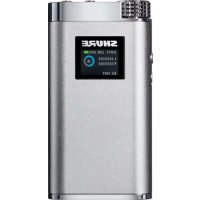
SHA900 - Headphone amplifier SHURE - Free user manual and instructions
Find the device manual for free SHA900 SHURE in PDF.


| Product Type | Portable Headphone Amplifier |
| Brand | Shure |
| Model | SHA900 |
| Dimensions (H x W x D) | 111 x 59 x 21 mm |
| Net Weight | 182.0 g (6.42 oz) |
| Power Supply | Built-in rechargeable Li-ion battery, 3.6 V DC |
| Battery Life | Up to 20 h (analog input, EQ bypassed); up to 10 h (USB input, active EQ) |
| Audio Inputs | Analog (3.5 mm), digital (USB Micro-B) |
| Headphone Output | 3.5 mm (1/8 in) |
| Digital Audio Resolution | Up to 24-bit / 96 kHz |
| Frequency Response | 10 Hz to 50 kHz |
| Signal-to-Noise Ratio | Up to 107 dB (A-weighted) |
| Adjustable Gain Range | -60 dB to +17 dB |
| Distortion (THD+N) | 0.05% (1 kHz) |
| Max Output Power (1% THD) | 135 mW + 135 mW (16 Ω); 95 mW + 95 mW (42 Ω) |
| Output Impedance | 0.35 Ω |
| Compatible Headphone Impedance | 6 Ω to 600 Ω |
| Equalizer | 4-band Parametric |
| Built-in Functions | 4-band parametric EQ, limiter, input attenuator |
| Controls | Rotary control button, power button, hold switch |
| Housing Material | Chromed aluminum |
| Included Accessories | Lightning® cable, USB Micro-B cable, 3.5 mm cables x2, power adapter |
| Compatibility | iOS (Made for iPod/iPhone/iPad), Android (USB audio 2.0 OTG), Windows, Mac |
| Firmware Update | Via Shure Update Utility |
| Operating Temperature | -18 °C to 57 °C |
| Charging Temperature | 0 °C to 45 °C |
Frequently Asked Questions - SHA900 SHURE
User questions about SHA900 SHURE
0 question about this device. Answer the ones you know or ask your own.
Ask a new question about this device
Download the instructions for your Headphone amplifier in PDF format for free! Find your manual SHA900 - SHURE and take your electronic device back in hand. On this page are published all the documents necessary for the use of your device. SHA900 by SHURE.
USER MANUAL SHA900 SHURE
Portable Listening Amplifier
| This symbol indicates that dangerous voltage constituting a risk of electric shock is present within this unit. | |
| This symbol indicates that there are important operating and maintenance instructions in the literature accompanying this unit. |
IMPORTANT SAFETY INSTRUCTIONS
- READ these instructions.
- KEEP these instructions
- HEED all warnings.
- FOLLOW all instructions.
- DO NOT use this apparatus near water.
- CLEAN ONLY with dry cloth.
- DO NOT block any ventilation openings. Allow sufficient distances for adequate ventilation and install in accordance with the manufacturer's instructions.
- DO NOT install near any heat sources such as open flames, radiators, heat registers, stoves, or other apparatus (including amplifiers) that produce heat. Do not place any open flame sources on the product.
- DO NOT defeat the safety purpose of the polarized or grounding type plug. A polarized plug has two blades with one wider than the other. A grounding type plug has two blades and a third grounding prong. The wider blade or the third prong are provided for your safety. If the provided plug does not fit into your outlet, consult an electrician for replacement of the obsolete outlet.
- PROTECT the power cord from being walked on or pinched, particularly at plugs, convenience receptacles, and the point where they exit from the apparatus.
- ONLY USE attachments/accessories specified by the manufacturer.
- USE only with a cart, stand, tripod, bracket, or table specified by the manufacturer, or sold with the apparatus. When a cart is used, use caution when moving the cart/apparatus combination to avoid injury from tip-over.
- UNPLUG this apparatus during lightning storms or when unused for long periods of time.
- REFER all servicing to qualified service personnel. Servicing is required when the apparatus has been damaged in any way, such as power supply cord or plug is damaged, liquid has been spilled or objects have fallen into the apparatus, the apparatus has been exposed to rain or moisture, does not operate normally, or has been dropped.
- DO NOT expose the apparatus to dripping and splashing. DO NOT put objects filled with liquids, such as vases, on the apparatus.
- The MAINS plug or an appliance coupler shall remain readily operable.
- The airborne noise of the Apparatus does not exceed 70dB (A).
- Apparatus with CLASS I construction shall be connected to a MAINS socket outlet with a protective earthing connection.
- To reduce the risk of fire or electric shock, do not expose this apparatus to rain or moisture.
- Do not attempt to modify this product. Doing so could result in personal injury and/or product failure.
- Operate this product within its specified operating temperature range.
WARNING: This product contains a chemical known to the State of California to cause cancer and birth defects or other reproductive harm.
WARNING: Voltages in this equipment are hazardous to life. No user-serviceable parts inside. Refer all servicing to qualified service personnel. The safety certifications do not apply when the operating voltage is changed from the factory setting.
Changes or modifications not expressly approved by Shure Incorporated could void your authority to operate this equipment.
WARNING
LISTENING TO AUDIO AT EXCESSIVE VOLUMES CAN CAUSE PERMANENT HEARING DAMAGE. USE AS LOW A VOLUME AS POSSIBLE. Over exposure to excessive sound levels can damage your ears resulting in permanent noise-induced hearing loss (NIHL). Please use the following guidelines established by the Occupational Safety Health Administration (OSHA) on maximum time exposure to sound pressure levels before hearing damage occurs.
| 90 dB SPLat 8 hours | 95 dB SPLat 4 hours | 100 dB SPLat 2 hours | 105 dB SPLat 1 hour |
| 110 dB SPLat 12 hour | 115 dB SPLat 15 minutes | 120 dB SPLAvoid or damage may occur | |
Note: Use only with the included power supply or a Shure-approved equivalent.
WARNING
- Battery packs may explode or release toxic materials. Risk of fire or burns. Do not open, crush, modify, disassemble, heat above 140^ (60°C), or incinerate.
• Follow instructions from manufacturer - Only use Shure charger to recharge Shure rechargeable batteries
- WARNING: Danger of explosion if battery incorrectly replaced. Replace only with same or equivalent type.
- Never put batteries in mouth. If swallowed, contact your physician or local poison control center
- Do not short circuit; may cause burns or catch fire
- Do not charge or use battery packs other than Shure rechargeable batteries
- Dispose of battery packs properly. Check with local vendor for proper disposal of used battery packs.
- Batteries (battery pack or batteries installed) shall not be exposed to excessive heat such as sunshine, fire or the like
• There is no mercury content in the product
Note: Battery replacement to be performed only by Shure authorized service personnel.
Please follow your regional recycling scheme for batteries, packaging, and electronic waste.


© 2015 Shure Incorporated
27A25731 (Rev. 3)
Printed in China

General Description
The Shure SHA900 is a compact, portable headphone amplifier that is compatible with both analog and digital audio sources. Audiophile-quality conversion delivers an exceptionally detailed audio signal over a micro-B USB connection, while premium analog components provide a clean, uncolored signal path for analog audio sources. A full set of furnished accessories includes a Lightning ^® cable, micro-B USB cable, two 3.5 mm cables, and an AC power adapter.
Features
- Connects to digital (USB) and analog audio sources
• Supports up to 24-bit, 96 kHz digital audio - Powered by an internal, rechargeable Lithium-ion battery
- Four band parametric equalizer, limiter, and input pad
• Factory and custom user presets
Controls and Navigation
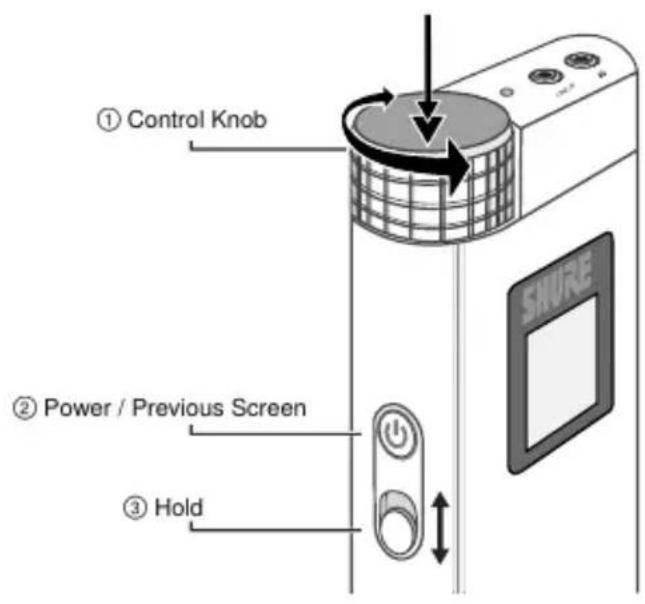
Powering on / off: Long press the power button ②
Adjusting volume: Turn the control knob ①
Accessing the menu: Double-click the control knob ①
Scroll through the menu: Turn the control knob ①
Select an item: Press the control knob button ①
Return to previous screen: Press the power button ②
Lock / unlock the controls: Slide the hold switch ③ to lock and unlock the power button and control knob. When switch displays red background, hold is enabled.
Setup
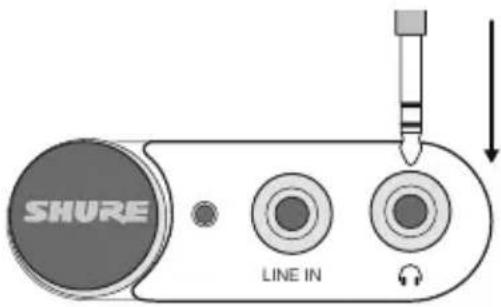
Step 1: Connect a pair of headphones or earphones to the amplifier
Plug into the amplifier with the amplifier powered off.
Step 2: Connect a sound source to the amplifier
Set the INPUT switch to LINE for analog 3.5 mm sources or USB for digital sources.
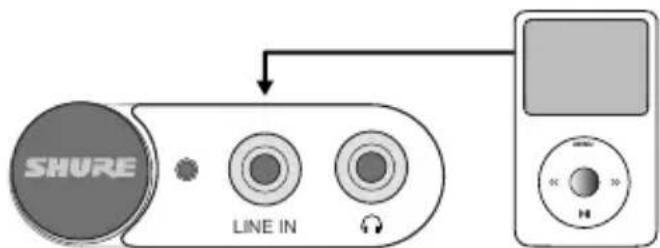
3.5 mm input (analog audio)
Plug the audio device into the LINE IN input and set the INPUT switch to LINE.
To charge the battery while using an analog source, connect the amplifier to a computer or external battery.
flowchart
graph TD
    A["SHURE"] -->|LINE IN| B["Audio Player"]
    B --> C["Screen"]
Connecting to an Analog Source
USB (digital audio and power)
Use the USB cable when listening to music from a computer or other USB-equipped device and set the INPUT switch to USB. When connected to a computer, USB simultaneously streams digital audio and charges the amplifier battery.
Note: You have the option to disable automatic charging in the Utilities menu.
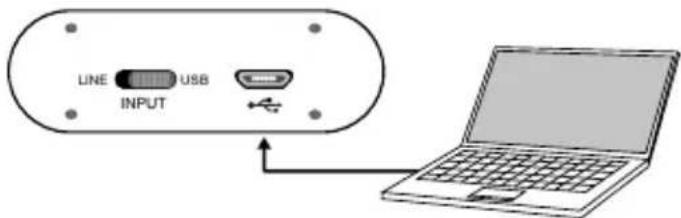
Connecting to a USB Source
Step 3: Power on the amplifier
The driver automatically installs when the amplifier is first plugged into a device. The SHA900 should take over as the default audio device.
Note: Volume controls are disabled on Windows, Mac, and iOS. Volume should be adjusted only by using the amp volume knob for best performance. Ensure that volume is maximized in iTunes or the Windows Media Player.
Firmware
Firmware is embedded software in each component that controls functionality. Periodically, new versions of firmware are developed to incorporate additional features and enhancements. To take advantage of design improvements, new versions of the firmware can be downloaded and installed using the Shure Update Utility tool. Software is available for download from http://www.shure.com/americas/products/software/utilities/shure-update-utility.
Specifications Certifications
Bit Depth
16-bit / 24-bit
Sampling Rate
44.1 / 48 / 88.2 / 96 kHz
Frequency Response
10 Hz to 50 kHz
Signal-to-Noise Ratio
up to 107 dB A-weighted
Adjustable Gain Range
-60 dB to +17 dB
THD+N
0.05% (1 kHz)
Output Power
Maximum, 1% THD
| 16 Ω 135 mW + 135 mW |
| 42 Ω 95 mW + 95 mW |
Output Impedance
0.35 Ω
Headphone Impedance Range
6 Ω to 600 Ω
Limiter
Selectable Analog RMS Limiter
Equalizer
4-band Parametric
USB Input
USB Micro-B Receptacle
Line-In Input
3.5 mm (1/8")
Headphone Output
3.5 mm (1/8")
Charging Requirements
USB-powered: 5 V, 0.5 A to 1 A
Housing
Chrome Plated Aluminum
Net Weight
182.0 g (6.42 oz.)
Dimensions
111 x 59 x 21 mm H x W x D
Battery Specifications
Battery Type
Rechargeable Li-Ion
Nominal Voltage
3.6V DC
Battery Life
| Analog in (BYPASS EQ) | up to 20 hours |
| USB Input (Analog EQ mode) | up to 10 hours |
Battery Charging Temperature Range
0 to 45 degrees C (32 to 113 degrees F)
Operating Temperature Range
-18 to 57 degrees C (0 to 135 degrees F)
Industry Canada ICES-003 Compliance Label: CAN ICES-3 (B)/NMB-3(B)
Note: Testing is based on the use of supplied and recommended cable types. The use of other than shielded (screened) cable types may degrade EMC performance.
This product meets the Essential Requirements of all relevant European directives and is eligible for CE marking.
The CE Declaration of Conformity can be obtained from: www.shure.com/europe/compliance
Authorized European representative:
Shure Europe GmbH
Headquarters Europe, Middle East & Africa
Department: EMEA Approval
Jakob-Dieffenbacher-Str. 12
75031 Eppingen, Germany
Phone: 49-7262-92 49 0
Fax: 49-7262-92 49 11 4
The Portable Listening Amplifier is compatible with Android devices that support USB Audio Class 2.0 and Micro-B OTG (On-The-Go) connectivity. Not all Android devices are compatible. Android is a trademark of Google Inc.
"Made for iPod," "Made for iPhone," and "Made for iPad" mean that an electronic accessory has been designed to connect specifically to iPod, iPhone, or iPad, respectively, and has been certified by the developer to meet Apple performance standards. Apple is not responsible for the operation of this device or its compliance with safety and regulatory standards. Please note that the use of this accessory with iPod, iPhone, or iPad may affect wireless performance.
iPad, iPhone, iPod, iPod classic, iPod nano, iPod touch, and Retina are trademarks of Apple Inc., registered in the U.S. and other countries. iPad Air and iPad mini are trademarks of Apple Inc. The trademark "iPhone" is used with a license from Aiphone K.K.
Mac ^® and Lightning ^® are registered trademarks of Apple Inc.
Conditions de charge requises
Service : Homologation EMA
Jakob-Dieffenbacher-Str. 12
111 × 59 × 21 mm A × L × P
Headquarters Europe, Middle East & Africa
Department: EMEA Approval
Jakob-Dieffenbacher-Str. 12
Headquarters Europe, Middle East & Africa
Department: EMEA Approval
Jakob-Dieffenbacher-Str. 12
75031 Eppingen, Germany
75031 Eppingen, Germany
TEL:49-7262-92 49 0
FAX:49-7262-92 49 11 4
Eメール: info@shure.de
Androidとの互換性
75031 Eppingen, Germany
전화: 49-7262-92 49 0
팩스: 49-7262-92 49 11 4
이메일:info@shure.de
Android 호환성
75031 Eppingen, Germany
电话:49-7262-92 49 0
传真:49-7262-92 49 11 4
电子邮件:info@shure.de
Android 兼容性
This product meets the Essential Requirements of all relevant European directives and is eligible for CE marking.
75031 Eppingen, Germany
電話:49-7262-92 49 0
傳真:49-7262-92 49 11 4
Aluminium Berlapis Krom
Berat Netto
182,0 g (6,42 oz.)
Dimensi
111 × 59 × 21 mm H × W × D
Spesifikasi Baterai
Jenis Bateri
75031 Eppingen, Germany
Telepon: 49-7262-92 49 0
Faks: 49-7262-92 49 11 4
United States, Canada, Latin
America, Caribbean:
Shure Incorporated
\$800 West Touhy Avenue
Niles, IL 60714-4608 USA
Phone: 847-600-2000
Fax: 847-600-1212 (USA)
Fax: 847-600-6446
Email:info@shore.com
Europe, Middle East, Africa:
Shure Europe GmbH
Jakob-Dieffenbacher-Str. 12,
75031 Eppingen, Germany
Phone: 49-7262-92490
Fax: 49-7262-9249114
22/F, 625 King's Road
North Point, Island East
Hong Kong
Phone: 852-2893-4290
Fax: 852-2893-4055