Live Loose HXEP202 - Earplug JAM - Free user manual and instructions
Find the device manual for free Live Loose HXEP202 JAM in PDF.


| Product type | Wireless Bluetooth headphones (neckband style) |
| Brand | JAM |
| Model | Live Loose HXEP202 |
| Weight | Approximately 30 g |
| Power supply | Rechargeable lithium-ion battery, micro USB port |
| Charging time | Approximately 2 hours |
| Battery life | Up to 6 hours of playback |
| Bluetooth version | Bluetooth 5.0 (compatible) |
| Bluetooth range | Approximately 10 meters (no obstructions) |
| Main functions | Play/pause, volume, next/previous track, call management, voice activation |
| Included accessories | 3 sizes of ear tips, USB cable, quick start guide, welcome card, legal card, JAM sticker |
| Construction | Plastic, silicone (ear tips) |
| Water resistance | Not specified (avoid moisture) |
| Care and cleaning | Clean with a soft, dry cloth. Do not immerse in water. |
| Safety | Do not use at high volume for long periods. Keep out of reach of children. Do not expose to excessive heat. |
| Warranty period | 1 year (US and Canada), 2 years (UK and Europe) |
| Customer service | www.jamaudio.com (US), uk.jamaudio.com (UK) |
Frequently Asked Questions - Live Loose HXEP202 JAM
User questions about Live Loose HXEP202 JAM
0 question about this device. Answer the ones you know or ask your own.
Ask a new question about this device
Download the instructions for your Earplug in PDF format for free! Find your manual Live Loose HXEP202 - JAM and take your electronic device back in hand. On this page are published all the documents necessary for the use of your device. Live Loose HXEP202 by JAM.
USER MANUAL Live Loose HXEP202 JAM
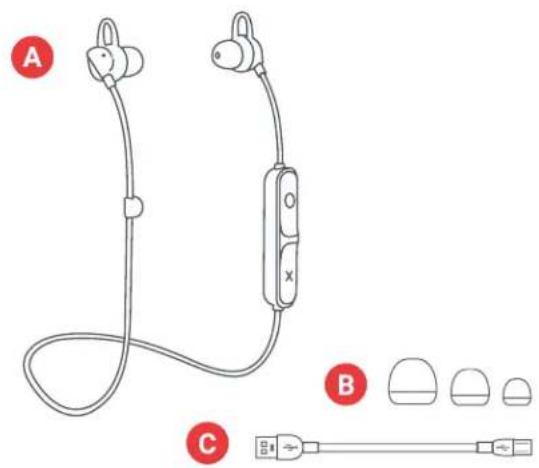
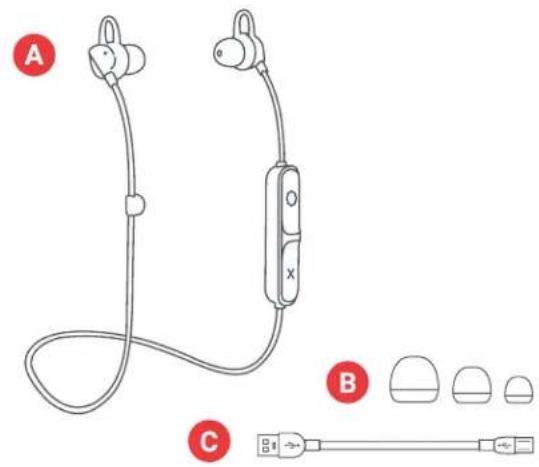
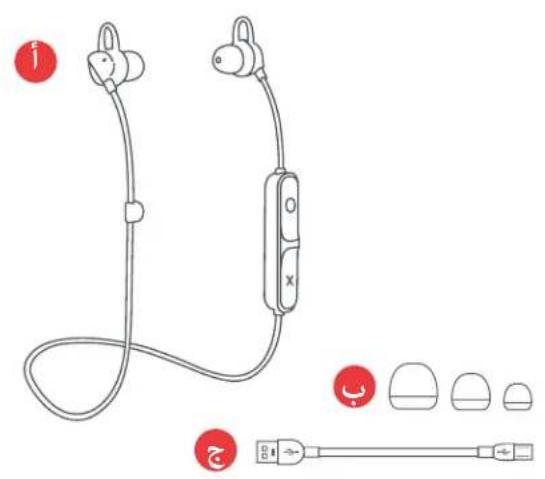
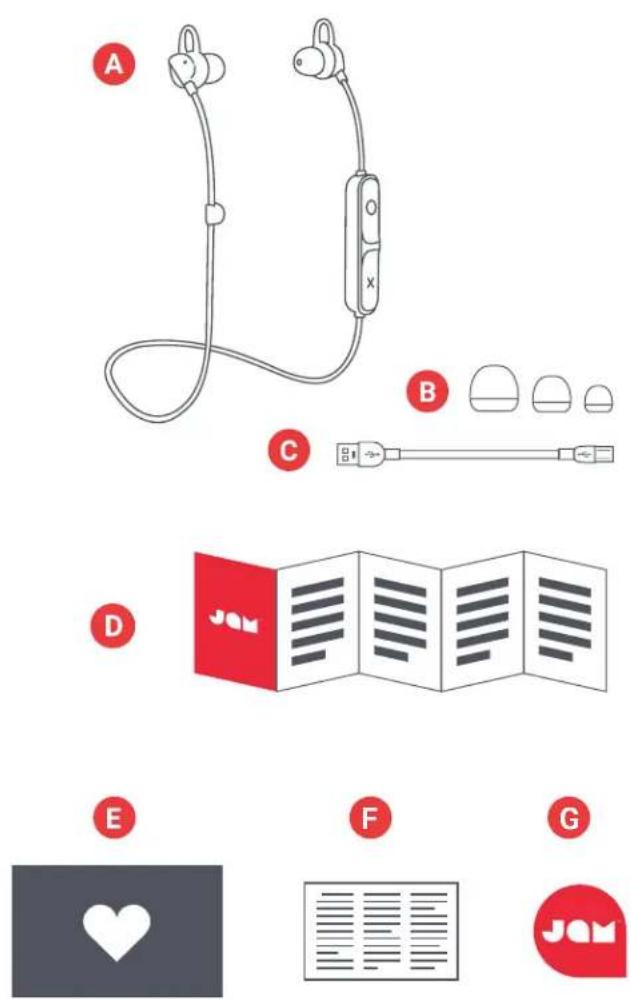
A - Earphones
B - 3 sets ear tips
C - Charging cable
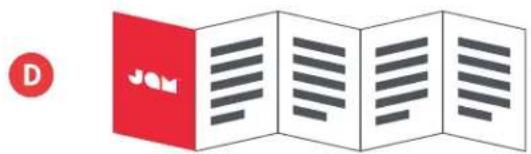
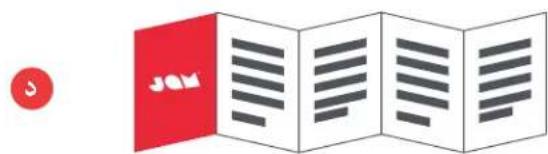
D - Quick-Start Guide
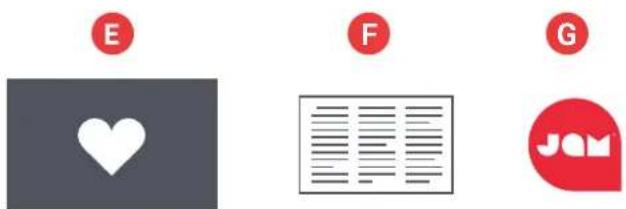
E - Welcome card
F - Legal card
G - Jam sticker
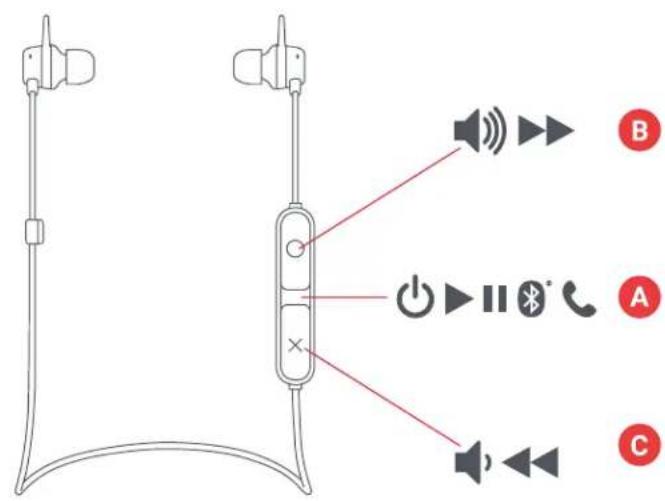
CONTROLS
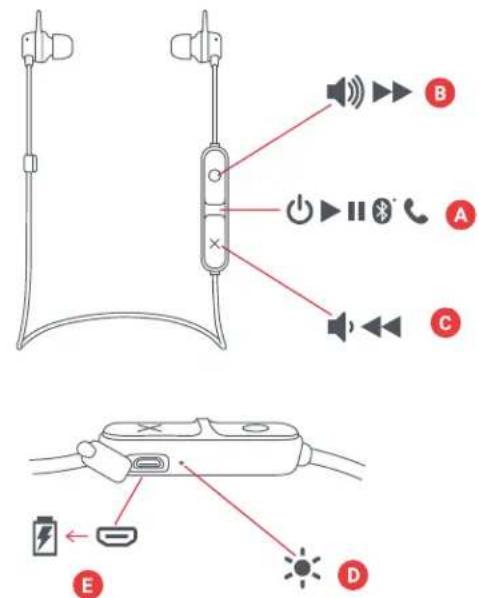
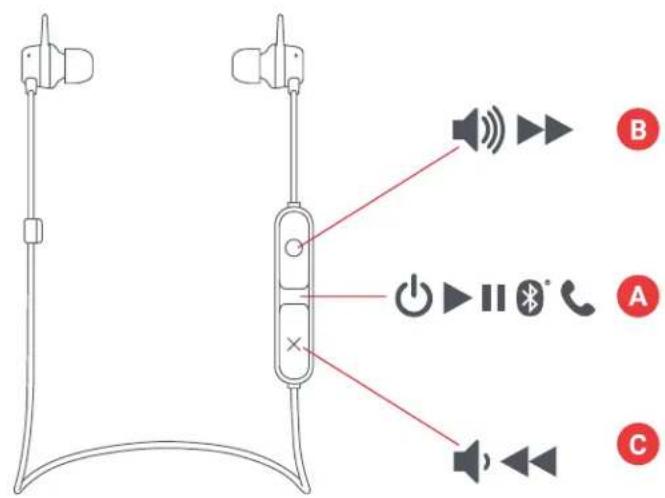
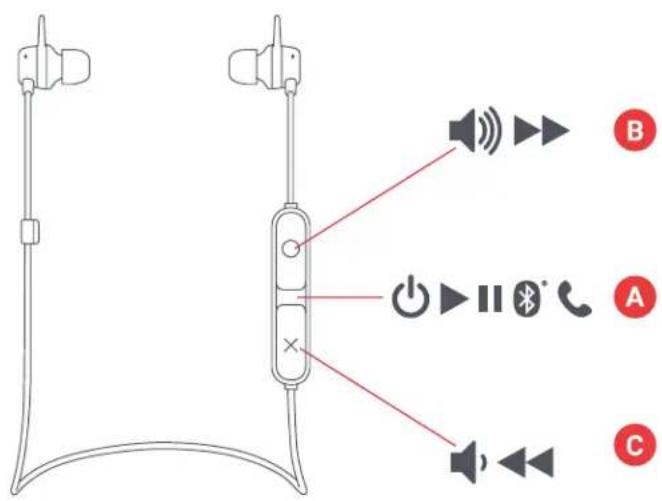
A - Power on/off/play/pause button
B - Volume up/next track
C - Volume down/previous track
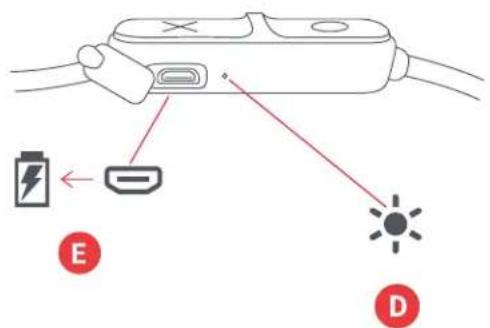
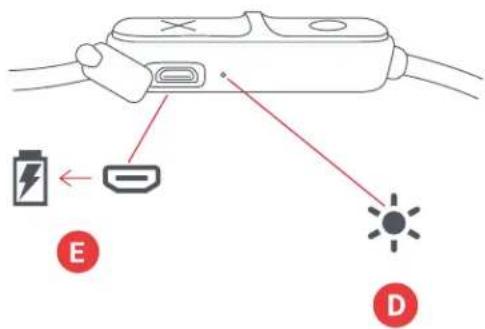
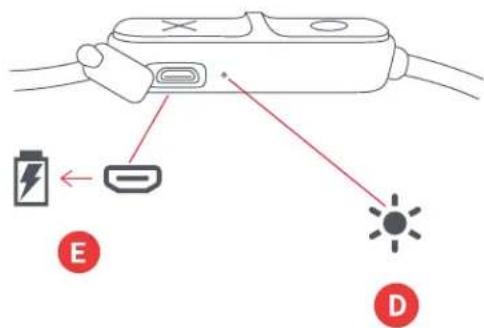
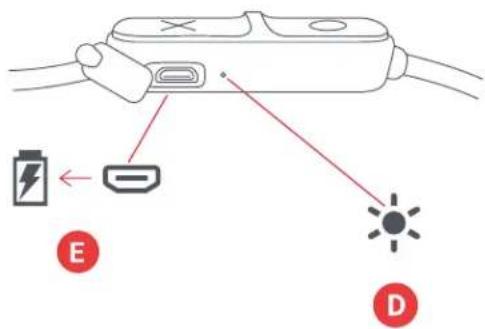
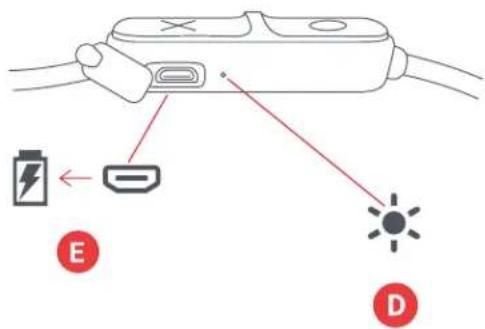
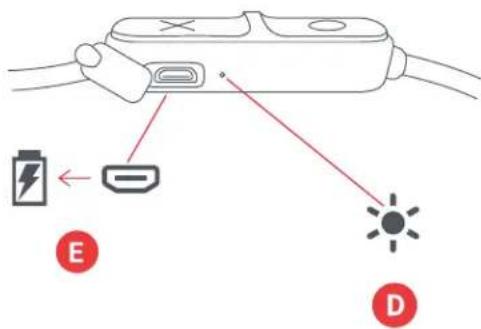
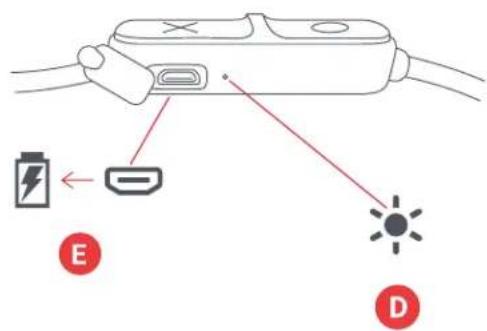
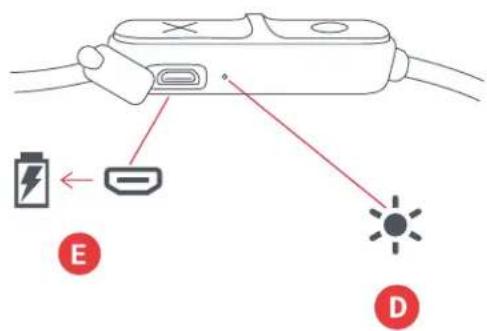
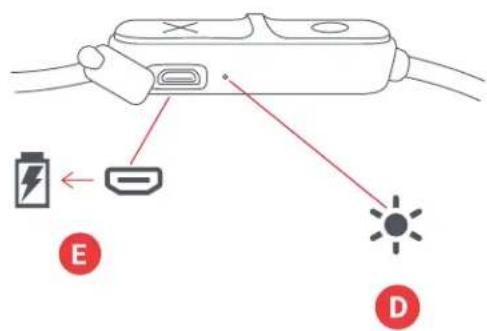
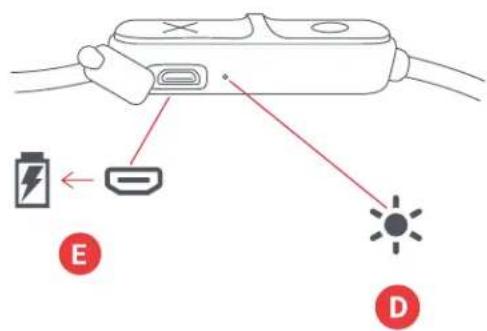
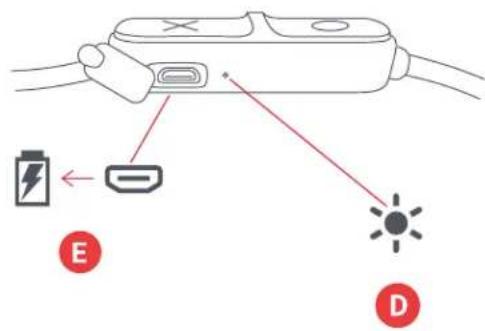
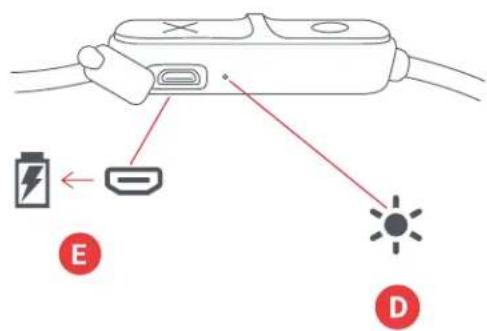
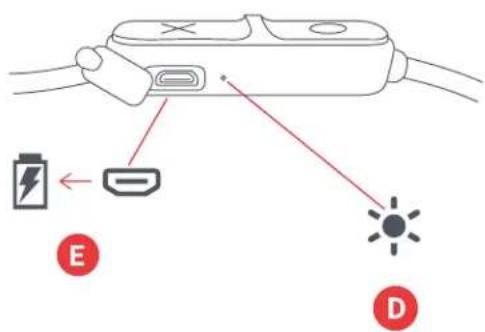
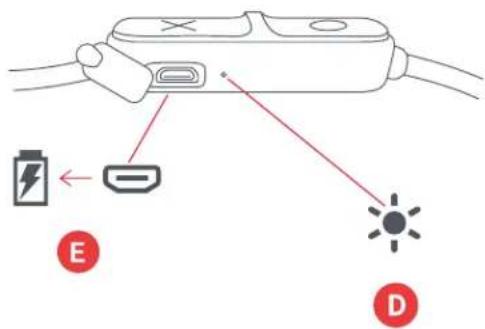
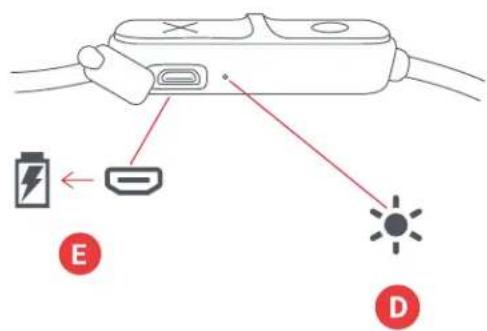
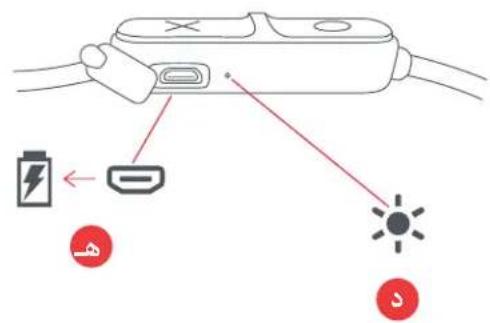
D - LED light indicator
E - Charging port
SET UP
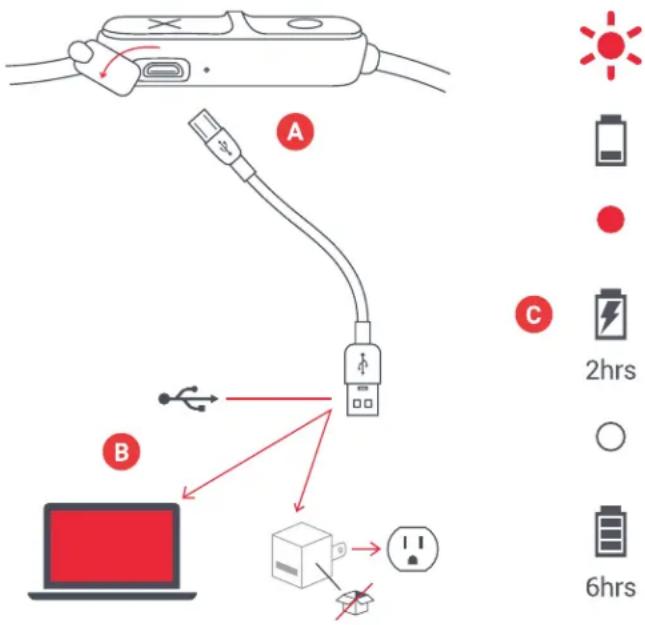
The 'Live Loose' earphones are powered by a rechargeable battery. The earbuds come pre-charged; however, for optimal playtime, be sure to charge before first use.
A – Unwrap the charging cable and plug the micro USB end into the charging port on the earphones.
B – Connect the larger USB plug to your computer or a powered USB AC adapter. An AC adapter is not included in the box, but you can use the one for your cell phone or pick one up next time you're at the store.
C – When the LED flashes red, it indicates that the battery is low and it's time to plug in and recharge. Charge for about 2 hours to get up to 6 hours of play time; while charging, the light will stay solid red. Once fully charged, the LED light will turn off.
USE
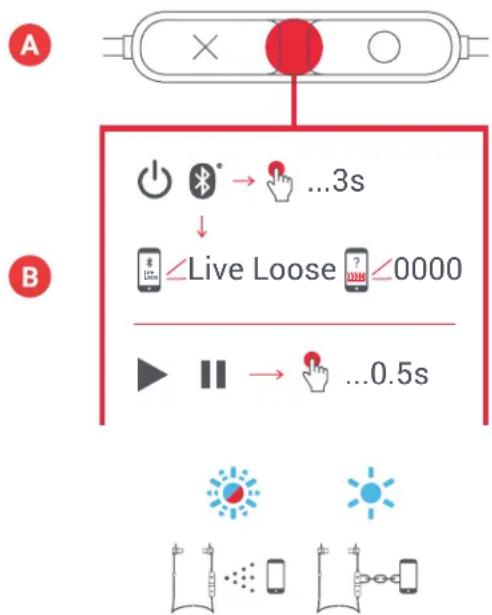
Hold down the power button for 3 seconds to turn on your earphones.
B - CONNECTING TO A DEVICE
Once turned on, the earphones will immediately search for a device to pair to; the LED will blink red and blue alternately. Enable Bluetooth on your device. From the Bluetooth menu, select "Live Loose". When the device and Live Loose are connected, you will hear a tone and the LED light will turn solid blue.
Once paired, your device and earphones will find each other every time, as long as your device's Bluetooth is on. If you're connecting to a computer, you may have a few more steps on that end. You'll have to get that information from the computer company. Depending on your device, you may be prompted to enter a pairing code. If so, use "0000" as the code. Holding down the "X" and "O" buttons at the same time, for 5 seconds, will disconnect a paired device.
flowchart
graph TD
    A["Start"] --> B{State 1}
    B -->|Yes| C["+"]
    B -->|No| D["O"]
    C --> E["Bluetooth → ...3s"]
    D --> F["Hand icon"]
    E --> G["↓"]
    F --> H["Live Loose ? 0000"]
    G --> I["Play button"]
    H --> J["Down arrow"]
    I --> K["Down arrow"]
    J --> L["→ ...0.5s"]
C-BUTTON FUNCTION
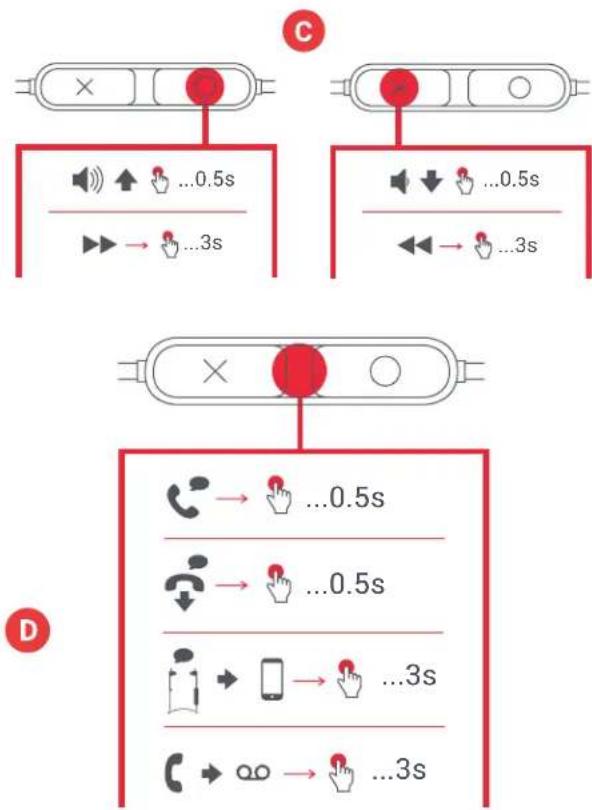
Short press the "play/pause" button for 0.5 seconds to play your music. To increase the volume, short press the "O" button; to lower the volume, short press the "X" button. To skip forward a track, long press the "O" button; to skip back a track, long press the "X" button.
D - CALL HANDLING
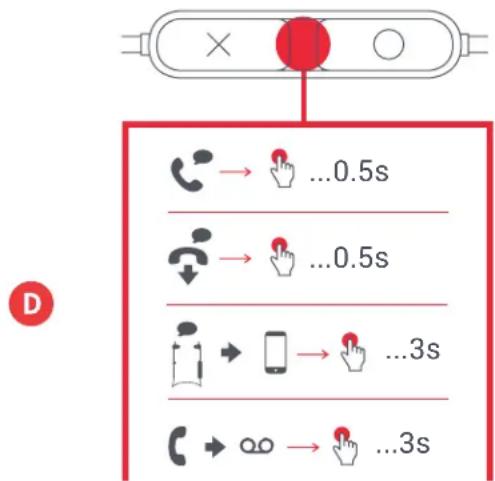
While rocking out to your music, if a call comes in, short press the "play/pause" button to pick up a call; short press again when you're done, to hang up.
While on a call, if you want to make it private, long press the "play/pause" button to move the call from the earphones to your phone.
If a call comes in and you don't want to pick it up, long press the "play/pause" button to send the call to voicemail.
*See the tables below for complete button function and LED light indicator interpretation.
flowchart
graph TD
    subgraph C
        A["State 1"] --> B["State 2"]
        B --> C["State 3"]
        C --> D["State 4"]
        D --> E["State 5"]
        E --> F["State 6"]
        F --> G["State 7"]
        G --> H["State 8"]
        H --> I["State 9"]
        I --> J["State 10"]
        J --> K["State 11"]
        K --> L["State 12"]
        L --> M["State 13"]
        M --> N["State 14"]
        N --> O["State 15"]
        O --> P["State 16"]
        P --> Q["State 17"]
        Q --> R["State 18"]
        R --> S["State 19"]
        S --> T["State 20"]
        T --> U["State 21"]
        U --> V["State 22"]
        V --> W["State 23"]
        W --> X["State 24"]
        X --> Y["State 25"]
        Y --> Z["State 26"]
        Z --> AA["State 27"]
        AA --> AB["State 28"]
        AB --> AC["State 29"]
        AC --> AD["State 30"]
        AD --> AE["State 31"]
        AE --> AF["State 32"]
        AF --> AG["State 33"]
        AG --> AH["State 34"]
        AH --> AI["State 35"]
        AI --> AJ["State 36"]
        AJ --> AK["State 37"]
        AK --> AL["State 38"]
        AL --> AM["State 39"]
        AM --> AN["State 40"]
        AN --> AO["State 41"]
        AO --> AP["State 42"]
        AP --> AQ["State 43"]
        AQ --> AR["State 44"]
        AR --> AS["State 45"]
        AS --> AT["State 46"]
        AT --> AU["State 47"]
        AU --> AV["State 48"]
        AV --> AW["State 49"]
        AW --> AX["State 50"]
        AX --> AY["State 51"]
        AY --> AZ["State 52"]
        AZ --> BA["State 53"]
        BA --> BB["State 54"]
        BB --> BC["State 55"]
        BC --> BD["State 56"]
        BD --> BE["State 57"]
        BE --> BF["State 58"]
        BF --> BG["State 59"]
        BG --> BH["State 60"]
        BH --> BI["State 61"]
        BI --> BJ["State 62"]
        BJ --> BK["State 63"]
        BK --> BL["State 64"]
        BL --> BM["State 65"]
        BM --> BN["State 66"]
        BN --> BO["State 67"]
        BO --> BP["State 68"]
        BP --> BQ["State 69"]
        BQ --> BR["State 70"]
        BR --> BS["State 71"]
        BS --> BT["State 72"]
        BT --> BU["State 73"]
        BU --> BV["State 74"]
        BV --> BW["State 75"]
        BW --> BX["State 76"]
        BX --> BY["State 77"]
        BY --> BZ["State 78"]
        BZ --> CA["State 79"]
        CA --> CB["State 80"]
        CB --> CC["State 81"]
        CC --> CD["State 82"]
        CD --> CE["State 83"]
        CE --> CF["State 84"]
        CF --> CG["State 85"]
        CG --> CH["State 86"]
        CH --> CI["State 87"]
        CI --> CJ["State 88"]
        CJ --> CK["State 89"]
        CK --> CL["State 90"]
LED INDICATORS
CHARGING IN USE
| Red flash every 5 seconds Low | battery |
| Solid red Charging | |
| LED off Charging complete |
| Flash blue and red Pairing mode |
| Blue flash every 5 seconds Paired with device |
BASIC FUNCTIONS
POWER
| Power on/off Long press play/pause button |
MUSIC
| Play/pause Short press play/pause button | |
| Volume up Short press O button | |
| Volume down | Short press X button |
| Skip forward a track | Long press O button |
| Skip backward a track | Long press X button |
CALLS
| Pick up a call Short press play/pause button | |
| Decline a call Long press play/pause button | |
| End a call | Short press play/pause button |
| Take a second incoming call | Short press play/pause button |
| Decline a second incoming call | Long press play/pause button |
| Transfer active call from earbuds to device | Long press play/pause button |
LEGAL INFORMATION
READ ALL INSTRUCTIONS BEFORE USE AND SAVE THESE INSTRUCTIONS FOR FUTURE REFERENCE.
FCC Warning:
This equipment has been tested and found to comply with the limits for a Class B digital device, pursuant to Part 15 of the FCC Rules. These limits are designed to provide reasonable protection against harmful interference in a residential installation. This equipment generates, uses, and can radiate radio frequency energy and, if not installed and used in accordance with the instructions, may cause harmful interference to radio communications. However, there is no guarantee that interference will not occur in a particular installation. If this equipment does cause harmful interference to radio or television reception, which can be determined by turning the equipment off and on, the user is encouraged to try to correct the interference by one or more of the following measures:
- Reorient or relocate the receiving antenna.
- Increase the separation between the equipment and receiver.
- Connect the equipment into an outlet on a circuit different from that to which the receiver is connected.
- Consult the dealer or an experienced radio/TV technician for help.
Any changes or modifications not expressly approved by the party responsible for compliance could void the user's authority to operate the equipment.
This device complies with Part 15 of the FCC Rules. Operation is subject to the following two conditions:
(1) This device may not cause harmful interference, and
(2) This device must accept any interference received, including interference that may cause undesired operation.
FCC RF Exposure Statement:
This equipment complies with FCC radiation exposure limits set forth for an uncontrolled environment. This transmitter must not be co-located or operating in conjunction with any other antenna or transmitter.
ISEDC Caution:
This device complies with Innovation, Science, and Economic Development Canada licence-exempt RSS standard(s). Operation is subject to the following two conditions:
(1) This device may not cause interference, and
(2) This device must accept any interference, including interference that may cause undesired operation of the device.
ISEDC RF Exposure Statement:
The device is in compliance with RF exposure guidelines; users can obtain Canadian information on RF exposure and compliance.
1-YEAR LIMITED WARRANTY - US & CANADA
WARRANTY - US & CANADA
JAM warrants this product free from defect in material and workmanship for a period of 1 year from the date of purchase. This warranty does not cover damage caused by misuse or abuse, accident, the attachment of any unauthorized accessory, alteration to the product, or any other conditions whatsoever that are beyond the control of JAM.
For detailed Warranty instructions and information, visit: www.jamaudio.com/customer-support/warranty-1yr. To obtain warranty service on your JAM product, contact a Consumer Relations representative by the telephone number or email address for your country of residence. Please make sure to have the model number of the product available.
For service in the USA
Email:
8:30am-7:00pm EST M-F
For service in Canada
Email:
cservice@homedicsgroup.ca
Tel: 1-888-225-7378
8:30am-5:00pm EST M-F
For service in Australia
Email:
cservice@homedics.com.au
Tel: 03 87566500
8:30am-5:00pm AEST M-F
www.jam-audio.com.au
WARRANTY – UK & EUROPE
JAM warrants this product free from defect in material and workmanship for a period of 2 years from the date of purchase. This warranty does not cover damage caused by misuse or abuse, accident, the attachment of any unauthorised accessory, alteration to the product, or any other conditions whatsoever that are beyond the control of JAM. Distributed in the EU by FKA Brands Ltd, Somerhill Business Park, Tonbridge, TN11 0GP, UK. Tel: 020 3538 0768 Email: uksupport@jamaudio.com.
WARRANTY - AUSTRALIA
(1-YEAR LIMITED WARRANTY)
We or Us means HoMedics Australia Pty Ltd ACN 31 103 985 717 and our contact details are set out at the end of this warranty; You means the purchaser or the original end-user of the Goods. You may be a domestic user or a professional user; Supplier means the authorized distributor or retailer of the Goods that sold you the Goods in Australia and New Zealand; and Goods means the product or equipment which was accompanied by this warranty and purchased in Australia and New Zealand.
For Australia:
Our Goods come with guarantees that cannot be excluded under the Australian Consumer Law. You are entitled, subject to the provisions of the Australian Consumer Law, to a replacement or refund for a major failure and for compensation for any other reasonably foreseeable loss or damage. You are also entitled, subject to the provisions of the Australian Consumer Law, to have the Goods repaired or replaced if the goods fail to be of acceptable quality and the failure does not amount to a major failure. This is not a complete statement of your legal rights as a consumer.
For New Zealand:
Our Goods come with guarantees that cannot be excluded under the Consumer Guarantees Act 1993. This guarantee applies in addition to the conditions and guarantees implied by that legislation.
The Warranty
HoMedics sells its products with the intent that they are free of defects in manufacture and workmanship under normal use and service. In the unlikely event that your HoMedics product proves to be faulty within 1 year from the date of purchase due to workmanship or materials only, we will replace it at our own expense, subject to the terms and conditions of this guarantee. The warranty period is limited to 3 months from the date of purchase for products used commercially/professionally.
Terms and Conditions:
In addition to the rights and remedies that you have under the Australian Consumer Law, Consumer Guarantees Act of New Zealand or any other applicable law and without excluding such rights and remedies warranty against defects:
-
The Goods are designed to withstand the rigors of normal household use and are manufactured to the highest standards using the highest quality components. Whilst unlikely, if, during the first 12 months (3 months commercial use) from their date of purchase from the Supplier (Warranty Period), the Goods prove defective by reason of improper workmanship or materials and none of your statutory rights or remedies apply, we will replace the Goods, subject to the terms and conditions of this warranty.
-
We do not have to replace the Goods under this Additional Warranty if the Goods have been damaged due to misuse or abuse, accident, the attachment of any unauthorised accessory, alteration to the product, improper installation, unauthorised repairs or modifications, improper use of electrical/power supply, loss of power, malfunction, or damage of an operating part from failure to provide manufacturer's recommended maintenance, transportation damage, theft, neglect, vandalism, environmental conditions, or any other conditions whatsoever that are beyond the control of HoMedics.
-
This Warranty does not extend to the purchase of used, repaired, or secondhand products, or to products not imported or supplied by HoMedics Australia Pty Ltd, including but not limited to those sold on offshore internet auction sites.
-
This Warranty extends only to consumers and does not extend to Suppliers.
-
Even when we do not have to replace the Goods, we may decide to do so anyway. In some cases, we may decide to substitute the Goods with a similar alternative product of our choosing. All such decisions are at our absolute discretion.
-
All such replaced or substituted Goods continue to receive the benefit of this Additional Warranty for the time remaining on the original Warranty Period (or 3 months, whichever is the longest).
-
This Additional Warranty does not cover items damaged by normal wear and tear, including but not limited to chips, scratches, abrasions, discolouration, and other minor defects, where the damage has negligible effect on the operation or performance of the Goods.
-
This Additional Warranty is limited to replacement or substitution only. As far as the law permits, we will not be liable for any loss or damage caused to property or persons arising from any cause whatsoever, and shall have no liability for any incidental, consequential, or special damages.
-
This warranty is only valid and enforceable in Australia and New Zealand.
Making a Claim:
In order to claim under this Warranty, you must return the Goods to the Supplier (place of purchase) for replacement. If this is not possible, please contact our Consumer Relations department by email (cservice@homedics.com.au) or at the address below.
- All returned Goods must be accompanied by satisfactory proof of purchase that clearly indicates the name and address of the Supplier, the date and place of purchase, and identifies the product. It is best to provide an original, legible, and unmodified receipt or sales invoice. - You must bear any expense for return of the Goods or otherwise associated with making your claim under this Additional Warranty.
Distributed in Australia by HOMEDICS AUSTRALIA PTY LTD, 14 Kingsley Close, Rowville, Victoria 3178. Distributed in New Zealand by Phoenix Distribution NZ Ltd, 7B Orbit Drive, Albany / North Shore 0757, Auckland, New Zealand.
IMPORTANT SAFETY INSTRUCTIONS
READ ALL INSTRUCTIONS BEFORE USING.
WARNING: Listen responsibly. To avoid hearing damage, make sure the volume on your device is turned down before connecting earphones. After placing earphones on your ears, gradually turn up the volume until you reach a comfortable listening volume.
- Use this product only for its intended purpose as described in this manual. Do not use attachments not recommended by Jam.
- Jam is not liable for any damage caused to smartphones, iPod/MP3 players, or any other devices.
- Do not place or store this product where it can fall or be dropped into a tub or sink.
- Do not place or drop into water or any other liquid.
• Not for use by children. THIS IS NOT A TOY.
- Never operate this product if it has a damaged cord, plug, cable, or housing.
- Keep away from heated surfaces.
- Only set on dry surfaces. Do not place on surface wet from water or cleaning solvents.
WARNING:
WARNING. This product has an internal, non-replaceable lithium battery. Please dispose in accordance with your local, state, province, and country guidelines. Batteries (battery pack or batteries installed) shall not be exposed to excessive heat such as sunshine, fire, or the like.
BATTERY REPLACEMENT
Your headphones includes a rechargeable battery designed to last the lifetime of the product. In the unlikely event that you should require a replacement battery, please contact Consumer Relations, which will supply details of the warranty and out-of-warranty replacement battery service. This product contains small parts that may present a choking hazard for young children.
CAUTION: All servicing of this product must be performed by authorized Jam Audio service personnel only. For complete user guide and to register your product, visit www.jamaudio.com (USA), canada.jamaudio.com (Canada), or uk.jamaudio.com/ instructionbooks (UK).

To prevent possible hearing damage, do not listen at high volume for long periods.

WEEE EXPLANATION
This marking indicates that this product should not be disposed with other household wastes throughout the EU.
To prevent possible harm to the environment or human health from uncontrolled waste disposal, recycle it responsibly to promote the sustainable reuse of material resources.

BATTERY DIRECTIVE
This symbol indicates that batteries must not be disposed of in the domestic waste as they contain substances that can be damaging to the environment and health. Please dispose of batteries in designated collection points.
Hereby, FKA Brands Ltd declares that this radio device is in compliance with the essential requirements and other relevant provisions of Directive 2014/53/EU. A copy of the Declaration of Conformity can be obtained from uk.jamaudio.com/DoC.
© 2018 HMDX. All rights reserved. JAM is a registered trademark of HMDX. HMDX is a registered trademark of FKA Distributing Co. The Bluetooth® word mark and logos are registered trademarks owned by Bluetooth SIG, Inc. and any use of such marks by HMDX is under license.



Operating frequency band: 2402 - 2480MHz
HX-EP202: Maximum radio-frequency power transmitted: -1.64dBm
Distributed by HMDX.
3000 N Pontiac Trail
Commerce Township, MI 48390
All rights reserved.
IB-HXEP202A
JOM ^TM
"Live Loose"
HX-EP202
LIVRET D'INSTRUCTIONS
CONTENU
natural_image
Simple graphic with a white heart inside a dark rectangle and a red circular icon labeled 'E' above it (no text or symbols on the heart)
COMMANDES
UTILISATION
A - MISE EN MARCHE DES ÉCOUTEURS
flowchart
graph TD
    subgraph C
        A["Switch"] --> B["Delay: ...0.5s"]
        B --> C["Delay: ...3s"]
    end
    subgraph D
        D["Switch"] --> E["Delay: ...0.5s"]
        E --> F["Delay: ...0.5s"]
        F --> G["Delay: ...3s"]
        G --> H["Delay: ...3s"]
    end
INDICADORES LED
CARGANDO EN USO
GEBRAUCH
flowchart
graph TD
    subgraph C
        A["Switch"] --> B["Delay: ...0.5s"]
        B --> C["Delay: ...3s"]
    end
    subgraph D
        D["Switch"] --> E["Delay: ...0.5s"]
        E --> F["Delay: ...0.5s"]
        F --> G["Delay: ...3s"]
        G --> H["Delay: ...3s"]
    end
LED-ANZEIGEN
LADEN IM GEBRAUCH
GEBRUIK
A - UW OORTELEFOONS INSCHAKELEN
flowchart
graph TD
    A["State 1: 🧐"] --> B{0.5s}
    B -->|Yes| C["State 2: 🧐"]
    B -->|No| D["State 3: 🧐"]
    C --> E["State 4: 🧐"]
    D --> F["State 5: 🧐"]
    E --> G["Speed Indicator: 🧐 → ...0.5s"]
    F --> H["Speed Indicator: 🧐 → ...0.5s"]
    G --> I["Speed Indicator: 🧐 → ...0.5s"]
    H --> J["Speed Indicator: 🧐 → ...0.5s"]
    I --> K["Speed Indicator: 🧐 → ...0.5s"]
    J --> L["Speed Indicator: 🧐 → ...0.5s"]
    K --> M["Speed Indicator: 🧐 → ...0.5s"]
    L --> N["Speed Indicator: 🧐 → ...0.5s"]
    M --> O["Speed Indicator: 🧐 → ...0.5s"]
    N --> P["Speed Indicator: 🧐 → ...0.5s"]
    O --> Q["Speed Indicator: 🧐 → ...0.5s"]
    P --> R["Speed Indicator: 🧐 → ...0.5s"]
LED-INDICATOREN
OPLADEN IN GEBRUIK
ANVENDELSE
A - TÆND H∅RETELEFONERNE
natural_image
Simple graphic with a white heart inside a red circle labeled 'E' (no text or symbols beyond the label)

CONTROLLI
USO
A - ACCENSIONE DEGLI AURICOLARI
KÄYTTÖ
A - VIRRAN KYTKEMINEN KUULOKKEISIIN
C - PAINIKETOIMINNOT
A - Kulaklık
KULLANIM
A - KULAKLIKLARINIZI AÇIN
natural_image
Simple graphic with a white heart shape on a dark gray background, topped with a red circle containing the letter 'E' (no text or symbols beyond the label)

KONTROLLER
A - Hörlurar
ANVÄNDNING
A - AKTIVERING AV DINA HÖRLURAR
flowchart
graph TD
    subgraph C
        A["Switch"] --> B["Delay: ...0.5s"]
        B --> C["Time: ...3s"]
    end
    subgraph D
        D1["Phone"] --> E["Delay: ...0.5s"]
        E --> F["Time: ...0.5s"]
        F --> G["Time: ...3s"]
        G --> H["Time: ...3s"]
        H --> I["Phone"]
        I --> J["Delay: ...0.5s"]
        J --> K["Time: ...3s"]
        K --> L["Phone"]
LED-INDIKATORER
LADDAR VID ANVÄNDNING
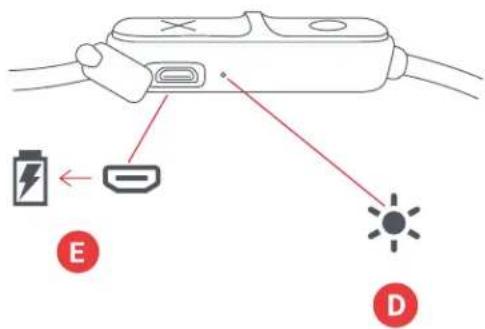
A - Av/på-knapp/spill/pause-knapp
B - ∅k lydstyrken/neste spor
C - Reduser lydstyrken/forrige spor
D - LED-indikator
E - Ladeport
KLARGJ∅RE UTSTYRET
LADE ∅REPROPPENE
BRUK
A - SLÅ PÅ ∅REPROPPENE
flowchart
graph TD
    A["State C"] --> B["Speed Limit Indicator: ...0.5s"]
    B --> C["Action: Click to 'OK' with 'OK' icon"]
    C --> D["Speed Limit Indicator: ...0.5s"]
    D --> E["Action: Click to 'No' with 'No' icon"]
    E --> F["Action: Click to 'Yes' with 'Yes' icon"]
    F --> G["Speed Limit Indicator: ...3s"]
    G --> H["Action: Click to 'No' with 'No' icon"]
    H --> I["Speed Limit Indicator: ...3s"]
    I --> J["Action: Click to 'Yes' with 'Yes' icon"]
LED-INDIKATORER
LADER | BRUK
ΧΡΗΣΗ
flowchart
graph TD
    A["Phone Call"] --> B["Call 0.5s"]
    C["Phone Drop"] --> D["Call 0.5s"]
    E["Phone Use"] --> F["Call ...3s"]
    G["Phone Use"] --> H["Call ...3s"]
ΕΝΔΕΙΞΕΙΣ LED
ΦΟΡΤΙΣΗ ΣΕ ΧΡΗΣΗ
POUŽITÍ
A - ZAPNUTÍ SLUCHÁTEK
flowchart
graph TD
    subgraph C
        A["Switch"] --> B["Delay: ...0.5s"]
        B --> C["Time: ...3s"]
    end
    subgraph D
        D1["Phone"] --> E["Delay: ...0.5s"]
        E --> F["Time: ...0.5s"]
        F --> G["Time: ...3s"]
        G --> H["Time: ...3s"]
    end
INDIKÁTORY LED
NABÍJENÍ PŘI POUŽITÍ
DŮLEŽITÉ POKYNY TÝKAJÍCÍ SE BEZPEČNOSTI
PŘED POUŽITÍ SI PŘEČTĚTE VŠECHNY POKYNY
HASZNÁLAT
A - FÜLHALLGATÓK BEKAPCSOLÁSA
USO
A - Slúchadlá
POUŽITIE
A - ZAPNUTIE SLÚCHADIEL
DÔLEŽITÉ BEZPEČNOSTNÉ POKYNY
VŠETKY POKYNY SI PREČÍTAJTE PRED POUŽITÍM.
MANUAL DE INSTRUCTIUNI
CONTINUT
A - Căști
B - 3 seturi capace auriculare
C-Cablu USB
A – Buton de pornire/oprire sau redare/pauză
UTILIZARE
A - PORNIREA CĂSTILOR
flowchart
graph TD
    A["Device 1"] --> B["Signal 1: ...0.5s"]
    A --> C["Signal 2: ...0.5s"]
    D["Device 3"] --> E["Signal 3: ...0.5s"]
    D --> F["Signal 4: ...0.5s"]
    G["Device 4"] --> H["Signal 4: ...0.5s"]
    G --> I["Signal 5: ...0.5s"]
    J["Device 5"] --> K["Signal 5: ...0.5s"]
    J --> L["Signal 6: ...0.5s"]
    M["Device 6"] --> N["Signal 7: ...0.5s"]
    M --> O["Signal 8: ...0.5s"]
    P["Device 7"] --> Q["Signal 9: ...0.5s"]
    P --> R["Signal 10: ...0.5s"]
    S["Device 8"] --> T["Signal 11: ...0.5s"]
    S --> U["Signal 12: ...0.5s"]
    V["Device 9"] --> W["Signal 13: ...0.5s"]
    V --> X["Signal 14: ...0.5s"]
    Y["Device 10"] --> Z["Signal 15: ...0.5s"]
    Y --> AA["Signal 16: ...0.5s"]
    AB["Device 11"] --> AC["Signal 17: ...0.5s"]
    AB --> AD["Signal 18: ...0.5s"]
    AE["Device 12"] --> AF["Signal 19: ...0.5s"]
    AE --> AG["Signal 20: ...0.5s"]
    AH["Device 13"] --> AI["Signal 21: ...0.5s"]
    AH --> AJ["Signal 22: ...0.5s"]
    AK["Device 14"] --> AL["Signal 23: ...0.5s"]
    AK --> AM["Signal 24: ...0.5s"]
    AN["Device 15"] --> AO["Signal 25: ...0.5s"]
    AN --> AP["Signal 26: ...0.5s"]
    AQ["Device 16"] --> AR["Signal 27: ...0.5s"]
    AQ --> AS["Signal 28: ...0.5s"]
    AT["Device 17"] --> AU["Signal 29: ...0.5s"]
    AT --> AV["Signal 30: ...0.5s"]
    AW["Device 18"] --> AX["Signal 31: ...0.5s"]
    AW --> AY["Signal 32: ...0.5s"]
    AZ["Device 19"] --> BA["Signal 33: ...0.5s"]
    AZ --> BB["Signal 34: ...0.5s"]
    BC["Device 20"] --> BD["Signal 35: ...0.5s"]
    BC --> BE["Signal 36: ...0.5s"]
    BF["Device 21"] --> BG["Signal 37: ...0.5s"]
    BF --> BH["Signal 38: ...0.5s"]
    BI["Device 22"] --> BJ["Signal 39: ...0.5s"]
    BI --> BK["Signal 40: ...0.5s"]
    BL["Device 23"] --> BM["Signal 41: ...0.5s"]
    BL --> BN["Signal 42: ...0.5s"]
    BO["D"]
INDICATORI LED
ÎNCĂRCARE ÎN TIMPUL UTILIZĂRII
UŻYCIE
A - WŁĄCZ SŁUCHAWKI
flowchart
graph TD
    A["Device 1"] --> B["Signal 1: ...0.5s"]
    A --> C["Signal 2: ...0.5s"]
    D["Device 3"] --> E["Signal 3: ...0.5s"]
    D --> F["Signal 4: ...0.5s"]
    G["Device 4"] --> H["Signal 4: ...0.5s"]
    G --> I["Signal 5: ...0.5s"]
    J["Device 5"] --> K["Signal 5: ...0.5s"]
    J --> L["Signal 6: ...0.5s"]
    M["Device 6"] --> N["Signal 7: ...0.5s"]
    M --> O["Signal 8: ...0.5s"]
    P["Device 7"] --> Q["Signal 9: ...0.5s"]
    P --> R["Signal 10: ...0.5s"]
    S["Device 8"] --> T["Signal 11: ...0.5s"]
    S --> U["Signal 12: ...0.5s"]
    V["Device 9"] --> W["Signal 13: ...0.5s"]
    V --> X["Signal 14: ...0.5s"]
    Y["Device 10"] --> Z["Signal 15: ...0.5s"]
    Y --> AA["Signal 16: ...0.5s"]
    AB["Device 11"] --> AC["Signal 17: ...0.5s"]
    AB --> AD["Signal 18: ...0.5s"]
    AE["Device 12"] --> AF["Signal 19: ...0.5s"]
    AE --> AG["Signal 20: ...0.5s"]
    AH["Device 13"] --> AI["Signal 21: ...0.5s"]
    AH --> AJ["Signal 22: ...0.5s"]
    AK["Device 14"] --> AL["Signal 23: ...0.5s"]
    AK --> AM["Signal 24: ...0.5s"]
    AN["Device 15"] --> AO["Signal 25: ...0.5s"]
    AN --> AP["Signal 26: ...0.5s"]
    AQ["Device 16"] --> AR["Signal 27: ...0.5s"]
    AQ --> AS["Signal 28: ...0.5s"]
    AT["Device 17"] --> AU["Signal 29: ...0.5s"]
    AT --> AV["Signal 30: ...0.5s"]
    AW["Device 18"] --> AX["Signal 31: ...0.5s"]
    AW --> AY["Signal 32: ...0.5s"]
    AZ["Device 19"] --> BA["Signal 33: ...0.5s"]
    AZ --> BB["Signal 34: ...0.5s"]
    BC["Device 20"] --> BD["Signal 35: ...0.5s"]
    BC --> BE["Signal 36: ...0.5s"]
    BF["Device 21"] --> BG["Signal 37: ...0.5s"]
    BF --> BH["Signal 38: ...0.5s"]
    BI["Device 22"] --> BJ["Signal 39: ...0.5s"]
    BI --> BK["Signal 40: ...0.5s"]
    BL["Device 23"] --> BM["Signal 41: ...0.5s"]
    BL --> BN["Signal 42: ...0.5s"]
    BO["D"]
WSKAŹNIKI LED
ŁADOWANIE

natural_image
Simple graphic with a red circular icon above a white heart on a dark gray rectangle (no text or symbols)

الإعداد
شحن سماعات الأدن
الاستخدام
flowchart
graph TD
    A["User Interface"] --> B{0.5s Interval}
    B -->|Yes| C["Hand icon: 'Phone' with finger pointing to '...0.5s'"]
    B -->|No| D["Hand icon: 'Phone' with finger pointing to '...3s'"]
    E["User Interface"] --> F{0.5s Interval}
    F -->|Yes| G["Hand icon: 'Phone' with finger pointing to '...0.5s'"]
    F -->|No| H["Hand icon: 'Phone' with finger pointing to '...3s'"]
    I["User Interface"] --> J{0.5s Interval}
    J -->|Yes| K["Hand icon: 'Phone' with finger pointing to '...0.5s'"]
    J -->|No| L["Hand icon: 'Phone' with finger pointing to '...3s'"]
    M["User Interface"] --> N{0.5s Interval}
    N -->|Yes| O["Hand icon: 'Phone' with finger pointing to '...0.5s'"]
    N -->|No| P["Hand icon: 'Phone' with finger pointing to '...3s'"]
    Q["User Interface"] --> R{0.5s Interval}
    R -->|Yes| S["Hand icon: 'Phone' with finger pointing to '...0.5s'"]
    R -->|No| T["Hand icon: 'Phone' with finger pointing to '...3s'"]
    U["User Interface"] --> V{0.5s Interval}
    V -->|Yes| W["Hand icon: 'Phone' with finger pointing to '...0.5s'"]
    V -->|No| X["Hand icon: 'Phone' with finger pointing to '...3s'"]
    Y["User Interface"] --> Z{0.5s Interval}
    Z -->|Yes| AA["Hand icon: 'Phone' with finger pointing to '...0.5s'"]
    Z -->|No| AB["Hand icon: 'Phone' with finger pointing to '...3s'"]
    AC["User Interface"] --> AD{0.5s Interval}
    AD -->|Yes| AE["Hand icon: 'Phone' with finger pointing to '...0.5s'"]
    AD -->|No| AF["Hand icon: 'Phone' with finger pointing to '...3s'"]
    AG["User Interface"] --> AH{0.5s Interval}
    AH -->|Yes| AI["Hand icon: 'Phone' with finger pointing to '...0.5s'"]
    AH -->|No| AJ["Hand icon: 'Phone' with finger pointing to '...3s'"]
    AK["User Interface"] --> AL{0.5s Interval}
    AL -->|Yes| AM["Hand icon: 'Phone' with finger pointing to '...0.5s'"]
    AL -->|No| AN["Hand icon: 'Phone' with finger pointing to '...3s'"]
    AO["User Interface"] --> AP{0.5s Interval}
    AP -->|Yes| AQ["Hand icon: 'Phone' with finger pointing to '...0.5s'"]
    AP -->|No| AR["Hand icon: 'Phone' with finger pointing to '...3s'"]
    AS["User Interface"] --> AT{0.5s Interval}
    AT -->|Yes| AU["Hand icon: 'Phone' with finger pointing to '...0.5s'"]
    AT -->|No| AV["Hand icon: 'Phone' with finger pointing to '...3s'"]
    AW["User Interface"] --> AX{0.5s Interval}
    AX -->|Yes| AY["Hand icon: 'Phone' with finger pointing to '...0.5s'"]
    AX -->|No| AZ["Hand icon: 'Phone' with finger pointing to '...3s'"]
    BA["User Interface"] --> BB{0.5s Interval}
    BB -->|Yes| BC["Hand icon: 'Phone' with finger pointing to '...0.5s'"]
    BC -->|No| BD["Hand icon: 'Phone' with finger pointing to '...3s'"]
    BE["User Interface"] --> BF{0.5s Interval}
    BF -->|Yes| BG["Hand icon: 'Phone' with finger pointing to '...0.5s'"]
    BF -->|No| BH["Hand icon: 'Phone' with finger pointing to '...3s'"]
    BI["User Interface"] --> BJ{0.5s Interval}
    BJ -->|Yes| BK["Hand icon: 'Phone' with finger pointing to '...0.5s'"]
    BJ -->|No| BL["Hand icon: 'Phone' with finger pointing to '...3s'"]
    BM["User Interface"] --> BN{0.5s Interval}
    BN -->|Yes| BO["Hand icon: 'Phone' with finger pointing to '...0.5s'"]
    BN -->|No| BP["Hand icon: 'Phone' with finger pointing to '...3s'"]
    BR["User Interface"] --> BS{0.5s Interval}
    BS -->|Yes| BT["Hand icon: 'Phone' with finger pointing to '...0.5s'"]
    BS -->|No| BU["Hand icon: 'Phone' with finger pointing to '...3s'"]
    BV["User Interface"] --> BW{0.5s Interval}
    BW -->|Yes| BX["Hand icon: 'Phone' with finger pointing to '...0.5s'"]
    BW -->|No| BY["Hand icon: 'Phone' with finger pointing to '...3s'"]
    BZ["User Interface"] --> CA{0.5s Interval}
    CA -->|Yes| CB["Hand icon: 'Phone' with finger pointing to '...0.5s'"]
    CA -->|No| CC["Hand icon: 'Phone' with finger pointing to '...3s'"]
    DA["User Interface"] --> DB{0.5s Interval}
    DB -->|Yes| DC["Hand icon: 'Phone' with finger pointing to '...0.5s'"]
    DB -->|No| DD["Hand icon: 'Phone' with finger pointing to '...3s'"]
    DE["User Interface"] --> DF{0.5s Interval}
    DF -->|Yes| DG["Hand icon: 'Phone' with finger pointing to '...0.5s'"]
    DE --> DI{0.5s Interval}
    DI -->|Yes| DJ["Hand icon: 'Phone' with finger pointing to '...0.5s'"]
    DE --> DI2{0.5s Interval}
    DI2 --> DI3{0.5s Interval}
    DE2 --> DI4{0.5s Interval}
    DE2 --> DI5{0.5s Interval}
    DE2 --> DI6{0.5s Interval}
    DE2 --> DI7{0.5s Interval}
    DE2 --> DI8{0.5s Interval}
    DE2 --> DI9{0.5s Interval}
    DE2 --> DI10{0.5s Interval}
    DE2 --> DI11{0.5s Interval}
    DE2 --> DI12{0.5s Interval}
    DE2 --> DI13{0.5s Interval}
    DE2 --> DI14{0.5s Interval}
    DE2 --> DI15{0.5s Interval}
    DE2 --> DI16{0.5s Interval}
    DE2 --> DI17{0.5s Interval}
    DE2 --> DI18{0.5s Interval}
    DE2 --> DI19{0.5s Interval}
    DE2 --> DI20{0.5s Interval}
    DE2 --> DI21{0.5s Interval}
ج-عمل الزر
사용
A-이어폰 켜기
flowchart
graph TD
    A["Device 1"] --> B["Signal 1: ...0.5s"]
    A --> C["Signal 2: ...0.5s"]
    D["Device 3"] --> E["Signal 3: ...0.5s"]
    D --> F["Signal 4: ...0.5s"]
    G["Device 4"] --> H["Signal 4: ...0.5s"]
    G --> I["Signal 5: ...0.5s"]
    J["Device 5"] --> K["Signal 5: ...0.5s"]
    J --> L["Signal 6: ...0.5s"]
    M["Device 6"] --> N["Signal 7: ...0.5s"]
    M --> O["Signal 8: ...0.5s"]
    P["Device 7"] --> Q["Signal 9: ...0.5s"]
    P --> R["Signal 10: ...0.5s"]
    S["Device 8"] --> T["Signal 11: ...0.5s"]
    S --> U["Signal 12: ...0.5s"]
    V["Device 9"] --> W["Signal 13: ...0.5s"]
    V --> X["Signal 14: ...0.5s"]
    Y["Device 10"] --> Z["Signal 15: ...0.5s"]
    Y --> AA["Signal 16: ...0.5s"]
    AB["Device 11"] --> AC["Signal 17: ...0.5s"]
    AB --> AD["Signal 18: ...0.5s"]
    AE["Device 12"] --> AF["Signal 19: ...0.5s"]
    AE --> AG["Signal 20: ...0.5s"]
    AH["Device 13"] --> AI["Signal 21: ...0.5s"]
    AH --> AJ["Signal 22: ...0.5s"]
    AK["Device 14"] --> AL["Signal 23: ...0.5s"]
    AK --> AM["Signal 24: ...0.5s"]
    AN["Device 15"] --> AO["Signal 25: ...0.5s"]
    AN --> AP["Signal 26: ...0.5s"]
    AQ["Device 16"] --> AR["Signal 27: ...0.5s"]
    AQ --> AS["Signal 28: ...0.5s"]
    AT["Device 17"] --> AU["Signal 29: ...0.5s"]
    AT --> AV["Signal 30: ...0.5s"]
    AW["Device 18"] --> AX["Signal 31: ...0.5s"]
    AW --> AY["Signal 32: ...0.5s"]
    AZ["Device 19"] --> BA["Signal 33: ...0.5s"]
    AZ --> BB["Signal 34: ...0.5s"]
    BC["Device 20"] --> BD["Signal 35: ...0.5s"]
    BC --> BE["Signal 36: ...0.5s"]
    BF["Device 21"] --> BG["Signal 37: ...0.5s"]
    BF --> BH["Signal 38: ...0.5s"]
    BI["Device 22"] --> BJ["Signal 39: ...0.5s"]
    BI --> BK["Signal 40: ...0.5s"]
    BL["Device 23"] --> BM["Signal 41: ...0.5s"]
    BL --> BN["Signal 42: ...0.5s"]
    BO["D"] --> BP["D"]
LED 표시등
충전 중
무선방식 (Operation Frequency):Bluetooth (2402-2480 MHz)
채널 (Radio Channel): Bluetooth (2402-2480 MHz)
무선채널(Bluetooth Mode):BT 4.2
출력 (Output Power):0.02mW/MHz
안테나이득(Antenna Gain):0dBi
변조형식 (Modulation Type): GFSK, π/4-DQPSK, 8DPSK
전원 (Power Supply): DC 3.7 V from battery
모든 권리 보유.
IB-HXEP202A
JOM
"Live Loose"
HX-EP202
使用說明
目錄
使用
A — 啟動耳機
啟動耳機時,長按電源鍵3秒鐘。