LIFE P66096 (MD 43881) - Radio MEDION - Free user manual and instructions
Find the device manual for free LIFE P66096 (MD 43881) MEDION in PDF.


| Product type | Bathroom radio |
| Brand | MEDION |
| Model | LIFE P66096 (MD 43881) |
| Protection rating | IPX6 (resistant to water splashes) |
| Audio power | 3 W RMS |
| Wireless connectivity | Bluetooth 5.0, range up to 10 m |
| FM radio | 87,5 – 108 MHz |
| Power supply | Built-in lithium-polymer battery 3.7 V / 1050 mAh (3.89 Wh) |
| Charging | Via micro-USB (5 V, 1 A), charging time approx. 2.5 hours |
| Estimated battery life | Approx. 6 hours (depending on volume) |
| Main functions | Bluetooth playback, FM radio, hands-free calling, alarm, clock |
| Built-in microphone | Yes, for phone calls |
| Approximate dimensions | 150 x 80 x 80 mm |
| Approximate weight | 300 g |
| Operating temperature | 10 °C to +45 °C |
| Supplied accessories | Micro-USB cable, user manual |
| Maintenance | Wipe after each use; do not use solvents |
| Safety | Do not open the device; charge under supervision; keep out of reach of children |
| Repairability | Contact Medion after-sales service for any repairs |
Frequently Asked Questions - LIFE P66096 (MD 43881) MEDION
User questions about LIFE P66096 (MD 43881) MEDION
0 question about this device. Answer the ones you know or ask your own.
Ask a new question about this device
Download the instructions for your Radio in PDF format for free! Find your manual LIFE P66096 (MD 43881) - MEDION and take your electronic device back in hand. On this page are published all the documents necessary for the use of your device. LIFE P66096 (MD 43881) by MEDION.
USER MANUAL LIFE P66096 (MD 43881) MEDION
www.medion.com/conformity
CE
Anschlüsse Micro-USB 5V---1A
Frequenz 87.5 MHz - 108.0 MHz
1. About these operating instructions 41
1.1.Key to symbols 41
1.2. Proper use 43
1.3.Declaration of Conformity 45
1.4. Information on trademarks 45
EN
43
FR
2. Safety information 46
2.1. Unauthorised persons 46
2.2. Operating safety 48
2.3. Power supply 49
2.4. Never carry out repairs yourself 50
- Device overview 51
- Package contents 52
- Getting started 53
5.1. Charging the battery 53
- Operation 54
6.1. Switching on the loudspeaker 54
6.2. Setting the time 54
6.3. Connecting the device via Bluetooth 56
6.4. Setting the radio 58
6.5. Mobile phone 60
6.6. Switching off the loudspeaker .. 62
- Maintenance 62
- Cleaning 63
- Faults 64
9.1. No sound / distorted sound 64
9.2. The device cannot be switched on 64
- Disposal 65
- Technical specifications 66
- Service information 67
- Legal Notice 70
1. About these operating instructions

Read these operating instructions carefully and comply with the information provided
in them. This will ensure that your device works reliably and has a long service life. Always keep these operating instructions close to the device. Keep these operating instructions in a safe place so they can be passed on to the new owner if you decide to sell the device.
1.1. Key to symbols
If a block of text is marked with one of the warning symbols listed below, the hazard described in that text must be avoided to prevent the potential consequences described there from occurring.

DANGER!
Warning: risk of fatal injury!
WARNING!

Warning: risk of possible fatal injury and/or serious irreversible injuries!
CAUTION!

Warning: risk of minor and/or moderate injuries!

Additional information on using the device!
Bullet point/information on steps during operation

Instruction to be carried out
1.2. Proper use
The bathroom radio is suitable for use as an output device for audio signals.
The device is intended for use in the bathroom and is protected against water spray according to protection class IPX6.
The device is only intended for private use and not for industrial/commercial use.
Note that no liability will be accepted if the device is not used for its intended purpose:
- Do not modify the device without our express agreement and do not use any accessories that have not been supplied or approved by us.
- Only use replacement parts or accessories that we have supplied or approved.
- Comply with all the information in these operating instructions, especially the safety information. Any other use is considered improper and can cause personal injury or property damage.
- Do not use the device in extreme environmental conditions
1.3. Declaration of Conformity
Medion AG hereby declares that the product conforms to the following European requirements:
- RE Directive 2014/53/EU
- Ecodesign Directive 2009/125/EC
RoHS Directive 2011/65/EU.
Complete declarations of conformity are available at www.medion.com/ conformity
CE
1.4. Information on trademarks
The Bluetooth® word mark and logos are registered trademarks of Bluetooth SIG, Inc. and are used by MEDION under licence.
2. Safety information
2.1. Unauthorised persons
This device may be used by children over the age of 8 and by persons with limited physical, sensory or mental abilities or by those without experience and knowledge, if they are supervised or have been instructed in the safe use of the device and have understood the dangers that result from it.
Children should be supervised to ensure they do not play with this device.
- Cleaning and user maintenance may not be carried out by children unless they are supervised.
- Keep the device and accessories out of reach of children.

DANGER!
Risk of choking and suffocation!
Packaging film can be swallowed or used improperly, creating a risk of choking and suffocation.
- Keep packaging material such as plastic film or plastic bags away from children.
2.2. Operating safety
Do not allow children to operate electrical devices unattended. Children are not always able to recognise and avoid possible dangers.
Batteries can be life-threatening if swallowed. Therefore, keep the device out of the reach of children. If a battery is swallowed, you must seek medical help immediately.
If you notice unusual noises or odours, or if smoke is visible, immediately disconnect the device from the power supply and switch it off.
2.3. Power supply
Your bathroom radio is fitted with an integrated rechargeable lithium polymer high-performance battery, which you can charge via the USB port on a PC using the USB cable provided.
2.4. Never carry out repairs yourself

WARNING!
Risk of electric shock!
There is a risk of electric shock if repairs are not carried out by qualifi ed personnel!
Never attempt to open or repair the device yourself.
In the event of a fault, contact the Service Centre or another suitable professional repair workshop.
3. Device overview
DE
EN
FR
ES
IT
NL
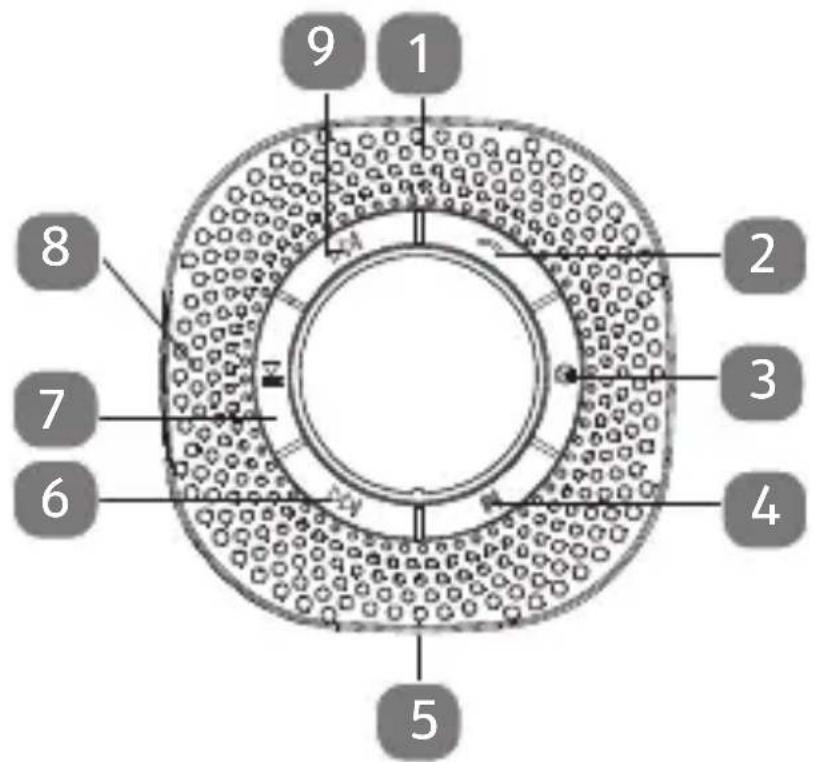
1) Speaker
2) Accept/reject call
3) Switch device on/off
4) Mode selection button
5) micro USB port for charging the internal rechargeable battery
6) Station search forwards / next track / increase volume
7) Start / stop / pause playback
8) Microphone
9) Station search backwards / previous track / decrease volume
4. Package contents
Please check your purchase to ensure that all items are included. If anything is missing, please contact us within 14 days of purchase. Included in the package:
- Shower radio
USB cable - Operating instructions and warranty documents
5. Getting started
5.1. Charging the battery

The bathroom radio is operated using the integrated 3.7 V / 1050 mAh lithium polymer rechargeable battery.
This battery must be fully charged before use. The normal charging time for the battery is approx. 4 hours.
If the battery charge level is too low, the battery symbol flashes quickly and the speaker automatically switches off.
The battery symbol flashes slowly during charging.
As soon as the battery is fully charged, the battery symbol permanently lights up.
6. Operation
6.1. Switching on the loudspeaker
- Switch on the speaker by pressing and holding the button for approx. 3 seconds.
The device is in standby mode.
6.2. Setting the time
Switch on the speaker.
Press and hold the M button for approx. 3 seconds, until either FM or is shown and the timer items are flashing.
Now use the and buttons to set the hour and press the button to confirm.
Now use the and buttons to set the minutes and also press the button to confirm.

If no button is pressed for 10 seconds, the display automatically switches off. The bathroom radio remains in operation.
6.2.1. Setting the alarm
Press and hold the button for approx. 3 seconds.
AL will appear on the display.
Press the or button until ON is shown on the display and press the button to confirm the entry.
Now use the and buttons to set the hour and press the button to confirm.
Now use the and buttons to set the minutes and also press the button to confirm.
Now use the and buttons to set the volume and also press the button to confirm.
6.3. Connecting the device via Bluetooth
Using Bluetooth, you can receive audio signals wirelessly from an external Bluetooth-enabled audio output device. Make sure the two devices are not more than 10 metres apart.

You can only connect one Bluetooth device to the speaker. You cannot connect it to a telephone and an audio output source at the same time.
6.3.1. Bluetooth-enabled output device
To connect a Bluetooth-enabled audio output device:
- Switch on the speaker by pressing and holding the button for approx. 3 seconds.
Press the M button repeatedly until the flashes on the display.
This switches the device to search mode. During the search, the symbol flashes on the display.
Now switch on the Bluetooth function on your audio output device and enable search mode to synchronise the two devices with each other.

You will find more information about the Bluetooth function on your audio output device in its operating instructions.
The device name MD 43881 is displayed as soon as it finds a signal.
Device pairing has been completed once the symbol on the display permanently lights up.
6.3.2. Playback
Press the button to start or pause playback.
Press and hold the▶ button to play the next track.
Press and hold the button to play the previous track.
Press the▶ button to increase the volume.
Press the button to decrease the volume.
6.4. Setting the radio
- Switch on the speaker by pressing and holding the button for approx. 3 seconds.
Press the M button repeatedly until FM and the current frequency lights up on the display.
Press the button to increase the volume.
Press the button to decrease the volume.
6.4.1. Storing a radio station
Press and hold the button to perform an automatic station search.
The bathroom radio automatically stores all stations received in succession.
Press the button again during the station search to stop the station search.
6.4.2. Call up/remove stored radio station
Press and hold the or button to show the memory slot and frequency of the currently selected station.
To remove the station from the selected memory slot, press and briefly hold down M. The station is removed and all other memory slots move forwards one place.
6.5. Mobile phone
To connect a Bluetooth-enabled mobile phone, proceed as follows:
- Switch on the speaker by pressing and holding the button briefly.
Press the M button repeatedly until the fl ashes on the display.
This switches the device to search mode. During the search, the symbol flashes on the display.
Now, switch on the Bluetooth function on your mobile phone and enable search mode to pair the two devices with each other.

You will find more information about the Bluetooth function on your audio output device
in its operating instructions.
The device name MD 43881 is dis
played as soon as it finds a signal.
Device pairing has been completed
once the symbol on the display permanently lights up.
If you use your mobile phone to play music (i.e. you use your mobile phone as an audio playback device), music playback is stopped in the event of an incoming call.
Press the button to accept a call via the Bluetooth speaker.
Press the button to end a call via the Bluetooth speaker.
Press the button to reject a call via the Bluetooth speaker.
Press the button twice in succession to call the previously selected telephone number via the Bluetooth speaker.

Dry the device after showering to ensure that no water "blocks" the microphone and reduces the recording quality of the microphone.
6.6. Switching off the loudspeaker
- Switch off the speaker by pressing and holding the button.
7. Maintenance

WARNING!
Risk of explosion!
Never leave the battery unattended when charging.
Never attempt to open or repair the device yourself.
In the event of a fault, contact the Service Centre or another suitable professional repair workshop.
DE
EN
FR
ES
IT
NL
Contact customer service if …
- Liquid has penetrated the speaker.
- The speaker is not operating correctly.
- The device has been dropped or its housing is damaged.
8. Cleaning
Do not use solvents, corrosive or gaseous cleaning agents.
Furniture is often coated with varnishes or plastics which are cleaned with a wide range of cleaning agents. Some of these cleaning agents contain ingredients which might damage the loudspeaker's base material, and cause it to become soft. If necessary, place an anti-slip mat under the base.
9. Faults
9.1. No sound / distorted sound
Is the audio device switched on, has playback started and at least a medium volume set?
If necessary, increase the volume. Is the volume of the speaker set too high?
If necessary, decrease the volume.
9.2. The device cannot be switched on
Is the battery flat?
If necessary, charge the battery.
10. Disposal

Packaging
Packaging and packaging aids that are no longer required
can be recycled and are to be taken to a collection point to be reused or recycled.
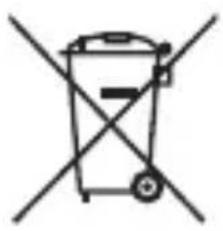
Correct disposal of this product
The device is fitted with an integrated lithium-ion high
performance battery. Within the EU, this symbol indicates that this product may not be disposed of with general household waste. Old devices contain valuable recyclable materials that are to be taken to a collection point to be reused or recycled to prevent harming the environment or human health as a result of uncontrolled waste disposal.
Please therefore dispose of old devices through suitable collection systems or send your old device back to where it
was purchased for disposal. The device will then be sent for material recycling.
11. Technical specifications
Speaker 3 W RMS
power
temperature 10^ C to +45^ C
Operation
Storage -20^ C to +45^ C
temperature
Connections Micro USB
5V-1A
Frequency 87.5 MHz
108.0 MHz -
Bluetooth Version: 5.0
Transmission pow-
er: 1.9 dBm max.
Frequency range:
2402-2480 MHz
Battery type Lithium polymer
3.7 V / 1050 mA h /
3.89Wh
Battery Approx. 2,5 hours
charging time
12. Service information
Please contact our Customer Service team if your device ever stops working the way you want or expect it to. There are several ways for you to contact us:
- In our Service Community, you can meet other users, as well as our staff, and you can exchange your experiences and pass on your knowledge there.
You will find our Service Community at http://community.medion.com.
- Alternatively, use our contact form at www.medion.com/contact.
- You can also contact our Service
team via our hotline or by post.
| Opening times | Hotline number UK |
| Mon – Fri: 08.00 – 20.00 Sat – Sun: 10.00 – 16.00 | 0333 3213106 |
| Hotline number Ireland | |
| 1 800 992508 | |
| Service address | |
| MEDION Electronics Ltd. 120 Faraday Park, Faraday Road, Dorcan Swindon SN3 5JF, Wiltshire United Kingdom | |

You can download this and many other sets of operating instructions from our service portal at www.medion.com/ gb/service/start/. You will also find drivers and other software for a wide range of devices there. You can also scan the QR code on the side of the screen, to download the operating instructions onto your mobile device from the service portal.
13. Legal Notice
Copyright © 2019
Date: 07.08.2019
All rights reserved.
These operating instructions are protected by copyright.
Mechanical, electronic and any other forms of reproduction are prohibited without the written permission of the manufacturer.
Copyright is owned by the company:
Please note that you cannot use the address above for returns. Please always contact our Customer Service team first.
1. Sommaire
DE
No permitted that the children are not allowed to eat, drink or play. No permit to use electronic devices. No permit to use any electronic equipment. No permit to use any electronic equipment for children under 18 years of age. No permit to use any electronic equipment for children under 18 years of age. No permit to use any electronic equipment for children under 18 years of age. No permit to use any electronic equipment for children under 18 years of age. No permit to use any electronic equipment for children under 18 years of age. No permit to use any electronic equipment for children under 18 years of age. No permit to use any electronic equipment for children under 18 year s no siempre reconocen los posibles peligos de manera correcta.
Eventuallycarelacicarelabattery.
10. Smaltimento