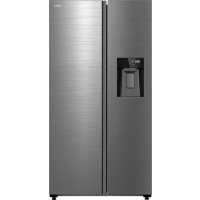
MDRS761MYC - Fridge MIDEA - Free user manual and instructions
Find the device manual for free MDRS761MYC MIDEA in PDF.
Download the instructions for your Fridge in PDF format for free! Find your manual MDRS761MYC - MIDEA and take your electronic device back in hand. On this page are published all the documents necessary for the use of your device. MDRS761MYC by MIDEA.
USER MANUAL MDRS761MYC MIDEA
MDRS761MYC* USER MANUAL Warning notices: Before using this product, please read this manual carefully and keep it for future reference. The design and specifications are subject to change without prior notice for product improvement. Consult with your dealer or manufacturer for details. The diagram above is just for reference. Please take the appearance of the actual product as the standard.EN English DE Deutsch IT Italian FR French ES Spanish PT Portuguese GR Greek PL Polish LV Latvian SR Serbian HR Republika Hrvatska HU Hungary SL Slovenia RO Romania BG Bulgaria LT Lithuania AL Albanian CZ Czech SK Slovak LANGUAGES01
Thank you for choosing Midea! Before using your new Midea product, please read this manual thoroughly to ensure that you know how to operate the features and functions that your new appliance oers in a safe way. CONTENTS
PRODUCT INSTALLATION
CLEANING AND MAINTENANCE
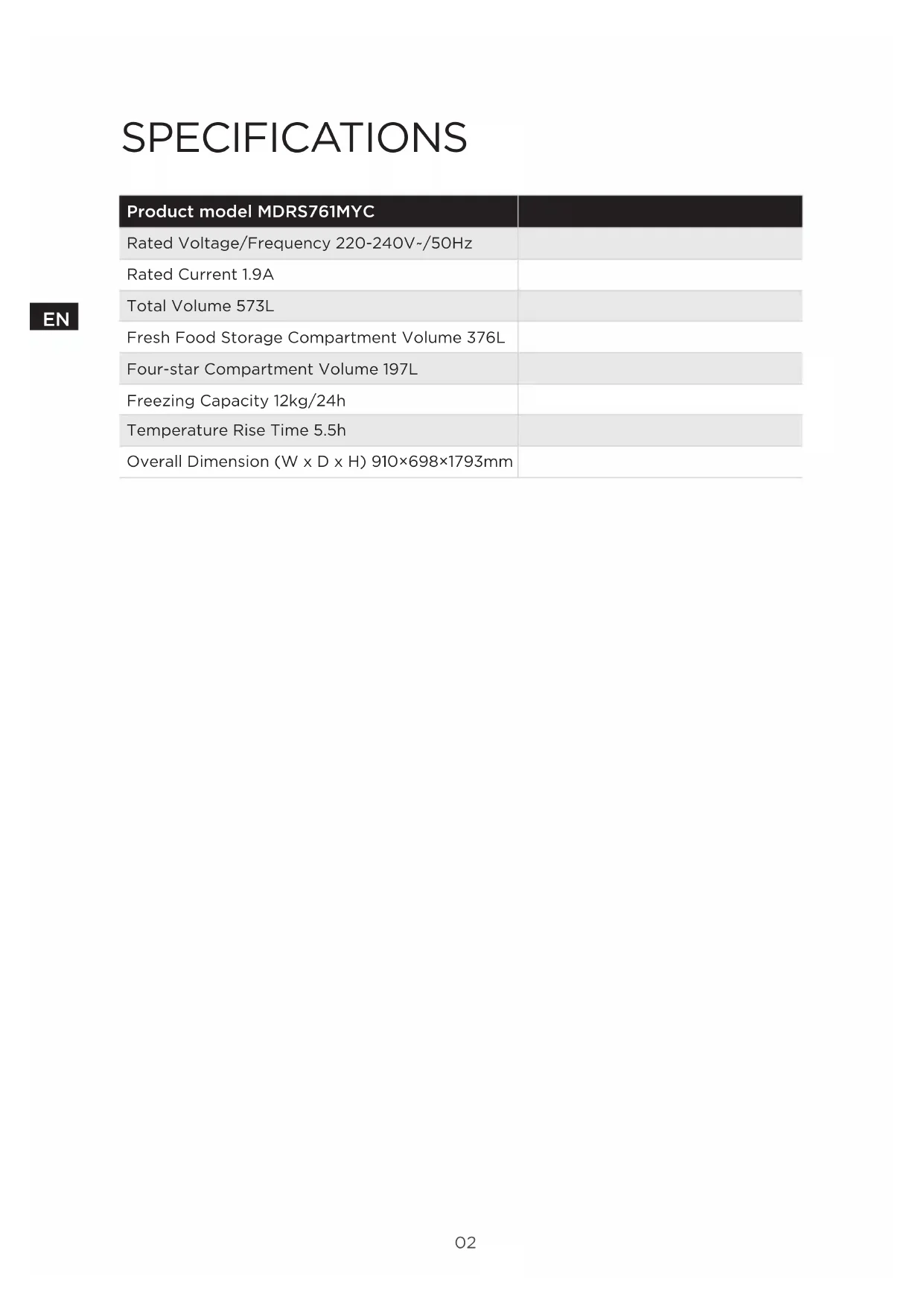
SPECIFICATIONS Product model MDRS761MYC Rated Voltage/Frequency 220-240V~/50Hz Rated Current 1.9A Total Volume 573L Fresh Food Storage Compartment Volume 376L Four-star Compartment Volume 197L Freezing Capacity 12kg/24h Temperature Rise Time 5.5h Overall Dimension (W x D x H) 910×698×1793mm03
PRODUCT OVERVIEW Names of components
LED Lighting Refrigerator glass shelf Ice maker and Ice storage bin Door tray Freezer glass shelf water tank Freezer Drawer Fruits and vegetables box ATTENTION The picture above is only for reference. The actual configuration will depend on the physical product or statement by the distributor.04
PRODUCT INSTALLATION Install Instruction For refrigerating appliances with climate class
- Depending on the climate class, this refrigerating appliance is intended to be used at ambient temperatures range as specified following table.• The climate class can be found on the rating plate. The product may not operate properly at temperatures outside of the specific range.• You can find the climate class on the product label. Eective temperature range
- The product is designed to operate normally in the temperature range specified by its class rating.Class SymbolAmbient temperature range °C IEC 62552 (ISO 15502) ISO 8561Extended temperate SN + 10 to + 32 + 10 to + 32Temperate N + 16 to + 32 + 16 to + 32Subtropical ST + 16 to + 38 + 18 to + 38Tropical T + 16 to + 43 + 18 to + 43 Dimensions and Clearances
- Too small of a distance from adjacent items may result in the degradation of freezing capability and increased electricity costs. Allow over 100 mm of clearance from each adjacent wall when installing the appliance. >100mm >100mm >100mm >100mm >100mm >100mm Top View Required spacefor air circulationATTENTION The picture above is only for reference. The actual configuration will depend on the physical product or statement by the distributor.05
Space requirement diagram (when the door is open and when the door is closed)
Leveling feet To avoid vibration, the unit must be leveled. If required, adjust the leveling screws to compensate for the uneven floor. The front should be slightly higher than the rear to aid in door closing. Leveling screws can be turned easily by tipping the cabinet slightly. Turn the leveling screws counterclockwise to raise the unit, clockwise to lower it. Leveling doors If the doors are not at the same height, the door can be adjusted with a spanner. A- To raise the door, turn the nut
clockwise. C- When the door is correctly aligned, fix it with the nut
1. Remove all food from inside the appliance.
2. Pull the power plug out, insert and fix it into the power plug hook at the rear or
on top of the appliance.
3. Tape parts such as shelves and the door handle to prevent falling o while
moving the appliance.
4. Move the appliance with no less than 2 people carefully. When transporting the
appliance over a long distance, keep the appliance upright.
5. After installing the appliance, connect the power plug into a socket to switch
on the appliance. ATTENTION Precautions before operation: Before making changes the refrigerator must be disconnected from power. precautions should be taken to prevent any personal injury.07
Instructions for water tank use and addition Steps of adding water:
1. Pull out the water tank from the refrigerator.
2. Open the water-injection cover
3. Add bottled drinking water or alkaline water, without exceeding the Max level.
- Do not exceed the max line. Water overflows.
- Fill the tank only with potable water such as mineral or purified water. Do not use other liquid.It is not allowed to add juice, milk and cola in the water tank.
4. Close the water-injection cover filtered water.
5. Push the water tank inside until it is fixed.
- After the water tank is pushed in, please wait for 30s before taking the first cup of water.
- Make sure the water tank fits into the shelf. Otherwise, the water tank may not operate
- Do not use the refrigerator without inserting the water tank. This may decrease the cooling performance. ATTENTION ATTENTION08
- The limit block is included in the attachment package.
- In order to better dissipate heat from the back condenser and reduce the power consumption of the refrigerator, it is necessary to install limit blocks on the refrigerator.
- Take out the limit block from the attachment package, tear o the adhesive backing paper, and apply it along the upper corner of the back, one on each corner.09
- Any replacement or maintenance of the LED lamps is intended to be made by the manufacturer, its service agent or similar qualified person. ATTENTION This product contains two light sources of energy eciency class (G). Connecting the appliance After installing the appliance, connect the power plug into a socket outlet. ATTENTION After connecting the power supply cord (or plug) to the outlet, wait 2 or 3 hours before you put food into the appliance. If you add food before the appliance has cooled completely, your food may spoil. Tips for energy saving
- Do not place the appliance near cookers, radiators or other heat sources. If the ambient temperature is high, the compressor will run more frequently and for longer, resulting in increased energy consumption.
- Ensure that there is sucient ventilation at the base of the appliance, on the sides of the appliance and at the back of the appliance. Never cover ventilation openings.
- Please also observe the spacing dimensions in the chapter “Installation”.
- The arrangement of drawers, shelves and racks as shown in the illustration oers the most ecient use of energy and should therefore be retained as far as possible. All drawers and shelves should remain in the appliance to keep the temperature stable and save energy.
- To obtain a larger storage space (e.g. for large refrigerated/frozen goods), the middle drawers can be removed. The top and bottom drawers and shelves should be removed last if necessary.
- An evenly filled refrigerator/freezer compartment contributes to optimal energy use. Therefore, avoid empty or half-empty compartments.
- Allow warm food to cool before placing it in the refrigerator/freezer. Food that has already cooled down increases energy eciency.
- Allow frozen food to defrost in the refrigerator. The coldness of the frozen food reduces the energy consumption in the refrigerator compartment and thus increases the energy eciency.
- Open the door only as briefly as necessary to minimise cold loss. Opening the door briefly and closing it properly reduces energy consumption.
- Setting the temperature no colder than necessary contributes to optimal energy use. The optimum temperature in the refrigerator is +7°C. It should be measured as far forward as possible in the top compartment of refrigerators.
- The door seals of your appliance must be perfectly intact so that the doors close properly and energy consumption is not increased unnecessarily.10
Refrigerating compartment temperature Button
Water tank warning reset ATTENTION The actual control panel may dier from model to model.The control panel will turn o automatically for energy saving.11
- In the unlocked state, long press the button for 3 seconds, enter the lock state; In the locked state, long press the button for 3 seconds, the lock icon disappears and enters the unlock state. All the following functions must be operated in the unlocking status. Vacation mode
- Click the button to enter the vacation mode. Icon lights up, the vacation mode will start after locking the control panel.
- Under vacation mode, the refrigerating compartment is turned o and temperature area display “--” the freezer compartment temperature is set at -18 °C. Super Cooling mode
- Click the button to enter the Super cooling mode. Icon lights up, the Super Cooling mode will start after locking the control panel. Super cooling exits up to 6h or exits after 30 minutes of reaching the super cooling shutdown point. Super Freezing mode
- Click the button to enter the Super freezing mode. Icon lights up, the Super freezing mode will start after locking the control panel. Super freeze exits for 26h. Temperature setting of refrigerating compartment
- Click temperature zone selection button , refrigerating compartment temperature will blink. Then click the button or again to set the temperature, and will hear one beep. Setting scope is between 2°C and 8°C. Every time you click the button, the temperature will be changed 1°C. After adjusting, the digital tube will keep blinking for 5 seconds. New temperature setting will take eect after locking the control panel. Temperature setting of freezer compartment
- Click temperature zone selection button , freezer compartment temperature will blink. Then click the button or again to set the temperature, and you will hear one beep. Setting scope is between -16°C and -24°C. Every time you click the button, the temperature will be changed 1°C. After adjusting, the digital tube will keep blinking for 5 seconds. New temperature setting will take eect after locking the control panel. ATTENTION Recommended setting: Refrigerated chamber 5°C, freezing chamber - 18°C. The Super freezing function is designed to maintain the nutritional value of the food in the freezer. It can freeze the food in the shortest time. If a large amount of food is frozen at one time, it is recommended that the user turn on the Super freezing function and put the food in. At this time, the freezing speed of the freezer compartment is increased, which can Super freezing the food, eectively lock the nutrition of the food, and facilitate storage.12
Storage upon power failure
- In case of power failure, the instant working state will be locked and maintained till re-electrification. Opening warning and alarm control
- when open the refrigerator doors, the opening music will play. If the door is not closed in two minutes, the buzzer will sound once every minute until the door is closed. Press anyone button to stop the buzzer alarm. ATTENTION Disable the door opening tone: Press and hold thecombination key and for 3 seconds to disable or enable the door opening tone (the tone is enabled by default). Disable the door opening alarm sound: Not possible Error code
- The following warnings appearing on the display indicate corresponding faults of the refrigerator. Though the refrigerator may still have cold storage function with the following faults, the user shall contact a maintenance specialist for maintenance, so as to ensure optimized operation of the appliance. Fault Code Fault Description E0 Icemaker error
Temperature sensor detection circuit error of refrigerating chamber E2 Temperature sensor detection circuit error of freezing chamber E5 Freezing defrost sensor detection circuit error E6 Communication fault of main board and Display control panel E7 Circulation of ambient temperature sensor detection circuit error EE Icemaker sensor circuit error EH Moisture sensor error EP Ice-separating fault of icemaker EF Water tank loose error13
Fetching water and ice Fetching cold water
- Keep clicking the buttons “ ” until the icon “ ” turns on.
- Push the container in the direction of fetching water cushion,Cold water starts to flow into the container.
- Remove the container from fetching water cushion and end the exporting of water. Fetching crushed ice
- Keep clicking the buttons “ ” until the icon “ ” turns on.
- Make the container tight with mouth of dispenser to prevent the side jet.
- Press the container in the direction of fetching water cushion . Fill the container with crushed ice.
- Remove the container from fetching water cushion and end the exporting of crushed ice.14
- Keep clicking the buttons “ ” until the icon “ ” turns on.
- Push the container in the direction of fetching water cushion.
- Ice cubes start to fall into the container.
- Remove the container from fetching water cushion and end the exporting of ice cubes. Cancel the function of ice-making
- If the function of fetching ice is not used for long time, you can cancel the function of ice-making.
- Press the button “ ” , the icon “ ” turns on. The picture above is only for reference. The actual configuration will depend on the physical product or statement by the distributor.15
Tips on storing food Freezer compartment
- The freezer is designated for the storage of food frozen at very low temperature, long-term storage of frozen food, and for the production of ice.
- Only use the shelves in the door of the freezer to store frozen food, not for storing hot food designated for freezing.
- Do not put fresh and frozen food next to each other. The frozen food may thaw.
- When freezing fresh food (such as meat, fish or chopped meat), cut them into parts that can be used at the same time.
- Storing frozen food: instructions are usually stated on the packages, which must be followed. If there is no information on the packaging, food should not be stored for longer than three months from the date of purchase.
- When purchasing frozen food, make sure that it was frozen at a suitable temperature and that the packaging is not damaged.
- Frozen food should be kept in suitable packages to retain the quality and should be returned to the freezer compartment as soon as possible.
- If a package of frozen food shows moisture or abnormal bulging, it is probable that it was stored at the wrong temperature and the content is spoiled.
- The storage period for frozen food depends on the room temperature, the thermostat setting, the frequency of opening the door of the freezer, the type of food and the time of transporting the product from the shop to the household. Always follow the instructions printed on the packaging and never exceed the maximum storage time stated on the package. Cooling compartment
- To reduce moisture and subsequent ice build-up, never put liquid into the refrigerator in unsealed containers. Frost tends to concentrate in the coolest parts of the evaporator. Storing uncovered liquids results in a more frequent need for defrosting.
- Never put warm foods in the refrigerator. These should first cool down at room temperature and then be placed so as to ensure adequate air circulation in the refrigerator.
- Foods or food containers should not touch the back wall of the refrigerator because they could freeze to the wall. Do not keep regularly opening the door of the refrigerator.
- Meat and clean fish (packed in a package or plastic foil) can be placed in the refrigerator, which can be used in 1–2 days.
- Fruit and vegetables without packaging can be placed in the part designated for fresh fruit and vegetables. Recommended Temperature The optimal temperature setting for food storage:
- Fridge: 4 °C , Freezer: -18 °C ATTENTION The optimal temperature setting of each compartment depends on the ambient temperature. Above optimal temperature is based on the ambient temperature of 25 °C.16
Order Compartments TYPE Target stor- age temp. [°C] Appropriate food 1 Fridge +2 ~ +8 Eggs, cooked food, packaged food, fruits and vegetables, dairy products, cakes, drinks and other foods are not suitable for freezing. 2 (***)*-Freezer
Seafood (fish, shrimp, shellfish), freshwater aquatic products and meat products (recommended for 3 months, the longer the storage time, the worse the taste and nutrition), suitable for frozen fresh food. 3 ***-Freezer
Seafood (fish, shrimp, shellfish), freshwater aquatic products and meat products (recommended for 3 months, the longer the storage time, the worse the taste and nutrition), suitable for frozen fresh food. 4 **-Freezer
Seafood (fish, shrimp, shellfish), freshwater aquatic products and meat products (recommended for 3 months, the longer the storage time, the worse the taste and nutrition), suitable for frozen fresh food. 5 *-Freezer
Seafood (fish, shrimp, shellfish), freshwater aquatic products and meat products (recommended for 3 months, the longer the storage time, the worse the taste and nutrition), suitable for frozen fresh food. 6 0-star -6 ~ 0 Fresh pork, beef, fish, chicken, some packaged processed foods, etc. (Recommended to eat within the same day, preferably no more than 3 days). Partially encapsulated processed foods (non- freezable foods). 7 Chill -2 ~ +3 Fresh/ frozen pork, beef, chicken, freshwater aquatic products, etc. (7 days below 0°C and above 0°C is recommended for consumption within that day, preferably no more than 2 days).Seafood (less than 0 for 15 days, it is not recommended to store above 0°C. 8 Fresh food 0 ~ +4 Fresh pork, beef, fish, chicken, cooked food, etc. (Recommended to eat within the same day, preferably no more than 3 days) 9 Wine +5 ~ +20 Red wine, white wine, sparkling wine, etc. ATTENTION please store dierent foods according to the compartments or target storage temperature of your purchased17
CLEANING AND MAINTENANCE
- The refrigerator is made based on the air-cooling principle and thus has automatic defrosting function. Frost formed due to change of season or temperature may also be manually removed by disconnection of the appliance from power supply or by wiping with a dry towel. Cleaning of the door tray
- According to the direction arrow in the figure below, use both hands to squeeze the tray, and push it upward, then you can take it out.
- After washing the tray having been taken out, you can adjust its installing height in accordance with your requirement. Cleaning of the glass shelf
- As the innermost part of the refrigerator liner where contacting the shelves has a backstop, you shall raise the shelves upward, then you can be able to take it out.
- Adjust or clean the shelves according to your requirement. Cleaning the Fruits and vegetables box
- Remove the contents of the drawer. Hold the handle of the fruits and vegetables box and pull it out completely until it stops.
- Lift the the fruits and vegetables box up and remove it by pulling it out. ATTENTION Soft towels or sponge dipped in water and non-corrosive neutral detergents are suggested for cleaning. The freezer of shall be finally cleaned with clean water and dry cloth. Open the door for natural drying before the power is turned on. Do not use hard brushes, clean steel balls, wire brushes, abrasives, such as toothpastes, organic solvents (such as alcohol, acetone, banana oil, etc.), boiling water, acid or alkaline items clean refrigerator considering that this may damage the fridge surface and interior.18
Clean the Ice Container Ice in the ice container may block the outlet because of lumping or other reasons. In this case the ice container needs cleaning or eliminating block. Figure 1 Figure 2 Ice outlet motor claw Ice outlet channel Figure 3
1. When the ice on light goes out,hold the left and right clasps of the ice storage
box with both hands, and move the ice storage box vertically to get it out of the limit buckle, and then slowly remove the ice storage box along the vertical door liner, as shown in Figure 1
2. Clean the ice storage box as needed. The installation process of the ice storage
box is contrary to the removal process. Pull the ice storage box downwards forcefully until it is installed in place. If it is dicult to install the ice storage box, turn the turntable on the ice storage box 90° according to Figure 2, and then install the ice storage box. Cleaning of Ice lattice and water pipe
- Ice making function if not used for a period of time, before using again. Please empty the ice in the ice storage box, make half a box of ice(about 24h) and dump it again, then you can use it normally.
- If the water intake function is not used for a period of time, before using again, please press the water intake operation to take two liters of water, and then normal use.19
TROUBLESHOOTING The following simple issues can be handled by the user. Please call the after-sale service department if the issues are not solved. Problem Possible reason Failed operation
- Check whether the appliance is connected to power or whether the plug is in well contact
- Check whether the voltage is too low
- Check whether there is a power failure or partial circuits have tripped Odor
- Odorous foods shall be tightly wrapped
- Check whether there is any rotten food
- Clean the inside of the refrigerator Long-time operation of the compressor
- Long operation of the refrigerator is normal in summer
- when the ambient temperature is high it is not suggestible having too much food in the appliance at the same time
- Food shall get cool before being put into the appliance
- The doors are opened too frequently Light fails to get lit
- Check whether the refrigerator is connected to power supply and whether the illuminating light is damaged
- Have the light replaced by a specialist Door can not be properly closed
- The door is stuck by food packages too much food is placed
- The refrigerator is tiltedr. Loud noises
- Check whether the floor is level and whether the refrigerator is placed stably
- Check whether accessories are placed at proper locations20
Problem Possible reason Door seal fails to be tight
- Remove foreign matters on the door seal
- Heat the door seal and then cool it for restoration (or blow it with an electrical drier or use a hot towel for heating) Water pan overflows
- There is too much food in the chamber or food stored contains too much water,resulting in heavy defrosting
- The doors are not closed properly, resulting in frosting due to entry of air and increased water due to defrosting Hot housing
- Heat dissipation of the built-in condenser via the housing, which is normal when housing becomes hot due to high ambient temperature, storage of too much food or shutdown of the compressor is shut down, provide sound ventilation to facilitate heat dissipation Surface condensation
- Condensation on the exterior surface and door seals of the refrigerator is normal when the ambient humidity is too high. Just wipe the condensate with a clean towel. Abnormal noise
- Buzz: The compressor may produce buzzes during operation, and the buzzes are loud particularly upon start or stop. This is normal.
- Creak: Refrigerant flowing inside of the appliance may produce creak, which is normal.21
APPENDIX Special for new European standard The ordered parts in the following table can be acquired from Service provider channel Ordered part Provided by Minimum time required for Provision Thermostats Professional maintenance personnel At least 7 years after the last model is launched on the market Temperature sensors Professional maintenance personnel At least 7 years after the last model is launched on the market Printed circuit boards Professional maintenance personnel At least 7 years after the last model is launched on the market Light sources Professional maintenance personnel At least 7 years after the last model is launched on the market Door handles Professional repairers and final users At least 7 years after the last model is launched on the market Door hinges Professional repairers and final users At least 7 years after the last model is launched on the market Trays Professional repairers and final users At least 7 years after the last model is launched on the market Baskets Professional repairers and final users At least 7 years after the last model is launched on the market Door gaskets Professional repairers and final users At least 10 years after the last model is launched on the market Dear customer
1. If you want to return or replace the product, please contact the store where you
buy. (Remember to bring the purchase invoice)
2. If your product breaks down which needs to repair, please contact after-sales
service provider. ATTENTION The model information inthe product database, as well as the model identifier, can be obtained througha weblink scanned by a QR code, if any, on the energy eciency label of the product.For more information about the energy eciency of the appliance, visit https://ec.europa.eu and search using the model name The model name can be found on the rating label of the appliance.22
- The OK-temperature indicator can be used to determine temperatures below +4°C. Gradually reduce the temperature if the sign does not indicate “OK”.
- To ensure the temperature in this area, do not change the positioning of the shelf. Inforced air refrigerators (equipped with a fan or No Frost models),the symbol of the coldest zone is not represented because the temperature inside is homogeneous. Temperature indicator setting
- To help you set your refrigerator well, it is equipped with a temperature indicator that will monitor the average temperature in the coldest zone.
- WARNING:This indicator is intended to work only with your refrigerator, do not use it in another refrigerator (in fact, the coldest zone is not the same), or for any other use. Checking the temperature in the coldest zone
- With the temperature indicator, you can check regularly that the temperature of the coldest zone is correct. Indeed, the internal temperature of the refrigerator depends on several factors such as the ambient temperature of the room, the amount of food stored and the frequency of door opening. Take these factors into consideration when setting the device.
- When the indicator shows « OK », this means that your thermostat is well adjusted and the internal temperature correct.
Symbol Vacation (Urlaub)
INSTALLATION DU PRODUIT
Buton Lock/Unlock (Blocare/ Deblocare)
ManualGo.com