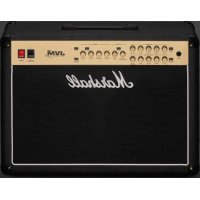
USER MANUAL Code 25 MARSHALL
WARNING! IMPORTANT SAFETY INSTRUCTIONS
2 Read these instructions.
2) Keep these instructions.
3) Herd all earnings
4) Yellowish instructions.
5) Do not use this approach near water.
6) Clean only with dry mol.
2) Do not install new any heat sources such as radiators, heat registers, stoves, or other apparatus (including amplifiers) that produce heat.
8) Do not defend the safety purpose of the previous is grounding-type plug. A polarized plug has two blades with one wider than the other. A grounding-type plug has two blades and a third groundley
press. The wide blade or the third spring are provided for your safety. If the provided plug does not fit into your outlet, consult an electrician for replacement of the obscure outlet.
9) Protect the power tax from having worked on or painted completely at plugs, experiences, replaces, and his point where they exit from his apparatus.
12) Only use attachments/accessories specified by the manufacturer.
14) Oranging this apparatus during lightning strikes or others, unless for long periods of fire.
12) Refer all services to qualified service personnel. Servicing is required when the apparatus has been damaged in any
way, such as power-supply cord or plug is damaged, liquid has been spilled or objects have fallen into the apparatus, the apparatus has been exposed to rain or moisture, does not operate normally, or has been dropped.
13) WARNING: To reduce the risk of fire or electric shock, do not expose this apparatus to rain or moisture.
(4) The appliance cuestion is used as the disconnect device, the disconnect device shall remain readily operable.
7S. The apparatus shall not be exposed to dripping or splashing and that no objects filled with liquid, such as esses, shall be placed on the apparatus.
The "real" lighting symbol indicates undissuolated material within your unit may cause on electric shock. For the safety or everyone in your household, please do not remove product covering.
The "exclamation point" calls attention to features for which you should read the enclosed literature closely to prevent operating and maintenance problems.

COMPLIANCE STATEMENT
This device complies with Part 15 of the FCC Rules.
Operation is subject to the following two conditions: (1) This device may not cause harmful interference, and (2) This device must accept any interference received, including interference that may cause undesired operation.
Warning. Charges or
diligations to the wall
not expressly approved by
the party responsible for
compliance could void the
user's authority to operate the
equipment.
Note: This equipment has been tested and found to comply with the limits for a Class B digital device, pursuant to Part 15 of the FCC Rules. These limits are designed to provide reasonable protection against harmful interference in a residential installation. This
equipment generates, uses and can navigate radio frequency energy and, if not installed and used in accordance with the instructions, may cause harmful interference to radio communications. However, there is no guarantee that interference will not occur in a particular installation. In this equipment does cause harmful interference to radio or television reception which can be determined by tuning the equipment or and on the user is encouraged to try to scan out the interference by one or more of the following measures.
Reorient or relocate the receiving antenna.
Increase the separation between the equipment and receiver.
Connect the equipment into an outlet on a circuit different
from that to which the receiver is connected.
- Consult the order on experienced radio/TV technician for help.
This equipment complies with 1CC R' radiation exposure limits set forth for an uncontrolled environment. This equipment should be installed and operated with a minimum distance of 70 centimeters between the radiator and your body.
industry Canada caution
This device complies with industry Console licence exempt RSS standards).
Operation is subject to the following two conditions:
(1) This device may not cause interference, and (2) This device must accept any interference, including
Interference that may cause undesired operation of the device.
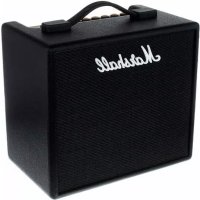
CODE is a new generation of Marshall amplifier. Fully programmable, CODE combines authentic modelling of classic and contemporary Marshall tones with professional quality FX. CODE preamp, power amp and speaker cabinet models have been developed in collaboration with audio software pioneers Softube to create Marshall-Softube (MST) modelling. Featuring Bluetooth® & USB connectivity, and Marshall Gateway™ compatibility, CODE is a powerful tool that lets you make music your way.
OVERVIEW
CODE is loaded with sonic possibilities. It has 14 MST preamps, 4 MST power amps and 8 MST speaker cabinets. CODE features 24 FX: including Compressor, stompbox Distortions, Auto Wah, Pitch Shifter, Chorus, Vibrato, Phaser, Vibes, Flanger and Tremolo. It includes Studio, Vintage, Multi and Reverse Delays, Tap Tempo, and studio quality Reverbs. Including Gate, you can have up to 5 FX simultaneously.
Using the Marshall Gateway App for your iOS or Android device you can control CODE's settings remotely via Bluetooth and share Presets with other CODE users. You can stream audio from your device, computer or MP3 player through CODE's speaker or headphones for practice, or jam along with tracks from your music library. Connect via USB to use your CODE amplifier as a DAW interface.
We sincerely hope that you enjoy your CODE amplifier and we wish you every success, whatever your performance situation. Thank you for choosing Marshall.
- The Marshal Team
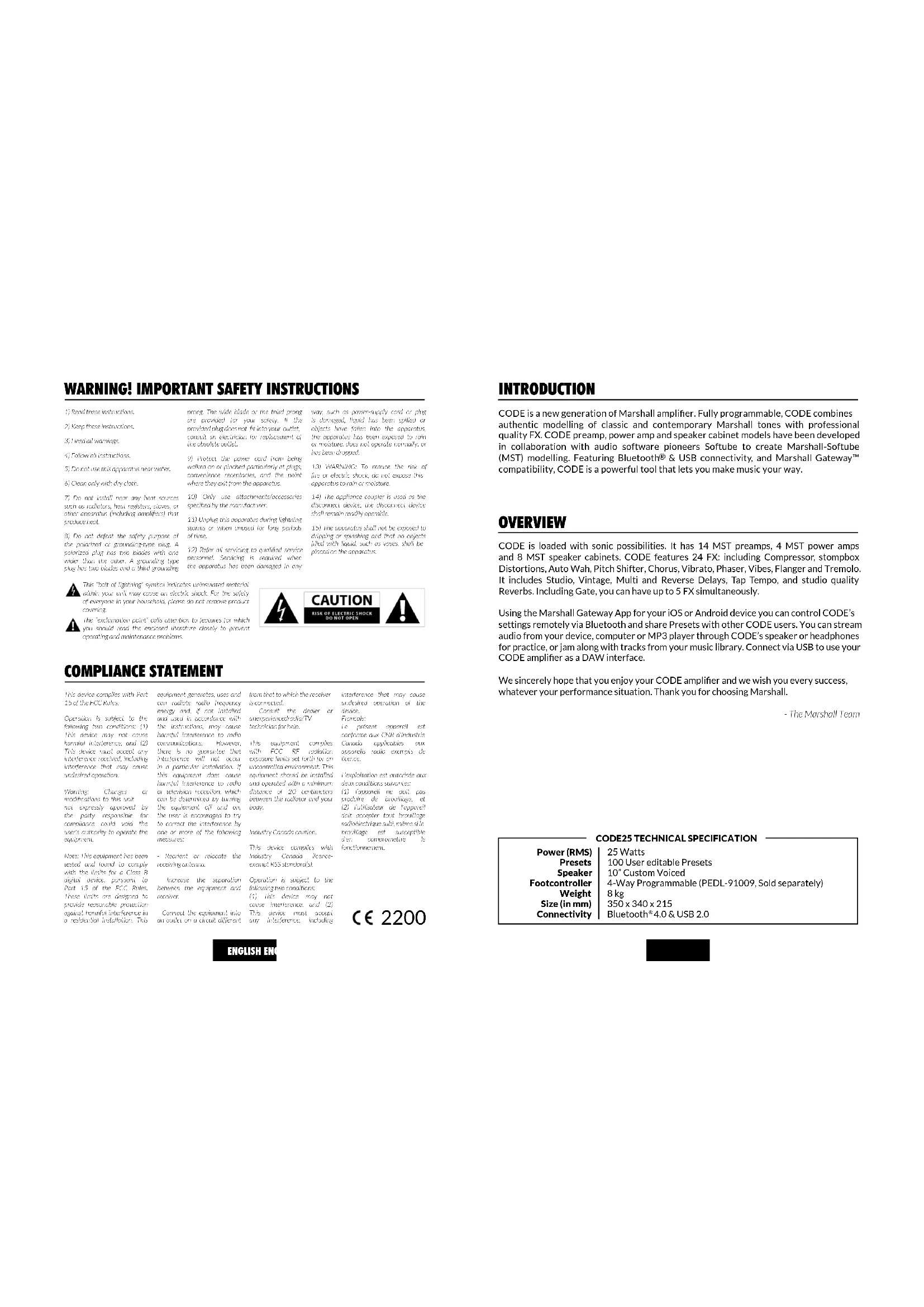
CODE25 TECHNICAL SPECIFICATION
Power (RMS)
Presets
Speaker
Footcontroller
Weight
Size (in mm)
Connectivity
25 Watts
100 User editable Presets
10" Custom Voiced
4-Way Programmable (PEDL-91009, Sold separately)
8 kg
350×340×215
Bluetooth® 4.0 & USB 2.0

MARSHALL AMPLIFIER HISTORY
MST modelling recreates the tonal and sonic characteristics of some of the most successful and respected amplifier preamps from the past fifty plus years.
JTM45™
The JTM45 was the first Marshall amplifier. It was made in 1962 by Jim Marshall and his small team of engineers in a workshop at his music store in Hanwell, London. This 30 Watt two channel amplifier began a revolution that changed forever the sound of rock and blues music. The JTM45 is still made today as part of the Vintage Re-Issue™ Series and Handwired™ Series.
1962 Bluesbreaker™
The 1962 Bluesbreaker was the first combo made by Marshall. Launched in 1965, it had two 12" speakers with an output of 30 Watts. The 1962 was famously used by Eric Clapton on the influential blues album 'John Mayall's Bluesbreakers' in 1966 – hence the 1962's 'Bluesbreaker' nickname. The 1962 Bluesbreaker is still made today as part of the Vintage Re-Issue Series™ and Handwired™ Series.
1959™ Plexi™
To the minds and ears of many, the 100 Watt Super Lead heads of the mid to late 1960s are the holy grail of great rock tone. Being non-master-volume, when cranked, the 1959 power valves overdrive producing highly responsive, harmonically rich tones. The 1959 amplifier is still made today as part of the Vintage Re-Issue Series ™ and Handwired ™ Series.
JCM800 2203™
The 2203 is one of the most important amplifiers Marshall has ever made. It evolved in the '70s from the JMP and 1959 Plexi heads. In the '80s the 2203 became the JCM800 2203 we know today: a straightforward single channel amplifier that was favoured by the heavy metal scene that dominated much of that decade. Its popularity remained well into the '90s with the emergence of Grunge and Britpop, and it's still revered today and is considered the benchmark by which modern all metal amplifiers are measured.
JCM2555™ Silver Jubilee™
The 25/50 Silver Jubilee Series was created in 1987 to celebrate the 25th anniversary of the founding of Marshall Amplification and 50 years of Jim Marshall being in the music business. Based on the JCM800 2203 and 2204TM Master Volume models, Silver Jubilee amplifiers had a special preamp circuit that featured three gain 'modes' which were Clean, Rhythm Clip and a switchable Lead Channel. The 2555 was the 100 Watt head in the Jubilee series, which was a limited edition. By popular demand the JCM2555 was reissued as the 2555XTM in 2015.
JCM2000™ DSL100™
Launched in 1997, the JCM2000 Dual Super Lead's 'dual mode' design meant that guitarists could choose either a Clean or Crunch tone from the Classic Gain Channel, whilst the Ultra Gain Channel provided two lead sounds: Lead 1 & Lead 2. This tonal versatility was aided by the Deep and Tone Shift features. It is the JCM2000 DSL100's tonal range and versatility that made it massively popular in its day, so much so, that its legacy lives on in the current DSL Series.
ENGLISH EN
MARSHALL AMPLIFIER HISTORY (CONT.)
JVM410H™
When the JVM410H launched in 2006 it caused quite a stir. This 100 Watt head is an all-valve tonal monster that has four channels, each with three modes: Green, Orange and Red, offering guitarists a range of 12 unique tones. Each mode reconfigures the channel gain stages in order to develop different amounts of gain and tone. The JVM410H's vast tonal spectrum makes it the most versatile amplifier Marshall has ever made, used by many professional players.
POWER AMPLIFIERS
MST modelling recreates four classic and vintage valve power output topologies. A valve power stage is a vital part of an all-valve amplifier's sound and its tonal character.
SPEAKER CABINETS
Marshall speaker cabinets are perhaps as famous as Marshall amplifiers. The iconic 4 x 12" design has changed little since Jim Marshall designed the first one in 1965. Since then the Marshall 4 x 12" has become the touchstone for all other speaker cabinets. MST modelling recreates the sonic characteristics of eight classic Marshall speaker cabinets, including a variety of 4 x 12", 2 x 12" & 1 x 12" speaker configurations. Marshall speaker cabinets differ not only in their speaker configurations, but in the speakers that they use, how they are wired and the size of the cabinet.
GETTING STARTED
To begin using CODE:
- Ensure that the power ON/OFF switch is set to the OFF position (#13 in this manual).
- Connect the supplied power cord to the rear power socket of the amplifier before plugging into the mains electricity supply.
- Plug your guitar cable into the amplifier INPUT jack socket (#2 in this manual).
- Set the MASTER volume control to zero (#9 in this manual).
- Turn the amplifier ON using the ON/OFF switch.
• Gradually turn the MASTER up to your desired volume level.
- Turn the PRESET selector to explore your CODE amplifier's factory Presets (#8 in this manual).
FRONT PANEL FUNCTIONS
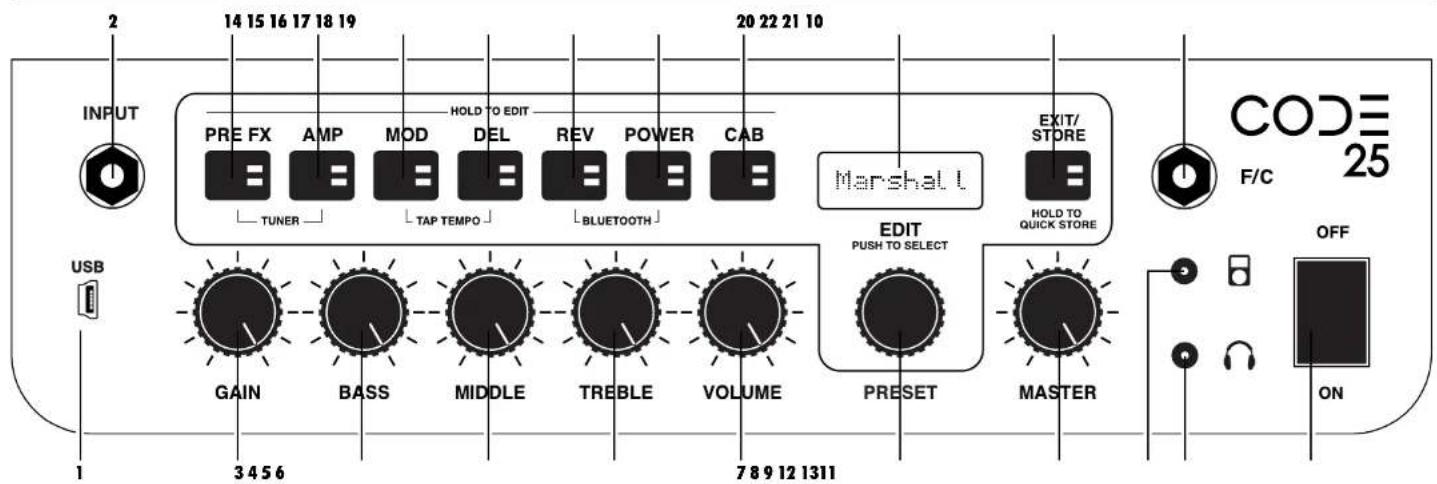
1. USB
Connect via USB to use CODE as a DAW interface, to play tracks from your music library, to get firmware updates and control via MIDI.
To record with CODE using your DAW:
- Connect to your computer via USB.
- Select your CODE amplifier as the input source on your computer and within your DAW.
To stream audio from your computer through CODE:
- Connect to your computer via USB.
- Select your CODE amplifier as your computer's output source.
- Use the MASTER control to adjust the volume level (#9 in this manual).
To get CODE firmware updates:
http://my.marshall.com/Downloads
Follow this link to quickly and easily keep your CODE amplifier's firmware up to date.
MIDI data:
- Your CODE amplifier can also send and receive MIDI data related to the front panel controls via the USB.
Use this jack socket to connect your guitar to the amplifier. Use a good quality screened/shielded guitar cable to help prevent noise interference.
3. GAIN
Controls the amount of Gain introduced to a Preset. The higher the Gain, the harder the preamp is driven.
4. BASS
Turning the BASS control will adjust the warmth and low-end depth of your sound.
5. MIDDLE
Adjusting the MIDDLE control will vary the amount of body in your sound by boosting or cutting midrange frequencies.
6. TREBLE
Increasing the TREBLE will make your sound brighter and more cutting. Turning the TREBLE down will decrease tonal edge and make the sound softer.
7. VOLUME
Controls the volume level within a selected Preset.
Because GAIN, BASS, MIDDLE, TREBLE & VOLUME are stored as part of a Preset, these panel tone controls only become active when they are used. This means that until they are turned their position is not related to their setting within a Preset. When you turn a tone control it becomes active. The display screen will show its current setting and the stored setting.

When a GAIN, BASS, MIDDLE, TREBLE or VOLUME control is activated the
EXIT/STORE LED will flash red to show that the Preset's stored settings have changed.
ENGLISH
ENGLISH
FRONT PANEL FUNCTIONS (CONT.) FRONT PANEL FUNCTIONS (CONT.)
8. PRESET
A Preset is a combination of preamp, power amp & speaker models, with tonal settings and FX: Chorus, Flanger, Tremolo, Delay etc, stored to a single location within your CODE amplifier's memory. This is like a 'snapshot' of the whole amplifier's settings (excluding MASTER), which can be recalled using the PRESET selector, or with the optional CODE footcontroller.
Turn the PRESET selector to explore your CODE amplifier's factory Presets.

To discover how to edit a Preset, go to 'EDITING A PRESET' in this manual
9. MASTER
Controls the overall volume level of your CODE amplifier.

MASTER Volume control settings are
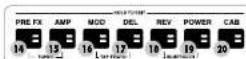
SECTION SWITCHES (14 - 20)
The Section Switches represent different 'sections' in the guitar signal chain. This is the route that a guitar signal travels through a conventional amplifier setup from the guitar to the loud speaker(s).
Pressing the Section Switches (#14 - #20 in this manual) will activate (Red LED on) and bypass (LED off) that Section.
![graph TD A["18 RYRER"] --> B["17 DELAY"] B --> C["16 M60"] D["14 STOPPOX"] --> E["19 POWER AMP"] E --> F["PREAMP"] G["20 CACINET"] --> H["Marshall"] I["Ground"] --> J["Handheld"] style A fill:#f9f,stroke:#333 style B fill:#f9f,stroke:#333 style C fill:#f9f,stroke:#333 style D fill:#f9f,stroke:#333 s…](/content/2026/03/561916/images/5a84e401928421e85e0758a244b8753a236054e05e31a319e4ee04cebf0393a9.jpg)
ENGLISH
stored as part of a Preset.
10.F/C
Use this jack socket to connect the CODE footcontroller (PEDL-91009 sold separately).
Use this dedicated mini-jack socket to connect an MP3 player to practice with or jam along to music.
12. HEADPHONE OUTPUT
Use this mini-jack socket to connect headphones for 'silent' practice. This can also be used as a line out.
13. ON/OFF
This is the mains power ON/OFF switch.
14. PRE FX
This is where you will find FX that would typically plug into a conventional amplifier between the guitar and the amplifier's input. These FX would typically be in pedal form, and also known as 'stompboxes'. The 'stompbox' FX in the PRE FX section are:
'STOMPBOX' FX

Compressor
Compressor affects an audio signal's dynamic range. CODE's compressor decreases, or 'compresses', any part of your guitar sound that peaks above a certain threshold. Any part of your guitar sound that remains below the threshold is unaffected. Compressor can add clarity and consistency to your guitar sound whether clean or overdriven. Compressor's editable parameters are:
| PARAMETER | VALUE RANGE | DESCRIPTION |
| Tone | 0 - 10 | Adjusts the Compressor's higher and lower frequencies. |
| Ratio | 0 - 10 | Controls how much Compression is applied to a signal above the threshold. |
| Compression | 0 - 10 | Adjusts the point at which Compression is applied to the signal. |
| Level | 0 - 10 | Controls the overall volume level of the Compressor. |
Distortion
CODE's stompbox Distortion's three Modes simulate solid-state Distortion and Overdrive FX pedals. GUV Mode is a Marshall Guv'nor™ with Drive and Tone controls. ODR & DIS Modes provide flavours of classic overdrive and distortion stompboxes. Stompbox Distortion is particularly effective when used with classic and vintage MST preamp models to provide more drive and sustain. Distortion's editable parameters are:
| PARAMETER | VALUE RANGE | DESCRIPTION |
| Mode | GUV, ODR & DIS | Marshall Guv'nor, Classic OD pedal & Classic Distortion pedal. |
| Drive | 0 - 10 | Controls the amount of Overdrive or Distortion applied to the signal. |
| Tone | 0 - 10 | Adjusts the amount of upper mid and higher frequency content in the Overdrive or Distortion before the signal reaches the amplifier panel tone controls. |
| Level | 0 - 10 | Controls Distortion's overall volume level. |
ENGLISH
FRONT PANEL FUNCTIONS (CONT.)
- PRE FX (CONT.)
'STOMPBOX' FX

Auto Wah
Auto Wah is a dynamic filter, similar to a Wah Wah pedal. A Wah Wah pedal has a 'rocker' footplate to control the frequency at which the filter operates. Auto Wah has no 'rocker' footplate, so in ENV Mode the rocker automation responds to input level. In LFO Mode the rocker motion is fully automated. Auto Wah's editable parameters are:
PARAMETER VALUE RANGE DESCRIPTION
| Mode ENV & LFO Envelope Filter & Low Frequency Oscillator. |
| Frequency | 0 - 10 | Controls the resting frequency, or fully closed position, of the Wah, thereby setting how far the filter opens when playing. |
| Sensitivity 0 - 10 | ENV Mode: Controls how much the Wah opens in relation to the pick attack.LFO Mode: Controls the speed at which the Wah opens and closes. Set to zero and Auto Wah acts as a fixed rocker Wah. |
| Resonance 0 - 10 | Adjusts the magnitude, bandwidth and shape of the filter's resonant peak. |
Pitch Shifter
Pitch Shifter generates chromatic harmonies with the ability to fine tune. This enables you to pitch up or down to produce octaves or 3rd, 4th or 5th harmonies. Pitch Shifter can also produce more discordant, quirkier sounds. Pitch Shifter's editable parameters are:
PARAMETER VALUE RANGE DESCRIPTION
| Semitone | -12 to +12 | Selects the pitch of the generated note chromatically from an octave below to an octave above the note played. |
| Fine Tune -50 to | +50 Fine tunes the pitch of the generated note. |
| Regeneration | 0 - 10 | Adjusts the percentage of the signal fed back into the Pitch Shifter. Set to zero for a single pitch shifted tone. |
| Mix 0 - 10 Adjusts the balance between the guitar signal and the generated note. |
ENGLISH
FRONT PANEL FUNCTIONS (CONT.)
15. AMP
AMP is short for preamp. MST modelling faithfully recreates classic and modern Marshall valve tones as well as other famous valve amp tones. Each AMP model creates an authentic preamp setting. The MST preamp models are classified into three groups: Clean, Crunch & Overdrive.
Your CODE amplifier's MST preamp models are:
PREAMP MODELS

CLEAN
| JTM45TM | JTM45 2245 on a clean setting. |
| CL DSL | DSL100H on the Classic Gain Channel, Clean setting. |
| CL American | Classic American pure-valve sound. |
| CL JVM | JVM410H on the Clean Channel in Green Mode. |
| Acoustic Simulator | Simulates the sound of an electro-acoustic guitar. |
CRUNCH
| BluesbreakerTM | 1962 Bluesbreaker combo overdriven. |
| PlexiTM | 1959SLP Overdriven. |
| CR American | Classic American valve overdrive. |
| JCM800TM | JCM800 2203 overdriven (high sensitivity input). |
| ‘50s British | Classic British valve combo overdrive. |
OVERDRIVE
| OD JVM | JVM410H on OD1 Channel in Red Mode. |
| OD DSL | JCM2000 DSL Lead 2 Channel. |
| OD American | Classic American higher gain overdrive. |
| OD Silver Jubilee | JCM2555 Silver Jubilee Lead Channel. |
NATURAL
The Natural preamp is designed to be used with external FX without the tonal colour of an MST modelled preamp. It provides EQ for tonal shaping and access to the Gate.
GATE
If the noise Gate is applied, when your sound level drops below the set threshold it will activate, preventing any signal below that threshold from passing through. It progressively attenuates the guitar signal, following its dynamics, to suppress unwanted noise.
PARAMETER VALUE RANGE DESCRIPTION
Threshold 0 - 10 Sets the point at which the Gate begins to close.
ENGLISH
FRONT PANEL FUNCTIONS (CONT.) FRONT PANEL FUNCTIONS (CONT.)
16. MOD
MOD is short for Modulation. Modulation FX in a conventional setup can be in stompbox or rack form and often connect via an amplifier's FX loop:
MODULATION FX

Chorus
Chorus and Vibrato FX apply a subtle pitch variation to the guitar signal taking your sound from shimmering, delicate undulations to full on wobble. This can add depth and width to clean sounds and fatten up solos. Chorus's editable parameters are:
PARAMETER VALUE RANGE DESCRIPTION
| Mode CLS & VIB | Classic Chorus & Vibrato. |
| Speed 0 - 10 Controls the rate of the Chorus or Vibrato effect. |
| Depth 0 - 10 Adjusts the depth of the Chorus or Vibrato effect. |
| Tone 0 - 10 Boosts or cuts high & low frequency content in the sound. |
Flanger
Flanger can produce Chorus-like sounds, but is more vivid and is harmonically more complex. It can create weird and wonderful sonic textures, like 'jet plane' Doppler FX and resonant metallic whooshes. Flanger's editable parameters are:
PARAMETER VALUE RANGE DESCRIPTION
| Mode JET & MET | Jet Flanger & Metallic Flanger. |
| Speed 0 - 10 Controls the rate of the Flanger effect. |
| Depth 0 - 10 Adjusts the depth of the Flanger effect. |
| Regeneration | 0 - 10 Adjusts the amount of signal that is fed back to the effect input, which makes the Flanger effect sharper. |
Phaser
Phaser uses all-pass filters to shift the guitar signal very slightly. Modulating the shifted, or phased, signal in relation to the original signal produces the classic Phaser sound - great for tight funky lines, sweeps and swells. Phaser's editable parameters are:
PARAMETER VALUE RANGE DESCRIPTION
| Mode CLS & VBE | Classic Phaser & Vibe. |
| Speed 0 - 10 Controls the rate of the | Phaser or Vibe effect. |
| Depth 0 - 10 Adjusts the depth of the | Phaser or Vibe effect. |
| Regeneration | 0 - 10 Adjusts the amount of signal that is fed back to the effect input, which makes the Phaser effect sharper. |
ENGLISH EN
16. MOD (CONT.)
MODULATION FX

Tremolo
The cool sounding Tremolo effect is created by the signal amplitude being modulated up and down. Tremolo can produce a variety of sonic characteristics from delicate shimmer to heavy Tremolo throb. Tremolo's editable parameters are:
PARAMETER VALUE RANGE DESCRIPTION
| Mode VLV & SQR | Valve Tremolo & Square Wave Tremolo. |
| Speed 0 - 10 Controls the rate of Tremolo oscillation. |
| Depth 0 - 10 Adjusts the depth of the Tremolo effect. |
| Skew | -50 to +50 | Adjusts the shape of the waveform that is performing the amplitude modulation. The variation of the wave shape across the value range moves between vintage and modern sounding Tremolo. |
17. DEL
DEL is short for Delay. Delay FX in a conventional setup can be in stompbox or rack form and often connect via an amplifier's FX loop. When you select DEL the switch's LED will remain lit red for two seconds before flashing to indicate the current Delay tempo. CODE's Delay FX are:
DELAY TYPES

Studio
Studio Delay is a high fidelity delay line. Its longer delay time enables you to layer what you play in up to 4 second loops. Studio Delay's editable parameters are:
PARAMETER VALUE RANGE DESCRIPTION
| Time | 0 - 4000 | Controls the Delay repeat time in milliseconds. |
| Feedback | 0 - 10 Adjusts the number of Delay repeats. |
| Frequency | 0 - 10 | Adjusts the amount of higher frequency content in the Delay repeats. |
| Level | 0 - 10 | Adjusts the level of the Delay effect. |

FRONT PANEL FUNCTIONS (CONT.)
17. DEL (CONT.)
DELAY TYPES

Vintage
Vintage Delay recreates the sound of analogue delays. Vintage Delay's editable parameters are:
PARAMETER VALUE RANGE DESCRIPTION
| Time 0 - 4000 Controls the Delay repeat time in milliseconds. |
| Feedback 0 - 10 Adjusts the number of Delay repeats. |
| Age 0 - 10 Adjusts the amount ‘flutter’ and higher frequency roll-off for a more vintage sounding Delay. |
| Level 0 - 10 Adjusts the volume level of the Delay effect. |
Multi
Multi Delay adds a rhythmic repeat for more complex delay patterns. Multi Delay's editable parameters are:
PARAMETER VALUE RANGE DESCRIPTION
| Time 0 - 4000 Controls the Delay repeat time in milliseconds. |
| Feedback 0 - 10 Adjusts the number of Delay repeats. |
| Tap Pattern 1 - 4 Select from four different Delay repeat patterns |
| Level 0 - 10 Adjusts the volume level of the Delay effect. |
Reverse
Reverse Delay's repeats run backwards. This can add texture and an eerie quality to your sound. Reverse Delay's editable parameters are:
PARAMETER VALUE RANGE DESCRIPTION
| Time 0 - 4000 Controls the Delay repeat time in milliseconds. |
| Feedback 0 - 10 Adjusts the number of Delay repeats. |
| Frequency | 0 - 10 | Adjusts the amount of higher frequency content in the Delay repeats. |
| Mix 0 - 10 Adjusts the level of the Delay effect relative to the unaffected signal. As the amount to Delay is increased, the unaffected signal is decreased, and vice versa. |
ENGLISH EN
FRONT PANEL FUNCTIONS (CONT.)
17. DEL (CONT.)
DELAY TYPES

Tap Tempo
Set the Delay time by tapping the EDIT selector, or by tapping an assigned button on the optional CODE footcontroller. This enables you to quickly and easily match the Delay time with the tempo of the music you are playing.
To activate TAP TEMPO:
- Press MOD and DEL Section Switches together.
- The display screen will show the Delay time in milliseconds.
- Either turn the EDIT selector to select the delay time in milliseconds or tap it repeatedly to find your delay time or to match a tempo.
- Press EXIT/STORE once to exit TAP TEMPO and return to the main Preset screen.

The DEL Section Switch LED will flash in time to the current Delay time or tempo when active.
18. REV
REV is short for Reverb. Reverb FX in a conventional amplifier setup can be in stompbox form, rack form or integrated within an amplifier. Your CODE's Reverb FX are:
REVERB TYPES

Room
Room Reverb recreates the acoustic reflections of small to larger rooms. Room Reverb's editable parameters are:
PARAMETER VALUE RANGE DESCRIPTION
| Decay | 0 - 10 Controls how long it takes for the reflections to fade. |
| Pre-delay | 0 - 10 | Adjusts the amount of time before the first reflection is heard. |
| Tone | 0 - 10 Adjusts the amount of higher frequency content in the reflections. |
| Level 0 - 10 Adjusts the level of the Reverb effect. |

FRONT PANEL FUNCTIONS (CONT.)
18. REV (CONT.)
REVERB TYPES

Hall
Hall Reverb recreates the longer acoustic reflections of a hall-sized space. Hall Reverb's editable parameters are:
PARAMETER VALUE RANGE DESCRIPTION
| Decay 0 - 10 Controls how long it takes for the reflections to fade. |
| Pre-delay 0 - 10 Adjusts the amount of time before the first reflection is heard. |
| Tone 0 - 10 Adjusts the amount of higher frequency content in the reflections. |
| Level 0 - 10 Adjusts the level of the Reverb effect. |
Spring
Spring Reverb is a classic, analogue way of creating Reverb FX. Conventional Spring Reverb uses a metal tray containing rows of springs. The guitar signal passes along the springs creating a vintage sounding Reverb effect. Spring Reverb's editable parameters are:
PARAMETER VALUE RANGE DESCRIPTION
| Decay 0 - 10 Controls how long it takes for the reflections to fade. |
| Pre-delay 0 - 10 | Adjusts the amount of time before the first reflection is heard. |
| Tone 0 - 10 Adjusts the amount of higher frequency content in the reflections. |
| Level | 0 - 10 | Adjusts the level of the Reverb effect applied to the unaffected signal. |
ENGLISH
FRONT PANEL FUNCTIONS (CONT.)
18. REV (CONT.)
REVERB TYPES

Stadium
Stadium Reverb recreates the acoustic reflections of a very large space. Stadium Reverb's editable parameters are:
PARAMETER VALUE RANGE DESCRIPTION
| Decay 0 - 10 Controls how long it takes for the reflections to fade. |
| Pre-delay 0 - 10 | Adjusts the amount of time before the first reflection is heard. |
| Tone 0 - 10 Adjusts the amount of higher frequency content in the reflections. |
| Level 0 - 10 Adjusts the level of the Reverb effect. |
19. POWER
This is the section of a conventional amplifier that provides power to drive the speaker(s). The power valves are an integral part of how an all-valve amplifier sounds. MST modelling faithfully recreates the four valve power amps models in CODE:
POWER AMP MODELS

Classic Marshall 100W
Class A/B 100 Watt with EL34 valves.
PARAMETER VALUE RANGE DESCRIPTION
| Presence 0 - 10 in a conventional amplifier Presence is a power stage function that adds higher frequency content to the sound. |
| Resonance | 0 - 10 | In a conventional amplifier Resonance is a power stage function that adds lower end thud to the sound. |
ENGLISH
FRONT PANEL FUNCTIONS (CONT.)
- POWER (CONT.)
POWER AMP MODELS

Vintage Marshall 30W
Class A/B 30 Watt with 5881 valves.
PARAMETER VALUE RANGE DESCRIPTION
| Presence 0 - 10 | In a conventional amplifier | Presence is a power stage function that adds higher frequency content to the sound. |
| Resonance 0 - 10 | In a conventional amplifier | Resonance is a power stage function that adds lower end thud to the sound. |
British Class A
Class A 30 Watt with EL84 valves.
PARAMETER VALUE RANGE DESCRIPTION
| Presence 0 - 10 In a conventional amplifier | In a conventional function that adds higher frequency content to the sound. |
| Resonance 0 - 10 In a conventional amplifier | In a conventional stage function that adds lower end thud to the sound. |
American Class A/B
Class A/B 100 Watt with 6L6 valves.
PARAMETER VALUE RANGE DESCRIPTION
| Presence 0 - 10 | In a conventional amplifier | Presence is a power stage function that adds higher frequency content to the sound. |
| Resonance 0 - 10 | In a conventional amplifier | Resonance is a power stage function that adds lower end thud to the sound. |
ENGLISH EN
FRONT PANEL FUNCTIONS (CONT.)
- CAB
CAB is short for Speaker Cabinet. A cab's speaker configuration and its size play a significant role in the overall sound produced by the whole amplifier setup.
The MST modelled speaker cabinets in your CODE amplifier are faithful recreations of classic Marshall cabs:
CABINET TYPES

1960
1960V
1960AX
960HW
1926
1930
1926V
1936V
1948
1912
1974CX
Classic 4 x 12" Celestion G12-T75 speakers.
4 x 12" with Celestion 'Vintage 30' speakers.
4 x 12" with Celestion G12M-25 speakers
4 x 12" with Celestion G12H-30 speakers.
Classic 2 x 12" Celestion G12-T75 speaker
2 x 12" with Celestion 'Vintage 30' speakers.
2x12 With Celestion Vintage 50 speakers for Classic 1 x 12" Celestion G12-B150 speakers.
1 x 12" Handwired with G12M-20 speaker.
- EXIT/STORE
While on any screen pressing EXIT/STORE returns you to the main Preset screen.
Press and hold EXIT/STORE while on any screen to QUICK STORE your edited settings. Your edited settings will store over the current Preset and the display will return you to the main Preset screen.

To discover how to store and name a Preset, go to STORING A PRESET in this manual.
- DISPLAY
The Display Screen shows a Preset's name, number, parameter settings and the tuner display.
EDITING A PRESET
To edit PRE FX, AMP, MOD, DEL, REV, POWER and CAB section settings:
- Hold down the Section Switch that you wish to edit (#14 - #20 in this manual) – the switch LED will light green.
- The display screen will show the current preamp, FX, power stage or speaker cab.
- Turn the PRESET selector (#8 in this manual) to scroll through the section's preamps, FX, power stages or speaker cabinets.

Speaker cabinet models are not editable.
- When you have found the preamp, FX or power stage that you want to edit, push the PRESET selector to begin editing.
- The display screen will show the parameter and its current value.
-
To edit the parameter value, turn the PRESET selector.
-
To move to the next parameter (if there is one), press the PRESET selector.
- To edit that parameter value, turn the PRESET selector.
- Repeat for all parameters and parameter values of the Sections that you wish to edit.
- When you are happy with your edited Preset you can store it to your CODE amplifier's memory.

To learn how to store an edited Preset, refer to STORING A PRESET in this manual.
- If you wish exit without storing your edits, press EXIT/STORE (# 21 in this manual). This will return you to the main Preset screen.
- Scroll away from the Preset and it will revert to its last stored settings.

If you wish to keep your edited settings ensure that you store before moving off that Preset.
STORING A PRESET
To store an edited Preset, Store an edited Preset to a new location, and to rename an edited Preset:
- When you have finished editing, press & hold EXIT/STORE briefly until the Preset name begins to flash.
- If you wish to store your edited Preset to another location, turn the PRESET selector to find a new location, then press & hold EXIT/STORE until STORED appears on the display screen.

Be sure that you want to store to the Preset location that you have selected, as the Preset in that location will be overwritten.
ENGLISH EN
STORING A PRESET (CONT.)
To rename the edited Preset and store to the current location:
- While the Preset name is flashing, press & hold EXIT/STORE again briefly until the Preset name is displayed with the cursor flashing at its first letter
- Turn the PRESET selector to change the letter or character.
- When you have found the letter or character you want, push PRESET to select it. The cursor will automatically move to the next character.
- Repeat until you have renamed the Preset.
The Section Switches act as naming shortcuts:
NAMING SHORTCUTS
| PRE FX | Clear |
| AMP | Number |
| MOD | Upper / Lower Case A |
| DEL | Upper / Lower Case |
| REV | Space |
| POWER | Backspace |
| CAB | Cancel |
- To complete the store process, press & hold EXIT/STORE once more until STORED appears on the display screen. Your edited Preset has now been stored to CODE's memory.
BLUETOOTH
Pressing REV and POWER Section Switches together (#18 & #19 in this manual) accesses the Bluetooth® pairing function:
- The display screen will show 'Bluetooth, pairing enabled' and your CODE amplifier's pairing ID.
- The blue LED on EXIT/STORE (#21 in this manual) will flash while pairing.
- When paired, the blue LED will stop flashing and remain lit.
- When streaming audio, use the MASTER volume control or your music player to set the volume level.

Audio streamed via Bluetooth will bypass CODE's panel features, with the exception of MASTER volume.
The Marshall Gateway™ App enables you to control your CODE amplifier remotely and access Marshall Gateway using your iOS/Android device. Download Marshall Gateway now from the App Store or Google Play.



GUITAR TUNER
Pressing the PRE FX and AMP Section Switches (#14 & #15 in this manual) together accesses the guitar TUNER:
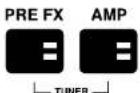
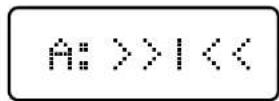
- Pluck a string and the note you are playing will display.
- Tune the string until the name of the note you wish to tune to appears on the screen.
- Arrows to the left of the vertical line means the note is flat; arrows to the right of the vertical line means the note is sharp.
- When the arrows disappear, that string is tuned to the displayed note.
- Press EXIT/STORE to exit the Tuner.
FACTORY RESET
Performing a factory reset will return CODE's Presets back to when it was new.
Before performing a factory reset, be sure that you want to overwrite all of your personal Presets.
To perform a factory reset:
- Power OFF the amplifier using the ON/OFF switch (#13 in this manual).
- Whilst holding down the AMP Section Switch, turn the power ON.
- The screen will display a notification that the amplifier is about to be returned to its factory settings.
- If you are sure that you want to perform a factory reset, press and hold the EXIT/STORE switch to confirm.
- If you do not want to restore the factory presets, pressing any other switch will cancel the
factory reset operation and boot the amplifier as normal.
| Manufacturer: | Marshall Amplification Plc,Denhigh Road,Bletchley,Milton Keyns.Burks,United KingdomMK1 1DQ |
| Kind of equipment: Audio Equipment |
| Type designation: CODE25, CODE50 |
We, Marshall Amplification Plc, declare under our sole responsibility that the above listed products complies with the following Directives:
- EMC Directive 2014/30/EU:
- Low Voltage Directive (LVD) 2014/35/EU:
- R&TTE Directive 1999/5/EC
The following harmonised standards have been applied:
| 1. EMC | • EN 55053:2013• EN 55020:2007+A11:2011• EN 61000-3-2:2014• EN 61000-3-3:2013 |
| 2. LVD • EN 60065:2014 | |
| 3. R&TTE | Health & Safety(Article 3(1)(a)) | • EN 62479:2010• EN 60065:2002 + A1:2006 + A11:2008 - A2:2010 - A12:2011 |
| EMC(Article 3(1)(b)) | • ETSI EN 301489-1V1.9.2:2011• ETSI EN 301489-17 V2.2.1:2012 |
| Spectrum(Article 3(2)) | • ETSI EN 300328 V1.9.1:2015 |
| Signature: Nhaen@ MBon Date: 2nd May 2016 | | |
CE 16
| Name of the responsible party: Jam Industries USA, LLC |
| Address of the responsible party: 1649 Barclay Blvd, Buffalo Grove, IL 60089, United States of America. |
| Telephone number of the responsible party: | B00-877-6863 |
| Name of equipment: MD116D Guitar Amplifiers |
| Model No.: CODE25, CODE50 | |
This device complies with part 15 of the FCC Rules. Operation is subject to the following two conditions: (1) This device may not cause harmful interference, and (2) this device must accept any interference received, including interference that may cause undesired operation.
ENGLISH EN

AVERTISSEMENT ! CONSIGNES DE SÉCURITÉ IMPORTANTES
3) Usez celle notice
2) Conserve 68 instructions.
3) Terce compte de tous les cas desements.
4) Subvez of the notice.
JCM2555™ Silver Jubilee™
Reverse (Sens inverse)
Vintage Marshall 30W
DÉCLARATION DE CONFORMITÉ
JCM2555™ Silver Jubilee™
JCM2555 Silver Jubilee Lead Channel.
NATURAL
JCM2555™ Silver Jubilee™
Vintage Marshall 30W
JCM2555™ Silver Jubilee™
Turning the BASS control will adjust the warmth and low-end depth of your sound.
5. MIDDLE (MEDI)
| CRUNCH |
| BluesbreakerTM | 1962 Bluesbreaker combo in overdrive. |
| PlexiTM | 1959SLP in overdrive. |
| CR American | Classic American valvolare in overdrive. |
| JCM800TM | JCM800 2203 in overdrive (ingresso ad alta sensibilità). |
| ‘50s British | Classic British valvolare combo overdrive. |
| OVERDRIVE |
| OD JVM | JVM410H sul canale OD1 in modalità red. |
| OD DSL | JCM2000 DSL canale Lead 2. |
| OD American | Classic American alto guadagno overdrive. |
| OD Silver Jubilee | JCM2555 Silver Jubilee canale Lead. |
Vintage Marshall 30W
Classe A/B 30 Watt con valvole 5881.
PARAMETRO GAMMA VALORI DESCRIZIONE
JCM2555™ Silver Jubilee™
Marshall Amplification plc, Denbigh Road,
Bletchley, Milton Keynes, MK1 1DQ, England.
Telephone: +44 (0) 1908 375411 | Fax: +44 (0) 1908 376118
Registered in England. Registered Number: 805676
M3311.347 | CATS-90340-v02