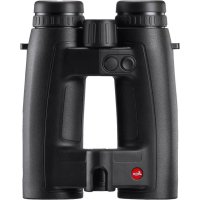
Geovid HDR 2700 8x42 - Laser pointer LEICA - Free user manual and instructions
Find the device manual for free Geovid HDR 2700 8x42 LEICA in PDF.


| Product type | Laser rangefinder binoculars with advanced ballistic compensation |
| Model | Leica Geovid HDR 2700 8x42 |
| Dimensions (L x H x D) | approx. 127 x 81 x 177 mm |
| Weight (with battery) | approx. 950 g |
| Power supply | 1 cylindrical lithium battery 3 V type CR2 |
| Battery life | approx. 2000 measurements at 20 °C |
| Maximum range | Up to 2550 m (HD-R) on reflective targets |
| Measurement accuracy | ± 0.5 m (10-200 m), ± 1 m (200-400 m), ± 0.5% (> 400 m) |
| Magnification | 8x |
| Objective lens diameter | 42 mm |
| Exit pupil | 5.2 mm |
| Field of view at 1000 m | approx. 130 m |
| Diopter adjustment | ± 4 dpt, with adjustment rings |
| Waterproof | Waterproof to a depth of 5 m |
| Operating temperature | -20 to 55 °C (electronics), -30 to 55 °C (mechanics) |
| Laser class | Class 1 (IEC/EN) – eye-safe |
| Ballistic functions | Equivalent horizontal range (EHR), holdover (HOLD), reticle adjustment (Clicks/MoA) – HD-B only |
| Measuring mode | Single and scan (continuous measurement) |
| Condition display | Inclination angle, temperature, atmospheric pressure |
| Maintenance and cleaning | Clean lenses with a damp cloth and chamois leather; clean housing with a damp cloth; do not use alcohol |
| Safety | Do not point the laser at eyes; do not disassemble; remove battery after impact |
| Spare parts and repairability | Spare parts available (eyecups, caps) via Leica after-sales service; repair only by Leica Customer Care |
| General information | Multilingual user manual; supplied with case, strap, battery, caps, microSD memory card |
Frequently Asked Questions - Geovid HDR 2700 8x42 LEICA
User questions about Geovid HDR 2700 8x42 LEICA
0 question about this device. Answer the ones you know or ask your own.
Ask a new question about this device
Download the instructions for your Laser pointer in PDF format for free! Find your manual Geovid HDR 2700 8x42 - LEICA and take your electronic device back in hand. On this page are published all the documents necessary for the use of your device. Geovid HDR 2700 8x42 by LEICA.
USER MANUAL Geovid HDR 2700 8x42 LEICA
GEOVID HD-B3000 / GEOVID HD-R2700
This equipment has been used and found in currently with the limits for Class B digital device, pursuant to Part 10 of the SEC Rules. These limits are designed to provide reasonable protection against harmful interference in a residential installation. This equipment generation, associated radiative radio frequency energy and, if not installed and used in accordance with the instructions, may cause harmful interference to radiocommunications. However, there is no guarantee that interference will occur in a particular
installation. If this equipment causes harmful interference to radio or biobat monitor receptor, which can be determined by using the equipment off and on, the user is encouraged to try to correct such interference by one or more of the following measures:
- Rerient of relonate the receiving antenna.
- Increase the separation between the equipment and receiver.
- Connect the equipment into an outlet on a circuit different from that, which the receiver is connected.
- Consult the dealer or an experienced radio/TV technician for help.
FCC CAUTION:
To assure continued compliance, follow the attachment instruction and use any fielded infrastructure codes with ferrite core when connecting to a computer or peripheral devices. Any changes or modifications not expressly approved by proprietary responsible for compliance could valid the user's authority to operate this equipment.
DECLARATION OF CONFORMITY
Trade Name:16C3
Model No.: 8905 (for Geovid x42) / 5980 (for Geovid x56)
Responsible party/Support contact:
Locus Carcinol Inc.
1PearsonUnitA
Allendale, New Jersey
T+120195005
Fag+14019951684
This device complies with Part 15 of the ICDRU, Operator is subject to the following requirements: (1) This device may not cause harmful interference, and (2) the devices must conform any interference received, including interference that may cause undesired operation.
FOR CANADA ONLY:
CANICES-17NMB-918
FOR JAPAN ONLY:
US = Anzeige in Yards
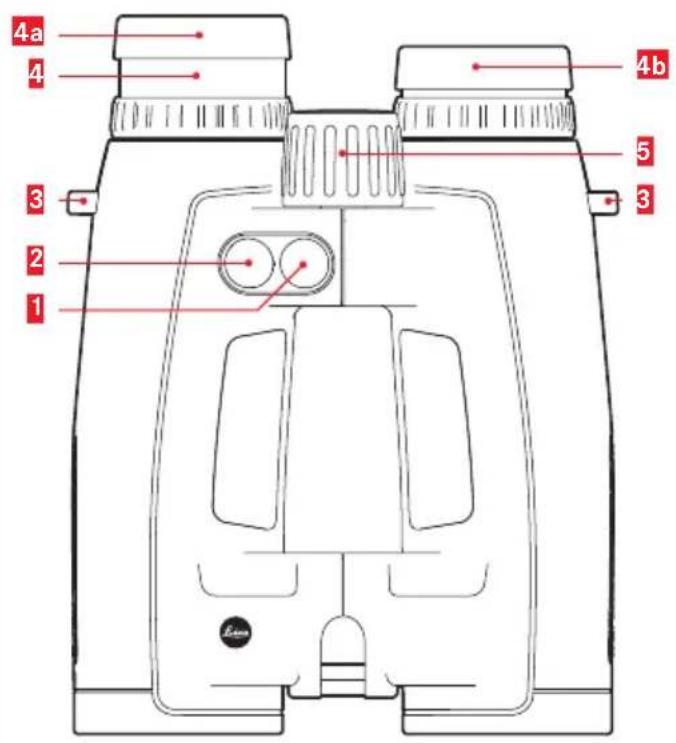
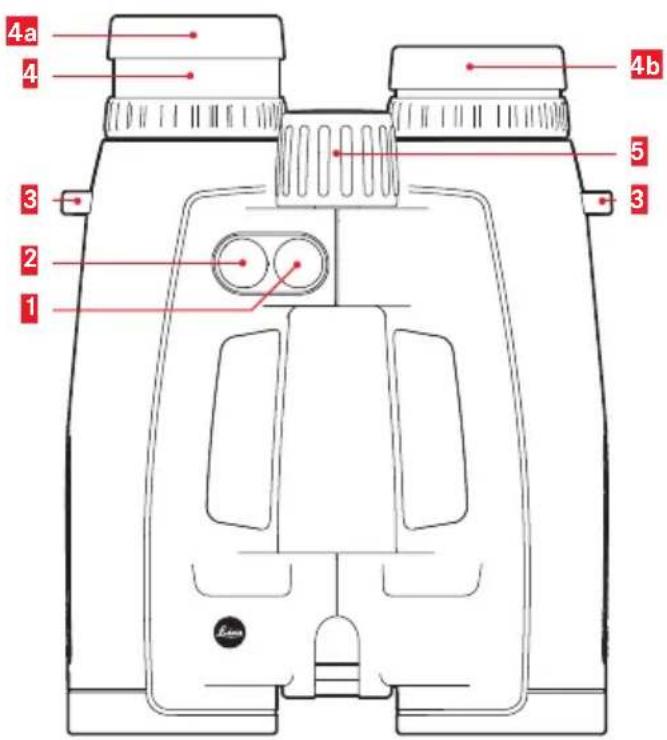
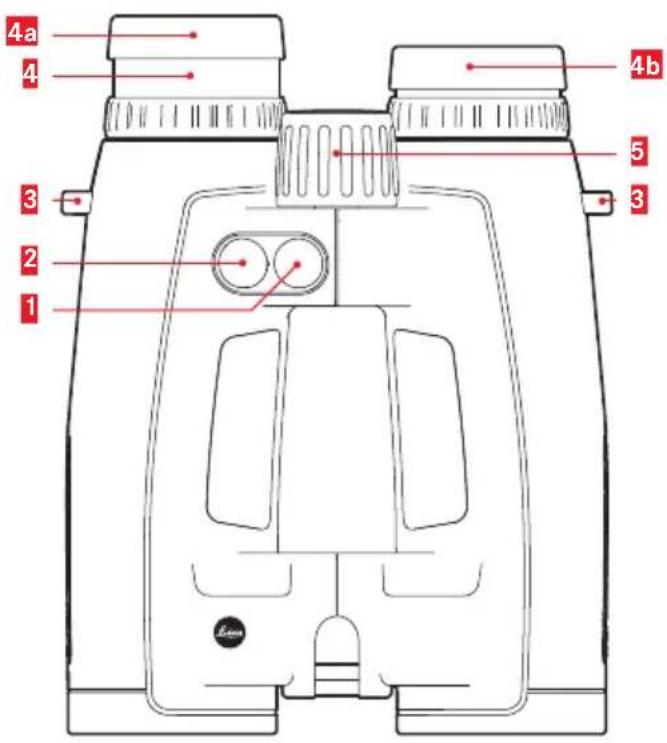
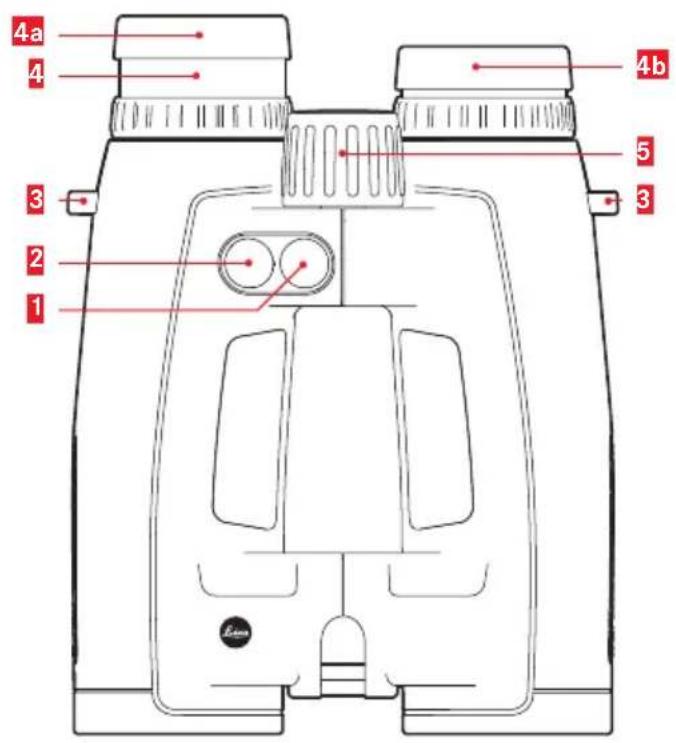
1 Main/trigger button for distance measurement
2 Secondary/menu button
3 Eyelets for the carrying strap
4 Eyecup
Turned out for use without eye glasses (4 steps)
Turned in for use with eye glasses
5 Central focusing wheel
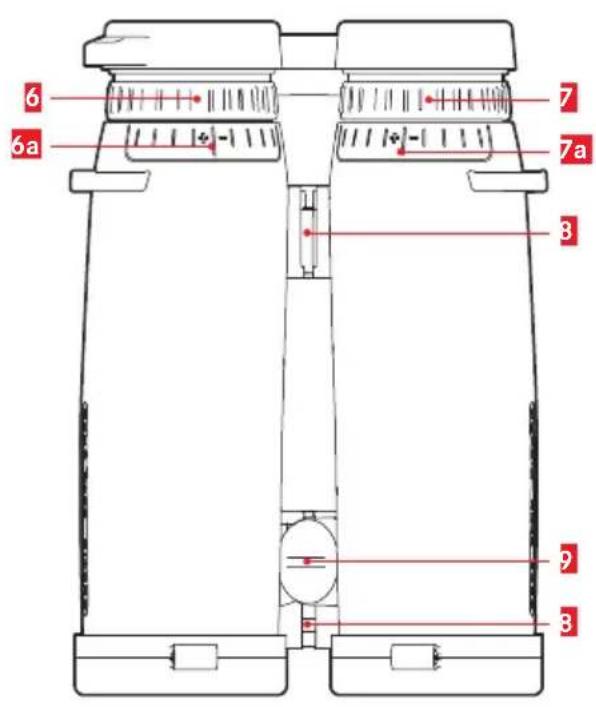
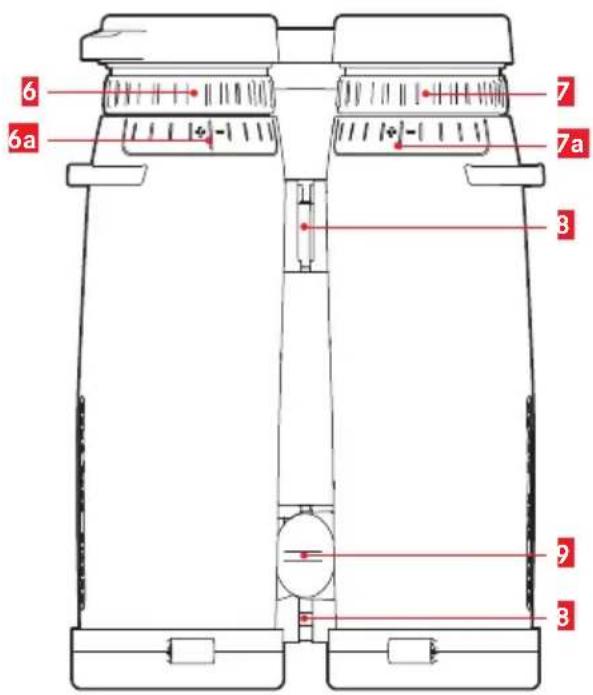
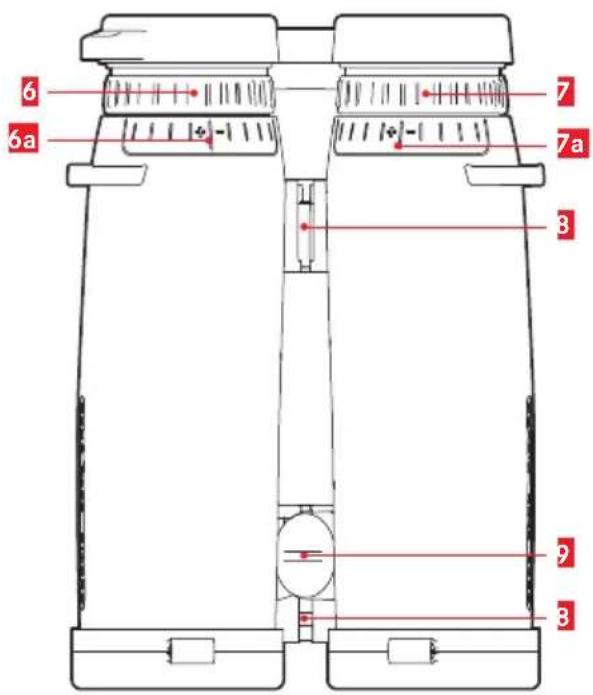
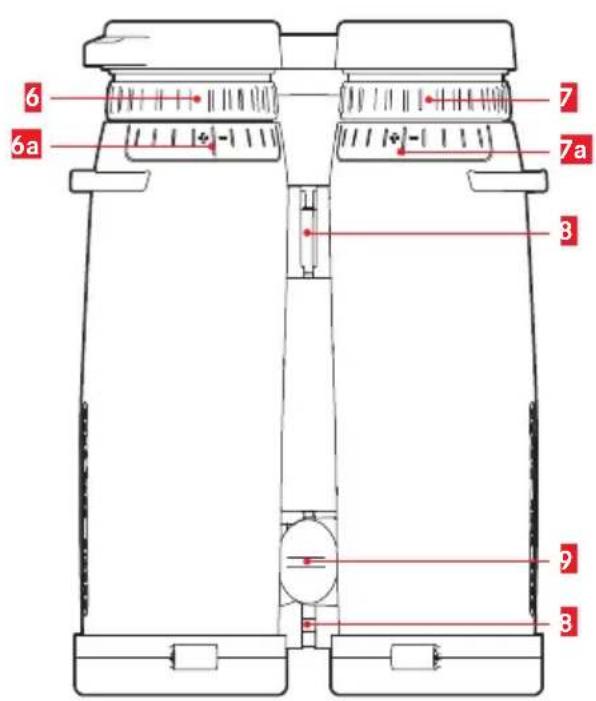
6 Diopter compensation ring with
scale
7 Diopter compensation ring for displays with
scale
Hinged joints for adjusting the eyebase
Battery compartment/memory card slot cap (closed)
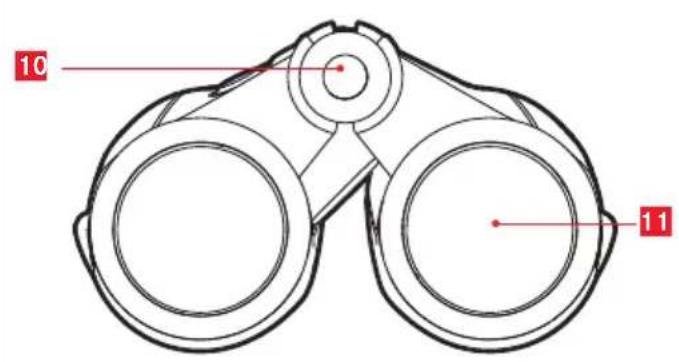
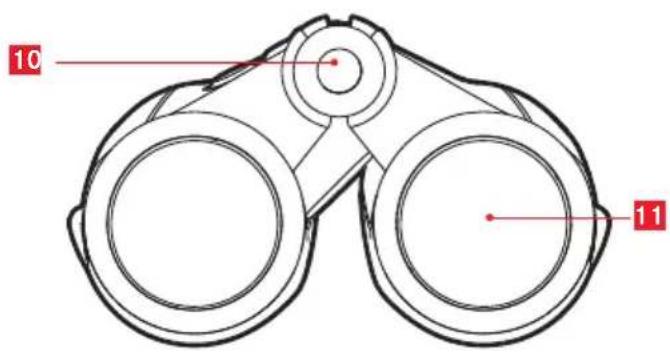
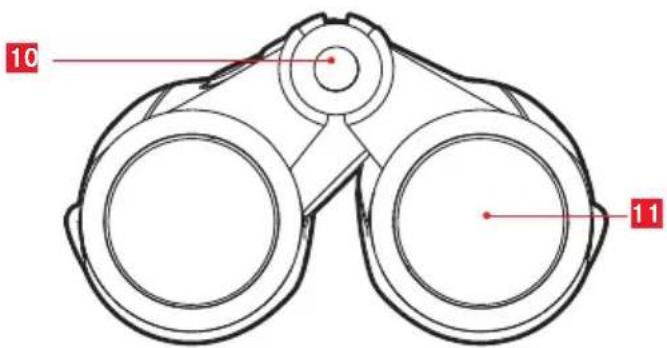
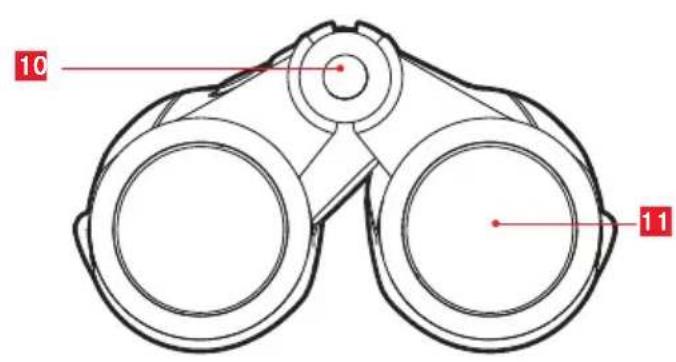
10 Laser transmission lens
11 Lens
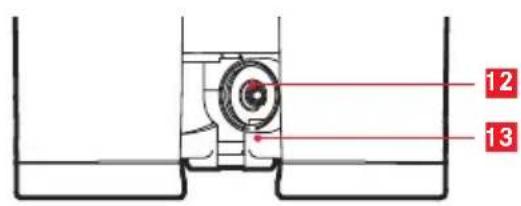
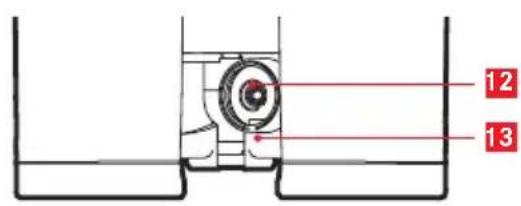
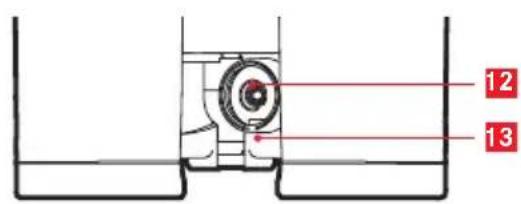
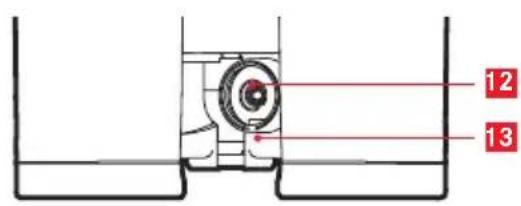
12 Battery compartment
13 Memory card slot (only HD-B 3000)
WARNING
This indication alerts you to the fact that any improper use ignoring the contents described herein can result in potential death or serious injury.
CAUTION
This indication alerts you to the fact that any improper use ignoring the contents described herein can result in potential injury or material loss.
SAFETY PRECAUTIONS (Laser)
The Leica Geovid uses an invisible laser beam. Be sure to observe the following:
WARNING
- Use of controls or adjustments or performance of procedures other than those specified herein may result in hazardous radiation exposure
- When you see the display through the eyepiece, please be aware that the product is active and emitting an invisible laser and the laser aperture should not be pointed toward anyone
- Do not take the product apart or modify the product in any way to expose internal electronics that might cause damage or electric shock
- Do not depress any button while aiming at a human eye or while looking into the optics from the objective side
- Do not leave the Leica Geovid within the reach of small children
CAUTION
- Do not aim at the eye.
- Do not point the laser at people.
- Do not operate the unit with other additional optical elements, such as lenses or binoculars. Using an optical instrument together with the Leica Geovid increases the danger of damaging the eyes.
- When not measuring, please keep your fingers away from any button to avoid accidentally emitting the laser beam.
-
When not in use for an extended period, please remove the battery from the body.
-
Do not disassemble/remodel/repair the Leica Geovid. The emitting laser may be harmful to your health. A product that has been disassembled/remeoded/ repaired is not guaranteed by the manufacturer.
- If the Leica Geovid's body cover is damaged, or if it emits a strange sound due to dropping or some other cause, remove the battery immediately and stop using.
Technical Data (Laser)
| Class IEC/EN Class 1 | |
| Wavelength (nm) 897 | |
| Pulse duration (ns) 57 | |
| Output (mW) 0,89 | |
| Beam divergence (mrad) | Vertical: 2.03, Horizontal: 1.13 |
The production date can be found on the stickers in the Guarantee Card and/or on the packaging. The date is written as follows: Year/Month/Day

FOREWORD
Dear Customer,
the name Leica is synonymous worldwide with the highest quality, precision mechanics, extreme reliability and long service life.
We wish you a great deal of enjoyment and every success with your new Leica HD-B 3000/HD-R 2700.
These binoculars with integrated rangefinder emit harmless, invisible infrared impulses and calculates the distance to an object from the reflected signal component using an in-built microprocessor. The device furthermore captures ambient and operating parameters. These values, combined with the measured distances, allow the device to calculate and display the relevant holdover values, required corrective click adjustments of the reticle on a rifle scope, or equivalent horizontal distances for various, selectable and programmable ballistic curves.
We recommend reading this manual in its entirety to ensure that you will be able to correctly utilize all functions of this high-quality and versatile device.
SCOPE OF DELIVERY
- Binoculars
- 1 lithium battery 3 V, type CR 2
- Carry strap
- Carry case
- Eyepiece cap
- 2 lens caps
- microSD memory card
- microSD card adapter
- Guarantee Card
- Test certificate
Warning note
As with all binoculars and telescopes, avoid looking directly at bright light sources with your Leica Geovid HD-B/HD-R, which could damage your eyes and eyesight.
DISPOSAL OF ELECTRICAL AND ELECTRONIC EQUIPMENT
(Appplies within the EU and for other European countries with active waste separation policies)
This device contains electrical and/or electronic components and must therefore not be disposed of in general household waste! Make sure to bring this device to a local disposal collection point for recycling. This service is free of charge. Any standard or rechargeable batteries used in this device must be removed and disposed of separately in accordance with local regulations (please read the device manual for details). Please contact your local authorities, waste disposal collection point or the retailer, from whom you purchased the device for more information on correct waste disposal.
EN
TABLE OF CONTENT
Areas of use. 39
Attaching the lens caps. 39
Attaching the carry strap and eyepiece cap 39
Inserting/replacing the battery. 40
Battery charge level 41
Adjusting the eyecups/ use with and without eye glasses. 42
Adjusting the interocular distance 42
Adjusting the focus / diopter compensation.....43
Menu control basics. 44
Setting the unit of measure 44
Distance measurement 45
Scan mode 46
Measurement range and accuracy. 47
Atmospheric conditions display. 48
Determining the ballistic curve 49
Setting the ballistic curve 50
Setting the zeroing distance 51
Set ballistic curve display and zeroing distance display 51
Ballistic output formats 52
Equivalent horizontal distance 53
Holding 53
Impact point correction using elevation adjustment (Click/MoA adjustment) 54
Settings and selection of ballistic output formats 54
Display and verification of set ballistic parameters. 55
Implementing additional ballistic curves. 56
Care/cleaning 58
Replacement parts. 58
Troubleshooting 59
Technical data 60
Leica Service Addresses 61
Ballistics tables.. Appendix
AREAS OF USE
Your Leica Geovid HD-B-/HD-R binoculars feature a robust magnesium housing for reliable use in adverse ambient conditions. Humidity or rain are no issue - these binoculars are completely waterproof to a depth of 5m and the nitrogen filling prevents condensation on internal optical elements.
ATTACHING THE LENS CAPS
The rubber rings on the caps are pulled over the binocular tubes on the lens side, so that the caps open up downward to mount the two lens caps.
ATTACHING THE CARRY STRAP AND EYEPIECE CAP
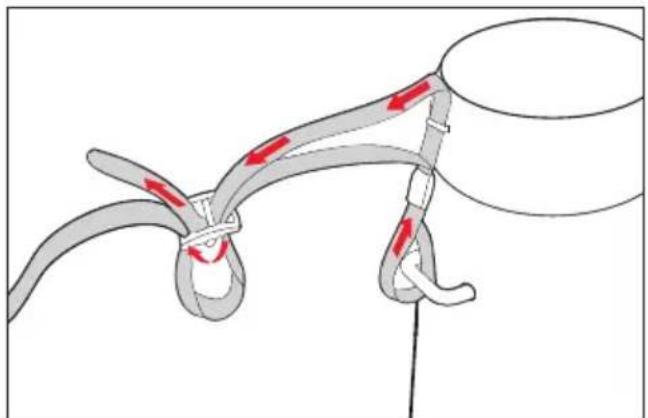
Note
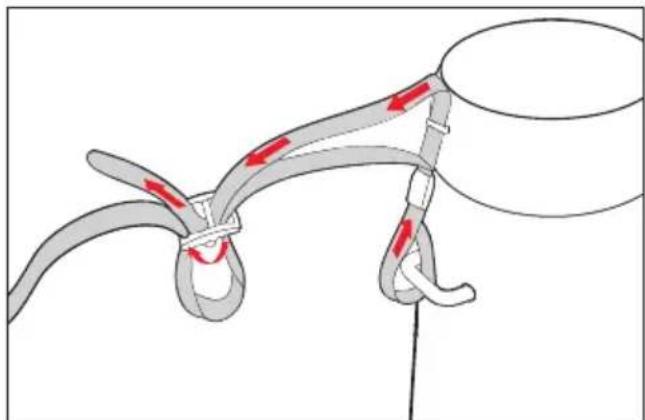
Thread the carry strap through the loop on the eyepiece cap to secure it and then attach the carry strap on the left side of the binoculars.
INSERTING/ REPLACING THE BATTERY
Your Leica Geovid HD-B/HD-R is powered by a cylindrical 3 V lithium cell (type CR 2).
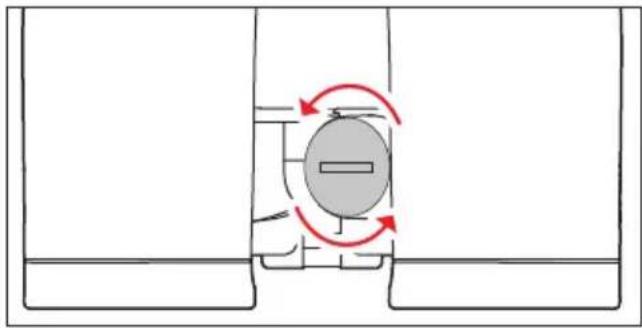
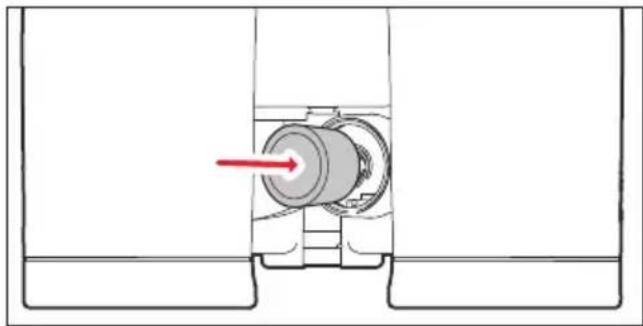
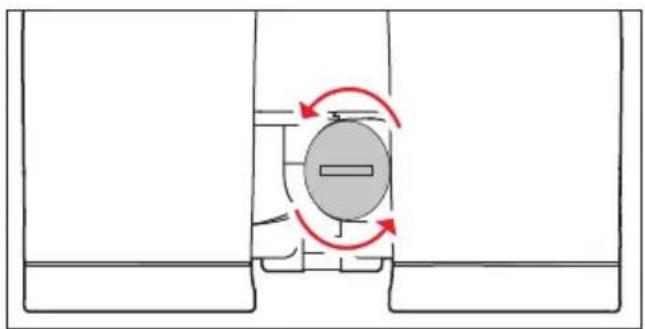
- Open the cap over the battery compartment 12 by turning it counter-clockwise (e.g. with a coin).
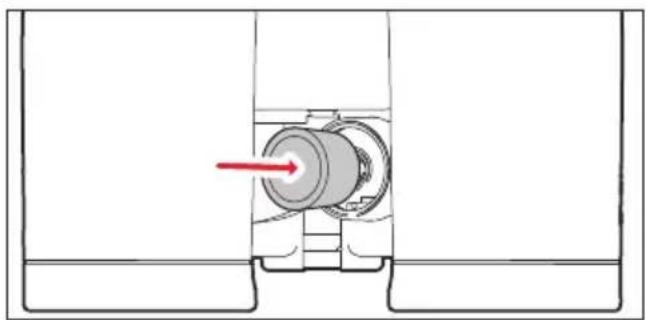
- Insert the battery so that the positive contact goes in first (note the markings in the battery compartment).
- Close the cap again by turning it clockwise.
Notes
- Low temperatures impair battery performance. Carry the binoculars close to the body in cold conditions and insert a fresh battery.
- Remove the battery if the binoculars will not be used for an extended period of time.
- Store batteries in a cool, dry place.
BATTERY CHARGE LEVEL
A fully charged, new battery will suffice for over 2000 measurements at ambient temperatures around 20^ .
Battery life can be significantly shorter or longer depending on operating conditions. Low temperatures and frequent use of the scan mode (see p. 46) will shorten battery life.
A depleted battery is indicated by a flashing measured value and reticule display. The battery will be able to perform another 50 measurements after the indicator flashes for the first time, the range will, however, decrease with each new measurement.
Leica recommends using brand name batteries only.
Attention
- Never throw batteries into an open fire. Do not heat, recharge, disassemble or break open a used battery.
- Depleted batteries must not be disposed of in regular household waste, because they contain toxic materials that are harmful to the environment.
- Return the depleted battery to a retailer offering a battery collection point or bring it to a local special waste collection point offered by the local authorities to ensure correct recycling.
ADJUSTMENT OF THE EYECUPS/ USE WITH/WHOUT EYE GLASSES
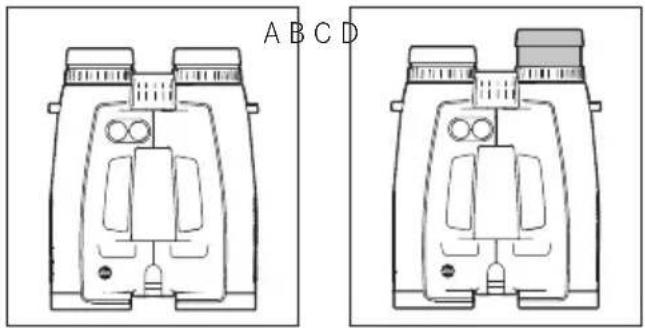
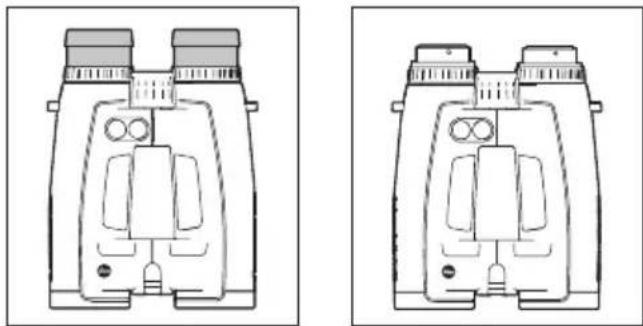
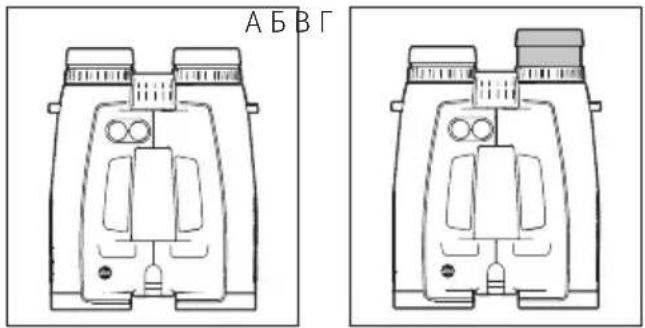
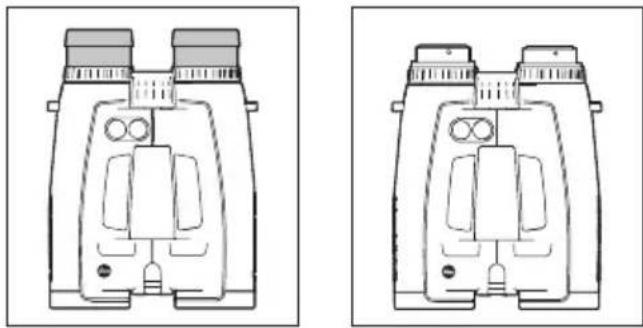
Twist the eyecups 4 to adjust them and click them securely into place in the desired position. They can also be removed for cleaning. Users with eye glasses (Figure A) should keep the eyecups in their fully turned in position. Users without eye glasses turn the eyecups in counterclockwise direction until the most comfortable position is found. Four adjustment positions are available (Figure B). Removing the eyecups for cleaning (Figure C) if the eyepiece shows signs of heavy soiling. Turn the eyecups all the way out and remove them with a gentle pull.
Adjust the interocular distance by moving the central hinged joints 3. The fields of view on the left and right must merge into one circular image.

ADJUSTING THE FOCUS/ DIOPTER ADJUSTMENT
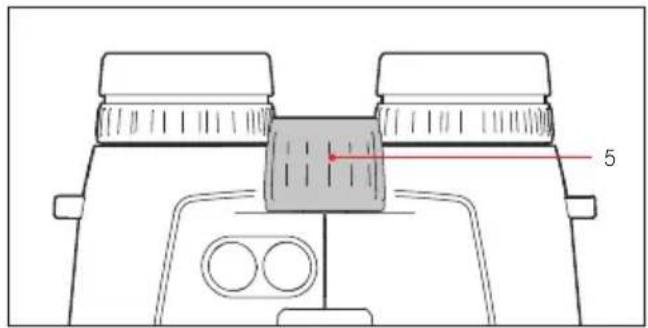
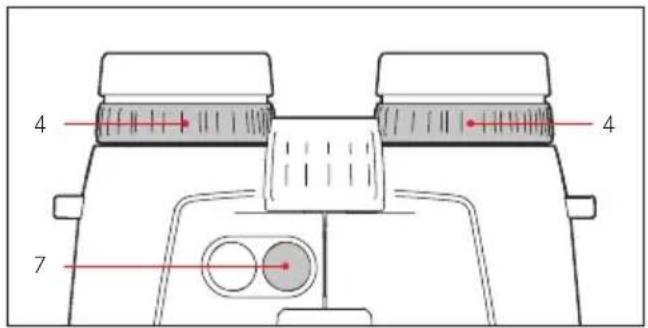
Use the central focusing wheel 5 to set the focus for objects at various distances on the Leica Geovid HD-B/HD-R. The two diopter compensation rings 6/7 allow a focus adjustment of the reticule to compensate for individual vision defects when used without eye glasses.
Follow the instructions below with care. Only then will you be able to take advantage of the full optical functionality of the device.
- Turn both diopter compensation rings to their zero position.
- Focus on the distant object with both eyes and turn the central focusing wheel.
- Press the main/trigger button 1 to activate the reticule.
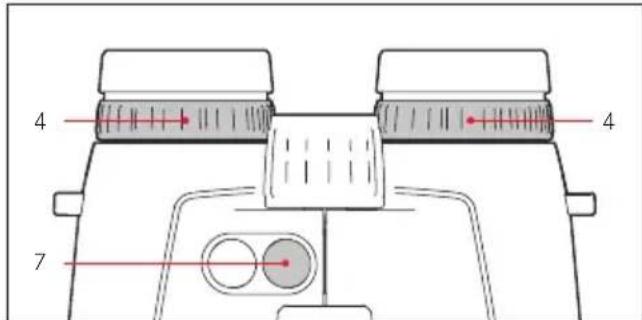
- Once the reticule appears in your field of vision, turn the diopter compensation ring on the right (red index) until the reticule on the right is in clear focus while focusing on the object with both eyes.
- With the reticule still activated, but only focusing on the object with your right eye, use the central focusing wheel again to finalize the image focus on the right.
- Next, use the diopter compensation ring 6 on the left to optimize the image focus on the left.
- The set values are displayed on the diopter scales 7a / 6a “+” and“-”.
Note
When setting the focus on either the left or right, close the relevantly other eye or cover the relevant other lens at the front of the binoculars.
MENUCONTROLBASICS
The following applies for all settings:
-
The main menu consists of four items: Yard/ Meter display (EUUS), Ballistics Curve (baLL), Zeroing Distance (Sld) and Ballistic Output Format (ABC). Please read the relevant sections in this manual for details on their function.
-
The main menu and the individual setting options appear in a continuous loop, which means that all items/settings can be reached by pressing the button repeatedly.
SETTING THE UNIT OF MEASURE
Your Leica Geovid HD-B/HD-R can be set to imperial units of measure (US) or metric units of measure (EU), i.e. Yards & Inches/Fahrenheit/ Inches of Mercury for Distance/Temperature/Air Pressure, or Meter & Centimeter/Celsius/Millibar. This setting also encompasses the units of measure of the holdover, ballistic curves and zeroing distance. Your Leica Geovid HD-B/HD-R is set to yards ex works.
Setting
- Press and hold the secondary/menu button 2 (≥ 3s)
EULS appears (flashing).
- Press the main/trigger button 1 to select your preferred unit of measure.
U5 = display in yards
EU = display in meters
Note
The current setting is always visible in the display: M (for meters) or Y (for yards) appears in addition to the digits displayed.
-
Save your setting by briefly pressing the secondary/menu button.
-
The saved setting is initially lit continuously as confirmation, then the display switches to the next menu item ("BALL" = Ballistics Curve). The display disappears if no other settings are made.
DISTANCE MEASUREMENT
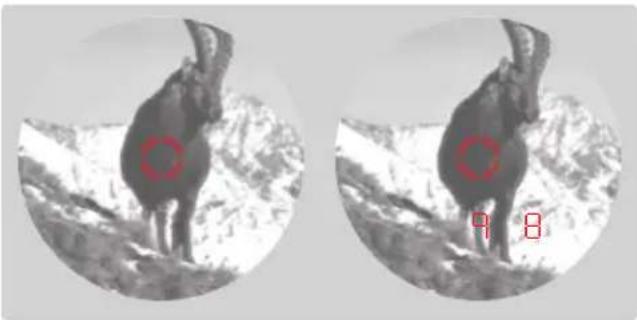
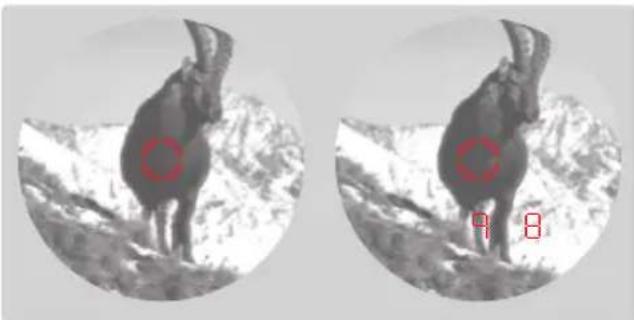
Aim directly at an object to measure its distance. Proceed as follows:
- Press the main/trigger button 1. The rangefinder activates.
The reticule appears.
The reticule remains lit for another 6 seconds after you release the main/trigger button. The reticule remains lit continuously while the button is pressed and held.
- Aim at the object while the reticule is lit.
- Press the main/trigger button again.
a. The reticule disappears briefly during the measurement.
b. The measured value is displayed.
You can start another measurement by pressing the main/trigger button at any time, as long as the reticule display is lit.
-
-
- appears if
-
- the distance to the object is less than 10 meters/yards or
the range is exceeded or - the object is not sufficiently reflective.
When the display disappears, the rangefinder shuts down automatically.
SCAN MODE
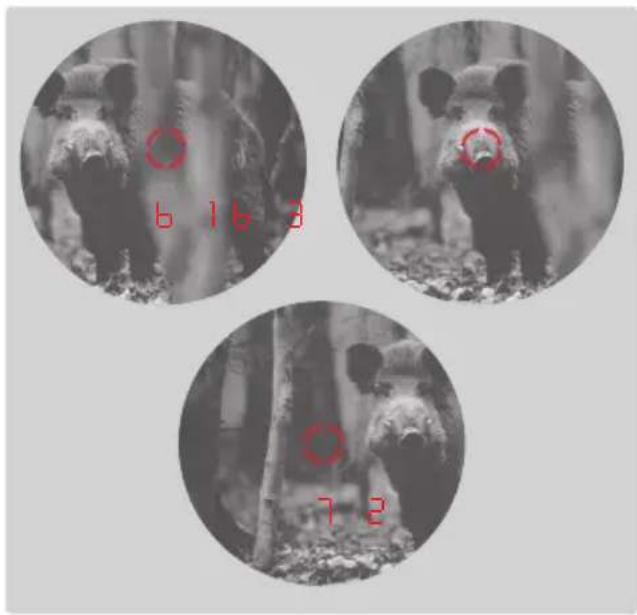
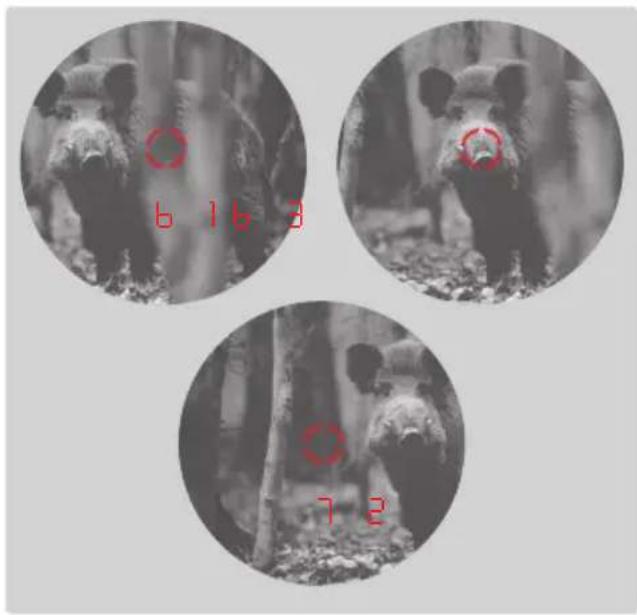
Your Leica Geovid HD-B/HD-R can also be used for continuous measurements (scan mode):
Hold the main/trigger button 1 when you press it a 2nd time. After about 2.5 seconds, the device switches to scan mode and will then measure continuously. Scan mode is indicated by a change in the display:
A new measured value appears every 0.5 seconds. Scan mode is particularly useful for measuring the distance to small, moving targets.
Notes
- In scan mode, the RBC compensation value is shown only after the final measurement.
- Because of the continuous measurements, power consumption is greater in scan mode than for single measurements.
MEASURING RANGE & ACCURACY
The measuring range of your Leica Geovid HD-B is max. 2800m / 3000 yds (HD-R: max. 2550m/ 2700 yds). Maximum range is achieved with highly reflective targets and a visual range of sight of around 10km / 6.2 miles.
Note
We recommend holding the binoculars very steady or resting them on a stable surface for accurate measurements of far away objects.
| Highly reflective targets | HD-B 3000: 2800 m, HD-R 2700: 2550 m |
| Trees | HD-B 3000: 1450 m, HD-R 2700: 1100 m |
| Game | HD-B 3000: 915 m, HD-R 2700: 730 m |
The measuring range is influenced by the following factors:
| Range | longer shorter | |
| Color | white black | |
| Angle to lens | perpendicular acute | |
| Object size | large small | |
| Sunlight | low (cloudy) | high (miday sun) |
| Atmospheric conditions | clear hazy | |
| Object structure | homogeneous (house wall) | inhomogeneous (underbrush, tree) |
The following ranges/tolerances apply for cloudy skies with good visibility:
| Range in meters | Accuracy (1σ) Normal Mode | Accuracy (1σ) Scan Mode |
| 10-200 | +/- 0.5 +/- 1.5 | |
| 200-400 | +/- 1 +/- 2 | |
| 400-800 | +/- 2 +/- 3 | |
| Above 800 | 0.5 % 0.5 % |
Note
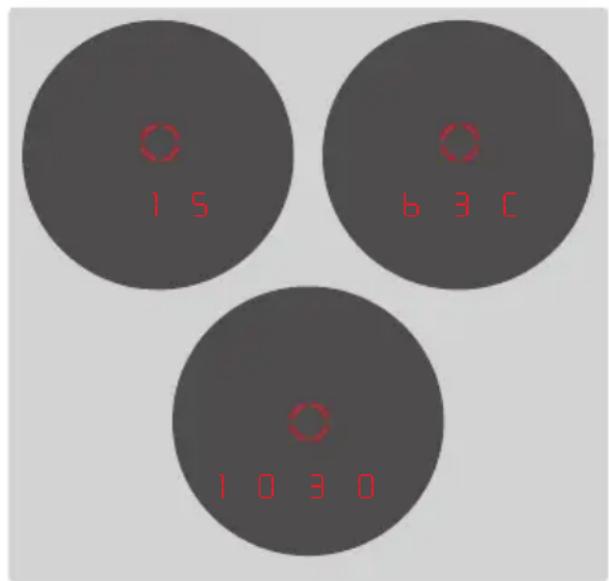
Distances below 200m are displayed with an accuracy of one decimal place, e.g.
ATMOSPHERIC CONDITIONS DISPLAY
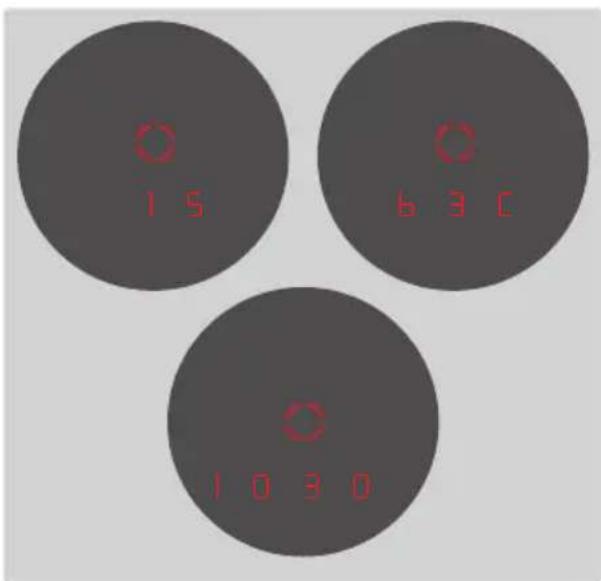
Your Leica Geovid HD-B/HD-R will determine three crucial pieces of additional information when measuring the distance to the intended object to accurately calculate the impact point (see next section): device angle, temperature and atmospheric pressure. You can have the relevant values displayed at any time.
Press the secondary/menu button 2 once.
- The reticule appears briefly (if distance measurement was not previously activated). Next, the following items appear in succession for around 2 s each instead of the range:
- inclination (indicated by an additional angle symbol)
-temperature
-atmospheric pressure
Note
It may take up to 30 minutes for the internal sensor to display the correct ambient temperature if the housing of your Leica Geovid HD-B/HD-R is significantly warmer or colder (e.g. during the transition from indoor to outdoor temperatures).
DETERMINING THE BALLISTICS CURVE
There are 12 ballistics curves to choose from to allow for a calculation adjustment of the equivalent horizontal distance (EHR, see p. 52), the holdover (HOLD, see p. 52), or the reticle correction (NOA, see p. 54) to the various calibers, as well as bullet types and weights. There are 6 tables provided in the Appendix, three each for zeroing distances in meters and yards. Find the ballistics curve that is closest to the point of impact specified by the ammunitions manufacturer in the relevant table matching the zeroing distance.
Example
The weapon and rifle scope are zeroed to a distance of 100 meters (Table 1 applies). The point of impact for the ammunition used is stated by the manufacturer as 15.0cm at 200m . In the relevant column, this is closest to the value 14.5cm in row EUN - and is therefore the correct ballistic curve.
Note
We recommend determining the ballistics data of your ammunition in practical tests to select the correct curve when using the Leica Geovid HD-B/ HD-R's ballistic function at distances greater than 300m / yds and/or with ammunition types not covered by the device-internal settings.
Alternatively, you can use the Leica ballistics calculator (http://ballistictool.leica-camera.com) to calculate new settings and transfer those to the device via the memory card.
SETTING THE BALLISTICS CURVE
Start with step 1 if you are working with the menu controls for the first time or with step 3 if you have just set the unit of measure and the display ball is still flashing.
$$ - 0 5 1 o r $$
$$ - E U I $$
- Press and hold the secondary/menu button 2 (≥ 3s)
EUUS appears. - Press the secondary/menu button 1 time (< 2s)
- The display switches to ball ( = Ballistics Curves).
- Press the main/trigger button 1.
The display switches to
Note
When a memory card is inserted, CRd appears before EUI/USI.
- Select the desired ballistics curve by pressing the main/trigger button repeatedly, i.e.
-051 to 052 or
EUI to EUE, or
OFF if you want to have the distance displayed without point of impact correction
-
Save your setting by briefly pressing the secondary/menu button.
-
The saved setting lights up for 4 s as confirmation, then the display initially switches to Sid and then disappears if no other action is taken.
Once a ballistics curve is set, the range value is first displayed for 2 s after each distance measurement is taken, followed by the calculated correction value for 6 s.
Start with step 1 if you have not previously opened the menu control, or with step 3 if you have just set the unit of measure and SId is still flashing in the display.
- Press and hold the secondary/menu button 2 (≥ 3s)
EUUS appears. - Press the secondary/menu button 2 times (< 2s)
- The display switches from ball to Sld.
- Pressing the main/trigger button 1 repeatedly selects the required zeroing distance.
-100 [m],
-200 [m] or
-CEE [m] or
-100 [y] or
200 [y] or
-300 [y].
-
Save your setting by briefly pressing the secondary/menu button.
-
The saved setting is initially lit continuously for 4 s as confirmation, then the display switches to ABC and then disappears.
SET BALLISTICS CURVE DISPLAY AND ZEROING DISTANCE DISPLAY
You can display the 3 values at any time if you want to verify your settings, e.g. because of a change in the hunting conditions or if some time has passed between uses.
Press the secondary/menu button 2 briefly twice.
The following will appear in sequence for around 15 sec each underneath the reticule (instead of the change, where applicable)
- the set ballistics curve
- the set zeroing distance
- the set ballistic output value
BALLISTICS OUTPUT FORMATS (ABO)
The Advanced Ballistic Compensation (RbC)
function of your Leica Geovid HD-B (not available for HD-R) allows you to optionally display one of the following three ballistics values right after the measured range is displayed:
the equivalent horizontal range (EHr)
- the relevant holdover (Hold)
(not available for HD-R)
- the number of clicks required on the rapid reticle adjustment (not on HD-R)
Both the displayed holdover and EH values factor in:
a. the measured range to the target
b. the angle of inclination of the weapon
c. the set ballistic curve
d. the measured temperature and atmospheric pressure values
e. the set zeroing distance
Notes
- Calculation of the specified values is based on the currently set ballistic curve, i.e. the curve must be selected first (see p. 50).
- For safety reasons, ballistic output values are only specified up to a range of 800m/ 875 yds. The actual measured range is also specified.
Important
- Please note that particularly at long ranges, the influence of all relevant ballistic influencing factors is greatly increased and considerable variations can occur. The ballistic values displayed should therefore only be viewed as a guideline.
- Regardless of whether this information is used, you are responsible for assessing the relevant hunting situation.
THE EQUIVALENT HORIZONTAL RANGE (EHR
Shots at targets at a higher or lower elevation are subject to changed ballistic conditions. Therefore, they require knowledge of the equivalent horizontal range, which is relevant for hunting. Knowledge of the is important, for example when using ballistic reticles. Values are indicated by the additional display EHR
Note
Horizontal measurements can also result in values that differ from the "straight line" measured range, for example if the temperature and/or the atmospheric pressure are non-standard values.
HOLDOVER (HOLD)
only HD-B 3000)
Holdover is defined as the point that you aim at with the weapon instead of the actual target point to compensate for the variation caused by the trajectory of the bullet (e.g. when using classic hunting reticles). By displaying the holdover, the Leica Geovid HD-B can provide valuable support in achieving the most accurate shots possible when hunting. In addition to the range, the calculation is based on the general conditions discussed in the previous section and the ballistic curve you have selected.
Note
The holdover/offset value is always displayed relative to the target distance.
Example If 300m 30 is displayed, you would have to aim 30 cm higher on the object than without compensation.
IMPACT POINT CORRECTION USING ELEVATION ADJUSTMENT (Click/MoA adjustment)
only HD-B 3000)
Variations in the point of impact can be compensated by adjusting the reticle on your rifle scope accordingly.
Based on the measured distance, bullet trajectory and the set zeroing distance (see p. 51), your Leica Geovid HD-B will display the relevant setting adjustments, i.e. the number of clicks required. For the different elevations, you can specify whether the click levels will be
- based on the international standard MOA (minutes of angle) graduation, or
displayed in 5 or 10 millimeter increments.
SETTINGS AND SELECTION OF BALLISTIC OUTPUT FORMATS
Start with step 1 if you have not previously opened the menu control, or with step 3 if you have just set the zeroing distance and ABC is still flashing in the display.
- Press and hold the secondary/menu button 2 (≥ 2s)
EULUS appears. - Press and hold the secondary/menu button 3 times (≥ 2s)
- The display switches from ball and Sid to ABC.
- Select the desired ballistics setting by pressing the main/trigger button 1 repeatedly.
EH-(HD-B and HD-R)
- only on HD-B 3000:
-HoHd, or
-11 (1 MOA as a decimal value) or
13 MOA) or
HH (1 / 4 MOA) or
-100
5
-
Save your setting by briefly pressing the secondary/menu button.
-
The saved setting is initially lit continuously for 4 s as confirmation, then the display disappears.
DISPLAYING AND CHECKING THE SET BALLISTIC PARAMETERS
only HD-B 3000)
If you want to check your settings, you can display the values at any time. To do so, press the secondary/menu button 2 twice.
-
The following will appear in sequence for around 2 s each underneath the reticule (instead of the range, where applicable)
-
the set ballistic curve (see p. 50)
- the set zeroing distance
(see p. 51)
- the set ballistic output value
(see p. 54)
Only the setting US or EU will be displayed
when all ballistics functions (BALL = OFF) are
deactivated.
USING OTHER BALLISTICS CURVES
only HD-B 3000)
You can add your own custom ballistics curves for the Leica Geovid HD-B if the intended weapon/ammunition combination is not covered by one of the 2x12 programmed ballistics curves EUI/USI/EU2/USI. These are initially calculated precisely based on the charge data like caliber, ballistics weight etc., which you have provided online. Then the data is transferred to the microSD memory card provided and can then be accessed by the binoculars, once the card is inserted.
This is done in three steps:
A. Calculation of the required ballistics curve and transfer to the memory card
The Leica Camera AG website at www.leica-camera. com offers the following information in the Sport Optics section:
- a description how to enter the required information/values to calculate a ballistics curve
- the relevant input mask
- a description of the download procedure, i.e. how to transfer the calculated ballistics curve to the memory card
B. Inserting the memory card into the binoculars
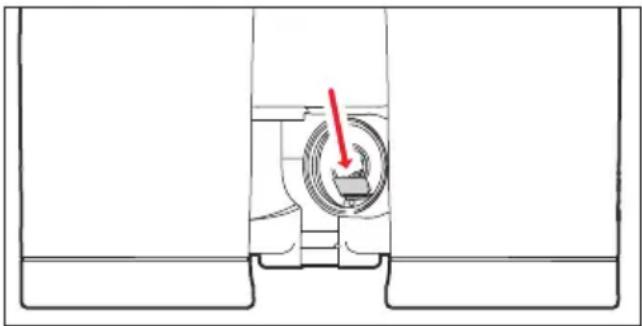
The memory card slot 13 is located in the battery compartment 12 to protect it against soiling and moisture.
- Open the the battery compartment cap by turning it counter-clockwise e.g.with a coin.
- Remove the battery.
- Push the memory card with the contacts at the front and bottom into the slot until you feel it clicking into place.
- Insert the battery so that the positive contact goes in first (note the markings in the battery compartment).
- Close the cap again by turning it clockwise.
C. Opening the ballistic curve from the memory card
When a memory card containing a ballistics curve is inserted into the binoculars, it can be selected the same way as described in "Setting the ballistics curve" on p. 50.
- Once you have pressed the main/trigger button 1, the first display in this case will be CDrd.
The following warning will be displayed:
- Err1 if the bALL menu was selected and the memory card was then removed, or if the memory card is defective or cannot be read. Cord will disappear if that is the case.
- Er2 if the memory card does not contain a ballistics curve
E3 if the ballistic curve on the memory card does not contain correct data
The rest of the procedure is the same as for programmed ballistics curves.
Notes
- You can select one of the programmed ballistic curves at any time while a memory card is inserted. Make sure to always check your settings.
- A separate microSD card is required for each ballistics curve. Do not attempt to rename a file on a microSD card, as the device will otherwise be unable to access it.
- Only one ballistic curve can be saved on a memory card for safety reasons and to avoid confusion.
- Distances of up to 925m / 1000 yds will be displayed when a ballistics curves from a memory card is used.
- The range of microSD cards is too large for Leica Camera AG to exhaustively test all available types for compatibility and quality. We therefore recommend using microSDHCTM memory cards manufactured by SanDisk.
- Although no damage to the binoculars or the card is generally expected, Leica Camera AG cannot provide any guarantee of function as some "no name" cards may not fully comply with microSD standards.
- Custom zeroing distances on the memory card will be replaced with pre-installed zeroing distances.
CARE/CLEANING
Your Leica Geovid HD-B/HD-R requires no special care. Coarse dirt particles like sand can be removed with a soft brush or simply blown off. Fingerprints, etc. on lenses and eyepieces can be removed with a damp cloth, and the surfaces must then be wiped with a clean leather or lint-free cloth.
Important
Do not apply pressure when wiping heavily soiled lens surfaces. The coating is abrasion-resistant, but is not impervious to sand or salt crystals.
The housing should be cleaned using a damp cloth only. Using a dry cloth may cause static electricity due to friction. Do not use alcohol or chemical cleaning solutions on the lenses or housing.
In addition to its type designation, each Leica Geovid HD-B/HD-R has a unique serial number. Please take note of this number as a safety measure.
Attention
Do not open the device!
REPLACEMENT PARTS
Please contact our customer service or your regional Leica representative (see Leica Camera AG homepage for addresses) if you ever need any replacement parts (e.g. an eyecup or an eyepiece cap) for your Leica Geovid HD-B/HD-R.
TROUBLESHOOTING
| Problem Cause Remedy | ||
| The viewing image is not circular. a. Your pupil is not in line with the exit pupil of the eyepiece. b. The eyecup setting not correct for use with/without glasses. | a. Adjust eye-to-eyepiece alignment b. Correct the setting: Eye glasses users fold back the eyecup; the eyecup remains folded out for users without eye glasses. | |
| Image is blurred Diopter setting incorrect | Repeat diopter compensation procedure | |
| “- - - ” Is displayed during distance measurement | a. Minimum/maximum measuring range exceededb. Insufficient object reflectivityc. Insufficient ambient conditions (visibility, etc.) | Observe specified measuring range limits |
| Display flashes or no measurement possible | Battery exhausted Replace the battery | |
| “Err” is displayed | A memory card error has occurred Check if - the memory card functions correctly - the data stored on the memory card is intact | |
TECHNICAL DATA
| Designation | Leica Geovid 8 x 42 HD-B 3000 / Leica Geovid 8 x 42 HD-R 2700 Type No.: 8905 | Leica Geovid 10 x 42 HD-B 3000 / Leica Geovid 10 x 42 HD-R 2700 Type No.: 8905 | Leica Geovid 8 x 56 HD-B 3000 / Leica Geovid 8 x 56 HD-R 2700 Type No.: 5980 |
| Magnification | 8 x 10 x 8 x | ||
| Lens diameter | 42 mm 56 mm | ||
| Exit pupil diameter | 5.2 mm 4.2 mm 7 mm | ||
| Twilight factor | 18.3 20.5 21.2 | ||
| Relative brightness | 27.5 17.6 49 | ||
| Field of view (at 1,000 m) / subjective viewing angle | approx. 130 m / 7.3° approx. | 114 m / 6.5° approx. 118 m / 5.8° | |
| Eye relief | 18 mm 16 mm 18 mm | ||
| Closest focusing distance | approx. 5 m approx. 5.8 m | ||
| Prism system | Perger prism | ||
| Coating on lenses | High Durable Coating (HDC™) and hydrophobic Aqua-Dura coating on external lenses, phase correction coating | ||
| on prisms | P 40 | ||
| Diopter compensation | ± 4 dpt. | ||
| Eyecups | Turn-to-adjust for eye glasses-compatibility, 4 click points, detachable for easy cleaning | ||
| Interocular distance | adjustable: 56 - 74 mm adjustable: 60 - 74 mm | ||
| Operating temperature range | Electrical: -20 to 55°C, Mechanical: -30 to 55°C | ||
| Storage temperature | -40 to 85°C | ||
| Waterproofing | waterproof to 5 m depth | ||
| Housing/chassis material | Magnesium die-cast, non-slip rubber reinforcement | ||
| Range | approx. 10 - 2800 m (HD-B) / approx. 10 - 2550 m (HD-R) | ||
| Measuring accuracy | 10-200 m: +/- 0.5 m, 200-400 m: +/- 1 m, >400 m: +/- 0.5 % | ||
| Display/Unit of measure | 4 seven-segment LEDs plus additional icons, optional display setting in yard/inch or meter/centimeter | ||
| Battery | 3 V/cylindrical lithium cell (type CR 2) | ||
| Battery life | approx. 2,000 measurements at 20°C | ||
| Laser | invisible, safe for eyes in compliance with EN and FDA Class 1 | ||
| Laser beam divergence | approx. 0.5 x 1.2 mrad | ||
| Maximum measurement duration | approx. 0.3 s | ||
| Dimensions (W x H x D) | approx. 127 x 81 x 177 mm approx. 153 x 90 x 187 mm | ||
| Weight (with battery) | approx. 950 g approx. 950 g approx. 1205 g | ||
LEICA CUSTOMER CARE
Please contact the Customer Care department at Leica Camera AG or the Repair Service department at your regional Leica subsidiary (a list of addresses is provided on the website of Leica Camera AG) for maintenance or repair issues with your Leica equipment.
Leica Camera AG
Customer Care
Am Leitz-Park 5
35578 Wetzlar, Germany
Telephone: +49(0)6441-2080-189
Fax: +49(0)6441-2080-339
customer.care@leica-camera.com
FR
Chere cliente, cher client,
REEMPLACEMENT DES ACCESSOIRES
35578 Wetzlar, Germany
Tel.: +49(0)6441-2080-189
Fax: +49(0)6441-2080-339
customer.care@leica-camera.com
NL
NAAM VAN DE ONDERDELEN
35578 Wetzlar, Germany
Telefoon: +49(0)6441-2080-189
Fax: +49(0)6441-2080-339
customer.care@leica-camera.com
IT
35578 Wetzlar, Germany
Telefono: +49(0)6441-2080-189
Fax: +49(0)6441-2080-339
customer.care@leica-camera.com
ES
CLASS1 LASER PRODUCT
PREFACIO
INNHOLDSFORTEGNEALSE
Bruksmuligheter 189
Pleie/rengjoring. 208
Reservedeler 208
US = Visiting i yard
HOLDEPUNKT (HOLD) (bare HD-B 3000)
CLASS1 LASER PRODUCT
COIDEPKHAHNE
Bo3MOxHocTH npMHeHHa 219
YcTaHOBka 3aunTHbIX KpbIweK o6beKTnBOB ....219
KpeIeHne HnIeUHO pemn 3aHTHO KpbIuKN OkyIpa. 219
YcTaHOBka n 3aMeHa 3JIeMeHtA PHTAHnra.220
CocToHHe 3apJa 3JIeMeHtA nITaHHn 221
Hactpoika HaIa3HkoB/ HcnoIb3ObaHne cOyKaMn 6e3. 222
Perynipobka pacctoHm Mekdy rna3amn 222
HacpoKa pe3KocTn /peylnpOBka dnoontpn.223
OchOBHnIHΦOpMauOno6ynpaBHeHHN C NOMOJIbIO MeHIO 224
Hactpoika Heo6xoDmOeHNHnCbI n3MepeHn 224
H3mepeHne paCCToHHN 225
PexkIM cKaHnpOBaHnI 226
Дальноctы DeiChTBи I TOUHOCTb H3MepeHn.....227
HnIkaIaI aTMoccepehblx ycIOBNI 228
OnpeIeJIeHne 6aJIInCTnuecko KpIbOI 229
HacpoKa 6aJIInCTnuecko KpIbOi. 230
HacpoKa pacctoHnIy ITOHOrO BbICTpeNa.231
HnDkaZna HacTpoeHHo 6aJIIncTHueckO KpINBO n pacCToHn IJr ToUHO BbICTpeJa 231
BaJIInCTnueckne opMaTbI BbIOIMbIX daHHbIX 232
3KBNBaIeHTHOe rOpN3OHTaIbHoe paCCToHHne... 233
Touka npuueHbAHnra. 233
Koppekunr Toukn nonaahann nocpeCTBOM
perynipOBKn yrna BO3BbIeHn
(perynpovka uenqk/MoA) 234
HacrpoKn N Bb6op
6aJIInCTnuecknx φopMaTOB BbIBoINMbIX daHHbIX234
HnDkaunu npOBepka HactpoeHHbIX
6aJIInCTnuecknx npaMeTpOB 235
IcnoJIb3OBAHnE npynx 6aannnCTnueeCKnx KpNBbIX..236
Yxoid 3a npnbopom/ouncTka. 238
3anachbte qactn. 238
UToIeIaTb,ecn.. 239
Texnueckne xapaKTepcntkN 240
Ampeca cepBnchbIX ceHtpOB Leica 241
6aJIInCTnueckne Ta6nucbI.. ..PpJIOXeHne
BO3MOXHOCTN IPIPMEHEHNA
BHHOKn Leica Geovid HD-B/HD-R nmeet npouhbl KOpync n3 MaHn, KOtOpbI DeJaET BO3MOXHbIM npImeHHe yctpoNCTBa np He6laTnpnTHbIX ycNoBnx. Pn 3OM Bo3deNCTBnE BnAri He cKa3blBaETcHa pa6ote 6HHKJr OtpuataJIbHbIM o6pa30M - yctpoNCTBO COxpaHRe T NOHHyIO repMeTuHOCtB Ha rIy6nHe Do 5 MeTPOB, n pacnoJOnKeHHa BHTpn ONTKa He NOBpeKdaETcR 6laOdApra HAnONHeHIO a3OTOM.
YCTAHOBKA 3AUNTHbIX KpbiIEK O6bEKTINBOB
Длma MOHTaJa 06eHx 3aIHTbIX KpbIWeK O6BeKTINOB pe3HHOBbIe KOJIbua KpbIWeK HaIIBnArIoTcR CO CTOpOHI bI O6BeKTINBa Ha Tpy6Kn 6HnOKn TaKm O6pa3OM, YTO6bl KpbIWeK CLOXnINCb BHN3.
KPEJIENHE HANJIeHOro PEMHn 3AUNTHOKNPbIKNOKyJRA
YKa3aHHe
EcIn Bbl XOTnTe 3aKpeNtB 3aunTHyU KpbIuKy Okylapa Ha HAnLeuHOM peMHe, peMeHb Heo6xOIMOpnoTeB uepez uko 3aunTHoN KpbIuKn Okylapa nepeKpennHeHem HAnLeuHoro peMHr K IeBOI cToPOHe 6nHokJ.
YCTAHOBKA 3AMEHA 3JEMEHTA NITAHNIA
3NeKtpoNTaHne Leica Geovid HD-B/HD-R o6ecne- YnBaETcOHNM KHOIOUHyBIM NITHeBBIM 3JeMeHTOM nTahnHaHnpJxHHeM 3 BoIbT (TIN CR 2).
- OtkpoTe KpbIshky 9OTceKa 3JIeMeHTa NITaHn 12, BpaJaa ee npOTnb YacOBo CTpeKn, Ha- npIMep, C NOMOu BO MOHeTbI.
2.Ппжд BCero yctaHOBHTe элем ent nHTaHnC CO6IIOJeHNEM NOJIAPHOCTN (B COOTBeTCTBnC МарКИРOBKОВ BOTCEKe элем enta NITaHnR). - CnoBa 3aKpOInTe KpbIshKy, BpaIaJ eE no YacobOn CTpeIKe.
Yka3aHn
XoIOcOKpaaaet EMKocTb 3nEmeHTOB HNTAHN. TOMy npu nCnONb3OBAHn B yCNOBnx Hn3kNX TeMepaTy p6nHOKnb IO BO3MOxHOCTn CneNyET depKaTb KaK MoXHo 6JIHXe K TeNy n NCNoB30BaTb CBexn 3nEmeHT NtAHN.
- EcHn 6uHOKNb He nCNoB3yETc B TeueHne dNITeIbHO BpemeHH, 3JeMeHT NITaHn HHeo6xoDIMO N3BNeYb.
- Θлем entblпсанг Слдуетхарntь В
прхладом И сухом MeCTe.
COCTOHN3APJDA3JIEMEHTA\PITAHN
Ondoro 3IeMeHtA NHTAHN6yDet IOCTaTOUHO nIbBblONHeHn np6bn3ntelHo 2000 n3mepenHn npTeMnepaType 20^ C.
B 3aBnCmOCTn OT yCNoBn npImeHEnra CpOK cnjx6bl 3IeMeHTOB nITaHn MoXeT 6bITb cyUeCTBeHHo cokpaueH nII npOJIeH. HeratNBHOe BnIyHHe Ha CpOK cnjx6bl 3IeMeHTOB nITaHn MOrYT OKa3aTb Hn3Kaar Tempepatya n uactoe nCnOJb30BaHne peKIMa cKaHnpOBaHn (cm. cTp. 226).
O HeIOCTaTOUHOM 3apJe 3JIeMeHTa NITaHnC Bn-TeIbCTByET MraIOUaJy INDINKaUa 3HaueHn I3MepenH N npuIeIbHa Mapka. Iocne nepBoro MmraHn INDInKaTopa BO3MOXHO BbINOJIHeHne npi6bn3ntelbHo 50 n3MepenH, Ondako npn 3Tom 6ydet COKpaTaTbCa DaIbHOCTb DeIcTBn yCTpOJCTBa.
Leica peKOMeHnyet npIMeHrTb 3JIeMeHTbl NITaHnI IN3BecTHbIX pOIN3BOJNTeJIeN.
BHHMaHHe
He donyckaTe nonadHnna 3neMeHTOB nHTAHnB OOrOhb, He donyckaTe nx HarpeBaHnHa, He nbTaI-TEcB 3apxKATn nn pa3bnpaTb nx.
- YtINH3aIINcINoJIb3OBAHHbIX əJIeMeHTOB nITAHnC O6bIHyBIMN 6bITOBbIMN OTXODAMN HeOnyCTHmA, NCKOJIbKO əJIeMeHTBI NTaHnCOpEpxaT JIOBNTBe BSeCTBa, PpHOCsIe BpeD OkpykaIouse CpeJe.
- 4to6bI o6ecneuHT bN DoJXHyIO BTOpHHyIO nepepa60Ky, OHДoJXHbI 6bITb CdaHb I CnuaIaIbHbI nyHKTb c6opa.
HACTPOIKA HAFIIA3HNKOB / HcNoJIb3OBAHHe C OyKAMn I Be3
HaJIa3HnKoOkyIpaOB 4 nerko peryInpyIOTc noCpeIcTBOM BpaUeHnHaIexKHO OHKCpIpyOTcB BBy6paHHbIX NIOLOXeHnx.ДЯ BbIOnHeHnTuaTeNbHO uCTKN IX MOxHO TaKKe NOJHOCTbIO CHrTb.ДЯ HAbIoJeHnB OuyKaX (Pnc.A) OHI OCTaIOTcBA MaKcImaJIbHO BBInHuEHHOM NIOXeHn.ДЯ Ha6IIODeHn 6e3 IcNoJIb3ObaHn OOKOB IX CLeNyET BbIKpyTITb BpaUeHnEM IpOTnb YacOBO CTpeNk.ДЯ ONTImaJIbHO HAcTPOKn IOCTuINHbI YeTbpe NIOJXeHn (Pnc.B).EcNI OkyIpaBi CInbHO 3aRpa3HeHbI,peKOMeHdyETcCHrTb HArla3HnKdIra OUYCTKN (Pnc.B).ДЯ 3ToI n3 NIONHOCTbIO BbIKpyeHHoro NIOXeHn IX CNeDyET CNeRka NOTAHyTb.
PEYIINPOBKA PACCTOHHMEXKJY 3PAUKAMN
HnBuaHnaHa HacPoKa paCCToHnMa MeKny 3paKaMn npOn3BOaNTcra NocpeDCTBOM Cn6aHn8 6nHOJNo 7apHnpOH OCN 3 PnEToM nOJIa 3peHnCnPaBa n CneBa DOJXHb CIHTbcR B eEDnHOe I3o6paKeHne KpyrIoN φOpMbI.
HACTPOIKA PE3KOCTN/PEGYJINPOBKA DNOPTPN
Hactpoika pe3koctn Ha o6bektbi, haxoiauiecna Ha pa3Hom pacctoHn OTHa6blOdaTeJIa,Ha 6HnOKIe Leica Geovid HD-B npOn3BOJNTcA CEHTpaJIbHbIM KOlecuKOM fokycupOBKn 5.ДЯ KOPpeKTnpOBKn HNDBnuaybHO amTpOONn PnHa6blOdeHN 6e3 NcPONb3OBaHn OUYOB n Dnla HActpoKN pe3koctn npUceNbHO mapKn cnykaT o6a KOnbua KoppeKun dNoontpn 6/7. BHHMaTeJIbHO BbINOJHnTE eTaNbl, ONncAHhble HnKe. ToIbKO nocne 3TOrO Bbl CMOXeTe BOCNOJIb3OBaTbcR BO3MOXHOCTaMn ONTNK INoHHO Mepe.
- YctaHOBHTe 6oa KoJIbca KoppeKcHn DIOPTpN B HynEBoE NOJoxHeH.
2.Пи HabIoIeHnO bOuMn rIa3Am 3a oBbEKTOM, paCNoIoxeHHbIM Ha 60JIbWOM ydaIeHn,Ha- CTpoIte pe3KoCTb C NOMOsbIO ueHTpaJIbHOrO KOIecNka FOkycnPOBKn. - Tenepb HaxaHem Ha rnaBHyIO KHOKNy / KHOKNy aKTHBaun 1 aKTHBnpyuTe npueIbHyO Mapky.
- После поьеня пицьног Марки,по-дожая habлodeни обони Газами,насточе павое кльculo корpeкши Дноотри (Красны Индак) takIM obpa3OM,чTo6bl пицьнай Марka peЗКО OTO6paЖалacbВ павом okулар.
5.He BbIKIoua npueJIbHyIO mapky n Tepeb nC- noJb3y I na Ha6IIOJeHnA nnB npabBn rna3, OKOHuaTeJIbHO HAcTpoIe C NOMOuO ceHTpaJIb-Horo KonecNka fokycnpOBKn YeTKoe n3o6pa-JkeHne B npabOM OkyIape. - 3aTeM HAcTpOte ONTMaJIbHyIO pe3KoCTb N3O-6paKeHnB V LeBOM OKyIpe, INcNoJIb3yJ IeBOe KOJIbUO KoppeKUnI dInOnTprN 5
7.HactpoeHHbIe 3HaueHnBbl MoKeTe yBnTeb Ha 1kanaX nnontpn C cNMBolamn ,+“nnn,“7a / 8a
Yka3aHne
EcnHa6nOeHne OcyuEcTBJareTc C npmHeHnem NnB OHO CTOpOHb 6nHOKn, Heo6xOIMO3aKpbITb COOTBETCTByUoN rla3 HnPiPOCTKpbIshKO COOTBETCTByUoN ObekTNB BnpeDn.
OCHOBHAR INΦOPMAUЯ OБ YYPABJIENH NOMOUIbIO MEHIO
PnBbINONHeHHJIIO6bIXHAcTpoEKNpIMeHMO CneIyIOUee:
-ΓλaBHOe MeHIO COCTOHT N3 YeTbIpeX IyHKTOB: HNDAKauNЯrpDOb/MetPOB (EUJ5), 6aJIInCTnueCKa KpNBaa (baLL), paCCToHne IIN TOUHORO BbICTpeLa (Sld) nΦopMaT 6aJIInCTnueCKNX BblXoDHbIX DaHHbIX (AbC). OnncAHne ΦyHKuN co-depKHTcB COOTBeTCTByIOuNX pa3DeIax.
- KaK nyHKtbl rIaNBHOro MeHIO, TaK n COOTBeTCTByIOUne npaMeTpbl HaCTpoiKn IocTyHNbI B BVnde KOnbueBOrO cNcKa, T. e. BCE nyHKtbl/HaCTpoiKn IpeKeKNIOuAOTcMHOROkpaTHbIM HaxaTNem Ha KHONKy.
HACTPOIKA HEOBXOIMOEN EINHNUbI N3MEPEHNA
Leica Geovid HD-B/ HD-R MOXET 6bITb HAcTpoEH KAK
dIa IcNoIb3OBaHnI paCnpocTpaeHHoB CUSA 6pntAHCCKO CNCTeMbI MEP N BecOB (US), TAK N dIy npImeHHeHNr MeTpueeCKo CNCTeMbI (EU), T. e. npN I3MepeHNn paCCToHnra/TempePaTybI/dabNeHnRA BO3dyxa
6byT IcNoIb3OBaTbCS RaDbI N IOHMbl/rgadYcbI DaPeHReHTa/InHg (IOHMbl pTyTHORO cTo16a) IIN MeTpbl
n caHTmEtpbl/rgadYcbI CeIbCSr/Mnlln6apbl.
3Ta HacTPOkA taKke OnpedEnrEt EINHcbl I3MepeHnR paCCToHnra DnT TOckN npuCeJIbAHnra, BannICTueeKx KpNBbIX N ToCHoro BbICTpeNa. Ha 3aBOde-I3rotOBtene dJa Leica Geovid HD-B/HD-R
HaCtPoEHbl rDbl.
HacrpoKa
-
Haximai Te BCnOMaTeIbHyIO KHOIky / KHOIky MeHIO 2 DInTeJIbHoE BpeM (≥3ceKyHd).
-
PONBnEeCUU5 (Mnraet).
-
HaxmTe rnaBHyIO KHOIpKy / KHOIpKy aKTHBaun 1 Ia Bb6opa Heo6xOmoM eHNuI N3MepeHnA.
US=INHdNkauB BApDax
EU = INHДИКациь B MeTpax
Yka3aHne
CoOTBeTCTByIOUaHaHCTpOka 6yIeT Bcerda oTo6paKaTbca Ha DnCpIee: PAnOM C uNΦpAMN 6yIyT OTo6paKaTbca M (MeTpbl) nII Y (ApDbl).
- CoxpaHnTe HAcTpoKy KOpOTKm HaKaTHeM BCnOMoTaTeIbHOH KHOKN / KHOKN MeHIO.
- Chauana coxpaHeHHa HacToPka C cIeIbIO NOTBepKdEHHa CBETTCa NocToHHO, 3aTeM INHINKaunn IepexoINT B CJIeNyUOuN PyHKT MeHIO (BALL = BaJIInCTNuCeCKa KpIBa) n rachET, eCNI dpYrHe HAcToPkn He BblOnHraNcB.
H3MEPEHENE PACCTOHHN
Дяизмереня pacctordняdoобектадалбомерdoлжeh 6bITb TOUHO HabeJeH Ha Hero. BbINOHLHTe cneNyIOUIne DeICTBn:
1.HaKmTe rnaBHyIO KHOKNy / KHOKNy aKTHBaCIN
1.ДаьHomep BKIOUOaETcY.
- PnraeTc npueJIbHa MapKa.
Iocne OTnyckaHn rnaBHO KNONK / KONKN aKTNaBau n npuehna Mapka 6ydt npoJOnKaTb CBeTtbc eune oKOLO 6 cekHyd. Ecnn KONKa ydepKnBaETcB HaxaTOM NIOJOKeHN, npuehna Mapka 6ydt CBETNbCnOCToRHHO.
- Habeinte daIbHomep Ha oBekT npn CBeTauec npuiehHou Mapke.
- CHOba HaxMITE Ha rIaBHyIO KHONKy / KHONKy aKTHBaCIN.
a.BoBpemn3mpeHn npuehna Mapka Ha KopoTkoe Bpemnpoanaet.
b. OTo6paKaTaCn3MepeHHoe 3HaueHHe.
Bo BpemcBceHnI npuIeIbHOm MapKn BO3MOxHo BblONHeHnEO HOBOrIO 3MepeHnIOBTOPbIM HaKaTHeM Ha IaBHyIO KHNky / KHNKy AKINBaUIn.
TOBnEe:--,ecn
- paccToHnE IO oBekTa COCTaBnEe MeHee 10 MeTPOB/raPIOB, HIN
- npeBbIeHa MaKcImaJIbHra DaJIbHOCTb I3MepeHn, nn
CINHANOTObbekTa6blnOTpaKeHNHeIOCTaTOUHOI CTENEH.
Ecnn nncnnr rachet, daJIbHomep abTomatueckn OTKJIIOUaETc.
PEKIM CKAHIOBAHNA
Даьнорер Leica Geovid HD-B/HD-R no3BOJЯET bIIOJIHЯТb I3MepeHne B pexIMe NOCTOHHoI pa-60TbI (pexIM cKaHIpOBaHn):
PnBTOpOM HaxaTNu depKnaBte rnaBHyIO KHOKNy /KHONky aKTINBaUIN B HAXaTOM NIOXKeHN.
Pn6H3TeJbHoYepe32,5ceKHyIbnpN6Op nepeXoNTBpeKIM CkaHnpOBaHn,IN3MepeHnBblIOJIHrOTcNOCTOARHO.3TOMOxHO ONpeJeITb NO N3MeHeHIO INdkaUH.
Pn6Hn3ntelbHo uepe3 kaJdbI 0,5 cekyHdbI oTo-6paXaETcHOBoe 3HaueHHe n3MepeHn. PexHM cKaHnpoBaHHO oc6eHH npAkrTuH npn HmEHeHH paCtOaHH Do nepemeuaUxxCs CeJeM Manoro pa3Mepa.
Yka3aHn
Bpekme cKaHnpOBaHn 3NaueHne KoppeKuIN Abc oTo6paKaTcra IuMb nOcNe nocJeHero n3Mepen.
BpejHMe cKaHnpOBaHn BcIeDCTBne NOCToHHO BbIOJIHReMbIX N3MepEni paCXoJ 3NeKTPo3-HeprnN BblSe, Yem npN BbIOJIHHeHN OINHOUYbIX N3MepEni.
ДАльноctь ДЕИCTВИ N TOUHOCTb H3MEPEHIN
ДаьhoeCTb DeHCTBn6HOKJLeica Geovid HD-B coCTabJnEeTdo 2800 metpoB (HD-R:do 2550 metPOB).MakcmaJIbHaJa DaIbHOCTb n3MepeHnIOCTnraetc np paBoTe c obKeTamn, oBeCneuBaIO- uINMN XopoOyUO OTPaKaEMoCTb CnHana, IN daIbHOCTN BuIMMOCTN OKOLO 10 KM.
YkaHne
Дя obecneeynToUHOrO n3MepeHn paCCToHnI do o6bekTOB, paCNoLoXeHHbIX Ha 60JIbWOM OTda- IeHN, 6INoKJIb CNeDyEt yDePxNBA Tb OueHb CNOKOJHO IIN NcNoJIb3OBaTb HeIOdBNXHyO ONOpY.
HHINKACNAATMOCΦEPHBIX YCLOBH
Дя touhoro paucheta toukn nonadHn (cm. cneyIounn pa3eJ) npn n3mepeHHn pacctoHn Leica Geovid HD-B/HD-R dononHntelbHO onpeJeT rpi Baxhblx napaMeTp:HaKIOH npnbopa, TeMnpa-typu n daBHeHne BO3dyxa. CoOTBeTcByIOUne 3haueHn MOrTy 6bItb OTo6paKeHb I JIO6oe Bpemr.
БыICTpo haxmnte BCNOMOraTeIbHyIO KHOKNy / KHOKNy MeHIO 21 pa3.
- PpncelbHa Mapka nOaBJIeTcH Ha He npoJOLKnTeIbHoe BpeM (ecnn H3MepeHne pacCTOHHpaHee yke He 6blno BKIOueHo). 3aTeM OINH 3aDpymBMeTo pacCTOHH np6bn3HTeIbHO 2cekyHdbI OTO6paKaiaOTcR
- yrol hakloha (O603hauaetcra DOnoHHTeIbHbIM CnMBOLOM yIina),
- TemnepaTypa,
ДавеленвОЗдуxa.
Yka3aHne
Ecni Kopnyc Leica Geovid HD-B/HD-R 6ydt MeTb Temepatpy, 3NaHTeNbHO OTnuaIOUIOc rO Temepatpyb OkpykaIOSeI cpebl, HAnpIMep, npN BixOnde n3 NomeuHnna HApKy, MoKET NOTpe6oBAtbcra Do 30 MNHyT, Noka pacnoJoxKeHHb INBHyTpN Kopnyca DaTHNK CMOKeT PpaBnIbHO I3MePntb Temepatpy OkpykaIOSeI cpebl.
ONPEDEJEHNE BANJIHCTNUECKOKNKPNBOI
C. BbI3OB 6aJIINCTnueeCKo KpHBoN n3 KaPbI NaMRTn
EcnB 6nHOKb BCTabIeHa KapTa namTn, Ha KOTopoH HaxoITc8 6aJIInCTnuecka KpIBaR, ee MOxHO Bb3BaTbB COOTBETCTBnC ONHCnHEm B pa3dene „HAcTpOiKa 6aJIInCTnueckoK pIBoN" Ha cTpaHnCe 230.
Iocne Haxatna TnabHOn KHOKN / KHOKN aKTHBaCUN 1B 3TOM Cnyae Chayana NOBnE etcra Cord
IINB KaueeTBe npedynpekndnna:
Err, ecn6bIIO Bb3BaHO MeHIO bALL, Ondako 3aTeM KapTa nAmrTn 6bIina N3BneyeHaNNB Cnyuae IcNoIb3OBAHH HeNCnPabHBIXKAPT, YTeHHe KOTOpBX HeBO3MOxHO. B ATOM Cnyuae TAKKe rachet HnDnKaUaCn Cord.
Ee2,ecnHaKapTe NaMaTn 6aannctuYeCKa KpUbaH He ObHApyKeHa.
-1E3,ecn6aannctnueckKaKpBaHa KaPte namrtn CoepxHn HnpabnIbHbIe DaHHble.
Даьнше onepaин BTOUHOCTN COOTBETCTBYOT onepaum, BbINOJIHReMbIM JIЯ 3aporpaMMnpoBaHHbIX 6aJIINCTUeCKNX KpNBbIX.
Yka3aHn
35578 Wetzlar, Germany
TeJeDOn: +49(0)6441-2080-189
Tepeka: +49(0)6441-2080-339
customer.care@leica-camera.com
ANHANG / APPENDIX / ANNEXE/ BIJLAGE / ALLEGATO / APÉNDICE / VEDLEGG / ΠΡΙΝΟχΕΝΗ
Anmerkungen:
- Tables 1, 2 and 3 show the ranges in meters and the holdover corrections in centimeters, while tables 4 and 5 use yards and inches.
-
All values are applicable for:
-
An atmospheric pressure of 1013mbar
A temperature of 20^ / 68^
Horizontal shots
Remarques:
| GESCHOSSABFALL / HOLDOVER CORRECTION / CHUTE DE LA BALLE / KOGELVAL / CORREZIONE BALISTICA / CORRECCION DEL PUNTO DE REFERENCA / KORREKSJON HOLDEPUNKT / ПОТРавка точки habовдки | ||||||||||||
| US1 US2 US3 US4 US5 US6 US7 US8 US9 US10 US11 US12 | ||||||||||||
| ENTERNUNG (M) / TARGET RANGE / DISTANCE DE LA CIBLE / MEETPUNTAFSTAND / DISTANZA DELL'OBIETTIVO / DISTANCA DEL Objetivo / MÁLAVSTAND / PACCTORNHÉ NO LÉTIМ | 0 | -2,0 -2,0 -2,0 -2,0 -2,0 -2,0 -2,0 -2,0 -2,0 -2,0 -2,0 -2,0 -2,0 -2,0 -2,0 -2,0 -2,0 -2,0 -2,0 -2,0 -2,0 -2,0 -2,0 -2,0 -2,0 -2,0 0,1,1,0,1,0,1,1,1,1,1,1,1,1,1,1,1,1,1,1,1,1,1,1,1,1,1,1,1,1,1,1,1,1,1,1,1,1,1,1,1,1,1,1,1,1,1,1,1,1,1,1,1,1,1,1,0,1,1,1,1,1,1,1,1,1,1,1,1,1,1,1,1,1,1,1,1,1,1,1,1,1,1,1,1,1,1,1,1,1,1,1,1,1,1,1,1,1,1,1,1,1,1,1,0,1,0,0,0,0,0,0,0,0,0,0,0,0,0,0,0,0,0,0,0,0,0,0,0,0,0,0,0,0,0,0,0,0,0,0,0,0,0,0,0,0,0,0,0,0,0,0,0,0,0,0,1,1,1,1,1,1,1,1,1,1,1,1,1,1,1,1,1,1,1,1,1,1,1,1,1,1,1,1,1,1,1,1,1,1,1,1,1,1,1,1,1,1,1,1,1,1,1,1,0,0,0,0,0,0,0,0,0,0,0,0,0,0,0,0,0,0,0,0,0,0,0,0,0,0,0,0,0,0,0,0,0,0,0,0,0,0,0,0,0,0,0,0,0,0,0,0,1,0,1,1,1,1,1,1,1,1,1,1,1,1,1,1,1,1,1,1,1,1,1,1,1,1,1,1,1,1,1,1,1,1,1,1,1,1,1,1,1,1,1,1,1,1,1,1,0,1,0,1,0,1,0,1,0,1,0,1,0,1,0,1,0,1,0,1,0,1,0,1,0,1,0,1,0,1,0,1,0,1,0,1,0,1,0,1,0,1,0,1,0,1,0,1,0,1,1,1,1,1,1,1,1,1,1,1,1,1,1,1,1,1,1,1,1,1,1,1,1,1,1,1,1,1,1,1,1,1,1,1,1,1,1,1,1,1,1,1,1,1,0,1,0,1,1,1,1,1,1,1,1,1,1,1,1,1,1,1,1,1,1,1,1,1,1,1,1,1,1,1,1,1,1,1,1,1,1,1,1,1,1,1,1,1,1,1,1,0,1,0,0,0,1,0,0,0,0,0,0,0,0,0,0,0,0,0,0,0,0,0,0,0,0,0,0,0,0,0,0,0,0,0,0,0,0,0,0,0,0,0,0,0,0,0,0,0,0,0,0,0,1,0,0,0,0,0,0,0,0,0,0,0,0,0,0,0,0,0,0,0,0,0,0,0,0,0,0,0,0,0,0,0,0,0,0,0,0,0,0,0,0,0,0,0,0,0,1,0,0,0,1,0,0,1,0,0,1,0,0,1,0,0,1,0,0,1,0,0,1,0,0,1,0,0,1,0,0,1,0,0,1,0,0,1,0,0,1,0,0,1,0,0,1,0,0,1,0,0,1,0,1,0,1,0,1,0,1,0,1,0,1,0,1,0,1,0,1,0,1,0,1,0,1,0,1,0,1,0,1,0,1,0,1,0,1,0,1,0,1,0,1,0,1,0,1,0,0,1,0,0,1,0,0,1,0,0,1,0,0,1,0,0,1,0,0,1,0,0,1,0,0,1,0,0,1,0,0,1,0,0,1,0,0,1,0,0,1,0,0,1,0,0,0,1,0,0,1,0,0,1,0,0,1,0,0,1,0,0,1,0,0,1,0,0,1,0,0,1,0,0,1,0,0,1,0,0,1,0,0,1,0,0,1,0,0,1,1,1,1,1,1,1,1,1,1,1,1,1,1,1,1,1,1,1,1,1,1,1,1,1,1,1,1,1,1,1,1,1,1,1,1,1,1,1,1,1,1,1,1,1,1,1,0,0,1,0,0,1,0,0,1,0,0,1,0,0,1,0,0,1,0,0,1,0,0,1,0,0,1,0,0,1,0,0,1,0,0,1,0,0,1,0,0,1,0,0,1,0,0,1,1,1,1,1,0,0,1,0,0,1,0,0,1,0,0,1,0,0,1,0,0,1,0,0,1,0,0,1,0,0,1,0,0,1,0,0,1,0,0,1,0,0,1,0,0,1,0,0,0,1,0,0,0,1,0,0,1,0,0,1,0,0,1,0,0,1,0,0,1,0,0,1,0,0,1,0,0,1,0,0,1,0,0,1,0,0,1,0,0,1,0,0,1,0,0,0,1,0,0,1,1,1,1,1,1,1,1,1,1,1,1,1,1,1,1,1,1,1,1,1,1,1,1,1,1,1,1,1,1,1,1,1,1,1,1,1,1,1,1,1,1,1,1,0,0,1,0,0,0,1,0,0,0,1,0,0,0,1,0,0,0,1,0,0,0,1,0,0,0,1,0,0,0,1,0,0,0,1,0,0,0,1,0,0,0,1,0,0,0,1,0,0,0,1,0,0,1,0,0,0,1,0,0,0,1,0,0,0,1,0,0,0,1,0,0,0,1,0,0,0,1,0,0,0,1,0,0,0,1,0,0,0,1,0,0,0,1,0,0,0,1,0,2,3,-6,-7,-8,-9,-2,-3,-2,-3,-2,-3,-2,-3,-2,-3,-2,-3,-2,-3,-2,-3,-2,-3,-2,-3,-2,-3,-2,-3,-2,-3,-2,-3,-2,-3,-2,-3,-2,-3,-2,-3,-2,-3,-2,-3,-2,-3,-2,-3,-2,-3,-2,-3,-2,-3,-2,-2,-3,-2,-3,-2,-3,-2,-3,-2,-3,-2,-3,-2,-3,-2,-3,-2,-3,-2,-3,-2,-3,-2,-3,-2,-3,-2,-3,-2,-3,-2,-3,-2,-3,-2,-3,-2,-3,-2,-3,-2,-3,-2,-3,-2,-3,-2,-3,-2,-4,-2,-2,-4,-2,-4,-2,-4,-2,-4,-2,-4,-2,-4,-2,-4,-2,-4,-2,-4,-2,-4,-2,-4,-2,-4,-2,-4,-2,-4,-2,-4,-2,-4,-2,-4,-2,-4,-2,-4,-2,-4,-2,-4,-2,-4,-2,-4,-2,-4,-2,-4,-2,-2,-4,-2,-4,-2,-4,-2,-4,-2,-4,-2,-4,-2,-4,-2,-4,-2,-4,-2,-4,-2,-4,-2,-4,-2,-4,-2,-4,-2,-4,-2,-4,-2,-4,-2,-4,-2,-4,-2,-4,-2,-4,-2,-4,-2,-4,-4,-2,-4,-2,-4,-2,-4,-2,-4,-2,-4,-2,-4,-2,-4,-2,-4,-2,-4,-2,-4,-2,-4,-2,-4,-2,-4,-2,-4,-2,-4,-2,-4,-2,-4,-2,-4,-2,-4,-2,-4,-2,-4,-2,-4,-2,-4,-2,-4,-4,-2,-4,-4,-2,-4,-2,-4,-2,-4,-2,-4,-2,-4,-2,-4,-2,-4,-2,-4,-2,-4,-2,-4,-2,-4,-2,-4,-2,-4,-2,-4,-2,-4,-2,-4,-2,-4,-2,-4,-2,-4,-2,-4,-2,-4,-2,-4,-2,-2,-4,-2,-2,-4,-2,-4,-2,-4,-2,-4,-2,-4,-2,-4,-2,-4,-2,-4,-2,-4,-2,-4,-2,-4,-2,-4,-2,-4,-2,-4,-2,-4,-2,-4,-2,-4,-2,-4,-2,-4,-2,-4,-2,-4,-2,-4,-2,-4,-3,-2,-4,-2,-4,-2,-4,-2,-4,-2,-4,-2,-4,-2,-4,-2,-4,-2,-4,-2,-4,-2,-4,-2,-4,-2,-4,-2,-4,-2,-4,-2,-4,-2,-4,-2,-4,-2,-4,-2,-4,-2,-4,-2,-4,-2,-4,-2,-4,-2,-3,-2,-4,-2,-4,-2,-4,-2,-4,-2,-4,-2,-4,-2,-4,-2,-4,-2,-4,-2,-4,-2,-4,-2,-4,-2,-4,-2,-4,-2,-4,-2,-4,-2,-4,-2,-4,-2,-4,-2,-4,-2,-4,-2,-4,-2,-4,-2,-4,-4,-4,-2,-4,-2,-4,-2,-4,-2,-4,-2,-4,-2,-4,-2,-4,-2,-4,-2,-4,-2,-4,-2,-4,-2,-4,-2,-4,-2,-4,-2,-4,-2,-4,-2,-4,-2,-4,-2,-4,-2,-4,-2,-4,-2,-4,-2,-4,-2,-2,-3,-2,-4,-2,-4,-2,-4,-2,-4,-2,-4,-2,-4,-2,-4,-2,-4,-2,-4,-2,-4,-2,-4,-2,-4,-2,-4,-2,-4,-2,-4,-2,-4,-2,-4,-2,-4,-2,-4,-2,-4,-2,-4,-2,-4,-2,-4,-2,-2,-4,-4,-2,-4,-2,-4,-2,-4,-2,-4,-2,-4,-2,-4,-2,-4,-2,-4,-2,-4,-2,-4,-2,-4,-2,-4,-2,-4,-2,-4,-2,-4,-2,-4,-2,-4,-2,-4,-2,-4,-2,-4,-2,-4,-2,-4,-2,-4,-4,-2,-2,-4,-2,-4,-2,-4,-2,-4,-2,-4,-2,-4,-2,-4,-2,-4,-2,-4,-2,-4,-2,-4,-2,-4,-2,-4,-2,-4,-2,-4,-2,-4,-2,-4,-2,-4,-2,-4,-2,-4,-2,-4,-2,-4,-2,-4,-2,-2,-4,-3,-2,-4,-2,-4,-2,-4,-2,-4,-2,-4,-2,-4,-2,-4,-2,-4,-2,-4,-2,-4,-2,-4,-2,-4,-2,-4,-2,-4,-2,-4,-2,-4,-2,-4,-2,-4,-2,-4,-2,-4,-2,-4,-2,-4,-2,-4,-4,-2,-4,-3,-2,-4,-2,-4,-2,-4,-2,-4,-2,-4,-2,-4,-2,-4,-2,-4,-2,-4,-2,-4,-2,-4,-2,-4,-2,-4,-2,-4,-2,-4,-2,-4,-2,-4,-2,-4,-2,-4,-2,-4,-2,-4,-2,-4,-2,-2,-4,-2,-4,-4,-2,-4,-2,-4,-2,-4,-2,-4,-2,-4,-2,-4,-2,-4,-2,-4,-2,-4,-2,-4,-2,-4,-2,-4,-2,-4,-2,-4,-2,-4,-2,-4,-2,-4,-2,-4,-2,-4,-2,-4,-2,-4,-2,-4,-4,-2,-4,-2,-2,-4,-2,-4,-2,-4,-2,-4,-2,-4,-2,-4,-2,-4,-2,-4,-2,-4,-2,-4,-2,-4,-2,-4,-2,-4,-2,-4,-2,-4,-2,-4,-2,-4,-2,-4,-2,-4,-2,-4,-2,-4,-2,-4,-2,-2,-4,-2,-4,-3,-2,-4,-2,-4,-2,-4,-2,-4,-2,-4,-2,-4,-2,-4,-2,-4,-2,-4,-2,-4,-2,-4,-2,-4,-2,-4,-2,-4,-2,-4,-2,-4,-2,-4,-2,-4,-2,-4,-2,-4,-2,-4,-2,-4,-4,-2,-4,-2,-4,-4,-2,-4,-2,-4,-2,-4,-2,-4,-2,-4,-2,-4,-2,-4,-2,-4,-2,-4,-2,-4,-2,-4,-2,-4,-2,-4,-2,-4,-2,-4,-2,-4,-2,-4,-2,-4,-2,-4,-2,-4,-2,-4,-2,-2,-4,-2,-4,-2,-2,-4,-2,-4,-2,-4,-2,-4,-2,-4,-2,-4,-2,-4,-2,-4,-2,-4,-2,-4,-2,-4,-2,-4,-2,-4,-2,-4,-2,-4,-2,-4,-2,-4,-2,-4,-2,-4,-2,-4,-2,-4,-2,-4,-4,-2,-4,-2,-4,-3,-2,-4,-2,-4,-2,-4,-2,-4,-2,-4,-2,-4,-2,-4,-2,-4,-2,-4,-2,-4,-2,-4,-2,-4,-2,-4,-2,-4,-2,-4,-2,-4,-2,-4,-2,-4,-2,-4,-2,-4,-2,-4,-2,-2,-4,-2,-4,-2,-4,-3,-2,-4,-2,-4,-2,-4,-2,-4,-2,-4,-2,-4,-2,-4,-2,-4,-2,-4,-2,-4,-2,-4,-2,-4,-2,-4,-2,-4,-2,-4,-2,-4,-2,-4,-2,-4,-2,-4,-2,-4,-2,-4,-3,-2,-4,-2,-4,-2,-4,-3,-2,-4,-2,-4,-2,-4,-2,-4,-2,-4,-2,-4,-2,-4,-2,-4,-2,-4,-2,-4,-2,-4,-2,-4,-2,-4,-2,-4,-2,-4,-2,-4,-2,-4,-2,-4,-2,-4,-2,-4,-2,-4,-4,-2 | ||||||||||
TABELLE 6: FLECKSCHUSS-ENTFERNUNG 300Y / TABLE 6: ZEROING RANGE 300YDS / TABLEAU 6: DISTANCE DU TIR DANS LE MILLE 300Y / TABEL 6: VLEKSCHOTAFSTAND 300Y / TABELLA: 6 DISTANZA DI AZZERAMENTO 300Y / TABLA 6: DISTANCIA DE TIRO IDEAL 300 Y / TABELL 6: INNSKYTNINGSAVSTAND 300Y / TABILIJA 6: PACCTORHINE IITTOHOTO BbICTPEJIA 300 RIOB
- GEOVID HD-B3000 / GEOVID HD-R2700
- FCC CAUTION:
- DECLARATION OF CONFORMITY
- FOR CANADA ONLY:
- FOR JAPAN ONLY:
- WARNING
- CAUTION
- SAFETY PRECAUTIONS (Laser)
- FOREWORD
- SCOPE OF DELIVERY
- Warning note
- DISPOSAL OF ELECTRICAL AND ELECTRONIC EQUIPMENT
- TABLE OF CONTENT
- AREAS OF USE
- ATTACHING THE LENS CAPS
- ATTACHING THE CARRY STRAP AND EYEPIECE CAP
- Note
- INSERTING/ REPLACING THE BATTERY
- Notes
- BATTERY CHARGE LEVEL
- Attention
- ADJUSTMENT OF THE EYECUPS/ USE WITH/WHOUT EYE GLASSES
- ADJUSTING THE FOCUS/ DIOPTER ADJUSTMENT
- MENUCONTROLBASICS
- SETTING THE UNIT OF MEASURE
- Setting
- DISTANCE MEASUREMENT
- SCAN MODE
- MEASURING RANGE & ACCURACY
- DETERMINING THE BALLISTICS CURVE
- Example
- SETTING THE BALLISTICS CURVE
- SET BALLISTICS CURVE DISPLAY AND ZEROING DISTANCE DISPLAY
- BALLISTICS OUTPUT FORMATS (ABO)
- Important
- THE EQUIVALENT HORIZONTAL RANGE (EHR
- HOLDOVER (HOLD)
- IMPACT POINT CORRECTION USING ELEVATION ADJUSTMENT (Click/MoA adjustment)
- SETTINGS AND SELECTION OF BALLISTIC OUTPUT FORMATS
- DISPLAYING AND CHECKING THE SET BALLISTIC PARAMETERS
- USING OTHER BALLISTICS CURVES
- CARE/CLEANING
- REPLACEMENT PARTS
- LEICA CUSTOMER CARE
- REEMPLACEMENT DES ACCESSOIRES
- NAAM VAN DE ONDERDELEN
- CLASS1 LASER PRODUCT
- PREFACIO
- INNHOLDSFORTEGNEALSE
- HOLDEPUNKT (HOLD) (bare HD-B 3000)
- COIDEPKHAHNE
- BO3MOXHOCTN IPIPMEHEHNA
- YCTAHOBKA 3AUNTHbIX KpbiIEK O6bEKTINBOB
- KPEJIENHE HANJIeHOro PEMHn 3AUNTHOKNPbIKNOKyJRA
- YKa3aHHe
- YCTAHOBKA 3AMEHA 3JEMEHTA NITAHNIA
- Yka3aHn
- COCTOHN3APJDA3JIEMEHTA\PITAHN
- BHHMaHHe
- HACTPOIKA HAFIIA3HNKOB / HcNoJIb3OBAHHe C OyKAMn I Be3
- PEYIINPOBKA PACCTOHHMEXKJY 3PAUKAMN
- HACTPOIKA PE3KOCTN/PEGYJINPOBKA DNOPTPN
- Yka3aHne
- OCHOBHAR INΦOPMAUЯ OБ YYPABJIENH NOMOUIbIO MEHIO
- HACTPOIKA HEOBXOIMOEN EINHNUbI N3MEPEHNA
- HacrpoKa
- H3MEPEHENE PACCTOHHN
- PEKIM CKAHIOBAHNA
- ДАльноctь ДЕИCTВИ N TOUHOCTb H3MEPEHIN
- YkaHne
- HHINKACNAATMOCΦEPHBIX YCLOBH
- ONPEDEJEHNE BANJIHCTNUECKOKNKPNBOI
- BbI3OB 6aJIINCTnueeCKo KpHBoN n3 KaPbI NaMRTn
- ANHANG / APPENDIX / ANNEXE/ BIJLAGE / ALLEGATO / APÉNDICE / VEDLEGG / ΠΡΙΝΟχΕΝΗ
- Anmerkungen:
- Remarques:
Brand : LEICA
Model : Geovid HDR 2700 8x42
Category : Laser pointer