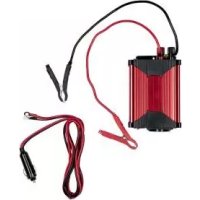
USSW 300 A1 - Voltage converter ULTIMATE SPEED - Free user manual and instructions
Find the device manual for free USSW 300 A1 ULTIMATE SPEED in PDF.



| Brand | Ultimate Speed |
| Model | USSW 300 A1 |
| Product type | Voltage converter (cigarette lighter) |
| Input voltage | 12 V (max. 14.8 V) |
| Output voltage | 230 V ~ / 50 Hz |
| Continuous power max. | 300 W |
| Peak power | 330 W (0.1 s) |
| Output current max. | 1.30 A |
| USB ports | 2 USB ports 5 V / 1 A each |
| Output waveform | Modified sine wave |
| Efficiency | > 75 % |
| Dimensions (L x W x H) | 102 x 150 x 55 mm |
| Weight (without cables) | approx. 450 g |
| Operating temperature | 5 °C to 40 °C |
| Overload protection | Trips at ≥ 330 W |
| Under-voltage protection | Shutdown at 10.5 V ± 0.3 V |
| Overvoltage protection | Shutdown at 14.8 V ± 0.3 V |
| Thermal shutdown | at 65 °C ± 5 °C |
| Fuses | 2 flat fuses 20 A + 1 glass fuse 20 A |
| Included accessories | Cable with cigarette lighter plug (2 m), cables with clamps (red/black 40 cm), manual |
| Use | Indoor, vehicle (engine off) |
| Warranty | 3 years |
Frequently Asked Questions - USSW 300 A1 ULTIMATE SPEED
User questions about USSW 300 A1 ULTIMATE SPEED
0 question about this device. Answer the ones you know or ask your own.
Ask a new question about this device
Download the instructions for your Voltage converter in PDF format for free! Find your manual USSW 300 A1 - ULTIMATE SPEED and take your electronic device back in hand. On this page are published all the documents necessary for the use of your device. USSW 300 A1 by ULTIMATE SPEED.
USER MANUAL USSW 300 A1 ULTIMATE SPEED
Genuine operating manual
NL BE
SPANNINGSOMVORMER
Before reading, unfold the pages with the figures and then familiarise yourself with all functions of the device.
FR BE
Dr. Christian Weyler
Katharina-Loth-Str. 15
DE - 66386 St. Ingbert
DEUTSCHLAND
service.de@cmc-creative.de
service.at@cmc-creative.de
service.ch@cmc-creative.de
Telefon:
+49 (0) 6894/ 9989750
Intended use. Page 40
Delivery scope.. Page 41
Description of parts.. Page 41
Technical data . Page 42
Safety notes.. Page 44
Specific safety notes Page 48
Commissioning Page 49
Notes on operation.. Page 49
Setup and attachment.. Page 50
Operation in a vehicle.. Page 50
Connection to a power source.. Page 51
Connection to a 12-V car cigarette lighter socket .........Page 51
Connection to a car battery.. Page 52
Connection and operation of a load/device.. Page 52
Notes on the operation of devices.. Page 53
Signal at low battery voltage.. Page 54
Charging a USB device . Page 54
Replacing the fuses.. Page 54
Troubleshooting . Page 56
Cleaning and maintenance.. Page 58
Environmental notes and disposal information......Page 59
EU declaration of conformity . Page 60
Notes on warranty and service processing.. Page 61
Warranty terms.. Page 61
Warranty period and statutory claims for defects .......Page 61
Warranty scope.. Page 62
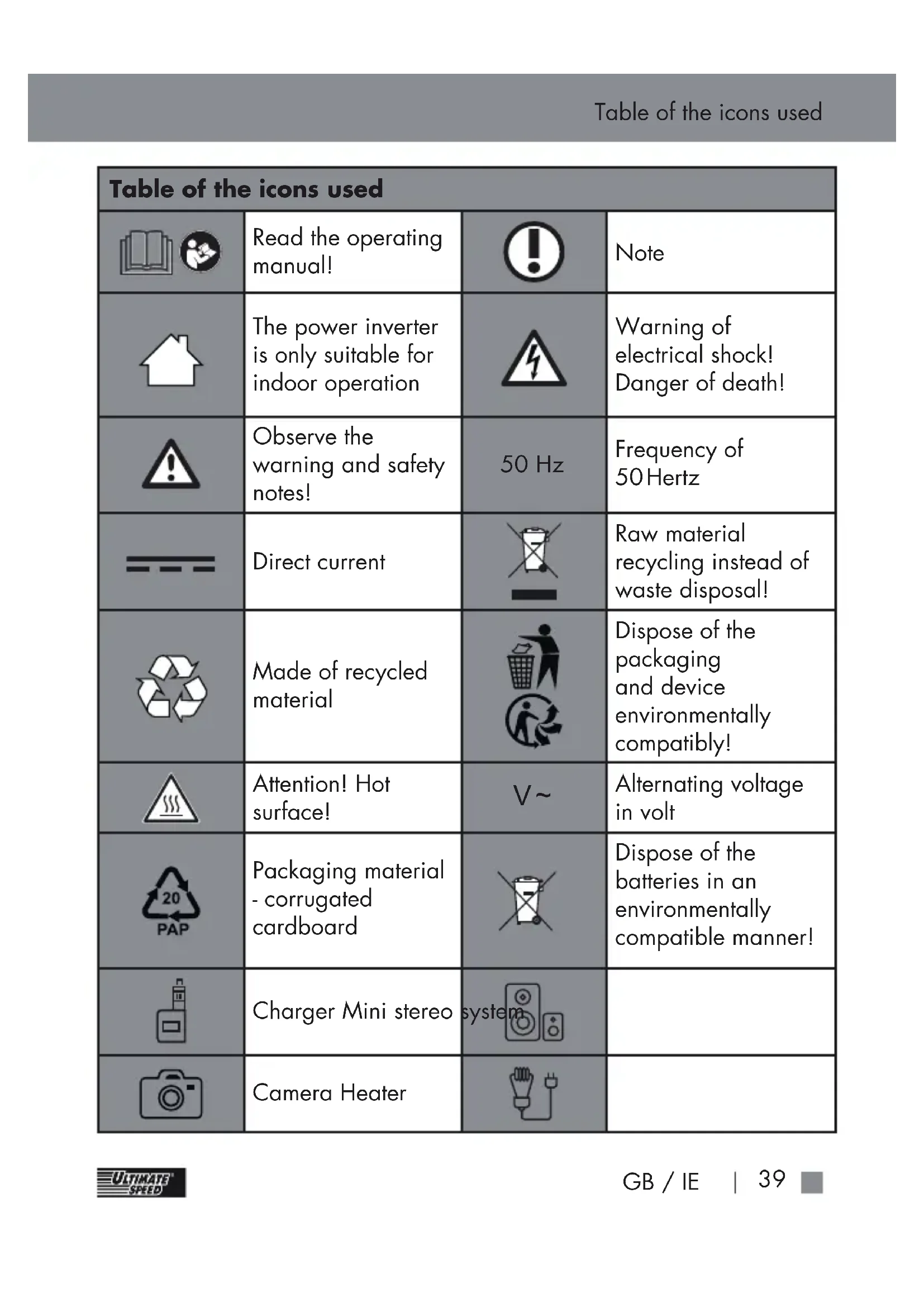
| Table of the icons used | |||
| Read the operating manual! | Note | ||
| The power inverter is only suitable for indoor operation | Warning of electrical shock! Danger of death! | ||
| Observe the warning and safety notes! | 50 Hz | Frequency of 50 Hertz | |
| Direct current | Raw material recycling instead of waste disposal! | ||
| Made of recycled material | Dispose of the packaging and device environmentally compatibly! | ||
| Attention! Hot surface! | V~ | Alternating voltage in volt | |
| 20PAP | Packaging material - corrugated cardboard | Dispose of the batteries in an environmentally compatible manner! | |
| Charger Mini stereo system | |||
| Camera Heater | |||
| USB charger Cooling box | USB charger Cooling box | |
| Razor Notebook |
POWER INVERTER 300W USSW 300 A1
Introduction
Congratulations! You have chosen a high-quality product from our company. Familiarise yourself with the product before first commissioning. For this, read the following operating manual and safety notes with care.
DO NOT LET THE DEVICE GET INTO THE HANDS OF CHILDREN!
- Intended use
This power inverter is suitable for operating 230 V devices with up to 300 W power intake,
or USB devices with up to 1 A current intake in the car on a 12-V connection. The power inverter can be connected either to the cigarette lighter of the vehicle via the enclosed cigarette lighter adapter cable, or directly to the battery using the enclosed adapter cable with terminals. If the power inverter is connected directly to the battery with the terminals, the power inverter must only be used while the vehicle is stationary. The manufacturer shall not be liable for any damage caused by nonintended or wrong use. This power inverter is not fit for commercial use. Commercial use causes the warranty to lapse. The device was developed for private use and is not suitable for commercial or

Note!
The output power is temperature- and voltage-dependent.
The output voltage varies based on load and input voltage.

Attention!
Devices with sensitive electronics should not be operated with the power inverter since the output voltage may be insufficient for such devices. Such devices may be damaged. If anything is unclear, please coordinate with the manufacturer of the connected device.
- Delivery scope

Always check that the delivery scope is
complete and that the power inverter is in an impeccable condition right after unpacking.
Do not use the device if it has any defects.
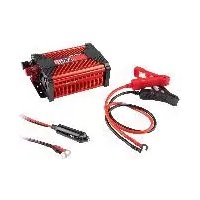
| 1 Power inverter |
| 2 Cable with connection terminal (1 x red 40 cm, 1 x black 40 cm) |
| 1 Cable with 12-V car cigarette lighter plug (2 m) |
| 1 Operating manual |
Description of parts
Power inverter
2 Operating LED (green)
3 Overload indicator (red)
4 On/off switch "0" means "OFF" "1" means "ON"
5 230-Vsocket
6 2 × USB connection 1 A
7 12-V screw connection red +
8 12-V screw connection black -
9 2x fuse holder
10 Cable with connection terminal red
11 Cable with connection terminal black
12 Cable with 12-V car cigarette lighter plug
13 2× 20 A car flat fuse
14 Fan
15 Attachment holes for fixed installation
Nut red
17 Nut black
18 Cigarette lighter plug
Glass fuse 20 A
20 Contact pin
21 Safety screw closure
Note: The terms "product" or "device" in the subsequent text refers to the power inverter described in this operating manual.
- Technical data
Input:
| Voltage: 12 V | === |
| Max. voltage: 14 | 8 V=== |
| Max. current intake: | 40 A |
| Undervoltage deactivation: | at 10.5 V ± 0.3 V |
| Overvoltage deactivation: | at 14.8 V ± 0.3 V |
Output:
| Voltage: | 230 V~ / 50 Hz |
| Output current: max. | 1.30 A |
| Permanent output: max. | 300 W |
| Efficiency (η): >75% | |
| Output waveform: | Modified sinus |
| Overload protec- tion: | >= 330 W |
| Temperature deac- tivation: | at 65 °C ± 5 °C |
| Peak perfor- mance: | max. 330 W / 0.1 s |
USB connection:
| Voltage: | 5 V === |
| Output current: max. | 1 A |
Fuse:
| Flat fuse in the power inverter: | 2 x 20 A car flat fuse |
| Glass fuse in the 12-V car cigarette lighter plug: | 20 A |
General information:
| Dimensions (without connections) (L x W x H): | 102 x 150 x 55 mm |
| Weight (without cable): | approx. 450 g |
| Operating temperature: | 5 °C - 40 °C |
| Operating humidity (rel. humidity - no condensation): | 0 - 80% |
Technical and visual changes may be made without notice within the scope of further development. All dimensions, notes and information in this operating manual are given without warranty. Legal claims that are filed based on the operating manual cannot be asserted for this reason.
- Safety notes

PLEASE READ THE OPERATING MANUAL WITH
CARE BEFORE USE. IT IS PART OF THE DEVICE AND MUST BE AVAILABLE AT ALL TIMES!
This section covers the basic safety provisions when working with the device.
Safety of persons!
This device may be used by children aged 16 and above, as well as by people with reduced physical, sensory or mental capacities or lack of experience and knowledge, provided that they are supervised or instructed in safe use of the device and understand the resulting risks. Children must not play with the device.
- Cleaning and user maintenance must not be performed by children without supervision.
Children should be supervised in order to ensure that they do not play with the device. - Keep the device away from people - in particular from children - and pets.
The user is responsible towards third parties for any damage caused by use of the device in the working area.
Never point the device at yourself or any other persons, in particular not at the eyes and ears, in operation. There is a danger of injury! - Do not let the device run unsupervised.
- Keep the device in a dry location and out of the reach of children.
To avoid dangers, unplug
the power inverter from the on-board socket or disconnect the connection terminals from the car battery after every use.
- Connect the power inverter to the car battery only with the engine off! There is a danger of injury from rotating parts!
The power inverter must be easily accessible at all times, so that the device can be disconnected from the battery quickly in an emergency.

This avoids damage to the device and potentially resulting injury:
Danger from electric shock!
Only connect the power inverter to a 12-V car battery/on-board
voltage. Connection to a 24 V voltage, can damage the device.
When connecting the power inverter via the 12-V car cigarette lighter plug, ensure that the polarity of the car cigarette lighter plug matches the polarity of the on-board socket. The on-board socket must have positive polarity on the inside, i.e. the plus pole of a vehicle battery must not be connected to the vehicle chassis.
Before connection of the inverter, check if the on-board socket is sufficiently protected. This protection must never be bypassed or changed.
Only use the enclosed connection cables.
- Never open or repair the device housing. Protection would not then be provided and the
warranty will expire.

The device is only suitable for indoor use.
Danger of fire!
Do not use the device near any hot surfaces.
- Do not set up the device in places that are subject to direct sunlight. Otherwise, it may overheat and receive irreparable damage. Do not operate the device on a vehicle placed in the sun.
- Never leave the device unsupervised when in use.
- Do not cover the ventilation slots of the fan while the device is on.
- Do not place any open sources of fire on the device, such as candles.
The two connection cables may heat up
under high load.
High transmission resistances may cause heating of the plug connection when using the cable with a 12-V car cigarette lighter plug. Use the connection cable with the connection terminals for operation with high loads for this reason.
Note on mains disconnection!
The on/off switch of this device will not completely disconnect the device from the on-board grid or the battery. The device will take in current when the car cigarette lighter plug is connected. In order to disconnect the device entirely from the on-board grid, the 12-V car cigarette lighter plug must be removed from
the on-board socket/the connection terminals must be disconnected from the car battery.
Work with the device
Check the device for damage before using it and use it only in an impeccable condition.
- Do not expose the device to any rain or damp weather. Do not let it get into contact with water or submerge it. There is a risk of electrical shock!
- Keep all openings of the device free during operation. Do not close the openings with your hands or fingers, and do not cover the device. There is a risk of overheating!
- Do not leave the device in the car during high outdoor temperatures.
The device may receive irreparable damage.
The device will turn hot in use. There is a risk of burns when touching the hot surfaces.
Ensure that neither sand nor dust or other small particles enter the air inlet or outlet opening.
- Do not use the device near any flammable liquids or gases. Do not suck in any hot vapours. Non-observation poses a danger of fire or explosion!
Turn off the device and disconnect the device from the power supply:
- if you are not using the device;
- if you are leaving the device unsupervised;
- if you perform any cleaning work;
- if the connection cable is damaged;
- after any foreign
bodies enter the device or in case of unusual sounds.
Use only accessories that are delivered and recommended by the manufacturer.
- Do not disassemble or change the device. This device must only be repaired by a maintenance technician.
Never store in places where the temperature may exceed 65°C
Only use at ambient temperatures between 5°C and 40°C .
Only use the adapter cables enclosed with the device.

CAUTION:
How to avoid accidents and
injuries from electrical shock:
Electrical safety
- Do not use the device if the switch cannot be turned on and off. Have damaged switches replaced.
- Do not carry the device by the cable. Do not pull the plug from the socket by the cable. Protect the cable from heat, oil and sharp edges.
- Disconnect the device from the power supply at once if the cable is damaged.
- Specific safety notes
A slightly increased operating temperature is not a malfunction. This is perfectly normal.
- Keep the device away from moisture and high temperatures, as well as fire.
- Keep the device in a dry location and protect
it from moisture and corrosion.
Do not drop the device.
Commissioning
Take all parts from the packaging and check if the power inverter or its parts show any damage. If this is the case, do not use the power inverter. Contact the manufacturer via the indicated service address. Remove all protective films and other transport packaging. Check if the delivery is complete.

Attention:
Do not let little children play with the packaging films. There is a danger of suffocation!
Notes on operation
For continuous operation of devices via the power inverter 1, the on-board socket must have a voltage between 10.5V and
14.8 V connected. Check before connection of the power inverter 1 whether the voltage source supplies enough current for operation. The current required for operation can be calculated as follows:
Current intake (A) =
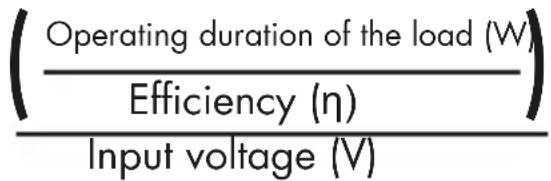
Example:
amp; (3 0 0 W/0 . 7 5) amp; 1 2 V/1 2 V = 3 3. 3 A
The power source should supply at least 33.3 A for a permanent load of 300 W accordingly.
Note:
12-V on-board sockets supply at most 15 A. Therefore, the power inverter in this example must be connected directly to a car battery, e.g. with the connection
terminals. Only this way can the 300 W permanent output be achieved.

Attention!
Never connect the power inverter 1 to a 24V on-board grid. The device would be damaged. The device must only be connected to a power source with a nominal voltage of 12V .
- Setup and attachment
The power inverter 1 should be placed on a level and flat surface. Ensure that a free space of at least 1cm remains around the power inverter 1 for air circulation.
A distance of 50 cm must be observed behind the ventilation slits of the fan 14.
The plastic base of the power inverter 1 has holes 15 for permanent installation in a vehicle. Matching screws can
be used to firmly install the power inverter Observe the space named above for air circulation.
Vehicle-specific situations make it impossible to enclose attachment material that will fit universally.
If you are not certain, contact your garage.
Operation in a vehicle
If you operate the power inverter 1 in a vehicle, ensure that the installation does not get in your way while driving. Always place cables so that they do not come into contact with many movable parts inside the vehicle, and make sure that they do not impair your view.
Note:
The power inverter can also be operated with the engine off. However, note that the power inverter may not work when starting the engine.
- Connection to a power source
Attention!
Before connecting the power inverter 1 to a power source, ensure that the on/off switch 4 of the device is in the position "0" (OFF). You can connect the power inverter 1 to a 12-V on-board socket with the 12-V plug 12 or directly to a car battery with the cables with connection terminals 10 and 11.
- Connection to a 12-V car cigarette lighter socket
Unscrew the red nut 16 at the power inverter 1. Guide the red eyelet of the cable with a 12-V car cigarette lighter plug 12 with the opening over the screw connection 7 (see fig. 1). Ensure that the washer is placed between the eyelet and the nut 16.
- Tighten the red nut until the eyelet can no longer become loose.
Unscrew the black nut 17 at the power inverter 1 Guide the black eyelet of the cable with a 12-V car cigarette lighter plug 12 with the opening over the 12-V screw connection 8 (see fig. 1). Ensure that the washer is placed between the eyelet and the nut 17. - Tighten the black nut until the eyelet can no longer become loose.
Plug the cable with 12-V car cigarette lighter plug into a car cigarette lighter socket.
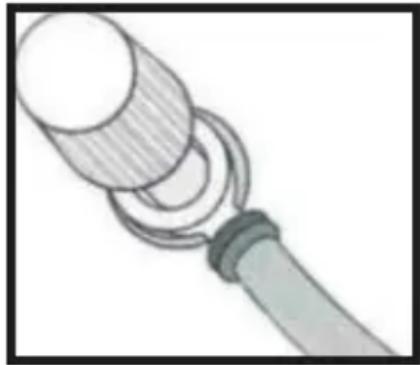
Fig. 1
Note:
High transmission resistances may
cause heating of the plug connection when using the cable with a 12-V car cigarette lighter plug 12. Use the connection cable with the connection terminals 10 and 11 for operation with high loads for this reason.
- Connection to a car battery
Unscrew the red nut 16 at the power inverter 1. Guide the red eyelet of the cable with the red connection terminal 10 over the 12-V screw connection 7 (see fig. 1). Ensure that the washer is placed between the eyelet and the nut 16.
- Tighten the red nut until the eyelet can no longer become loose.
Unscrew the black nut 17 at the power inverter 1. Guide the black eyelet of the cable with the black connection
terminal 11 over the screw connection 8 (see fig. 1). Ensure that the washer is placed between the eyelet and the nut 17.
-
Tighten the black nut until the eyelet can no longer become loose.
-
First connect the red terminal to the plus pole of the car battery and then the black terminal to the minus pole of the car battery.
- Connection and operation of a load/device
Attention!
Before connecting a load/device to the power inverter 1, ensure that the on/off switch 4 of the device is in the position "0" (OFF).
Ensure that the power of the connected load/device does not exceed the maximum permanent output of the power inverter 1.

Attention!
Do not turn on the load/device to be operated yet!
Connect the plug of the load/ device to be operated to the 230-V socket 5 of the power inverter 1.
Turn on the power inverter 1 by switching the on/off switch 4 into the position "1" (ON). A brief signal sound can be heard and the overload indicator 3 (red) will light up briefly. Then the operating LED 2 (green) will light up if the power inverter 1 is properly connected to a charged battery.
Now turn on the load/device to be operated.
Note:
If a signal sound can be heard and the overload indicator 3 lights up red, the input voltage is
too low or the power of the load/ device connected to the power inverter 1 is too high.
Notes on the operation of devices
General notes:
Usually, the rating plates of devices contain information on the current consumption in Ampere (A) or the power consumption in Watt (W). Before operation, make sure that the maximum current consumption is not above 1.30 A and that the maximum permanent output is not above 300 W.
- Loads with a high internal resistance can be operated very well via the power inverter, while loads with a low internal resistance, such as heating and cooking devices, usually have a power consumption in Watt that is too high.
Inductive loads, such as TV or stereo units (devices with a coil
or transformer) often require a much higher activation current than resistor loads with the same indicated power consumption in Watt. TVs have a multiple of the power consumption indicated on the rating plate for turning them on. This may make it necessary to turn the power inverter 1 on and off several times in order to switch on the TV.
If anything is unclear, please coordinate with the manufacturer of the connected device.
- Signal at low battery voltage
If the battery voltage drops below 10.5V , the power inverter will turn off and the overload indicator will light up red. A warning sound sounds.
- Charging a USB device
Attention!
Ensure before connection that the power consumption of the USB device is no higher than 1 A. For more information, see the operating manual of your USB device.
- Connect the USB plug of the USB device to the USB connection 6 of the power inverter 1.
If necessary, turn on the USB device. Note: The 230-V socket and the USB connection can be used at the same time.
- Replacing the fuses
Danger of death from electric shock:
Before replacing any fuse, disconnect the power inverter from the power supply. Disconnect any devices connected to the
power inverter 1.
Replace the fuse by an equivalent type - as indicated in the technical data with the same deactivation characteristics (20 A).

Attention!
Never use any fuses with a different value!
Before turning on the power inverter again, remove the cause that tripped the fuse.
Proceed as follows to replace the 20-A car flat fuse 13:
Pull the car flat fuse 13 from the fuse holder 9. The fuse can be pulled out easily with a car fuse extractor. This tool is not enclosed.
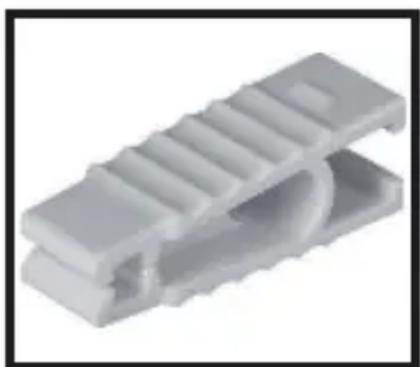
Insert a new, equivalent fuse. Proceed as follows to replace the 20-A glass fuse in the cigarette lighter plug
Unscrew the fuse screw connection 21 under which the fuse is placed.
Make sure not to lose the loosely inserted contact pin 20.
Remove the defective 20-A glass fuse 19.
Insert a new, equivalent 20-A glass fuse 19.
Insert the contact pin 20 in the fuse screw closure 21 and screw the fuse screw connection 21 back on the 12-V cigarette lighter plug 18.
- Troubleshooting
| Problem Potential cause | Remedy: | |
| No output voltage The power inverter 1 is overloaded. | Reduce the load until it no longer exceeds the maximum load indicated in the technical data. | |
| The input voltage is below 10.5 V. | Keep the input voltage of the power inverter above 10.5 V, in order to get an output voltage. | |
| Low output voltage The input voltage is below 12 V. | Keep the input voltage of the power inverter above 12 V in order to keep the output voltage consistent. | |
| The signal for low battery voltage keeps sounding The battery is defective. | Replace the battery. | |
| Insufficient voltage and power supply. | Check the condition of the on-board socket and the 12-V car cigarette lighter plug 12 and clean it if necessary. | |
| No output power | The power inverter 1 is not completely heated up due to low ambient temperature (e.g. in winter). | Turn the power inverter 1 on and off again until the device connected to the power inverter 1 is supplied with power. Repeat this process in order to be able to turn on the device. |
| The ignition must be on for the on-board socket to be supplied with power. | Turn the car ignition on or to "1" (ON). | |
| The power inverter 1 is overloaded. | Reduce the load until it no longer exceeds the maximum load indicated in the technical data. | |
| The power inverter 1 is overheated. | Let the device cool off. Ensure sufficient ventilation distance. Ensure that the connected load is not permanently above the maximum load in order to prevent recurring overheating. | |
| The device fuse has blown. | Replace the fuse as described in the chapter "Replacing the fuses". Ensure that the power inverter 1 is connected to the power supply with the correct polarity. |
TVs:
The power inverter 1 is shielded and emits a modified sine wave. When receiving, e.g., very weak TV stations, there may nevertheless be interferences or image distortions. In that case, position the power inverter 1 as far as you can away from the TV, aerial cable and aerial. Align the power inverter 1, TV, aerial cable, and aerial with each other until the reception improves. If possible, use a high-quality, shielded aerial cable.
Audio systems:
Some audio/video systems emit a hum through the speakers if operated via the power inverter 1. This is because these devices cannot filter the modified sine wave of the power inverter 1. This is not a defect of the power inverter 1.
maintenance
Attention: The device must not come into contact with water or be placed directly in water. There is a danger of injury from electrical shock if moisture enters the device.
Before cleaning, always disconnect the power inverter from the car cigarette lighter socket/remove the connection terminals from the car battery. Also disconnect any devices connected to the power inverter 1
Clean the housing surface and the accessories with a slightly moistened cloth. Never use petrol, solvent or detergent, since these may damage the surface of the device! If the ventilation slits are dusty, clean them with a soft brush.
- Environmental notes and disposal information
Raw material recycling instead of waste disposal!
The European directive 2012/19/EU requires separate collection of used-up electrical devices and delivery for environmentally compatible recycling. Disposal of the device via a licensed disposal operation or your municipal disposal facility. Observe the currently applicable provisions. If in doubt, contact your disposal facility.

The device, accessories, and packaging should be delivered to environmentally compatible recycling.
Do not dispose of electrical devices in domestic waste!
You as the end user are legally (battery regulation)
required to return all used batteries. Batteries that contain hazardous substances are marked with the adjacent symbols that refer to the prohibition of disposing of them in domestic waste. The designations for the relevant heavy metal is: Cd = Cadmium, Hg = Mercury, Pb = Lead. Take used-up batteries to a disposal facility in your city or municipality, or return them to the dealer. This complies with the statutory obligations and will make an important contribution to environmental protection.
EU declaration of conformity
We,
C. M. C. GmbH
Document officer:
Dr. Christian Weyler
Katharina-Loth-Str. 15
DE - 66386 St. Ingbert
GERMANY
declare, subject to our sole
responsibility, that the product
Power inverter
IAN: 334225_1907
Item no.: 2275
Year of manufacture: 2020/14
Model: USSW 300 A1
complies with the essential
protection requirements that
are specified in the European
directives
Electromagnetic compatibility:
(2014/30/EU)
Low-voltage directive:
(2014/35/EU)
60GB/IE
RoHS directive:
(2011/65/EU+2015/863/EU)
and their amendments.
The object of the declaration
as described above meets the
provisions of directive 2011/65/
EU of the European Parliament
and the Council of 08 June 2011
for limitation of use of certain
dangerous substances in electrical
and electronics devices.
The following harmonised standards were used for conformity assessment:
EN 62368-1:2014/
A11:2017
EN 50498:2011
by proxy (i. A.) Dr. Christian
Weyler
- Quality assurance -
- Notes on warranty and service processing
Warranty of Creative Marketing & Consulting GmbH
Dear Customer, this device comes with a warranty of 3 years after the purchasing date. In the case of product defects, you will have statutory rights against the vendor of the product. These statutory rights are not limited by our warranty as described below.
Warranty terms
The warranty term shall commence on the purchasing date. Please keep the original receipt. You will need that document as evidence of your purchase.
If any defect of material or craftsmanship appears during a period of three years after the purchasing date, we will
repair or replace the product free of charge for you - at our choice. This warranty service requires that the defective device and the purchasing document (receipt) are submitted during the period of three years, and that the defect, as well as the time of its occurrence, are briefly described in writing.
If the defect is covered by our warranty, we will return the repaired product to you or send you a new one. Repair or replacement shall not cause a new warranty period to commence.
Warranty period and statutory claims for defects
The warranty period shall not be extended by warranty services performed. This shall also apply to replaced and repaired parts. Any damage and defects that
are present at purchase already must be reported at once after unpacking. Any repairs required after the end of the warranty period shall be subject to fees.
Warranty scope
The device has been carefully produced based on strict quality directives and thoroughly inspected before delivery.
The warranty service is available for defects of material or craftsmanship. This warranty shall not cover any product parts that are subject to regular wear and therefore may be considered wear parts, or to any damage to fragile parts, such as switches, rechargeable batteries, or parts made of glass.
This warranty shall be void if the product has been damaged, used or serviced improperly. Proper use of the
product requires compliance with all instructions listed in the operating manual. Purposes of use and actions that are advised or warned against in this operating manual must be avoided.
The product is only intended for private, non-commercial use. Abuse and improper treatment, application of violence and any manipulation not performed by our authorised service office shall void the warranty.
- Processing of a warranty claim
In order to ensure quick processing of your request, observe the following notes: Keep your purchasing receipt and the item number (e.g. IAN) at hand as proof of purchase if you submit any requests. For the item number, see the rating plate, an engraving, the title page of
your instructions (lower left) or the sticker on the rear or bottom. If any functional errors or other defects occur, contact the service department designated below by phone or email first.
You can send a part recorded as defective to the service address provided to you, postage paid. The shipment must include the purchasing document (receipt) and information on what the defect is and when it occurred.

Note:
This and many other manuals, product videos and software can be downloaded from www.lidlservice.com.
This QR code will take you directly to the Lidl service page (www.lidl-service.com) where you can open your operating manual by entering the item number (IAN) 334225_1907.

How to contact us:
GB,IE
Name: C. M. C. GmbH
Website: www.cmc-creative.de
Email: service.gb@cmc-creative.de
Phone: 0-808-189-0652
Registerd office: Germany
IAN 334225_1907
Please note that the following address is not a service address.
Contact the above service point first.
Address:
C. M. C. GmbH
Katharina-Loth-Str. 15
DE - 66386 St. Ingbert
GERMANY
Ordering spare parts:
Marketing & Consulting
GmbH
Chere cliente, cher client, cet
service.fr@cmc-creative.de
Telephone:
Dr. Christian Weyler
Katharina-Loth-Str. 15
DE - 66386 St. Ingbert
DUITSLAND
2011/65/UE Parliament
GTX Service Sp. zo.o Sp.k.
Adres internetowy:
www.gtxservice.pl
E-mail: bok@gtxservice.com
Telefon: +48 225730385
Siedziba: Niemcy
IAN 334225_1907
Creative Marketing & Consulting
GmbH Service CZ
Internetová adresa:
www.cmc-creative.de
E-mail:
info@bohemian-dragomans.com
Telefon: +420 608 600485
Sidlo: Německo
IAN 334225_1907
service.sk@cmc-creative.de
Telefon: 0850 232001
Sidlo: Nemecko
IAN 334225_1907
- FR BE
- SAFETY NOTES.. PAGE 44
- SPECIFIC SAFETY NOTES PAGE 48
- COMMISSIONING PAGE 49
- NOTES ON OPERATION.. PAGE 49
- TROUBLESHOOTING . PAGE 56
- CLEANING AND MAINTENANCE.. PAGE 58
- ENVIRONMENTAL NOTES AND DISPOSAL INFORMATION......PAGE 59
- EU DECLARATION OF CONFORMITY . PAGE 60
- NOTES ON WARRANTY AND SERVICE PROCESSING.. PAGE 61
- POWER INVERTER 300W USSW 300 A1
- INTRODUCTION
- DO NOT LET THE DEVICE GET INTO THE HANDS OF CHILDREN
- INTENDED USE
- NOTE
- ATTENTION
- DELIVERY SCOPE
- DESCRIPTION OF PARTS
- TECHNICAL DATA
- INPUT
- OUTPUT
- USB CONNECTION
- FUSE
- GENERAL INFORMATION
- SAFETY NOTES
- PLEASE READ THE OPERATING MANUAL WITH
- CARE BEFORE USE. IT IS PART OF THE DEVICE AND MUST BE AVAILABLE AT ALL TIMES
- SAFETY OF PERSONS
- DANGER FROM ELECTRIC SHOCK
- DANGER OF FIRE
- NOTE ON MAINS DISCONNECTION
- WORK WITH THE DEVICE
- CAUTION
- ELECTRICAL SAFETY
- SPECIFIC SAFETY NOTES
- EXAMPLE
- SETUP AND ATTACHMENT
- OPERATION IN A VEHICLE
- CONNECTION TO A POWER SOURCE
- CONNECTION TO A 12-V CAR CIGARETTE LIGHTER SOCKET
- CONNECTION TO A CAR BATTERY
- CONNECTION AND OPERATION OF A LOAD/DEVICE
- NOTES ON THE OPERATION OF DEVICES
- GENERAL NOTES
- CHARGING A USB DEVICE
- REPLACING THE FUSES
- DANGER OF DEATH FROM ELECTRIC SHOCK
- TVS
- AUDIO SYSTEMS
- MAINTENANCE
- ENVIRONMENTAL NOTES AND DISPOSAL INFORMATION
- RAW MATERIAL RECYCLING INSTEAD OF WASTE DISPOSAL
- EU DECLARATION OF CONFORMITY
- C. GMBH
- POWER INVERTER
- ELECTROMAGNETIC COMPATIBILITY
- LOW-VOLTAGE DIRECTIVE
- ROHS DIRECTIVE
- NOTES ON WARRANTY AND SERVICE PROCESSING
- WARRANTY OF CREATIVE MARKETING & CONSULTING GMBH
- WARRANTY TERMS
- WARRANTY PERIOD AND STATUTORY CLAIMS FOR DEFECTS
- WARRANTY SCOPE
- PROCESSING OF A WARRANTY CLAIM
- HOW TO CONTACT US
- GB,IE
- IAN 334225_1907
- ADDRESS
- ORDERING SPARE PARTS
Brand : ULTIMATE SPEED
Model : USSW 300 A1
Category : Voltage converter