ManualGo.com
IAN 337431 - Desk lamp Livarno Lux - Free user manual and instructions
Find the device manual for free IAN 337431 Livarno Lux in PDF.



Download the instructions for your Desk lamp in PDF format for free! Find your manual IAN 337431 - Livarno Lux and take your electronic device back in hand. On this page are published all the documents necessary for the use of your device. IAN 337431 by Livarno Lux.
USER MANUAL IAN 337431 Livarno Lux
Operation and safety notes
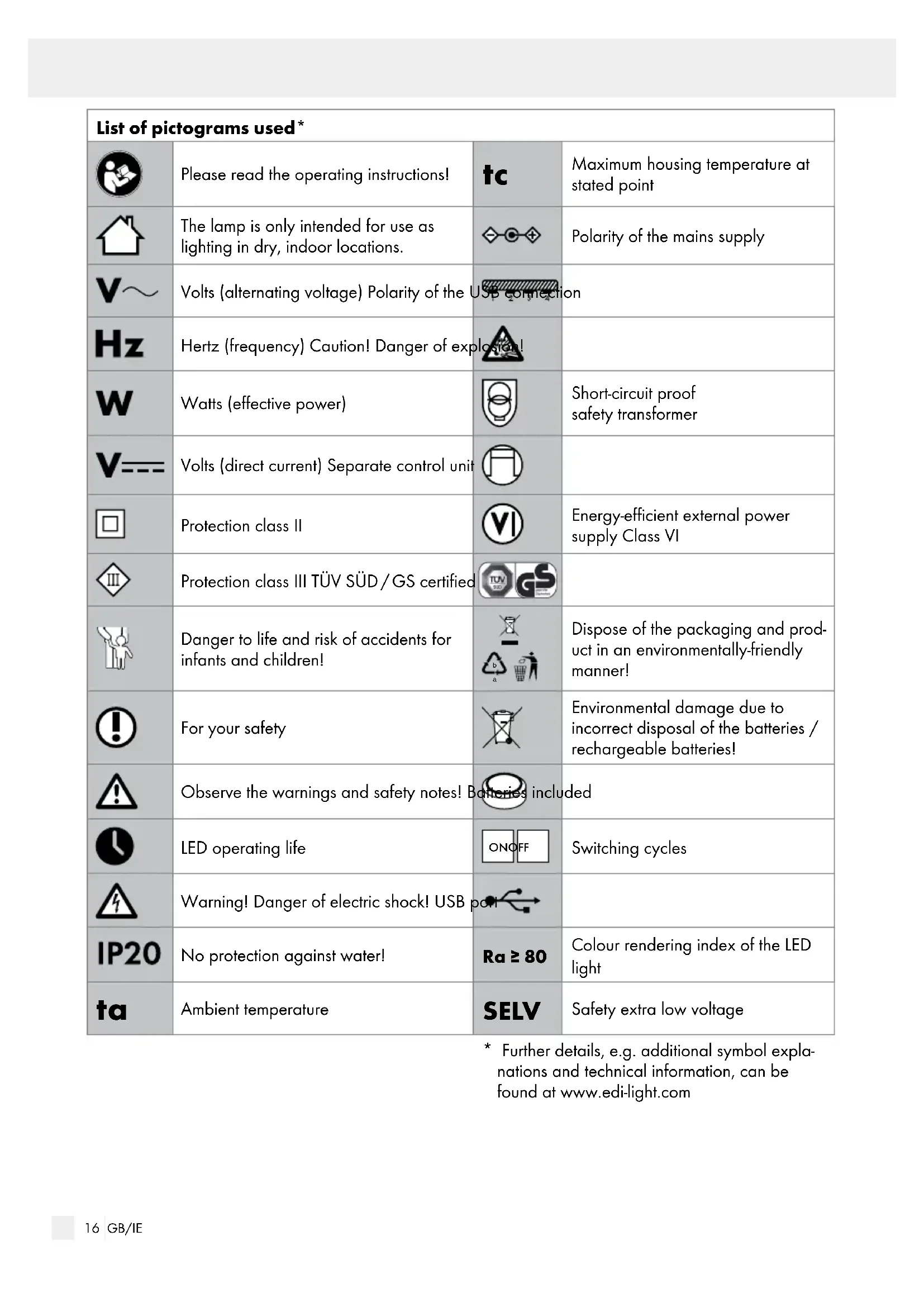
Maximum housing temperature at stated point The lamp is only intended for use as lighting in dry, indoor locations. Polarity of the mains supply Volts (alternating voltage) Polarity of the USB connection Hertz (frequency) Caution! Danger of explosion! Watts (effective power) Short-circuit proof safety transformer Volts (direct current) Separate control unit Protection class II Energy-efficient external power supply Class VI Protection class III TÜV SÜD / GS certified Danger to life and risk of accidents for infants and children!
Dispose of the packaging and prod- uct in an environmentally-friendly manner! For your safety Environmental damage due to incorrect disposal of the batteries / rechargeable batteries! Observe the warnings and safety notes! Batteries included LED operating life ON OFF Switching cycles Warning! Danger of electric shock! USB port No protection against water! Ra ≥ 80 Colour rendering index of the LED light
- Further details, e.g. additional symbol expla- nations and technical information, can be found at www.edi-light.com17 GB/IE LED desk lamp Introduction Familiarise yourself with the product be- fore using it for the first time. Please also carefully read the following instructions for use and safety notes. Only use the product as described and for the specified purposes. Keep these instructions in a safe place. When passing this product on to others, please also include all documentation. Intended use The lamp is intended to illuminate dry, enclosed indoor spaces and features a time, date and temperature display. By activating the alarm function the lamp can also be used as an alarm. This lamp is only intended for household use, not for commercial purposes. Only use the lamp as described in these instructions for use. Any other use is considered improper use and may result in property damage and / or personal injury. The lamp is not a toy. The manufacturer and retailer assume no liability for damages due to im- proper or incorrect use. Scope of delivery 1 LED desk lamp, Model 55154 (black) / 55155 (grey) 1 Connection cable 1 Mains adapter K05S050100G 1 Instructions for use Parts description
Cover (battery compartment)
Connection socket (mains adapter)
Light colour: 5000 K Mains adapter: K05S050100G Total Power: 6.0 W Input voltage: 100–240 V∼ 50 / 60 Hz Input current: 0.2 A (max.) Output voltage: 5 V Output current: 1.0 A Output power: 5.0 W Protection class: II / Ambient temperature (ta): max. 45 °C Housing temperature (tc): max. 79 °C Safety notes DANGER TO
LIFE AND RISK OF ACCIDENT
FOR INFANTS AND CHILDREN! This product may be used by children aged 12 years and older and persons with reduced18 GB/IE physical, sensory or mental capabilities or la- cking experience and knowledge when super- vised or instructed in safe product use by a person responsible for their safety. Do not al- low children to play with the product. Cleaning and user maintenance must not be performed by children without supervision. Keep children under age eight years away from the light, the connection cable, and the mains adapter. Keep batteries out of the reach of children. Risk of choking and suffocation. Seek immediate medical attention if batteries a
swallowed by children or pets. Never leave the lamp on unattended. Do not allow children to play with the packaging film. Children can get entangled in the packaging whilst laying and suffocate.
SHOCK! Risk of electric shock due to faulty electrical installation or excess line voltage. Only connect the lamp if the mains voltage of the socket corresponds with the specifications in the type plate. Always connect the lamp to an easy to reach socket so the lamp can quickly be disconnected from the mains in the event of a fault. Do not use the lamp if you detect any type of damage or the connection cable / mains adapter is defective. Do not open the housing; repairs must be car- ried out by a professional. Contact a specialist workshop for this purpose. Unauthorised repairs, incorrect connection or improper use will void all warranty and liability claims. Always repair using parts which meet the origi- nal product specifications. This lamp contains electrical and mechanical parts which are vital to prevent safety hazards. The illuminant in this lamp is not replaceable; if the illuminant reaches the end of its life, replace the entire lamp. Do not use the lamp with an external timer s witch or a separate remote control system. Do not immerse the lamp or the connection ca- ble or mains adapter in water or other liquids. Never touch the mains adapter with wet hands. Never unplug the mains adapter by the connec- tion cable, always grab the mains adapter. Never use the connection cable as a handle. Keep the lamp, mains adapter and the connec- tion cable away from open fire and hot surfaces. Ensure the connection cable does not become a tripping hazard. Do not kink the connection cable or run it over sharp edges. Only use the lamp indoors. Never user the lamp in wet rooms or in rain. Never keep the lamp where it can fall into a tub or a washbasin. Never reach for an appliance which has fallen into water. Instead, immediately unplug the mains adapter from the socket. CAUTION! RISK OF INJURY! Improper use of the lamp may result in injuries. Do not look directly into the LED illuminant dur- ing operation to prevent damage to the retina. Also instruct other users of this hazard. The LED lamp and the mains adapter become hot during use. Allow the lamp and mains adapter to cool down after use before touching. NOTE: RISK OF DAMAGE! Improper use of the lamp may result in damage. Place the lamp on an easy to access, level, dry, and sufficiently sturdy surface. Do not place the lamp near the edge. Never place the lamp on or near hot surfaces (hobs, etc.). Do not cover the lamp. Do not allow the connection cable to come into contact with hot parts. Never expose the lamp to high temperatures (radiators, etc.) or the weather (rain, etc.). Never immerse the lamp in water to clean or use a steam cleaner. Discontinue use of the lamp if parts are cracked or deformed. Always replace damaged parts with genuine spare parts.19 GB/IE Battery safety information
KEEP BATTERIES OUT OF THE
REACH OF CHILDREN! Swallow- ing batteries can cause chemical bur ns, perforation of soft tissue, and death. Severe burns may occur within 2 hours of swallowing batteries. Seek immediate medical attention.
BURNS! Leaked battery acid can cause chemical burns. Avoid contact with the skin, eyes, and mucous membranes. Do not clean battery acid with bare hands. Use conventional washing up gloves. If the lamp will not be used for more than one month, remove the backup battery from the lamp. Remove used batteries from the lamp. CAUTION! DANGER OF EXPLOSION! Batteries can explode in excessive heat. Do not heat batteries and do not throw into open fire. Do not expose the battery and lamp to direct sunlight. Do not short-circuit batteries. Never recharge primary batteries. Initial use Examining the lamp and the scope of delivery NOTE: RISK OF DAMAGE! Opening the packaging carelessly with a sharp knife or other sharp objects may damage the lamp. Open the packaging with care.
1. Remove the lamp, connection cable
and the mains adapter
from the packaging and remove all protective film.
erify the scope of delivery is complete (see Fig. A).
3. Check the lamp and accessories for damage.
Do not use the lamp if you detect any type of damage. In this case, please contact the manu- facturer (see “Service address“). Backup Battery The backup battery is already installed. Remove the insulating strip from the backside of the lamp before first use. When disconnecting the lamp from the mains, any settings, e.g. time and alarm, will be lost. The backup battery ensures that the settings will not be lost, even though the display
is unlit and the LED light
cannot be switched on. Once reconnected to the mains, the display
will light up again and the LED light
can be switched on again. Removing / replacing the backup battery (see Fig. C)
1. Open the battery compartment on the back-
side of the lamp by loosening the screws in the cover
using a Phillips screwdriver.
2. Remove the used battery.
3. If applicable, insert a new battery of the same
type (see “Technical data“).
4. Reinstall the cover
over the new battery.
5. Close the battery compartment by slightly press-
into the battery compartment and tightening the Phillips screw again. Connecting the lamp to the power supply
1. Insert the coaxial connector of the connection
into the connection socket
2. Insert the USB plug of the connection cable into
of the mains adapter.
into a properly in- stalled socket to connect the lamp to the mains.20 GB/IE Setting the time and date NOTE: If no buttons are pressed for more than 60 seconds whilst setting the time or date, the process will be cancelled and any settings lost. NOTE: When adjusting the settings in time mode, the symbol will continuously flash in the function display.
switch from alarm mode to time mode. A beep will sound and the symbol will appear in the function display
A beep will sound and the top line in the time display
to set the current hour.
ress the Select button
to confirm the settin
A beep will sound and the bottom line in the time display will flash.
ress the Select button
to confirm the setting
A beep will sound and both lines in the display will flash.
to set the current year. The weekday in the date display
will correct automatically.
ress the Select button
to confirm the setti ng. A beep will sound and the first field in the date display will flash.
to set the current mo nth.
to confirm the entry. A beep will sound and the second field in the date display will flash.
to set the current date.
to confirm the entry. The date and time have been set. The symbol in the function display will stop flashing and stay on. Note: You can change the unit of temperature (° C or ° F) at any time by pressing the but- ton
You can switch between the 12-hour and 24-hour mode at any time by pressing the button
Operation Use the flexible lamp head
to adjust the LED lamp. Switching the lamp on or off The lamp has three brightness settings:
once to switch on the LED lamp
a second time to increase the brightness.
a third time to increase the brightness more.
a fourth time to switch the LED lamp
off. Switching the alarm on and off Activate the alarm (see “Activating the alarm“). The alarm will sound at the set time. Press any button (
) on the backside of the lamp to switch off the alarm sound. With the snooze function activated, the symbol will appear in the function display. The alarm will sound again after the set snooze time (max. 2 x). Activating the alarm Press the Mode button
to switch from time mode to alarm mode. A beep will sound and the symbol will appear in the function display
several times to activate or disable the respective function:
- symbol appears in the function display: The alarm function is activated.
- symbol also appears in the function display: The snooze function is activated. Press the Mode button
to revert from alarm mode to time mode. A beep will sound. The symbol will go out and in addition to the /21 GB/IE symbols for the respective selected functions, the will appear in the function display. If no changes are made for 60 seconds, the LC display
will automatically revert from alarm mode to time mode. Setting the alarm time, snooze time and alarm sound
switch from time mode to alarm mode. A beep will sound and the symbol will appear in the function display
will show the current alarm time.
A beep will sound, the top line in the time dis- play will flash, and the symbol will flash in the function display.
to confirm the setting. A beep will sound, the bottom line in the time display will flash, and the symbol will flash in the function display.
to confirm the setting. A beep will sound, the bottom line in the time display will flash, and the symbol will flash in the function display.
to set the snooze time (in minutes).
to confirm the settin
A beep will sound and the bottom line in the time display will flash.
to select one of eight alarm sounds.
to confirm the entry. The alarm time, snooze time, and the alarm sound have been set. The symbol will stay on in the function dis- play. Cleaning RISK OF SHORT CIRCUIT! Water or other liquids inside the housing may cause a short circuit. Do not allow water or other liquids to enter the housing. Never immerse the lamp in water or other liquids. NOTE: RISK OF DAMAGE! Improper use of the lamp may result in damage. Do not use aggressive cleaning agents, brushes with metal or nylon bristles, or sharp or metal cleaning tools such as knives, rigid scrapers, etc. These can damage the surface.
from the mains before cleaning.
2. Allow the lamp and mains adapter to cool down
3. Wipe all parts with a slightly damp cloth.
4. Use a soft cloth to wipe all parts dry after
cleaning. Storage All parts must be completely dry prior to storage. Always store the lamp in a dry location. Protect the lamp and all accessories from direct sunlight. Store the lamp securely locked away out of the reach of children at a storage temperature be- tween 5 °C and 20 °C (room temperature). Disposal The packaging is made entirely of recyclable mate- rials, which you may dispose of at local recycling facilities.
Observe the marking of the packaging materials for waste separation, which are marked with abbreviations (a) and numbers (b) with following meaning:22 GB/IE 1–7: plastics / 20–22: paper and fibre- board / 80–98: composite materials. The product and packaging materials are recyclable, dispose of it separately for better waste treatment. The Triman logo is valid in France only. Contact your local refuse disposal author- ity for more details of how to dispose of your worn-out product. To help protect the environment, please dispose of the product properly when it has reached the end of its useful life and not in the household waste. Information o
collection points and their opening hours can be obtained from your local authority. Faulty or used batteries / rechargeable batteries must be recycled in accordance with Directive 2006/66/EC and its amendments. Please return the batteries / rechargeable batteries and / or the product to the available collection points. Environmental damage through incorrect disposal of the batter- ies / rechargeable batteries! Batteries / rechargeable batteries may not be dis- posed of with the usual domestic waste. They may contain toxic heavy metals and are subject to haz- ardous waste treatment rules and regulations. The chemical symbols for heavy metals are as follows: Cd = cadmium, Hg = mercury, Pb = lead. That is why you should dispose of used batteries / recharge- able batteries at a local collection point. Declaration of conformity This product fulfils the requirements of the applicable European and national direc- tives. The relevant declarations and do- cuments are held by the manufacturer. The product meets the requirements of the German Equipment and Product Safety Act. We reserve the right to make technical and visual changes to the product in the interest of product improvement. Typographical and printing errors excepted. Warranty and service Warranty The product has been manufactured to strict quality guidelines and meticulously examined before deli- very. In the event of product defects you have legal rights against the retailer of this product. Your legal rights are not limited in any way by our warranty detailed below. The warranty for this product is 3 years from the date of purchase. Should this product show any fault in materials or manufacture within 3 years from the date of purchase, we will repair or replace it – at our choice – free of charge to you. The warranty period begins on the date of purchase. Please keep the original sales receipt in a safe loca- tion. This document is required as your proof of purchase. This warranty becomes void if the product has been damaged, or used or maintained improperly. The warranty applies to defects in material or manu- facture. This warranty does not cover product parts
ubject to normal wear, thus possibly considered co nsu- mables (e.g. batteries) or for damage to fragile parts, e.g. switches, rechargeable batteries or glass parts. Service address Great Britain / Irland EGLO UK Ltd. Unit 12 Cirrus Park Lower Farm Road Moulton Park Industrial Estate Northampton, NN3 6UR, GREAT BRITAIN E-Mail: info-greatbritain@eglo.com Phone: +44-1604-790 98623 GB/IE IAN 337431_2004 Please have your receipt and item number (e.g. IAN 123456_7890) ready as your proof of purchase when enquiring about the product. Warranty card Return address: Name / First name: Country / Postal code / City / Street address: Phone number: Item number / Description: Purchase date / Point of purchase: Description of the defect: Date / Signature: