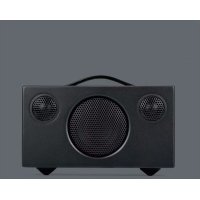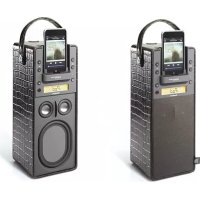
Porto docking speaker - Music receiver AUDIO PRO - Free user manual and instructions
Find the device manual for free Porto docking speaker AUDIO PRO in PDF.



User questions about Porto docking speaker AUDIO PRO
0 question about this device. Answer the ones you know or ask your own.
Ask a new question about this device
Download the instructions for your Music receiver in PDF format for free! Find your manual Porto docking speaker - AUDIO PRO and take your electronic device back in hand. On this page are published all the documents necessary for the use of your device. Porto docking speaker by AUDIO PRO.
USER MANUAL Porto docking speaker AUDIO PRO
sound, science and style
© Audio Pro AB Sweden 2006/2007.
Audio Pro ^® , the Audio Pro logotype, the 'a' symbol and acebass ^® are all registered trademarks of Audio Pro AB, Sweden. All rights reserved. Audio Pro follows a policy of continuous advancement in development. Specifications may be changed without notice.
EmbracingSound
EmbracingSound™ is the single-point loudspeaker technology for consumers and professionals alike to experience more of the recording with better resolution and clarity than ever before. Thanks to the unique speaker placement and an ingenious signal treatment, the stereo signal is optimized to reach our ears instead of separate speakers. Just sit back and experience more of your music and maybe you will find new favorites, as well as, making excursions into music genres that you where totally unfamiliar with before. For further information please visit www.embracingsound.com.
The trademark EmbracingSound ^™ is owned by Embracing Sound Experience AB. US Patent # 7,010,128 Patents pending.

The "Made for iPod" logo indicates that this product has been designed specifically to work with iPod. The manufacturer certifies that this accessory has been made in accordance with the high standards of quality and performance that you expect from iPod and Apple.
iPod doesn't come in just one size or shape. The Universal Dock provides a single, elegant way to connect any iPod with dock connector to your iPod accessory. iPod fits into the Universal Dock through the use of interchangeable inserts called Dock Adapters.
audio pro
sound, science and style
© Audio Pro AB Sweden 2006/2007.
sound, science and style
© Audio Pro AB Sverige 2006/2007.
sound, science and style
© Audio Pro AB Schweden 2006/2007.
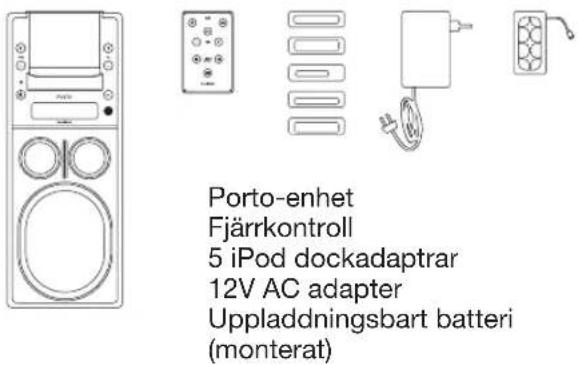
FÖRPACKNINGSINNEHÅLL
text_image
Porto-enhet Fjärrkontroll 5 iPod dockadaptrar 12V AC adapter Uppladdningsbart batteri (monterat)iPod video (60GB, 80GB)
iPod, U2 iPod med video (30GB)
iPod nano (1 gen.) (2GB, 4GB)
iPod photo, färgdisplay (40GB, 60GB)
NOTERA:
natural_image
Two technical diagrams showing mechanical components with arrows indicating direction (no text or symbols)RDS Station Name Display
Generellt
Ingångar
natural_image
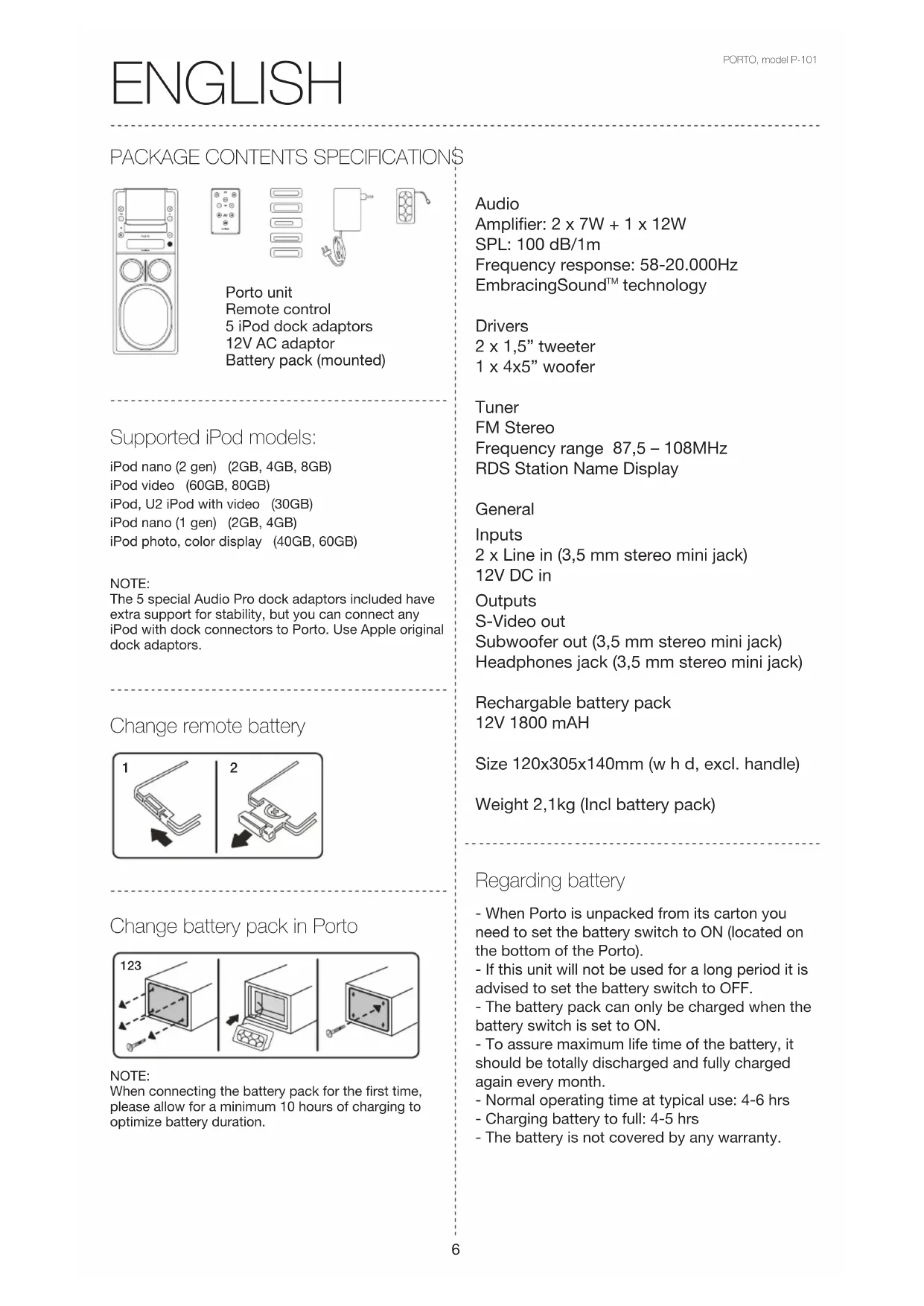
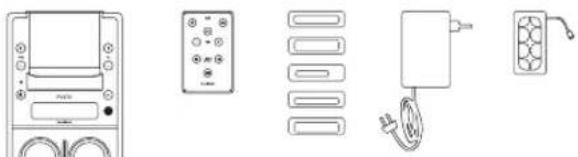
Line drawings of various household appliances and devices including a TV, control panel, washing machine, and electrical plug (no text or symbols)Porto unit
Remote control
5 iPod dock adaptors
12V AC adaptor
Battery pack (mounted)
Supported iPod models:
iPod nano (2 gen) (2GB, 4GB, 8GB)
iPod video (60GB, 80GB)
iPod, U2 iPod with video (30GB)
iPod nano (1 gen) (2GB, 4GB)
iPod photo, color display (40GB, 60GB)
NOTE:
The 5 special Audio Pro dock adaptors included have extra support for stability, but you can connect any iPod with dock connectors to Porto. Use Apple original dock adaptors.
Change remote battery
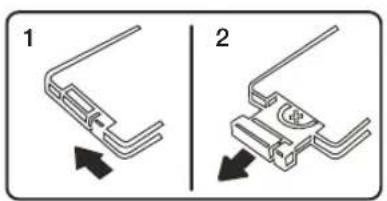
natural_image
Two technical diagrams showing mechanical components with arrows indicating direction (no text or symbols)Change battery pack in Porto
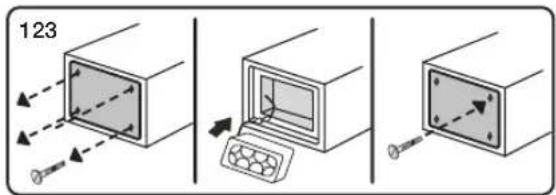
text_image
123NOTE:
When connecting the battery pack for the first time, please allow for a minimum 10 hours of charging to optimize battery duration.
Audio
Amplifier: 2 x 7W + 1 x 12W
SPL: 100 dB/1m
Frequency response: 58-20.000Hz
EmbracingSound™ technology
Drivers
2 x 1,5" tweeter
1 x 4x5" woofer
Tuner
FM Stereo
Frequency range 87,5 - 108MHz
RDS Station Name Display
General
Inputs
Rechargeable battery pack
12V 1800 mAH
Size 120x305x140mm (w h d, excl. handle)
Weight 2,1kg (Incl battery pack)
Regarding battery
- When Porto is unpacked from its carton you need to set the battery switch to ON (located on the bottom of the Porto).
- If this unit will not be used for a long period it is advised to set the battery switch to OFF.
- The battery pack can only be charged when the battery switch is set to ON.
- To assure maximum life time of the battery, it should be totally discharged and fully charged again every month.
- Normal operating time at typical use: 4-6 hrs
- Charging battery to full: 4-5 hrs
- The battery is not covered by any warranty.
FRONT
1. Tune up
Single push changes 0.05 MHz at a time.
Long push scans fast up for next available station.
2. Tune down
Single push changes 0.05 MHz at a time.
Long push scans fast down for next available station.
3. LED status
System on: Green steady light
Green light flashing when charging, steady light when fully charged
Red light flashing when battery low, <10%.
System off: Green light flashing when charging, steady light when fully charged
Red light flashing when battery low, <10%.
(Faster flash the less battery capacity remaining)
4. Stand by
Turns Porto on and off.
5. iPod universal dock
You can use any iPod adaptor to connect any iPod model.
6. Volume up
Single push changes 1 step at a time.
Long push increases volume faster.
7. Volume down
Single push changes 1 step at a time.
Long push decreases volume faster.
8. SRC
Source selection, toggle between connected sources.
(iPod, FM tuner, Line 1 and Line 2.)
9. Infrared sensor for remote control
10. Display
11. Acoustic divider
Part of the EmbracingSound™ technology.
12. Tweeters
13. Woofer
14. Battery switch (on the battery lid)
Set the battery switch to ON to charge or use the internal battery. Switch to OFF when the internal battery will not be used.
BACK
- FM antenna
Pull out to improve FM reception.
- S-Video out
Connect to your TV set to view movies on screen.
- Stereo/Mono switch
If FM reception is poor, switch to Mono to reduce noise.
- Line in x 2
Connect other sound sources, such as CD-player, Mp3-player, PC, etc.
- Subwoofer out
Connect to powered subwoofer.
-
Headphones
-
12V DC IN
Connect the external AC power supply or
DC 12V from car or boat to charge Porto.

DC plug 2.1 mm.
REMOTE CONTROL
- On/off
Turns Porto on and off.
- Mute
Push to turn sound off. Push again to turn sound on.
- SRC
Source selection, toggle between connected sources
(iPod, FM tuner, Line 1 and Line 2.)
- Volume down
Single push changes 1 step at a time.
Long push decreases volume faster.
- Volume up
Single push changes 1 step at a time.
Long push increases volume faster.
- Track/tune previous/down
When in iPod mode, changes to previous track.
When in FM mode, tune down.
- Track/tune next/up
When in iPod mode, changes to next track.
When in FM mode, tune up.
- Play/pause
Play or pause when in iPod mode.

The lightning flash with arrowhead symbol, within an equilateral triangle, is intended to alert the user to the presence of uninsulated “dangerous voltage” within the product’s enclosure that may be of sufficient magnitude to constitute a risk of electric shock to persons.

The exclamation point within an equilateral triangle is intended to alert the user to the presence of important operating and maintenance (servicing) instructions in the literature accompanying the appliance.
WARNING: TO REDUCE THE RISK OF FIRE OR ELECTRIC SHOCK, DO NOT EXPOSE THIS APPARATUS TO RAIN OR MOISTURE.
CAUTION: TO REDUCE THE RISK OF ELECTRIC SHOCK, DO NOT REMOVE COVER (OR BACK). NO USER-SERVICEABLE PARTS INSIDE. REFER SERVICING TO QUALIFIED SERVICE PERSONNEL.
Important safety instructions
-
Read these instructions.
-
Keep these instructions.
-
Heed all warnings.
-
Follow all instructions.
-
Do not use this apparatus near water.
-
Clean only with dry cloth.
-
Do not block any ventilation openings. Install in accordance with the manufacturer's instructions.
-
Do not install near any heat sources such as radiators, heat registers, stoves, or other apparatus (including amplifiers) that produce heat.
-
Protect the power cord from being walked on or pinched particularly at plugs, convenience receptacles, and the point where they exit from the apparatus.
-
Only use attachments/accessories specified by the manufacturer.
-
Unplug this apparatus during lightning storms or when unused for long periods of time.
-
Refer all servicing to qualified service personnel. Servicing is required when the apparatus has been damaged in any way, such as power-supply cord or plug is damaged, liquid has been spilled or objects have fallen into the apparatus, the apparatus has been exposed to rain or moisture, does not operate normally, or has been dropped.
-
Damage Requiring Service
Unplug the apparatus from the wall outlet and refer servicing to qualified service personnel under thee following conditions:
A. When the power-supply cord or plug is damaged,
B. If liquid has been spilled, or objects have fallen into the apparatus,
C. If the apparatus has been exposed to rain or water,
D. If the apparatus does not operate normally by following the operating instructions. Adjust only those controls that are covered by the operating instructions as an improper adjustment of other controls may result in damage and will often require extensive work by a qualified technician to restore the apparatus to its normal operation.
E. If the apparatus has been dropped or damaged in any way, and
F. When the apparatus exhibits a distinct change in performance this indicates a need for service.
- Object and Liquid Entry
Never push objects of any kind into the apparatus through openings as they may touch dangerous voltage points or short-out parts that could result in a fire or electric shock. The apparatus shall not be exposed to dripping or splashing and no objects filled with liquids, such as vases shall be placed on the apparatus. Don't put candles or other burning objects on top of this unit.
- Batteries
Always consider the environmental issues and follow local regulations when disposing of batteries.
-
If you install the apparatus in a built-in installation, such as a bookcase or rack, ensure that there is adequate ventilation. Leave 20 cm (8") of free space at the top and sides and 10 cm (4") at the rear. The rear edge of the shelf or board above the apparatus shall be set 10 cm (4") away from the rear panel or wall, creating a flue-like gap for warm air to escape.
-
This device has no mains switch. To disconnect this device from mains supply, the power cord must be disconnected.
-
The power supply and power cord for this apparatus is intended for indoor use only.
-
Do not move the apparatus if another devise, such as an iPod or any other audio device, is connected to it.
-
Only use the enclosed A/C adaptor.
A D/C cord (to connect 12V in car) is a not included accessory. Contact your local authorized dealer.
CONTENU DE L'EMBALLAGE CARACTÉRISTIQUES TECHNIQUES
natural_image
Line drawings of various household appliances and devices including a TV, control panel, wall-mounted units, and electrical connectors (no text or symbols)natural_image
Two technical diagrams showing mechanical components with arrows indicating direction (no text or symbols)natural_image
Line drawings of various household appliances and devices including a TV, control panel, wall-mounted units, and electrical connectors (no text or symbols)Porto-Gerät
Fernbedienung
5 verschiedene iPod-Dockadapter
12V-Netzteil
Akkupack (montiert)
natural_image
Two technical diagrams showing mechanical components with arrows indicating direction (no text or symbols)natural_image
Line drawings of various household appliances and devices including a TV, control panel, washing machine, and electrical plug (no text or symbols)Porto eenheid
Afstandsbediening
5 iPod (dock) basisstation
adapters
12V lichtnetadapter
natural_image
Line drawings of various household appliances and devices including a TV, control panel, washing machine, and electrical plug (no text or symbols)RDS (Station Name Display)
natural_image
Line drawings of various household appliances and devices including a TV, control panel, washing machine, and electrical plug (no text or symbols)Unidad Porto
Control remoto
natural_image
Two mechanical component diagrams showing a bracket and pin assembly, with arrows indicating direction (no text or symbols)natural_image
Line drawings of various household appliances including a TV, control panel, wall-mounted units, and electrical connectors (no text or symbols)natural_image
Two technical diagrams showing mechanical components with arrows indicating direction (no text or symbols)sound, science and style
© Audio Pro AB Sweden 2006/2007.
sound, science and style
sound, science and style
© Audio Pro AB Sweden 2006/2007.
sound, science and style
text_image
audio pro® Designed and engineered by Audio Pro AB, Sweden Model no: p-101 Serial no: EmbracingSound® The trademark EmbracingSound(TM) is owned by Embracing Sound Experience AB. US Patent # 7.010,128 Patents pending.
audio pro
www.audiopro.com
www.audiopro.se