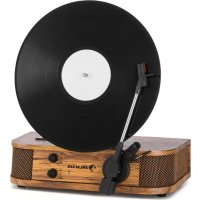
Verticalo SE - Media player Auna - Free user manual and instructions
Find the device manual for free Verticalo SE Auna in PDF.


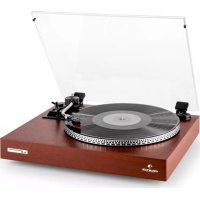
| Product Type | Turntable with built-in speakers, USB player and Bluetooth |
| Brand | Auna |
| Model | Verticalo SE |
| Power supply | 230 V~ 50 Hz |
| Wireless connectivity | Bluetooth 2.402-2.480 GHz, max. power 4 dBm |
| Playback modes | Vinyl (33⅓, 45, 78 rpm), USB, Bluetooth |
| Audio output | Line Out (RCA) |
| Approximate dimensions | 430 x 360 x 140 mm (L x D x H) |
| Approximate weight | 4 kg |
| Main functions | Vinyl playback with auto-stop, USB with track controls, Bluetooth streaming, volume adjustment, speed selector, line output |
| Included accessories | Magnetic centering adapter, power adapter, user manual |
| Maintenance and cleaning | Use a dry cloth; avoid insecticide sprays and oil-based products |
| Safety | Do not open or modify the device; use only indoors; keep children away from packaging |
| Spare parts and repairability | The stylus is not covered by warranty; any unauthorized intervention voids the warranty |
| General information | Item number: 10034589; energy saving: automatic shutdown after 20 minutes without audio signal |
Frequently Asked Questions - Verticalo SE Auna
User questions about Verticalo SE Auna
0 question about this device. Answer the ones you know or ask your own.
Ask a new question about this device
Download the instructions for your Media player in PDF format for free! Find your manual Verticalo SE - Auna and take your electronic device back in hand. On this page are published all the documents necessary for the use of your device. Verticalo SE by Auna.
USER MANUAL Verticalo SE Auna
INHALTSVERZEICHNIS
Technische Daten 3
Member of Berlin Brands Group
Handwerkerstr. 11
15366 Dahlwitz-Hoppegarten
Deutschland
natural_image
Symbol of a trash bin crossed with a diagonal line, representing no waste or discharge (no text or labels)Berlin Brands Group UK Ltd
PO Box 1145
Oxford, OX1 9UW
United Kingdom
Congratulations on purchasing this device. Please read the following instructions carefully and follow them to prevent possible damages. We assume no liability for damage caused by disregard of the instructions and improper use. Scan the QR code to get access to the latest user manual and more product information.

CONTENTS
Safety Instructions 14
Device Overview 16
Preparation for Use 17
Operation 18
Disposal Considerations 20
Declaration of Conformity 20
TECHNICAL DATA
| Item number 10034589 | |
| Power supply 230 V ~ 50 Hz | |
| BT frequency 2.402-2.480 GHz | |
| BT radio-frequency power (max.) 4 dBm |
SAFETY INSTRUCTIONS
- These operating instructions are intended to familiarize you with the operation of this product.
- These operating instructions are intended to familiarize you with the operation of this product.
- Please use the product only in its intended manner. Any other use may result in damage to the product or its surroundings.
- Modification or alteration of the product impairs product safety. Attention: Risk of injury!
- Never open the product without authorization and never carry out repairs yourself!
- Handle the product carefully. It can be damaged by shocks, blows or a fall from a low height.
- Keep the product away from moisture and extreme heat. This appliance is only suitable for domestic use in closed rooms.
- Keep the product away from moisture and extreme heat. This appliance is only suitable for domestic use in closed rooms.
- Do not place heavy objects on top of this appliance.
- Only clean the appliance with a dry cloth.
- Do not block the ventilation openings.
- Only use accessories recommended by the manufacturer or a qualified retailer.
- Turn down the volume before connecting the headphones to a music device
- Use the supplied AC adaptor to connect the unit to an electrical outlet and connect it only to ordinary (230 V\~ 50 Hz) household sockets.
- The warranty expires if the device is tampered with by third parties.
Small objects/packaging parts (plastic bags, cardboard, etc.)
- Keep small objects (e.g. screws and other mounting materials, memory cards) and packaging parts out of the reach of children so that they cannot be swallowed by them. Do not let small children play with foil. There is a danger of suffocation!
Transporting the device
- Please keep the original packaging. To gain sufficient protection of the device while shipment or transportation, make sure to put it back in its original packaging.
Cleaning the surface
- Do not use volatile liquids such as insect sprays. Excessive pressure when wiping may damage the surfaces. Rubber or plastic parts should not come into contact with the unit for long periods of time. Use a dry cloth.
DEVICE OVERVIEW


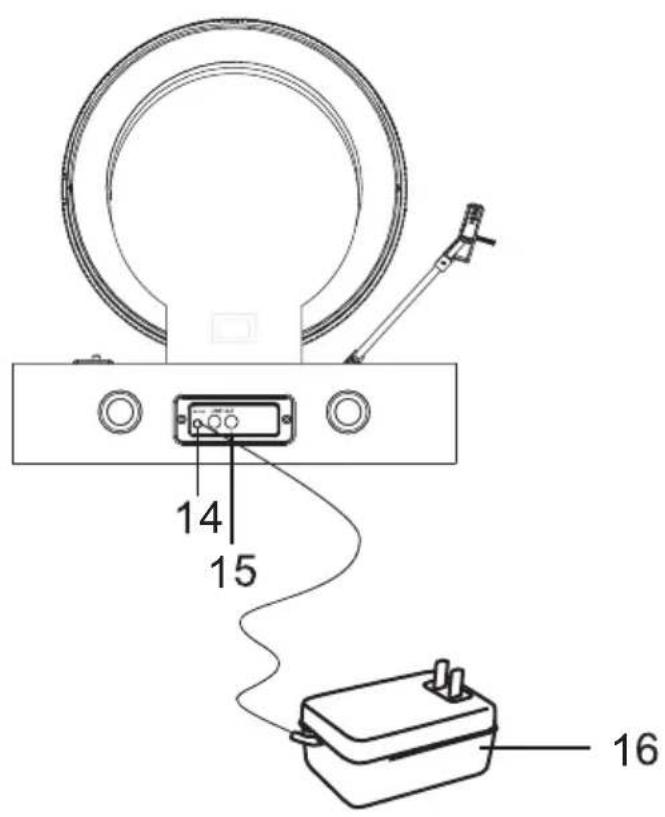
Device
1 Cartridge and stylus
2 Turntable
3 Tone Arm
4 Speakers
5 ON/OFF VOLUME knob
6 Speed Control knob
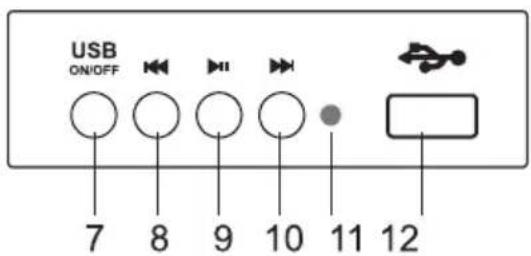
Control Panel
7 USB ON/OFF button
8 Forward skip button
9 Wiedergabe - Pause
10 Backward skip button
11 USB indicator light
12 USB port
13 Magnetic adapter
Back
14 Power jack
15 LINE OUT jack
16 AC adapter
PREPARATION FOR USE
Unpacking and Setup
- Carefully remove the unit from the display carton and remove all packing material from the unit.
- Unwind the AC power cord and extend it to its full length.
- Place the unit on a stable, level surface, convenient to an AC outlet, out of a strong magnetic field.
- Connect the plug to your AC outlet.
- Remove the white plastic stylus cover from the phonograph stylus by sliding it in the direction of the arrow.
- During this operation pay attention to the stylus, because the stylus damage is not covered by guarantee.
- This product is designed to operate on 230 V\~50 Hz AC only. Attempting to operate this system from any other power source may cause damage to the system, and such damage is not covered by your warranty.
Protecting your furniture
This model is equipped with non-skid rubber, 'feet' to prevent the product from moving when you operate the controls. These, 'feet' are made from non-migrating rubber material specially formulated to avoid leaving any marks or stains on your furniture. However certain types of oil based furniture polishes, wood preservatives, or cleaning sprays may cause the rubber, 'feet' to soften, and leave marks or a rubber residue on the furniture. To prevent any damage to your furniture we strongly recommend that you purchase small self-adhesive felt pads, available at hardware stores and home improvement centers everywhere, and apply these pads to the bottom of the rubber, 'feet' before you place the product on fine wooden furniture.
Care of Cabinets
You should care for the cabinet as you would care for any piece of the furniture. When the cabinet becomes dusty wipe it with a soft, non-abrasive dust cloth. If the cabinet becomes smudged with fingerprints you may use any good quality commercial dusting and polishing spray cleaner, however avoid spraying the plastic or metal parts of this system. We recommend that you spray the cleaner on your dust cloth. Not directly on the cabinet. to avoid getting any of the spray on the plastic or metal parts.
OPERATION
USB operation
- Press USB ON/OFF button to set the unit to the USB mode, USB indicator light will be on.
- Insert the USB disk, the unit will begin to play the first song of the USB disk automatically. And the indicator light will flash.
- Press the Forward skip button ▶ Backward skip button to select the song.
- To pause playback, press the Play/Pause button ▶ the indicator light will be on. Press the Play/Pause button ▶ again to resume playback.
- To stop playback, press USB ON/OFF button, the indicator light will go off.
NOTE: When playing USB (the USB indicator light is on), only the Volume control knob on the front panel can be used.
Tunable operation
- Rotate the ON/OFF knob to turn on the unit.
- Rotate the SPEED CONTROL KNOB to the correct speed (33 ½, 45 oder 78 rpm) for the select record.
- Take out the MAGNETIC ADAPTER, put a record on the TURNTABLE lightly, then put the MAGNETIC ADAPTER back to fix the record.
- Remove the stylus protector from the stylus assembly.
- Release the tonearm lock, use the Cue Lever to lift up the tonearm.
- Move the tonearm over the record where play is desired to begin. Use the Cue Lever back to the down position, the tonearm will descend slowly onto the record and begin to play.
- Rotate the volume control knob to get desired sound level.
- At the end of the record, the tone arm will stop automatically.
Line-out operation
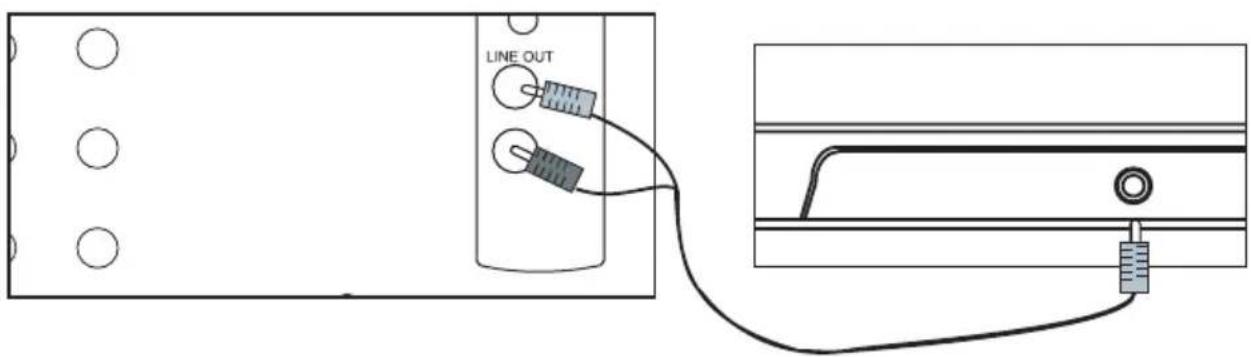
This system includes a set of LINE OUT jacks which allow you to record from the Radio or Phonograph of this system to an external recording device such as a cassette recorder, Mini-Disc, etc. In any play mode, insert the audio cable(not include) into the matching "LINE OUT" socket of the unit, operate as usual, and through the speakers of A, we can hear the sound exported from.
NOTE: Power saving function
To help save power consumption, if there is no audio signal input for 20 minutes while the unit is powered on, the unit will off power automatically. To turn power back on and resume playing, you will need to turn off the power first and turn it back on to continue.
BT operation
- Turn on the unit by rotating the volume knob.
- The BT function is setting as acquiescent function when turning on the unit. Make sure the tone-arm is on the resetting state. A short BT starting tone can be heard, then the BT indicator will be flashing.
- Turn on your BT device and scan. It will be displayed as „Verticalo-SE“ when discovered by your BT device. Enter password „0000“ during pairing if necessary.
- When the unit is paired with your BT device, you can hear a short tone from the speakers.
- Play your BT device as you normally do and the sound will be played from this unit. Then you may enjoy the music.
Notes:
- Make sure your BT device and this unit is within 10 metres.
- Check and see if there are other BT devices nearby interfering the signal and connection.
- This unit is could be paired by multiple different BT devices, but could only be connected and played by one of them at a time. Make sure no others device is actively connected to it already when you are trying to connect the one you are working on.
DISPOSAL CONSIDERATIONS

natural_image
Symbol of a trash bin crossed with a diagonal line, representing no waste or discharge (no text or labels)If there is a legal regulation for the disposal of electrical and electronic devices in your country, this symbol on the product or on the packaging indicates that this product must not be disposed of with household waste. Instead, it must be taken to a collection point for the recycling of electrical and electronic equipment. By disposing of it in accordance with the rules, you are protecting the environment and the health of your fellow human beings from negative consequences. For information about the recycling and disposal of this product, please contact your local authority or your household waste disposal service.
This product contains batteries. If there is a legal regulation for the disposal of batteries in your country, the batteries must not be disposed of with household waste. Find out about local regulations for disposing of batteries. By disposing of them in accordance with the rules, you are protecting the environment and the health of your fellow human beings from negative consequences.
DECLARATION OF CONFORMITY

Manufacturer:
Chal-Tec GmbH, Wallstrasse 16, 10179 Berlin, Germany.
Importer for Great Britain:
Berlin Brands Group UK Ltd
PO Box 1145
Oxford, OX1 9UW
United Kingdom
Hereby, Chal-Tec GmbH declares that the radio equipment type Verticalo SE is in compliance with Directive 2014/53/EU. The full text of the EU declaration of conformity is available at the following internet address: use.berlin/10034589
For Great Britain: Hereby, Chal-Tec GmbH declares that the radio equipment type Verticalo SE is in compliance with the relevant statutory requirements. The full text of the declaration of conformity is available at the following internet address: use.berlin/10034589
Chère cliente, cher client,
SOMMAIRE
Fiche technique 21

Appareil
natural_image
Symbol of a trash bin crossed with a diagonal line, representing no waste or discharge (no text or labels)DÉCLARATION DE CONFORMITÉ

Fabricant :
Chal-Tec GmbH, Wallstraße 16, 10179 Berlin, Allemagne.
Berlin Brands Group UK Ltd
PO Box 1145
Oxford, OX1 9UW
United Kingdom
ÍNDICE
Datos técnicos 29

Aparato
natural_image
Symbol of a trash bin crossed with a diagonal line, representing no waste or discharge (no text or labels)DÉCLARATION DE CONFORMITÉ

Fabricant :
Chal-Tec GmbH, Wallstraße 16, 10179 Berlin, Allemagne.
Berlin Brands Group UK Ltd
PO Box 1145
Oxford, OX1 9UW
United Kingdom
INDICE
Dati tecnici 37


Dispositivo
natural_image
Symbol of a trash bin crossed with a diagonal line, representing no waste or discharge (no text or labels)Berlin Brands Group UK Ltd
PO Box 1145
Oxford, OX1 9UW
United Kingdom
natural_image
Abstract white logo design on dark background, resembling stylized letter 'S' or wave form (no text or symbols)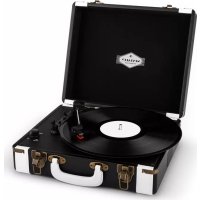
- INHALTSVERZEICHNIS
- Member of Berlin Brands Group
- Handwerkerstr. 11
- Dahlwitz-Hoppegarten
- Deutschland
- CONTENTS
- SAFETY INSTRUCTIONS
- Small objects/packaging parts (plastic bags, cardboard, etc.)
- Transporting the device
- Cleaning the surface
- DEVICE OVERVIEW
- Device
- Control Panel
- Back
- PREPARATION FOR USE
- Unpacking and Setup
- Protecting your furniture
- Care of Cabinets
- OPERATION
- USB operation
- Tunable operation
- Line-out operation
- BT operation
- Notes:
- DISPOSAL CONSIDERATIONS
- DECLARATION OF CONFORMITY
- Manufacturer:
- Importer for Great Britain:
- Chère cliente, cher client,
- SOMMAIRE
- Appareil
- DÉCLARATION DE CONFORMITÉ
- Fabricant :
- ÍNDICE
- Aparato
- INDICE
- Dispositivo
Brand : Auna
Model : Verticalo SE
Category : Media player