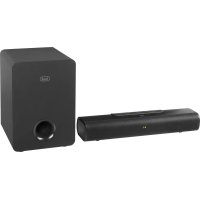
SB 8380 SW - Soundbar Trevi - Free user manual and instructions
Find the device manual for free SB 8380 SW Trevi in PDF.



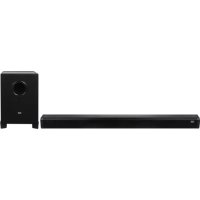
| Product type | 2.1 soundbar with wireless subwoofer |
| Brand | Trevi |
| Model | SB 8380 SW |
| Soundbar dimensions (W x H x D) | 410 x 95 x 65 mm |
| Subwoofer dimensions (W x H x D) | 220 x 193 x 270 mm |
| Total weight | 3.5 kg |
| Soundbar power supply | 19 V ⎓ 4.5 A |
| Subwoofer power supply | 100-240 V ~ 50/60 Hz |
| Speakers | 2 × 2" + subwoofer 5.25" |
| Maximum audio power | 90 W (2 × 15 W + 60 W) |
| Connectivity | USB, optical input, HDMI ARC, AUX (3.5 mm jack), Bluetooth |
| Audio functions | Preset equalizer (EQ), treble/bass adjustment, 3D surround effect, repeat (ONE/ALL), Mute |
| Bluetooth | Version not specified, typical range 10 m, password 0000 |
| USB input | Play audio files from USB flash drive |
| Auto power off | Yes (AutoPower Off after inactivity) |
| Remote control | Yes, AAA batteries not included |
| Power consumption | Not specified |
| Maintenance and cleaning | Soft slightly damp cloth, no solvents |
| Safety | Do not expose to water, no flame sources, ventilation space 10 cm |
| Reset | Unplug for 30 seconds |
| Repairability | Trevi authorized service center only, warranty void if self-repair |
Frequently Asked Questions - SB 8380 SW Trevi
User questions about SB 8380 SW Trevi
0 question about this device. Answer the ones you know or ask your own.
Ask a new question about this device
Download the instructions for your Soundbar in PDF format for free! Find your manual SB 8380 SW - Trevi and take your electronic device back in hand. On this page are published all the documents necessary for the use of your device. SB 8380 SW by Trevi.
USER MANUAL SB 8380 SW Trevi
SISTEMA STEREO 2.1 SOUNDBAR CON WIRELESS SUBWOOFER
Manuale d'uso e collegamento
STEREO SISTEM 2.1 SOUNDBAR WITH WIRELESS SUBWOOFER
Connection and Operation Manual
STEREO SISTEM 2.1 SOUNDBAR AVEC SUBWOOFER SANS FIL
WARNING: DO NOT OPEN THE SET. NEITHER CONTROLS OR SPARE PARTS TO BE USED BY THE USER ARE TO BE FOUND INSIDE IT. APPLY TO AUTHORISED TREVICENTERS FOR SERVICE OPERATIONS.
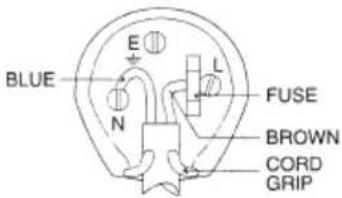
WIRES CONNECTIONS TO A UK THREE-PIN PLUG
The wires in this mains lead are coloured in accordance with the following wiring codes:
Blue: Neutral
Brown:Live
The wires in this mains lead must be connected to the terminals in the plug as follows:
Blue wire: N or Black
Brown wire: L or Red
Neither wire is to be connected to the earth (E or W) terminal of three-pin plug.
Should the fuse fail in the plug remove the plug form the wall socket and replace the fuse with a 3 Amp. ASTA approved BS 1362 fuse.
NOTE D'USO
-
Place the device on a flat surface.
-
Place the device so that its sides there is always enough space for air to circulate freely (at least 10cm ).
-
Do not place anything on top of the unit.
-
The apparatus shall not be exposed to dripping or splashing water. No objects filled with liquid, such as vases, should be placed on the unit.
-
If liquids penetrate inside the device immediately disconnect the plug from the socket and take it to the nearest service center autorizzato TREVI.
-
No naked flame sources, such as lighted candles, should be placed on.
-
Cables should be hidden and protected in order to avoid stumbling from someone and the consequent fall of the appliance.
The power adapter must be connected to a socket close to the device and must be easily accessible.
-
If you notice excessive heat on the device or on the power adapter, immediately disconnect the plug from the main power outlet.
-
Keep the unit away from the following places.
-
Near strong heat sources, such as central heating plants or stoves.
-
In very humid places such as bathrooms, swimming pools, etc...
-
In very dusty places.
-
In places subject to strong vibrations.
-
Unplug the power cable during thunderstorms or long periods of inactivity.
- Instruct children and people with little knowledge of the product for proper use.
- Listen at high volume for a long time, can damage your hearing.
- Keep the following user manual.
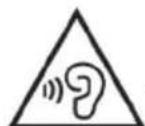
To prevent possible hearing damage, do not listen at high volumes levels for long periods.
CARE AND MAINTENANCE
Use a slightly damp soft cloth for cleaning. Do not use solvents and abrasive substances.
IMPORTANT
This appliance has been carefully built to ensure long-lasting perfect performance. However, should any inconvenience occur, please contact your local authorised TREVI Service Centre.
TREVI follows a policy of ongoing research and development. Therefore products may have different features from those described.
DESCRIPTION OF CONNECTORS/CONTROLS
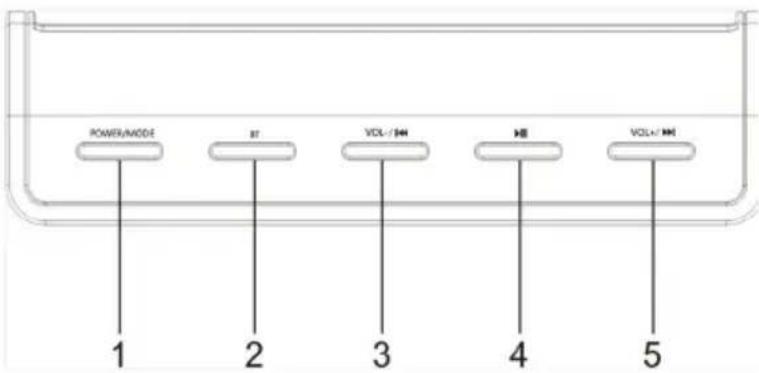
- POWER/MODE button: soundbar on/off/active input selection.
- BT button: direct selection of playback via Bluetooth connection.
- VOL-/PREV button: Volume decrease/previous track selection.
- Play / Pause button: start / stop playback.
- VOI + / NEXT key: Volume increase / next track selection.
Back panel
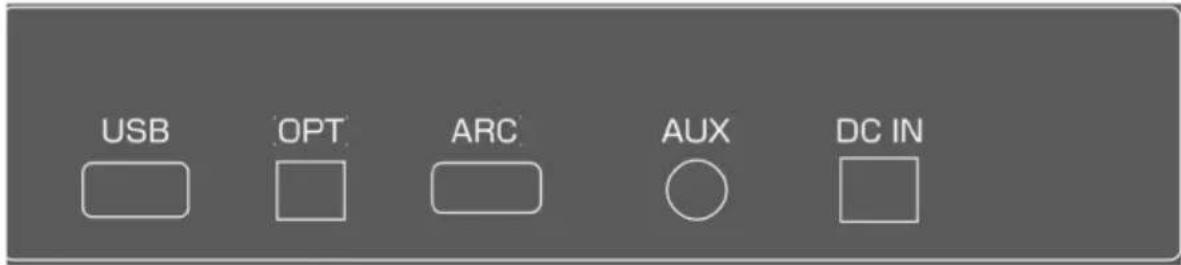
USB: USB input
OPT: Optical digital Audio input.
ARC: HDMI ARC input
AUX: AUX-IN input (3.5mm stereo jack)
DC IN: soundbar power socket 19V = 1,5A.
REMOTE CONTROL DESCRIPTION
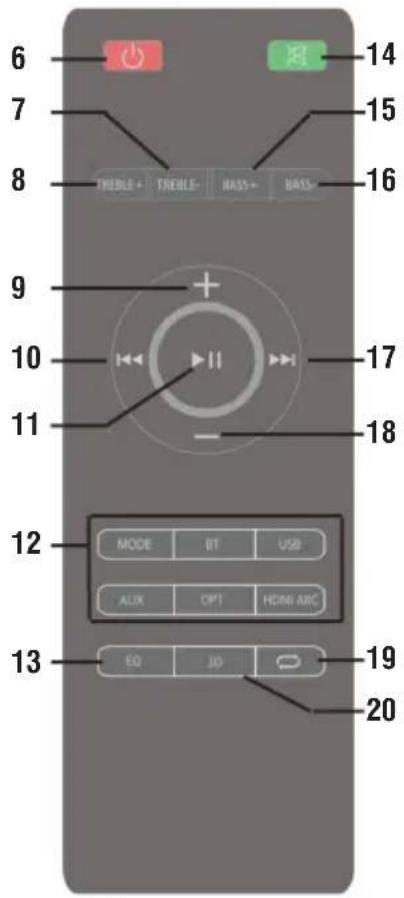
- POWER button: on / off.
7/8. TREBLE + and - keys: treble adjustment -
- key: Volume + adjustment
- PREV key: selection of the previous track.
- Play / Pause button: play / pause.
- Direct selection keys in active inputs
- EQ button: selection of the audio equalization (3).
- MUTE key: audio deactivation / activation.
15/16. BASS + and - keys: bass adjustment - NEXT button: next track selection.
- Button -: Volume adjustment -.
- REPEAT button: ONE (single track repeat), ALL (all track repeat).
- 3D button: surround effect.
REMOTE CONTROL BATTERIES
Insert two "AAA" batteries according to the markings inside compartment.
SUPPLY
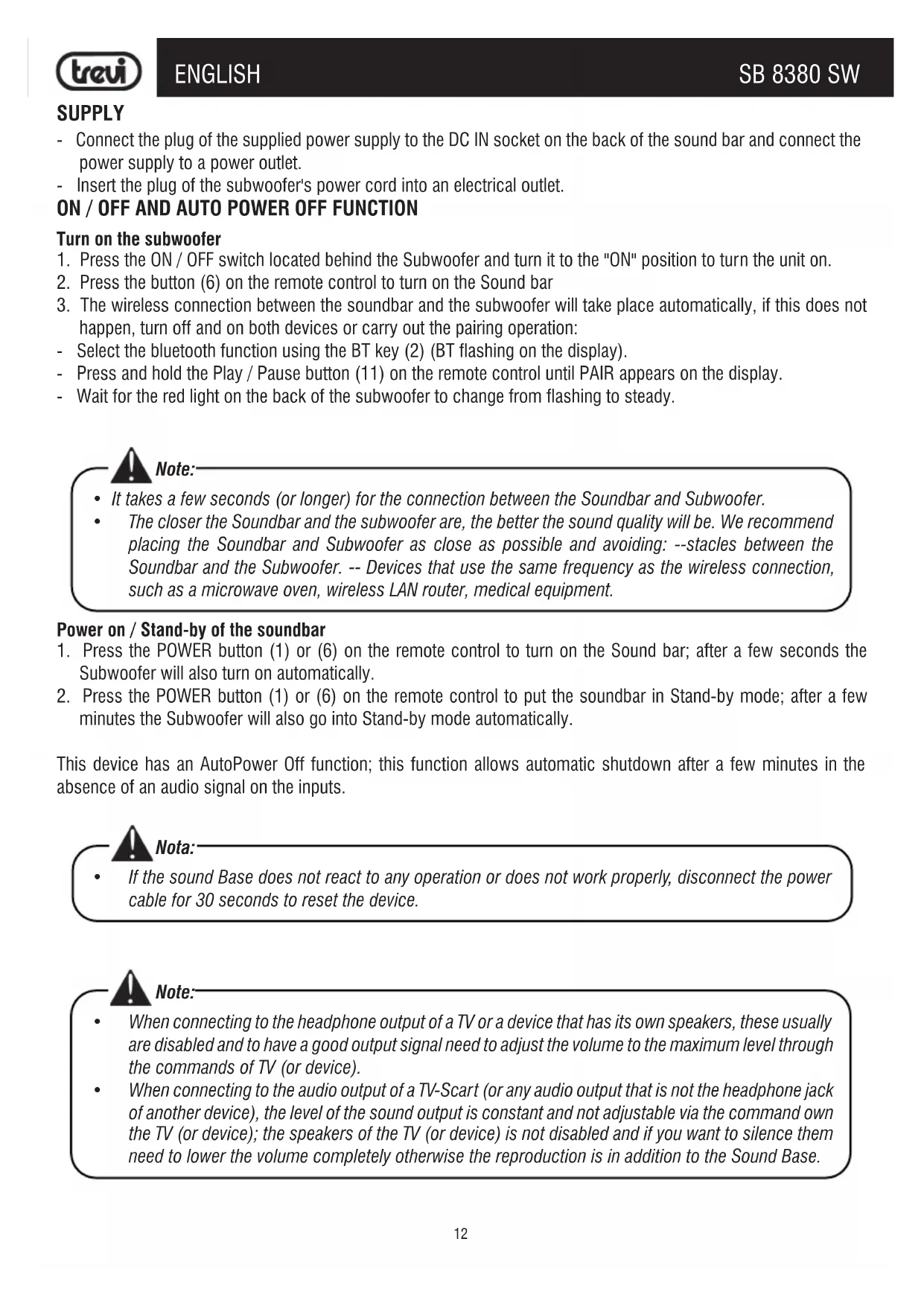
- Connect the plug of the supplied power supply to the DC IN socket on the back of the sound bar and connect the power supply to a power outlet.
- Insert the plug of the subwoofer's power cord into an electrical outlet.
ON/OFF AND AUTO POWER OFF FUNCTION
Turn on the subwoofer
- Press the ON / OFF switch located behind the Subwoofer and turn it to the "ON" position to turn the unit on.
- Press the button (6) on the remote control to turn on the Sound bar
- The wireless connection between the soundbar and the subwoofer will take place automatically, if this does not happen, turn off and on both devices or carry out the pairing operation:
- Select the bluetooth function using the BT key (2) (BT flashing on the display).
- Press and hold the Play / Pause button (11) on the remote control until PAIR appears on the display.
- Wait for the red light on the back of the subwoofer to change from flashing to steady.

Note:
It takes a few seconds (or longer) for the connection between the Soundbar and Subwoofer.
- The closer the Soundbar and the subwoofer are, the better the sound quality will be. We recommend placing the Soundbar and Subwoofer as close as possible and avoiding: --stacles between the Soundbar and the Subwoofer. -- Devices that use the same frequency as the wireless connection, such as a microwave oven, wireless LAN router, medical equipment.
Power on / Stand-by of the soundbar
- Press the POWER button (1) or (6) on the remote control to turn on the Sound bar; after a few seconds the Subwoofer will also turn on automatically.
- Press the POWER button (1) or (6) on the remote control to put the soundbar in Stand-by mode; after a few minutes the Subwoofer will also go into Stand-by mode automatically.
This device has an AutoPower Off function; this function allows automatic shutdown after a few minutes in the absence of an audio signal on the inputs.

Nota:
- If the sound Base does not react to any operation or does not work properly, disconnect the power cable for 30 seconds to reset the device.

Note:
- When connecting to the headphone output of a TV or a device that has its own speakers, these usually are disabled and to have a good output signal need to adjust the volume to the maximum level through the commands of TV (or device).
- When connecting to the audio output of a TV-Scart (or any audio output that is not the headphone jack of another device), the level of the sound output is constant and not adjustable via the command own the TV (or device); the speakers of the TV (or device) is not disabled and if you want to silence them need to lower the volume completely otherwise the reproduction is in addition to the Sound Base.

Caution:
- Some audio outputs which you connect the Sound Bar (like headphone output) can have its own volume control: make sure you have set on the source device an adequate level audio output otherwise the Sound Bar will sound even at maximum volume.
- If the sound played by the Sound Bar be distorted means that the input signal is too strong: lower the volume of the Sound Bar or paid on a level audio source device output more low.
- In case of connection to a TV by headphone output, it may happen that the sound reproduced by the Soundbar is low even at maximum volume; in this case try connecting the Soundbar to the audio-scart output using an adapter (not supplied).
VOLUME ADJUSTMENT AND MUTE FUNCTION
- Press the + button (9) on the remote control or press and hold the VOI + button (5) on the unit for a few seconds to increase the volume of the device.
- Press the - button (18) on the remote control or press and hold the VOL- button (3) on the unit for a few seconds to decrease the volume.
MUTE function: it is possible to activate the mute function of the device using the MUTE button (14) on the remote control. To reactivate listening, press the MUTE button (14) again.
USB IN
- Insert a USB memory into the USB input;
- Switch on the appliance. The contents of the USB will be automatically played;
- Press the button (11) on the remote control or the button (4) on the unit to temporarily stop playback. Press it again to resume playback;
- Press the (10) or (17) button on the remote control or the (3) or (5) buttons on the unit to skip to the previous or next track.
- Press the REPEAT button (19) on the remote control to activate continuous playback of a single track (ONE) or all tracks (ALL).
AUX IN
- Use a 3.5mm Stereo jack cable to connect the AUX input on the back of the sound bar to the headphone / audio output of the TV or other source device;
- Select the AUX input;
- For correct sound reproduction, refer to the VOLUME ADJUSTMENT AND MUTE FUNCTION chapter and the manual of the source device.
OPTICAL INPUT
- Use a digital optical cable (not included) to connect the OPT input to the digital optical output of the TV or other source device;
- Turn on the device and select the OPT input.

Note:
Before connecting the optical cable, be sure to remove the plug protection cover if your cable is equipped with it.
- Some TVs or devices is necessary to enable the digital optical output.
- PCM digital audio must be set on the source device for playback from this input.
HDMIARCIN
The HDMI ARC socket allows sound reproduction and joint control of the sound bar and the source device on some basic functions (such as volume adjustment or mute function).
Check the complete list of available ARC functions in the manual of the source device.
- Use an HDMI cable to connect the HDMI ARC input on the back of the sound bar to an HDMI ARC socket on your TV or other source device.
- Select the HDMI ARC input on the soundbar (ARC on the display);
- The audio of the program being viewed on the source device will be played.
Note: The source device must have an ARC compatible HDMI socket; in some devices this function (if present) must be activated from the menu. Check the HDMI ARC compatibility and available functions with the user manual of the source device.
BLUETOOTH OPERATION
- Turn on the device and select the BLUETOOTH function (BT flashing on the display);
- The system will automatically go into pairing mode;
- Activate the Bluetooth functionality on the external device to be paired:
- Start searching for devices. At the end select the device "SB 8380 SW";
- Enter the password "0000" if requested:
- Press button (11) on the remote control or button (4) on the unit to start playback and buttons (10) or (17) on the remote control or button (3) or (5) on the unit to select tracks.
PRE EQUALIZATIONS
The sound bar has a pre-set equalization system, press the EQ button (13) several times during playback to select the audio dynamics that best suit the music style being played.
Press the 3D button (20) to have a surround effect.
HIGH and LOW TONE ADJUSTMENT
Treble tones can be adjusted using the TREBLE + (8) and TREBLE- (7) buttons on the remote control. It is possible to adjust the bass tones using the BASS + (15) and BASS- (16) buttons on the remote control.
PROBLEMS AND SOLUTIONS
If your Sound bar does not work properly, check this short list before taking it to an authorized TREVI service center. In any case, do not try to repair the device yourself, this would invalidate the warranty. Only TREVI technical assistance centers are authorized to carry out interventions on this product.
No sound:
- Check that the MUTE function is not activated.
- Check that you have selected the correct input.
- Check and adjust the volume of the Sound Bar and TV (or connected device).
The Sound Bar does not turn on or turn off automatically:
- Check that you have correctly inserted the power cable.
- If the Sound Bar does not receive a signal for a certain time or has the Volume at 0 level, it will automatically switch off (energy saving).
Problems with pairing with Bluetooth devices:
- If the sound quality is poor after Bluetooth pairing with an external device, please bring the external device closer to the soundbar or remove any obstacles between them.
- If the connection between the soundbar and the device is not successful, check that the pairing function of the device is enabled; refer to the device manual to enable the function.
The soundbar does not connect to the subwoofer:
- The Wireless connection may not work normally in an area where the signal is weak.
- Please install a Soundbar close enough to the wireless subwoofer.
- Do not install the Soundbar or Subwoofer on a metal cabinet if you want to achieve optimal performance.
- Avoid obstacles between the Soundbar and the Subwoofer.
The remote control does not work:
- Replace the batteries.
Commands do not respond:
- Unplug the power supply from the mains for 30 seconds to perform a reset.
TECHNICAL FEATURES
Sound bar power supply: 19V 1:5A
Subwoofer power supply: .100-240V 50-60Hz
Speakers: 2x2" + SUB 5.25
Maximum audio power: ... 90W (2x15W + 60W)
Bluetooth transmission power: 1mW
Bluetooth transmission frequency: 2.4GHz
Sound bar dimensions: 410x95x65mm
Subwoofer Dimensions: 220x193x270mm
Total weight: 3.5 Kg
NOTES D'EMPLOI
To prevent possible hearing damage, do not listen at high volumes levels for long periods.
Precautions for correct disposal of the product.
The symbol shown on the equipment indicates that waste must be disposed of in "separate collection" and so the product must not be disposed of together with urban waste. The user must take the product to special "separate waste collection centres" provided by local government, or deliver it to the retailer against the purchase of a new product.
Separate collection of waste and subsequent treatment, recycling and disposal operations promotes the production of equipment with recycled materials and limits negative effects on the environment and on health caused by improper handling of waste. Illegal disposal of the product leads to the enforcement of administrative penalties.
https://www.trevi.it/dms/zidi/TREV/DOCSB8380SW.pdf
SIMPLIFIED EU DECLARATION OF CONFORMITY
Hereby TREVI Spa declares that the equipment type SB 8380 SW is in compliance with directive 2014/53/EU.
The full text of the EU declaration of conformity is available at the following internet address
https://www.trevi.it/dms/zidi/TREVI/DOCSB8380SW.pdf

If you will not find your language on the instruction manual, please go on our website www.trevi.it to find it

- WIRES CONNECTIONS TO A UK THREE-PIN PLUG
- NOTE D'USO
- CARE AND MAINTENANCE
- IMPORTANT
- DESCRIPTION OF CONNECTORS/CONTROLS
- Back panel
- REMOTE CONTROL DESCRIPTION
- REMOTE CONTROL BATTERIES
- SUPPLY
- ON/OFF AND AUTO POWER OFF FUNCTION
- Turn on the subwoofer
- Note:
- Power on / Stand-by of the soundbar
- Nota:
- Caution:
- VOLUME ADJUSTMENT AND MUTE FUNCTION
- USB IN
- AUX IN
- OPTICAL INPUT
- HDMIARCIN
- BLUETOOTH OPERATION
- PRE EQUALIZATIONS
- HIGH and LOW TONE ADJUSTMENT
- PROBLEMS AND SOLUTIONS
- No sound:
- The Sound Bar does not turn on or turn off automatically:
- Problems with pairing with Bluetooth devices:
- The soundbar does not connect to the subwoofer:
- The remote control does not work:
- Commands do not respond:
- TECHNICAL FEATURES
- NOTES D'EMPLOI
- Precautions for correct disposal of the product.
- SIMPLIFIED EU DECLARATION OF CONFORMITY
Brand : Trevi
Model : SB 8380 SW
Category : Soundbar