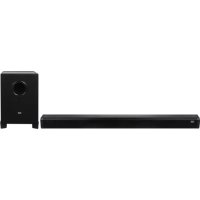
SB 8340 SW - Soundbar Trevi - Free user manual and instructions
Find the device manual for free SB 8340 SW Trevi in PDF.



| Product Type | Soundbar |
| Brand | Trevi |
| Model | SB 8340 SW |
| Dimensions (Soundbar) | 780 x 60 x 60 mm |
| Dimensions (Subwoofer) | 780 x 60 x 60 mm |
| Weight | 1.4 kg |
| Power Supply | 5 V = 2 A (power adapter included) |
| Power Consumption | 16 W |
| Maximum Output Power | 40 W (4 x 5 W + 20 W) |
| Frequency Response | 50 Hz - 18 kHz |
| Signal-to-Noise Ratio | ≥ 75 dB |
| Audio Inputs | Bluetooth, USB, SD (TF card), AUX 3.5 mm, Optical |
| Control | Remote control (AAA batteries) and buttons on device |
| Preset Equalizer | Normal, Rock, Pop, Classical, Jazz, Country |
| Mute Function | Yes (via remote control) |
| Auto Power Off | After 10 minutes without audio signal |
| Cleaning | Soft slightly damp cloth; avoid solvents and abrasives |
| Safety | Do not expose to water, heat sources, or vibrations |
| Spare Parts | Not provided; contact Trevi authorized service center |
| Warranty | Void if opened by unauthorized personnel |
| Bluetooth | Power 1 mW, band 2.4 GHz, pairing code 0000 |
| Wall Mounting | Possible (mounting holes) |
| Reset | Unplug the power cable for 30 seconds |
Frequently Asked Questions - SB 8340 SW Trevi
User questions about SB 8340 SW Trevi
0 question about this device. Answer the ones you know or ask your own.
Ask a new question about this device
Download the instructions for your Soundbar in PDF format for free! Find your manual SB 8340 SW - Trevi and take your electronic device back in hand. On this page are published all the documents necessary for the use of your device. SB 8340 SW by Trevi.
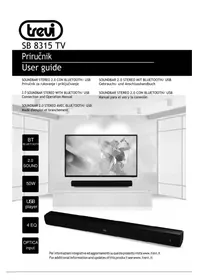
USER MANUAL SB 8340 SW Trevi
SISTEMA STEREO SOUNDBAR CON SUBWOOFER 2.1
Manuale d'uso e collegamento
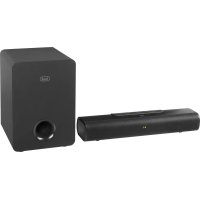
SOUNDBAR STEREO 2.1 WITH SUBWOOFER
Connection and Operation Manual
SOUNDBAR STEREO 2.1 AVEC SUBWOOFER
- Place the device on a flat surface.
- Place the device so that its sides there is always enough space for air to circulate freely (at least 10 cm).
- Do not place anything on top of the unit.
- The apparatus shall not be exposed to dripping or splashing water. No objects filled with liquid, such as vases, should be placed on the unit.
- If liquids penetrate inside the device immediately disconnect the plug from the socket and take it to the nearest service center autorizzato TREVI.
- No naked flame sources, such as lighted candles, should be placed on.
- Cables should be hidden and protected in order to avoid stumbling from someone and the consequent fall of the appliance.
- Keep the unit away from the following places.
- Near strong heat sources, such as central heating plants or stoves.
- In very humid places such as bathrooms, swimming pools, etc.
- In very dusty places.
- In places subject to strong vibrations.
- Unplug the power cable during thunderstorms or long periods of inactivity.
- Instruct the proper use children and people with little knowledge of the product.
- Listen at high volume for a long time, can damage your hearing.
- Keep the following user manual.
CARE AND MAINTENANCE
Use a slightly damp soft cloth for cleaning. Do not use solvents and abrasive substances.
IMPORTANT
This appliance has been carefully built to ensure long-lasting perfect performance. However, should any inconvenience occur, please contact your local authorised TREVI Service Centre.
TREVI follows a policy of ongoing research and development. Therefore products may have different features from those described.
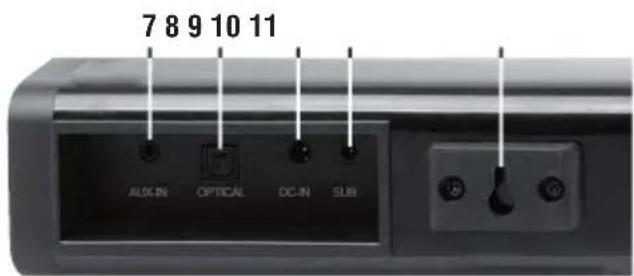
DESCRIPTION OF CONNECTORS/CONTROLS
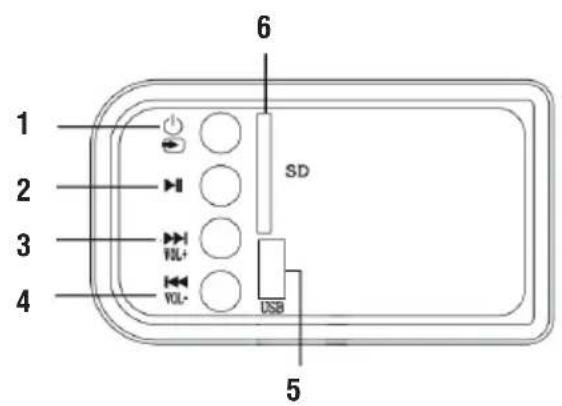
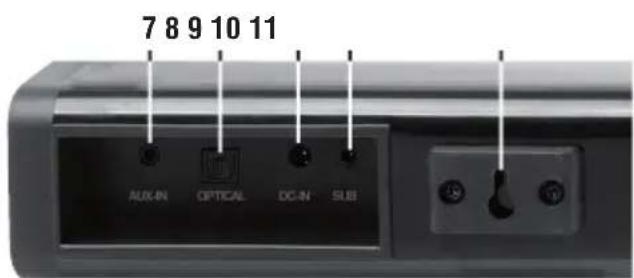
- Button ⏻ hold down for a few seconds to switch the appliance on/off; press repeatedly to select the function/inputs.
- Button ▶: start/stop playback.
- Button ▶▶1: hold for a few seconds to increase the volume; press several times to go to the next tracks.
- Button VOL:- hold for a few seconds to minimize the volume; press several times to match the previous tracks.
- USB Input.
- SD Input.
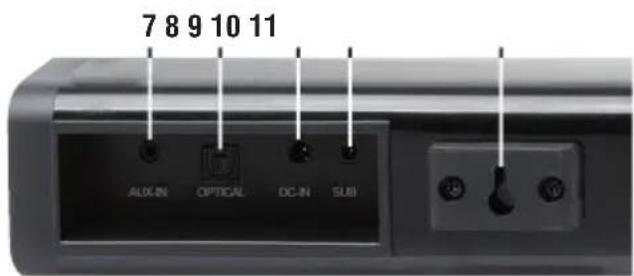
- AUX-IN Input (jack 3.5mm).
- Digital Optical Input.
- Power Socket 5V = 2A.
10.SubwooferSocket. - Wall mounting holes.
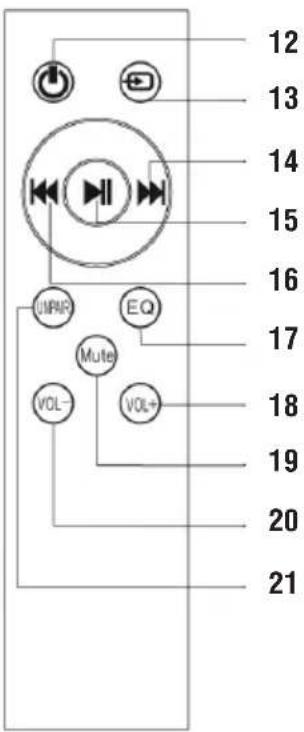
REMOTE CONTROL:
- Power ON/OFF.
- Input mode selection (AUX, Bluetooth, USB, SD).
- ▶, previous song button.
- ▶ II, Play/pause button.
- ◀◀, next song button.
- EQ selection button (0: NORMAL; 1: ROCK; 2: POP; 3: CLASSICAL; 4: JAZZ; 5: COUNTRY).
- Volume increase.
- MUTE button.
- Volume decrease.
- Under Bluetooth mode, search for new device again.
REMOTE CONTROL BATTERIES
Insert two "AAA" batteries according to the markings inside compartment.
INSTALLATION
POWER SUPPLY
Connect the DC plug of the supplied AC adapter to the 5V -2A socket (9) located at the back of the appliance. Connect the supplied power adapter to an electrical outlet.
POWER ON/OFF AND AUTO POWER OFF FUNCTION
- Hold the button (1) for a few seconds or press the button (12) on the remote control to switch ON the device.
- Hold the button ⏻ (1) for a few seconds or press the button (12) on the remote control to switch OFF the device. This device is equipped with Auto Power Off function; this function allows the automatic shutdown when no audio signal inputs after 10 minutes.
Note: If the Sound Base does not react to any operation or does not work properly, disconnect the power cable for 30 seconds to reset the device.
VOLUME ADJUSTMENT AND MUTE FUNCTION
Is possible to adjust the unit's volume with the volume keys (3, 4 on the device, 18, 20 on remote control)
- Press (18) button on remote control or press VOL+ (3) button for a few seconds to increase the device's volume.
- Press (18) button on remote control or press ▶▶▶ VOL+ (4) button for a few seconds to decrease the device's volume.
Note:
When connecting to the headphone output of a TV or a device that has its own speakers, these usually are disabled and to have a good output signal need to adjust the volume to the maximum level through the commands of TV (or device).
When connecting to the audio output of a TV-Scart (or any audio output that is not the headphone jack of another device), the level of the sound output is constant and not adjustable via the command own the TV (or device); the speakers of the TV (or device) is not disabled and if you want to silence them need to lower the volume completely otherwise the reproduction is in addition to the Sound Base.
MUTE function: Press MUTE button (19) on the remote control to activate the mute function; to reactivate listening,
press the MUTE button (19) again.
Note:
- Some audio outputs which you connect the Sound Bar (like headphone output) can have its own volume control: make sure you have set on the source device an adequate level audio output otherwise the Sound Bar will sound even at maximum volume.
- If the sound played by the Sound Bar be distorted means that the input signal is too strong: lower the volume of the Sound Bar or paid on a level audio source device output more low.
- In case of connection to a TV by headphone output, it may happen that the sound reproduced by the Soundbar is low even at maximum volume; in this case try connecting the Soundbar to the audio-scart output using an adapter (not supplied).
USB/SD CARD (TF CARD) INPUT
- Insert a USB memory into the input (5) or an SD card into the input (6);
- Turn ON the nit, it will automatically play the Music file inside the USB or SD Card;
- Press ▶ II (15) button on the remote control to momentarily stop playback. Press it again to resume playback;
- Press ◀◀ (16) or ▶▶ (14) button on the remote control to select tracks.
AUX-IN
- Plug in 3.5mm AUX cable;
- Turn ON the unit, press (13) button on the remote control and select the AUX-IN input;
- For proper playback sound refer to chapter VOLUME ADJUSTMENT AND MUTE FUNCTION.
OPTICAL INPUT
- To use a digital optical cable (not included) to connect the OPTICAL input (8) to the digital optical output of your TV or other source devices;
- Turn ON the unit, press (13) button on remote control and select the OPTICAL input;
- Adjust the volume using (18) Vol+ and (20) Vol- buttons.
Note:
- Some TVs or devices is necessary to enable the digital optical output.
- PCM digital audio must be set on the source device for playback from this input.
BLUETOOTH OPERATION
- Turn on the unit; press (13) button on remote control to select the BLUETOOTH function;
- The system automatically goes into search mode, if not press, for a few seconds, the UNPAIR button (21) on remote control;
- Activate the Bluetooth functionality on the external device to be paired;
- Start the device search. At the end select the "SB 8340 SW" device;
- Enter the password "0000" if required;
- Press ▶ II (15) button on remote control to start playback and the ◀◀ (16) or ▶▶ b14) button on remote control to select tracks;
- Press and hold for a few seconds UNPAIR (21) button on remote control to stop the active connection and pair a new device.
EQUALIZER
The soundbar has a pre-set equalizer system, repeatedly press the EQ button (17) during playback to select the audio dynamic that best suits the music style being played.
TROUBLESHOOTING
If the Sound Bar does not work properly, check this short list before taking it to a TREVI authorised service centre. In any case, do not try to repair the device, this will void the warranty. Only TREVI authorised service centres are authorised to perform operations on this product.
No Sound
- Check that the MUTE function is not activated.
- Check that the correct input has been selected.
- Check and adjust the volume of the Sound Bar and the TV (or the device connected).
The Sound Bar does not turn on or turns off automatically
- Check that the power cable is correctly inserted.
- If the Sound Bar does not receive any signal for some time it automatically turns to standby mode.
Pairing problems with Bluetooth devices:
- If the audio quality is poor after pairing Bluetooth with an external device, bring the external device closer to the soundbar or remove any obstructions between them.
- If the connection between the soundbar and the device does not occur, check that the coupling function of the device is enabled; refer to the device manual to enable the function.
- If the coupling with the external device is activated and deactivated continuously, bring the external device closer to the soundbar or remove any obstacle between them. In some external devices, the Bluetooth pairing can be switched off automatically to safeguard the consumption of its battery, this is not a malfunction of the device.
I can't find the Bluetooth name of this unit on my Bluetooth device for Bluetooth pairing
■ Ensure that the unit is switched on.
■ Ensure that the Bluetooth function is activated on your Bluetooth device.
The remote control does not work
- Replace the battery
The device does not react to any operation
- Disconnect the power cable from the device for 30 seconds to reset it.
TECHNICAL FEATURES
GENERAL FEATURES
Power supply: 5V = 2A
Consumption: 16W
Maximum output power: 40W (4x5W+20W)
Frequency response: 50Hz-18KHz
S/N Ratio: ≥75db
Bluetooth transmission power: 1mW
Bluetooth transmission: 2,4GHz
Sound Bar size: 780x60x60mm
Subwoofer size: 160x250x210mm
Weight: 2,7Kg
NOTES D'EMPLOI
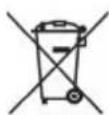
USERS INFORMATION pursuant to Legislative Decree No. 49 of March 14, 2014
"Implementation of Directive 2012/19 / EU on Waste Electrical and Electronic Equipment (WEEE)"
This wheeled bin symbol on the product indicates that at the end of its life must be collected separately from other waste. The user must, therefore, take the remote control integrates the essential components that got to its life to the appropriate differentiated collection centers for electronic and electro-technical waste, or return it to the dealer when purchasing a new appliance of equivalent type, in terms of one to one, or one to zero for equipment having longer side of less than 25 cm. Appropriate separate collection for the decommissioned equipment for recycling, processing and environmentally compatible disposal helps prevent negative impact on the environment and human health and promotes recycling of the materials making up the product. Illegal dumping of the product by the user entails the application of administrative sanctions stated in Legislative Decree n. Legislative Decree No. 49 of March 14, 2014.
SIMPLIFIED EU DECLARATION OF CONFORMITY
Hereby TREVI Spa declares that the equipment type SB 8340 SW is in compliance with directive 2014/53/EU.
The full text of the EU declaration of conformity is available at the following internet address
https://www.trevi.it/dms/zidi/TREVI/DOCSB8340SW.pdf
- CARE AND MAINTENANCE
- IMPORTANT
- DESCRIPTION OF CONNECTORS/CONTROLS
- REMOTE CONTROL:
- REMOTE CONTROL BATTERIES
- INSTALLATION
- POWER SUPPLY
- POWER ON/OFF AND AUTO POWER OFF FUNCTION
- VOLUME ADJUSTMENT AND MUTE FUNCTION
- Note:
- USB/SD CARD (TF CARD) INPUT
- AUX-IN
- OPTICAL INPUT
- BLUETOOTH OPERATION
- EQUALIZER
- TROUBLESHOOTING
- No Sound
- The Sound Bar does not turn on or turns off automatically
- Pairing problems with Bluetooth devices:
- I can't find the Bluetooth name of this unit on my Bluetooth device for Bluetooth pairing
- The remote control does not work
- The device does not react to any operation
- TECHNICAL FEATURES
- GENERAL FEATURES
- NOTES D'EMPLOI
- USERS INFORMATION pursuant to Legislative Decree No. 49 of March 14, 2014
- "Implementation of Directive 2012/19 / EU on Waste Electrical and Electronic Equipment (WEEE)"
- SIMPLIFIED EU DECLARATION OF CONFORMITY
Brand : Trevi
Model : SB 8340 SW
Category : Soundbar