LT10 - Electrical tester Amprobe - Free user manual and instructions
Find the device manual for free LT10 Amprobe in PDF.



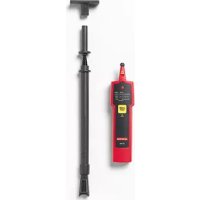
| Type de produit | Fluorescent lamp tester and non-contact voltage detector |
| Marque | Amprobe |
| Modèle | LT10 |
| Dimensions (L x l x H) | 170 x 40 x 24 mm |
| Poids | 80 g (with battery) |
| Alimentation | 1 x 9 V alkaline or lithium battery (6LR61/6LF22/MN1604) |
| Autonomie de la pile | 500 typical tests (alkaline battery) |
| Fonction test de lampe | Tests T2, T4, T5, T8, T9, T10, T12 fluorescent tubes, energy-saving bulbs, low/high pressure sodium, neon, mercury, halogen. Does not work with LED or incandescent. |
| Test de filament (broche) | For double-pin fluorescent lamps (indicates if filament is intact) |
| Détection de tension sans contact VolTect™ | 90 V AC to 600 V AC, 50/60 Hz |
| Tension de test de lampe | Approximately 3 kV / 280 kHz |
| Longueur maximale de l'antenne | 121.92 cm (48") |
| Sécurité | CAT III 300 V, CAT II 600 V; Double insulation; CSA, CE, UL certifications |
| Température d'utilisation | -10 °C to +50 °C, ≤85% RH |
| Température de stockage | -10 °C to +50 °C, ≤85% RH |
| Altitude maximale d'utilisation | 2000 m |
| Durée d'utilisation recommandée | 1 second ON / 1 second OFF, 5 cycles max, then 1 minute rest |
| Entretien et nettoyage | Clean with mild detergent and water; do not use solvents. User replaceable battery. |
| Réparabilité | Repair by authorized center only (except battery) |
| Pièces de rechange | LT-10-ANT antenna (ref. 4357839) |
| Accessoires fournis | Tester, fluorescent antenna, sodium antenna (EUR model), adapter plate, carrying case, 9V battery, user guide |
Frequently Asked Questions - LT10 Amprobe
User questions about LT10 Amprobe
0 question about this device. Answer the ones you know or ask your own.
Ask a new question about this device
Download the instructions for your Electrical tester in PDF format for free! Find your manual LT10 - Amprobe and take your electronic device back in hand. On this page are published all the documents necessary for the use of your device. LT10 by Amprobe.
USER MANUAL LT10 Amprobe
LT-10 LT-10-EUR Lamp Tester
User Manual

Limited Warranty and Limitation of Liability
Your Amprobe/Beha-Amprobe product will be free from defects in material and workmanship for one year from the date of purchase unless local laws require otherwise. This warranty does not cover fuses, disposable batteries or damage from accident, neglect, misuse, alteration, contamination, or abnormal conditions of operation or handling. Resellers are not authorized to extend any other warranty on the behalf of Amprobe/Beha-Amprobe. To obtain service during the warranty period, return the product with proof of purchase to an authorized Amprobe/Beha-Amprobe Service Center or to an Amprobe/Beha-Amprobe dealer or distributor. See Repair Section for details. THIS WARRANTY IS YOUR ONLY REMEDY. ALL OTHER WARRANTIES - WHETHER EXPRESS, IMPLIED OR STATUTORY - INCLUDING IMPLIED WARRANTIES OF FITNESS FOR A PARTICULAR PURPOSE OR MERCHANTABILITY, ARE HEREBY DISCLAIMED. MANUFACTURER SHALL NOT BE LIABLE FOR ANY SPECIAL, INDIRECT, INCIDENTAL OR CONSEQUENTIAL DAMAGES OR LOSSES, ARISING FROM ANY CAUSE OR THEORY. Since some states or countries do not allow the exclusion or limitation of an implied warranty or of incidental or consequential damages, this limitation of liability may not apply to you.
Repair
All Amprobe/Beha-Amprobe returned for warranty or non-warranty repair or for calibration should be accompanied by the following: your name, company's name, address, telephone number, and proof of purchase. Additionally, please include a brief description of the problem or the service requested and include the test leads with the meter. Non-warranty repair or replacement charges should be remitted in the form of a check, a money order, credit card with expiration date, or a purchase order made payable to Amprobe/Beha-Amprobe.
In-Warranty Repairs and Replacement – All Countries
Please read the warranty statement and check your battery before requesting repair. During the warranty period, any defective test tool can be returned to your Amprobe/Beha-Amprobe distributor for an exchange for the same or like product. Please check the "Where to Buy" section on amprobe.com or beha-amprobe.com for a list of distributors near you. Additionally, in the United States and Canada, in-warranty repair and replacement units can also be sent to an Amprobe/Beha-Amprobe Service Center (see address below).Service Center (see address below).
Non-warranty Repairs and Replacement – United States and Canada
Non-warranty repairs in the United States and Canada should be sent to an Amprobe Service Center. Call Amprobe or inquire at your point of purchase for current repair and replacement rates.
USA: Canada:
Amprobe Amprobe
Everett, WA 98203 Mississauga, ON L4Z 1X9
Tel: 877-AMPROBE (267-7623) Tel: 905-890-7600
Non-Warranty Repairs and Replacement – Europe
European non-warranty units can be replaced by your Beha-Amprobe distributor for a nominal charge. Please check the "Where to Buy" section on beha-amprobe.com for a list of distributors near you.
Beha-Amprobe
Division and reg. trademark of Fluke Corp. (USA)
Germany* United Kingdom The Netherlands - Headquarters**
In den Engematten 14 52 Hurricane Way Science Park Eindhoven 5110
79286 Glottertal Norwich, Norfolk 5692 EC Son
Germany NR6 6JB United Kingdom The Netherlands
Tel.: +49 (0) 7684 8009 - 0 Tel.: +44 (0) 1603 25 6662
beha-amprobe.de
beha-amprobe.com
Tel.: +31 (0) 40 267 51 00
beha-amprobe.com
*(Correspondence only – no repair or replacement available from this address. European customers please contact your distributor.)
**single contact address in EEA Fluke Europe BV
CONTENTS
SYMBOL....3
SAFETY INFORMATION ....3
UNPACKING AND INSPECTION ....4
FEATURE......4
Attaching and Removing the Antenna....6
Attaching and Removing the Adaptor....7
LAMP TEST 7
Testing Fluorescent Lamps 8
Using Sodium Lamp Antenna 9
VolTect™ Non-contact Voltage Detection 10
Voltage Detection with Antenna 11
Voltage Detection with Probe 12
Pin Test 13
DETAILED SPECIFICATIONS .... 14
MAINTENANCE....15
TROUBLESHOOTING....16
BATTERY REPLACEMENT....17
SYMBOLS
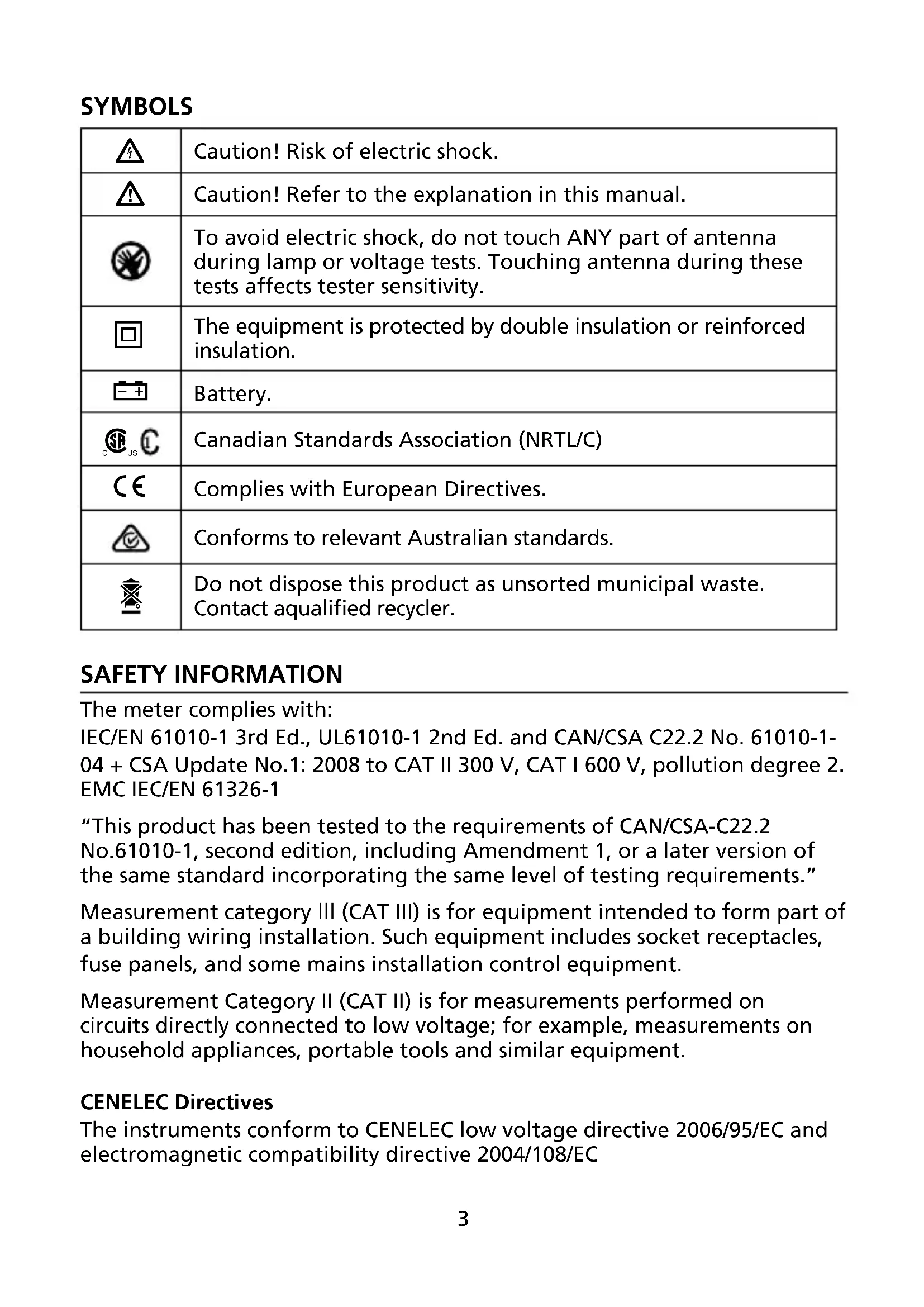
 | Caution! Risk of electric shock. |
 | Caution! Refer to the explanation in this manual. |
 | To avoid electric shock, do not touch ANY part of antenna during lamp or voltage tests. Touching antenna during these tests affects tester sensitivity. |
 | The equipment is protected by double insulation or reinforced insulation. |
 | Battery. |
 | Canadian Standards Association (NRTL/C) |
 | Complies with European Directives. |
 | Conforms to relevant Australian standards. |
| [HSX4] | Do not dispose this product as unsorted municipal waste. Contact aqualified recycler. |
SAFETY INFORMATION
The meter complies with:
IEC/EN 61010-1 3rd Ed., UL61010-1 2nd Ed. and CAN/CSA C22.2 No. 61010-1-04 + CSA Update No.1: 2008 to CAT II 300 V, CAT I 600 V, pollution degree 2. EMC IEC/EN 61326-1
"This product has been tested to the requirements of CAN/CSA-C22.2 No.61010-1, second edition, including Amendment 1, or a later version of the same standard incorporating the same level of testing requirements."
Measurement category III (CAT III) is for equipment intended to form part of a building wiring installation. Such equipment includes socket receptacles, fuse panels, and some mains installation control equipment.
Measurement Category II (CAT II) is for measurements performed on circuits directly connected to low voltage; for example, measurements on household appliances, portable tools and similar equipment.
CENELEC Directives
The instruments conform to CENELEC low voltage directive 2006/95/EC and electromagnetic compatibility directive 2004/108/EC
For Use by Competent Persons
Anyone using this instrument should be knowledgeable and trained about the risks involved with light fixtures and electrical connections. They must understand the importance of taking safety precautions and testing the instrument before and after use to ensure that it is in good working condition.
⚠️ Warning: Read Before Using
To avoid possible electric shock or personal injury:
- If the tester is used in a manner not specified by the manufacturer, protection provided by the tester may be impaired.
- For indoor use only. Do not use the tester in rain, snow, damp or wet locations. Do not use the tester around explosive gas or vapor. Do not insert or remove the battery in an explosive or flammable environment.
- Comply with local and national safety requirements.
- Use proper protective equipment as required by local or national authorities.
UNPACKING AND INSPECTION
Your shipping carton should include:
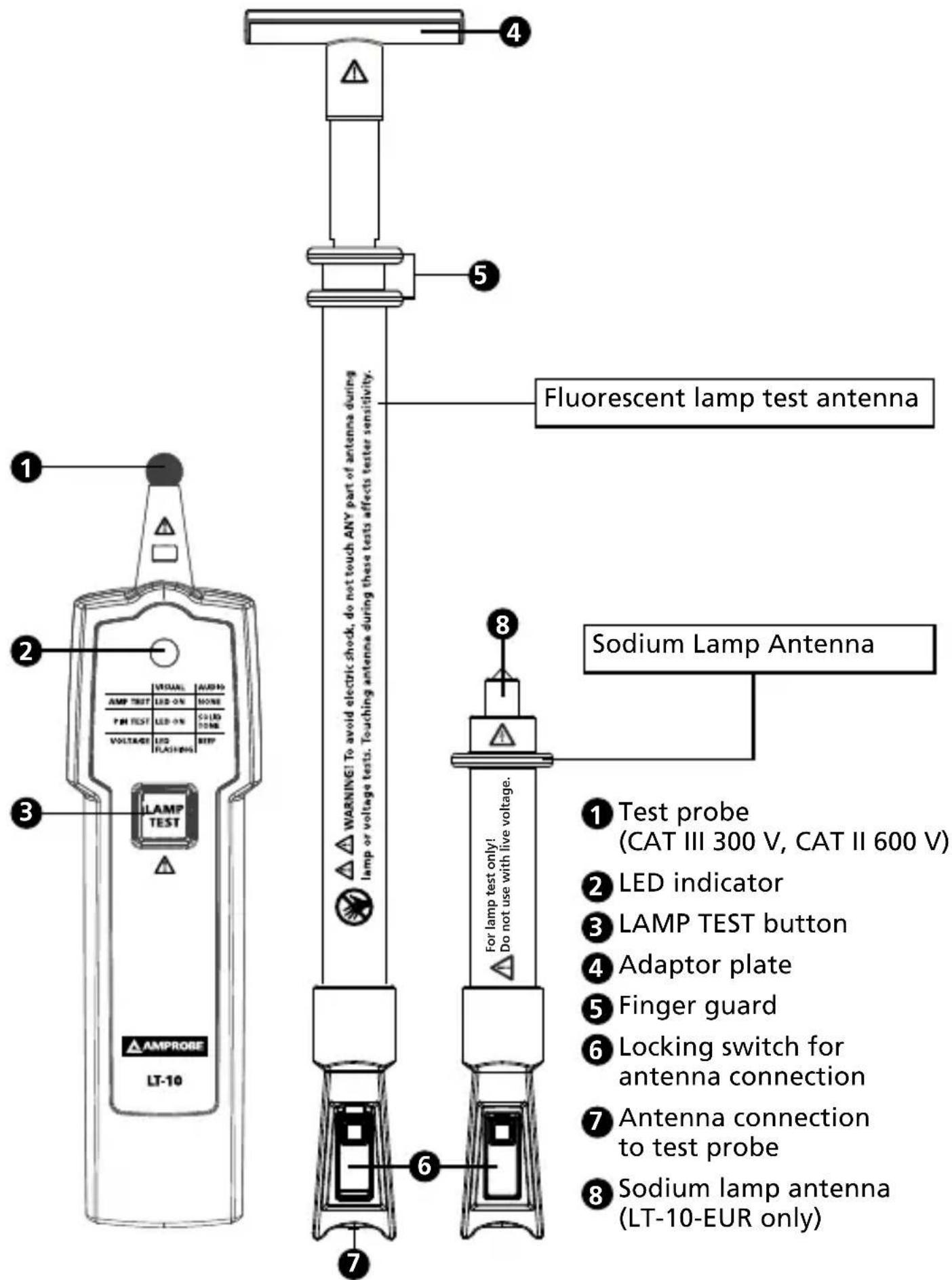
1 LT-10 Lamp Tester
1 Fluorescent lamp antenna
1 Sodium lamp antenna (LT-10-EUR only)
1 Adaptor plate
1 Carrying case
1 9V alkaline battery
1 Users manual
If any of these items are damaged or missing, return the complete package to the place of purchase for an exchange.
FEATURES
The Amprobe LT-10 Lamp Tester is a pocket-sized tool designed to troubleshoot fluorescent lamps prior to installation or removal and verify presence of voltage of electrical systems.
Three easy steps to troubleshoot lamps:
-
Check if fluorescent (electroluminescent) light bulb is damaged with LAMP TEST and PIN TEST functions.
-
Verify if voltage is present at the ballast with VolTect™ non-contact voltage detection.
-
If light bulb passes the test in step 1 and the voltage is present in step 2, but the lamp is not working, then replace the ballast.
Features:
- Tests fluorescent (electroluminescent) lights
• Built-in VolTect™ non-contact voltage detection - Lamp and filament test to check fluorescent and sodium light bulbs
- Simple one-handed, single button operation
- Ultra-compact design for portability
- 48" removable, fully retractable antenna included to test lights and voltage without a ladder
- Compatible with light bulbs:
- Fluorescent T2, T4, T5, T8, T9, T10, T12 light bulbs
- Fluorescent energy saving light bulbs
- Low pressure sodium vapor bulbs
- High pressure sodium vapor bulbs
- Neon bulbs
- Mercury vapor bulbs
- Halogen metal vapor bulbs
- Insulated antenna sleeve and tip provided to safely extend and retract during use
- Does not work with LED and incandescent (standard) light bulbs
- Replacement parts: Antenna LT-10-ANT (Item No. 4357839)
The test probe and antennas emit a high frequency voltage (approximately 3 kV) to ionize the light fixtures in order to diagnose a failure.
Precautions:
- To avoid electric shock, do not touch ANY part of antenna during lamp or voltage tests. Touching antenna during these tests affects tester sensitivity.
- When LAMP TEST button is pressed, be alert. Do not touch test probe or antenna. Discharge can cause electric shock or personal injury.
-
Do not attempt to overreach. Make sure you have proper footing and balance at all times.
-
Do not allow lamp test probe or antenna to touch energized wires.
- To avoid damages to antenna and personal injury, do not attempt to bend or use the antenna as a crowbar.
- Do not operate the instrument if the case or the battery door is open.
- Do not use if the instrument appears damaged or doesn't operate properly. If in doubt, have the instrument serviced.
- The non-contact voltage function is always on. Test on a known live source within the rated ac voltage range of the product, both before and after use to ensure the instrument is in good working condition.
Test Functions and Indications:
| Test\Indication | Visual Audio | |
| Lamp test LED on None | ||
| Pin test LED on Solid tone | ||
| Non-contact voltage detection LED flashing Modulated beep | ||
Attaching the Antenna
Make sure the switch is securely locked onto the probe before use.
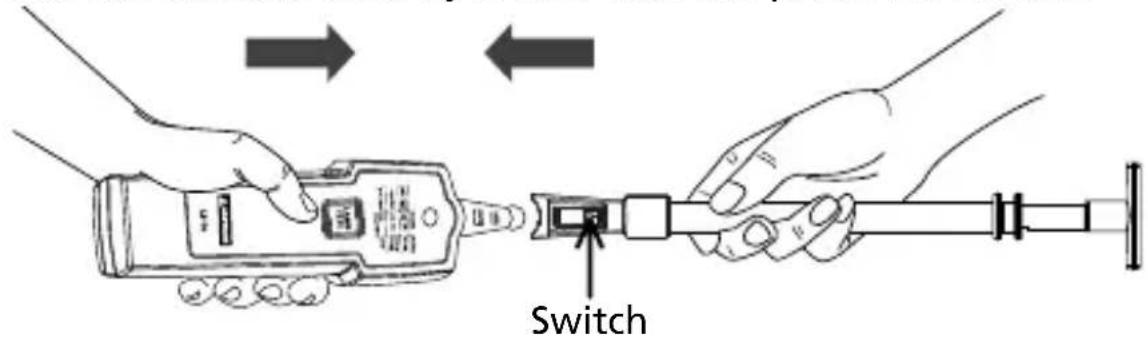
Figure 1: Attaching the antenna
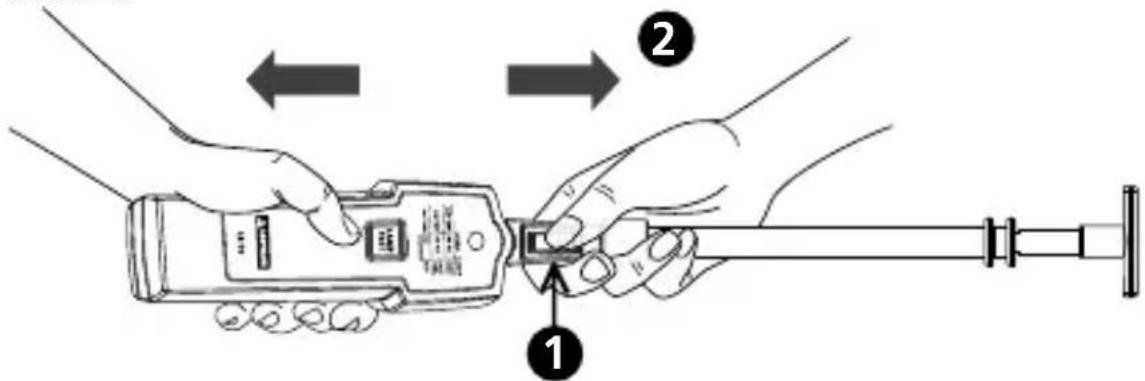
Removing the Antenna
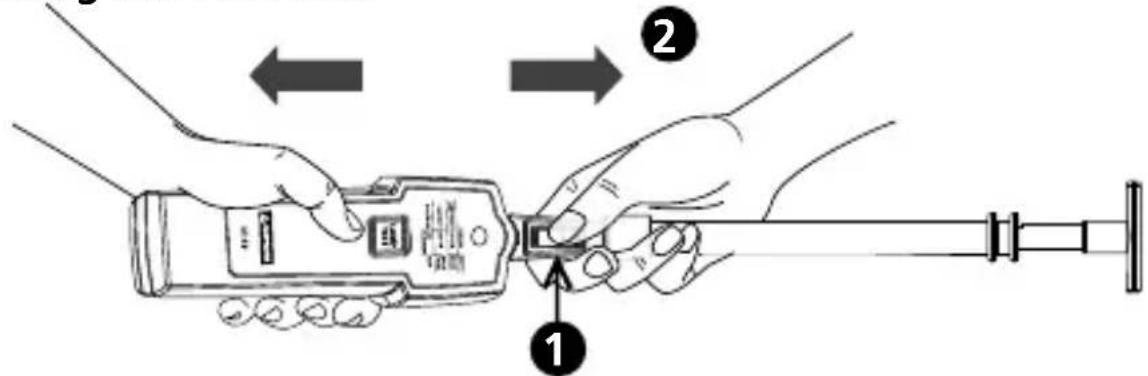
Figure 2: Removing the antenna
1 Press and hold down the switch to unlock.
2 Remove the antenna from the probe.
Removing the antenna in a manner not specified in this manual may cause damages to the instrument and protection provided by the instrument may be impaired.
Attaching and Removing the Adapter Plate
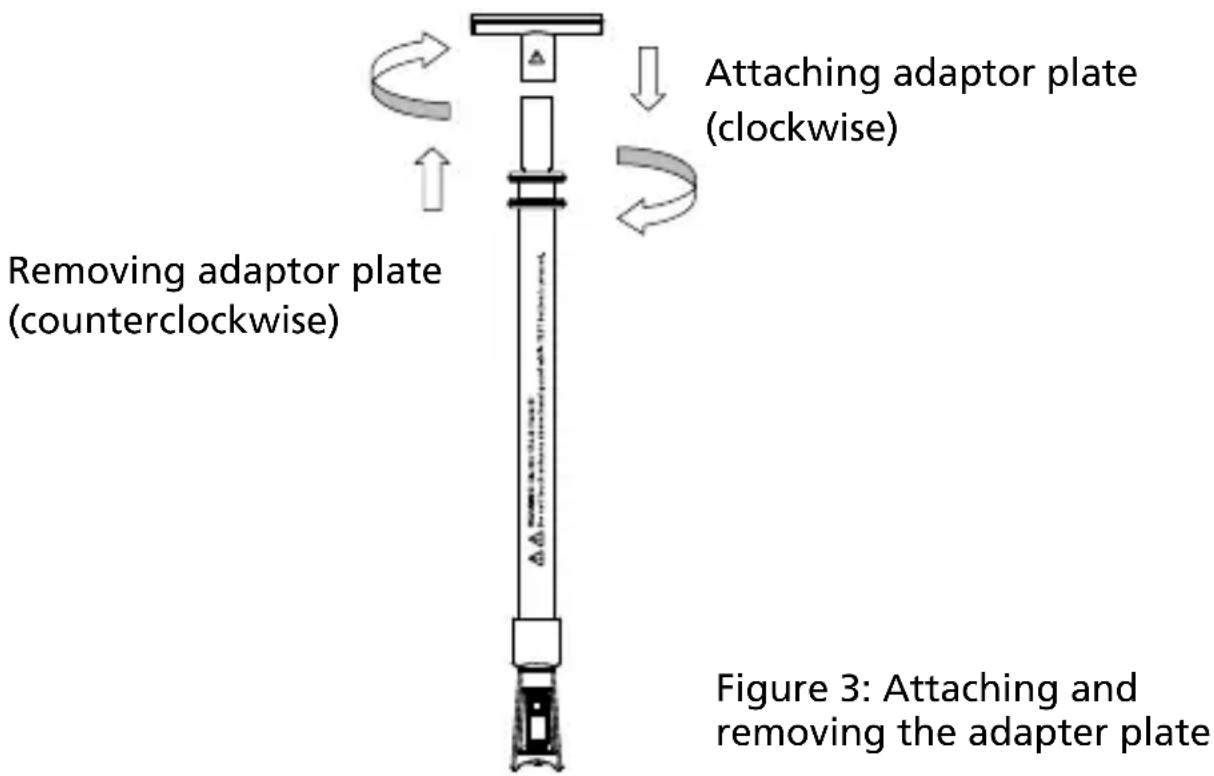
LAMP TEST
Non-contact voltage detection is always on. When the probe or the antenna is close to energized wires, LED flashes and beeps. Non-contact voltage detection will be disabled when LAMP TEST button is pressed.

- Verify lamp test function on a known lamp and/or on the identical lamp model both before and after use to ensure the instrument is in good working condition.
- On a very few particular linear fluorescent types, testing against the glass surface of the lamp may not respond. Testing on the lamp socket pin via the instrument's probe (direct metal-to-metal contact) shall allow good lamp response from a working lamp.
For better results, do the following while testing:
- Press and hold down LAMP TEST button for one second and release it for one second.
- Operating time: one second ON, one second OFF for maximum five cycles and wait for 1 minute before taking another measurement.
Testing Fluorescent Lamps
Lamp test with antenna
-
Attach the antenna to the test probe and make sure the switch is locked and secured.
-
Pull the antenna to the desired length up to 48".
-
Touch the surface of the light bulb with the tip of the antenna.
• To boost the test signal, install the adapter plate.
Do not touch the live parts with the antenna.
- Press and hold down the LAMP TEST button
• The fluorescent bulb is good if lit during lamp test
• The fluorescent bulb is bad if not lit during lamp test
- If the fluorescent bulb is lit during the lamp test, but does not function when installed in the light fixture, the spiral wound filament, the starter or the ballast may be faulty.
To avoid electric shock, do not touch ANY part of antenna during lamp or voltage tests. Touching antenna during these tests affects tester sensitivity.
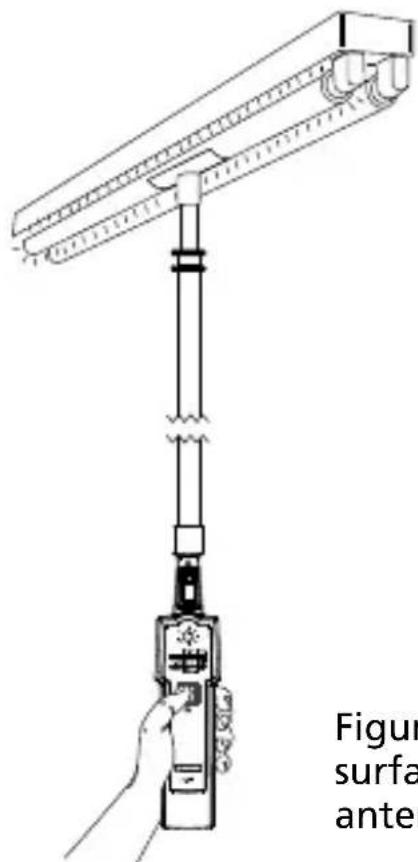
Figure 4: Lamp test against glass surface in light fixture with the antenna
Lamp test with the probe
- Touch the surface of the light bulb or the lamp socket with the probe.

Do not touch energized parts with the probe.
Do not touch the lamp socket during test. This could lead to faulty test results and cause electric shock.
- Press and hold down the LAMP TEST button.
• The fluorescent bulb is good if lit during lamp test
• The fluorescent bulb is bad if not lit during lamp test
- If the fluorescent bulb is lit during the lamp test, but does not function when installed in the light fixture, the spiral wound filament, the starter or the ballast may be faulty.

Do not touch the live parts with the probe.
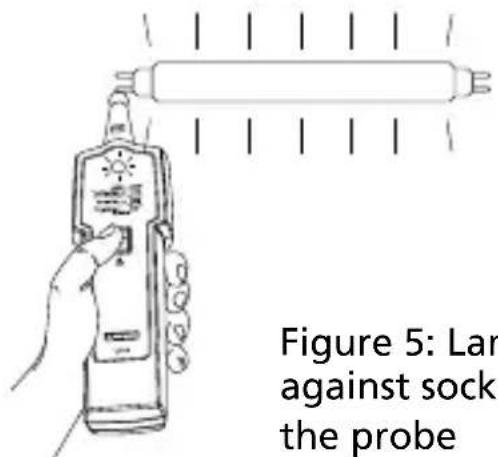
Figure 5: Lamp test against socket with the probe
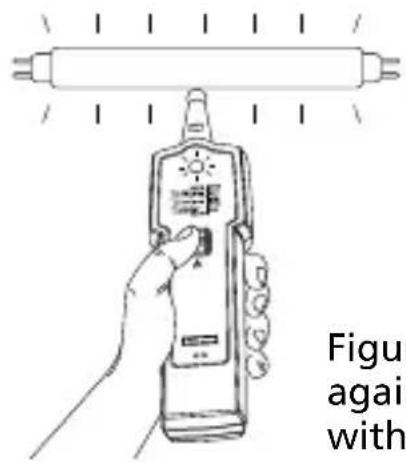
Figure 6: Lamp test against glass surface with the probe
Using Sodium Lamp Antenna (LT-10-EUR only)
Install the sodium lamp test antenna onto the Lamp Tester and make sure the switch is locked and secured. Verify lamp test function on a known lamp and/or on the identical lamp model both before and after use to ensure the instrument is in good working condition.
Note: The level of lamp response/illumination from one lamp type to another or from one brand to another may vary.

Do not touch the live parts with the lamp test probe. Keep the fingers mind the hand guard while TEST button is pressed.
Sodium lamp antenna tests:
- Low pressure sodium vapor bulbs
• High pressure sodium vapor bulbs -
Neon bulbs
• Mercury vapor bulbs
• Halogen metal vapor bulbs -
Touch the one of the socket pin with the tip of the sodium lamp test antenna.
-
Press and hold down the LAMP TEST button
• The bulbs is good if glowing.
- If the bulb does not glow, repeat lamp test with touching the other socket pin.
Note: If the bulb glows with either of socket pins during lamp test, the lamp is good. In some cases, only part of the bulb will glow, the other part should glow when testing the other socket pin.
VolTect™ Non-contact Voltage Detection
Amprobe LT-10 Lamp Tester is NOT equipped with a probe tip to be inserted into the slot of the receptacle contact. Testing voltage that way will not be reliable.
The LT-10 can only be used for detecting hot wires in outlets when the wiring is exposed.
With some cables, such as extension cords, hot and neutral wires might be twisted. In order to reliably test voltage, move the tester along the cable for some distance (typically a few inches). The tester will only indicate voltage in places where the hot wire of the twisted wires is closer to the tester. It will NOT indicate voltage in other places of the cable.
⚠️ ⚠️ WARNING!
- To avoid electric shock, do not touch ANY part of antenna during lamp or voltage tests. Touching antenna during these tests affects tester sensitivity.
- If the instrument is used in a manner not specified by the manufacturer, protection provided by the tester may be impaired.
- Test on a known energized source within the rated ac voltage range of the instrument both before and after use to ensure the instrument is in good working condition.
- The non-contact voltage detection function is always on. When the probe or antenna is close to energized wires, LED flashes and beeps. Non-contact voltage detection will be disabled when the LAMP TEST button is pressed.
- When using the instrument, if LED indicator does not glow or the instrument does not beep, voltage could still be present. The instrument indicates active voltage in the presence of electrostatic fields of sufficient strength generated from the source voltage. If the field strength is low, the instrument may not provide indication of live voltage. Lack of an indication occurs if the instrument is unable to sense the presence of voltage which may be influenced by several factors including, but not limited to:
- Shielded wire/cables
- Thickness and type of insulation
- Distance from the voltage source
- Fully-isolated users that prevent an effective ground
- Receptacles in recessed sockets or differences in socket design
-
Condition of the instrument and batteries
-
Do not use if the instrument appears damaged or if it doesn't operate properly. Closely examine the tip of the probe for cracks or breakage before use. If in doubt, have the instrument serviced.
- Do not use the instrument to test voltage higher than the rated voltage as marked on the instrument.
- Use caution with voltages above 30 V ac as a shock hazard may exist.
- Comply with local and national safety requirements.
- Use proper protective equipment as required by local or national authorities.
The non-contact voltage (NCV) test can be used to check whether the ballast is functional by verifying the presence of ac voltages at the input and output of the ballast, or the energized parts of the light fixture. The light fixture must be turned on before verifying the presence of ac voltage with the instrument.
Voltage Detection with Antenna
Do not touch the energized bare parts with the antenna. Test on energized insulated parts or insulated wires only.
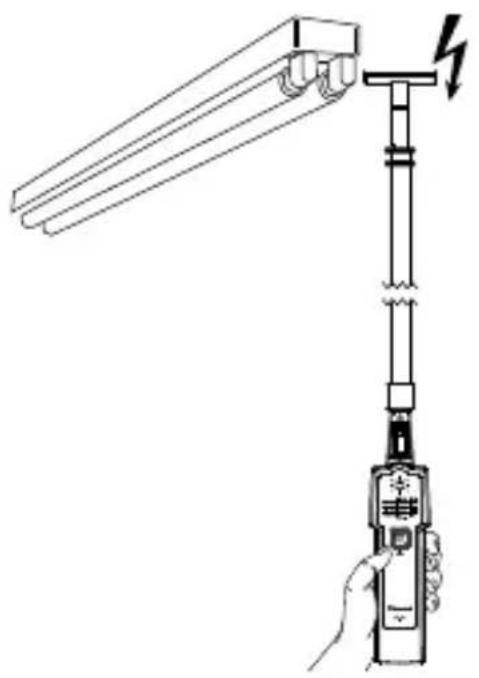
- Turn the light fixture's power on.
- Use the antenna to quickly check the presence of ac voltage to the light fixture.
- If the LED flashes red and beeps (modulated), there is ac voltage present.
natural_image
Line drawing of a hand holding a handheld device with a lightning bolt symbol (no text or labels)Figure 7: Voltage detection with antenna
Voltage Detection with Probe
Do not touch the energized bare parts with the probe. Test on energized insulated parts or insulated wires only.
To avoid electric shock, do not touch ANY part of antenna during lamp or voltage tests. Touching antenna during these tests affects tester sensitivity.
-
Turn the light fixture's power on.
-
Use the probe to detect the presence of ac voltage on the wires at input of the ballast.
- If the tester's LED flashes red and beeps, there is ac voltage present.
- Use the probe to detect the presence of ac voltage on the wires at output of the ballast.
- If the tester's LED flashes red and beeps, there is ac voltage present. The lamp may be faulty.
- If LED and beeper do not activate during voltage detection at the ballast output wires, the ballast may be faulty.
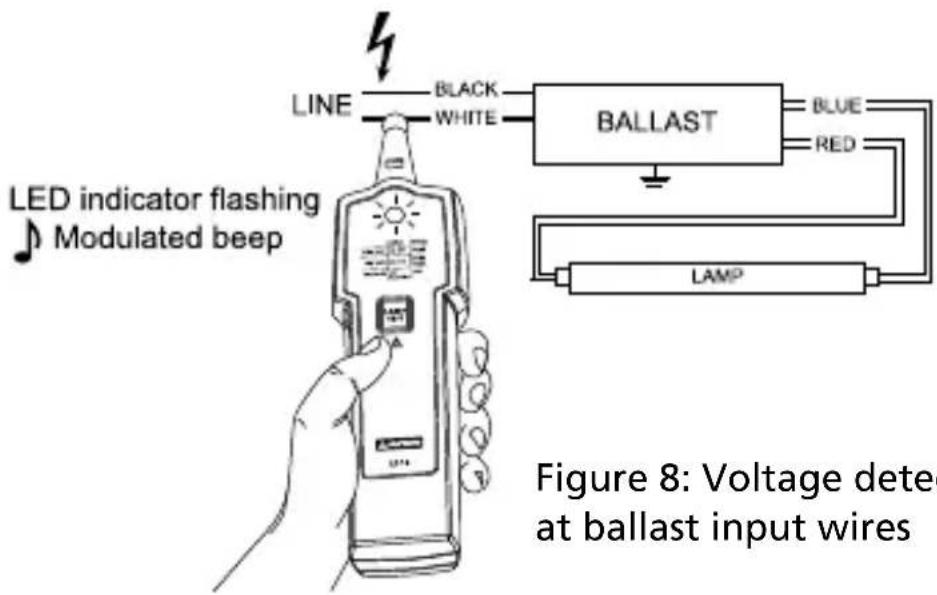
Figure 8: Voltage detection at ballast input wires
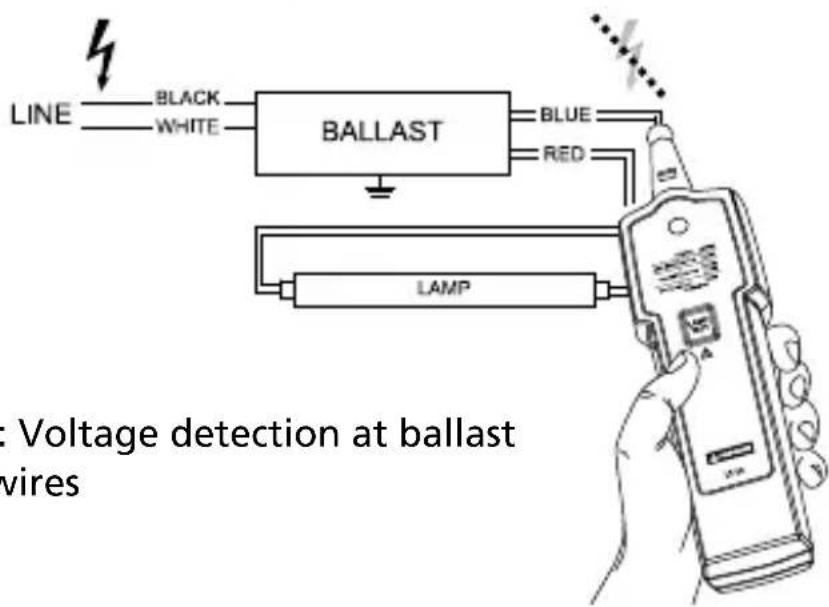
Figure 9: Voltage detection at ballast output wires
Pin Test
The pin test (filament test) can be used on dual pin fluorescent lamps that have a filament under the metal cap. The filament is used to excite the gas inside the tube and turn it on. The lamp will not function correctly if the filament is broken.

Turn the power off to the light fixture before removing the lamp from the fixture.
-
Pin test is always on. Plug the lamp pins into the pin test slots on the back of the tester.
-
If the tester does not beep and LED indicator is not on, the filament is broken. Replace the lamp.
-
If the tester beeps and LED indicator is on, the filament is functional. The pins are good.
-
Repeat step 1 with the other end of the lamp.
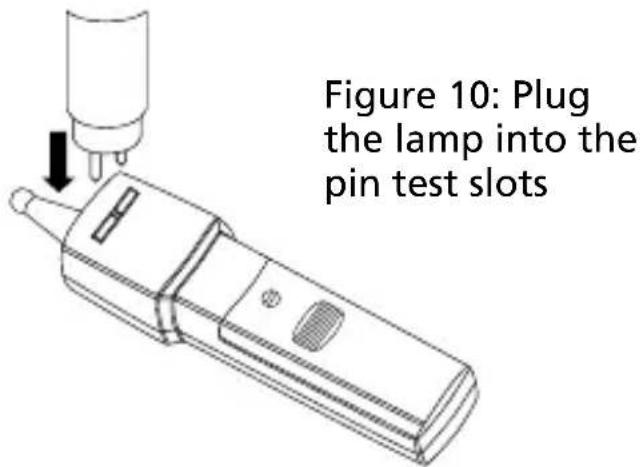
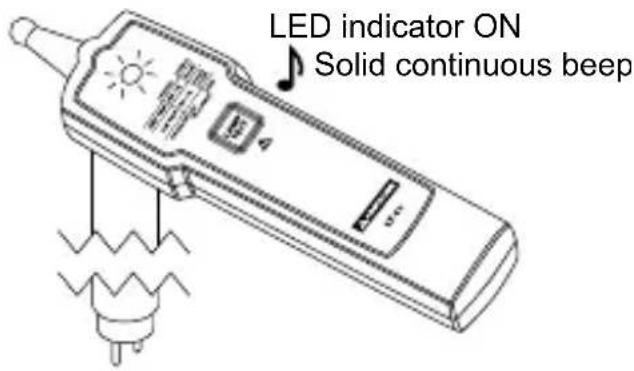
Figure 11: Pin test indications
DETAILED SPECIFICATIONS
| Test voltage (with new battery) | Approximately 3 kV / 280 kHz |
| Field strength Approximately 100 μV/m at 260 - 300 kHz | |
| Maximum antenna length | 121.92cm (48") |
| Filament test T2, T4, T5, T8, T9, T10, T12 | |
| Non-contact voltage detection | AC 90 V to AC 600 V, 50/60 HzCAT III 300 V, CAT II 600 V |
| Non-contact voltage sensitivity (with probe) | LED illuminates and beeps at approximately 3 mm (0.12 in) distance from a wire carrying 120 VacLED illuminates and beeps at approximately 5 mm (0.2 in) distance from a wire carrying 230 Vac |
| Drop proof 1 meter | |
| Operating time | One second ON, one second OFF for maximum five cycles and wait for 1 minute before making another measurement |
| Operating temperature -10 °C to +50°C (14°F to 122°F) ≤85% RH | |
| Storage temperature -10 °C to +50°C (14°F to 122°F) ≤85% RH | |
| Operating altitude Up to 2000 meters | |
| Battery | 1 x 9V lithium or alkaline battery only,6LR61/6LF22/MN1604 or equivalent |
| Battery life 500 tests (alkaline typically) | |
| Dimensions(L x W x H) | Approximately 170 x 40 x 24 mm(6.69 x 1.57 x 0.94 in) |
| Weight | Approximately 80 g (0.18 lb)with battery installed |
| Safety compliance | IEC 61010-1, UL 61010-1CAN/CSA-C22.2 No. 61010-1-2004 |
| EMC compliance IEC 61326-1 | |
| Certification CSA and CE | |
MAINTENANCE AND REPAIR
If the instrument fails to operate, check the battery and replace as necessary.
Do the following:
- Replace the battery if the tester does not work.
- If antenna is not working, check the antenna connection. Make sure the antenna is locked and secured.
- Review the users manual to better understand how the tester operates.
Except for the replacement of the battery, repair of the tester should be performed only by an authorized service center or by other qualified instrument service personnel.
The front panel and carrying case can be cleaned with a mild solution of detergent and water. Apply sparingly with a soft cloth and allow to dry completely before using. Do not use aromatic hydrocarbons, gasoline or chlorinated solvents for cleaning.
Lamp tester doesn't work:
Problem: Possible low or dead battery
Action: Check and/or replace battery
Low lamp tester response:
Problem:
- Possible low battery
- Bad contact between the probe/antenna and the lamp tester
Action:
- Check and/or replace battery
- Test the area on the lamp where the probe/antenna can make good contact against lamp glass surface or the lamp socket
Antenna doesn't work:
Problem:
- Possible low battery
- Bad contact between the antenna and the lamp under test
- Bad connection contact between the probe and antenna
Action:
- Check and/or replace battery
- Test the area on the lamp where the antenna can make good contact against lamp glass surface or the lamp socket
- Check and re-install the antenna. Make sure the antenna is securely locked onto the probe. If the antenna is still not working, the antenna may be damaged. Contact a service center for repair or antenna replacement
Sodium lamp antenna doesn't work:
Problem:
- Possible low battery
- Bad contact between the probe and the lamp socket NOTE: The insulated probe may not work on socket of energy saving lamp.
Action:
- Check and/or replace battery
- Test the glass tube on the lamp with the probe.
Replacing BATTERY follow below steps:
- On the battery case, turn the screw to "open" position by using a flat screw driver. Then open the battery cover.
- Remove battery and replace it with one 9V alkaline or lithium battery only (6LF22, 6LR61, MN1604 or equivalent). Pay attention to the polarity signs.
- Put the battery cover back on and refasten the screw.
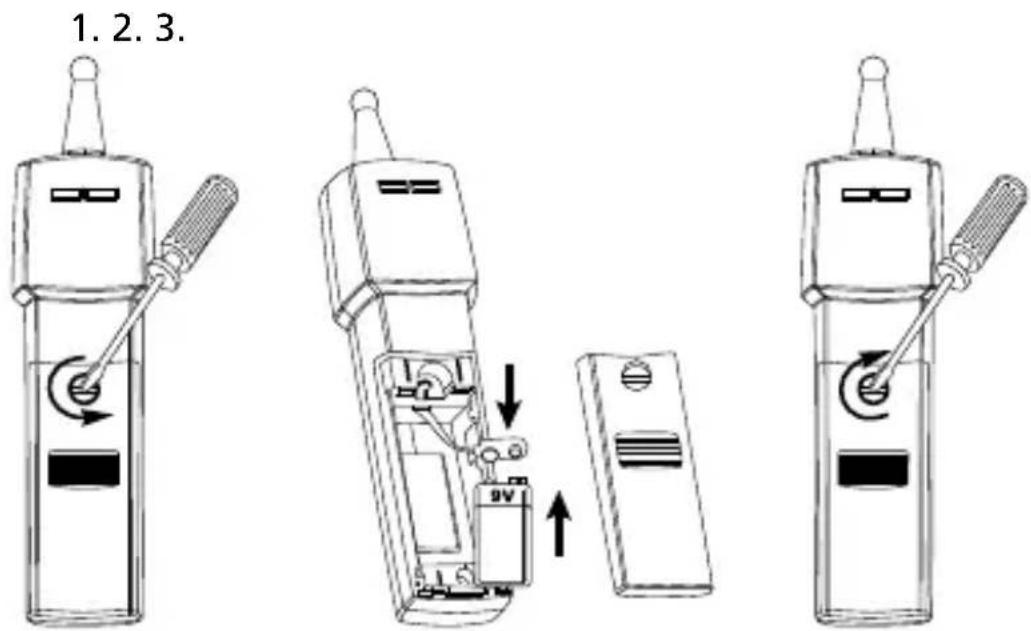
Figure 12: Replacing battery
LT-10
LT-10-EUR
Leuchtmittelprüfer
Bedienungsanleitung
natural_image
Diagram of a handheld device with a hand holding a spring scale, showing mechanical components and wiring (no text or symbols)natural_image
Line drawing of a handheld device with a screwdriver and circular button (no text or symbols)natural_image
Diagram of a hand holding a handheld device with a lightning bolt symbol (no text or labels)Imagen 1: Colocar la antena
Retirar la antena
natural_image
Diagram of a hand holding a handheld device with a lightning bolt symbol (no text or labels)natural_image
Diagram of a handheld device with a hand holding a spring scale, showing mechanical components and a lightning symbol (no text or labels)Figur 2: Ta bort antennen
Figur 4: Lamptest med antenn mot glasyta i belysningsarmatur
Lamptest med sonden
natural_image
Line drawing of a handheld device with a hand holding a lever and a lightning bolt symbol (no text or labels)Figur 7: Spänningsdetektion med antenn
Figur 11: Stifttestindikationer
DETLAJERADE SPECIFIKATIONER
Visit the website for your region for
- Catalog
- Application notes
• Product specifications - User manuals
Amprobe®
amprobe.com
info@amprobe.com
Everett, WA 98203
Tel: 877-AMPROBE (267-7623)
Beha-Amprobe®
Division of Fluke Corp. (USA)
Science Park
Eindhoven 5110
5692 EC Son
The Netherlands
+31 (0) 40 267 51 00
beha-amprobe.com

Please Recycle
- Limited Warranty and Limitation of Liability
- Repair
- In-Warranty Repairs and Replacement – All Countries
- Non-warranty Repairs and Replacement – United States and Canada
- Non-Warranty Repairs and Replacement – Europe
- Beha-Amprobe
- CONTENTS
- SYMBOLS
- SAFETY INFORMATION
- CENELEC Directives
- For Use by Competent Persons
- ⚠️ Warning: Read Before Using
- To avoid possible electric shock or personal injury:
- UNPACKING AND INSPECTION
- FEATURES
- Features:
- Precautions:
- Attaching the Antenna
- Removing the Antenna
- Attaching and Removing the Adapter Plate
- LAMP TEST
- Testing Fluorescent Lamps
- Lamp test with antenna
- Lamp test with the probe
- Using Sodium Lamp Antenna (LT-10-EUR only)
- VolTect™ Non-contact Voltage Detection
- ⚠️ ⚠️ WARNING!
- Voltage Detection with Antenna
- Do not touch the energized bare parts with the antenna. Test on energized insulated parts or insulated wires only.
- Voltage Detection with Probe
- Pin Test
- Turn the power off to the light fixture before removing the lamp from the fixture.
- MAINTENANCE AND REPAIR
- Lamp tester doesn't work:
- Low lamp tester response:
- Problem:
- Action:
- Antenna doesn't work:
- Sodium lamp antenna doesn't work:
- LT-10
- LT-10-EUR
- Leuchtmittelprüfer
- Bedienungsanleitung
- Lamptest med sonden
- Visit the website for your region for
- Amprobe®
- Beha-Amprobe®
Brand : Amprobe
Model : LT10
Category : Electrical tester