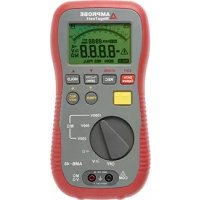
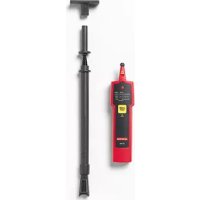
AMB45 - Electrical tester Amprobe - Free user manual and instructions
Find the device manual for free AMB45 Amprobe in PDF.



| Product Type | Digital Megohmmeter / Insulation Resistance Tester |
| Brand | Amprobe |
| Model | AMB45 |
| Dimensions | 230 × 116 × 62 mm |
| Weight (with batteries) | Approximately 750 g |
| Power Supply | 8 AA 1.5 V batteries |
| Display | Large LCD screen 70 × 46 mm, 60-segment analog display |
| Safety Category | CAT III 600 V, CAT II 1000 V |
| Main Functions | AC/DC Voltage (600 V), Low Resistance (400/4000 Ω), Continuity Alarm (<40 Ω), Insulation Test (250/500/1000 V up to 4000 MΩ), Data Logging (4000 records), RS232 Interface |
| Operating Conditions | Indoor, altitude ≤2000 m, pollution degree 2, relative humidity ≤80%, temperature 0 to 40 °C |
| Maintenance and Cleaning | Wipe the casing with a dry cloth. Do not use abrasive solvents. Only qualified personnel for repairs. |
| Spare Parts and Repairability | User-replaceable fuse F 0.5 A 600 V. Replaceable batteries. Repair by Amprobe authorized service center. |
| General Information | Automatic shutdown after 30 minutes of inactivity. Low battery indicator. Fuse protection. Adjustable zero for probe resistance. |
Frequently Asked Questions - AMB45 Amprobe
User questions about AMB45 Amprobe
0 question about this device. Answer the ones you know or ask your own.
Ask a new question about this device
Download the instructions for your Electrical tester in PDF format for free! Find your manual AMB45 - Amprobe and take your electronic device back in hand. On this page are published all the documents necessary for the use of your device. AMB45 by Amprobe.
USER MANUAL AMB45 Amprobe
Limited Warranty and Limitation of Liability
Your Amprobe product will be free from defects in material and workmanship for 1 year from the date of purchase, unless local laws require otherwise. This warranty does not cover fuses, disposable batteries or damage from accident, neglect, misuse, alteration, contamination, or abnormal conditions of operation or handling. Resellers are not authorized to extend any other warranty on Amprobe's behalf. To obtain service during the warranty period, return the product with proof of purchase to an authorized Amprobe Test Tools Service Center or to an Amprobe dealer or distributor. See Repair Section for details. THIS WARRANTY IS YOUR ONLY REMEDY. ALL OTHER WARRANTYES - WHETHER EXPRESS, IMPLIED OR STAUTORY - INCLUDING IMPLIED WARRANTYES OF FITNESS FOR A PARTICULAR PURPOSE OR MERCHANTABILITY, ARE HEREBY DISCLAIMED. MANUFACTURER SHALL NOT BE LIABLE FOR ANY SPECIAL, INDIRECT, INCIDENTAL OR CONSEQUENTIAL DAMAGES OR LOSSES, ARISING FROM ANY CAUSE OR THEORY. Since some states or countries do not allow the exclusion or limitation of an implied warranty or of incidental or consequential damages, this limitation of liability may not apply to you.
Repair
All Amprobe returned for warranty or non-warranty repair or for calibration should be accompanied by the following: your name, company's name, address, telephone number, and proof of purchase. Additionally, please include a brief description of the problem or the service requested and include the test leads with the meter. Non-warranty repair or replacement charges should be remitted in the form of a check, a money order, credit card with expiration date, or a purchase order made payable to Amprobe.
In-Warranty Repairs and Replacement - All Countries
Please read the warranty statement and check your battery before requesting repair. During the warranty period, any defective test tool can be returned to your Amprobe distributor for an exchange for the same or like product. Please check the "Where to Buy" section on amprobe.com for a list of distributors near you. Additionally, in the United States and Canada, in-warranty repair and replacement units can also be sent to an Amprobe Service Center (see address below).
Non-Warranty Repairs and Replacement - US and Canada
Non-warranty repairs in the United States and Canada should be sent to an Amprobe Service Center. Call Amprobe or inquire at your point of purchase for current repair and replacement rates. In USA In Canada
Amprobe Test Tools Amprobe Test Tools
Everett, WA 98203 Mississauga, ON L4Z 1X9
Tel: 877-AMPROBE (267-7623) Tel: 905-890-7600
Non-Warranty Repairs and Replacement - Europe
European non-warranty units can be replaced by your Beha-Amprobe distributor for a nominal charge. Please check the "Where to Buy" section on beha-amprobe.com for a list of distributors near you.
Beha-Amprobe
Division and reg. trademark of Fluke Corp. (USA)
The Netherlands - Headquarters**
Germany*
United Kingdom
Science Park Eindhoven 5110
In den Engematten 14
52 Hurricane Way
5692 EC Son
79286 Glottertal
Norwich, Norfolk
The Netherlands
Germany
NR6 6JB United Kingdom
Phone: +31 (0) 40 267 51 00
Phone: +49 (0) 7684 8009 - 0
Phone: +44 (0) 1603 25 6662
beha-amprobe.com
beha-amprobe.de
beha-amprobe.com
*Correspondence only - no repair or replacement available from this address. European customers please contact your distributor.)
**single contact address in EEA Fluke Europe BV
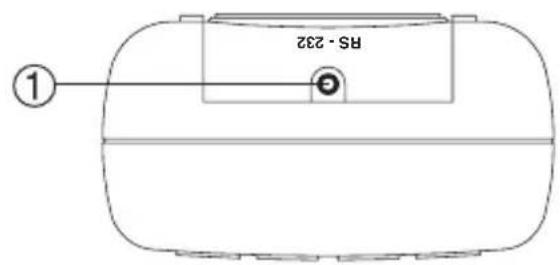
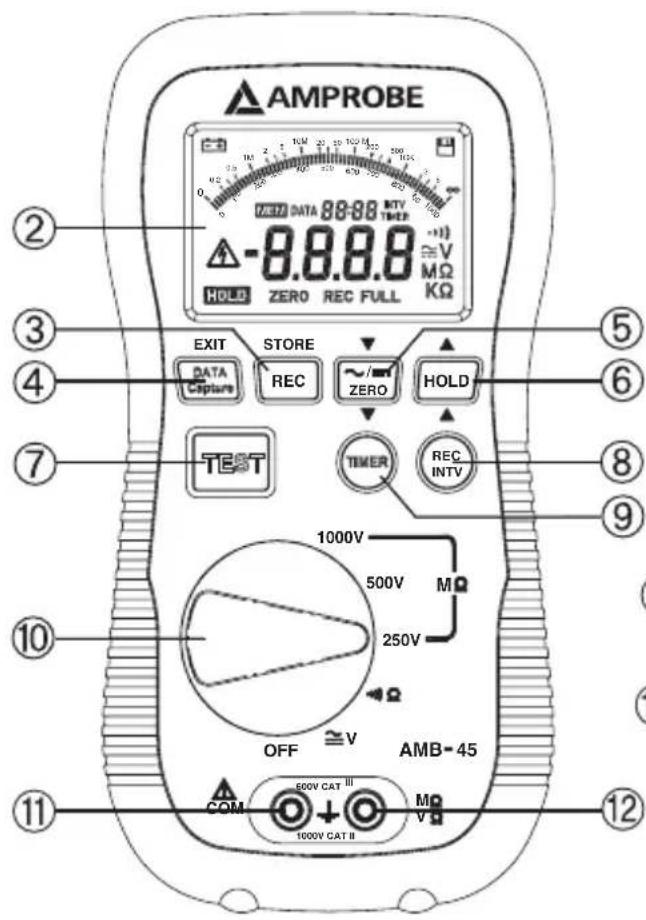
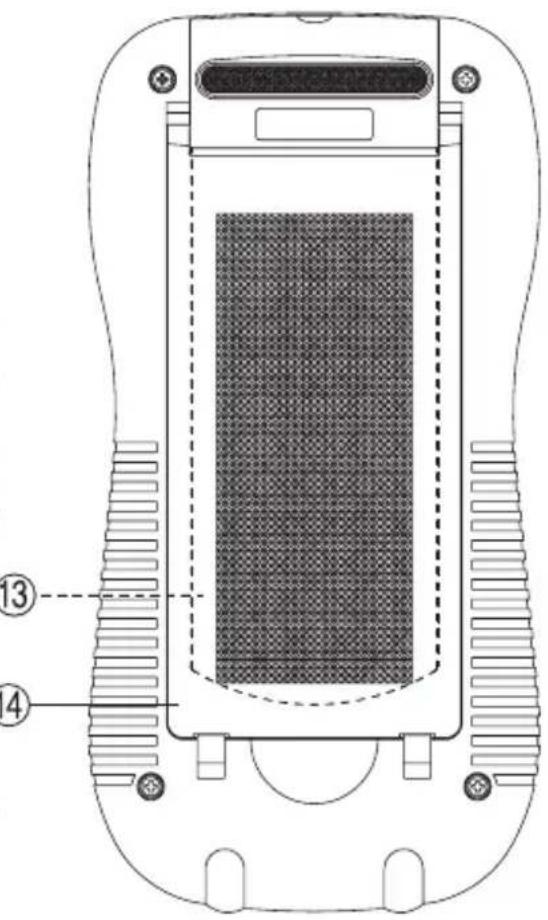
① RS232 connector REC interval setup button
② LCD display
Insulation timer button
③ REC button
Function selection dial
④ Data capture button
Black terminal
⑤ AC/DC button / ZERO button
Red terminal
⑥ Data hold button
3 Battery compartment cover
TEST button
14 Foldable stand
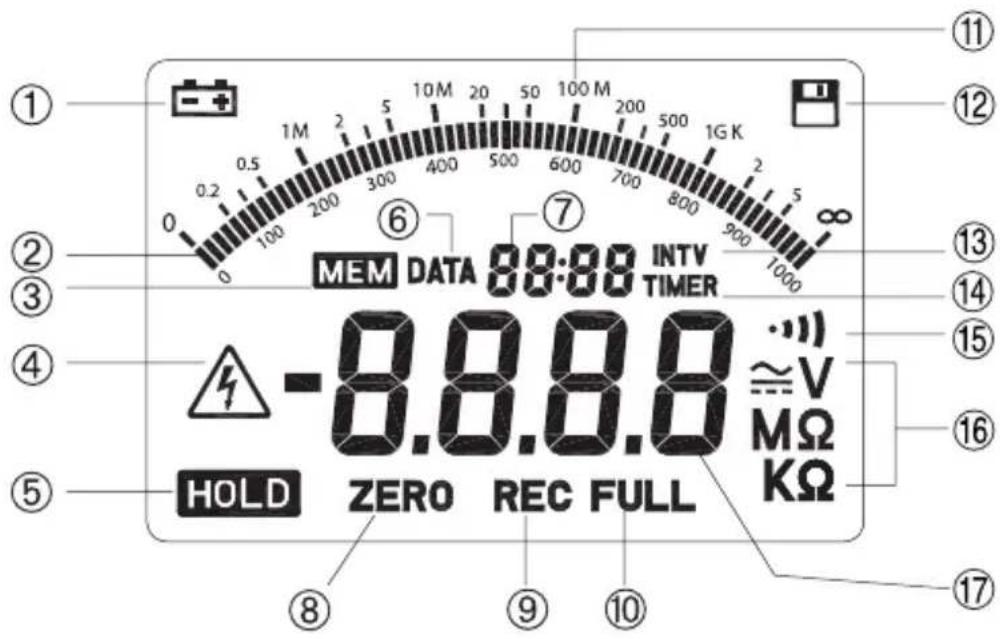
① Low battery
② Analog bar display
③ Data in capture memory
High voltage warning
⑤ Data hold
i Data capture mode indication
⑦ Second digit display
Low ohm zero function
⑨ REC in process
Memory full
11 Analog bar scale
Data recording
13 REC interval symbol
Insulation test timer symbol
15 Continuity buzzer function
16 Measuring unit
⑦ Main digit display
CONTENTS
SYMBOL DEFINITION AND BUTTON LOCATION 1
SAFETY SYMBOLS 3
SAFETY INFORMATION 4
Environment Conditions. 4
Maintenance & Cleaning 4
GENERAL SPECIFICATION 4
ELECTICAL SPECIFICATION 5
SAUTO POWER OFF 5
BATTERY CHANGING. 5
FUSE CHANGING 5
MEASURING FUNCTION 6
ACV Function 6
DCV Function. 6
Low Ohm Function and Continuity Function 6
MegaOhm Function 6
SAFETY SYMBOLS
| ! | Caution (Refer to this manual before using the meter) |
| 4 | Dangerous voltages, risk of electric shock. |
| ☐ | Meter is protected throughout by double insulation. When servicing, use only specified replacement parts. |
| c US | Underwriters Laboratories Inc. [Note: Canadian and US.] |
- Read the following safety information carefully before attempting to operate or service the meter.
- The circuit under test must be de-energized and isolated before connections are made except for voltage measurement.
- Circuit connections must not be touched during a test.
- After insulation test, capacitance circuits must be allowed to discharge before disconnecting the test leads.
- To avoid damages to the instrument do not apply the signals, which exceed the maximum limits shown in the technical specification tables, to the meter.
- Do not use the meter or test leads if they look damaged. Use extreme caution when working around bare conductors or bus bars.
- Use the meter only as specified in this manual; otherwise, the protection provided by the meter may be impaired.
- Caution when working with voltages above 60V DC or 30 V AC RMS. Such voltages pose a shock hazard.
- Before taking resistance measurements or testing acoustic continuity, disconnect circuit from main power supply and all loads from the circuit.
Environment Conditions
- Installation Categories III 600V, Categories II-1000V
Pollution Degree 2
Altitude up to 2000 meters - Indoor use only
- Relatively humidity 80% max.
Operation Temperature 0 ~ 40
Maintenance & Cleaning
- Only qualified personnel should perform repairs or servicing not covered in this manual.
Periodically wipe the case with a dry cloth. Do not use abrasives or solvents on these instruments.
GENERAL SPECIFICATION
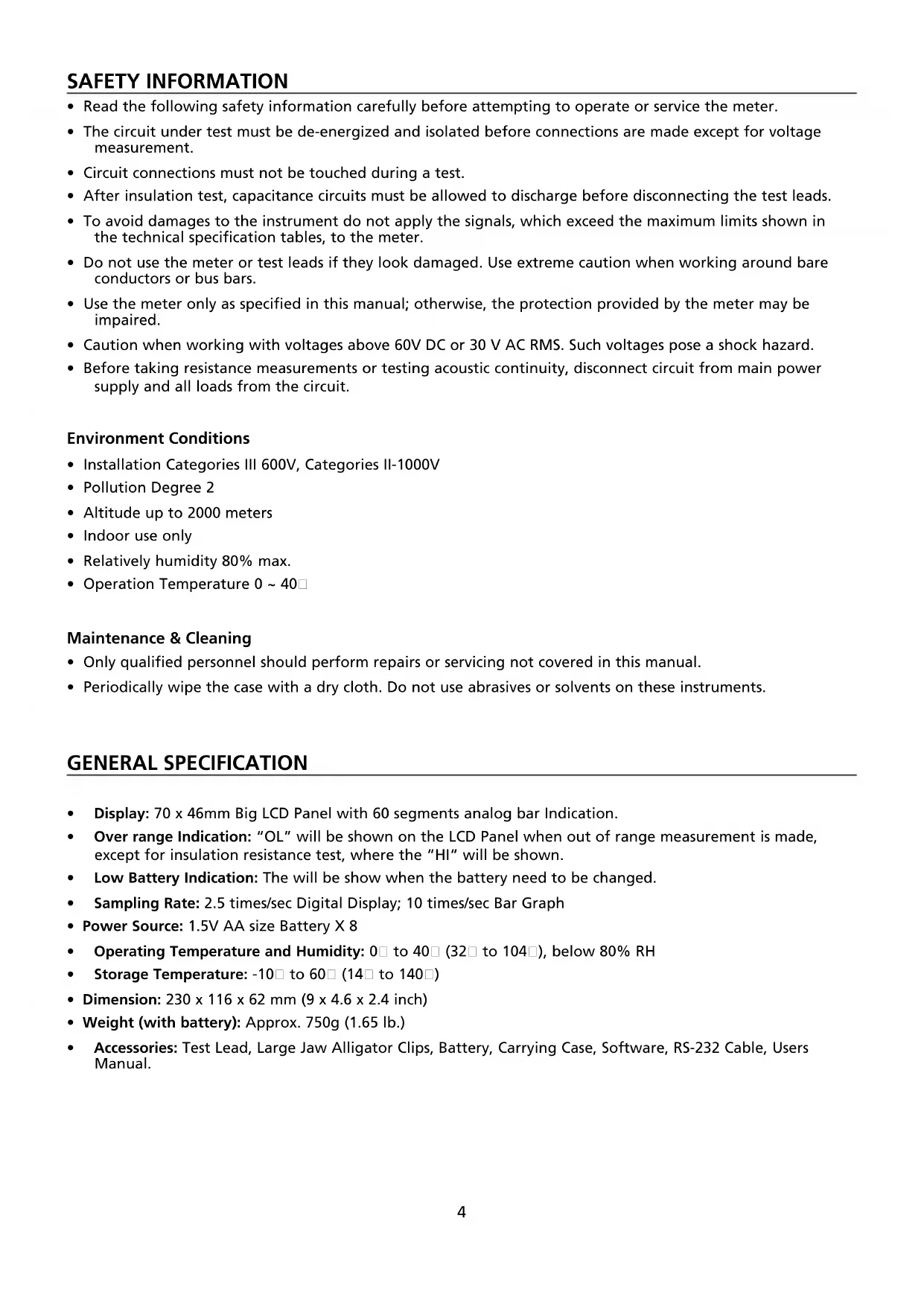
- Display: 70 × 46 mm Big LCD Panel with 60 segments analog bar Indication.
Over range Indication: "OL" will be shown on the LCD Panel when out of range measurement is made, except for insulation resistance test, where the "HI" will be shown. - Low Battery Indication: The will be show when the battery need to be changed.
- Sampling Rate: 2.5 times/sec Digital Display; 10 times/sec Bar Graph
Power Source: 1.5V AA size Battery X 8 - Operating Temperature and Humidity: 0 to 40 (32 to 104), below 80% RH
Storage Temperature: -10 to 60 (14 to 140)
Dimension: 230 × 116 × 62 mm ( 9 × 4.6 × 2.4 inch )
Weight (with battery): Approx. 750g (1.65 lb.) - Accessories: Test Lead, Large Jaw Alligator Clips, Battery, Carrying Case, Software, RS-232 Cable, Users Manual.
| AC Voltage (50-500 Hz) | ||
| Range Resolution Accuracy | ||
| 600V 0.1V ±(1.5% rdg + 5 dgts) | ||
| DC Voltage | ||
| Range Resolution Accuracy | ||
| 600V 0.1V ±(1% rdg + 3 dgts) | ||
| Ω Ohms (Autoranging) | ||
| Range Resolution Accuracy | ||
| 400Ω 0.1Ω | ±(1% rdg + 5 dgts) | |
| 4000Ω 1Ω | ||
| Continuity Beeper | ||
| Range Active Protection | ||
| < 40Ω 250Vrms | ||
| MΩ (Autoranging) | ||
| Range Resolution Accuracy | ||
| 4/40/400/4000MΩ (250V) | 0.001 / 0.01 / 0.1 / 1 MW | ±(3% rdg + 5 dgts) < 2 GΩ ±(5% rdg + 5 dgts) < 4 GΩ |
| 4/40/400/4000MΩ (500V) | ||
| 4/40/400/4000MΩ (1000V) | ||
Recording Length: 4000 records
AUTO POWER OFF
When the tester is idle for thirty minutes, with no function selector or button operation, it will turn itself off automatically. To turn the tester on again, the user has to turn the function selector to "OFF" position, then the selected function.
BATTERY CHANGING
When happens on the LCD, the battery need to be replaced with new ones. To replace the battery the user should turn the function selector to OFF position. Then the user needs to open the battery compartment cover with a screwdriver. Eight AA 1.5V batteries are needed to replace the old ones. After all Batteries are changed, put the cover back and fasten the screw.
FUSE CHANGING
When connect the meter under Ohm rang to a source >10V , the protection fuse will break the circuit and new one will be needed for replacement. To replace the fuse, user should prepare an F 0.5A 600V fuse. First, the user should turn the tester off and remove the test leads then remove the Back Cover and Replace the fuse.
ACV Function
Turn function selector to voltage range. Connect black test lead to Black terminal and red one to the Red terminal. Connect test lead to the test circuit in parallel. Operator can hold the reading by pressing the HOLD key.
DCV Function
Turn function selector to voltage range. Connect black test lead to Black terminal and red one to the Red terminal.
Press the ZERO button to change the mode form ACV to DCV function. Connect test lead to the test circuit in parallel. One can hold the reading by pressing the ZERO key.
Low Ohm Function And Continuity Function
Turn function selector to Ohm range. Connect black test lead to Black terminal and red one to the Red terminal. Connect test lead to the test circuit in parallel. If the reading is less than 40 Ohm, the continuity beeper will sound.
One may null the lead resistance (under 40 Ohm) by shorting the test lead than press the zero key. When the lead resistance is recorded a ZERO symbol will display on the LCD. Press zero key again to go back to normal operation. If the lead resistance is great than 40Ω the error beeping will sound. Because the test current provided by the meter could reach 200mA , do not use this range to test electronic component like diode, transistor or fuse.

Caution:
Before measuring, verify the circuit is not live by voltage function
Megaohm Function
Turn the function selector to the desired test voltage range. The LCD will display "----" to indicate the tester is standing by. Connect black test lead to Black terminal and red one to the Red terminal. Connect test lead to the test circuit in parallel. One may take the measuring under manual power mode or power lock mode:

Caution:
Before measuring, verify the circuit is not live by voltage function.
Do not start the test before the lead is connected to the test circuit properly.
Do not remove the test leads from the test circuit before the discharge process is completed.
- Manual Mode: If the timer symbol and setup is not shown on the center of LCD, the tester is under manual mode. Press the test key to activate the test voltage source and the measuring will stop after it got the first stable reading or the TEST is pressed again before a stable reading is reached. A periodic beeping will warn the high voltage output. A series of beeping with shorter period indicate the discharging in progress. When the beeper stops, the discharge is completed. The test result will be held on the display automatically.
- Lock Mode: Press the button to enter or exit the Power Lock operation mode. Under this mode the timer and setup will be shown in the center of LCD. Press the test button once to activate the test source and the testing down counter will be shown in the 2nd digital display. A periodic beeping will warn the high voltage output. The test process can be stop by pressing the TEST button again or when the testing down counter reaches zero. A series of beeping with shorter period indicate the discharging in progress. Then the beeper stops, the discharge is completed. The test result will be held on the display automatically.
- Setup Timer: When the function selector is under insulation ranges, the user can setup the timer by pressing (TIMER) for 2 seconds. The timer setup will blink in LCD and it can be changed by (Z) and (Key) Pressing these keys one time will change the setup by one second and pressing these keys for more than two seconds the value will change continuously. Once the setup is done, the user needs to press the timer again to store the value into the memory.
- Setup REC interval: The user can setup the REC interval by pressing . The interval setup will blink in LCD and it can be changed by zero and Hkeys. Pressing these keys one time will change the setup by one second and pressing these keys for more than two seconds the value will change continuously. Once the setup is done, the user needs to press the timer again to store the value into the memory.
- Start/Stop REC measuring DATA: When the function selector is under voltage and low resistance ranges, the user can start the REC function by pressing RECR key. The REC symbol will display in the LCD. The REC down counter will also be shown in LCD to forecast the next data sampling time. When the second that the recording occurs, a disk symbol will be shown to indicate this process. When the function selector is under insulation ranges, the user can set the REC mode only before the measuring start. If the REC mode is set, a measuring will start the REC process automatically.
- Data Capture Function: When the user want to store a reading on the LCD, he can press DATA Capture key to enter data capture window. The tester will automatically searched the next available capture memory to store the reading or the user can browse up and down by press the ZERO and Hkeys. Once the address is chosen, the user need to press STORE key to store reading. The user can exit data capture window by press DATA Capture key again.
- Erase Data Memory: The user can erase all the memory in the following process. Turn the tester off. Press and hold REC key then turn on the tester. CL will be shown to indicate the erasing is under process. When it is done, message DOME will be shown in the LCD and the user can release the key.
AMPROBE
AMB-45
Amprobe Test Tools Amprobe Test Tools
Everett, WA 98203 Mississauga, ON L4Z 1X9
Tél.: 877-AMPROBE (267-7623) Tél.: 905-890-7600
Amprobe Test Tools Amprobe Test Tools
Everett, WA 98203 Mississauga, Ontario L4Z 1X9
Tel.: 877-AMPROBE (267-7623) Tel.: 905-890-7600
Visit amprobe.com for
- Catalog
Application notes
Product specifications - User manuals
Amprobe
amprobe.com
Division of Fluke Corp.
6920 Seaway Blvd.
M/S 143F
Everett, WA 98203 USA
Tel: 877-AMPROBE (267-7623)
Beha-Amprobe
beha-amprobe.com
c/o Fluke Europe BV
Science Park
Eindhoven 5110
NL-5692 EC Son
Tel.: +49 (0) 7684 8009 - 0

Please Recycle
- Limited Warranty and Limitation of Liability
- Repair
- In-Warranty Repairs and Replacement - All Countries
- Non-Warranty Repairs and Replacement - US and Canada
- Non-Warranty Repairs and Replacement - Europe
- Beha-Amprobe
- CONTENTS
- SAFETY SYMBOLS
- Environment Conditions
- Maintenance & Cleaning
- GENERAL SPECIFICATION
- AUTO POWER OFF
- BATTERY CHANGING
- FUSE CHANGING
- ACV Function
- DCV Function
- Low Ohm Function And Continuity Function
- Megaohm Function
- AMB-45
- Visit amprobe.com for
- Amprobe
Brand : Amprobe
Model : AMB45
Category : Electrical tester