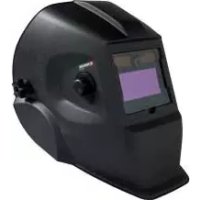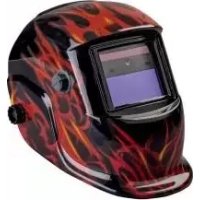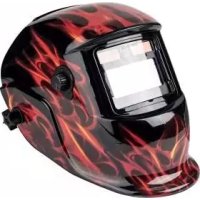
PSHL 2 C1 - Welding helmet PARKSIDE - Free user manual and instructions
Find the device manual for free PSHL 2 C1 PARKSIDE in PDF.


| Product type | Automatic welding helmet |
| Brand | Parkside |
| Model | PSHL 2 C1 (flames and black variants) |
| Field of view | 9.2 x 4.2 cm |
| Light state | DIN 4 |
| Dark state (flames) | DIN 9 to 13 |
| Dark state (black) | DIN 5 to 8 and DIN 9 to 13 |
| UV/IR protection | DIN 16 |
| Speed light → dark | 0.23 - 0.72 ms |
| Speed dark → light (flames) | 0.2 - 0.6 s |
| Speed dark → light (black) | 0.15 - 0.45 s |
| Power supply | Solar cell + 2 batteries (for LED lighting) |
| Compatible welding methods | MMA, MIG, MAG, TIG, plasma cutting, plasma welding |
| Operating temperature | -5 °C to +55 °C |
| Storage temperature | -20 °C to +70 °C |
| Maximum service life | Approximately 6 years |
| Safety standards | EN 166, EN 175, EN 379 |
| Settings | Darkening, delay, sensitivity, grinding mode |
| Protective screens | Outer and inner (replaceable) |
| Maintenance | Clean with a soft dry cloth, pure alcohol or disinfectant |
| Warranty | 3 years |
Frequently Asked Questions - PSHL 2 C1 PARKSIDE
User questions about PSHL 2 C1 PARKSIDE
0 question about this device. Answer the ones you know or ask your own.
Ask a new question about this device
Download the instructions for your Welding helmet in PDF format for free! Find your manual PSHL 2 C1 - PARKSIDE and take your electronic device back in hand. On this page are published all the documents necessary for the use of your device. PSHL 2 C1 by PARKSIDE.
USER MANUAL PSHL 2 C1 PARKSIDE
natural_image
Exterior view of a black outdoor welding helmet with visible branding and a close-up of its flame mask (no text or symbols on the helmet itself)AUTOMATIC WELDING HELMET PSHL 2 C1
GBIEN
AUTOMATIC WELDING HELMET
Operation and Safety Notes
Translation of the original instructions
FR BE
MASQUE DE SOUDAGE AUTOMATIQUE
Before reading, unfold the page containing the illustrations and familiarise yourself with all functions of the device.
DK
GB /IE/ NI Operation and Safety Notes Page 5
natural_image
Close-up of a mechanical component with a central circular component and two rectangular plates (no visible text or symbols)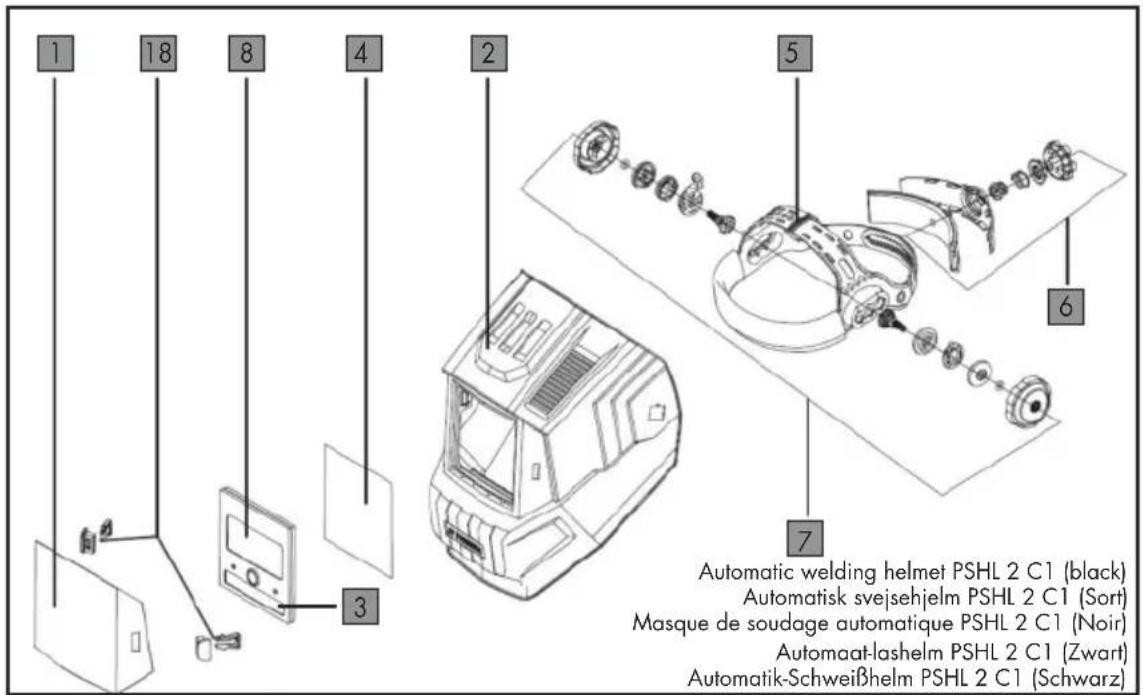
text_image
1 18 8 4 2 5 6 7 Automatic welding helmet PSHL 2 C1 (black) Automatisk svejsehjelm PSHL 2 C1 (Sort) Masque de soudage automatique PSHL 2 C1 (Noir) Automaat-lashelm PSHL 2 C1 (Zwart) Automatik-Schweißhelm PSHL 2 C1 (Schwarz)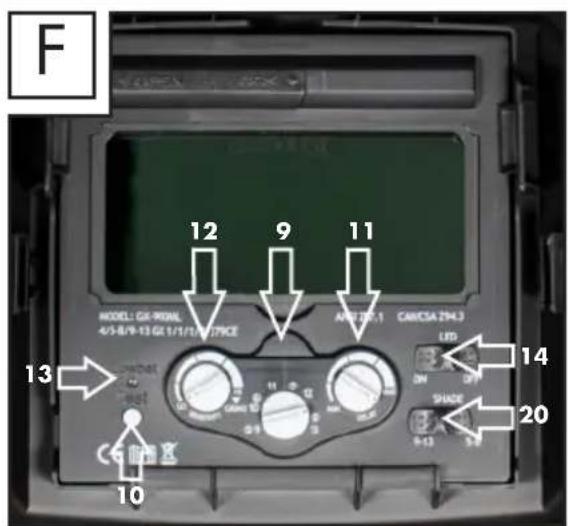
text_image
F MODEL: GX-90AL 4/5-B/9-13 GL 1/1/T/279CE 12 9 11 APR287.1 CANCSA 294.3 LED 13 14 SHADE 20 C6 10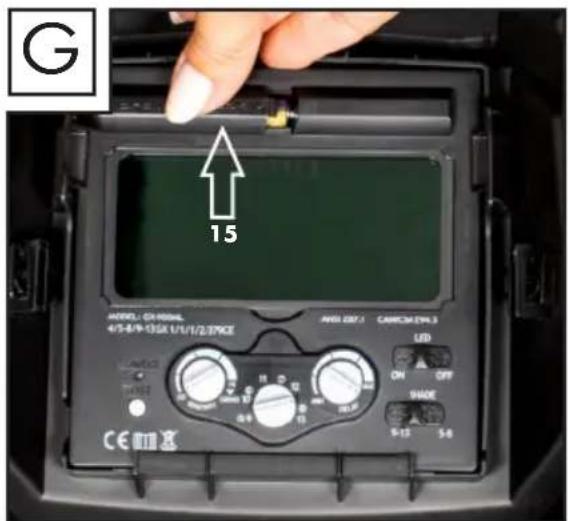
text_image
G 15 MODEL - CL-PROVAL 4/5-8/9-13GX 1/1/1/2/PRICE ANSS 007.1 CANACH 2V4.3 LED ON OFF SHADE 5-13 5-8 CE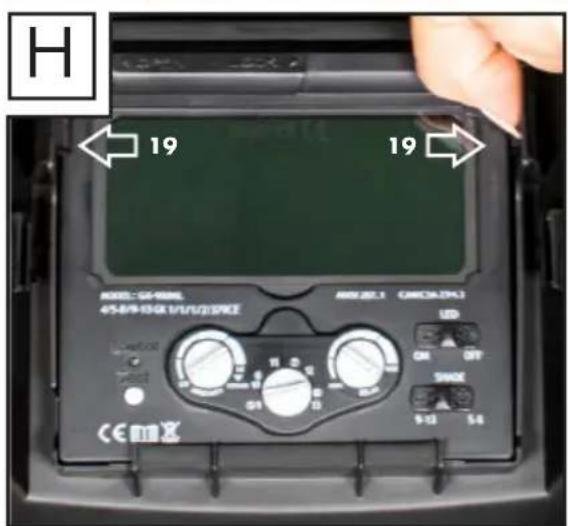
text_image
H 19 19 MODEL: 52-0000 45-BP-10G R1/1/2/2/2/2 AMU-2.1 (MUSCA/PL) LED ON OUT SHADE 9-13 5-6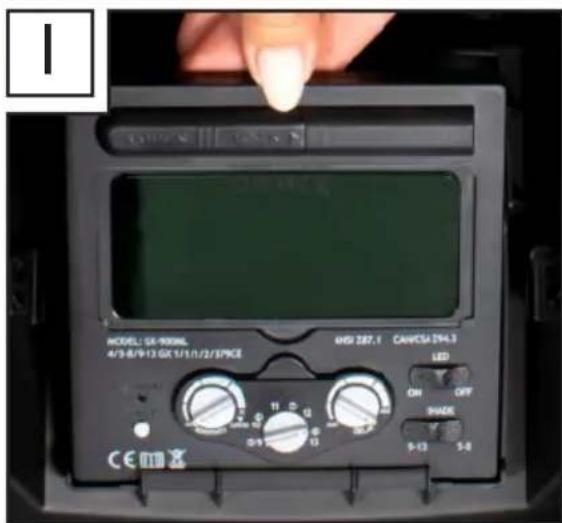
text_image
MODEL: GB-900ML 4/3-8/9-13-GX 1/3/1/2/3/PRICE HSS 287.1 CANVCSA 294.3 LED ON OFF PHASE 9-13 5-0 CE
text_image
J 17List of pictograms used....Page 6
Introduction Page 6
Intended use....Page 6
Package contents......Page 6
Parts description for "flames" model Page 7
Parts description for "black" model....Page 7
Technical specifications for "flames" model......Page 7
Technical specifications for "black" model....Page 7
Safety instructions......Page 8
Using the device....Page 12
Replacing the UV filter....Page 13
Troubleshooting......Page 14
Cleaning and maintenance......Page 15
Storage Page 15
Information about recycling and disposal......Page 15
Meaning of the marking....Page 15
EU Declaration of Conformity Page 16
Warranty and service information ......Page 18
Warranty conditions....Page 18
Warranty period and statutory claims for defects ......Page 19
Extent of warranty Page 19
Processing of warranty claims Page 19
Service......Page 20
| List of pictograms used | |||
 | Caution!Read the operating instructions! |  | Warning: Potential hazards! |
 | Do not dispose of any electrical devices in domestic waste! |  | Important note! |
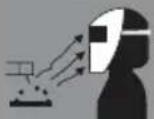 | Attention: Welding helmets do not offer any form of protection for the eyes, ears or face! | 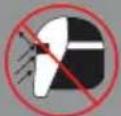 | Attention: Arc beams can damage the retina of the eye! |
 | Made from recycling material |  | Dispose of batteries in an environmentally friendly manner! |
 | Dispose of packaging properly.Do not dispose of the appliance in household waste! |  | Direct current |
Automatic welding helmet PSHL 2 C1
- Introduction

Congratulations! You have purchased one of our high-quality
devices. Please familiarise yourself with the product before setup or first use. To do so, please read through the following operating and safety instructions carefully. This product must be set up or used only by people who have been trained to do so.
KEEP OUT OF THE REACH OF CHILDREN!
- Intendeduse
When welding, this welding helmet protects the eyes and face from sparks, splashes and UV radiation and automatically adjusts to the lighting conditions. It ensures immediate, sensor-controlled darkening when the arc is ignited as well as automatic lightening when welding work is finished (including short delay for protection against afterglow). The
welding helmet has an infinitely adjustable DIN protection level and can also be set for flying sparks during grinding work. Use the product only as described and only for the specific applications as stated. Keep these instructions in a safe place. Ensure you hand over all documentation when passing the product on to anyone else. Any use that differs to the intended use as stated above is prohibited and potentially dangerous.
Damage or injury caused by misuse or disregarding the above warning is not covered by the warranty or any liability on the part of the manufacturer.
The device has been designed for household use only and must not be used in commercial or industrial applications. Commercial use will void the guarantee.
• Package contents
1 Automatic welding helmet 1 set of operating instructions
- Parts description for "flames" model
1 Viewing pane
2 Helmet casing
3 Solar cell
4 Rear lens
5 Headband
6 Rear control dial on headband
7 Lateral control dial on headband
8 UV filter
9 Darkening control
10 Test button
11 Delay setting
12 Sensitivity setting
13 Low battery display
14 LED light switch
15 Battery compartment
16 Bracket
17 Arc sensor
- Parts description for "black" model
1 Viewing pane
2 Helmet casing
3 Solar cell
4 Rear lens
5 Headband
6 Rear control dial on headband
7 Lateral control dial on headband
8 UV filter
9 Darkening control
10 Test button
11 Delay setting
12 Sensitivity setting
13 Low battery display
14 LED light switch
15 Battery compartment
17 Arc sensor
18 Viewing pane bracket
19 Filter bracket
20 Darkening switch
- Technical specifications for "flames" model
Filter cassette size:
$$ 1 1 0 \times 9 0 \times 1 0 \mathrm{mm} $$
$$ \text { Field of vision: } 9. 2 \times 4. 2 \mathrm{cm} $$
$$ \text { Light condition: DIN 4 } $$
$$ \text { Dark condition: DIN 9 - - DIN 13 } $$
Cycle times
$$ \text { Light to dark: } 0. 2 3 \sim 0. 7 2 \mathrm{ms} $$
$$ \text { Dark to light: } 0. 2 \sim 0. 6 \mathrm{s} $$
$$ \text { Switching on / off: Fully automatic } $$
$$ \text { Energy supply: Solar cell } $$
$$ \text { UV / IR protection: DIN 16 } $$
$$ \text { Operating temperature: } - 5 ^ {\circ} \mathrm{C} \text { to } + 5 5 ^ {\circ} \mathrm{C} $$
$$ \text { Storage temperature: } - 2 0 ^ {\circ} \mathrm{C} \text { to } + 7 0 ^ {\circ} \mathrm{C} $$
$$ \begin{array}{l l} \text {Welding processes:} & \text {MMA, MIG, MAG,} \ & \text {TIG, plasma cutting} \ & \text {and plasma welding} \end{array} $$
Maximum service life: approx. 6 years
- Technical specifications for "black" model
Filter cassette size
$$ 1 1 5 \times 1 1 5 \times 1 0 \mathrm{mm} $$
$$ \text { Field of vision: } 9. 2 \times 4. 2 \mathrm{cm} $$
$$ \text { Light condition: DIN 4 } $$
$$ \text { Dark condition: DIN 5 - 8/ DIN 9 - 13 } $$
Cycle times
$$ \text { Light to dark: } 0. 2 3 \sim 0. 7 2 \mathrm{ms} $$
$$ \text { Dark to light: } 0. 1 5 \sim 0. 4 5 \mathrm{s} $$
$$ \text { Switching on / off: Fully automatic } $$
$$ \text { Energy supply: Solar cell } $$
$$ \text { UV / IR protection: DIN 16 } $$
$$ \text { Operating temperature: } - 5 ^ {\circ} \mathrm{C} \text { to } + 5 5 ^ {\circ} \mathrm{C} $$
$$ \text { Storage temperature: } - 2 0 ^ {\circ} \mathrm{C} \text { to } + 7 0 ^ {\circ} \mathrm{C} $$
$$ \begin{array}{l l} \text {Welding processes:} & \text {MMA, MIG, MAG,} \ & \text {TIG, plasma cutting} \ & \text {and plasma welding} \end{array} $$
Maximum service life: approx. 6 years
- Safety instructions
Please read the operating instructions with care and observe the notes described. Familiarise yourself with the device, its proper use and the safety notes based on these operating instructions. The rating plate contains all technical data of this welding helmet; please learn about the technical features of this product.
■ Prior to each use, check that it is working properly by pressing the "Test" button.
■ The product is not suitable for laser welding.
■ The product is only approved for use within a temperature range of between -5^ to +55^ .
■ The product is not fire-resistant.
■ Welding helmet and ADF filter must not be exposed to any heat or moisture.
- Do not remove the ADF filter from the welding helmet and never open the housing of the ADF filter without authorisation from the manufacturer.
■ Prior to each use, check whether the Welding/Grinding setting was selected correctly.
■ The cover lens must be installed on the outer side of the ADF
filter. Otherwise, the ADF filter can get damaged.
■ Do not carry out any modifications/replacements on the welding helmet and ADF filter without consent.
■ If the filter does not darken automatically whilst welding please stop the operation immediately and contact the dealers without delay.
■ Do not use any alcohol, fuel or diluting agents to clean the ADF filter. Do not place the ADF filter in water.
■ The response time of the ADF liquid crystal slows down if the ambient temperature is lower, however this does not have an impact on the protective functions.
■ Please replace the housing of the ADF filter immediately if it is damaged or scratched because this can impair visibility and the protective performance.
■ Please replace the viewing pane immediately if it is broken or scratched. Do not use any hard objects to replace the viewing pane of the filter.
■ Regularly clean the surfaces of the ADF filter, sensor and solar cells.
■ The welding helmet cannot withstand any damages that are caused by a heavy blow, explosion or abrasive liquids.
■ The useful life depends on many different individual factors such as usage, cleaning, storage and maintenance. Regular inspections and replacement in the case of damage are recommended.
■ The material used to manufacture the product will age over time. This can result in breakages on the welding helmet, for example. As a result of these damages, the welding helmet is no longer able to provide effective protection. In this case, the user should replace the welding helmet immediately.
■ This product cannot be used for overhead welding work and cutting operations. If this product is use for overhead welding or cutting, the molten metal drops could burn through the ADF filter and result in injuries to the user.
■ If the filter is faulty, the user must stop using the welding helmet immediately. Slag splashes can damage the surface of the
filter and cause injury to the user's skin or cause other serious accidents.
■ This product is temperature resistant and hardly inflammable but in case of direct contact with naked flames or in case of access to an object with a high temperature, the helmet may begin to burn or melt. Please store and only use the welding helmet in the manner described in order to reduce such risks.
■ The ADF filter is an electronic product that is not waterproof. Please ensure it is kept dry and clean and not stored in a damp environment.
■ Improper use could result in injury to the use and cause other types of diseases.
■ Please examine the filter prior to each use. As soon as the function and appearance seem defective, they must no longer be used.
■ The use of the welding helmet is prohibited if the filter flickers or if the level of darkening no longer corresponds to the standard value or there are other abnormal working conditions.
■ Please do not expose this product to unnecessary solar radiation.
■ Please only use original spare parts. The use of non-original parts can cause problems with regard to the protective function, serviceability and degree of product protection.
- Exceeding the service life (insufficient protection) – please check the protective glasses prior to each use for damage and durability.
■ Using eye protection without the filter effect against radiation (damages the eyes) – prior to each use check whether the eye protection exhibits the necessary scale number.
■ Using the product against splashes (insufficient protection) – always check whether the correct protective effect is present.
■ Using the product for protection against large dust particles (injury, accident). The eye protection equipment must only be used for the work described in the operating instructions. Any deviation from the instructions in the operating instructions can result in injuries or accidents.
■ Using damaged products (insufficient protection) – prior to each use check the protective glasses for damage and durability.
■ Improper use of the eye protection (injury, accident). The eye protection device must only be used for the work described in the operating instructions. Any deviation from the instructions can result in injuries or accidents.
■ This device may be used by children aged 16 years and older, and by persons with reduced physical, sensory or mental capacities, or a lack of experience and knowledge, if they are supervised or have been instructed in how to use the device safely and understand the dangers that may arise when using it. Do not allow children to play with the device. Cleaning and day-to-day maintenance must not be performed by children without supervision.
■ The welding helmet with auto-darkening is not suitable for laser and autogenous welding.
■ Never place the welding helmet on hot surfaces.
■ Do not open the welding helmet under any circumstances. Do not carry out any repair work or alterations to the welding helmet. This work must only be carried out by trained specialist personnel.
■ Before any welding work, please make sure that you have adjusted the auto-darkening.
■ The safety visor must not be opened. It protects the filter from dirt and damage.
■ If the filter does not darken automatically, stop the welding work immediately and contact the manufacturer.
■ Only use the welding helmet at temperatures between -5^ and +55^ . The response time of the filter will slow down if the temperatures go below/above these temperatures.
- Clean the filter, helmet surface and the solar cells regularly. - Replace the protective visor if i showing signs of scratches or damage.
■ The welding helmet does not protect against impact.
■ Using, cleaning and storage can reduce the service life of approx. 6 years. If the viewing pane is scratched or there is other visible damage to the
viewing pane or the welding helmet, replace immediately.
⚠️ ATTENTION! Materials which come into contact with the skin of the wearer can cause allergic reactions for sensitive individuals.
⚠️ ATTENTION! Eye protection equipment against high-speed particles can pose a danger for the wearer through transfer of impact if they are worn over standard prescription glasses.
⚠️ ATTENTION! If protection against high-speed particles at extreme temperatures is necessary, the selected eye protection equipment must be marked with the letter T in accordance with the letters relating to impact intensity, i.e. FT, BT or AT. If the letter for impact intensity is not followed with the letter T, the eye protection equipment must only be used at room temperature against high-speed particles.
- Using the device
Note: Only use the welding helmet with the rear lens 4 fitted. Note: Keep the sensors 17 of the UV filter 8 clean.
After opening the package, immediately check to ensure that the package contents are complete and in perfect working order. Contact your dealer immediately if the package contents are incomplete or have any defects. Do not use the device if it is defective.
⚠️ Before using the welding helmet each time, you must check that the protective screen as well as the helmet is intact. If the protective screen should show signs of scratches, cracks or unevenness, then it is essential that it is replaced before use, as otherwise this could lead to serious injuries.
filter. Using the darkening switch 20 you can set whether the darkening will be set between levels 5-8 or 9-13 on the darkening control 9.
⚠️ ATTENTION! Prior to each use, make sure that the darkening is set correctly!
⚠️ ATTENTION! With the helmet with the flames pattern, the darkening control ⑨ has the "Grind" adjustment position. If the darkening control ⑨ is set to this position, then auto-darkening is deactivated. Only use the setting if you do not want to use welding helmet for welding or plasma cutting. Auto-darkening is then not active.
⚠️ ATTENTION! With the black helmet, make sure that you do not accidentally set the sensitivity setting 12 to "Grind", if you want to use the welding helmet for welding or plasma
■ Remove the protective film from the inside and outside of the visor.
- Adjust the welding helmet with the help of the headband 5. Turn the rear control dial on the headband 6 in order to adapt the welding helmet to the respective head size and the lateral control dials on the headband 7 to lock the welding helmet. During the set-up, make sure the welding helmet is positioned as low as possible on the head and as close as possible to your face.
■ Setting the darkening level: Before carrying out welding work, set the appropriate darkening level (see following table).
■ For the helmet with the flames pattern, please proceed as follows:
The darkening level can be set manually between 9 and 13, by turning the darkening control 9 on the outside of the helmet.
■ For the black helmet, please proceed as follows: The darkening
level can be set manually between 5 and 8 and between 9 and 13, by turning the darkening control 9 on the inside of the
- Prior to each use check the light seal. - Perform test procedure:
For the helmet with the flames pattern, please proceed as follows:
Go towards an external light source at more than 40 W with the viewing pane and check whether the pane becomes darker or lighter. To do so, turn the darkening control 9 clockwise from "Grind" to the next position. This sets the filter to auto-darkening mode. If you turn the darkening control 9 back to "Grind", the filter's auto-darkening feature is once again deactivated.
For the black helmet, please proceed as follows:
Go towards an external light source at more than 40 W with the viewing pane and check whether the pane becomes darker or lighter. To do so, turn the sensitivity setting 12 anticlockwise from "Grind" to the next position. This sets the filter to auto-darkening mode. If you turn the sensitivity setting 12 back to "Grind", the filter's auto-darkening feature is once again deactivated.
Table to adjust the darkening levels
| Arc current (Amps) | |||||||||||||||||||||||||
| 1.5 | 6 | 10 | 15 | 30 | 40 | 60 | 70 | 100 | 125 | 150 | 175 | 200 | 225 | 250 | 300 | 350 | 400 | 450 | 500 | 600 | |||||
| Grind | Grinding function – auto-darkening is not active | ||||||||||||||||||||||||
| SMAW | 8 | 9 | 10 | 11 | 12 | 13 | 14 | ||||||||||||||||||
| MAG | 8 | 9 | 10 | 11 | 12 | 13 | 14 | ||||||||||||||||||
| TIG / GTAW | 8 | 9 10 | 11 | 12 | 13 | ||||||||||||||||||||
| MIG (heavy) | 9 | 10 | 11 | 12 | 13 | 14 | |||||||||||||||||||
| MIG (light) | 10 | 11 | 12 | 13 | 14 | ||||||||||||||||||||
| PAC | 9 | 10 | 11 | 12 | 13 | ||||||||||||||||||||
| PAW | 4 | 5 | 6 | 7 | 8 | 9 | 10 | 11 | 12 | ||||||||||||||||
SMAW: Welding with coated electrodes
MIG (heavy): MIG welding with heavy metals
MIG (light): MIG welding of light metals and alloys
WIG / TIG /
GTAW: Tungsten inert gas welding
MAG: Welding with metal active gas PAC: Plasma cutting
PAW: Plasma welding
Grind: Grinding function: Auto-darkening is not active. Only use the setting if you do not use welding helmet for welding/plasma cutting.
- Replacing the UV filter
For the helmet with the flames pattern, please proceed as follows:
To replace the UV filter/solar cell, pull the bracket 16 of the filter over the two protruding locking pins and outwards (Fig. C). Flip the bracket upwards (Fig. D). With a finger centred underneath the filter, lift the filter and pull it down to remove it. Then remove the darkening control 9 on the outside of the welding helmet by simply pulling it and then release the nut located below. Once you have released the nut from the thread, you can completely remove the filter from the welding helmet.
For the black helmet, please proceed as follows:
To replace the UV filter/solar cell, press the plastic catches 19 on both sides outwards (Fig. H). Then lift the filter with your finger to the upper edge (Fig. I).
- You can use the test button to check whether the welding helmet's darkening feature is working properly.
- You can adjust the delay setting to configure whether or not the auto-darkening feature should be switched off immediately after stopping welding work, depending on the type of welding work. At the lowest setting, auto-darkening is
switched off immediately. Turning the control dial further clockwise towards the highest setting, means that the darkening function will remain active for longer after welding work. This feature is very useful for handling afterglow.
- You can use the sensitivity setting to adjust the light sensitivity of the sensor. With low incident light, the control can be adjusted to the highest setting to ensure that the auto-darkening feature is activated even for a weak light source. Even with this additional feature, you can also adjust the light sensitivity of the sensor to suit your own personal requirements.
The lowlight sensor switches the LED lamp on in dark environments and off in brightly lit environments. This helps to illuminate the object being welded in dark working conditions. The lowlight sensor can be switched on and off using the switch 14. If the battery charge level is too low you can replace the batteries. To do so, slide the left side of the battery compartment 15 to the left (see figure A/G). A low battery charge level is indicated with a red warning light on the display 13.
- Troubleshooting
| Faults Cause Solution | ||
| The filter does not become dark steadily or flickers. | The protector is dirty or defective. | Clean the protector or replace it. |
| The arc sensor is not clear. Clean the surface of the arc sensor. | ||
| The welding current is too low. | Set the sensitivity to the max. level. | |
| The reaction is slowed down. | The ambient temperature is too low/high. | Only use the welding helmet at temperatures between -5°C and +55°C. |
| The sensitivity is too low. Adjust the sensitivity to a higher level. | ||
| Visibility is poor. The protector | protective screen is dirty. | Clean the protector and protective screen. |
| The protective film on the protective screen has not been removed. | Remove the protective film. | |
| The ambient light is not sufficient. | Provide more light for the working environment. | |
| The wrong darkening level has been set. | Re-set the darkening level. | |
| The welding helmet slips. | The headband 5 is adjusted incorrectly. | Re-adjust the headband 5 and make it tighter. |
- Cleaning and maintenance
- Rear lens CMC 1F CE (C6255CMC/R0):
- Do not use any abrasive detergents to clean the helmet casing 2.
■ Never allow the UV filter to come into contact with water.
■ Clean the product with a soft and dry cloth or with a cloth moistened with pure alcohol or with a cloth moistened with disinfectant.
$$ \mathrm{CMC} = \text { Manufacturer code } $$
$$ 1 = \text { Optical class } $$
$$ F = \text { mechanical resistance } $$
$$ (L o w - v e l o c i t y \text { impact } 4 5 \mathrm{m} / \mathrm{s}) $$
$$ C E = C E \text { mark } $$
- Storage
ADF tested in accordance with DIN EN 379: (Flames model)
$$ 4 / 9 - 1 3 \text { CMC } 1 / 1 / 1 / 2 / 3 7 9 \text { CE } $$
$$ (C 6 2 5 3 C M C / R O) $$
- Keep the device in a dry location and out of the reach of children.
$$ (B l a c k \quad m o d e l) $$
$$ 4 / 5 - 8 / 9 - 1 3 \text { CMC } 1 / 1 / 1 / 2 / 3 7 9 \text { CE } $$
$$ (C 6 2 5 0 C M C / R O) $$
● Information about recycling and disposal
Explanation:

Don't throw away – recycle!
Please return this device, accessories and packaging to your local recycling depot.
Do not dispose of the automatic welding helmet in household waste, in fire or in water. Devices that are no longer functional should be recycled wherever possible. Ask your local stockist for advice.
$$ 4 = \text { light condition } $$
$$ 5 - 8 / 9 - 1 3 = \text { dark conditions } $$
$$ C M C = \text { Manufacturer code } $$
$$ \text { Digit } 1 = \text { Optical class } $$
$$ \text { Digit } 2 = \text { Scattered light class } $$
$$ \text { Digit } 3 = \text { Homogeneity class } $$
$$ \text { Digit } 4 = \text { Angle - dependence class } $$
$$ 3 7 9 = \text { Test standard } $$
$$ C E = C E \text { mark } $$
- Meaning of the marking
Safety viewing pane tested in accordance with DIN EN 166 (C6252CMC/R0, C6254CMC/R0, C6255CMC/R0):
- Viewing panes CMC B CE (C6252CMC/R0, C6254CMC/R0):
$$ \mathrm{CMC} = \text { Manufacturer code } $$
B = mechanical resistance (Medium-velocity impact 120 m/s) CE = CE mark
Welding helmet shell: CMC EN 175 F CE (C6251CMC/R0, C6247CMC/R0)
Identification of the manufacturer: CMC
Number of this standard: EN 175
Application area(s) (if required): S, F, B
Mass in grams (if required)
Protection class for the welding helmets item
$$ \text { no.: } 2 2 0 6 / 2 2 0 7: F $$
$$ C E = C E \text { m a r k } $$
| Symbol | Protection type | Description of the application area |
| S | increased resistance | Mechanical resistance |
| F | Low-velocity impact | Mechanical resistance |
| B | Medium-velocity impact | Mechanical resistance |
⚠️ If the symbols S, F and B are not present for either the viewing pane or the frame, then the complete eye protection equipment is to be rated at the lower level.
Certification body:
• EU Declaration of Conformity
- PSA (product, type, batch or serial number):
Automatic welding helmet
IAN: 315776_1904
Serial number:
2206 (black variant) /
2207 (variant with flames)
Year of manufacture: 2019/52
Model: PSHL 2 C1
- Name and address of the manufacturer and his/her representative, if required:
C.M.C. Creative Marketing & Consulting GmbH Responsible for documentation: Dr Christian Weyler Katharina-Loth-Str. 15 66386 St. Ingbert GERMANY
- The manufacturer is solely responsible for the creation of the declaration of conformity.
C.M.C. Creative Marketing & Consulting GmbH
- The object of the declaration (identification of the PPE that enables traceability; if necessary, it can also contain a sufficient sharp image if it is necessary for the identification of the PPE):
Welder visor
Flames
PSHL 2 C1, item no.: 2207
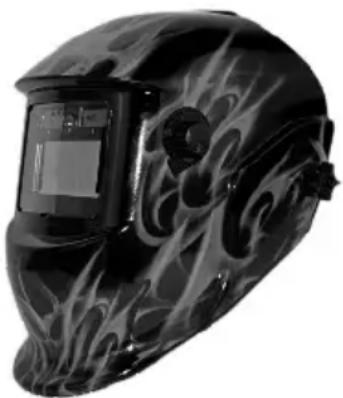
natural_image
Welder helmet with flame-like design and digital display (no text or symbols visible)Rear lens without filter effect
PSHL 2 C1, item no.: 2207
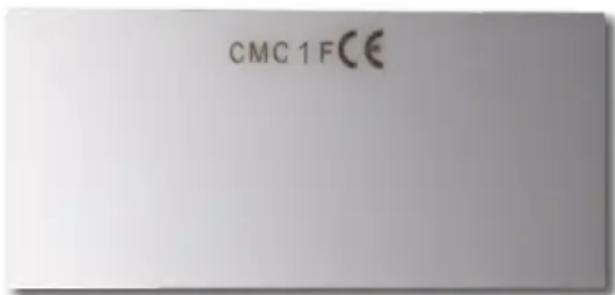
text_image
CMC 1 FCEViewing pane without filter effect PSHL 2 C1, item no.: 2207
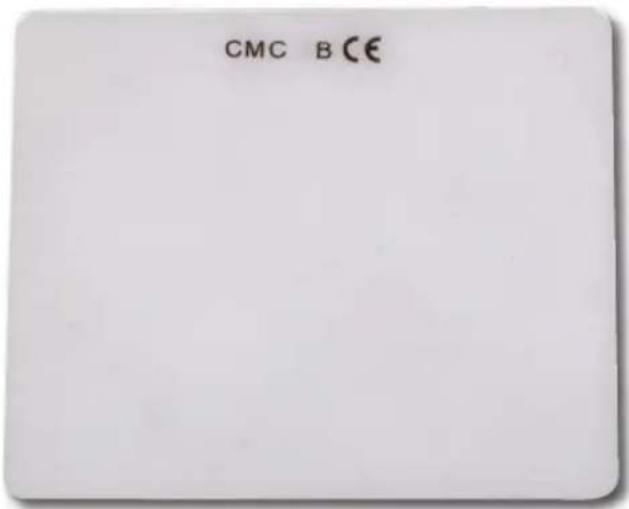
text_image
CMC B CEAutomatic welder protective filter with manually adjustable protection level PSHL 2 C1, item no.: 2207
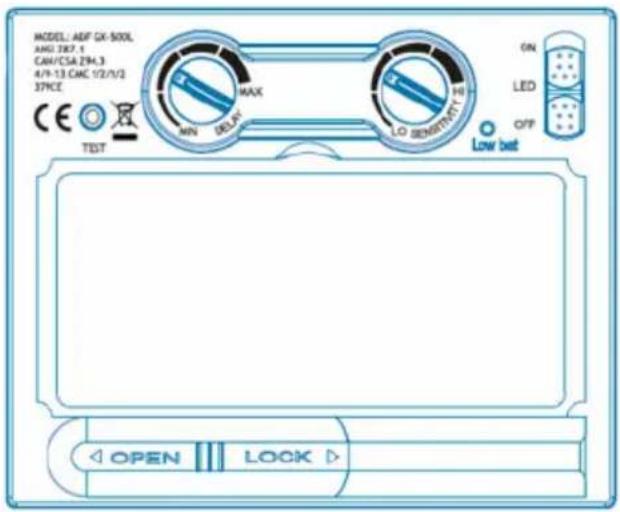
text_image
MODEL: AEF GX-500L AMG 387.1 CAH/CSA 294.3 4/9-13 CMC 1/2/1/2 37PCE TEST MAX MIN DELAY LO SENSITET ON LED OFF Low bet OPEN LOCKWelder visor Black PSHL 2 C1, item no.: 2206,
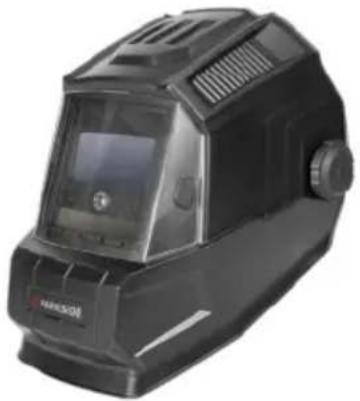
natural_image
Black industrial welding helmet with visible internal components and no text or symbolsRear lens without filter effect PSHL 2 C1, item no.: 2206
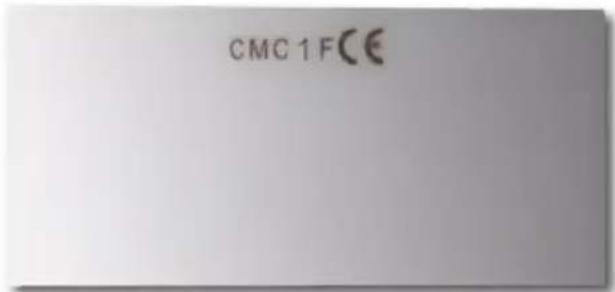
text_image
CMC 1FCEViewing pane without filter effect PSHL 2 C1, item no.: 2206
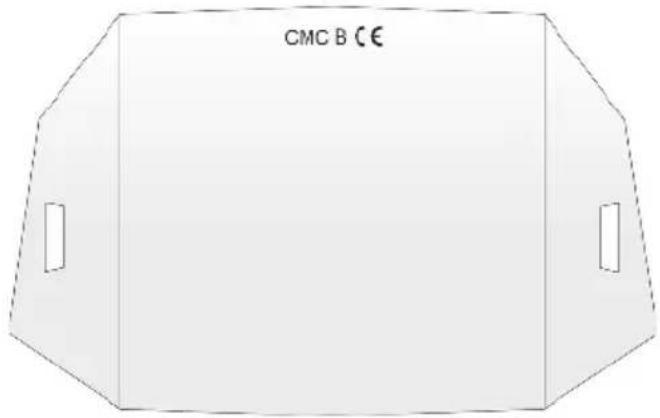
text_image
CMC B C€Automatic welder protective filter with manually adjustable protection level PSHL 2 C1, item no.: 2206
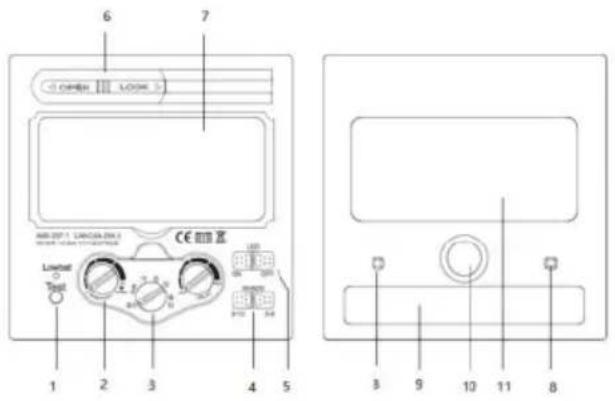
text_image
6 7 OPEN LOOK ABS-207.1 CANADA 207.1 CE 颜色 Level 3 Test 1 2 3 4 5 LED 3 9 10 11 8- The object of the declaration described under number 4 corresponds to the relevant harmonisation legislation of the EU:
General product safety directive
2001 / 95 / EC
Electromagnetic Compatibility
2014 / 30 / EU
RoHS directive
2011 / 65 / EU
Personal protective equipment regulation
(EU) / 2016/425
- Indication of the relevant harmonised standards used or other technical specifications in relation to which conformity is declared, including the date of the standards or other technical specifications:
EN 166:2001
EN 175:1997
EN 379:2009.
- The notified certification body
Alboinstrasse 56, 12103 Berlin, Notified body number 0196, carried out the EC type examination and issued the EC type examination certificate C6247CMC/R0, C6250CMC/R0, C6251CMC/R0,
C6252CMC/R0, C6253CMC/R0,
C6254CMC/R0, C6255CMC/R0.
St. Ingbert, 02/09/2019
C.M.C. GmbH
Katharina-Loth-Str.15
A.66386 St.inger
Telefon:+49 6894 9989720
Telefax:+49 6894 9989729
On behalf of Dr Christian Weyler
- Quality Assurance -
● Warranty and service information
Warranty from Creative Marketing & Consulting GmbH
Dear Customer,
The warranty for this equipment is 3 years from the date of purchase. In the event of product defects, you have legal rights against the retailer of this product. Your statutory rights are not affected in any way by our warranty conditions, which are described below.
• Warranty conditions
The warranty period begins on the date of purchase. Please retain the original sales receipt. This document is required as your proof of purchase.
Should this product show any defect in materials or manufacture within 3 years from the date of purchase, we will repair or replace it – at our discretion – free of charge.
This warranty service requires that you retain proof of purchase (sales receipt) for the defective device for the three year period and
that you briefly explain in writing what the fault entails and when it occurred.
If the defect is covered by our warranty, we will repair and return your product or send you a replacement. The original warranty period is not extended when a device is repair or replaced.
• Warranty period and statutory claims for defects
The warranty period is not extended by the guarantee. This also applies to replaced and repaired parts. Any damages or defects detected at the time of purchase must be reported immediately after unpacking.
Any incidental repairs after the warranty period are subject to a fee.
- Extent of warranty
This device has been manufactured according to strict quality guidelines and carefully inspected before delivery.
The warranty applies to material and manufacturing defects only. This warranty does not extend to product parts, which are subject to normal wear and tear and can thus be regarded as consumable parts, or for damages to fragile parts, e.g. switches, rechargeable batteries or parts made from glass.
This warranty is voided if the product becomes damaged or is improperly used or maintained. For proper use of the product, all of the instructions given in the operating instructions must be followed precisely. If the operating instructions advise you or warn you against certain uses or actions, these must be avoided in all circumstances.
The product is for consumer use only and is not intended for commercial or trade use.
The warranty becomes void in the event of
misuse and improper use, use of force, and any work on the device that has not been carried out by our authorised service branch.
- Processing of warranty claims
To ensure prompt processing of your claim, please follow the instructions given below.
Please retain proof of purchase and the article number (e.g. IAN) for all inquiries.
The product number can be found on the type plate, an engraving, the cover page of your instructions (bottom left), or the sticker on the back or underside of the device.
In the event of malfunctions or other defects, please first contact our service department below by phone or email. If your product is found to be defective, you can then send your product with proof of purchase (till receipt) and a statement describing what the fault involves and when it occurred free of charge to the service address given.

Note:
You can download this handbook and many more, as well as product videos and software at www.lidl-service.com.
With this QR code you can gain immediate access to the Lidl Service page (www.lidl-service.com) and you can open your Operating Instructions by entering the article number (IAN) 315776_1904.
text_image
PDF ONLINE www.lidl-service.com• Service
Only use original spare parts:
Variant with flames
(PSHL 2 C1, item no.: 2207):
- Viewing pane (CMC B CE): 109.6 mm x 86 mm x 1.0 mm
- Rear lens (CMC 1F CE): 98.6 mm × 46 mm × 0.8 mm
Black variant
(PSHL 2 C1, item no.: 2206):
- Viewing pane (CMC B CE): 134 mm x 135 mm x 1.6 mm
- Rear lens (CMC 1F CE): 98.6 mm × 46 mm × 0.8 mm
How to contact us:
GB, IE, NI
Name: C. M. C. GmbH
Website: www.cmc-creative.de
E-mail: service.gb@cmc-creative.de
Phone: 0-808-189-0652
Registered office: Germany
IAN 315776\_1904
Please note that the following address is not a service address. Please first contact the service point given above.
Address:
C.M.C. Creative Marketing & Consulting GmbH
Katharina-Loth-Str. 15
66386 St. Ingbert
GERMANY
Ordering spare parts:
B = mekanisk fasthed
F = mekanisk fasthed
natural_image
Welder helmet with flame-like design and digital display (no text or symbols visible)natural_image
Black industrial welding helmet with visible heat shield and control panel (no text or symbols)natural_image
Close-up of a black welding helmet with flame-like patterns and a clear visor (no text or symbols visible)natural_image
Black industrial welding helmet with digital display and control buttons (no visible text or symbols)Dr. Christian Weyler
Katharina-Loth-Str. 15
DE-66386 St. Ingbert
DUITSLAND
natural_image
Black and white photo of a welding helmet with flame-like patterns (no text or symbols visible)natural_image
Black Paretoor device with digital display and control buttons (no visible text or symbols)i.o. Dr. Christian Weyler