SBL 3 D1 - Bluetooth speaker SILVERCREST - Free user manual and instructions
Find the device manual for free SBL 3 D1 SILVERCREST in PDF.


| Product type | Bluetooth speaker with FM radio and alarm |
| Brand | SilverCrest |
| Model | SBL 3 D1 |
| Dimensions (Ø x H) | Approx. 84 x 52 mm |
| Weight | Approx. 130 g |
| Power supply | Rechargeable battery 3.7 V / 1200 mAh, charging via micro USB (5 V / 500 mA) |
| Charging time | Approx. 3 hours |
| Playback time | Approx. 6.5 hours (at medium volume) |
| Output power | 3 W RMS |
| Bluetooth version | 4.2 |
| Supported Bluetooth profiles | A2DP, AVRCP |
| Bluetooth range | 10 m max. |
| FM frequency band | 87.5 - 108 MHz |
| Protection rating | IPX6 (protection against powerful water jets) |
| Main functions | Bluetooth playback, FM radio with auto and manual search, alarm, time setting, suction cup mount |
| Care and cleaning | Clean with a soft, slightly damp cloth, micro USB cover closed, avoid solvents |
| Safety | Do not expose to heat, liquids, magnetic fields; high volume can damage hearing; do not open the casing |
| Spare parts and repairability | No user-serviceable parts; repair by qualified technician; availability of parts during warranty period |
| General information | Instruction manual included; 3-year warranty; manufacturer TARGA GmbH |
Frequently Asked Questions - SBL 3 D1 SILVERCREST
User questions about SBL 3 D1 SILVERCREST
0 question about this device. Answer the ones you know or ask your own.
Ask a new question about this device
Download the instructions for your Bluetooth speaker in PDF format for free! Find your manual SBL 3 D1 - SILVERCREST and take your electronic device back in hand. On this page are published all the documents necessary for the use of your device. SBL 3 D1 by SILVERCREST.
USER MANUAL SBL 3 D1 SILVERCREST
- Trademarks 34
- Intended use 35
- Package contents 36
- Overview of controls 37
4.1 Button functions 38
4.2 Display indicators 40
- Technical specifications 41
- Safety instructions 42
- Copyright 47
8.Before you start. 48
8.1Charging the battery 48
- Getting started 48
9.1 Switching the speaker on and off 48
9.2 Adjusting the volume 49
9.3 Selecting the mode 49
9.4 Bluetooth® mode 49
9.5 Radio mode. 51
9.5.1 Automatic tuning 51
9.5.2 Manual tuning.. 51
9.5.3 Recalling a saved station 51
9.5.4 Mute 52
9.6 Setting the time 52
9.7 Setting the alarm 52
9.8 Checking the alarm status 53
9.9 Stopping the alarm 54
- Troubleshooting 55
- Cleaning 56
- Storage when not in use 56
- Environmental regulations and disposal information 57
- Conformity notes 58
- Warranty and service information 59
Congratulations!
By purchasing the SilverCrest SBL 3 D1 Bluetooth® bathroom speaker, hereinafter referred to as the speaker, you have opted for a quality product.
Before first using it, familiarise yourself with the way the speaker works and read these operating instructions through carefully. Be careful to follow the safety instructions and only use the speaker as described in the operating instructions and for the applications given.
Keep these operating instructions in a safe place. If you pass the speaker on to someone else, make sure to give them all the relevant documents too. The User Manual forms part of this product.
1. Trademarks
The Bluetooth® wording and its logo are registered trademarks of Bluetooth SIG, Inc. (Special Interest Group). TARGA GmbH is using these marks under license.
The SilverCrest trademark and the SilverCrest brand are the property of their respective owners.
USB is a registered trademark of USB Implementers Forum, Inc.
Other names and products may be the trademarks or registered trademarks of their respective owners.
2. Intended use
This device is a consumer electronics device. It has been designed to play music. Audio data can be transferred to it via Bluetooth®. The device can also be used as a radio. The speaker is suitable for private use only, not for industrial or commercial purposes. The manufacturer is not liable for any damage or problems caused by unauthorised modifications. Observe the regulations and laws in the respective country of use.
Please note that different national regulations may exist in different countries as to which frequency bands may be received freely. Information received outside of the granted frequency ranges may not be used, nor may its content or the fact that it has been received be passed on to third parties.
3. Package contents
Remove the speaker and all the accessories from the packaging. Remove all packaging material and check that all parts are complete and undamaged. If you find anything missing or damaged, please contact the manufacturer.
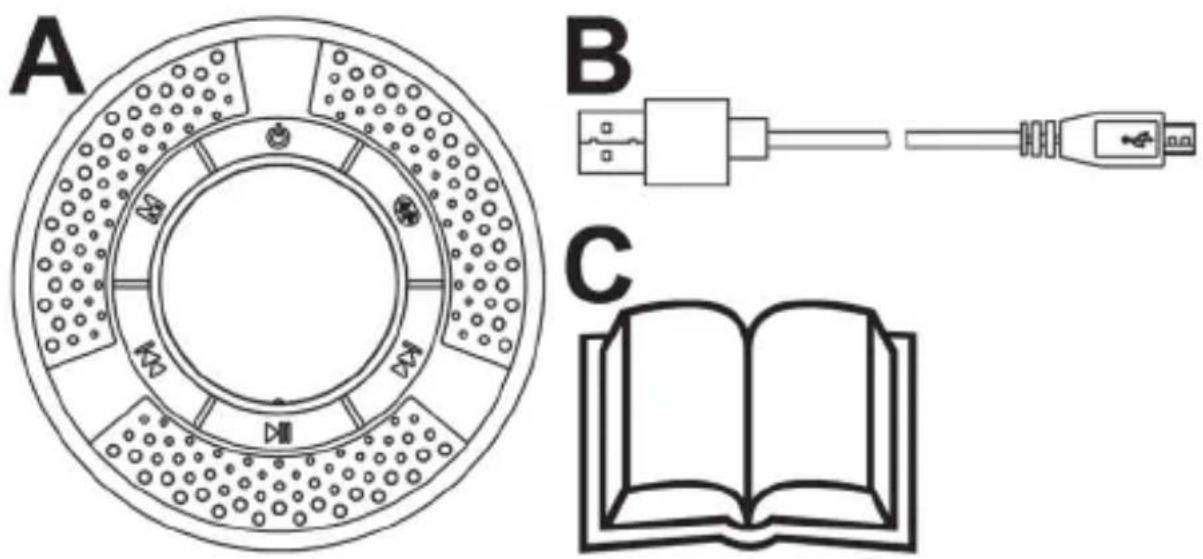
| A | Speaker (incl. suction pad) |
| B | Charging cable (USB A to Micro USB) |
| C | User Manual and Quick Start Guide (lineart illustration) |
4. Overview of controls
These operating instructions have a fold-out cover. Fold-out the cover so you can refer to the relevant controls at any time.
| 1 | 按钮 |
| 2 | Display |
| 3 | * button |
| 4 | ▶I button |
| 5 | ■II button |
| 6 | Micro USB charging socket (incl. cover) |
| 7 | Suction pad |
| 8 | I▲按钮 |
| 9 | M button |
4.1 Button functions
| Button | Function |
| (1) | Powering On/Off: keep pressed for approx. 2 seconds |
| M (9) | Selecting mode (Bluetooth®, Radio, Alarm): press briefly |
| (4) | Increasing the volume: press briefly Next track (Bluetooth®): press and hold for approx. 2 seconds Next station preset (radio): keep pressed for approx. 2 seconds Manual scan for next station (radio): press briefly 2x |
| (8) | Reducing the volume: press briefly Beginning of track / Previous track (Bluetooth®): press and hold for approx. 2 seconds to go back to the beginning of the track / press and hold again for approx. 2 seconds to skip to the previous track |
| Previous station preset (radio): keep pressed for approx. 2 seconds Manual scan for previous station (radio): press briefly 2x | |
| II (5) | Start/pause playback (Bluetooth®): press briefly Mute on/off (radio): press briefly |
| (3) | Unpairing Bluetooth® (Bluetooth®): press and hold for approx. 2 seconds / the speaker disconnects Bluetooth® and then goes into pairing mode. |
4.2 Display indicators
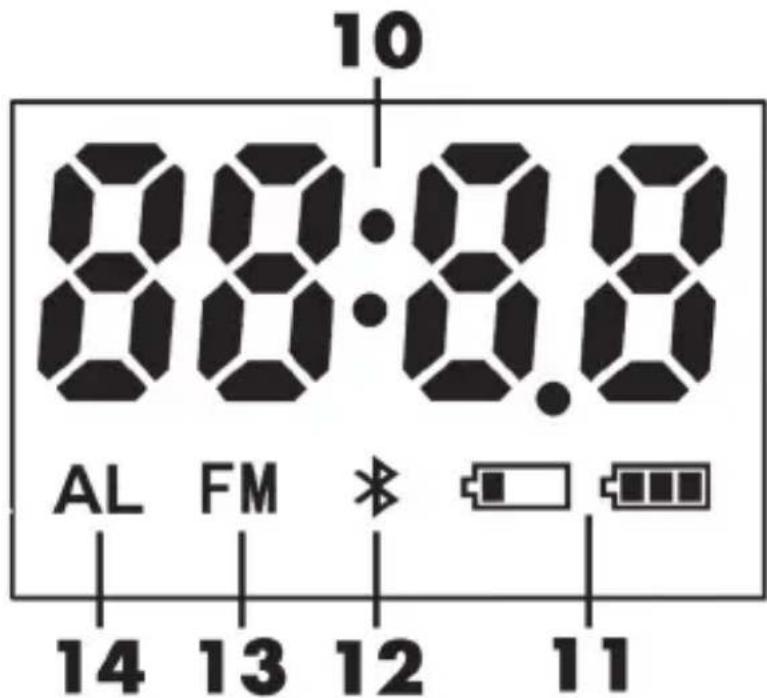
| 10 | Time / Frequency / Volume |
| 11 | Battery indicator |
| 12 | Bluetooth® mode indicator |
| 13 | Radio mode icon |
| 14 | Alarm mode indicator |
5. Technical specifications
The rating label can be found on the bottom of the speaker.
| Operating voltage/current 5V / 500 mA | |
| Battery 3.7 V / 1200 mAh / | 4.44 Wh |
| Output power 3 W RMS | |
| Bluetooth® | V4.2 |
| Profiles supported A2DP / AVRCP | |
| Bluetooth® transmission power max. | 10 dBm |
| Bluetooth® frequency band 2.402 | 2.480 GHz |
| FM frequency band 87,5 - 108 MHz | |
| Bluetooth® range max. 10 m | |
| Charging time approx. 3 hours | |
| Music playback approx. 6,5 hours | (at medium volume setting) |
| Dimensions (Ø x H) approx. 84 x 52 mm | |
| Weight approx. 130 g | |
| Degree of protection IPX6 (protection against powerful water jets) | |
| Operating environment | 5°C to 35°C, max 85% rel. humidity |
| Storage temperature | 0°C to 40°C |
The technical data and design may be changed without prior notice.
6. Safety instructions
Before you use this speaker for the first time, please read the following notes and heed all warnings, even if you are familiar with handling electronic devices. Keep these operating instructions in a safe place for future reference.
Explanation of warnings and symbols used

DANGER! This signal word indicates a danger with a high risk, which could lead to death or major injuries if not avoided.

WARNING! This signal word indicates a danger with a moderate risk, which can lead to death or major injuries if not avoided.

ATTENTION! This signal word indicates a danger with a low risk, which can lead to minor or moderate injuries if not avoided.

CAUTION! This symbol indicates important instructions to protect against damage to property.

This symbol denotes further information on the topic.

DC voltage

WARNING! Radio interface
Turn the speaker off when on board an aircraft, in a hospital, in an operating theatre or near electronic medical equipment. The RF signals may interfere with the functionality of sensitive devices. Keep the speaker at least 20cm away from pacemakers or implanted defibrillators, as the RF signals could prevent them from working properly. The RF signals transmitted can interfere with hearing aids. If wireless mode is switched on, do not place the speaker near flammable gases or in a potentially explosive area (e.g. a paint shop), as the RF signals transmitted could cause explosions or fire. The range of the radio frequency signals depends on environmental conditions. If data is transmitted via a wireless connection, it can also be received by unauthorised parties. TARGA GmbH is not liable for any interference caused to RF or TV signals derived from unauthorised modification to this device. Furthermore, TARGA does not assume any liability if cables or devices are replaced with those that have not been specifically approved by TARGA GmbH. The user is solely responsible and liable for remedying any interference caused by such unauthorised modification of this device or for replacing the device.

WARNING! Risk of explosion!
Never throw the speaker into a fire, as this could cause the built-in battery to explode.

WARNING! Make sure that:
- no fire sources (e.g. burning candles) are placed on or near the speaker.
- Make sure there is no penetration by foreign bodies.
- the speaker is not subjected to any major temperature fluctuations, as this can cause condensation and short-circuiting. If the speaker has been exposed to strong temperature fluctuations, wait for it to reach the ambient temperature before switching it on (about 2 hours).
- the speaker is never covered while it is charging, as the battery can heat up during charging.
- Lay any connected cables so they do not present a trip hazard. There is a danger of injury.

CAUTION! Make sure that:
- no direct heat sources (e.g. radiators) can affect the speaker.
- the speaker is not exposed to direct sunlight or bright artificial light.
-
contact with aggressive liquids is avoided. When operating the speaker near water, no cables must be connected to it and the cover of the Micro USB charging socket (6) must be properly closed. Do not place any vessels containing liquids, e.g. drinks or vases, on or next to the speaker.
-
the speaker is not placed right next to magnetic fields (e.g. speakers).
- the speaker is not subjected to excessive shocks and vibrations.
- Always disconnect cables using the plug and not by pulling on the cable itself. Do not place furniture or other heavy objects on the cables and make sure that the cables are not kinked, especially at the plug and sockets. Never tie knots in a cable and do not tie them to other cables.
- the suction pad must be kept clean at any time in order to guarantee the speaker is affixed securely. Also, the suction pad must not be damaged, as it could then no longer hold the speaker securely.
- the suction pad must always be fixed to a smooth surface, e.g. windows or smooth tiles.
- the speaker is always affixed securely, otherwise it could fall and cause injury or damage.
- the speaker must always be charged in a dry environment.
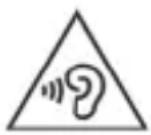
WARNING! Risks of injury associated with high volumes.
Listening to music too loudly can damage the hearing. Avoid listening to the music at extremely high volume!

WARNING! Personal safety
This speaker may be used by children of 8 years or over or by persons with physical, sensory or mental impairments or those with no knowledge or experience providing they are supervised or they have been given instructions on the proper use of the speaker and they understand the associated risks. Children must not play with the speaker. The product must not be cleaned or maintained by unsupervised children. Keep the packaging materials out of the reach of children. Packaging material is not a toy.

DANGER! There is a risk of suffocation.

WARNING! Maintenance / cleaning
Repairs are required if the speaker has been damaged in any way, for example if the device housing is damaged, if liquids or objects have penetrated the device or if it has been exposed to rain or moisture. To avoid damage due to moisture, make sure that the cover of the Micro USB charging socket (6) is properly closed when cleaning the device. Repairs are also necessary if the product is not working properly or has been dropped. If you notice smoke, unusual noises or smells, power off the speaker immediately and unplug any connected cables. If this occurs, the
speaker should not be used before it has been inspected by authorised service personnel. All repairs must be carried out by qualified service personnel. Only use a clean, slightly damp cloth to clean the device. Never use any aggressive liquids. Do not open the speaker housing - it contains no serviceable parts. Doing so will also void the warranty.
7. Copyright
All the contents of this user manual are protected by copyright and provided to the reader for information only. Copying data and information without the prior explicit written consent of the author is strictly forbidden. This also applies to any commercial use of the contents and information. All texts and diagrams are up-to-date as of the date of printing. Subject to change without notice.
8. Before you start
8.1 Charging the battery
Before the first use or when the built-in battery is empty, charge it up as follows:
- Open the cover for the Micro USB charging socket (6).
- Connect the charging cable (B) supplied to the Micro USB charging socket (6) and to a free USB port on a USB power adapter (not supplied).
- The battery indicator (11) flashes during the charging process. Once charging is complete, the battery indicator 口 口 is lit continuously.
- After charging, disconnect the charging cable (B) and close the cover of the Micro USB charging socket (6).

A flashing battery indicator (11) means that the battery is low. A beep also sounds.
9. Getting started
9.1 Switching the speaker on and off
Press and hold the button (1) for approx. 2 seconds to switch the speaker on. A sequence of beeps can be heard. The speaker starts in the mode last used.
Press and hold the button (1) for approx. 2 seconds to switch the speaker off. A sequence of beeps can be heard and the display (2) reads "OFF".

If no button is pressed for approx. 2 minutes, the display (2) switches off.
9.2 Adjusting the volume
Briefly press the I (8) or (4) buttons to adjust the volume to the desired level. The current volume setting is shown on the display (2). A beep sounds when the minimum or maximum volume is reached. The speaker will always switch on at the volume it was at when it was switched off.
9.3 Selecting the mode
Press the M button (9) several times to toggle through the different modes. The current mode is shown on the display (2). The following modes are available: (Bluetooth), FM (radio) and AL (alarm).
9.4 Bluetooth® mode
Via Bluetooth® , you can pair a Bluetooth® -compatible music player (such as a smartphone or MP3 player) with the speaker. After pairing, you can play the music on the speaker and control basic player functions remotely using the buttons on the speaker.
Proceed as follows to pair the speaker with your mobile phone or player:
- Switch the speaker on by pressing and holding the button (1) for approx. 2 seconds.
- Press the M button (9) multiple times until \ 12$ flashes on the display (2). The pairing mode will now be active for approx. 15 minutes. If no device is paired during this time, the speaker switches off.
- Now pair your mobile phone or music player to the speaker via Bluetooth®. Please read the operating instructions of your mobile phone. From the list of devices found, select "SBL 3 D1" and establish the connection. If you are prompted to enter a PIN, use "0000".
- The speaker beeps to confirm the pairing and (12) is shown continuously on the display (2).
- You can now start playback from your Bluetooth® device. The speaker starts playing the audio.

When it is switched on, the speaker automatically reconnects to the last-paired Bluetooth device. To pair the speaker with a different Bluetooth device, press and hold the button (3) for approx. 2 seconds until a beep sounds. The speaker disconnects and toggles to pairing mode.
9.5 Radio mode
The speaker has a radio function. Proceed as follows to use the radio mode:
- Switch the speaker on by pressing and holding the button (1) for approx. 2 seconds.
- Press the M button (9) several times until "FM" (13) is shown on the display (2). The frequency of the last station used (10) is shown briefly on the display (2).
9.5.1 Automatic tuning
Start automatic tuning by pressing the button (5) and holding it down for about 2 seconds. Any stations found are saved automatically in order of frequency. After the station scan has finished, the first station saved is tuned and played. You can save up to 30 stations.
9.5.2 Manual tuning
This function allows you to search for a station without saving it. Briefly press the 丨 (8) or (4) button twice to launch the station scan in the selected direction. The search stops at the next station found. Please note that any station found using this method is not played after switching the device off and back on or after toggling to a different mode.
9.5.3 Recalling a saved station
Press and hold the 1 (8) or (4) button for approx. 2 seconds to toggle through stored stations.
9.5.4 Mute
Press the button (5) briefly to enable or disable the mute function.
9.6 Setting the time
The time can only be set in alarm mode. To set the time, proceed as follows:
- Switch the speaker on by pressing and holding the button (1) for approx. 2 seconds.
- Press the M button (9) several times until "AL" (14) is shown on the display (2) and *(12) or "FM" (13) goes out.
- Press and hold the M button (9) for approx. 2 seconds.
- The hour display flashes and you can now use the I< (8) and I (4) buttons to set the hour. You can keep the buttons pressed to accelerate the digits count. Press the II button (5) briefly to apply the setting.
- The minute display flashes and you can now use the I< (8) and I (4) buttons to set the minutes. You can keep the buttons pressed to accelerate the digits count. Press the II button (5) briefly to apply the setting.
9.7 Setting the alarm
The alarm can only be set in alarm mode. To set the alarm, proceed as follows:
-
Switch the speaker on by pressing and holding the button (1) for approx. 2 seconds.
-
Press the M button (9) several times until "AL" (14) is shown on the display (2) and * (12) or "FM" (13) goes out..
- Press and hold the button (5) for approx. 2 seconds.
- Use the I (8) and I (4) buttons to select the "ON" or "OFF" option.
- Press the button (5) briefly.
- If you selected "ON", the hours flash. You can now set the hours by pressing the I< (8) and I buttons (4). You can keep the buttons pressed to accelerate the digits count. Press the II button (5) briefly to apply the setting.
- The minute display flashes and you can now use the | | (8) and (4) buttons to set the minutes. You can keep the buttons pressed to accelerate the digits count. Press the button (5) briefly to apply the setting.
- The volume indicator (10) flashes. You can now set the alarm volume by pressing the I< (8) and I (4) buttons. During the adjustment the alarm sound is played at the set volume. You can keep the buttons pressed to accelerate the digits count. Press the I button (5) briefly to apply the setting.
9.8 Checking the alarm status
The alarm status can be checked in alarm mode. Proceed as follows:
- Switch the speaker on by pressing and holding the button (1) for approx. 2 seconds.
-
Press the M button (9) several times until "AL" (14) is shown on the display (2) and (12) or "FM" (13) goes out.
-
Press the button (5) briefly. The display (2) reads "A ON" (if the alarm is enabled) followed by the alarm time set or "A OFF" if the alarm is disabled.

"AL" (14) is lit on the display when the alarm is enabled.
9.9 Stopping the alarm
While the alarm is sounding, the time (10) flashes on the display (2). The alarm switches off automatically after approx. one minute. Press any button to stop the alarm manually.
10. Troubleshooting
Unable to power the speaker on
- The speaker battery is empty. Recharge the battery.
No Bluetooth® connection can be established
- Check if the speaker is switched on and Bluetooth® mode is enabled. If necessary, switch the speaker on and enable the Bluetooth® mode.
- Please check whether the Bluetooth® function is activated on your mobile phone or audio device and on the speaker.
- The distance between the devices is too great, move them closer.
- Make sure that any previous pairing to another Bluetooth® device has been unpaired. If necessary, unpair the connection and make a new pairing with the desired Bluetooth® device.
You notice limitations on the functionality between the speaker and the Bluetooth® device used
- This problem could be related to the current software version of your Bluetooth® device. You could try updating the software version. See the User Manual for your Bluetooth® device.
No sound
- Increase the speaker volume.
11. Cleaning
No moisture must penetrate into the speaker. Keep the cover for the Micro USB charging socket (6) closed during cleaning. Only clean the speaker with a soft, slightly damp cloth. Do not use any solvents or abrasive or astringent cleaners. This could irreparably damage the surface of the speaker.
12. Storage when not in use
Keep the speaker in a clean, dry place away from direct sunlight. You should recharge the battery from time to time when not using the speaker for an extended period in order to preserve the battery life.
13. Environmental regulations and disposal information
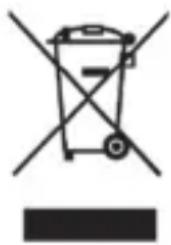
The product bears the symbol of a rubbish bin crossed out. This means it is subject to European Directive 2012/19/EU. All electrical and electronic devices must be disposed of separately from household waste at official disposal centres. For further information, contact your local government, disposal bodies or the shop where you bought the device.
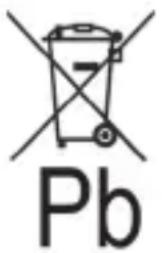
Environmental damage through incorrect disposal of batteries!
Do not dispose of any batteries with domestic waste. They can contain toxic heavy metals and must be handled as specialist waste. The chemical symbols of the heavy metals are as follows: Cd = Cadmium, Hg = Mercury, Pb = Lead. Always take spent batteries to a local collection point. The built-in rechargeable battery cannot be removed for disposal, therefore the complete product has to be disposed of.



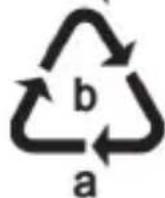

Dispose of all packaging in an environmentally friendly manner. Cardboard packaging can be taken to paper recycling centres or public collection points for recycling. Any film or plastic contained in the packaging should be taken to your public collection points for disposal.
Please note the markings on the packaging material. dispensing of it, it is labelled with abbreviations (a) and numbers (b), the meanings of which are as follows:
1-7: plastic / 20-22: paper and cardboard / 80-98: composite materials.
The product can be recycled, is subject to an extended producer responsibility and is collected separately.
14. Conformity notes

This product complies with the basic and other relevant requirements of RE Directive 2014/53/EU and the RoHs Directive 2011/65/EU.

H005 20
The product complies with the requirements of the applicable national directives of the Republic of Serbia. The complete EU Declaration of Conformity is available for download from this link:
https://www.targa.gmbh/downloads/conformity/344984_2004.pdf
15. Warranty and service information
Warranty of TARGA GmbH
This device is sold with three years warranty from the date of purchase. Please keep the original receipt in a safe place as proof of purchase. Before using your product for the first time, please read the enclosed documentation. Should any problems arise which cannot be solved in this way, please call our hotline. Please have the article number and, if available, the serial number to hand for all enquiries. If it is not possible to solve the problem on the phone, our hotline support staff will initiate further servicing procedures depending on the fault. Within the warranty period the product will be repaired or replaced free of charge as we deem appropriate. No new warranty period commences if the product is repaired or replaced. Consumables such as batteries, rechargeable batteries and lamps are not covered by the warranty.
Your statutory rights towards the seller are not affected or restricted by this warranty.
Service

Phone: 0800 404 7657
E-Mail: targa@lidl.co.uk

Phone: 1890 930 034
E-Mail:
targa@lidl.ie

Phone: 800
62230
E-Mail:
targa@lidl.com.mt

Phone: 8009
4409
E-Mail:
targa@lidl.com.cy
IAN: 344984_2004

Manufacturer
TARGA GmbH
Coesterweg 45
59494 Soest
GERMANY
Table des matieres
https://www.targa.gmbh/downloads/conformity/344984_2004.pdf
WAARSCHUWING! Radio-interface
WAARSCHUWING! Explosiegevaar!
https://www.targa.gmbh/downloads/conformity/344984_2004.pdf
15. Garantie- en servicegegevens
https://www.targa.gmbh/downloads/conformity/344984_2004.pdf
https://www.targa.gmbh/downloads/conformity/344984_2004.pdf