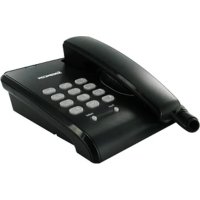
C100 - Telephone SAGEMCOM - Free user manual and instructions
Find the device manual for free C100 SAGEMCOM in PDF.



| Product Type | Wired telephone |
| Brand | Sagemcom |
| Model | C100 |
| Dimensions (approximate) | 21 x 17 x 8 cm |
| Weight (approximate) | 450 g |
| Power supply | Via telephone line (line current) |
| Operating temperature | 5 °C to 35 °C |
| Dialing | Pulse (PULSE) or tone dialing (TONE) |
| Ringer volume adjustment | RINGER switch: HI (loud), MID (medium), LOW (soft) |
| Flash key | Yes, adjustable (100 ms, 300 ms, 600 ms) |
| Redial key | Yes, last dialed number (max 32 digits) |
| Package contents | Base, handset, coiled cord, telephone cable |
| Maintenance and cleaning | Slightly damp cloth (avoid dry cloth to prevent electrostatic discharge) |
| Safety | Do not install near water source, do not open the device |
| Spare parts and repairability | No user-replaceable parts; repair by SAGEMCOM |
| Warranty | 24 months for device, 3 months for accessories |
| General information | Compliant with European directives R&TTE, EMC, LVD; CE marking |
Frequently Asked Questions - C100 SAGEMCOM
User questions about C100 SAGEMCOM
0 question about this device. Answer the ones you know or ask your own.
Ask a new question about this device
Download the instructions for your Telephone in PDF format for free! Find your manual C100 - SAGEMCOM and take your electronic device back in hand. On this page are published all the documents necessary for the use of your device. C100 by SAGEMCOM.
USER MANUAL C100 SAGEMCOM
Thank you for purchasing a SAGEMCOM telephone we appreciate your trust in us.
For your comfort and safety, we ask that you read the following paragraph carefully:
Recommendations and safety instructions

Your telephone must not be installed in a humid room (wash-up room, bathroom, laundry room, kitchen, etc.) unless it is 1.50 m away from a water point or outside. Your telephone must be operated at temperatures ranging from 5°C and 35°C.

Do not attempt to remove screws or open the appliance. It does not contain any user-replaceable parts.

The CE marking certifies that the product meets the essential requirements of Directive 1999/5/CE of the European Parliament and of the Council pertaining to microwave radio equipment and telecommunication terminal equipment.
The declaration of compliance may be looked up on the www.sagemcom.com site or can be obtained from the following address:
SAGEMCOM SAS
Your package should contain the following items:
- Base unit,
- Handset,
- Handset cord,
- Phone line cord.
Installation and setup
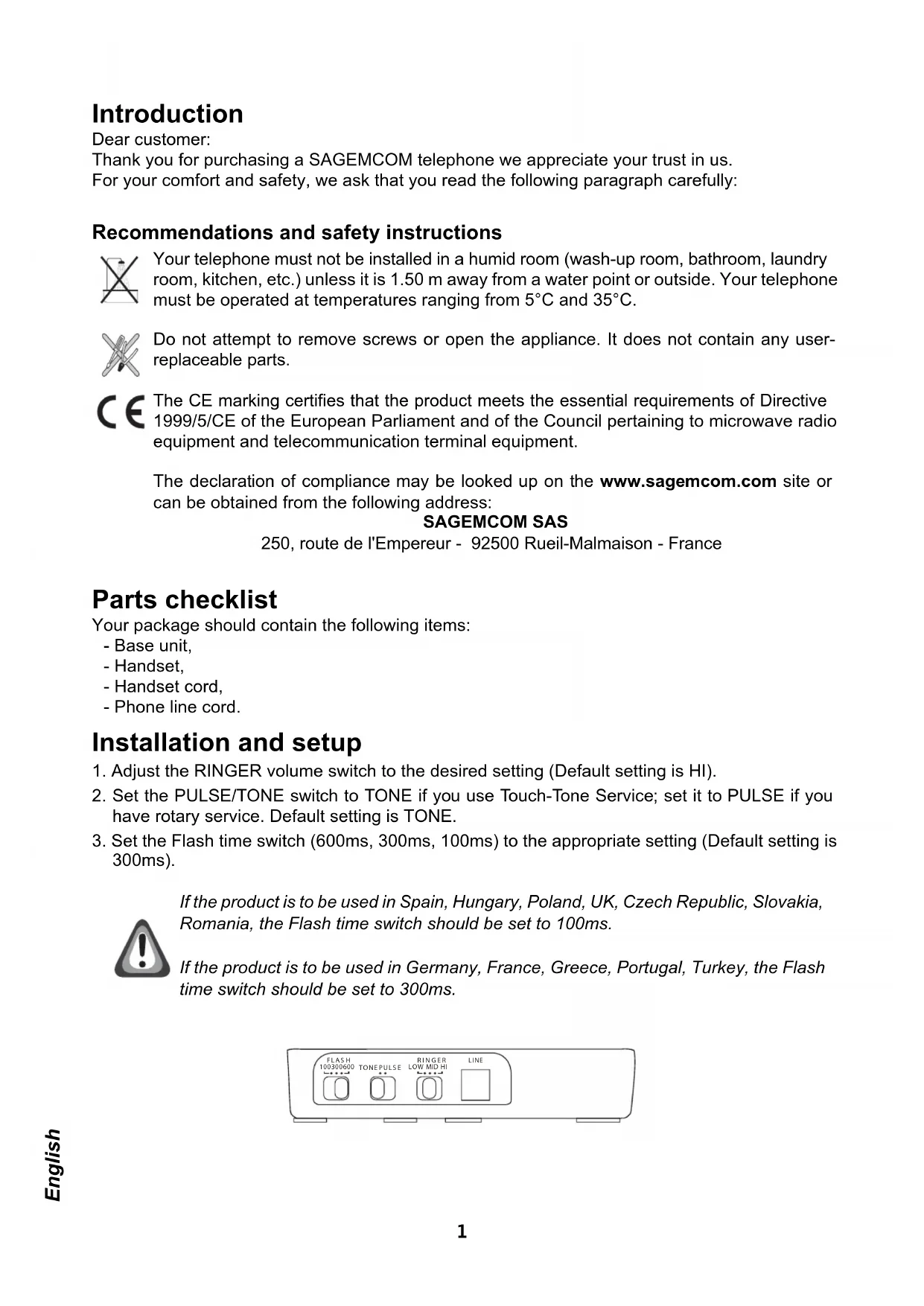
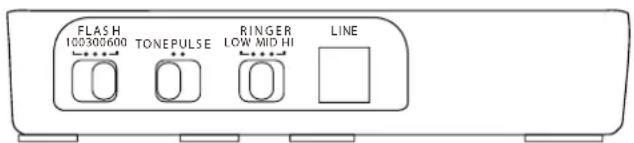
- Adjust the RINGER volume switch to the desired setting (Default setting is HI).
- Set the PULSE/TONE switch to TONE if you use Touch-Tone Service; set it to PULSE if you have rotary service. Default setting is TONE.
- Set the Flash time switch (600ms, 300ms, 100ms) to the appropriate setting (Default setting is 300ms).

If the product is to be used in Spain, Hungary, Poland, UK, Czech Republic, Slovakia, Romania, the Flash time switch should be set to 100ms.
If the product is to be used in Germany, France, Greece, Portugal, Turkey, the Flash time switch should be set to 300ms.
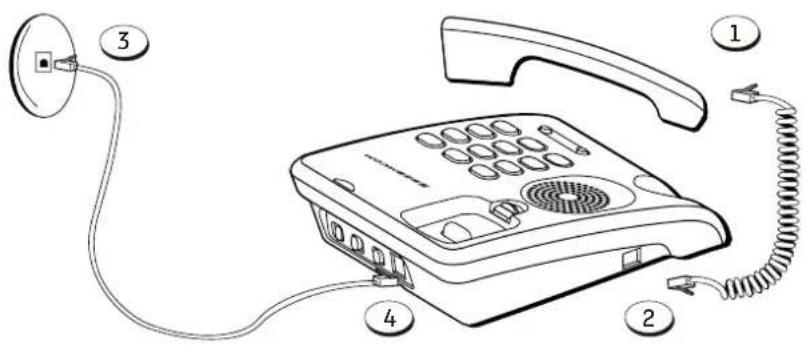
- Plug the handset cord into the handset (1), and into the telephone jack on the left side of the unit (2).
- Plug the telephone line cord into a modular jack (RJ11) (3) and into the LINE jack on the back of the unit (4).
- Place the handset to base cradle.
Using features
Making a call
- Lift the handset and wait for a dial tone.
- Dial the telephone number using the keypad.
Receiving a call
Lift the handset to answer the call.
Ringer volume control
Use the RINGER volume switch on the bottom of the base to adjust the volume of the ringer.
Flash button
Press the FLASH button instead of using the hook switch to activate customer calling services such as call waiting or call transfer, which are provided by your local phone company.
Redial button
Redial the last number you called by pressing the REDIAL button after you get a dial tone. Max digit of redial is 32.
Care and Maintenance
Use a slightly damp cloth to wipe the base and handset, do not use a dry cloth as this may cause electrostatic charges.
Environment
Preservation of the environment is an essential concern of SAGEMCOM. The desire of SAGEMCOM is to operate systems observing the environment and consequently it has decided to integrate environmental performances in the life cycle of its products, from manufacturing to commissioning, use and elimination.
Packaging

The presence of the logo (green dot) means that a contribution is paid to an approved national organisation to improve packaging recovery and recycling infrastructures.
To facilitate recycling, please respect the sorting rules set up locally for this kind of waste.
The product

The crossed-out waste bin stuck on the product or its accessories means that the product belongs to the family of electrical and electronic equipments.
In this respect, the European regulations ask you to dispose of it selectively:
- At sales points in the event of the purchase of similar equipment.
- At the collection points made available to you locally (drop-off centre, selective collection, etc.).
Terms and Conditions for United Kingdom & Ireland only
In order to apply the guarantee, you should contact the SAGEMCOM Helpdesk or the retailer where you purchased the equipment. Proof of purchase will be required in either case.
Please make sure that you use your equipment only for the purpose for which it was designed and under normal usage conditions.
SAGEMCOM do not accept any liability for the equipment if used outside the frame of its original designed purpose or any consequence that may arise from this usage.
Should any malfunction arise, the SAGEMCOM Helpdesk or your retailer will advise you how to proceed.
A) General Guarantee conditions
SAGEMCOM undertakes to remedy by repair or exchange at its own convenience, free of charge for labour and replacement parts, any defects in the equipment during the guarantee period of 12 (twelve) months or 3 (three) months for accessories, from the date of original invoice of the Equipment, where those defects are a result of faulty workmanship.
Unless the customer has concluded with SAGEMCOM a maintenance contract in respect of the equipment which specifically provides for repairs to be carried out at the customer's premises, the repairs will not be carried out on the equipment at the customer premises.
The customer must however return the defective equipment at his/her own expense, to the address supplied by the SAGEMCOM Helpdesk or by the retailer.
In the case that a product needs to be sent in for a repair, it must always be accompanied by a proof of purchase (which is not altered, written on or in any way made illegible) showing that the product is still under guarantee. In the case that no proof of purchase is enclosed, the SAGEMCOM repair centre will use the production date as its reference for establishing the guarantee status of the product.
Apart from all legal obligatory rules, SAGEMCOM, do not give any Guarantee, either implicit or explicit which is not set force in the present section, and can not be held responsible for any direct or indirect, material or immaterial damage, either in or out of the frame of the present guarantee. If any provision of this guarantee shall be held to be in whole or in part invalid or illegal due to an obligatory rule applicable to consumers pursuant to their national legislation, such invalidity or illegality shall not impair or affect the remaining provisions or parts of this guarantee.
This guarantee does not affect the Customer statutory rights.
B) Exclusions From Guarantee
SAGEMCOM shall have no liability under the guarantee in respect of :
- Damage, defects, breakdown or malfunction due to one or more of the following:
- Failure to properly follow the installation process and instructions for use
- An external cause to the equipment (including but not limited to: lightening, fire, shock, vandalism, inappropriate conditions of electrical network or water damage of any nature)
- Modifications made without the written approval of SAGEMCOM
- Unsuitable operating conditions, particularly of temperature and humidity
- Repair or maintenance of the equipment by persons not authorised by SAGEMCOM
- Wear and tear from normal daily use of the equipment and its accessories
- Damage due to insufficient or bad packaging of equipment when returned to SAGEMCOM
- Usage of new versions of software without the previous approval of SAGEMCOM
• Work on any equipment or software modified or added without the prior written consent of
SAGEMCOM
- Malfunctions not resulting from the Equipment or from software installed in user workstations for the purpose of use of the equipment.
Communication problems related to an unsuitable environment including:
- Problems related to access and/or connection to the Internet such as interruptions by access networks or malfunction of the line used by the subscriber or his correspondent
- Transmission faults (for example poor geographical coverage by radio and TV transmitters, interference or poor line quality)
- Local network faults (wiring, servers, workstations) or the failure of the transmission network (such as but not limited to interferences, fault or poor quality of the network)
- Modification of the parameters of the cellular or broadcast network carried out after the sale of the Product
- Normal servicing (as defined in the user guide supplied with the equipment) as well as malfunctioning due to servicing not being carried out. Servicing costs are in any event always borne by the customer.
- Malfunctions resulting from the usage of products, consumables or accessories not compatible with the equipment.
C) Out of Guarantee Repairs
In the cases set forth in B) as well as after expiry of the guarantee period, the customer must ask the Authorised SAGEMCOM Repair Centre for a cost estimation prior to work being carried out. In such cases, the repair and delivery costs will be invoiced to the customer.
The foregoing shall apply unless otherwise agreed in writing with the customer and only for the United Kingdom and Ireland.
SAGEMCOM Helpdesk (from UK): 08 45 09 003 16
SAGEMCOM Helpdesk (from Ireland): 01 60 583 84
SAGEMCOM Helpdesk Email: dti.faxservice-uk@sagemcom.com
www.sagemcom.com
Terms and Conditions for other countries
If, despite our best efforts, your product presents any defects, you should refer to your retailer and present the proof of purchase that they gave you on the day of purchase.
Should any malfunctioning arise, the retailer will advise you what to do.
For the warranty to apply, you should ensure that the product was used in accordance with the instructions for use and the purpose for use, and that you have at your disposal the sales invoice or receipt stating the date of purchase, the name of the retailer, the reference and the serial number of the product.
No coverage shall be given under this warranty if the following conditions are applicable:
- The required documents have been modified or altered in order to take advantage of the warranty.
- The manufacturing numbers, product brands or labels have been altered or made illegible.
- Interventions on the product have been made by an unauthorized person.
- The product has been subjected to abnormal or improper use.
- The product has been damaged by external factors such as lightning, over-voltage, moisture, accidental damage, improper care as well as all Acts of God.
This present warranty does not affect the consumer rights that you may have under the laws in effect in your country.
Important:
Should you return the product to the after-sales department, please ensure that you return as well all the elements and accessories originally supplied with the product.
Vorwort
- Ligue um dos extremos do cabo telefónico à Base e o outro extremo ao auscultador.
- Ligue um dos estremos do cabo de linha telefónica à tomada de rede, e o outro extremo à Base no conector identificado como linha telefónica.
- Coloque o auscultador sobre a Base.
Utilização
Digital Media Service Sp. z o.o.
01-424 Warszawa, Al. Prymasa Tysiąclecia 76d, tel. (022) 862 07 44, (022) 862 07 45,
(022) 862 11 47; fax (022) 877 12 60
| Hick of |
| A. elia wind, chula |
| Crusul |
| Moce |
| Heparet |
NOTE
CE DECLARATION CE DE CONFORMITE EC DECLARATION OF CONFORMITY
| FABRICANT / MANUFACTURER | : | SAGEMCOM BROADBAND SAS |
| ADRESSE / ADDRESS | : | 250 Route de l'Empereur - 92500 RUEIL MALMAISON - FRANCE |
| FAMILLE DE PRODUIT / PRODUCT RANGE | : | Corded Telephone |
| TYPE DE PRODUIT / PRODUCT TYPE | : | C100 Corded Telephone |
| NOM DU PRODUIT / PRODUCT NAME | : | C100 Multicountries |
| IDENTIFICATION / IDENTIFICATION | : | 253340172 |
We declare under our sole responsibility that this product conforms to the essential requirements of the following EEC directives :
PARIS : April 19,2010 Signature / Signed :

Nom / Name :
Ahmed SELMANI
Senior VP, Managing Director of Residential Terminals Business Unit
Tanıtım
Değerli müşteri
User Manual - Data subject to change without notice

- Recommendations and safety instructions
- SAGEMCOM SAS
- Installation and setup
- Using features
- Making a call
- Receiving a call
- Ringer volume control
- Flash button
- Redial button
- Care and Maintenance
- Environment
- Packaging
- The product
- Terms and Conditions for United Kingdom & Ireland only
- A) General Guarantee conditions
- B) Exclusions From Guarantee
- SAGEMCOM
- C) Out of Guarantee Repairs
- Terms and Conditions for other countries
- Important:
- Vorwort
- Utilização
- NOTE
- CE DECLARATION CE DE CONFORMITE EC DECLARATION OF CONFORMITY
- Tanıtım
Brand : SAGEMCOM
Model : C100
Category : Telephone