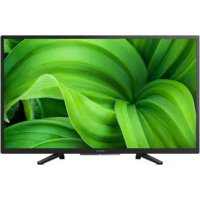
USER MANUAL KD32W804 SONY
This TV comes with the following manuals. Please retain the manuals for future reference.
Setup Guide
- TV installation and setup.
Reference Guide (this manual) / Safety Documentation
- Safety information, remote control, troubleshooting, wall-mount installation, specification, etc.
Help Guide (On screen Manual)
- Settings, functions, Internet connection, troubleshooting, etc.
- To open it, press the HELP button on the remote control and select Help Guide.
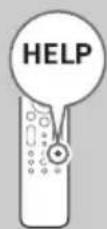
- You can refer to the Help Guide with your smartphone.
https://rd1.sony.net/help/ tv/iaepm1/h_aep/
Setting menus are subject to change without notice.
IMPORTANT - Read the End User Software Licence
Agreement before using your Sony product. Using your product indicates your acceptance of the End User Software Licence Agreement. The software licence agreement between you and Sony is available online at Sony website (https://www.sony.net/tv-software-licenses3/) or on your product screen. Press Quick Settings) on the remote control and select [Settings] → [Device Preferences] → [About] → [Legal information] → [Notices and licences].
Note
- Before operating the TV, please read the "Safety Information".
- Read the supplied safety documentation for additional safety information.
- Images and illustrations used in the Setup Guide and this manual are for reference only and may differ from the actual product.
- The "x"/"xx" that appears in the model name corresponds to a numeric digit, related to design, colour or TV system.
Location of the identification label
Labels for the TV Model No., Production Date (year/month)* and Power Supply rating are located on the rear of the TV or package.
- Only on limited region/country/TV model.
IMPORTANT NOTICE
Notice for Radio Equipment
Hereby, Sony Corporation declares that the radio equipment types KD-32W800, KD-32W804 are in compliance with Directive 2014/53/EU. The full text of the EU declaration of conformity is available at the following internet address: https://compliance.sony.eu
Hereby, Sony Corporation declares that the radio equipment types KD-32W800, KD-32W804 are in compliance with the UK relevant statutory requirements. The full text of the declaration of conformity is available at the following internet address: https://compliance.sony.co.uk
For this radio equipment, the following restrictions on putting into service or of requirements for authorization of use apply in AT, BE, HR, CY, CZ, DK, EE, FI, FR, DE, EL, HU, IE, IT, LV, LT, LU, MT, NL, PL, PT, SK, SI, ES, SE, UK, UK (NI), IS, LI, NO, CH, BG, RO, TR, AL, BA, MK, MD, RS, ME, Kosovo :
5150 - 5350 MHz band is restricted to indoor operations only.
Installation/Set-up
Install and use the TV set in accordance with the instructions below in order to avoid any risk of fire, electric shock or damage and/or injuries.
Installation
- The TV set should be installed near an easily accessible mains socket.
- Place the TV set on a stable, level surface to prevent it from falling over and causing personal injury or property damage. Install the TV where it cannot be pulled, pushed, or knocked over.
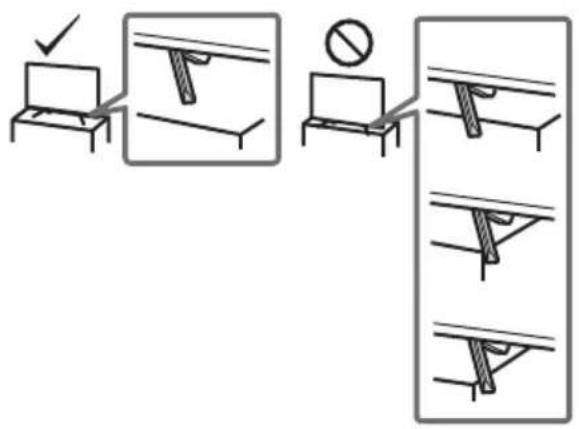
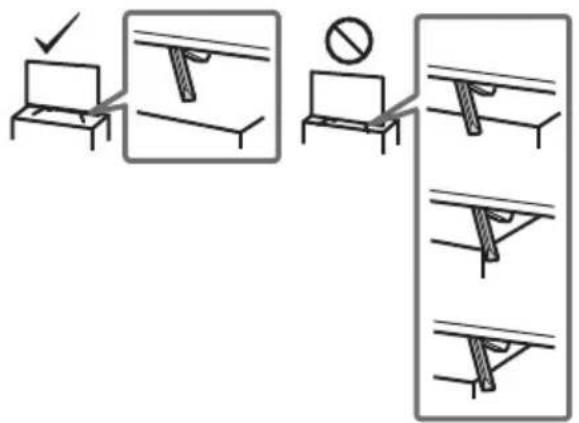
- Install the TV so that the TV's Table-Top Stand does not protrude out from the TV stand (not supplied). If the Table-Top Stand protrudes out from the TV stand, it may cause the TV set to topple over, fall down, and cause personal injury or damage to the TV.
Transporting
- Before transporting the TV set, disconnect all cables.
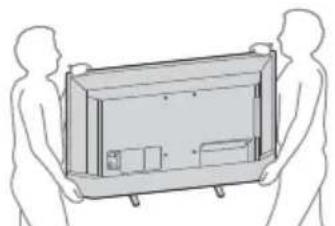
- Two or more people are needed to transport a large TV set.
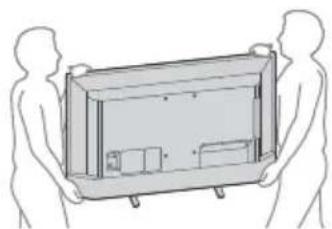
- When transporting the TV set by hand, hold it as shown below. Do not put stress on the LCD panel and the frame around the screen.
- When lifting or moving the TV set, hold it firmly from the bottom.
- When transporting the TV set, do not subject it to jolts or excessive vibration.
- When transporting the TV set for repairs or when moving, pack it using the original carton and packing material.
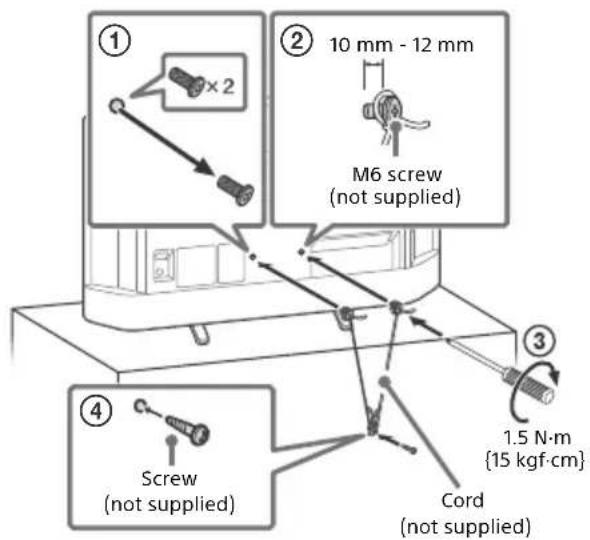
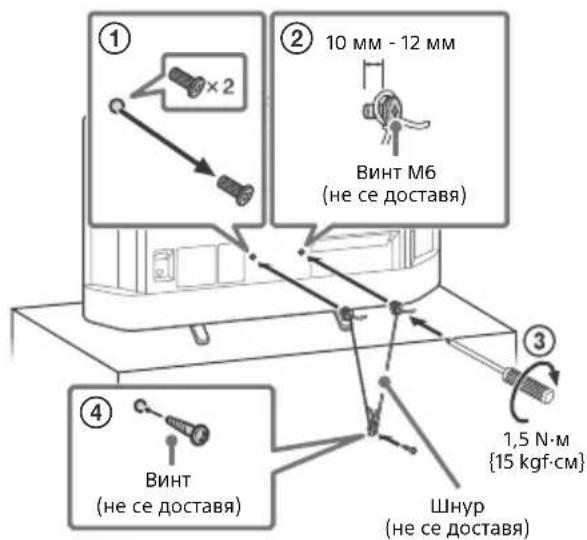
Topple prevention
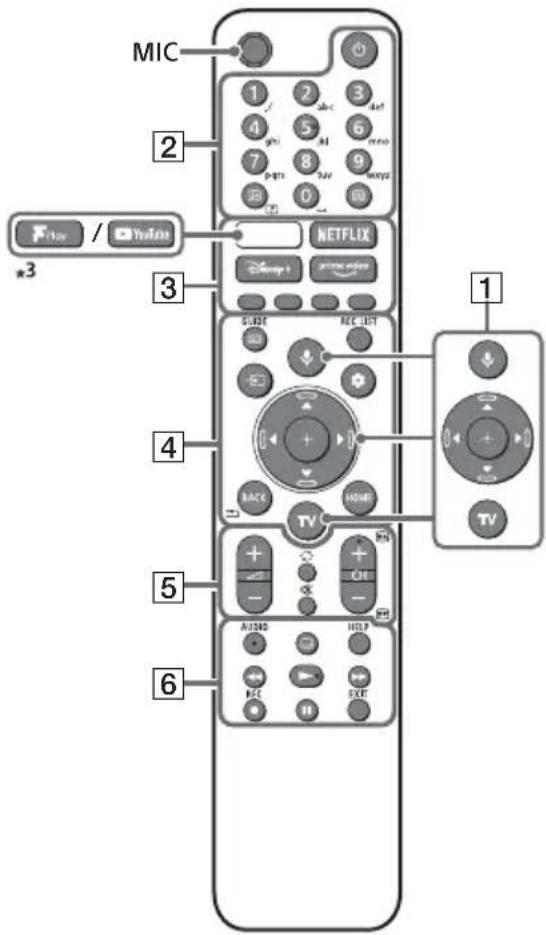
Remote Control and TV
The remote control shape, layout, availability and function of remote control buttons may vary depending on your region/country/TV model/TV settings.
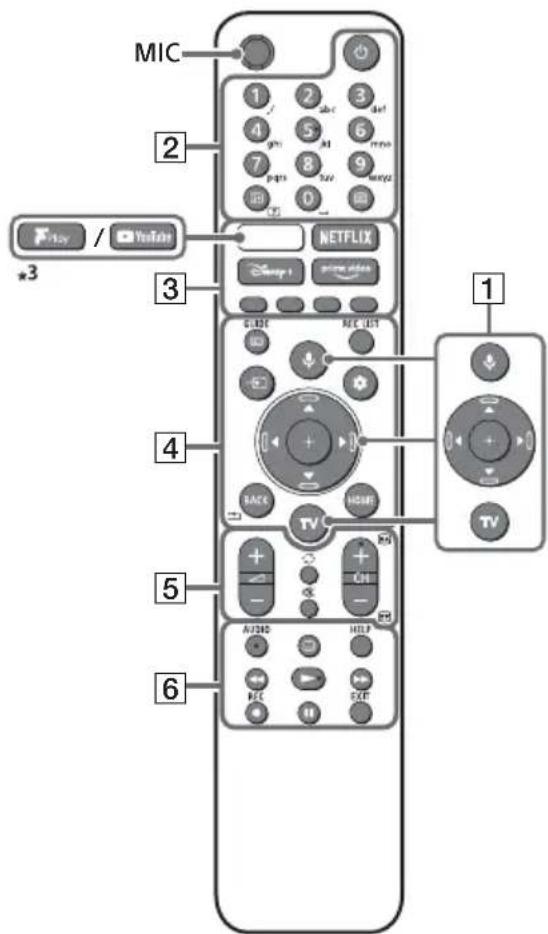
1 (Microphone) / (Google Assistant): Use Google Assistant*1*2 or voice search*2. For hints on how to control your TV, press the microphone button on the remote control and say "voice hints".
Navigation buttons: On screen menu navigation and selection.
TV: Switch to input.
2 (Power)
Number buttons
i+/? (Info/Display): Display information.
Text: Display text information.
3 (YouTube™/Freeview Play)*³/ NETFLIX / Disney+ / Prime Video / Colour buttons
GB
4 GUIDE: Display the digital programme guide of TV.
REC LIST: Display the Rec list of USB HDD.
Input select: Display and select the input source, etc.
Quick settings: Display Quick Settings.
BACK/
HOME
5 +/-(Volume)
(Jump)
(Mute)
CH + / - / 1/3: Select the channel, or next/previous page.
(previous/next) page.
6 AUDIO: Select the sound of multilingual source or dual sound (depending on programme source).
(Subtitle setting)
HELP: Display the Help menu.
<</>>
REC: Record the currently viewed programme on USB HDD.
EXIT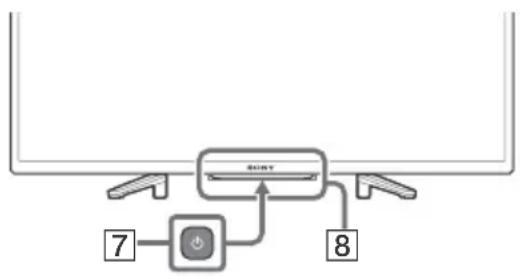
7 (Power) Remote Control sensor / LED
1 Only on limited region/country/TV model/language. 2 Google Assistant or voice search requires an Internet connection. *3 Feature support depends on region/country/TV model.
For more information, refer to the Help Guide.
Installing the TV to the Wall
Using the optional Wall-Mount Bracket (SU-WL450)* (not supplied)
To Customers:
For product protection and safety reasons, Sony strongly recommends that installation of your TV be performed by Sony dealers or licensed contractors. Do not attempt to install it yourself.
To Sony Dealers and Contractors:
Provide full attention to safety during the installation, periodic maintenance and examination of this product.
For instructions on Wall-Mount Bracket installation, see the Installation Information (Wall-Mount Bracket) on the product page for your TV model.
https://www.sony.eu/support
- Follow the instruction guide provided with the Wall-Mount Bracket for your model. Sufficient expertise is required in installing this TV, especially to determine the strength of the wall for withstanding the TV's weight.
- Sony is not liable for any damage or injury caused by mishandling or improper installation.
- Only qualified service personnel should carry out wall-mount installations.
- For safety reasons, it is strongly recommended that you use Sony accessories, including: —Wall-Mount Bracket SU-WL450
- Be sure to use the screws supplied with the Wall-Mount Bracket when attaching the Wall-Mount Bracket to the TV set. The supplied screws are designed as indicated by illustration when measured from the attaching surface of the Wall-Mount Bracket.
The diameter and length of the screws differ depending on the Wall-Mount Bracket model. Use of screws other than those supplied may result in internal damage to the TV set or cause it to fall, etc.
TV's rear cover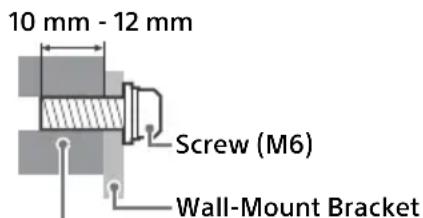
- Be sure to store the unused screws and Table-Top Stand in a safe place until you are ready to attach the Table-Top Stand. Keep the screws away from small children.
- Only on limited region/country/TV model.
Troubleshooting
General troubleshooting for issues like: black screen, no sound, frozen picture, TV does not respond, or network is lost, do the following steps.
1 Restart your TV by pressing the power button on the remote control for about five seconds. The TV will restart. If the TV does not recover, try unplugging the mains lead then press the power button on the TV and release it. Wait for two minutes, and plug in the mains lead. Or, press the power button on the TV for about 40 seconds until the TV turns off. 2 Refer to the Help menu by pressing HELP on the remote control. 3 Connect your TV to the Internet and perform a software update. Sony recommends you to keep your TV software updated. Software updates provide new features and performance improvements. 4 Visit Sony support website (information provided at the end of this manual).
When you plug in the TV, the TV may not be able to turn on for a while even if you press the power button on the remote control or the TV.
It takes time to initialize the system. Wait for about one minute, then operate it again.
The remote control does not function.
- Replace the batteries. The parental lock password has been forgotten.
- Enter 9999 for the PIN and enter the new PIN.
For more information on troubleshooting, refer to the Help Guide.
Specifications
System
Panel system: LCD (Liquid Crystal Display) Panel, LED Backlight
TV system: Depend on your country/area
selection/TV model
Analogue: B/G, D/K, I
Digital: DVB-T/DVB-C/DVB-T2
Satellite: DVB-S/DVB-S2
Colour system: PAL/SECAM
Channel coverage: Depend on your country/
area selection/TV model
Analogue: UHF/VHF/Cable
Digital: UHF/VHF/Cable
Satellite: IF Frequency 950-2150 MHz
Sound output: 5 W + 5 W
Wireless technology
Protocol IEEE 802.11a/b/g/n
Bluetooth® Version 5.0
Frequency band(s)
| Frequency range Output power |
| Wireless LAN (TV) |
| 2400-2483.5 MHz | < 20.0 dBm |
| 5150-5250 MHz | < 23.0 dBm |
| 5250-5350 MHz | < 23.0 dBm |
| 5470-5725 MHz | < 30.0 dBm |
| 5725-5875 MHz | < 13.98 dBm |
| Bluetooth® (TV) |
| 2400-2483.5 MHz < 10.0 dBm |
| Bluetooth® (Remote control) |
| 2400-2483.5 MHz < 10.0 dBm |
Antenna (aerial)/cable
75 ohm external terminal for VHF/UHF
Satellite antenna
Female F Type Connector, 75 ohm.
DiSEqC 1.0, LNB 13 V/18 V & 22 kHz tone, Single
Cable Distribution EN50494.
HDMI IN 1/2/3 (HDCP 1.4 compatible)
Video:
HDMI video format:
480i, 480p, 576i, 576p, 720p (50 Hz, 60 Hz), 1080i (50 Hz, 60 Hz), 1080p (24 Hz, 30 Hz, 50 Hz, 60 Hz)
HDMI PC supported format:
640 x 480 @ 60 Hz, 800 x 600 @ 60 Hz, 1024 x 768 @ 60 Hz, 1360 x 768 @ 60 Hz
Audio:
PCM: 32/44.1/48 kHz 16/20/24 bits, Dolby Audio
ARC (Audio Return Channel) (HDMI port 1 only)* In ARC mode
Two channel linear PCM: 48 kHz 16 bits, Dolby Audio

DIGITAL AUDIO OUT (OPTICAL)
Digital optical jack (Two channel linear PCM: 48 kHz 16 bits, Dolby Audio)
(Stereo mini jack)
Headphone

- 2
(HDD
REC)
USB port 1 supports High Speed USB (USB 2.0) USB port 2 supports High Speed USB (USB 2.0)

AM (Conditional Access Module) slot

LAN
10BASE-T/100BASE-TX connector (Depending on the operating environment of the network, connection speed may differ. The communication rate and quality are not guaranteed.)
Power, Product Fiche and others
Power requirements
220V-240VAC, 50Hz
Energy Efficiency Class*
KD-32W800: A+
KD-32W804: A+
Screen size (measured diagonally) (Approx.)
KD-32W800: 80.0 cm / 32 inches
KD-32W804: 80.0 cm / 32 inches
Power consumption*2
In [Standard] mode
KD-32W800: 60 W
KD-32W804: 60 W
Annual energy consumption*2
KD-32W800: 47 kWh per year
KD-32W804: 47 kWh per year
Standby power consumption 2 5*6
0.50 W (10 W in software/EPG update mode)
Display resolution (horizontal × vertical) (pixels)
1366 × 768
Output rating
500 mA (for USB1 and USB2)
Dimensions (Approx.) (w × h × d) (cm)
With Table-Top Stand
KD-32W800: 73.3 × 46.8 × 18.9
KD-32W804: 73.3 × 46.8 × 18.9
Without Table-Top Stand
KD-32W800: 73.3 × 43.5 × 7.8
KD-32W804: 73.3 × 43.5 × 7.8
Mass (Approx.) (kg)
With Table-Top Stand
KD-32W800: 5.0
KD-32W804: 5.0
Without Table-Top Stand
KD-32W800: 4.9
KD-32W804: 4.9
Others
Optional accessories
Wall-Mount Bracket: SU-WL450
Operating temperature: 0°C - 40°C
Operating humidity: 10% - 80% RH (non-condensing)
1 Connect your audio system to the HDMI IN 1 to route TV audio to your audio system. 2 This information is for EU and other countries whose relevant regulation is based on EU energy labelling regulation. 3 Energy consumption in kWh per year, based on the power consumption of the television operating 4 hours per day for 365 days. The actual energy consumption will depend on how the television is used. 4 Energy consumption in kWh per year, based on the power consumption of the television operating 8 hours per day for 365 days. The actual energy consumption will depend on how the television is used. 5 Specified standby power is reached after the TV finishes necessary internal processes. 6 Standby power consumption will increase when your TV is connected to the network.
Note
- Optional accessories availability depends on countries/region/TV model/stock.
- Design and specifications are subject to change without notice.
- Subscriptions for services and applications may be required and additional terms, conditions and/or charges may apply when using Google Assistant.
- Product fiche in this manual is for COMMISSION DELEGATED REGULATION (EU) 1062/2010. Refer to its website for (EU) 2019/2013 information.
Notes on Digital TV function
- Digital TV (DVB terrestrial, satellite and cable), interactive services and network functions may not be available in all countries or areas. Some functions might not be enabled or might not operate correctly with some providers and network environments. Some TV service providers may charge a fee for their services.
- This TV supports digital broadcasting using MPEG-2, H.264/MPEG-4 AVC and H.265/HEVC CODECs, but compatibility with all operator/service signals, which may change over time, cannot be guaranteed.
- The terms HDMI, HDMI High-Definition Multimedia Interface, and the HDMI Logo are trademarks or registered trademarks of HDMI Licensing Administrator, Inc.
- Manufactured under license from Dolby Laboratories. Dolby, Dolby Audio, and the double-D symbol are trademarks of Dolby Laboratories Licensing Corporation.
- Google TV and related logos are trademarks of Google LLC.
- Netflix is a registered trademark of Netflix, Inc.
- DiSEqCTM is a trademark of EUTELSAT. This TV supports DiSEqC 1.0. This TV is not intended for controlling motorized antennas.
- TUXERA is a registered trademark of Tuxera Inc. in the US and other countries.
- All other trademarks are the property of their respective owners.
Product registration number
(COMMISSION DELEGATED REGULATION (EU)
2019/2013)
KD-32W800: (448133),
KD-32W800/1*: (1278989),
KD-32W804: (448136),
KD-32W804/1*: (1278991)
- Model identifiers followed by "/1" provide a new product registration number in the EPREL database in accordance with Tier 2 requirements enforced from March 2023. Please refer to the energy label included with this product to confirm which model identifier corresponds to your unit.
https://rd1.sony.net/help/tv/iaepm1/h_aep/
1 (Microphone) / Google Assistant):
https://www.sony.eu/support
—Wall-mount bracket SU-WL450
Analogue: B/G, D/K, I
Analogue: UHF/VHF/Cable
PCM: 32/44.1/48 kHz 16/20/24 bits, Dolby Audio
ARC (Audio Return Channel) (Port HDMI 1, uniquely)*
In ARC mode
KD-32W800/1*: (1278989),
KD-32W804:(448136),
KD-32W804/1*: (1278991)
https://rd1.sony.net/help/ tv/iaepm1/h_aep/
https://www.sony.eu/support
Digital: UHF/VHF/Cable
1080i (50 Hz, 60 Hz), 1080p (24 Hz, 30 Hz,
50 Hz, 60 Hz)
PC-compatible HDMI format:
640 × 480 @ 60 Hz, 800 × 600 @ 60 Hz
1024 × 768 @ 60 Hz, 1360 × 768 @ 60 Hz
Audio:
PCM: 32/44.1/48 kHz 16/20/24 bits, Dolby
Audio
ARC (Audio Return Channel) (HDMI 1 port only)
HDMI 1)
In ARC mode
Two-channel linear PCM: 48 kHz 16 bits, Dolby Audio
DIGITAL AUDIO OUT (OPTICAL)
Optical digital jack (two-channel linear PCM
48 kHz 16 bits, Dolby Audio)
Stereo mini jack
Headphones
1,2 (HDD REC)
KD-32W800/1*: (1278989),
KD-32W804: (448136),
KD-32W804/1*: (1278991)
https://rd1.sony.net/help/ tv/iaepm1/h_aep/
https://www.sony.eu/support
1080i (50 Hz, 60 Hz), 1080p (24 Hz, 30 Hz,
50 Hz, 60 Hz)
PCM: 32/44.1/48 kHz 16/20/24 bits, Dolby
Audio
ARC (Audio Return Channel) (Only
HDMI port 1)*1
In ARC mode
Two-channel linear PCM: 48 kHz 16 bits,
Dolby Audio

DIGITAL AUDIO OUT (OPTICAL)
KD-32W800/1*: (1278989),
KD-32W804: (448136),
KD-32W804/1*: (1278991)
https://rd1.sony.net/help/ tv/iaepm1/h_aep/
https://www.sony.eu/support
PCM: 32/44.1/48 kHz 16/20/24 bits, Dolby
Audio
ARC (Audio Return Channel) (HDMI 1 only)*1
In ARC mode
DIGITAL AUDIO OUT (OPTICAL)
KD-32W800/1*: (1278989),
KD-32W804: (448136),
KD-32W804/1*: (1278991)
https://rd1.sony.net/help/ tv/iaepm1/h_aep/
PCM: 32/44.1/48 kHz 16/20/24 bits, Dolby Audio
ARC (Audio Return Channel) (HDMI 1 only)*1
No ARC module
Linear PCM 2ch: 48 kHz 16 bits, Dolby Audio
PCM linear, 2 channels: 48 kHz, 16 bits, Dolby Audio
Optical digital jack (Linear PCM 2ch: 48 kHz 16 bits, Dolby Audio)
(Stereo mini jack)
(Mini stereo jack)
Auscultador
1,2(HDDREC)
The USB 1 port supports High Speed USB (USB 2.0)
The USB 2 port supports High Speed USB (USB 2.0)

CAM slot (Conditional Access Module)
LAN
KD-32W800/1*: (1278989),
KD-32W804: (448136),
KD-32W804/1*: (1278991)
- The model identifier followed by "/1" provides a new product registration number in the EPREL database with the Level 2 requirements applied from June 2023. Refer to the energy label included with this product to confirm which model identifier corresponds to your unit.
https://rd1.sony.net/help/ tv/iaepm1/h_aep/
https://www.sony.eu/support
PCM: 32/44.1/48 kHz 16/20/24 bit, Dolby Audio
ARC (Audio Return Channel) (HDMI 1 port only)*1
In ARC mode
https://rd1.sony.net/help/tv/iaepm1/h_aep/
+/? (Visar info om text-TV)
Text (Text): Visa textinformation.
3 (YouTube™/Freeview Play)*3/ NETFLIX / Disney+ / Prime Video / Färgknappar
Se Hjälpguiden för mer information.
För instruktioner om installation av Väggfäste, se installationsinformationen (Väggfäste) på produktsidan för din TV-modell. https://www.sony.eu/support
PCM: 32/44,1/48 kHz 16/20/24-bitars, Dolby Audio
ARC (Audio Return Channel) (HDMI-port 1 endast)*1
ARC-läge
Tvåkanalig linjär PCM: 48 kHz 16-bitars, Dolby Audio

DIGITAL AUDIO UT (OPTISK)
KD-32W800/1*: (1278989),
KD-32W804: (448136),
KD-32W804/1*: (1278991)
https://rd1.sony.net/help/tv/iaepm1/h_aep/
https://www.sony.eu/support
PCM: 32/44.1/48 kHz 16/20/24 bit, Dolby Audio
ARC (Audio Return Channel) (on HDMI port 1)*
ARC mode
Two-channel linear PCM: 48 kHz 16 bit, Dolby Audio
DIGITAL AUDIO OUT (OPTICAL)
Digital optical connector (two-channel linear PCM:
48 kHz 16 bit, Dolby Audio)
(Stereo mini-jack)
Headphones
1,2 (HDD REC)
USB port 1 supports High Speed USB (USB 2.0)
USB port 2 supports High Speed USB (USB 2.0)

CAM (Conditional Access Module) slot
LAN
10BASE-T/100BASE-TX connector
I [Standard] mode
KD-32W800: 60 W
KD-32W804: 60 W
KD-32W800/1*: (1278989),
KD-32W804: (448136),
KD-32W804/1*: (1278991)
https://rd1.sony.net/help/tv/iaepm1/h_aep/
DIGITAL AUDIO OUT (OPTICAL)
KD-32W800/1*: (1278989),
KD-32W804: (448136),
KD-32W804/1*: (1278991)
https://rd1.sony.net/help/tv/iaepm1/h_aep/
Settings menus may change without notice.
Quick settings.
BACK/*
HOME
5 +/-(Volume)
(Jump)
(Mute)
(Subtitle settings)
HELP: Displays the Help menu.
<</>>
https://www.sony.eu/support
PCM: 32/44.1/48 kHz 16/20/24 bits, Dolby Audio
ARC (Audio Return Channel) (HDMI port 1 only)*
ARC mode
Linear PCM: 48 kHz 16 bits, Dolby Audio
DIGITAL AUDIO OUT (OPTICAL)
Digital optical input (linear PCM: 48 kHz 16 bits, Dolby Audio)
(minijack, stereo)
Headphones
1,2(HDDREC)
KD-32W800/1*: (1278989),
KD-32W804: (448136),
KD-32W804/1*: (1278991)
- Model identifiers ending with "/1" have a new Product Registration Number in the EPREL database in accordance with Tier 2 requirements applicable from March 2023. See the energy label supplied with this product to confirm which model identifier applies to your device.
https://rd1.sony.net/help/ tv/iaepm1/h_aep/
https://www.sony.eu/support
DIGITAL AUDIO OUT (OPTICAL)
USB port 1 supports standard High Speed USB (USB 2.0)
USB port 2 supports standard High Speed USB (USB 2.0)

https://rd1.sony.net/help/ tv/iaepm1/h_aep/
Settings options may change without prior notice.
IMPORTANT - Before using your Sony product, please read the End User License Agreement for software. By using the product, you confirm that you agree to the End User License Agreement for software. The End User License Agreement between you and Sony Corporation is available online at Sony's website (https://www.sony.net/tv-software-licenses3/) or on the screen of your purchased product. Press (Quick Settings) on the remote control, select [Settings] → [Device Preferences] → [About] → [Legal Information] → [Notices and Licenses].
Note
https://www.sony.eu/support
PCM: 32/44.1/48 kHz 16/20/24 bit, Dolby Audio
ARC (Audio Return Channel) (Only 1 HDMI port)*1
In ARC mode
DIGITAL AUDIO OUT (OPTICAL)
KD-32W800/1*: (1278989),
KD-32W804: (448136),
KD-32W804/1*: (1278991)
https://rd1.sony.net/help/tv/iaepm1/h_aep/
DIGITAL AUDIO OUT (OPTICAL)
KD-32W800/1*: (1278989),
KD-32W804: (448136),
KD-32W804/1*: (1278991)
https://rd1.sony.net/help/tv/iaepm1/h_aep/
https://www.sony.eu/support
PCM: 32/44.1/48 kHz 16/20/24 bit, Dolby Audio
ARC (Audio Return Channel) (HDMI port 1 only)*1
In ARC mode
DIGITAL AUDIO OUT (OPTICAL)
KD-32W800/1*: (1278989),
KD-32W804: (448136),
KD-32W804/1*: (1278991)
https://rd1.sony.net/help/tv/iaepm1/h_aep/
Settings menus can be changed without prior notice.
Analog: B/G, D/K, I
Digital: DVB-T/DVB-C/DVB-T2
Satellite: DVB-S/DVB-S2
Color system: PAL/SECAM
Analog: UHF/VHF/Cable
Digital: UHF/VHF/Cable
Satellite: IF frequency 950-2150 MHz
Audio output: 5W + 5W
Wireless technology
Protocol IEEE 802.11a/b/g/n
Bluetooth® version 5.0
Frequency band(s)
| Gama de freventa Putere de iesire |
| LAN wireless (Televizor) |
| 2400-2483,5 MHz | < 20,0 dBm |
| 5150-5250 MHz | < 23,0 dBm |
| 5250-5350 MHz | < 23,0 dBm |
| 5470-5725 MHz | < 30,0 dBm |
| 5725-5875 MHz | < 13,98 dBm |
| Bluetooth® (Televizor) |
| 2400-2483,5 MHz < 10,0 dBm |
| Bluetooth® (Telecomanda) |
| 2400-2483,5 MHz < 10,0 dBm |
Input/output jacks
PCM: 32/44.1/48 kHz 16/20/24 bit, Dolby Audio
ARC (Audio Return Channel) (1 HDMI port)*1
In ARC mode
KD-32W800/1*: (1278989),
KD-32W804: (448136),
KD-32W804/1*: (1278991)
https://rd1.sony.net/help/ tv/iaepm1/h_aep/
MeHIOTa 3a HAcTpoKn PoJLExKa HT Na npOMHa 6e3 npEdupeXeHne.
IMPORTANT - Before using your Sony product, please read the software license agreement for end users. Using your product signifies that you accept the software license agreement for end users. The software license agreement between you and Sony is available at the Sony website (https://www.sony.net/ tv-software-licenses3/) or on the screen of your product. Press the HOME button on the remote control, then select [Settings] → [Device Preferences] → [Information] → [Legal Information] → [License Notices].
Caution
- Caution: Please read the safety documentation for complete safety information. The illustrations and diagrams used in the Setup Guide and in this manual are for reference only and may differ from the actual product. The symbol "X"/"XX" appearing in the model name corresponds to a number related to the design, color, and system of the TV.
Identification label
The labels for the model name, date of manufacture (year/month), and protection class are located on the back of the TV or on the packaging.
* Only for certain regions/countries/TV models.
IMPORTANT CAUTION
Caution for radio equipment
Hereby, Sony Corporation declares that this radio equipment KD-32W800, KD-32W804 complies with Directive 2014/53/EU. The full text of the EU declaration of conformity is available at the following internet address: https://compliance.sony.eu
For this radio equipment, the following restrictions on putting into service or authorization for use apply in AT, BE, HR, CZ, CZ, DE, FR, DE, EL, HU, IE, IT, LV, LT, LU, MT, NL, PL, PT, SK, SI, ES, SE, UK, NI) IS, LI, NO, CH, BG, RO, TR, AL, BA, MK, MD, RS, ME, Kosovo:
5150 - 5350 MHz frequency is restricted to indoor use only.
Safety information
Installation guide
Install the TV in accordance with the instructions described below to avoid the risk of fire, electric shock, or damage/injury.
Installation
The TV should be installed close to a wall outlet. Place the TV on a stable, flat surface to avoid it falling, which could cause injury to people or damage to property. Mount the TV in a place where it cannot be pulled, pushed, or knocked over.
- Place the TV so that the stand for the TV does not protrude from the stand on which the TV is placed (not applicable). If the stand for the TV is extended beyond the stand on which the TV is placed, this may cause the TV to tip over or fall, leading to injury or damage to the TV.
Moving
Before moving the TV, disconnect all cables. Lift the TV by the bottom edge or by the handle. When moving the TV, hold it as shown below. Do not press on the LCD panel or the frame around the screen. When lifting or moving the TV, hold it firmly.
- When moving, do not subject the TV to vibrations or impacts. When transporting the TV, place it in its original packaging or use suitable packing material.
Preventing damage
Remote control of the TV
The layout, format, availability, and functions of the buttons on the remote control may vary depending on the region/model/settings of the TV.
1 (Microphone)/ (Google Assistant):
Use Google Assistant*2 or voice search*2. For tips on how to control the TV, press the Microphone button on the remote control and say "Voice tips".
A/V/4/D/H: Navigate the on-screen menu and make selections.
TV: Switch to TV mode.
2 (Mute)
E/(Information on text): Show information. (Text): Show text information.
3 (YouTubeTM/Freeview Play)3/ NETFLIX/ Disney+ / Prime Video / Guide to show program information.
PCM: 32/44.1/48 kHz 16/20/24 bits, Dolby
Audio
ARC (Audio Return Channel)
(HDMI port 1)*1
ARC time
DIGITAL AUDIO OUT (OPTICAL)
Optical digital jack (2-channel linear
PCM: 48 kHz 16 bits, Dolby Audio)
(Stereo mini jack)
Listen

- 2 (HDD REC)
USB port 1 supports High Speed USB
(USB 2.0)
USB port 2, High Speed USB
(USB 2.0)

CAM (conditional access module) slot

LAN
10BASE-T/100BASE-TX connector
(Depending on the conditions of the
network, the data transfer speed
and the quality of the communication are not
guaranteed.)
Power supply, product and other
requirements for the power supply
220V-240VAC,50Hz
Energy class*
KD-32W800: A+
KD-32W804: A+
Screen size (measured diagonally)
(approx.)
KD-32W800: 80.0 cm / 32 inches
KD-32W804: 80.0 cm / 32 inches
Energy consumption
In [standard] mode
KD-32W800: 60 W
KD-32W804: 60 W
Annual energy consumption*2
KD-32W800: 47 kWh per year
KD-32W804: 47 kWh per year
Energy consumption in standby mode
Standby 2 5*6
0.50 W (10 W in software/EPG update mode)
Screen resolution (horizontal ×
vertical) (pixels)
1366 × 768
Rated current
500 mA (for USB1 and USB2)
Dimensions (approx.) (W × H × D) (cm)
With stand
KD-32W800: 73.3 × 46.8 × 18.9
KD-32W804: 73.3 × 46.8 × 18.9
Without stand
KD-32W800: 73.3 × 43.5 × 7.8
KD-32W804: 73.3 × 43.5 × 7.8
Weight (approx.) (kg)
With stand
KD-32W800: 5.0
KD-32W804:5,0
6e3 nocTabka 3a Maca
KD-32W800:4,9
KD-32W804: 4,9
Дугн
DonbHnTeJHHaKcecoapN
Koh3oJa 3a 3akpenBaHe KbM CTeHa:
SU-WL450
Pa60Tha Tempepatya: 0°C - 40°C
Pa60Tha BnaxKHOCT: OTHOCHTeJHa BnaxKHOCT
10% - 80% (6e3 o6pa3yBaHe Ha KOHdeH3)
1 Cbpxte ayDnO cnCTemata cn KbM HDMI IN 1, 3a Da HaCOHTe TeJeBn3NOHHna ayDnO cnHHaJI KbM BaAATA ayDnO cnCTema. 2 Ta3n INΦopmaζηce ΑθHac 3a ΣτρaHn Π EC n έργrι ΚτρaHn, ΜΙΝΤΟ ΒοΤΒΕΤΗ έλποpeДБι Ε ΚΟΥBaВaT Ha perΓλaMeHTa Ha EC 3a eΗερχινΗΟτ ΕτιΚeΤιρaHε. 3 TódiuHaTa KOHCymaúna Ha eHepnB kWh e 6a3npaHa Ha KOHCymaúna Ta Ha TeleBu3Op, KoTo pa60tn 4 Yaca Ha DeH, 365 dH. DeIcTBnTeJHaTa KOHCymaúna Ha eHepnB 3aBnCn OT TOBa KaK ce H3No3Ba TeleBu3Opa. 4 Гошинда Консmaця Ha eheprnB kWh e 6a3npaHa Ha KOHcmaцЯТа Ha TeJIeBu3Op, KoITo pa60tN 8 Yaca Ha DeH, 365 dH. DeIcTBuTeJHaTa KaHcmaця Ha eHeprn 3aBucn OT TOBa KaK ce n3PON3Ba TeJIeBu3Opa. 5 Yka3aHaT a KOHCyMaun Ha eHepnB B peKIM TOTOBHOCT ce IOCTnra CneI KaTO TeNEBu3OpBT npNKIOUH Heo6xOuMnTe BbTpEHN NPOUCN. 6 KOncymaunraHa eHepnBpeKIM rOTOBHOCT ue Ce yBeNUn, KOraTO BaunrTeNeBu3Op e Cbbp3aH KbM MpeKa.
3a6eJekka
HaJIuHNeTo HaIOnbJIHNHTeHN aKCECoApn 3aBNCu OT DbpXKaBaTa/perNoHa/MoJeHa TeJeBu3Opa N HAIuHOCCTTa. -ДиЗанБТИСпeЦиФиКaциNTe ПОДлжаТ ha npOMЯHa 6e3npdUpypeKxJdeHne. - Moxe da ce n3ncBaat aboHaMeHTn 3a ycnyn npinnoxehn y moT da ce npinarat DOnbHnTeHN cpoKOb, ycNoBnN/nn TaKcnpn n3NoJ3BaHe Ha Google AcnCTeHT. -ПюдуктobиТФишВTOBA pБКОВОДСТВо e 3a
ДЕЛЕЦРАН PEGJIAMET (EC) 1062/2010 HA
КOMИСТЯ. Вижтуе уебаита за инфорmaцья
OTHOCHO (EC) 2019/2013.
3a6eJekka 3a cnΦpoBaTa ΦyHKunHa TeIeBn3opa
Depending on the terrestrial, satellite or cable broadcasting, interactive services and network functions may not be available on all pages or regions. Some functions may not be activated or may not work properly with some network providers. Some providers of television services may charge a fee for the services. This television supports digital broadcasting using MPEG-2, H.264 / MPEG-4 AVC and H.265 / HEVC codecs, but compatibility with all operator/service signals cannot be guaranteed, as they may change over time.
Trademarks
- The terms HDMI and HDMI High-Definition Multimedia Interface, as well as the HDMI logo, are trademarks or registered trademarks of HDMI Licensing Administrator, Inc. in the United States and other countries.
- Manufactured under license from Dolby Laboratories. Dolby, Dolby Audio, and the double-D symbol are trademarks of Dolby Laboratories Licensing Corporation.
- Google TV and related logos are trademarks of Google LLC.
- Netflix is a registered trademark of Netflix, Inc. DiSEqC is a trademark of EUTELSAT. This television supports DiSEqC 1.0. This television is not intended for controlling antennas with a motor. TUXERA is a registered trademark of Tuxera Inc. in the U.S. and other countries.
- All other trademarks are the property of their respective owners.
Product registration number (DELEGATED REGULATION (EU) 2019/2013 OF THE COMMISSION)
KD-32W800: (448133),
KD-32W800/1*: (1278989),
KD-32W804: (448136),
KD-32W804/1*: (1278991)
The model identifier, followed by "/1", represents the product registration number in the EPREL database in accordance with the requirements for stage 2 in force from March 2023. You can find the energy label included with this product to confirm which model identifier corresponds to your device.
https://rd1.sony.net/help/ tv/iaepm1/h_aep/
https://www.sony.eu/support
According to the instructions, the passage is not in English, so it should be translated and cleaned. However, the passage appears to be garbled Greek text. It seems to be a mix of Greek letters and numbers, possibly an OCR error. The intended meaning might be about the wall mounting instructions. I will attempt to reconstruct and translate it. The original Greek might be: "Ακολουθήστε το εγχειρίδιο οδηγιών για την εγκατάσταση της βάσης τοίχου. Απαιτείται επαρκής εσπρία για την εγκατάσταση αυτής της τηλεόρασης και ειδικότερα για να προσδιοριστεί η αντοχή τοίχου που συγκρατεί το βάρος της τηλεόρασης." Translation: "Follow the instruction manual for installing the wall mount. Sufficient strength is required for installing this TV and especially to determine the wall strength that holds the weight of the TV." I will output that.
This is Greek text. Translation: "Sony does not assume any responsibility for any damage or injury that may result from improper handling or misuse."
This is already in English: "PCM: 32/44.1/48 kHz 16/20/24 bit, Dolby"
This is a single word: "Audio"
This is Greek: "ARC (Audio Return Channel) (Μόνο Ύρα" - translation: "ARC (Audio Return Channel) (Only for"
This is English: "HDMI 1)*1"
This is English: "DIGITAL AUDIO OUT (OPTICAL)"
This is Greek with math: "Οπτική ψηφιακή υποδοχή (γραμμικό PCM)" - translation: "Optical digital input (linear PCM)"
This is Greek: "δύο κανάλια: 48 kHz 16 bit, Dolby Audio)" - translation: "two channels: 48 kHz 16 bit, Dolby Audio)"
This is Greek: "Χωρίς βάση ευτραπεζίας τοποθέτησης" - translation: "Without tabletop stand"
This is English with numbers: "KD-32W800: 73.3 × 43.5 × 7.8"
This is English with numbers: "KD-32W804: 73.3×43.5×7.8"
This is Greek: "Βάρος (Περίπου) (kg)" - translation: "Weight (Approximate) (kg)"
This is Greek with numbers: "KD-32W800/1*: (1278989)," - translation: "KD-32W800/1*: (1278989),"
This is Greek with numbers: "KD-32W804: (448136)," - translation: "KD-32W804: (448136),"
KD-32W804/1*: (1278991)
*The model identifier shown on the product may indicate the /1" suffix, which denotes a new product registration number in the EPREL database, in accordance with the requirements of Regulation 2, effective from March 2023. Refer to the energy label supplied with this product to confirm which model identifier corresponds to your unit.
About Manuals
https://rd1.sony.net/help/ tv/iaepm1/h_aep/
Digital: UHF/VHF/Cable
Satellite: IF Frequency 950-2150 MHz
Audio output: 5 W + 5 W
PCM: 32/44.1/48 kHz 16/20/24 bit, Dolby
Audio
ARC (Audio Return Channel) (Only HDMI
connection point)
In ARC mode
DIGITAL AUDIO OUT (OPTICAL)
KD-32W800: 47 kWh per year
KD-32W804: 47 kWh per year
Power consumption in standby mode*2,5*6
0.50 W (10 W in software/EPG update mode)
KD-32W800/1*: (1278989),
KD-32W804: (448136),
KD-32W804/1*: (1278991)
https://www.保养.eu/support