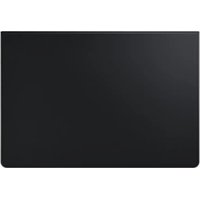
Book Cover Keyboard Slim - Stapler SAMSUNG - Free user manual and instructions
Find the device manual for free Book Cover Keyboard Slim SAMSUNG in PDF.
 FR
FR
 BG
BG
 CS
CS
 DA
DA
 DE
DE
 EL
EL
 EN
EN
 ES
ES
 ET
ET
 FI
FI
 HU
HU
 IT
IT
 KK
KK
 KO
KO
 LT
LT
 LV
LV
 NL
NL
 NO
NO
 PL
PL
 PT
PT
 RO
RO
 RU
RU
 SK
SK
 SL
SL
 SV
SV
 TR
TR
 UK
UK
 ZH
ZH
| Product Type | Keyboard cover with built-in keyboard |
| Brand | Samsung |
| Compatible Models | EF-DT630: Galaxy Tab S7; EF-DT730: Galaxy Tab S7+ and Galaxy Tab S7 FE |
| Dimensions (approx.) | 254 × 165 × 5 mm |
| Weight (approx.) | 300 g |
| Material | Plastic and leatherette |
| Keys | Full keypad with function keys (DeX, Search, Language, Navigation) |
| Keyboard shortcuts | [Fn] + [DeX]: Launch/Close Samsung DeX; [Fn] + [Lang]: Change language; [Fn] + [▲/▼/△/▷]: Navigation |
| Connectivity | Connection via pogo pin connectors (integrated docking station) |
| S Pen Support | Attaching and storing the S Pen on the keyboard |
| Samsung DeX Function | Yes, via dedicated key |
| Screen Protection | The screen turns off when the keyboard is folded down |
| Power | Powered by the tablet via connectors |
| Maintenance | Wipe with a dry cloth; avoid moisture and solvents (acetone) |
| Precautions | Do not expose to moisture or solvents; do not exert excessive pressure on the screen |
| Box Contents | Keyboard cover, quick start guide |
| General Information | Includes open source software (see opensource.samsung.com) |
Frequently Asked Questions - Book Cover Keyboard Slim SAMSUNG
User questions about Book Cover Keyboard Slim SAMSUNG
0 question about this device. Answer the ones you know or ask your own.
Ask a new question about this device
Download the instructions for your Stapler in PDF format for free! Find your manual Book Cover Keyboard Slim - SAMSUNG and take your electronic device back in hand. On this page are published all the documents necessary for the use of your device. Book Cover Keyboard Slim by SAMSUNG.
USER MANUAL Book Cover Keyboard Slim SAMSUNG
- Please read this manual before using the device to ensure safe and proper use.
Images may vary by the product. - Some content may differ from your device depending on the region, and is subject to change without prior notice.
- For the latest version of the manual, refer to the Samsung website, www.samsung.com.
- EF-DT630 is optimised to connect with the SAMSUNG Galaxy Tab S7 and EF-DT730 is optimised to connect with the SAMSUNG Galaxy Tab S7+ and Galaxy Tab S7 FE.
- If the product is exposed to humidity or solvents such as acetone, it may get stained, wrinkled, misshapen, or change colour.
- This product includes certain free/open source software. To see the instructions for viewing the open source licence, go to the Samsung website (opensource.samsung.com).
Instructional icons
Warning: situations that could cause injury to yourself or others
Caution: situations that could cause damage to your device or other equipment
Note: notes, usage tips, or additional information
Getting started
Package contents
- Keyboard cover
Quick start guide

- The items supplied with the device and any available accessories may vary depending on the region or service provider.
- Appearances and specifications are subject to change without prior notice.
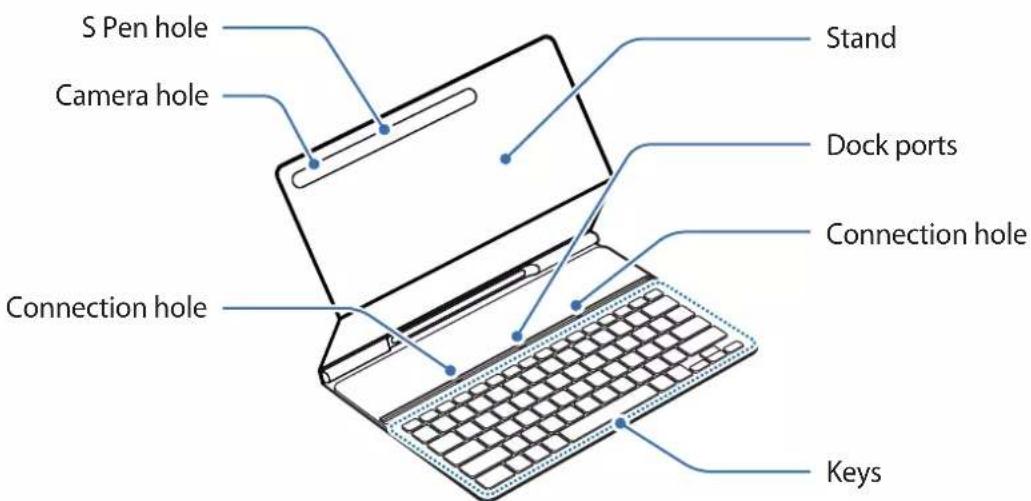
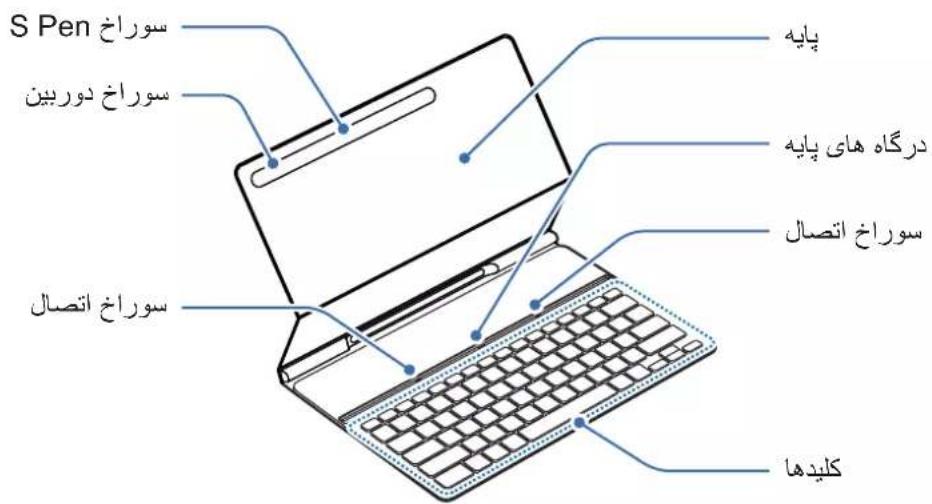
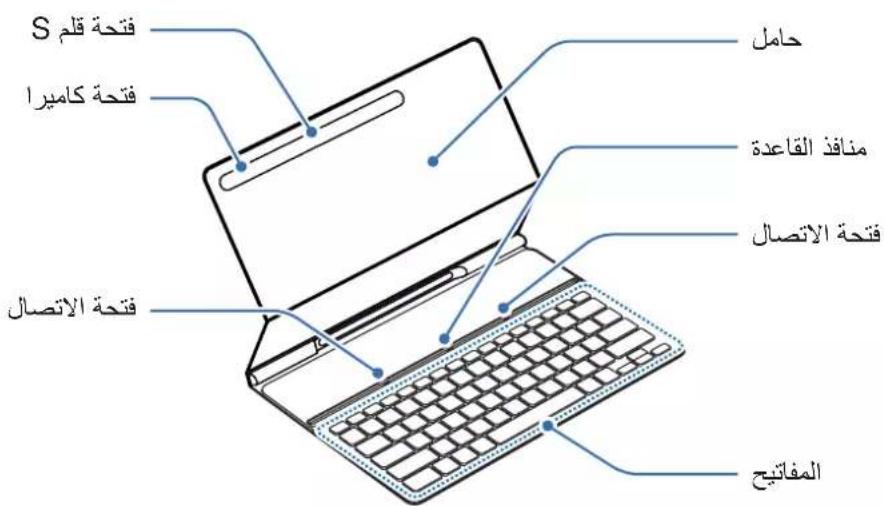
Device layout
Using the Keyboard
Connecting the keyboard
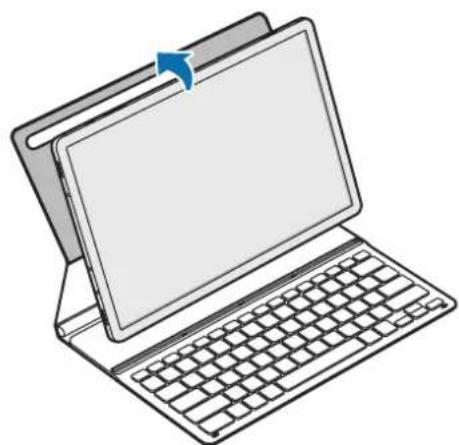
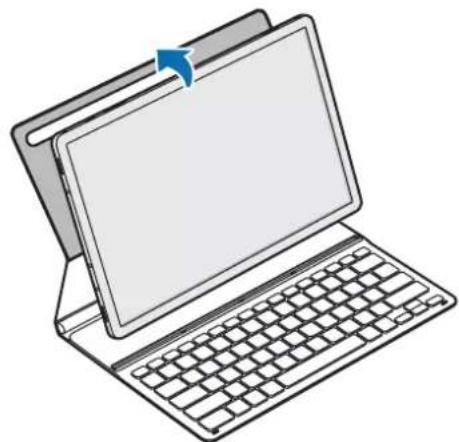
1 Position the tablet's rear camera to insert it into the camera hole and put the tablet in the stand.
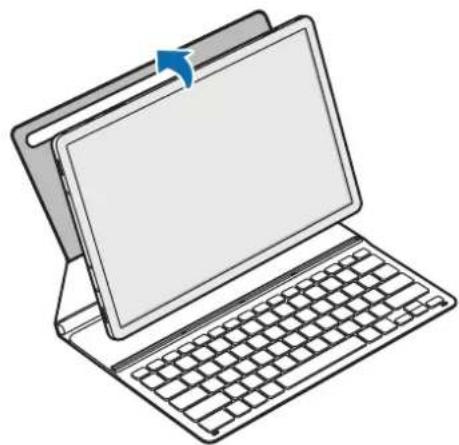
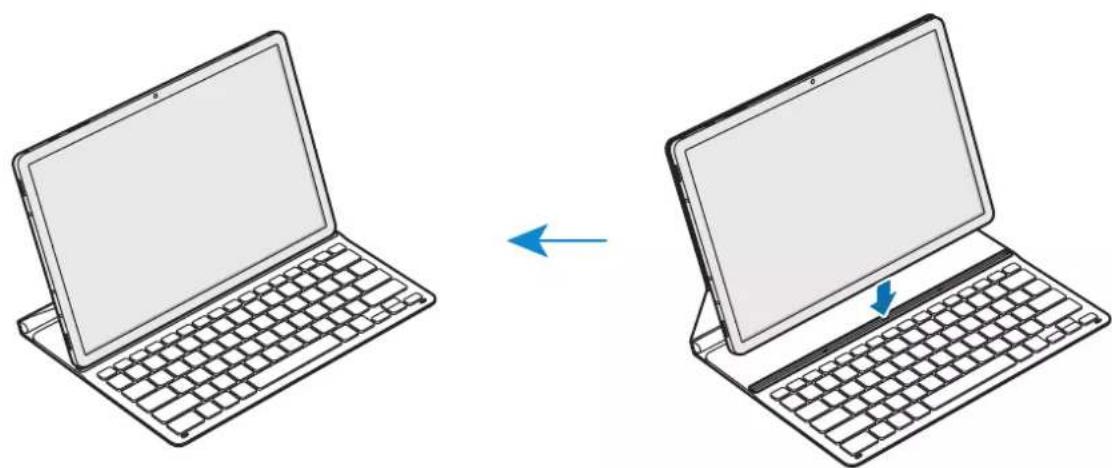
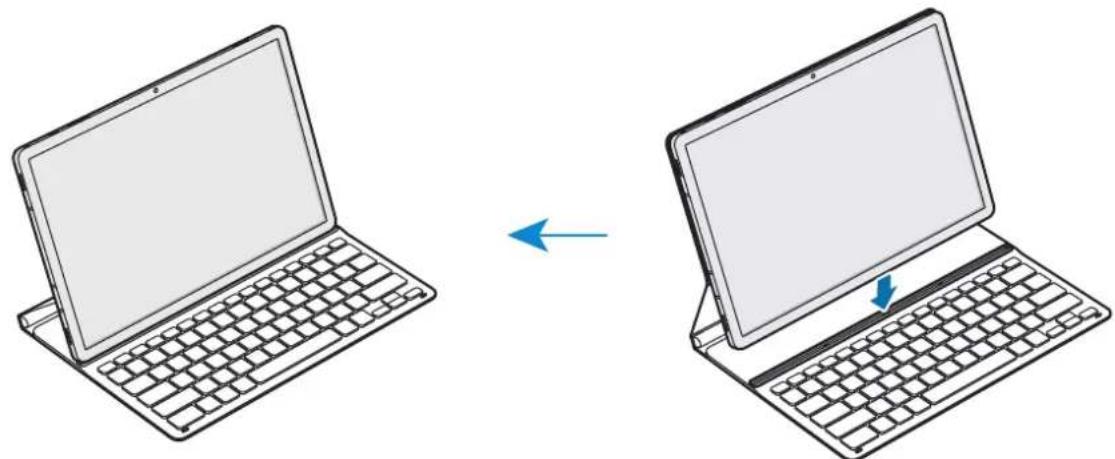
2 Insert the tablet into the connection hole to meet the tablet's connectors and the dock ports.
You can use the keyboard instantly.
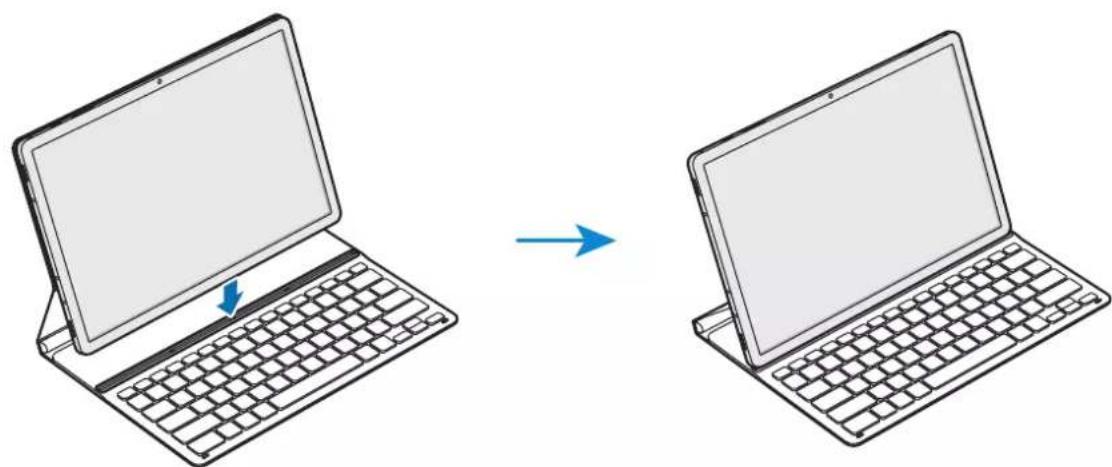

You can use the keyboard as a screen cover. The screen turns off when you cover it with the keyboard, and it turns on when you open the keyboard.

Do not apply excessive pressure on the keyboard while covering the tablet's screen. Doing so may cause screen damage.
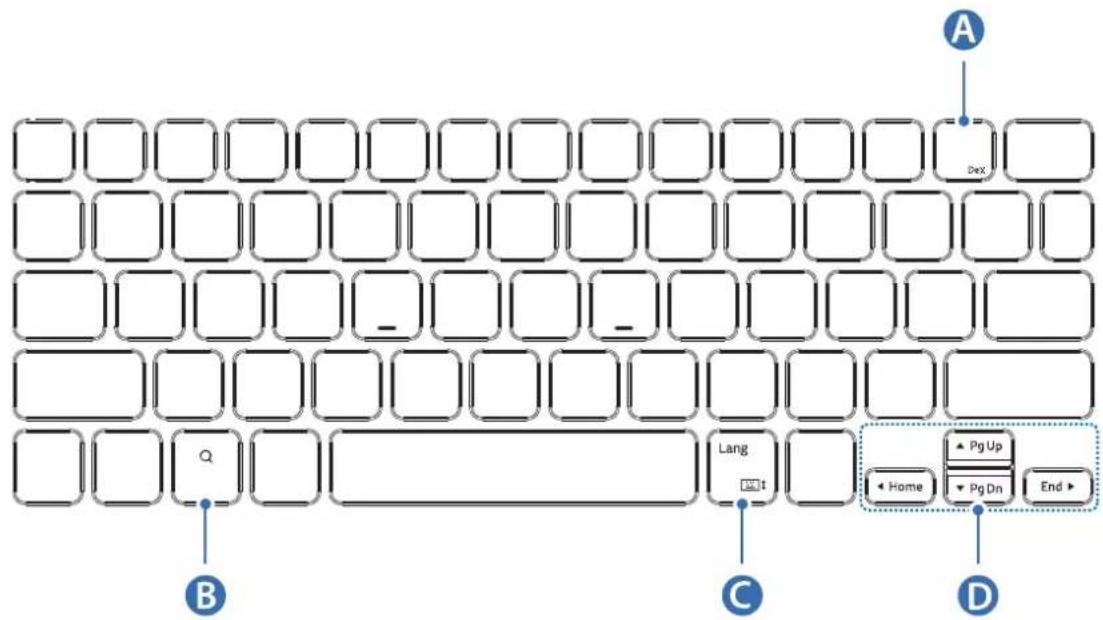
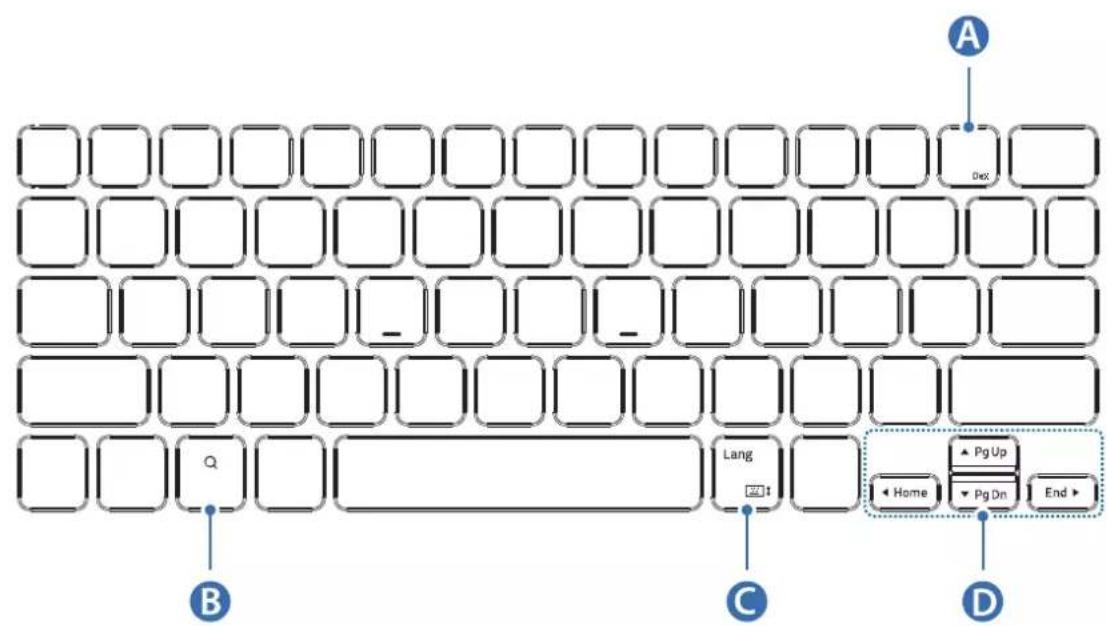
Using the keys
Set the input language on the tablet before you use the keyboard. For more information about setting the input language, refer to the tablet's user manual.
EF-DT630:
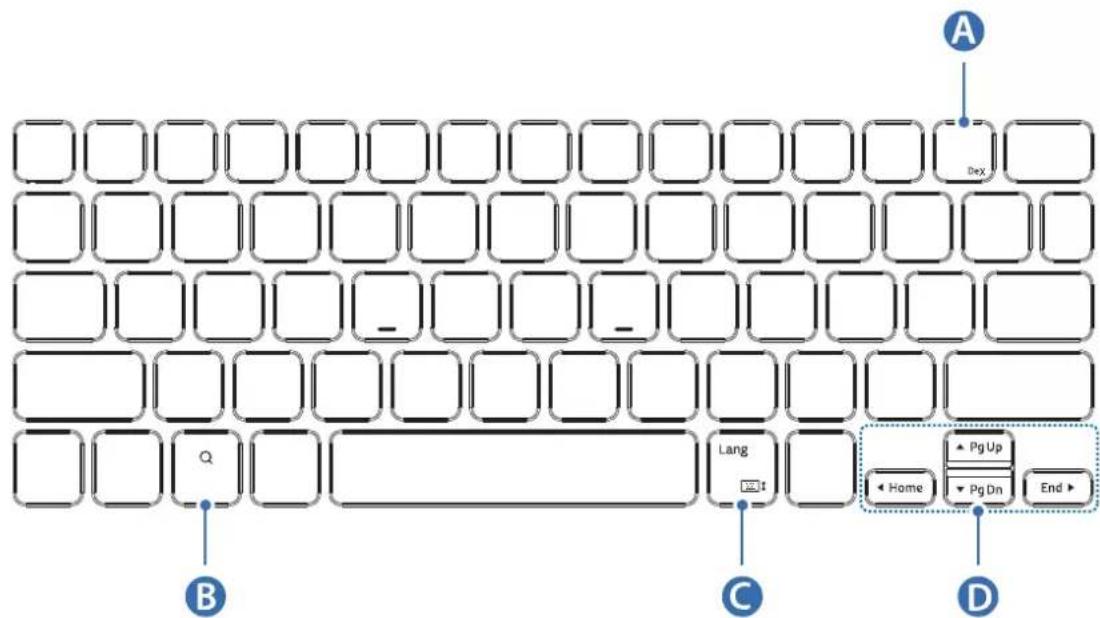
| A | • [Fn] + [DeX]: Launch or close Samsung DeX. |
| B | • Search the contents. |
| C | • [Lang]: Change between input languages. • [Fn] + □: Able or disable the on-screen keyboard. |
| D | • ▲/▼ / △/▲: Move cursor or system caret; • [Fn] + [▲]: Page Up • [Fn] + [▼]: Page Down • [Fn] + [▲]: Home • [Fn] + [▷]: End |

EF-DT730:
| A | • [Fn] + [DeX]: Launch or close Samsung DeX. |
| B | • Search the contents. |
| C | • [Lang]: Change between input languages. • [Fn] + :Enable or disable the on-screen keyboard. |
| D | • ▲/▼ / ▲/▲: Move cursor or system caret; • [Fn] + [▲]: Page Up • [Fn] + [▼]: Page Down • [Fn] + [▲]: Home • [Fn] + [▲]: End |
For more information about Samsung DeX, refer to the tablet's user manual.
Attaching the S Pen
Attach the S Pen to the tablet as shown in the image below.
You can also attach the S Pen after covering the keyboard cover.
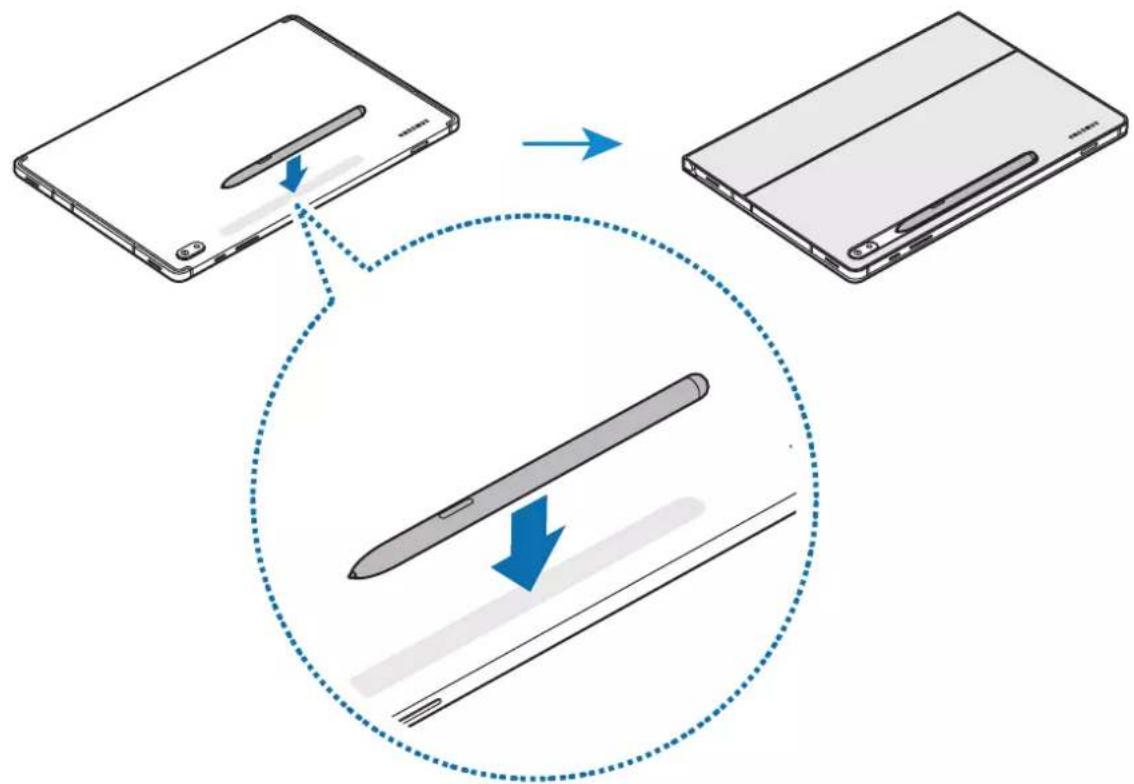

Make sure to place the nib of the S Pen to face the camera. The S Pen will not charge if it is misplaced.
Storing the S Pen
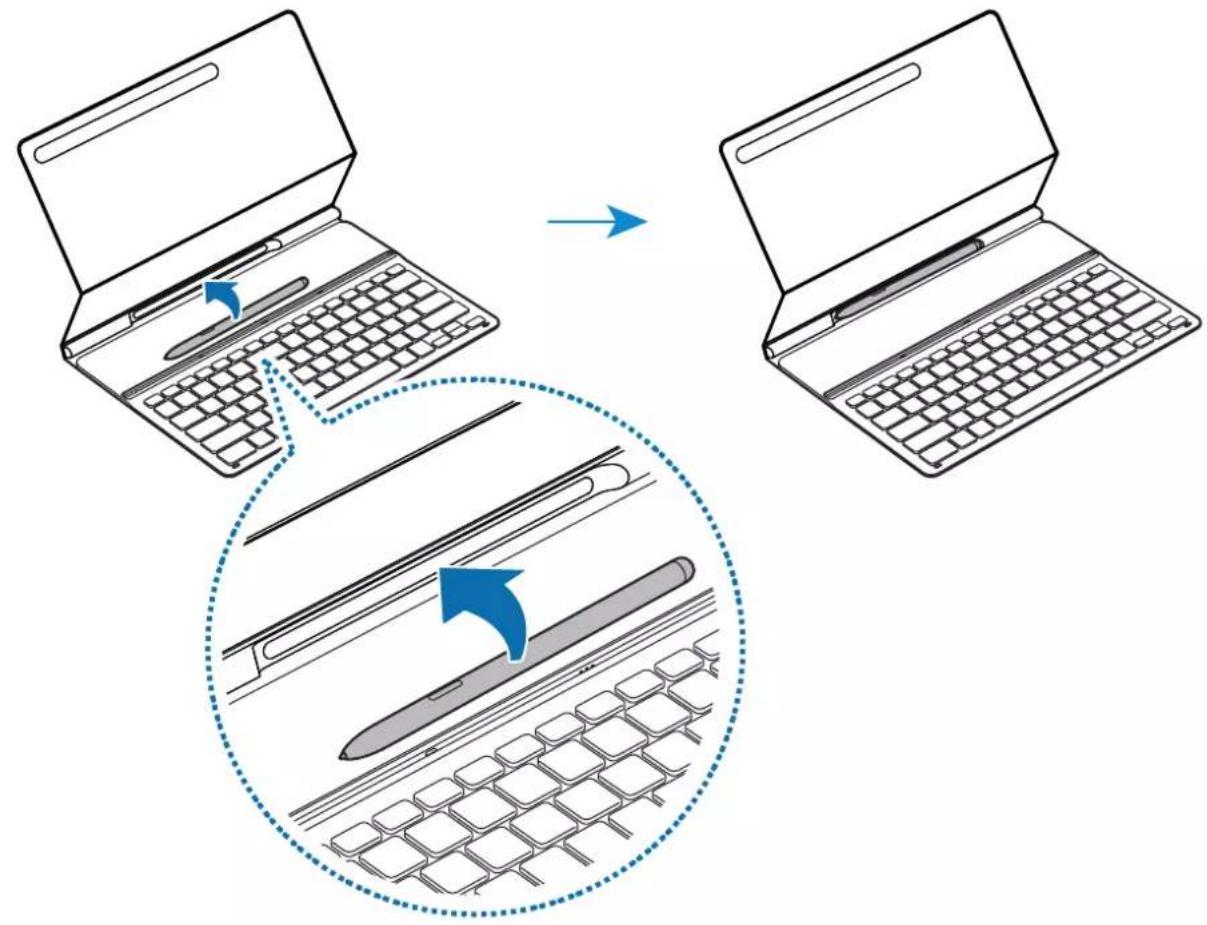
Store the S Pen as shown in the image below.
Copyright
Copyright © 2021 Samsung Electronics Co., Ltd.
This user manual is protected under international copyright laws.
No part of this manual may be reproduced, distributed, translated, or transmitted in any form or by any means, electronic or mechanical, including photocopying, recording, or storing in any information storage and retrieval system.
Trademarks
- SAMSUNG and the SAMSUNG logo are registered trademarks of Samsung Electronics Co., Ltd.
- All other trademarks and copyrights are the property of their respective owners.
Copyright © 2021 Samsung Electronics Co., Ltd.
Copyright © 2021 Samsung Electronics Co., Ltd.
Copyright © 2021 Samsung Electronics Co., Ltd.
Copyright © 2021 Samsung Electronics Co., Ltd.
Copyright © 2021 Samsung Electronics Co., Ltd.
Copyright © 2021 Samsung Electronics Co., Ltd.
Copyright © 2021 Samsung Electronics Co., Ltd.
ToBa pbkoBOCTBO Ha Notpe6nteI e 3aunTeHO OT MeKdyHapOHNTE 3aKOHN 3a ABTOPCNO npaBO.
HnKoJyactOTpBKOBOCTBOToHeMoKeJa6bJeBb3POn3BexJaHa,pa3npocTpaHЯBaHa, npBeBXdaHa nnI npexBbPnaNoi KaKBaTO Ja e oOpMa IINIO KaKBbTO Ja e NaunH, eNeKTPOHeH IIN MEXAHueH,B TOBa YncIo OToKOpnIPAHe, 3aInc IIN CbXpaHeHne B KaKBaTO Ja e CNCTema 3a INOOPMaUHOHO CbXpaHeHne N3BnUaHe.
TbproBcN MapKn
SAMSUNG i noroTo ha SAMSUNG ca pernctpupaH TbproBckn MapKn Ha Samsung Electronics Co., Ltd.
- Bcunckn octaHaJIb TbproBCKn MapKn ca co6CTBeHOCT Ha cbOTBeHTHe NTm npTeKaTeJI.
Prvo ovo pročitajte
Copyright © 2021 Samsung Electronics Co., Ltd.
Ovaj je prisučnik zašićen prema mežunarodnim zakonima o autorskim pravima.
Nijedan dio ovog prisučnika ne smijete umnažati, distribuirati, prevoditi ni prenositi u bilokakvom oblik ili na bilo koji način, elektronički ili ručno, uključujuci fotokopiranje, snimanje ili Čuvanje na bilo kakvo sredstvo za pohranu, informatički oblik Čuvanja ili sustav dohvaćanja.
Zašitni znakovi
SAMSUNG i SAMSUNG logotip registrarani su zašitni znakovi tvrtke Samsung Electronics Co., Ltd.
- Svi ostali zašitni znakovi i autorska prava imaju svoje vlasnike.
Prvo pročitajte ovo
Copyright © 2021 Samsung Electronics Co., Ltd.
Ovo uputstvo za upotrebu je zašićeno medunarodnim zakonima za zašitu autorskih prava. Nijedan deo ovog prisćnika se ne sme reprodukovati, distribuirati, prevoditi niti prenositi ni u Jednom obliku niti bilo kojim putem, elektronskim niti mehaničkim, što podrazumeva fotokopiranje, snimanje i skladištenje u okviru bilo kogSYSTEMA za skladištenje i preuzimanje informacija.
Zigovi
SAMSUNG i SAMSUNG logotip predstavlaju registrovaneŽigove kompanije Samsung Electronics Co., Ltd.
Svi ostali zigovi i autorska prava pripadaju odgovarajućim vlasnicima.
Leia-me
Copyright © 2021 Samsung Electronics Co., Ltd.
Este manual está protegado ao abrigo de leis de copyright internacional.
Copyright © 2021 Samsung Electronics Co., Ltd.
Copyright © 2021 Samsung Electronics Co., Ltd.
Copyright © 2021 Samsung Electronics Co., Ltd.
Copyright © 2021 Samsung Electronics Co., Ltd.
Copyright © 2021 Samsung Electronics Co., Ltd.
Copyright © 2021 Samsung Electronics Co., Ltd.
Telif Hakki © 2021 Samsung Electronics Co., Ltd.
Copyright © 2021 Samsung Electronics Co., Ltd.
1
nnaa nnaa nnaa nnaa nnaa nnaa nnaa nnaa nnaa nnaa nnaa nnaa nnaa nnaa nnaa nnaa nnaa nnaa nnaa nnaa nnaa nnaa nnaa nnaa nnaa nnaa nnaa nnaa nnaa nnaa nnaa nnaa nnaa nnaa naa
6907
SAMSUNG SAMSUNG Samsung Electronics Co., Ltd
- 1920070777767777777777777777777
115
. 1
J 1
15 1
www.samsung.com
= 1 或 - 1
EF-DT730 SAMSUNG Galaxy Tab S7 EF-DT630
Galaxy Tab S7 FE & SAMSUNG Galaxy Tab S7+
J 1
i
j 1 j 1 j 1 j 1 j 1 j 1 j 1 j 1 j 1 j 1 j 1
(.opensource.samsung.com)
laia j glaia
2g 1

J 150000000000000000000000000000000000000000000

i 1

J
a
S OBC = S COD + S BOC - S BOC
J 1
glia
1
O
15 10
15 1
1
1
15 15
1j 1

2 1
J 1

Lai jolal
i j 154
:EF-DT630
Copyright © 2021 Samsung Electronics Co., Ltd.
1 1 1 1 1 1 1 1 1 1 1 1 1 1 1 1 1 1 1 1 1 1 1 1 1 1 1 1 1 1 1 1 1
s
Samsung Electronics Co., Ltd. Sis
#
J 1
iill 1
. www.samsung.com Samsung
EF-DT730 SAMSUNG Galaxy Tab S7 EF-DT630
.Galaxy Tab S7 FE , SAMSUNG Galaxy Tab S7+
a
(.opensource.samsung.com)
A
i 1

s 1111111111111111111111111111

aI 1 aIglo gI pIi I iI 1 1

p
aai
J
a_i = 1( 2^i - 1) !

jglil bbs
C
C
1
1
iie iie iie iie iie iie iie iie iie iie iie iie iie iie iie iie iie iie
.
aaii i 1



J 1
:EF-DT630
Pnukpinib npo S Pen do nlaHeta, knoka3aHo Ha 306paXeHHi, HabeJeHomy HxKye.
Nepo S Pen MoXHa npKpInTu nicJ3aKpBaHHy OoxJa-KnabiaTypn.

YCTAHOBiTB nepo S Pen TaK, 06 noro kInuK po3TaOboyBaBCa neped kamepo. Nepo S Pen He 6yde 3apJxKaTnCra, JaKIO noro BCTaHOBNeHnPabNbHo.
36epiranna nepa S Pen
36epiraTe nepo S Pen,Яп пokazahNo Ha 306paXkeHHi,HaBeJeHomy HnKYe.
ABTOPcBe npaBO
Samsung Electronics Co., Ltd., 2021
Ie noci6nK KopncTyBaHa 3axnueHo 3riHc 3 MxHapOnHM 3aKoHaMn 0do aBTOpcbKnX npaB.
3a6oponeho biTbopouBaTu, po3noBcOJxUyBaTu, nepeKlaIaTu a6o nepeJaBaTu B 6yb-akii foPmi cn 6yb-akmni 3ac06amn, eJeKTPOHNMn a6o MexaHiHMMn, BKJIQUHO 3 KcepOKoIIOBaHHM, 3aNCSyBaHHm a6o 36epirAHm Ha 6yb-akOMy npncTrooi dna 36epiraHHaHnx Yn B iHOpMaizHoNoWykobi cNCTeMi, 6yb-ky qactInHy cbooro noci6Hnka.
TobapHi 3HaKn
SAMSUNG i norotin SAMSUNG e 3apeectroBaHIMn TOBAPHMn 3HaKaMn KOMnaHii Samsung Electronics Co., Ltd.
- Yci iHsi TOBapHi 3HaKn aBTopcbKi npaBa HaneJaTb BiIDNoBiDHM BlaCHNkAM.
MaHbI3dbl Kipicne
Kayinci3 XaHe dypbc naiDalaHydbl KaMTaMaCbI3 eTy ywiH KypblfbiHbl naJaalahydaH 6ypbIH OcbI HcCKayDbI OKblHbI3.
Keckindep eHimre 6aJlaHaBICTbI aptypIi 6Olybl MyMKiH.
- AиMaKka 6aJIaHbICTbl Kypblfbldaftkei6ip Ma3Myn E3rewe 6Olybl MymkIn XaHe aIbIH aIa eckepTyci3 e3reptijiyi MymkIn.
- HycayIbIKTbIH COHfbl HycKacbIH Samsung KOMnHaNcBih, Be6-caTbIHah KapaHbI3: www.samsung.com.
EF-DT630 SAMSUNG Galaxy Tab S7 KypbIbnfbciHa, an EF-DT730 SAMSUNG Galaxy Tab S7+ XaHe Galaxy Tab S7 FE KypbIbnfbcIapbHa Kocblny ywiH OHTaJlaHdblpblFaH.
- Erep eHim bIfaiDbIn, acepihe ywblpaca Hemece oFaH aUeToH cnaKtbi epitKiIupert TnIn Ketce, OHda daKTap, KaTnapnap naJa 6Obln, on NiwiHin Hemece TyciH e3repTyi MymKiH.
- Бул сим кеьбip TeriH/aшык Ke3deH ablHfah 6afdaplamalbIK KypaIadapdbI KaMTnIbI. AшыК
6actanKbI KoDbI 6ap 6afdaplamalbIK JacaKaTamaFa apHaIfAH IuIeH3nIaMeh KaIaN TaHbICyfa
6olatbIHbIN 6ily yushi Samsung (opensource.samsung.com) Be6-caITbIHa KipiHiz.
Hycayb6elriwelep

Eckepy: 3iH3re Hemece 6ackaIapfa kapaKaT KeJItipetin KaFdaIap

A6aJbI3: Kypblfba Hemece 6aca Xa6dbkTapfa HyKcaH KeJItipetIH XaFdaJap

EckepTy: Ka36aIap, NaIdaIaHy TypalbI KeHeCTep Hemece KocbIMwa MJIIMMeTTeP
KymbICTbi 6actay
KopantbIH iwiHderici
- NepheTaKaMa MyKa6aCbI
XbIaam6actayHcyayIbIFbl

KypbIfBImeH 6epiTeIH 3JeMeHTep XaHe Ke3 KeJIreH KOJIKeTIIdi KepeK-JapaKTap aMakKa Hemece Kbl3Met npoBaIdepIe 6aJlaHbICTbI eptpI 6Olybl MymKiH.
Cbiptkbl Tpylepi MeH TexHnKaIbIK CnNaTtAmalapbi eceptyci3 3reptiyi MymkiH.
KypblfblHbIH KypblmbI
Copyright © 2021 Samsung Electronics Co., Ltd.
Byn naaahnybI HcyaynbIbI xaibIkapabIK aBTOpbIK KkykbIK Typalbi 3aHap 6oynihwa KopraIraH.
Бул hyсaylbiktbiH eшбip 6eJIirH ke3 KeJIreH Tpyde Hemece ke3 KeJIreH aIicneH (JIeKTPoHbIK He MexaHnkaIbIK), cohBiH iwiHde, fOToKeWiPy, Xa3y Hemece ke3 KeJIreH aKnapaTbIK KoIMaJa XHe IblFapbl anly JxuHeciHde caTay apKbIbI KeWiPyre, TaPaTyfA, aydapyfA Hemece TaCbIMaJdAyfA 60lmamdbI.
Cayda 6eIrilepi
SAMSUNG JAne SAMSUNG Iorotnni — Samsung Electronics Co., Ltd. KOMnaHnrcbHbHt tipKeIreH cayda 6elrilepi.
- Baplbk 6aca cayda 6eirilepi MeH aBTOpbIK KYKbIKTap OlanpIbIH Tnicti nelepiHmehwiri 6oIbn Ta6bila.
Read me first
- Please read this manual before using the device to ensure safe and proper use.
Images may vary by the product. - Some content may differ from your device depending on the region, and is subject to change without prior notice.
- For the latest version of the manual, refer to the Samsung website, www.samsung.com.
- EF-DT630 is optimized to connect with the SAMSUNG Galaxy Tab S7 and EF-DT730 is optimized to connect with the SAMSUNG Galaxy Tab S7+ and Galaxy Tab S7 FE.
- If the product is exposed to humidity or solvents such as acetone, it may get stained, wrinkled, misshapen, or change color.
- This product includes certain free/open source software. To see the instructions for viewing the open source license, go to the Samsung website (opensource.samsung.com).
Instructional icons
Warning: situations that could cause injury to yourself or others
Caution: situations that could cause damage to your device or other equipment
Note: notes, usage tips, or additional information
Getting started
Package contents
Keyboard cover
- Quick start guide

- The items supplied with the device and any available accessories may vary depending on the region or service provider.
- Appearances and specifications are subject to change without prior notice.
Device layout
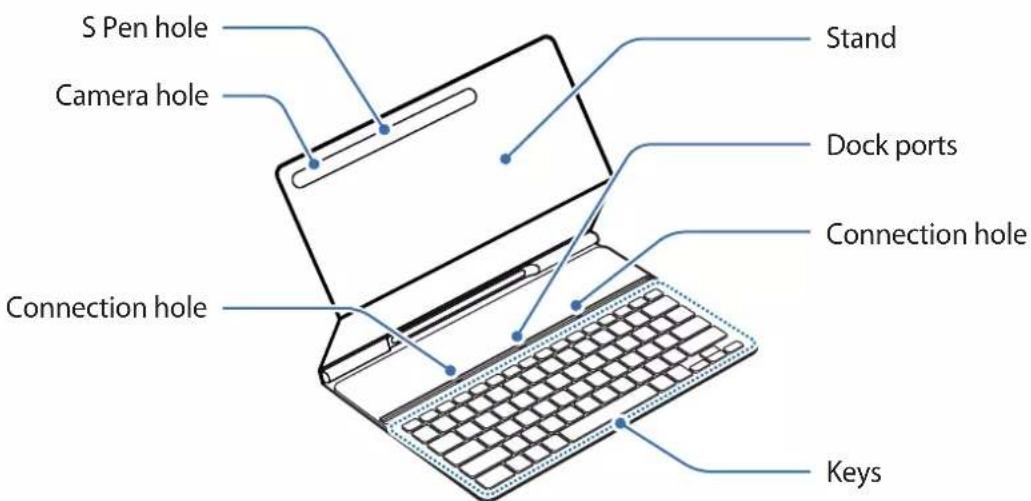
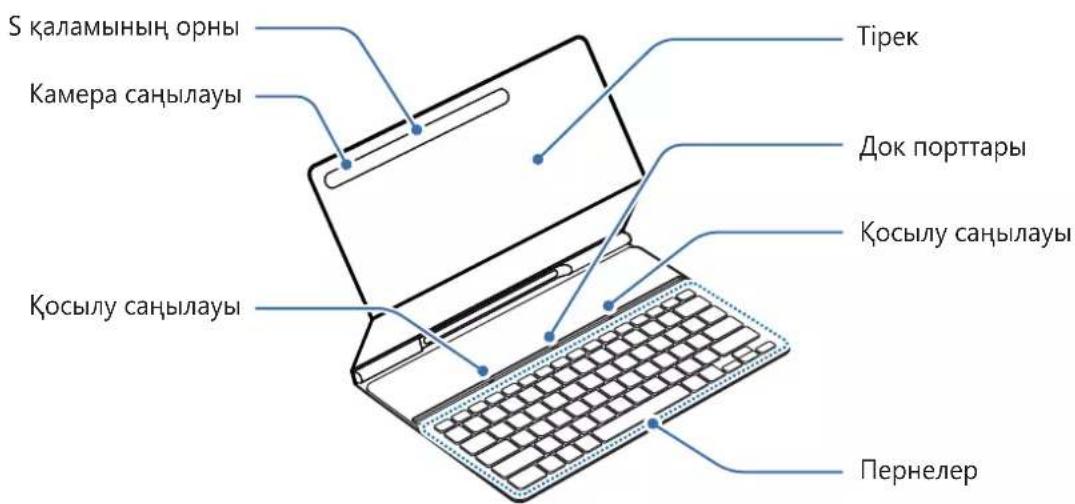
Using the Keyboard
Connecting the keyboard
1 Position the tablet's rear camera to insert it into the camera hole and put the tablet in the stand.
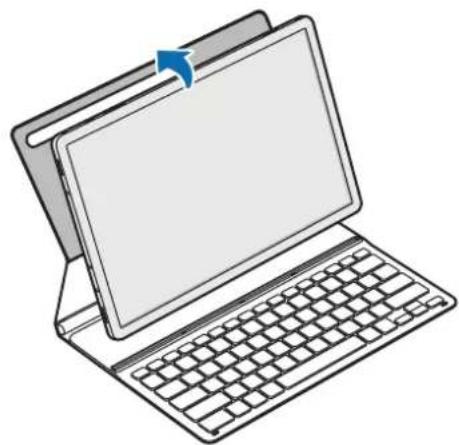
2 Insert the tablet into the connection hole to meet the tablet's connectors and the dock ports.
You can use the keyboard instantly.
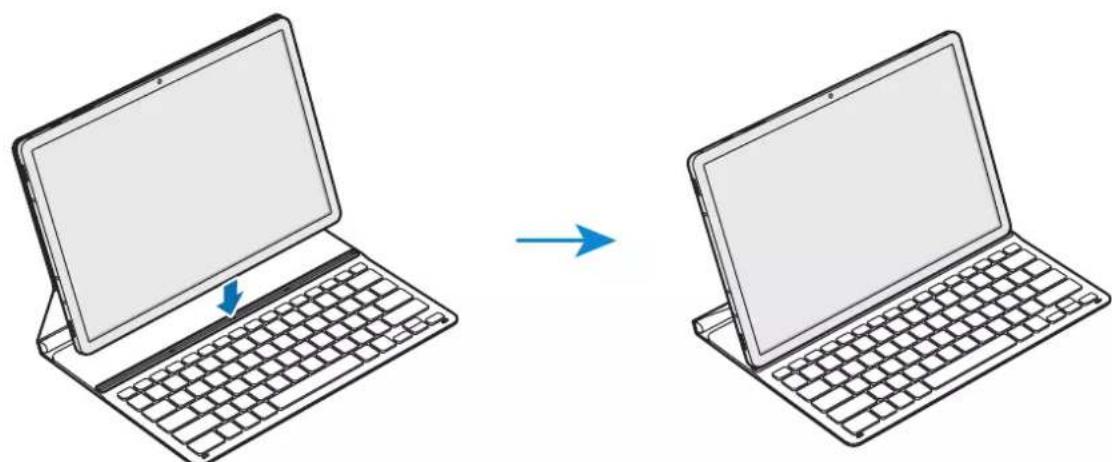

You can use the keyboard as a screen cover. The screen turns off when you cover it with the keyboard, and it turns on when you open the keyboard.

Do not apply excessive pressure on the keyboard while covering the tablet's screen. Doing so may cause screen damage.
Using the keys
Set the input language on the tablet before you use the keyboard. For more information about setting the input language, refer to the tablet's user manual.
EF-DT630:
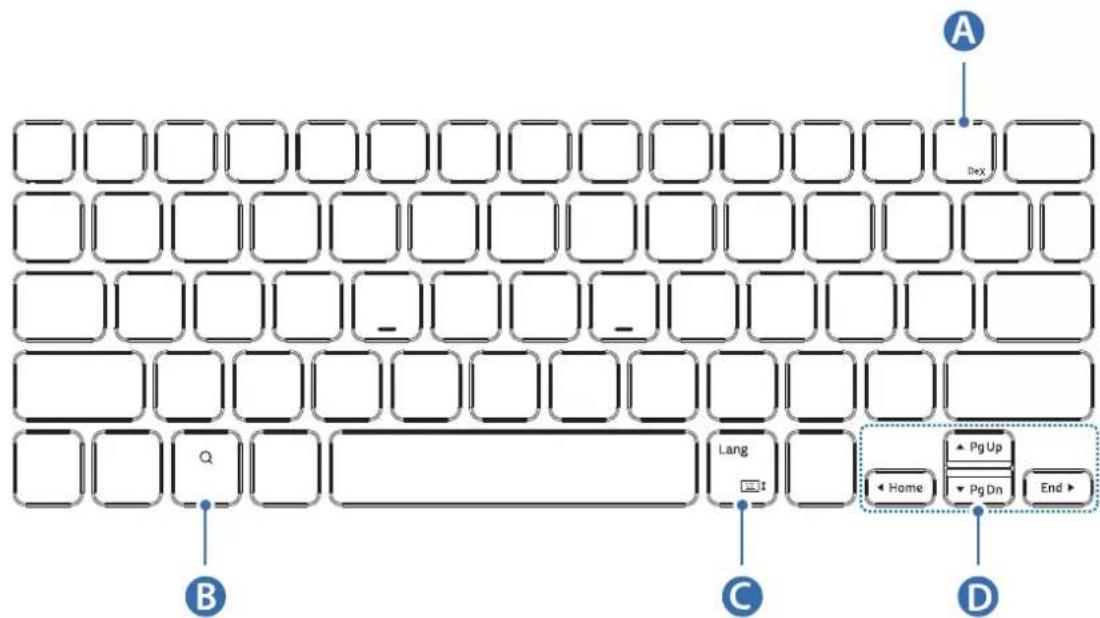
| A | • [Fn] + [DeX]: Launch or close Samsung DeX. |
| B | • Search the contents. |
| C | • [Lang]: Change between input languages. • [Fn] + □: Able or disable the on-screen keyboard. |
| D | • ▲/▼ / △/▲: Move cursor or system caret; • [Fn] + [▲]: Page Up • [Fn] + [▼]: Page Down • [Fn] + [▲]: Home • [Fn] + [▷]: End |
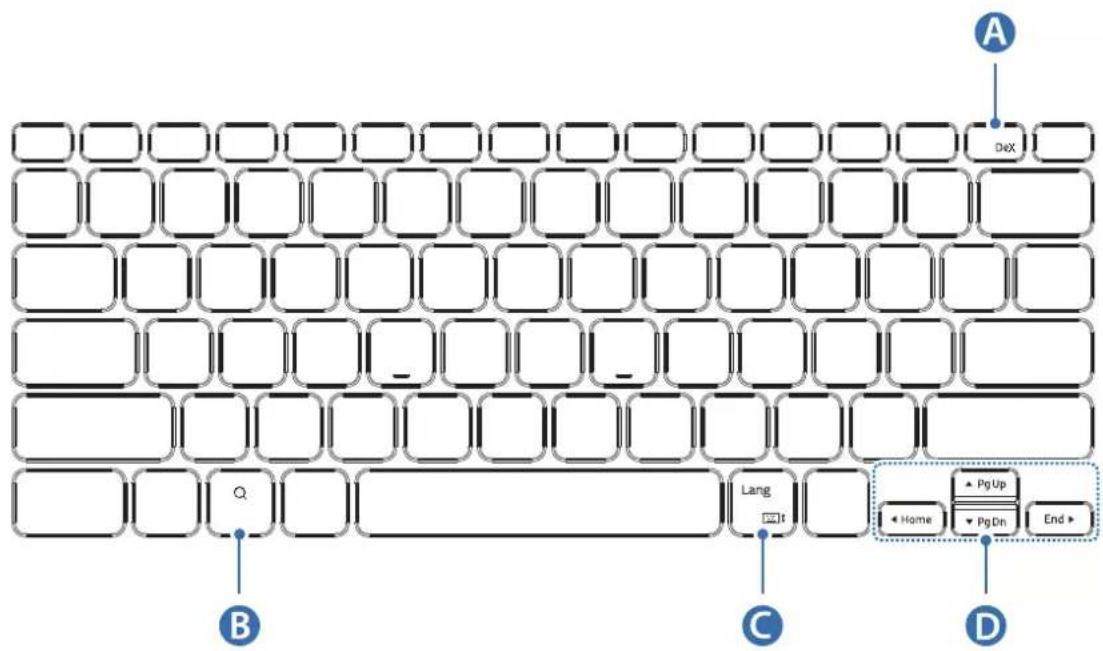
EF-DT730:
| A | • [Fn] + [DeX]: Launch or close Samsung DeX. |
| B | • Search the contents. |
| C | • [Lang]: Change between input languages. • [Fn] + :Enable or disable the on-screen keyboard. |
| D | • ▲/▼ / △/▶: Move cursor or system caret; • [Fn] + [▲]: Page Up • [Fn] + [▼]: Page Down • [Fn] + [▲]: Home • [Fn] + [▶]: End |
For more information about Samsung DeX, refer to the tablet's user manual.
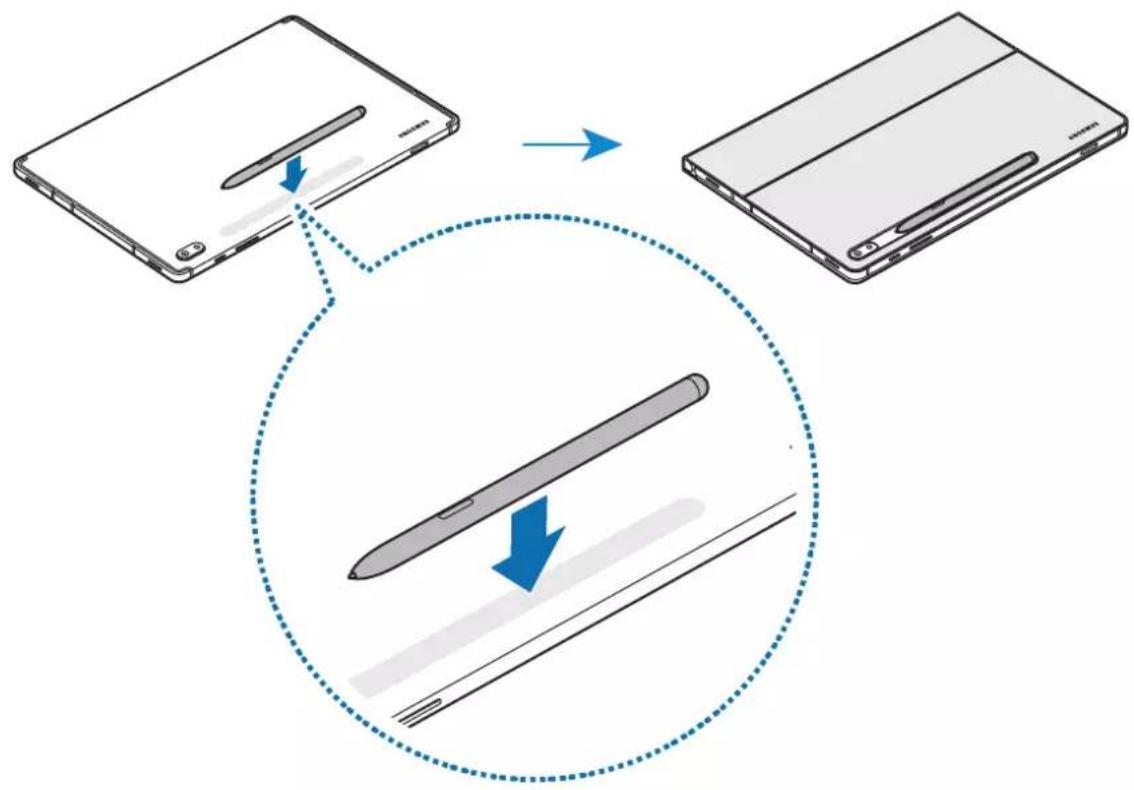
Attaching the S Pen
Attach the S Pen to the tablet as shown in the image below.
You can also attach the S Pen after covering the keyboard cover.
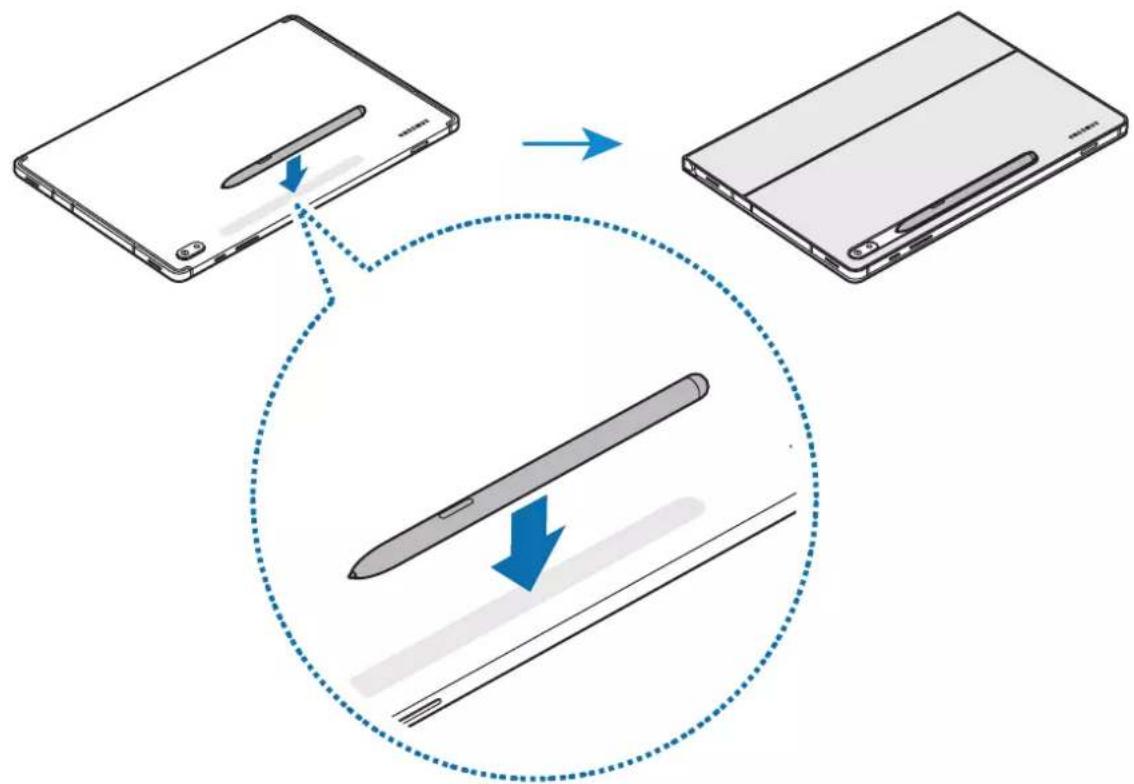

Make sure to place the nib of the S Pen to face the camera. The S Pen will not charge if it is misplaced.
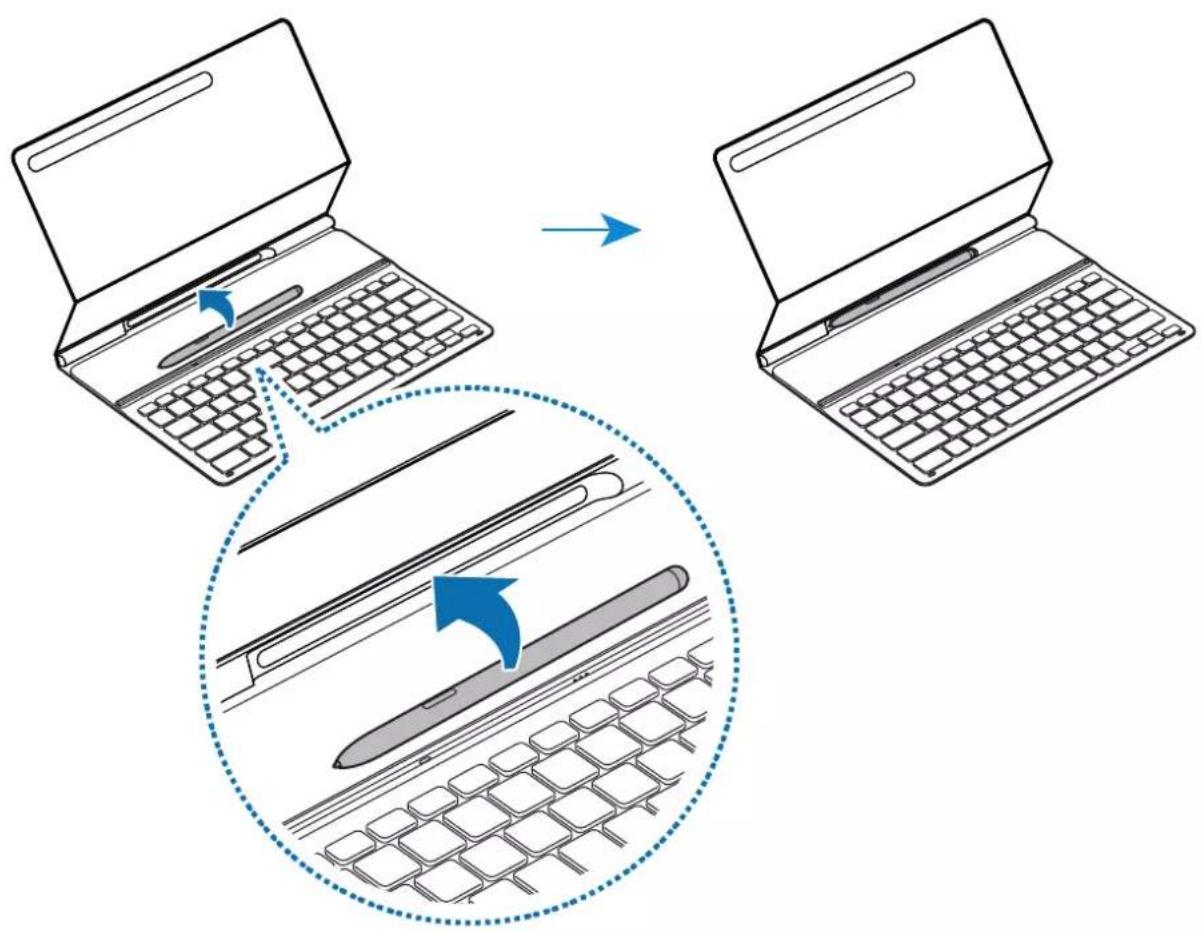
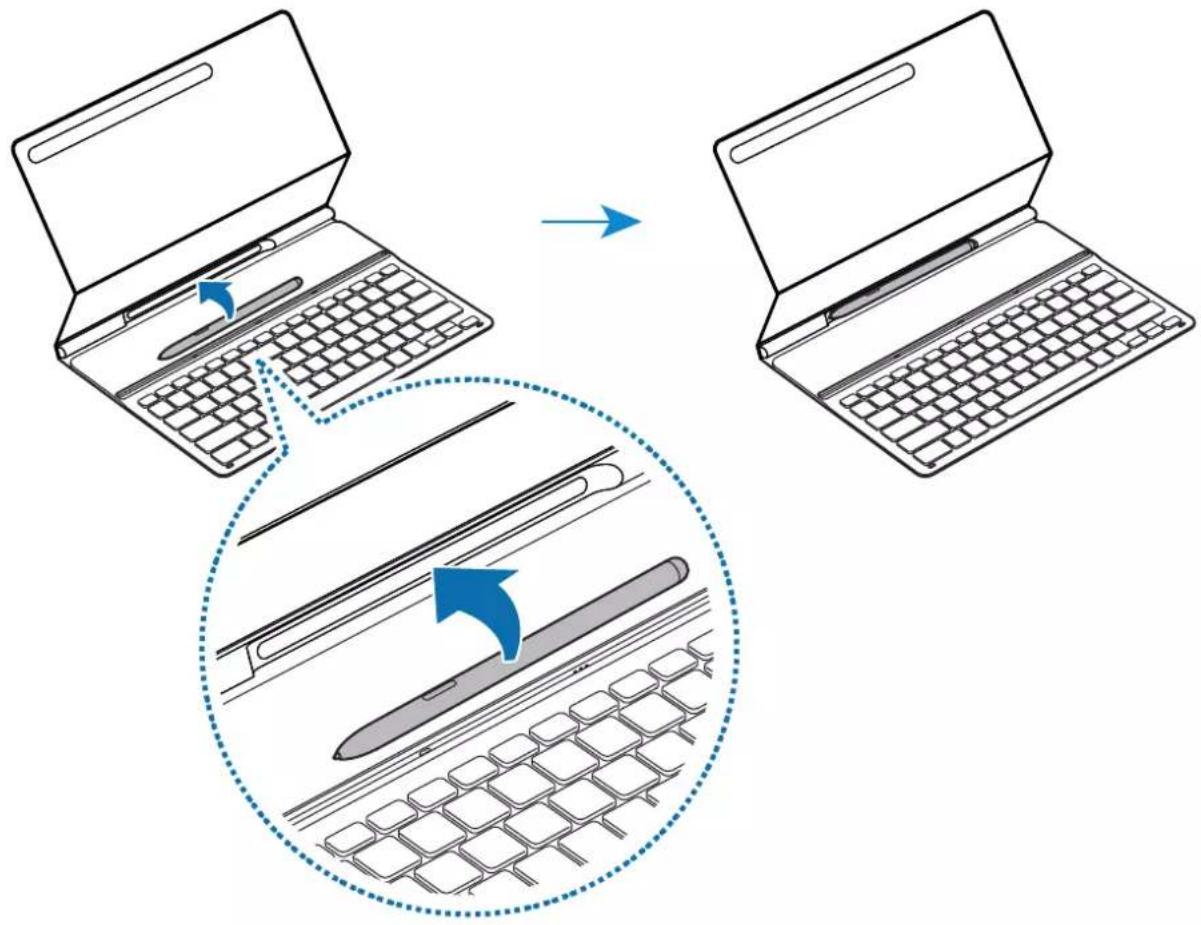
Storing the S Pen
Store the S Pen as shown in the image below.
Copyright
Copyright © 2021 Samsung Electronics Co., Ltd.
This user manual is protected under international copyright laws.
No part of this manual may be reproduced, distributed, translated, or transmitted in any form or by any means, electronic or mechanical, including photocopying, recording, or storing in any information storage and retrieval system.
Trademarks
- SAMSUNG and the SAMSUNG logo are registered trademarks of Samsung Electronics Co., Ltd.
- All other trademarks and copyrights are the property of their respective owners.
Leer primo
Copyright © 2021 Samsung Electronics Co., Ltd.
Copyright © 2021 Samsung Electronics Co., Ltd.
本使用者手册受國際著作權法所保護。
1 正:
孫的:賊藥藻藻藻藻藻藻藻藻藻藻藻藻藻藻藻藻藻藻藻藻藻藻藻藻藻藻藻藻藻藻藻藻藻藻藻藻藻藻藻藻藻藻藻藻藻藻藻藻藻藻藻藻藻藻藻藻藻藻藻藻藻藻藻藻藻藻藻藻藻藻藻藻藻
日 啦阿杜::樂藥土,早歌,,,,,,,,,,,,,,,,,,,,,,,,,,,,,,,,,,,,,,,,,,,,,,,,,,,,,,,,,,,,,,,,,,,,,
製作bohydrate
kgengx
- kibodt kibit
- [-]
