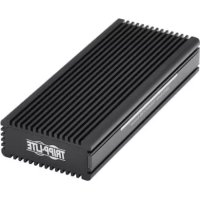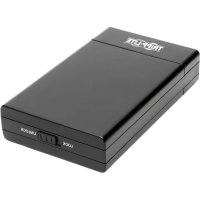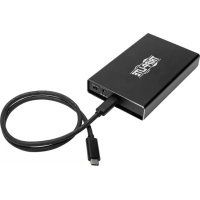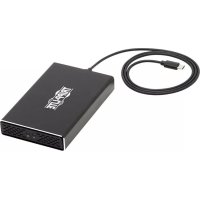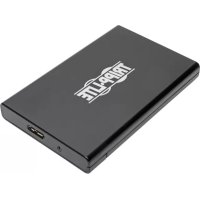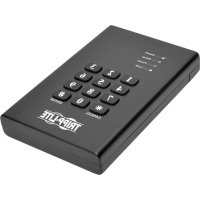
U357025SEC - External hard drive enclosure Tripp Lite - Free user manual and instructions
Find the device manual for free U357025SEC Tripp Lite in PDF.


| Product Type | External hard drive enclosure with hardware encryption |
| Brand | Tripp Lite |
| Model | U357-025-SEC |
| Interface | USB 3.0 (backward compatible with USB 2.0 and 1.1) |
| Host Connector | USB Micro-B female |
| Compatible Drives | SATA 2.5" hard drive (HDD/SSD) – SATA I/II/III, max height 9.5 mm |
| Maximum Tested Capacity | 2 TB |
| Encryption | Real-time AES 256-bit |
| Security | Keypad lock with 4-6 digit password |
| LED Indicators | Red (locked), Green (power/data), Orange (configuration), Blue (unlocked) |
| Transfer Speed | Up to 5 Gbps (USB 3.0); UASP support for enhanced performance |
| Power | Bus-powered (no external power required) |
| Operating Temperature | 10 to 50°C |
| Operating Humidity | 10 to 80% RH |
| System Compatibility | All operating systems supporting USB |
| Package Contents | Enclosure, USB 3.0 Micro-B cable (0.61m), user manual |
| Warranty | 1-year limited |
Frequently Asked Questions - U357025SEC Tripp Lite
User questions about U357025SEC Tripp Lite
0 question about this device. Answer the ones you know or ask your own.
Ask a new question about this device
Download the instructions for your External hard drive enclosure in PDF format for free! Find your manual U357025SEC - Tripp Lite and take your electronic device back in hand. On this page are published all the documents necessary for the use of your device. U357025SEC by Tripp Lite.
USER MANUAL U357025SEC Tripp Lite
USB 3.0 to SATA Encrypted Hard Drive Enclosure with Keypad Lock
Model: U357-025-SEC
Register your product for quicker service and ultimate peace of mind.
You could also win an ISOBAR6ULTRA surge protector—a $100 value!
www.triplite.com/warranty


Manufacturing
1111 W. 35th Street, Chicago, IL 60609 USA www.triplite.com/support
Copyright © 2016 Tripp Lite. All rights reserved.
Package Contents
U357-025-SEC
- USB 3.0 A to Micro-B Device Cable - 2 ft.
- Owner's Manual
Product Features
- Enclosure quickly turns any 2.5" internal SATA hard drive into an external hard drive
Real-time 256-bit AES encryption ensures data is protected - Keypad lock provides password security for important documents and files
- Portable design allows for on-the-go external storage
Supports USB 3.0 data transfer rates up to 5 Gbps; backwards compatible with USB 2.0 and 1.1 - Compatible with SATA I (1.5 Gbps), II (3 Gbps), and III (6 Gbps) hard drives
- Tested with 2.5-inch SATA hard disk drives and solid state drives up to 2 TB
UASP-compatible for up to 70% faster performance - Plug-and-play; no software or drivers required
- No external power required
System Requirements
2.5" SATA Hard Drive
- Computer with an available USB port. A USB 3.0 port is required to achieve maximum speeds.
- 2.5" SATA HDD or SSD with 9.5 mm maximum height
- Compatible with all USB-enabled operating systems
Optional Accessories
- U324-Series USB 3.0 SuperSpeed Extension Cable A/A (M/F)
- U326-Series USB 3.0 SuperSpeed Device Cable A/Micro-B (M/M)
Installation
Notes:
- Once the password is set and data is encrypted, losing the password or hardware failure will result in lost data. Removing the drive and placing it in another enclosure will not allow access to the data. It is recommended that all data stored on the enclosure be backed up to another location regularly to prevent data loss.
-
HDD/SSD drives are sensitive to static electricity and must be handled properly to avoid the risk of data loss. Always handle your HDD/SSD drive with caution by wearing an anti-static strap (such as Tripp Lite P999-000) or touching a grounded metal surface to discharge yourself of static electricity prior to picking up the drive.
-
Slide off the enclosure cover to reveal the drive tray.
- Slide a 2.5" SATA drive into the drive tray. Align the SATA plug on the drive to the SATA connector in the drive tray.
- Slide the enclosure cover back on the unit. Flip the unit over so its keypad faces upward.
- Press and hold the "1" and "3" buttons on the keypad for 20 seconds. At the same time, connect the included USB cable between the USB port on the unit and a USB port on the host computer. The green LED will blink for a moment, then the red and green LEDs will illuminate solid to indicate the unit is ready to be assigned a password.
Installation
- To assign a password, press and hold the * button for 5 seconds or until the orange LED illuminates. Enter your 4 to 6-digit custom password, then hit the # button to enter.
- Once the custom password is entered, the orange LED will shut off, though the password must be reentered for confirmation. If your password is successfully confirmed, the green and blue LEDs will illuminate. If your password confirmation is unsuccessful, the red and green LEDs will illuminate to indicate the passwords do not match.
- After your password is successfully confirmed, the host computer will immediately identify the hard drive connected to the keypad.
- If the SATA drive has not been formatted, you will first need to format it using your computer's Disk Management Utility in order to copy and access files.
- Your enclosure is now ready to read and write data. The green LED will blink to indicate data is being transferred.
Modifying Your Password
To change your password, follow these steps:
- Press and hold the button. At the same time, connect the included USB cable between the USB port on the unit and a USB port on the host computer. After approximately 5 seconds, the red, green and orange LEDs will illuminate.
- Enter the old password and press the “#” button to enter. Only the red and green LEDs will illuminate.
- Enter the new password and press the “#” button to save. The blue LED will blink while the red and green LEDs remain illuminated.
- Reenter the new password and press the "#" button to confirm the password change was successful. The blue LED will blink. The red and green LEDs will then illuminate to indicate a successful password change.
Specifications
| SATA Connection 22-Pin | SATA Data + Power |
| USB Connection USB 3.0 | Micro B (Female) |
| Encryption 256-bit AES | |
| LEDs Lock (Red), | Power/Data (Green), Setup (Orange), Unlock (Blue) |
| Hard Drive Capacity Tested up to 2 TB | |
| Operating Temperature 50° to 122°F (10° to 50°C) | |
| Operating Humidity 10% to 80% RH | |
Warranty and Product Registration
1-Year Limited Warranty
TRIPP LITE warrants its products to be free from defects in materials and workmanship for a period of one (1) year from the date of initial purchase. TRIPP LITE's obligation under this warranty is limited to repairing or replacing (at its sole option) any such defective products. To obtain service under this warranty, you must obtain a Returned Material Authorization (RMA) number from TRIPP LITE or an authorized TRIPP LITE service center. Products must be returned to TRIPP LITE or an authorized TRIPP LITE service center with transportation charges prepaid and must be accompanied by a brief description of the problem encountered and proof of date and place of purchase. This warranty does not apply to equipment, which has been damaged by accident, negligence or misapplication or has been altered or modified in any way. EXCEPT AS PROVIDED HEREIN, TRIPP LITE MAKES NO WARRANTYES, EXPRESS OR IMPLIED, INCLUDING WARRANTY OF MERCHANTABILITY AND FITNESS FOR A PARTICULAR PURPOSE.
Some states do not permit limitation or exclusion of implied warranties; therefore, the aforesaid limitation(s) or exclusion(s) may not apply to the purchaser.
EXCEPT AS PROVIDED ABOVE, IN NO EVENT WILL TRIPP LITE BE LIABLE FOR DIRECT, INDIRECT, SPECIAL, INCIDENTAL OR CONSEQUENTIAL DAMAGES ARISING OUT OF THE USE OF THIS PRODUCT, EVEN IF ADVISED OF THE POSSIBILITY OF SUCH DAMAGE. Specifically, TRIPP LITE is not liable for any costs, such as lost profits or revenue, loss of equipment, loss of use of equipment, loss of software, loss of data, costs of substitutes, claims by third parties, or otherwise.
Warranty and Product Registration
Product Registration
Visit www.triplite.com/warranty today to register your new Tripp Lite product. You'll be automatically entered into a drawing for a chance to win a FREE Tripp Lite product!*
- No purchase necessary. Void where prohibited. Some restrictions apply. See website for details.
FCC Notice, Class B
This device complies with part 15 of the FCC Rules. Operation is subject to the following two conditions: (1) This device may not cause harmful interference, and (2) this device must accept any interference received, including interference that may cause undesired operation.
Note: This equipment has been tested and found to comply with the limits for a Class B digital device, pursuant to part 15 of the FCC Rules. These limits are designed to provide reasonable protection against harmful interference in a residential installation. This equipment generates, uses and can radiate radio frequency energy and, if not installed and used in accordance with the instructions, may cause harmful interference to radio communications. However, there is no guarantee that interference will not occur in a particular installation. If this equipment does cause harmful interference to radio or television reception, which can be determined by turning the equipment off and on, the user is encouraged to try to correct the interference by one or more of the following measures:
- Reorient or relocate the receiving antenna.
- Increase the separation between the equipment and receiver.
- Connect the equipment into an outlet on a circuit different from that to which the receiver is connected.
- Consult the dealer or an experienced radio/TV technician for help.
Warranty and Product Registration
Any changes or modifications to this equipment not expressly approved by Tripp Lite could void the user's authority to operate this equipment.
WEEE Compliance Information for Tripp Lite Customers and Recyclers (European Union)
Under the Waste Electrical and Electronic Equipment (WEEE) Directive and implementing regulations, when customers buy new electrical and electronic equipment from Tripp Lite they are entitled to:
- Send old equipment for recycling on a one-for-one, like-for-like basis (this varies depending on the country)
- Send the new equipment back for recycling when this ultimately becomes waste
Use of this equipment in life support applications where failure of this equipment can reasonably be expected to cause the failure of the life support equipment or to significantly affect its safety or effectiveness is not recommended.
Tripp Lite has a policy of continuous improvement. Specifications are subject to change without notice.

1111 W. 35th Street, Chicago, IL 60609 USA www.triplite.com/support
1111 W. 35th Street, Chicago, IL 60609 EE UU www.triplite.com/support
Copyright © 2016 Tripp Lite.
Todoos扣除reservados.
1111 W. 35th Street, Chicago, IL 60609 EE UU www.triplite.com/support
1111 W. 35th Street, Chicago, IL 60609 USA www.triplite.com/support
1111 W. 35th Street, Chicago, IL 60609 USA www.triplite.com/support
PykoBODCTBO N0lb30BaTeJia
KopnycЖecTKoro ДиCKa C pa3beMaMn USB 3.0 / SATA, B03MOxHocTbIO 施Фованяи 6лOKИрOBКОй KlaBnaTypbl
Modélb: U357-025-SEC
1111 W. 35th Street, Chicago, IL 60609 USA
www.triplite.com/support
OxpanyetcayBTOPCKIM npabom © 2016 Tripp Lite. Pepeneatka 3anpeaetc.
CopejxHmoe ynaKOBKn
- UcTpoIcTBo U357-025-SEC
- Ka6eIb IJIy IIOKIIuOHeHry UcTPOiCTB cpa3bEmaMn USB 3.0 A n Micro-B (dInHa 0,6 m)
PykoBOOCTBO n0lb3OBaTeJIa
XapakTepnCTnKn npOdyKta
Kopnyc 6bictpo npebpaaet IIO60BHyTpEHn3,5-IOMOBbI JxecTKI DnCK SATA BO BHeuHNI XeCTKIN DnCK
- ΜινόροBaHην B peaIbHOM BpeMeHn no 256-6HTHOMy AES-npotoKoJy
- obecneuBaet HadexKHyU 3aIHTy daHHbIX
-БлokирOBka KnaBnatapybI obecneuBaet napoIbHyIO 3aunTy dIy BaXHbIX DOKymeHTOB I aIIOB
- IopTaTnBna KOnCTpyKzna yCtpoiCTBa 06ecneuNbae T Bo3MOxHocTb ero
NCNoIb3OBAHn B KaueCTBe NepeHOCHOro BHeuHero HaKoNTeJIa
- Пордержka ckopoстей пераши данньх до 5 ГиТ/c черз Иntepфс USB 3.0; образ纳я совмость с Иntepфсcamn USB 2.0 и 1.1
Cobmectnmoctb c xecTKIMN dNCKAMN SATAI (1,5Γ6nt/c), II (3Γ6nt/c) n III (6Γ6nt/c)
-Проверен Ha COBMeCTHMOCTb c 2,5-DIOHMOBbIMN JKeCTKUMN DnCKaMNSATA N TBepDoTeNbHbIMN DnCKaMNeMKoCTbI O 2 Tb
- Cobmectnmoctb c npotoKoIom UASP o6ecneuBaet noBbiueHne 6bICTPOeIcTBnHa BeNnHy do 70%
- Поклоченье поTekhoлоги Plug-and-play 6e3 Heo6xOДМоCTИСплььЗОВаня КAKOTO-ПИБО nporpaMMHOrO obecneченЯ Или ДрайВеров.
OTcYCTBHe Heo6xOIMOCn BO BHeHem NCTouHKe PNTaHnA
IJIa n3MeHnna napoB BbINOHNte cneDyUOune DeiCTBnA:
- Haxmte u yepkuaite KhoNky **. OndOBpeMeHNO c 3TUM coeHNITE USB-nopt ycptpoicTBa c USB-noptom roNoBHoro KOMbIOTepa c nOmoU bUS-Ka6eJ, BxOJaIeRo B KOMnJIeKT. IIO nCTeueHnn npImepHo 5 ceKynd 3aropaiTcBcTeOnIOHbIe INDnKaTopbl KpaCHOrO, 3eJeHOrO n opAHXeBOrO UBeTOB.
- Hapepe tapa naponb n noTbepeTe ero haxaTne M KhoNkn "#. Pocne 3toro octao TopeB ToIbKO CBeToIOHbIe INHdkaTopbl KpaCHO r 3eJeHO rBeTOB.
- BBeIte HOBbI napoIb I haxMITE KHOKNy "#" dIra erO coXpaHHeNIA. PocIe 3TOrO NaunHaet MIRaTb CBeToIONoHbI INHnKaTOp cHHeRo UBeTa, a CBEToIONoHbIe INHnKaTOpbI KpaCHOr O 3eJeHOrO cBeTOB npoJOLkaIoT rOpeTb.
- Повторе Ввор Новоги паоли и нажмITE Кногу "#" Дяповторгдени того, чо паоль успшно Измен. Посл eтого начигаet могать сбetoюньи Инданкотор си在现场а. В качеве повторgesеня успшно смени паоля загаются сбetoюньile Инданкоторы КpacHorO n 3eNeHOrOцBEtOB.
TexHnueckneXapaKTepeNCTNUK
1111 W. 35th Street, Chicago, IL 60609 USA
www.triplite.com/support
16-11-238 93-3690_RevA