
HS214 - Soundbar HISENSE - Free user manual and instructions
Find the device manual for free HS214 HISENSE in PDF.
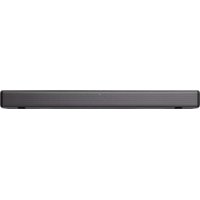



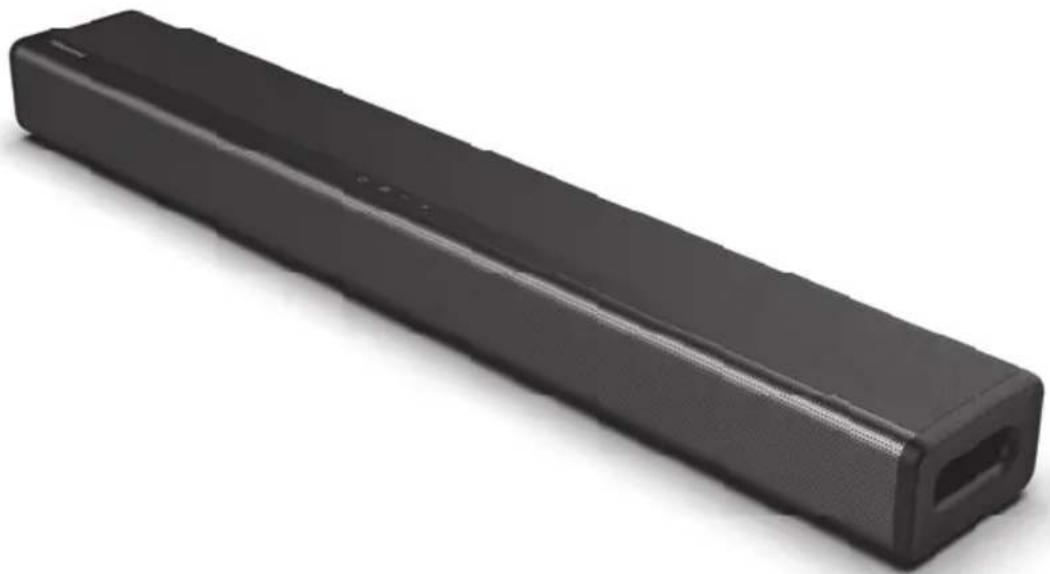
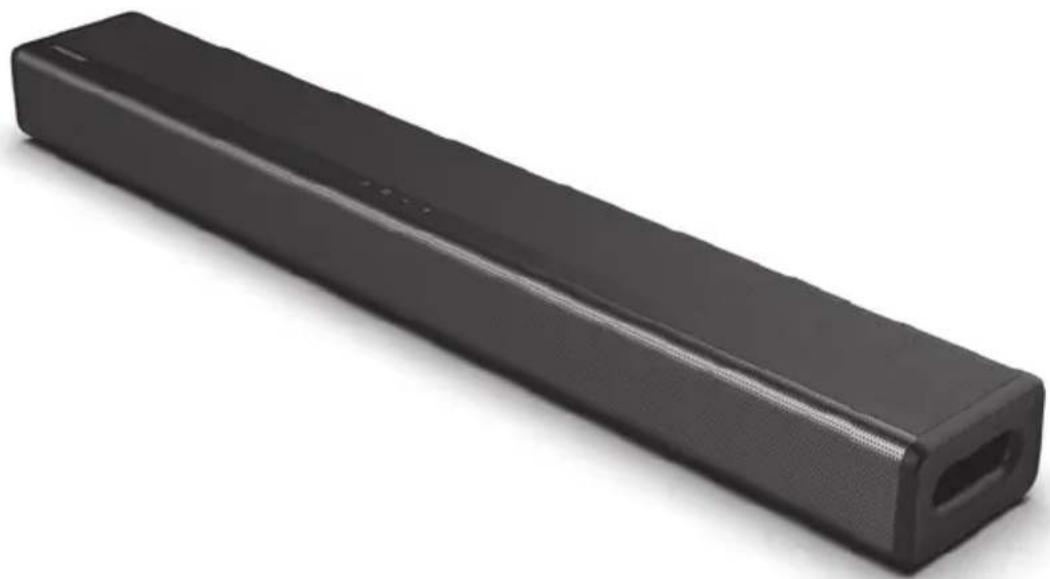
| Product Type | 2.1 Soundbar with built-in subwoofer |
| Brand / Model | Hisense HS214 |
| Dimensions (W × D × H) | 650 × 95 × 61.5 mm (25.59 × 3.74 × 2.42 inches) |
| Net Weight | 2.17 kg (4.78 lbs) |
| Power Supply | 100-240 V AC, 50/60 Hz |
| Power Consumption | 20 W (standby: 0.45 W) |
| Total Output Power | 108 W (54 W + 27 W × 2) |
| Frequency Response | 40 Hz – 20 kHz |
| Impedance | 4 Ω + 8 Ω × 2 |
| Audio Inputs | HDMI ARC, Optical, Coaxial, AUX (RCA / 3.5 mm), USB |
| Bluetooth | Version 4.2, range 8 m, codecs SBC |
| USB Audio Formats | MP3, WAV, WMA, FLAC (FAT32, up to 64 GB) |
| Audio Technologies | Dolby Audio, surround effects, EQ modes (Movie, Music, News) |
| Practical Functions | Auto power on, auto standby (15 min), remote control included |
| Wall Mounting | Possible (fixings not included, integrated wall bracket) |
| Cleaning | Dry soft cloth, no chemical solvents |
| Operating Temperature | Temperate or tropical climate |
| Package Contents | Soundbar, remote control, AAA batteries (×2), EU power cord, user manual |
Frequently Asked Questions - HS214 HISENSE
User questions about HS214 HISENSE
0 question about this device. Answer the ones you know or ask your own.
Ask a new question about this device
Download the instructions for your Soundbar in PDF format for free! Find your manual HS214 - HISENSE and take your electronic device back in hand. On this page are published all the documents necessary for the use of your device. HS214 by HISENSE.
USER MANUAL HS214 HISENSE
2.1 Channel Sound Bar Home Theater System
Model: HS214

Dolby Audio
HDMI
HDMI

Bluetooth
USER MANUAL

Before using the sound bar, please read this manual thoroughly and retain it for future reference.
ENFR
DEIT
SP SL HR
NL
CZ SK
HUPT
SR MK
Contents
Important Safety Instructions 3
Safety 3
EN
Warning. 4
Package Contents 5
Product Diagram 6
Main Unit 6
Remote Control 7
Instructions 7
Prepare the Remote Control 7
Replace the Remote Control Battery. 7
Precautions Concerning Batteries 7
Placement and Mounting. 8
Wall Mounting (if using option-B) 8
Connections 9
Connect to COAXIAL Socket 9
Connect to HDMI ARC Socket 9
Connect to AUX Socket 9
Connect to OPTICAL Socket 10
Connect Power 10
Basic Operation 10
Standby/On 10
Auto Wake 10
How to Enable Auto Wake 10
Automatic Power Off Function 10
Select Modes 10
Adjust the Volume 11
Select a Preset Sound Effect 11
OPTICAL / COAXIAL / HDMI ARC / AUX Operation 11
Bluetooth Operation 11
Pair Bluetooth-enabled Devices 11
Listen to Music from Bluetooth Device 12
USB Operation 12
Troubleshooting 13
Specifications 14
| CAUTION RISK OF ELECTRIC SHOCK DO NOT OPEN | |
| AVIS | |
| RISQUE DE CHOC ÉLECTRIQUE NE PAS PUVRIR |
The lightning flash with arrowhead symbol, within an equilateral triangle, is intended to alert the user to the presence of uninsulated "dangerous voltage" within the product's enclosure that may be of sufficient magnitude as to constitute a risk of electric shock to persons.
The exclamation point within an equilateral triangle is intended to alert the user to the presence of important operating and maintenance (servicing) instructions in the literature accompanying the appliance.
Safety
1 Read these instructions - All the safety and operating instructions should be read before this product is operated. 2 Keep these instructions - The safety and operating instructions should be retained for future reference. 3 Heed all warnings - All warnings on the appliance and in the operating instructions should be adhered to. 4 Follow all instructions - All operating and usage instructions should be followed. 5 Do not use this apparatus near water - The appliance should not be used near water or moisture - for example, in a wet basement or near a swimming pool and the like. 6 Clean only with a dry cloth. 7 Do not block any ventilation openings. Install in accordance with the manufacturer's instructions. 8 Do not install near any heat sources such as radiators, heaters, stoves, or other apparatus (including amplifiers) that produce heat. 9 Do not defeat the safety purpose of the polarized or grounding plug. A polarized plug has two blades with one wider than the other. A grounding plug has two blades and a
third grounding prong. The wide blade or the third prong is provided for your safety. If the provided plug does not fit into your outlet, consult an electrician for replacement of the obsolete outlet.
10 Protect the power cord from being walked on or pinched particularly at plugs, convenience receptacles, and the point where they exit from the apparatus. 11 Only use attachments/accessories specified by the manufacturer.
12 Use only with the cart, stand, tripod, bracket or table specified by the manufacturer, or sold with the apparatus. When a cart or rack is used, use caution when moving the cart/apparatus combination to avoid injury from tip-over. 13 Unplug the apparatus during lightning storms or when unused for long periods of time. 14 Refer all servicing to qualified personnel. Servicing is required when the apparatus has been damaged in any way, such as power supply cord or plug is damaged, liquid has been spilled or objects have fallen into the apparatus, the unit has been exposed to rain or moisture, does not operate normally, or has been dropped. 15 This equipment is a Class II or double insulated electrical appliance. It has been designed in such a way that it does not require a safety connection to electrical earth. 16 The apparatus shall not be exposed to dripping or splashing. No objects filled with liquids, such as vases, shall be placed on the apparatus. 17 Minimum distance around the apparatus for sufficient ventilation is 5 cm. 18 The ventilation should not be impeded by covering the ventilation openings with items, such as newspapers, table-cloths, curtains, etc. 19 No naked flame sources, such as lighted candles, should be placed on the apparatus. 20 Batteries should be recycled or disposed of as per state and local guidelines. 21 The use of apparatus in moderate or tropical climates.
Caution:
- Use of controls or adjustments or performance of procedures other than those described herein, may result in hazardous radiation exposure or other unsafe operation. To reduce the risk of fire or electric shock, do not expose this apparatus to rain or moisture. The apparatus must not be exposed to dripping or splashing and objects filled with liquids, such as vases, must not be placed on apparatus. The mains plug/appliance coupler is used as the disconnect device, the disconnect device must remain readily operable. Danger of explosion if battery is incorrectly replaced. Replace only with the same or equivalent type.
Warning
The battery (batteries or battery pack) shall not be exposed to excessive heat such as sunshine, fire or the like. - Before operating this system, check the voltage of this system to see if it is identical to the voltage of your local power supply. - Do not place this unit close to strong magnetic fields. - Do not place this unit on the amplifier or receiver. - Do not place this unit close to damp areas as the moisture will affect the life of the laser head. If any solid object or liquid falls into the system, unplug the system and have it checked by qualified personnel before operating it any further. - Do not attempt to clean the unit with chemical solvents as this may damage the finish. Use a clean, dry or slightly damp cloth. - When removing the power plug from the wall outlet, always pull directly on the plug, never yank on the cord. Changes or modifications to this unit not expressly approved by the party responsible for compliance will void the user's authority to operate the equipment. - The rating label is pasted on the bottom or back of the equipment.
Dolby Audio
Manufactured under license from Dolby Laboratories. Dolby, Dolby Audio, and the double-D symbol are trademarks of Dolby Laboratories.
Bluetooth
The Bluetooth word mark and logos are registered trademarks owned by Bluetooth SIG., Inc.
WARNING
DO NOT INGEST BATTERY, CHEMICAL BURN HAZARD
If you think batteries might have been swallowed or placed inside any part of the body, seek immediate medical attention. Keep new and used batteries away from children. If the battery compartment does not close securely, stop using the product and keep it away from children. The remote control supplied with this product contains a coin/button cell battery. If the coin/button cell battery is swallowed, it can cause severe internal burns in just 2 hours and lead to death.
WARNING: This product contains chemicals known to the State of California to cause cancer and birth defects or other reproductive harm. For more information: www.watts.com/prop65
Correct Disposal of this product. This marking indicates that this product should not be disposed with other household wastes throughout the EU.
To prevent possible harm to the environment or human health from uncontrolled waste disposal, recycle it responsibly to promote the sustainable reuse of material resources. To return your used device, please use the return and collection systems or contact the retailer where the product was purchased. They can take this product for environmental safe recycling.
Europe-European Union Notice Radio products with the CE alert marking comply with the RED Directive (2014/53/EU) issued by the Commission of the European Community. Frequency range: 2402-2480MHz Versions of software or firmware affecting compliance with essential requirements: HW: HS214-01-A0F Maximum RF output power of the product: +9dBm Accessories/components marketed together: Remote control
Hereby, Hisense International Co., Ltd declares that the 2.1 channel sound bar with built-in subwoofer is in compliance with Directive 2014/53/EU.

HDMI HIGH-DEFINITION MULTIMEDIA INTERFACE
HDMI is a trademark or registered trademark of HDMI Licensing, LLC in the United States and/or other countries.
Package Contents
Main Unit, Remote Control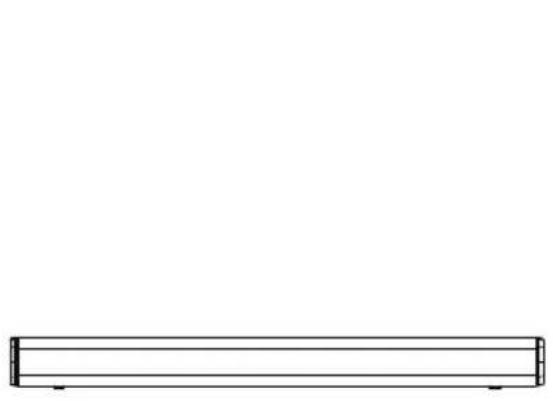
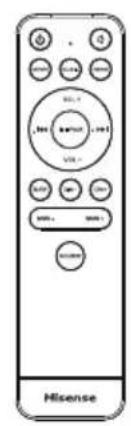
R03 (Size AAA) Battery x2
HDMI Cable
Wall Mounting Kit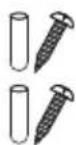
AC Power Cord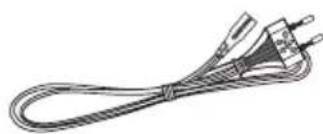
User Manual / Quick Start Guide
- Design and specifications are subject to change without notice.
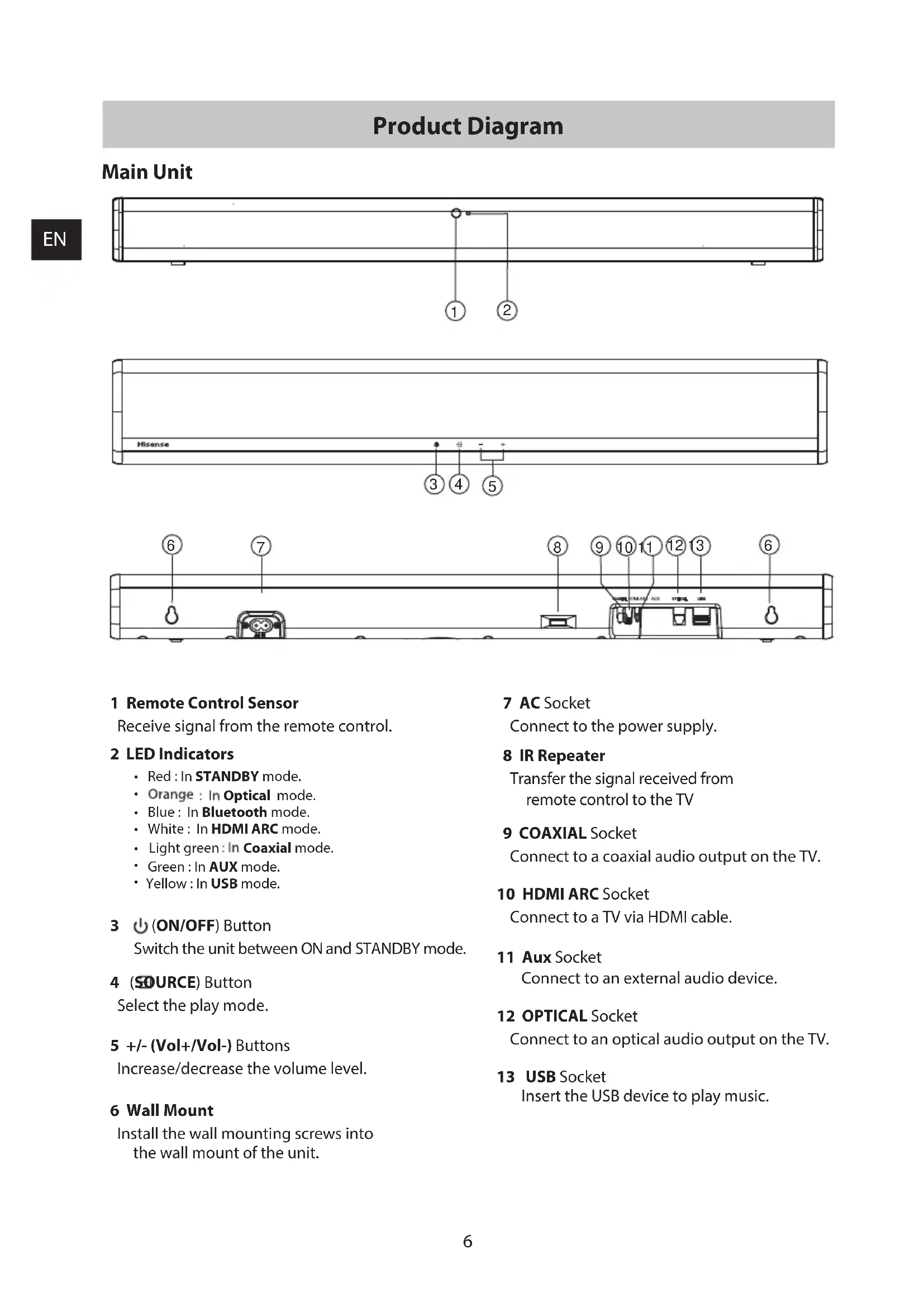
Product Diagram
Main Unit




1. Remote Control Sensor
Receives signal from the remote control.
2 LED Indicators
Red: In STANDBY mode. - Orange: In Optical mode. - Blue: In Bluetooth mode. - White: In HDMI ARC mode. - Light green: In Coaxial mode. - Green: In AUX mode. - Yellow: In USB mode.
3 (ON/OFF) Button
Switch the unit between ON and STANDBY mode.
4 (SOURCE) Button
Select the play mode.
5 +/- (Vol+/Vol-) Buttons
Increase/decrease the volume level.
6 Wall Mount
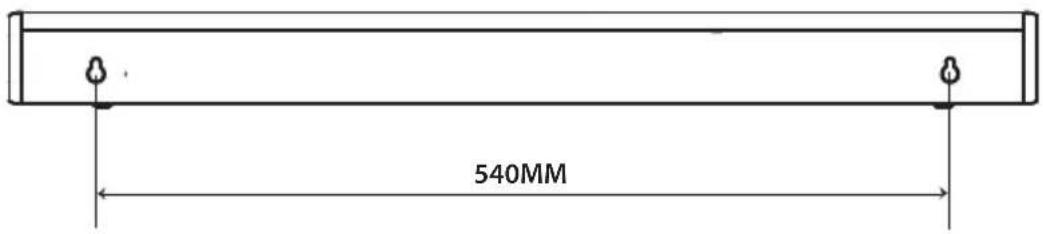
Install the wall mounting screws into the wall mount of the unit.
7 AC Socket
Connect to the power supply.
8 IR Repeater
Transfer the signal received from remote control to the TV.
9 COAXIAL Socket
Connect to a coaxial audio output on the TV.
10 HDMI ARC Socket
Connect to a TV via HDMI cable.
11 Aux Socket
Connect to an external audio device.
12 OPTICAL Socket
Connect to an optical audio output on the TV.
13 USB Socket
Insert the USB device to play music.
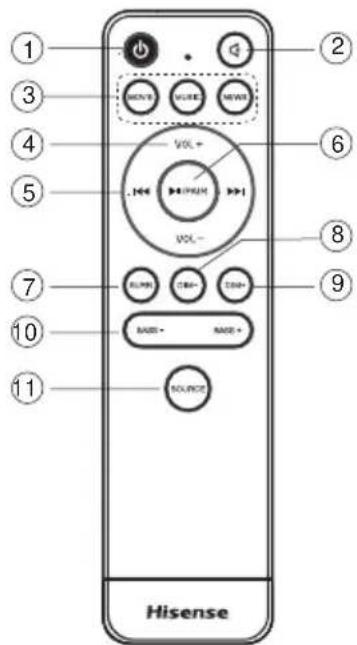
Remote Control
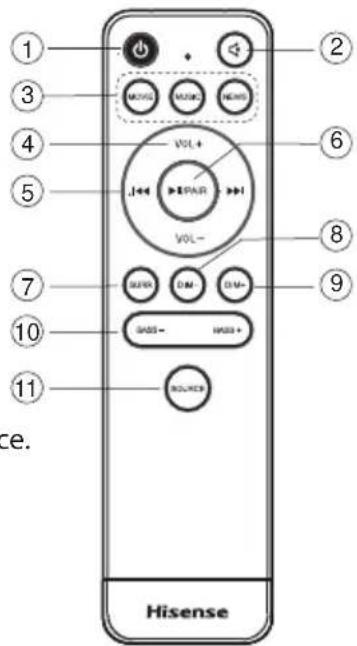
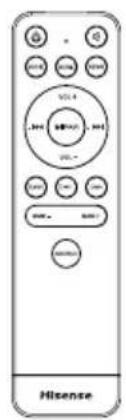
1 (ON/OFF) Switch the unit between ON and STANDBY mode.
2 (MUTE) Mute or resume volume.
3 EQ buttons Select MOVIE/MUSIC/NEWS sound effect.
4 VOL+/VOL- Increase/decrease the volume level.
In Bluetooth/USB mode:
Skip to previous/next track.
6 II/PAIR Play/pause/resume playback in Bluetooth/USB mode. Press and hold to activate the pairing function in Bluetooth mode or disconnect the existing paired Bluetooth device.
7 SURR Adjust the surround ON/OFF.
8 DIM - Decrease the display brightness.
9 DIM + Increase the display brightness.
10 BASS+, BASS- Increase/decrease the bass level.
11 SOURCE Select the play mode.
Instructions
Prepare the Remote Control
The Remote Control allows the unit to be operated from a distance. - Even if the Remote Control is operated within the effective range 26.2 feet (8m), remote control operations may be disrupted if there are any obstacles between the unit and the remote control. If the Remote Control is operated near other products that generate infrared rays, or if other remote control devices using infrared rays are used near the unit, it may operate incorrectly. Conversely, the other products may operate incorrectly.
First-time Use:
Put the 2 x AAA batteries (included) into the remote control before use.
Replace the Remote Control Battery
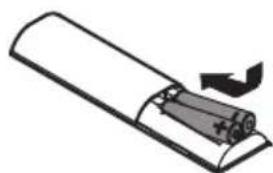
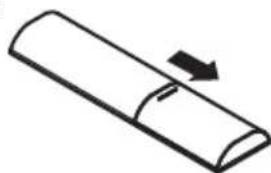
- Push the tab on the side of the battery tray towards the tray and then pull the battery tray out of the remote control.
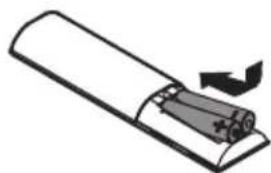
- Remove the old batteries. Place 2 x new AAA batteries into the battery tray with the correct polarity (+/-) as indicated.
- Slide the battery tray back into the slot in the remote control.
Precautions Concerning Batteries
- When the remote control is not to be used for a long time (more than a month), remove the batteries from the remote control to prevent it from leaking.
- If the batteries leak, wipe away the leakage inside the battery compartment and replace the batteries with new ones.
- Do not use any batteries other than those specified.
- Do not heat or disassemble batteries.
- Keep away from heat or moisture.
- Do not carry or store batteries with other metallic objects. Doing so could cause batteries to short circuit, leak or explode.
- Never recharge a battery unless it is confirmed to be a rechargeable type.
Placement and Mounting
Placement
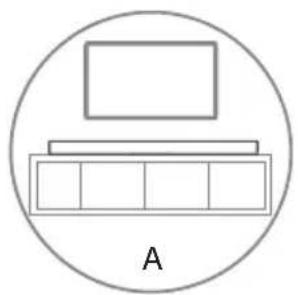
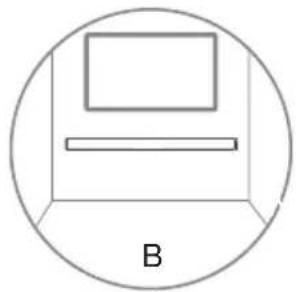
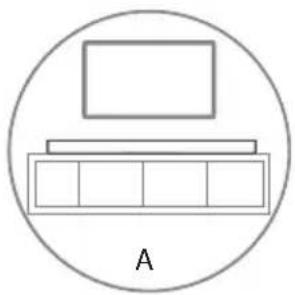
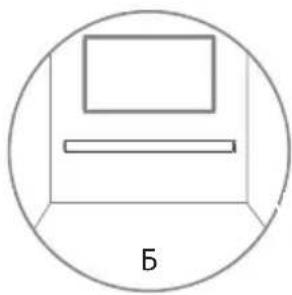
A If your TV is placed on a table, you can place the unit on the table directly in front of the TV stand, centered with the TV screen. B If your TV is attached to a wall, you can mount the unit on the wall directly below the TV screen.
Wall Mounting (if using option-B)
Note:
- Installation must be carried out by qualified personnel only. Incorrect assembly may result in severe personal injury and property damage (if you intend to install this product yourself, you must check for installations such as electrical wiring and plumbing that may be buried inside the wall). It is the installer's responsibility to verify that the wall will safely support the total load of the unit and wall brackets.
- Additional tools (not included) are required for the installation.
- Do not overtighten screws.
- Keep this instruction manual for future reference. Use an electronic stud finder to check the wall type before drilling and mounting.
Connections
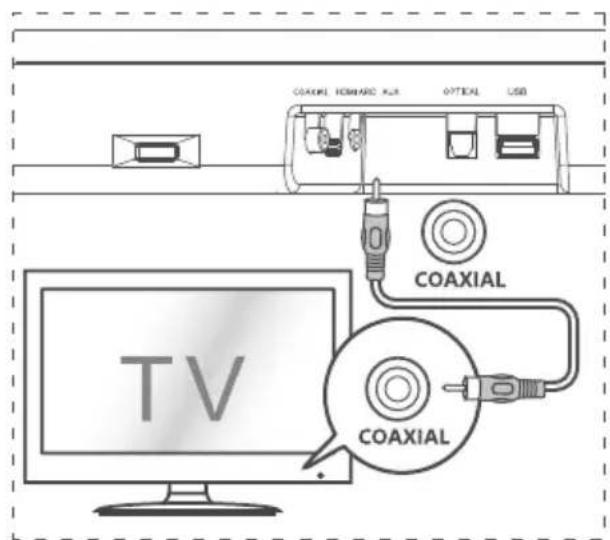
Connect to COAXIAL Socket
- You can use a COAXIAL cable (not included) to connect the TV's COAXIAL OUT socket and the COAXIAL socket on the unit.
Tip:
- While in OPTICAL, HDMI ARC or COAXIAL mode, if there's no sound output from the unit, you may need to activate PCM signal output on your source device (e.g., TV, DVD or Blu-ray player).
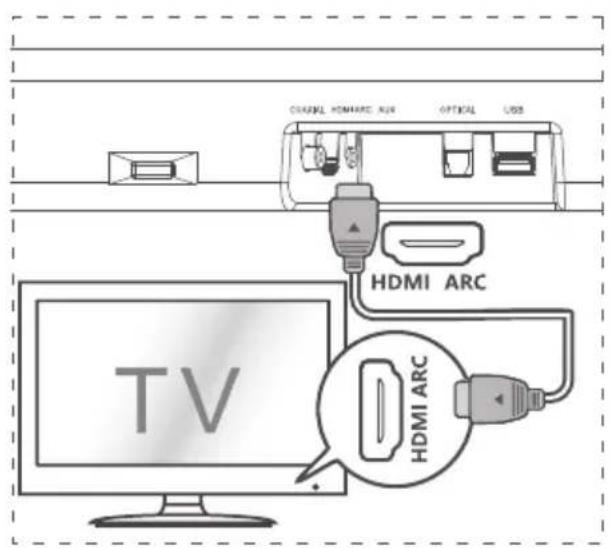
Connect to HDMI ARC Socket
Your Soundbar supports HDMI with Audio Return Channel (ARC). If your TV is HDMI ARC compliant, you can hear the TV audio through your Soundbar by using a single HDMI cable.
1. Use a High Speed HDMI cable to connect the HDMI ARC connector on your Soundbar and the HDMI ARC connector on the TV. - The HDMI ARC connector on the TV might be labelled differently. For details, see the TV user manual. 2. On your TV, turn on HDMI-CEC operations. For details, see the TV user manual.
Tips:
- Your TV must support the HDMI-CEC and ARC function. HDMI-CEC and ARC must be set to On. The setting method of HDMI-CEC and ARC may differ depending on the TV. For details about ARC function, please refer to your TV user manual. Only HDMI 1.4 compatible cables can support the ARC function.
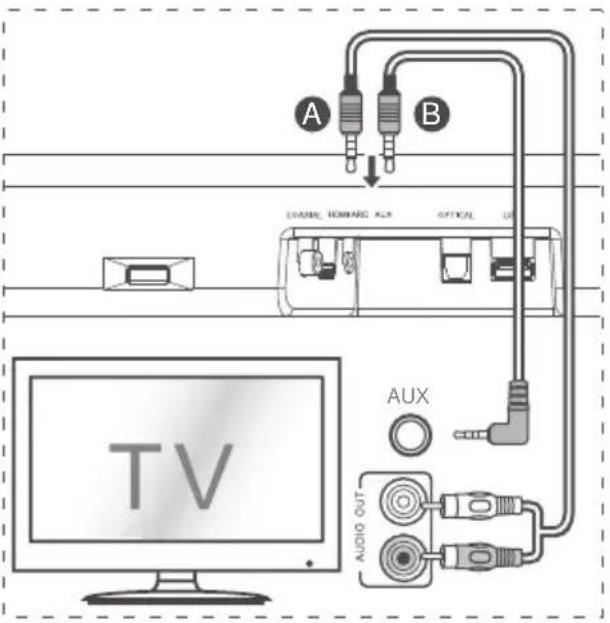
Connect to AUX Socket
A Use a RCA to 3.5mm audio cable (not included) to connect the TV's audio output socket and the AUX socket on the unit. B Use a 3.5mm to 3.5mm audio cable (not included) to connect the TV's or external audio device Aux socket to the Aux socket on the unit.
Connect to OPTICAL Socket
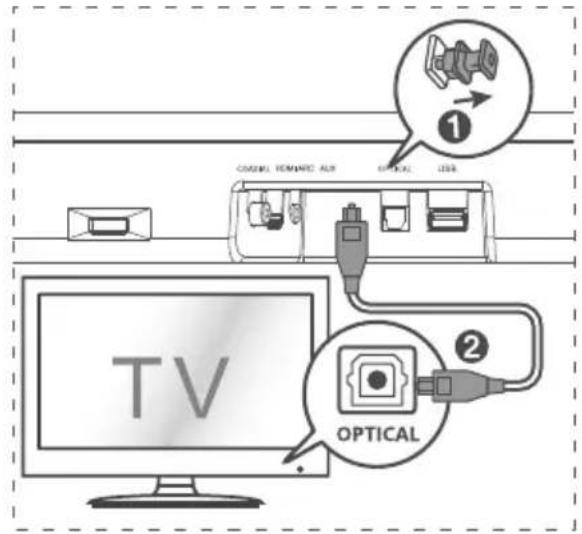
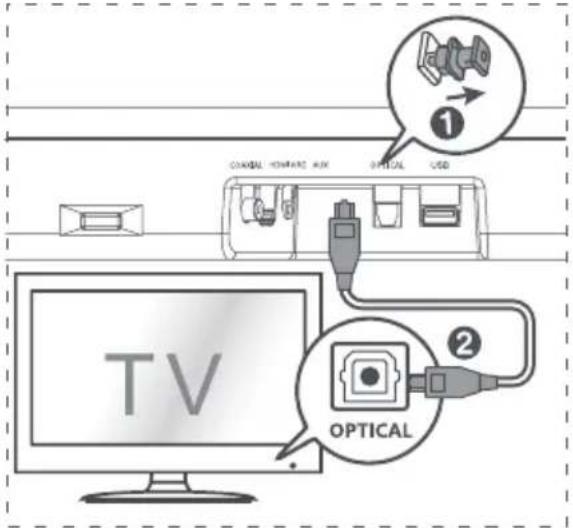
- Remove the protective cap of the OPTICAL socket, then connect an OPTICAL cable to the TV's OPTICAL OUT socket and the OPTICAL socket on the unit.
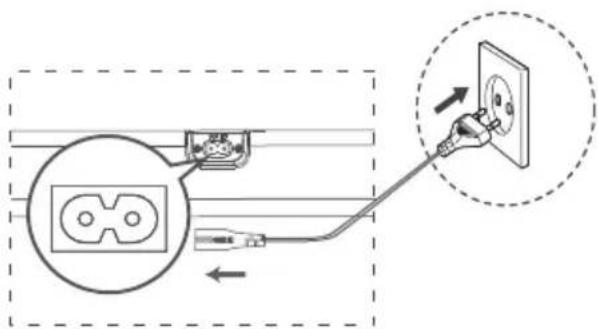
Connect Power
Risk of product damage!
- Ensure that the power supply voltage corresponds to the voltage printed on the back or the underside of the unit. Before connecting the AC power cord, ensure you have completed all other connections.
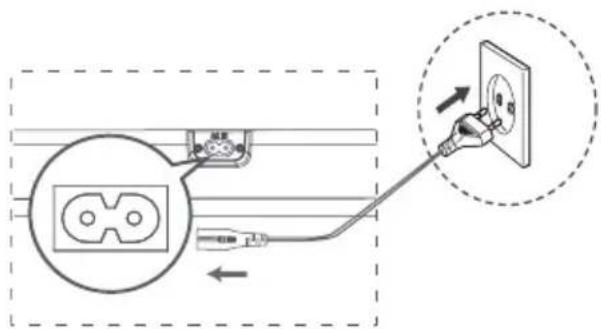
- Connect the mains cable to the AC Socket of main unit and then into a mains socket.
Basic Operation
Standby/On
When you first connect the main unit to the mains socket, the main unit will be in STANDBY mode.
- Press the button on the unit or on the remote control to switch the unit ON.
- Press the button again to switch the unit back to STANDBY mode.
- Disconnect the mains plug from the mains socket if you want to switch the unit OFF completely.
Auto Wake
If a TV or an external device is connected (AUX / OPTICAL / COAXIAL / HDMI ARC), the unit will switch on automatically when the TV or the external device is switched on.
How to Enable Auto Wake
- Short press the (SOURCE) button and + (VOL +) button on the unit to enable or disable Auto Wake function.
- Auto Wake On: white and green LED blink twice
sequentially. While in STANDBY mode, the RED LED is breathing.
- Auto Wake Off: white and red LED blink twice sequentially. While in STANDBY mode, the LED is in solid red.
Automatic Power Off Function
The unit automatically turns to STANDBY mode after about 15 minutes if the TV or the external unit is disconnected or switched off.
- To switch the unit off completely, disconnect the mains plug from the mains socket.
- Please turn the unit off completely to save energy when not in use.
Select Modes
Press the (SOURCE) button repeatedly on the unit or the SOURCE button on the remote control to select the desired mode. The LED indicator on the front of the main unit will show which mode is currently in use.
Adjust the Volume
Press the + / - buttons on the unit or VOL+ / VOL- on the remote control to adjust the volume.
If you wish to turn the sound off, press the mute button on the remote control. Press the mute button again or press the + / - buttons on the unit or VOL+ / VOL- on the remote control to unmute.
Note: While adjusting the volume, the status LED indicator will flash once. When the volume has reached the maximum or minimum level, the status LED indicator will flash quickly.
Select a Preset Sound Effect
While playing, press the NEWS/MOVIE/MUSIC buttons on the remote control to select the preset equalizers:
MOVIE (recommended for watching movies)
MUSIC (recommended for listening to music)
NEWS (recommended for listening to news)
OPTICAL/COAXIAL/HDMI ARC/AUX Operation
1. Ensure that the unit is connected to the TV or audio device. 2. Press the button repeatedly on the unit or the SOURCE button on the remote control to select the OPTICAL, COAXIAL, HDMI ARC, or AUX mode. 3. Operate your audio device directly for playback features. 4. Press the +/- button on the unit or VOL+ / VOL- on the remote control to adjust the volume to your desired level.
Tip:
While in OPTICAL, HDMI ARC, or COAXIAL mode, if there is no sound output from the unit, you may need to activate PCM signal output on your source device (e.g., TV, DVD, or Blu-ray player). For digital audio formats that the unit does not support, the LED light will be purple and blink three times.
Bluetooth Operation
Pair Bluetooth-enabled Devices
The first time you connect your Bluetooth device to this unit, you need to pair your device to this unit.
Note:
The operational range between this unit and a Bluetooth device is approximately 26 feet (8m) (without any object between the Bluetooth device and the unit). Before you connect a Bluetooth device to this unit, ensure you know the device's capabilities. - Compatibility with all Bluetooth devices is not guaranteed. Any obstacle between this unit and a Bluetooth device can reduce the operational range. If the signal strength is weak, your Bluetooth receiver may disconnect, but it will re-enter pairing mode automatically.
1 During ON mode, press the button repeatedly on the unit or the SOURCE button on the remote control to select Bluetooth mode. The Blue indicator light will flash. 2 Activate your Bluetooth device and select the search mode. "Hisense HS214" will appear on your Bluetooth device list. If you cannot find the unit, press and hold the II/PAIR button on the remote control to enter into pairing mode again.
You will hear audio prompt from the unit and the Bluetooth indicator will flash quickly.
3 Select "Hisense HS214" in the pairing list. After audio prompt, the system is successfully connected and the Bluetooth indicator will light up solidly. 4 Play music from the connected Bluetooth device.
To disconnect the Bluetooth function, you can :
- Switch to another source on the unit.
- Disable the function from your Bluetooth device. The Bluetooth device will be disconnected from the unit after audio prompt.
- Press and hold the ▸ /PAIR button on the remote control.
Tips:
- Enter "0000" for the password if necessary.
- If no other Bluetooth device pairs with this unit within two minutes, the unit will recover its previous connection.
- The unit will also be disconnected when your device is moved beyond the operational range. If you want to reconnect your device to this unit, place it within the operational range.
- If the device is moved beyond the operational range, when it is brought back, please check if the device is still connected to the unit.
- If the connection is lost, follow the instructions above to pair your device to the unit again.
Listen to Music from Bluetooth Device
- If the connected Bluetooth device supports Advanced Audio Distribution Profile (A2DP), you can listen to the music stored on the device through the unit.
- If the device also supports Audio Video Remote Control Profile (AVRCP), you can use the unit's remote control to play music stored on the device.
1. Pair your device with the unit. 2. Play music via your device (if it supports A2DP). 3. Use the supplied remote control to control playback (if it supports AVRCP). - To play/pause, press the button on the remote control. - To skip a track, press the next/previous track buttons.
USB Operation
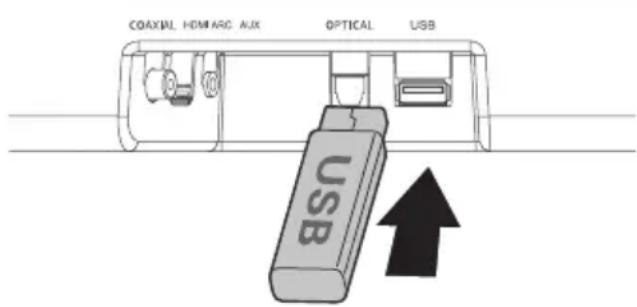
1. Insert a USB device. 2. Press the button repeatedly on the unit or press the SOURCE button on the remote control to select USB mode. 3. During playback:
- To play/pause, press the PAIR button on the remote control.
- To skip to the previous/next track, press the previous/next track buttons on the remote control.
Tip:
The unit can support USB devices with up to 64 GB memory.
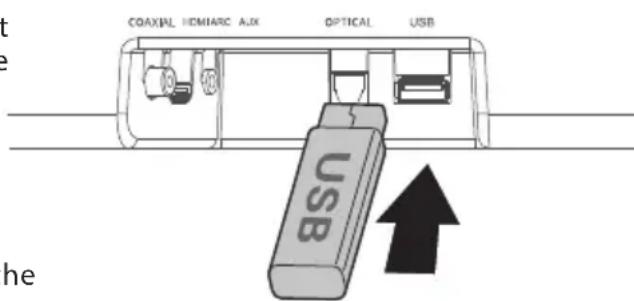
This unit can play MP3, WAV, WMA, and FLAC files. The unit supports FAT32. - Embedded USB full speed host for USB applications should not exceed 6.5 Mbps. For FLAC files, the maximum block size is 8107/8109, and the maximum supported block size is 4608.
Troubleshooting
To keep the warranty valid, never try to repair the unit yourself. If you encounter problems when using this unit, check the following points before requesting service.
No power
- Ensure that the AC power cord of the unit is properly connected.
- Ensure that there is power at the AC outlet.
- Press the standby button to turn the unit on.
Remote control does not work
Before you press any playback control button, first select the correct source. - Reduce the distance between the remote control and the unit. - Insert the batteries with their polarities (+/-) aligned as indicated. - Replace the batteries. - Aim the remote control directly at the sensor on the front of the unit and ensure there is no obstacle between the remote control and the unit.
No sound
- Increase the volume. Press VOL+ on the remote control or + on the unit.
- Press the mute button on the remote control to ensure the soundbar is not muted.
- Press the SOURCE button to select a different input source.
- When using either of the digital inputs, if there is no audio:
Try setting the TV output to PCM or connect directly to your Blu-ray/other source. Some TVs do not pass through digital audio.
- Your TV may be set to variable audio output. Ensure that the audio output setting is set to FIXED or STANDARD, not VARIABLE. Refer to your TV's user manual for more detailed information.
- If using Bluetooth, ensure that the volume on your source device is turned up and the device is not muted.
I can't find the Bluetooth name of this unit on my Bluetooth device for Bluetooth pairing
- Ensure the Bluetooth function is activated on your Bluetooth device.
- Ensure you have paired the unit with your Bluetooth device.
This is a 15-minute power-off function, one of the ERPII standard requirements for saving power.
- When the unit's external input signal level is too low, the unit will be turned off automatically in 15 minutes. Please increase the volume level of your external device.
Specifications
Model Name HS214
EN
Soundbar
| Power Supply 100-240V~ 50/60Hz | |
| Power Consumption 20W | |
| Standby Power 0.45W | |
| USB Port for Playback USB Compatibility USBPlayback Support/File Formats | 5V Hi-Speed USB (2.0) / FAT32 WAV、MP3、WMA、FLAC |
| Dimension (WxDxH) 25.59 x 3.74 x 2.42 inches / (650 x 95 x 61.5 mm) | |
| Net Weight 4.78 lbs (2.17kg) | |
| Impedance 4Ω+8Ω x 2 | |
| Frequency Response 40Hz-20KHz | |
Wireless Specification
Remote Control
| Bluetooth Version V4.2 | |
| Bluetooth Maximum Power Transmitted (EU) | 9dBm |
| Frequency Bands 2402 ~ 2480 MHz |
Amplifier (Output power)
Total 108W
54W + 27W x 2
Distance/Angle 8m / ±30°; 90°
Battery Type AAA Zn-Mn battery
Wall mount kit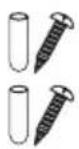
HDMI cable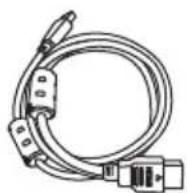
2.1 Channel Sound Bar Home Theater Model: HS214
Dolby Audio
HDMI HIGH-DEFINITION MULTIMEDIA INTERFACE
Bluetooth
USER MANUAL

Before using the sound bar, please read this manual carefully and keep it for future reference.
Contents
Maximum RF power transmitted by the product: +9 dBm
Accessories/components sold separately: Remote control
Hereby, Hisense International Co., Ltd declares that the 2.1 channel soundbar with wireless subwoofer is in compliance with Directive 2014/53/EU.

HDMI
HDMI is a trademark or registered trademark of HDMI Licensing, LLC in the United States and/or other countries.
Package Contents
MK

Remote control (battery AAA) ×2
Mounting kit for the device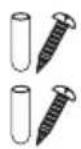
HDMI cable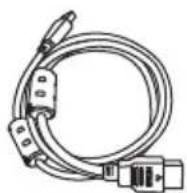
Cable for power supply with EU standard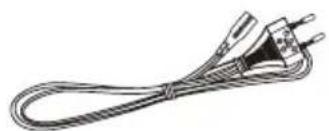
User manual / Quick guide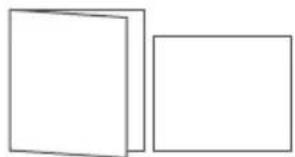
Design and specifications are subject to change without prior notice.
Connection diagram
Main unit

MK


1 Remote control sensor
Receives signal from the remote control.
2 Indicators
Red: Standby. - Orange: Power on. Blue: Bluetooth. - Green: HDMI ARC mode. Light green: In standby mode. Green: In power on mode. Red: In standby mode.
3 Button (ON/OFF)
To switch the unit between standby and power on.
4 Button (SOURCE)
Input for insertion.
5 End + / - (Vol+/Vol-)
To adjust the volume level.
6 SNI mounting
Follow the instructions for mounting the SNI on the bracket or on the device.
7 Power cord
Connects to electrical power.
8 MIO repeat
This repeats the signal from the remote control of the television to the television.
9 Coaxial connector
Connects to a coaxial audio output of the television.
10 HDMI ARC connector
Connects the television via HDMI cable.
11 AUX connector
Connecting an external audio device.
Use the buttons on the device to adjust the volume.
13 All buttons
Press the USB button to reproduce music.
MK
Remote control
1 (ON/OFF) To turn the unit on or off, press the button.
2 (MUTE) To mute or unmute the sound.
3 EQ to select sound effects for FILM/MUSIC/NEWS.
4 VOL+/VOL- to increase/decrease the volume.
5 In Bluetooth/USB mode: skip to previous/next track.
6 Play/pause/resume playback in Bluetooth/USB mode. Press and hold to activate the pairing function in Bluetooth mode or to disconnect the paired Bluetooth devices.
7 SURr to turn the surround sound on/off.
8 DIM- to decrease the screen brightness.
9 DIM+ to increase the screen brightness.
10 BASS+, BASS- To adjust the bass level.
11 SOURCE To select the input source.
Device
Preparing the remote control
The remote control allows the unit to be operated from a distance.
If the remote control is operated within the effective range of 26.2 ft (8 m), operations with the remote control may be performed if there are no obstacles between the unit and the remote control. If the remote control is operated near other products that generate infrared radiation, or other devices that use infrared radiation, the unit may not operate correctly. Conversely, other products may not operate correctly.
First-time use:
Insert 2 x AAA batteries (included) into the remote control before using it.
①
②
Replacing the remote control battery
- 1. Slide the latch on the battery compartment cover and pull out the battery holder from the remote control. 2. Remove the old batteries. Insert 2 x new AAA batteries into the battery holder with the correct polarity (+/-) as indicated. 3. Slide the battery holder back into the battery compartment of the remote control.
Battery precautions
③ When the remote control is not used for a long time (more than a month), remove the batteries from the remote control to prevent them from leaking. If the batteries leak, wipe the leaked liquid from the battery compartment and replace the batteries with new ones. - Do not use batteries other than those specified. Do not heat or dispose of batteries in fire. - Keep batteries away from heat or fire. Do not carry or store batteries with other metal objects. This may cause short-circuiting, leaking, or explosion. Never recharge the battery unless it is confirmed to be rechargeable.
Installation / Mounting
The TV stand can be placed on the floor, or you can place the stand directly in front of the TV, aligned with the TV screen. If the TV is mounted on a wall, you can mount the stand directly below the TV.
MK
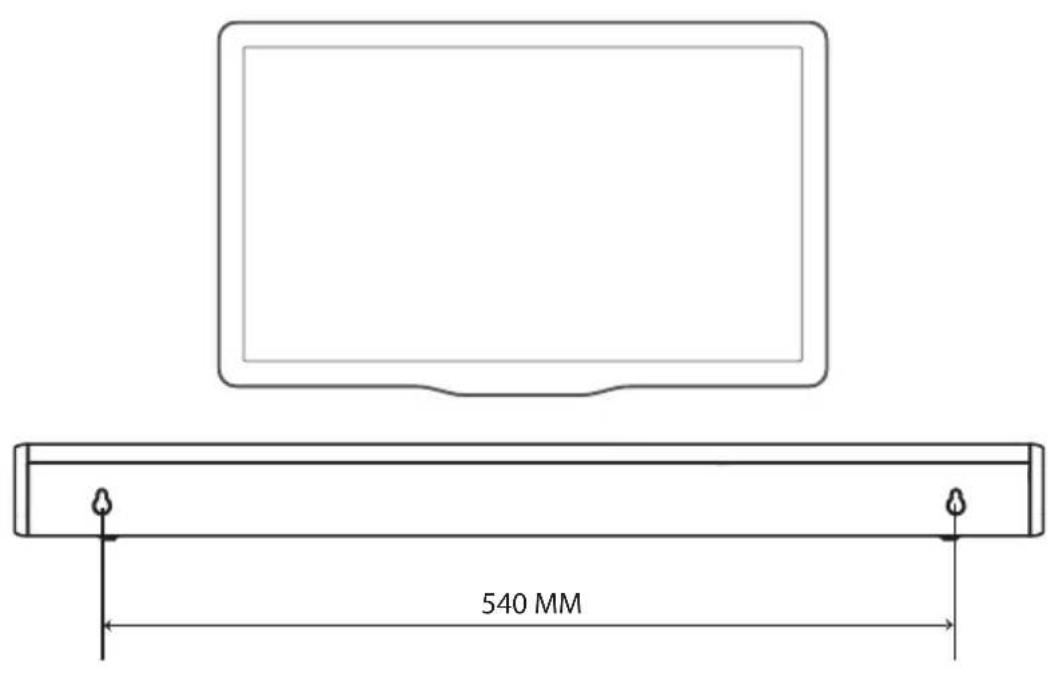
Mounting the stand (if using the optional wall mount)
Note:
- Installation must be performed only by qualified personnel. Incorrect mounting may cause serious injury or damage to the unit (if you want to install the product yourself, you must check the installation conditions such as electrical installation and water installation that can be connected inside the unit). The installer is responsible for ensuring that the unit is safely supported by the entire load from the unit and the brackets for the unit.
- For mounting, the necessary tools are required (not included). -Do not cut the cables.
- Keep this manual for future reference.
- Use the column guides to check the depth of the unit before mounting.
MK
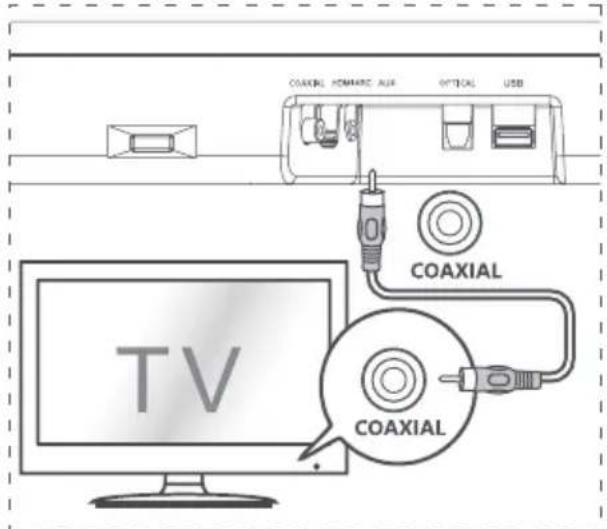
Connecting the COAXIAL connector
- You can use a COAXIAL cable (not included) to connect the COAXIAL output on the TV to the COAXIAL OUT (coaxial) connector on the unit.
Tip:
-If the unit is in OPTICAL, HDMI ARC, or COAXIAL mode and there is no sound from the unit, you may need to activate the PCM output on your source device (e.g., TV, DVD, or Blu-ray player).
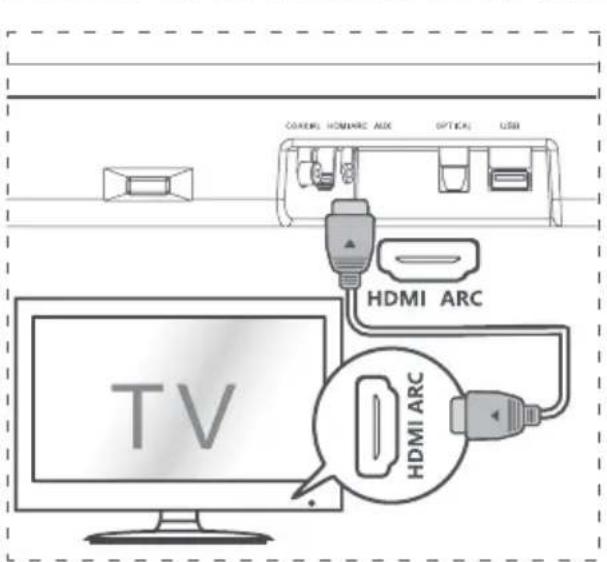
Connecting the HDMI ARC connector
Soundbar supports ARC (Audio Return Channel). If your TV is HDMI ARC compatible, you can listen to TV audio through the Soundbar using a single HDMI cable.
1 Use a high-speed HDMI cable to connect the HDMI ARC connector on your Soundbar to the HDMI ARC connector on the TV. - The HDMI ARC connector on the TV may be labeled. For details, see the TV user manual. 2 Turn on your TV and enable HDMI-CEC. For details, see the TV user manual.
Tips:
- The TV must support HDMI-CEC and ARC functions. HDMI-CEC and ARC must be set to On. - The setting method for HDMI-CEC and ARC may vary depending on the TV. For details on the ARC function, refer to the TV user manual. - Only HDMI 4 compatible cables can support the ARC function.
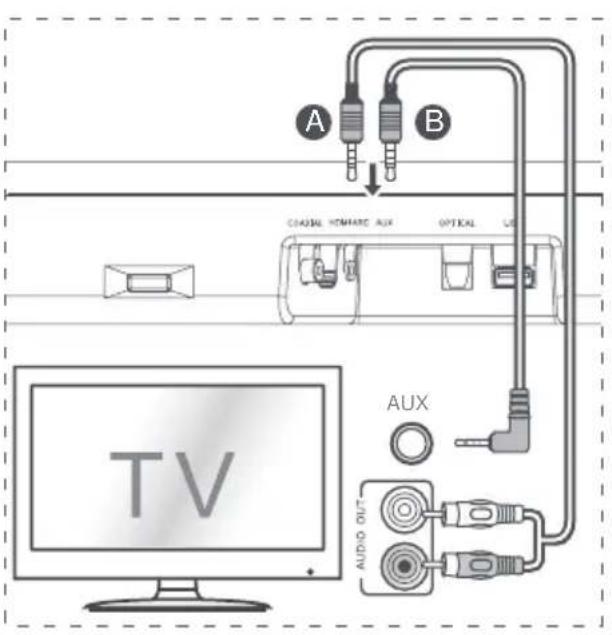
Connecting AUX input
Use an RCA to 3.5 mm audio cable (not included) to connect the audio output connector on the TV to the AUX connector on the unit. Use a 3.5 mm to 3.5 mm audio cable (not included) to connect the AUX connector on the TV or on an external audio device to the AUX connector on the unit.
Connecting optical input
Remove the protective cap from the optical connector, then connect the optical cable to the optical output connector on the TV and the optical connector on the unit.
Connecting power
Risk of product damage!
- Ensure that the power voltage corresponds to the voltage printed on the back or bottom of the unit.
- Before connecting the power cable, make sure you have completed all other connections. Connect the power cable to the AC input on the main unit, then to the electrical outlet.
Basic operations
Standby/On
When you first connect the main unit to the electrical outlet, the main unit will be in standby mode.
- Press the button on the remote control to turn the unit on.
- Press the button again to turn the unit back to standby mode.
- Unplug the power cord from the power outlet if you want to completely disconnect the unit.
Auto standby
- If the TV is turned on and connected (AUX / OPTICAL / COAXIAL / HDMI ARC), the unit will automatically turn on when the TV is turned on.
How to enable auto standby
Briefly press the SOURCE button and the VOL + button on the unit to enable or disable the auto standby function.
- Auto standby enabled: white and green LED will blink alternately. While in standby mode, the LED is red.
- Auto standby disabled: white and red LED will blink alternately. While in standby mode, the LED is steady red.
At maximum/minimum volume, the status LED will blink quickly.
Selecting a preset sound effect
While playing, press the NEWS/MOVIE/MUSIC button on the remote control to select the preset equalizers:
MOVIE (recommended for watching films)
MUSIC (recommended for listening to music)
NEWS (recommended for listening to news)
OPTICAL / COAXIAL / HDMI ARC / AUX
1. Connect the device to the TV or to an audio device. 2. Press the button on the device or the SOURCE button on the remote control several times to select the OPTICAL, COAXIAL, HDMI ARC, or AUX mode. 3. Operate your audio device directly for functional reproduction. 4. Press the +/ - button on the device or VOL+/VOL- on the remote control to adjust the volume of the connected device.
Tips:
-If in OPTICAL, HDMI ARC, or COAXIAL mode there is no sound from the device, you may need to activate PCM output of the signal on your source device (e.g., TV, DVD, or Blu-ray player). If the power supply and input are disconnected, the LED indicator will change in color and the indicator will flash quickly.
Working with Bluetooth
Pair the device with Bluetooth enabled
When you connect your Bluetooth device to this unit for the first time, you need to pair the device with the unit.
Note:
- The operating distance between the unit and the Bluetooth device is approximately 26 feet (8 m) (without any objects between the Bluetooth device and the unit).
- Before using a Bluetooth device with this unit, make sure that you know the capabilities of the device.
- Compatibility with all Bluetooth devices is not guaranteed.
- The distance between this unit and the Bluetooth device may affect the operating range.
- If the signal strength is weak, the Bluetooth receiver may disconnect, but it will automatically re-enter pairing mode.
1. When the unit is on, press the button on the unit or the SOURCE button on the remote control several times to select the Bluetooth mode. The indicator will light up. 2. Activate your Bluetooth device and select the search mode. "Hisense HS214" will appear on your Bluetooth device list. If you cannot find the unit, press and hold the PAIR button on the remote control to re-enter pairing mode.
You will hear audio from the unit, and the Bluetooth indicator will flash quickly.
Press the Hisense HS214" button on the remote control. According to the audio settings, the system is successfully connected, and the Bluetooth indicator lights up constantly. 4 Playing Music from a Connected Device.
To disable the Bluetooth function, you can:
- Switch to another source on the unit. To disable the Bluetooth function, the Bluetooth device will be disconnected from the unit after the audio settings. -Press the II/PAIR button on the remote control.
Tip:
Enter "0000" if a PIN is required. If another Bluetooth device does not pair with this unit within two minutes, the unit will restore the previous connection. - The unit will also turn off when your device is moved out of the operating range. If you want to reconnect your device to this unit, place it within the operating range. If the device is moved out of the operating range, when it returns, check if the device is still connected to the unit. If the connection is lost, follow the
steps above to pair your device with the unit again.
Listening to music from a Bluetooth device
-If the connected Bluetooth device supports the Advanced Audio Distribution Profile (A2DP), you can listen to music stored on the device through the unit. -If the device also supports the Audio/Video Remote Control Profile (AVRCP), you can use the remote control of the unit to play music stored on the device.
1 Pair the device with the unit. 2 Play music through your device (if it supports A2DP). 3 Use the supplied remote control to control playback (if it supports AVRCP). -To play/pause, press the II/PAIR button on the remote control. -To skip to the previous/next track, press the |«,»| buttons on the remote control.
Working with USB
1 Insert the USB device. 2 Press the button on the unit or press the SOURCE button on the remote control to select USB mode. 3 During playback: -To play/pause, press the II/PAIR button on the remote control. -To skip to the previous/next track, press the |«,»| buttons on the remote control.
Tip:
- The unit can support USB devices with memory up to 64 GB.
- This unit can play MP3.
- This unit supports WAV/WMA/FLAC.
- The USB drive must be formatted as FAT32. The USB host connection speed for USB devices must not be lower than 6.5 Mbps.
- The size of the file system block in FLAC format must not exceed 4608 bytes; otherwise, it may cause sound interruptions or no sound.
To ensure the device remains functional, never attempt to repair the unit yourself. If you encounter problems when using this unit, check the following items before requesting service.
No power
Ensure that the unit's power cable is properly connected. - Verify that there is electrical power in the power outlet. - Press the power button to turn on the unit.
The remote control does not work
- First, check the batteries for the remote control; replace them if necessary.
- Reduce the distance between the remote control and the unit.
- Insert the batteries with the correct polarity (+/-) as indicated. Replace the batteries. Point the remote control directly at the sensor on the front of the unit and ensure there are no obstacles between the remote control and the unit.
No sound
Increase the volume. Press VOL+ on the remote control or on the unit. - Ensure that the soundbar is not muted. - Press the SOURCE button to select a different input source. When using connected devices, if there is no audio:
- Make sure to set the TV output to PCM or
- Connect directly to your Blu-ray/DVD source, not through the TV, if the TV lacks digital audio output.
Your TV may be set to variable audio output. Ensure that the audio output setting is set to FIXED or STANDARD, not VARIABLE. For more information, refer to the TV's user manual. - If using Bluetooth, ensure that the volume on your source device is increased and that the device is not muted.
Pair the device with your Bluetooth device via the Bluetooth function on your Bluetooth device.
- Make sure that the Bluetooth function is activated on your Bluetooth device.
- Make sure that you have paired the unit with your Bluetooth device.
This is a function to automatically turn off after 15 minutes, one of the standard ERPII features for energy saving.
When the level of the input signal on the unit is low, the unit will automatically turn off after 15 minutes. Increase the volume on your input device.
Specifications
| Изма мodyен HS214 |
| Сayндбар | |
| Еlektрично наоюваные 100-240 V~50/60 | Hz |
| ПOTROшувачka на[elektрична[eheprиja 20] | W |
| Еlektрична[eheprиja bo podrotbehocst 0,45] | W |
| UCB-Порта за ретрodieкциja Компатибулочь со уCB Посадшика за уCB-ретрodieкциja/Формати на датerteka | 5V UCB co roлема брзINA (2.0) / FAT32 WAV, MP3, WMA, FLAC |
| Димензи (Ш × Д × В) 25,59 × 3,74 × 2,42 и НetoTeXина 4,78 ФунтNi (2,17 кг) | |
| Импесанca 4 Ω+8 Ω × 2 | |
| Φразковциски одровор 40 Hz-20 KHz | |
| Бeзшии спецфikаци | |
| Вероза на Bluetooth V4.2 | |
| Мakсимална(emittува на мokhoeст наBluetooth (ЕY) | 9 dBm |
| Ф配电вenuickи oncesи 2402 ~ 2480 MHz | |
7 Power socket with alternative plug
Connect to the power supply.
8 IR repeater
Transfer the signal received from the TV remote control to the TV.
9 COAXIAL socket
Connect to a coaxial audio output on the TV.
10 HDMI ARC socket
Connect to a TV via an HDMI cable.
11 AUX socket


- CHANNEL SOUND BAR HOME THEATER SYSTEM
- MODEL: HS
- USER MANUAL
- CONTENTS
- IMPORTANT SAFETY INSTRUCTIONS
- PACKAGE CONTENTS
- PRODUCT DIAGRAM
- INSTRUCTIONS
- CONNECTIONS
- BASIC OPERATION
- SAFETY
- CAUTION
- WARNING
- DOLBY AUDIO
- BLUETOOTH
- DO NOT INGEST BATTERY, CHEMICAL BURN HAZARD
- HDMI HIGH-DEFINITION MULTIMEDIA INTERFACE
- MAIN UNIT
- REMOTE CONTROL SENSOR
- LED INDICATORS
- (ON/OFF) BUTTON
- (SOURCE) BUTTON
- (VOL+/VOL-) BUTTONS
- WALL MOUNT
- AC SOCKET
- IR REPEATER
- COAXIAL SOCKET
- HDMI ARC SOCKET
- AUX SOCKET
- OPTICAL SOCKET
- USB SOCKET
- REMOTE CONTROL
- PREPARE THE REMOTE CONTROL
- FIRST-TIME USE
- REPLACE THE REMOTE CONTROL BATTERY
- PRECAUTIONS CONCERNING BATTERIES
- PLACEMENT AND MOUNTING
- PLACEMENT
- WALL MOUNTING (IF USING OPTION-B)
- NOTE
- CONNECT TO COAXIAL SOCKET
- TIP
- CONNECT TO HDMI ARC SOCKET
- TIPS
- CONNECT TO AUX SOCKET
- CONNECT TO OPTICAL SOCKET
- CONNECT POWER
- RISK OF PRODUCT DAMAGE
- STANDBY/ON
- AUTO WAKE
- HOW TO ENABLE AUTO WAKE
- AUTOMATIC POWER OFF FUNCTION
- SELECT MODES
- ADJUST THE VOLUME
- SELECT A PRESET SOUND EFFECT
- OPTICAL/COAXIAL/HDMI ARC/AUX OPERATION
- BLUETOOTH OPERATION
- PAIR BLUETOOTH-ENABLED DEVICES
- TO DISCONNECT THE BLUETOOTH FUNCTION, YOU CAN
- LISTEN TO MUSIC FROM BLUETOOTH DEVICE
- USB OPERATION
- TROUBLESHOOTING
- NO POWER
- REMOTE CONTROL DOES NOT WORK
- NO SOUND
- I CAN'T FIND THE BLUETOOTH NAME OF THIS UNIT ON MY BLUETOOTH DEVICE FOR BLUETOOTH PAIRING
- THIS IS A 15-MINUTE POWER-OFF FUNCTION, ONE OF THE ERPII STANDARD REQUIREMENTS FOR SAVING POWER
- SPECIFICATIONS
- HDMI
- CONNECTION DIAGRAM
- INDICATORS
- BUTTON (ON/OFF)
- BUTTON (SOURCE)
- END + / - (VOL+/VOL-)
- SNI MOUNTING
- POWER CORD
- MIO REPEAT
- COAXIAL CONNECTOR
- HDMI ARC CONNECTOR
- AUX CONNECTOR
- ALL BUTTONS
- MK
- DEVICE
- PREPARING THE REMOTE CONTROL
- REPLACING THE REMOTE CONTROL BATTERY
- BATTERY PRECAUTIONS
- INSTALLATION / MOUNTING
- MOUNTING THE STAND (IF USING THE OPTIONAL WALL MOUNT)
- CONNECTING THE COAXIAL CONNECTOR
- CONNECTING THE HDMI ARC CONNECTOR
- CONNECTING AUX INPUT
- CONNECTING OPTICAL INPUT
- CONNECTING POWER
- BASIC OPERATIONS
- AUTO STANDBY
- HOW TO ENABLE AUTO STANDBY
- SELECTING A PRESET SOUND EFFECT
- OPTICAL / COAXIAL / HDMI ARC / AUX
- WORKING WITH BLUETOOTH
- PAIR THE DEVICE WITH BLUETOOTH ENABLED
- TO DISABLE THE BLUETOOTH FUNCTION, YOU CAN
- LISTENING TO MUSIC FROM A BLUETOOTH DEVICE
- WORKING WITH USB
- THE REMOTE CONTROL DOES NOT WORK
- PAIR THE DEVICE WITH YOUR BLUETOOTH DEVICE VIA THE BLUETOOTH FUNCTION ON YOUR BLUETOOTH DEVICE
- THIS IS A FUNCTION TO AUTOMATICALLY TURN OFF AFTER 15 MINUTES, ONE OF THE STANDARD ERPII FEATURES FOR ENERGY SAVING
- POWER SOCKET WITH ALTERNATIVE PLUG
Brand : HISENSE
Model : HS214
Category : Soundbar