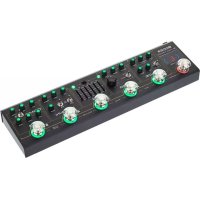
Black Truck - Guitar effects pedal Mooer - Free user manual and instructions
Find the device manual for free Black Truck Mooer in PDF.


| Product Type | Multi-effects pedal |
| Brand | Mooer |
| Model | Black Truck |
| Dimensions | 370 mm x 96 mm x 51 mm |
| Weight | 1.23 kg |
| Power Supply | 9V DC 1A (center negative) |
| Input | 6.35 mm mono jack (impedance 2 MΩ) |
| Outputs | 6.35 mm mono jack x 2 (impedance 100 Ω) + 3.5 mm stereo headphone output (50 Ω) |
| Effects Loop | Send/Return (6.35 mm jacks) between EQ and MOD |
| Built-in Tuner | Yes, high precision (activate by long press on TAP) |
| Amp Simulator | Yes, on dedicated Cab Sim output |
| Usage Modes | Live (individual control of effects) and Preset (5 presets) |
| Included Effects | Compressor (Yellow Comp), Overdrive (modified Green Mile), Distortion (HI-GAIN), EQ (Graphic G), Modulation (Tremolo/Phaser/Flanger), Space (Delay/Reverb) |
| Tap Tempo | Yes, controls delay and modulation |
| Included Accessories | User manual, carrying case |
| Maintenance | Clean with a soft dry cloth; avoid abrasive products, alcohol, solvents |
| Safety | Use only the specified power supply (9V 1A); unplug during storms; avoid extreme humidity, dust, magnetic fields, shocks |
| Repairability | No spare parts provided; contact Mooer after-sales service |
| Certification | Complies with Part 15 of FCC rules |
Frequently Asked Questions - Black Truck Mooer
User questions about Black Truck Mooer
0 question about this device. Answer the ones you know or ask your own.
Ask a new question about this device
Download the instructions for your Guitar effects pedal in PDF format for free! Find your manual Black Truck - Mooer and take your electronic device back in hand. On this page are published all the documents necessary for the use of your device. Black Truck by Mooer.
USER MANUAL Black Truck Mooer
Combined Effects Pedal
Precautions
PLEASE READ CAREFULLY BEFORE PROCEEDING
Power Supply
Use the correct AC outlet to connect the power adapter.
Use a power supply with a 8V DC 1A (1000mA) output otherwise it will cause equipment damage, fire or other problems.
When unused or thunderstorms please unplug the power supply.
Connections
Before connecting the device or disconnecting it, be sure to turn off the power and other equipment, which will help to avoid malfunction and damage to other equipment. Also, make sure that all cables and power cords are disconnected before moving the unit.
Place the place
To prevent deformation, discoloration, and other serious damage, avoid the following:
- Direct sunlight
Near heat source
Magnetic field - High temperature and humidity
- Dusty or unclean place
- Humidity is large
- Strongly vibrating or shakin
Electrical interference
When using the unit, the radio and the TV may cause interference.
Use the unit away from the radio and the TV.
Clean
Please use a dry, soft cloth to clean the unit. If necessary, wipe with a slightly moist cloth. Do not use rough clean powder, alcohol, paint thinner, wax, solvent, detergent and chemical agents such as impregnated wipes.
Operating
Do not use brutal forces to use switches and control elements.
Do not allow paper, metal, and other objects to fall into the machine.
Be careful not to fall, do not subject it to shock and excessive pressure.
FCC certification
This device complies with Part 15 of the FCC Rules. Operation is subject to the following two conditions:
This device may not cause harmful interference.
- This device must accept any interference received, including interference that may cause undesired operation.
Introduction
BLACK TRUCK combines 6 individual effects pedals, a high-precision tuner, an effects loop and a loop switcher. Bringing them all together into a single portable unit that's built for the road.
Although incredibly versatile and useful as a tool for all styles of music, BLACK TRUCK has been designed primarily for hard rock and heavy metal musicians. With this in-mind, a carefully selected array of popular analog pedals from the MOOER MICRO SERIES make up the COMPRESSOR, OVERDIVE and EQ modules.
A brand new "amp like" analog HI-GAIN distortion has been developed specifically for this product which, in itself, covers a huge spectrum of tonal possibilities and a wide range of gain.
These analog modules are complemented well by a multi-modulation pedal and a digital ambiance engine, simply named SPACE. Which consists of a high quality digital delay and a stereo reverb. Both of these digital modules are fully controllable by the dedicated tap tempo control footswitch.
When used in conjunction with the integrated loop switcher, BLACK TRUCK can very easily be programmed to provide one step presets.
Following a lot of feedback from the RED TRUCK an independent volume control has been added to the cab simulated output so it can be used simultaneously with the main outputs.
Main Features
- 6 effects pedals built into 1 simple unit. Compressor, Overdrive, Distortion, EQ, modulation, Delay/Reverb
Full featured controls for each effect
Built in precision guitar tuner - Tap tempo synchronization
- Integrated effects loop for connecting external pedals or 4 cable method connection with an amplifier
- Stereo outputs
- Dedicated direct output with speaker simulation and an independent volume control for connection to a mixing desk, computer or headphones
- Includes a carry case for easy transportation
Pedal Layout
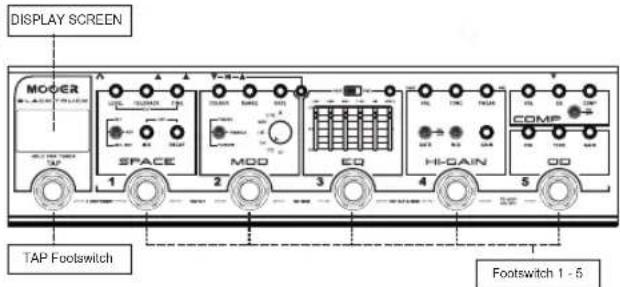
TAP- Press several times for tap tempo. Hold for Tuner
Footswitch 1-SPACE (Delay/Reverb) on/off in LIVE mode. Preset 1 in PRESET mode
Footswitch 2- MOD on/off in LIVE mode. Preset 2 in PRESET mode
Footswitch 3- EQ on/off in LIVE mode. Preset 3 in PRESET mode
Footswitch 4-HI GAIN (Distortion) on/off in LIVE mode. Preset 4 in PRESET mode
Footswitch 5-OD on/off in LIVE mode. Preset 5 in PRESET mode
DISPLAY SCREEN- Displays the current operation mode of BLACK TRUCK. Displays the tune when activated
Operation Modes
BLACK TRUCK has two different operation modes. LIVE MODE and PRESET MODE To change operation mode, simultaneously press and release TAP + Footswitch 1
Live Mode
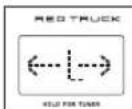
In this mode BLACK TRUCK operates like a traditional pedalboard. Each footswitch will toggle its respective effects module on and off. The DISPLAY SCREEN will display < L> when in Live Mode
Preset Mode
In this mode BLACK TRUCK operates like a pedalboard loop switcher. Each footswitch will recall a preset combination of which effect modules are on/off.
The DISPLAY SCREEN will display <P> when in Preset Mode.
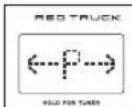
To create a preset:
- Ensure BLACK TRUCK Is in LIVE MODE
- Activate the effect modules you want to use in your preset
- Press and hold the corresponding footswitch where you wish to save the preset for use in Preset mode
- The Footswitch LED will flash 3 times to confirm that the preset has been saved to this footswitch
- After you have saved your presets, put the BLACK TRUCK into PRESET MODE and press any footswitch from 1-5 to recall it's preset.
Note: Effect parameters can not be s lared to the presol s. Only the on/off state of each effect I module will be stored.
Effect Modules
BLACK TRUCK has 6 stompbox style effect modules and a built in precision tuner.
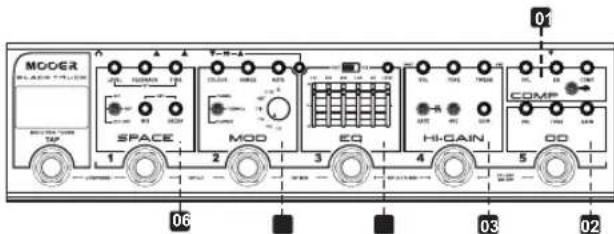
- COMP: Based on one of MooER's most popular and useful micro pedals. The Yellow Comp is an all analogue compressor that can provide all means of compression from subtle and transparent to squashed and bloomy.
ON/OFF: Switches the COMP effect on/off
VOL: Adjusts the over-all volume output after the compression. This is very useful to compensate for perceived volume drop or even to use the compressor as a boost.
EQ: Adjusts the overall tone of the compressor. Clockwise is brighter, Counter clockwise is darker
COMP: Simultaneously adjusts the compression ratio, threshold and release.
- OD: A modified GREEN MILE circuit, the DRIVE module of Redtruck is a warm and natural analog overdrive circuit with a distinct hump in the mids. At higher gain settings it can emulate a vintage amplifier being pushed into breakup. At lower gain settings it is perfect for pushing the HI-GAIN module for solos or as a warm boost for the guitar.
VOL: Adjusts the output level
GAIN: Adjusts the amount of overdrive
TONE: Adjusts the EQ. Clockwise is brighter, Counter clockwise is darker
- HI-GAIN: Designed exclusively for the BLACK TRUCK, this analog distortion circuit delivers hl-gain amp like distortion which is perfect for all of your hard rock and metal needs.
VOL: Adjusts the overall output level
TONE: Adjusts the mid and treble frequencies. Clockwise is brighter and has
more bite. Counter clockwise is warmer and has more mids
TWEAK: Adjusts the low frequencies. Clockwise has tighter and more focused bass response, Counter-clockwise has fatter warmer bass.
GATE: Noise gate on/off for reducing unwanted noise at higher gain settings
MID: Boosts/scoops the middle frequencies
GAIN: Adjusts the amount of distortion
- EQ: An analog Equalizer based on the MOOER GRAPHIC G.
The EQ has 5 adjustable frequencies ranging from 100Hz - 4KHz that can be boosted or attenuated +/- 18dB. When the frequency slider is set to O then no boost or attenuation of that particular frequency will occur. Up = Boost / Down = Attenuation.
LEVEL: Boosts/attenuates the output signal +/-18dB
POST: Positions the EQ module after the HI-GAIN module in the signal chain.
PRE: Positions the EQ module before the HI-GAIN module in the signal chain.
- MOD: A digital multi-modulation unit which brings together tremolo, phaser and flanger.
COLOUR: Phaser intensity / Tremolo waveform / Flanger intensity
RATE: Adjusts the modulation effects speed
RANGE:Phaser Depth / Tremolo mix / Flanger waveform delay
Toggle switch: Selects the modulation effect type
Rhythm Knob: Adjusts the sub-division of the modulation effect in relation to the tap tempo. (X = random pattern)
- SPACE: A high quality digital delay and stereo reverb module.
MIX: Adjusts the wet/dry mix of the reverb
DECAY: Adjusts the length of the reverb decay time
LEVEL: Adjusts the volume of the delay repeats
FEEDBACK: Adjusts the number of delay re
TIME: Adjusts the time between delay repeats
TOGGLE SWITCH: Selects between DLY (Delay only), REV (Reverb only) and DLY+REV (Delay and Reverb)
TUNER: BLACK TRUCK has an accurate built-in guitar tuner. Press and hold the TAP foot switch to mute your output and activate the tuner. Press the TAP foot switch once to exit the tuner and un-mute your output.
Tap Tempo
TAP: Press and release this foot switch several times to create a Tap Tempo.
Tap tempo can control both the delay time and modulation rate simultaneously or either of these two effect modules independently. The light surrounding the TAP foot switch will illuminate a different colour to indicate what it is controlling. You can change the tap tempo function by pressing a combination of two foot switches simultaneously. See below.
DLY + MOD = PURPLE (press foot switches 3 + 4)
DLY only = RED (press foot switches 1 + 2)
MOD only = BLUE (press foot switches 2 + 3)
By default the tap tempo will control both the delay time and the modulation rate simultaneously. The TAP foot switch light will illuminate purple to indicate this.
Using The FX LOOP
BLACKTRUCK comes equipped with a serial effects loop. This sits between the EQ and MOD modules in the internal signal chain.
The FX LOOP can be used in many different ways...

SEND: Can also be considered as EQ/HI-GAIN output
RETURN: Can also be considered as MOD input
-Add your favourite pedal or preamp to the chain -
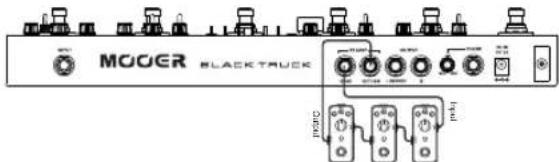
This is an easy way to add an extra pedal into the BLACK TRUCK signal chain, in-between your EQ and MOD.
Connect SEND to the input of your favourite pedal. Connect the output of the pedal to the RETURN of BLACK TRUCK.
We like to use this with our Micro Preamp pedals for the ultimate in portable rigs.
-4 cable method
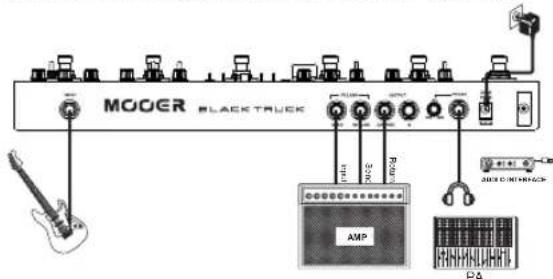
If your amplifier has it's own effects loop you can connect BLACKTRUCK using the "4 cable method" which will put the drive modules in front of your amplifiers input and the MOD and SPACE modules into your amplifiers effects loop.
- Connect your guitar to the input of BLACKTRUCK
Connect BLACKTRUCK SEND to your amplifiers input
Connect your amplifiers "effects send" to BLACKTRUCK RETURN
Connect the OUTPUT of BLACKTRUCK to the "effects return" of your amplifier
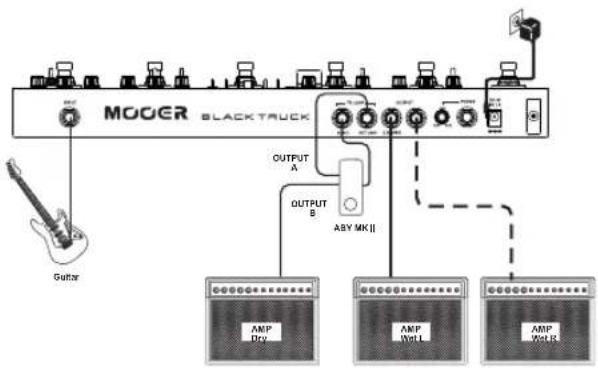
-WETDRYSETUP
This is an easy way to setup BLACK TRUCK with 2 amplifiers. One amplifier with just the drive signal. The other amplifier with drive signal, modulation, delay and reverb effects. This is a very popular setup method used by professional guitarists to maintain astonishingly clear and articulate tones while still having beautiful atmospheric effects for live shows. To accomplish this setup you will also require an ABY box. We recommend the MOOER ABY mkII
Connect your guitar to the input of BLACKTRUCK
Connect SEND of the BLACKTRUCK to the input of your ABY box
Connect one output of the ABY box to the input of amplifier 1.
Connect the other output of the ABY box to the RETURN of BLACKTRUCK
Connect the OUTPUT of BLACKTRUCK to the input of amplifier 2.
If you have a 3rd amplifier you can use both stereo outputs of BLACKTRUCK to make a WET / DRY / WET setup taking full advantage of true stereo reverb, whilst maintaining an awesome clear guitar tone.
Connections
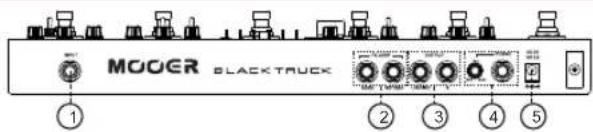
1. INPUT
Connect your instrument to this input using a standard 1/4" jack cable
2.FX LOOP
Refer to the 'USING THE FX LOOP' section of this manual for more details
3.OUTPUT
Connect to these outputs using standard 1/4"Jack cables Connect to L only for mono output Connect to L and R for true stereo output
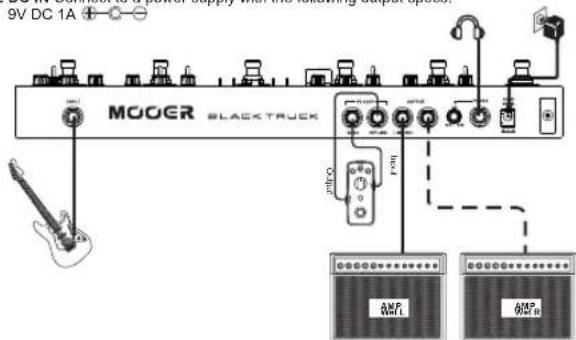
4. PHONES
Connect to this output using a mono or stereo 1/4"jack cable This provides an output with integrated speaker cabinet simulation for connecting headphones or Direct to your PA system or recording console. The phones output on BLACKTRUCK has an independent level control
- DC IN Connect to a power supply with the following output specs:
Technical Parameters
Input: 1 / 4 audio Jack cable (impedance 2M
Output: 1 / 4^* audio jack cable x2 (Impedance 100Ω)
Headphones: 1/8" stereo jack x1 (50Ω)
Power supply: 9V DC 1A (1000mA)
Size: 370 mm (D) X 96 mm (W) X 51 mm (H)
Weight: 1.23Kg
Attachment: Owner's Manual, Carry Case
Disclaimer: Parameter update is subject to change without notice.
注意事项
使用前请仔细阅读
电源供应
DLY+REV (Delay e Reverb)
Connect SEND to the input of your favourite pedal. Connect the output of the pedal to the RETURN of BLACK TRUCK.
Dimensoes: 370mm (P) × 96mm (L) × 51mm (A)
Peso: 1,23kg
When used in conjunction with the integrated loop switcher, BLACK TRUCK can very easily be programmed to provide one step presets.
Disclaimer: Parame ter u pda t e is sub ject to change witho11t notice.
使用上注意
PLEASE READ CAREFULLY BEFORE PROCEEDING
電源
Headphones: 1/4" stereo jack x1 (50Ω)
Power supply: 9V DC 1A (1000mA) + - - -
Size:370mm(D)X96mm(W)X51mm(H)
Weight: 1.23Kg
Attachment: Owner's Manual, Carry Case
又卡是予告在<要更士的场合如里示。
Precautions
=Boost/Down=Attenuation
6F. Unit D. Jinghang Building, Liuxian 3rd Road.
Bao'an 71 District, Shenzhen, China. 518133