27U41YA - Monitor LG - Free user manual and instructions
Find the device manual for free 27U41YA LG in PDF.
 FR
FR
 BG
BG
 CA
CA
 CS
CS
 DA
DA
 DE
DE
 EL
EL
 EN
ES
EN
ES
 ET
ET
 FI
FI
 HU
HU
 ID
ID
 IT
IT
 JA
JA
 KK
KK
 KO
KO
 LT
LT
 LV
LV
 MK
MK
 NL
NL
 NO
NO
 PL
PL
 PT
PT
 RO
RO
 RU
RU
 SK
SK
 SL
SL
 SQ
SQ
 SV
SV
 TR
TR
 ZH
ZH
| Product Type | LCD Monitor |
| Brand | LG |
| Model | 27U41YA |
| Screen Size | 27 inches |
| Native Resolution | 1920 x 1080 (Full HD) |
| Refresh Rate | 60 Hz |
| Connectivity | HDMI (compatible with 1.4 and 2.0), D-SUB (VGA) |
| Dimensions with Stand (W x D x H) | 611.6 x 220 x 458.2 mm |
| Dimensions without Stand (W x D x H) | 611.6 x 37.5 x 357.7 mm |
| Weight with Stand | 4.2 kg |
| Weight without Stand | 3.3 kg |
| Power Supply | Mains power via provided power adapter |
| Power Consumption | Active mode: normal operation; standby mode: reduced consumption; off mode: minimal consumption (DPMS) |
| Technologies | DPMS energy saving, DDC (Display Data Channel) |
| Safety | Overvoltage protection; automatic shutdown in case of fault; do not open the case |
| Maintenance and Cleaning | Unplug before cleaning; use a soft, slightly damp cloth; avoid chemical products (benzene, alcohol) |
| Repairability | Do not open; contact an authorized service center for any repairs |
| Warranty | The warranty does not cover persistent images due to prolonged fixed display |
| Included Accessories | Power cord, power adapter, HDMI cable (depending on model) |
Frequently Asked Questions - 27U41YA LG
User questions about 27U41YA LG
0 question about this device. Answer the ones you know or ask your own.
Ask a new question about this device
Download the instructions for your Monitor in PDF format for free! Find your manual 27U41YA - LG and take your electronic device back in hand. On this page are published all the documents necessary for the use of your device. 27U41YA by LG.
USER MANUAL 27U41YA LG
Characteristic Meniu principal
-1920x1080la100Hz(HDMI)
-1920x1080la75Hz(D-SUB)
24U411A-BN/24U411A-BG/24U41YA-BG
27U411A-BD/27U411A-BG/27U41YA-BG
-1920x1080la120Hz(HDMI)
-1920x1080la75Hz(D-SUB)
- Rezolutiie recomandata
-1920x1080la60Hz
Conditi de mediu
-
Conditij de fonctionare
-
Temperatura: inte 0°C si 40°C
-
Umiditate: Mai putin de 80%
-
Condiţi de depositar
-
Temperatura: intre -20°C si 60°C
- Umiditate: Mai putin de 85%
Adaptor c.a./c.c.
ModeiADS-25FSF-1919025EPG-1
ADS-25FSF-19 19025EPK-1
ADS-25FSF-19 19025EPCU-1
ADS-25FSF-19 19025EPB-1
ADS-25FSF-19 19025EPI-1
ADS-25SFA-19-3 19025E
Produced by: SHENZHEN HONOR ELECTRONIC CO., LTD
Intrare:100-240V\~50/60Hz,0.7A
-lesire:19V-3A
Surse de alimentare
Capacitate nominala:194-1,3A
This unit has been engineered and manufactured to ensure your personal safety, however improper use may result in potential electrical shock or fire hazards. In order to allow the proper operation of all safeguards incorporated in this display, observe the following basic rules for its installation, use, and servicing. All precautions and safety information apply to LCD and OLED models.
On Safety
Use only the power cord supplied with the unit. In case you use another power cord, make sure that it is certified by the applicable national standards if not being provided by the supplier. If the power cable is faulty in any way, please contact the manufacturer or the nearest authorized repair service provider for a replacement.
The appliance coupler is used as the disconnect device.
Please make sure the device is installed near the wall outlet to which it is connected and that the outlet is easily accessible.
Operate the display only from a power source indicated in the specifications of this manual or listed on the display. If you are not sure what type of power supply you have in your home, consult with your dealer.
Overloaded AC outlets and extension cords are dangerous. So are frayed power cords and broken plugs. They may result in a shock or fire hazard. Call your service technician for replacement.
As long as this unit is connected to the AC wall outlet, it is not disconnected from the AC power source even if the unit is turned off.
Do not Open the Display:
- There are no user serviceable components inside.
- There are Dangerous High Voltages inside, even when the power is OFF.
- Contact your dealer if the display is not operating properly.
To Avoid Personal Injury :
- Do not place the display on a sloping shelf unless properly secured.
- Use only a stand recommended by the manufacturer.
- Do not drop an object on or apply impact to the product. Do not throw any toys or objects on the product screen.
It can cause injury to human, problem to product and damage the display.
To Prevent Fire or Hazards:
- Always turn the display OFF if you leave the room for more than a short period of time. Never leave the display ON when leaving the house.
- Keep children from dropping or pushing objects into the display's cabinet openings. Some internal parts carry hazardous voltages.
- Do not add accessories that have not been designed for this display.
- When the display is to be left unattended for an extended period of time, unplug it from the wall outlet.
- In the presence of thunder and lightning, never touch the power cord and signal cable because it can be very dangerous. It can cause electric shock.
On Installation
Do not allow anything to rest upon or roll over the power cord, and do not place the display where the power cord is subject to damage.
Do not use this display near water such as near a bathtub, washbowl, kitchen sink, laundry tub, in a wet basement, or near a swimming pool.
Displays are provided with ventilation openings in the cabinet to allow the release of heat generated during operation. If these openings are blocked, built-up heat can cause failures which may result in a fire hazard.
Therefore, NEVER:
- Block the bottom ventilation slots by placing the display on a bed, sofa, rug, etc.
- Place the display in a built-in enclosure unless proper ventilation is provided.
- Cover the openings with cloth or other material.
- Place the display near or over a radiator or heat source.
Do not rub or strike the Active Matrix LCD with anything hard as this may scratch, mar, or damage the Active Matrix LCD permanently.
Do not press the LCD screen with your finger for a long time as this may cause some afterimages.
Some dot defects may appear as Red, Green or Blue spots on the screen.
However, this will have no impact or effect on the display performance.
If possible, use the recommended resolution to obtain the best image quality for your LCD display. If used under any mode except the recommended resolution, some scaled or processed images may appear on the screen. However, this is characteristic of the fixed-resolution LCD panel.
Displaying a still image for long time on the monitor may leave persistent image or stain on the monitor screen. To avoid this problem, use a screen saver and power off when this product is not used. Persistent image or stain caused by long time usage are not covered by the warranty on this product.
Do not shock or scratch the front and sides of the screen with metallic objects.
Otherwise, it may cause damage to the screen.
Make sure the panel faces forward and hold it with both hands to move. If you drop the product, the damaged product can cause electric shock or fire. Contact an authorized the service center for repair. Avoid high temperatures and humidity.
Do not install this product on a wall if it could be exposed to oil or oil mist.
- This may damage the product and cause it to fall.
For displays with glossy bezels the user should consider the placement of the display as the bezel may cause disturbing reflections from surrounding light and bright surfaces.
Do not use products using high voltage around the Monitor. (ex. Electrical Swatter)
- Monitor may have malfunction as its electrical shock.
Precautions to the AC Adapter and Power
If water or any foreign substance goes inside the product (TV, monitor, power cord, or AC adapter), disconnect the power cord immediately and contact the service center.
- Otherwise, this may cause a fire or electric shock due to damage to the product.
Do not touch the power plug or AC adapter with wet hands. If the pins of the plug are wet or dusty, wipe and dry them before use.
- Otherwise, this may cause a fire or electric shock.
Make sure to completely insert the power cord into the AC adapter.
- If loosely connected, the poor connection may cause a fire or electric shock.
Be sure to use power cords and AC adapters provided or approved by LG Electronics, Inc. - The use of non-approved products may cause a fire or electric shock.
When unplugging the power cord, always pull it by the plug. Do not bend the power cord with excessive force.
- The power line can be damaged, which may cause electric shock or fire.
Be careful not to step or place heavy objects (electronic appliances, clothing, etc.) on the power cord or AC adapter. Be careful not to damage the power cord or AC adapter with sharp objects. - Damaged power cords may cause a fire or electric shock.
Never disassemble, repair or modify the power cord or AC adapter.
- This may cause a fire or electric shock.
Be sure to keep the outlet, AC adapter, and pins of the power plug clean from dust and etc.
This may cause a fire.
On Cleaning
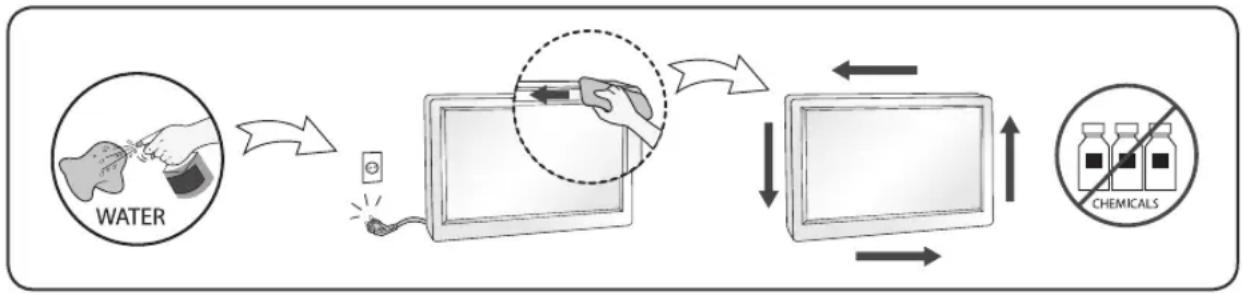
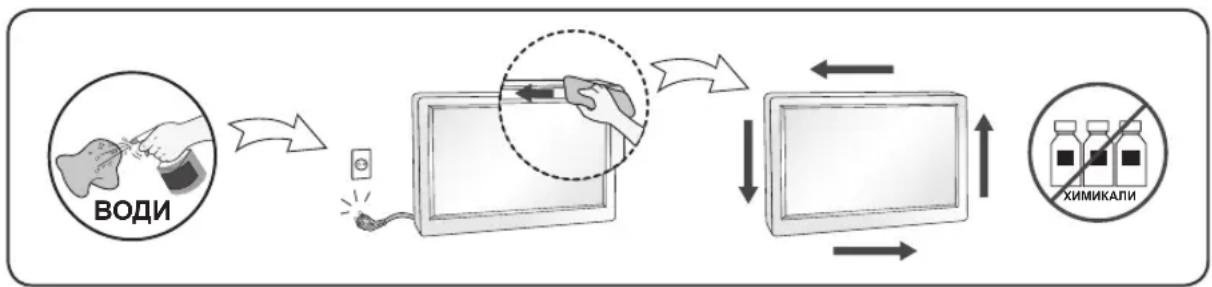
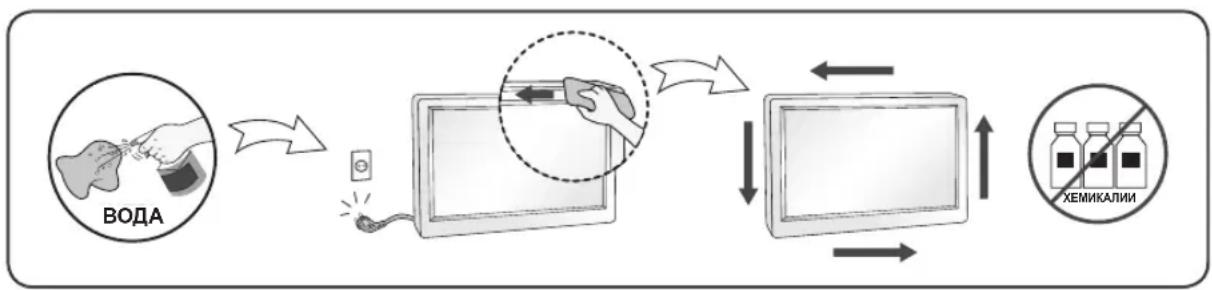
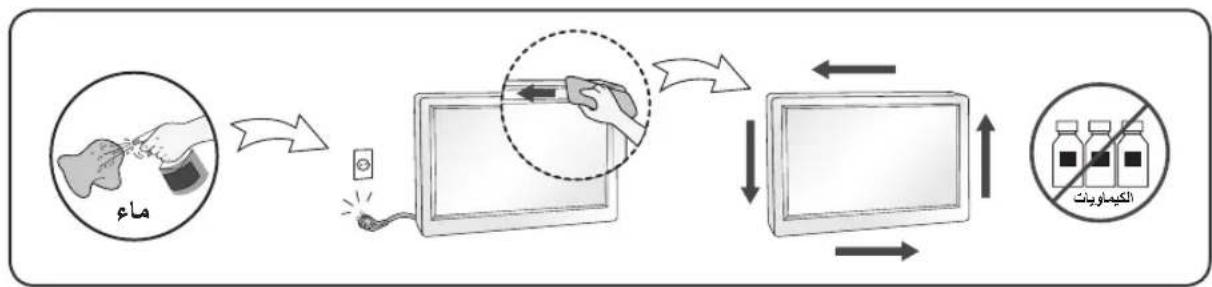
- Unplug the display before cleaning the face of the display screen.
- Use a slightly damp (not wet) cloth. Do not use an aerosol directly on the display screen because over-spraying may cause electrical shock.
- When cleaning the product, unplug the power cord and scrub gently with a soft cloth to prevent scratching. Do not clean with a wet cloth or spray water or other liquids directly onto the product. An electric shock may occur. (Do not use chemicals such as benzene, paint thinners or alcohol)
- Spray water onto a soft cloth 2 to 4 times, and use it to clean the front frame; wipe in one direction only. Too much moisture may cause staining.
On Repacking
- Do not throw away the carton and packing materials. They make an ideal container in which to transport the unit. When shipping the unit to another location, repack it in its original material.
MASA TÉ RÉNDÉSISHME PARAPRAKE
Ky aparat ᵓshte inexhinieruar dhe prodhuar né MENyre qē tē garantojē sigurine tuaj personale, sidoqofté, pērdorimi i gabuar mund tē shkaktojē elektroshok ose zjarr. Ně MENyre qē tē lejoni funkSIONimin e sakte tē githa siguresave tē brendatrupëzura ně kětē televizor, vēzhgoni regullat bazē tē mēposhtme per instalimin, pērdorimin dhe mirëmbajtjen e tij. Tē githa masat paraprake dhe informazioni i sigurise vlejnè per modelet LCD dhe OLED.
Rrethsigurise
Pördorni vetem kordonin elektrik qè jepet me aparatin. Nèse pördorni njè kordon tjeter elektrik, sigurohuni qèèshte i vertetuar nga standardet kombëtare né fuqi nèse nuk juèshte ofruar nga furnizuesi. Nèse kabloja elektrikeèshte me defekt, lutemi tè kontaktoni me prodhuesin ose ofruesin e autorizuar tè sherbimit tè riparimit mè tè afert per ta zëvendésuar.
BAJHIN PPEIa3HN MEPKN
ToBa ycTpoiCTBO e KOHcTpynpaHO n npOn3BeDeHo c ueI da ce rapaHTnpa BaWata JnUHa 6eONaCHocT, Ho HnnpaBnHOTo N3NoJ3BaHe MOKe Da DOBeJe Do TOKOB yIap IIN pNCK OT Bb3HnKBAHe Ha NOxap. 3a Da ce No3BOJI npaBnHOTo npInIOXeHHe HA BCnKn PpeDna3HN MepKn, BKIOUeHn B HAcTOAun MoyI, CnA3BaIte CneIHnte OCHOBn npaBnJa 3a HerOBOTO INCTaJInpaHe, IN3NO3BaHe n NOJdpBxKa. BcnKn PpeDna3HN MepKn n INΦopMaζηra 3a 6eONaChocT ca npInIOXmM 3a MoDEJI LCD n OLED.
HΦopMaζη OTHOCHO 6e30NaChOCTTa
I3noJI3BaIte cAmO 3axpaHbAunKa6eI, npedocTaBHe 3aeHNO C yCTpoiCTBOTo. Ako n3noJI3BaTe dpyr 3axpaHbAaKab6eI, npoBepeTe daIIe cepTnФuNpuAn OT cbOTBeTHIne npINOxIMn HaUHOHaHN CTaHapTN B cnlyaHTe, KORato He ca ocNpyehn OT doCTaBUnka. Ako 3axpaHbAunKa6e I nobpeDeH, ce obbpHeTe KbM npOn3BoDnteI nn Hau-5nn3Km OToPn3npaH npedctaBNTe 3a cmHa.
CbeiHHTeJIaT Ha yCTpoIcTBOTo Ce I3NoI3Ba KaTO yCTpoIcTB0 3a IpeKbCBAHe Ha Bpb3KaTa.
YBepete Ce, Ye yCtpoiCTBOTO e HCTaIINpaHO B 6JIIN3OCT DO CTEHNRA KOHTAKT, B KOITo E BKJIIOUeHO, N YE KOHTAKTB T JNECHO DOCTbNeH.
BknuBaTe nncnnae cmo B n3ToUHnK Ha 3axpaHbaHe, nocOeH B cneunfkaunite Ha HactoIOTOpbKOBOCTBO uINn oocOeH Ha dncnpe. Ako He Cte cnrypHn KaKbE TnTbT Ha eJeKTpuYeCKOTO3axpaHbaHe, c KOETo pa3noJarate B doma cn, ce KOHCyItnpaIte Cbc CBOA nnbp. IpTeOBapeHnTE npOMeHNIBOTOKOBn KONTAKTN yDJIIXNTEeN ca onachn. IpotPNTte KaBeJIn n ChyPeHnTe ueCeJIn cbio npedctabnBaT onachoct. Te morat da DoBeDaT do TOKOB ydap nn OnaCHOCT OT Bb3NHkBaHe Ha noXkap.
O6aTeCeHa cepBn3eH TexNk, 3a Da n3BbPpMn CMHa.
Dokato TOBA yCTPOINCTBO e BKJIIOUeHO B CTeHEN KOHTAKT 3a NpOMeHJINB TOK, Bp3KaTa C N3TOUHnka Ha 3axpaHbAHeto He Ce IpeKbcBA, DOpN KOrATO N3KJIIOUHTe YCTPOINCTBOTo OT KOHTAKTA.
He otBaprTe dinCpIe:
B HrO He Ce CbIbpxK TOMHOENTN, KOUTo MOraT Da ce 0cbnyXBaT OT Ntpe6nteJI.
B Hero ca 3aJIOXeHN onaCHn HAnpeXeHn BNCOKo BbTpe, DOpN KOraTo 3axpaHbaHeTo e N3KJIHO.
Cbpxte ce cbc cBor npedctabnten, aKo dinpnerH pe60tn npabnHO.
3a da n36eHete Teleecn nobpei:
He noctabraye dinpIe Ha haknoheHn pafoBe, oCbeH aKO nocneHnTe He ca yctOnuBO 3actonopeHn.
- ⅠЗПОЛЗВАЙТЕ само CTОДКИ, прелорьани OT пОНЗВОДЛТЕЛЯ.
He n3nyckaIte npedMeTu n He ynpaxKHaBaTe HaTnCK Bbpxy ycToPcTBOTo. He noCTaBnTe irpaKu nn DpyrnpedMeTu Bbpxy ekpAHa Ha ycToPcTBOTo. Toba moKe da npuHn HapaHbaHe Ha xopa, npo6JIemC ycToPcTBOTO n NOBpeDa Ha DNcJIeJ.
Ho Te He ce OTPa3BaT He6laoropnraTHO Bbpxy KaeeCTBOTo Ha KapTuHaTa.
No Bb3MOxHOCr 3n0J3BaIe npenopbUHTeJIHaTa pa3JeJIITeJIHa cnoc6HOCT 3a noJyUbaHe Ha HauD6po KaueCTBO Ha 3o6paKeHHeTo 3a CBOA LCD dinCnnei.
Ako ce n3no13BaT noD npyr pexkum c n3KnHoueHne Ha npenopbuaHaTa pa3deJIHTeHa cnoc6HOCT, HApKaHa MoKe Da ce NoBRT HAKON MaaAspaHn UIN O6pa6ToHN 3o6paKeHna.
Ho ToBa e xapaKTepeNCTnka Ha LCD naHena c fKnCupaHa pa3JeIITeHnHa cnOco6HOcT.
Ioka3BaHTo Ha HeNoDbNkHo 3o6paXeHne npOdbJnxTeHb BpeMe Ha MOHTopa MoKe da npuHNn ΦHKcnpaHc Hua 3o6paXeHne nn neTHo Ha ekpHa. 3a Da n36erHeTe To3n npo6nem, n3no3BaHTe CKPNHCenBbp Nn3KnUoyBaHTe yCTpoiCTBOTo BNHaR, KOrato He Bn e Heo6xOIMO. NocToHHOTO 3o6paXeHne nn neTHo, npuHNHn OT npOdbJnxTeHnHa ynotpe6a, He ce 0xbuataT ot rapaunohhata NOdpbXka Ha TOBa yCTpoiCTBO.
He ydpnTe n He dpackaTe npedHaT a n CtpaHnHnTe Yactn Ha ekpaHa C MeTaHn NpeDMeTn.
B npotuben cnuyaToba moke da doBeDe Do nobpeHa ekpaHa.
Korato npemecTBate ycTpoiCTBOTO, npOBepTe daHn nAHeNbT CTOn C IInue HAnpe NTo rDpbXte C DBeTe cn pbc. Ako n3nycheTe ycTpoiCTBOTO, NOBpeDeHnrt PpOdyKT MoKe Da npuHn TOKOB ydap nn nojkap.
CbpxkeTe ce cbc ynbHOMOeH cepBn3eH ueHTbp 3a nonpaBA. N36raTte BucOKn TeMnpaTypn IN BlaXHOCT.
He noctabray Te npodykTa Ha cTeHa, KbdeTo da 6bDe n3JIOXeH Ha n3napEny O T Ma3HnHa nn npbckn ot onno.
ToBa moKe Da noBpei npOdyKta JIn Da npuHn NaJaHe nopAaXJb3raHe.
3a ekpaHnte c nbckabn pHHn notpe6ntjT tr6Ba da o6mncna 3a nocTabraHTo Ha ekpHa, 3aIoTO pHHnTe MoKe Da DOBeDaT Do CMUbauOn OtpaKeHn O OKJHaTa CBETIna N CBETIN NOBbpxHOCTN.
He n3no13BaIte yctpoiCTBa C BnCOKO HanpeXeHne OKoLo MOHTopa. (HaNP. eJeKtpruecka Myx06oKa)
- MoHITOpbT MoKe Da Ce NOBpeN, HAnpIMeP Da Bb3HnKHe TOKOB yIap.
IpeDnA3Hm MepK, Cbbp3aHn c AC aanTepa n 3axpaHbaunia Ka6eJ
AkoB npOkykTa (TeJeBn3Op, MOHITOp, 3axpaHbAs Ka6e Nn AC aanTep) HABJe3e B0da nnn dpyra yJxda cy6ctaunna, He3a6abHo n3KnHouTe 3axpaHbAs Ka6e N ce CbpxKeTe cbc cepBn3nueHTbp.
B npotnbEN cnuyaToba moKe da doBeDe do noXap nIIN TOKOB yIap,napaNIOBpeHa npOdykTa. He dOKocBaIe TcncSeI aIIN AC aIanTepa C Mokpn pIe. Ako IuΦTOBete Ha uenceJa ca MOKpn IIn npaunH, n36bpweTe rN rN n3cywTe npdey uNoTpe6a.
B npotnbEN cnyaT OBa moKe da doBepe do noXap nI IN TOKOB yap.
Ybepete ce, ye cte Bkapann Dokpam 3axpanBaunkaeB AC aanTepa.
Ako e xna6abo Cbbp3aH, looTo Cbbp3BaHe MoKe Da doBeDe Do noKap Nn TOKOB ynap.
YBepete ce, ye n3non3BaTe 3axpaHbaun Ka6e nn AC aanTepn, npedocTaBeH nn odopeHn ot LG Electronics, Inc.
- YnoTepe6aTa Ha HeoDo6peHn IpOdyKT MoKe Da DoBede Do noKap UIN TOKOB yIap.
Korato n3kIIOvBaTe 3axpaHbAunKa6eI, BnHaRn n3dIbpNbaIte uencena. He orbBaIte 3axpaHbAun Ka6e IpekaJeHo cnJHo.
3axpaHbauyne Moe Ja Ce NOBpeu, KOeTO da DOBeJe DO TOKOB ynap INI NOkap.
BnHmabaiTe da He cTbNaTe n da He noCTaBAre TeKKn npEmdTe (eJeKtpoHH yCtpoiCTBa, dpexn t.H.) Bbpxy 3axpaHbaunia Ka6en nnn AC aanTepa. BnHmabaiTe da He nobpeDnte 3axpaHbaunia Ka6en nnn AC aanTepa c ocTpr npEmdTe. - NOBpeHEn 3axpaHbau Ka6e MoKe Da NoBeDe Do noXap uNn TOKOB yIap.
Hnkora He demoHTnpaTe, He nonpaBraTe n He moNnPhiuPaTe 3axpaHbauJna Ka6eJ nn AC aanTepa.
ToBa MoKe Da DoBeDe Do NoXap Nn TOKOB ydap.
IopdbpkaTe KOHTaTa, AC aanTepa u uonTOBeHa uenCeNa UnCTn O npax n T.H.
ToBa MoKeJa npEun3BnKa noXap.
Pn nouchTaHe
- ɪnəkʌnəʊbaɪte ðɪçnɪŋeɪ ppeɪnɪ da nəʊnɪctɪte nɒbʌpɔxHocCTT a H a ekpaHa My.
- 13no3BaTe Jeko HabJaxHeHa (He Mokpa) Kbpna. He npbckaTe ekpaha Ha dncnner c aep030n, 3aTO pkeKomepHTo npckaHe MoKe da npuHH ToKOB ynap.
- Pn nouctbahe Ha yctpoictBOTo n3BaTee enceJa Ha 3axpaHbunna Ka6eJ OT KOHTaHa n36bpseTe C MeKa Kbpna, 3a Da npedotBpataHe HApackBaHe. He nouctbaite C Bnaxha Kbpna Hn pbckaTe yctpoictBOTo C BOda nn DpyrTeuHocn. B npotnbEN cnUyau MoKe da Bb3HkHe TOKOB yap. (He n3non3BaTe XmMueckn BeueCTBa KaTO 6eH3eH, pa3peNTeIN nn ankoXoN.)
- HanpbckaTe MeKa Kbpna C BODa OT 2 Do 4 NbTu I N3NoN3BaIte 3a NouchTbaHe Ha npedHaTa pamka; 3a6bpcBaIte cMoB eEdHa Nocoka. Ipekomehpata Bnara MoKe da npuHn 3aunBaHe.
Kayinci3dk 6oynbInha
KyaT cbIMbIHbIH yCTiHe eUHepce KOIMaHbI3 Hemece Kypri36eH3. XaHe KyaT cbIMbl 3aKbIMdaJIFaH dncnneiOpHaTnAbI3.
Dncnnei BaHHa, Kon Kyfbiu, ac y paKOBnHacbl, Kip KyaTbH opBHL, bINFaI XepTeJe Hemece Ky3y 6accenHi CnAaTbCy1bapopbIHdapdbHkaHbHda naDaanahBaHb3.
DncnneiH KopnycbHda KymbIC Ke3iHde naHa 6oNaTbH bCbH KeTydi WbIFapyfa MymkiHik 6epeTIn KEnDeTKiW caHbIaynapbI 6ap. ErepocbI cHbIaynap 6itein KaIca, DncnneiH Kbl3ybl aKayIbIK TydbipIn, Kayinti XaFdai opBn anybi MymkiH.
Con ce6eni, TeMeHderi IapTTapDbI opbIHDaHbI3:
-Диспени Керует, ДИВан, KINЕм Кэн сюксы 6acka 3attapdbiH yctiHe Koibin, TemeHri JKeIeTeY caHbIaynapbH 6eremhi3.
JaBikTbI TypDe JeenDey KaMTaMaCbI3 etinmece, dinnnei Kipictipinre H KopwaynbOpbIHFa opHaTNaHbI3.
CaHbIayapdbIy6epeKeHHeMece 6acka MaTepaJapMeH JaPiHaB13.
- Ducnnei jkybiny 6aTapeycbi Hemece 6acka bictbik Ke3depiH yctiHe KOImaHbI3.
Active Matrix CKД ькраньн kaTы 3aTпeн CypTпeн3 Hemece coKnaHb3.БyI Active Matrix CKД duCnpeinH cbipybl, cblpTkbl 6bTeIH 6yIpyi Hemece 6ipXOla 3aKbIMdaybl MymKiH.
CKI 3KpaHbIH caycaKneH y3ak yaKbIT 6oBbl 6acbl TypMaHb3, 6yJ KaNdbIK KeckHHIH 1bIfybiHa ce6en 6OjYbiMymKiH.3KpaHda KblBn, Xacbl Hemece KEk daKTap CNaRkTbI HYKe aKaynbikTapbl naJa 6OJybl MymKiH.
DereHMeH,6yI dncnneiH KymbicbHa ecep etnei.
Mymkh 601ca, CKD nucnneinHde JkaKcbI Keckih canacih any ywiH, YcblhInfah aXbipatmbIMdbIKtB naJaHaHbHb3. YCbHbJFaH axbipatmbIMbIKtaH 6acka KaHdA da 6ip pexim naJaHaHbInca, kpaHda MacuTa6TaNfAH HeMece eHdEnreH keckihdep naJa 6Olyb MyMKiH. AJaDa, 6yJ axbipatmbIMdbIKfBf6ekitireh CKD naHeniiH cinnattamacbl.
Ko3raIbIcBIs 3 KeckHdi MOHTOpda y3ak yaKbIT 60bI KepCteTy MOHTOP 3KpaHbIHDa TpyaKTBi KeckH Hemece DaK KaIdbIpYb MyMkiH. By np6nemahb 60nbipMay yuH, 3KpaH KopraftbTb NaIdaHaHbI3 XHe eHIM KOJaHbImaHaF Ke3de Kyat Ke3iHeh axbipTaBHb3. 3ak yaKbIT 60bI KOJaHydAeT bHdaFaH TpyaKTBi KeckHdI Hemece daKtB ocbl eHIMHi Kenilir KaMTbMaJbI.
3KpaHHbH aIbH Hemece WETepiH Temip 3aTTapMeH cbIpMaHbI3.
BvI 3KpaHdb3aKbIMdaybMyMkiH.
KbIbIbIyuiH naHeniH anfa Kapatbn, eki KOImeH yCTaHb3.Erep eHIMdi KyIaTbn aIcaHb3, 3aKbIMdaIHa KypblbI TOK cOByI Hemece oTeHyi MymKiH. OHI XeHDey uiH pyKcTaB6 ap KbI3MeT Kepcety opTaIbIFbHa xa6apnacHbI3. KpaIbI JXorapbl TemnepaTypanap Meh bINFaIbIKTa naIaNanH6aHbI3.
MaH Hemece MaJIbI aya ecep etyi MymKIn 6oJca, 6yN eHIMdi Ka6bIpraFa opHaTnAbI3.
- Byn eHIMdi 3aKbIMdaybXeHe oJ KyIaN TycyI MyMkiH.
KoahnybI rnaHceBa o6paMneHne 3kpaHdbI KOaHraH 6oJca, OHda 3kpaHdbI KoHaH opBH ce6endeH 3kpaHH Hpybl Ke3re Wafblbcin KaIy MYHKyH.
MoHITop XaHbIHda Xorapbl KepeyMeH XyMbIC icTeiTih eHIMdi naIandaHaYfA 6OJIMaIdbI. (MbIC.3NeKTp
- MoHHTOP TOK COY CNYKtbl DpybIC KymbIC Xacamaybl MymkIH.
AinbimabTOK aanTepi MeH KyaTka 6aJnAbICTbI CaKtbIK shapapanapbl
Erep cy Hemece 6eIe 3aTtap eHIMHIN (TeleIuIapdbH, MOHTOpdbH, KyaT cbIMbIHbH Hemece aHbMaIbI Tok aadantepiH) iuiHe kipce, KyaT cbIMbH bipdeh axbipatbn, KbI3MeT KepeTy opTaIbIFbHa xa6apnaCbHb3.
EkpaHOT npKnyyBajTe ro eDInHCTBeHO Ha n3BOp Ha eJleKtpuHa eHeprJa KaKO wTo e Ha3NaYeHO BO CneUΦnKaUNTe Ha OBA yNATCTBO NIN Ha ekpaHOT. Ako He cTe cnrypHi KaKOB TnI Ha HAnOjYBaJIe NMaTe BO BAaHOT Dom, o6paTeCe Do BAaHOT npOdaBaU.
IpeoNTOBaPeHnte npKnyoOn 3a cTpyja n npOdoJnxTeJIHnTe Ka6n ce OAnCH. NcTOTo Baxn 3a OwTeTeHnte Ka6n 3a HanojyBaHe n npKnyoOn. Oba MoKe da npEtn3BnKa onaChoc T od eJeKtpueh ydap nn noXap. ObpaTeTe ce do BaUnOT cepBucep 3a 3ameHa.
Cé Idoke ypeoTe nOBp3aH Ha SIneH uTEKeep Ha HAn3MeHnUHa cTpyja, Toj e NOBp3aH Ha N3BOp Ha HanojyBaHe n Pokpaj Toa uTo MoKe6n e NCKnyuH.
He otbopajte ro ekpahot:
Bhatpe Hema DeNoBN KOI MOKAT Da ce nonpaBaat od KopnCHnUte.
- ПocToI onaCHOcT OД BnCOK HANOH, dypn I KOra HanojyBaHbTeO e NCKJnyEHO.
-Дokonky ekpaHOT He pa6Otn npaBnHNo obpaTe ce kaj Baunot npoDaBaU.
3a da ce n36erHe InuHa nobpeda:
He noctabvajte ro ekpaHOT ha 3akocena nolnca oCBeH BO cnyuj kora Toj e npabunho 06e36eHN.
KopncTeTe eHCTBeHO dpkae Koje npenopaah OJ poun3BOUnteJOT.
He ncyuTajTe npedMeTN Bp3 npoN3BOIoT He npimEnHyBajTe cnla Bp3 nCTnOT. He pPrajTe irpaKn nn npedMeTN KOH ekpaHOT.
PnToa MoKe Da DoJde Do NOBpeHa NyfeTo, npo6IeMn Co pOn3BOoT n OwTeYBaHe Ha ekpaHOT.
3a da ce cnpeu noxap n dpyrn onacnoctn:
- Cekoraw kora no donro ke ja hanywntte co6ata NCKJyETE ro ekpaHOT. Hnkoraaw he octabajte ro ekpaHOT BKJyUeH kora ro hanywTaTe domOT.
He do3BOyBajTe Dea Da HcnyuTaaT npEdMeTu Bp3 ekpaHOT nn Da TypKaaT npEdMeTu BO OTBOpHT Ha KyKuHTeTo. Hekon BHaTpeuHn DeNoBu Ce noD Bucok HANOH.
He Kopnctete DoataoOn KOn He Ce Dn3ajHnpaHn 3a OBOJ ekpaH.
Kora ekpahot Tpe6a da ro octabnte 6e3 na3op nooJro Bpeme, ncknyte ro od snHnot Tekep. - Пп пова на громови и мольн, Нкогаш He донпajte Г Каблente 3a Hanoуваы сгнан 6идевки то може за бидemeMHory onacho. Toa може за прдиИЗВИКа щелктучен уdap.
OkoIy nHcTaJInpaJIbeTo
He cMeete HnIto Da NoctabYbATE Bp3 Ka6eIOT 3a HanojyBaHe IIN da ro octaBate npOn3BOoT Ha MeCTa HA KO E MOXHO OwTeTyBaHe Ha Ka6eIOT.
Hemojte da ro nocTabyBaTe ekpaHot BO 6n3Ha Ha BODa KaKo Ha npimep, 6ncky do KaDa, MjaJIHK, nepaHa, BnaKeH noDpym nn Bo 6n3Ha Ha 6a3eH.
EkpaHnTe HMaat OTBOpn 3a BeHTnlaCnJa Ha KyKnUteTo KOn OBO3MOxyBaat Da ce OcNo6oN ToPnHaTa Koja ce Co3DaBa npn HNBHOto pa6oteHe. DOKOJIky OTBOpnte Ce 6JIOKnpaHn, aKymuInpaHaTAt ToPnHa MoKe Da npEiIN3BnKa OwTeTyBaHa KaON MoKe Da DOBeDat Do ONaCHOCT OD NOXap.
3apaOn oBa, HNKOKA:
He 6nokpajte rno OTBOpTe 3a BaHTnnaCnJa CO nocTaByBaHBe Ha ekpaHOT Ha KpeBET, coFa, KINIM, nTH.
He noctabybajte ro ekpaHOT BO 3aTbopeHn eIemEn 3a BrpaNyBaHe, ocBcH Kora e o6e36eHa npabunha BeHTunaJia.
He nokpmbajte rno tBopnte co TkaehnHa nn npyMaTepnjaJ.
- He nocTaBajTe ro ekpaHOT BO 6n3nHa Ha paAnjatop nnIpyr n3BOp Ha TOnnHa.
HemojTe da ro TpneTe nnn ydnpaTe LCD ekpaHot co aKTHBn MaTpuCa co ubpctn npedmetn 6nndejkn Toa Moke da npedn3Bnka rpe6eHe n TpaJHO owTeYbaHe Ha LCD ekpaHot co aKTHBn MaTpua.
HemojTe da npitnckate Ha LCD ekpaHot co npctot nooJiro BpeMe 6nJejKn Oba Moxe da npedn3Bnka OwTeTyBaHe ha cnKata. Moxe da ce nojabat deqektn Ha TochKeTb BO o6nIK Ha CpBeHN, 3eNeHN nIN CNHN TOOKn Ha ekpaHot.
Cenak, Oba Hema Da Bnjae Bp3 nepoopmaHCnte Ha ekpaHOt.
Дokолу e можно, корисе ѳ я пени ранда розушиja 3а ддобитеш Надов Квалпет Ha cnka t ha LCD ekpanot. Дokолу ekpanot се корись bo ржим co pezoушиja koja otstanyba od npenopaанata, може д ca ce nojabи сикaco полагodeна rolemna ил перабoteha cnika. Oba ceak e kapakteriptska ha LCD ekpanite co Фнсна розушиja.
DOnIroTpajHTo npKakyBaHBe Ha HeNoDbNkHa Cnka Ha MOHITOpT MoKe Da Ipeu3BnKa NojaBa Ha BpexKaHa Cnka Nn DAmKn Ha ekpaHot Od MOHITOpT. 3a Da ro n36eHHeTe OBOJ npo6JIeM, KopNCTeTe 3aHTnHK Ha ekpan Nn NckIyCyBajTe Ro npoN3BOIoT KOrA He Ce yNoTpe6yBa. TpaJHO BpexKaHaTa Cnka Nn DAMKITE KOI Ce npeDi3BnKaHN Co DOJIroTpajHo KOpNCTeHbE He Ce onFaTeHN co rapaHcNJaTa Ha OBOJ npoN3BOiD.
He ynpajte Hn rpe6e Te n npedHnot n ctpaHnHnTe dnoBn od ekpaHOT co metaJIHN npeMeTn. Bo cnpoTNbEN cnuyaj, moKe da doJde eoOtetyBaHe Ha ekpaHOT.
3a nomectybahe Ha npou3BOoT noCTaBeTe ro anapatoT co naHeNOT KOH Hnpei ndpkeTe ro co DBeTa paue. Ako ro nCnyuTIne npou3BOoT, OwTeTEHNOT npou3BOo MoKe da npedn3BnKa CTpyeH ydap iIIN noKap. 3a nonpaBka o6paTeTe ce do OBlaactEHNOt cepBuceH ueHTap. N36erHyBajte BnCOkTI TemnepaTynpi ngolema BnaxHoCT.
He nHCTaInpajTe ro OBOJ npOu3BOd Ha SuD, DOKOJIky TaMy MoKe Da ce N3IOXn Ha MacNo IIN MaCHN YECTNUKN.
Toa moKe da npedn3Bnka oWTeTyBaHe n naFaHBe Ha npOn3BODoT.
3a dincnne co CBeHTn PNHn KOpncnKOT Tpe6a da pa3mncna 3a nocTaByBaHe Ha ekpa, 3aToa To PNHra MoKe Da npEiN3BnKa BO3HemnpyBauchn Ondlecou OD OKoHNITE CBETNIH N CBETNI NOBpHHN.
HemojTe Da KOpNCHTe Ipon3BOOn KOI KOpNCtAT BnOCK HAnOH BO 6JIn3Ha Ha MOHITOPOT.
(Ha np. eJektpnHa TeNaJaKa 3a MyBn)
- MoHHTOpOT MOKe Da He paBToN IcnpaBHO KaKo NocpeNua Ha CTpyeH yIap.
MepknHa npetna3nBocT 3a AC aanTepot n hanojyBaHeto
IOKoJky BO IPOU3BOOIT (TeNEBn3Op, MOHITOP, Ka6e 3a HanojyBaHe uN AC aanTep) Bne3e BoDa Nn HeKaBa HaDBopeuHa CyntaHua, BeNaW OTkaueTe ro Ka6eNoT 3a HanojyBaBe N KOHTaKTnpajTe co cepBnCHnOT ueHTap.
- Bo cnpoTnBHO, OBA moKe Ia IIOBeIe IIO noXap IIN eIeKtpuYeH yIap IopaI N oWTeTyBaHeTo Ha npOn3BOIoT.
He donnpajte ro ctpyjhnot ka6en nnn AC aadantepot co bnaekn paue. Dokonky npnknyoonte ha enektpnuhnoT ka6en ce bnaekn nn npaunBn, n36pnwete ng nncuweTe ng nped ynoTpe6a.
Bo cnpotNBHO, OBA MOKe Da npEun3BnKa noKap nIeN eJektpueH yIap.
PpOBepTe daJIu cIeIOcho cTe ro BMeTHaJIe Ka6JIOT 3a HanojyBaHbe BO AC aIanTePOr.
-Дokолу He e DoBoIHo Do6po npuBpcTeH, cna6To nOBp3yBaHbe MoKe Da npeDn3BnKa noXap nnEneKtpnueH ynap.
BHHMabajte da Kopncntte Ka6n 3a HanojyBaHe n AC aanTepn OBO3MOKeH n nn oO6peHn od cTpaHa Ha LG Electronics, Inc.
KopncTeHbTo Ha HeoO6peHN npOn3BODn MOKe Da npEduN3BnKa noXap nIeKtpuYdap.
Kora ro otkauyBaTe ka6enot 3a HanojyBaHe, BneyeTe ro 3a npnkyoKOT. He npeBntKyBajTe ro ka6enot 3a HanojyBaBe KopncTejk npekymepHa cnna.
- Moxe da ce ouTeTn XuCaTa 3a cTpyja, StTo MoXE da npEiun3BnKa eJeKtpueH yap nIIN noXkap.
BnHmabajTe da He ro 3ra3HeTe nn Da He NoCTaByBaTe TeWKn npEdMeTn (eNEKtpoHcN ypeN, oBneKa nTH.) Ha Ka6enot 3a HanojyBaBe nn Ha AC aanTepo. BnHmabajTe da He ro oWTeTnte Ka6enot 3a HanojyBaBe nn AC aanTepo co ocTpni npEdMeTn.
- OwTeTeHInTe Ka6Ii 3a HanojyBaHe MoKe Da npEiN3BnKaat noXap iJi eJeKtpuH e ydap.
Hemojte da ro packnonybate, nonpaBate nIIM MeHyBaTe Ka6eJOT 3a HanojyBaHe nIIN AC aIantepot.
- Oba moke da npeu3Bnka nokap nIeKeTpueH yap.
BnHmabajte uTekepoT, AC aadanTepoT n npKnyoUte Ha eNeKtpuHnot Ka6eI da He coOpXaT npaunHa nHaDBopeuHN cyntaHcN.
- Oba moke da npedn3Bvka nokap.
OkoJy uHcTeHbeto
- Ппд чистende на ппдната ства од ekpaHOT, Иклучerteю ekpaHOT oДштЕК.
KopncTeMaNky HABnaxHeTa (He BoHe) Kpna. He KopncTe AePOcoN dIpeKTHO Ha ekpaHOT 6ndejkn npekymepHOTo npCKaHe MoKe Da npeDn3BnKa eJNEKTPuYeH yap. - PnHcTeHe Ha npOn3BOoT, NCKnyeTe ro cTpJHnOT Ka6eN n NcHcTeTe co MEka TkaEHnHa 3a Da He Dojde Do rpe6Be. He YnCTe Co BaxHa TkaEHnHa H He npckajTe BOa n Dpyr TeuHocTn DnpeKTHo Ha npOn3BOoT. MoKe Da Dojde Do eNeKtpuyeH yap. (HemojTe da Kopncnte Xemnckn CpeDCTBa KaKO 6eH30I, pa3peyBaU Ha 6oja nn ankoXoJ.)
- Icnpckajte Meka Kpna 2 do 4 natn co Boda, n co Hea NcHCTe ja npedHaTa pamka; 6pnueTe cmo BO eHa Hacoka. PpeMHory Bnara Moke da nped3Bnka nojaba Ha damkn.
OkoIy IOBTOPO NaKyBaHbE
He pnpajTe nKapToHnTe mATEpNJanOT 3a nakyBaHe. Tne ce nIdeaJHo naKyBaHe 3a npHeCyBaHe Ha ypeJOT. PnP npemecTyBaHe Ha dpyra Iokauija, nobTopHO cnaKyBajTe ro ypeJOT BO opRnHaHaTa am6anaXa.
BELANGRIJKE VOORZORGSGMAATREGELEN
Ho 3TO He BnIaRt Ha KaueCTBO pa60Tb MOHITopa.
Ecnn Bo3MoXHo, nCnoIb3yIte peKomeHdyEmoe pa3peWeHne IJn DOCTNXeHnaHnyUWero KaueCTBa n3o6paXeHn JKK-dncnJe. Pnp nCnoIb3OBAHn C dpYrM, OTNNUHBIM OT peKomeHDOBAHHoro, pa3peWeHem, Ha 3kpaHe Moryt 6bITb 3aMeTHbl CNeIb MaCwTa6bOpOBaHn I o6pa6OTKn N3o6paXeHn. Ho 3TO kaueCTBO npcCyUe BcEM JKK-dncnJeM c fHKCuPOBaHHbIM pa3peWeHnEM.
OTo6paXeHHe HeNoDnBnKHO r3o6paXeHnHa MoHTope B TeueHne DInTeJIbHOrOBpMeHN MoKeT npNBecTN K NOBpeXeHnIO 3KpaHa N NoRbIeHnIO ocTaTOHOro 3o6paXeHn.
YTo6bI n36exaTb 3ToI npo6nembl, nCNoIb3yIte 3kpaHHyO 3actABky I BBIKIOuHaTe yCTpoiCTBO, KOrDa OHO He nCNoJIb3yeTc. TapaHTnI dIy daHHoro yCTpOiCTBa He pacnpocTppaHReTCs Ha noBJeHne ocTaTOHORo n3o6paKeHnI.
He noDBepraIte yCTpOInCTBO BCTPcKKe I He capanaiTe MeTAnNueCKMn PpeDMeTaMn NpeDHHIOU 6okobIe qactn dncnnner.
3To MoKet Bbl3BaTb NOBpeKdHe NkpaHa.
Pn npeHocke depKnte yctpoiCTBO DBym pykAmn NaHeIbIO BnepeI. NaJeHne ycTpoiCTBa moKet npBecNTK nopAkeHNIO 3JKeTprueckIM TOKOM NIN BO3rOpaHIO. O6paTInTECB cepBnCHbI ueHTp dJa peMOHTa. He noDBepraIte ycTpoiCTBO BbICOKIM TemNepaTypam IN BnaXHOCTN.
He yctahabnbaaTe 3TO yCTPOIcTBo Ha CTeHy, rDe OHO MOKeT 6bITb NOBepKeHO BO3dEiCTBnIO Macna IIN MACJIHoro Tymaha.
- 3TO MOKTe NOBpeDntb yCtpoiCTBO n npuBecTn K eTo NaDeHnIO.
IINCJIeB C IINHueBOI pAMKo, npy yCTAHOBKe NOJb3OBATeNb DOJXeH yYeCTb BO3MOXHbIe 6NIKN HpaMKe TB ot OKpykaIOUero OCBeSeHn.
He nCnoB3yIe npOdyKtbl, noD BbICOKM HApJxKeHneM, B6JIu3N MOHTopa. (HaNPmep, 3JIeKTPnueckyo Myxo6oIky)
- 3TO MOKET npBecTN K HENOJaKAM MOHITOPA BCNeDCTBNE BO3JeCtBnA 3JeKTpUeCKORo TOKa.
Mepblnpedoctoopoxhoctn pni nCnoB30BaHn aanTepa nepemehnHO Toka n 3JeKTPoNTaHn
Pn nopaan B yctpoiCTBO (TeJeBn3Op, MOHtOP, Ka6eJb NITaHna NN aIaNTep nepemehoro Toka) BObl IIN JIO6bIX DpyrNX NOCTOPOHHX BeIeCTB HemeJeHHO OTKIOUHTe Ka6eJb NITaHna N O6paTntecb B cepBnchbI cHTp.
B npotnbHOM cnuyae, 3TO MOKeT npNBecTN K NOXapy NIN NopaxKeHHO 3NeKtpnueckm TOKOM BCJIeIcTBne NOBpeKDeHnY yCTpoiCTBa.
He npikacaiTecb K BNJIke nITaHn aadantepy nepemehHoro TOKa MOKpbIM pykam. EcJIN uTbIPN BnIKBnAkhHbe IIN NOKpbITbI nbIbIO, npOTpNTe IX nepeD NCNOJB3OBAHNEM.
B npotnbHOM cnyae 3TO MOKeT npBeCTN K NOkApy Nn npopaxeHIO 3JeKtpueeCKM TOKOM.
Y6eIITecb B TOM, UTO Ka6JIb IITAHINB CBTABHEN B aadTep IepemEHHO TOKa DO KOHua.
- Henlnothoe coeHHeHne MoKeT npBecTN K noKapy nIIN nopAkeHHIO 3JIeKtpueeCKM TOKOM.
Y6eIITecb, YTO NcNoIb3yEmbIe Ka6eJI NITaHnI aIaIITepbl IpeMeHHOrO TOKa IpOu3BeDeHbI INN Odo6peHbI KOMNaHnei LG Electronics, Inc.
- IcnoIb3OBAHHe HeYTBepXdEHHbIX npOdyKToB MoKeT npuBecTu K NoxApuy Nn NopaKeHIO 3JIeKtpuYeCKm TOKOM.
Pn oTcoeHHeHH Ka6JIa NHTAHN Ta HNTe 3a BNkY. He nepeH6aIte Ka6eB NHTAHN C n3NIuHM ycHnEM.
MUHIM EHTIYOT CHORALARI
Shaxsiy shikastlanishlarning oldini olish:
To'g'ri mahkamlanmagan bo'lsa, displayni qiya tokchalarga o'matmang.
- Faqat ishlab chiqaruvchi tomonidan tavsiya qilingan tayanchlardan foydalaning.
- Mahsulot ustiga buyumlarni tashlamang yoki uni hech qanday ta'sir ostiga qo'ymang. Mahsulot ekraniga o'yinchoglar yoki boshqa buyumlarni otmang.
Bu odamlarning jarohatlanishi, mahsulot bilan bog'liq muammolar va displayning shikastlanishiga olib kelishi mumkin.
Jaa aee aee aee aee aee aee aee aee aee aee aee aee
与 SU = S 一致成立
aannnnn nnnnnn nnne
LG Electronics, Inc. 1
a jao s y aillll 1y. yaiil na la 4sui, aiall lue
a a a a a a a a a a a a a a a a a a a a a
aolalalalalal
·
aai 1 aai
.
LgJyJ 10
.
#
a 2
.
A
jglalcbyAaBqgllgaii aieeabaaiaeaiaa aayp,agblllll jlaa
.
j j 150
()
a a a a a a a a a a a a a a a a a a a a a a a a a a a
a
4guc ! jgljcd
a
ENGLISH
DDC(Display Data Channel)
DDC is a communication channel over which the monitor automatically informs the host system (PC) about its capabilities.
DDC protocol
① DDC1/DDC2B
An uni-directional communication channel.
② DDC 2AB/DDC2B+/DDC2Bi
A bi-directional communication channel.
Note
- PC must support DDC functions to do this.
E-DDC (Enhanced DDC)
A protocol based on I^2C and used on a bidirectional data channel between the display and host. This protocol accesses devices at I^2C address of A0/A1 as well as the address 60. The 60 address is used as a segment register to allow larger amounts of data to be retrieved than is possible using DDC2B protocols. The protocol is compatible with DDC2B protocols.
DEUTSCH
DDC(Display Data Channel)
② DDC 2AB/DDC2B+/DDC2Bi
② DDC 2AB/DDC2B+/DDC2Bi
Canal de communication bidirectionnel.
Remarque
② DDC 2AB/DDC2B+/DDC2Bi
② DDC 2AB/DDC2B+/DDC2Bi
② DDC 2AB/DDC2B+/DDC2Bi
② DDC 2AB/DDC2B+/DDC2Bi
DbYcTOPOHHN KaHAn CBA3N.
ПРИМЕЧАНЕ
- PpumueaHue: Ira paobmbe 3ompeXume Heo6xodumo 3aepy3umb coombemcmyouu dpaueb kOmblomepa.
E-DDC (PacunpeHbI KaHaJI nepedaUn daHHbIX)
IpoTOKoN, OCHOBaHHbI Ha TexHONOrn I2C, KOtOpbI NcNoB3yEtCra Ipy DByCTOpOHHei nepeDaun DaHHbIX MeJdy DInCnJIeem INCTOChNKOM BnDeOdaHHbIX. Ipy DoCTyna K yCTpOJCTBaM NcNoB3yOTcR 6nTbI aAppeca I2C (A0/A1), a TaKKe aApcec 60.
Aapec 60 yka3bIbaeHa peHcTp ceMeHTOB, KOtOpBn PO3BOJraT NOJyauTb 6OJIbUWe o6bEmbl DaHHbIX, Yem npu NcNOJb3OBAHN npOTOKoJa DDC2B. 3TOT npOTOKoJ COBmecTM c npOTOKoJam DDC2B.
中国
② DDC 2AB/DDC2B+/DDC2Bi
皂藻皂 藻土,
平
② DDC 2AB/DDC2B+/DDC2Bi
仅方向通信不
注
② DDC2AB/DDC2B+/DDC2Bi
AB/DDC+B+/DDC Bi DDC ②
alililililililil
DDC 1
(DDC)E-DDC
a 14C
e 1
i j 1000
.DDCB 1y jy yjdy kai all yai
. DDCyB 1
ENGLISH PORTUGUES
Energy Saving Design
This program is designed to have computer equipment manufacturers build circuitry into their products to reduce power consumption when it is not in operation.
When this monitor is used with a PC on which a screen blanking software complying with the VESA Display Power Management Signalling (DPMS) Protocol is installed, it can conserve significant energy by reducing power consumption when it is not in operation.
There are 2 signal lines, 3 modes of operation.
: On Mode, Sleep Mode, Off Mode.
| Mode Definition | |
| On mode | The normal operation. When the monitor is on mode, being connected to a power source, it displays an image. |
| Sleep Mode | The reduced power state. returns to on mode when the user moves the mouse or presses a key on the keyboard. |
| Off Mode | The lowest power consumption state. returns to on mode when the user pushes a power switch. |
Note
- The energy saving Design monitors only work while connected to the computers that have energy saving features.
Programa de economia de energia
Mode activé (On), mode de veille (Sleep), mode désactivé (Off).
Mode Définition
CyueCTByOT 2 cnHnBhIe nnHnn, 3 peXmapa60tbl:
BKnHoueH,OxuaHHe,BbIKnHueH
a a a a a a a a a a a a a a a a a a a a a a a a a a a a a a a a a a a a a a a a a a a a a
j 150000000000000000000000000000000000000000000000000000000000000000000000000000000
J 1
Unplug the monitor from the wall outlet and refer servicing to qualified service personnel when :
- The power cord or plug is damaged or frayed.
Liquid has been spilled into the monitor. - The monitor has been exposed to rain or water.
- The monitor does not operate normally following the operating instructions. Adjust only those controls that are covered in the operating instructions. An improper adjustment of other controls may result in damage and often requires extensive work by a qualified technician to restore the monitor to normal operation.
- The monitor has been dropped or the cabinet has been damaged.
- The monitor exhibits a distinct change in performance.
- Snapping or popping from the monitor is continuous or frequent while the monitor is operating. It is normal for some monitors to make occasional sounds when being turned on or off, or when changing video modes.
Do not attempt to service the monitor yourself, as opening or removing covers may expose you to dangerous voltage or other hazards. Refer all servicing to qualified service personnel.