MPS200 - Battery charger Mestic - Free user manual and instructions
Find the device manual for free MPS200 Mestic in PDF.



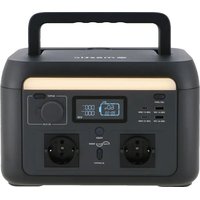
| Product Type | Portable Power Station |
| Brand | Mestic |
| Model | MPS200 |
| Dimensions | 200 x 134 x 130 mm |
| Net Weight | ≈ 2 kg |
| Battery Capacity | 102.4 Wh, 25.6 V, 4 Ah |
| Cell Type | Lithium Iron Phosphate (LiFePO₄) |
| Cycle Life | 3000 cycles |
| AC Output (Inverter Mode) | 200 W (peak 250 W), 220-240 V~, 50/60 Hz, 1.1 A, pure sine wave |
| AC Output (Bypass Mode) | 200 W max., 220-240 V~, 50/60 Hz, 1.1 A |
| USB-A Ports | 2 ports, 5 V ⎓ 2.4 A, 12 W max. each |
| USB-C1 Port | 5/9 V ⎓ 3 A, 12 V ⎓ 2.5 A, 15 V ⎓ 2 A, 20 V ⎓ 1.5 A, 30 W max. |
| USB-C2 Port | 5/9/12/15 V ⎓ 3 A, 20 V ⎓ 3.25 A, 65 W max. |
| Auto Charger | 12.6 V ⎓ 8 A, 100 W max. |
| AC Input | 220-240 V~, 50/60 Hz, 320 W max., 1.8 A |
| Solar Charge (PV) | 50 W max., 12-24 V ⎓, 4 A |
| Car Charge | 12/24 V, 8 A standard |
| Protections | Over-temperature, low temperature, deep discharge, overcharge, short circuit, overcurrent |
| Operating Temperature | Discharge: -20°C to 45°C; Charge: 0°C to 45°C |
| Storage Temperature | -20°C to 45°C (20°C to 30°C recommended) |
| Wi-Fi | Supported (dedicated app) |
| EPS Function | Backup power with switching < 14 ms |
| Maintenance | Discharge and recharge every 3 months for long-term storage; clean with a dry cloth |
| Safety | Do not expose to water, do not disassemble, keep out of reach of children, use in a ventilated area |
Frequently Asked Questions - MPS200 Mestic
User questions about MPS200 Mestic
0 question about this device. Answer the ones you know or ask your own.
Ask a new question about this device
Download the instructions for your Battery charger in PDF format for free! Find your manual MPS200 - Mestic and take your electronic device back in hand. On this page are published all the documents necessary for the use of your device. MPS200 by Mestic.
USER MANUAL MPS200 Mestic
- Power station
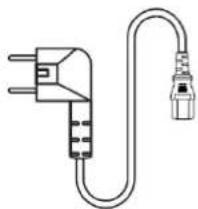
- AC cable
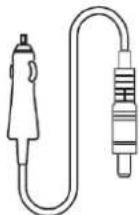
- Car charge cable
- User manual
Parameters
| General | |
| Net Weight | 2kg |
| Dimensions | 200x134x130mm |
| Battery Capacity | 102.4Wh, 25.6V≈, 4Ah |
| Wi-Fi | Supported |
| Output | |
| AC Outlet (Inverter Mode) | pure sine-wave, total 200W (peak 250W), 220-240V~, 50Hz/60Hz, 1.1A |
| AC Outlet (Bypass Mode) | 220-240V~, 50Hz/60Hz, 200W Max., 1.1A |
| USB-A1 + A2 | 5V=== 2.4A, 12W Max. |
| USB-C1 | 5/9V=== 3A, 12V=== 2.5A, 15V=== 2A, 20V=== 1.5A, 30W Max. |
| USB-C2 | 5/9/12/15V=== 3A, 20V=== 3.25A, 65W Max. |
| Auto Charger | 12.6V=== 8A, 100W Max. |
| Input | |
| AC Input Power | 320W max., 1.8A |
| AC Input Voltage | 220-240V~, 50Hz/60Hz |
| PV Charging | 50W max., 12-24V===, 4A |
| Car Charging Input | 12V/24V battery supported, 8A standard |
| Input charging | |
| AC Charging Power | 120W max. |
| PV / Car Charging Power | 50W max. / 50W max. |
| AC + PV Charging Power | 120W max. |
| Battery | |
| Cell Type | Lithium Iron Phosphate (LiFePO4) |
| Lifecycle | 3000 cycles |
Protection
Overheating protection, low temperature protection, over-discharge protection, overcharge protection, overload protection, short-circuit protection, overcurrent protection
Operating temperature
| Optimal Operating Temperature | 20°C - 30°C |
| Discharge Temperature Range | -20°C - 45°C |
| Charge Temperature Range | 0°C - 45°C |
| Storage Temperature Range | -20°C - 45°C (20°C - 30°C recommended) |
Safety instructions
- Before using the power station, please read this user manual to ensure understanding and proper use.
- Do not place a working power station close to any heat source, such as fire or a heater.
- Avoid allowing the power station to come into contact with any liquid.
- Do not use the power station in a strong electrostatic or strong magnetic field environment.
- Do not disassemble the power station in any way or pierce it with a sharp object.
- Avoid short-circuiting the power station with wires or other metal objects.
- It is forbidden to step on, sit, or climb on this product.
- Do not use non-genuine parts or accessories. For part or accessory replacement, please visit the official sales channel for purchase information.
- When using the power station, strictly follow the operating temperature defined in this user manual. If the temperature is too high, the battery may catch fire or even explode. If the temperature is too low, the power station's performance will be seriously impaired, and normal use may be impacted.
- Do not stack heavy objects on the power station, not forcibly stop the fan or expose the power station to an unventilated or dusty environment when it is working.
- Please avoid collisions, dropping, and violent vibrations. If a severe impact occurs, shut down the power supply immediately. Secure the power station firmly during transportation to prevent vibration and impact.
- If the power station falls into water accidentally, place it in a safe and wide area, and keep yourself away from it until it's dry. The dried product is not to be used again. Dispos of it properly according to the discard instructions in this manual. If the power station is on fire, please use fire extinguishing equipment in the recommended order: water or water mist, sand, fire blanket, dry powder, carbon dioxide fire extinguisher.
- If there is dirt on the power station, use a dry cloth to wipe it.
- Place the power station carefully to prevent damage. If the power station is tipped over and seriously damaged, turn off the power station immediately, place the battery in a spacious area, keep it away from flammable materials and people, and discard it in accordance with the requirements of local laws and regulations.
- Keep the power station out of the reach of children and pets.
- Keep the power station in a dry and ventilated place.
- In a humid environment (seaside, water, etc.), it is recommended to equip the power station with a moisture-proof bag. If water is found inside the product, do not use/start it again. Take countermeasures to prevent electric shock before touching the power station. Put it in a safe and waterproof open area and contact customer service immediately.
- It is not recommended to use the power station to supply power for safety-related emergency medical equipment, including but not limited to medical-grade breathing machines (hospital version CPAP: Continuous Positive Airway Pressure), artificial lungs (ECMO, Extracorporeal Membrane Oxygenation). It can be used to supply power for the home version CPAP at home and does not require continuous professional monitoring. Follow your doctor's advice and consult the manufacturer for any restrictions on the use of the device. For general medical equipment, pay attention to the power condition to ensure that power does not run out.
- Conditions permitting, be sure to discharge the battery completely, and then put the power station in the specified battery recycling bin.
- The power station contains batteries, which are dangerous. It is strictly prohibited to discard them in ordinary dustbins. For details, follow local laws and regulations on battery recycling and disposal.
-
If the battery cannot be discharged completely due to a product failure, do not discard the battery directly in the battery recycling bin. Contact a professional battery recycling company for further disposal.
-
The battery will not start after over-discharge. Please dispose of it.
- Power supplies will inevitably generate electromagnetic fields when in use, which might affect implantable medical devices or the normal operation of personal medical devices, such as pacemaker devices, cochlear implants, hearing aids, defibrillators, etc. If any of these medical devices are used, please consult the manufacturer about the restrictions on the use to ensure that the power station is operated at a safe distance from implanted medical devices such as pacemakers, cochlear implants, hearing aids, defibrillators, etc.
- When the power station is connected to a refrigerator, it may automatically shut down because of the power fluctuation property of the refrigerator. When connecting the power supply to a refrigerator that stores medicine, vaccines, or other valuable items, it is recommended to set the AC output to "Never off" in the APP, so as to ensure continuous power. Users should pay attention to power consumption.
- During the push-pull movement of this product, it is forbidden to put other items on this product.
Warning
- Do not overcharge the internal battery. See instruction manual.
- Do not smoke, strike a match, or cause a spark in the vicinity of the power station.
- Only charge the internal battery in a well-ventilated area.
- CAUTION: Risk of electric shock. Connect only to properly grounded outlets.
- CAUTION: Risk of injury to persons. Do not use this product if the power cord or the battery cables are damaged in any way.
- CAUTION: Risk of electric shock. Do not remove cover. No user serviceable parts inside. Refer servicing to qualified service personnel.
- CAUTION: This device is not intended for use in a commercial repair facility.
Product overview
Front view

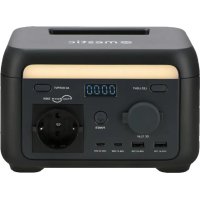
- LED Light Button
- Car Charge Output
- USB-A Output Ports (2x)
- USB-C Output Ports (2x)
- AC Output Socket
- ON/OFF Button
- AC Output Button
- Digitron Display
- LED Light
Rear View

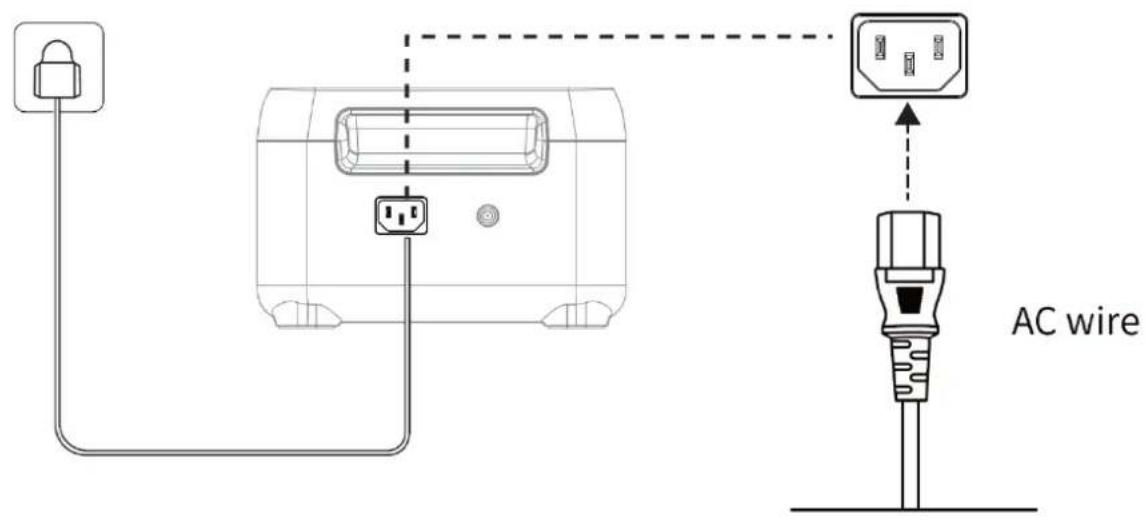
- AC Input Socket
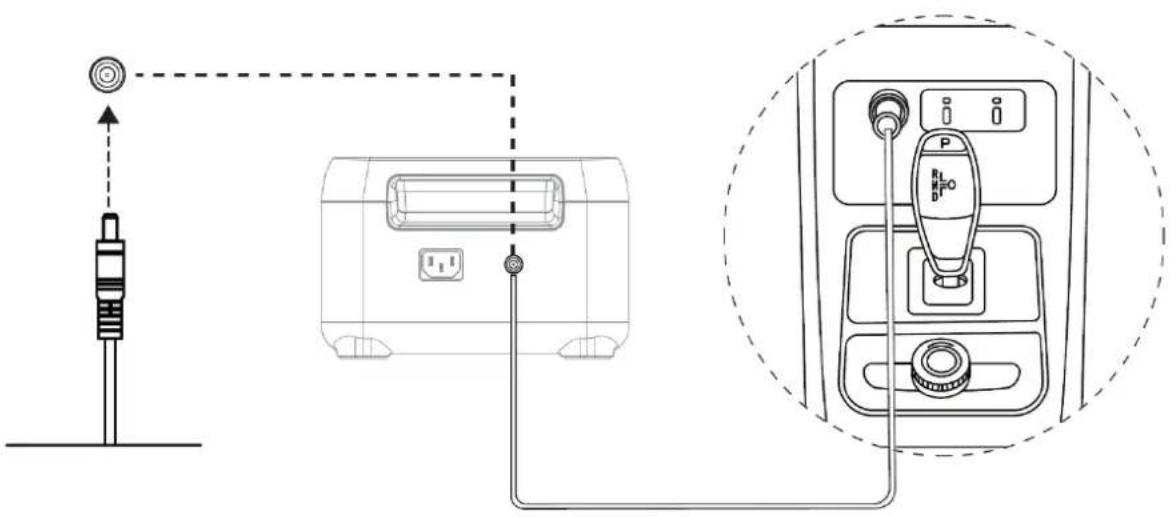
- Solar/Car Charge Input
Side view
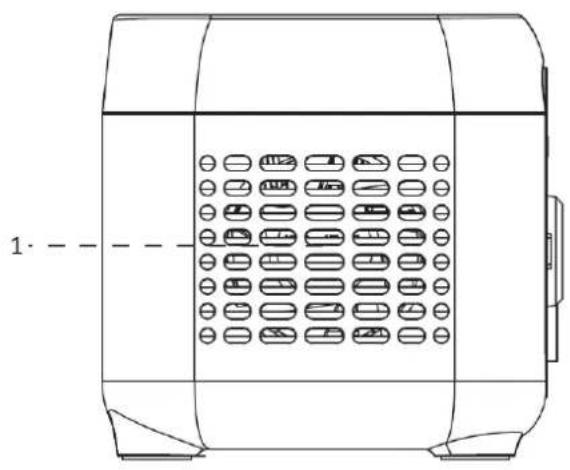
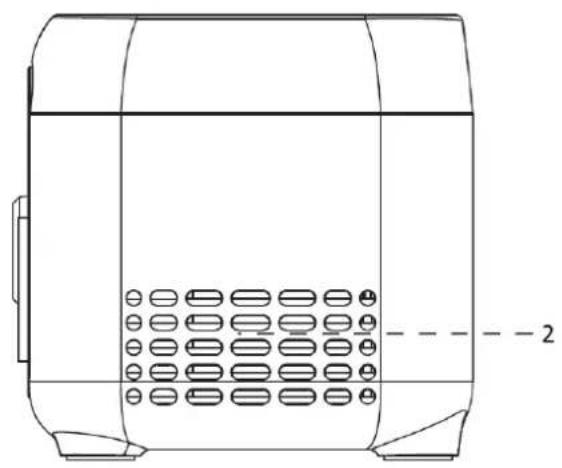
1/2. Ventilation opening
LCD-Screen

Use
- Press the main power switch to turn on the device; the screen and the power indicator will light up.
- If no operation is performed on the power station for 5 minutes, the power station will enter a hibernation state, and the LCD screen will automatically turn off. When there is a load change or operation on the power station, the LCD screen will automatically light up. Press the main power switch to turn on or turn off the LCD screen.
- Press and hold the main power switch to turn off the power station.
-
In normal mode (when the power is above 5% ), the default standby time of this product is 2 hours. When the AC output switch is not turned on, and there is no charge or discharge for 2 hours, the product will automatically shut down. The standby time can be set on the APP. When the power is 5% or below, the product will be forced to enter low power mode. In the case of no charge or discharge, the product will adjust the standby time according to the power and automatically shut down.
-
In normal mode, long-press the LED light button to exit the automatic shutdown setting, and the battery icon on the screen will flash. Long-press again to enter the automatic shutdown setting, and the battery icon will not flash. (The automatic shutdown setting is to protect the battery from low power; exiting this setting may damage the battery life, so please use it with caution.)
- Note: When there is no AC input, long press the AC output button. You can switch the AC off-grid output frequency (50 Hz/60 Hz), long press 2 seconds to switch. The AC output icon will flash 3 times after successful switching.


- After ensuring that the main power is turned on, short-press the AC output power switch to turn on the AC output. Short-press the AC output power switch again to turn it off.
- The default standby time of the AC output port is 1 hour. After 1 hour without any load on the AC output port of this product, the AC output power will be automatically turned off. In normal mode, long-press the LED light button; the AC output power switch can exit the automatic shutdown setting, and the battery icon on the screen will flash. Long-press again, and the AC output power switch enters the automatic shutdown setting, and the battery icon will not flash.
- Long-press the LED light button to exit the AC automatic shutdown setting: it is applicable to AC equipment below 10W and pulse working equipment.
- When the AC output is not in use, turn it off to save power consumption.
AC charging
When the product is turned on, the default fast charging mode is working. In fast charging mode, it takes about 75 minutes to fully charge. Please use the standard AC cable for charging. AC charging cable should directly plug into a 10A (or above) wall-mounted socket. We take no responsibilities for any damage caused by using an unofficial AC charging cable, and other failures to follow instructions.
PV charging
- Please follow the user manual to connect the solar panels.
- Before connecting the solar panel, check whether its output voltage is within the power station specifications to avoid damage to the power station.
- The interface of this product is DC7909. If you need an adapter cable from MC4 to DC7909, please purchase it yourself.

Car charging
The power station can be charged using a car charging port. It should be charged after the car starts to avoid car battery loss and failure to start. At the same time, ensure a good connection between the car charging port and the cigarette lighter. We take no responsibility for any loss caused by improper operation.
Intelligent inversion
To avoid operation faults arising from charging overload, when the total output power exceeds the rated output power, the constant output power will be automatically enabled, allowing the power station to supply power to high-power devices at the rated output power.
Please take note of the following while using constant power:
- The constant power output function is not enabled by default and can be turned on or off via the app.
-
The constant power output function is not enabled in the following cases:
-
When AC output is turned on during charging (bypass mode).
-
When constant power output is turned off.
-
The constant power output function is more suitable for heaters and motors instead of all electrical equipment. It is not suitable for some electrical appliances with voltage protection (such as precision instruments). The application of the constant power output function is subject to actual testing.
APP
You can control and view information and data about this product through the app. For detailed usage instructions, please refer to the WiFi Connection Instructions:
EPS Function
This product supports the EPS (emergency backup power) function. Connect the power grid to the AC input port of this product using the AC charging cable; it operates in Bypass mode (AC power comes from the grid, not the battery). In the event of a sudden power loss from the grid, the product can automatically switch to battery power supply mode within 14 milliseconds. At this time, it functions in inverter mode. Please note that this function
does not support 0 milliseconds switching. Avoid connecting it to devices that require high uninterrupted power supply, such as data servers and workstations, unless compatibility is confirmed through multiple tests. It is recommended to use only one device at a time to avoid overload protection. If the device does not operate normally or data is lost due to failure to follow instructions, we will not be responsible.

Maintenance
- It is recommended to use or store the power station in an ambient temperature of 20^30^ . Keep it away from water, heaters, and metal parts, and store it in a dry and ventilated place.
- For long-term storage, charge and discharge every 3 months, i.e., discharge to 0% , then charge to 100% and finally discharge to 48%-52% .
- For safety, do not store the power station with a temperature above 45^ or below -10^ .
- If the capacity is lower than 1% , please charge it to 60% . Long-term storage with a serious power shortage will cause irreversible damage to the cell and shorten the service life of the product.
- If the capacity is seriously insufficient and idle time is too long, the product will enter deep sleep mode, and it can only be used after being charged.
- After charging or discharging this product, wait for more than 30 minutes before using it.
error codes
| Error no. | Fault Description | Solution |
| 2 | Pressure difference is too large | Auto shutdown. Fault will be cleared after reboot. |
| 4 | Battery OTP (over temperature protection) fault | Auto shutdown. Temperature recovery enables starting up. |
| 5 | Battery UTP (under temperature protection) fault | |
| 6 | OCP (over current protection) fault | Auto shutdown. Remove the over-power device. Fault will be cleared after reboot. |
| 8 | Pre-charge fault | Auto shutdown. Fault will be cleared after reboot. |
| 9 | Battery under voltage fault | Auto shutdown and charge. Contact customer service if still not fixed after multiple charging failures. |
| 11 | Abnormal INV battery voltage | Auto recover after fault is cleared. |
| 12 | Grid voltage or frequency fault | The fault is cleared when the grid returns to normal. |
| 13 | Abnormal INV BUS voltage | Auto recover after fault is cleared. |
| 14 | Abnormal INV output | Auto recover after fault is cleared. |
| 15 | INV discharge overload | Remove over-power device. Auto recover after fault is cleared. |
| 16 | Charge overload | Auto recover after fault is cleared. |
| 17 | INV Tz | |
| 20 | MOSFET OTP fault | Auto recover after product has cooled down. |
| 21 | Fan stop | Turn on and off. Contact customer service if not fixed. |
| 23 | Charge soft start fault | |
| 24 | MOSFET UTP fault | Turn on and off. Contact customer service if not fixed. |
| 27 | DC input hardware overcurrent protection | Remove DC charge, auto recover after connecting DC an turn on. |
| 28 | DC input software | DC charging stops and will automatically |
| 30 | overcurrent protection | resume after the fault is eliminated. |
| 30 | Car charger output/ DC5521 output Over current protection | Turn off output. Manual recover after fault is cleared. |
| 31 | PV output OVP (over voltage protection) fault | Removing the PV charging interface will automatically restore it after a certain period of time. |
| 32 | DC input voltage overvoltage protection | Remove the DC charging interface for a certain period of time to automatically recover or check whether the PV output fuse is disconnected. |
| 35 | DC input over temperature protection | Stop DC. Auto recover after fault is cleared. |
| 38 | Abnormal communication | Turn on and off, or change operation environment. Contact customer service if still not fixed. |
Disclaimer
- The product has a built-in battery management system with protections such as overcharge, over-discharge, overcurrent, short circuit, high and low temperature, and abnormal communication. During the use of this product, protection may occur, causing output interruption. The power supply to special equipment, such as medical equipment or servers, and any indirect loss caused by accidental power failure, we do not take responsibility for. All accidents caused by illegal use, self-dismantling, and man-made damage we do not take responsibility for.
- Before using the power station, please read this user manual to ensure understanding and proper use. Keep the user manual for future reference. Improper operation may cause serious injury or result in product damage and property loss. By using the power station, you are deemed to have understood and accepted all terms and contents herein. Users promise to be responsible for their actions and all consequences arising therefrom. The company shall not be liable for any loss arising from the user not following this user manual.
- In compliance with laws and regulations, the manufacturer reserves the right of the final interpretation of this document and all related documents of this product. Subject to update, revision, or termination without prior notice, please visit the official website for the latest product information.

Recycling
This product bears the selective sorting symbol for waste electrical and electronic equipment. This means that this product must be handled pursuant to European Directive (2012/19/EU) in order to be recycled or dismantled to minimize its impact on the environment. For further information, please contact your local or regional authorities. Electronic products not included in the selective sorting process are potentially dangerous for the environment and human heath due to the presence of hazardous substances.
Declaration of conformity
Hereby Gimeg Nederland B.V., declares that the device Power Station MPS-200, complies with the basic requirements and other relevant regulations listed in the European Battery Directive (2023/1542/EU), Low Voltage Directive (2014/35/EU), Electromagnetic Compatibility (2014/30/EU), RoHS (2011/65/EU) and Radio Equipment (2014/53/EU). A complete declaration of conformity can be requested from the address listed on the back.
DEUTSCH

1
2
3

4