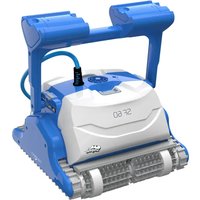
Dolphin Easy Comfort - Robot vacuum MAYTRONICS - Free user manual and instructions
Find the device manual for free Dolphin Easy Comfort MAYTRONICS in PDF.



| Brand | Maytronics |
| Model | Dolphin Easy Comfort |
| Product type | Robotic pool cleaner |
| Power supply | External power supply, input 100-250 V AC, 50-60 Hz, 180 W, output 30 V DC |
| Power supply protection rating | IP54 (splash-proof) |
| Filter types | Mesh filter and cartridges (only one type supplied depending on factory setting) |
| Brush types | PVC brush (concrete, PVC, fiberglass), Combined brush (all coatings), Wonder brush (smooth ceramic) |
| Speed setting | Adjustable handle angle: normal or fast speed |
| Cleaning cycle | Automatic, start via ON/OFF switch |
| Water temperature range | 6°C to 34°C |
| Recommended chemical parameters | pH 7.0-7.8; NaCl max 5000 ppm; Chlorine max 4 ppm |
| Maintenance | Filter cleaning after each cycle, brush rinsing, periodic turbine cleaning |
| Safety instructions | Disconnect before maintenance; do not enter pool during operation; use a ground fault circuit interrupter |
| Storage | In a dry, cool place, protected from sunlight, excessive heat and frost |
| Included accessories | Robot, power supply, floating cable, filter(s), brush(es), Caddy kit, S-hooks |
Frequently Asked Questions - Dolphin Easy Comfort MAYTRONICS
User questions about Dolphin Easy Comfort MAYTRONICS
0 question about this device. Answer the ones you know or ask your own.
Ask a new question about this device
Download the instructions for your Robot vacuum in PDF format for free! Find your manual Dolphin Easy Comfort - MAYTRONICS and take your electronic device back in hand. On this page are published all the documents necessary for the use of your device. Dolphin Easy Comfort by MAYTRONICS.
USER MANUAL Dolphin Easy Comfort MAYTRONICS
Robot Pool Cleaner by Maytronics
EN User Instructions....p. 1
natural_image
Exterior view of a modern Maytronics robotic lawn mower (no signage or text visible)CLASSIC 8D-UNI
Ver.01 8151622
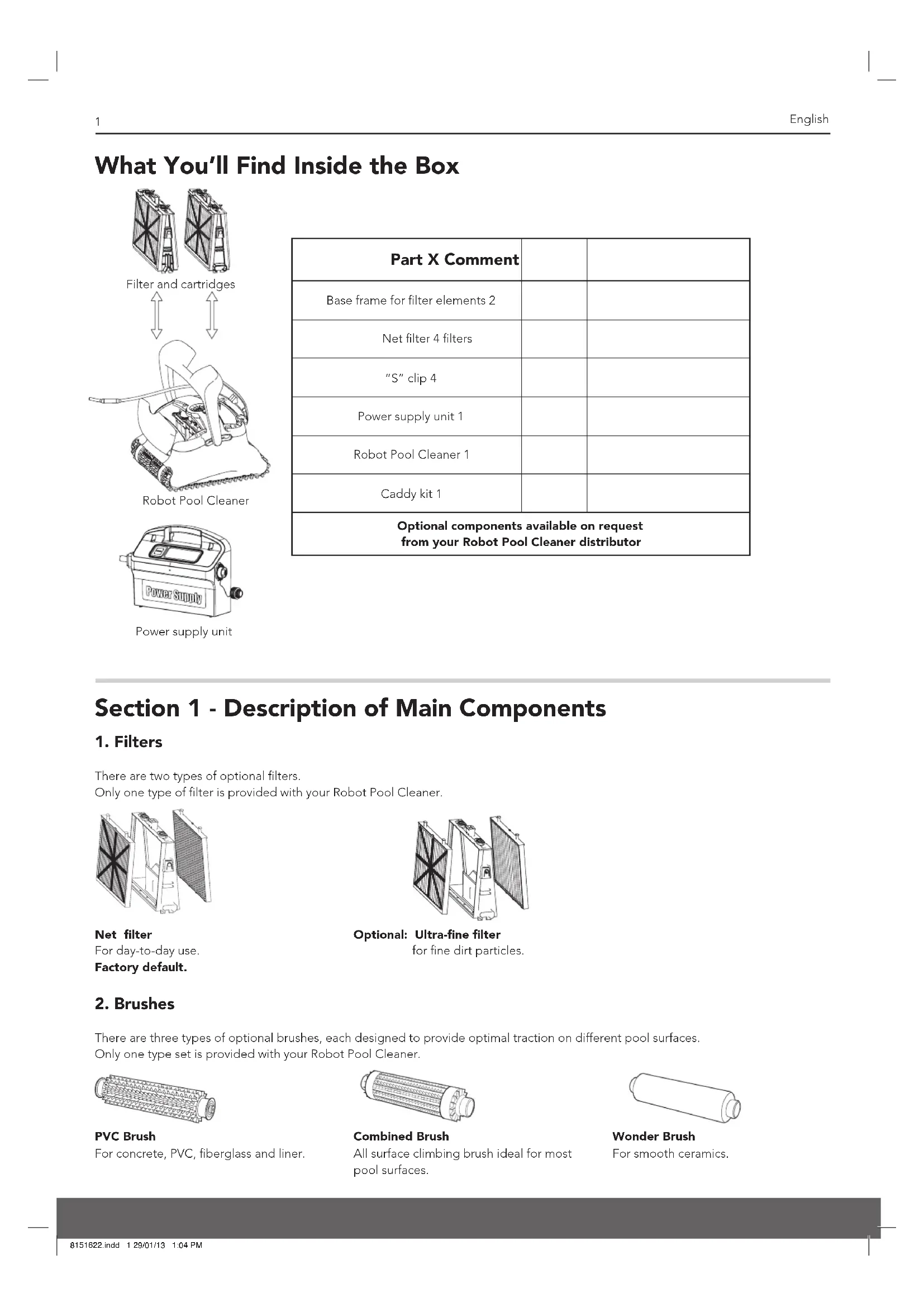
What You'll Find Inside the Box
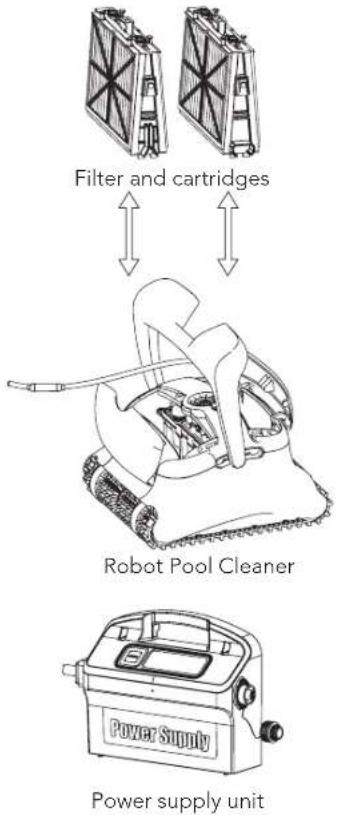
text_image
Filter and cartridges Robot Pool Cleaner Power Supply Power supply unit| Part X Comment | ||
| Base frame for filter elements 2 | ||
| Net filter 4 filters | ||
| "S" clip 4 | ||
| Power supply unit 1 | ||
| Robot Pool Cleaner 1 | ||
| Caddy kit 1 | ||
| Optional components available on request from your Robot Pool Cleaner distributor | ||
Section 1 - Description of Main Components
1. Filters
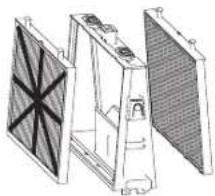
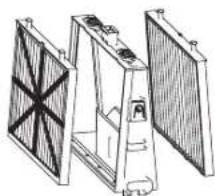
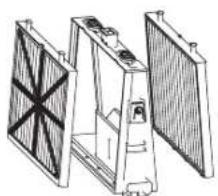
There are two types of optional filters.
Only one type of filter is provided with your Robot Pool Cleaner.
natural_image
Technical line drawing of a three-tiered mechanical or electronic component with no visible text or symbolsNet filter
For day-to-day use.
Factory default.
natural_image
Technical line drawing of a mechanical assembly with no visible text or symbolsOptional: Ultra-fine filter
for fine dirt particles.
2. Brushes
There are three types of optional brushes, each designed to provide optimal traction on different pool surfaces. Only one type set is provided with your Robot Pool Cleaner.
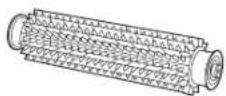
PVC Brush
For concrete, PVC, fiberglass and liner.
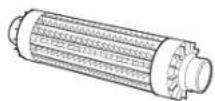
Combined Brush
All surface climbing brush ideal for most pool surfaces.
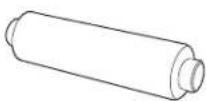
Wonder Brush
For smooth ceramics.
3. Power supply unit
Digital, "Switch-Mode" power supply:
• Input - 100-250 AC Volts
50-60 Hertz
180 Watt
• Output - 30 VDC
IP 54
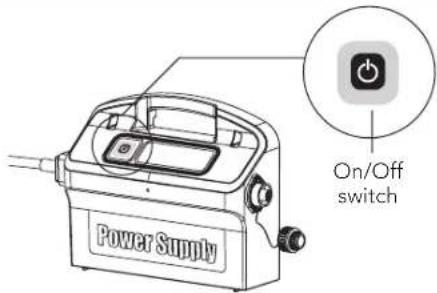
text_image
Power Supply On/Off switchSection 2 – Robot Pool Cleaner Operation
Part 1 – Preparing the Robot Pool Cleaner for Use
A. Assemble the Caddy kit – you will find the instructions in a separate document
B. Adjusting the handle float angle
The handle angel must be adjusted to determine the speed that the Robot Pool Cleaner advances along the water-line.
- Lay the handle down at an angle of 180^ to the ground.
- Push the base of the arm into the body of the Robot Pool Cleaner and slide it towards the rear of the Robot Pool Cleaner until it clicks into the required position.
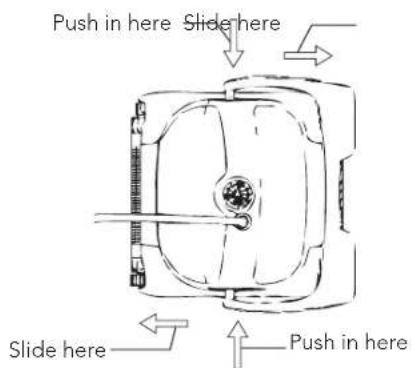
text_image
Push in here Slide here Slide here Push in hereNormal advance
More efficient cleaning action on water-line.
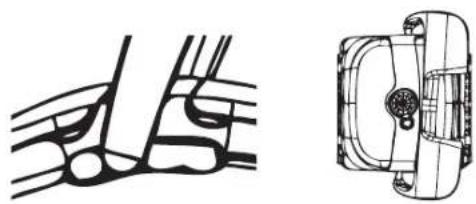
natural_image
Technical line drawing of a mechanical component with no visible text or symbolsFast advance
Fast speed – For faster but less efficient cleaning action on water-line.
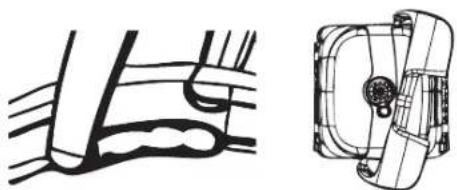
natural_image
Technical line drawing of a mechanical component with no visible text or symbolsC. Laying out the cable
Unwind minimal required cable to cover the entire pool size, straight the cable along the pool side. Make sure there are no twists or kinks.
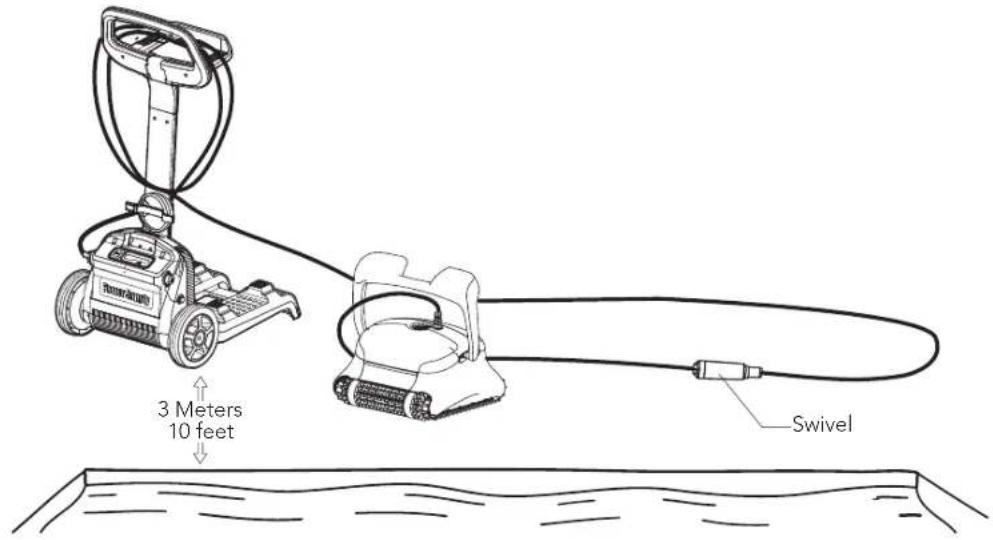
text_image
3 Meters 10 feet SwivelOnly use only the original supplied power supply unit.
The Power supply unit is splash proof – do not immerse it in water.
⚠️ Unplug the power supply unit before any servicing activity.
Do not plug the power supply unit in before placing the pool cleaner in the water.
⚠ Ensure the mains outlet is protected by a ground fault interrupter (GFI) or an earth leakage interrupter (ELI).
Important: Do not enter the swimming pool while the pool cleaner is working.
Part 2 - Into the water
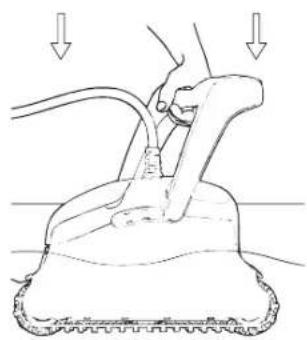
Inserting the Robot Pool Cleaner into the pool.
Place the Robot Pool Cleaner into the pool and release the handle.
natural_image
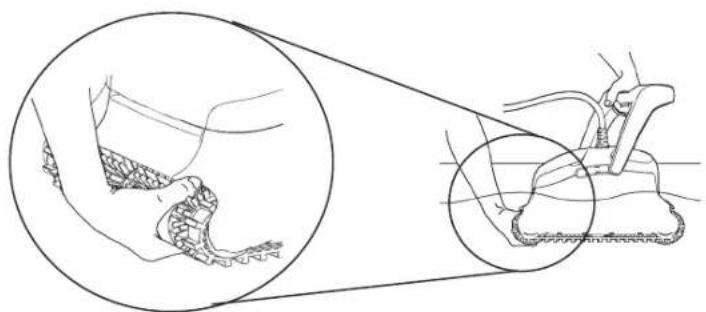
Line drawing of a hand using a tool to lift a surface, with arrows indicating downward motion (no text or symbols)Note: When using the Combined brushes or Wonder brushes, gently squeeze the Wonder brush material until it is totally wet.
natural_image
Medical illustration showing a foot and ankle joint with a close-up of the ankle joint (no text or labels)Turning the Robot Pool Cleaner ON
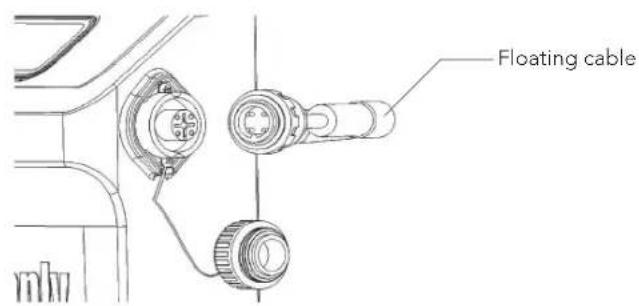
- Plug the floating cable from the Robot Pool Cleaner into the power supply unit.
-
Plug the electrical cable from the power supply unit into the mains.
-
Press the ON / OFF switch.
- The Robot Pool Cleaner will now start to work.
text_image
Floating cable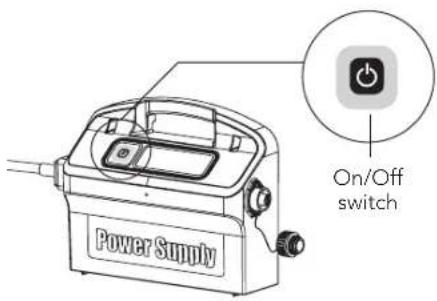
text_image
Power Supply On/Off switch
Important: Do not enter the swimming pool while the pool cleaner is working.
Part 3 - Taking the Robot Pool Cleaner out of the water

Unplug power supply before any servicing activity.
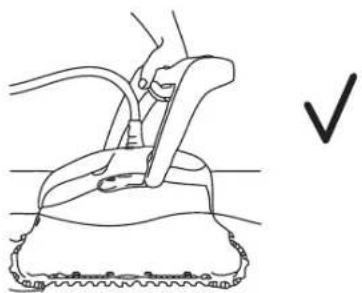
- If the Robot Pool Cleaner has not finished its cycle, turn off the power supply unit and unplug the mains.
- Pull the floating cable gently until the Robot Pool Cleaner has risen to the surface, then lift by the handle.
natural_image
Line drawing of a hand using a tool to clean or repair a surface, with a checkmark indicating the correct action (no text or symbols present)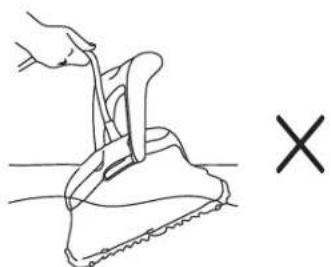
natural_image
Line drawing of a hand gripping a piece of dough with a fork, next to a cross symbol (no text or labels)Important: Do NOT lift the Robot Pool Cleaner from the water by its cable.
Section 3 - Routine Maintenance
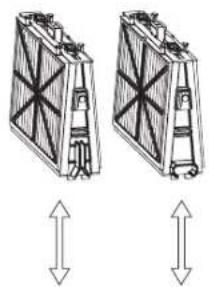
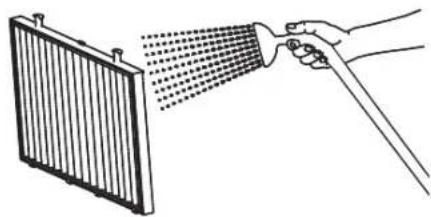
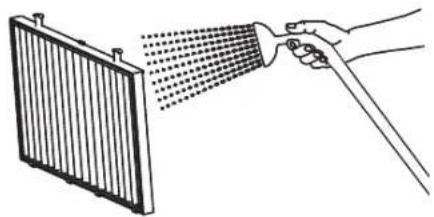
Part 1 - Extracting and cleaning the filter elements

Unplug power supply before any servicing activity.
natural_image
Two identical 3D diagrams of a mechanical component with internal structure, shown with upward and downward arrows (no text or symbols)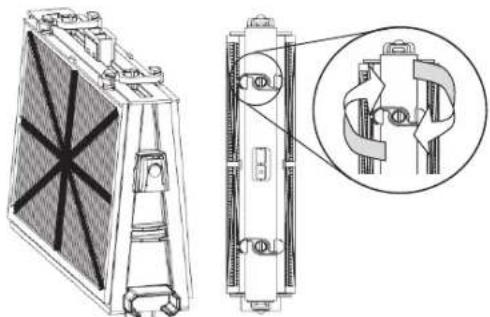
natural_image
Technical line drawing of a heat exchanger or cooling unit with internal components and a magnified inset showing internal mechanical assembly (no text or symbols)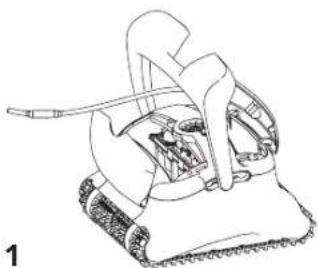
natural_image
Line drawing of a mechanical device with textured base and handle (no text or symbols)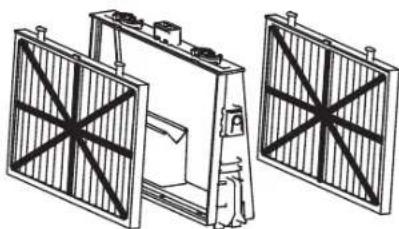
natural_image
Technical line drawing of three industrial fan structures with no visible text or symbols2
natural_image
Illustration of a hand spraying water onto a radiator panel (no text or symbols)3
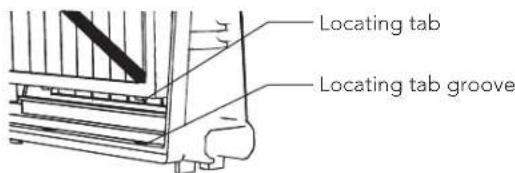
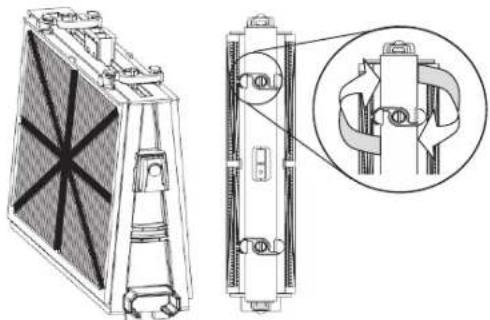
Reassembling the filter elements
Insert the locating tabs at the bottom of the filter element into their groves on the base frame, then close the "S" clip.
text_image
Locating tab Locating tab groove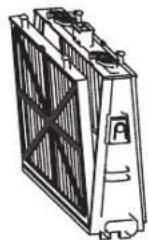
natural_image
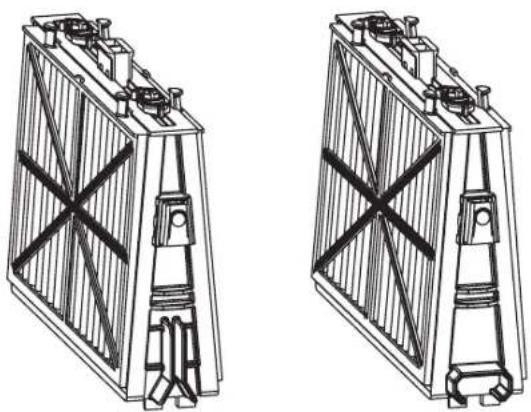
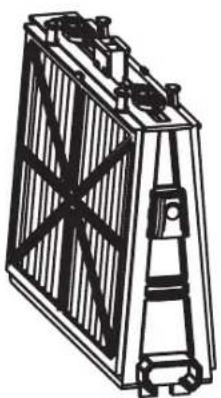
Technical line drawing of a heat exchanger or cooling unit with internal components and a magnified inset showing internal structure (no text or symbols)Reinstall the filters according to the diagram DO NOT FORCE THE FILTERS INTO PLACE.
natural_image
Technical line drawings of two identical battery modules with no visible text or symbolsGrooved end fitting Octagonal end fitting
Recommendation: Rinse all brushes with clean water after each cleaning cycle.
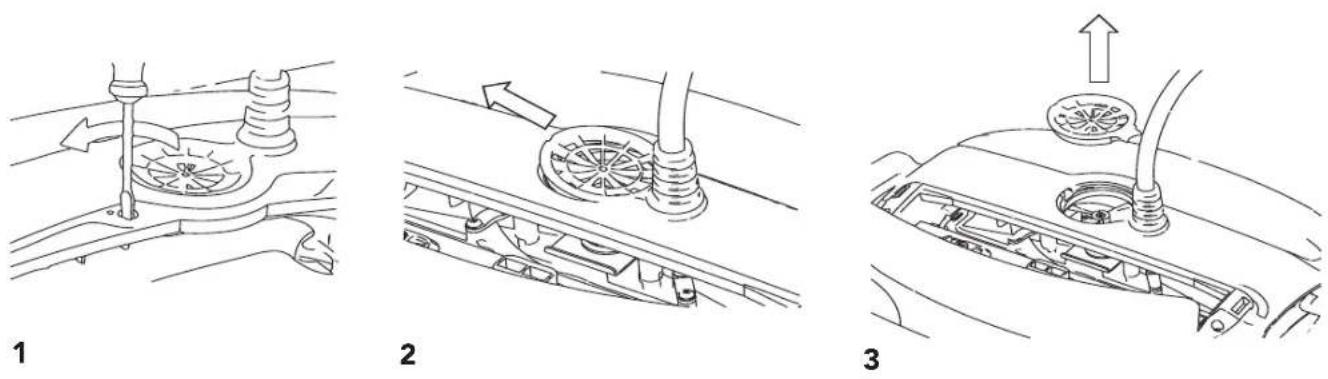
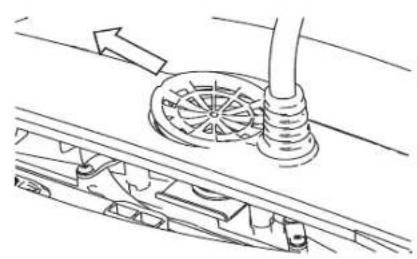
Part 2 - Dismantling and cleaning the impeller
⚠️ Unplug power supply before any servicing activity.
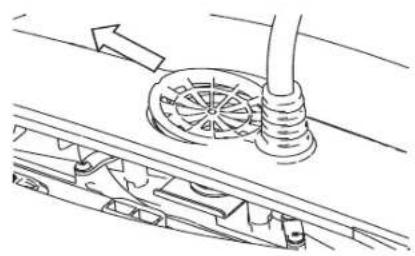
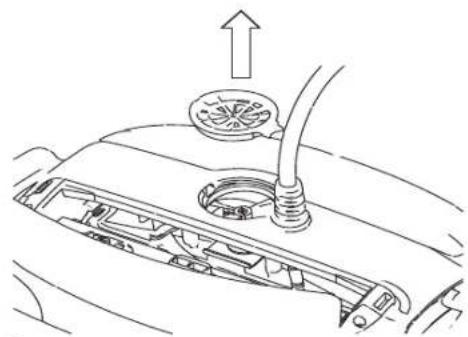
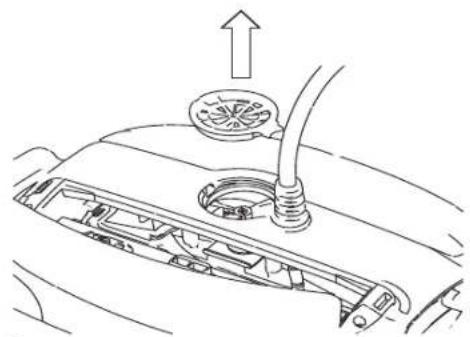
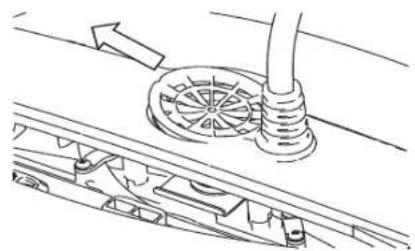
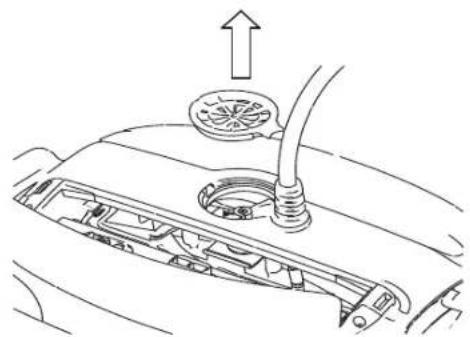
Dismantle the impeller cover and clean around the impeller housing, then reassemble.
Section 4 – Storage Advice
Coil the cable and store in dry cool area – preferably on the Caddy if available.
✗ Do NOT store the Robot Pool Cleaner exposed to direct sunlight.
✗ Do NOT store the Robot Pool Cleaner exposed to excessive heat.
✗ Do NOT store the Robot Pool Cleaner exposed to frost.
Troubleshooting Guide
Before contacting your Robot Pool Cleaner distributor please read through this guide.
The pool water condition must be within the following parameters:
| PH: 7.0 – 7.8 NaCl: Max 5,000 ppm | |
| Temperature: 6°C(43°F) to 34°C(93°F) Chlorine: Max 4 ppm |
| Symptom Solution | |
| Cable twisting or cable coils up | Check for any obstruction in the pool |
| Remove excess cable from the pool | |
| Make sure filter cartridge is clean | |
| Straighten cable and lay it in the sun periodically | |
| Robot Pool Cleaner is moving in circles or does not reach all pool areas | Check for foreign objects in moving parts |
| Make sure filter elements are clean and that the filter doors are closed | |
| Make sure that there is enough cable laid out to cover the whole pool | |
| Before using the Robot Pool Cleaner at the beginning of the season you should brush any algae from the floor and walls of the pool | |
| Robot Pool Cleaner is not traveling sideways on walls | Adjust the diagonal angle of the handle |
| Robot Pool Cleaner does not climb walls | Make sure the filter cartridge is clean |
| If using the Robot Pool Cleaner at the beginning of the season you should first brush any algae from the floor and walls of the pool | |
| Check if brushes are suitable for pool coating and replace them if necessary | |
| Check if brushes are worn and replace them if necessary | |
| Make sure the impeller area is clean | |
| Robot Pool Cleaner not sinking | Make sure the Wonder brushes or the combined brushes are soaked in water |
| Robot Pool Cleaner disengaging from wall at water line | If Robot Pool Cleaner climbs too high consult your Robot Pool Cleaner distributor |
| Motor is not working | Check if the impeller is blocked |
| Check if the drive system is blocked | |
| Electrical problem (power supply), check power source. If power source is in order, please contact your Robot Pool Cleaner distributor |
natural_image
Technical line drawing of a mechanical or architectural component with no visible text or symbolsFiltre filet
À usage quotidien.
natural_image
Technical line drawing of a three-panel industrial device with heat sinks and structural panels (no text or symbols)Enoption:Filtreultrafin
natural_image
Technical line drawing of a mechanical component with no visible text or symbols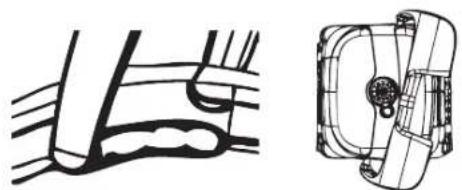
natural_image
Technical line drawing of a mechanical component with no visible text or symbolstext_image
3 metres 10 feet Pivot (Swivel)natural_image
Line drawing of a hand operating a tool on a tiled floor, with arrows indicating downward motion (no text or symbols)natural_image
Technical illustration of a mechanical device with a close-up inset showing internal components (no text or symbols)text_image
Diagram showing two steps of a hairdryer tool: checkmark and cross, with labeled arrows.natural_image
Two identical diagrams of a mechanical device with directional arrows indicating vertical displacement (no text or symbols)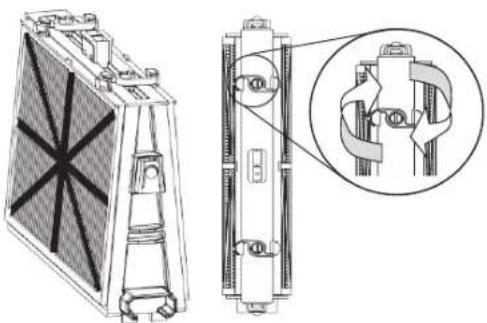
natural_image
Technical line drawing of a heat exchanger or cooling unit with internal components and a close-up inset showing mechanical assembly (no text or symbols)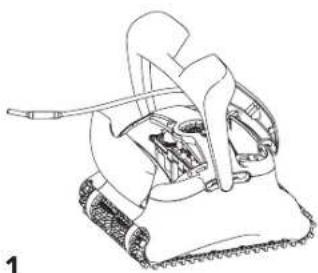
natural_image
Line drawing of a mechanical device with textured base and handle (no text or symbols)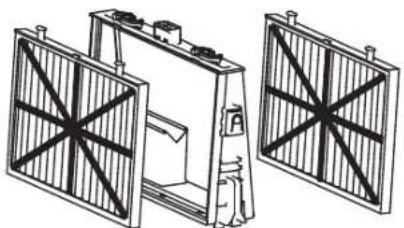
natural_image
Technical line drawing of a mechanical assembly with two views of a frame structure (no text or symbols)2
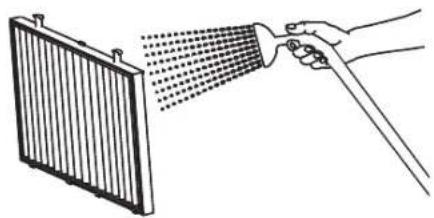
natural_image
Illustration of a hand spraying water onto a panel with a spray gun (no text or symbols)3
Remontage
natural_image
Technical line drawing of a heat exchanger or cooling unit with internal components and a magnified inset showing internal mechanical assembly (no text or symbols)natural_image
Technical line drawing of a battery with internal structure and mounting brackets (no text or symbols)Embout à rainure
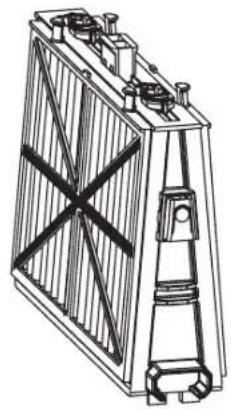
natural_image
Technical line drawing of a battery with visible internal structure and mounting brackets (no text or symbols)Embout octogonal
natural_image
Technical line drawing of a three-panel industrial device with no visible text or symbolsFiltro a rete
natural_image
Technical line drawing of a mechanical assembly with three views (front, side, and top) showing internal components without any text or symbols.text_image
Power Supply Interruttore On/Offnatural_image
Technical line drawing of a mechanical component with arrows indicating motion or force (no text or symbols)Fare scivolare qui


Premere qui
Avanzamento normale
natural_image
Abstract line drawing with intersecting curves and no text or symbols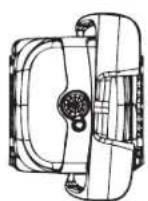
Avanzamento veloce
natural_image
Pure mechanical diagram showing a pipe joint with no text or symbols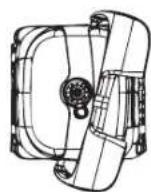
C. Posa del cavo
natural_image
Line drawing of a hand operating a tool on a textured surface, with arrows indicating force direction (no text or symbols)natural_image
Diagram showing a foot and ankle joint with a close-up of the ankle joint, no text or symbols presenttext_image
Power Supply Interruttore On/Off
natural_image
Line drawing of a hand using a tool to lift a small object, with a checkmark indicating the correct action (no text or symbols present)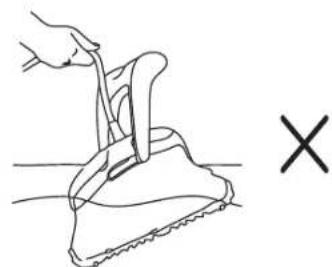
natural_image
Line drawing of a hand gripping a small object on a textured surface, with a 'X' symbol below (no text or labels)natural_image
Technical line drawing of a heat exchanger or cooling unit with internal components and a magnified inset showing internal structure (no text or symbols)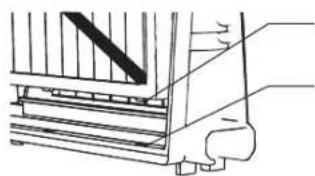
natural_image
Technical line drawing of a mechanical assembly with stairs and legs (no text or symbols)Aletta di posizione
natural_image
Technical line drawing of a mechanical assembly with a rotating component and base mount (no text or symbols)1
natural_image
Technical line drawing of a mechanical assembly with no visible text or symbols2
natural_image
Diagram of a car's engine compartment showing intake manifold and exhaust pipe (no text or labels)3
natural_image
Line drawing of a power supply device with no visible text or symbols on the bodynatural_image
Technical line drawing of three mechanical components with no visible text or symbolsFiltro de red
Para el uso diario.
natural_image
Technical line drawing of a mechanical assembly with three views (front, side, and top) showing internal components without any text or symbols.Opcional:Filtroultrafino
natural_image
Technical line drawing of a mechanical component with no visible text or symbolsAvanzo Rápido
natural_image
Technical line drawing of a mechanical component with no visible text or symbolsC. Colocar el Cable
natural_image
Line drawing of a hand using a tool to lift a tiled floor (no text or symbols)natural_image
Technical illustration of a foot and ankle mechanism with magnified views (no text or symbols)natural_image
Line drawing of a hand using a tool to clean or repair a surface, with a checkmark indicating the correct action (no text or symbols present)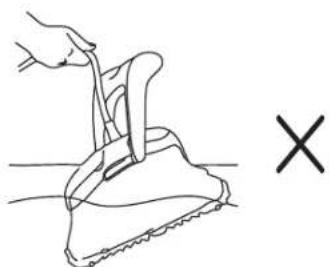
natural_image
Line drawing of a hand gripping a piece of material, with a 'X' symbol indicating a defect or mark (no text or labels present)natural_image
Two identical 3D diagrams of a folded structure with internal components, each showing upward and downward arrows (no text or symbols)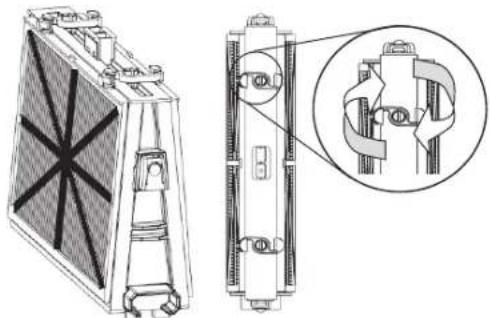
natural_image
Technical line drawing of a heat exchanger or cooling unit with internal components and a magnified inset showing internal structure (no text or symbols)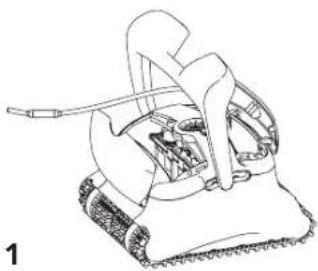
natural_image
Line drawing of a mechanical device with gears and a handle (no text or symbols)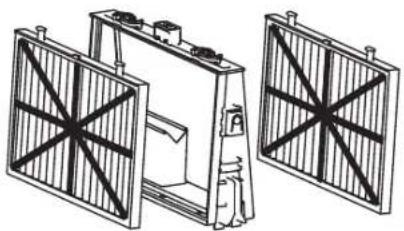
natural_image
Technical line drawing of a mechanical device with two fan-like structures and a central component (no text or symbols)2
natural_image
Illustration of a hand spraying water onto a panel with a spray gun (no text or symbols)3
Reensamblar
natural_image
Technical line drawing of a heat exchanger or fan device with internal components and a magnified inset showing internal structure (no text or symbols)natural_image
Technical line drawing of a battery with internal structure and mounting brackets (no text or symbols)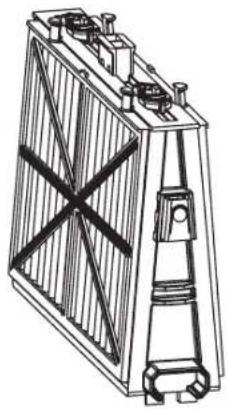
natural_image
Technical line drawing of a battery with internal components and mounting feet (no text or symbols)natural_image
Line drawing of a power supply device with no visible text or symbols on the bodynatural_image
Technical line drawing of a mechanical component with three views (front, side, and top) showing internal structure and mounting features (no text or symbols)Netzfilter
natural_image
Technical line drawing of a mechanical assembly with no visible text or symbolsOptional: Ultrafeiner Filter
natural_image
Technical line drawing of mechanical components, no text or symbols presentnatural_image
Technical line drawing of a mechanical component with no visible text or symbolsnatural_image
Line drawing of a hand using a tool to lift a textured surface, with arrows indicating downward motion (no text or symbols)natural_image
Diagram showing a mechanical device emitting a beam, with an inset close-up of the component (no text or symbols present)natural_image
Line drawing of a hand using a tool to press or install a mechanical component, with no visible text or symbols.natural_image
Line drawing of a hand gripping a saw blade, with a cross symbol indicating a defect or mark (no text or labels present)natural_image
Technical line drawing of a heat exchanger or fan device with internal components and a magnified inset showing internal structure (no text or symbols)natural_image
Technical line drawing of a battery with internal structure and mounting base (no text or symbols)GeriffeltesEndstück
natural_image
Technical line drawing of a rectangular battery with internal circuitry and mounting brackets (no text or symbols)natural_image
Technical line drawing of a mechanical assembly with no visible text or symbols1
natural_image
Technical line drawing of a mechanical assembly with gears and shafts (no text or symbols)2
natural_image
Diagram of a car's engine compartment showing intake manifold, exhaust pipe, and fan (no text or labels)3
natural_image
Line drawing of a mechanical device with two upward arrows indicating motion or force direction (no text or symbols)natural_image
Line drawing of a power supply device with buttons and a display (no text or symbols)natural_image
Diagram of three rectangular electronic components with internal structures, no visible text or symbolsFiltro de rede
Para uso diário.
Padrão de fábrica.
natural_image
Technical line drawing of a mechanical component with three views (front, side, and top), no text or symbols present.Opcional: Filtro ultrafino
text_image
Interruptor On/Off Power Supplynatural_image
Technical line drawing of a mechanical component with no visible text or symbolsAvanço rápido
natural_image
Technical line drawing of a mechanical component with no visible text or symbolsC. Colocar o cabo
natural_image
Diagram of a hand operating a tool on a textured surface with two downward arrows indicating force or movement (no text or symbols present)natural_image
Medical illustration showing a surgical procedure on a patient's foot and ankle, with magnified views of the incision (no text or labels)Ligar o Robô Limpador de Piscinas
text_image
Cabo flutuantetext_image
Power Supply Interruptor On/Offnatural_image
Line drawing of a hand using a tool to lift a surface, with a checkmark indicating the correct action (no text or symbols present)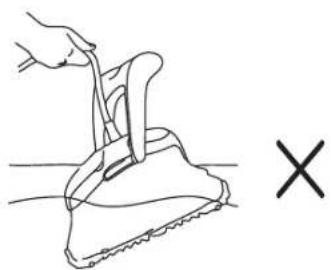
natural_image
Line drawing of a hand using a tool to lift a small object, with a cross symbol indicating cancellation (no text or labels)natural_image
Technical line drawing of a heat exchanger or cooling unit with internal components and a magnified inset showing internal structure (no text or symbols)natural_image
Technical line drawing of two identical electrical or mechanical components with no visible text or symbolsnatural_image
Line drawing of a mechanical assembly with a tool and rotating components (no text or symbols)1
natural_image
Technical line drawing of a mechanical assembly with pipes and gears (no text or symbols)2
natural_image
Diagram of a car's engine compartment showing intake manifold, exhaust pipe, and fan (no text or labels)3
Robot Pool Cleaner by Maytronics
CLASSIC 8D-UNI
Ver.01 8151622