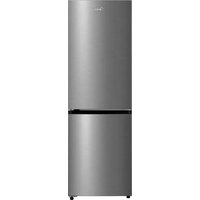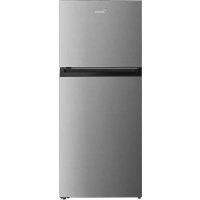
MDRT580MTE02E - Fridge MIDEA - Free user manual and instructions
Find the device manual for free MDRT580MTE02E MIDEA in PDF.



User questions about MDRT580MTE02E MIDEA
0 question about this device. Answer the ones you know or ask your own.
Ask a new question about this device
Download the instructions for your Fridge in PDF format for free! Find your manual MDRT580MTE02E - MIDEA and take your electronic device back in hand. On this page are published all the documents necessary for the use of your device. MDRT580MTE02E by MIDEA.
USER MANUAL MDRT580MTE02E MIDEA
natural_image
Simple line drawing of a refrigerator with two doors and a side panel (no text or symbols)Refrigerator
TOP MOUNTED FREEZER SERIES
USER MANUAL
MDRT489MTE*
MDRT580MTE*
MDRT645MTE*
LANGUAGES
EN English
DE Deutsch
IT Italian
FR French
ES Spanish
PT Portuguese
GR Greek
PL Polish
LV Latvian
SR Serbian
Thank you for choosing Midea! Before using your new Midea product, please read this manual thoroughly to ensure that you know how to operate the features and functions that your new appliance offers in a safe way.
CONTENTS
THANK YOU LETTER 01
SPECIFICATIONS 02
PRODUCT OVERVIEW 03
PRODUCT INSTALLATION 04
OPERATION INSTRUCTIONS 11
CLEANING AND MAINTENANCE 15
TROUBLESHOOTING 16
APPENDIX 18
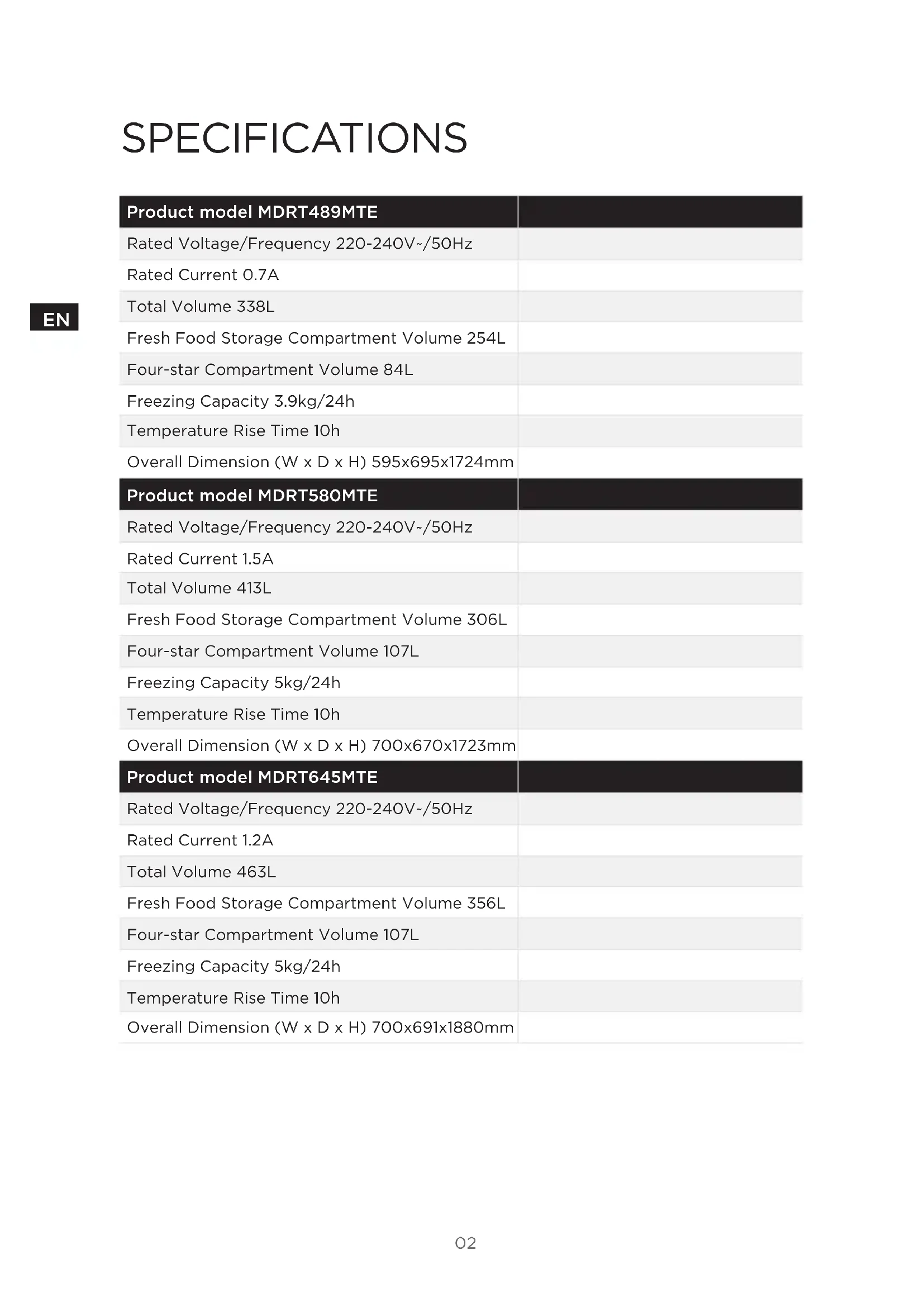
SPECIFICATIONS
EN
| Product model MDRT489MTE | |
| Rated Voltage/Frequency 220-240V~/50Hz | |
| Rated Current 0.7A | |
| Total Volume 338L | |
| Fresh Food Storage Compartment Volume 254L | |
| Four-star Compartment Volume 84L | |
| Freezing Capacity 3.9kg/24h | |
| Temperature Rise Time 10h | |
| Overall Dimension (W x D x H) 595x695x1724mm |
| Product model MDRT580MTE | |
| Rated Voltage/Frequency 220-240V~/50Hz | |
| Rated Current 1.5A | |
| Total Volume 413L | |
| Fresh Food Storage Compartment Volume 306L | |
| Four-star Compartment Volume 107L | |
| Freezing Capacity 5kg/24h | |
| Temperature Rise Time 10h | |
| Overall Dimension (W x D x H) 700x670x1723mm |
| Product model MDRT645MTE | |
| Rated Voltage/Frequency 220-240V~/50Hz | |
| Rated Current 1.2A | |
| Total Volume 463L | |
| Fresh Food Storage Compartment Volume 356L | |
| Four-star Compartment Volume 107L | |
| Freezing Capacity 5kg/24h | |
| Temperature Rise Time 10h | |
| Overall Dimension (W x D x H) 700x691x1880mm |
PRODUCT OVERVIEW
Names of components
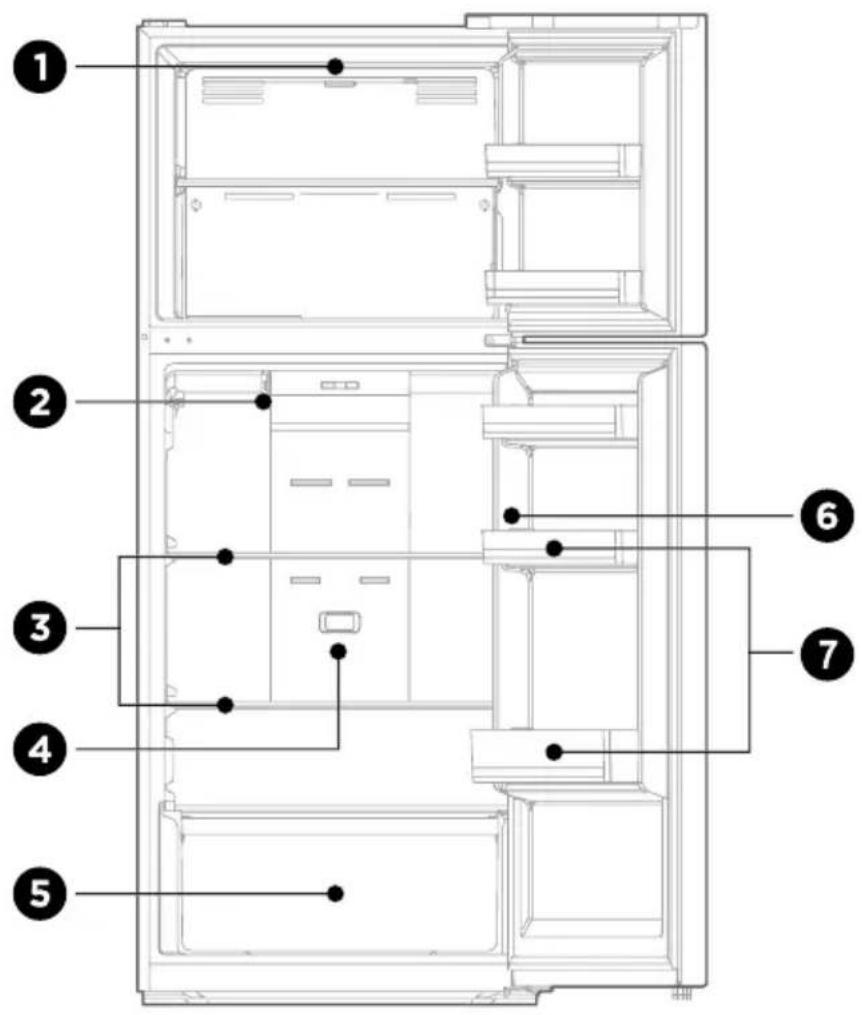
text_image
Technical diagram of a refrigerator interior with numbered components for identification1 LED light
2 Damper adjusting slider
3 Shelf
4 Deoderizer
5 Fruits and vegetables box
6 Temperature control
7 Door tray
ATTENTION
The picture above is only for reference. The actual configuration will depend on the physical product or statement by the distributor.
PRODUCT INSTALLATION
Install Instruction
For refrigerating appliances with climate class
- Depending on the climate class, this refrigerating appliance is intended to be used at ambient temperatures range as specified following table.
- The climate class can be found on the rating plate. The product may not operate properly at temperatures outside of the specific range.
- You can find the climate class on the product label.
Effective temperature range
- The product is designed to operate normally in the temperature range specified by its class rating.
| Class Symbol | Ambient temperature range °C | ||
| IEC 62552 (ISO 15502) | ISO 8561 | ||
| Extended temperate SN + 10 to + 32 + 10 to + 32 | |||
| Temperate N + 16 to + 32 + 16 to + 32 | |||
| Subtropical ST + 16 to + 38 + 18 to + 38 | |||
| Tropical T + 16 to + 43 + 18 to + 43 | |||
Dimensions and Clearances
- Too small of a distance from adjacent items may result in the degradation of freezing capability and increased electricity costs. Allow over 100 mm of clearance from each adjacent wall when installing the appliance.
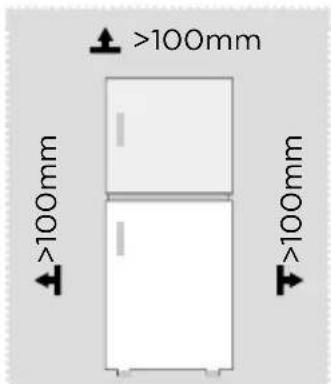
text_image
>100mm >100mm >100mm >100mm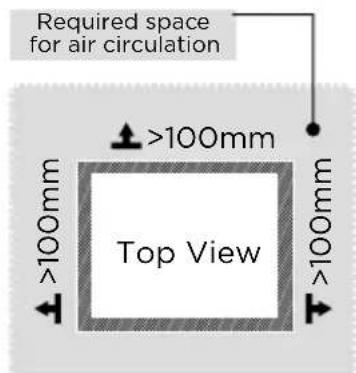
text_image
Required space for air circulation >100mm Top View >100mm >100mm
ATTENTION
The picture above is only for reference. The actual configuration will depend on the physical product or statement by the distributor.
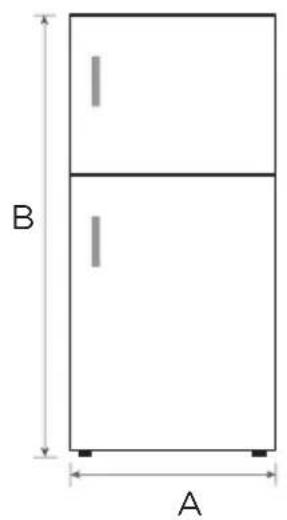
Space requirement diagram (when the door is open and when the door is closed)
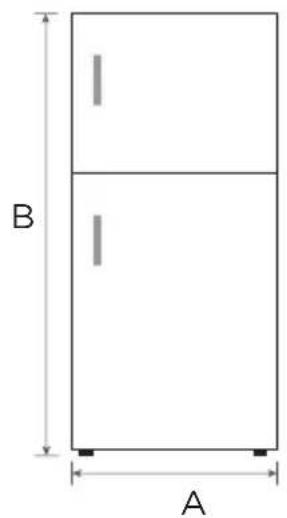
text_image
B A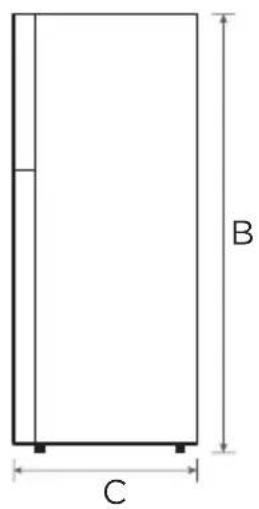
text_image
B C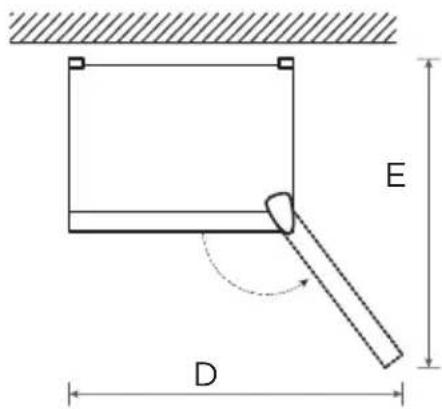
text_image
E D| Product model Width | Overall Height | Depth | Width doors open 135° | Depth doors open 135° |
| A B C D E | ||||
| MDRT489MTE 595 1724 695 997 1137 | ||||
| Product model Width | Overall Height | Depth | Width doors open 125° | Depth doors open 125° |
| A B C D E | ||||
| MDRT580MTE 700 1723 670 1085 1252 | ||||
| MDRT645MTE 700 1880 691 1085 1252 |
Notice: All dimensions in mm
Door right-left change
List of tools to be provided by the user
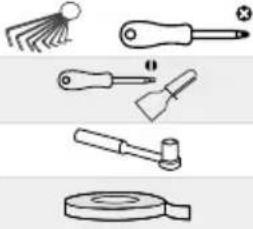 | Allen wrench-Cross screwdriver |
| Putty knife Thin-blade screwdriver | |
| 5/16" socket spanner | |
| Masking tape |
Parts to be used for door reverse
| SN | Parts Quantity | |
| 1 | Right upper hinge 1 | |
| 2 | Right upper hinge cover 1 | |
| 3 | Upper hinge axle sleeve 1 | |
| 4 | Upper hinge screw 3 | |
| 5 | Hole cover 1 | |
| 6 | Middle hinge screw 2 | |
| 7 | Middle hinge 1 | |
| 8 | Hole plug 2 | |
| 9 | Middle beam screw 1 | |
| 10 | Middle beam screw cap | 1 |
| 11 | Adjustable foot | 1 |
| 12 | Lower hinge screw 3 | |
| 13 | Lower hinge assembly | 1 |
| 14 | Lower end cover screw of freezing door | 1 |
| 15 | Lower end cover limiting block of freezing door | 1 |
| 16 | Lower end cover screw of refrigerator door | 1 |
| 17 | Lower end cover limiting block of refrigerator door | 1 |
| 18 | Upper end cover axle sleeve of refrigerator door | 1 |
| 19 | Lower support of refrigeration door | 1 |
| 20 | Accessory package | 4 |
| 21 | Self-locking of right door | 1 |
Notes:
1-19/Pre-installed on the refrigerator and to be used when changing the door
20/Left upper hinge,left upper hinge cover,Self-locking of left door,left decorative cover
21/Pre-installed on refrigerator, removed and retained it when changing the door
- Please power off this appliance before conduct this operation.
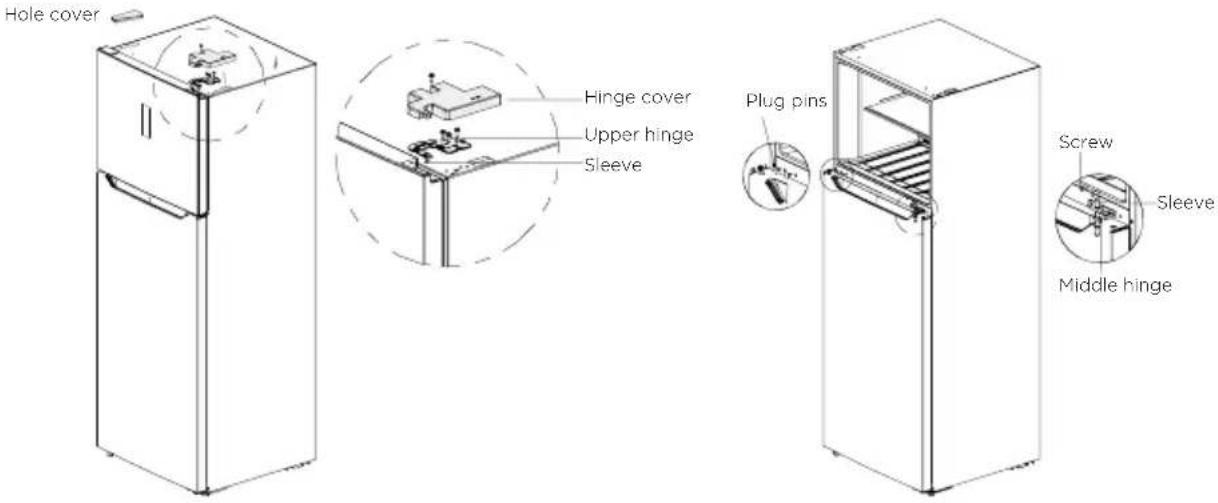
- Remove the hinge cover and screw on the top right side of the box, as well as the upper hinge and the hole cover on the left side.
text_image
Hole cover Hinge cover Upper hinge Sleeve Plug pins Screw Sleeve Middle hinge- Unscrew the hinge screw, take off the middle hinge and the upper shaft sleeve, depart the two hinge hole covers (plug pins) on the middle hinge, and take out the door body of the refrigerator chamber upward.
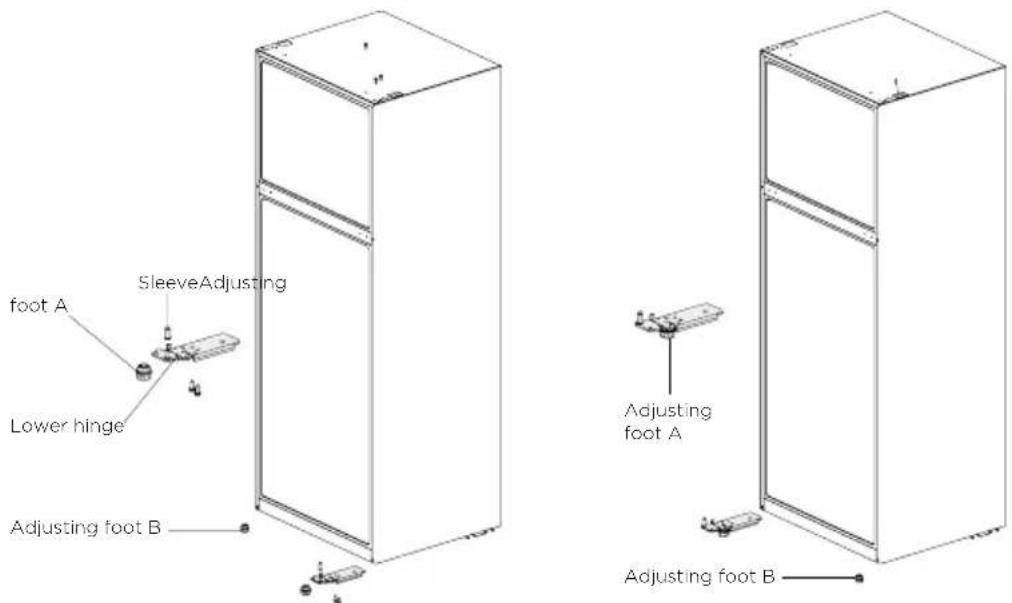
- Install the hinge shaft and shaft sleeve to the left hole of the lower hinge, and then the lower hinge to the left corner of the refrigerator, then adjusting foot A according to the position shown in the Figure, and finally the adjusting foot B to the right lower corner of the refrigerator.
text_image
SleeveAdjusting foot A Lower hinge Adjusting foot B Adjusting foot A Adjusting foot B- Dismantle the door stop of the two door bodies and the self-locking screws of right door, then take out the self-locking of left door from the accessory bag and install it to the left corner of the door body together with the door stop; take out the bottom support block of the door body of refrigeration chamber and install it to the lower left corner, Finally take out the hole plug and shaft sleeve for the door of refrigeration chamber and adjust their positions, and then install them into the door body. take out the right decorative cover on the door of refrigeration chamber, and take out the left decorative cover from the accessory bag and install it.chamber, and take out the left decorative cover from the accessory bag and install it.
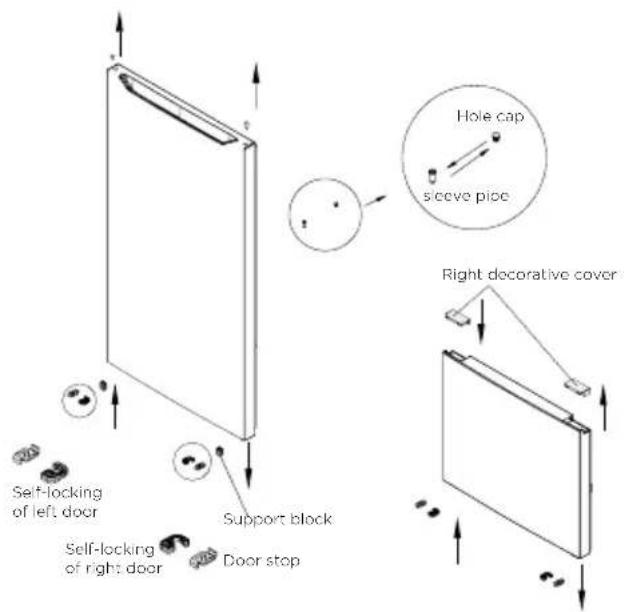
text_image
Self-locking of left door Self-locking of right door Support block Door stop Hole cap sleeve pice Right decorative cover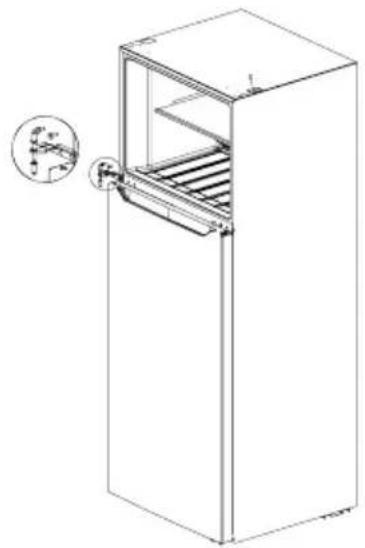
natural_image
Line drawing of a refrigerator with an open door and internal shelves, showing a close-up inset of the front panel (no text or symbols)- Install the door of refrigerator chamber on the lower hinge, the middle hinge on the left side of the refrigerator and tighten the screws, and place the shaft sleeve well. Install the plug pin in the hole on the middle beam at the other end.
- Install the door of freezer on the middle hinge, take out the left upper hinge and the cover for the left upper hinge from the accessory bag, install the left hinge and tighten the screws, install the cover for the left upper hinge and tighten the screw, install the right sensor in the original left hole cover, and then fix the hole cover on the right box.
- After completing the installation.
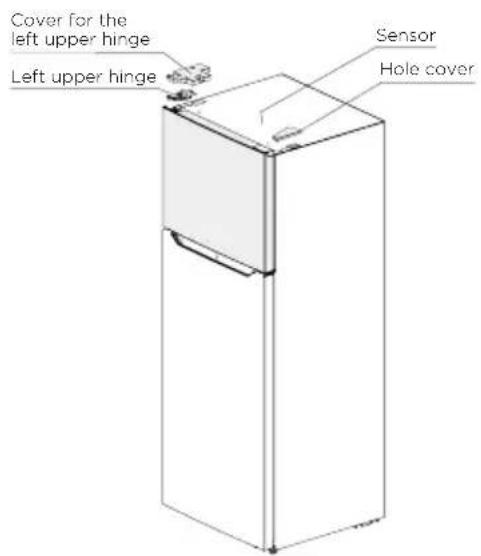
text_image
Cover for the left upper hinge Left upper hinge Sensor Hole cover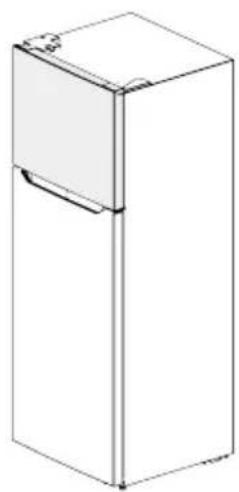
natural_image
Line drawing of a rectangular refrigerator with lid and front panel (no text or symbols)
ATTENTION
The picture above is only for reference. The actual configuration will depend on the physical product or statement by the distributor.
Leveling feet
To avoid vibration, the unit must be leveled.
If required, adjust the leveling screws to compensate for the uneven floor.
The front should be slightly higher than the rear to aid in door closing.
Leveling screws can be turned easily by tipping the cabinet slightly.
Turn the leveling screws counterclockwise to raise the unit, clockwise to lower it.
Moving the appliance
- Remove all food from inside the appliance.
- Pull the power plug out, insert and fix it into the power plug hook at the rear or on top of the appliance.
- Tape parts such as shelves and the door handle to prevent from falling off while moving the appliance.
- Move the appliance with more than two people carefully. When transporting the appliance over a long distance, keep the appliance upright.
- After installing the appliance, connect the power plug into a socket out to switch on the appliance.
ATTENTION
Precautions before operation:
Before making changes the refrigerator must be disconnected from power.
precautions should be taken to prevent any personal injury.
Changing the light
- Any replacement or maintenance of the LED lamps is intended to be made by the manufacturer, its service agent or similar qualified person.
ATTENTION
MDRT489MTE contains a light source of energy efficiency class (F).
MDRT580MTE/MDRT645MTE contains two light sources of energy efficiency class (F).
Connecting the appliance
After installing the appliance, connect the power plug into a socket outlet.
ATTENTION
After connecting the power supply cord (or plug) to the outlet, wait 2 or 3 hours before you put food into the appliance. If you add food before the appliance has cooled completely, your food may spoil.
Tips for energy saving
- Do not place the appliance near cookers, radiators or other heat sources. If the ambient temperature is high, the compressor will run more frequently and for longer, resulting in increased energy consumption.
- Ensure that there is sufficient ventilation at the base of the appliance, on the sides of the appliance and at the back of the appliance. Never cover ventilation openings.
- Please also observe the spacing dimensions in the chapter "Installation".
- The arrangement of drawers, shelves and racks as shown in the illustration offers the most efficient use of energy and should therefore be retained as far as possible. All drawers and shelves should remain in the appliance to keep the temperature stable and save energy.
- To obtain a larger storage space (e.g. for large refrigerated/frozen goods), the middle drawers can be removed. The top and bottom drawers and shelves should be removed last if necessary.
- An evenly filled refrigerator/freezer compartment contributes to optimal energy use. Therefore, avoid empty or half-empty compartments.
- Allow warm food to cool before placing it in the refrigerator/freezer. Food that has already cooled down increases energy efficiency.
- Allow frozen food to defrost in the refrigerator. The coldness of the frozen food reduces the energy consumption in the refrigerator compartment and thus increases the energy efficiency.
- Open the door only as briefly as necessary to minimise cold loss. Opening the door briefly and closing it properly reduces energy consumption.
- The door seals of your appliance must be perfectly intact so that the doors close properly and energy consumption is not increased unnecessarily.
OPERATION INSTRUCTIONS
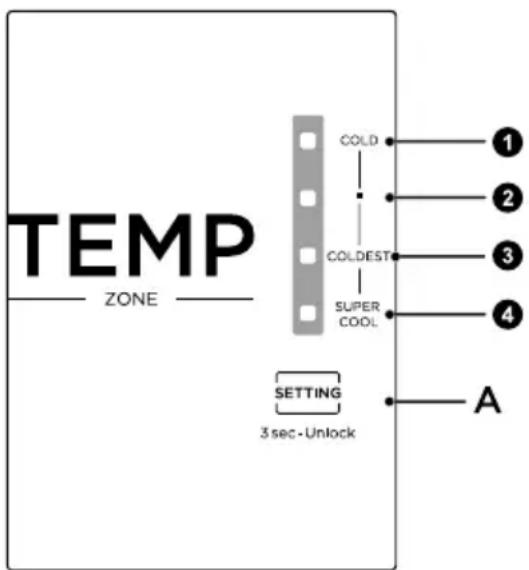
Control panel
text_image
TEMP ZONE COLD 1 2 3 4 COLDEST SUPER COOL SETTING 3 sec-Unlock AKey
- Setting 1 (COLD)
- Setting 2 (MID)
- Setting 3 (COLDEST)
- Setting 4 (SUPER COOL)
- Setting A (Temperature setting button of refrigerator compartment)

ATTENTION
The actual control panel may differ from model to model.
Display
- when electrify the refrigerator for first time, the display screen shines fully for 3 seconds, and then the refrigerator runs according to setting 3. In case of a failure, the corresponding LED blinks. In case of no failures, it shows the temperature setting of refrigerator.
| Fault Code Fault Description | |
| Indicator setting 3 and setting 4 | Temperature sensor failure of refrigerating chamber |
| Indicator setting 2 and setting 4 | Defrost sensor failure of freezer chamber |
| Indicator setting 1 and setting 4 | Ambient temperature sensor failure |
Temperature setting
- Each time the temperature setting button (A) is pressed, the temperature setting changes once. When the temperature setting is finished, the fridge will run according to the setting after 15 seconds.
- The setting changes in this order:

flowchart
graph LR
    A["setting 1 setting 2 setting 3 setting 4"] --> B["End"]
Lock/Unlock
- Long pressthe TEMP key for 3 seconds to unlock and 30 seconds to automatically lockwithout operation.
Damper adjusting slider
- The temperature inside the freezer can be adjusted by changing the position of the damper slider. The initial position of the damper slider is at position A. If lower temperature inside the freezer is required, you can adjust the damper slider from the position A to left side.
- For better use of the refrigerator, it is recommended to keep the damper slider at initial position.

text_image
Max setting position Damper Slider A COLDEST ←→ COLDStop using
- Power failure: In case of power failure, even if it is in summer, foods inside the appliance can be kept for several hours; during the power failure, the times of door opening shall be reduced, and no more fresh food shall be put into the appliance.
- Long-time nonuse: The appliance shall be unplugged and then cleaned; then the doors are left open to prevent odor.
Tips on storing food
Freezer compartment
- The freezer is designated for the storage of food frozen at very low temperature, long-term storage of frozen food, and for the production of ice.
- Only use the shelves in the door of the freezer to store frozen food, not for storing hot food designated for freezing.
- Do not put fresh and frozen food next to each other. The frozen food may thaw.
- When freezing fresh food (such as meat, fish or chopped meat), cut them into parts that can be used at the same time.
- Storing frozen food: instructions are usually stated on the packages, which must be followed. If there is no information on the packaging, food should not be stored for longer than three months from the date of purchase.
- When purchasing frozen food, make sure that it was frozen at a suitable temperature and that the packaging is not damaged.
- Frozen food should be kept in suitable packages to retain the quality and should be returned to the freezer compartment as soon as possible.
- If a package of frozen food shows moisture or abnormal bulging, it is probable that it was stored at the wrong temperature and the content is spoiled.
- The storage period for frozen food depends on the room temperature, the thermostat setting, the frequency of opening the door of the freezer, the type of food and the time of transporting the product from the shop to the household. Always follow the instructions printed on the packaging and never exceed the maximum storage time stated on the package.
Cooling compartment
- To reduce moisture and subsequent ice build-up, never put liquid into the refrigerator in unsealed containers. Frost tends to concentrate in the coolest parts of the evaporator. Storing uncovered liquids results in a more frequent need for defrosting.
- Never put warm foods in the refrigerator. These should first cool down at room temperature and then be placed so as to ensure adequate air circulation in the refrigerator.
- Foods or food containers should not touch the back wall of the refrigerator because they could freeze to the wall. Do not keep regularly opening the door of the refrigerator.
- Meat and clean fish (packed in a package or plastic foil) can be placed in the refrigerator, which can be used in 1-2 days.
- Fruit and vegetables without packaging can be placed in the part designated for fresh fruit and vegetables.

ATTENTION
The optimal temperature setting of each compartment depends on the ambient temperature. Above optimal temperature is based on the ambient temperature of 25 °C .
| Order | Compartments TYPE | Target storage temp. [°C] | Appropriate food |
| 1 Fridge +2 ~ +8 | Eggs, cooked food, packaged food, fruits and vegetables, dairy products, cakes, drinks and other foods are not suitable for freezing. | ||
| 2 (***)-Freezer | ≤-18 | Seafood (fish, shrimp, shellfish), freshwater aquatic products and meat products (recommended for 3 months, the longer the storage time, the worse the taste and nutrition), suitable for frozen fresh food. | |
| 3 ***-Freezer | ≤-18 | Seafood (fish, shrimp, shellfish), freshwater aquatic products and meat products (recommended for 3 months, the longer the storage time, the worse the taste and nutrition), suitable for frozen fresh food. | |
| 4 **-Freezer | ≤-12 | Seafood (fish, shrimp, shellfish), freshwater aquatic products and meat products (recommended for 3 months, the longer the storage time, the worse the taste and nutrition), suitable for frozen fresh food. | |
| 5 *-Freezer | ≤-6 | Seafood (fish, shrimp, shellfish), freshwater aquatic products and meat products (recommended for 3 months, the longer the storage time, the worse the taste and nutrition), suitable for frozen fresh food. | |
| 6 0-star -6 ~ 0 | Fresh pork, beef, fish, chicken, some packaged processed foods, etc. (Recommended to eat within the same day, preferably no more than 3 days).Partially encapsulated processed foods (non-freezable foods). | ||
| 7 Chill -2 ~ +3 | Fresh/ frozen pork, beef, chicken, freshwater aquatic products, etc. (7 days below 0°C and above 0°C is recommended for consumption within that day, preferably no more than 2 days).Seafood (less than 0 for 15 days, it is not recommended to store above 0°C. | ||
| 8 Fresh food 0 ~ +4 | Fresh pork, beef, fish, chicken, cooked food, etc. (Recommended to eat within the same day, preferably no more than 3 days) | ||
| 9 Wine +5 ~+20 Red wine, white wine, sparkling wine, etc. | |||

ATTENTION
please store different foods according to the compartments or target storage temperature of your purchased.
CLEANING AND MAINTENANCE
Defrosting
- The refrigerator is made based on the air-cooling principle and thus has automatic defrosting function. Frost formed due to change of season or temperature may also be manually removed by disconnection of the appliance from power supply or by wiping with a dry towel.
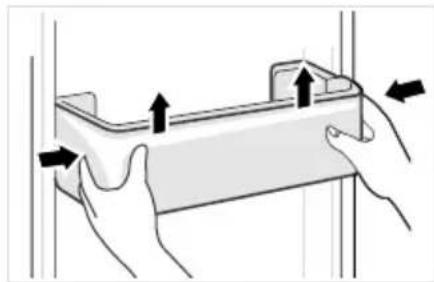
Cleaning of door tray
- According to the direction arrow in the figure below, use both hands to squeeze the tray, and push it upward, then you can take it out.
• After washing the tray having been taken out, you can adjust its installing height in accordance with your requirement.
natural_image
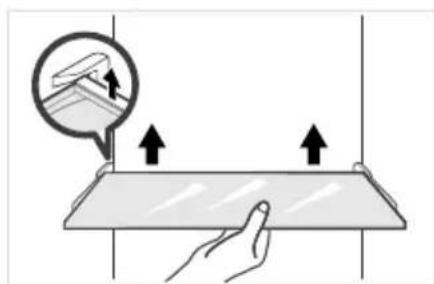
Illustration of hands holding a rectangular object with arrows indicating movement or force (no text or symbols)Cleaning of glass shelf
- As the innermost part of the refrigerator liner where contacting the shelves has a backstop, you shall raise the shelves upward, then you can be able to take it out.
- Adjust or clean the shelves according to your requirement.
natural_image
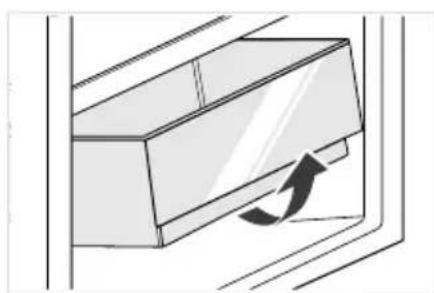
Illustration of a hand holding a flat surface with two upward arrows, and a speech bubble showing a document or interface (no text or symbols present)Cleaning the vegetable drawer
- Remove the contents of the drawer. Hold the handle of the vegetable drawer and pull it out completely until it stops.
- Lift the vegetable drawer up and remove it by pulling it out.
natural_image
Diagram of a door handle with an arrow indicating clockwise motion (no text or symbols)ATTENTION
Soft towels or sponge dipped in water and non-corrosive neutral detergents are suggested for cleaning. The freezer of shall be finally cleaned with clean water and dry cloth. Open the door for natural drying before the power is turned on. Do not use hard brushes, clean steel balls, wire brushes, abrasives, such as toothpastes, organic solvents (such as alcohol, acetone, banana oil, etc.), boiling water, acid or alkaline items clean refrigerator considering that this may damage the fridge surface and interior.
TROUBLESHOOTING
The following simple issues can be handled by the user. Please call the after-sale service department if the issues are not solved.
| Problem Possible reason | |
| Failed operation | ·Check whether the appliance is connected to power or whether the plug is in well contact |
| ·Check whether the voltage is too low | |
| ·Check whether there is a power failure or partial circuits have tripped | |
| Odor | ·Odorous foods shall be tightly wrapped |
| ·Check whether there is any rotten food | |
| ·Clean the inside of the refrigerator | |
| Long-time operation of the compressor | ·Long operation of the refrigerator is normal in summer |
| ·when the ambient temperature is high it is not suggestible having too much food in the appliance at the same time | |
| ·Food shall get cool before being put into the appliance | |
| ·The doors are opened too frequently | |
| Light fails to get lit | ·Check whether the refrigerator is connected to power supply and whether the illuminating light is damaged |
| ·Have the light replaced by a specialist | |
| Door can not be properly closed | ·The door is stuck by food packages too much food is placed |
| ·The refrigerator is tiltedr. | |
| Loud noises | ·Check whether the floor is level and whether the refrigerator is placed stably |
| ·Check whether accessories are placed at proper locations | |
| Door seal fails to be tight | Remove foreign matters on the door seal |
| Heat the door seal and then cool it for restoration (or blow it with an electrical drier or use a hot towel for heating) | |
| Water pan overflows | There is too much food in the chamber or food stored contains too much water, resulting in heavy defrosting |
| The doors are not closed properly, resulting in frosting due to entry of air and increased water due to defrosting | |
| Hot housing | Heat dissipation of the built-in condenser via the housing, which is normal when housing becomes hot due to high ambient temperature, storage of too much food or shutdown of the compressor is shut down, provide sound ventilation to facilitate heat dissipation |
| Surface condensation | Condensation on the exterior surface and door seals of the refrigerator is normal when the ambient humidity is too high. Just wipe the condensate with a clean towel. |
EN
APPENDIX
Special for new European standard
The ordered parts in the following table can be acquired from Service provider channel
| Ordered part Provided by | Minimum time required for Provision | |
| Thermostats Professional maintenance personnel | At least 7 years after the last model is launched on the market | |
| Temperature sensors | Professional maintenance personnel | At least 7 years after the last model is launched on the market |
| Printed circuit boards | Professional maintenance personnel | At least 7 years after the last model is launched on the market |
| Light sources Professional maintenance personnel | At least 7 years after the last model is launched on the market | |
| Door handles Professional repairers and final users | At least 7 years after the last model is launched on the market | |
| Door hinges Professional repairers and final users | At least 7 years after the last model is launched on the market | |
| Trays Professional repairers and final users | At least 7 years after the last model is launched on the market | |
| Baskets Professional repairers and final users | At least 7 years after the last model is launched on the market | |
| Door gaskets Professional repairers and final users | At least 10 years after the last model is launched on the market | |
Dear customer
- If you want to return or replace the product, please contact the store where you buy.
(Remember to bring the purchase invoice)
- If your product breaks down which needs to repair, please contact after-sales service provider.

ATTENTION
The model information in the product database, as well as the model identifier, can be obtained througha weblink scanned by a QR code, if any, on the energy efficiency label of the product.
For more information about the energy efficiency of the appliance, visit https://ec.europa.eu and search using the model name.
The model name can be found on the rating label of the appliance.
Coldest zone in the refrigerator
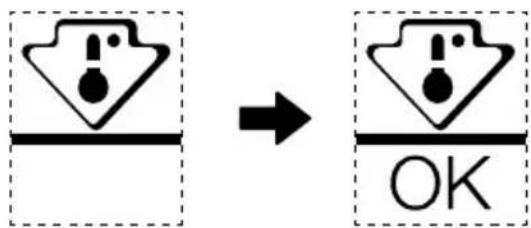
OPTIONAL: OK-temperature indicator
- The OK-temperature indicator can be used to determine temperatures below +4°C. Gradually reduce the temperature if the sign does not indicate "OK".
text_image
Diagram showing a warning symbol before and after transformation, with 'OK' indicating completion or cancellation.- To ensure the temperature in this area, do not change the positioning of the shelf. Inforced air refrigerators (equipped with a fan or No Frost models), the symbol of the coldest zone is not represented because the temperature inside is homogeneous.
Temperature indicator setting
• To help you set your refrigerator well, it is equipped with a temperature indicator that will monitor the average temperature in the coldest zone.
- WARNING: This indicator is intended to work only with your refrigerator, do not use it in another refrigerator (in fact, the coldest zone is not the same), or for any other use.
Checking the temperature in the coldest zone
- With the temperature indicator, you can check regularly that the temperature of the coldest zone is correct. Indeed, the internal temperature of the refrigerator depends on several factors such as the ambient temperature of the room, the amount of food stored and the frequency of door opening. Take these factors into consideration when setting the device.
- When the indicator shows « OK », this means that your thermostat is well adjusted and the internal temperature correct.
- If the indicator of temperature turns WHITE, this means that the temperature is too high; in this case, increase the refrigerator temperature control setting and wait for 12 hours before performing a new visual inspection of the indicator. When fresh food has been introduced or the door has been left open, it is possible for the indicator of temperature to turn WHITE after a while.
VIELEN DANK
text_image
Technical diagram of a refrigerator interior with numbered components for identificationnatural_image
Line drawing of a rectangular refrigerator with lid and front panel (no text or symbols)ACHTUNG
natural_image
Illustration of hands holding a rectangular object with arrows indicating movement or force (no text or symbols)natural_image
Illustration of a hand interacting with a flat surface, showing upward arrows and a magnified view of a small object (no text or symbols)natural_image
Diagram of a door handle with an arrow indicating clockwise motion (no text or symbols)ACHTUNG
text_image
Diagram showing a warning symbol with exclamation mark inside a box and an 'OK' button below it, indicating cancellation or error.text_image
Technical diagram of a refrigerator interior with numbered components for identificationnatural_image
Line drawing of a rectangular refrigerator with lid and front panel (no text or symbols)
ATTENZIONE
natural_image
Illustration of hands holding a rectangular object with arrows indicating movement or force (no text or symbols)natural_image
Illustration of a hand pressing down on a flat surface with upward arrows, no text or symbols presentnatural_image
Diagram of a door handle with an arrow indicating clockwise motion (no text or symbols)ATTENZIONE
text_image
Diagram showing a warning symbol before and after transformation, with 'OK' indicating completion or cancellation.INSTALLATION DU PRODUIT 04
GUIDE D'UTILISATION 11
NETTOYAGE ET ENTRETIEN 15
DÉPANNAGE 16
ANNEXE 18
SPÉCIFICATIONS
text_image
Technical diagram of a refrigerator interior with numbered components for identificationINSTALLATION DU PRODUIT
natural_image
Illustration of hands holding a rectangular object with arrows indicating movement or force (no text or symbols)natural_image
Illustration of a hand pressing down on a flat surface with arrows indicating upward motion (no text or symbols)natural_image
Diagram of a door handle with an arrow indicating clockwise motion (no text or symbols)ATTENTION
text_image
Diagram showing a warning symbol with exclamation mark inside a box and an 'OK' button below it, indicating cancellation or error.text_image
Technical diagram of a refrigerator interior with numbered components for identificationnatural_image
Illustration of hands holding a rectangular object with arrows indicating movement or force (no text or symbols)natural_image
Illustration of a hand pressing down on a flat surface with arrows indicating direction (no text or symbols)natural_image
Diagram of a door handle with an arrow indicating clockwise motion (no text or symbols)ATENCIÓN
text_image
Diagram showing a warning symbol with exclamation mark inside a box and an arrow pointing to a 'OK' button in the second box.text_image
Technical diagram of a refrigerator interior with numbered components for identificationnatural_image
Illustration of hands holding a rectangular object with arrows indicating movement or force direction (no text or symbols)natural_image
Illustration of a hand pressing down on a flat surface with arrows indicating movement or force (no text or symbols)natural_image
Diagram of a door handle with an arrow indicating clockwise motion (no text or symbols)ATENÇÃO
text_image
Diagram showing a warning symbol with exclamation mark inside a box and an 'OK' button below it, indicating cancellation or error.text_image
Technical diagram of a refrigerator interior with numbered components for identification1 Auxvía LED
5 Φρουτοθήκη
natural_image
Floor plan diagram of a room with furniture layout and directional arrow (no text or labels)Baportekälder
αεραγωγού Α
ΨΥΧΡΟΤΕΡΟ ←→ ΨΥΧΡΟ
Διακοπή χρήσης
natural_image
Illustration of hands holding a rectangular object with arrows indicating movement or force (no text or symbols)natural_image
Illustration of a hand holding a flat surface with two upward arrows indicating movement or force, and a speech bubble showing a document (no text or symbols present)natural_image
Diagram of a door handle with an arrow indicating clockwise motion (no text or symbols)ΠΡΟΣΟΧΗ
text_image
Diagram showing a warning symbol with exclamation mark inside a box and an arrow pointing to a 'OK' button, indicating a change or modification.text_image
Technical diagram of a refrigerator interior with numbered components for identification1 Lampa LED
natural_image
Illustration of hands holding a rectangular object with arrows indicating movement or force direction (no text or symbols)natural_image
Illustration of a hand pressing down on a flat surface with upward arrows indicating movement or force (no text or symbols)natural_image
Diagram of a door handle with an arrow indicating clockwise motion (no text or symbols)UWAGA
text_image
Diagram showing a warning symbol with exclamation mark inside a box and an arrow pointing to a 'OK' button, indicating cancellation or completion.PRODUKTA PÄRSKATS 03
PRODUKTA UZSTĀDĪŠANA 04
LIETOŠANAS INSTRUKCIJAS 11
TİRİŞANA UN APKOPE 15
PROBLÉMU NOVĚRŠANA 16
PIELIKUMS 18
SPECIFIKĀCIJAS
text_image
Technical diagram of a refrigerator interior with numbered components for identificationnatural_image
Illustration of hands holding a rectangular object with arrows indicating movement or force (no text or symbols)natural_image
Illustration of a hand pressing down on a flat surface with arrows indicating movement or force (no text or symbols)natural_image
Diagram of a door handle with an arrow indicating clockwise motion (no text or symbols)UZMANĪBU!
text_image
Diagram showing a warning symbol with exclamation marks and an 'OK' button, indicating a change or modification process.text_image
Technical diagram of a refrigerator interior with numbered components for identification1 LED sijalica
natural_image
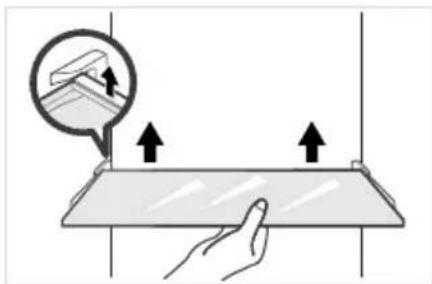
Illustration of hands holding a rectangular object with arrows indicating movement or force (no text or symbols)Čišćenje staklene police
- Kako najdublji unutrašnji deo podloge frižidera gde kontakt sa policama ima graničnik, morate da podignite police nagore, a zatim ih možete izvaditi.
- Podesite ili očistite police prema vašim potrebama.
natural_image
Illustration of a hand holding a flat surface with two upward arrows indicating movement or force, and a speech bubble showing a document (no text or symbols present)natural_image
Diagram of a door handle with an arrow indicating clockwise motion (no text or symbols)PAŽNJA
Za čišćenje se preporučuju meki peškiri ili suđer umočeni u vodu i nekorozivni neutralni deterdženti. Zamrzivač se mora na kraju očistiti čistom vodom i obrisati suvom krpom. Otvorite vrata za prirodno sušenje pre nego što se uključi napajanje. Nemojte koristiti tvrde četke, čelične kuglice za čišćenje, žičane četke, abrazivna sredstva (kao što su paste za zube), organske rastvarače (kao što su alkohol, aceton, ulje banane, itd.), ključalu vodu, kisele ili alkalne predmete da očistite frižider s obzirom da to može da ošteti površinu i unutrašnjost frižidera.
OTKLANJANJE PROBLEMA
text_image
Diagram showing a warning symbol with exclamation marks and an 'OK' label, indicating a change or modification process.- Da bi se održavala ujednačena temperatura u ovoj oblasti, nemojte menjati položaj police. Kod frižidera sa protokom vazduha (opremljeni ventilatorom ili modeli bez stvaranja leda), nema oznake za najhladniju zonu jer je temperatura unutra ravnomerna.
Indikator podešavanja temperature
text_image
Technical diagram of a refrigerator interior with numbered components for identification1 LED svjetlo
2 Klizač zaklopke zraka
3 Polica
4 Sklop za uklanjanje neugodnih mirisa
5 Kutija za voće i povrće
6 Podešavanje temperature
7 Plitica u vratima

PAŽNJA
Gornja slika služi samo kao referenca. Stvarna konfiguracija ovisit će o fizičkom proizvodu ili izjavi distributera.
INSTALACIJA PROIZVODA
Upute za instalaciju
Za rashladne uređaje s klimatskim razredom
- Ovisno o klimatskom razredu, ovaj rashladni uređaj namijenjen je uporabi unutar raspona temperature navedenih u donjoj tablici.
- Klimatski razred može se pronaći na natpisnoj pločici. Proizvod možda neće ispravno raditi na temperaturama izvan navedenog raspona.
- Klimatski razred naveden je na naljepnici proizvoda.
Učinkovit temperaturni raspon
- Proizvod je konstruiran za normalan rad u temperaturnom rasponu koji je određen ocjenom razreda.
| Razred Simbol | Raspon temperature okoline °C | ||
| IEC 62552 (ISO 15502) ISO 8561 | |||
| Prošireni umjereni SN + 10 do + 32 + 10 do + 32 | |||
| Umjereni N + 16 do + 32 + 16 do + 32 | |||
| Subtropski ST + 16 do + 38 + 18 do + 38 | |||
| Tropski T + 16 do + 43 + 18 do + 43 | |||
HR
Dimenzije i razmaci
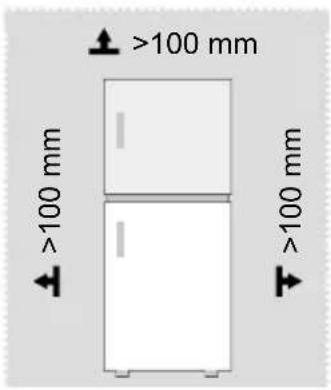
- Premala udaljenost od susjednih elemenata može dovesti do smanjenja kapaciteta zamrzavanja i povećanja troškova električne energije. Prilikom postavljanja uređaja ostavite više od 100 mm slobodnog prostora od svakog susjednog zida.
text_image
>100 mm >100 mm >100 mm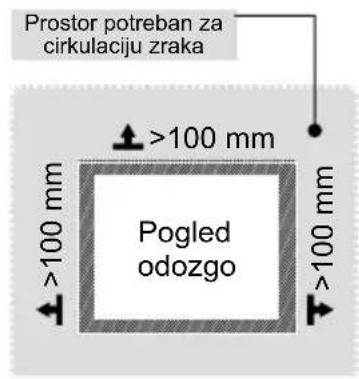
text_image
Prostor potreban za cirkulaciju zraka >100 mm Pogled odozgo >100 mm >100 mm
PAŽNJA
Gornja slika služi samo kao referenca. Stvarna konfiguracija ovisit će o fizičkom proizvodu ili izjavi distributera.
Dijagram s podacima o potrebnom prostoru (s otvorenim i zatvorenim vratima)
text_image
B A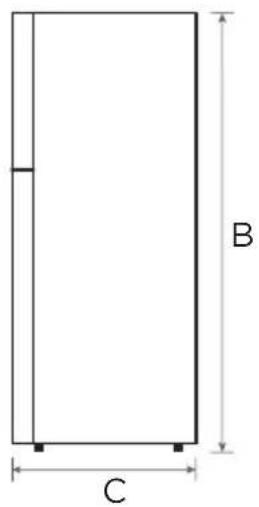
text_image
B C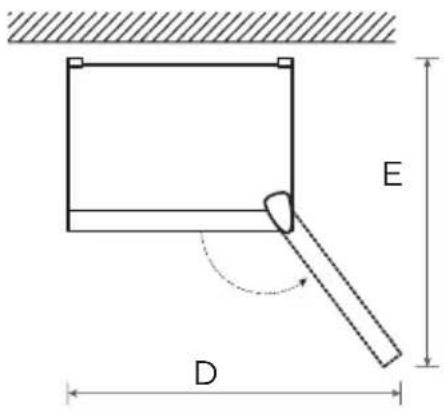
text_image
E D| Model proizvoda Širina | Sveukupna visina | Dubina | Širina s vratima otvorenima 135° | Dubina s vratima otvorenima 135° |
| A B C D E | ||||
| MDRT489MTE 595 1724 695 997 1137 | ||||
| Model proizvoda Širina | Sveukupna visina | Dubina | Širina s vratima otvorenima 125° | Dubina s vratima otvorenima 125° |
| A B C D E | ||||
| MDRT580MTE 700 1723 670 1085 1252 | ||||
| MDRT645MTE 700 1880 691 1085 1252 |
Napomena: Sve dimenzije u mm
natural_image
Floor plan diagram of a room with furniture layout and directional arrow (no text or labels)Klizačza pôdešavanje temperature zamrzivača A
natural_image
Illustration of hands holding a rectangular object with arrows indicating movement or force (no text or symbols)Čišćenje staklene police
natural_image
Illustration of a hand holding a flat surface with two upward arrows, and a magnified inset showing a small object above it (no text or symbols)Čišćenje ladice za povrće
natural_image
Diagram of a door handle with an arrow indicating clockwise motion (no text or symbols)PAŽNJA
Za čiščenje se preporučuju mekani ručnici ili spužva umočeni u vodu i nekorozivni neutralni deterdženti. Zamrzivač konačno očistite čistom vodom i suhom krpom. Otvorite vrata za prirodno sušenje prije nego što se napajanje uključi. Ne upotrebljavajte tvrde četke, čiste čelične kuglice, žičane četke, abrazive, kao što su paste za zube, organska otapala (poput alkohola, acetona, banana ulje itd.), kipuću vodu, kiseline ili alkalne predmete čistite hladnjak s obzirom da to može oštetiti površina i unutrašnjost hladnjaka.
OTKLANJANJE PROBLEMA
text_image
Diagram showing a warning symbol with exclamation mark inside a box and an arrow pointing to a 'OK' button, indicating a change or modification.- Kako biste osigurali temperaturu u tom području, nemojte mijenjati položaj police. Hladnjaci s hlađenjem pod pritiskom (opremljeni ventilatorom ili modeli bez inja), simbol najhladnije zone nije predstavljen jer je unutarnja temperatura homogena.
Postavka indikatora temperature
- Kao pomoć pri pravilnom postavljanju hladnjaka imate indikator temperature koji će pratiti prosječnu temperaturu u najhladnijoj zoni.
- UPOZORENJE: Ovaj indikator namijenjen je isključivo radu s vašim hladnjakom, nemojte ga koristiti na drugom hladnjaku (najhladnija zona nije ista) ili za drugu namjenu.
text_image
Technical diagram of a refrigerator interior with numbered components for identificationnatural_image
Floor plan diagram showing room layout with furniture and directional arrow (no text or labels)natural_image
Illustration of hands holding a rectangular object with arrows indicating movement or force (no text or symbols)Üvegpolc tisztítása
natural_image
Illustration of a hand holding a flatboard with arrows indicating upward motion, no text or symbols presentnatural_image
Diagram of a door handle with an arrow indicating clockwise motion (no text or symbols)text_image
Diagram showing a warning symbol with exclamation mark inside a box and an arrow pointing to a 'OK' button, indicating cancellation or completion.text_image
Technical diagram of a refrigerator interior with numbered components for identification1 LED-lučka
5 Predal za sadje in zelenjavo
natural_image
Illustration of hands holding a rectangular object with arrows indicating movement or force (no text or symbols)Čiščenje steklene police
text_image
Diagram showing a hand holding a flat surface with upward arrows indicating movement or force, and an inset magnifying the top section of a device.natural_image
Diagram of a door handle with an arrow indicating clockwise motion (no text or symbols)POZOR
text_image
Diagram showing a warning symbol with exclamation marks and an 'OK' button, indicating a change or modification process.text_image
Technical diagram of a refrigerator interior with numbered components for identification1 Bec LED
natural_image
Illustration of hands holding a rectangular object with arrows indicating movement or force (no text or symbols)natural_image
Illustration of a hand interacting with a flat surface, showing upward arrows and a magnified view of a device (no text or symbols)natural_image
Diagram of a door handle with an arrow indicating clockwise motion (no text or symbols)ATENTIE
text_image
Diagram showing a warning symbol with exclamation mark inside a box and an arrow pointing to a 'OK' button, indicating cancellation or completion.text_image
Technical diagram of a refrigerator interior with numbered components for identificationnatural_image
Line drawing of a refrigerator with lid and front panel (no text or symbols)
ЗАБЕЛЕЖКА
natural_image
Illustration of hands holding a rectangular object with arrows indicating movement or force (no text or symbols)natural_image
Illustration of a hand holding a flat surface with two upward arrows, and a magnified inset showing a small object (no text or symbols)natural_image
Diagram of a door handle with an arrow indicating clockwise motion (no text or symbols)ЗАБЕЛЕЖКА
text_image
Diagram showing a warning symbol with exclamation marks and an 'OK' button, indicating a change or modification process.text_image
Technical diagram of a refrigerator interior with numbered components for identification1 LED lemputé
2 Sklendès reguliavimo slankiklis
3 Lentyna
4 Deoderizatorius
natural_image
Illustration of hands holding a rectangular object with arrows indicating movement or force (no text or symbols)natural_image
Illustration of a hand holding a flatboard with arrows indicating upward motion, no text or symbols presentnatural_image
Diagram of a door handle with an arrow indicating clockwise motion (no text or symbols)DÈMESIO
text_image
Diagram showing a warning symbol with exclamation marks and an 'OK' label, indicating a change or modification process.text_image
Technical diagram of a refrigerator interior with numbered components for identificationAL
INSTALIMI I PRODUKTIT
flowchart
graph LR
    A["caktimi 1 caktimi 2 caktimi 3 caktimi 4"] --> B["End"]
Bllokimi/Zhbllokimi
natural_image
Illustration of hands holding a rectangular object with arrows indicating movement or force (no text or symbols)Pastrimi i raftit prej xhami
natural_image
Illustration of a hand pressing down on a flat surface with arrows indicating movement or force (no text or symbols)natural_image
Diagram of a door handle with an arrow indicating clockwise motion (no text or symbols)MBANI PARASYSH
text_image
Diagram showing a warning symbol with exclamation marks and an 'OK' button, indicating a change or modification process.text_image
Technical diagram of a refrigerator interior with numbered components for identificationnatural_image
Illustration of hands holding a rectangular object with arrows indicating movement or force (no text or symbols)natural_image
Illustration of a hand interacting with a flat surface, showing upward arrows and a magnified view of a small object (no text or symbols)natural_image
Diagram of a door handle with an arrow indicating clockwise motion (no text or symbols)UPOZORNĚNÍ
text_image
Diagram showing a warning symbol with exclamation marks and an 'OK' button, indicating cancellation or error.text_image
Technical diagram of a refrigerator interior with numbered components for identificationnatural_image
Floor plan diagram of a room with furniture layout and an arrow indicating direction (no text or labels)Posúvač Slider
NAJCHLADNEJŠIE ←→ CHLADNÉ
natural_image
Illustration of hands holding a rectangular object with arrows indicating movement or force (no text or symbols)natural_image
Illustration of a hand pressing down on a flat surface with two upward arrows indicating movement or force (no text or symbols present)Čistenie priehradky na zeleninu
natural_image
Diagram of a door handle with an arrow indicating clockwise motion (no text or symbols)UPOZORNENIE
text_image
Diagram showing a warning symbol with exclamation mark inside a box and an arrow pointing to a 'OK' button, indicating cancellation or completion.make yourself at home