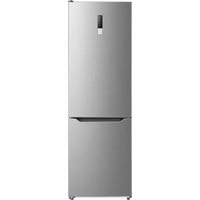
MRS25I7BST - Fridge MIDEA - Free user manual and instructions
Find the device manual for free MRS25I7BST MIDEA in PDF.


User questions about MRS25I7BST MIDEA
0 question about this device. Answer the ones you know or ask your own.
Ask a new question about this device
Download the instructions for your Fridge in PDF format for free! Find your manual MRS25I7BST - MIDEA and take your electronic device back in hand. On this page are published all the documents necessary for the use of your device. MRS25I7BST by MIDEA.
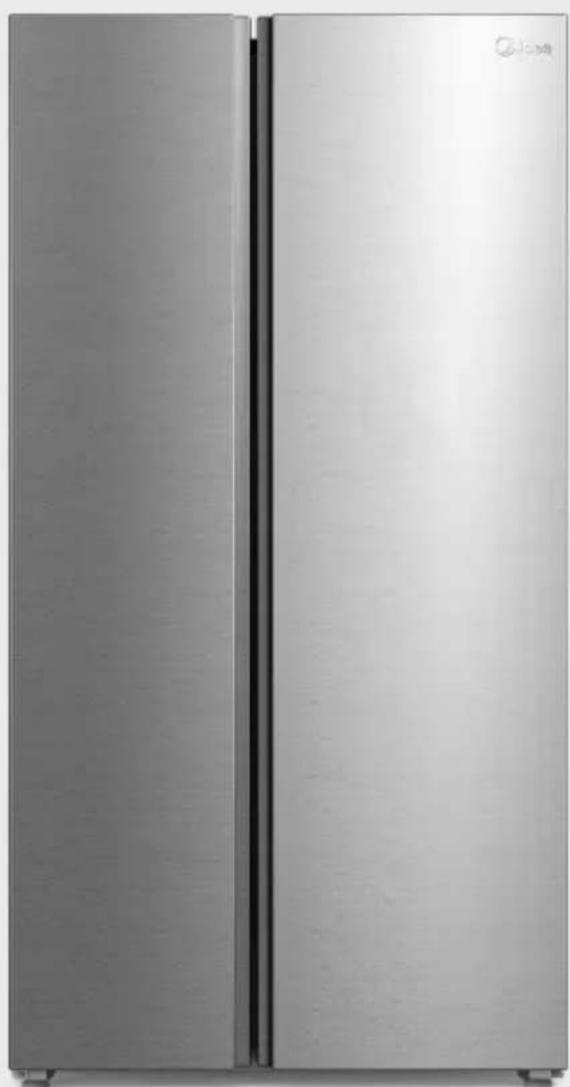
USER MANUAL MRS25I7BST MIDEA
natural_image
Front view of a modern stainless steel refrigerator with dual doors (no visible text or symbols)Refrigerator
SIDE-BY-SIDE SERIES

SmartHome
Download the app & activate product
USER MANUAL
MRS25I7BST
Warning notices: Before using this product, please read this manual carefully and keep it for future reference. The design and specifications are subject to change without prior notice for product improvement. Consult with your dealer or manufacturer for details.
The diagram above is just for reference. Please take the appearance of the actual product as the standard.
THANK YOU LETTER
Thank you for choosing Midea! Before using your new Midea product, please read this manual thoroughly to ensure that you know how to operate the features and functions that your new appliance offers in a safe way.
CONTENTS
SPECIFICATIONS 04
PRODUCT OVERVIEW 05
PRODUCT INSTALLATION 06
OPERATION INSTRUCTIONS 12
APP SETUP AND OPERATION 19
CLEANING AND MAINTENANCE 20
TROUBLESHOOTING 23
CERTIFICATIONS 26
TRADEMARKS, COPYRIGHTS AND LEGAL STATEMENT-27
DISPOSAL AND RECYCLING 27
DATA PROTECTION NOTICE 27
LANGUAGES
EN English
SPECIFICATIONS
| Product model MRS25I7BST | |
| Volume 24.5cu.ft.(695L) | |
| Rated Voltage 115V~ | |
| Rated Frequency 60Hz | |
| Rated Current 3.3A | |
| Rated Defrost Power 180W | |
| Refrigerant,Amount R600a,2.68oz(76g) | |
| Dimensions (W x D x H) 35.8x28.9x69.9 in |

| Wireless network module MWB-S-WB01 | |
| Standard IEEE 802.11b/g/n | |
| Antenna Type Printed PCB antenna | |
| Frequency Band 2400-2483.5 MHz | |
| Operating Temperature | 0 °C - 85 °C /32 °F - 185 °F |
| Operation Humidity | 10% - 85% |
| Maximum Transmission Power | <20 dBm |
| Power Input | DC 5V/500mA |
PRODUCT OVERVIEW
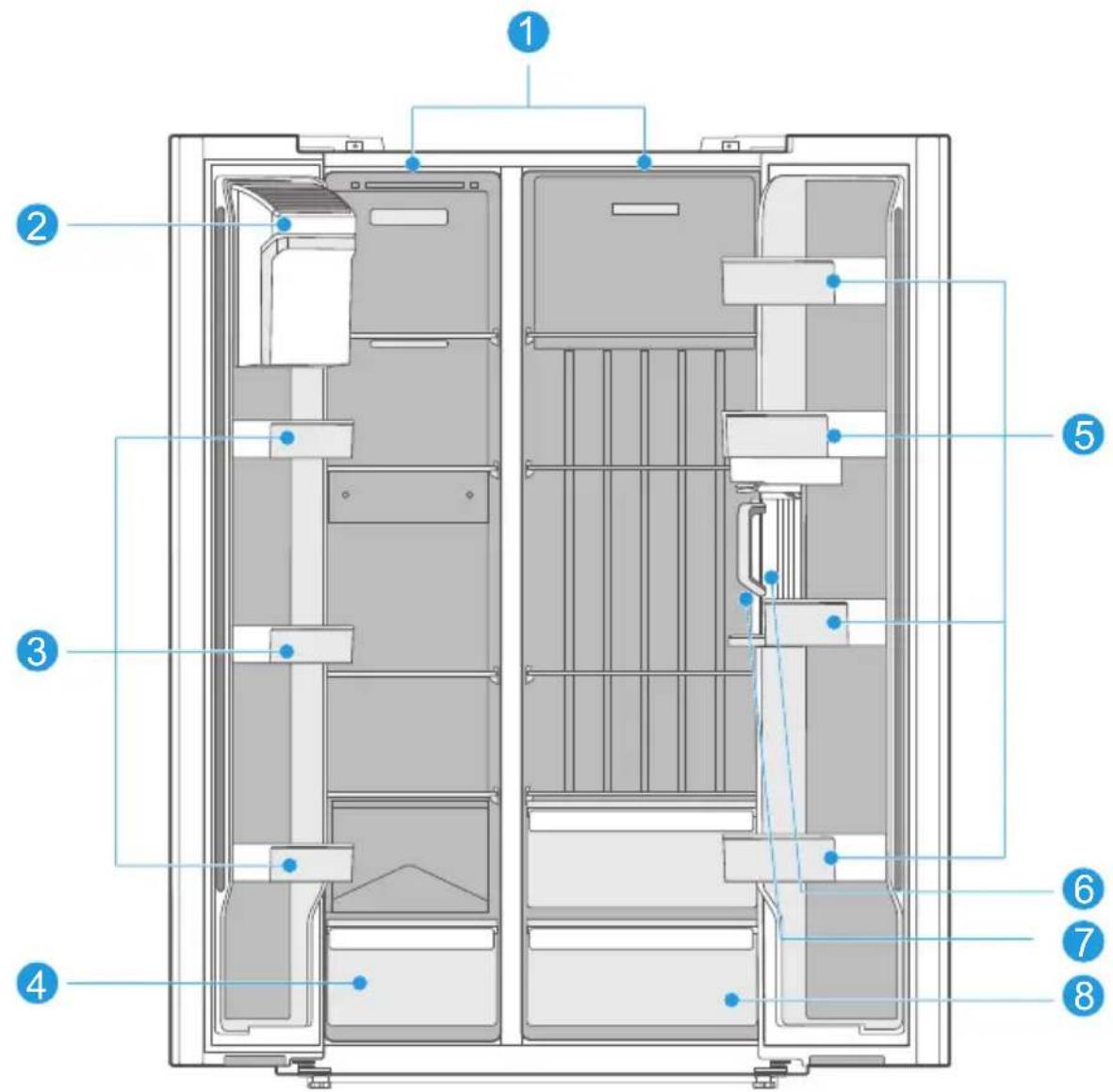
Parts Description
text_image
Technical diagram of an appliance front view with numbered components for identificationEN
1 LED Light 5 Fridge Door Bin
2 Ice Maker 6 Water Pitcher
3 Freezer Door Bin 7 Control Panel
4 Freezer Drawer 8 Crisper Drawer

ATTENTION
The picture above is for reference only. The actual configuration will depend on the physical product or statement by the distributor.
PRODUCT INSTALLATION
Installation Instructions
Refrigerator Location
- Your refrigerator is designed to be free standing, and is not to be recessed or built in.
- Place the refrigerator in a well-ventilated location where the floor is flat and sturdy.
- Keep the refrigerator away from direct sunlight.
- Avoid locations exposing your refrigerator to high humidity and moisture.
Clearances
- Inadequate clearance from adjacent items may result in the degradation of freezing capability and increased electricity costs. Allow over 100 mm of clearance at both sides and the top, and 50-75 mm at the back when installing the appliance.
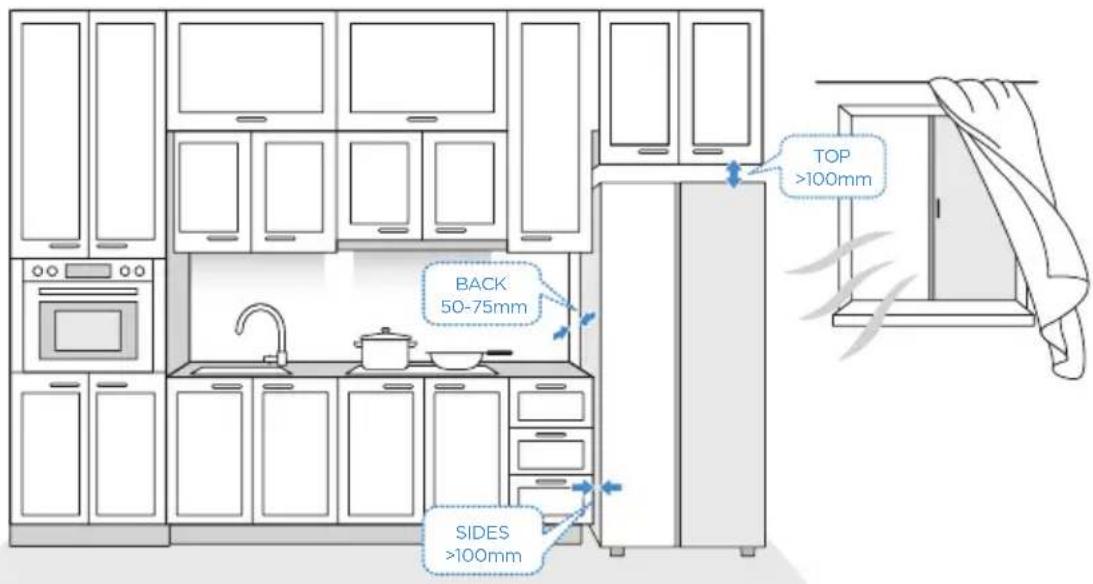
text_image
TOP >100mm BACK 50-75mm SIDES >100mmConnecting to Power
• A 115 V AC, 60Hz, 15- or 20-amp electrical supply is required.
- The power cord is equipped with a 3-prong plug with grounding which mates with standard 3-prong wall outlet. The ground minimizes the possibility of electrical shock.

CAUTION
The refrigerator should be plugged into a dedicated electrical circuit rated to match the requirements of the refrigerator, 115 V AC, 60Hz, 15- or 20-amp
Never unplug the refrigerator by pulling on the power cord. Always grip the plug firmly and pull straight out from the outlet.
When positioning the refrigerator, ensure the power cord is not trapped or damaged.
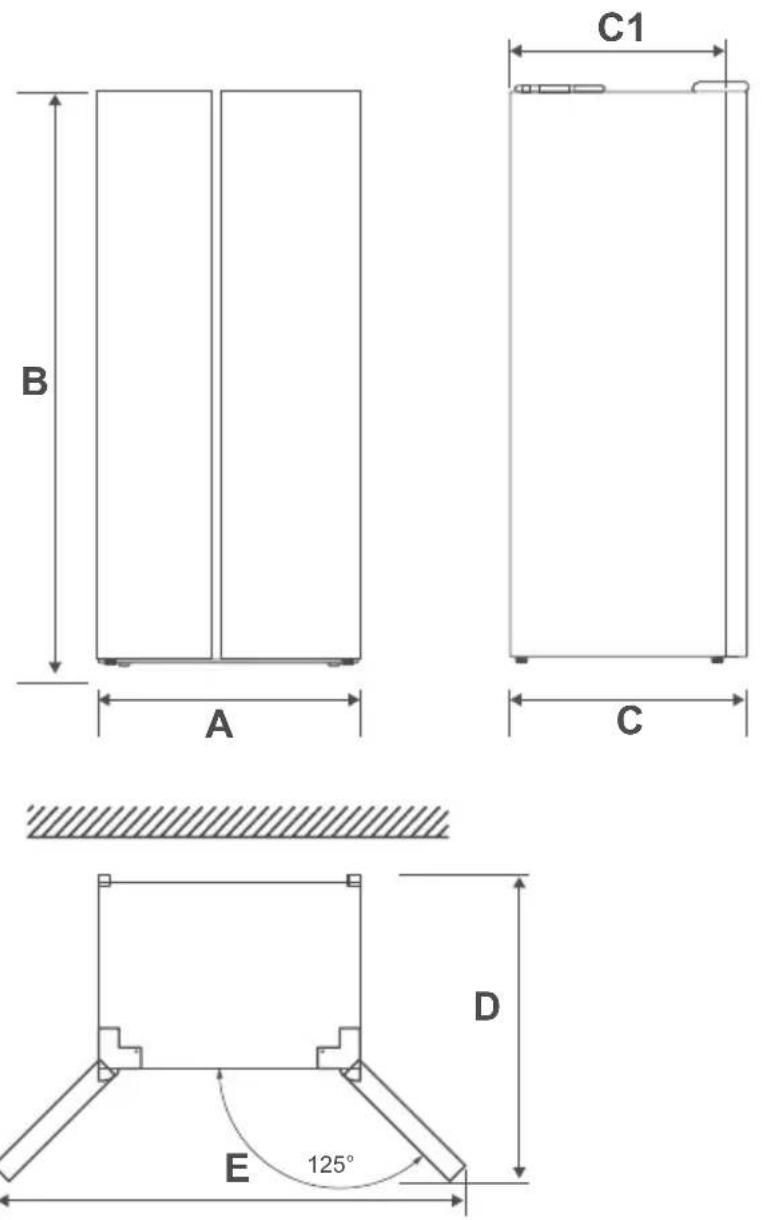
| Width | Overall Height | Depth | Depth (Only Cabinet) | Depth (doors open 125°) | Width (doors open 125°) |
| A B C C1 D E | |||||
| 35.8" (910mm) | 69.9" (1775mm) | 28.9" (735mm) | 25.0" (636mm) | 44.4" (1127mm) | 57.4" (1458mm) |
EN
Installing the Water Line
WARNING: Connect to potable water supply only.
Water line installation kits are available as an additional accessory from your dealer or at a local hardware store.
Connecting the water line
- First, shut off the main water supply line and turn off the ice maker.
- Locate the nearest cold water supply valve.
- After connecting the water supply to the water valve, turn your main water supply back on and flush several gallons of water to clean the water supply line.
The minimum inlet water pressure: 276 KPa (40 psi).
The maximum inlet water pressure: 689 KPa (100 psi).
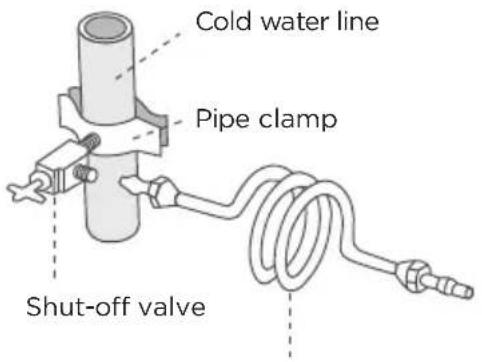
text_image
Cold water line Pipe clamp Shut-off valveWater line installation kit
EN
Connecting the water line to refrigerator
• There are several items that you need to purchase to complete this connection.
- You will find these items sold as a kit at your local hardware store.
- First, close the main water supply and locate the nearest cold water line.
- Depending on the height of the cold water pipe, open the pipe clamp holding the water pipe to adjust the height of the water valve.
- Second, connect the water valve to the cold water line.
- Turn water valve on and check for any leakage.
- When moving the refrigerator, you can hang the power cord on the power cord hook.
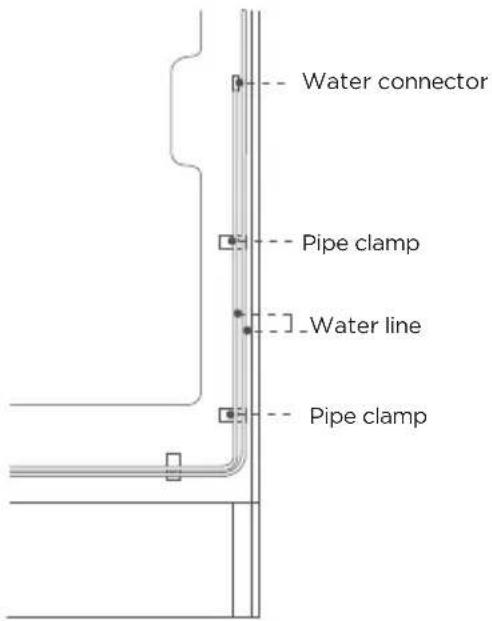
text_image
Water connector Pipe clamp Water line Pipe clampInstalling the Water Pitcher
-
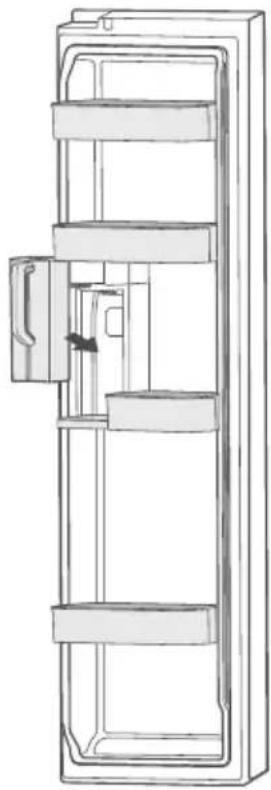
Take the water pitcher out of the packaging.
-
Open the door of the refrigerator compartment, and then install the water pitcher onto the holder. Push it straight in as shown in the illustration.
natural_image
Technical line drawing of a refrigerator door frame with horizontal shelves and handle (no text or symbols)Leveling Feet
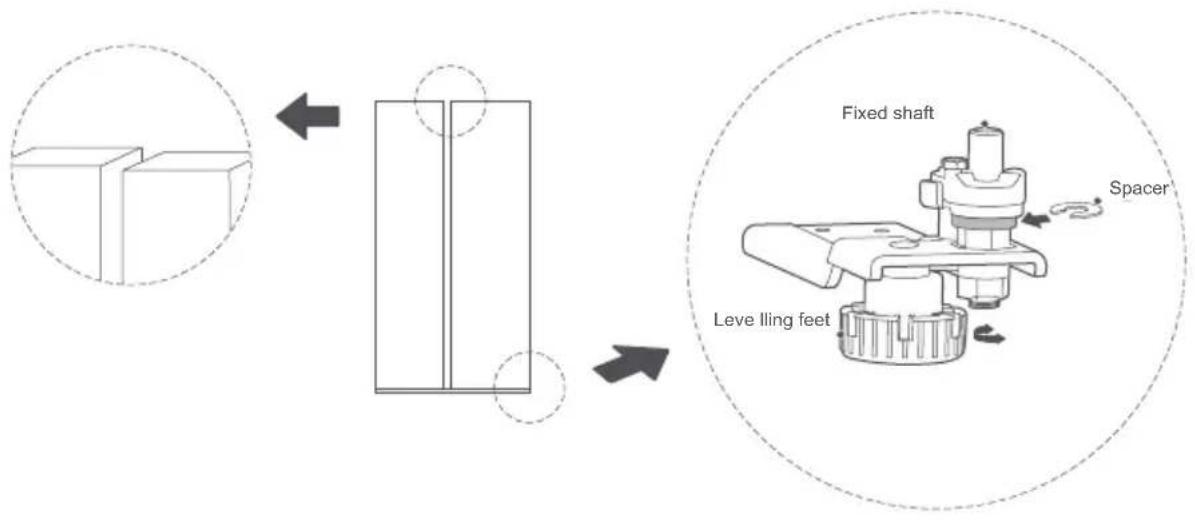
To avoid vibration, the appliance must be leveled.
If required, adjust the leveling feet (located on both sides of the bottom front) to compensate for the uneven floor.
The front should be slightly higher than the rear to aid in door closing.
Leveling feet can be turned by tipping the cabinet slightly.
Turn the leveling feet counterclockwise to raise the unit, or clockwise to lower it.
Aligning the Doors
If the upper edge of the door on the refrigerator is not aligned, place 1-2 shims between the lower hinge self-locking and the nut of the lower door to adjust the height.
text_image
Fixed shaft Spacer Leve lling feetMoving the Appliance
- Remove all items from inside the appliance.
- Pull the power plug out, insert and fix it into the power plug hook at the rear or on top of the appliance.
- Tape parts such as shelves and the door to prevent from falling off while moving the appliance.
- Move the appliance with more than two people carefully. When transporting the appliance over a long distance, keep the appliance upright.
- After installing the appliance, connect the power plug into a socket outlet to switch on the appliance.
Connecting the Appliance
After installing the appliance, connect the power plug into a socket outlet.

ATTENTION
After connecting the power supply cord (or plug) to the outlet, wait 2 or 3 hours before you put food into the appliance. If you add food before the appliance has cooled completely, your food may spoil.
Precautions before operation:
- Before making changes, the refrigerator must be disconnected from power.
- Precautions should be taken to prevent any personal injury.
Tips for Energy Saving
- Do not place the appliance near cookers, radiators or other heat sources. If the ambient temperature is high, the compressor will run more frequently and for longer, resulting in increased energy consumption.
- Ensure that there is sufficient ventilation at the base of the appliance, on the sides of the appliance and at the back of the appliance. Never cover ventilation openings.
- Please also observe the spacing dimensions in the chapter "Installation".
- The arrangement of drawers, shelves and racks as shown in the illustration offers the most efficient use of energy and should therefore be retained as far as possible. All drawers and shelves should remain in the appliance to keep the temperature stable and save energy.
- To obtain a larger storage space (e.g. for large refrigerated/frozen goods), the middle drawers can be removed. The top and bottom drawers and shelves should be removed last if necessary.
- An evenly filled refrigerator/freezer compartment contributes to optimal energy use. Therefore, avoid empty or half-empty compartments.
- Allow warm food to cool before placing it in the refrigerator/freezer. Food that has already cooled down increases energy efficiency.
- Allow frozen food to defrost in the refrigerator. The coldness of the frozen food reduces the energy consumption in the refrigerator compartment and thus increases the energy efficiency.
- Open the door only as briefly as necessary to minimise cold loss. Opening the door briefly and closing it properly reduces energy consumption.
- The door seals of your appliance must be perfectly intact so that the doors close properly and energy consumption is not increased unnecessarily.
OPERATION INSTRUCTIONS
Control Panel
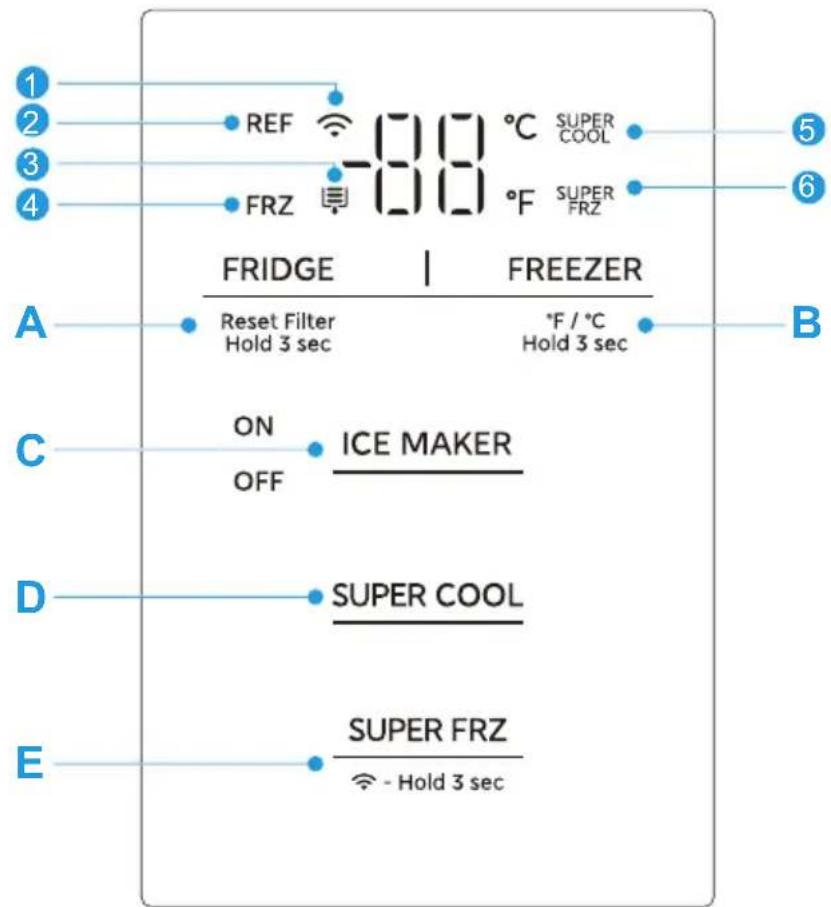
The control panel is located inside the refrigerator compartment.
text_image
1 2 3 4 REF -80 °C SUPER COOL FRZ -80 °F SUPER FRZ FRIDGE | FREEZER Reset Filter Hold 3 sec °F / °C Hold 3 sec A B C ON OFF ICE MAKER D SUPER COOL E SUPER FRZ - Hold 3 sec| Icons Buttons | |||
| 1 | Wireless network | A | Refrigerator temperature adjustment |
| 2 | Refrigerator | B | Freezer temperature adjustment |
| 3 | Filter replacement reminder | C | Ice maker on/off |
| 4 | Freezer | D | Super cool |
| 5 | Super cool | E | Super freeze |
| 6 | Super freeze |

ATTENTION
The actual control panel may vary depending on the model.
Use and Functions
Display
- When the refrigerator is electrified, the display screen will totally display for 3 seconds, meanwhile the start-up bell rings, then the display screen enters the normal display of operation. (When powered on for the first time, the default set temperature of the refrigerator compartment and freezer compartment is 37^ / -04^ ( 03^ / -20^ ), the ice makers are turned on by default, and the initial power-up is set to Fahrenheit).
- If there is a fault, the fault code is displayed (cycle display). The refrigerating chamber's set temperature is displayed when there is no fault.
- If no button is pressed for 10 seconds, the screen will be locked. The display will be off after 30 seconds, and will be on again when any button is pressed. When there is a “fault code visible” type of fault, the display will light up, and will turn off after 30 seconds.
- When the filter icon lights up after 150 days of filter operation, the user is prompted to change the filter. After 180 days, the filter icon will flash, prompting the user to change the filter. After replacing the filter, press and hold the FRIDGE button for 3 seconds to activate the "RESET FILTER" function. This will reset the filter time to zero, and the filter icon will turn off after 10 seconds.
- Press and hold the FREEZER button for 3 seconds to achieve the Celsius/Fahrenheit conversion function.
Lock/Unlock
- The screen automatically enters the locked state after 10 seconds waiting.
- In the locked state, press any button to enter the unlocked state.
Refrigerator temperature setting
- Press the FRIDGE button to adjust the temperature of refrigerator compartment. Each time you press the button, the temperature increases or decreases by 1°C/1°F. The setting range of the refrigerator compartment is 01 - 07°C/34 - 44°F.
- The setting takes effect after 10 seconds (screen locked).
Freezer temperature setting
- Press the 586708 adjust the temperature of freezer compartment. Each time you press the button, the temperature increases or decreases by 1^ / 1^ . The setting range of the freezer compartment is -22 - -14^ / -07 - 07^ .
- The setting takes effect after 10 seconds (screen locked).
Super Cool mode
- Press the button to set/exit the Super Cool mode. When Super Cool mode is set,
the temperature of the refrigerator compartment is automatically set to 1^ C, and the is on.
SUPER
COOL icon - The Super Cool mode will be automatically exited after 6 hours. When exited, the temperature will return to that set before entering Super Cool mode.
Super Freeze mode
- Press the button to set/exit the Super Freeze mode. When Super Freeze mode is
set, the freezer compartment temperature is automatically set to -22^ , and the on.
SUPER FRZ - The Super Freeze mode will be automatically exited after 40 hours. When exited, the temperature will return to that set before entering Super Freeze mode.

ATTENTION
The super freeze function is designed to maintain the nutritional value of the food in the freezer. It can freeze the food in the shortest time. If a large amount of food is frozen at one time, it is recommended that the user turn on the super freeze function and put the food in. At this time, the freezing speed of the freezer compartment is increased, which can quickly freeze the food, effectively lock the nutrition of the food, and facilitate storage.
Ice Maker On/Off
Press the _button to turn the ice maker on or off. When turned on, the ice maker indicator lights up.
Sabbath mode
- Press ICE MAKER and SUPER FRZ simultaneously for 3 seconds to enter or exit Sabbath mode. After the setting is activated, it will display "On" or "OF" for 2 seconds and then will automatically return to the normal display.
- If the refrigerator is connected to the Internet, you can also enter or exit the Sabbath mode through the corresponding function button in the MSmartHome refrigerator control interface.
Forced AP mode
- Press and hold for 4 seconds to force the refrigerator's wireless network module into AP mode ("AP" appears in the temperature display area). After the module enters AP mode and is successfully configured, it will automatically exit AP mode and the temperature display area will return to normal temperature display.
- After setting the AP mode, if the module is not successfully configured for 10 seconds, the AP mode will be forcibly exited, and the temperature display area will return to the normal temperature display.
Fault indication
- When the following fault codes appear on the display screen, it indicates a problem with the refrigerator. Although the refrigerator in the following fault case can still provide cooling/freezing functions, the user should contact maintenance personnel to ensure the normal use of refrigerator.
Fault Code Fault Description
| E1 Refrigerator chamber temperature sensor fault |
| E2 Freezer chamber temperature sensor fault |
| E5 Freezer chamber defrosting sensor fault |
| E6 Communication fault |
| E7 Ambient temperature sensor fault |
| E0 Ice maker fault |
| EE Ice maker sensor fault |
| EP Ice maker fails to drop ice |
| L3 Freezer fan fault |
| L4 Freezer fan speed is abnormal |
| L5 Condenser fan fault |
| L6 Condenser fan speed is abnormal |
Using the Water Pitcher
To make sure the water pitcher's AutoFill function works properly, place the pitcher correctly on the holder and close the door. After a while, the water in the pitcher will automatically fill to the preset level.
Cooled purified water is available in the water pitcher. You can put tea or fruit in the filter and enjoy a variety of fruity water you like.
To get cold brew water
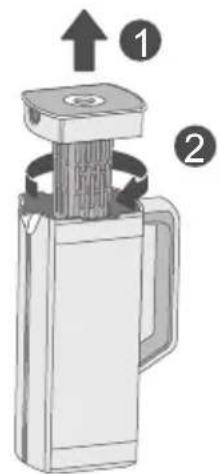
- Grasp the handle slot on the lid and pull up to open the lid.
- Rotate the filter element and remove it from the lid.
- Place the tea or fruit in the filter element according to your taste.
- Place the water pitcher back on the pitcher holder. To prevent the water pitcher from pouring or leaking, make sure the pitcher fits into the pitcher holder slot as shown in the figure below.
- Close the door. The water pitcher will begin to fill with cooled water after a short time.
text_image
Diagram of a mechanical device with numbered parts and directional arrows indicating assembly or operation.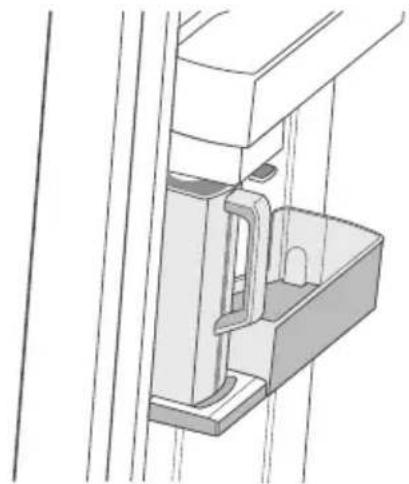
natural_image
Technical line drawing of a mechanical assembly with no visible text or symbolsNotes:
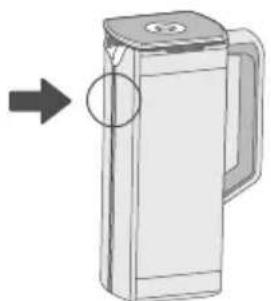
If there is too much moisture on the front of the water pitcher (the marked area), the pitcher may not be fully filled. Please remove moisture and try again.
natural_image
Illustration of a cylindrical water dispenser with a handle and lid, showing an arrow pointing to its side (no text or symbols present)If the water pitcher fails to fill within a certain period of time, the automatic water filling function will stop supplying water to the pitcher. If this happens, check that the water pipes are properly connected. Remove and reinsert the water pitcher and try again.
Tips:
We recommend drinking fruit soaked water within 24 hours. After this time, the water may spoil.
The water pitcher must be washed after drinking the soaked water. If the water pitcher is not used for a long time, it also needs to be cleaned.
To prevent the water pitcher from overflowing or leaking, make sure the lid is properly inserted.
Do not fill the water pitcher with hot water.
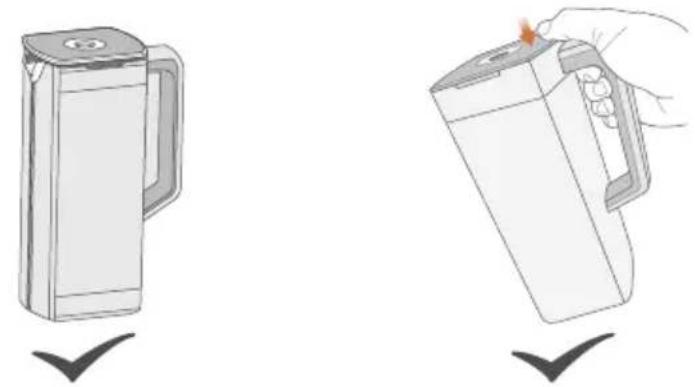
Do not expose the water pitcher to high temperatures.When pouring water from the pitcher it is recommended to press the lid with your thumb.
Manual water dispensing function
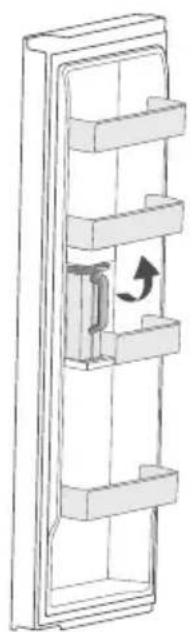
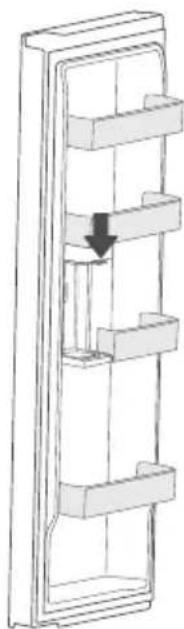
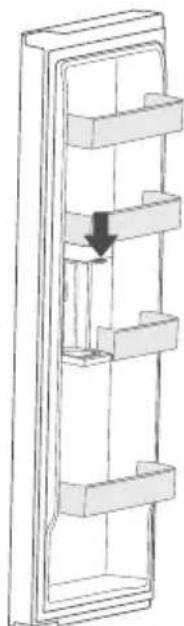
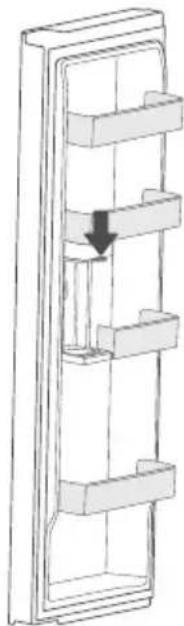
- To dispense water manually, open the door and remove the water pitcher from the pitcher holder.
- Position the mouth of the container cup under the spout on the pitcher holder.
- Press the dispenser to dispense water into the container.
- Release the dispenser to stop the water flow.
natural_image
Diagram of a refrigerator with shelves and a door handle, showing a directional arrow (no text or symbols)1
natural_image
Diagram of a vertical shelf with horizontal shelves and a downward arrow indicating flow or movement (no text or symbols)2
Notes:
Keep children away from the dispenser to prevent them from playing with or damaging it.
The maximum single dispensing time is 2 minutes. If the dispenser is pressed for more than 2 minutes, the spout will stop dispensing water. Release and press the dispenser again to resume water flow.
Adjust the distance between the container cup and the spout to avoid water splashing out of the container.
When the water level in the water pitcher is below the high level, pressing the dispenser will dispense water into the pitcher; when the water level reaches the high level, pressing the dispenser will not dispense water.
Using the Ice Storage Box
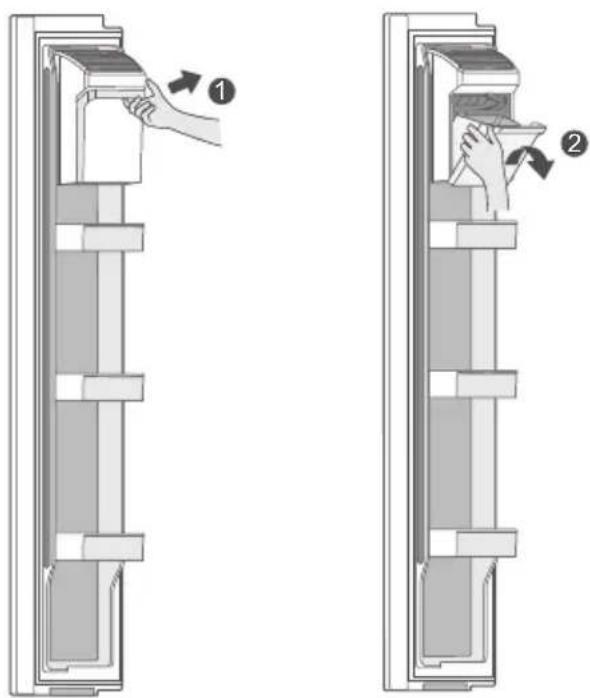
- Grasp the ice box handle and turn the ice box about 35 degrees in the direction of the arrow to open and remove a small amount of ice.
text_image
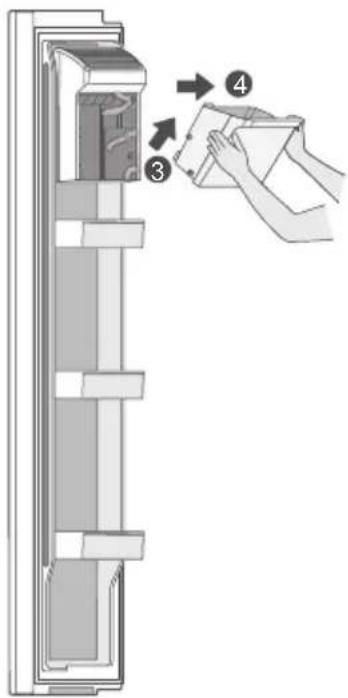
Diagram showing two steps of a door latch mechanism with labeled arrows indicating process flow.- When more or all of the ice is needed, the ice box can be removed as indicated by the arrows.
text_image
Diagram showing a refrigerator interior with labeled parts and a hand holding a package, illustrating the process of cleaning or packaging.EN
Storing Food
Freezer Compartment
- The freezer compartment is designated for the storage of food frozen at very low temperature, long-term storage of frozen food, and for the production of ice.
- Use the shelves in the door of the freezer only for storing frozen food, not for storing hot food intended for freezing.
- Do not put fresh and frozen food next to each other. The frozen food may thaw.
- When freezing fresh food (such as meat, fish or chopped meat), cut them into parts that can be used at the same time.
- Storing frozen food: instructions are usually stated on the packages, which must be followed. If there is no information on the packaging, food should not be stored for longer than three months from the date of purchase.
- When purchasing frozen food, make sure that it was frozen at a suitable temperature and that the packaging is not damaged.
- Frozen food should be kept in suitable packages to retain the quality and should be returned to the freezer compartment as soon as possible.
- If a package of frozen food shows moisture or abnormal bulging, it is probable that it was stored at the wrong temperature and the content is spoiled.
- The storage period for frozen food depends on the room temperature, the thermostat setting, the frequency of opening the door of the freezer, the type of food and the time of transporting the product from the shop to the household. Always follow the instructions printed on the packaging and never exceed the maximum storage time stated on the package.
Refrigerator Compartment
To reduce moisture and subsequent ice build-up, never put liquid into the fridge compartment in unsealed containers. Frost tends to concentrate in the coolest parts of the evaporator. Storing uncovered liquids results in a more frequent need for defrosting.
Never put warm foods in the fridge compartment. These should first cool down at room temperature and then be placed so as to ensure adequate air circulation in the fridge compartment.
Foods or food containers should not touch the back wall of the fridge because they could freeze to the wall. Do not keep regularly opening the door of the refrigerator.
Meat and clean fish (packed in a package or plastic foil) can be placed in the fridge compartment, which can be used in 1-2 days.
Fruit and vegetables without packaging can be placed in the part designated for fresh fruit and vegetables
Recommended Temperature
The optimal temperature setting for food storage:
- Fridge: 39.2^ (4°C); freezer: -0.4^ (-18°C)

ATTENTION
The optimal temperature setting of each compartment depends on the ambient temperature. Above optimal temperature is based on the ambient temperature of 25^ C.
APP SETUP AND OPERATION
Download the SmartHome App
On an app market (Google Play Store, Apple App Store), search for "SmartHome" and find the SmartHome app. Download and install it on your phone. You can also download the app by scanning the QR code below.
Register and log in
Open the SmartHome app, and create a new account to start (you can also register through a third-party account). If you already have an existing account, use the account to log in.
Connect your devices to SmartHome
- Please make sure your mobile phone is connected to a wireless network. If it is not, go to Settings and enable wireless networks and Bluetooth.
- Please power on your devices.
- Open SmartHome App on your phone.
- If a message of "Smart devices discovered nearby" appears, click to add.
- If no message appears, select "+" on the page and select your device in the list of nearby devices available. If your device is not listed, please add your device manually by the device category and device model.
- Connect your device to the wireless network according to instructions on app. If the connection fails, please follow the instructions provided by the app to continue with the operation.
text_image
SmartHome Download the app & activate product Download at the App Store Google Play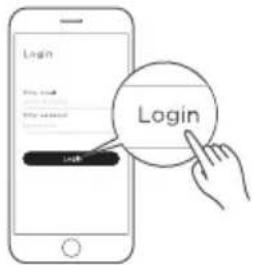
text_image
Login Login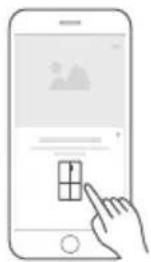
natural_image
Illustration of a hand interacting with a smartphone displaying a grid interface (no text or symbols)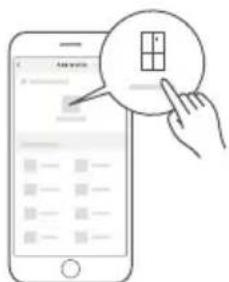
text_image
Illustration showing a hand interacting with a smartphone screen displaying a grid interface, with a magnified circular icon highlighting the grid.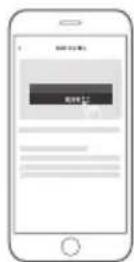
CLEANING AND MAINTENANCE

CAUTION
Disconnect the appliance from the electrical supply before performing any routine maintenance. Allow at least 5 minutes before restarting the appliance, as frequent starting may damage the compressor.
Hold the plug, not the cable, when unplugging the appliance.
Do not scrape off frost and ice with sharp objects. Do not use sprays, electric heaters, hair dryers, steam cleaners or other sources of heat in order to avoid damage to the plastic parts.
Eliminate the dust on the back of the unit at least once in the year to avoid hazard by fire, as well as increased energy consumption.
Check the door gasket regularly to make sure there is no debris. Clean the door gasket with a soft cloth dampened with soapy water or diluted detergent.
The interior of the product should be cleaned regularly to avoid odor.
Use a soft cloth or sponge to clean the inside of the product, with two tablespoons of baking soda and a quart of warm water. Then rinse with water and wipe clean. After cleaning, open the door and let it dry naturally before turning on the power.
For areas that are difficult to clean in the product (such as narrow gaps or corners), it is recommended to wipe them regularly with a soft rag, soft brush, etc. and when necessary, combined with some auxiliary tools (such as thin sticks) to ensure no contaminants or bacteria accumulation in these areas.
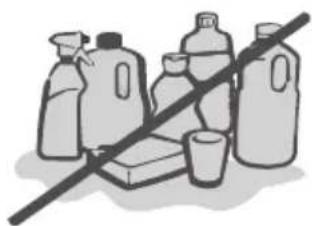
Do not use soap, detergent, scrub powder, spray cleaner, etc., as these may cause odors in the interior of the product or contaminated food.
Wipe the outer surface of the product with a soft cloth dampened with soapy water, detergent, etc., and then wipe dry.
Do not use hard brushes, clean steel balls, wire brushes, abrasives (such as toothpastes), organic solvents (such as alcohol, acetone, isoamyl acetate, etc.), boiling water, acid or alkaline items, which may damage the fridge surface and interior. Boiling water and organic solvents such as benzene may deform or damage plastic parts.
natural_image
Illustration of various plastic containers and a crossed-out line, no text or symbols presentDo not rinse directly with water or other liquids during cleaning to avoid short circuits or affect electrical insulation after immersion.

ATTENTION
The appliance shall run continuously once it is started. Generally, the operation of the appliance shall not be interrupted; otherwise the service life may be impaired.
Defrosting
The refrigerator is made based on the air-cooling principle and thus has an automatic defrosting function. Frost formed due to change of season or temperature may also be manually removed by disconnecting the appliance from power supply or by wiping with a dry towel.
CAUTION!
Don't use sharp objects to remove frost from the freezer.
Only after the interior completely dry should the appliance be switched back on and plugged back into the mains socket.
Cleaning the Door Bin
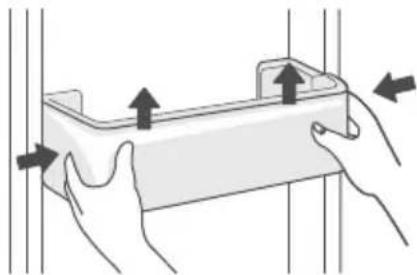
According to the direction arrow in the figure, use both hands to squeeze the bin and push it upward, then you can remove it.
After washing the removed bin, you can adjust its installation height to suit your needs.
natural_image
Illustration of hands holding a rectangular object with arrows indicating movement or force (no text or symbols)Cleaning the Glass Shelf
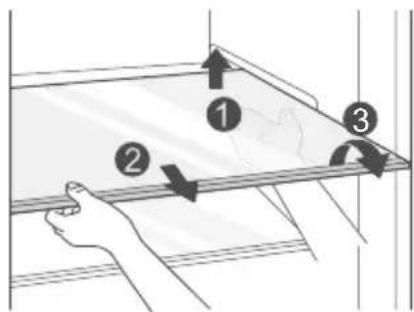
As the innermost part of the refrigerator liner where contacting the shelves has a backstop, you shall raise the shelves upward, rotate the shelf as indicated, then you can take it out.
Adjust or clean the shelves as needed.
text_image
Diagram showing a hand holding a tray with three numbered arrows indicating movement or force directions, labeled 1, 2, and 3.Cleaning the Drawers
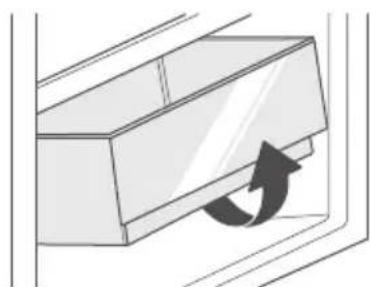
Remove the contents of the drawer. Hold the handle of the drawer and pull the drawer out completely until it stops.
Lift up the drawer and pull it out.
natural_image
Diagram of a cabinet or shelf with an arrow indicating clockwise motion (no text or symbols)Cleaning the Ice Storage Box
Remove the ice storage box from the refrigerator as described on page 17.
It is recommended to clean the ice storage box with a soft towel or a sponge dipped in water and a non-corrosive neutral detergent, then rinse with clean water and wipe with a dry cloth.
Cleaning the Water Pitcher
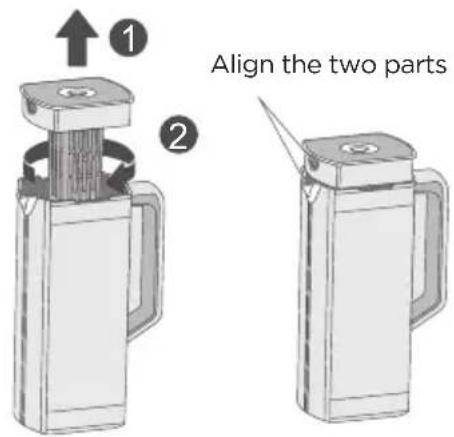
Grasp the handle slot on the lid and pull the lid upwards.
Twist and remove the infuser from the lid.
Wash the infuser with a mild detergent and running water. Rinse clean and dry thoroughly.
Reassemble the water pitcher in the reverse order of disassembly. When reassembling, be sure to align the pitcher spout with the lid outlet.
Note:
The water pitcher and lid are not allowed in the microwave and dishwasher. Exposure to heat sources, including hot water, may cause them to melt or deform. Hand wash with cold or lukewarm water as needed.
text_image
1 2 Align the two partsReplacing the Filter
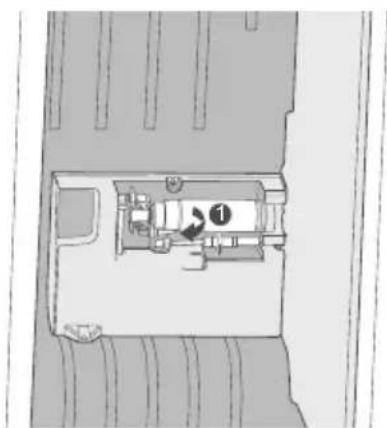
The filter is located in the lower right corner of the refrigerator compartment.
- Pull the end of the filter out of its place by hand, then rotate 90^ counterclockwise to remove.
text_image
Architectural floor plan diagram with labeled room number 1 and directional arrow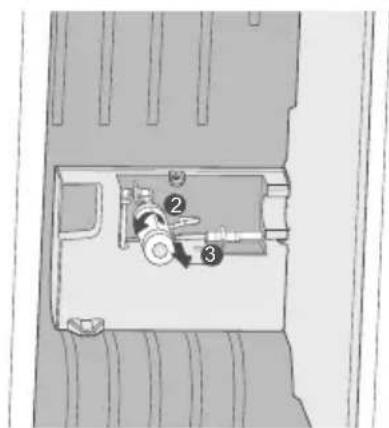
text_image
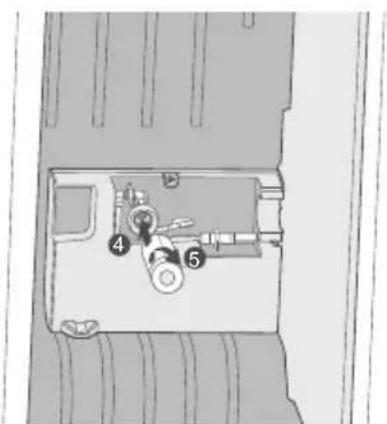
Technical diagram of a mechanical assembly with numbered components, likely a valve or pump mechanism.- Remove the new filter from its packaging. To install the new filter, position the O-ring correctly, insert the new filter into the holder and lock it by turning clockwise.
text_image
Diagram of a vehicle interior with numbered components, likely indicating parts of a vehicle or parking area.Replacing the Light
Any replacement or maintenance of the LED lamps is intended to be made by the manufacturer, its service agent or similar qualified person.
TROUBLESHOOTING
The following simple issues can be handled by the user. Please call the after-sales service department if the issues are not solved.
| Problem Possible Causes | |
| Failed operation | ·Check whether the appliance is connected to power or whether the plug is in well contact |
| ·Check whether the voltage is too low | |
| ·Check whether there is a power failure or partial circuits have tripped | |
| Odor | ·Odorous foods shall be tightly wrapped |
| ·Check whether there is any spoiled food | |
| ·Clean the inside of the refrigerator | |
| Long-time operation of the compressor | ·Long operation of the refrigerator is normal in summer |
| ·When the ambient temperature is high, it is not recommended to have too much food in the appliance at the same time | |
| ·Food shall get cool before being put into the appliance | |
| ·The doors are opened too frequently | |
| Light fails to get lit | ·Check whether the refrigerator is connected to power supply and whether the illuminating light is damaged |
| ·Have the light replaced by a specialist | |
| Door does not close properly | ·The door is stuck by food packages. Too much food is placed |
| ·The refrigerator is tilted | |
| Freezer door will not open | ·If the ice bin has shifted and prevents the door from opening properly, use a stick to push it back into place. You can then open the door normally |
| Loud noises | ·Check whether the floor is level and whether the refrigerator is placed stably |
| ·Check whether accessories are placed at proper locations | |
| Door seal is not tight | ·Remove foreign matter from the door seal |
| ·Heat the door seal and then cool it for restoration (or blow it with an electric dryer or use a hot towel for heating) | |
EN

| Problem Possible Causes | |
| Water pan overflows | ·There is too much food in the chamber or food stored contains too much water, resulting in heavy defrosting |
| ·The doors are not closed properly, resulting in frosting due to entry of air and increased water due to defrosting | |
| Hot housing | ·Heat dissipation of the built-in condenser via the housing, which is normal When housing becomes hot due to high ambient temperature, storing too much food, or compressor shutdown, provide sound ventilation to facilitate heat dissipation |
| Surface condensation | ·Condensation on the exterior surface and door seals of the refrigerator is normal when the ambient humidity is too high. Just wipe the condensate with a clean towel |
| Abnormal noise | ·Buzz: The compressor may produce buzzes during operation, and the buzzes are loud particularly upon start or stop. This is normal |
| ·Creak: Refrigerant flowing inside of the appliance may produce creak, which is normal | |
| Not making ice cubes (only on models with an ice maker) | ·The ice making function not turned on. Switch on the ice maker |
| ·The appliance is not being supplied with water. Check whether the water supply is on | |
| ·The water pipe is kinked. Straighten the kinks | |
| ·The water pipe connection is not installed correctly. Check the water connection | |
| ·The water pressure is too low. Check the pressure of the water supply, or whether the filter is clogged | |
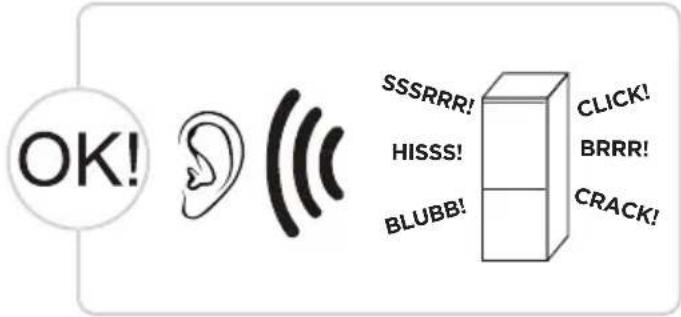
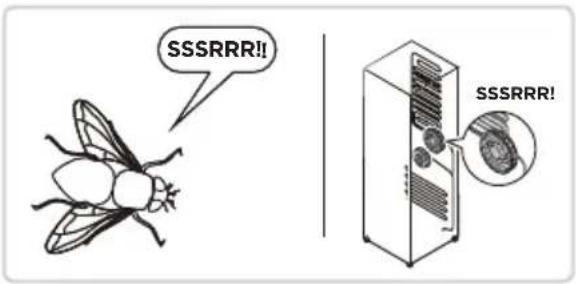
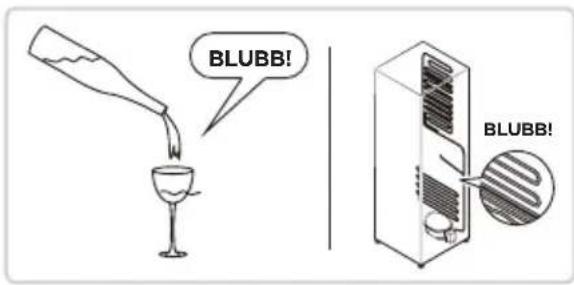
Do you hear these abnormal sounds as below? Usually these sounds are normal.
text_image
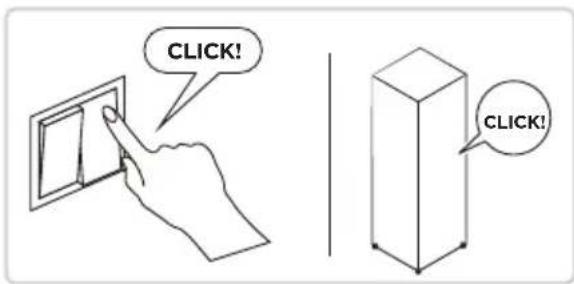
OK! SSSRRR! HISSS! BLUBB! CLICK! BRRR! CRACK!CLICK: Some electrical parts in the refrigerator, such as electric valve will make this noise when working. This is normal.
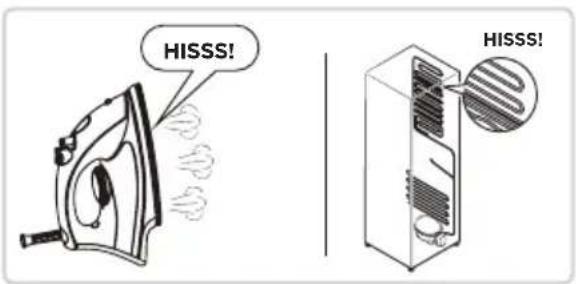
HISSS: When the refrigerant flows into the evaporator, it will make this noise. This is normal.
text_image
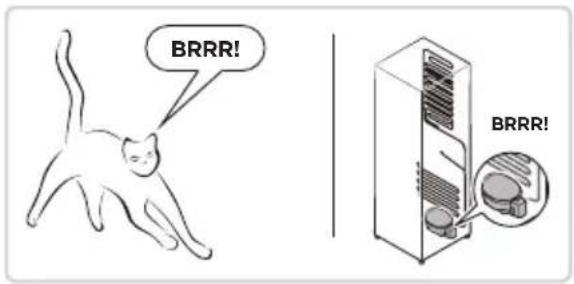
CLICK! CLICK!BRRR: The compressor will make this noise when working, and the buzzes are loud particularly upon start or stop. This is normal.
text_image
HISSS! HISSS!SSSRRR: The fan motor in the No Frost refrigerator will make this noise when working. This is normal.
text_image
BRRR! BRRR!BLUBB: Refrigerant flowing through the pipes in the refrigerator will make this noise. This is normal.
text_image
SSSRRR!! SSSRRR!CRACK: Cracking sound or broken ice sound: the overall structure of the refrigerator, air duct frost will be with the thermal expansion and contraction of the expansion sound, these are also normal physical phenomenon.
text_image
BLUBB! BLUBB!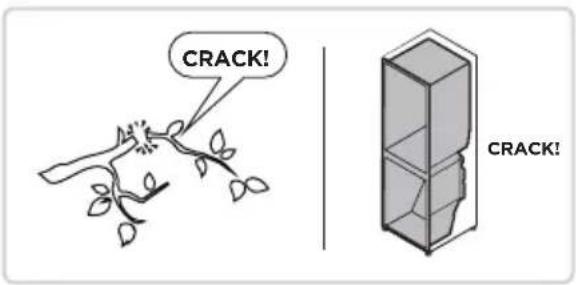
text_image
CRACK! CRACK!CERTIFICATIONS
Please note that changes or modifications of this product is not expressly approved by the party responsible for compliance could void the user's authority to operate the equipment.
This equipment complies with FCC's RF radiation exposure limits set forth for an uncontrolled environment.
The antenna(s) used for this transmitter must be installed and operated to provide a separation distance of at least 20 cm from all persons and must not be collocated or operating in conjunction with any other antenna or transmitter. Installers must ensure that 20cm separation distance will be maintained between the device (excluding its handset) and users.
Federal Communications Commission (FCC) Compliance Statement for USA
This device complies with part 15 of the FCC rules. Operation is subject to the following two conditions: (1) This device may not cause harmful interference, and (2) this device must accept any interference received, including interference that may cause undesired operation.
Note: This equipment has been tested and found to comply with the limits for a Class B digital device, pursuant to part 15 of the FCC Rules. These limits are designed to provide reasonable protection against harmful interference in a residential installation. This equipment generates, uses and can radiate radio frequency energy and, if not installed and used in accordance with the instructions, may cause harmful interference to radio communications. However, there is no guarantee that interference will not occur in a particular installation. If this equipment does cause harmful interference to radio or television reception, which can be determined by turning the equipment off and on, the user is encouraged to try to correct the interference by one or more of the following measures:
- Reorient or relocate the receiving antenna.
- Increase the separation between the equipment and receiver.
- Connect the equipment into an outlet on a circuit different from that to which the receiver is connected.
- Consult the dealer or an experienced radio/TV technician for help.
This equipment complies with FCC radiation exposure limits set forth for an uncontrolled environment.
FCC Supplier's Declaration of Conformity
Product Name: Refrigerator
Model number: UR-BCD695WZ-ST
Suppliers Name: Midea America Corp.
Suppliers Address (USA): 300 Kimball Dr. Parsippany, NJ 07054
Suppliers Website: http://midea.com/us
Contact Email/Telephone: 1-866-646-4332
Industry Canada (IC) Compliance Statement for Canada
This device complies with Industry Canada license-exempt RSS standard(s). Operation is subject to the following two conditions: (1) this device may not cause interference, and (2) this device must accept any interference, including interference that may cause undesired operation of the device.
CAN ICES-003(B)/NMB-003(B)
Midea is not responsible for any changes or modifications not expressly approved by Midea. Such modifications could void the user's authority to operate the equipment.
For model: MWB-S-WB01
FCC ID: 2ADQOMWB-SWB01
IC ID: 12575A-WB01

text_image
FCTRADEMARKS, COPYRIGHTS AND LEGAL STATEMENT

idea logo, word marks, trade name, trade dress and all versions thereof are valuable assets of Midea
Group and/or its affiliates (“Midea”), to which Midea owns trademarks, copyrights and other intellectual property rights, and all goodwill derived from using any part of an Midea trademark. Use of Midea trademark for commercial purposes without the prior written consent of Midea may constitute trademark infringement or unfair competition in violation of relevant laws.
This manual is created by Midea and Midea reserves all copyrights thereof. No entity or individual may use, duplicate, modify, distribute in whole or in part this manual, or bundle or sell with other products without the prior written consent of Midea.
All the described functions and instructions were up to date at the time of printing this manual. However, the actual product may vary due to improved functions and designs.
DISPOSAL AND RECYCLING
Important instructions for environment
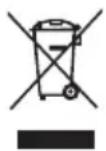
This symbol indicates that this product shall not be disposed with other household wastes at the end of its service life. Used device must be returned to official collection point for recycling of electrical electronic devices. To find these collection systems please contact to your local authorities or retailer where the product was purchased. Each household performs important role in recovering and recycling of old appliance. Appropriate disposal of used appliance helps prevent potential negative consequences for the environment and human health.
Compliance with RoHS Directive
The product you have purchased complies with EU RoHS Directive (2011/65/EU). It does not contain harmful and prohibited materials specified in the Directive.
Package information
Packaging materials of the product are manufactured from recyclable materials in accordance with our National Environment Regulations. Do not dispose of the packaging materials together with the domestic or other wastes. Take them to the packaging material collection points designated by the local authorities.

DATA PROTECTION NOTICE
For the provision of the services agreed with the customer, we agree to comply without restriction with all stipulations of applicable data protection law, in line with agreed countries within which services to the customer will be delivered, as well as, where applicable, the EU General Data Protection Regulation (GDPR).
Generally, our data processing is to fulfil our obligation under contract with you and for product safety reasons, to safeguard your rights in connection with warranty and product registration questions. In some cases, but only if appropriate data protection is ensured, personal data might be transferred to recipients located outside of the European Economic Area.
Further information are provided on request. You can contact our Data Protection Officer via MideaDPO@midea.com. To exercise your rights such as right to object your personal date being processed for direct marketing purposes, please contact us via MideaDPO@midea.com. To find further information, please follow the QR Code.
natural_image
Front view of a modern stainless steel refrigerator with dual doors (no visible text or symbols)Réfrigérateur
GAMME CÔTE À CÔTE

SmartHome
APERÇU DU PRODUIT 05
INSTALLATION DU PRODUIT 06
INSTRUCTIONS D'UTILISATION 12
INSTALLATION ET FONCTIONNEMENT DE L'APPLICATION 19
NETTOYAGE ET ENTRETIEN 20
DÉPANNAGE 23
CERTIFICATIONS 26
MARQUES COMMERCIALES, DROITS D'AUTEUR ET MENTIONS LÉGALES 27
MISE AU REBUT ET RECYCLAGE 27
AVIS DE PROTECTION DES DONNÉES 27
LANGUAGE
FR French
CARACTÉRISTIQUES
text_image
Technical diagram of an internal refrigerator with numbered components for identificationFR
INSTALLATION DU PRODUIT
natural_image
Technical line drawing of a door with horizontal panels and a handle (no text or symbols)Mode super congélation
text_image
Diagram of a mechanical device with numbered parts and directional arrows indicating assembly or movement.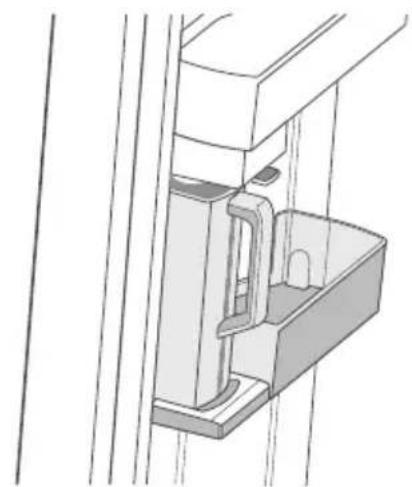
natural_image
Technical line drawing of a mechanical assembly or bracket (no text or symbols)Remarques :
natural_image
Line drawing of a cylindrical water dispenser with a handle and lid, showing an arrow pointing to the side (no text or symbols present)natural_image
Diagram of a mechanical or electrical component with no visible text, numbers, or symbols1
natural_image
Diagram of a multi-tiered refrigerator with a downward arrow indicating a drop or movement (no text or symbols present)2
Remarques :
text_image
Diagram showing two steps of a door latch mechanism, labeled ① and ②, with hand placement instructions.text_image
Diagram showing a hand cleaning a refrigerator with labeled parts and directional arrows indicating components.FR
Conservation des aliments
text_image
SmartHome Download the app & activate product Download on the App Store Google Play
text_image
Login File card File name: Login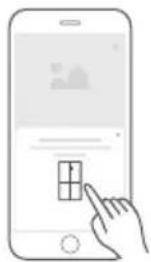
natural_image
Illustration of a hand interacting with a smartphone displaying a grid interface (no text or symbols)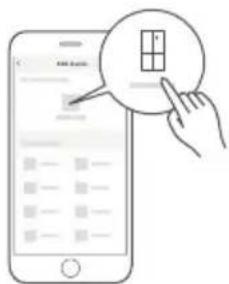
text_image
Illustration of a smartphone screen with a hand pointing to a grid interface, showing a small icon of a grid cell.
NETTOYAGE ET ENTRETIEN

MISE EN GARDE
natural_image
Illustration of various household items including a milk bottle, bottles, and a glass with a crossed-out diagonal line (no text or symbols)natural_image
Illustration of hands holding a rectangular object with arrows indicating movement or force (no text or symbols)text_image
Diagram showing a hand holding a tray with three numbered arrows indicating movement or force directions, labeled 1, 2, and 3.natural_image
Diagram of a cabinet or shelf with an arrow indicating clockwise motion (no text or symbols)text_image
Top-down diagram of a vehicle or road intersection with labeled components and directional arrow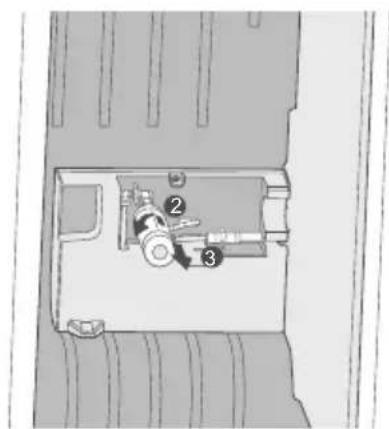
text_image
Technical diagram of a mechanical device with numbered components, likely for assembly or maintenance reference.text_image
Technical diagram of a mechanical device with numbered components labeled 4 and 5text_image
TSSS ! TSSS !natural_image
Front view of a modern stainless steel refrigerator with dual doors (no visible text or symbols)Frigorífico
SERIE SIDE-BY-SIDE

SmartHome
text_image
Technical diagram of an internal refrigerator with numbered components for identificationnatural_image
Technical line drawing of a door frame with horizontal bars and a handle (no text or symbols)Pies de nivelación
text_image
Diagram of a blender with labeled parts and directional arrows indicating process flow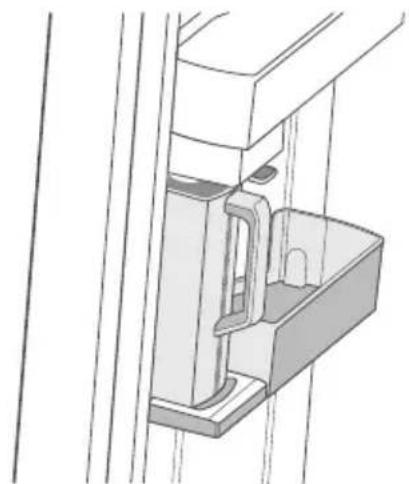
natural_image
Technical line drawing of a mechanical assembly or bracket with no visible text or symbolsES
Notas:
natural_image
Illustration of a simple container with a handle and lid, showing an arrow pointing to the side (no text or symbols present)natural_image
Diagram of a mechanical or electrical component with internal channels and a directional arrow (no text or symbols)1
natural_image
Diagram of a vertical shelf with horizontal shelves and a downward arrow indicating a movement or force (no text or symbols)2
Notas:
text_image
Diagram illustrating two steps of a refrigerator door opening, labeled with arrows and numbered positions.text_image
Diagram showing a hand cleaning a refrigerator with labeled parts and directional arrows indicating cleaning steps.ES
text_image
SmartHome Download the app & activate product Download on the App Store Google Play
text_image
Login Live next Live next Login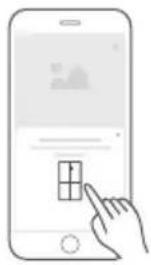
natural_image
Illustration of a hand interacting with a smartphone displaying a grid interface (no text or symbols)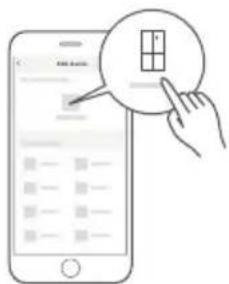
text_image
Illustration of a smartphone screen with a hand pointing to a grid interface, showing a small grid symbol and text '100%'.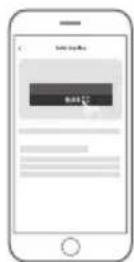
LIMPIEZA Y MANTENIMIENTO

PRECAUCIÓN
natural_image
Illustration of various household items including milk cans, bottles, and a glass with a diagonal line crossing (no text or symbols)natural_image
Illustration of hands holding a rectangular object with arrows indicating movement or force (no text or symbols)text_image
Diagram showing a hand holding a tray with three numbered arrows indicating movement or force directions, labeled 1, 2, and 3.natural_image
Diagram of a cabinet or shelf with an arrow indicating clockwise motion (no text or symbols)text_image
Top-down diagram of a vehicle or road intersection with labeled location and directional arrow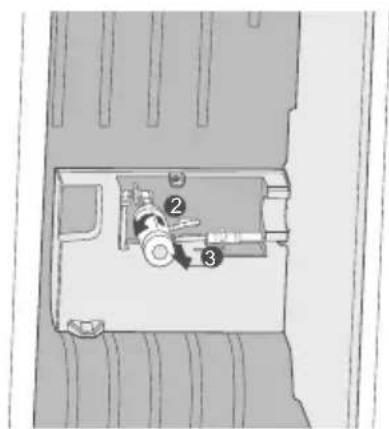
text_image
Technical diagram of a mechanical device with numbered components, likely for assembly or maintenance reference.text_image
Diagram of a device with numbered components, likely an electrical or mechanical component layoutmake yourself at home