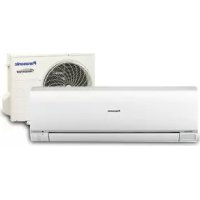
CUE9NKR - Air-conditioner PANASONIC - Free user manual and instructions
Find the device manual for free CUE9NKR PANASONIC in PDF.



| Product Type | Reversible wall-mounted air conditioner from the CUE series |
| Brand | Panasonic |
| Model | CUE9NKR |
| Cooling capacity (kW) | 2.5 (estimated for 9,000 BTU/h) |
| Heating capacity (kW) | 3.2 (heat pump) |
| Energy class | A+ (cooling) / A+ (heating) |
| Power supply | 230 V / 50 Hz / single-phase |
| Indoor unit dimensions (W x H x D mm) | 798 x 295 x 235 |
| Outdoor unit dimensions (W x H x D mm) | 780 x 540 x 290 |
| Indoor unit weight (kg) | 9 |
| Outdoor unit weight (kg) | 25 |
| Refrigerant | R32 |
| Indoor noise level (dB(A)) | 22 to 40 (depending on speed) |
| Outdoor noise level (dB(A)) | 48 |
| Main functions | Cooling, heating, dehumidification, ventilation, silent mode, nanoe™ X |
| Filter | Washable air filter with anti-allergen frame |
| Maintenance and cleaning | Clean the filter every 2 weeks during intensive use |
| Safety | Anti-freeze protection, automatic shutdown in case of overheating, child lock |
| Available spare parts | Remote control, filter, batteries, temperature sensor |
| Repairability index | 7.5 / 10 (estimated) |
| Warranty | 2 years parts and labor (subject to conditions) |
Frequently Asked Questions - CUE9NKR PANASONIC
User questions about CUE9NKR PANASONIC
0 question about this device. Answer the ones you know or ask your own.
Ask a new question about this device
Download the instructions for your Air-conditioner in PDF format for free! Find your manual CUE9NKR - PANASONIC and take your electronic device back in hand. On this page are published all the documents necessary for the use of your device. CUE9NKR by PANASONIC.
USER MANUAL CUE9NKR PANASONIC
Your Home In The Cloud

PA-AC-WIFI-1A
INSTALLATION GUIDE
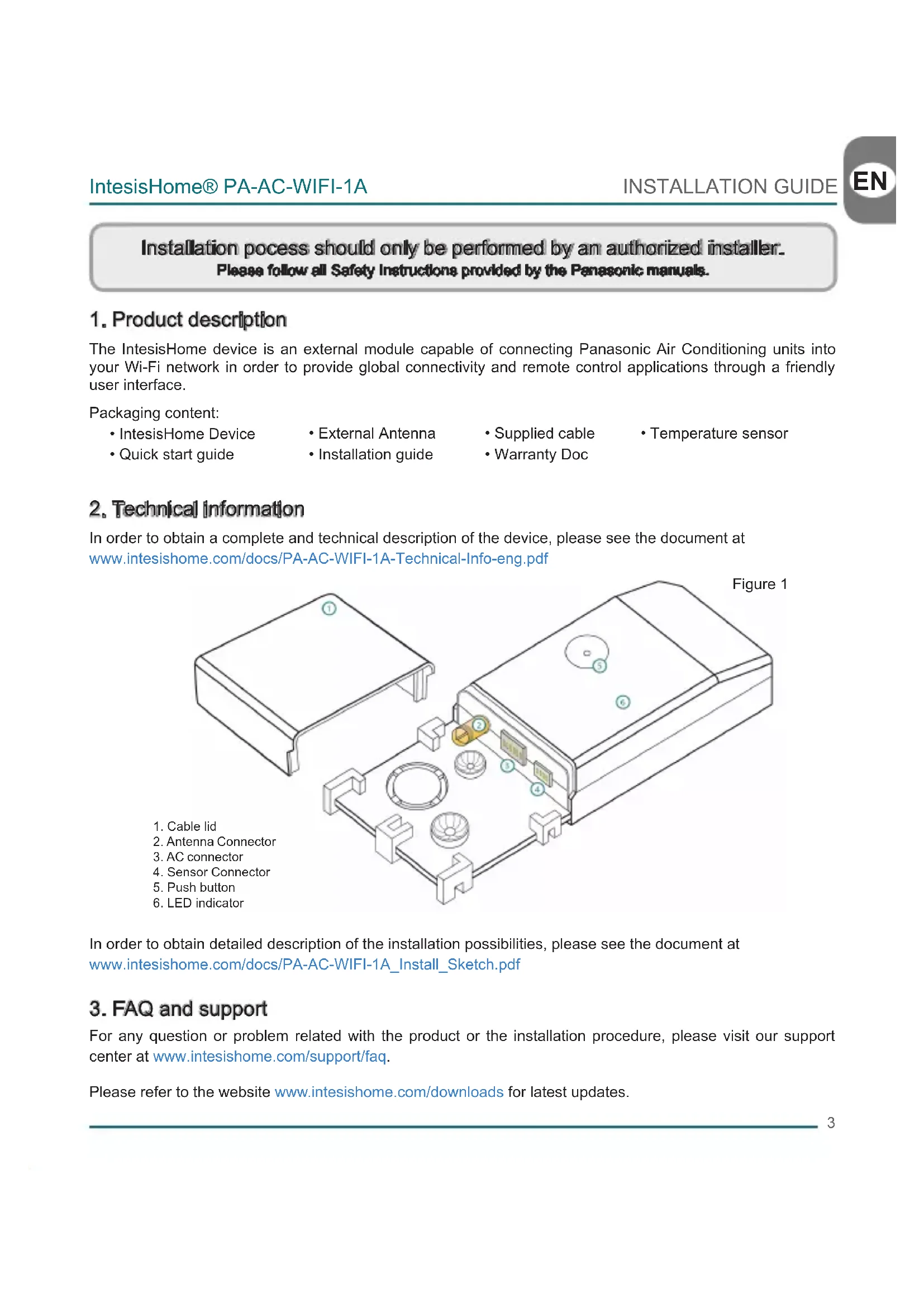
Installation process should only be performed by an authorized installer. Please follow all Safety Instructions provided by the Panasonic manuals.
1.Product description
The IntesisHome device is an external module capable of connecting Panasonic Air Conditioning units into your Wi-Fi network in order to provide global connectivity and remote control applications through a friendly user interface.
Packaging content:
IntesisHome Device
-
External Antenna
-
Supplied cable
-
Temperature sensor
-
Quick start guide
Installation guide
Warranty Doc
2. Technical Information
In order to obtain a complete and technical description of the device, please see the document at www.intesishome.com/docs/PA-AC-WIFI-1A-Technical-Info-eng.pdf
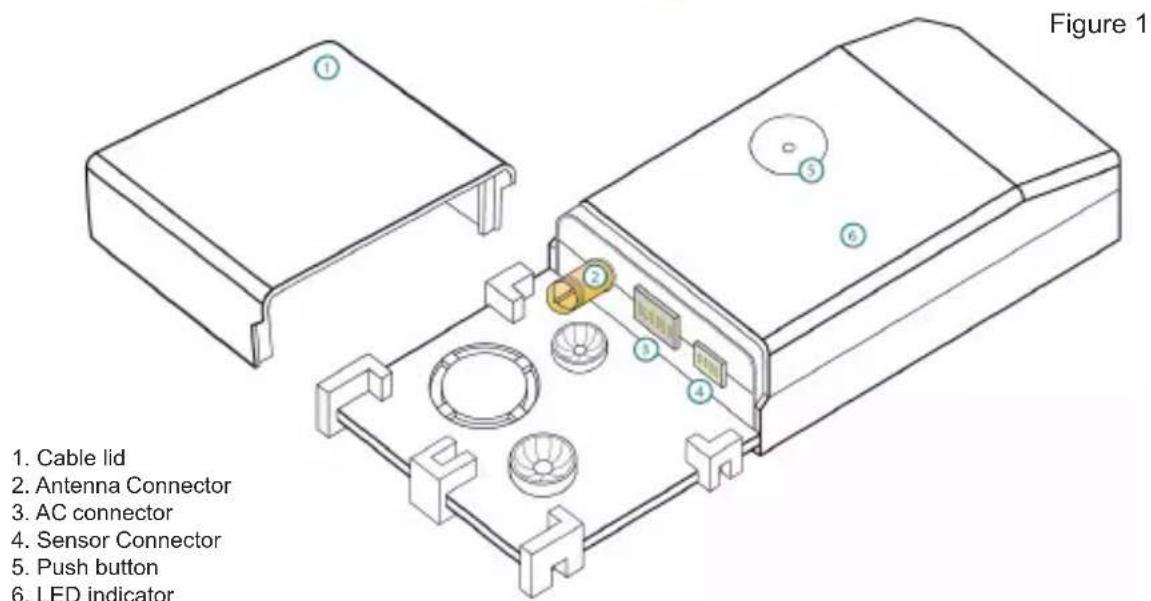
In order to obtain detailed description of the installation possibilities, please see the document at www.intesishome.com/docs/PA-AC-WIFI-1A_Install_Sketch.pdf
3. FAQ and support
For any question or problem related with the product or the installation procedure, please visit our support center at www.intesishome.com/support/faq.
Please refer to the website www.intesishome.com/downloads for latest updates.
4. Installation overview
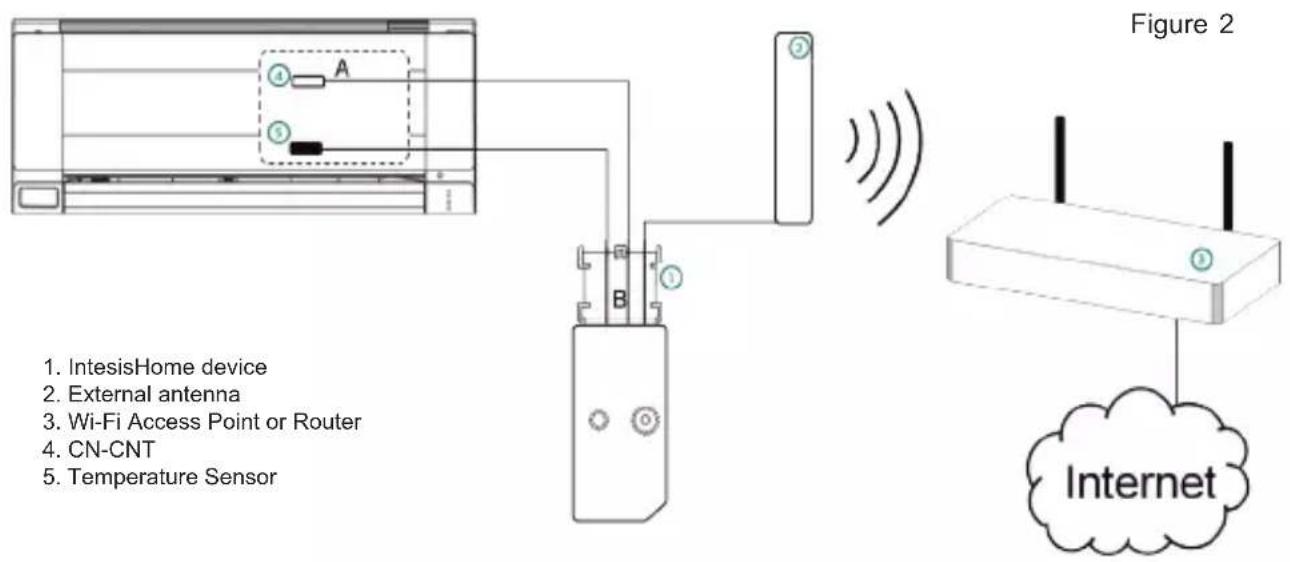
5. Device connections
- Unplug the Air conditioner (AC) unit from the power supply line.
- Access to the main Printed Circuit Board.*
- Locate the socket connector marked as CN-CNT*
- Select a location for the IntesisHome device. See section 6 for more information.
- Connect the A-end (the long one) of the supplied cable to the Air Conditioner CN-CNT connector and the B-end (the short one) to the device AC connector.
- Connect the external antenna into the antenna connector. Make sure you screw the antenna connector in a clockwise direction until it stops.
- (If needed) Install the Temperature Sensor. See section 8 for more information.
- Place the antenna outside the AC, preferably in a vertical position and pointing directly to the Wi-Fi Router or Access Point (AP). See section 7 for more information.
- Close the Air Conditioner unit.
- Plug the AC to the power supply line. If connection with the Air Conditioner has been successful, IntesisHome device LED will start blinking Green and then will change to steady Green.
- See Panasonic installation or service manual for detailed information.
6. Device location
IntesisHome device can be both installed inside or outside the AC units.
In order to obtain detailed description of the installation possibilities, please see the document at www.intesishome.com/docs/PA-AC-WIFI-1A_Install_Sketch.pdf
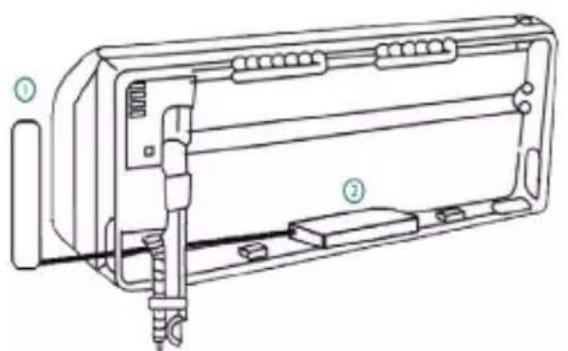
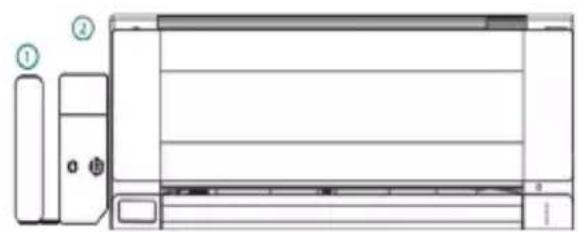
Inside the AC unit Outside the AC unit
1. External antenna
2. IntesisHome device
Device Installed Inside the AC unit or hidden
It allows a neater installation as the user cannot see the device during normal operation. The following points need to be taken into account if the device is installed inside the AC.
- The indication LED and the button are not going to be accessible by the user.
o The LED is an indicator of the status of the device both during connection and normal behavior.
o The button is used to reconfigure the device if the Access Point (AP) configuration changes. If this happens the user will need to access the inside of the Air Conditioner.
- If there is not enough space for installation inside the AC unit the following actions can be performed:
o If it is due to water pipes, change the side of the AC where they are connected to get more space inside the AC unit.
o Otherwise the support surface can be removed (Figure 1)
Device Installed outside the AC unit
The following points need to be taken into account if the device is installed outside the AC.
- The device can be fixed both using screws of double side tape.
- The cable lid has several options in order to direct the cables to the desired direction.
7.Antenna location
Locating the external antenna in a proper location and position will improve communication between the IntesisHome device and your Wi-Fi Router or Access Point (AP).
Remember to correctly screw the antenna connector in a clockwise direction until it stops.
Important: Avoid placing the antenna next to metal surfaces.
Important: When possible, try to check Wi-Fi coverage in the installation location. Good Wi-Fi level is strongly recommended.
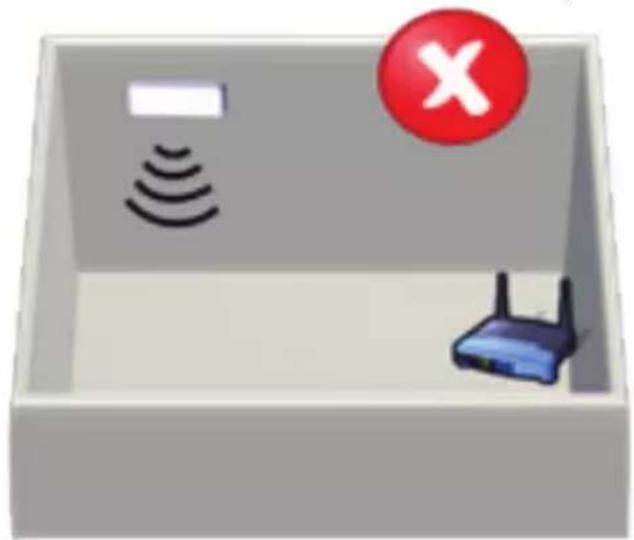
Fix the external antenna preferably as close as possible from the Wi-Fi signal source (Access Point or Router). Please, make sure that you place the antenna in a vertical position and pointing directly to your Wi-Fi Router or Access Point (AP).
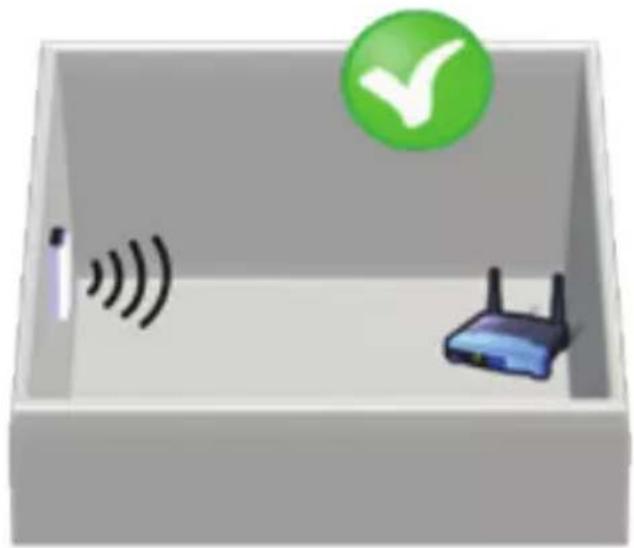
Figure 4
Antenna in vertical position and pointing to the Wi-Fi Access Point or Router.
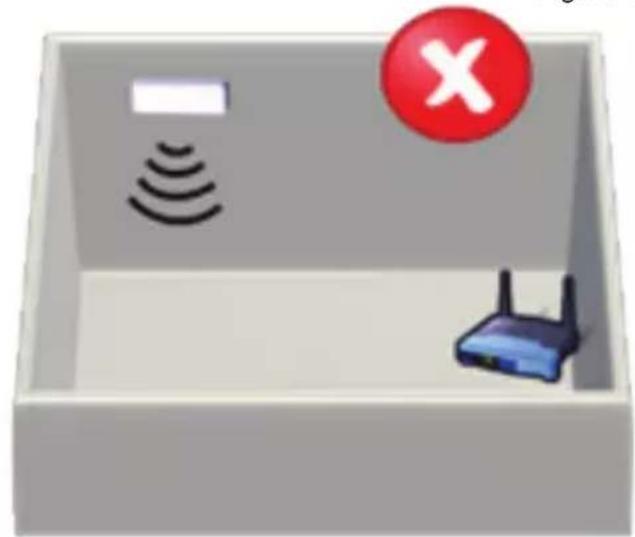
Antenna im Inertionfall position and net pointing to the Wi-Fi Access Point or Router.
If you have coverage problems after installation, please visit the connectivity support section in our site at www.intesishome.com/support/faq
8. Temperature Sensor location
The supplied temperature sensor only needs to be installed in MKE and NKE units. Newer models do not require an external temperature sensor.
Connect the temperature sensor to the device Temperature Sensor connector (Figure 1) and fix the other end next to the Air Conditioner intake air sensor.
See www.intesishome.com/docs/PA-AC-WIFI-1A_Install_Sketch.pdf for more information
Se www.intesishome.com/docs/PA-AC-WIFI-1A_Install_Sketch.pdf for mer information
Installationsprocessed bo r kun udfores af en autoriseret installator. Du bedes fale ge alle de sikkerhedinstrukser, der forekrives af Panasonic manualema.
1. Produktbeskrivelse
IhOpMaunO nocJeDnX oBHOJHmX MoKHO HaHTn Ha caTe www.intesishome.com/downloads.

4.Obuee onncaHne yctaHOBKn
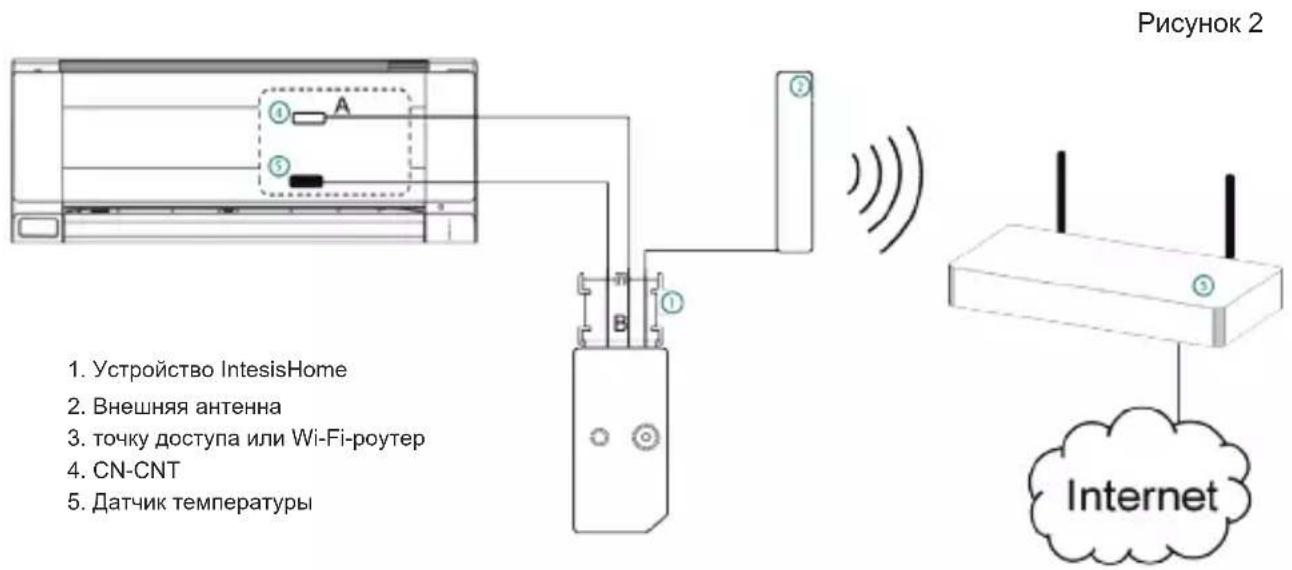
5.Подкючени устpoиства
-
OToeHNHTe KOHdNcNoHep OT cTe NITaHnA.
-
OtkpoTe KpbIuKy DoCTyna K rIaBHO neaTHo nIaTe.*
-
HainTe pa3bem c uΦpom CN-CNT.*
-
BbI6epnte MeTo dny yCTaHOBKn ycTpoiCtBa IntesisHome. Iopno6Hee cm. pa3dien 6.
-
IopKlOHTe KOHeA (dHnHHb) KOMPJIeKTHOro Ka6eIa pa3bemy KOHNIOHEpa, 0603HaueHHOMy CN-CNT, a KOHeB (kopOTkn) K pa3bemy AC yctpoiCTba.
-
BCTaBbTe Ka6eNb BHeUHei aHTeHHbI B pa3bEm IJn aHTeHHbI. CoeHHTeNb aHTeHHoro Ka6eNa Heo6xOIMo BKpyTntB rHe3do no YacOBOn CtpenKe Do ynopa.
-
Pn Heo6xOaHMOCTN yCTaHOBtE daTcNK Tempeatpybl. NpOp6Hee cm. pa3dcl 8.
-
BbIbeIte aHTeHHy 3a Kopnyc KOHNiCNoHepa JxelaTeBHo B BepTnKaIbHOM nIOXeHn HnHaPaBBTe npraMo Ha Wi-Fi poyter nn ToOCTyna (AP). POnp6Hee cm. pa3Je7.
-
3akpoIte 6nok KOHduuOhepa.
-
NOKIIOHTe KOHNIOHep K cETn nITaHna.Ecnn coeINHeHne C KOHNIOHepom yCTaHOJIeHO, 3eNEbI CBToOnOc nCTembl IntesisHome cnpBa HauHET MIRATb, a 3aTeM 6yDet ropeTb He MIRaJ.
*Iopno6Hee cm. PykoBoDcTBO no yctaHOBe nIO o6cnyxuBaHnIO Panasonic.
6. Pa3meueHne yctpoiCTBa
YcTpoNCTBO IntesisHome MoXHo ycTaHaBnBaTb KaK BHyTpN KOHdIuNoHepa, TaK BHe erO.
Bollee noDpo6Hoe onncahne BO3MOxHocTe yCTaHOBKn MOxHo haHTN B cIeNyUoE M OOKyMeHTe: www.intesishome.com/docs/PA-AC-WIFI-1A_Install_Sketch.pdf
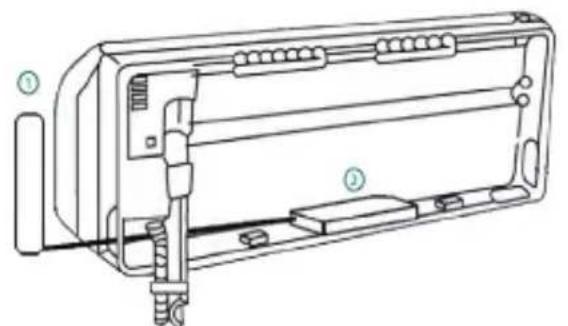
PncyHOK3
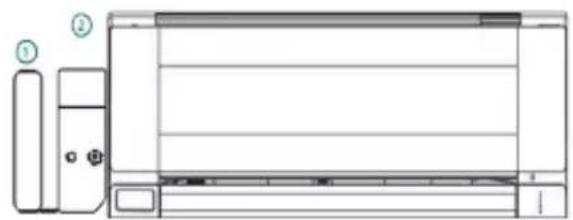
BHyTpNi KOHdIuNoHepa CkpIta yCTaHObKa
1.BheHra aHTeHHa
2. YctpoIcTBo IntesisHome
YcTaHOBKa BHyTpN KOHNIOHOpe NNN CkpbTaN YcTaHOBKa
Takoi BnD yCTaHOBKn aKKypaThee, XOTB O6bHbIX YcNOBnx 3KcNpyaTuCN YcTPOIcTBO cKpbITo OT rna3 nIb3OBaTei. B Cnyae yCTaHOBKn yCTpOIcTBa BHyTpN KOHNIOHePA Heo6xQdmo yYeCTb CneDuOnne OCObEHOctn.
- CBETOIOHbI INHINKATOp I KHOIIKA B 3TOM ClyaE 6yUT HeIOCTYHBIM IINI NOJIb3OBaTeJIa
O INHnKaTOp noka3bIbaeT COCToHHe yCTpOcTBa KaK npN NOkJIIOUeHnn, TaK N B HopMaJIbHOM peXmpepa60Tbl.
o o Khonka nCnoJb3yetc dIJI nepe nporpaMMnpOBaHn yctpoiCTBa npi CMeHe ToKn DoCTyna (AP). B 3TOM cIyuae noIb3ObaTeIb BblHykden 6ydet OTKpbItb DoCTyn K BHyTpHeH qactu KOHNIOHOepa.
- Ecπn BHytpn KOHπuηnohepa HeoctaTOUHO MecTa IJy yCTaHOBKn yCTpoiCTBa, Heo6xOμmOBbINOHNtBcneDyiooee:
o Ecn MeCTa He XBatae Tno npuHHe BOJHBIX Tpy6OK, NOcOeHNHTe IX K KOHdUHOpey C npOTUBONIOJXHO CTOpOHbl.
O IINJXe MOXHO CHrTB ONOpHyIO NOBepxHocTb (Pnc.1).
YcTaHObKa BHe KOHdNIOHepa
B cnyuae yctahOBKn ycTpoiCTBa BHe KOHdIuOHepa Heo6xoDnMo yueCt b CneDuOune Oc06eHHocn.
- YcTpoIcTB MoXHO 3aKpeNITb KaK Ha BnHTax, TaK Na DByCTOpOHem CKOTHe.
KoHCTpykun KpbIuKn Ka6eIbHO OTeKa Daet BO3MOXHOCTb yKnaDbIBaTb Ka6eIN B HUxHOM HapabHeHH. 45

7. NOnOKeHne aHTeHHbI
YcTaHOBJIeHHa B HAdnEkaUem MeCte N HAnpaBJIeHHN BHeHJra aHTehHa yLyUaet CBa3b MExdy yCTpoiCTBOM IntesisHome n Wi-Fi-poyTePOM nIuToKo DocTyna (T).
POMHHTe, UTO COeINHITeJIb aHTeHHoro Ka6eIa Heo6xoJIMO BkpyTtB BrHe3do no YacOBoi CTepeJIke do ynpa
Baxno: Hcyctayraaeeaae aHTEHy 0000 metaruHxckox noepxhoctei.
Baa: NonbtaTecb npaepnbp nappnne csnWAFiHaote yctanoe, 6013 80mooHO. Mn HactcrtbnHpokomHpyem mthxopounypcnhcnnna Wi-Fi.
BHeuHIO aHTeHHy Heo6xOIMO yCTaHaBnBaTb MaKcMaJIbHO 6IIN3KO K NCTOCHky CnIHana Wi-Fi (TOUKe DoCTyna IIN MapwpyTu3aTOpY). IOnKaIyIcTa, npOBepbTe, YTo6bl aHTeHHa HaxOINacb B BePTNkAlbHOM INoJoxHmN i 6bl Na HapabNeHa nprMo Ha Wi-Fi-poyTepr IIN ToUkY DoCTyna (TД).
PncyHok 4
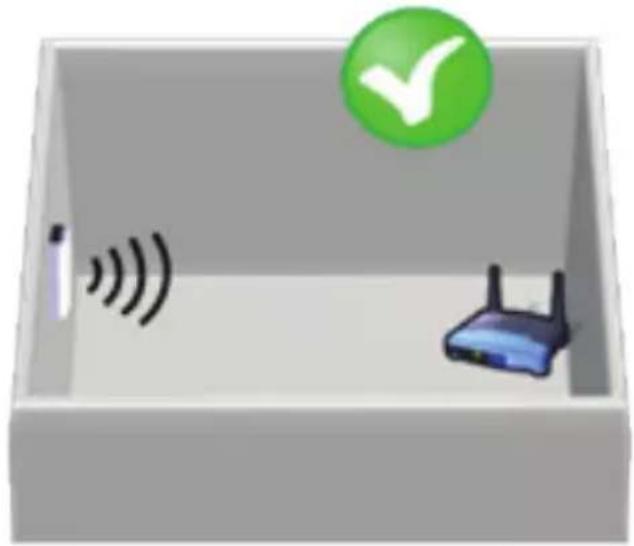
AHTeHHH HxDyMTCA BepTnHgBnONrTOcONHm HnnpaBHeHa HToKy ApOCTyDaAMn Wt-FI-poynp
AHTeHHa HxOyTcB TropasHTanbHOM monnssnnm He HanpaaneHa Ha ToKy doCTyna nn W-Fl-poyrep
Ecnn nocne yctaHOBN y BAC BO3HKn npo6IeMb C NOKpbITHe, 3aJnte B pa3JeN NOdepKKn CoeHHeN caTa www.intesishome.com/support/faq
8. MecTo yCTaHOBKn DaTUnKa TeMnepaTypbl
KomnneKTHbI DaTcHk TempeaTypbI Tpe6yET OTeJIbHO yCTaHOBKn ToIbKO B MoJeJx MKE n NKE. B 6oJee HObIX MoeJAX BHeuHNI TempeaTypbI DaTcHk He Tpe6yETcra.
IodcoeHnHTe DaTnK Tempeatpyb K pa3bemy TempeatypHoro daTnka yctpoiCTBa (Pnc.1), a BtopoN KoHeC Ka6eJra - K daTnky npntOuHoro BO3dyxa KOHNIOHepa.
CMOTPNTeDONOHHTeBHyO pdf.
HOpMaunu
www.intesishome.com/docs/PA-AC-WIFI-1A_Install_Sketch.

- Your Home In The Cloud
- PA-AC-WIFI-1A
- Installation process should only be performed by an authorized installer. Please follow all Safety Instructions provided by the Panasonic manuals.
- 1.Product description
- Technical Information
- FAQ and support
- Installation overview
- Device connections
- Device location
- Device Installed Inside the AC unit or hidden
- Device Installed outside the AC unit
- 7.Antenna location
- Temperature Sensor location
- Installationsprocessed bo r kun udfores af en autoriseret installator. Du bedes fale ge alle de sikkerhedinstrukser, der forekrives af Panasonic manualema.
- Produktbeskrivelse
- 4.Obuee onncaHne yctaHOBKn
- 5.Подкючени устpoиства
- Pa3meueHne yctpoiCTBa
- YcTaHOBKa BHyTpN KOHNIOHOpe NNN CkpbTaN YcTaHOBKa
- YcTaHObKa BHe KOHdNIOHepa
- NOnOKeHne aHTeHHbI
- MecTo yCTaHOBKn DaTUnKa TeMnepaTypbl
Brand : PANASONIC
Model : CUE9NKR
Category : Air-conditioner