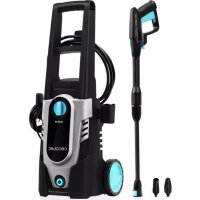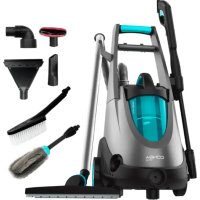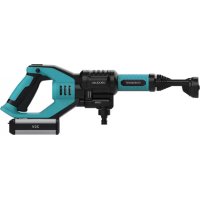
HydroBoost 10000 Liberty - Pressure washer CECOTEC - Free user manual and instructions
Find the device manual for free HydroBoost 10000 Liberty CECOTEC in PDF.



| Product Type | Cordless High Pressure Cleaner |
| Brand | Cecotec |
| Model | HydroBoost 10000 Liberty |
| Reference | 05406 |
| Nominal Pressure | 2.4 MPa (24 bars) |
| Maximum Flow Rate | 3 L/min (180 L/h) |
| Battery Power Supply | 20 V DC, 2500 mAh, 10 Wh (Lithium-ion) |
| Charger | Input 100-240 V AC 50/60 Hz, Output 20 V DC 1 A |
| Protection Rating | IPX5 |
| Operating Modes | High Pressure (Turbo) / Economical (ECO) |
| Multifunction Nozzle | Adjustable angles: 0° (concentrated jet), 15°, 40°, 60° (wide jet) |
| Included Accessories | Foam cannon, lance, hose, charger, travel bag |
| Maximum Water Temperature | 40 °C |
| Water Inlet Filter | Yes, removable and cleanable |
| Cleaning and Maintenance | Clean the nozzle, filter, and inlet connector |
| Safety | Overheating protection for motor and battery, automatic shutdown |
| Warranty | 2 years |
| After-Sales Service | +34 963 21 07 28 (Cecotec Official Service) |
| Recycling | Compliant with WEEE 2012/19/EU, removable battery to be recycled separately |
Frequently Asked Questions - HydroBoost 10000 Liberty CECOTEC
User questions about HydroBoost 10000 Liberty CECOTEC
0 question about this device. Answer the ones you know or ask your own.
Ask a new question about this device
Download the instructions for your Pressure washer in PDF format for free! Find your manual HydroBoost 10000 Liberty - CECOTEC and take your electronic device back in hand. On this page are published all the documents necessary for the use of your device. HydroBoost 10000 Liberty by CECOTEC.
USER MANUAL HydroBoost 10000 Liberty CECOTEC
- Parts and components
- Before use
3.Product assembly 36 - Operation
- Cleaning and maintenance
- Troubleshooting
- Technical specifications
B. Disposal of old electrical appliances - Technical support service and warranty
SOMMAIRE
Read these instructions thoroughly before using the appliance. Keep this instruction manual for future reference or new users. Make sure that the mains voltage matches the voltage stated on the rating label of the appliance and that the wall outlet is grounded.
Remove by the plug, do not pull on the cord.
This appliance is for household use only.
Turn off and disconnect the device from the power supply when not in use and before cleaning.
Do not use an appliance for any purpose other than its intended use.
Stay alert, always watch what you are doing during operation. Do not operate the machine when fatigued or under the influence of alcohol or drugs.
Never leave the appliance unattended while in use.
Always unplug the appliance when not in use, after use and before cleaning. Allow it to cool down before disassembling parts.
The use of accessories or utensils not recommended by Cecotec may cause fire, electrical shock or injury.
Do not immerse the cord, plug, or any non-removable part of the appliance in water or any other liquid, nor expose the electrical connections to water. Make sure your hands are dry before handling the plug or switching on the appliance.
Check the power cord regularly for visible damage. If the cord is damaged, it must be replaced by the official Technical Support Service of Cecotec in order to avoid any type of danger.
Do not use outdoors, near a gas or electric hob, in heated ovens or near open flames.
Do not twist, bend, strain, or damage the power cord in any way. Protect it from sharp edges and heat sources. Do not let it touch hot surfaces. Do not let the cord hang over the edge of the working surface or countertop.
Always unplug the appliance after being used.
Take extreme precaution when moving any appliance containing hot food, water, oil or other liquids.
Do not point the high-pressure hose towards people or animals
to avoid injuries.
The water inlet's temperature should not exceed 40^
The appliance is not intended to be used by children under the age of 8. It can be used by children over the age of 8, as long as they are given continuous supervision.
This appliance can be used by children aged 8 and above, and persons with reduced physical, sensory or mental capabilities or lack of experience and knowledge, as long as they have been given supervision or instruction concerning the use of the appliance in a safe way and understand the hazards involved. Children shall not play with the appliance.
Supervise young children to make sure that they do not play with the appliance. Close supervision is necessary when the appliance is being used by or near children.
Do not leave the device unattended when connected to the power supply. Keep the device out of the reach of children when connected and while cooling down.
Battery instructions
This appliance includes Li-ion batteries, do not incinerate or expose them to high temperatures, as they may explode.
Leaks from the battery or battery cells can occur under extreme conditions. Do not touch any liquid that leaks from the battery. If the liquid gets into contact with skin, wash immediately with soap and water. If the liquid gets into the eyes, flush them immediately with clean water for a minimum of 10 minutes and seek medical attention. Wear gloves to handle the battery and dispose of immediately in accordance with local regulations.
Avoid contact between the battery and small metallic objects such as paper clips, coins, keys, nails or screws.
Do not recharge non-rechargeable batteries.
Remove the battery from the device before charging.
Do not mix different batteries or mix new and old ones.
Pay attention to the polarity when inserting batteries.
Discharged batteries must be removed from the device and disposed safely.
Remove batteries from the appliance if it is going to be stored for a long period of time.
Do not short-circuit the terminals.
INSTRUCTIONS DE SECURITE
Não misture不同类型tipsodebacterias,nem misture as novascomasantigas.
- ECO/Turbo mode button
2.Safety lock - Trigger (On/Off)
- Battery opening button
- Battery
- Water inlet
- Multi-angle nozzle
B. Hose connector - Inlet hose
- Hose clamp
- Water inlet's filter
- Bottle for soap
- Charger
14.Travelbag
2. BEFORE USE
Take the product out of the box.
Remove all packaging material.
Make sure all parts and accessories are included, and check that they do not show any signs of damage. If there are any, contact the official Technical Support Service of Cecotec.
Dry the device completely before using it for the first time.
Charging the battery
Do not use other chargers than the one provided by Cecotec to charge the battery. Do not let any metal objects touch the battery as this may cause a short circuit.
The battery will not be fully charged at first. Charge it before using it for the first time and also if it has not been used in a long time. Press the battery's green button to display its remaining power.
In order to charge the battery, plug the charger into a suitable power outlet.
A red light will indicate that the battery pack is correctly connected with the charger and that it is charging.
When the battery is fully charged, the green light will turn on. Unplug the battery.
If the battery starts flashing a red light, it means there is a battery failure. In this case, remove the battery and reinsert it. If the battery is correctly charged but the red light still flashes, the battery may be invalid.
ENGLISHENGLISH
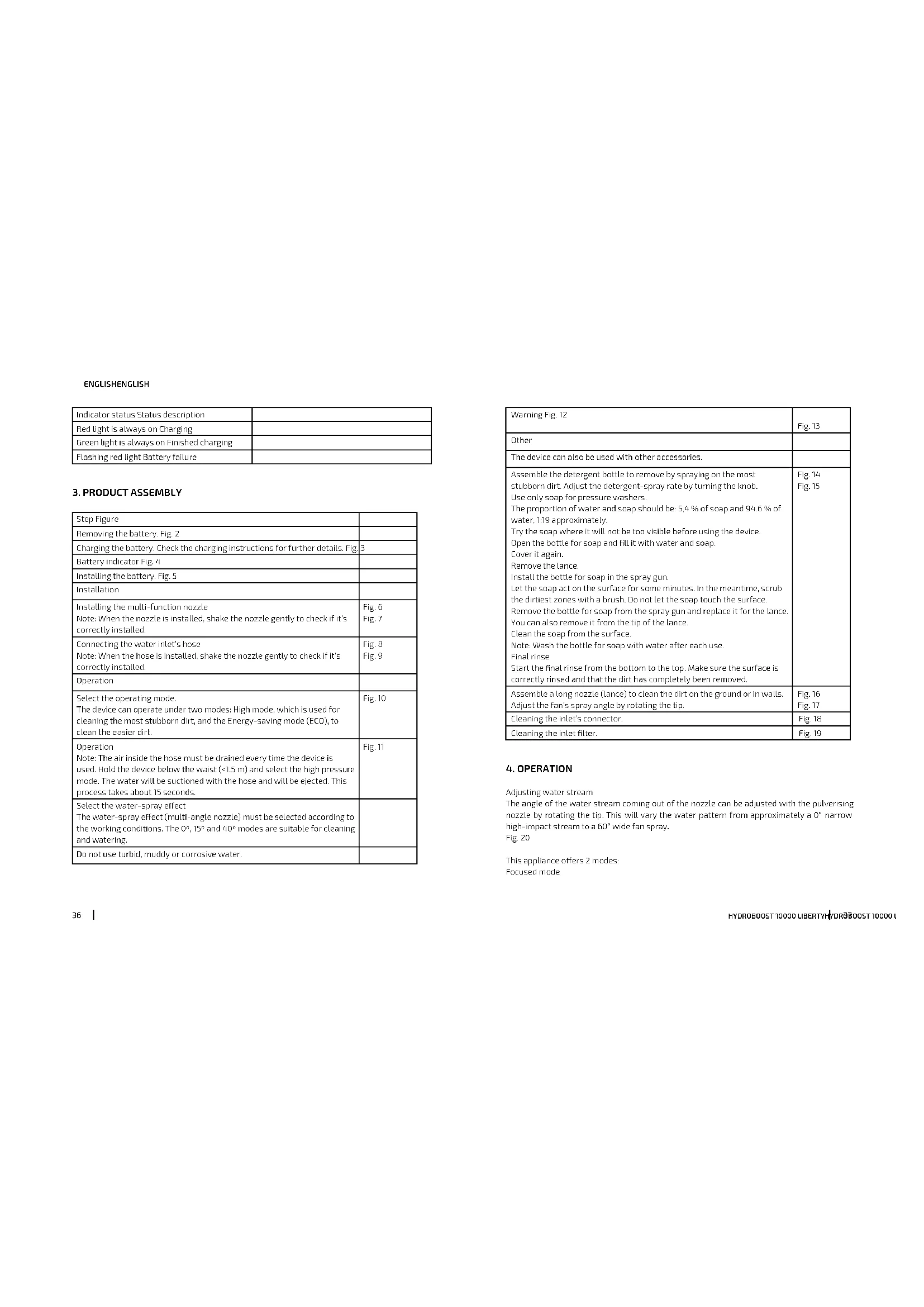
| indicator status Status description | |
| Red light is always on Charging | |
| Green light is always on Finished charging | |
| Flashing red light Battery failure |
3.PRODUCT ASSEMBLY
| Step Figure | |
| Removing the battery. Fig. 2 | |
| Charging the battery. Check the charging instructions for further details. Fig. 3 | |
| Battery indicator Fig. 4 | |
| Installing the battery. Fig. 5 | |
| Installation | |
| Installing the multi-function nozzle Note: When the nozzle is installed, shake the nozzle gently to check if it's correctly installed. | Fig. 6 Fig. 7 |
| Connecting the water inlet's hose Note: When the hose is installed, shake the nozzle gently to check if it's correctly installed. | Fig. 8 Fig. 9 |
| Operation | |
| Select the operating mode. The device can operate under two modes: High mode, which is used for cleaning the most stubbom dirt, and the Energy-saving mode (ECO), to clean the easier dirt. | Fig. 10 |
| Operation Note: The air inside the hose must be drained every time the device is used. Hold the device below the waist (<1.5 m) and select the high pressure mode. The water will be suctioned with the hose and will be ejected. This process takes about 15 seconds. | Fig. 11 |
| Select the water-spray effect The water-spray effect (multi-angle nozzle) must be selected according to the working conditions. The 0°, 15° and 40° modes are suitable for cleaning and watering. | |
| Do not use turbid, muddy or corrosive water. | |
| Warning Fig. 12 | Fig. 13 |
| Other | |
| The device can also be used with other accessories. | |
| Assemble the detergent bottle to remove by spraying on the most stubborn dirt. Adjust the detergent-spray rate by turning the knob.Use only soap for pressure washers.The proportion of water and soap should be: 5/4 % of soap and 9/4.6 % of water, 1/19 approximately.Try the soap where it will not be too visible before using the device.Open the bottle for soap and fill it with water and soap.Cover it again.Remove the lance.Insall the bottle for soap in the spray gun.Let the soap act on the surface for some minutes. In the meantime, scrub the dirtiest zones with a brush. Do not let the soap touch the surface.Remove the bottle for soap from the spray gun and replace it for the lance.You can also remove it from the tip of the lanceCLEan the soap from the surface.Note: Wash the bottle for soap with water after each use.Final rinseStart the final rinse from the bottom to the top. Make sure the surface is correctly rinsed and that the dirt has completely been removed. | Fig. 14Fig. 15 |
| Assemble a long nozzle (lance) to clean the dirt on the ground or in walls.Adjust the fan's spray angle by rotating the tip. | Fig. 16Fig. 17 |
| Cleaning the inlet's connector. | Fig. 18 |
| Cleaning the inlet filter. | Fig. 19 |
4. OPERATION
Adjusting water stream
The angle of the water stream coming out of the nozzle can be adjusted with the pulverising nozzle by rotating the tip. This will vary the water pattern from approximately a 0^ narrow high-impact stream to a 60^ wide fan spray.
Fig. 20
This appliance offers 2 modes:
Focused mode
ENGLISHENGLISH
The angle of the water stream coming out of the nozzle may be adjusted with the pulverising nozzle. Turn the nozzle to select the focused stream, which has a high impact on the cleaning surface and results in maximum deep cleaning in a concentrated area. This narrow high-impact stream must be used cautiously, as it may damage some surfaces.
Note: Pay special attention when cleaning delicate surfaces such as bodywork a wheel rims, lacquered surfaces, wood, paint, etc.
Fig. 21
Spray mode
Turn the pulverising nozzle to select the flat-fan pattern. A wide stream will distribute the impact of water over a larger area, resulting in excellent cleaning action with a reduced risk of surface damage. Large surface areas can be cleaned more quickly using a wider stream.
Fig. 22
Product operation
Note: The motor on this pressure washer does not run continuously. It only runs when the trigger of the spray gun is squeezed. After following the start-up procedures in this manual, press the safety-lock button and the trigger at the same time, then release the safety-lock button. The device will operate as long as the trigger is pressed.
Nozzle cleaning
A clogged or partially clogged nozzle can cause a significant reduction of water coming out of the nozzle and cause the unit to pulsate while spraying. To clean out the nozzle:
Turn off and unplug the unit.
Turn off water supply. Relieve any pressure trapped in the high-pressure by squeezing the trigger 2-3 times.
Separate the lance from the gun.
Rotate the nozzle to the narrow stream setting.
Use any type of pointed element such as an unfolded paper clip to clean the nozzle. Insert the wire into the nozzle hole and move back and forth until debris is dislodged.
Fig. 23
Remove debris by back-flushing water through the nozzle. To do this, point the end of a garden hose (with water running) to the nozzle's end for 30-60 seconds.
Angle from the high-pressure hose to the cleaning surface
When spraying water against a surface, maximum impact is reached when the water strikes the surface head on. However, this type of impact tends to cause dirt particles to imbed in the surface, thereby preventing the desired cleaning action.
The optimum angle for spraying water against a cleaning surface if 45 degrees.
Spraying water against a surface at this angle provides for the most beneficial impact force
combined with efficient removal of debris from the surface.
Distance from cleaning surface
The impact force of the water is increased as the pulverising nozzle is moved closer to the surface.
How to avoid damaging surfaces
Damage to cleaning surfaces occurs because the impact force of the water exceeds the hardness of the surface. The Impact force can be varied by controlling the three previously noted items. Never use a narrow high impact stream on a surface that is susceptible to damage.
Avoid spraying windows with a narrow high impact stream as this may cause breakage. The surest way to avoid damaging surfaces is to follow these steps:
Before triggering the gun, adjust the pulverising nozzle to a wide stream.
First, follow the distance and angle instructions above.
Vary the spray angle, stream type and the distance to the cleaning surface until optimum cleaning efficiency is achieved without damaging the surface.
Cleaning process
Surface preparation
Clean the area of furniture and make sure all windows and doors are closed tight. Also, make sure that all plants and trees near the cleaning area are protected by a drop cloth.
Initial high pressure rinse
Spray the cleaning surface with water to clear off any dirt or grime that may have collected on the surface. Before triggering the gun, adjust the pulverising nozzle to a wide stream and slowly adjust it to the desired stream. This will avoid applying too much concentrated spray to the surface which could cause damage.
Final rinse
Start the final rinse at the bottom and work upward. Make sure the surface is thoroughly rinsed and that all dirt is removed.
Shut down
Release the trigger.
Remove the water supply.
Warning: Do not turn the water supply off before turning the motor off. Serious damage could occur.
Tips for extending the product's service life
Never operate unit without water.
Do not use the device with hot water.
ENGLISHENGLISH
Before adjusting the pulverising nozzle's pressure (high to low or low-to-high) release trigger.
Anti-impurities filter
This model includes a transparent male connector with an anti-scale filter to which the hose is connected, preventing scale from building up.
5. CLEANING AND MAINTENANCE
Disconnect the appliance from the power supply and allow it to cool down before cleaning. Use a soft, damp cloth to clean the product's surface.
Do not immerse the appliance in water or other liquid.
Do not use abrasive scouring pads, powders or cleaners.
Maintenance of the water filter
Remove the transparent cover of the filter, then remove the dirt in the filter and rinse the parts with water. Put the transparent cover back.
Cleaning and preservation
Remove the water inlet and the hose before storing it. Pour out the water inside the device and the hose.
Remove the battery and store it separately if the device is not going to be used for a long time.
6.TROUBLESHOOTING
| Problem Cause Solution | ||
| ECO Indicator light flashes. Low battery. Charge the battery. | ||
| The device does not turn on. Low battery. Charge the battery. | ||
| Sudden power outage. Temperature too high, overheating protection. | Turn the device again once the temperature is lower. | |
| Low water content. Filtering blockage that leads to a poor water intake. | Clean the water inlet's filter and the water inlet. | |
| Inlet hose bont. Replace or straughten the inlet hose. | ||
| Water contains impurities Replace the water. |
| The device does not absorb the water | Water Inlet's leakage. Tighten the inlet's joint. | |
| Poor connection between water inlet and water inlet's connector. | Reassemble the inlet and outlet accessories. | |
| The water inlet's filter is not correctly assembled. | Assemble it correctly. | |
| The device takes longer to absorb water. | Device on Energy-saving mode. | Deactivate ECO mode and switch to normal mode. |
| Multi-function nozzle leaks. | Multi-function nozzle is not correctly assembled. | Insert the multi-function nozzle in the device and then rotate it. |
| Multi-function nozzle leaks. | The nozzle is not correctly assembled. | Rotate the nozzle to the indicating mark. |
| Why can't I charge the battery? | Check if the charger and the battery are compatible. | |
| The battery can only be inserted into the charger in one direction. Turn the battery until it can be inserted into the charger. When the charger's indicator light turns red, it means it is charging. | ||
| Why does the battery's charging time change? | The charging time is affected by many factors, but this does not mean the device is defective. If the battery is only partially discharged, it will take less time to charge it back. | |
| If the battery's temperature and the room temperature are low, the battery will take longer to charge. | ||
| If the battery is too hot, the overheating-protection system will disconnect the device automatically. If this happens, unplug the device from the socket and the battery from the charger and then start charging it again after it cools down. | ||
7. TECHNICAL SPECIFICATIONS
Product reference: 05406
ENGLISH
Product: HydroBoost 10000 Liberty
Battery: 20 V DC, 2500 mAh, 10 Wh
Charger (Input): 100-240 V AC, 50/60 Hz, Max 1.2 A
Charger (Output): 20 V DC, 1000 mA
Rated Pressure: 2.4 Mpa (24 bar)
Max. Flow: 3 L/min (180 L/hour)
IPX5
8. DISPOSAL OF OLD ELECTRICAL APPLIANCES

The European directive 2012/19/EU on Waste Electrical and Electronic Equipment (WEEE), specifies that old household electrical appliances must not be disposed of with the normal unsorted municipal waste. Old appliances must be collected separately, in order to optimize the recovery and recycling of the materials they contain and reduce the impact on human health and the environment.
The crossed out 'wheeled bin' symbol on the product reminds you of your obligation to dispose of the appliance correctly. If the product has a built-in battery or uses batteries, they should be removed from the appliance and disposed of appropriately.
Consumers must contact their local authorities or retailer for information concerning the correct disposal of old appliances and/or their batteries.
9. TECHNICAL SUPPORT SERVICE AND WARRANTY
This product is under warranty for 2 years from the date of purchase, as long as the proof of purchase is submitted. The product is in perfect physical condition and it has been given proper use, as explained in this Instruction manual.
The warranty will not cover the following situations:
The product has been used for purposes other than those intended for it. Misused, beaten, exposed to moisture, immersed in liquid or corrosive substances, as well as any other fault attributable to the customer.
The product has been disassembled, modified, or repaired by persons, not authorised by the official Technical Support Service of Ecotec.
Faults deriving from the normal wear and tear of its parts, due to use.
The warranty service covers every manufacturing defects of your appliance for 2 years, based on current legislation, except consumable parts. In the event of misuse, the warranty will not apply.
If at any moment you detect any problem with your product or have any doubt, do not hesitate to contact Cecotec Technical Support Service at +34 963 210 728.
FRANÇAIS
1. PIÉCÉS ET COMPOSANTS
Img 1
Vypnete privod vody.
Upozarneni: Newpinyinefte pivod vody, dokud nvynefte motor, mohio by tozpaosabit vozne peoskzeni
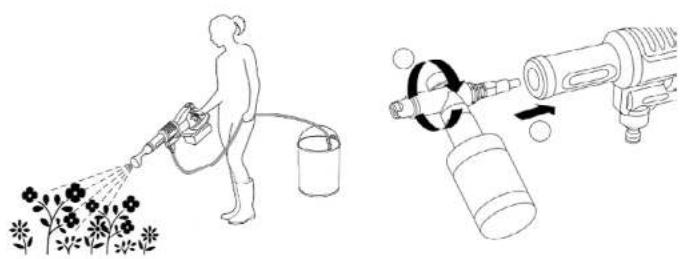
Fig./Img/Abb/Afb/Rys/Obr.13 Fig./img/Abb/Afb/Rys/Obr.14
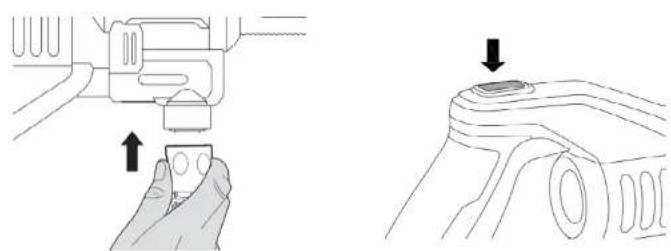
Fig./Img./Abb./Afb./Rys./Obr. 9 Fig./Img./Abb./Afb./Rys./Obr. 10
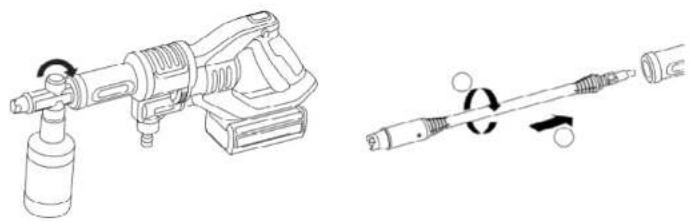
Fig./Img./Abb./Afb./Rys./Obr.15 Fig./Img./Abb./Afb./Rys./Obr.16
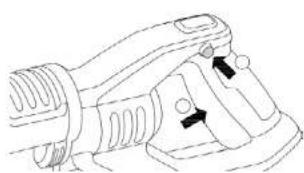
Fig./Img./Abb./Afb./Rys./Obr.11
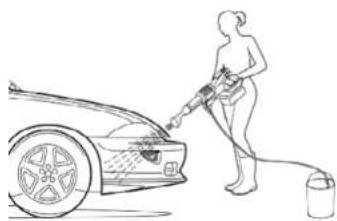
Fig./Img./Abb./Afb/Rys./Obr.12
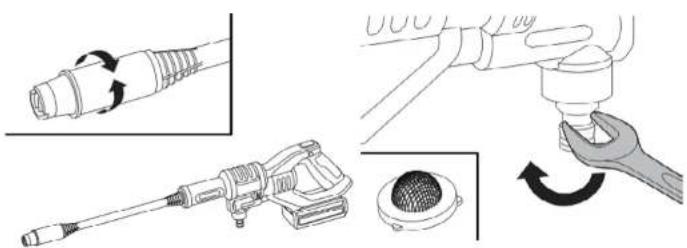
Fig./Img./Abb./Afb./Rys./Obr.17 Fig./Img./Abb./Afb./Rys./Obr.18
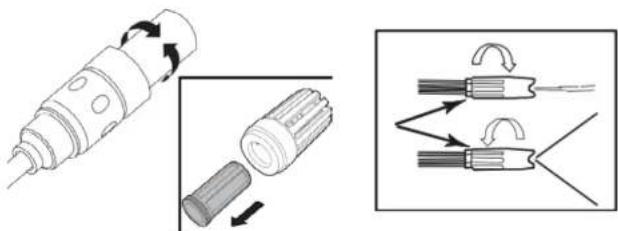
Fig./Img./Abb./Afb./Rys./Obr.19 Fig./Img./Abb./Arb./Rys./Obr.20

Fig./Img./Abb/Afb/Rys./Obr.21 Fig./Img./Abb/Afb/Rys./Obr.22
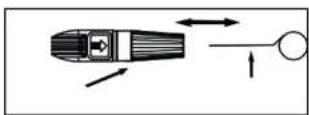
Fig./img./Abb/Afb/Rys/Dbr.23
www.ceotec.es