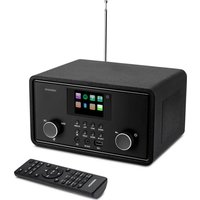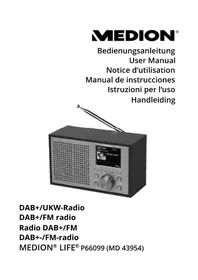
LIFE P66099 (MD 43954) - Radio MEDION - Free user manual and instructions
Find the device manual for free LIFE P66099 (MD 43954) MEDION in PDF.

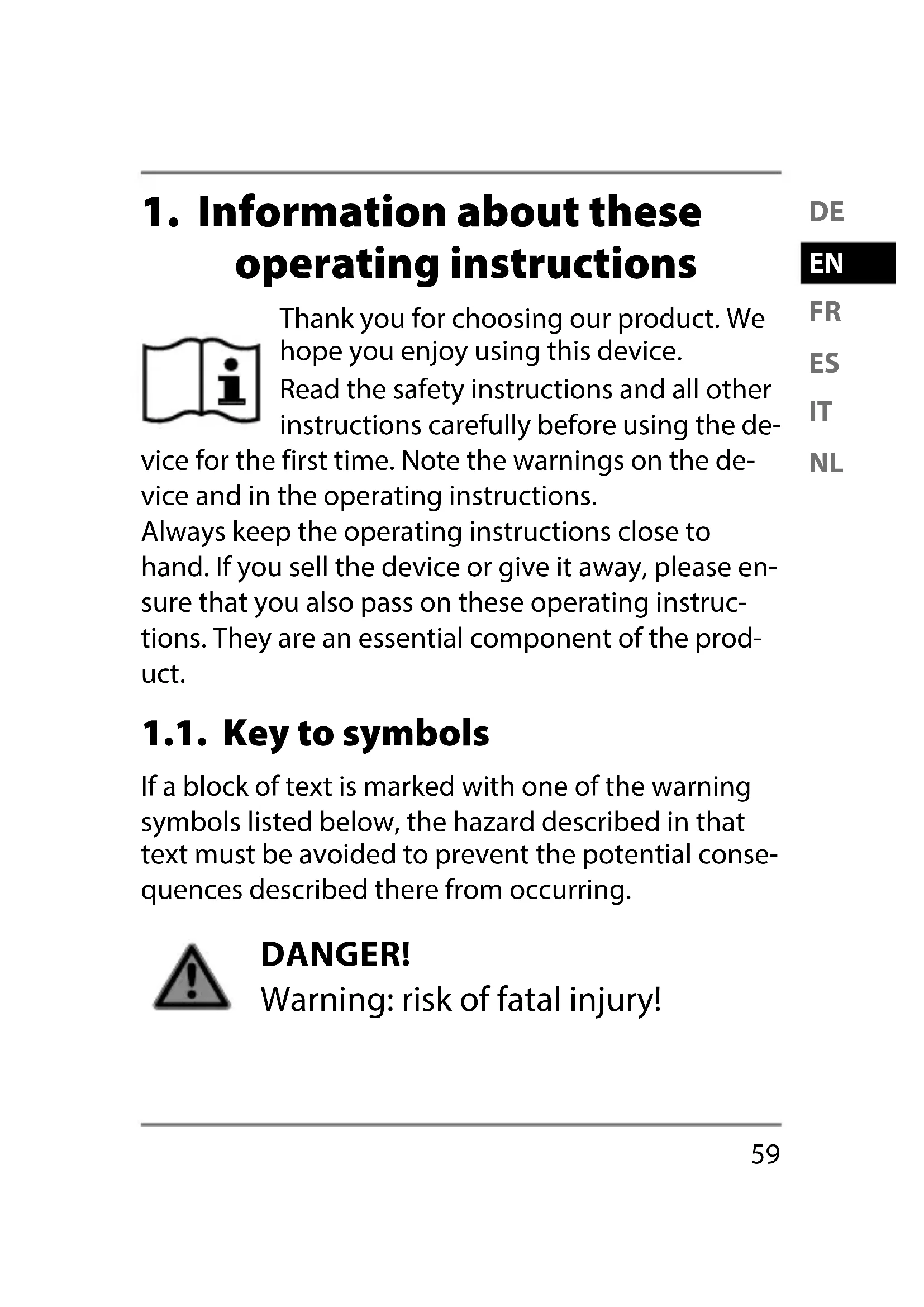


| Product Type | DAB+/FM Radio |
| Brand | Medion |
| Model | LIFE P66099 (MD 43954) |
| Dimensions (W x H x D) | Approx. 170 x 103 x 95 mm |
| Weight (without power adapter) | Approx. 675 g |
| Power Supply | DC 5.9 V = 1.2 A (power adapter included) or 4 x 1.5 V batteries type R6/LR6/AA (not included) |
| Output Power | 2 W RMS |
| FM Frequency Range | 87.5 – 108 MHz |
| DAB+ Frequency Range | 174.928 – 239.20 MHz |
| Main Functions | DAB+ and FM reception, 10 presets per band, alarm, snooze, sleep timer, equalizer (Normal, Classic, Jazz, Pop, Rock, Speech, My EQ), DLS information display, auto search, telescopic antenna |
| Outputs | 3.5 mm headphone jack, built-in speaker |
| Care and Cleaning | Disconnect the power adapter; use a soft, dry cloth; avoid solvents and chemicals |
| Safety | Automatic shutdown in case of overheating, overvoltage protection, detailed safety instructions (protection class II, indoor use) |
| Spare Parts and Repairability | Do not open or repair yourself; contact Medion customer service; replace power adapter with an identical model |
| General Information | Private use only, operating ambient temperature 10 °C to 45 °C, humidity < 80 %; CE, RoHS certificates |
Frequently Asked Questions - LIFE P66099 (MD 43954) MEDION
User questions about LIFE P66099 (MD 43954) MEDION
0 question about this device. Answer the ones you know or ask your own.
Ask a new question about this device
Download the instructions for your Radio in PDF format for free! Find your manual LIFE P66099 (MD 43954) - MEDION and take your electronic device back in hand. On this page are published all the documents necessary for the use of your device. LIFE P66099 (MD 43954) by MEDION.
USER MANUAL LIFE P66099 (MD 43954) MEDION
- Information about these operating instructions. 59
EN
1.1.Key to symbols 59
FR
-
Proper use ES 61
-
Safety information 63 IT
3.1. Restricted group of people 63
NL
3.2. Operating safety 64
3.3. Handling batteries 68
-
Declaration of Conformity 71
-
Package contents 72
- Device overview 73
6.1. Front view 73
6.2. Rear view 74
- Setting up the device 75
- Connecting the mains adapter 75
8.1. Inserting the batteries into the device .76
- Switching the device on/off 77
- Adjusting the aerial 77
- Set volume 78
- Connecting the earphones/headphones ... 78
- Radio mode. 79
13.1. DAB mode 80
13.2. FM mode 81
13.3. Display information/select views .....82
14. Using the alarm 83
14.1. Setting the alarm 83
14.2. Stopping the alarm / activating the snooze function 85
15. Settings 85
15.1. Overview of the menus in the FM and DAB operating modes 86
- Cleaning 91
- Troubleshooting 92
- Repairs 94
- Disposal 95
- Technical specifications 96
20.1. Key to symbols 98
- Service information 100
- Legal Notice 102
1. Information about these operating instructions

Thank you for choosing our product. We hope you enjoy using this device.
Read the safety instructions and all other instructions carefully before using the de
vice for the first time. Note the warnings on the device and in the operating instructions.
Always keep the operating instructions close to hand. If you sell the device or give it away, please ensure that you also pass on these operating instructions. They are an essential component of the product.
1.1. Key to symbols
If a block of text is marked with one of the warning symbols listed below, the hazard described in that text must be avoided to prevent the potential consequences described there from occurring.

DANGER!
Warning: risk of fatal injury!
WARNING!

Warning: risk of possible fatal injury and/or serious irreversible injuries!
CAUTION!

Warning: risk of minor and/or moderate injuries!

NOTICE!
Follow these instructions to prevent damage to the device!

Additional information on using the device!

Comply with the notes in the operating instructions.
WARNING!
Warning: risk of electric shock!
WARNING!
Warning: danger due to loud volume!
Bullet point/information on steps during operation
Instruction to be carried out
2. Properuse
Your DAB+/FM radio is suitable for music and sound playback of radio programmes. It can be operated via the mains adapter and with batteries.
The device is only intended for private use and not for industrial/commercial use.
Note that no liability will be accepted if the device is not used for its intended purpose:
- Do not modify the device without our express agreement and do not use any accessories that have not been supplied
or approved by us.
- Only use replacement parts or accessories that we have supplied or approved.
- Comply with all the information in these operating instructions, especially the safety information. Any other use is considered improper and can cause personal injury or property damage.
- Do not use the device in potentially explosive atmospheres. This includes petrol stations, fuel storage areas and areas where solvents are processed. This device must also not be used in areas with particle-laden air (for example flour or wood dust).
-
Do not expose the device to extreme conditions. Avoid:
-
High humidity or wet conditions
- Extremely high or low temperatures
- Direct sunlight
- Open flames
3. Safety information
3.1. Restricted group of people
- This device can be used by children of eight years and older, and by people with limited physical, sensory or mental capacity, or with a lack of experience and knowledge, but only with proper supervision, or if they have been told how to use the device safely, and have understood the risks involved if they use it improperly.
- Children must not be allowed to play with the device.
- Cleaning and maintenance by the user must not be carried out by children unless they are supervised.
- Keep the device and its accessories out of the reach of children.
- The packaging material is not a toy for children to play with. Children must not
be allowed to play with the plastic bags. There is a risk of choking and suffocation.
3.2. Operating safety
- Do not place containers filled with liquid, e.g. vases, on or near the product, and protect all the parts from drips or splashes. Such containers could tip over and the liquid could impair the electrical safety of the device.
- If the mains adapter, mains cable or device is damaged, immediately unplug the device from the socket.
- If the device has been moved from a cold to a warm space, condensation may form inside the device and mains adapter. Wait a few hours before using the device.
3.2.1. Power supply
- Only use the supplied mains adapter to connect the radio.
- Only connect the mains adapter to a properly installed earthed mains socket (100 to 240 ~V 50 to 60 ~Hz ) that is easy to reach and close to the place where you have set up the device. Always keep the power socket free of obstructions so that the plug can be pulled out easily.
- Always unplug the mains adapter from the socket before cleaning.
- When unplugging the mains cable from the socket, always pull on the plug rather than on the cable.
- In the event of damage to the mains adapter, mains cable or the device itself or if liquids or foreign bodies get into the device, unplug the device from the socket immediately.
3.2.2. Installation location/ surroundings
- The device is equipped with non-slip plastic feet. Since furniture is coated with a variety of varnishes and plastics which are cleaned with different cleaning agents, it cannot be completely excluded that some of these cleaning agents contain ingredients which might damage the plastic feet, and cause them to become soft. If necessary, place a non-slip mat under the device.
- To prevent the device from falling, only install and operate it and its components on a sturdy, level and vibration-free surface.
-
During the set-up process, maintain a minimum distance of 5cm around the device for sufficient ventilation.
-
Ventilation must not be impeded by covering the device with objects such as mag azines, table cloths, curtains etc.
- Do not place the device near direct heat sources (e.g. heaters) that could affect it.
- Never expose the device to excessive heat such as direct sunlight, fire, strong artificial light or similar.
- Do not expose the device to extreme cold conditions.
- Do not place naked flames (e.g. lit candles) on or near the device.
- Do not place any objects on the cables as they may be damaged.
- Only use the device in living rooms or similar.
3.2.3. Electromagnetic compatibility
- To avoid malfunctions, keep the device at a distance of at least one metre from high-frequency or magnetic in
terference sources (televisions, other loudspeakers, mobile and cordless telephones, etc.).
3.3. Handling batteries
The device can also be operated with batteries. Please note the following:
- Avoid contact with battery acid. If battery acid comes into contact with skin, eyes or mucous membranes, rinse the affected areas with plenty of clean water and consult a doctor as soon as possible.
- Keep new and used batteries out of the reach of children.

WARNING!
Risk of chemical burns!
The device can also be operated with batteries. If batteries are swallowed, they can cause serious internal chemical burns within two
hours which may prove fatal.
-
Seek medical help immediately if you think that batteries may have been swallowed or secreted in any part of the body.
-
Do not swallow batteries as they can cause chemical burns.
-
Stop using the product if the battery compartment does not close properly, and keep it out of reach of children.
-
Before inserting the batteries, check that the contacts in the device and on the batteries are clean and, if necessary, clean them.
- Always use new batteries of the same type. Never use old and new batteries together.
- Pay attention to the polarity (+/-) when inserting the batteries.
- Never try to recharge non-rechargeable batteries. Risk of explosion!
- Never expose the batteries to excessive heat (such as direct sunlight, fire or similar).
- Store batteries in a cool, dry place.
- Strong direct heat can damage batteries. Do not expose the device to sources of intense heat.
- Never short-circuit batteries.
- Never throw batteries into a fire.
- Remove leaking batteries from the de
vice immediately. Clean the contacts before inserting a new battery. Risk of chemical burns from battery acid!
- Always remove flat batteries from the device.
- If the device is not going to be used for long periods, remove the batteries.
4. Declaration of Conformity
CE
Medion AG hereby declares that this device complies with the fundamental requirements and the other relevant provisions of:
EMC Directive 2014/53/EU
- Ecodesign Directive 2009/125/EC
RoHS Directive 2011/65/EU.
Complete declarations of conformity are available at www.medion.com/conformity.
5. Package contents

DANGER!
Risk of choking and suffocation!
Risk of choking and suffocation through swallowing or inhaling small parts or plastic wrap.
-
Keep the plastic packaging out of the reach of children.
-
Remove the product from the packaging and remove all packaging material.
- Please check your purchase to ensure that all items are included. If anything is missing, please contact us within 14 days of purchase.
The following items are supplied with your product:
- DAB+/FM radio
- Mains adapter
- Operating instructions and warranty card
6. Device overview
6.1. Front view
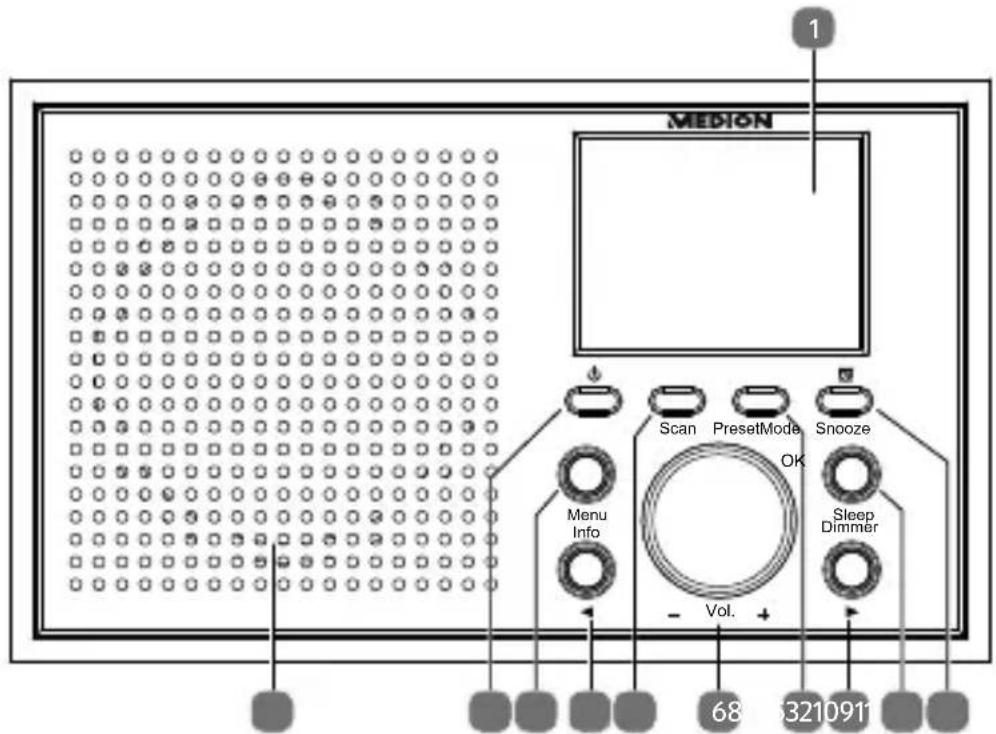
1) Display
2) Alarm function, snooze function
3) Sleep timer; set display brightness
4) Navigate right/down in the menu; Open station list
5) Save station; retrieve station
6) Set volume
7) Automatic station search
8) Navigate left/up in the menu; Open station list
9) Open menu; display station information
10) Switch device on, switch to standby mode; Select operating mode
11) Speaker
6.2. Rear view
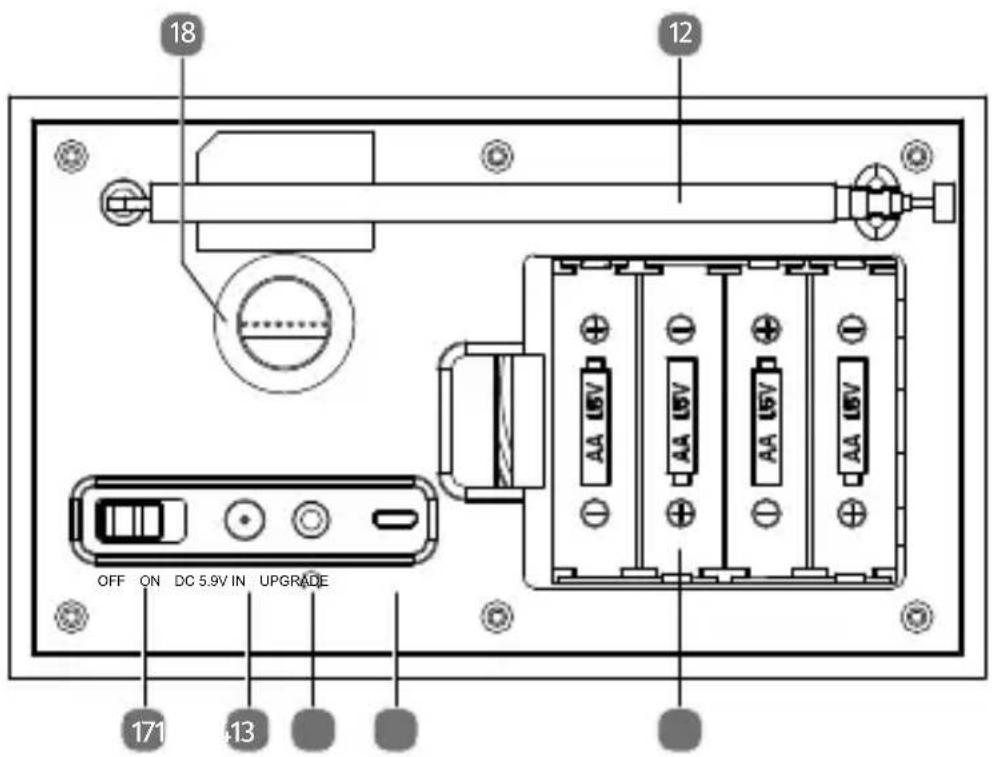
12) Telescopic aerial
13) Battery compartment
14) Connection for software update (by Service Centre only)
15) Headset connection
16) Connection for mains adapter
17) On/Off switch
18) Opening for bass
7. Setting up the device
Place the device on a sturdy, level surface. Make sure that:
- the device and batteries are not exposed to intense sources of heat;
- the device and the batteries are not left in direct sunlight;
- the device (DAB radio and mains adapter) does not come into contact with liquids, not even water droplets or spray.
8. Connecting the mains adapter

Only use the supplied mains adapter to connect the radio. The mains adapter has a type plate with the corresponding information on it.
Connect the plug of the mains adapter cable to the DC 5.9V IN connection of the device.
Plug the mains plug of the mains adapter into an easily accessible 100 - 240V 50 - 60Hz mains socket.

If you do not need to use the device for a relatively long time, take it out of operation. To do this, unplug the mains plug!
8.1. Inserting the batteries into the device
The battery compartment is located at the rear of the device.
Release the latch and remove the battery compartment cover.
Insert four 1.5 V R6/LR6/AA batteries (not supplied) with the negative ends on the springs. Refer to the diagrams in the battery compartment!
Replace the battery compartment cover.
The device is battery-operated if no mains adapter is connected to the DC 5.9V IN socket.
The device is now in standby mode.

WARNING!
Risk of explosion if batteries are replaced incorrectly.
Replace batteries only with the same or equivalent type.
9. Switching the device on/off
- Switch the mains switch on the back of the device to ON.
Press the button to switch on the device.
To switch the device to standby mode, press and hold the button until the date and time appear on the display.
To turn off the device completely, switch the mains switch on the back of the device to OFF.
10. Adjusting the aerial
Pull out the telescopic aerial on the back of the device completely.

The aerial should be fully extended to ensure good signal reception and sound quality. When adjusting the telescopic aerial, the stations may have to be searched again (see "13. Radio mode" on page 79).
11. Set volume
When the device is in use, turn the VOL. controller anticlockwise (-) to reduce the volume.
When the device is in use, turn the VOL. controller clockwise (+) to increase the volume.
12. Connecting the earphones/headphones
The headphone jack is located on the back of the device.
Damage to hearing!
Excessive sound pressure when using earphones and headphones can result in damage to and/or loss of hearing.
Before pressing play, set the volume to the lowest setting by turning the VOL. controller.
Start playback and increase the volume to a comfortable level.
Using headphones/earphones to listen to a device at high volumes for an extended period can damage your hearing.
Use a 3.5mm jack to plug the headphones into the connection on the back of the device. The speaker then switches off automatically.
13. Radio mode
You can use this radio to receive FM and DAB stations.
Your radio has the Dynamic Label Segment (DLS) information service, which displays information such as artist, song titles or current traffic news on the display.
After switching on for the first time, the device automatically searches for DAB stations that can be received and stores them permanently. A search is required in FM mode.

Follow the instructions described in chapter "15. Settings" on page 85 to set basic settings such as preferred language and time.
13.1. DAB mode
Press the MODE button once or multiple times until DIGITAL RADIO is highlighted in the display.
Then press the OK controller or wait a few seconds.
13.1.1. Selecting DAB stations from the station list
Press the / button to select the desired DAB station from the station list.
Press the OK controller to play the station.
13.1.2. Storing DAB stations
You can store up to 10 preset DAB stations.
Set a station as described above.
Press and hold the PRESET button until the station list with the stored stations appears in the display.
Turn the controller to select the desired memory slot.
Press the OK controller to save the station.
13.1.3. Calling up DAB stations
Press the PRESET button. The list of stored stations appears on the display.
Turn the controller to select the desired memory slot.
Press the OK controller to select the station.
13.2. FM mode
You can listen to FM radio in this mode.
Press the MODE button once or multiple times until FM is highlighted in the display.
Then press the OK controller.
13.2.1. Searching for FM stations
Press the / button briefly to set a particular frequency.
Hold down one of the buttons to automatically search for the next station.
13.2.2. Automatic search for the next station
Press the SCAN button. The station search starts forwards and stops at the next station found. If you press and hold the SCAN button, the search is performed backwards.
If necessary, press the button again to select the next station.
13.2.3. Storing FM stations
You can store up to 10 preset FM stations.
Set a station as described above.
Press and hold the PRESET button until the station list with the stored stations appears in the display.
Turn the controller to select the desired memory slot.
Press the OK controller to save the station.
13.2.4. Calling up FM stations
Press the PRESET button. The list of stored stations appears on the display.
Turn the controller to select the desired memory slot.
Press the OK controller to select the station.
13.3. Display information/select views
In DAB or FM mode, press the INFO button to view the following information in sequence on the display:
Station name/information, artist name (DAB), track name (DAB), programme section, responsible radio station, channel number/frequency, signal strength/ stability (DAB), bit rate/DAB variant (DAB), mono/stereo (FM), date/weekday.
Different views of the running program can also be selected in DAB mode. Display a logo or album photo by pressing the controller once or several times.
14. Using the alarm
The device has two alarm functions, using either an alarm tone or the radio as a wake-up call. You can also set the alarm to start on certain days or daily.
14.1. Setting the alarm
Press the button. The general alarm menu opens.
Turn the controller to select ALARM 1 or 2.
- Confirm by pressing the controller to open the menu of the selected alarm.
- Select the respective menu entries by turning the controller and confirm by pressing the controller:
-
ALARM: switch on or off
-
FREQUENCY: Select alarm frequency
-
(DATE)/WAKE UP TIME: To set the alarm time and date (only for a single alarm)
-
SOURCE: Wake up by buzzer, digital radio or FM
-
PRESET (not with source buzzer): To select the last radio station listened to or a stored radio station
DURATION: To select the duration of the alarm
- VOLUME: To select the volume of the alarm
Once you have made all the settings, you can exit the alarm menu by pressing the MENU button once or several times.
In standby mode, the status of the alarm times is shown on the display.
14.2. Stopping the alarm / activating the snooze function
- When the alarm sounds, you can stop it immediately by pressing the button
- or start the snooze function by pressing the SNOOZE controller. The alarm will then sound again after approx. 9 minutes. By pressing the SNOOZE button several times, the snooze function can be extended by up to 30 minutes.
- When the snooze function is active, the display shows the elapsed time until the next alarm.
- The snooze function can be cancelled by pressing the button.
15. Settings
System settings can only be adjusted when the device is switched on.

Any adjustments to the device settings are retained when the device is in standby mode.
Proceed as follows to navigate in the menu and make settings:
- First select the DAB or FM operating mode as described above. Different settings can be configured depending on the selected operating mode.
Press and hold the MENU button until the menu is shown on the display. - Turn the controller to select a specific menu or entry.
Press the controller button to open a specific menu or to confirm a setting. - You can return to the previous menu by briefly pressing the MENU button again.
Press and hold MENU to exit the menu completely. The last radio station set appears in the display.
15.1. Overview of the menus in the FM and DAB operating modes
| Menu name Description | |
| STATION LIST (DAB operating mode only) | |
| Display station list | |
| FULL SCAN (DAB operating mode only) | |
| Automatic station search | |
| MANUAL TUNE (DAB operating mode only) | |
| Manual selection of radio frequency | |
| PRUNE INVALID (DAB operating mode only) | |
| YES | Delete all DAB stations that cannot be received in the current region. |
| NO | |
| DRC (DAB operating mode only) | |
| OFF | Dynamic Range Control (DRC): Compression selection; default setting: off |
| LOW | |
| HIGH | |
DE
EN
FR
ES
IT
NL
| Menu name Description | |
| SCAN SETTING (FM operating mode only) | |
| ALL STATIONS | Select whether to search for all (even weak) or only strong stations. |
| STRONG STATIONS ONLY | |
| AUDIO SETTING (FM operating mode only) | |
| MONO | Select whether to play mono or stereo sound (only for sound playback through headphones). |
| STEREO | |
| SYSTEM SETTINGS | |
| EQUALISER | Selection of different sound profiles (NORMAL, Klassik, JAZZ, POP, ROCK, SPEECH, MY EQ)Under MY EQ SETUP you can define treble, bass and volume. |
| Menu name Description | ||
| TIME/DATE | SET TIME/DATE | Manually set the time and date. |
| AUTO UPDATE | Choose whether or not the date and time are set automatically via the DAB or FM signal. | |
| SET 12/24 HOUR | Set the 12-hour or 24-hour time format. | |
| SET DATE FORMAT | Set the date format. | |
DE
EN
FR
ES
IT
NL
| Menu name Description | ||
| BACK-LIGHT | TIMEOUT | Turn the automatic light- ing on or off. When this function is enabled, the brightness of the display is dimmed if you do not per- form any actions. |
| ON- LEVEL | Set the desired maximum display lighting intensity. The value of this setting can also be set with the DIMMER button. | |
| DIM LEVEL | Set the desired display lighting intensity for the dimming. | |
| LANGUAGE | Select the menu language | |
| FACTORY RESET | Reset to factory settings | |
| SOFTWARE UPDATE | Updating the device soft- ware via the micro USB connection (by Service Centre only) | |
| Menu name Description | |
| SOFTWARE VERSION | Display of software version |
16. Cleaning
Before cleaning, please pull the mains adapter out of the outlet. Use a soft, dry cloth to clean the device.
Do not use chemical solutions or cleaning agents because these may damage the device's surface or the labels on it.
17. Troubleshooting
| Problem | Possible cause | Remedy |
| The device cannot be switched on. | · The batteries may be dead. · The mains adapter is not connected properly. | · Operate the device using the batteries, check that they are correctly inserted and charged. · Ensure that the mains cable is properly connected. |
| Incorrect display of time and date | · The time/date is set incorrectly. · The time/date was not synchronised properly due to insufficient reception. | · Set the desired time. · If necessary, switch off the automatic update in the time menu. |
| The device switches off when it is in use. | The batteries may be dead. | • Operate the device via the mains adaptor or insert new batteries. |
| No or poor radio reception | The station signals are too weak. | • Adjust the frequency of the stations. • Move the radio to a different location or change the direction of the aerial to improve the reception, if necessary. |
| No sound | The volume is set too low. | • Increase the volume as required. |
DE
EN
FR
ES
IT
NL
18. Repairs
Please contact our Service Center if you have technical problems with your device.

WARNING! Risk of electric shock!
There is a risk of electric shock from live parts. Never, under any circumstances, attempt to open or repair the housing of the mains adapter or the device yourself.
If the housing of the mains adapter or the mains cable is damaged, the mains adapter must be disposed of and replaced with a new mains adapter of the same type.
If the mains cable of this device is damaged, it must be replaced by the manufacturer (or relevant customer service) or other suit
ably qualified person. This is to avoid hazards.
19. Disposal

PACKAGING
Your device has been packaged to protect it from damage in transit. The packaging is made of materials that can be recycled in an environmentally friendly manner.
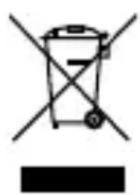
DEVICE
The device is fitted with an integrated battery. At the end of its service life, do not dispose of the device in the normal household rubbish. Instead, contact your local authority to find out how to dispose of it in an environmentally friendly manner at collection points for electrical and electronic scrap.
20. Technical specifications
| Mains adapter | |
| Manufacturer YNQX | |
| Model YNQX09T059120VL | |
| Input voltage | AC 100-240 V ~ 50/60 Hz 0.3 A |
| Output voltage DC 5.9 V --- 1.2 A | |
| TÜV®®® ZERTUERNT www.tuv.com ID 100000000 | |
| Radio | |
| Power supply DC 5.9 V 1.2 A --- | |
| Battery operation 4 x 1.5 V (R6/LR6/AA) | |
| Output power 2 W RMS | |
| Headphone output 150 mV max. | |
| FM frequency band 87.5-108 MHz | |
| DAB+ frequency band 17 | 4.928–239.20 MHz |
| Environmental conditions | In operation: 10°C ~ +45°C < 80% humidity Not in operation: -20°C ~ +60°C < 90% humidity |
| Dimensions (W x H x D) | Approx. 70 x 103 x 95 mm |
| Weight (without mains adapter) | Approx. 675 g |
DE
EN
FR
ES
IT
NL
20.1. Key to symbols

Protection class II
Electrical devices in protection class II are devices that have double and/or reinforced insulation throughout, and do not have the option of connecting a protective earth. The housing of an electrical device in protection class II, with surrounding insulating material, may either form all of the additional or reinforced insulation, or part of it.

Indoor use
Devices with this symbol are intended solely for indoor use.
Polarity markings
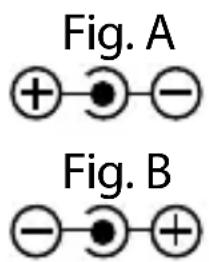
In the case of devices with coaxial power connectors, these symbols indicate the polarity of the connector. There are two types of polarity: either positive inside and negative outside (Fig. A), or negative inside and positive outside (Fig. B).

CE labelling
Products that feature this symbol meet the requirements of the EU directives (see chapter entitled "Declaration of conformity").

Tested safety
Products that feature this symbol meet the requirements of the German Product Safety Act.
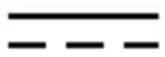
Symbol for direct current

Symbol for AC current
21. Service information
Please contact our Customer Service team if your device ever stops working the way you want or expect it to. There are several ways for you to contact us:
- In our Service Community, you can meet other users, as well as our staff, and you can exchange your experiences and pass on your knowledge there.
You will find our Service Community at http://community.medion.com.
- Alternatively, use our contact form at www.medi-on.com/contact.
- You can also contact our Service team via our hotline or by post.
| Opening times Hotline number UK | |
| Mon – Fri: 08.00 – 20.00 Sat – Sun: 10.00 – 16.00 | 0333 3213106 |
| Hotline number Ireland | |
| 1 800 992508 | |
Service address
MEDION Electronics Ltd. 120 Faraday Park, Faraday Road, Dorcan Swindon SN3 5JF, Wiltshire United Kingdom
You can download this and many other sets of operating instructions from our service portal at www.medion.com/gb/service/start/.
You will also find drivers and other software for a wide range of devices there.
You can also scan the QR code on the side of the screen, to download the operating instructions onto your mobile device from the service portal.
22. Legal Notice
Copyright © 2019
Date: 14.02.2019
All rights reserved.
These operating instructions are protected by copyright.
Mechanical, electronic and any other forms of reproduction are prohibited without the written permission of the manufacturer.
Copyright is owned by the company:
MEDION AG
Am Zehnhof 77
45307 Essen
Germany
Please note that you cannot use the address above for returns. Please always contact our Customer Service team first.