EasyManual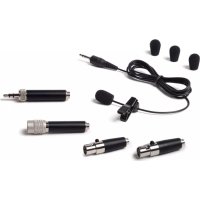
LM10 - Microphone SAMSON - Free user manual and instructions
Find the device manual for free LM10 SAMSON in PDF.



User questions about LM10 SAMSON
0 question about this device. Answer the ones you know or ask your own.
Ask a new question about this device
Download the instructions for your Microphone in PDF format for free! Find your manual LM10 - SAMSON and take your electronic device back in hand. On this page are published all the documents necessary for the use of your device. LM10 by SAMSON.
USER MANUAL LM10 SAMSON
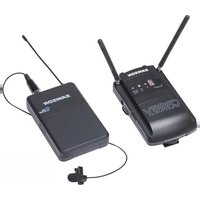
Samson Technologies Corp. 45 Gilpin Avenue Hauppauge, New York 11788-8816 Phone: 1-800-3-SAMSON (1-800-372-6766) Fax: 631-784-2201 www.samsontech.com3 EN FR DE ES IT Introduction Thank you for purchasing the Samson LM10 lavalier microphone! The LM10 is a low profile, microminiature condenser microphone with a 3.5mm capsule producing outstanding audio quality making it perfect for presentations, broadcast, houses of worship and other vocal applications. Thanks to the omnidirectional pick up pattern, the microphone’s off axis frequency response is linear, resulting in a clear and articulate reproduction regardless of the position of the capsule relative to the sound source. The LM10 lavalier microphone is particularly well-suited for use with Samson wireless systems and with four included adapters, the microphone can be used with most any other manufacturer’s wireless body pack systems. The kit also includes three windscreens and an attractive carry case to hold the LM10 and all the accessories. Manufactured with extreme care and the highest quality components, the LM10 delivers an exceptionally clear, articulate sound with reliable performance in an extremely low profile, nearly invisible design. In these pages, you’ll find a description of the features of the LM10 microphone as well as inst ructions for setup and use. You’ll also find a warranty card enclosed. Please don’t forget to fill it out and mail it in so that you can receive online technical support, and so that we can send you updated information about this and other Samson products in the future. Also, be sure to check out our website (www.samsontech.com) for complete information about our full product line. With proper care and maintenance, your LM10 will operate trouble-free for many years. Should your microphone ever require servicing, a Return Authorization (RA) number must be obtained before shipping your unit to Samson. Without this number, the unit will not be accepted. Please call Samson at 1-800-3SAMSON (1-800-372-6766) for an RA number prior to shipping your unit. Please retain the origi- nal packing materials and, if possible, return the unit in its original carton. If your LM10 microphone was purchased outside of the United States, contact your local distributor for warranty details and service information.4 LM10 Features The LM10 Omnidirectional lavalier microphone provides excellent vocal reproduction in a nearly invisible, low profile design. Following below are the LM10 main features:
- Micro-miniature, inconspicuous condenser with a 3.5mm diameter capsule
- Omnidirectional pick up pattern provides a linear frequency response for natural sounding vocal reproduction
- Microphone requires phantom power for operation
- Four cable adapters are included for compatibility with most popular wireless body pack transmitters
- Also, includes three windscreens, lapel clip and carry case5 EN FR DE ES IT Using the LM10 Follow these simple steps to setup and use the LM10 micro- phone:
- Install the appropriate adapter for your wireless body pack. Be sure to tighten the locking ring to hold the adapter firmly in place.
- Attach the microphone to the performer’s shirt or jacket, us- ing the included clip, approximately 8” below their chin with a clear path to the mouth.
- Connect the microphone to the wireless body pack.
- With the performer talking into the microphone, listen to the quality of the audio, and adjust the positioning of the micro- phone until a balanced frequency response is reached.
- To further conceal the microphone, it can be placed behind clothing or in the performers hair, but this will affect the high frequency performance of the microphone.