EasyManual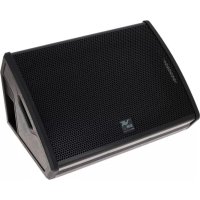
LVX XM 15 - Speaker DB Technologies - Free user manual and instructions
Find the device manual for free LVX XM 15 DB Technologies in PDF.



User questions about LVX XM 15 DB Technologies
0 question about this device. Answer the ones you know or ask your own.
Ask a new question about this device
Download the instructions for your Speaker in PDF format for free! Find your manual LVX XM 15 - DB Technologies and take your electronic device back in hand. On this page are published all the documents necessary for the use of your device. LVX XM 15 by DB Technologies.
USER MANUAL LVX XM 15 DB Technologies
- According to the standards EN 55103 this equipment is designed and suitable to operate in E3 (or lower E2, E1) Electromagnetic environments. This device complies with part 15 of the FCC Rules. Operation is subject to the following two conditions: (1) This device may not cause harmful interference, and (2) this device must accept any interference received, including interference that may cause undesired operation. Make sure that the loudspeaker is securely installed in a stable position to avoid any injuries or damages to persons or properties. For safety reasons di not place one loudspeaker on top of another without proper fastening systems. Before hanging the loudspeaker check all the components for damages, deformations, missing or damaged parts that may compromise safety during installation. If you use the loudspeakers outdoor avoid spots exposed to bad weather conditions. Contact dBTechnologies for accessories to be used with the speakers. dBTechnologies will not accept any responsibility for damages caused by inappropiate accessories or additional devices. WARNING3 LVX XM15 Cod. 420120241 REV.1.0 ITALIANO ENGLISH DEUTSCH FRANÇAIS ESPAÑOL4 LVX XM15 Cod. 420120241 REV.1.0 INDICE 1. INFORMAZIONI GENERALI p. 5
- BENVENUTI! p. 5
- PANORAMICA INTRODUTTIVA p. 5
- RIFERIMENTI PER L’UTENTE p. 5
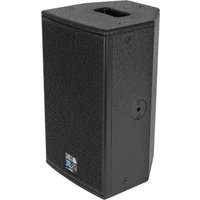
WELCOME! PRODUCT OVERVIEW USER REFERENCE Thanks for purchasing a product designed and developed in Italy by dBTechnologies! This professional-grade coaxial active monitor is the product of several years of experience and innovation in the sound reinforcement industry, using cutting-edge sound, electronic and material research solutions. LVX XM15 is a professional-grade coaxial active monitor in bass-reex conguration, equipped with a 15” woofer (2.5” voice coil) and a compression driver with 1” output (1.4” voice coil), driven by a latest-generation 600 W RMS DIGIPRO G3 amplier. Its main features include: To make the most of your LVX XM15, we recommend that you:
- sound optimization in reex conguration and a coaxial transducer that provides compact mechanical layout, uniform coverage, broad frequency response range, low feedback sensitivity and coherence at crossover frequency;
- enhanced versatility, offering two positions when used as a stage monitor or installation on a stand as PA amplication system;
- ease of handling and quick conguration thanks to presets that can be set from the amplier panel to suit specic application;
- high-quality wooden cabinet with rugged PVC coating make for reliable performance in all application scenarios, including long tours and outdoor congurations
- Read the quick start user manual included in the package and this user manual thoroughly and keep this manual during the whole life of the product.
- Register your product at http://www.dbtechnologies.com under “SUPPORT”.
- Download and install the latest rmware version at http://www.dbtechnologies.com under “DOWNLOADS” (see section FIRMWARE UPDATES).
- Keep proof of purchase and WARRANTY (User manual “section 2”). English24 LVX XM15 Cod. 420120241 REV.1.0
MECHANICAL AND ACOUSTICAL FEATURES
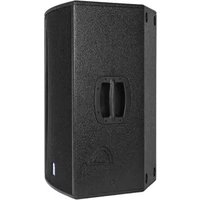
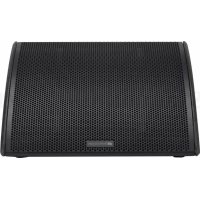
DIMENSIONS SOUND COVERAGE LVX XM15 incorporates a 15” woofer (2.5” voice coil) and a 1” compression driver (1.4” voice coil) in coaxial conguration accommodated in a wooden cabinet protected by a PVC coating and weighing 22,3 kg. The overall dimensions of a single speaker are as follows: 640 x 460 x 370 mm. The monitor can be easily carried and handled by a single person thanks to its side handles. Standard 35-mm dia. pole mount allows for use in an installation for PA sound reinforcement, as well as dual monitor conguration. The monitor’s particular geometry shown in the diagram ensures 90 x 70° coverage. This ensures good dispersion performance in all use congurations, including vertical arrangement. Coaxial conguration provides excellent off- axis coverage and excellent sound results at close listening distance. English25 LVX XM15 Cod. 420120241 REV.1.0 FEATURES OF THE AMPLIFIER AND CONTROL SECTIONS The latest-generation class-D digital amplier DIGIPRO G3 is at core of LVX XM15. It features totally silent fanless cooling and provides 600 W RMS amplication power. All inputs and controls are gathered in the amplier panel. An internal DSP adapts the monitor to different application requirements based on presets that can be set using a rotary switch. The DIGIPRO G3 panel is made up of: WARNING!
- Protect the unit from moisture.
- Never attempt to disassemble the amplier in any way.
- In the event of a malfunction, remove power supply immediately by disconnecting the unit from the power mains and contact an authorised repair centre.
- Input, Output and Control Section
This standard Mini-USB Type-B port enables user to update product rmware using a PC and USB BURNER MANAGER. More details are available at http://www.dbtechnologies.com under “DOWNLOADS” and in section FIRMWARE UPDATES.
3. AUDIO INPUT SENSITIVITY WITH LINE/MIC SELECTOR
AUDIO INPUT SENSITIVITY controls input level. The connected selector toggles input type between MIC (microphone input) and LINE (line/mixer input).
The hybrid Neutrik ® connector accepts both an unbalanced TRS jack and a balanced XLR connector.
Balanced XLR output intended to send the audio signal to another amplied speaker.
6. DSP PRESET ROTARY SWITCH
8-position rotary switch to set monitor equalisation using presets
The “Limiter” and “Signal / ON“ LEDs provide useful indications about system status. The “Limiter” LED indicates when the internal protection circuitry is active before a sound distortion condition occurs. The “Signal / ON” LED turns on when the module is powered on and indicates that an audio signal is present. English27 LVX XM15 Cod. 420120241 REV.1.0
- Do not use the speaker for long periods of time when the Limiter LED is on or blinking, as this indicates that the module is operating under exceeding stress under distortion conditions.
- Use the SERVICE DATA USB port to update product rmware only. Do not connect any USB devices to the unit to avoid damage or malfunctioning. WARNING!
- The fuse installed at the factory is rated for operation in the 220-240 V voltage range. If you need to operate the speaker in the 100-120 V range:
This connector is intended to supply power to a second module.
POWER SUPPLY UNIT SECTION
1. Disconnect all connections, including the power supply connection.
3. Replace the fuse with the fuse rated for the 100-120 V range, which is included in the
INPUT AND OUTPUT CONNECTIONS
When you open the LVX XM15 speaker package, ensure that all contents are present. The package contains:
- power supply cable with POWERCON® connector
- quick start user manual and warranty documents
- fuse rated for operation in the 100-120V voltage range WARNING! The fuse installed at the factory is rated for operation in the 220-240 V voltage range. If you need to operate the speaker in the 100-120 V range:
1. Disconnect all connections, including the power supply connection.
3. Replace the fuse with the fuse rated for the 100-120 V range, which is included in the package.
4. Use only the supplied power supply cable.
- Connect the audio input (4) properly, selecting the source with the “Input sensitivity” selector (3). Set selector to “LINE” if the input signal is coming from a line input or a mixer output, or to “MIC” for a microphone input (use a dynamic microphone). Please see the table below for a quick overview of audio cables.
- To connect the power supply, connect the cable with the POWERCON connector to “MAINS INPUT” (8)
- The Signal/ON LED (2) will blink briey at power-up
- Turn the Audio Input Sensitivity encoder (3) to adjust system gain to the appropriate level.
- When you have connected the audio source properly and switched it on, raise the volume gradually to ensure that the speaker is producing sound POWER SUPPLY
- Set the DSP preset to the desired value:
1. FLAT - Equalisation without emphasis in a particular frequency range
2. WEDGE - Equalisation with emphasis for live monitoring purposes
W1 - VOCAL, convenient for voice (speech and vocals) W2 - HF PASS (80 Hz), for use with ltering of the frequency band from 80 Hz and higher W3 - HF PASS (120 Hz), for use with ltering of the frequency band from 120 Hz and higher
3. SERVICE - Enables rmware update (see section FIRMWARE UPDATES)
4. ON STAND - Equalisation with emphasis for pole mount application (tripod stand)
S1 - LOUDNESS, helps with background noise S2 - HF BOOST, boosts low frequencies S3 - HF REDUCTION, reduces high frequencies English30 LVX XM15 Cod. 420120241 REV.1.0 CONNECTING THE OUTPUTS OF MULTIPLE MODULES (power daisy chain) POWER SUPPLY DAISY CHAIN English31 LVX XM15 Cod. 420120241 REV.1.0 CONNECTING THE OUTPUTS OF MULTIPLE MODULES (audio daisy chain) LVX XM15 can supply mains power to another monitor up to a maximum current draw of 14 A (3200 W) when operating at 220-240Vac or up to 11 A (1200 W) when operating at 100-120Vac. To perform this type of connection, simply connect the supplied power supply cable to the MAINS INPUT (8) of the rst LVX XM15 module and connect a second (optional) cable with suitable connectors across the MAINS LINK output (9) and the MAINS INPUT (8) of the next LVX XM15 module in the chain. Several modules can be connected in this manner up to the maximum current draw allowed that is indicated on the MAINS LINK connector (9) of the rst monitor. To connect 2 or more speakers to the same audio source in certain installations, you may nd it convenient to daisy chain the signal from a rst module to the next and so on. First, connect an audio source to “INPUT” (4) of the rst speaker (for the different “LINE” or “MIC” connection, please read section INPUT CONNECTIONS). Next, connect a balanced XLR cable across the “LINK” output (5) of the rst speaker and the “INPUT” (4) of the next speaker. Repeat this second step to connect additional speakers until achieving the installation that best suits the specic application. WARNING! The maximum current draw allowed indicated in the rating data of LVX XM15 (MAINS LINK) is calculated based on the maximum current specication of the PowerCON connector. However, this is not a xed value as it depends on the type of cable (cross-section area and type of plug) used to connect the rst LVX XM15 module and on the next LINK cables (cross-section area and type of cable) in the chain. Always check the maximum current (and power) specications and the cross-section areas of the cable leads used when designing and sizing the sound system, and anyway before connecting several modules in a daisy- chain connection. DAISY CHAIN AUDIO INPUT English32 LVX XM15 Cod. 420120241 REV.1.0
- In the monitor conguration, plan installation so as to ensure appropriate sound coverage, with as few obstacles as possible, and such to avoid the Larsen effect (audio feedback).
Usage as stage audio monitor is quick and easy. Determine oor slope (if any) to ensure that the monitor will not slide. Check for obstacles in front of the speaker. Consider the dispersion pattern shown in section SOUND COVERAGE. A pole mount socket with 35-mm diameter is provided to mount the monitor on a tripod stand. Ensure that the tripod centre leg is pointing forward to improve stability. Maximum mounting height (height of monitor’s bottom side above oor) is 1.4 m. WARNING!
- In outdoor applications, consider anchoring the speaker to prevent swinging due to weather or wind.
- Use a suitably sized stand with the central leg pointing forward to provide appropriate stability.
- Never hand the speaker from the handles.
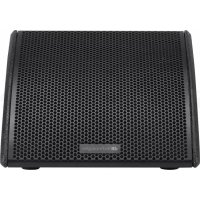
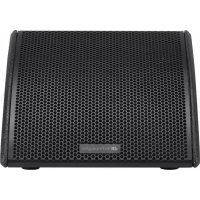
- The only congurations allowed are those shown in this manual The monitor has suitable feet that allow it to be placed with the amplier heat- sink side facing down as shown in the gure. This way, the speaker can be used as a monitor with greater front coverage on the stage. This particular arrangement can cause the heat sink to become very hot (hot surface). WARNING!
- The heat sink of the LVX XM speaker can become very hot. Before placing the speaker in this mounting conguration, ensure that the surface it is to be placed on is made from material resistant to high temperatures and not propagating ame. English33 LVX XM15 Cod. 420120241 REV.1.0
It is very important to keep product rmware updated to the latest version to ensure full performance. Please check site http://www.dbtechnologies.com for updates under section “DOWNLOADS” periodically.
1. Download USB BURNER MANAGER from section “SOFTWARE & CONTROLLER” of the dBTechnologies site.
2. Download the .zip le with the last rmware from section “DOWNLOADS” for your product
3. Connect the product to the PC by means of a USB cable (not supplied) featuring the right connector detail is
contained in section FEATURES OF THE AMPLIFIER AND CONTROL SECTIONS
4. In the top right corner of the USB BURNER MANAGER screen, select “File Opening”.
5. Select the rmware le you have downloaded previously (ensure that it is suitable for your operating system).
6. Follow the on-screen instructions.
English34 LVX XM15 Cod. 420120241 REV.1.0 This option is available for quick mounting and use as PA system:
- SSB2, pair of tripods with 35-mm diameter to mount 2 LVX XM15 monitors for use as PA amplication system. A pole mount socket suitable for the purpose is integrated in the chassis on monitor side. Please read the corresponding manual for more details.
1. Check that power supply is present upstream of the installation.
2. Ensure that the power supply cable with POWERCON connector is properly plugged in.
3. If the problem persists, contact service.
1. Ensure that audio signal input connections have been performed properly, preferably using cables with
Neutrik® connectors.
2. Check the cables for damage.
3. Ensure that the mixer or audio source is on and an output signal is present.
4. Check for the proper Audio Input Sensitivity level (3) at the amplier control panel.
1. With the system on, rst adjust source volume, and then set the Audio Input Sensitivity rotary switch
to the appropriate value. Look at the LIMITER LED; if on, it means that the speaker is operating under distortion conditions.
2. Check the cables for damage and replace them as required (a damaged cable may lead to signal loss or
3. Ensure that the LINE-MIC switch is set to match actual input connection.
4. Check the settings of the DSP preset rotary switch that affect output frequency response. To this end,
please read section FIRST POWER-UP. The speaker will not turn on: The speaker turns on but produces no sound: Speaker sound is distorted:
1. Ensure that the speaker is properly positioned on the stage according to the indicated sound dispersion
pattern and the positions shown in section INSTALLATION EXAMPLES.
2. Check for any obstacles directly between performer and monitor.
USER INTERFACE Presets (): Wedge: [1] FLAT/ [2] VOCAL/ [3] HPF-80Hz/ [4] HPF-120Hz/ [5] Service Speaker: [6] HF reduction/ [7] HF boost/ [8] loudness Controls: Rotary BCD 8 Pos, MIC LINE SWITCH
- INSTALLER NOTES: The values refer to 1/8 of full power, in average operating conditions (music program with infrequent or no clipping). It is recommended to consider them the minimum sizing values for any type of conguration. ** INSTALLER NOTES: The values refer to 1/3 of full power, in heavy operating conditions (music program with frequent clipping or activation of the limiter). We recommend sizing according to these values in case of professional installations and tours. English Draw at 1/8 of full power in average use conditions (*): 1,01 A / 110 W (230 V) - 1,71 A / 113 W (115 V) Draw at 1/3 of full power in maximum use conditions (**): 1,89 A / 230 W (230 V) - 3,2 A / 230 W (115 V) Draw with speaker turned on without signal (idle): : 19 W Inrush current:
English39 LVX XM15 Cod. 420120241 REV.1.0 Product features, specications and appearance are subject to changes without prior notice. dBTechnologies reserves the right to make changes or improvements in design or manufacture without any obligation to incorporate such changes or improvements in products manufactured before their introduction. English A.E.B. Industriale Srl Via Brodolini, 8 Località Crespellano 40053 VALSAMOGGIA BOLOGNA (ITALIA) Tel +39 051 969870 Fax +39 051 969725 www.dbtechnologies.com info@dbtechnologies-aeb.com40 LVX XM15 Cod. 420120241 REV. 1.0 INHALT Deutsch Deutsch