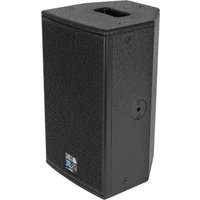
DVX D8 HP - Loudspeaker DB Technologies - Free user manual and instructions
Find the device manual for free DVX D8 HP DB Technologies in PDF.


| Product type | Bi-amplified active loudspeaker |
| Brand | DB Technologies |
| Model | DVX D8 HP |
| Amplifier | DIGIPRO® G2, class D, 400 W RMS / 800 W peak |
| Acoustic components | 1 x 8" woofer (2" voice coil), 1 x 1" compression driver (1.4" voice coil) |
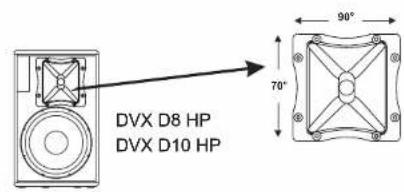
| Dispersion | 90° x 70° (rotatable horn) |
| Frequency response | 100 Hz – 19 kHz (-3 dB) / 75 Hz – 20 kHz (-10 dB) |
| Crossover frequency | 1850 Hz, 24 dB/oct |
| Max SPL | 125 dB |
| Input sensitivity | -40 dBu (MIC) / -3 dBu (LINE) |
| Input impedance | 20 kΩ (MIC) / 2.2 kΩ (LINE) |
| Power supply | 220-240 V~ 50-60 Hz or 110-120 V~ 50-60 Hz |
| Inrush current | 18.7 A |
| Dimensions (W x H x D) | 250 x 425 x 260 mm |
| Weight | 9.7 kg |
| Enclosure material | 12 mm birch plywood |
| Rigging points | 10 x M8, 2 flypins |
| Pole mount | 36 mm aluminum |
| Handle | 1 top handle |
| Main functions | FULL RANGE / STAGE MONITOR switch, sensitivity control, LIMITER, SIGNAL, READY indicators, horn rotation |
| Maintenance and cleaning | Clean with a dry, soft cloth. Do not use solvents or abrasive products. |
| Safety | Install on a stable surface. Do not use handles to suspend the speaker. Check the integrity of suspension points before any installation. |
| Spare parts and repairability | Contact an authorized service center for any parts or repairs. The amplifier module is replaceable by a qualified technician. |
Frequently Asked Questions - DVX D8 HP DB Technologies
User questions about DVX D8 HP DB Technologies
0 question about this device. Answer the ones you know or ask your own.
Ask a new question about this device
Download the instructions for your Loudspeaker in PDF format for free! Find your manual DVX D8 HP - DB Technologies and take your electronic device back in hand. On this page are published all the documents necessary for the use of your device. DVX D8 HP by DB Technologies.
USER MANUAL DVX D8 HP DB Technologies
natural_image
Abstract geometric logo design with interlocking shapes (no text or symbols)PROFESSIONAL ACTIVE SPEAKERS
SERIESSERIES



A.E.B. INDUSTRIALE s.r.l.
Via Brodolini, 8 - 40056 Crespellano (Bo) - ITALIA
Tel. + 39 051 969870 - Fax. + 39 051 969725
Internet: www.dblechnologies.com
E-mail: info@dbtechnologies-aeb.com

THE SOUND OF EXPERIENCE
USER MANUAL - Section 1
2) CONNETTORI "LINK" - "INPUT-LINK"
4) INDICATORE LUMINOSO "SIGNAL"
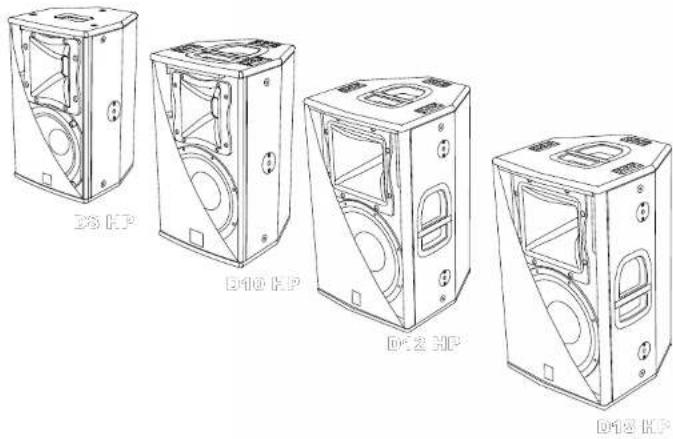
The speakers of DVX HP series use cutting edge digital amplifiers of the DIGIPRO ® G2 series, providing with different powers 800W, 1200W and 1400W, to meet the requirements of any kind of application.
These highly efficient amplifiers provide high power with limited weight and dimension. Thanks to the low power dissipated, the cooling of the amplifier module does not require a fan.
The digital preamplifier with DSP (Digital Signal Processing) controls the audio crossover of the acoustic components, the frequency response, the limiter, and the acoustic phase alignment. A selector enables to select one of two different equalizations - "FULL RANGE" or "STAGE MONITOR" - to provide high versatility for the different applications.
The amplifiers DIGIPRO ® G2 use power supplies featuring SMPS (Switched-Mode Power Supplies) technology.
This technology increases power supply efficiency and minimizes its weight.
DXV D8 HP
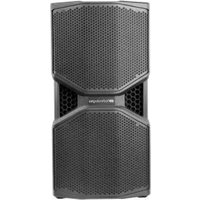
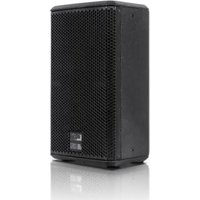
The D8 HP bi-amped active speaker is equipped with a DIGIPRO® amplifier delivering 800W.
D8 HP is a bi-amped speaker features a woofer 8" (voice coil 2") and a compression driver 1" (voice coil 1.4") on a 90°x70° aluminium CD-hom.
The speaker's horizontal directivity is 90irc by default factory setting.
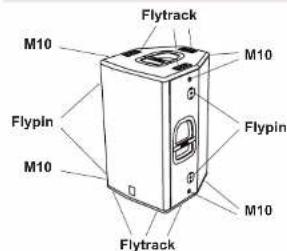
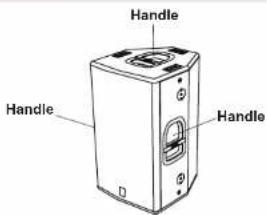
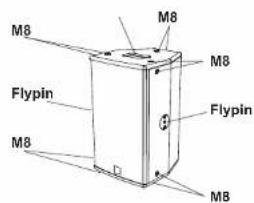
The speaker is made of 12mm birch ply wood, the one top handle housing, the 6 flytracks, the 10 M8 threads and the 2 flypins located on the sides and the back of the speaker are enabling easy transport and installation.
The speaker has been designed to be used also as stage monitor (45° angle). By rotating the horn you can maintain the same coverage angle also when the speaker is used as monitor.
In the bottom of the box there is a standard pole mount cup (D36mm) made of aluminium.
DVX D10 HP
The D10 HP bi-amped active speaker is equipped with a DIGIPRO ® G2 amplifier delivering 1200W.
D10 HP is a bi-amped active speaker features a woofer 10" (voice coil 2,5") and a compression driver 1" (voice coil 1,75") on a 90°x70° aluminium CD-hom.
The speakers' horizontal directivity is 90° by default factory setting.
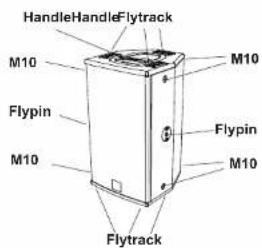
The speaker is made of 12mm birch ply wood, the one top handle in aluminum, the 6 flytracks, the 6 M10 threads and the 2 flypins located on the sides and the back of the speaker are enabling easy transport and installation.
The speaker has been designed to be used also as stage monitor (45° angle). By rotating the horn you can maintain the same coverage angle also when the speaker is used as monitor.
In the bottom of the box there is a standard pole mount cup (D36mm) made of aluminium.
DVX D12HP
The D12 HP bi-amped active speaker is equipped with a DIGIPRO ® G2 amplifier delivering 1400W.
The D12 HP is a bi-amped active speaker features 12" (voice coil 3") woofer and a 1.4" (voice coil 3") compression driver installed on a 60"x40" aluminium CD-hom.
The speaker's horizontal directivity is 60° by default factory setting.
The speaker is made of 15mm birch ply wood, the 3 handles, the 6 flytracks, the 6 M10 threads and the 4 flypins located on the sides and the back of the speaker are enabling easy transport and installation.
The speaker has been designed to be used also as stage monitor (45° angle). By rotating the horn you can maintain the same coverage angle also when the speaker is used as monitor.
In the bottom of the box there is a standard pole mount cup (D36mm) made of aluminium.
DVX D15 HP
The D15 HP bi-amped active speaker is equipped with a DIGIPRO ® G2 amplifier delivering 1400W
The D15 HP is a bl-amped active speaker features a 15" (voice coil 3") woofer and a 1.4" (voice coil 3") compression driver installed on a 60°x40° aluminium CD-hom.
The speaker's horizontal directivity is 60° by default factory setting.
The speaker is made of 15mm birch ply wood, the 3 handles, the 6 flytracks, the 6 M10 threads and the 4 flypins located on the sides and the back of the speaker are enabling easy transport and installation.
The speaker has been designed to be used also as stage monitor (45° angle). By rotating the horn you can maintain the same coverage angle also when the speaker is used as monitor.
In the bottom of the box there is a standard pole mount cup (D36mm) made of aluminium.
COMMANDS AND FUNCTIONS (reference page29)
1) "BALANCED INPUT" CONNECTOR
These balanced inputs can be used to connect balanced or unbalanced microphones or audio sources at line level (0dB) (eg. preamplifier, mixer, recorder, CD player, musical instrument, ...).
2) "LINK" - "INPUT-LINK" CONNECTORS
The balanced connector is connected in parallel with input to send the audio signal to other amplified speakers, recorders or supplementary amplifiers.
3) "LIMITER" INDICATOR LIGHT
This indicator shows red to indicate that the internal limiter circuit has tripped. This prevents amplifier distortion and protects the speakers against overloads.
4) "SIGNAL" INDICATOR LIGHT
This indicator shows green to indicate the presence of the audio signal (at a level of -20dB).
5) "READY" INDICATOR LIGHT
This indicator shows green to indicate that the main power voltage is correct. The LED shows green normal operating conditions
6) "SENSITIVITY" INPUT SENSITIVITY CONTROL
This control adjusts the sensitivity of the signal amplifier input. This control does not affect the "LINK" - "INPUT - LINK" output level.
7) "MODE" SWITCH
This two-way switch allows to choose between two different system presets. The "FULL RANGE" position allows linear response of the speaker, which is mainly suitable for the "live" application. The "STAGE MONITOR" position makes its use easier in the monitor application by limiting the low frequencies, which are emphasized by the floor.
8) "INPUT SENS" SWITCH
Position the switch in LINE to use a line level source (0 dB) or MIC to use a microphone.
9) FUSE CARRIER "FUSE"
Mains protection fuse housing. The fuse specifications are found in the data plate of the apparatus. In case of failure to replace it with one of the same type and value specified.
10) "MAINS INPUT" POWER SOCKET
To connecting the power cable provided. The connector used for mains connection is a POWER CON®(blue) socket
11) "MAINS LINK" OUTPUT POWER SOCKET
To linking the mains power. The output is connected in parallel with input (10) and can be used to power another active speaker. The connector is a POWER CON® (grey) socket.
CONNECTIONS
Connecting to the mains supply
Each active speaker features its own power cable. Connection is done by a Neutrik POWER CON® (blue) model which permits easy and fast connection to the speaker as well as being an excellent locking system.
The same connector serves as a switch to turn ON and OFF the active loudspeaker by turning the connector to the left (OFF) or right (ON).
The active speaker must be connected to a power supply able to deliver the maximum required power.
Main power supply linking
On the rear of the speaker, a Neutrik POWER CON® connector (grey) offers linking the mains power supply.
This socket links the power supply to another speaker, thereby reducing the direct connections to the mains. Maximum amplifier input power is shown on the amplifier panel. The maximum number of speakers connected together varies of max input power and of the maximum allowed current of the first power socket.
CHARACTERISTICS AND PROTECTION
FrontGrille
The speakers's components in the box are protected by 1,2mm (DVX D8HP and D10 HP) or 1,5mm (DVX D12HP and D15 HP metal steel grille covered by foam on backside.
Cooling
Thermal control is provided by the internal microprocessor which, by means of two sensors, controls the temperature of the amplifier and of the power supply, avoiding overheating by limiting the overall volume.
In case of overheating (> 80 degrees) the volume decreases proportionally to the temperature increase, making the change unnoticeable.
The correct volume and all the functions are automatically restored when standard operating temperatures are reached.
Switch on
The amplifiers are equipped with a microprocessor to control the DSP and the amplifier.
The correct switch on of the amplifier is ensured by an initialization procedure; during this test stage the LEDs ("LIMITER", SIGNAL AND READY), located on the "amplifier module, remain off for approx. 2 sec.
At the end of the switch on procedure, on the amplifier module, the "READY" green LED only remains steadily on.
In case of severe failure of the speaker, on the amplifier module, the "LIMITER" red LED flashes. The speaker switches to "mute".
Failure indications and safeties
The microprocessor is able to signal three different kinds of failure by flashing the "LIMTER" red LED on the amplifier panel before the lighting up of the "READY" green LED. The three types of failure are:
1) WARNING: a non-severe error or auto-ripristinate malfunction is detected and the performance of the speaker is not limited
2) LIMITATION: an error is detected and the performance of the speaker is limited (the sound level is reduced by 3dB).
This does not affect the operation of the speaker since it continues to operate.
However, it is necessary to call the service centre to solve the issue.
3)
FAILURE:
a severe malfunction is detected. The speaker switches to "mute".
| Flashing | Indication |
| 1 or 2 | Warning |
| 3 or 4 | Limitation |
| from 5 to 8 | Failure |
In case of failure, the "READY" green LED remains off.
Perform the checks listed below:
- Check if the speaker is properly connected to the power supply.
- Make sure that the power supply is of correct voltage.
- Check that the amplifier is not overheated.
- Disconnect the speaker from the mains power supply, wait for a few minutes and connect it again.
If this error signaling remains active contact the authorized service center to resolve the problem.
ROTATING HORN
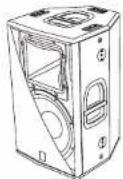
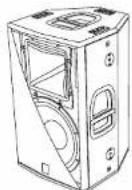
When used horizontally, the loudspeaker allow to maintain the same coverage angle by featuring a rotating horn.
The speakers are always supplied by the manufacturer with the horn positioned horizontal at 90° by default for D8 HP and D10 HP speakers and with the horn positioned horizontal at 60° by default for D12HP and D15HP speakers.
If you wish to change the coverage angle (FIG.A page 33, 34):
- unscrew the fixing screws of the grille - remove the front protective grille by slightly pressing on one side and taking the grille off the recessed slots
- unscrew the eight fixing screws of the horn
- rotate the horn in the desired position (the horn should never be removed from the driver!)
- tighten the fixing screws of the hom
- put the grille back in the recessed slots and tighten the screws of the grille.
LOUDSPEAKER INSTALLATION

WARNING
Make sure that the loudspeaker is securely installed in a stable position to avoid any injuries or damages to persons or property.
For safety reasons do not place one loudspeaker on top of another without proper fastening systems. Before hanging the loudspeaker check all the components for damages, deformations, missing or damaged parts that may compromise safety during installation.
If you use the loudspeakers outdoors avoid places that are exposed to bad weather.
The loudspeaker has the following mounting options:
- bookshelf (Fig. 1 page 35)
- floor (monitor) (Fig.2 page 35)
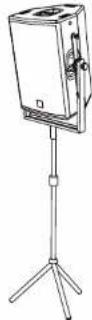
- on speaker stands (Fig.3 page 36)
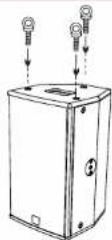
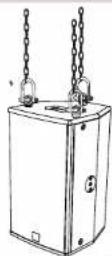
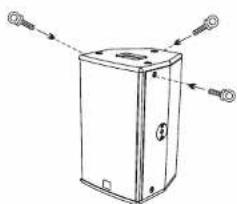
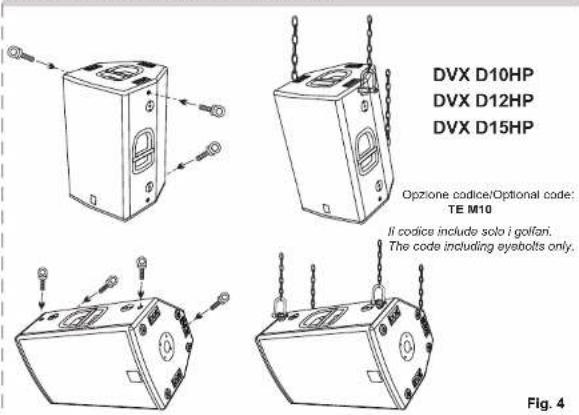
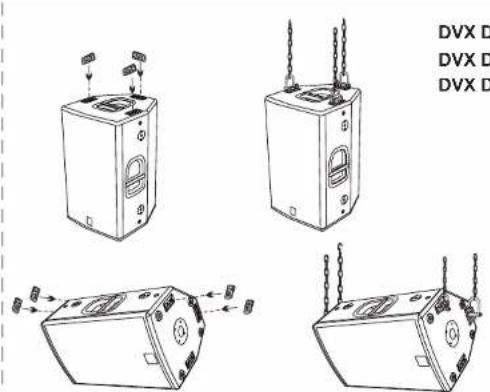
- suspended with eyebolts (Fig.4 page 36.37) or flytracks - excluded DVX D8HP - (Fig.5 page 37)
brackets supplied by the manufacturer

WARNING
Never use the handles to hang the speaker!
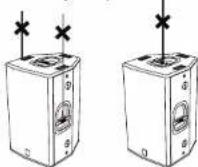

WARNING only for DVX D8HP
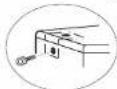
To hang the loudspeaker use only one eyebolt for each hanging point. The hanging points are of M8 threads.
Do not unscrew both bolts recessed in the housing!
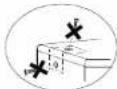
WRONG!
EXACT!
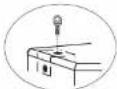
EXACT!
EMI CLASSIFICATION
According to the standards EN 55103 this equipment is designed and suitable to operate in E3 (or lower E2, E1) Electromagnetic environments.
2) "LIAMSGANBSBUDHISE
DIMENSIONI - DIMENSIONS
ABMESSUNGEN - DIMENSIONI
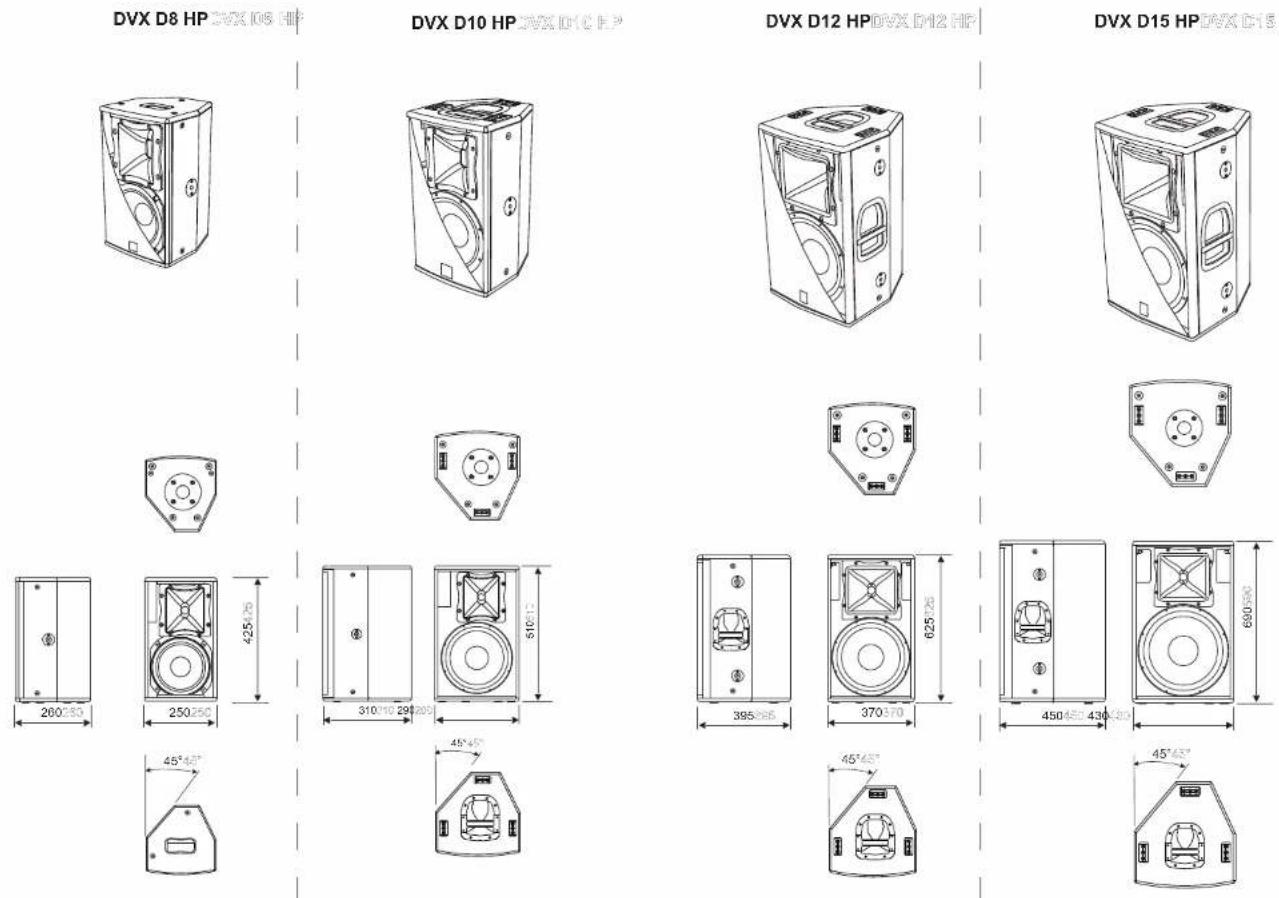
DIMENSIONI - DIMENSIONS
ABMESSUNGEN - DIMENSIONS
ANGOLO DI COPERTURA TROMBA / HORN ANGLE COVERED
HOCHTONHORN ABSTRAHLWINKEL / ANGLE DE COUVERTURE COTE
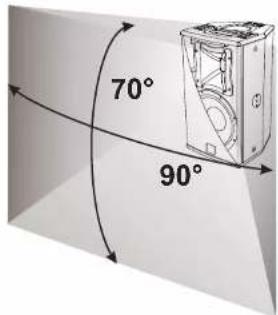
Utilizzo a pavimento (monitor) con tromba ruotata Floor use (monitor) with rotated horn. Verwendung auf dem Boden (monitor) mit gedrehtem Horn. Utilisation au sol (écran) avec cône lourné
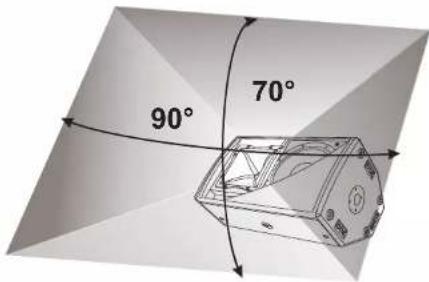
Fig. A
ANGOLO DI COPERTURA TROMBA / HORN ANGLE COVERED
HOCHTONHORN ABSTRAHLWINKEL / ANGLE DE COUVERTURE COTE
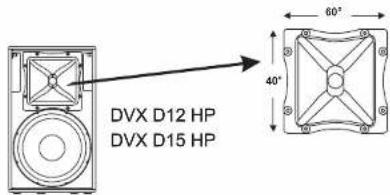
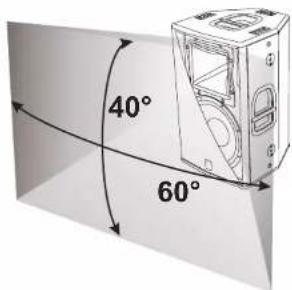
Utilizzo a pavimento (monitor) con tromba ruotata Floor use (monitor) with rotated horn. Verwendung auf dem Boden (monitor) mit gedrehtem Horn. Utilisation au sol (écran) avec cône tourné
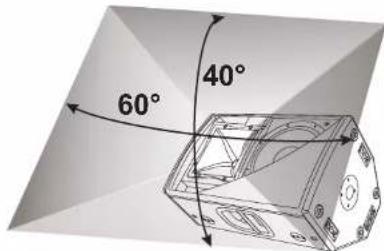
Fig. A
SAFETY INSTRUCTIONS FOR ACCESSORIES
Contact dB Technologies for accessories to be used with speakers.
Will not accept any responsibility when inappropriate accessories or not suitable additional devices are used.
UTILISATION AU SOL (ECRAN)
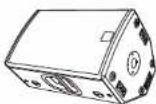
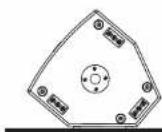
SOLO DVX D12 HP - D15 HP NUR DVX D12 HP - D15 HP ONLY DVX D12 HP - D15 HP SEULEMENT DVX D12 HP - D15 HP
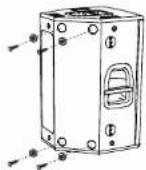
Nota: E' possibile montare 4 piedi in gomma sul fianco per utilizzo in appoggio (in dotazione) Note: It is possible to mount 4 rubber feet on the side for bookshelf use (provided) Anmerkung: Zur Verwendung als Boden-Monitor können die 4 beiliegende Gummifuße montiert werden. Note: It est possible de monter quatre pieds caoutchouc sur le coté puor une utilisation en appul (en dotation)
Fig. 2
SUPPORTO PIANTANA STANDARD (D36M)
STANDARD STAND (D36MM)
li codice include solo i golian. The code including eyebolts only.
natural_image
Line drawing of a rectangular electronic device with four circular connectors pointing outward (no text or symbols)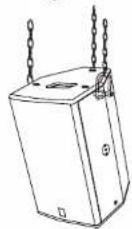
Fig. 4
APPENDIBILITA' DRAMHEI
SUSPENDABLE WITH EYEBOLTS
MAN KANN DEN LAUTSPRECHER MIT RINGSCHRAUBEN AUFHÄNGEN POSSIBILITÉ DE SUSPENSION AVEC ANNEAUX
APPENDIBILITA' HRXMKRECKS
SUSPENDABLE WITH FLYTRACKS
MAN KANN DEN LAUTSPRECHER MITTELS FLUGSCHIENEN AUFHÄNGEN POSSIBILITÉ DE SUSPENSION AVEC FLYTRACK
DVX D10HP
DVX D12HP
DVX D15HP
Fig. 5
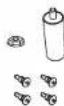
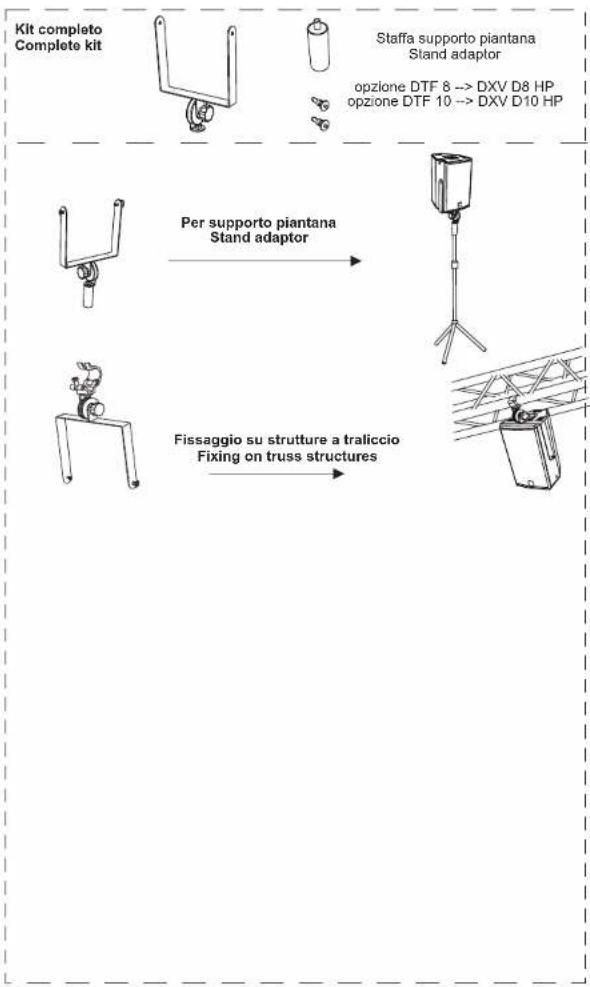
Kit completo
Complete kit
natural_image
Line drawing of a mechanical device with triangular frame structure (no text or symbols)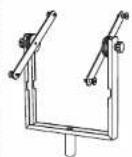
Per supporto piantana
Stand adaptor
flowchart
graph TD
    A["Kit complete Complete kit"] --> B["Staffa supporto piantana Stand adaptor"]
    B --> C["Per supporto piantana Stand adaptor"]
    C --> D["Fissaggio su strutture a traliccio Fixing on truss structures"]
- 2) CONNETTORI "LINK" - "INPUT-LINK"
- 4) INDICATORE LUMINOSO "SIGNAL"
- DXV D8 HP
- DVX D10 HP
- DVX D12HP
- DVX D15 HP
- COMMANDS AND FUNCTIONS (reference page29)
- 1) "BALANCED INPUT" CONNECTOR
- 2) "LINK" - "INPUT-LINK" CONNECTORS
- 3) "LIMITER" INDICATOR LIGHT
- 4) "SIGNAL" INDICATOR LIGHT
- 5) "READY" INDICATOR LIGHT
- 6) "SENSITIVITY" INPUT SENSITIVITY CONTROL
- 7) "MODE" SWITCH
- 8) "INPUT SENS" SWITCH
- 9) FUSE CARRIER "FUSE"
- 10) "MAINS INPUT" POWER SOCKET
- 11) "MAINS LINK" OUTPUT POWER SOCKET
- CONNECTIONS
- Connecting to the mains supply
- Main power supply linking
- CHARACTERISTICS AND PROTECTION
- FrontGrille
- Cooling
- Switch on
- Failure indications and safeties
- ROTATING HORN
- LOUDSPEAKER INSTALLATION
- WARNING
- WARNING only for DVX D8HP
- EMI CLASSIFICATION
- 2) "LIAMSGANBSBUDHISE
Brand : DB Technologies
Model : DVX D8 HP
Category : Loudspeaker