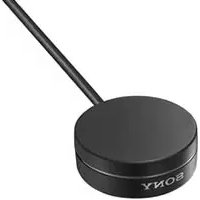
TDMBT1 - Network card / adapter SONY - Free user manual and instructions
Find the device manual for free TDMBT1 SONY in PDF.


| Product Type | Bluetooth Wireless Audio Adapter |
| Brand | Sony |
| Model | TDM-BT1 |
| Bluetooth Version | 2.0 |
| Compatible Bluetooth Profile | A2DP (Advanced Audio Distribution Profile) |
| Maximum Range | Approximately 10 meters (line of sight) |
| Frequency Band | 2.4 GHz (2.4000 - 2.4835 GHz) |
| Modulation Method | FHSS (Frequency Hopping Spread Spectrum) |
| Maximum Number of Paired Devices | 8 |
| Default PIN Code | 0000 |
| Power | Via DIGITAL MEDIA PORT (provided by host device) |
| Dimensions (approx.) | 80 x 30 x 15 mm |
| Weight (approx.) | 30 g |
| Operating Temperature | 5 °C to 35 °C |
| Main Functions | Wireless Bluetooth stereo audio reception; conversion of digital audio signals to analog via DMPORT |
| Care and Cleaning | Wipe with a dry, soft cloth. Avoid solvents. |
| Safety | Do not expose to moisture, impacts, or extreme temperatures. Do not disassemble. |
| Spare Parts and Repairability | No user-serviceable parts. Contact Sony after-sales service. |
| Package Contents | Adapter, DIGITAL MEDIA PORT cable, instruction manual |
| Repairability Index | Not applicable |
Frequently Asked Questions - TDMBT1 SONY
User questions about TDMBT1 SONY
0 question about this device. Answer the ones you know or ask your own.
Ask a new question about this device
Download the instructions for your Network card / adapter in PDF format for free! Find your manual TDMBT1 - SONY and take your electronic device back in hand. On this page are published all the documents necessary for the use of your device. TDMBT1 by SONY.
USER MANUAL TDMBT1 SONY
Bluetooth™ Wireless Audio Adapter
GB
FR
DE
NL
Operating Instructions
Mode d'emploi
Bedienungsanleitung
Gebruiksaanwijzing
The nameplate is located on the bottom exterior.
Do not install the appliance in a confined space, such as a bookcase or built-in cabinet.
For the customers in Europe
CE
Hereby, Sony Corporation declares that this TDM-BT1 Bluetooth™ Wireless Audio Adapter is in compliance with the essential requirements and other relevant provisions of Directive 1999/5/EC. For details, please access the following URL: http://www.compliance.sony.de/
The Bluetooth word mark and logos are owned by the Bluetooth SIG, Inc. and any use of such marks by Sony Corporation is under license. Other trademarks and trade names are those of their respective owners.
Disposal of Old Electrical & Electronic Equipment (Applicable in the European Union and other European
countries with separate collection systems)
This symbol on the product or on its packaging indicates that this product shall not be treated as household waste. Instead it shall be handed over to the applicable collection point for the recycling of electrical and electronic equipment. By ensuring this product is disposed of correctly, you will help prevent potential negative consequences for the environment and human health, which could otherwise be caused by inappropriate waste handling of this product. The recycling of materials will help to conserve natural resources. For more detailed information about recycling of this product, please contact your local Civic Office, your household waste disposal service or the shop where you purchased the product.
For the customers in Singapore
Complies with IDA Standards DB00353
Table of Contents
Features 4
How to use the unit. 5
GETTING STARTED
Unpacking 6
Location of Parts 6
OPERATING THE UNIT
Using the unit 7
Preparation 7
Pairing 7
Connecting 9
Initializing 10
ADDITIONAL INFORMATION
Precautions. 11
Troubleshooting 13
What is BLUETOOTH technology? 14
Specifications 15
Features
You can enjoy listening to a BLUETOOTH stereo audio source device (mobile phone, digital music player, etc.) *, with a DIGITAL MEDIA PORT jack (Sony Home Theatre System, etc.) connected to this unit using BLUETOOTH wireless technology, and convert digital wireless audio signals to analog (analogue) audio signals.
Example
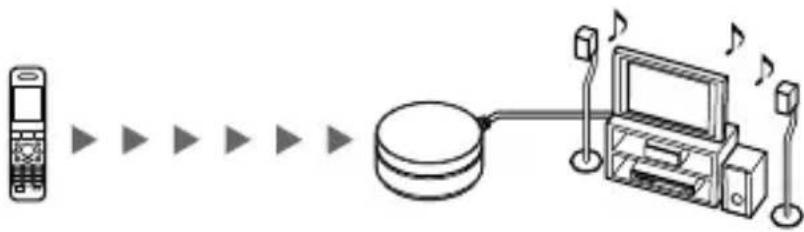
BLUETOOTH mobile phone or other BLUETOOTH stereo audio source device
This unit
Stereo audio output device
- BLUETOOTH devices to be connected with this unit are required to support A2DP (Advanced Audio Distribution Profile).
Notes
- DIGITAL MEDIA PORT is occasionally abbreviated as DMPORT.
- For details on how to operate the devices to be connected, refer to the operating instructions supplied with each device.
- For details regarding compatible BLUETOOTH connectable devices, visit the following URLs.
Customers in the U.S.A. http://sony.com/support
Customers in Canada http://www.sony.ca/support
Customers in Europe http://support.sony-europe.com
How to use the unit
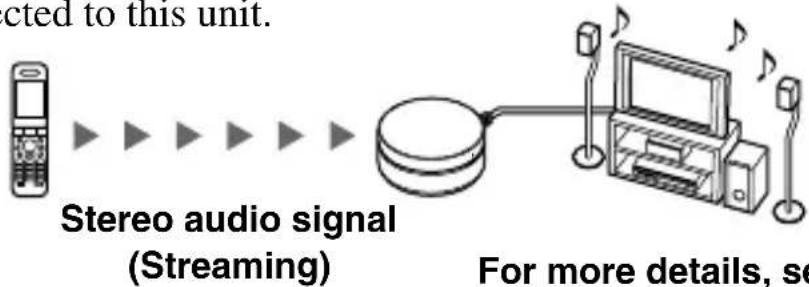
In the example below, we will explain how to receive music played on a BLUETOOTH mobile phone via the music playback function on this unit, and listen to music on a stereo audio output device with a DIGITAL MEDIA PORT jack (DAV series, etc.) connected to this unit.
1. Pairing
Enables a BLUETOOTH mobile phone and this unit to recognize one another.
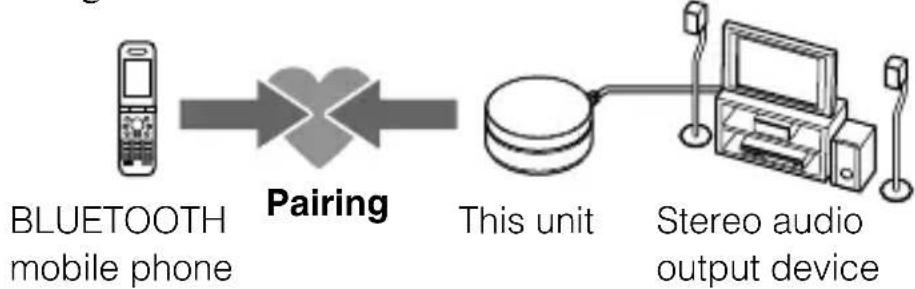
For more details, see pages 7 and 9.

2. BLUETOOTH connection
Operate the BLUETOOTH mobile phone to make the BLUETOOTH connection.
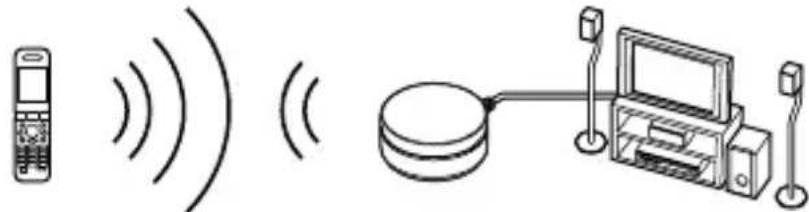
Connection

3. Receiving music
Enjoy listening to music played on a BLUETOOTH mobile phone through a stereo audio output device (DAV series, etc.) connected to this unit.
Unpacking
- BLUETOOTH Wireless Audio Adapter (1)
- Operating Instructions (1)
Location of Parts
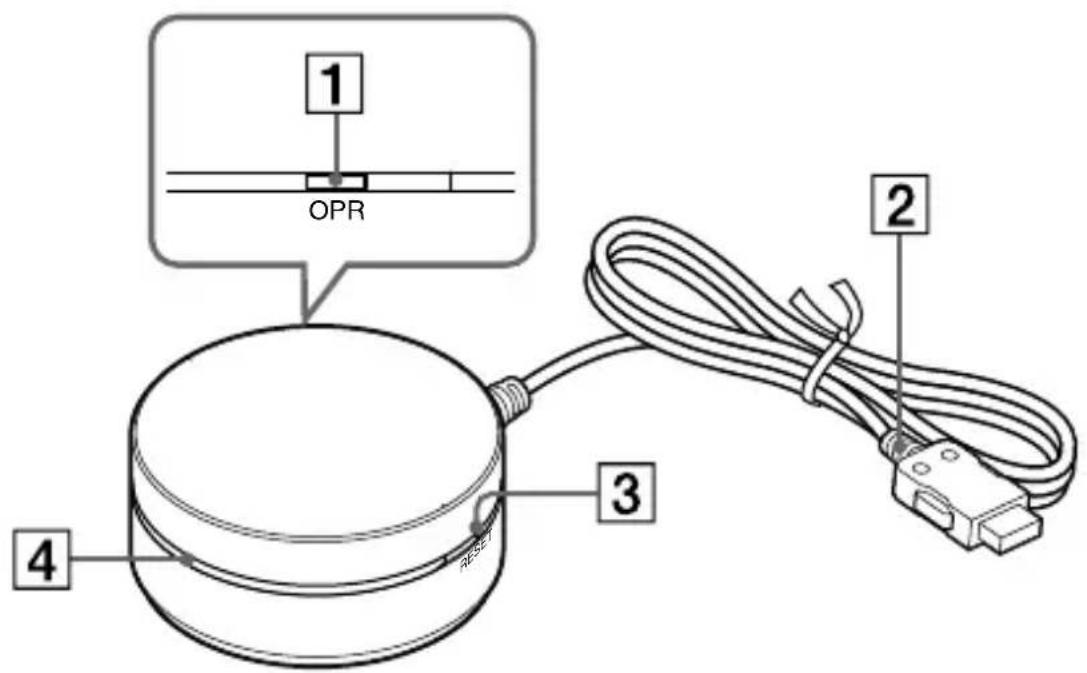
1 OPR button (7)
2 DIGITAL MEDIA PORT cable (7)
3 RESET button (10)
4 LED status indicator
Status LED status indicator
Ready Lights up for 2 seconds
Pairing mode Flashes very quickly
Connection possible Flashes slowly
Connect Constantly on
Disconnect Flashes quickly
Using the unit
Preparation
1 Connect the DIGITAL MEDIA PORT cable of this unit to the DIGITAL MEDIA PORT jack of a stereo audio output device (DAV series, etc.). Make sure the output device is turned off before connecting.
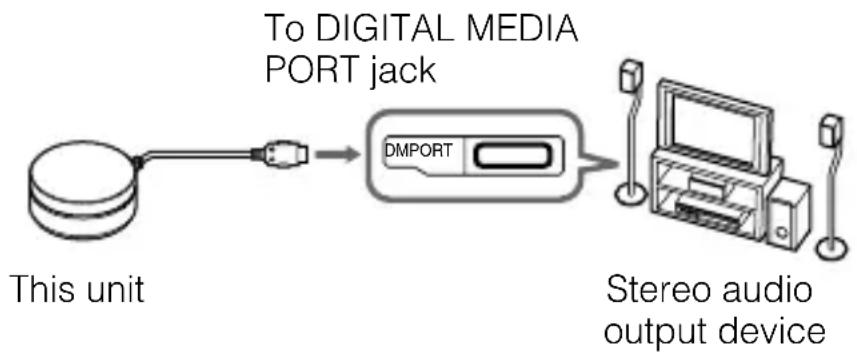
2 Turn on the stereo output device with a DIGITAL MEDIA PORT jack (DAV series, etc.) connected to this unit, and select the DIGITAL MEDIA PORT input.
The LED status indicator lights up for 2 seconds to indicate "Ready."
Pairing
What is pairing?
BLUETOOTH devices need to be "paired" with each other beforehand. Once BLUETOOTH devices are paired, there is no need for pairing again, except in the following cases:
- Pairing information is deleted after repair, etc.
- This unit can be paired with up to 8 BLUETOOTH stereo audio source devices. If a new device is paired thereafter, the device with the oldest registration among the 8 paired devices is replaced by the new one.
1 Press and hold the OPR button for 3 seconds or more.
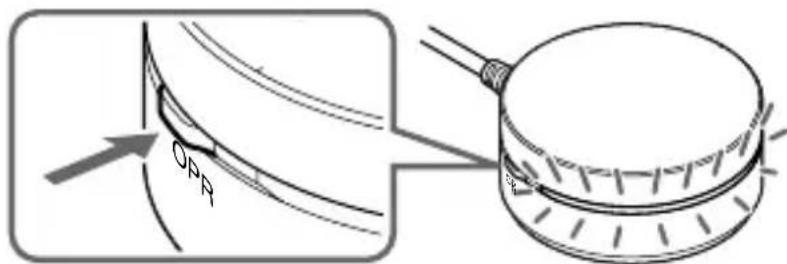
The LED status indicator starts flashing very quickly and this unit enters pairing mode.
Note
Pairing mode is canceled automatically if pairing is not achieved within 5 minutes, or manually by pressing the OPR button. If pairing mode is canceled midway, start over from step 1.
2 Perform pairing procedure on the BLUETOOTH stereo audio source device to detect this unit.
The list of detected devices appears on the display of the BLUETOOTH stereo audio source device. This unit is displayed as "TDM-BT1."
If "TDM-BT1" is not displayed, repeat from step 1.
Notes
- When pairing, be sure to place both the BLUETOOTH devices within 1m of each other.
- Some devices cannot display the list of detected devices.
- To operate the BLUETOOTH stereo audio source device, refer to the operation instructions of the device.
3 Select "TDM-BT1" on the display of the BLUETOOTH stereo audio source device.
4 If Passcode* input is required on the BLUETOOTH stereo audio source device, input "0000".
When BLUETOOTH pairing is complete, the LED status indicator flashes slowly and pairing information is memorized on this unit.
- Passcode may be called "Passkey," "PIN code," "PIN number," or "Password."
Notes
-
Some BLUETOOTH stereo audio source devices may connect with the unit automatically when pairing is completed. For other devices, you will have to connect to this device manually.
-
If you disconnect this unit or the BLUETOOTH stereo audio source device, before a connection is complete, pairing information is not memorized, and pairing will not be completed.
When pairing with a BLUETOOTH stereo audio source device that cannot display a list of detected devices or that has no display
You may pair the device by setting both this unit and the BLUETOOTH stereo audio source device to pairing mode. For details, refer to the operating instructions supplied with the device.
Note
For devices without a display screen the device must have a default pin code of "0000" to work with the TDM-BT1.
If pairing is not complete
Start over from step 1.
Note
Passcode of this unit is fixed to "0000". This unit cannot be paired with a BLUETOOTH stereo audio source device whose Passcode is not "0000".
Tip
To pair with other BLUETOOTH stereo audio source devices, repeat steps 1 to 5 for each device.
Connecting
Check "Preparation" (page 7) and "Pairing" (page 7) before operating the unit.
1 Check to see if the LED status indicator flashes slowly, indicating connection is possible.
Note
If the LED status indicator turns off, perform the pairing procedure, or press the OPR button momentarily.
2 Start the BLUETOOTH connection from the BLUETOOTH stereo audio source device.
3 Start music playback on the BLUETOOTH stereo audio source device.
Notes
- After connection is complete, the LED status indicator becomes constant.
- Turn off the bass boost function or equalizer function of the BLUETOOTH stereo audio source device. If these functions are on, sound may be distorted.
To finish connecting
Terminate the BLUETOOTH connection by any of the operations below.
- Operate the BLUETOOTH stereo audio source device to terminate the connection. For details, refer to the operating instructions supplied with the device.
- Turn off the BLUETOOTH stereo audio source device.
- Press the OPR button momentarily. Until the disconnection is complete, the LED status indicator flashes.
Note
In the following cases, you need to make the BLUETOOTH connection again.
- The BLUETOOTH connection is disconnected once.
- The power of the BLUETOOTH stereo audio source device does not turn on, or the BLUETOOTH signal is off.
- The BLUETOOTH stereo source device is in sleep mode.
- The BLUETOOTH connection is not made.
To turn off the BLUETOOTH signal
Even if you stop BLUETOOTH communication with the BLUETOOTH stereo audio device, this unit continues to send out signals. You can stop the signal completely by the operations below.
- When the LED is on:
Press momentarily the OPR button to stop BLUETOOTH communication with the BLUETOOTH stereo audio device. Then press momentarily the OPR button again to turn off the signal from the unit.
- When the LED is flashing:
Press momentarily the OPR button to turn off the signal from the unit.
Initializing
You can reset this unit to its default setting and delete all pairing information.
If this unit is turned on, use a thin pointed object (such as a paper clip) to press the RESET button to initialize this unit.
The LED status indicator flashes twice, and this unit is reset to the default.
All pairing information is deleted.
Note
If this unit is connected to a BLUETOOTH device, you cannot reset this 10 unit.
Precautions
- BLUETOOTH wireless technology operates within a range of about 10 m. Maximum communication range may vary depending on obstacles (person, metal, wall, etc.) or electromagnetic environment.
BLUETOOTH stereo audio source device
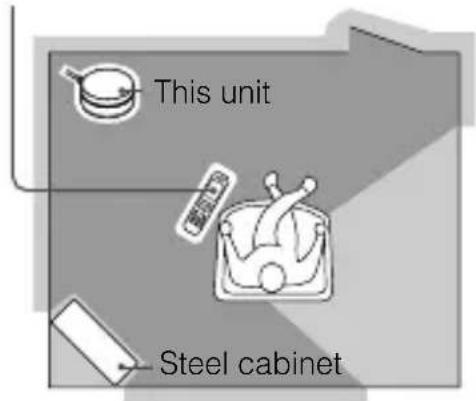
Optimal performance
Limited performance
The following conditions may affect the sensitivity of BLUETOOTH communication
- There is an obstacle such as a person, metal, or wall between this unit and BLUETOOTH device.
- A device using 2.4 GHz frequency, such as a wireless LAN device, cordless telephone, or microwave oven, is in use near this unit.
-
This unit is installed horizontally on a desk made of steel.
-
Because BLUETOOTH devices and wireless LAN (IEEE802.11b/g) use the same frequency, microwave interference may occur and resulting in communication speed deterioration, noise, or invalid connection if this unit is used near a wireless LAN device. In such a case, perform the following.
-
Use this unit at least 10m away from the wireless LAN device.
-
If this unit is used within 10m of a wireless LAN device, turn off the wireless LAN device.
Install this unit and BLUETOOTH device as near to each other as possible. -
Microwaves emitting from a BLUETOOTH device may affect the operation of electronic medical devices. Turn off this unit and other BLUETOOTH devices in the following locations, as it may cause an accident.
where inflammable gas is present, in a hospital, train, airplane, or a gas (petrol) station
- near automatic doors or a fire alarm
Refer to "To turn off the BLUETOOTH signal" (page 10) for further details regarding how to quit BLUETOOTH connection of this unit.
- This unit supports security capabilities that comply with the BLUETOOTH standard to provide a secure connection when the BLUETOOTH wireless technology is used, but security may not be enough depending on the setting. Be careful when communicating using BLUETOOTH wireless technology.
- We do not take any responsibility for the leakage of information during BLUETOOTH communication.
-
Connection with all BLUETOOTH devices cannot be guaranteed.
-
A device featuring BLUETOOTH function is required to conform to the BLUETOOTH standard specified by BLUETOOTH SIG, and be authenticated.
-
Even if the connected device conforms to the above mentioned BLUETOOTH standard, some devices may not be connected or work correctly, depending on the features or specifications of the device.
Depending on the device to be connected, it may require some time to start communication.
On safety
- Do not drop, hit, or otherwise expose the unit to strong shock of any kind. This could damage the product.
- Do not disassemble or attempt to open any parts of the unit.
On placement
-
Do not place the unit in any of the following locations.
-
Direct sunlight, near a heater, or other extremely high-temperature location
Dusty location
-
An unsteady or inclined surface
-
Location exposed to large amounts of vibration
Bathroom or other high-humidity location
- In a car subject to the direct rays of the sun.
Notes when using with a mobile phone
- You cannot use this unit to talk over the telephone, even if the BLUETOOTH connection between this unit and a mobile phone is made.
- For details on operation of your mobile phone when receiving a telephone call while transmitting music using the BLUETOOTH connection, refer to the operating instructions supplied with the mobile phone.
Others
- If you have any questions or problems concerning this unit that are not covered in this manual, please consult your nearest Sony dealer.
- Should any problem persist, consult your nearest Sony dealer.
Troubleshooting
If you run into any problems using this unit, use the following checklist. Should any problem persist, consult your nearest Sony dealer.
No sound
Check the connection between this unit and the stereo audio output device connected to this unit.
Check that both this unit and the BLUETOOTH stereo audio source device are turned on.
Ensure that this unit is not too far from the BLUETOOTH stereo audio source device, or this unit is not receiving interference from a wireless LAN, other 2.4 GHz wireless device, or microwave oven.
Check that the BLUETOOTH connection is made properly between this unit and the BLUETOOTH stereo audio source device.
Turn up the volume of the stereo audio output device.
Turn up the volume of the BLUETOOTH stereo audio source device as high as possible to the extent that sound is not distorted. For details on volume adjustment, refer to the operating instructions supplied with the BLUETOOTH stereo audio source device.
Pair this unit and the BLUETOOTH stereo audio source device again.
Low sound level
Turn up the volume of the BLUETOOTH stereo audio source device as high as possible to the extent that sound is not distorted. For details on volume adjustment, refer to the operating instructions supplied with the BLUETOOTH stereo audio source device.
Turn up the volume of the stereo audio output device.
Distorted sound
Turn down the volume of the BLUETOOTH stereo audio source device to the point where the sound is no longer distorted. For details on volume adjustment, refer to the operating instructions supplied with the BLUETOOTH stereo audio source device.
Sound skips or the correspondence distance is short.
If a device that generates electromagnetic radiation, such as a wireless LAN, other BLUETOOTH device(s), or a microwave oven is nearby, move away from such sources.
Remove any obstacle between this unit and other BLUETOOTH device or move away from the obstacle.
Locate this unit and other BLUETOOTH device(s) as near as possible.
Re-position this unit.
Re-position other BLUETOOTH device.
Pairing cannot be done.
Bring this unit and the BLUETOOTH device closer together.
Verify BLUETOOTH audio source device has pin code of "0000".
Turn off the BLUETOOTH function of all other unused BLUETOOTH device(s).
The BLUETOOTH stereo audio source device cannot connect to this unit.
Turn off the BLUETOOTH function of all other unused BLUETOOTH device(s).
Sound is delayed.
If you watch a TV or a DVD through BLUETOOTH connection via this unit, sound may lag behind the picture.
What is BLUETOOTH technology?
BLUETOOTH wireless technology is a short-range wireless technology that enables wireless data communication between digital devices, such as a computer or digital camera. BLUETOOTH wireless technology operates within a range of about 10m
Connecting two devices as necessary is common, but some devices can be connected to multiple devices at the same time.*
You do not need to use a cable for connection since BLUETOOTH technology is a wireless technology, nor is it necessary for the devices to face one another, such as the case with infrared technology. For example, you can use such a device in a bag or pocket. BLUETOOTH technology is an international standard supported by millions of companies all over the world, and employed by various companies worldwide.
- This unit cannot be connected to multiple devices at the same time.
Communication System and Compatible BLUETOOTH Profile of this unit
Profile is standardization of the function for each BLUETOOTH device specification. This unit and the BLUETOOTH audio source device needs to support the following BLUETOOTH version and profile to work together:
Communication System: BLUETOOTH Specification version 2.0
Compatible BLUETOOTH Profile:
-A2DP (Advanced Audio Distribution Profile)
Specifications
General
Communication System
BLUETOOTH Specification version 2.0
Output
BLUETOOTH Specification Power Class 2
Maximum communication range
Line of sight approx. 10m^*1
Frequency band
2.4 GHz band (2.4000 GHz - 2.4835 GHz)
Modulation method
FHSS
Compatible BLUETOOTH Profile*2
A2DP (Advanced Audio Distribution Profile)
Power requirements
DC 5 V, 0.1 A (via DIGITAL MEDIA PORT)
Dimensions
Approx. dia. 44 × 16 ~mm high (cable 1 ~m )
Mass
Approx. 55g
*1 The actual range will vary depending on factors such as obstacles between devices, magnetic fields around a microwave oven, static electricity, reception sensitivity, antenna's (aerial) performance, operating system, software application, etc.
^*2 BLUETOOTH standard profiles indicate the purpose of BLUETOOTH communication between devices.
Design and specifications are subject to change without notice.
AVENTISSEMENT
Complies with IDA Standards DB00353
Table des matières
Charactéristiques 4
Commentutiliser 1'appareil 5
PREPARATION
Déballage 6
Telephone portable BLUETOOTH
Cet apparel
Specifications BLUETOOTH version 2.0
Sortie
Specifications BLUETOOTH Power Class 2
A2DP (Advanced Audio Distribution Profile)
Alimentation requise
5 V CC, 0,1 A (via DIGITAL MEDIA PORT)
Dimensions
Environ 44 diam. × 16 mm haut (cable de 1m
Masse
Environ. 55g
http://www.sony.ca/support
Kunden in Europa
http://support.sony-europe.com
(2,4000 GHz - 2,4835 GHz)
A2DP (Advanced Audio Distribution Profile)
Betriebsspannung
Klanten in Canada http://www.sony.ca/support
Klanten in Europa
http://support.sony-europe.com
A2DP (Advanced Audio Distribution Profile)
Stroomvereisten
Per i clienti in Canada http://www.sony.ca/support
Per i clienti in Europa http://support.sony-europe.com
Specifica BLUETOOTH Power Class 2
A2DP (Advanced Audio Distribution Profile)
Alimentazione
CC 5 V, 0,1 A (mediante DIGITAL MEDIA PORT)
Dimensioni
A2DP (Advanced Audio Distribution Profile)
A2DP (Advanced Audio Distribution Profile)
Strömförsörjning
Likström 5 V, 0,1 A (via DIGITAL MEDIA PORT)
Matt
Ungefär 44× 16mm (diam. × hojd), (kabel 1 )
Vikt
A2DP (Advanced Audio
Distribution Profile)
- Bluetooth™ Wireless Audio Adapter
- For the customers in Europe
- CE
- countries with separate collection systems)
- For the customers in Singapore
- Table of Contents
- GETTING STARTED
- OPERATING THE UNIT
- ADDITIONAL INFORMATION
- Features
- Example
- Notes
- How to use the unit
- Pairing
- BLUETOOTH connection
- Receiving music
- Unpacking
- Location of Parts
- Status LED status indicator
- Using the unit
- Preparation
- Pairing
- What is pairing?
- Press and hold the OPR button for 3 seconds or more.
- Note
- Perform pairing procedure on the BLUETOOTH stereo audio source device to detect this unit.
- Select "TDM-BT1" on the display of the BLUETOOTH stereo audio source device.
- If Passcode* input is required on the BLUETOOTH stereo audio source device, input "0000".
- When pairing with a BLUETOOTH stereo audio source device that cannot display a list of detected devices or that has no display
- If pairing is not complete
- Tip
- Connecting
- Check to see if the LED status indicator flashes slowly, indicating connection is possible.
- Start the BLUETOOTH connection from the BLUETOOTH stereo audio source device.
- Start music playback on the BLUETOOTH stereo audio source device.
- To finish connecting
- To turn off the BLUETOOTH signal
- Initializing
- If this unit is turned on, use a thin pointed object (such as a paper clip) to press the RESET button to initialize this unit.
- Precautions
- On safety
- On placement
- Notes when using with a mobile phone
- Others
- Troubleshooting
- No sound
- Low sound level
- Distorted sound
- Sound skips or the correspondence distance is short.
- Pairing cannot be done.
- The BLUETOOTH stereo audio source device cannot connect to this unit.
- Sound is delayed.
- What is BLUETOOTH technology?
- Communication System and Compatible BLUETOOTH Profile of this unit
- Specifications
- General
- Communication System
- Output
- Maximum communication range
- Frequency band
- Modulation method
- Compatible BLUETOOTH Profile*2
- Power requirements
- Dimensions
- Mass
- AVENTISSEMENT
- Table des matières
- Charactéristiques 4
- Sortie
- Alimentation requise
- Masse
- Betriebsspannung
- Stroomvereisten
- Alimentazione
- Dimensioni
- Strömförsörjning
- Matt
- Vikt
Brand : SONY
Model : TDMBT1
Category : Network card / adapter