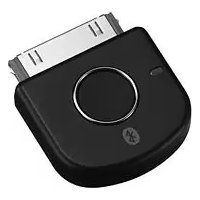
TMRBT8iP - Network card / adapter SONY - Free user manual and instructions
Find the device manual for free TMRBT8iP SONY in PDF.



| Product Type | Bluetooth Audio Transmitter |
| Brand | Sony |
| Model | TMRBT8iP |
| Dimensions (W × H × D) | Approx. 31 × 28 × 8 mm |
| Weight | Approx. 5 g |
| Power Supply | Via iPod (30-pin dock connector), no battery or charging required |
| Bluetooth Version | 2.0 + EDR (Enhanced Data Rate) |
| Supported Bluetooth Profiles | A2DP (Advanced Audio Distribution Profile), AVRCP (Audio Video Remote Control Profile) |
| Maximum Range | Approx. 10 m (30 ft) line of sight |
| Frequency Band | 2.4 GHz (2.4000 GHz to 2.4835 GHz) |
| Frequency Response (A2DP) | 20 Hz – 20,000 Hz (44.1 kHz sampling) |
| Audio Codec | SBC (Subband Codec) |
| Connector | iPod 30-pin |
| Operating Temperature | 0 °C to 35 °C |
| Main Functions | Wireless transmission of stereo music from iPod to Bluetooth receiver; remote control of iPod (play, pause, etc.) via AVRCP |
| iPod Compatibility | iPod nano (1st to 3rd generation), iPod touch, iPod classic, iPod 5th generation, iPod 4th generation (color display), iPod mini |
| Care and Cleaning | Clean with a soft, dry cloth; do not use solvents (alcohol, gasoline) |
| Safety | Do not expose to rain or humidity; do not disassemble; keep away from heat sources |
| Supplied Accessories | Instruction manual (1) |
Frequently Asked Questions - TMRBT8iP SONY
User questions about TMRBT8iP SONY
0 question about this device. Answer the ones you know or ask your own.
Ask a new question about this device
Download the instructions for your Network card / adapter in PDF format for free! Find your manual TMRBT8iP - SONY and take your electronic device back in hand. On this page are published all the documents necessary for the use of your device. TMRBT8iP by SONY.
USER MANUAL TMRBT8iP SONY
To reduce the risk of fire or electric shock, do not expose this apparatus to rain or moisture.
C
Hereby, Sony Corp., declares that this equipment is in compliance with the essential requirements and other relevant provisions of Directive 1999/5/EC.
For details, please access the following URL: http://www.compliance.sony.de/
Use of this radio equipment is not allowed in the geographical area within a radius of 20 km from the centre of Ny-Alesund, Svalbard in Norway.
iPod is trademark of Apple Computer, Inc., registered in the U.S. and other countries
The Bluetooth word mark and logos are owned by the Bluetooth SIG, Inc. and any use of such marks by Sony Corporation is under license.
Other trademarks and trade names are those of their respective owners.
Disposal of Old Electrical & Electronic Equipment (Applicable in the European Union and other European countries with separate collection systems)

This symbol on the product or on its packaging indicates that this product shall not be treated as household waste. Instead it shall be handed over to the applicable collection point for the recycling of electrical and electronic
equipment. By ensuring this product is disposed of correctly, you will help prevent potential negative consequences for the environment and human health, which could otherwise be caused by inappropriate waste handling of this product.
The recycling of materials will help to conserve natural resources. For more detailed information about recycling of this product, please contact your local Civic Office, your household waste disposal service or the shop where you purchased the product.
CompatibleiPodmodels
The compatible iPod models are as follows. Update your iPod to use the latest software before you use it.

Pod nano 3rd generation (vide o)
P od touch

iPod classic

Pod 5th generation (vole o)

iPod nano2nd generation (aluminum)

iPodnano 1st generation

iPod 4th generation (color display)

iPod 4th generation

iPod mini
Table of Contents
What is Bluetooth wireless technology? 4
Features 5
Basic operation of Bluetooth devices 6
Getting Started
Location and Function of Parts 7
Connecting to an iPod ......... 8
Pairing 10
What is pairing? 10
Pairing procedures 10
On Indicators 13
Listening to music
Bluetooth Connecting / Playing back 14 Controlling by the Remote ...16
Additional Information
Precautions 17
Troubleshooting 19
Initializing this unit 21
Specifications 22
Notes
- This unit is designed for iPod only. You cannot connect any other portable audio players.
- Sony cannot accept responsibility in the event that data recorded to iPod is lost or damaged when using an iPod connected to this unit.
What is Bluetooth wireless technology?
Bluetooth™ wireless technology is a short-range wireless technology that enables wireless data communication between digital devices, such as a computer or digital camera. Bluetooth wireless technology operates within a range of about 10 meters (about 30 feet).
Connecting two devices as necessary is common, but some devices can be connected to multiple devices at the same time.
You do not need to use a cable for connection nor is it necessary for the devices to face one another, such as the case with infrared technology. For example, you can use such a device in a bag or pocket.
Bluetooth standard is an international standard supported by thousands of companies all over the world, and employed by various companies worldwide.
Communication System and Compatible Bluetooth Profile of this unit
Profile is standardization of the function for each Bluetooth device specification. This unit supports the following Bluetooth version and profiles:
Communication System: Bluetooth Specification version 2.0 + EDR*
Compatible Bluetooth Profile:
- A2DP (Advanced Audio Distribution Profile)
-
AVRCP (Audio/Video Remote Control Profile)
-
Enhanced Data Rate
Notes
- To be able to use the Bluetooth function, the Bluetooth device to be connected requires the same profile as the unit's.
Note also that even if the same profile exists, devices may vary in function depending on their specifications. - Due to the characteristic of Bluetooth wireless technology the sound transmitted from this unit is slightly delayed during listening to the music.
Features
This unit is an audio transmitter using Bluetooth wireless technology.
You can enjoy music wirelessly by transmitting the audio signals to a Bluetooth receiving device (headset, car stereo, speaker, stereo component system, etc.), if you connect this unit to the iPod (see page 3 on compatible iPod models) with the iPod connector (30 pin).
This unit's features are as follows:
- Wireless transmitter for streaming of high-quality stereo music from iPod.
Transmits music to other devices using Bluetooth wireless technology.*1 - Basic remote control operation (play, pause, etc.) of iPod functions via Bluetooth connection.*2
- Transmitter power supplied from iPod so no additional battery or charging is needed.
- Bluetooth Specification Version 2.0 + EDR (Enhanced Data Rate) for higher quality audio with less interference.
1 The connected Bluetooth device is required to support A2DP (Advanced Audio Distribution Profile).
2 The connected Bluetooth device is required to support AVRCP (Audio/Video Remote Control Profile).
iPod with dock connector port (30 pin)
This unit
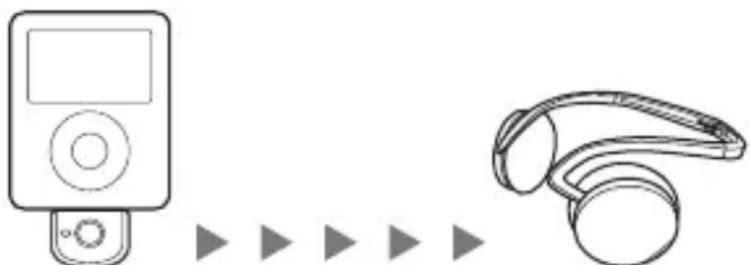
Bluetooth receiving device (Headset, etc)

Tip
For details on Bluetooth wireless technology, see page 4.
Basic operation of Bluetooth devices
The following example describes how you can transmit music played on an iPod connected to this unit, and listen on a Bluetooth receiving device (headset).
Pairing
Enables a Bluetooth receiving device and this unit to recognize one another. You do not need to recognize one another next time if you did once.
iPod with dock connector port (30 pin)
This unit


Bluetooth receiving device (Headset, etc)
For more details, see page 10.
Bluetooth connecting
Turn on the Bluetooth receiving device and play the iPod. Bluetooth connection is established automatically.

For more details, see page 14.
Listening to music
You can enjoy listening to music played on your iPod connected to this unit through the Bluetooth receiving device.

For more details, see page 14.
Location and Function of Parts

1 iPod connector (30 pin)
Connects to the dock connector of an iPod (page 8).
2 Indicator
Indicates this unit's status (page 13).
3 Power button
Performs the following:
- Turning on/off of this unit (page 8).
- Pairing (page 10).
- Initializing this unit (page 21).
Connecting to an iPod
Connect this unit to the dock connector port of an iPod firmly.
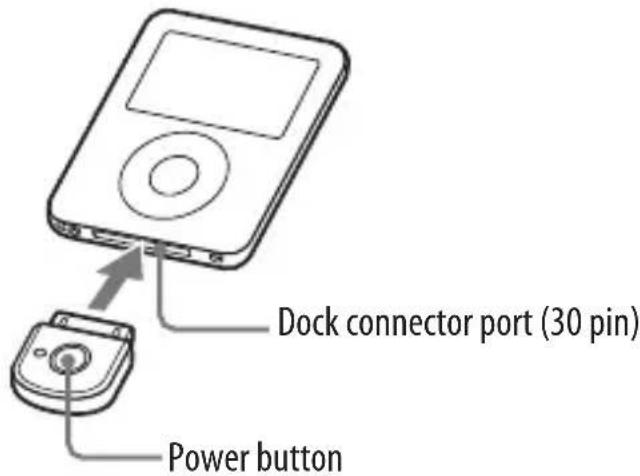
To turn on this unit
1 Connect this unit to the iPod.
2 Press the power button of this unit for about 1 second to turn it on, or start to play back on iPod.
When this unit turns on, the indicator flashes twice.
Note
If the unit cannot turn on, operate the iPod.
To turn off this unit
To turn off this unit, press and hold this unit's power button for about 1 second. The indicator flashes once and this unit turns off.

Tip
Maximum communication time or standby time may vary depending on your iPod.
Notes
- To listen to music from the headphone jack of the iPod, disconnect this unit from the iPod.
- While this unit is turned on, it consumes power from the iPod. We recommend disconnect this unit from iPod when not using the Bluetooth function.
- If the headphone is connected to the iPod while the iPod is playing back, it consumes power from iPod.
- If you turn off this unit while the iPod is playing back, iPod will power off.
- It is not recommended to turn off iPod as the linkage will lost between this unit and the Bluetooth receiving device.
- There is no need to charge this unit as it will receive power from the connected iPod. It is recommended to check the iPod's remaining battery before using.
Pairing
What is pairing?
Bluetooth devices need to be "paired" with each other beforehand.
Once Bluetooth devices are paired, there is no need for pairing again, except in the following cases:
- Pairing information is deleted after repair, etc.
- This unit is paired with 9 or more receiving devices.
This unit can be paired with up to 8 Bluetooth receiving device. If a new device is paired after 8 devices have been paired, the device whose latest connection time is the oldest among the 8 paired devices is replaced by the new one.
- This unit is initialized.
All pairing information is deleted (page 21).
Pairing procedures
1 Turn on the power of iPod.
(Make sure the iPod is in pause mode)
2 Connect this unit to the iPod (page 8).
3 Place this unit and the Bluetooth receiving device to be paired together within 1 m (3 ft).
4 Set the Bluetooth receiving device to enter "Pairing in process."
See the operating instructions supplied with the Bluetooth receiving device.

Tip
For Sony Wireless Stereo Headset
Press and hold the POWER button of the bluetooth receiving device for 7 seconds or more to standby for pairing while the unit is turned off.

Notes
- Passcode* of this unit is fixed at "0000", "1234" or "8888." Depending on the Bluetooth receiving device, it may be necessary to input the passcode (in this case, "0000", "1234" or "8888"). This unit cannot be paired with a Bluetooth receiving device whose passcode is not "0000", "1234" or "8888."
- If the Bluetooth receiving device requires a passcode, input "0000."
- Passcode may be called "Passkey," "PIN code," "PIN number," or "Password."
5 Press and hold the power button of this unit for more than about 7 seconds to enter "Pairing in process."
After about 1 second, the indicator will flash twice but keep pressing the power button.
Notes
- When first power on this unit after initialize, this unit will enter the "Pairing in process" automatically.
- The pairing information is initialized if you press and hold the power button for 15 seconds. The indicator lights up for 5 seconds before the initialization starts. Release the button immediately when the indicator lights up.

When the indicator of this unit flashes quickly, stop pressing it. This unit enters "Pairing in process."
This unit's indicator status will vary as follows, and pairing is established with the Bluetooth receiving device.
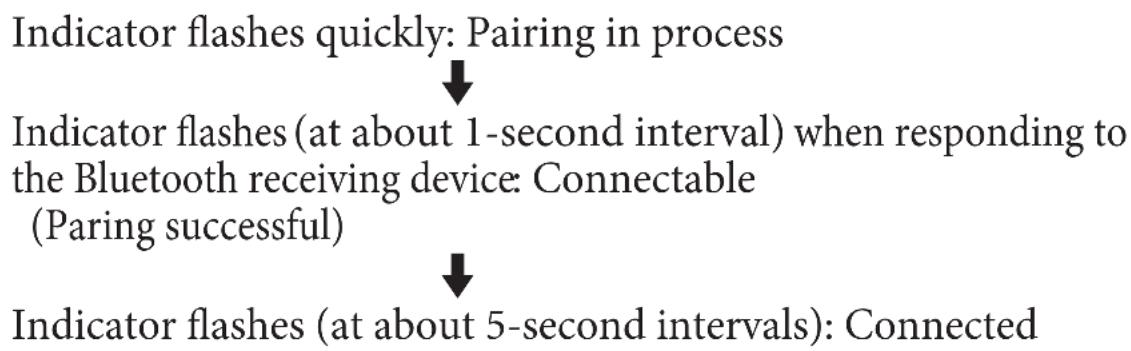
Notes
- "Pairing in process" of this unit is released after about 5 minutes. If pairing is not established within about 5 minutes, repeat the above procedure from step 4. iPod backlight may turn on in this 5 minutes.
- To enter "Pairing in process," you need to turn off the power of this unit first.
When not completed pairing
Repeat the procedure from step 2.
To quit "Pairing in process"
Press and hold the power button of this unit for about 1 second to turn off this unit.

Tip
When paring this unit with a number of Bluetooth receiving devices, repeat steps 3 to 5 for each device individually.
Note
For using the Bluetooth function, it is required that the Bluetooth device on the other side is corresponding with the same profile as this unit. However, even if it is corresponding with the same profile, functions may differ depending on the specification of the Bluetooth device.
On Indicators
| Status Indicator | ||
| Power on | Flashes twice | ●● |
| Power off | Flashes once | ●● |
| Pairing | Flashes quickly | ●●●●●●●●●●●●●●●●●●●●●●●●●●●●●●●●●●●●●●●●●●●●●●●●●●●●●●●●●●●●●●●●●●●●●●●●●●●●●●●●●●●●●●●●●●●●●●●●●●●● ● |
| Connecting | Flashes(at about 1-second intervals) | ●-●-●-●-●-●-●-●-●-●-●-●-●-●-●-●-●-●-●-●-●-●-●-●-●-●-●-●-●-●-●-●-●-●-●-●-●-●-●-●-●-●-●-●-●-●-●-●-●-●-●●-●-●-●-●-●-●-●-●-●-●-●-●-●-●-●-●-●-●-●-●-●-●-●-●-●-●-●-●-●-●-●-●-●-●-●-●-●-●-●-●-●-●-●-●-●-●-●-●-● - |
| Connected | Listening *1(flashes twice atabout 5-secondintervals) | ●●-●-●-●-●-●-●-●-●-●-●-●-●-●-●-●-●-●-●-●-●-●-●-●-●-●-●-●-●-●-●-●-●-●-●-●-●-●-●-●-●-●-●-●-●-●-●-●-●- ● |
| With no music *2(flashes once atabout 5-secondintervals) | ●-●-●-●-●-●-●-●-●-●-●-●-●-●-●-●-●-●-●-●-●-●-●-●-●-●-●-●-●-●-●-●-●-●-●-●-●-●-●-●-●-●-●-●-●-●-●-●-● - | |
1 When press▶II on the iPod, the music pause. The indicator flashes twice on this unit. This unit transmit the data of no sound.
2 When press the pause button on the Bluetooth receiving device, the music pause. The indicator flashes once on this unit. This unit does not transmit the music.
Bluetooth Connecting / Playing back
You can listen to music of the iPod connected to this unit on the Bluetooth receiving device (headset, etc.).
Before starting operation, complete pairing this unit and the Bluetooth receiving device (page 10).
1 The Bluetooth receiving device is on standby for connection.
2 Connect this unit to the iPod then turn on the iPod and start playback on the iPod.
This unit's indicator status will vary as follows, and the Bluetooth connection between this unit and the Bluetooth receiving device is established.
Indicator flashes twice: Power is on

Indicator flashes (at about 1-second intervals): Connecting in process

Indicator flashes twice slowly (at about 5-second intervals):
Connected
(Playback will start automatically)
If the Bluetooth connection is not established within 5 minutes*, this unit automatically turns itself off. In this case, turn it on again by pressing and holding the power button for about 1 second.
- iPod backlight may turn on in this 5 minutes.
Notes
- If the Bluetooth connection cannot be established with the device paired already, try pairing again.
- If playback cannot start automatically, try start playback on iPod.
- If you press and hold the power button on this unit for about 1 second, this unit will connect to the iPod and start playback automatically.

Tip
You can control the volume on the Bluetooth receiving device.
(The volume of the iPod is not changed.)
Notes
- Even if you control the volume on the iPod, sound from the Bluetooth receiving device will not change.
- If this unit and the Bluetooth receiving device become out of range and the Bluetooth connection terminates, repeat the procedure from step 1.
- Playback through a Bluetooth connection may cause noise, sound break, or playback speed change depending on the location and the usage (page 17).
Controlling by the Remote
When connecting (Bluetooth connecting) to devices that support AVRCP (Audio/Video Remote Control Profile)
You can control the iPod using the control button of the Bluetooth receiving device. For details, see the operating instructions supplied with the Bluetooth devices.
Before starting remote control operation, check that step 1 and 2 of "Bluetooth Connecting / Playing back" are completed (page 14). Remote control for the iPod by the Bluetooth receiving device.

Notes
- Even if you control the volume on the iPod, the volume of the Bluetooth receiving device, such as a headset, does not change.
- When operating the iPod by remote control, do not cover this unit with hands.
- You may need to press the play/pause button twice depending on the Bluetooth receiving device.
- You may need to press the play/pause button of the Bluetooth receiving device twice when you operate the button on the iPod.
- Operation of the iPod with this unit by the Bluetooth receiving device will vary depending on the Bluetooth receiving device's specification.
- When the iPod is playing a video or photo, remote control operation may become unstable.

Tip
When you press the pause button on the Bluetooth receiving device, the iPod goes to pause mode for 10 minutes and the iPod backlight is turns on and off at interval.

Do not cover this unit with hands.
Precautions On Bluetooth communication
- Bluetooth wireless technology operates within a range of about 10 meters (about 30 feet). Maximum communication range may vary depending on obstacles (human body, metal, wall, etc.) or electromagnetic environment.
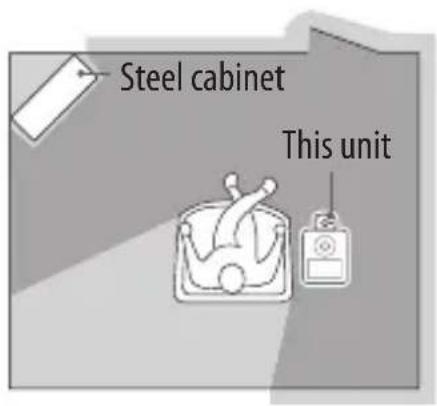

Optimal performance Limited performance
- The aerial of this unit is shown as illustrated in the dotted line. The sensitivity of Bluetooth communication will improve by turning the direction of the built-in aerial to the connected Bluetooth device. The communication distance shortens when the obstacles are between the aerial of the connected device and this unit.

Location of built-in aerial
The following conditions may cause noise, sound break or playback speed change.
-
When using inside the metal bag.
-
When using inside the backpack or shoulder bag.
-
A device using 2.4 GHz frequency, such as a wireless LAN device, cordless telephone, or microwave oven, is in use near this unit.
-
Because Bluetooth devices and wireless LAN (IEEE802.11b/g) use the same frequency, microwave interference may occur and resulting in communication speed deterioration, noise, or invalid connection if this unit is used near a wireless LAN device. In such a case, perform the following.
-
Install this unit and Bluetooth device as near to each other as possible.
-
If this unit is used within about 10 meters (about 30 feet) of a wireless LAN device, turn off the wireless LAN device.
-
Microwaves emitting from a Bluetooth device may affect the operation of electronic medical devices. Turn off this unit and other Bluetooth devices in the following locations, as it may cause an accident.
where inflammable gas is present, in a hospital, train, airplane, or a petrol station.
-
near automatic doors or a fire alarm.
-
This unit supports security capabilities that comply with the Bluetooth standard to provide a secure connection when the Bluetooth wireless technology is used, but security may not be enough depending on the setting. Be careful when communicating using Bluetooth wireless technology.
-
We do not take any responsibility for leakage of information during Bluetooth communication.
-
Connection with all Bluetooth devices cannot be guaranteed.
-
A device featuring Bluetooth function is required to conform to the Bluetooth standard specified by Bluetooth SIG, Inc. and be authenticated.
-
Even if the connected device conforms to the above mentioned Bluetooth standard, some devices may not be connected or work correctly, depending on the features or specifications of the device.
Depending on the device to be connected, communication may take some time.
On safety
-
Do not drop, hit, or otherwise expose the unit to strong shock of any kind. This could damage the product.
-
Do not disassemble or attempt to open any parts of the unit.
On placement
- Do not place the unit in any of the following locations.
- Direct sunlight, near a heater, or other extremely high-temperature location
Dusty location - An unsteady or inclined surface
- Location exposed to large amounts of vibration
- Bathroom or other high-humidity location
- In a car subject to the direct rays of the sun
Notes on using in a car
Do not attempt to connect this unit, or to operate this unit, an audio output device or a car radio while driving or waiting at a traffic signal.
Cleaning
Clean the unit with a soft, dry cloth, or a soft cloth lightly moistened with a mild detergent solution. Do not use any type of solvent, such as alcohol or benzene, which may damage the finish.
Others
If you have any questions or problems concerning this unit that are not covered in this manual, please consult your nearest Sony dealer.
Troubleshooting
If you run into any problems using this unit, use the following checklist and read the product support information on our website. Should any problem persist, consult your nearest Sony dealer.
| Symptom Cause / Remedy | |
| This unit is not turned on. (or turns off shortly after turning on.) | → Press and hold this unit power button for about 1 second. → Check the remaining battery of the iPod. If the remaining battery is not enough, charge the iPod. → Reset your iPod. → If your iPod have no content, add some content to your iPod. |
| No sound | → Check the connection between this unit and the iPod. → Check that both this unit and the Bluetooth receiving device are turned on. → Ensure that this unit is not too far from the Bluetooth receiving device, or this unit is not receiving interference from a wireless LAN, other 2.4 GHz wireless device, or microwave oven. → Pair this unit and the Bluetooth receiving device again. |
| Low sound level | → Turn up the volume of the Bluetooth receiving device as high as possible to the extent that sound is not distorted. For details on volume adjustment, refer to the operating instructions supplied with the Bluetooth receiving device. |
| Cannot change the volume. | → Change the volume on the Bluetooth receiving device. |
Symptom Cause / Remedy
| Distorted sound | →Turn down the volume of the Bluetooth receiving device to the point where the sound is no longer distorted. For details on volume adjustment, refer to the operating instructions supplied with the Bluetooth receiving device. →Turn off the EQ of iPod. →Ensure that this unit is not receiving interference from a wireless LAN, other 2.4 GHz wireless device, or microwave oven. |
| Sound break, noise or playback speed change | →If a device that generates electromagnetic radiation, such as a wireless LAN, other Bluetooth device(s), or a microwave oven is nearby, move away from such sources. →Remove any obstacle between this unit and other Bluetooth device or move away from the obstacle. →Locate this unit and other Bluetooth device(s) as near as possible. →Re-position or re-orient this unit. →Re-position or re-orient other Bluetooth device. |
| Pairing cannot be established. | →Locate this unit and other Bluetooth device(s) as near as possible. →Check if you input correct passcode (page 11). |
| Bluetooth connection cannot be established with a device that has been “paired” before. | →Locate this unit and other Bluetooth device(s) as near as possible. →This unit tries to connect with either of the last two devices recognized before. If this unit cannot establish the Bluetooth connection with a paired device, operate the connecting procedures on the Bluetooth receiving device or pair the device again. →Pairing information may be deleted. Pair the device again. |
Initializing this unit
You can reset this unit to its default and delete all pairing information.
1 Connect the unit to the iPod.
2 Press and hold the power button for more than about 15 seconds.
During these 15 seconds, the indicator changes in sequence as follows:
- flash (at about 1 second intervals) for about 5 seconds
- flash quickly for about 5 seconds
- lights up for about 5 seconds
- flash 4 times
Then, the unit is reset to default setting and all pairing information is deleted.
Note
Do not operate your iPod while initializing this unit.
Specifications
General
Communication System
Bluetooth Specification Version 2.0 + EDR*1
Output
Bluetooth Specification Power Class 2
Maximum communication range
Line of sight approx. 10m (30ft)^*2
Frequency band
2.4 GHz band (2.4000 GHz - 2.4835 GHz)
Modulation method
FHSS
Transmission range (A2DP)
20 - 20,000 Hz (Sampling frequency
44.1 kHz)
Compatible Bluetooth Profiles*3
A2DP (Advanced Audio Distribution Profile)
AVRCP (Audio/Video Remote Control Profile)
Supported Codec*4
SBC*5
Terminal
iPod connector (30 pin)
Operating temperature
0^ to 35^ (32^ to 95^)
Dimensions
Approx. 31× 28× 8mm
(1^1 / 4× 1^1 / 8× 1^1 / _32in.)(w / h / d)
(including protruding parts)
Mass
Approx. 5g (0.2 oz)
1 Enhanced Data Rate
2 The actual range will vary depending on factors such as obstacles between devices, magnetic fields around a microwave oven, static electricity, reception sensitivity, aerial's performance, operating system, software application, etc.
^*3 Bluetooth standard profiles indicate the purpose of Bluetooth communication between devices.
^44 Codec: Audio signal compression and conversion format
*5 Subband Codec
Supplied accessories
Operating instructions (this book) (1)
Design and specifications are subject to change without notice.
AVERTISSEMENT
Specifications Bluetooth Power Class 2
A2DP (Advanced Audio Distribution Profile)
AVRCP (Audio/Video Remote Control Profile)
Codes pris en charge
SBC*5
Bones
-
A2DP (Advanced Audio Distribution Profile)
-
AVRCP (Audio/Video Remote Control Profile)
-
Enhanced Data Rate
Hinweise
(2,4000 GHz - 2,4835 GHz)
A2DP (Advanced Audio Distribution
Profile)
AVRCP (Audio/Video Remote Control
Profile)
A2DP (Advanced Audio Distribution Profile)
AVRCP (Audio/Video Remote Control Profile)
- To reduce the risk of fire or electric shock, do not expose this apparatus to rain or moisture.
- C
- Disposal of Old Electrical & Electronic Equipment (Applicable in the European Union and other European countries with separate collection systems)
- CompatibleiPodmodels
- Table of Contents
- Getting Started
- Listening to music
- Additional Information
- Notes
- What is Bluetooth wireless technology?
- Communication System and Compatible Bluetooth Profile of this unit
- Features
- Tip
- Basic operation of Bluetooth devices
- Pairing
- Bluetooth connecting
- Location and Function of Parts
- iPod connector (30 pin)
- Indicator
- Power button
- Connecting to an iPod
- To turn on this unit
- Note
- To turn off this unit
- What is pairing?
- Pairing procedures
- Press and hold the power button of this unit for more than about 7 seconds to enter "Pairing in process."
- When not completed pairing
- To quit "Pairing in process"
- On Indicators
- Bluetooth Connecting / Playing back
- Controlling by the Remote
- When connecting (Bluetooth connecting) to devices that support AVRCP (Audio/Video Remote Control Profile)
- Before starting remote control operation, check that step 1 and 2 of "Bluetooth Connecting / Playing back" are completed (page 14). Remote control for the iPod by the Bluetooth receiving device.
- Precautions On Bluetooth communication
- Optimal performance Limited performance
- Location of built-in aerial
- On safety
- On placement
- Notes on using in a car
- Cleaning
- Others
- Troubleshooting
- Symptom Cause / Remedy
- Initializing this unit
- Specifications
- General
- Communication System
- Output
- Maximum communication range
- Frequency band
- Modulation method
- Transmission range (A2DP)
- Compatible Bluetooth Profiles*3
- Supported Codec*4
- Terminal
- Operating temperature
- Dimensions
- Mass
- Supplied accessories
- AVERTISSEMENT
- Codes pris en charge
- Bones
- Hinweise
Brand : SONY
Model : TMRBT8iP
Category : Network card / adapter