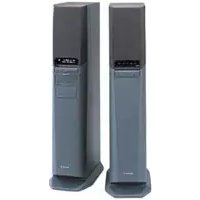
SAVA10 - Home Theater System SONY - Free user manual and instructions
Find the device manual for free SAVA10 SONY in PDF.



| Product type | Home cinema system with integrated amplifier |
| Brand | Sony |
| Model | SA-VA10 |
| Dimensions front left speaker | 190 x 565 x 280 mm (W/H/D) |
| Dimensions front right speaker | 190 x 565 x 265 mm (W/H/D) |
| Dimensions rear speaker | 110 x 160 x 140 mm (W/H/D) |
| Weight front left speaker | 9.0 kg |
| Weight front right speaker | 8.0 kg |
| Weight rear speaker | 700 g per speaker |
| Power supply | Mains 220-230 V, 50/60 Hz |
| Power consumption | 75 W |
| Total RMS power | 100 W |
| Surround modes | Dolby Pro Logic, HALL, GAME, Surround OFF |
| Front speakers | 2 x 5 cm (center), 2 x 10 cm (full range/bass), 1 x 13 cm (subwoofer) |
| Rear speakers | 2 x 8 cm cone type |
| Supplied accessories | Rear speakers SS-SR151 (2), connection cords, remote control RM-J10, SUM-3 batteries (2), anti-vibration pads (8) |
| Special functions | Automatic on/off, infrared remote control, delay time adjustment, super woofer mode (1/2/off) |
| Maintenance and cleaning | Soft cloth with neutral detergent; avoid alcohol and benzine |
| Safety precautions | Do not expose to humidity; unplug if liquid or solid enters; use on compatible mains |
| Spare parts and repairability | Replaceable batteries (AA/R6); for other parts, contact Sony dealer |
Frequently Asked Questions - SAVA10 SONY
User questions about SAVA10 SONY
0 question about this device. Answer the ones you know or ask your own.
Ask a new question about this device
Download the instructions for your Home Theater System in PDF format for free! Find your manual SAVA10 - SONY and take your electronic device back in hand. On this page are published all the documents necessary for the use of your device. SAVA10 by SONY.
USER MANUAL SAVA10 SONY
Home Theater Active Speaker System
Operating Instructions GB
Mode d'emploi F
Thank you for purchasing a Sony speaker system.
Before operating the unit, please read this manual thoroughly and retain it for future reference.
About This Manual
The instructions in this manual describe the controls on the left speaker. You can also use the controls on the remote if they have the same or similar names as those on the left speaker.
- The following icons are used in this manual:

Indicates that you can use only the remote to do the task. Indicates hints and tips for making the task easier.
This speaker system incorporates the Dolby Pro Logic Surround System.*
* Manufactured under license from Dolby Laboratories Licensing Corporation. DOLBY, the double-D symbol □□ and “PRO LOGIC” are trademarks of Dolby Laboratories Licensing Corporation.
TABLE OF CONTENTS
Overview 4
Getting Started
Precautions 6
Unpacking 6
Installing the Anti-vibration pads 7
Choosing the Best Location 7
Speaker System Hookups 8
Audio Component Hookups 9
Home Theatre Operations
Enjoying Surround Sound 10
Adjusting the Surround Sound 11
Adjusting the Sound 12
Using an External Centre Speaker 13
Additional Information
Troubleshooting 14
Specifications 14
Glossary 15
Index 15
natural_image
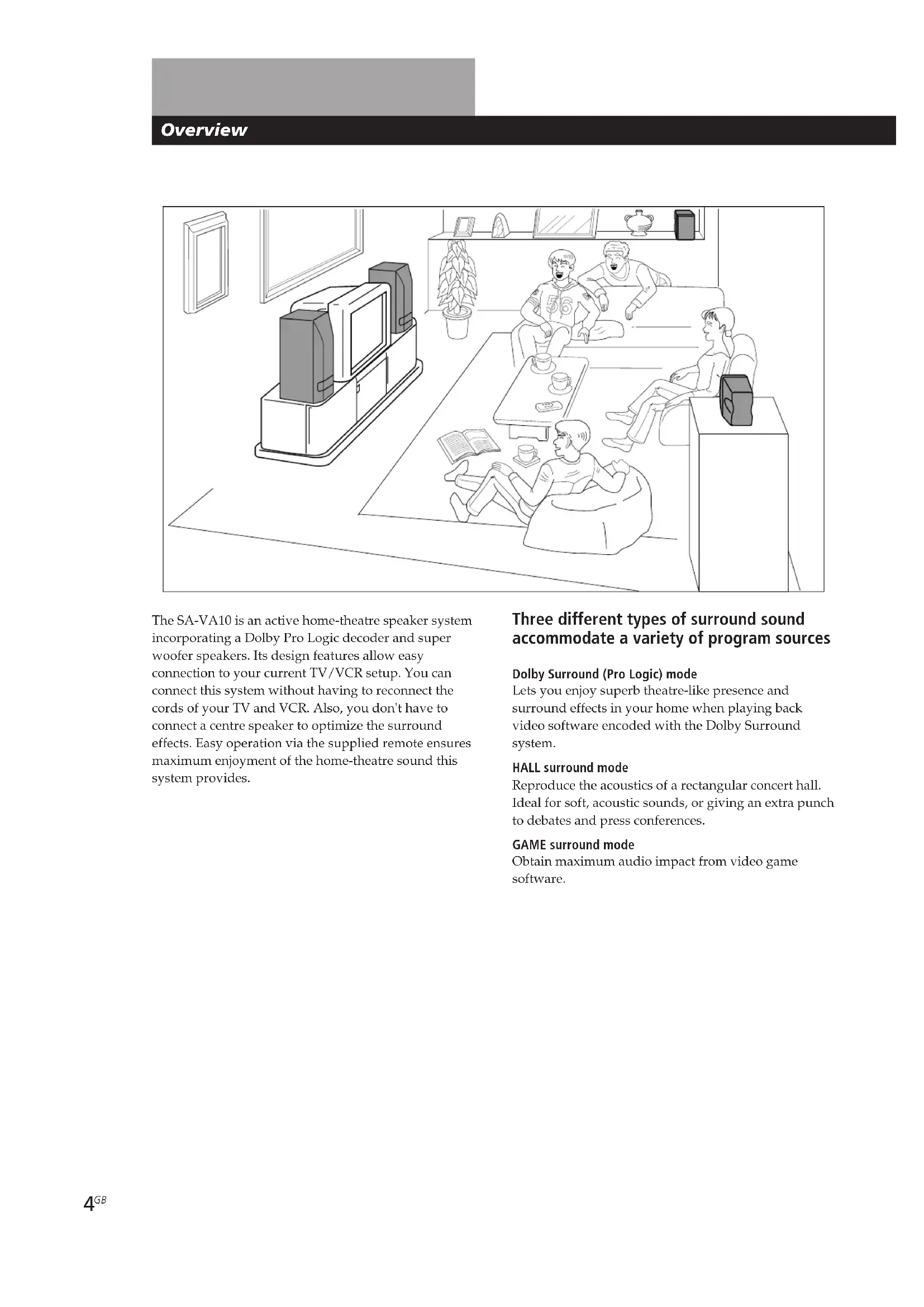
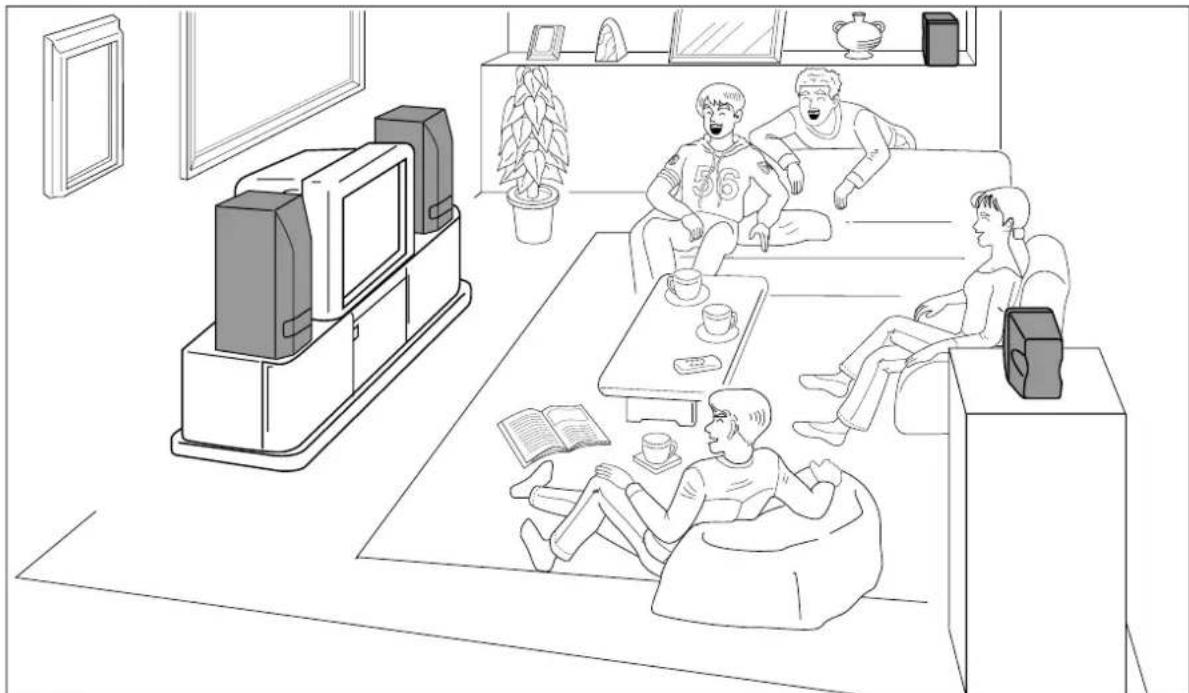
Line drawing of a living room scene with people relaxing on sofas, TV set, and a coffee table (no text or symbols)The SA-VA10 is an active home-theatre speaker system incorporating a Dolby Pro Logic decoder and super woofer speakers. Its design features allow easy connection to your current TV/VCR setup. You can connect this system without having to reconnect the cords of your TV and VCR. Also, you don't have to connect a centre speaker to optimize the surround effects. Easy operation via the supplied remote ensures maximum enjoyment of the home-theatre sound this system provides.
Three different types of surround sound accommodate a variety of program sources
Dolby Surround (Pro Logic) mode
Lets you enjoy superb theatre-like presence and surround effects in your home when playing back video software encoded with the Dolby Surround system.
HALL surround mode
Reproduce the acoustics of a rectangular concert hall. Ideal for soft, acoustic sounds, or giving an extra punch to debates and press conferences.
GAME surround mode
Obtain maximum audio impact from video game software.
Dolby Pro Logic Surround sound
The use of a centre speaker is a key factor in obtaining a full surround effect when playing sources encoded with the Dolby Pro Logic Surround sound system.
Centre speakers in a movie theatre make central sounds, such as dialogue, clearer and create a unified sound image.
Normally, you have to install a centre speaker separately, but this speaker system makes it easy to set up a high-performance home theatre system by incorporating a high-quality centre speaker system into the front speakers.
Top view
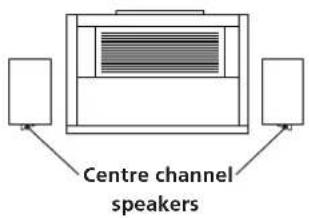
Front view
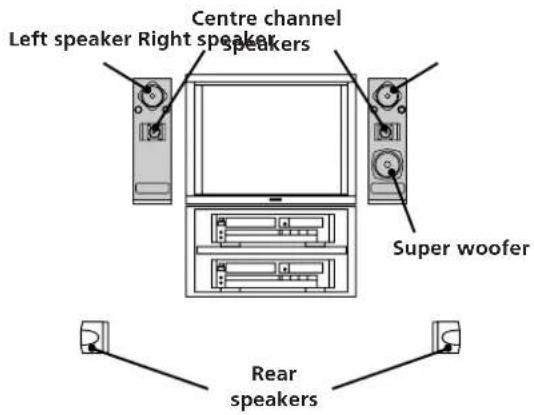
How the centre speaker works
The front left and right speakers are equipped with centre channel tweeters (see above) angled inwards at 30^ to reproduce high-frequency centre channel sounds. Low-frequency centre channel sounds are mixed with the front channel signals and reproduced through the front left and right full range units. This design produces a high-quality centralized sound image for the centre channel which exactly matches the quality of the front channel sound to provide superior sound quality and a unified sound image without a cumbersome external centre speaker.
Dynamic Bass Roar (DBR) super woofer system provides theatre-like bass sound
To provide a theatre-like experience complete with dynamic bass sounds, this speaker system incorporates the Super Acoustically-loaded Woofer (SAW) design (see below) in the right front speaker to form a DBR super woofer system.
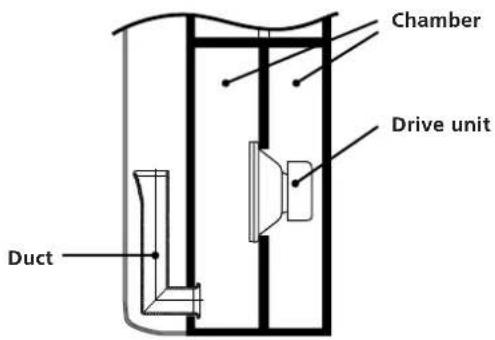
What is the SAW design?
The SAW design features a centrally-positioned woofer drive unit, two chamber construction, and a long duct. Through precision control of the acoustics of the two chambers, the unit can reproduce powerful ultra low frequencies without muddiness.
In addition, we also included two super woofer modes designed to bring the dynamic bass sounds found in movie theatres (mode 1) and concert halls (mode 2) to your living room.
Power turns on and off automatically
The speakers will turn on automatically when a sound signal is input and turn off when you've finished watching a program and the sound signal goes out. So you don't have to bother using the power switch every time you use the system.
Precautions
On safety
- Should any solid object or liquid fall into the cabinet, unplug the speaker system and have it checked by qualified personnel before operating it any further.
On power sources
- Before operating the speakers, check that the operating voltage is identical with your local power supply. The operating voltage is indicated on the nameplate on the rear of the speakers.
- The speakers are not disconnected from the AC power source as long as they are connected to the wall outlet, even if the speakers themselves have been turned off.
- If you are not going to use the speakers for a long time, be sure to disconnect the speakers from the wall outlet. To disconnect the Mains lead, grasp the plug itself; never pull the cord.
- One blade of the plug is wider than the other for the purpose of safety and will fit into the wall outlet only one way. If you are unable to insert the plug fully into the outlet, contact your dealer.
- AC power cord must be changed only at the qualified service shop.
On placement
- Do not place the speakers near heat sources, or in a place subject to direct sunlight, excessive dust or mechanical shock.
- Good ventilation is essential to prevent internal heat buildup. Place the speakers in a location with adequate air circulation, and in a way that does not block the rear ventilation holes.
On cleaning
- Clean the cabinet, panel and controls with a soft cloth slightly moistened with a mild detergent solution. Do not use any type of abrasive pad, scouring powder or solvent such as alcohol or benzine.
If you have any question or problem concerning your receiver, please consult your nearest Sony dealer.
Unpacking
Check that you received the following items with your speaker system:
- Front L/R speaker connecting cord, 3.5 m (1)
• Rear speaker SS–SR151 (2)
• Rear speaker connecting cord, 10 m (2)
• Audio connecting cord, 1.5 m (1) - Remote commander (remote) RM-J10 (1)
- Sony SUM-3 (NS) batteries (2)
• Anti-vibration pads (8)
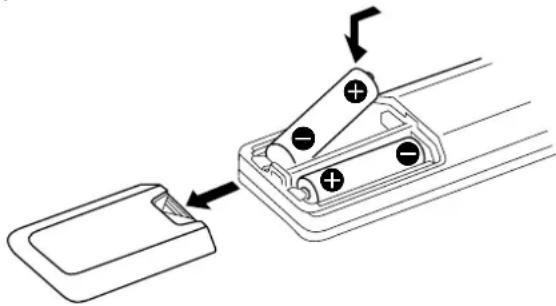
Inserting batteries into the remote
Insert two size AA (R6) batteries with the + and - on the battery compartment. When using the remote, point it at the remote sensor ☐ on the left front speaker.
natural_image
Diagram of a battery pack with two batteries and an open rear panel, showing internal components and directional arrows (no text or symbols)
When to replace batteries
Under normal use, the batteries should last for about 6 months. When the remote no longer operates the speakers, replace both batteries with new ones.
Notes
- Do not leave the remote in an extremely hot or humid place.
- Do not use a new battery with an old one.
- Do not expose the remote sensor to direct sunlight or lighting apparatuses. Doing so may cause a malfunction.
- If you don't use the remote for an extended period of time, remove the batteries to avoid possible damage from battery leakage and corrosion.
Using the remote

You can use the shaded buttons shown below to operate Sony TVs.
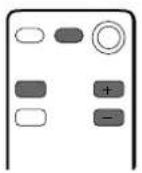
To Press
turn on a Sony TV TV POWER
operate a Sony TV the button(s) for the operation you desire.
turn off a Sony TV TV POWER
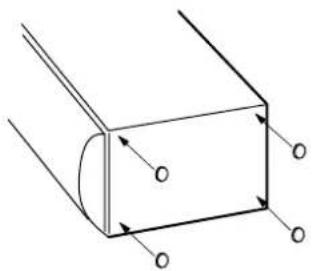
Installing the Anti-vibration pads
1 Spread a towel, or other soft cloth, over a table and lay the speakers down.
2 Peel off the covering sheet from the anti-vibration pad and attach it on the bottom of the speakers (4 for each speaker).
natural_image
Pure 3D diagram of a rectangular prism with internal curved lines and arrows indicating direction (no text or symbols)3 Make sure the anti-vibration pads are securely attached and stand the speaker upright.
Choosing the Best Location
To obtain high sound quality and a proper sound image from the front speakers, place the speaker with the built-in operation panel to the left of your TV and the other to the right of your TV so that the centre channel tweeters angle towards the centre of the room.
For the best central sound image, place the left and right speakers within 1.5 m of each other and equidistant from the TV.
The left and right speakers must be placed standing upright, laying them on their sides will defeat the centre channel surround effect.
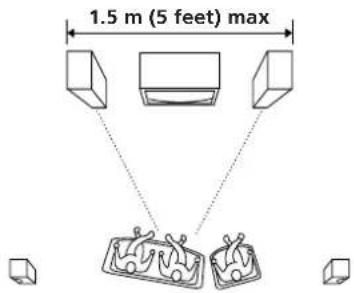
Place the rear speakers so that they fire directly across at each other about 60 - 90 cm (2 - 3 feet) above your listening position.

Speaker System Hookups
This section describes how to connect the speaker system and how to connect your TV or VCR to the speakers.
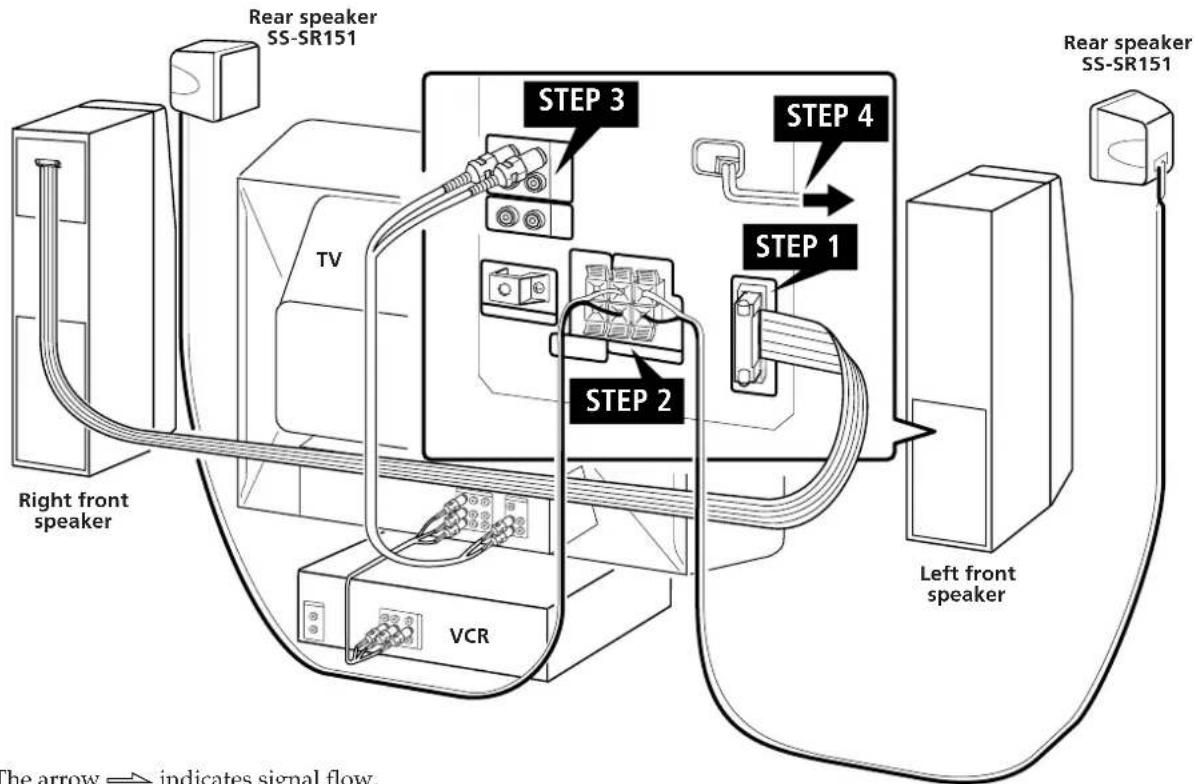
The arrow indicates signal flow.
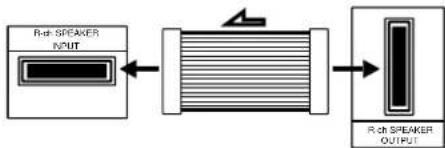
STEP 1 Connecting the front speakers
right speaker left speaker
flowchart
graph LR
    A["R-th SPEAKER INPUT"] --> B["Connector"]
    B --> C["R-th SPEAKER OUTPUT"]
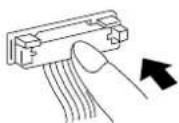
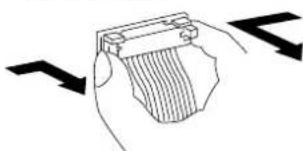
To connect, depress the middle of the male connector until it clicks into the female connector.
To disconnect, pull the connector out. Never pull the cord itself.
natural_image
Illustration of a hand holding a card or folder with directional arrows indicating movement (no text or symbols)STEP 2 Connecting the rear speakers
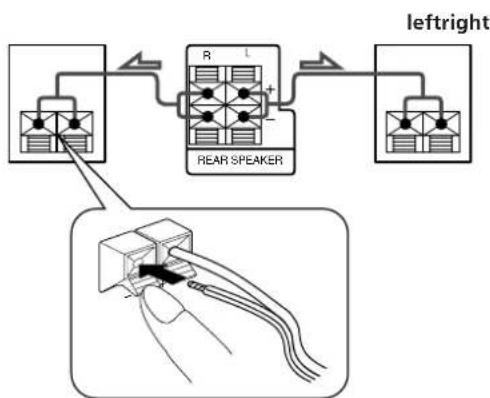
Use the supplied speaker cord to connect the left and right rear speakers.
1 Twist the speaker cord coating and strip it from the end of the cords.
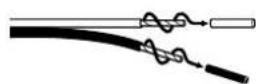
2 Insert the stripped wire into speaker terminals.
flowchart
graph TD
    A["Left Right"] --> B["Central Rear Speaker"]
    B --> C["Right"]
    D["Left Right"] --> E["Central Rear Speaker"]
    E --> F["Right"]
    G["Left Right"] --> H["Central Rear Speaker"]
    H --> I["Right"]
    style A fill:#f9f,stroke:#333
    style D fill:#f9f,stroke:#333
    style G fill:#f9f,stroke:#333
    style H fill:#f9f,stroke:#333
    style I fill:#f9f,stroke:#333
Be sure to connect matching speaker terminals (e.g. use the striped wire to connect + to +, and use the solid wire to connect - to -). If the connections are reversed (+ to -), the sound will be distorted and lack bass.
STEP 3 Connecting your TV
If the audio and video output terminals on your TV and VCR are already connected, and your TV has stereo AUDIO OUT jacks, you can start enjoying surround sound simply by connecting the speaker system to your TV as shown below.
Important
- Set the volume on your TV to MIN (minimum).
- If your TV has an ON/OFF switch for its internal speaker, set it to OFF and enjoy the sound from this speaker system.
TV front left speaker
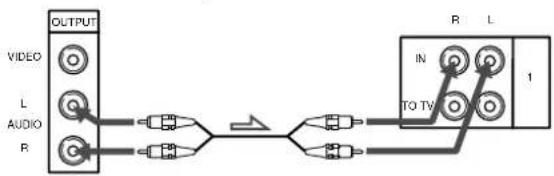
flowchart
graph LR
    A["OUTPUT"] --> B["VIDEO"]
    A --> C["L"]
    A --> D["AUDIO"]
    A --> E["R"]
    B --> F["AND"]
    C --> G["AND"]
    D --> H["AND"]
    E --> I["AND"]
    F --> J["NOT"]
    G --> J
    H --> J
    I --> J
    J --> K["TO TV"]
    K --> L["R"]
    K --> M["L"]
    L --> N["1"]
    M --> N
If you use AUDIO OUT jacks marked VARIABLE
After making the connection as shown above, turn up the volume on the TV. Use this speaker system's volume control for regular volume adjustment. Turning down the volume on the TV reduces the AUDIO OUT signal level and may cause a loss in sound quality and/or the auto-power off function (see page 11) to function.
For the best possible sound (or if your TV only has a monaural AUDIO OUT jack, or no AUDIO OUT jacks)
Connect the speaker system directly to your VCR or cable box.
The following connections suppress noise from the TV and let you enjoy high quality sound.
1 Connect your VCR or cable box to the 1 IN jacks on the left front speaker.
2 Connect your TV to the TO TV jacks on the left front speaker.
TV front left speaker
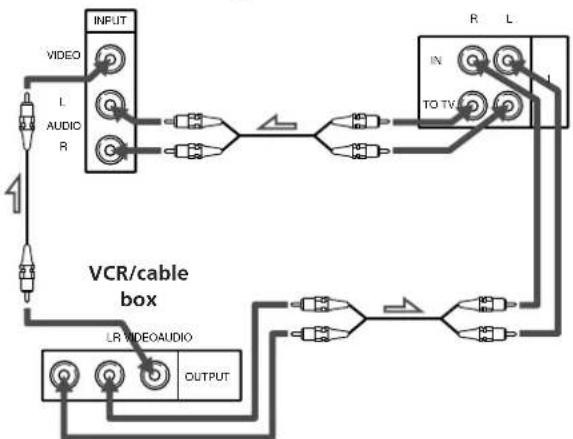
flowchart
graph TD
    A["INPUT"] --> B["VIDEO"]
    A --> C["L"]
    A --> D["AUDIO R"]
    A --> E["1"]
    F["VCR/cable box"] --> G["LR VIDEOAUDIO"]
    F --> H["OUTPUT"]
    I["IN"] --> J["TO TV"]
    J --> K["R"]
    J --> L["L"]
STEP 4 Connecting the mains lead
Connect the mains lead to a wall outlet.
Audio Component Hookups
Since this speaker system incorporates its own internal amplifier and preamplifier, you can also connect an audio component, such as a CD player.
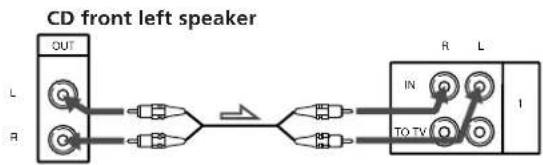
flowchart
graph LR
    A["CD front left speaker"] --> B["L"]
    A --> C["R"]
    B --> D["OUT"]
    C --> D
    D --> E["AND"]
    E --> F["→"]
    F --> G["IN"]
    G --> H["TO TV"]
    H --> I["R L"]
    H --> J["1"]
Note
Do not connect an amplified audio source. The combined amplification from the component and the speaker's internal amplifier may damage the speakers.
Enjoying Surround Sound
You can take advantage of the speaker's surround sound simply by choosing a surround mode according to the type of program you are watching. This system is provided with three different surround modes:
DOLBY SUR. (Dolby Pro Logic Surround)
Reproduces superb theatre-like presence and surround effects from video software encoded with Dolby Surround.
HALL surround mode
Reproduce the acoustics of a rectangular concert hall. Ideal for soft, acoustic sounds, or for giving an extra punch to debates and press conferences.
GAME surround mode
Obtain maximum audio impact from video game software.
Remote
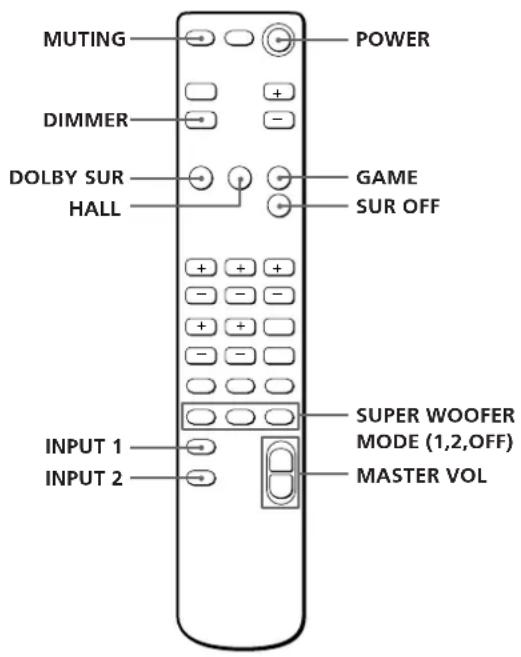
Left speaker
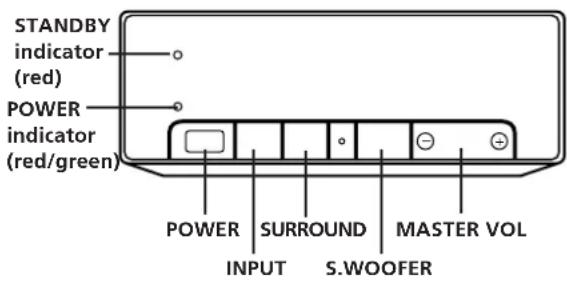
1 Press POWER.
The POWER indicator lights (green) and the speakers turn on. Once you've turned the speakers on, they turn themselves off and on automatically with the auto power on/off function.
2 Press INPUT 1 or 2 on the remote or INPUT on the operation panel to select the program source. For example, if you connected your VCR to the 1 IN jacks, select INPUT 1.
The respective INPUT indicator lights up.
3 Start playback from the program source.
4 Press either DOLBY SUR, HALL or GAME on the remote, or SURROUND on the operation panel a few times, according to the program you want to enjoy.
| program | DOLBY SUR | HALL | GAME | SUR OFF |
| recent movies | ● | |||
| concerts | ● | ● | ||
| music | ● | |||
| sports | ● | |||
| video game | ● | |||
| education, news | ● |
To listen without surround effects
Press SUR OFF on the remote, or press SURROUND on the operation panel a few times until SUR OFF is displayed.
Note
Some videos and laser discs may use Dolby Surround sound even if it's not indicated on the package.
5 Press MASTER VOL. (VOLUME) to adjust the volume.
To select a suitable SUPER WOOFER mode
Press SUPER WOOFER MODE 1 or 2.
SUPER WOOFER MODE 1 provides powerful bass sound ideal for movies. SUPER WOOFER MODE 2 is a more subtle effect designed for music.
To mute the sound
Press MUTING.
To restore the sound, press MUTING again.
For other sound adjustments, see page 12.

The speakers turn on and off automatically (Auto power on/off function)
Three minutes after the sound signal goes out (when you turn off the TV, or the currently playing video/laserdisc ends), the speakers turn off automatically and the POWER indicator turns red.
The speakers turn themselves back on the next time you turn on the TV or start playback from the VCR and the POWER indicator turns green.

If you press POWER on the remote when the speakers are on
The speakers enter standby mode (the red standby indicator lights up) and the auto power on/off function will not operate. You have to press POWER on the remote again to turn on the speakers.
Changing the display
You can dim the display, or turn it off, according to your preference.
Press DIMMER, on the remote, a few times until the display mode you desire appears.
The display returns to full brightness temporarily when you press one of the buttons on the control panel or the remote.
Adjusting the Surround Sound
Although this speaker system is factory preset to provide balanced surround sound without adjustment, you can adjust the volume of each speaker and the delay time to accommodate the conditions in your living room or your individual preference.
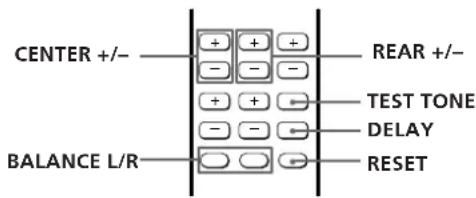
Adjusting the speaker volumes
The test tone feature lets you adjust the volume of the sound coming from each speaker to the same level, so that the surround sound will be even and natural.
Make the following adjustments from your listening position.
1 Choose the DOLBY SUR mode.
2 Press TEST TONE on the remote.
The test tone comes from each speaker in sequence:

3 Adjust the volume levels so that you hear the test tone from each speaker at the same volume level when you are in your listening position:
| To adjust the level | press |
| between the right and left front speakers | BALANCE L or R |
| of the centre speaker | CENTER + or - |
| of the rear speaker | REAR + or - |
4 Press TEST TONE on the remote to turn off the test tone.
To restore the centre, rear, or balance levels to the factory setting
Press CENTER +/-, REAR +/-, or BALANCE L/R, then press RESET.
(continued)
Note
Pressing buttons other than MASTER VOL., RESET, CENTER +/-, REAR +/-, or BALANCE L/R cancels the test tone.
Adjusting the delay time
By adjusting the delay time you can enhance the spatial characteristics of the sound to obtain a theatre-like presence regardless of the size of your room. If the rear speakers are close to your listening position, choose a longer delay time.
You can adjust the settings individually for DOLBY SUR, HALL and GAME.
Note
The delay time cannot be adjusted in PRO LOGIC 3CH mode.
1 Choose any surround mode.
2 Playback a program.
3 Press DELAY on the remote once to display the current delay time.
4 Press DELAY a few times to choose the delay time you prefer, either 15, 20, or 30 ms.
The factory setting is 20 ms.
To restore the delay time to the factory setting Press DELAY and then RESET.
Resetting an entire surround mode
Press the button for the surround mode you want to reset (i.e., HALL) and then press RESET while the name of the surround mode is being displayed. All of the adjustments in that mode, including the bass and treble, are reset to the factory settings.
Adjusting the Sound

Although this speaker system's sound quality is already adjusted. You can change the settings, as you like, for each surround mode individually. The following settings remain stored in their respective surround mode until you change them.
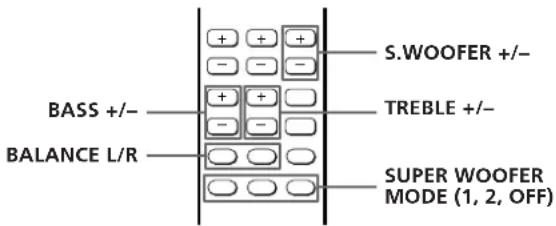
1 Playback a program and choose a surround mode.
2 Make the following sound adjustments according to your preference and/or the type of program you are watching.
| To | press |
| adjust the super woofer level | S.WOOFER + or - |
| adjust the bass level | BASS + or - |
| adjust the treble level | TREBLE + or - |
| adjust the balance | BALANCE L or R* |
* Since BALANCE L and R control sound from the front speakers, they have little effect on DOLBY SUR when the source software has a high proportion of centre-channel sound.
To restore the factory settings
Press RESET after pressing either S.WOOFER +/-, BASS +/-, TREBLE +/-, or BALANCE L/R.
Using an External Centre Speaker
Since this system incorporates a centre speaker (see page 5), you don't have to connect a centre speaker. However, it is possible to connect a centre speaker, if you already have one, to the CENTER SPEAKER terminals. Be sure to use a speaker with a 8 to 16 ohm impedance for the centre speaker.

flowchart
graph LR
    A["left front speaker"] --> B["centre speaker"]
    C["EXTERNAL CENTER SPEAKER REFERENCE - 5.0"] --> A
    A --> D["Arrow pointing to the right side of the centre speaker"]
Use a screwdriver and remove the screw holding the CENTER SPEAKER button cover in place. Then depress the CENTER SPEAKER button. This turns off the internal centre speaker and directs the centre channel signal to the CENTER SPEAKER terminals.
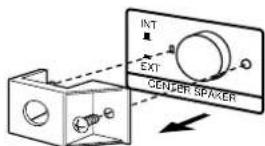
Connecting an external centre speaker lets you choose from 4 different Dolby Pro Logic Surround centre modes: NORMAL, WIDE, 3 CH (3 Channel logic), or PHANTOM. Use the NORMAL or WIDE mode. For details on Dolby Pro Logic Surround sound, see page 15.
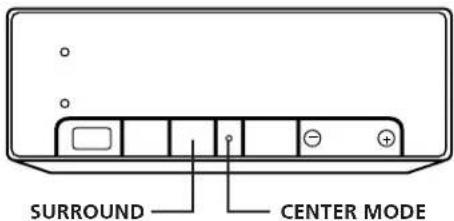
1 Press SURROUND on the front left speaker to choose PRO LOGIC. ("PRO LOGIC" appears in the display instead of "DOLBY SUR" when you connect an external centre speaker.)
2 Press CENTER MODE on the front left speaker a few times until the centre mode you want appears in the display.
3 Adjust the speaker volumes and delay time, if necessary, by referring to pages 11 and 12.
Troubleshooting
If you experience any of the following difficulties while using the speakers, use this troubleshooting guide to help you remedy the problem. Should any problem persist, consult your nearest Sony dealer.
There's no sound from any of the speakers.
→ Check that components are connected securely to the speakers.
→ Make sure you selected the correct input (1 or 2).
→ Press MUTING to cancel the muting function.
→ Press MASTER VOLUME + to turn up the volume.
→ Turn up the volume on the TV to increase the output level when using the TV's VARIABLE AUDIO OUTPUT terminals.
No sound or only a very low sound level is heard from the rear speakers.
→ Surround sound is turned off.
→ Adjust the volume of the rear speakers (see page 11).
→ Check the sound image balance with TEST TONE (see page 11).
There's no sound from the centre speaker.
→ Make sure you selected the DOLBY SUR (or PRO LOGIC) surround mode.
→ No centre speaker is connected, but the CENTER SPEAKER button on the rear panel is set to EXTERNAL.
→ You connected an external centre speaker, but the Dolby Pro Logic Surround centre mode is set to PHANTOM.
→ You connected an external centre speaker, but the CENTER SPEAKER button on the rear panel is set to INTERNAL.
Severe hum or noise is heard.
Move the connecting cord away from any transformers or motors and least 3 meters (10 feet) from any fluorescent lights.
→ Connect the speakers to your VCR or cable box instead of to your TV (see page 9).
Remote operations cannot be performed.
→ Point the remote towards the remote sensor on the left front speaker.
→ Remove any obstructions between the remote and this system's left front speaker.
→ Replace the batteries in the remote.
Picture on TV screen vibrates or distorts.
→ Move the speakers farther away from the TV.
Specifications
Amplifier section
Continuous RMS power output total 100 W
Centre tweeter 20 W (8 ohms at 10 kHz, 9 % THD) Front full range/ Centre woofer 20 W + 20 W (8 ohms at 1 kHz, 9 % THD) Super woofer 20 W (8 ohms at 40 Hz, 9 % THD) Rear 20 W (8 ohms at 1 kHz, 9 % THD) Input sensitivity/ Impedance 450 mV, 50 kilohms
Output sensitivity/ Impedance
TO TV: 450 mV, 1 kilohm External Centre: 20 W (at 8 ohms, 1 kHz, 9 % THD), 8–16 ohms Rear: Accepts only supplied rear speakers SS-SR151 R-ch: Accepts only SA-VA10 R-ch speaker
Tone control
Front/Centre
Bass: ±10 dB at 100 Hz Treble: ±10 dB at 10 kHz
Speaker section
Type
Front speaker DBR super woofer Rear speaker
Bass reflex type SAW type Bass reflex type
Speaker unit
Front speaker system
Centre tweeter: 5 cm cone type (2) Front full range / Centre woofer: 10 cm cone type (2) Super woofer: 13 cm cone type (1)
Rear speaker
8 cm cone type (2)
General
Power requirement Front speakers
220-230 V AC, 50/60 Hz
Power consumption 75 W Front speakers
Dimensions
Front left: Approx. 190 x 565 x 280 mm (w/h/d) (7^1/2 × 22^1/4 × 11 inches) Front right: Approx. 190 x 565 x 265
mm (w/h/d) (7^1/2 × 22^1/4 × 10^7/_16 inches) Rear:
Approx. 110 x 160 x 140 mm (w/h/d) (4^5/16 × 6^5/16 × 5^1/_2 inches)
Mass
Supplied accessories
Front (L): 9.0 kg (19 lb 13 oz)
Front (R): 8.0 kg (17 lb 10 oz)
Rear: 700 g/pc (1 lb 9 oz)
Rear speaker SS-SR151 (2)
Front L/R speaker connecting cord, 3.5 m (1)
Rear speaker connecting cord, 10 m (2)
Audio connecting cord, 1.5 m (1)
Remote Commander RM-J10 (1)
Sony batteries SUM-3 (NS) (2)
Anti-vibration pads (8)
Design and specifications are subject to change without notice.
Glossary
Centre mode
Speaker setting to enhance the Dolby Pro Logic Surround mode. Select one of the following four centre modes according to your speaker system.
• NORMAL mode
Select NORMAL mode if you connect a small sized active centre speaker to this speaker system. Since a small speaker cannot produce enough bass, the bass sound of the centre channel is output from the front speakers.
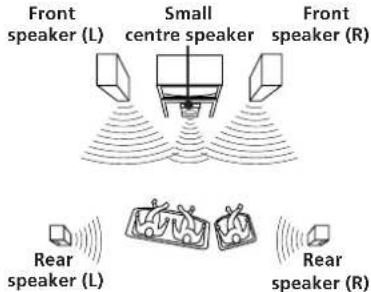
The test tone is output as shown on page 11.
- WIDE mode
Select WIDE mode if you connect an active centre speaker equivalent to the two front speakers. With the WIDE mode, you can take full advantage of Dolby Surround sound.
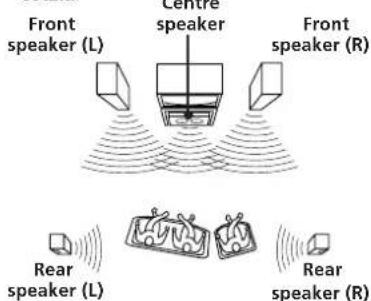
The test tone is output as shown on page 11.
• 3 CH LOGIC mode
Select 3 CH LOGIC mode if you don't want to use the rear speakers to output sound. The sound of the rear channel is output from the front speakers to let you experience some of the surround sound without using rear speakers.
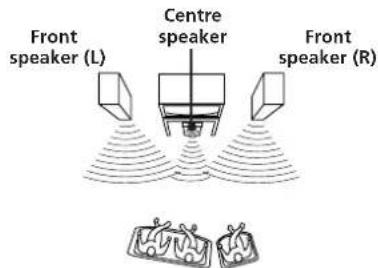
The test tone is output:

- PHANTOM mode
Select PHANTOM mode if you do not want to use the centre speaker to output sound. The sound of the centre channel is output from the front speakers.

The test tone is output:

Delay time
Time lag between the surround sound output from front speakers and rear speakers. By adjusting the delay time of the rear speakers, you can obtain the feeling of presence. Make the delay time longer when you have placed the rear speakers in a small room or close to your listening position, and make it shorter when you have placed them in a large room or apart from your listening position.
Dolby Pro Logic Surround
Decoding system of Dolby Surround sound standardized in TV programs and movies. Compared with the former Dolby Surround system, Dolby Pro Logic Surround improves sound image by using four separate channels: off-screen audio effects, on-screen dialog, left-to-right panning, and music. These channels manipulate the sound to be heard and enhance the action as it happens on the screen. To take advantage of Dolby Pro Logic, you should have at least one pair of rear speakers and/or one centre speaker. You also need to select the appropriate centre mode to enjoy a full effect.
Dolby Surround
Encoding and decoding system of Dolby Surround sound for consumer use. Dolby Surround decodes the extra channels on the Dolby Surround-encoded sound tracks of movie videos and TV programs and produces sound effects and echoes that make the action seem to envelop you.
Index
A
B
Adjusting
bass 12
delay time 12
speaker volume 11
super woofer level 11, 12
treble 12
volume 11
Audio component hookups 9
C
Centre mode 13, 15
NORMAL mode 13,15
PHANTOM mode 13, 15
3 CH LOGIC mode 13,15
WIDE mode 13,15
Connecting. See Hookups
D
Delay time 12, 13, 15
Dolby Pro Logic Surround 13, 15
centre mode 13,15
Dolby Surround sound 15
E, F, G
External centre speaker 13
H, I, J, K, L, M
Hookups
audio components 9
mains lead 9
speakers 8
TV/VCRs 9
N, O
NORMAL mode 13, 15
P, Q
PHANTOM mode 13, 15
R
Remote 6,7,10,11,12
S
Speakers
connection 8
placement 7
Speaker volume 11
Surround sound 10, 11, 12
T
Test tone 11
3 CH LOGIC mode 13,15
Troubleshooting 14
TV/VCR hookups 9
U, V
Unpacking 6
W, X, Y, Z
WIDE mode 13, 15
AVERTISSEMENT
natural_image
Line drawing of a living room scene with people relaxing on sofas, TV set, and a potted plant (no text or symbols)natural_image
Diagram of a battery holder assembly with arrows indicating direction (no text or symbols)
natural_image
Pure geometric diagram of a rectangular prism with internal arrows and labeled points (no text or symbols)natural_image
Illustration of a hand holding a device with arrows indicating direction (no text or symbols)DOLBY SUR. (Dolby Pro Logic Surround)
Dolby Pro Logic Surround 14, 16
Mode de canal central 14, 16
E, F
Enceintes
emplacement 7
raccordements 8
Enceinte central externe 14
G, H, I, J, K, L
natural_image
Line drawing of a living room scene with people relaxing on sofas, TV set, and a potted plant (no text or symbols)natural_image
Diagram of a battery holder assembly with arrows indicating direction (no text or symbols)
natural_image
Pure geometric diagram of a rectangular prism with internal curved lines and labeled points (no text or symbols)flowchart
graph LR
    A["Rich Speaker INPUT"] <--> B["Filter"]
    B --> C["Rich Speaker OUTPUT"]
natural_image
Diagram showing two hand press application steps: one with a handle and arrow, the other with a handle and arrow (no text or symbols)DOLBY SUR. (Dolby Pro Logic Surround)
Dolby Pro Logic Surround 14, 16
modo central 14, 16
M, N, O, P, Q, R
Modo central 14, 16
modo NORMAL, 14, 16
modo PHANTOM 14,16
modo 3 CH LOGIC 14, 16
modo WIDE 14, 16
S
natural_image
Line drawing of a living room scene with people relaxing on sofas, TV set, and a coffee table (no text or symbols)natural_image
Diagram of a battery holder assembly with arrows indicating direction (no text or symbols)
natural_image
Pure 3D diagram of a rectangular prism with internal arrows and labeled points (no text or symbols)natural_image
Illustration of a hand holding a device with directional arrows indicating movement or force (no text or symbols)→ Afaste as colunas do televisor.
Especificações
Logic Surround 13, 15
modo central 13, 15
L
natural_image
Line drawing of a living room scene with people relaxing on sofas, TV, and a coffee table (no text or symbols)natural_image
Diagram of a battery pack with two batteries and an open switch, showing no text or symbols
natural_image
Pure geometric diagram of a rectangular prism with internal curved lines and arrows, no text or symbols present.natural_image
Diagram showing two mechanical components with arrows indicating motion, no text or symbols presentDOLBY SUR. (Dolby Pro Logic Surround)
Accoustically-loaded Woofer)
Baßreflex
Bestückung
Frontlautsprecher
Centerkanal-
Hochtöner: 5 cm, Konus (2)
Front links: ca. 190 x 565 x 280 mm (B/H/
Front rechts: ca. 190 x 565 x 265 mm (B/H/T)
Surroundklang 10, 11, 12
T, U
Testton 11
V
natural_image
Line drawing of a living room scene with people watching TV and reading (no text or symbols)natural_image
Diagram of a battery compartment with arrows indicating direction (no text or symbols)
natural_image
Pure geometric diagram of a rectangular prism with internal curved lines and labeled points (no text or symbols)natural_image
Diagram showing two hand positions: one with a handle and arrow indicating direction, the other with a handle and arrow indicating direction (no text or symbols)flowchart
graph LR
    A["External Center Speaker\nIMFORDANCE 10.0"] --> B["Group of Devices"]
    B --> C["Arrow pointing to the device"]
natural_image
Line drawing of a living room scene with people relaxing on sofas, TV set, and a potted plant (no text or symbols)natural_image
Diagram of a battery switch mechanism with arrows indicating direction (no text or symbols)
natural_image
Pure geometric diagram of a rectangular prism with internal curved lines and labeled points (no text or symbols)natural_image
Illustration of a hand holding a device with arrows indicating direction (no text or symbols)natural_image
Line drawing of a living room scene with people relaxing on sofas, TV set, and a potted plant (no text or symbols)natural_image
Diagram of a battery holder assembly with arrows indicating direction (no text or symbols)
natural_image
Pure 3D diagram of a rectangular prism with internal curved lines and labeled points O, showing no text or symbols.natural_image
Illustration of a hand holding a device with arrows indicating direction (no text or symbols)DOLBY SUR. (Dolby Pro Logic Surround)
Tweeter centrale 20 W (8 ohm a 10 kHz, THD 9%)
Gamma completa 20 W + 20 W (8 ohm a anteriori/woofer 1 kHz, THD 9%) centrale
Super woofer 20 W (8 ohm a 40 Hz, THD 9%)
Posteriori 20 W (8 ohm a 1 kHz, THD 9%)
Anteriore (sinistro): 9,0 kg Anteriore (destro): 8,0 kg
Sonoro surround 10, 11, 12
Suono Dolby Surround 15
T, U
Telecomando 6,7,10,11,12

- Home Theater Active Speaker System
- About This Manual
- TABLE OF CONTENTS
- Getting Started
- Home Theatre Operations
- Additional Information
- Three different types of surround sound accommodate a variety of program sources
- Dolby Surround (Pro Logic) mode
- HALL surround mode
- GAME surround mode
- Dolby Pro Logic Surround sound
- How the centre speaker works
- Dynamic Bass Roar (DBR) super woofer system provides theatre-like bass sound
- What is the SAW design?
- Power turns on and off automatically
- Precautions
- On safety
- On power sources
- On placement
- On cleaning
- Unpacking
- Inserting batteries into the remote
- When to replace batteries
- Notes
- Using the remote
- To Press
- Installing the Anti-vibration pads
- Choosing the Best Location
- Speaker System Hookups
- STEP 1 Connecting the front speakers
- STEP 2 Connecting the rear speakers
- STEP 3 Connecting your TV
- Important
- If you use AUDIO OUT jacks marked VARIABLE
- For the best possible sound (or if your TV only has a monaural AUDIO OUT jack, or no AUDIO OUT jacks)
- STEP 4 Connecting the mains lead
- Audio Component Hookups
- Note
- Enjoying Surround Sound
- DOLBY SUR. (Dolby Pro Logic Surround)
- Press POWER.
- Press INPUT 1 or 2 on the remote or INPUT on the operation panel to select the program source. For example, if you connected your VCR to the 1 IN jacks, select INPUT 1.
- Start playback from the program source.
- Press either DOLBY SUR, HALL or GAME on the remote, or SURROUND on the operation panel a few times, according to the program you want to enjoy.
- To listen without surround effects
- To select a suitable SUPER WOOFER mode
- To mute the sound
- The speakers turn on and off automatically (Auto power on/off function)
- If you press POWER on the remote when the speakers are on
- Changing the display
- Adjusting the Surround Sound
- Adjusting the speaker volumes
- To restore the centre, rear, or balance levels to the factory setting
- Adjusting the delay time
- Resetting an entire surround mode
- Adjusting the Sound
- To restore the factory settings
- Using an External Centre Speaker
- Troubleshooting
- There's no sound from any of the speakers.
- No sound or only a very low sound level is heard from the rear speakers.
- There's no sound from the centre speaker.
- Severe hum or noise is heard.
- Remote operations cannot be performed.
- Picture on TV screen vibrates or distorts.
- Specifications
- Amplifier section
- Tone control
- Speaker section
- Type
- Speaker unit
- General
- Dimensions
- Mass
- Supplied accessories
- Glossary
- Centre mode
- • NORMAL mode
- - WIDE mode
- • 3 CH LOGIC mode
- - PHANTOM mode
- Delay time
- Dolby Pro Logic Surround
- Dolby Surround
- Index
- A
- B
- C
- D
- E, F, G
- H, I, J, K, L, M
- N, O
- P, Q
- R
- S
- T
- U, V
- W, X, Y, Z
- AVERTISSEMENT
- E, F
- G, H, I, J, K, L
- M, N, O, P, Q, R
- Especificações
- L
- T, U
- V
Brand : SONY
Model : SAVA10
Category : Home Theater System