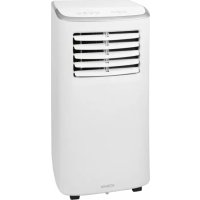
CL 6048 CB - Air Conditioning BOMANN - Free user manual and instructions
Find the device manual for free CL 6048 CB BOMANN in PDF.



| Product type | Monoblock mobile air conditioner |
| Brand | Bomann |
| Model | CL 6048 CB |
| Net weight | Approximately 19.7 kg |
| Power supply | 220-240V~, 50Hz |
| Power consumption | 792 W |
| Cooling capacity | 7000 BTU (2.06 kW) |
| Energy efficiency class | A |
| Protection class | I |
| Refrigerant | R290 (propane, flammable) |
| Maximum operating pressure (high pressure) | 1.8 MPa |
| Maximum operating pressure (low pressure) | 0.6 MPa |
| Maximum allowable pressure | 3.0 MPa |
| Operating modes | Cooling (COOL), Dehumidification (DRY), Fan (FAN), Sleep (SLEEP) |
| Temperature setting | 16 °C to 31 °C (display in °C or °F) |
| Fan speeds | 2 speeds: LOW and HIGH |
| Programmable timer | Yes, from 1 to 24 hours for automatic start or shut-off |
| Remote control | Yes, with AAA 1.5 V batteries (2 batteries included) |
| Condensation water tank capacity | Approximately 0.6 liter |
| Recommended room area | Up to 70 m³ (approximately 25 m² at 2.5 m height) |
| Minimum distance from walls | 50 cm |
| Filter cleaning | Every 2 weeks with daily use, vacuum then wash with water |
| Compressor safety | 3-minute restart delay for protection |
| Replacement fuse | Type T, 250 V AC, 3.15 A |
| Delivery contents | Air conditioner, remote control, batteries, flexible exhaust hose, adapters, window installation kit, water hose, plugs |
Frequently Asked Questions - CL 6048 CB BOMANN
User questions about CL 6048 CB BOMANN
0 question about this device. Answer the ones you know or ask your own.
Ask a new question about this device
Download the instructions for your Air Conditioning in PDF format for free! Find your manual CL 6048 CB - BOMANN and take your electronic device back in hand. On this page are published all the documents necessary for the use of your device. CL 6048 CB by BOMANN.
USER MANUAL CL 6048 CB BOMANN
Filter. 16
Behuizing. 17
ATTENTION: Risque de surchauffe!
Thank you for choosing our product. We hope you will enjoy using the appliance.
Symbols in this Instruction Manual
Important information for your safety is specially marked. It is essential to comply with these instructions in order to avoid accidents and prevent damage to the appliance:
WARNING:
This warns you of dangers to your health and indicates possible injury risks.
CAUTION:
This refers to possible hazards to the appliance or other objects.
i NOTE:
This highlights tips and information.
Contents
Overview of the Components 3
Overview of Buttons, Icons and Indicator Lights 4
General Notes 40
Special Safety Precautions for this Appliance. 40
Handling Batteries 41
Unpacking the Appliance 42
Scope of Delivery 42
Overview of the Components 42
Overview of Buttons, Icons and Indicator Lights 42
Control Panel 42
Remote Control 42
Notes for Use 42
Putting into Service 42
Location 42
Assembly of Exhaust Pipe 42
Inserting Batteries in the Remote Control. 43
Electric Connection 43
Compressor Safety Appliance 43
Using the Appliance 43
Function Buttons 43
Turning Appliance On/Off 43
Setting the Air Outlet 43
Operating Modes 43
Setting the Fan 43
Setting the Temperature 43
"Sleep Mode" 43
Timer (Automatic Timer) 44
Emptying the Water Tank. 44
Terminating Operation 44
Cleaning 44
Filter 44
Housing 44
Seasonal Cleaning and Storage 44
Troubleshooting 45
Technical Data 45
Disposal 45
Battery Disposal 45
Meaning of the "Dustbin" Symbol 45
General Notes
Read the operating instructions carefully before putting the appliance into operation and keep the instructions including the warranty, the receipt and, if possible, the box with the internal packing. If you give this appliance to other people, please also pass on the operating instructions.
- The appliance is designed exclusively for private use and for the envisaged purpose. This is not fit for commercial use.
- Do not use it outdoors. Keep it away from sources of heat, direct sunlight, humidity (never dip it into any liquid) and sharp edges. Do not use the appliance with wet hands. If the appliance is humid or wet, unplug it immediately.
- When cleaning or putting it away, switch off the appliance and always pull out the plug from the socket (pull the plug itself, not the lead) if the appliance is not being used and remove the attached accessories.
- The appliance and the mains lead have to be checked regularly for signs of damage. If damage is found the appliance must not be used.
- Use only original spare parts.
- In order to ensure your children's safety, please keep all packaging (plastic bags, boxes, polystyrene etc.) out of their reach.

WARNING:
Do not allow small children to play with the plastic foil. There is a danger of suffocation!
Special Safety Precautions for this Appliance
On the products you will find symbols that indicate warnings or provide information:

Read the instructions!

WARNING: Fire hazard!
The appliance contains a flammable refrigerant!
- Do not use any objects other than those permitted by the manufacturer to accelerate the defrosting process.
- The appliance should only be stored in rooms without a permanent source of ignition (e.g. open flames, an activated gas appliance or electric heater).
- Do not drill or burn the appliance.
- Remember that refrigerants are odourless.
- The appliance must only be operated in rooms larger than 7m^2

The service manual is available at the following web address: www.sli24.de
In the "Downloads" area, please enter the model name CL 6048 CB.
- Any person who is involved with working on or breaking into a refrigerant circuit should hold a current valid certificate from an industry-accredited assessment authority, which authorises their competence to handle refrigerants safely in accordance with an industry recognised assessment specification.
Servicing shall only be performed as recommended by the equipment manufacturer. Maintenance and repair requiring the assistance of other skilled personnel shall be carried out under the supervision of the person competent in the use of flammable refrigerants.

WARNING:
- Do not use and store the appliance at the following locations:
- Near a fire source.
- An area, where water or oil can splash.
- An area exposed to direct sunlight.
- In the bathroom, the laundry room or next to a swimming pool.
- The appliance must be set up, operated and stored in a room with a floor area larger than 7m^2

CAUTION: Risk of overheating!
- Keep the ventilation slots free!
-
Do not cover the appliance!
-
R 290 is a refrigerant that complies with European environmental directives.
- Do not damage the refrigerant circuit.
- The appliance is intended for indoor use only.
- The appliance must be stored in such a way that it does not get damaged.
- Adhere to the national connection regulations.
- In the event of strange noises, smells and / or smoke emissions, unplug the power plug from the socket.
- Only operate or move the appliance in an upright position.
- Ensure a distance of at least 50~cm between the appliance and any walls or other objects to ensure sufficient air circulation during operation.
- Never use the appliance without the filter.
-
Do not leave the appliance unattended for hours at a time. Do not leave your home whilst the appliance is in operation.
-
This appliance has been designed for the air-conditioning of residential rooms and must not be used for other purposes.
- Do not operate the appliance in rooms where gas, fuel, oil or other easily flammable liquids are present. Do not use sprays such as paint, pesticides or other flammable materials in that room.
- Do not insert any objects into the openings of the appliance.
- This appliance shall not be exposed to dripping or splashing water and that no object filled with liquids such as vases shall be placed on apparatus.
- Do not move the appliance when the mains cable is connected to the wall socket.
Always turn off the appliance first using the POWER button before disconnecting the mains plug. - If operation has been interrupted, wait for approx. 3 minutes before restarting the appliance again, in order for the cooling circuit pressure to decrease.
- Do not repair the appliance by yourself. Always contact an authorized technician. If the supply cord is damaged, it must be replaced by the manufacturer, its service agent or similarly qualified persons in order to avoid a hazard.
- Prevent small children from touching the appliance.
- This appliance can be used by children aged from 8 years and above and persons with reduced physical, sensory or mental capabilities or lack of experience and knowledge if they have been given supervision or instruction concerning use of the appliance in a safe way and understand the hazards involved.
Children shall not play with the appliance. - Cleaning and user maintenance shall not be made by children without supervision.
- Please follow the instructions in the chapter "Cleaning".
- Details of type and rating of fuses: T, 250 V AC, 3,15 A
Handling Batteries

WARNING:
- Do not expose batteries to excessive heat such as sunlight, fire or similar. There is a risk of explosion!
- Batteries are not toys. Keep away from children.
- Do not open batteries by force.
- Avoid contact with metal objects (rings, nails, screws, etc.). There is a risk of short circuit!
- A short circuit could cause the battery to heat up excessively or even to catch fire, resulting in injuries.
- For your own safety, cover the battery terminals with adhesive tape during transport.
- In case of battery leakage, make sure not to rub the liquid into your eyes or mucous membranes. In case of contact, wash your hands and rinse your eyes with clear water. Seek medical attention if any discomfort persists.
WARNING:
- Non-rechargeable batteries are not to be recharged.
- Ensure correct polarity when inserting the battery / batteries.
CAUTION:
- When not using the remote control for a long period of time, remove the batteries in order to prevent "leakage" of battery acid.
- Different battery types or new and used batteries must not be used together.
- Do not dispose of batteries along with domestic waste. Return used batteries to the relevant collection facilities or your retailer.
Unpacking the Appliance
- Remove the appliance from its packaging.
- Remove all the packaging material such as plastic bags, filler material, cable ties and cardboard packaging.
- Check that all parts are supplied in the package.
Scope of Delivery
1 Air conditioning appliance
1 Remote control
2 Batteries
1 Flexible exhaust pipe
1 Exhaust pipe adapter (Connection on the appliance)
1 Window kit, 2-piece
1 Adapter for the window exhaust kit
1 Water hose
2 Plugs (spares)
Overview of the Components
1 Control panel with display
2 Air outlet (pivoting flap)
3 Housing
4 Water outlet
5 Handle
6 Exhaust pipe connector
7 Mains cable
8 Water outlet
9 Window kit, 2-piece
10 Remote control
1 Flexible exhaust pipe
2 Adapter for the window exhaust kit
3 Exhaust pipe adapter
14 Grid on the air intake (with built-in filter insert)
Overview of Buttons, Icons and Indicator Lights
Control Panel
1 Indicator light (timer operation enabled)
2 HIGH indicator light (high fan speed)
3 LOW indicator light (low fan speed)
4 Display
5 COOL indicator light (cooling)
6 DRY indicator light (dehumidifying)
7 FAN indicator light (fan)
8 Indicator light (sleep mode)
9 POWER indicator light
10 FULL indicator light (water tank full)
11 POWER button (switch appliance on / off)
12 SLEEP button (set "sleep mode")
13 MODE button (set operating mode)
14 d b nbs (adjust temperature or hour)
15 SPEED button (set fan speed)
16 TIMER button (set timer)
Remote Control
1 MODE button (set operating mode)
2 TIMER button (set timer)
3 POWER button (switch appliance on / off)
4 TEMP+TEMP- buttons (adjust temperature or hour)
5 SLEEP button (set "sleep mode")
6 SPEED button (set fan speed)
Notes for Use
CAUTION: Important for initial operation or after transport! Before initial operation, the appliance must stay in an upright position for at least 3 hours in order for the cooling agent to sink. The compressor will be damaged otherwise.

CAUTION:
- When you interrupt the operation with the POWER button, wait for at least 3 minutes before switching the appliance on again.
-
If you want to move the appliance to another location, first empty the water tank!
-
The appliance operates most effectively with a room size up to 70m^3
- The flexible exhaust hose and the adapter have been manufactured especially for this appliance. In order to avoid incorrect operation, do not replace the pipe with another pipe.
- The exhaust pipe can be extended up to 150~cm . Do not use any extension.
- Ensure free airflow. Make sure not to kink or bend the exhaust pipe. Any blockage can cause the appliance to overheat.
- Close all windows and doors in order to prevent outside air from entering the room and thus allowing a more effective operation of the appliance.
Putting into Service
Location
- When installing the appliance, make sure to keep a distance of at least 50~cm between the appliance and any walls or other objects.
- The surface must be flat and dry.
Assembly of Exhaust Pipe
NOTE:
For sliding windows or external roller blinds you may use the supplied window exhaust air kit in a vertical or horizontal orientation. Adjust the length of the seal plate as desired.
- Connect the adapter to the exhaust hose. Place the exhaust hose in a way that the first fin of the hose lays in the rail. Tighten the adapter by turning it clockwise.
-
Connect the adapter to the connector on the back of the appliance. To do this, push the adapter from the right into the guides until it stops.
-
Extend the pipe to the desired length.
- Screw the window exhaust air kit adapter onto the end of the exhaust air hose.
- If the window does not have a roller shutter and is not a sliding window, then proceed as follows:
a) Stick the open end of the pipe into a window.
b) Close the window as far as possible.
- If the window has a roller shutter or if the window is a sliding window, then proceed as follows:
a) The exhaust air kit for the window is to be installed with the smooth side facing inwards.

NOTE:
During installation with a roller shutter, attach the adapter to the exhaust air kit for the window so that the bulbous portion is facing downwards.
b) Insert the adapter in the exhaust air opening and then push it towards the outside. Fasten it to the exhaust air kit for the window using the enclosed tapping screw.
c) Insert the retaining plate through the hole in the opposite side of the exhaust air opening. Now, push the inner runner over the retaining plate so it fits into the groove. This is to specify the required width for the exhaust air kit for the window. Apply the ring washer and screw the wing nut in by hand until it is tight.
d) Install the exhaust air kit for the window in the window by closing the roller shutter.
Inserting Batteries in the Remote Control
- Open the battery compartment cover on the back of the remote control.
- Insert 2 batteries of type R03 "AAA" 1.5V, observing the correct polarity (see markings on the bottom of the compartment)!
- Close the battery compartment cover.
Electric Connection
- Make sure the mains voltage you want to use corresponds to the voltage of the appliance. Please check the rating label for detailed specifications.
- Connect the appliance to a properly installed grounded socket. A signal will sound indicating that the appliance is ready for use. The appliance is in standby. The display shows the current room temperature.
Compressor Safety Appliance
If operation is interrupted, the safety appliance for the compressor is activated. This prevents operation of the compressor for approx. 3 minutes, in order to relieve the pressure in the cooling circuit. This is not a malfunction of the appliance. Therefore, wait at least 3 minutes, before switching the appliance on again.
Using the Appliance
You can operate the appliance both using the control on the appliance itself or by using the remote control. Identical buttons provide the same function.
The buttons on the control panel are explained below. The indicator lights show your chosen selection.
Function Buttons
The buttons on the appliance are touch keys. Gently touch the buttons with a finger to execute the function. Whenever a button is pressed, it will be confirmed by a beep sound.
Turning Appliance On/Off
- Press the POWER button to turn on the appliance. The appliance is pre-set to "COOL (Kühlen)" mode and the temperature is 22^ . If operation has been stopped without disconnecting the plug, all previously set operating mode and temperature settings will be retained. The control lamps indicate this setting.
- Press the POWER button again to turn off the appliance.
Setting the Air Outlet
You can adjust the direction of the air flow using the horizontal and vertical swivel flaps.
- To direct the air upwards / downwards, adjust the position of the front horizontal swivel flaps.
- You can direct the air to the right / left using the rear swivel flap. You can change the position of the vertical swivel flap when the horizontal ones are folded up. A lever for this purpose is located above the last horizontal swivel flap, to the right.
Operating Modes
Use the MODE button to select one of the following operating modes:
Cooling (COOL)
- Dehumidifying (DRY)
Fan (FAN)
Operating Mode "Cooling" COOL
In this operation mode, you can adjust the fan speed and the temperature as desired.
i NOTE:
To operate the appliance with the compressor, the set temperature must be lower than the current room temperature.
Operating Mode "Fan" FAN
This mode only allows you to set the speed of the fan. The display shows FR
Operating Mode "Dehumidifying" DRY
This operating mode does not support any further settings. The display shows dh
- The fan speed is preset to the lowest level LOW.
- The appliance will cool the room and extract the humidity from the air.
- When using the mode "Dehumidifying" over an extended period, we recommend permanently connecting the supplied water hose to the upper water drain. Remove the top plug first. Place the end of the water hose in a container of sufficient size (e.g. a bucket).
Setting the Fan
In "COOL (Cooling)" and "FAN (Fan)" modes you can set the fan speed with 2 different settings. Press the SPEED button accordingly.
LOW (low)
- HIGH (high)
Setting the Temperature
- Use the or buttons in "COOL (Kühlen)" mode to set the temperature.
- Select a temperature between 16^ (61^) and 31^ (88^) . Ex factory items display the temperature in Celsius.
i NOTE:
The changeover from "Celsius to "Fahrenheit can only be performed on the appliance itself. Keep the button pressed down and, at the same time, press the button. The factory setting is selected again by pulling the mains plug.
"Sleep Mode"
- Press the SLEEP button when the appliance is switched on and in the "COOL (Cooling)" operating mode.
- The fan speed is preset to the lowest level LOW. This cannot be changed.
After running for one hour in the "Sleep" mode, the preset temperature will automatically increase by 1^ . This will be repeated one hour later again. This way, a comfortable room temperature will be achieved.
Timer (Automatic Timer)
Use the timer function to set the power-on and power-off times of the appliance. Select a time between 1 and 24 hours.
i NOTE:
- If you want to deactivate the set timer operation, press the TIMER button twice. The (1) indicator light goes off.
- You may also cancel the timer function at any time by pressing the POWER button to turn the appliance on / off.
Using the Timer Function for Automatic Power-On
- Press the POWER button to turn on the appliance.
- Select the operating mode, temperature and fan speed for the appliance to operate in or at when powered on at the pre-set time.
- Press the POWER button to turn off the appliance.
- Press the TIMER button. The number of hours flashes.
- You can set the desired number of hours with the and buttons. The setting mode is automatically exited after approx. 5 seconds. Timer operation is activated and the indicator light (1) illuminates.
i NOTE:
Do not press the TIMER button after setting the hours, as the timer operation will not be saved.
Using the Timer Function for Automatic Power-Off
- Press the POWER button to turn on the appliance.
- Press the TIMER button during operation. The number of hours flashes.
- You can set the desired number of hours with the and buttons. The setting mode is automatically exited after approx. 5 seconds. Timer operation is activated and the indicator light (1) illuminates.
Emptying the Water Tank
The appliance integrates a water tank for collecting condensation. When the water tank is full, the pilot lamp FULL lights up. The appliance switches off.
CAUTION:
Do not transport the appliance while the water tank is full. Water could get into the appliance.
In order to continue operation, you need to empty the water tank. For this, you need a floor cloth, a flat bowl with a capacity for approx. 0.6 litre of water and the water hose supplied with the appliance.
- Disconnect the mains plug from the wall socket.
- Place the floor towel and the flat bowl underneath the water outlet. If possible, set the bowl on a lower level than the appliance.
- Unscrew the swivel nut from the lower plug. Then pull the plug out.
- Connect the water hose to the water outlet of the appliance. Place the end of the hose in the bowl.
- After the water has been discharged, remove the water hose. Use the stopper to close the water drain on the appliance again. Fasten the plug by screwing the swivel nut back on.
Terminating Operation
- Press the POWER button to turn off the appliance.
- Disconnect the mains plug from the wall socket.
Cleaning
WARNING:
Always disconnect the mains plug from the wall socket before cleaning!
- Make sure no water enters the openings of the appliance during cleaning. Otherwise this might result in an electric shock or fire.
CAUTION:
- Do not spray the appliance with cleaning agents.
- Do not use a wire brush or any abrasive items.
- Do not use any acidic or abrasive detergents.
Filter
Clean the filter once every 2 weeks, if the appliance is in daily use. If dust in the filter blocks the ventilation, the efficiency of the appliance is no longer guaranteed.
- On the rear side of the appliance, above the connection for the exhaust air hose, you will find a grille with a built-in filter.
- The grille is secured with a phillips-head screw. Remove this screw using a suitable screwdriver.
- Vacuum the filter with a vacuum cleaner.
- Clean the filter under running water. If necessary, use a mild detergent.
- Leave the filter to dry in the open air in a shady location.
- Only put the grill back in the appliance if the filter is completely dry.
- Fasten the grille again using the screw.
CAUTION:
Do not operate the appliance without filter!
Housing
- Use a vacuum cleaner to clean the ventilation slots.
- Wipe the housing with a slightly damp cloth.
Seasonal Cleaning and Storage
When not using the appliance for a long period of time, proceed as follows:
- Empty the water tank as described above.
- Repeat the steps 2 to 5 from the chapter "Emptying the water tank" with the upper water outlet (top plug).
- Operate the appliance in "FAN (Fan)" mode for 2 hours in order to dry the inside of the appliance.
- Press the POWER button to turn off the appliance. Disconnect the mains plug from the wall socket.
- Disconnect the flexible exhaust pipe from the appliance.
- Leave both water outlets open.
- Clean the filter and the appliance as described above.
- Cover the appliance with foil.
- Always store the appliance out of the reach of children in a dry, well ventilated place.
Troubleshooting
| Problem Possible Cause Solution | ||
| Appliance does not function. No power supply. Check the power connection. | ||
| The ambient temperature is too low or too high. | It is recommended to use the appliance at an ambient temperature of 7 - 35 °C (44 - 95 °F). | |
| The appliance is defect. Contact our service department or a specialist. Please consider the enclosed service manual. | ||
| Appliance does not cool sufficiently. | The appliance is exposed to direct sunshine. | Choose another location or shade the windows. |
| Windows or doors are open. Close any windows | or doors. | |
| There are too many people or other heating sources in the room. | Remove portable heaters or switch them off. | |
| The filter is dirty. Clean the filter. | ||
| The air inlet or air outlet is blocked. Remove the blockage. Keep the ventilation openings free from obstructions. | ||
| Appliance too noisy during operation. | The appliance is not in an upright position. | Place the appliance on a flat surface. Avoid vibrations. |
| The appliance switches off during operation. The indicator light FULL lights up red. | The water tank is full. | Pull the power plug. Empty the water tank via the lower water outlet. Then you can use the appliance again. |
| The remote control does not work. | The distance to the appliance is too far. | Move closer to the appliance. |
| You are not holding the remote control towards the sensor. | Hold the remote control so it points to the sensor. Make sure there are no obstacles between the remote control and the sensor. | |
| The batteries are dead. | Replace the batteries. | |
| Display on the appliance: E1 | Temperature sensor defective. | Contact our customer service or your dealer. |
| Display on the appliance: E2 | ||
Contact our customer service or your dealer if you encounter any problems that are not listed in the table or if the recommended remedy does not work.
Technical Data
Model: CL 6048 CB
Net weight: approx. 19.7 kg
Power supply: 220 - 240 V~, 50 Hz
Power consumption: 792W
Protection class: I
Energy efficiency class: A
Cooling capacity: 7000BTU (2.06kW)
Refrigerant: R290
Maximum permissible operating pressure:
Pressure side: 1.8MPa
Suction side: 0.6MPa
Maximum pressure allowed: 3.0 MPa
The right to make technical and design modifications in the course of continuous product development remains reserved.
This appliance has been tested according to all relevant current CE guidelines, such as electromagnetic compatibility and low voltage directives, and is manufactured according to the latest safety regulations.
Disposal
Battery Disposal

As a consumer you are obliged by law to return old batteries/ accumulators.
Remove the batteries from the remote control before disposing of the appliance.
Return the batteries to a collection facility for the collection of old batteries or hazardous waste. Contact your local authority for more information.
Meaning of the "Dustbin" Symbol
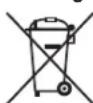
Protect our environment: do not dispose of electrical equipment in the domestic waste.
Please return any electrical equipment that you will no longer use to the collection points provided for their disposal.
This helps avoid the potential effects of incorrect disposal on environment and human health.
This will contribute to the recycling and other forms of re-utilisation of electrical and electronic equipment.
Information concerning where the equipment can be disposed of can be obtained from your local authority.
Instrukcja obslugi
CIMBOBII pImuMeHReMbI B DAHHOM pyKOBoCTBe NOJIb3OBaTeJIa
Baxhble pekomedauim nIg o6ceuehenBauei 6e3oanchoctn
063haehbI IOOC6EHNOy.ObraTeJIbHO CNEyIte 3TMpekomedauim,HTO6bl npedotbpaTb HecactbI CNyaua IIN NIOJOMky
H3dJIIN:

IPEyIPEXDEHNE:
PpeDynpexKaetobonachOCTnIa3dopoBbN BO3MOxHOM pncKe nOnyuEHn TpaBMbl.

BHIMAHIME:
Yka3bIbaet Ha BO3MOxHyOOnaHOCtB IJIa N3dJIINa INpyrNX OkpyXaHOuIX PpeMeTOB.

ПРМЕЧАнЯ:
DaetcoBtbiHnHΦopMaunHO.
Copepkzhanie
O63op DeTanei np6opa. 3
0630p KhoNOK,IKHOHOK IN HnKkATOpHbIX lam. 4
O6uaHnΦopMaun 59
OcobIe yka3aHnno no texHnke
6e3onacnoctn dna daHoro ycTpoiCTBa. 59
063op KhoNOK, IKOHOK INHdNKaTOPhIx NaMn
PanaheIynpaBneHn
1 INdikatop (pa6oTa TaIMePa OTKIOUeHa)
2 INHdikaTop HIGH (BbICKaA CKOpocTb BEHTINaTopa)
3 INHdkaTop LOW (Hn3kACKOocb BeHTnIaTopa)
4 3KpaH
5 INHdkaTop COOL (oxnackdene)
6 INHdkaTOp DRY (oxnaKeHne)
7 INHINKATOP FAN (BENTINPATOP)
8 INdikatop (cnpaui pexim)
9 INHdkaTop POWER
10 INdkaTOp FULL (pe3epByap nra BOblnHbI)
11 KhoIka POWER bblkIOuateIb npB60pa BkIOUeH / BblkIOueH)
12 Khonka SLEEP 乙ctaHOBNTb «CPIIIMpeKMIM»
13 KhoNka MODE (cTaHOBKa pexima pa6oTb)
14 KhoHKn (HaHOBKa TeMnepaTpyb i N yaca)
15 KhoIka SPEED cytaHObKa ckopoCTn BENTINrTopa)
16 KhoNka TIMER (3hacTpoNka TaHmepa)
ДиctанцioHnoe ynpaBneHne
1 KhoNka MODE (ycTaHOBka peKIma pa6oTb)
2 KhoNka TIMER (HacTpoNka TaMepa)
3 KhoNka POWER (BbIKIOuateIb npmbopa BkIOUeH / BbIKIOueH)
4 KhoNkI TEMP+TEMP- (yctaHOBKa temnepaTypbI uaca)
5 KhoNka SLEEP (ycTaHOBnTB «CnIaIePexIMM)
6 KhoNka SPEED (ycTaHoBbCKOpocTn BeHTnIaTopa)
PpIMeuaHnno nCNoJIb3OBaHn
BHIMAHHE: BaxHo neped nepBbIM BkHoueHem HnNo nocIe TpaHCnopTupOBKn!
IpeepnepBbIM BkIOUeHHeM npIbOp cIeJeT BbIDepKzTaB He MeHee
3 yacobB BeptnkaIbHOM NIOJOxEHN, YTO6bl XnaIaReHT CTK Bn3.
B npoTnBHOM cnUyae cyuEcTeBye t pNCK NOBpeXJeHnKoMnpeccopa.
BHIMAHINE:
Pn npepbibaHn paobTc nomoBtu KhoNkPOWER nepei NOBTOHPbIM BKNIOUeHMe np6oopa noDOxDte He MeHee 3 MmHT.
-Пелд Tem,кakпелмecntlb yctpoiCTBO BДpyroe MecTo, cIeITe BOуИЗ pe3epByapa ДЯь BOы!
3ΦΦeKTHBHeB Bcero np6op pa60aet B IOMeueHnX pa3MePOM do 70 M³.
Γn6kMnIaHrDnIopabOtaHHOro Bo3dyxa HnepeXoDnK 6blnn 13roTOBHe bCteuaJIbHO nIg 3ToI np6opa.Bo n36eKaHne HeBepHo pa6OtBe He 3aMeHnTe ee Ha dpyruo.
OTBOHnA Tpy6a MoKet BbITrNBaTbCn Ha 150 cm.He nTIOJIb3yIte yDINHHTeN.
- ObecneBte Cbo6OdbHb npITOK Bo3dyxa. He nepeKIMMaTe n He nepeKpyuBaIe Tpy6y. BIOKNPOBka LpKpyLm MOxET pINBeCTn K neperpeBy yctpoCTBa.
3akpoTe BCE OKHa nDbepn BO n36ekaHne npntoka HapyKHOBO3- dYxa B KOMHaTy, YTO CHNkaeTcKTHBHOCTb pa0tbl.
Iodrotobka npnbopa K pa6ote
Pa3MeueHne
- Pn yctaHOBke np6o4 co6IOdaIte pacCTOHaHE He MeHee 50 cm Mekdy np6bOpM n CTehAMn IIN DpyTMM NpeMetamn.
Поверхиносты дожнkaьpoьни cyхо.
C60pKa OTBOHOH Tpybbl
IITIPIMEUYAHNA
ДяСКОЛБЗЯUXOKOHИНHAPYKHbIXpoIHKOBbIXUToP BblMOKTe INCOJIb3OBAtB NOCTaBnEМь KOMNKeTДЯВblNyCa BO3DyXaYepe3 OKHa CBePTNKaIbHOH INNROP3OHTaJIbHOIpneHTaUne.OTperyIpyiTe pa3Mep yIIOTHeJIbHOIIpactINHbI.
1.Плдкючite adanTep K bblnyckHomy shaHry. ПлорохиTe BblnyckHoi shaHrТak,Чтбы nepBoe pe6po shaHa rna lekaNo Ha HanpaBnIIOuEe. 3atAnHte adanTep, nobepHyB erO no Yacoboi CTpeNke.
2.Плдкючite aadantep K coeHnHTeHn Ha 3aHHe CTOpOHe np6opa.ДЯ STOrO OTBeDHTe NepExoHnBnPaBO nHaPabNHOUMdoynopa.
3. BbITaHHTe Tpy6yHa HnyKHyIO dnnHy
4.ПикртугеаадптетКOMПЕКТаВынчсьВОЗдухаЧЕЗOKHOODHOMY KOHCUУшангавынчсьВОЗдуха.
5.EcINOKHO HeOBopyoBaHO pOIMKOBOn HToPkoN HHe ABnHecpa3dBnXhBIM, BbINONHHTe CneDyUouee:
a) BbCyHbTe CBO6OHN KOHeTpy6bB OKHO.
b) 3aKpoIte OKHO, HACKOJIbKO BO3MOxHO.
5.EcIn OKHOOBopyoBaHO pOIMKOBI WTOPOA3DBHXHoe OKHO, BbINONHTe CNEyHOuee:
a) KomnneKt BbInyCa BO3dyXa Chepe 0KHO Heo6xOIMMO yCTaHABnBaTb rJaKO CTOpOH BHyTpB.
I PIPMEUAHNA:
Bo Bpem yctaHOBKn polnIKBOBoi uTOpKn npncOeHNHTe nepeXoDNHK K KOMTIKeKTy BbIycka Bo3dyxa Upe3 OKHO TAK, YTO6blero BbIyknA qAcTb 6JbJa HapBaBneHa BH3.
b) BCTaBtpe npexoDnK B OTBepcTne Bblnycka BO3dyxa n npoToNkHIne erOp HApKy. 3akpeInTe npexoDnK B KOMnIeKeTne DnBblnycka BO3dyxa Ype3 OKHO C NOMOuBIO npinraeMOro CaMoHaPe3HOro BNHTa.
c) BCTaBbTe ynpHyo nIaNky B na3 Ha npOTbnOIOxHO CTOpOHe OTBepTnBaBInyCKa BO3Dyxa. 3aTe mPnKMMTE BHyTpEHHIO ONOpY K ynpHoo nIaNKe TAK, YTO6bI OHa BOuNb H AnpabNIOUe. 3To Heo6XoIMNo DnI OBeCneueHnra TpeSyemO uINHbI KOMIIeKTA dIg BAInyCKA BO3Dyxa Upe3 OKHO. YcTaHOBtE KOJIb-UEByIO WAn6y N 3aTARHtE BpyHyIO bapuKOByIO raKy.
d) YCTaHOBITE KOMIJIeKT IINyBa BbIyCkA Bo3DyXa Yepe3 OKHO BOKHO, 3aKpbIb pOIMKOByIO WToPKy.
BcTaBA 6aTapeek B npIbT Dv
- OtkpoTe 6atapeHbI OTCEK CH3y NylbTa DY
- Bctabbte 26aapeKm Tnna R03 «AAA» 1,5B, co6HIOaI nonpHOCTb (CMOTpn O6O3Haehn Ha nDe OTceKa)!
3.3akpoTe KpbuKy 6aTaapeHOro OTecka.
3neKtpnueckoe noKnHouHeHne
1.Y6eIntecb,YTOnapaMeTpbl3JIeKtpnHeckoCEtN COOTBETCTBYOT Tpe6oBaHnM K3JIeKTPoNTaHnIO pIn6opa。O3HaKoMbTeCb C INHΦopMaLHOHHoTaJNUcKO.
2. PoiKIOHHTe np60p K npaBnIbHO yCTaHOJIeHHo N 3a3eMIIeHHo pO3ETKE. IpO3ByNT 3ykoBOI CnHAn, Yka3bIbAOUm, YTO np6Op roTob K pa6Ote. Pnp6Op HaxOUnTCB B DExkyPOM peXIMe. INcPIeN IOKa3bIbAet EkyUHO TEMpeATpy B KOMHaTe.
IpeoXpaHnteHbHm MexaH3M KOMnpeccca
Ecnn pa6oTa npepBaHa, akTbnpyeTc3 3aunThbMexAHmKOMnpecoppa.3To npocTahBnBaet pa6Oy KCMpeccopa npimepHo Ha3MHnytbl, YTO6bl yMeHbNTb daBHeHne B KOHType OXlaJxDHeN.3To He ABnTeC5oem B pa6Ote H3dEner. I03Tomy, noOoxDte B TeueHne, no KpaHne Mepe, 3 MInyT, npeed TEm, kak BkInouHTb erO ChoBa.
Pnpaok pa6oTbI c npu6opom
UnpabTb np6bOp MOXHO C NMOOJIbNo naHEnI ynpaBHeHnHa cAMOM ycTpoiCTBe INC NMOOJIbIO NyIbTa Dv. IeHTNHeIe KhoIKN BblONHJOT OINHAKOBYIO FyHKUIO.
KhONKn naHeJn ynpaBneHn paCCMOpteHb HnKe. NnDnKaToPb 6yDyT noka3bBaT baw BbI6Op.
ФнкионаньпьгКногн
KhONKn Ha yCTpOINCTBe cHcOpHbIe. IINBbINOJIHeHnA cyHKuIN cIeRk KaacaiTeCb KhONOK nalbEm. KaXdoe HaxKaTne KhONKn NOITBepKJaETc3 BYKOBBIM CINHaIOM.
BkJIOUeHHe / BbIKJIOUeHHe
HaKMTe KHOKNy POWER BKNIOHEnn npB6opA. NOBOPoTHa KpbIuKa OTKpbIaBeTcABOMaTneCckn. PpeBaPteNbHe HaCTPOIKN yCTPOiCtBA: peKIM «COOL (OxnaJeHne)», TempeAtypa 22°C. Ecnn pa60Ta 6bIina OCTaHOBHeHa 6e3 OKIOHEnn OT cETN, BCE HAcTPOIKN pa60TbI N TEMpeAtypb 6dyT coXpaHbI. INHnKa-TopbI COOTBETCTBYOT DAHHbIM HAcTPOIKAM.
- HaxMITE KONIKY POWER OBAДЯ BbIKIQUeHnA yCTpOCTBa.
PerynipOBKa Bo3yXHa BbIXOe
IpyerynipOBKn HapnbEnHnnotOKa BO3dyxa nCnObl3yHOTcR np-3OHTaJIbHbIe INBepTNkAInbHbIe NOBOPoTHbIe 3acNOHKn.
- PnypepynpOBKn IOTOKA BO3dyxa BBEpx ININ BHN3 nCnObl3yHTcpepeHHe roPn30HTaIbHbIe NOBOPOTbIe 3acNOHKn.
Moxho Hapabntb Bo3dyx BnEBO mNn BnpaBO c nOmo3bHO 3aHnei NobopoTHOH 3acNOHKn. PnCNOXeHHbIX rOp3oHTaNbHbIX 3acNOHkax MoXHO m3MeHHTb NIOJOKeHHe BEpTKaJIbHbIX NOBOPOTbIX 3acNOHOK. CneuaIbHbIpbHar paONoKeH cnpaBa Had nocJeHne Iop3oHTaHbOH 3acIOHKO.
Pexmbpa60TbI
IcnoB3ynte KONKY MODE 18 BbIbopa Ondoro n3 cneyuOxpejIMOB:
- OxnaJdHneHe (COOL)
Ocuyenne (DRY) - BeHTnIaTOp (FAN)
Pexum《OxnaKeHue》COOL
B daHOM peKIMpepaObI MOxHO NO Mepe Heo6xoMocTn OTpeynpoBaT cKOPOCT BeHTINrAToPA n TEMnepaTyP.
IIPIMEUYAHIA:
ДяЗкплуаци Идени C komпессором, устоведна Temnepeразда Должна 6ыть Ннke Tekyшew Temnepa typb I NOMEseHIM.
Pexum «Bemunjamop» FAN
3TOT peKIM CNyKNT TOnIbKO IIN yCTaHOBKn CkOpocn BeHTNIATopa. Ha dncnnee oTo6pakaetcra
Pexum «OcyweHue» DRY
B 3OM pexnme HET DONOHHTenbHbIX HAcTpoek. Ha dncnnee oTo6paKaetc4h
- CkopocTb BeHTnIaTopa yCTaHaBnIBaetcH a cambHn3kn ypoBeHb LOW.
KoHdIuHOHeP OXnAHT KOMHaTy n3BneHT Bnary N3 Bo3dyxa. - PpN DnIteJIbHOM IcNOIb3OBAHmpeXIMa 06e3BOXMBAHm Mbl peKOMHeM NOCTOARHHe COeINHEHe WIIaHrA IOdAnB OBoBIC BepxHM BOIOCTOKOM.ChaJana CHINMITE np6Ky.YcTaHOBITE KOHeU BOJHOro WIIaHra B KOHTeHep COOTBeTCTByIOJIero pa3Mepa (HaNPmEep,B BeDpo).
Hactpoika BeHTnIaTopa
B pexmax «COOL (OxnaXeHne)» n «FAN (BeHTnTJTop)» Bbl Mo-KeTe yctaHOBntb ckopocTb BeHTnTJTopa c 2 HactpoiKaMn. HaxmTe KhoNky SPEED
LOW (HIN3KIM)
- HIGH (BbICOKn)
YctaHObKa TEMpepatypbl
Исплььтуг Кногк Aи Вжime «COOL(Oхлajденe)» Ду установки Temnéраурbl.
BbIbepuTe Tempepaty MExdy 16 ^ C (61 ^ F ) n 31 ^ C (88 ^ F ). PpnoctabKe TemepaTpaOTo6paKaetcB rpaDycax No Lcnbmo.
IITIPIMEYAHNA
IpeeknHouHbNnKauHnHa rpaDycbI No FapeHreHTy MoKHO ToBko Hn npnbope. YdepKmbaTe KhONky AkaToN nOHOBpeMeHNO Haxmnte KhONky Ipn OTKIOHeHn npnbopa oCTn 3neKtpoNTaHn BHOb cTaHOBtca AKTMBHO 3aBOcka HaCtpoKa.
《CπaπηpεκιM》
Hakmtte KhoNkys LEEP, korga npn6op BKIOueH HaxoNTcB pa60eH peKmE «COOL (OxnaJdeHne)».
- Ckopoctb BEHTNITOPa yCTaHABJINBaETcHa cAmb Hn3Kn ypoBENb LOW.3To HeJIb3r N3MeHrTb.
Поссе уаca paobtbyржime «Спши»npedyctahOBнehaTeMnepatypa6ydet abTomatnecekn ybeinheHa Ha 1^ .Toxe camoe 6ydert cdenaho eue uepe3 qac.Takim cnocobom doctnaeTcKOMfopthar Tempepatypa B KOMhate.
TaIeMep (ABTomatueckn TaIeMep)
IcnoIb3yIte cyHKIO TaMepa Iyra YcTaHOBKn BpeMeHN BKNIOeHnN BbIKHOeHnnp6opA. BbIepTe Bpem MeJy 1 n24acamn.
IITIPIMEUYAHNA
- EcnXoTInTe DeaktnBnpoBaTb yKe ycTaHOJIeHHbI TaIMep, DBAKdI HAnKMITE KhoNkY TIMER INHdkaTop (1) raCHet.
Takke Bbl MoXeTe OTMeHnTB TaImeP hAaB KOnkpy POWER DJIY BKNIOHEny / BbIKHOHEny npN6opa.
Ucnonb3o8aHue maumepa dna aamomamuueckozo 8knloeHHa
- HaxmTe KhoIky POWER BkIIOyeHn np6opa.
- BbIbepnte pekIM pa60tbl, Tempeatpy n ckopocTb BEHTnIaTopa Dnpa60tbl Nocle BKIOHcHnB Ha3HaehHOE Bpemr.
3.HaKMTe KHOIIky POWER 1nBbIKIOHEn npI6opa. - HaxMMTe Ha KHONKY TIMER. HaHrT MIRaTB KOJNUcEeCTBO YaCoB.
5.Heo6xoJIMoe KOJIueCTBO YAcOB MOXHO 3aJaTb C NOMOJIbIO KHOIOK PExHM HACTPOKn ABTomATNUeCKN 3aBepUaETc npIM. Upe3 5 cekyHd.BKnIOuAeTc paBoTa Taimepa n 3arOpaeTc INDn- KaTOp (1).
I PIPMEUHNAI:
He Haximai Te KhoNky TIMER NoCne HaCTPOKu YacOB, INaue He 6yUT COxpaHbI CBeDeHnO O pa6Ote TaImepa.
Vcnonb3o8aHue maUmepa dna aemomamuueckoO 6kIIOueHua
- HaxmTe KhoNky POWER BkNIOeHn np6opa.
- HaxMITE Ha KHONKY TIMER BO Bpempaobtbl. HauHET MIRATb KOINHECTBO YACOB.
3.Heo6xoJIMoe KOJIueCTBO YACOB MOKHO 3aJaTb C NOMOJIbIO KHOIOK Pexm HactpoKn ABTomATNUeCKn 3aBepUaeTc npM. Uepe35cekyHd.BkIOuAeTc pa6ota TaImepaN 3arOpaTeCn INDn- KaTOp (1).
OnyctoueHne pe3epByapa nBBoDbl
B np6op BcTpoen pe3epByap nIa c6opa KOnHehcaTa. KOrda 6ak C BOIOJ 3aONIIeH, 3aropaetcKoHTpOJIbHaJ IaMNa FULL. Pnp6op BBkIIOUaETc.
BHIMAHINE:
He nepemeeaTe np6op c noHbIM 6akom Bobl. Boda moKet nonactb npi6op.
BbIdoJXhblocBo6OHTbpe3epByapOT Bobln npoOnKeHna pa- 60tB KOHNIOHEpa.ДЯ STORO nTope6yETc NOOBAR TpNka, MNCa C BOOEMKOCtBu NpIMePHO 0,6 NHTu WNaHr DnA Bobl, NoCTabnE-MbI c pnp6opom.
1.OTKIIIOHTe BNIJKI H3 pO3eTKI.
2.ПOMeCTIte NONoBvO TpRnIKy Ia3 NoD OTBoDHOE OTBepCTHe. PO BO3MOxHOCTHIOCTaBbTe MNCky HIXKe, YEM pN6Op.
3. BbIkyTHe HAKnDHyIO rAIky C HIXKHeN 3aRnyuKn. 3aTeM N3BNeKeNTe 3aRnyuKy.
4.ПлдкночишалгдявбдквбдснвомуOTьерспюпьбopa.Оустichte коесшалгВМСКУ.
5. Nocne cInBa BObl ydaNITe 7nAHH nIaBObl. IcNoB3yTe 3Ty np6Ky ChOBa, YTObbl 3aKpbTb CINB BObl n3 np6bopa. 3aKpeNITe 3aRnyuKy C NOMOsbH HAKNDHOraKN.
OctaHOBka pa60TbI
1.HaKMnTe KhoNky POWER 1BbIKHNoeHn npIbopa.
2. OToCoeIMHnTE BnIKy OTpo3ETKcTeN.
UHCTka
PENEYPENKDEHNE:
- Bcerda otknouaTe npnbop ot cetn 3neKtponntaHna neped uNCTko!
Cneinte 3a TeM, yTo6bI B OTBepCTnYyCTpOInCTBa BO BpeM YnCTKn He NOnaDana Boa. To MoXet 6bITb PnHHoN 3JeKtpnueckoro Ydapa nn NoJxapa.
BHIMAHINE:
- He pa36pb3nBaBte Ha yctpoCTBO uHCTRue cpeCTBA.
He nCnoB3yTe npoBOIOHbIe 1eTkn nn Dpyrne capaanouupe npedmetbl.
He nIcIb3yIte cIbIbIe IuI zapaIauOJIne IuCTraJIe cpeIcTBA.
ΦnIbTp
Ecnn yctpoictBO nCnOJb3yETcE xekdHeBHO, OuIaIte qmIbTp pa3 B 2 HeIeIN. Ecnn nbIb 6IoKpyet BeHTnIaIIO, 0fpeKTNBHOCTb pa6oTbI npIbopa HeBO3MOxHOr rapAHTnpOBaTb.
- Ha 3aDneH CTOpOHe np60pa Hn n noe CoeHHeMe m nI IHaHra BbIyCk BAoDyX paacnoNoKeHa peWeTc BCTpoEHbIM hnltpOM.
- PeuTeKa 3aKpeIeHa BnHtOM C KpeCTOo6pa3HbIM UJIIncEm. BbykpyTITe 3OT BnHT C NOMOuBIO NOxODAuei OTBePTKN.
- Ouchntte pfHbtp C nOMOsbHbIbIeocca.
4.ПомоITEФньТРДпрOTHOBODI.PINHeO6xOIMOCTNICNOL3yITMEYKOEYCTAUECEpEDCTBO.
5.ДаиTeФиMbTyВыCOxHyTbHAOTKpbITOMBO3dYXEBTENH. - Nocne nonHoro BbicbIXaHnI nIbTp a yCTaHOBIne peWetky B npN-6op.
7.3akpenitepeweetyc nomoubBInHTa.
BHIMAHINE:
He nCnoB3yIte yCTpOncTBO, He yCTaHOBnB qHbTpbl!
Kopnyc
-ПЯЧТКИBEHTNIIAQUOHHbIXIJIeNEIICNOJIb3yITeNbIeOC.
- PnOtpuTe KOpNyc BnAxxHoi TkAhbIo.
Ce3oHHa YnCTka XpaHeHne
Ecyn yctpoCTBO He nCnOJB3yeTcB TeueHne dIITeINbHoro cPoka, uNCTky He06xOIMO pnoBODITb CNEduIOUM o6pa3OM:
1.CneIte BOy u3 BOdHoro pe3epByapa, kak ONmCaHO Bblie.
2.Повторе onepaunn 2-5и psaedela «OnyctoeHne pe3epByapaДЯВоы»Чepe3 np6ky Дявь(DePbXIOU np6ky).
- 3aIyCTTne yctpoiCTBO BpeXmme FAN (BeHTnIaTOp)Ha 2 Yaca, TTO6bI npocuWntb BHyTpENHne Yactn yctpoiCTBa.
4.HaKIMTe KHOHky POWER ⑤,YTO6bI BbIKIOHTb YcTPOJCTBO.OT-KJIIOHTeeroOT cETn3NeKtpoNTaHnB, BbITaUNB BNJKy IN3 PO3ETKN. - OToCoeINHnTe OYCTpOCTBa Tm6KyIO TOBDoHyTO Ty6y.
- OctabTe o6a OTBepCTnIa BObl OTKpbITbIM.
- OuInCTNeΦnIbTp,a TAKKe yCTpOcTBo ONuCaHHbIM Bblue CnOCO6OM.
- HakpoTe yCTPOIcTBO fONbIOI.
9.BceIgxaHHTe yCTPOUcTBo B cyXOM,XOPOIIO BEHTINIPyEMOM MecTe,HeIOCTYNHOM DnIeTei.
YcTpaHHeHne npo6Jem
yogao 16b1 yiaozai gai
111 111 111 111 111 111 111 111 111 111 111 111 111 111 111 111 1
155 jlaalgljai 7.
(ayglalldy)gylal
aaioo aolj ooiyllb.
JbUJI JIO 1oJgll UaJcI JauLoo 1oJgll "OogjE" gog j 1oJgll Jua
gill 100 gie jSc 100 lalllgluee j100 Lel2 jelll j
4010g 111111
aaggl cll aalc alal aalaaal
Aa aabay Caa
g 1 g 1 g 1 g 1 g 1 g 1 g 1 g 1 g 1 g 1 g 1 g 1 g 1 g 1 g 1 g 1 g 1 g 1 g 1 g 1 g 1 g
Jus
:alitlljglslglgdlgljglcy MODEjjp
COOL)
(RYD) 4y3y2y1y
( FAN) = 0
COOL"33.291"1.82.201"2.29
a 15 b 1000 a 2000 1000
:di#
a 1
FAN " 3.31^n " 3.31^n + 1 " 3.31^n + 2 "
FRII 12 de yjdu. 13 de a 14 du Jauy (S) a quill oio du
DRY "C:10000000000000000000
dolal de joholololololololololol
2008gj6 4w wcb .LOW gwn 13
1
14
Jao) quaia aoe eae 3e 100g b y 3b g 3y 2g 3o 100j j 5s
40g 1
Coluee gao aogai haoa ooco COOL" (g) FAN
SPEED jj b
(z) LOW
(jiazhu) HIGH
u 100
.5000000000000000000000000000000000000000000000
LJL LALW 1000000000000000000000000000000000000000000000000000000000000000000000
a 1
clauo 1) 50g 50g
ab = 10
TITIMER
gagal no jagol gol, uall jgal all sgsb Jgably 1jla 2
.
gblbglbl 0000000000003.3
pall al gao as gaoe u gai juaogai a 1jgai
aaiwai aagai gao paaii jyai yai
polal algo as geane abj. 2 jolal gao aodol o polal algo dao i jgalid
a 100
Jolpall alg aad Jalal jll 8oggl dall JcJb
yell llll gao yuuyuuyuuyuuyuuyuuyuuyuuyuuyuuyuuyuuyuuyuuyuuyuuyuuyuuyuuyuuyuuyuuyuuyuuyuuyuuy
Jie jieSowiljipjie Cuiyibaiji
a a a a a a a a a a a a a a a a a a a a
jai jai lii jia jia jia jia jia jia jia jia jia jia jia jia jia jia jia jia jia jia jia jia jia jia jia jia jia jia jia jia jia jia jia jia jia jia jia jia jia jia jia jia jia
jIJIJIJIJIJIJIJIJIJIJIJIJIJIJIJIJIJIJIJIJIJIJIJIJIJIJIJIJIJIJIJIJIJIJIJIJIJIJIJIJIJIJIJIJIJIJIJIJIJIJIJIJIJIJIJIJIJIJIJIJIJIJIJIJIJIJIJIJIJIJIJIJIJIJIJIJIJIJIJIJIJIJIJIJIJIJIJIJIJIJIJIJIJIJIJIJIJIJIJIJIJ
jglulplu
jgl pluwl gl dawj jglll 3gogb gSoll jgl pluwl jglll clse
- gaii dai bgi aiai bai jjbj jjg jjgc ssoii
4530g j1j601 9g jglj g201 0010g 0010g 0010g 0010g
p5001,1j,j
aaiyaiyaiyaiyaiyaiyaiyaiyaiyaiyaiyaiyaiyaiyaiyaiyaiyaiyaiyaiyaiyaiyaiyaiyaiyaiyaiyaiyaiyaiyaiyaiyaiyaiyaiyaiyaiyaiyaiyaiyaiyaiyaiyaiyaiyaiyaiyaiyaiyaiyai
j661 alg jgojgljjylde aolo oybi
pSoo
()
(aagall aiee e w) HIGH yll gol 2
(aogal aiaia 3) LOW (gall gabg 3
4
()COOL 5
(aagjai)DRYgjgl6
(204g)FAN 111 7
(pall a00g)lll 8
POWER 9
()FULL 10
(jL1J 1
()SLEEPjj12
(JADIaagb)MODEj13
15gol 1601jfoafoafofofofofofofofofofofofofofofofofofofofofofofofofofofofofofofofo
ab = 3a
a aal algall agaa gaaal duag aal lglgall g
aill llll Jaa Jg2 Jai 15g 15g 15g
jg jai jgi jy gai yai pali pbi yai ai bai jia
aLw yJaa oolj 4yJy aIbll jg jgbl
"abilll" 3d 80jglll 1
jaiy jaiy jaiy jaiy jaiy
yjll/ajjlll jsswaaaal aall no 55
"wui" ciuui jybuai jj1,duybi jia jie paoi jilipnpuo
a.1111
aegs gssy syyu cyjly juygai gai kauo cyjky elgi jny baly
jao jaoaobuabu buaa aiaa aaiyaa y
yololal yolol yolol yolol yolol
jgljllgizxoo
.45+20j1g2019
gul gul ul 12jg. gaiol oog aLg yu 10a 10al algo J5Jj.2
1
3x + 2 = - 3k + 2
aaii
1
uoofoolj 1
2
jpo 1
(jjduy Jgog) 1
2.aaab 1
oJolI polo aGaoe Jgab1
oloojbj 1
(ylo) 2
UgSglde aoleo
△U1g 8
aLg aolll 1
2.5.15 9
(g)
10
3
j0s 11
山 4
oJoll pols aoe gooe ool 12
5
poll wjg 13
poll 6
(gds)0gj)0gjj 14
7
:
:1111111
.
.
jao aibio - jaiuiu
= = _2( 1 + 12) = 12
S_ OBC = 12 · BO · CD = 12 × 2t × 5
.
1.2023.10.18 05:24:25
1.55 5 10
1,2, a ,b y
.2uulzuaizb1a
y jie ojls 1
bsyolwpluxuWJaxs jyall.
. a3 = 2 b3 = - 2
aai jiae ayjglj
- gj y jia 7 jc lgaiu wui jy jz jh bao jiaai

jllgglggo jlgce gte alall
www.sli24.de
"Downloads" abio j CL 6048 CB jbll
.()
Jg jll gdlg jol Jg jol
A
aaiab 25rill jao yogol gaoi lly alall aolj pae c
Juaa aalal yolal 1jle p
山
jglal pluioo giai j J Lulieu olol de ul
pLuswyll cLalj j0j
galln lalldl gailldl gailldl olae clldlc gog a
aai aai g yjllal jolao jie luyd abdo. aajlal jsljg jiljai piae
jglg jll jll jll g jll g jll g jll g jll
a
a 1
Lg
gall, a. s. w. nll (w.l. 11), Jolli, o. gali lla hao, or. dillab i. agy gale ge jge oole o
4.
70
70.
69
69. jglil ci goo #
69
69.
68.
68
68 25 Mo Tu We Th Fr So Su
68
68
68
68
S OBC = S COD + S BOC - S BOC
68
68.
68
68
68
68 1991年鉴真东渡
67
67 20.161 b.
67
67.
67. (jiaotii 二g)
67
67
67
67
67
66.
66
66
66
66
66
GARANTIEKARTE
warranty card · garantiekaart · carte de garantie · scheda di garanzia · tarjeta de garantia · cartao de garantia · garantikort · karta gwarancyjna · zaručni list · kartica jamstva · carte de garantie · rapaúnOHNA Kapta · zaručny list · garancijski list · garanciajegy · rapahtiñnHΦopMynp · RapaHTnHBt TANOJ
CL 6048 CB
24 Monate Garantie gemäß Garantieerklarung - 24 months warranty according to warranty declaration - 24 maanden garantie volgens garantieverklaring - 24 mois de garantie selon la déclaration de garantie - 24 mesi di garanzia secondo la dichiarazione di garanzia - 24 meses de garantia de acordo con la déclaration de garantia - 24 meses de garantia, de accordo a déclaration de garantia - 24 mandes garanti i henholdt al garantibetingelsene - 24 misièe gwarancji na podstawie oswiadczenia gwarancjynego - záruka 24 mésicu podle prohlaseni o záruč - 24 mjesnej amstvo u skladu s jamstvenom déclaraci-jom - 24 luni garantie conform déclaratiéi de garantie - 24 meceua rapiñnica B cboTBeTcBHe C rapaHUnOHnHa T dKpIapaiu - 24-mesačna záruka podlaVyhlasenia o záruč - 24-mesečna garancjina, skladno Z garancjskjo izavo - 24 hönap garacnia a garanciaféltetelekben leirakt szerint - rapaŋrHa ha 24 miCui bIDnoBIDn 3aII npo rapaŋtio - rapaŋtio corNacho 3aBnEHNbIM rapiNTNbIM pABINAM - 24 kJUJI
Kaufdatum, Handlsterpmel, Unterschrift: dase of purchase, dealer stamp, signature - aankooipdatum, dealertempel, handeltenking - date d'achat, tampon du concessionaire, signature - dati de acquitiou, limbo r del rivenditre, fimra - fecha de compria, sello del distribuidor, fimra - data de compria, carimbo do distribuidor, assinatura - kipadiata, forhandiertempel, signatur - data zakupu, pieciez sorzedawy, podips - datum zakupeni, natrki prodekje, podips - datum kupovine, igtrovocu, potpis - datum ochizne, stampila fumoruziluri, semnatura - Daia na koxmianu, Neva - na Ptoideaana, Ptolvnc - datum nukiu, peclata obchodnka/ predacju, podips - datum nakupa, igtrovocu, potpis - vassarlas distuma, kereskedko beyegozje alalras - da tnpriobekna, nequtka npodabua, ngnuc - Da tnpioopeternenu, ulamn npodabua, pnoivns- gjgjgljgljgljgljgljgljgljgljgljgljgljgljgljgljgljgljgljgljgljgljgljgljgljgljgljgljgljgljgljgljgljgljgljgljgljgljgljgljgljgljgljgljgljgljgljgljgljgljgljglj
BOMANN®
www.bomann-germany.de
BOMANN®
C. Bomann GmbH
Internet: www.bomann-germany.de
Made in P.R.C.
- ATTENTION: Risque de surchauffe!
- Symbols in this Instruction Manual
- WARNING:
- CAUTION:
- i NOTE:
- Contents
- General Notes
- WARNING:
- Special Safety Precautions for this Appliance
- Read the instructions!
- WARNING: Fire hazard!
- The service manual is available at the following web address: www.sli24.de
- CAUTION: Risk of overheating!
- Handling Batteries
- Unpacking the Appliance
- Scope of Delivery
- Overview of the Components
- Overview of Buttons, Icons and Indicator Lights
- Control Panel
- Remote Control
- Notes for Use
- Putting into Service
- Location
- Assembly of Exhaust Pipe
- NOTE:
- Inserting Batteries in the Remote Control
- Electric Connection
- Compressor Safety Appliance
- Using the Appliance
- Function Buttons
- Turning Appliance On/Off
- Setting the Air Outlet
- Operating Modes
- Operating Mode "Cooling" COOL
- Operating Mode "Fan" FAN
- Operating Mode "Dehumidifying" DRY
- Setting the Fan
- Setting the Temperature
- "Sleep Mode"
- Timer (Automatic Timer)
- Using the Timer Function for Automatic Power-On
- Using the Timer Function for Automatic Power-Off
- Emptying the Water Tank
- Terminating Operation
- Cleaning
- Filter
- Housing
- Seasonal Cleaning and Storage
- Technical Data
- Disposal
- Battery Disposal
- Meaning of the "Dustbin" Symbol
- Instrukcja obslugi
- CIMBOBII pImuMeHReMbI B DAHHOM pyKOBoCTBe NOJIb3OBaTeJIa
- IPEyIPEXDEHNE:
- BHIMAHIME:
- ПРМЕЧАнЯ:
- Copepkzhanie
- 063op KhoNOK, IKOHOK INHdNKaTOPhIx NaMn
- PanaheIynpaBneHn
- ДиctанцioHnoe ynpaBneHne
- PpIMeuaHnno nCNoJIb3OBaHn
- BHIMAHHE: BaxHo neped nepBbIM BkHoueHem HnNo nocIe TpaHCnopTupOBKn!
- BHIMAHINE:
- Iodrotobka npnbopa K pa6ote
- Pa3MeueHne
- C60pKa OTBOHOH Tpybbl
- IITIPIMEUYAHNA
- I PIPMEUAHNA:
- BcTaBA 6aTapeek B npIbT Dv
- 3neKtpnueckoe noKnHouHeHne
- IpeoXpaHnteHbHm MexaH3M KOMnpeccca
- Pnpaok pa6oTbI c npu6opom
- ФнкионаньпьгКногн
- BkJIOUeHHe / BbIKJIOUeHHe
- PerynipOBKa Bo3yXHa BbIXOe
- Pexmbpa60TbI
- Pexum《OxnaKeHue》COOL
- IIPIMEUYAHIA:
- Pexum «Bemunjamop» FAN
- Pexum «OcyweHue» DRY
- Hactpoika BeHTnIaTopa
- YctaHObKa TEMpepatypbl
- IITIPIMEYAHNA
- 《CπaπηpεκιM》
- TaIeMep (ABTomatueckn TaIeMep)
- I PIPMEUHNAI:
- OnyctoueHne pe3epByapa nBBoDbl
- OctaHOBka pa60TbI
- UHCTka
- PENEYPENKDEHNE:
- ΦnIbTp
- Kopnyc
- Ce3oHHa YnCTka XpaHeHne
- Jus
- COOL"33.291"1.82.201"2.29
- :di#
- FAN " 3.31n " 3.31n + 1 " 3.31n + 2 "
- DRY "C:10000000000000000000
- 40g 1
- ab = 10
- jglulplu
- j661 alg jgojgljjylde aolo oybi
- ab = 3a
- jgljllgizxoo
- aaii
- UgSglde aoleo
- 山
- GARANTIEKARTE
- CL 6048 CB
- BOMANN®
Brand : BOMANN
Model : CL 6048 CB
Category : Air Conditioning