CC 202 - Coin and bill counter OLYMPIA - Free user manual and instructions
Find the device manual for free CC 202 OLYMPIA in PDF.



User questions about CC 202 OLYMPIA
0 question about this device. Answer the ones you know or ask your own.
Ask a new question about this device
Download the instructions for your Coin and bill counter in PDF format for free! Find your manual CC 202 - OLYMPIA and take your electronic device back in hand. On this page are published all the documents necessary for the use of your device. CC 202 by OLYMPIA.
USER MANUAL CC 202 OLYMPIA
[2] Position in Grafik
Service-Center Hattingen
Zum Kraftwerk 1
45527 Hattingen
Please read and observe the following information and keep the existing manual available for future once!
Safety Information

WARNING!
- Risk of suffocation from small parts, packaging and protective foil!
Keep the product and its packaging out of reach of children!

CAUTION!
- Risk of property damage!
Ensure no foreign bodies, such as paper clips, rubber bands, etc. get into the infeed.
Prevent exposure to environmental affects, e.g. from smoke, dust, vibration, chemicals, moisture, heat and direct sunlight.
Repairs may only be carried out by appropriately trained specialists.
Set the machine down on a stable, horizontal surface.
Do not position the machine in an unsuitable location.
Intended Use
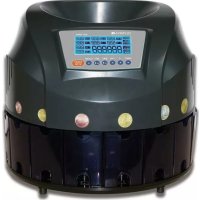
The coin counter serves to count and sort Euro coins. Any other use is considered unintended use. Do not use the coin counter to count or sort coins which do not comply with the intended use and do not insert any foreign bodies in the coin counter. Unauthorised modification or reconstruction is not permitted. Under no circumstances open the machine or complete any repair work yourself.
Only use in suitable conditions
Prevent exposure to smoke, dust, vibration, chemicals, moisture, heat and direct sunlight.
Scope of Delivery
- Coin counter
Power cable
Brush
Bedienungsanleitung
Display and Notation
Action to be completed
Result of the action

5-C Detail C in Figure 5
[2] Reference number in the illustrations
START/STOP Press the button
Press the button and keep it pressed
5 sec. Press the button for 5 seconds
Operating Elements
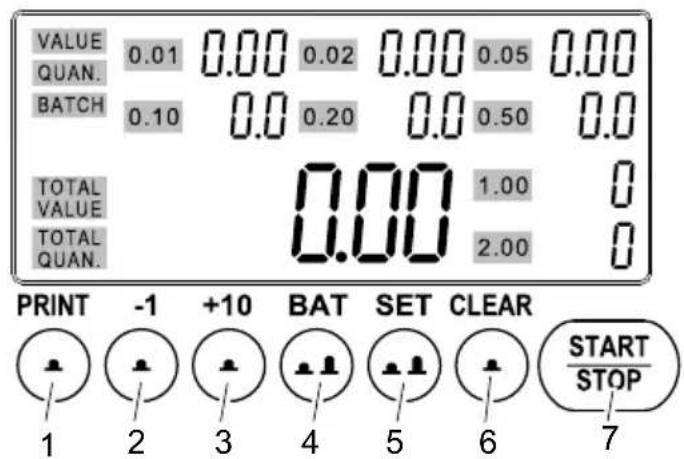

1 PRINT Print the result
2-1 Reduce the set value by 1
3 +10 Increase the set value by 10
4 BAT Batch function / Define the capacity
5 SET Set display of the count results / Define settings
6 CLEAR Reset the count results
7 START/STOP Start/Stop the counting process / Confirm settings
Display
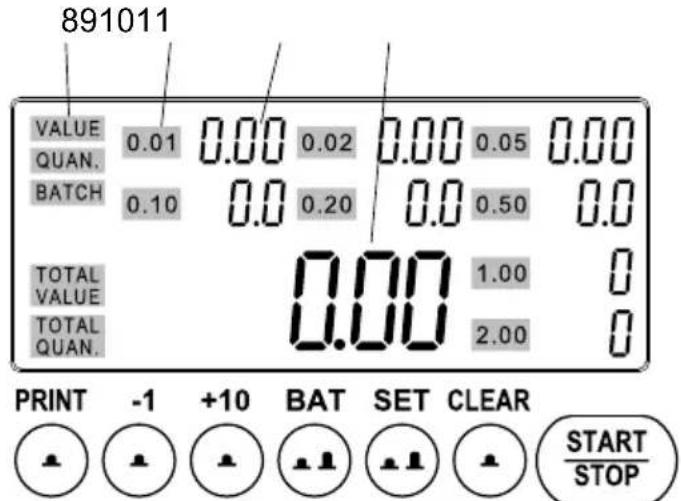

8 Display of the count results
9 Display of the respective coin value
10 Individual count result of the adjacent coin value
11 Total quantity of coins / Total value of coins
Operation
Switching on/off
The coin counter is switched on and off using the switch on the rear of the machine.
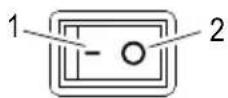
1 On
2 Off
Self-Test
After switching the machine on, it performs a self-test.
Switch the machine on. A self-test is completed, BBBBBB appears in the display.
i If the machine will not be used for a longer period, disconnect it from the power outlet.
If an error occurs, refer to the "Self-Diagnosis" table.
Trays/Tubes
Before you start counting and sorting the Euro coins, define whether trays or tubes are installed in the machine. Trays and tubes have different capacities.
The machine is supplied with trays installed; tubes are optional accessories available from our Service Center.
Capacity of the trays / tubes
| Coin value (€) | Capacity | |
| Trays Tubes | ||
| 0.01 280 50 | ||
| 0.02 200 50 | ||
| 0.05 160 50 | ||
| 0.10 150 40 | ||
| 0.20 110 40 | ||
| 0.50 90 40 | ||
| 1.00 100 25 | ||
| 2.00 80 25 | ||
Changing the capacity value to trays or tubes
BAT until 0.01 appears in the display [10] beside 300. The capacity of all the trays is displayed.
START/STOP The machine is ready to operate. or
2 × BAT until 0.01 appears in the display [10] beside 50 . The capacity of all the tubes is displayed.
START/STOP The collector last selected is reselected. The machine is ready to operate.
Inserting coins
Insert the coins to be counted at the top of the funnel.

CAUTION!
- Risk of injury
Fingers and hands could be injured.
Do not reach into the funnel. - Keep fingers and hands well away from the infeed mechanism.
ATTENTION!
- Risk of property damage!
Do not insert coins which do not comply with the intended use or foreign bodies into the coin counter.
START/STOP Start the counting process.
START/STOP Stop the counting process.
Functions
Display of the count results
The display [10] and display [11] together represent the results of counting. Define whether you want the results of counting the individual coin denominations as a quantity or an amount and the total result in the display [11] as a quantity or an amount.
SET, several times if necessary, The display of the count results changes and is also indicated in the display [8] (VALUE, QUAN.).
i Display as a quantity is also indicated by a simply 0. Display as an amount appears as a decimal value 0.00.
Batch
This function causes counting to stop when the preset quantity of coins has been counted.
The batch of coins to be counted can be set between I and the maximum capacity of the respective trays.
The maximum capacity is shown in the "Capacity, tray/ tube" table.
2 sec. BAT The selected coin value flashes in the display [10].
+10 / -1 until the required batch quantity is set.
BAT Set the next batch.
Repeat this process until all the coin values are set.
START/STOP The setting process is completed.
Insert the coins for the count/sort process using the Batch function.
START/STOP Start the count/sort process.
i When the set number of a specific coin denomination has been reached, the count/sort process
stops and the corresponding coin denomination flashes in the display. Empty the tray.
START/STOP Continue counting.
When the count/sort process has finished, the result appears in the display for the total and for the individual coin denominations.
Press the CLEAR button before beginning a new counting process.
Connections
The coin counter is equipped with two connections.
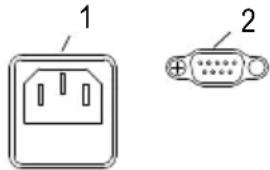
1 Power
2 Printer / Computer (RS-232)
Printing the Count Results
Connect a printer or computer to the coin counter at the RS-232 port and start the counting process.
After the counting process:
2 sec. SET Prt or PC appears in the display.
SET until the required setting is selected.
PRINT The count results are printed out on the printer or PC connected.
Self-Diagnosis
| Display Cause Solution | ||
| EO | The sensor is soiled or damaged. Remove the coins and clean the sensor. | |
| EC | The sensor for the coin tray is soiled or damaged. | Clean the sensor. |
| E1 - EB | The respective counting sensor is soiled or damaged. | Clean the respective sensor. |
If there is no improvement after cleaning, refer to Chapter GUARANTEE and call the service number.
Technical specifications
| Model CC 202 | |
| Infeed funnel 300 - 500 coins | |
| Counting speed Approx. 215 coins/minute | |
| Power supply 230 V/ 50 Hz | |
| Power consumption 45 W | |
| Permissible ambient temperature 0 to 40 °C; 30 to 80% relative humidity | |
| Dimensions 321 x 321 x 270 mm | |
| Weight 4.5 kg |
Disposal
Switch the machine off prior to cleaning.
Clean off dust with a soft, clean brush or a soft, lint-free cloth.
Clean the sensors after each use.
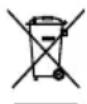
The adjacent symbol indicates that old electrical and electronic apparatus and batteries
must be disposed of separate from normal old waste, in compliance with legal require
Packaging materials must be disposed of according to local regulations.
Guarantee
Dear Customers,
We are very pleased that you have decided to buy this product.
- The first line of action if a problem occurs is to contact our hotline.
- In case the equipment is defective, return it together with the purchase receipt and original packaging to the point-of-sale.
Capacité des compartments / tubes
| Valeur de la monnaie (€) | Capacité | |
| Compartiments Tübes | ||
| 0,01 280 50 | ||
| 0,02 200 50 | ||
| 0,05 160 50 | ||
| 0,10 150 40 | ||
| 0,20 110 40 | ||
| 0,50 90 40 | ||
| 1,00 100 25 | ||
| 2,00 80 25 | ||
1 Stroom
2 Printer / computer (RS-232)
To view the complete Declaration of Conformity, please refer to the free download available on our website www.olympia-vertrieb.de.