ASUS GTX750DF2GD5 - Graphic card

GTX750DF2GD5 - Graphic card ASUS - Free user manual and instructions

Find the device manual for free GTX750DF2GD5 ASUS in PDF.
📄 167 pages English EN Download 💬 AI Question
Notice ASUS GTX750DF2GD5 - page 3

User questions about GTX750DF2GD5 ASUS

0 question about this device. Answer the ones you know or ask your own.

Ask a new question about this device

The email remains private: it is only used to notify you if someone responds to your question.

No questions yet. Be the first to ask one.

Download the instructions for your Graphic card in PDF format for free! Find your manual GTX750DF2GD5 - ASUS and take your electronic device back in hand. On this page are published all the documents necessary for the use of your device. GTX750DF2GD5 by ASUS.

USER MANUAL GTX750DF2GD5 ASUS

ASUS GPU Tweak II User Manual

Q10790

First Edition

August 2015

Contents

English....3

繁體中文 14

简体中文 25

Français 36

日本語 47

Italiano 58

Русский....69

Čeština....80

Nederlands 91

Ελληνικά.... 102

Português.... 113

Polski....124

Español.... 135

Українська.... 146

Deutsch....157

Knowing GPU Tweak II

ASUS GPU Tweak II utility allows you to monitor and tweak the settings of your ASUS graphics card for optimal performance. It has two user interfaces, the Simple Mode and Professional Mode, that allow you to quickly monitor your preset and customized profiles, boost the GPU settings for your game-changing enjoyment, or do some advanced tweaking on the GPU settings for optimal performance.

ASUS GPU Tweak II includes these ASUS-exclusive preset power-saving and gaming profiles:

ASUS GTX750DF2GD5 - Knowing GPU Tweak II - 1

OC Mode

Silent Mode

Gaming Mode

My Profile

System requirements

• AMD 7000 Series GPU or higher
• NVIDIA 600 Series GPU or higher
• 32-/64-bit Microsoft® Windows® 10 / 8 / 8.1 / 7

Installing GPU Tweak II

  1. Ensure that you have installed the ASUS graphics card and its driver. Refer to the ASUS graphics card user manual for details on installing its driver.
  2. Locate the ASUS GPU TweakII driver folder and double-click the setup.exe file to start the installation.
  3. Follow the onscreen instructions to finish the installation.

Launching GPU Tweak II

• Double-click the GPU Tweak icon on the desktop.
- Click Start > All Programs > ASUS > GPU Tweak II to launch the program.

ASUS GTX750DF2GD5 - Launching GPU Tweak II - 1

Simple Mode

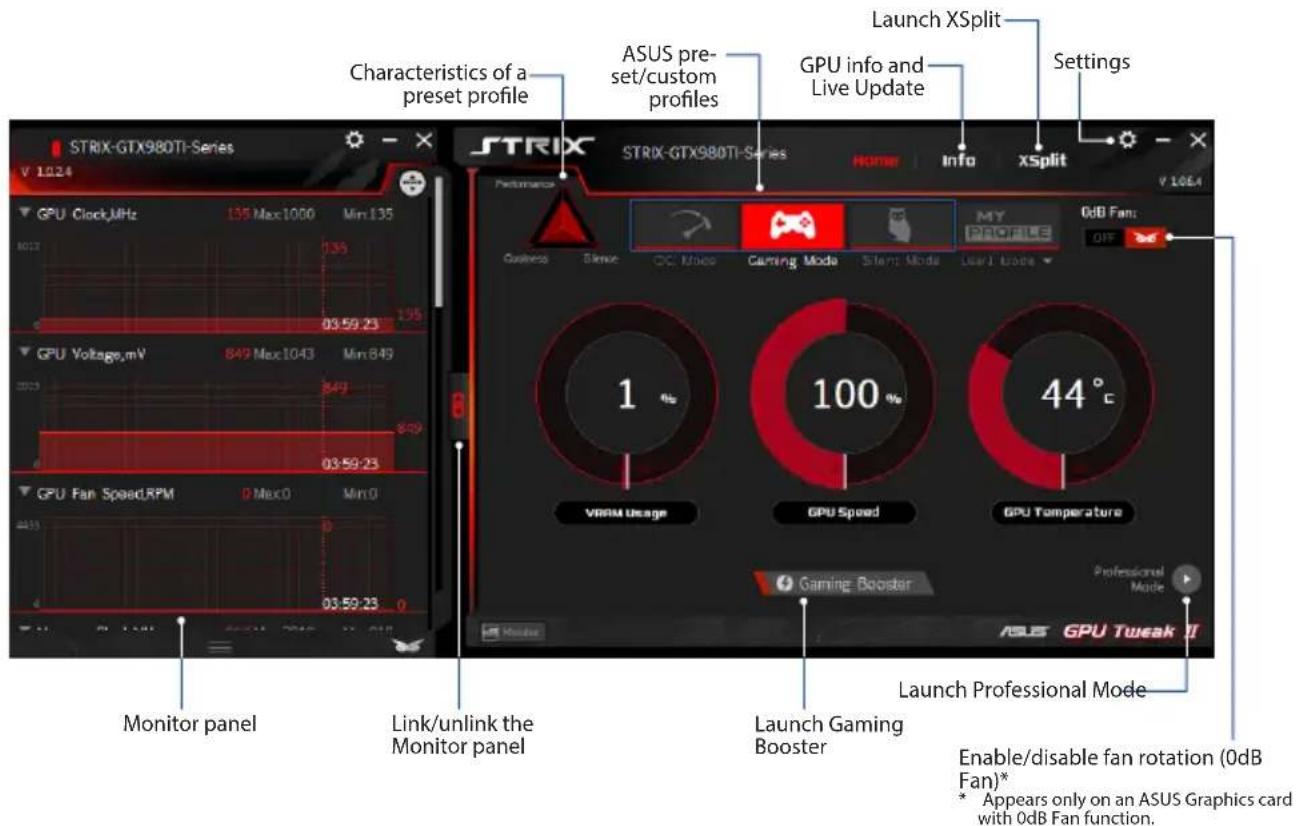
Simple Mode provides you with a quick way to monitor your GPU settings in real-time, and tweak some system settings via Gaming Booster for your game-changing enjoyment.
ASUS GTX750DF2GD5 - Simple Mode - 1

text_image CHARACTERISTICS OF A preset profile ASUS pre- set/custom profiles GPU info and Live Update Launch XSplit Settings STRIX-GTX980TI-Series V 1024 STRIX STRIX-GTX980TI-Series HOME Info xSplit V 1064 Performance Business Skew DC Mode Gaming Mode Start Mode User/Trade MY PROGRESS 0dB Fan: OFF 1 100 44 °C VRAM Usage GPU Speed GPU Temperature Gaming Booster Professional Mode Monitor panel Link/unlink the Monitor panel Launch Gaming Booster Launch Professional Mode ASUS GPU Tweak II Enable/disable fan rotation (0dB Fan)* * Appears only on an ASUS Graphics card with 0dB Fan function.

Gaming Booster

Get that game-changing performance edge with Gaming Booster, which helps optimize your system for a seamless and faster game play in your computer games.

Gaming Booster offers you these three (3) functions:

  • Visual Effects: Lets you turn off the Windows® visual effects to intensify the processor performance.
  • System Services: Lets you to automatically or manually turn off Windows® services or processes.

- System Services setting: Lets you to manually choose the services or processes that you want to stop.

- System Memory defragmentation: Lets you rearrange and clean your system memory without closing any processes.
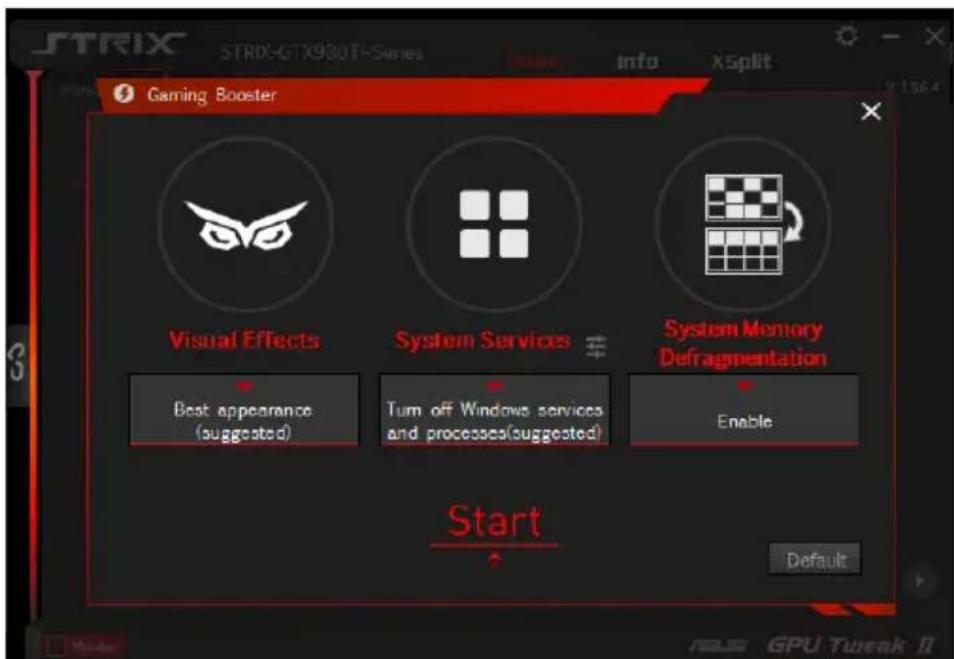
ASUS GTX750DF2GD5 - Gaming Booster - 1

text_image STRIX STRIX-GTX980T1-Series Info X5plit Gaming Booster Visual Effects System Services # System Memory Defragmentation Best appearance (suggested) Turn off Windows services and processes(suggested) Enable Start Default

Professional Mode

Configure the GPU settings like a pro, and get the optimal performance from your ASUS Graphics card.
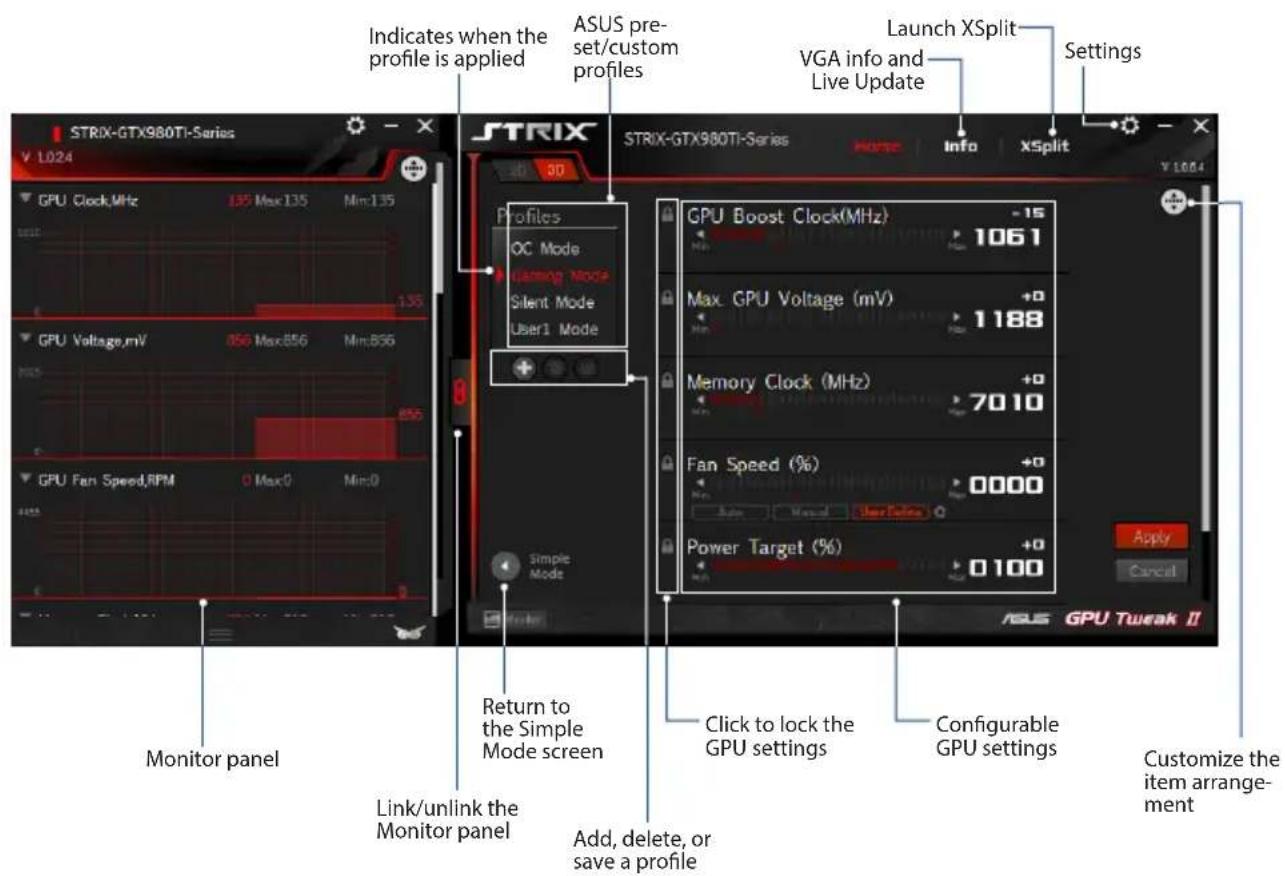
ASUS GTX750DF2GD5 - Professional Mode - 1

text_image STRIX-GTX980Ti-Series Indicates when the profile is applied ASUS pre- set/custom profiles Launch XSplit VGA info and Live Update Settings STRIX GPU Clock,MHz 135 Max:135 Min:135 GPU Voltage,mV 856 Max:856 Min:856 GPU Fan Speed,RPM 0 Max:0 Min:0 Monitor panel Return to the Simple Mode screen Link/unlink the Monitor panel Add, delete, or save a profile Click to lock the GPU settings Configurable GPU settings Power Target (%) +0 0 100 Apply Cancuit ASP GPU Twreak II GPU Boost Clock(MHz) -15 1061 Max. GPU Voltage (mV) +0 1 188 Memory Clock (MHz) +0 7010 Fan Speed (%) +0 0 0000 +0 Power Target (%) +0 0 100 Customize the item arrange- ment

Configuring a profile

  1. Select the profile that you want to configure.
  2. Select the GPU setting, then key in your preferred value.
  3. When done, click Apply

Adding a profile

  1. Click + then assign the profile name.
  2. Set your preferred values.
  3. When done, click to save the profile.

Applying a profile

- Select the profile, then click to apply the profile.

Deleting a profile

- Select the profile, then click 📄 to delete the profile.

Getting the VGA info and Live Update

The Info screen provides you with information and live updates about your ASUS VGA card.

NOTE: Ensure that your computer is connected to the Internet to get the Live Update.
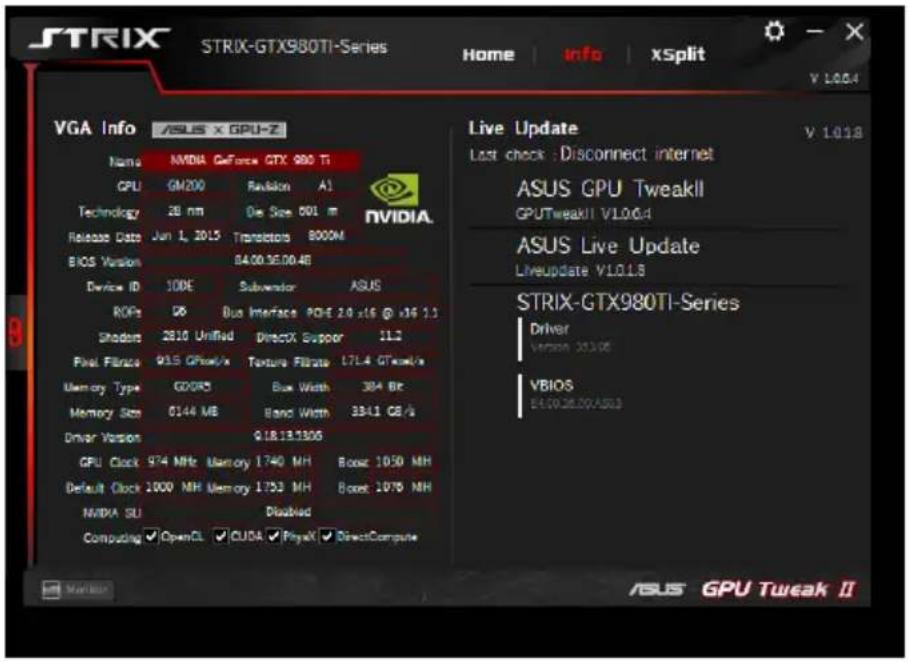
ASUS GTX750DF2GD5 - Getting the VGA info and Live Update - 1

text_image STRIX-GTX980TI-Series Home | info | xSplit V 1.0.0.4 VGA Info | ASUS x GPU-Z Name NVIDIA GeForce GTX 980 TI GPU GM200 Revision A1 Technology 28 nm Die Size 501 m Release Date Jun 1, 2015 Transistors 8000M BIOS Version 84:00:56:00:46 Device ID 10DE Subwoofer ASUS ROFs DB Bus Interface PGE 2.0 x16 @ x16 1.1 Shodors 2010 Unifed DirectX Support 11.2 Pixel Filters 915 GPin/kx Texture Filter 17L4 GTxcel/x Memory Type GD085 Bus Width 304 Bit Memory Size 6144 MB Band Width 33-1 GB/s Driver Version Q18183305 GPU Clock 974 MHz Memory 1740 MH Boost 1050 MH Default Clock 1000 MHz Memory 1753 MH Boost 1075 NH MNDIA SU Disabled Computing OpenCL CUDA PhysX DirectCompute Live Update V 1.0.18 Last check : Disconnect internet ASUS GPU TweakII GPUTweakII V1.0.0.4 ASUS Live Update Liveupdate V1.0.18 STRIX-GTX980TI-Series Driver Version 23306 VBIOS E15028.00/ASU3 ASUS GPU Tweak II

Launching XSplit

Install and launch XSplit Gamecaster from GPU Tweak II.
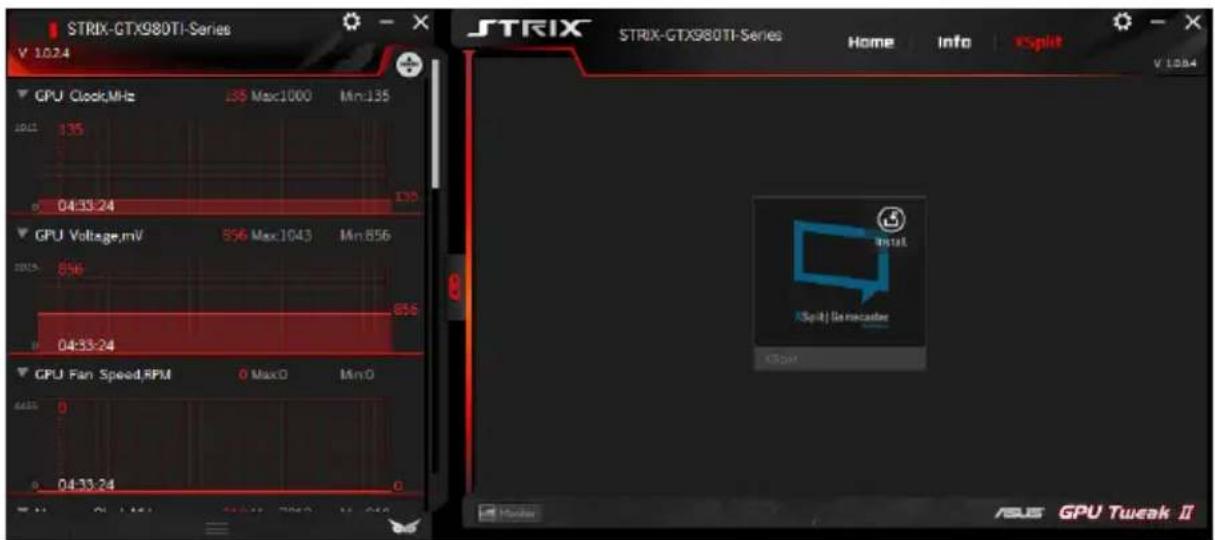
ASUS GTX750DF2GD5 - Launching XSplit - 1

text_image STRIX-GTX980TI-Series V 1024 STRIX STRIX-GTX980TI-Series Home Info vSplit V 1084 GPU Clock,MHz 135 Max:1000 Min:135 10/1 135 04:33:24 GPU Voltage,mV 856 Max:1043 Min:856 10/15 856 04:33:24 GPU Fan Speed,RPM 0 Max:0 Min:0 645 0 04:33:24 Insert vSplit | Senecaster COSA Monitor ASIS GPU Tweak II

Using the Settings screen

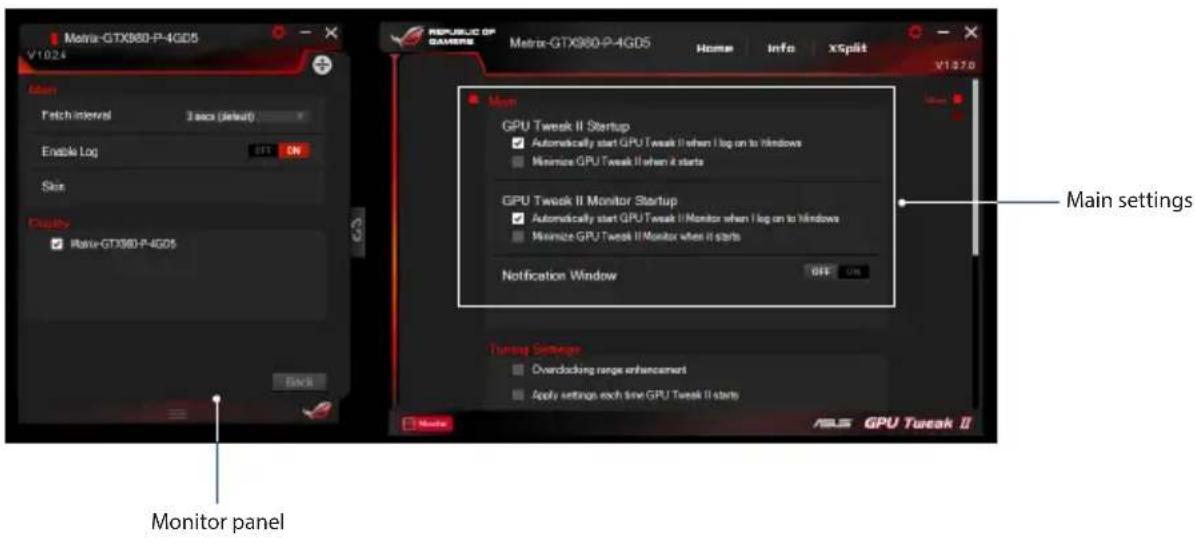
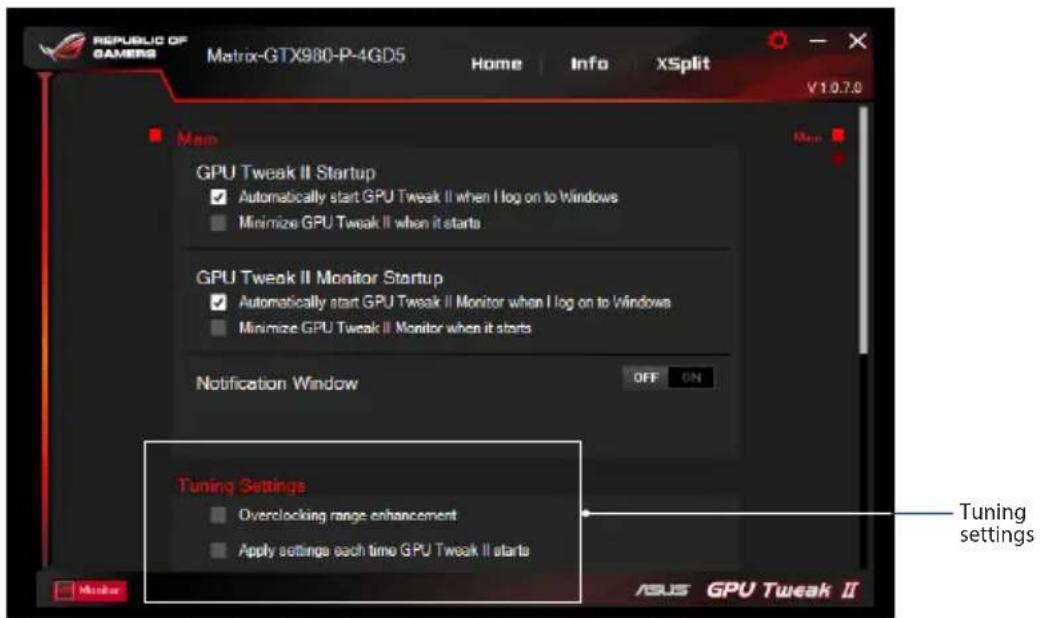
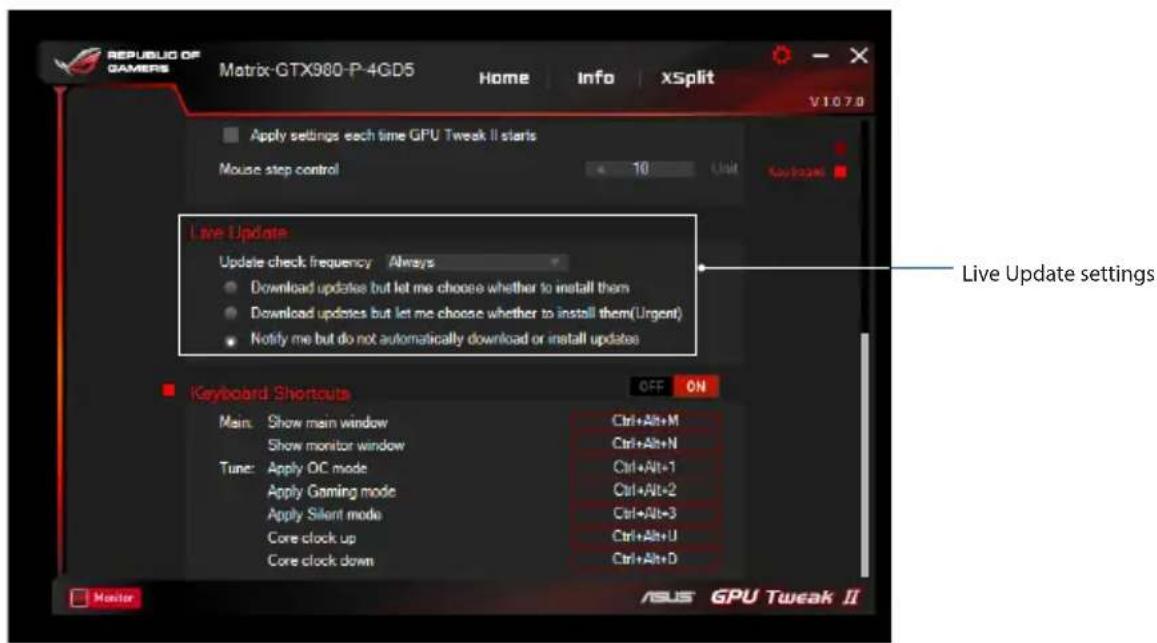
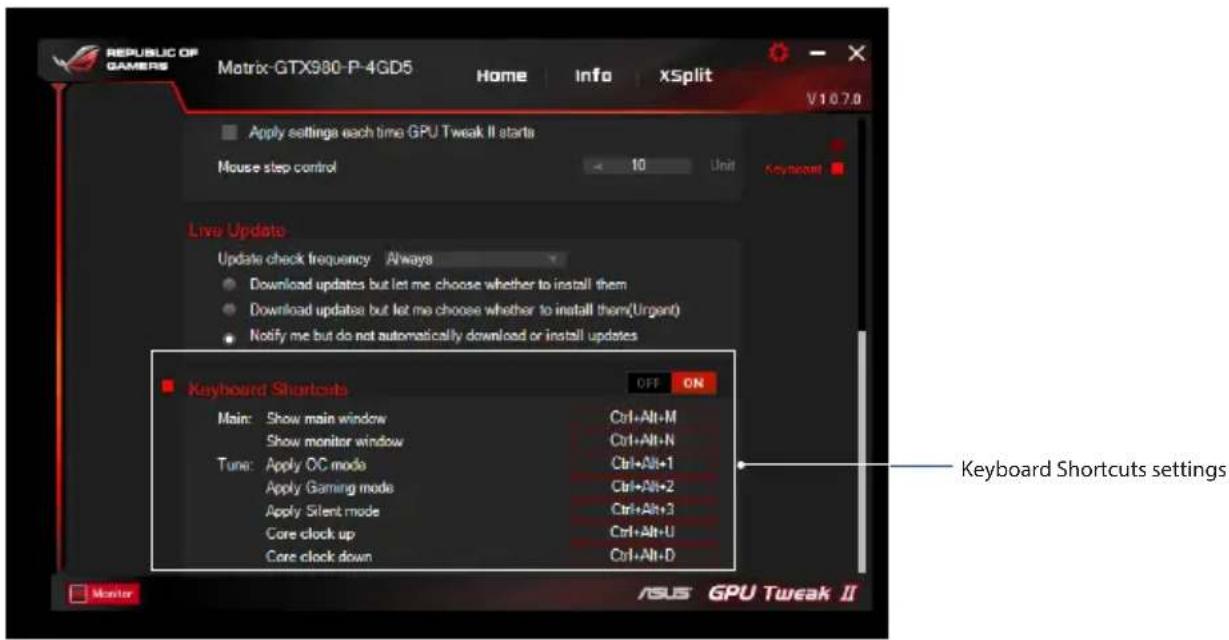
The Settings screen allows you to configure the GPU Tweak II settings such as Main, Tuning Settings, Live Update, and Keyboard Shortcuts.

Main

From the Main settings, you can select any of these options on launching GPU Tweak II:

• Automatically launch GPU Tweak II or its Monitor panel on Windows® startup.
- Minimize GPU Tweak II or its Monitor panel once launched.
- Turn the notification window on/off.
ASUS GTX750DF2GD5 - Main - 1

text_image Metro-GTX860-P-4G05 V1024 Monitor panel Petch interval 3 secs (default) Enable Log ON Skin Display Rate-GTX860-P-4G05 Back REPUBLIC OF GAVENIX Metro-GTX860-P-4G05 Home Info xSplit V10270 Main GPU Tweak II Startup ✓ Automatically start GPU Tweak II when I log on to Windows ■ Minimize GPU Tweak II when it starts GPU Tweak II Monitor Startup ✓ Automatically start GPU Tweak II Monitor when I log on to Windows ■ Minimize GPU Tweak II Monitor when it starts Notification Window OFF ON Turnup Settings ■ Overdocking range enhancement ■ Apply settings each time GPU Tweak II starts ASLS GPU Tweak II

Tuning Settings

From the Tuning Settings, you can select any of these options on applying the GPU Tweak II settings:

• Enhance the overclocking range.
- Apply the settings on GPU Tweak startup.
ASUS GTX750DF2GD5 - Tuning Settings - 1

text_image REPUBLIC OF GAMERS Matrix-GTX980-P-4GD5 Home Info XSplit V1.0.7.0 Map GPU Tweak II Startup ✓ Automatically start GPU Tweak II when I log on to Windows ■ Minimize GPU Tweak II when it starts GPU Tweak II Monitor Startup ✓ Automatically start GPU Tweak II Monitor when I log on to Windows ■ Minimize GPU Tweak II Monitor when it starts Notification Window OFF ON Tuning Settings Overclocking range enhancement Apply setting each time GPU Tweak II starts Tuning settings ASUS GPU Tweak II

Live Update

Receive notifications on the latest VBIOS and driver updates from Live Update. Configure and select the following Live Update options:

  • Set the Update check frequency as to when you want to receive the Live Update.
    • Select any of the Live Update options:

  • Download updates but let me choose whether to install them: Select this option to automatically download updates, and decide whether to manually install them.

  • Download important updates but let me choose whether to install them: Select this option to automatically download critical updates, and decide whether to manually install them.
  • Notify me but do not automatically download or install updates: Select this option to receive notifications only, and decide whether to manually download and install the updates.
ASUS GTX750DF2GD5 - Live Update - 1

text_image REPUBLIC OF GAMERS Matrix-GTX980-P-4GD5 Home Info xSplit V1078 Apply settings each time GPU Tweak II starts Mouse step control 10 Unit Keyboard Live Update Update check frequency Always Download updates but let me choose whether to install them Download updates but let me choose whether to install them(Urgent) Notify me but do not automatically download or install updates Live Update settings Keyboard Shortouts OFF ON Main: Show main window Show monitor window Tune: Apply OC mode Apply Gaming mode Apply Silent mode Core clock up Core clock down Ctrl+Alt+M Ctrl+Alt+N Ctrl+Alt+1 Ctrl+Alt+2 Ctrl+Alt+3 Ctrl+Alt+U Ctrl+Alt+D Monitor ASUS GPU Tweak II

Keyboard Shortcuts

Turn on/off the Keyboard Shortcuts to quickly show the main screen or apply some quick adjustments.
ASUS GTX750DF2GD5 - Keyboard Shortcuts - 1

text_image REPUBLIC OF GAMERS Matrix-GTX980-P-4GD5 Home Info XSplit V107.0 Apply settings each time GPU Tweak II starts Mouse step control 10 Unit Keyboard Live Update Update check frequency Always Download updates but let me choose whether to install them Download updates but let me choose whether to install them(Urgent) Notify me but do not automatically download or install updates Keyboard Shortcuts OFF ON Main: Show main window Show monitor window Tune: Apply OC mode Apply Gaming mode Apply Silent mode Core clock up Core clock down Ctrl+Alt+M Ctrl+Alt+N Ctrl+Alt+1 Ctrl+Alt+2 Ctrl+Alt+3 Ctrl+Alt+U Ctrl+Alt+D Keyboard Shortcuts settings Monitor ASUS GPU Tweak II

了解 GPU Tweak II

text_image STRIX STRIX-GTX930T1-Series Info X5plit Gaming Booster Visual Effects System Services System Memory Defragmentation Best appearance (suggested) Turn off Windows services and processes(suggested) Enable Start Default

專家模式

text_image REPUBLIC OF GAMERS Matrix-GTX980-P-4GD5 Home Info XSplit V1070 Apply settings each time GPU Tweak II starts Mouse step control 10 Used Keyboard Live Update Update check frequency Always Download updates but let me choose whether to install them Download updates but let me choose whether to install them(Urgent) Notify me but do not automatically download or install updates Live Update 設定 Keyboard Shortouts Main: Show main window Show monitor window Tune: Apply OC mode Apply Gaming mode Apply Silerit mode Core clock up Core clock down OFF ON Ctrl+Alt+M Ctrl+Alt+N Ctrl+Alt+1 Ctrl+Alt+2 Ctrl+Alt=3 Ctrl+Alt+U Ctrl+Alt+D Monitor ASUS GPU Tweak II

鍵盤快捷鍵

text_image REPUBLIC OF GAMERS Matrix-GTX980-P-4GD5 Home Info X5plit V107.0 Apply settings each time GPU Tweak II starts Mouse step control 10 Unit Keyboard Live Update Update check frequency Always Download updates but let me choose whether to install them Download updates but let me choose whether to install them(Urgent) Notify me but do not automatically download or install updates Keyboard Shortcuts OFF ON Main: Show main window Show monitor window Tune: Apply OC mode Apply Gaming mode Apply Silent mode Core clock up Core clock down Ctrl+Alt+M Ctrl+Alt+N Ctrl+Alt-1 Ctrl+Alt-2 Ctrl+Alt+3 Ctrl+Alt+U Ctrl+Alt+D 键盘快捷键设定 Monitor ASUS GPU Tweak II

了解 GPU Tweak II

text_image STRIX STRIX-GTX980T-Series Info X5plit Gaming Booster Visual Effects System Services System Memory Defragmentation Best appearance (suggested) Turn off Windows services and processes(suggested) Enable Start Default

专家模式

text_image REPUBLIC OF CAMERS Matrix-GTX980-P-4GD5 Home Info xSplit V1.0.7.0 Map GPU Tweak II Startup ✓ Automatically start GPU Tweak II when I log on to Windows ■ Minimize GPU Tweak II when it starts GPU Tweak II Monitor Startup ✓ Automatically start GPU Tweak II Monitor when I log on to Windows ■ Minimize GPU Tweak II Monitor when it starts Notification Window OFF ON Tuning Settings Overclocking range enhancement Apply settings each time GPU Tweak II starts 微调设置 ASUS GPU Tweak II

Live Update

text_image REPUBLIC OF GAMERS Matrix-GTX980-P-4GD5 Home Info XSplit V1070 Apply settings each time GPU Tweak II starts Mouse step control 10 Unit Keyboard Live Update Update check frequency Always Download updates but let me choose whether to install them Download updates but let me choose whether to install them(Urgent) Notify me but do not automatically download or install updates Live Update 设置 Keyboard Shortcuts OFF ON Main: Show main window Show monitor window Tune: Apply OC mode Apply Gaming mode Apply Silent mode Core clock up Core clock down Ctrl+Alt+M Ctrl+Alt+N Ctrl+Alt+1 Ctrl+Alt+2 Ctrl+Alt+3 Ctrl+Alt+U Ctrl+Alt+D Monitor ASUS GPU Tweak II

键盘快捷键

text_image REPUBLIC OF GAMERS Matrix-GTX980-P-4GD5 Home Info XSplit V107.0 Apply settings each time GPU Tweak II starts Mouse step control 10 Unit Keyboard Live Updates Update check frequency Always Download updates but let me choose whether to install them Download updates but let me choose whether to install them(Urgent) Notify me but do not automatically download or install updates Keyboard Shortcuts OFF ON Main: Show main window Show monitor window Tune: Apply OC mode Apply Gaming mode Apply Silent mode Core clock up Core clock down Ctrl+Alt+M Ctrl+Alt+N Ctrl+Alt+1 Ctrl+Alt+2 Ctrl+Alt+3 Ctrl+Alt+U Ctrl+Alt+D 键盘快捷键设置 Monitor ASUS GPU Tweak II
text_image STRIX STRIX-GTX980T-Series Info XSplit Gaming Booster Visual Effects System Services System Memory Defragmentation Best appearance (suggested) Turn off Windows services and processes(suggested) Enable Start Default

Mode Professionnel

text_image REPUBLIC OF GAMERS Matrix-GTX980-P-4GD5 Home | Info | XSplit V1070 Apply settings each time GPU Tweak II starts Mouse step control 10 Unit Keyboard Live Update Update check frequency Always Download updates but let me choose whether to install them Download updates but let me choose whether to install them(Urgent) Notify me but do not automatically download or install updates Paramètres Live Update Keyboard Shortouts OFF ON Main: Show main window Show monitor window Tune: Apply OC mode Apply Gaming mode Apply Silent mode Core clock up Core clock down Ctrl+Alt+M Ctrl+Alt+N Ctrl+Alt+1 Ctrl+Alt+2 Ctrl+Alt+3 Ctrl+Alt+U Ctrl+Alt+D Monitor ASUS GPU Tweak II

Keyboard Shortcuts (Raccourcis clavier)

text_image REPUBLIC OF GAMERS Matrix-GTX980-P-4GD5 Home Info XSplit V107.0 Apply settings each time GPU Tweak II starts Mouse step control 10 Unit Keyboard Live Updates Update check frequency Always Download updates but let me choose whether to install them Download updates but let me choose whether to install them(Urgent) Notify me but do not automatically download or install updates Keyboard Shortcuts OFF ON Main: Show main window Show monitor window Tune: Apply OC mode Apply Gaming mode Apply Silent mode Core clock up Core clock down Ctrl+Alt+M Ctrl+Alt+N Ctrl+Alt+1 Ctrl+Alt+2 Ctrl+Alt+3 Ctrl+Alt+U Ctrl+Alt+D Paramètres Keyboard Short- cuts (Raccourcis clavier) Monitor ASUS GPU Tweak II

GPU Tweak IIの概要

text_image STRIX STRIX-GTX9B01E-Series Info X Split Gaming Booster Visual Effects System Services System Memory Defragmentation Best appearance (suggested) Turn off Windows services and processes(suggested) Enable Start Default GPU Tweak II

Professional Mode

text_image REPUBLIC OF GAMERS Matrix-GTX980-P-4GD5 Home Info XSplit V1.0.7.0 Map GPU Tweak II Startup ✓ Automatically start GPU Tweak II when I log on to Windows ■ Minimize GPU Tweak II when it starts GPU Tweak II Monitor Startup ✓ Automatically start GPU Tweak II Monitor when I log on to Windows ■ Minimize GPU Tweak II Monitor when it starts Notification Window OFF ON Tuning Settings Overclocking range enhancement Apply settings each time GPU Tweak II starts Tuning Setting ASUS GPU Tweak II
text_image REPUBLIC OF GAMERS Matrix-GTX980-P-4GD5 Home Info XSplit V107.0 Apply settings each time GPU Tweak II starts Mouse step control 10 Unit Keyboard Live Update Update check frequency Always Download updates but let me choose whether to install them Download updates but let me choose whether to install them(Urgent) Notify me but do not automatically download or install updates Live Update Keyboard Shortcuts OFF ON Main: Show main window Show monitor window Tune: Apply OC mode Apply Gaming mode Apply Silent mode Core clock up Core clock down Ctrl+Alt+M Ctrl+Alt+N Ctrl+Alt+1 Ctrl+Alt+2 Ctrl+Alt+3 Ctrl+Alt+U Ctrl+Alt+D Monitor ASUS GPU Tweak II

キーボードショートカット

text_image REPUBLIC OF GAMERS Matrix-GTX980-P-4GD5 Home Info xSplit V107.0 Apply settings each time GPU Tweak II starts Mouse step control 10 Unit Avonset Live Update Update check frequency /Always Download updates but let me choose whether to install them Download updates but let me choose whether to install them(Urgent) Notify me but do not automatically download or install updates Keyboard Shortcuts Main: Show main window Show monitor window Tune: Apply OC mode Apply Gaming mode Apply Silent mode Core clock up Core clock down Off ON Ctrl+Alt+M Ctrl+Alt+N Ctrl+Alt+1 Ctrl+Alt+2 Ctrl+Alt+3 Ctrl+Alt+U Ctrl+Alt+D 基于一ドショートカット Monitor ASUS GPU Tweak II
text_image STRIX GTX98071-Series Info xsplit Gaming Booster Visual Effects System Services System Memory Delragmentation Best appearance (suggested) Turn off Windows services and processes(suggested) Enable Start Default
text_image Matrix-GTX980-P-4GD5 V1024 Matrix Patch interval 3 sec (default) Enable Lag ON Size Desktop Matrix-GTX980-P-4GD5 Pannello Monitor REPUBLIC OF CAMERA Matrix-GTX980-P-4GD5 Home Info xSplit V1020 Next GPU Tweak II Startup ✓ Automatically start GPU Tweak II when I log on to Windows Minimize GPU Tweak II when it starts GPU Tweak II Monitor Startup ✓ Automatically start GPU Tweak II Monitor when I log on to Windows Minimize GPU Tweak II Monitor when it starts Notification Window OFF ON Impostazioni principali Testing Settings Overloading range enhancement Apply settings such line GPU Tweak II starts ASL GPU Tweak II

Tuning Settings (Impostazioni Tuning)

text_image REPUBLIC OF GAMERS Matrix-GTX980-P-4GD5 Home Info XSplit V1.0.7.0 Main GPU Tweak II Startup ✓ Automatically start GPU Tweak II when I log on to Windows ■ Minimize GPU Tweak II when it starts GPU Tweak II Monitor Startup ✓ Automatically start GPU Tweak II Monitor when I log on to Windows ■ Minimize GPU Tweak II Monitor when it starts Notification Window OFF ON Tuning Settings Overclocking range enhancement Apply settings each time GPU Tweak II starts Impostazioni Tuning ASUS GPU Tweak II

Live Update

text_image REPUBLIC OF GAMERS Matrix-GTX980-P-4GD5 Home | Info | xSplit V1070 Apply settings each time GPU Tweak II starts Mouse step control 10 Unit Restaurant Live Update Update check frequency Always Download updates but let me choose whether to install them Download updates but let me choose whether to install them(Urgent) Notify me but do not automatically download or install updates Impostazioni di Live Update Keyboard Shortcuts OFF ON Main: Show main window Show monitor window Tune: Apply OC mode Apply Gaming mode Apply Silent mode Core clock up Core clock down Ctrl+Alt+M Ctrl+Alt+N Ctrl+Alt+1 Ctrl+Alt+2 Ctrl+Alt+3 Ctrl+Alt+U Ctrl+Alt+D Monitor ASUS GPU Tweak II

Keyboard Shortcuts

text_image REPUBLIC OF GAMERS Matrix-GTX980-P-4GD5 Home Info XSplit V107.0 Apply settings each time GPU Tweak II starts Mouse step control 10 Unit Keyboard Live Update Update check frequency Always Download updates but let me choose whether to install them Download updates but let me choose whether to install them(Urgent) Notify me but do not automatically download or install updates Keyboard Shortcuts Main: Show main window Show monitor window Tune: Apply OC mode Apply Gaming mode Apply Silent mode Core clock up Core clock down Ctrl+Alt+M Ctrl+Alt+N Ctrl+Alt+1 Ctrl+Alt+2 Ctrl+Alt+3 Ctrl+Alt+U Ctrl+Alt+D Monitor ASUS GPU Tweak II Impostazioni scorciatoie da tastiera
text_image STRIX STRIX-GTX980T1-Series Info X5plit Gaming Booster Visual Effects System Services # System Memory Defragmentation Best appearance (suggested) Turn off Windows services and processes(suggested) Enable Start Default ASUS GPU Tureak II
text_image REPUBLIC OF GAMERS Matrix-GTX980-P-4GD5 Home Info XSplit V1078 Apply settings each time GPU Tweak II starts Mouse step control 10 Unit Keyboard Live Update Update check frequency Always Download updates but let me choose whether to install them Download updates but let me choose whether to install them(Urgent) Notify me but do not automatically download or install updates Keyboard Shortcuts OFF ON Main: Show main window Show monitor window Tune: Apply OC mode Apply Gaming mode Apply Silent mode Core clock up Core clock down Ctrl+Alt+M Ctrl+Alt+N Ctrl+Alt+1 Ctrl+Alt+2 Ctrl+Alt+3 Ctrl+Alt+U Ctrl+Alt+D Monitor ASUS GPU Tweak II

Горячие клавиши

text_image REPUBLIC OF GAMERS Matrix-GTX980-P-4GD5 Home Info XSplit V107.0 Apply settings each time GPU Tweak II starts Mouse step control 10 Unit Keyboard Live Update Update check frequency Always Download updates but let me choose whether to install them Download updates but let me choose whether to install them(Urgent) Notify me but do not automatically download or install updates Keyboard Shortcuts OFF ON Main: Show main window Show monitor window Tune: Apply OC mode Apply Gaming mode Apply Silent mode Core clock up Core clock down Ctrl+Alt+M Ctrl+Alt+N Ctrl+Alt+1 Ctrl+Alt+2 Ctrl+Alt+3 Ctrl+Alt+U Ctrl+Alt+D Настройки горячих клавиш Monitor ASUS GPU Tweak II
text_image Gaming Booster Visual Effects System Services System Memory Defragmentation Best appearance (suggested) Turn off Windows services and processes(suggested) Enable Start Default

Profesionální režim

text_image GAMERS Matrix-GTX980-P-4GD5 Home Info XSplit V1.0.7.0 Apply settings each time GPU Tweak II starts Mouse step control 10 Unit Keyboard Live Update Update check frequency Always Download updates but let me choose whether to install them Download updates but let me choose whether to install them(Urgent) Notify me but do not automatically download or install updates Nastavení Live Update Keyboard Shortcuts OFF ON Main: Show main window Show monitor window Tune: Apply OC mode Apply Gaming mode Apply Silent mode Core clock up Core clock down Ctrl+Alt+M Ctrl+Alt+N Ctrl+Alt=1 Ctrl+Alt=2 Ctrl+Alt=3 Ctrl+Alt+U Ctrl+Alt+D Monitor ASUS GPU Tweak II
text_image Visual Effects System Services System Memory Defragmentation Best appearance (suggested) Turn off Windows services and processes(suggested) Enable Start Default

Professionele modus

text_image Main GPU Tweak II Startup ✓ Automatically start GPU Tweak II when I log on to Windows ■ Minimize GPU Tweak II when it starts GPU Tweak II Monitor Startup ✓ Automatically start GPU Tweak II Monitor when I log on to Windows ■ Minimize GPU Tweak II Monitor when it starts Notification Window OFF ON Tuning Settings ■ Overclocking range enhancement ■ Apply settings each time GPU Tweak II starts Tuning-instel- lingen ASUS GPU Tweak II

Live Update

text_image REPUBLIC OF GAMERS Matrix-GTX980-P-4GD5 Home | Info | xSplit V107.0 Apply settings each time GPU Tweak II starts Mouse step control 10 Until Keyboard Live Update Update check frequency Always Download updates but let me choose whether to install them Download updates but let me choose whether to install them(Urgent) Notify me but do not automatically download or install updates Live Update-instel- lingen Keyboard Shortcuts OFF ON Main: Show main window Show monitor window Tune: Apply OC mode Apply Gaming mode Apply Silent mode Core clock up Core clock down Ctrl+Alt+M Ctrl+Alt+N Ctrl+Alt+1 Ctrl+Alt+2 Ctrl+Alt+3 Ctrl+Alt+U Ctrl+Alt+D Monitor ASUS GPU Tweak II

Sneltoetsen

text_image V107.0 Apply settings each time GPU Tweak II starts Mouse step control 10 Unit Key based Live Update Update check frequency Always Download updates but let me choose whether to install them Download updates but let me choose whether to install them(Urgent) Notify me but do not automatically download or install updates Keyboard shortcuts OFF ON Main: Show main window Ctrl+Alt+M Show monitor window Ctrl+Alt+N Tune: Apply OC mode Ctrl+Alt+1 Apply Gaming mode Ctrl+Alt+2 Apply Silent mode Ctrl+Alt+3 Core clock up Ctrl+Alt+U Core clock down Ctrl+Alt+D Sneltoetsinstellingen Monitor ASUS GPU Tweak II
text_image Visual Effects System Services System Memory Defragmentation Best appearance (suggested) Turn off Windows services and processes(suggested) Enable Start Default
text_image Mouse step control 10 Unit Newport Live Update Update check frequency Always Download updates but let me choose whether to install them Download updates but let me choose whether to install them(Urgent) Notify me but do not automatically download or install updates Puthišćić Zwntanów evnmerpósewn Keyboard Shortcuts OFF ON Main: Show main window Show monitor window Tune: Apply OIC mode Apply Gaming mode Apply Silent mode Core clock up Core clock down Ctrl+Alt+M Ctrl+Alt+N Ctrl+Alt=1 Ctrl+Alt+2 Ctrl+Alt=3 Ctrl+Alt+U Ctrl+Alt+D Monitor ASUS GPU Tweak II
text_image Visual Effects System Services System Memory Defragmentation Best appearance (suggested) Turn off Windows services and processes(suggested) Enable Start Default

Modo Profissional

text_image REPUBLIC OF GAMERS Matrix-GTX980-P-4GD5 Home Info XSplit V1.0.7.0 Main GPU Tweak II Startup ✓ Automatically start GPU Tweak II when I log on to Windows ■ Minimize GPU Tweak II when it starts GPU Tweak II Monitor Startup ✓ Automatically start GPU Tweak II Monitor when I log on to Windows ■ Minimize GPU Tweak II Monitor when it starts Notification Window OFF ON Tuning Settings Overclocking range enhancement Apply settings each time GPU Tweak II starts Definitions de ajuste ASUS GPU Tweak II
text_image REPUBLIC OF GAMERS Matrix-GTX980-P-4GD5 Home Info XSplit V107.0 Apply settings each time GPU Tweak II starts Mouse step control 10 Unit Keyboard Live Update Update check frequency Always Download updates but let me choose whether to install them Download updates but let me choose whether to install them(Urgent) Notify me but do not automatically download or install updates Keyboard Shortcuts Main: Show main window Show monitor window Tune: Apply OC mode Apply Gaming mode Apply Silent mode Core clock up Core clock down Off ON Ctrl+Alt+M Ctrl+Alt+N Ctrl+Alt+1 Ctrl+Alt+2 Ctrl+Alt+3 Ctrl+Alt+U Ctrl+Alt+D Definições de Live Update (Atualização) Monitor ASUS GPU Tweak II

Atalhos do teclado

text_image REPUBLIC OF GAMERS Matrix-GTX980-P-4GD5 Home Info XSplit V107.0 Apply settings each time GPU Tweak II starts Mouse step control 10 Unit Keyboard Live Updates Update check frequency Always Download updates but let me choose whether to install them Download updates but let me choose whether to install them(Urgent) Notify me but do not automatically download or install updates Keyboard Shortcuts OFF ON Main: Show main window Ctrl+Alt+M Show monitor window Ctrl+Alt+N Tune: Apply OC mode Ctrl+Alt-1 Apply Gaming mode Ctrl+Alt-2 Apply Silent mode Ctrl+Alt-3 Core clock up Ctrl+Alt+U Core clock down Ctrl+Alt+D Monitor /SUS GPU Tweak II Definições de atalhos do teclado

Poznanie GPU Tweak II

Gaming Mode (Tryb Gier)

My Profile (Mój profil)

Wymagania systemowe

text_image Visual Effects System Services System Memory Defragmentation Best appearance (suggested) Turn off Windows services and processes(suggested) Enable Start Default

Professional Mode (Tryb Profesjonalny)

text_image REPUBLIC OF GAMERS Matrix-GTX980-P-4GD5 Home Info XSplit V1.0.7.0 Main GPU Tweak II Startup ✓ Automatically start GPU Tweak II when I log on to Windows ■ Minimize GPU Tweak II when it starts GPU Tweak II Monitor Startup ✓ Automatically start GPU Tweak II Monitor when I log on to Windows ■ Minimize GPU Tweak II Monitor when it starts Notification Window OFF ON Tuning Settings ■ Overclocking range enhancement ■ Apply settings each time GPU Tweak II starts Tuning settings (Ustawienia dostrajania) ASUS GPU Tweak II
text_image REPUBLIC OF GAMERS Matrix-GTX980-P-4GD5 Home Info X5plit V1070 Apply settings each time GPU Tweak II starts Mouse step control 10 Unit Keyboard Live Update Update check frequency Always Download updates but let me choose whether to install them Download updates but let me choose whether to install them(Urgent) Notify me but do not automatically download or install updates Keyboard Shortcuts OFF ON Main: Show main window Show monitor window Tune: Apply OC mode Apply Gaming mode Apply Silent mode Core clock up Core clock down Ctrl+Alt+M Ctrl+Alt+N Ctrl+Alt+1 Ctrl+Alt+2 Ctrl+Alt+3 Ctrl+Alt+U Ctrl+Alt+D Ustawienia Keyboard Short- cuts (Skróty klawiaturowe) Monitor ASUS GPU Tweak II
text_image Visual Effects System Services System Memory Defragmentation Best appearance (suggested) Turn off Windows services and processes(suggested) Enable Start Default

Modo Profesional

text_image REPUBLIC OF CAMER Matrix-GTX980-P-4GD5 Home | Info | XSplit V1.0.7.0 Menu GPU Tweak II Startup ✓ Automatically start GPU Tweak II when I log on to Windows ■ Minimize GPU Tweak II when it starts GPU Tweak II Monitor Startup ✓ Automatically start GPU Tweak II Monitor when I log on to Windows ■ Minimize GPU Tweak II Monitor when it starts Notification Window OFF ON Tuning Settings ■ Overclocking range enhancement ■ Apply settings each time GPU Tweak II starts Configuration de ajuste Monitor ASUS GPU Tweak II
text_image Visual Effects System Services System Memory Defragmentation Best appearance (suggested) Turn off Windows services and processes(suggested) Enable Start Default

Professional Mode (Professioneller Modus)

text_image REPUBLIC OF GAMERS Matrix-GTX980-P-4GD5 Home Info xSplit V10.7.0 Apply settings each time GPU Tweak II starts Mouse step control 10 Unit Keyboard Live Update Update check frequency Always Download updates but let me choose whether to install them Download updates but let me choose whether to install them(Urgent) Notify me but do not automatically download or install updates Live Update (Echtzeitaktualisierung)-Einstellungen Keyboard Shortouts OFF ON Main: Show main window Show monitor window Tune: Apply OC mode Apply Gaming mode Apply Silent mode Core clock up Core clock down Ctrl+Alt+M Ctrl+Alt+N Ctrl+Alt+1 Ctrl+Alt+2 Ctrl+Alt+3 Ctrl+Alt+U Ctrl+Alt+D Monitor ASUS GPU Tweak II
text_image REPUBLIC OF GAMERS Matrix-GTX980-P-4GD5 Home info xSplit V107.0 Apply settings each time GPU Tweak II starts Mouse step control 10 Unit Keyboard Shortcuts Live Updates Update check frequency Always Download updates but let me choose whether to install them Download updates but let me choose whether to install them(Urgent) Notify me but do not automatically download or install updates Keyboard Shortcuts OFF ON Main: Show main window Show monitor window Tune: Apply OC mode Apply Gaming mode Apply Silent mode Core clock up Core clock down Ctrl+Alt+M Ctrl+Alt+N Ctrl+Alt=1 Ctrl+Alt=2 Ctrl+Alt=3 Ctrl+Alt+U Ctrl+Alt+D Keyboard Shortcuts(Schnell- tasten)-Einstellungen Monitor ASUS GPU Tweak II
Manual assistant
Powered by Anthropic
Waiting for your message
Product information

Brand : ASUS

Model : GTX750DF2GD5

Category : Graphic card