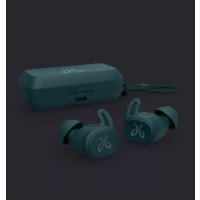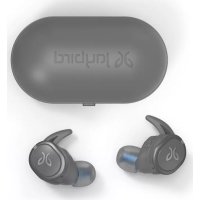
JB200 - Earphones JAYBIRD - Free user manual and instructions
Find the device manual for free JB200 JAYBIRD in PDF.



User questions about JB200 JAYBIRD
0 question about this device. Answer the ones you know or ask your own.
Ask a new question about this device
Download the instructions for your Earphones in PDF format for free! Find your manual JB200 - JAYBIRD and take your electronic device back in hand. On this page are published all the documents necessary for the use of your device. JB200 by JAYBIRD.
USER MANUAL JB200 JAYBIRD
JB200 Bluetooth Headphones

text_image
STOPPlease review your user guide carefully before using this product
If you need further assistance DO NOT return it to the store where you bought it, please contact us at:
1.866.244.3399
OR
jaybirdgear.com
click support for troubleshooting & customer service assistance
Quick Start Guide
Charge
Charge your JayBird JB-200 Bluetooth® Stereo Headset for 2 hours before use. See page 2 for details.
First time fi tting
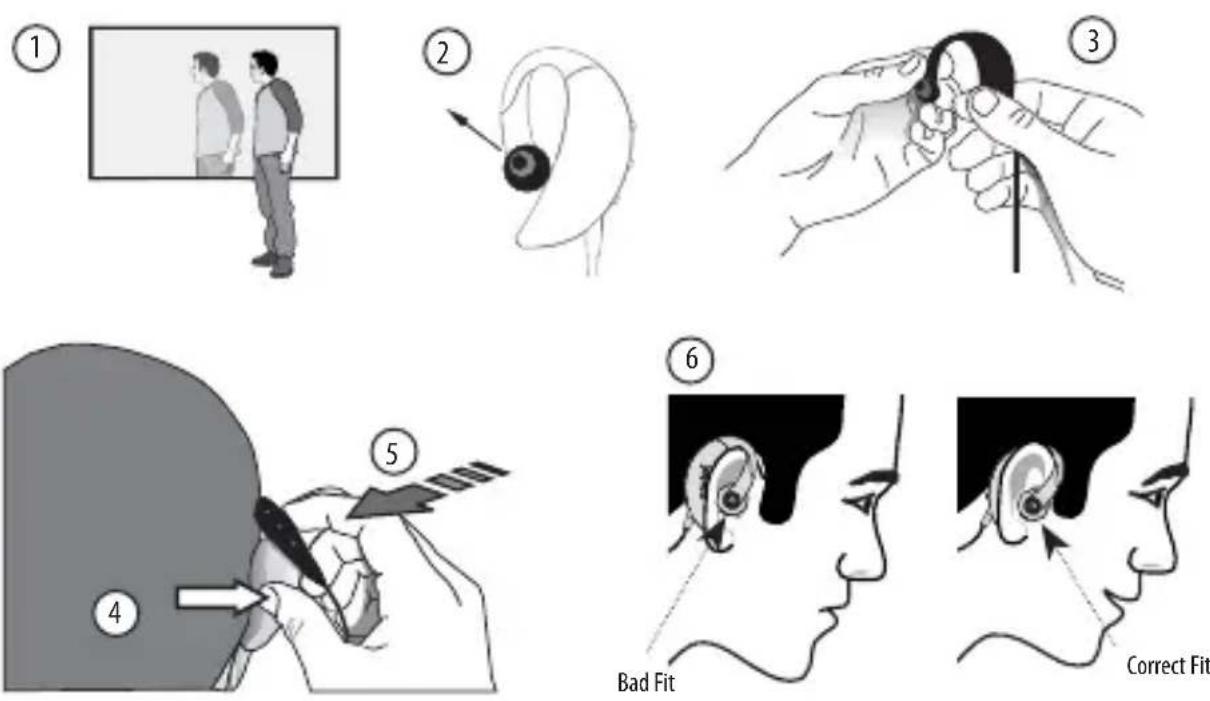
The JayBird headset is designed for performance fi t under extreme conditions so it's like putting on tightly fi tting performance clothing for the fi rst time. Getting the headset on maybe challenging at fi rst, but stick with it, you will get the hang of it after a couple of times and appreciate its snug performance fi t.
- A mirror can help for the first fitting
- Point the ear-tips forward and up
- Hold open with two hands
- Push ear out using thumb
- Using both hands guide headset over ear snug against head
- Check that the headset sits snug against head
and not closely on top of your ear
If you experience any difficulty please visit jaybirdgear.com and click the support link for tutorials on getting the right fi t.
Pairing with cell phone / music device
- With the headset in your hand, hold the power/talk button for 5 seconds until you see steady blue blinking from the LED status indicator. Release the button. The headset is now on.
-
Hold the power/talk button a second time for 4 seconds until you see a steady blue and red blinking from the LED status indicator. Release the button. The headset is now in pairing mode.
-
Refer to your cell phone user manual for cell phone pairing instructions. When the cell phone detects the JayBird headset, enter pass code 0000.
-
If using in conjunction with a JayBird Bluetooth® adapter for iPod® or MP3 player, turn music device on, plug the JayBird Bluetooth® adapter in and press play. The JayBird devices will automatically connect without needing pair mode.
Optimal Range outdoors
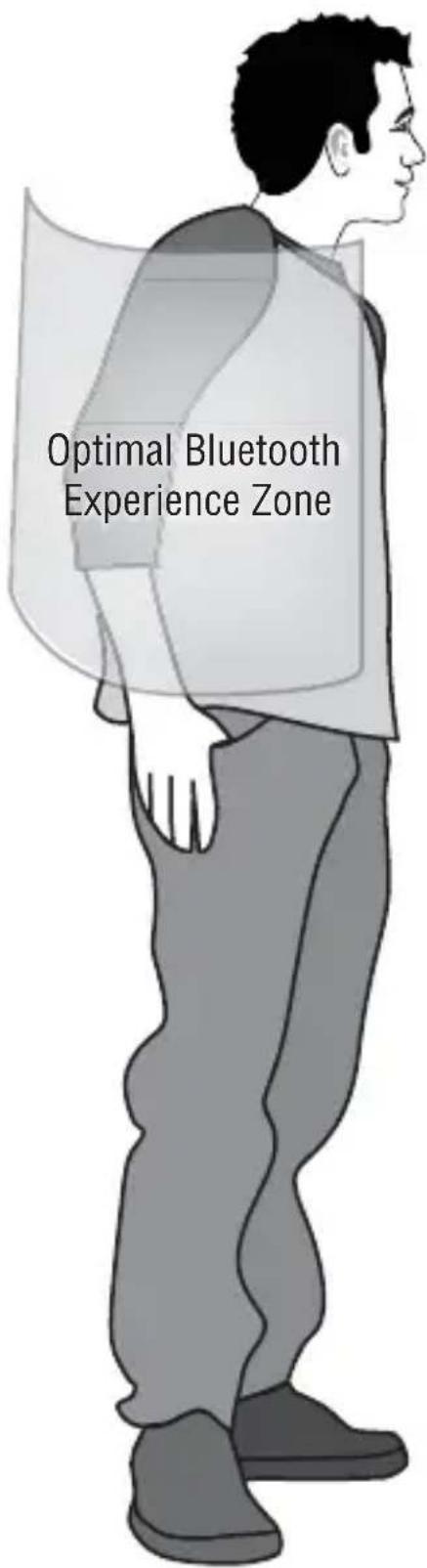
While the range of Bluetooth ^® is 10 meters (33 feet), the optimal range for STEREO MUSIC with ANY BRAND of Bluetooth ^® stereo headset is within 2 feet of the music device, particularly outdoors where the signal cannot bounce off walls and ceilings. For optimal connectivity outdoors, have your device above your elbow on your right side.
Visit jaybirdgear.com for current and upcoming range of sports armbands for iPod® and other devices.
text_image
Optimal Bluetooth Experience ZoneTable of Contents
What's included in this package? 1
Product Features 1
Charging your headset 2
Adjusting the in-ear buds for optimum fit 2
Fitting the JayBird Bluetooth ^® Stereo Headset 3
Pairing the JayBird Bluetooth ^® Stereo Headset with a Bluetooth ^® cell phone 4
Button Controls 5
Using the headset to listen to music from your cell phone. 6
Using the headset to make and answer calls with your cell phone. 7
Using your JayBird Bluetooth ^® Stereo Headset with an iPod ^® or other MP3 players. 7
Apple iPod ^a 7
MP3 and other portable audio players 8
Specifications 8
Warranty 10
FAQ / Troubleshooting 10
Customer Service 11
Certification and Agency Approvals 11
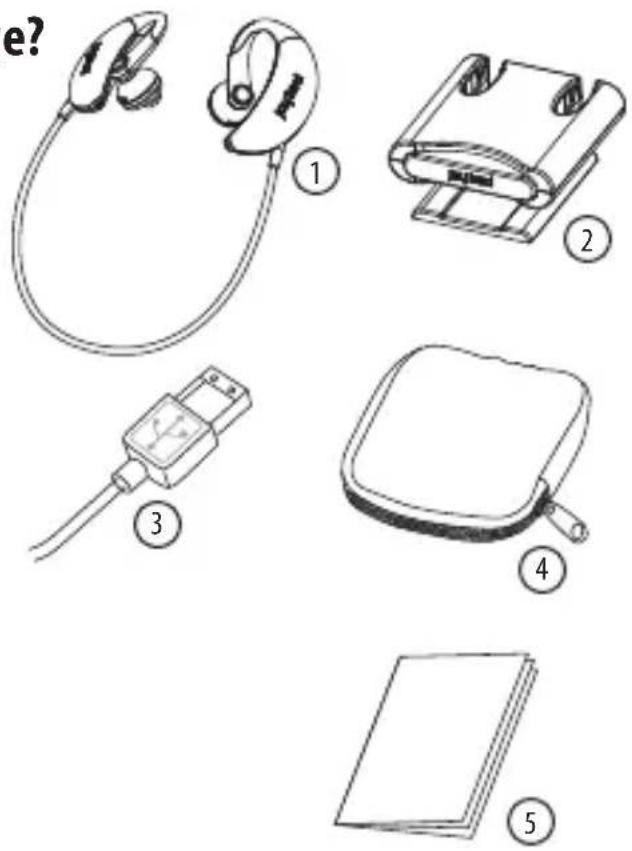
What's included in this package?
- JayBird Bluetooth Stereo Headset
- Charger Dock
- USB Charging Cable
- Nylon Mesh Carrying Pouch
- This User Manual
text_image
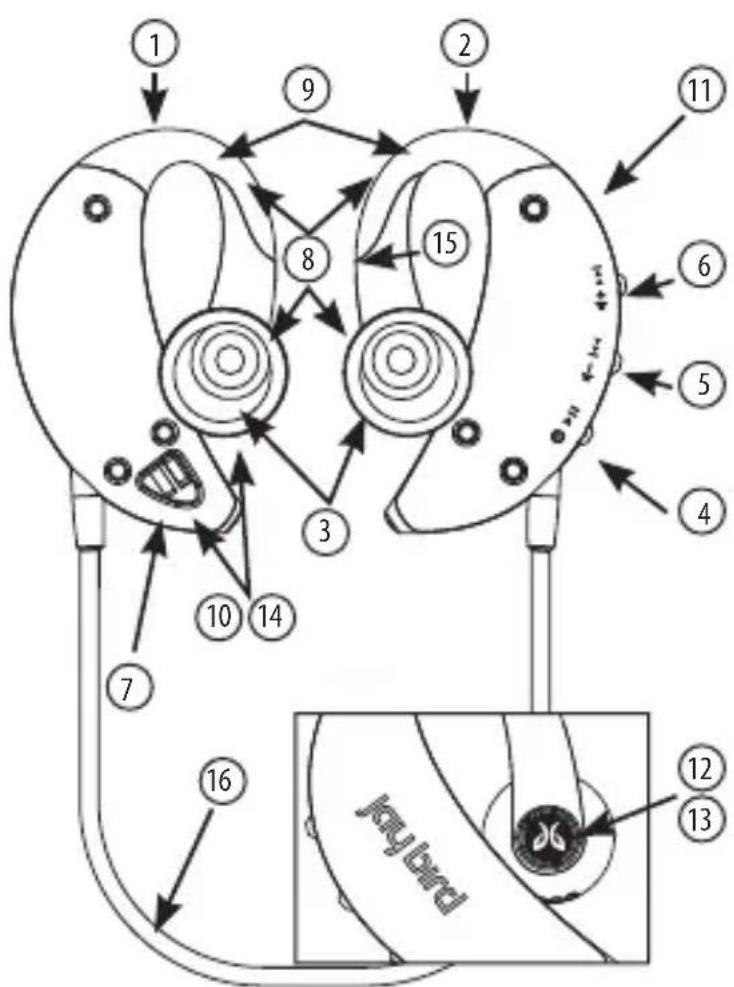
e?Product Features
- Left Earpiece
- Right Earpiece
- Adjustable In-Ear Buds
- Power / Talk Button
- Volume Down / Previous Track
- Volume Up / Next Track
- Rechargeable Lithium Polymer Battery
- Flex-Fit Design
- Rubberized Surfaces for Ultra-Comfort
- Gasket Sealed Construction
- Bluetooth ^® 2.0 with A2DP Wireless Technology
- Bluetooth® Status Indicator
- Battery Charging Status Indicator
- Sweat-proof and Water Resistant Speakers
- Omni-Directional Microphone
- Behind-the-head Back Band
flowchart
graph TD
    A["1"] --> B["2"]
    B --> C["3"]
    C --> D["4"]
    D --> E["5"]
    E --> F["6"]
    F --> G["7"]
    G --> H["8"]
    H --> I["9"]
    I --> J["10"]
    J --> K["11"]
    K --> L["12"]
    L --> M["13"]
    M --> N["keybird"]
    N --> O["14"]
    O --> P["15"]
Charging your headset
Your JayBird Bluetooth® Stereo Headset is powered by a built-in rechargeable battery. Before using your headset for the first time, you should fully charge the battery.
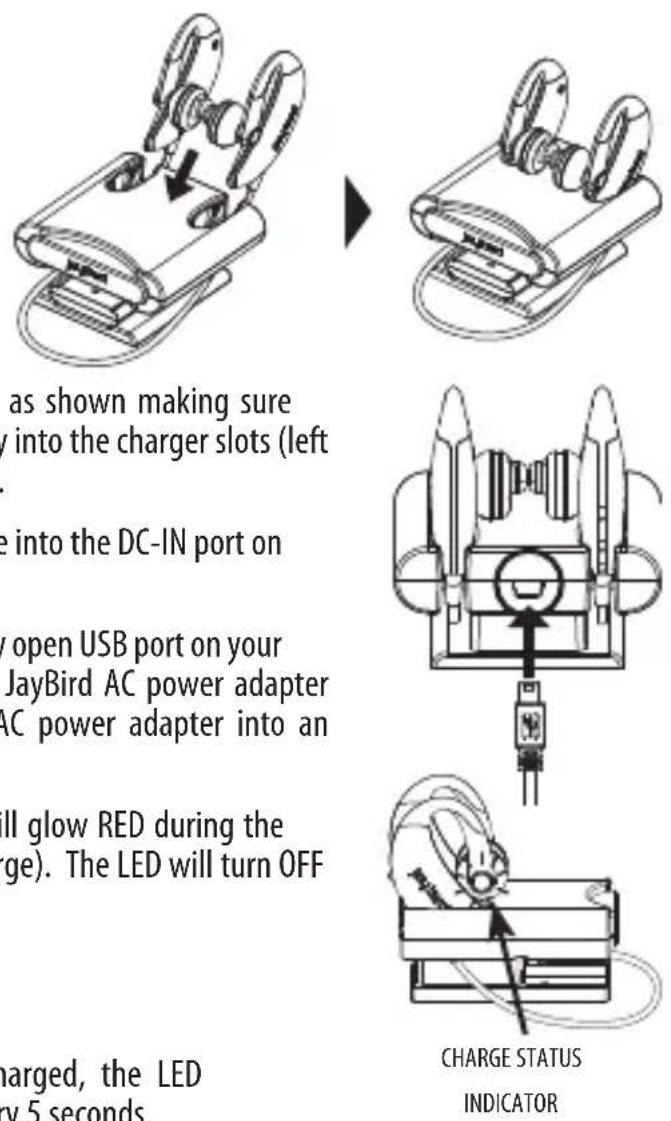
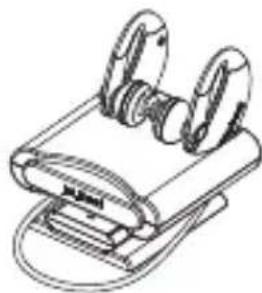
- Insert the headset into the Charger Dock as shown making sure the left earpieces are pushed all the way into the charger slots (left earpiece provides charging connection).
- Plug the smaller connector of the USB Cable into the DC-IN port on the back of the Charger Dock.
- Plug the other end of the USB Cable into any open USB port on your computer or into the USB port on the JayBird AC power adapter (sold separately) and then plug the AC power adapter into an outlet.
- The LED indicator on the right earpiece will glow RED during the charge cycle (about 2 hours to fully charge). The LED will turn OFF when fully charged.
- Remove headset from Charger Dock.
Note: When the battery needs to be recharged, the LED indicator will alternate blue and red color every 5 seconds.
Adjusting the in-ear pieces for optimum fit
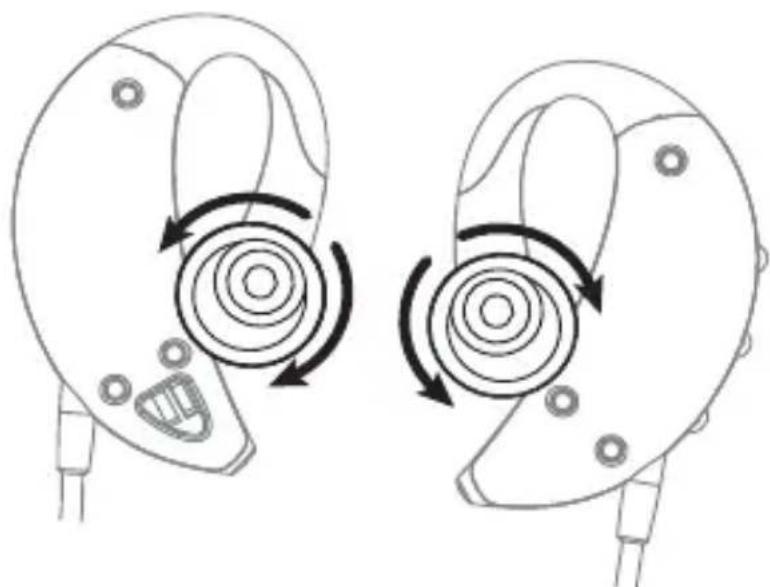
You can rotate the adjustable in-ear buds 360^ to achieve a different fit of the earpiece to the ear. The default positions as shown are strongly recommended. 2 o'clock for the leftside earpiece and 10 o'clock for the right side earpiece.
natural_image
Diagram of ear ear components with circular motion arrows indicating rotation (no text or symbols)Fitting the JayBird Bluetooth® Stereo Headset
The JayBird headset is designed for performance fi t under extreme conditions so it's like putting on tightly fi tting performance clothing for the fi rst time. Getting the headset on maybe challenging at fi rst, but stick with it, you will get the hang of it after a couple of times and appreciate its snug performance fi t.
- A mirror can help for the first fitting
- Point the ear-tips forward and up
- Hold open with two hands
- Push ear out using thumb
- Using both hands guide headset over ear snug against head
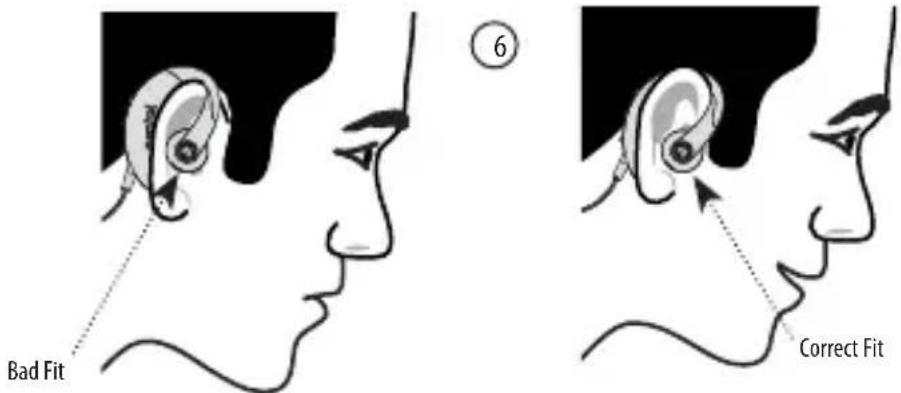
- Check that the headset sits snug against head and not loosely on top of your ear
If you experience any difficulty please visit jaybirdgear.com and click the support link for tutorials on getting the right fit.

text_image
Bad Fit Correct FitPairing the JayBird Bluetooth ^® Stereo Headset with a Bluetooth ^® cell phone
The JayBird headset will work for calls on any Bluetooth ^® cell phone. If your cell phone supports the Bluetooth ^® A2DP protocol (stereo music), you can also use your headset to listen to stereo music.
- Make sure that Bluetooth ^ mode is enabled on your cell phone (refer to your cell phone user manual).
- With the headset in your hand, hold the power/talk button for 5 seconds until you see steady blue blinking from the LED status indicator. Release the button. The headset is now on.
- Hold the power/talk button a second time for 4 seconds until you see a steady blue and red blinking from the LED status indicator. Release the button. The headset is now in pairing mode.
- From your cell phone, perform a discovery/search (refer to your cell phone user manual).
- The cell phone will list all devices found within range. Select JayBird JB-200 Headset. Select OK or YES to pair your JayBird Bluetooth® Stereo Headset with your cell phone.
- You will be asked for a passkey. Enter 0000
- Once paired, the LED on the JayBird Bluetooth ^® Stereo Headset will blink blue every 6 seconds.
- To verify that your JayBird Bluetooth ^ Stereo Headset has established a handsfree calling connection, dial a call using your cell phone. If the call completes correctly (if you hear ringing on the JayBird Bluetooth ^ Stereo Headset), you have succeeded in establishing a handsfree calling connection (Call audio in left side only).
- To verify that your JayBird Bluetooth ^® Stereo Headset has established an A2DP (streaming music) connection, play music on your cell phone. If you hear stereo music on your JayBird Bluetooth ^® Stereo Headset, you have succeeded in establishing an A2DP (streaming music) connection (Music audio in both sides).
Note: The pairing method described above is for most common Bluetooth ^® enabled cell phones. Refer to your cell phone user manual for detailed pairing instructions.
Button Controls
Power On: Press and hold the power/talk button for 5 seconds until blue LED fl ashes blue rapidly. Once on, the headset LED will fl ash blue once every few seconds.
Power Off : Press and hold the power/talk button for 6 seconds until blue LED fl ashes blue rapidly. Once off, the headset LED will no longer flash.
Pairing (in power on state): With headset already on, press and hold the power/talk button for 4 seconds until LED fl ashes red and blue. The headset is ready to pair with your phone or music device
Auto power off: The device will automatically turn off after 10 minutes if not connected to another device.
Music & Phone Mode: The headset is in music mode by default and will switch to phone mode when:
- You answer a call by pressing the power/talk button
- Reject a call by pressing and holding power/talk button for 2 seconds
- Redial a call by pressing and holding power/talk button for 2 seconds
Play / Pause: Short press/release of the power/talk button will toggle between play and pause in music mode.
Previous / Next track: Short press/release of the volume up/down button will skip to the previous/next song in music mode. This button function has no effect in phone mode.
Volume: Press AND HOLD the volume up/down button will increase/decrease the volume in both phone and music mode.
Speakers: During phone calls the right speaker is muted. During music play back the right speaker is enabled for stereo sound. This is common in Bluetooth® "stereo" headsets to avoid feedback from the mic with dual speaker output.
Using the headset to listen to music from your cell phone
- Upon successful pairing to your A2DP (stereo music) capable cell phone, use the music player feature to listen to stereo music on your JayBird Bluetooth® Stereo Headset. Refer to your cell phone user manual for detailed instructions on how to play music on your cell phone.
- Adjust the volume on both the cell phone and/or music player and on the JayBird Bluetooth® Stereo Headset so that there is no distortion. It's a good idea to not use maximum volume on the cell phone and/or cell phone music player. Refer to your cell phone user manual for detailed instructions on how to adjust the music volume on your cell phone.
Using the headset to make/answer calls with your cell phone
- To make calls, simply dial the call on your cell phone. You will hear the phone ring through the speakers on your JayBird Bluetooth® Stereo Headset. The sensitive microphone on the JayBird Bluetooth® Stereo Headset will pick up your voice when you talk during your phone call. To terminate the call, either press the Power/Talk button on the JayBird headset, use your cell phone dial pad button, or wait for the other party to terminate the call on their end. Refer to your cell phone user manual on how to make and end calls using a wireless headset.
- When a call comes in to your cell phone, you will hear an ascending ring through the JayBird Bluetooth® Stereo Headset speakers. Your cell phone will also ring and/or vibrate (unless you have the ringer and/or vibrate mode turned off). Answer the call by pressing the Power/Talk button on the right hand earpiece. You can also answer the call using your cell phone dial pad button. To terminate the call, either press the Power/Talk button on the JayBird headset, use your cell phone dial pad button, or wait for the other party to terminate the call on their end. Refer to your cell phone user manual on how to answer incoming calls using a wireless headset.
Note: You can make and receive calls even when listening to stereo music. The music will be paused during your phone call and will resume upon call termination.
Using your JayBird Bluetooth ^® Stereo Headset with an iPod ^® or other MP3 players
You can listen to music from any supported Apple iPod or other MP3 players using the appropriate JayBird Bluetooth ^® Adapter.
Apple iPod®
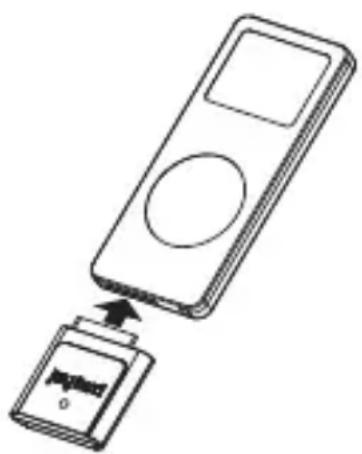
The optional JayBird Bluetooth ^® Adapter for iPod ^® (Model number JB-BA-100i) connects directly to the iPod ^® 30 pin dock connector. It draws its power directly from the iPod ^® so no battery or charging is required and can be purchased at stores selling the JayBird Bluetooth ^® Stereo Headset or online at jaybirdgear.com.
Optional Bluetooth ^® adapter and iPod ^® shown are sold separately.
natural_image
Diagram of a device with an open lid and a circular button, showing internal components (no text or symbols)MP3 . PDA . PC . MAC . DVD . TV . Gaming . Home Theatre & any other device with a 3.5 mm headphone jack
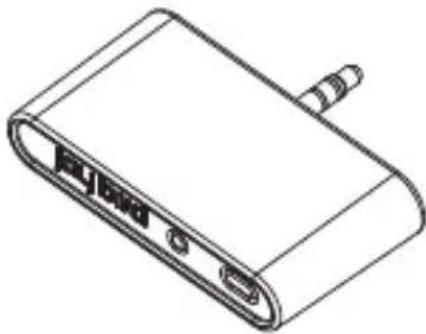
The optional JayBird Bluetooth ^® Adapter for MP3 (Model number JB-BA-100m) connects directly any 3.5mm stereo headphone jack, making it compatible with many audio devices including:
- MP3 players, PDAs, PC, Mac, DVD players, TVs, Gaming devices, Home Theatre and others
The JayBird Bluetooth® Adapter for MP3 is rechargeable and docks directly to the charger dock included with your JayBird Bluetooth® Stereo Headset for recharging and can be purchased at stores selling the JayBird Bluetooth® Stereo Headset or online at jaybirdgear.com.
Optional Bluetooth ^® Adapter sold separately.
natural_image
Line drawing of a USB flash drive with ports and cable (no text or symbols)Specifications
| Type In-Ear Style | |
| Sealing: Water Resistant/Sweat Proof | |
| Noise Cancelling CVC® Clear Voice Capture Echo and Noise Suppression | |
| Response Bandwidth 20-20000Hz | |
| Impedance: 32 Ohm | |
| Output 10mW RMS | |
| Audio S/N Ratio -91 dB | |
| Total Harmonic Distortion (THD) <5% (1KHz, 10mW) | |
| Protocol Bluetooth® 2.0, A2DP, Handsfree, Headset | |
| Frequency Band 2.4 GHz | |
| Tx Power Bluetooth® Class 2 | |
| Range 10 meters/33 feet | |
| Audio Format 16-bit Stereo | |
| Talk Time 6.5 Hrs (May vary dependent on usage and cell phone) | |
| Music Playing Time 5.5 Hrs (May vary dependent on usage and cell phone) | |
| Standby Time 110Hrs (May vary dependent on usage and cell phone) | |
| Battery 135 mAh Lithium Polymer | |
| Charging AC Charger and USB | |
| Charging Time 2 hrs | |
| Weight:(Grams) 23.5g (headset) 57.3g (Charger) | |
| Microphone type 4mm omni-directional | |
| Microphone Sensitivity -40 dB +/-3dB (1KHz, 0dB=1V/Pa) | |
| Speaker sensitivity 114±3dB At 1KHz | |
| Operating Temp 14 F to 113 F (-10°C to 45°C) (subject to change) | |
| Storage Temp -4 F to 131 F (-20°C to 55°C) (subject to change) | |
| AC power supply 5V DC 1A 100-240VAC, 50-60Hz input | |
| No of Paired Device 2 | |
| Pairing passkey 0000 | |
| Features | Answer call, end call, reject call, volume control, Integrated AVRCP music controls (Play, pause, next and previous track) |
| Agency Approvals FCC, CE | |
| Included In Box | JayBird Bluetooth® Stereo HeadsetCharger DockAC Power Supply (BSA Style Plug)USB Charging CableNylon Mesh Carrying PouchUser Manual2 spair pairs of ear-tips |
| Compatibility | See jaybirdgear.com/phones |
Warranty
1 Year parts and labor, Life time warranty against sweat. JayBird will replace without charge any headset which fails to function as a direct result of the effects of perspiration at any time following the original purchase. "Lifetime" means life of the product and covers replacement only, not money back. JayBird reserves the right to examine the headset and determine the cause of failure which may or may not be caused by sweat. This warranty runs alongside the regular one year warranty. Full warranty details can be found at jaybirdgear.com/warranty.
FAQ / Troubleshooting
Q: How do I get the best and most comfortable fi t when putting the headset on?
A: The JayBird headset is designed and built for performance under extreme conditions so it is like putting on tightly fi tting performance clothing for the fi rst time.
Visit jaybirdgear.com and click on support for tutorials on best fi t
Do not share your headset with someone else on a regular basis. The headset's over-molded arm has some memory and will mold slightly to the ear of the person wearing it. Sharing the headset may cause it to have a poor fit for one or both of the users.
Q: The sound quality is poor and sounds distorted.
A: Adjust the volume control on your device to a lower setting. Find the right balance between both volume controls on the device and headset for optimal sound performance. If using the iPod ^® adapter with an iPod ^® all volume control is diverted to the headset.
Q: The sound cuts in and out intermittently.
A: While the range of Bluetooth ^® is 10 meters (33 feet), the optimal range for STEREO MUSIC with ANY BRAND of Bluetooth ^® stereo headset is within 2 feet of the music device, particularly outdoors where the signal cannot bounce off walls and ceilings. For optimal connectivity outdoors, have your device above your elbow on your right side.
Additionally, water and sweat can interfere with Bluetooth ^® radio signal. Make sure that there is no sweat in direct contact with the Bluetooth ^® Adapter. Make sure the adapter is not in direct contact with skin when exercising and that it is on the outside of any clothing that maybe holding moisture (e.g. if using the iPod ^® or JayBird armband, use it over the top of your clothing)
Visit jaybirdgear.com for current and upcoming range of sports armbands for iPod® and other devices.
Q: Music from my phone only plays through one earpiece or fails to work sometimes
A: Each phone has differing software configurations resulting in varying degrees of compatibility with Bluetooth ^® stereo headsets. Visit jaybirgear.com/phones for more information.
Q: My headset won't charge fully
A: This maybe caused by the headset not getting a good connection to the charging points on the charger. Make sure the left side earpiece is well connected and right side earpiece shows a red light. If the connection is poor or disconnects easily by a slight bump please contact JayBird for a replacement charger within the first year of use.
Customer Service
Phone: +1.866.244.3399 (USA)
Online: jaybirdgear.com
Certification and Agency Approvals

FCC ID: VL5-JB100


Bluetooth®
Federal Communication Commission
This device complies with Part 15 of the FCC Rules. Operation is subject to the following two conditions: (1) This device may not cause harmful interference, and (2) this device must accept any interference received, including interference that may cause undesired operation.
This equipment has been tested and found to comply with the limits for a Class B digital device, pursuant to Part 15 of the FCC Rules. These limits are designed to provide reasonable protection against harmful interference in a residential installation. This equipment generates, uses and can radiate radio frequency energy and, if not installed and used in accordance with the instructions, may cause harmful interference to radio communications. However, there is no guarantee that interference will not occur in a particular installation. If this equipment does cause harmful interference to radio or television reception, which can be determined by turning the equipment off and on, the user is encouraged to try to correct the interference by one of the following measures:
- Reorient or relocate the receiving antenna.
- Increase the separation between the equipment and receiver.
- Connect the equipment into an outlet on a circuit different from that to which the receiver is connected.
- Consult the dealer or an experienced radio/TV technician for help.
Any changes or modifications not expressly approved by the party responsible for compliance could void the user's authority to operate this equipment.
©2007 JayBird Gear LLC. All rights reserved. JayBird, and the JayBird logo are trademarks of JayBird Gear LLC. iPod is a trademark of Apple, Inc., registered in the U.S. and other countries. Bluetooth is a trademark owned by Bluetooth SIG, Inc. USA, and licensed to JayBird Gear LLC. "Made for iPod" means that an electronic accessory has been designed to connect specifically to iPod and has been certified by the developer to meet Apple performance standards. Apple is not responsible for the operation of this device or its compliance.
natural_image
Black-and-white profile of a male head and neck against a dark background (no text or symbols)
text_image
STOPtext_image
Diagram showing five types of medical or electronic devices with numbered labels: ear, device, plug, cover, and notebook.natural_image
Diagram of ear ear components with circular motion arrows indicating rotation (no text or symbols)natural_image
Side profile illustration of a person wearing a medical ear device (no text or symbols)6
Ajustement incorrect
natural_image
Diagram showing a device being inserted into a device (no text or symbols present)natural_image
Line drawing of a USB flash drive (no text or symbols)Spécifi cations
Federal Communication Commission
natural_image
Black-and-white profile of a male head and neck against a dark background (no text or symbols)
text_image
STOPtext_image
Diagram showing five types of medical or electronic devices with numbered labels: ear cap, device, plug, cover, and notebook.Produktmerkmale
natural_image
Diagram of ear ear components with circular motion arrows indicating rotation (no text or symbols)natural_image
Diagram showing a device being inserted into a device (no text or symbols present)natural_image
Line drawing of a USB flash drive (no text or symbols)Spécifi cations
Online: jaybirdgear.com
Federal Communication Commission
natural_image
Black-and-white profile of a male head and neck against a dark background (no text or symbols)
text_image
STOPtext_image
Diagram showing five types of medical or electronic devices with numbered labels: ear, device, plug, cover, and notebook.natural_image
Technical line drawing of a mechanical device with a downward arrow indicating a component (no text or symbols present)▶
natural_image
Line drawing of a mechanical device with two circular components attached to a base (no text or symbols)natural_image
Pure mechanical diagram showing a piston-cranked piston assembly with no text or symbols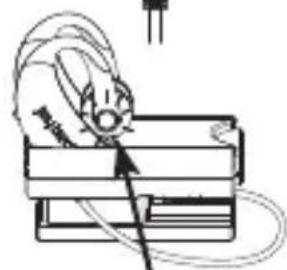
natural_image
Illustration of a mouse interacting with a laptop (no text or symbols visible)CHARGE STATUS INDICATOR
natural_image
Diagram of ear ear components with circular motion arrows indicating rotation (no text or symbols)natural_image
Diagram of a device being inserted into a slot, showing the slot's internal structure (no text or symbols)natural_image
Line drawing of a USB flash drive (no text or symbols)Online: jaybirdgear.com
Federal Communication Commission
natural_image
Black-and-white profile of a male head and neck against a dark background (no text or symbols)
text_image
STOPtext_image
Diagram showing five types of medical or electronic devices with numbered labels: ear, device, plug, cover, and notebook.natural_image
Diagram of ear ear components with circular motion arrows indicating rotation (no text or symbols)natural_image
Side profile illustration of a person's head and neck with earphones, showing anatomical alignment (no text or symbols)natural_image
Diagram showing a device being inserted into a device (no text or symbols present)natural_image
Line drawing of a USB device with ports and a screw connector (no text or symbols)Especifi caciones