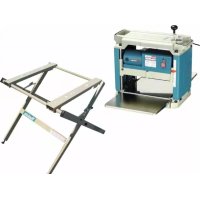
2012NBX - Electric planer MAKITA - Free user manual and instructions
Find the device manual for free 2012NBX MAKITA in PDF.


| Product type | Electric planer |
| Brand | Makita |
| Model | 2012NBX |
| Cutting width | 304 mm |
| Maximum cutting depth | 3.0 mm (pieces < 150 mm), 1.5 mm (150-240 mm), 1.0 mm (240-304 mm) |
| Feed speed | 8.5 m/min |
| Table dimensions (L x W) | 304 mm x 771 mm |
| No-load speed | 8,500 rpm |
| Overall dimensions (L x W x H) | 483 mm x 771 mm x 401 mm |
| Net weight | 28.1 kg (according to EPTA 01/2003) |
| Safety class | II (double insulation) |
| Power supply | Single-phase, 220-250 V, 50/60 Hz (mains impedance ≤ 0.38 Ω) |
| Intended use | Planing of wood and similar materials |
| Sound pressure level (LpA) | 86 dB(A) (uncertainty 3 dB(A)) |
| Sound power level (LwA) | 99 dB(A) (uncertainty 3 dB(A)) |
| Main functions | Depth adjustment by crank, repeatability stop, precision gauge, dust extraction hood, folding auxiliary tables |
| Routine maintenance | Chain/columns/screws lubrication, chip cleaning, carbon brush replacement (wear > limit line), sharpening ordinary blades (min length 4 mm) |
| Safety | Drum lock, protective cover, emergency stop, mandatory use of hearing and eye protection |
| Spare parts | Disposable blades (306 mm) and ordinary blades, fixing plates, magnetic holders, carbon brushes, blade gauge, hex and socket wrenches |
| Repairability | Repairs exclusively by Makita authorized service center with original parts |
Frequently Asked Questions - 2012NBX MAKITA
User questions about 2012NBX MAKITA
0 question about this device. Answer the ones you know or ask your own.
Ask a new question about this device
Download the instructions for your Electric planer in PDF format for free! Find your manual 2012NBX - MAKITA and take your electronic device back in hand. On this page are published all the documents necessary for the use of your device. 2012NBX by MAKITA.
USER MANUAL 2012NBX MAKITA
Explanation of general view
| 1 Carrying handle | 15 Stopper knob | 29 Blade gauge |
| 2 Sub-table | 16 Table top | 30 Hood set |
| 3 Bolt or screw | 17 Lock plate | 31 Chip cover |
| 4 Pilot lamp | 18 Pulley | 32 Ruler |
| 5 Switch | 19 Drum | 33 Post card |
| 6 Crank handle | 20 Chain | 34 Adjusting screw |
| 7 S c a l e | 21 Thumb screw | 35 Hex wrench |
| 8 Main frame | 22 Blade installation bolt | 36 Limit mark |
| 9 Indicator plate | 23 Set plate | 37 Brush holder cap |
| 10 Depth gauge | 24 Magnetic holder | 38 Screwdriver |
| 11 Groove | 25 Blade | 39 Column |
| 12 Depth adjusting gauge | 26 Claw | 40 Base |
| 13 Stopper | 27 Socket wrench | 41 More than 4 mm |
| 14 Stopper button | 28 Screw |
SPECIFICATION
| Model 2012NB | |
| Cutting width 304 mm | |
| Max. cutting depth | 3.0 mm of stock width less than 150 mm 1.5 mm of stock width from 150 mm to 240 mm 1.0 mm of stock width from 240 mm to 304 mm |
| Feed rate (min-1) 8.5 m | |
| Table size (W x L) 304 mm x 771 mm | |
| No load speed (min-1) | 8 |
| Overall length (W x L x H) | 483 mm x 771 mm x 401 mm |
| Net weight | 28.1 kg |
| safety class | 回/II |
- Due to our continuing program of research and development, the specifications herein are subject to change without notice.
- Specifications may differ from country to country.
Weight according to EPTA-Procedure 01/2003
ENE001-1
Intended use
The tool is intended for planing wood.
ENF002-1
Power supply
The tool should be connected only to a power supply of the same voltage as indicated on the nameplate, and can only be operated on single-phase AC supply. They are double-insulated in accordance with European Standard and can, therefore, also be used from sockets without earth wire.
ENF100-1
For public low-voltage distribution systems of between 220 V and 250 V
Switching operations of electric apparatus cause voltage fluctuations. The operation of this device under unfavorable mains conditions can have adverse effects to the operation of other equipment. With a mains impedance equal or less than 0.38 Ohms it can be presumed that there will be no negative effects.
The mains socket used for this device must be protected with a fuse or protective circuit breaker having slow tripping characteristics.
GEA010-1
General Power Tool SafetyWarnings
WARNING Read all safety warnings and all instructions. Failure to follow the warnings and instructions may result in electric shock, fire and/or serious injury.
Save all warnings and instructions for future reference.
GEB066-1
THICKNESSER SAFETY WARNINGS
- Wear eye protection.
- Wear suitable personal protective equipment when necessary, such as hearing protection (ear plugs), respiratory protection (dust mask) and gloves when handling rough material.
- Do not use the tool in the presence of flammable liquids or gases.
- Make sure that all covers are installed in place before operation.
- Handle the blades very carefully.
- Check the blades carefully for cracks or damage before operation. Replace cracked or damaged blades immediately.
-
Tighten the planer blade installation bolts securely.
-
Remove nails and clean the workpiece before cutting. Nail, sand or foreign matter can cause blade damage.
- Do not remove chips from the chip chute when the motor is running. Clean out chips after the blades come to a complete stop. Always use a stick etc. when cleaning them out.
- Do not leave the tool running.
- Do not abuse cord. Never yank cord to disconnect it from receptacle. Keep cord away from heat, oil water and sharp edges.
- The tool should only be used for wood and similar materials.
SAVE THESE INSTRUCTIONS.
WARNING:
DO NOT let comfort or familiarity with product (gained from repeated use) replace strict adherence to safety rules for the subject product. MISUSE or failure to follow the safety rules stated in this instruction manual may cause serious personal injury.
INSTALLATION
Movement and transport of thicknesser (Fig. 1)
CAUTION:
- Watch your step when moving the tool.
Fold the sub-tables. Grasp the carrying handles when moving the tool.
When transporting it by vehicle, secure with a rope or other substantial means to prevent tipping or movement.
Positioning the thicknesser (Fig. 2)
- Locate the tool in a well lit and level place where you can maintain good footing and balance. Bolt/screw it to the workbench or stand (optional accessory) using the bolt holes provided in the base.
FUNCTIONAL DESCRIPTION
CAUTION:
Always be sure that the tool is switched off and unplugged before adjusting or checking function on the tool.
Switch action (Fig. 3)
CAUTION:
- Before plugging in the tool, always be sure that the tool is switched off. The pilot lamp lights up when the tool is plugged into the power source.
To start the tool, press the ON (I) button. To stop it, press the OFF (O) button.
Dimensional adjustment (Fig. 4)
Lower the main frame by turning the crank handle counterclockwise until the indicator plate points to the scale graduation indicating the desired finished dimension. One full turn of the crank handle moves the main frame 2mm up or down. The scale has inch graduations on its right side and metric graduations on its left side.
Adjusting depth of cut
The maximum depth of cut differs depending upon the width of workpiece being cut. Refer to the table. When you need to remove more than the amount specified in the table, set the depth of cut shallower than the amount and make two or more passes.
| Width of workpiece being cut | Maximum depth of cut |
| Less than 150 mm 3.0 | mm |
| 150 mm – 240 mm | 1.5 mm |
| 240 mm – 304 mm | 1.0 mm |
To adjust the depth of cut, proceed as follows.
Insert the workpiece flat on the table top. Lower the main frame by turning the crank handle counterclockwise. The depth gauge will rise and the amount of gauge rise indicates the depth of cut. (Fig. 5)
CAUTION:
- Always lower the main frame when aligning the indicator plate with the graduation indicating the desired finished dimension. If you raise the main frame into the desired finished dimension, additional play in the screw may result. This may cause an undesired finished dimension.
- Always place the workpiece flat on the table top when predetermined the depth of cut. Otherwise, the predetermined depth of cut will differ from actual depth of cut.
Depth adjusting gauge (Fig. 6)
Use the depth adjusting gauge when you need to predetermine the depth of cut more accurately. To do so, proceed as follows.
- First, plane the workpiece at the predetermined depth of cut. Measure the thickness of the planed piece to know how much more stock you need to remove.
- Turn the depth adjusting gauge on the crank handle until the 0 graduation is aligned with the groove on the tool.
- Now turn the crank handle counterclockwise until the graduation for the desired depth of cut is aligned with the groove on the tool.
- When you need to remove more than the amount specified in the table mentioned in the "Adjusting depth of cut" section, set the depth of cut shallower than the amount and make two or more passes.
Stopper (Fig. 7)
Use the stopper when you need to plane many workpieces to the same thickness. To do so, proceed as follows.
- Turn the crank handle until the indicator plate points to the scale graduation indicating the desired finished dimension.
- Depress the stopper button and lower the stopper until it just contacts the table top.
- If you need fine adjustment of the stopper, turn the stopper knob.
CAUTION:
- When the stopper is not in use, always raise it to the topmost position. Never force the crank handle when the stopper is in contact with the table top. This may cause tool damage.
ASSEMBLY
CAUTION:
- Always be sure that the tool is switched off and unplugged before carrying out any work on the tool.
Replacing blades
CAUTION:
- Handle the blades very carefully when removing or installing the blades to prevent cuts or injury from the blades and to prevent damage to the blades. They are razor-sharp.
- Clean out all chips, dust, pitch or foreign matter adhering to the drum or blades before installing the blades.
- Use blades of the same dimensions and weight, or drum oscillation/vibration will result, causing poor cutting action and eventually, tool breakdown.
- Replace both blades at the same time.
- The disposable-type blade has a cutting edge on both sides. When one cutting edge becomes dull, you can use the other cutting edge. Always remove resin and dirt sticking to the reverse side of the blade before using the other cutting edge. This blade must not be sharpened. When both cutting edges become dull, the blade should be carefully thrown away.
1. Removing blades
Loosen the thumb screw which secures the chip cover and remove the chip cover. Remove the screws which secure the right side cover. Then remove the right side cover. Turn the pulley until the drum can be locked in the position whereby the blade installation bolts face upward. (Fig. 8)
For throw away blades only
Place the two magnetic holders on the set plate and push them in the direction of the arrow until the claw contact the blade. Remove the six blade installation bolts using the socket wrench. Grip the magnetic holders and raise them straight up to remove the set plate and the blade from the drum. Press the lock plate and turn the pulley 180^ to lock the drum. Remove the other blade as described above. (Fig. 9 & 10)
For standard blades only
Remove the six installation bolts using the socket wrench. Raise the set plate and blade straight up to remove them from the drum. Press the lock plate and rotate the drum by turning the pulley 180^ to lock the drum. Remove the other blade as described above. Remove the set plate from the blade. (Fig. 11 & 12)
2. Installing blades
CAUTION:
- Use only Makita socket wrench provided to tighten the blade installation bolts. The use of any other socket wrench may cause overtightening or insufficient tightening of the bolts, resulting in severe injury.
For throw away blades only
Provide a flat wood block approximately 300mm long and 100mm wide. Place the blade and the set plate on the wood block so that the blade locating lug of the set plate rests in the groove of the blade.
Adjust the set plate so that both ends of the blade protrude approximately 1mm beyond the end of the set plate. Place the two magnetic holders on the set plate and push them until the claw contacts the blade. (Fig. 13)
Grip the magnetic holder and slip the heel of the set plate into the groove in the drum. Install the blade installation bolts. (Fig. 9)
After tightening all the blade installation bolts lightly and evenly from the center to the outside, tighten them completely following the same sequence. Remove the magnetic holders from the set plate.
Install the other blade as described above. Rotate the drum slowly while pressing the lock plate to make sure there is nothing abnormal. Then install the chip cover and the side cover. (Fig. 10)
CAUTION:
- Do not tighten the blade installation bolts without the blade locating lug of the set plate correctly resting in the groove of the blade. This may cause damage to the blade and potential injury to the operator.
- Do not turn the tool on with the chip cover removed.
- When installing the chip cover, make sure that the chain is not caught by the chip cover.
For standard blades only
Place the blade on the blade gauge so that the blade edge is perfectly flush with the inside of the front rib (A). Place the set plate on the blade, then gently press the heel of the set plate flush with the back side of the blade gauge (B). Tighten the screws to secure the set plate to the blade. (Fig. 14)
Slip the heel of the set plate into the groove in the drum. Install the blade installation bolts. (Fig. 15)
After tightening all the blade installation bolts lightly and evenly from the center to the outside, tighten them completely following the same sequence. (Fig. 16)
Install the other blade as described as above. Rotate the drum slowly while pressing the lock plate to make sure there is nothing abnormal. Then install the chip cover and the side cover.
CAUTION:
- Tighten the blade installation bolts securely when installing the blades.
- Do not turn the tool on with the chip cover open.
- When installing the chip cover, make sure that the chain is not caught by the chip cover.
Changing type of blade
This tool can accept either throw away blades or standard blades. If you wish to change the type of blade, buy and use the following parts.
| Changing from standard blade to throw-away blade Ch | anging from throw-away blade to standard blade | ||
| Set plate 2 pcs. Set plate | 2 pcs. | ||
| Throw-away blade (306 mm) 2 pcs. | Pan head screw | M 4 x 6 4 pcs. | |
| Magnetic holder 2 pcs. Standard blade 2 pcs. | |||
| Blade gauge 1 pc. | |||
Hood set (Fig. 17)
When you wish to maintain clean operations through easy dust collection, connect the vacuum cleaner to the thicknesser using this hood.
Loosen the thumb screws which secure the chip cover. Attach the hood to the thicknesser and secure the chip cover and the hood together by tightening the thumb screws.
CAUTION:
- When installing the hood set, make sure that the chain is not caught by the chip cover or hood set. (Fig. 18)
OPERATION
CAUTION:
- Two or more pieces of narrow but similar thickness stock can be passed through the thicknesser side by side. However, allow some spacing between the stock to permit the feed rollers to grip the thinnest piece of stock. Otherwise, a slightly thinner piece could be kicked back by the cutterhead.
Place the workpiece flat on the table top.
Determine the depth of cut as described before.
Switch on the tool and wait until the blades attain full speed. The workpiece should not be in contact with the feed roller when you turn the tool on.
Then insert the workpiece flush with the table top.
When cutting a long or heavy workpiece, lift up its end slightly at the start and the end of the cut to avoid gouging or snipping at the extreme ends of the workpiece. (Fig. 19)
The use of the tool top enables quick, effortless return of the workpiece to the infeed table side. This is especially convenient with two operators. (Fig. 20)
CAUTION:
- The workpiece with the following dimensions cannot be fed into the tool because the interval between two feed rollers is 129 mm . Do not try to cut them.
| 1 Less than 130 mm long ← Less than 130 mm → | ||
| 2 Having a groove more than 130 mm wide | ||
| 3 Having grooves at intervals of 130 mm wide | ||
- Stop the tool when the workpiece has stalled. Allowing the tool to run with a stalled workpiece causes rapid wearing of the feed rollers.
MAINTENANCE
CAUTION:
- Always be sure that the tool is switched off and unplugged before attempting to perform inspection or maintenance.
- Never use gasoline, benzine, thinner, alcohol or the like. Discoloration, deformation or cracks may result.
Adjusting height of sub-table (Fig. 21 & 22)
The height of sub-table is factory-adjusted. If further adjustment is necessary, proceed as follows.
Place a postcard on the table and also place a ruler on the postcard. Turn the adjusting screw with the hex wrench until the end of the sub-table contacts the ruler. Now the end of the sub-table is from 0.1mm to 0.3mm above the table surface.
Replacing carbon brushes (Fig. 23 & 24)
Remove and check the carbon brushes regularly. Replace when they wear down to the limit mark. Keep the carbon brushes clean and free to slip in the holders. Both carbon brushes should be replaced at the same time. Use only identical carbon brushes.
Use a screwdriver to remove the brush holder caps. Take out the worn carbon brushes, insert the new ones and secure the brush holder caps.
Keeping blades sharp
Dull blades can cause rough finish, an overload of the motor and dangerous kickback of the workpiece. Replace dull blades immediately.
Lubrication (Fig. 25)
Oil the chain (after removing the side cover R), the four columns and the screws for elevating the main frame. This periodic lubrication should be performed with machine oil.
CAUTION:
- Oiling and all maintenance should be done with the tool turned off and unplugged.
Cleaning
Always brush off dirt, chips and foreign matter adhering to the roller surfaces, motor vents and drums.
Limit for re-sharpening of standard blade (Fig. 26)
Do not use the standard blade whose blade length is under 4mm
To maintain product SAFETY and RELIABILITY, repairs, any other maintenance or adjustment should be performed by Makita Authorized Service Centers, always using Makita replacement parts.
ACCESSIONS
CAUTION:
- These accessories or attachments are recommended for use with your Makita tool specified in this manual. The use of any other accessories or attachments might present a risk of injury to persons. Only use accessory or attachment for its stated purpose.
If you need any assistance for more details regarding these accessories, ask your local Makita Service Center.
Magnetic holder - Throw-away blade
- Standard blade
- Blade gauge
- Socket wrench 9
- Hex wrench 2.5
- Hood set
- Stand
ENG905-1
Noise
The typical A-weighted noise level determined according to EN61029:
Sound pressure level (L_pA) : 86 dB (A)
Sound power level (L_WA) : 99 dB (A)
Uncertainty (K): 3 dB (A)
Wear ear protection
ENH037-1
For European countries only
EC Declaration of Conformity
We Makita Corporation as the responsible manufacturer declare that the following Makita machine(s):
Designation of Machine: Thicknesser
Model No./ Type: 2012NB
are of series production and
Conforms to the following European Directives: 2006/42/EC
And are manufactured in accordance with the following standards or standardised documents: EN12100-1, IEC61029, EN860
The EC Type-Examination Certificate No. 10-SKM-CM-0523
The EC Type-Examination per 2006/42/EC was performed by:
Inspecta Sweden AB
PO Box 30100
SE-104 25 STOCKHOLM, Sweden
Identification No. 0409
The technical documentation is kept by our authorised representative in Europe who is:
Makita International Europe Ltd.
Michigan Drive, Tongwell,
Milton Keynes, MK15 8JD, England
3.3.2010
Tomoyasu Kato
Director
Makita Corporation
3-11-8, Sumiyoshi-cho,
Anjo, Aichi, JAPAN
Descriptif
Michigan Drive, Tongwell,
Milton Keynes, MK15 8JD, Angleterre
3.3.2010
Tomoyasu Kato
Director
Makita Corporation
3-11-8, Sumiyoshi-cho,
Anjo, Aichi, JAPAN
Übersicht
Michigan Drive, Tongwell,
Milton Keynes, MK15 8JD, England
3.3.2010
Tomoyasu Kato
Direktor
Makita Corporation
3-11-8, Sumiyoshi-cho,
Anjo, Aichi, JAPAN
Visione generale
Michigan Drive, Tongwell,
Milton Keynes, MK15 8JD, England
3.3.2010
Tomoyasu Kato
Aministratore
Makita Corporation
3-11-8, Sumiyoshi-cho,
Anjo, Aichi, JAPAN
Michigan Drive, Tongwell,
Milton Keynes, MK15 8JD, England
3.3.2010
Tomoya Su Kaib
Director
Makita Corporation
3-11-8, Sumiyoshi-cho,
Anjo, Aichi, JAPAN
SE-104 25 STOCKHOLM, Suez
N^ de identificacion 0409
Michigan Drive, Tongwell,
Milton Keynes, MK15 8JD, Inglaterra
3.3.2010
Tomoyasu Kato
Director
Makita Corporation
3-11-8, Sumiyoshi-cho,
Anjo, Aichi, JAPAN
Explicaçao geral
1. Retirar as laminas
Manter as laminas afiadas
Michigan Drive, Tongwell,
Milton Keynes, MK15 8JD, Inglaterra
3.3.2010
TomoyasuKato
Director
Makita Corporation
3-11-8, Sumiyoshi-cho,
Anjo, Aichi, JAPAN
Michigan Drive, Tongwell,
Milton Keynes, MK15 8JD, England
3.3.2010
Tomoyasu Kato
Direktor
Makita Corporation
3-11-8, Sumiyoshi-cho,
Anjo, Aichi, JAPAN
Moyo yia kavovikcs AaeS
MetakivioTe ta Ei moulovia eykataoans
Lapac xpooiopoovtac to Koilo Kxidi.
Sknwote Tnv naka puthetaionc kai Tnv laia iia
enaw yia va tic aphipeoet e ano To tuunavo.
Natote Tnv naka aaoaianc kai nepiotpseyte
to tuunavo yupicovtac Tnv tpoxaia 180° yia va
KleiodooeTo tuunavo.AphioeTev aaan
Lapa onwc npiypaeftaipanavw.AphioeTe
tnv naka puthetaionc ano Tnv laa. (Eik. 11 ka 12)
2. EykaTaOaTaN aauwV
NPOsOXH:
XpnouoieTe mOto KoIo KkEidi MaKita nou npexetai yia ophiio twv unouloviw.H xpion onoiouhnote aalou tunou koiou kEIOU mOpEi va npokalee iite unepBoIko eite avenapkec ophiio, e anotelEsigma oobapo tpaumatuo.
Moyo yia avaawoiues Aae
Etoiaotemu enineeN Eulivn bao n diaotaoewv
neipinou 300 xIa mKous kai 100 xIaTouc,
TonoetnoTe Tnv laa Ka I Tnv naKa
puoianocntny Eulivn baon etoi wote to lobio
evtionc tnc laac n cnaKac puOuaC v
betaeketal otny Eykon n c naac. PuOioTe Tnv
naka puOuaC eTai oae KAI ta du oakp Ta C
lambdaac va npoeExoxuv neipinou 1 xIa nepav TNC
akps n s naKac puOuaC. Tonoetieote tig
duo mayvtikec thkec atny naKapuOuaC kai
opwxte tic expi n apnayn va kavei enaH me
tny aHa. (Eik.13)
PiadoTe TnV mayvntikn OKn kai oupte to Takouvi Tnc nakac pUthetaiOnc meo aTnv EYkorn oTo tuunavo. TonotheiOte ta unoulaovia Eykataoaon ts lacuaac.(EIK.9)
Apoou ophiéte ða ta μnouλovia εykataoataonc Tnc λαμac ελaφpa kai ooióoppa ano to Kévtpo npoc Ta E\xω, ophiTE ta πλnpoc aKαλouθwvtac Tnv iδia σεipá. Aφaipéote tic μayvntikec θηkec ano Tnv πλaka puθμianc.
TonoTeTeiTe Tny aAaA naA oNwC
nepiypafetai npanavw. NepiotpeTe To TUmaV apya evw nizTe Tny naka
aoaiaionc yia va bEbaWteTe otI tInote 6ev
eival avikavoviko. Meta EykataoteiTe To KAUmu anaOKoMaTsw KAI TO NLeupiko
kaumu.(EK.10)
NPOOxH:
Mn ophiyyete ta noulaovia eykataotaon Lapaac xwpic to lobio evtontionc laaac tns Palaacputhetaiogsigmaevo stnv EkyoTn TncLapaac.Auto npopei va npokaleoi Zma otna Lapaa kai niavopauatioo oov Xepiotn.
Mny avaBTe to epyaIio u e to kaUmu aNOKoMaTov byaAevo.
- Otav tonotheite to kαλuμa anokμatwβεbaωtheite oti n aluaiaδev exi niαotei ano to kαλuμa anokμatwv.
Móvo yia kavovikéç àμες
TOnoTeTeIe TnV Ama OToV eTpnTn Ama c Etoi Wte n aKpn Tnc AmaC va Eival TEaia EuOuypaumioevn m To EOWTepiko Tou Eunpoooiu NLeupou (A).TOnoTeTeIe Tnv PAnaka puOmuonc otNv Ama, mTa anala Niote To Takouvi Tnc PAnaka pOthmuonc yia va EuOuypaumioei m Tnv niow PAnupa Tou MTeptn HApac B. ZPhiTE Tc BiDcVa aoPaiOeTe TnV PAnaka puOmuonc otNv Ama. (Eik.14)
BáIe to takouvi nIs pλakac puθμiOnc μεo aσtnv Eykonn σTo tμnavo. TonoθετεiTe ta μnoulovi éykaTaoTaonc λaμac.(Eik.15)
SE-104 25 STOCKHOLM, Sweden (∑ounδia)
Ap. tauonoinoc 0409
H TExvikn Tekunpiwn Fuaaooetai ano tov Eouaoobotnuevo Eknpoosno mac stny Eupwn, 0naon:
Makita International Europe Ltd.
Michigan Drive, Tongwell,
Milton Keynes, MK15 8JD, England (Ayyia)
3.3.2010
Tomoya su Kato
△ieuθuvtns
Makita Corporation
3-11-8, Sumiyoshi-cho,
Anjo, Aichi, JAPAN
Makita Corporation
Anjo, Aichi, Japan





- Intended use
- Power supply
- For public low-voltage distribution systems of between 220 V and 250 V
- General Power Tool SafetyWarnings
- THICKNESSER SAFETY WARNINGS
- SAVE THESE INSTRUCTIONS.
- WARNING:
- INSTALLATION
- Movement and transport of thicknesser (Fig. 1)
- CAUTION:
- Positioning the thicknesser (Fig. 2)
- FUNCTIONAL DESCRIPTION
- Switch action (Fig. 3)
- Dimensional adjustment (Fig. 4)
- Adjusting depth of cut
- Depth adjusting gauge (Fig. 6)
- Stopper (Fig. 7)
- ASSEMBLY
- Replacing blades
- Removing blades
- For throw away blades only
- For standard blades only
- Installing blades
- Changing type of blade
- Hood set (Fig. 17)
- OPERATION
- MAINTENANCE
- Adjusting height of sub-table (Fig. 21 & 22)
- Replacing carbon brushes (Fig. 23 & 24)
- Keeping blades sharp
- Lubrication (Fig. 25)
- Cleaning
- Limit for re-sharpening of standard blade (Fig. 26)
- ACCESSIONS
- Noise
- For European countries only
- EC Declaration of Conformity
- Descriptif
- Übersicht
- Retirar as laminas
- Manter as laminas afiadas
- Moyo yia kavovikcs AaeS
- EykaTaOaTaN aauwV
- NPOsOXH:
- Moyo yia avaawoiues Aae
- NPOOxH:
- Móvo yia kavovikéç àμες
- Makita Corporation
Brand : MAKITA
Model : 2012NBX
Category : Electric planer