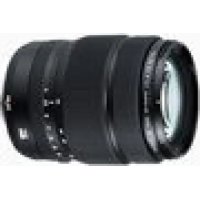
GF3264mmF4 R LM WR - Lens FUJIFILM - Free user manual and instructions
Find the device manual for free GF3264mmF4 R LM WR FUJIFILM in PDF.



| Product type | Standard zoom lens |
| Mount | FUJIFILM G (exclusive, not X-compatible) |
| Focal length | 32-64 mm (35 mm equivalent: 24-51 mm) |
| Maximum aperture | f/4 |
| Minimum aperture | f/32 |
| Optical construction | 14 elements in 11 groups (3 aspherical, 1 ED, 1 Super ED) |
| Angle of view | 81° - 46.3° |
| Minimum focus (W) | 0.5 m |
| Minimum focus (T) | 0.6 m |
| Maximum magnification | 0.12× |
| Filter diameter | 77 mm |
| Dimensions (W) | Ø92.6 × 116 mm |
| Dimensions (T) | Ø92.6 × 145.5 mm |
| Weight (without accessories) | 875 g |
| Supplied accessories | Front cap, rear cap, lens hood, soft case |
| Focus motor | Linear motor (fast and silent AF) |
| Weather sealing | Rubber ring for dust and splash resistance |
| Maintenance | Blower and soft cloth, no organic solvents |
| Safety instructions | Do not look at the sun through the lens, avoid water, store away from sunlight |
Frequently Asked Questions - GF3264mmF4 R LM WR FUJIFILM
User questions about GF3264mmF4 R LM WR FUJIFILM
0 question about this device. Answer the ones you know or ask your own.
Ask a new question about this device
Download the instructions for your Lens in PDF format for free! Find your manual GF3264mmF4 R LM WR - FUJIFILM and take your electronic device back in hand. On this page are published all the documents necessary for the use of your device. GF3264mmF4 R LM WR by FUJIFILM.
USER MANUAL GF3264mmF4 R LM WR FUJIFILM
LENSKJFFJFJFJFJFJFJFJFJFJFJFJFJFJFJFJFJFJFJFJFJFJFJFJFJFJ
レンズフードの取り付出方
Be sure to read these notes before use
Safety Notes
Thank you for your purchase of this product. For repair, inspection, and internal testing, contact your FUJIFILM dealer.
Make sure that you use the lens correctly. Read these safety notes and the camera Owner's Manual carefully before use.
After reading these safety notes, store them in a safe place.
About the icons
The icons shown below are used in this document to indicate the severity of the injury or damage that can result if the formation indicated by the icon is ignored and the product is used incorrectly as a result.

WARNING
This icon indicates that death or serious injury can result if the information is ignored.

CAUTION
This icon indicates that personal injury or material damage can result if the information is ignored.
The icons shown below are used to indicate the nature of the instructions which are to be observed.

Triangular icons tell you that this information requires attention ("Important").

Circular icons with a diagonal bar tell you that the action indicated is prohibited ("Prohibited").

Filled circles with an exclamation mark indicate an action to be performed ("Required").

WARNING

Do not use in the bathroom or shower
Do not immerse in or expose to water. Failure to observe this precaution can cause a fire or electric shock.

Do not disassemble
Do not disassemble (do not open the case). Failure to observe this precaution can cause fire, electric shock, or injury due to product malfunction.

Do not touch internal parts
must
Should the case break open as the result of a fall or other accident, do not touch the exposed parts. Failure to observe this precaution could result in electric shock or in injury from touching the damaged parts. Remove the camera battery immediately, taking care to avoid injury or electric shock, and take the product to the point of purchase for consultation.
| WARNING |
| Do not place on unstable surfaces. The product may fall, causing injury. |
| Do not view the sun through the lens or camera view fi nd Failure to observe this precau-tion can cause permanent visual impairment. |
| CAUTION |
| Do not use or store in locations that are exposed to steam, or smoke or are very humid or extremely dusty. Failure to observe this precaution can cause fire or electric shock. |
| Do not leave in direct sunlight or in locations subject to very high temperatures, such as in a closed vehicle on a sunny day. Failure to observe this precau-tion can cause fire. |
| CAUTION | |
| Keep out of the reach of small children. This product could cause injury in the hands of a child. | |
| Do not handle with wet hands. Failure to observe this precaution can cause electric shock. | |
| Keep the sun out of the frame when shooting backlit subjects. Sunlight focused into the camera when the sun is in or close to the frame can cause fire or burns. | |
| When the product is not in use, replace the lens caps and store out of direct sunlight. Sunlight focused by the lens can cause fire or burns. | |
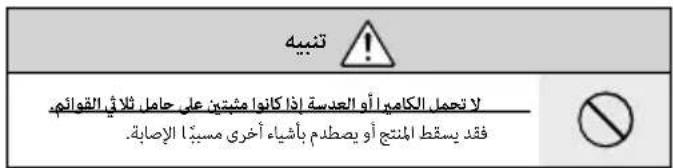
| Do not carry the camera or lens while they are attached to a tripod. The product can fall or strike other objects, causing injury. |
For Customers in the U.S.A.
Tested To Comply With FCC Standards FOR HOME OR OFFICE USE
FCC Statement: This device complies with Part 15 of the FCC Rules. Operation is subject to the following two conditions: (1) This device may not cause harmful interference, and (2) this device must accept any interference received, including interference that may cause undesired operation.
CAUTION: This equipment has been tested and found to comply with the limits for a Class B digital device, pursuant to Part 15 of the FCC Rules. These limits are designed to provide reasonable protection against harmful interference in a residential installation. This equipment generates, uses, and can radiate radio frequency energy and, if not installed and used in accordance with the instructions, may cause harmful interference to radio communications. However, there is no guarantee that interference will not occur in a particular installation. If this equipment does cause harmful interference to radio or television reception, which can be determined by turning the equipment off and on, the user is encouraged to try to correct the interference by one or more of the following measures:
Reorient or relocate the receiving antenna.
- Increase the separation between the equipment and receiver.

- Connect the equipment into an outlet on a circuit different from that to which the receiver is connected.
- Consult the dealer or an experienced radio/TV technician for help.
- You are cautioned that any changes or modifications not expressly approved in this manual could void the user's authority to operate the equipment.
Notes on the Grant: To comply with Part 15 of the FCC Rules, this product must be used with a Fujii Im-specific ed ferrite-core A/V cable, USB cable, and DC supply cord.
For Customers in Canada
CANICES-3(B)/NMB-3(B)
CAUTION: This Class B digital apparatus complies with Canadian ICES-003.
IMPORTANT SAFETY INSTRUCTIONS
- Read these instructions.
- Keep these instructions.
Heed all warnings. - Follow all instructions.
- Do not use this apparatus near water (excluding waterproof products).
Clean only with a dry cloth. - Do not block any ventilation openings. Install in accordance with the manufacturer's instructions.
- Do not install near any heat sources such as ra
EN-3
diators, heat registers, stoves, or other apparatus (including amplifiers) that produce heat.
- Protect the power cord from being walked on or pinched particularly at plugs, convenience receptacles, and the point where they exit from the apparatus.
- Only use attachments/accessories specified by the manufacturer.
- Unplug this apparatus during lightning storms or when unused for long periods of time.
Refer all servicing to qualified service personal. Servicing is required when the apparatus has been damaged in any way, such as power supply cord or plug is damaged, liquid has been spilled or objects have fallen into the apparatus, the apparatus has been exposed to rain or moisture, does not operate normally, or has been dropped.
Disposal of Electrical and Electronic Equipment in Private Households
In the European Union, Norway, Iceland and Liechtenstein: This symbol on the product, or in the manual and in the warranty, and/or on its packaging indicates that this product shall not be treated as household waste. Instead it should be taken to an applicable collection point for the recycling of electrical and electronic equipment.
ENGLISH
By ensuring this product is disposed of correctly, you will help prevent potential negative consequences to the environment and human health, which could otherwise be caused by inappropriate waste handling of this product.
The recycling of materials will help to conserve natural resources. For more detailed information about recycling this product, please contact your local city office, your household waste disposal service or the shop where you purchased the product.
In Countries Outside the European Union, Norway, Iceland and Liechtenstein: If you wish to discard this product, including the batteries or accumulators, please contact your local authorities and ask for the correct way of disposal.
Australian RCM

Before Using This Product
Some lens features are not available with older versions of the camera firmware. Be sure to update the camera firmware to the latest version. Instructions on viewing the camera firmware version and updating camera firmware are available from the following website:
http://www.fujifilm.com/support/digital Cameras/software/#firmware
If you do not have access to a computer, support is available from the local distributor listed in the "FUJIFILM Worldwide Network" material provided with your camera.
Product Care
- When using a lens hood, do not pick up or hold the camera using only the hood.
-
Keep the lens signal contacts clean.
-
Use a blower to remove dust and lint from the glass surfaces of the lens or fi iter. To remove smudges and fingerprints, apply a small amount of lens cleaner to a soft, clean cotton cloth or lens-cleaning tissue and clean from the center outwards using a circular motion, taking care not to leave smears or touch the glass with your fingers.
- Never use organic solvents such as paint thinner or benzene to clean the lens.
- Attach the front and rear caps when the lens is not in use.
- Store the lens and filter in cool, dry locations to prevent mold and rust. Do not store in direct sunlight or with naphtha or camphoc moth balls.
- Keep the lens dry. Rusting can cause irreparable damage. Wipe off rain and water droplets.
- Leaving the lens in extremely hot locations could cause damage or warping.
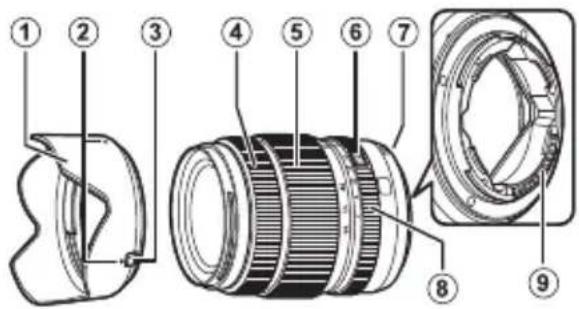
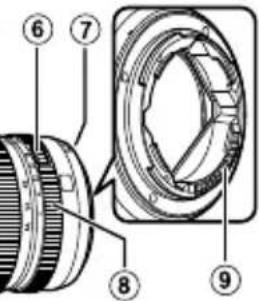
Parts of the Lens
GF32-64mmF4 R LM WR
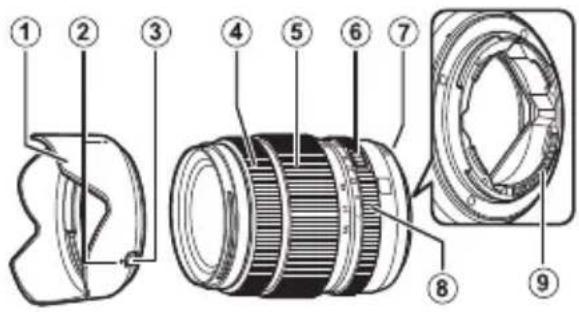
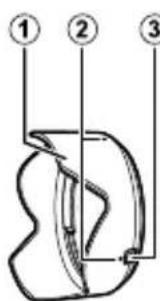
① Lens hood
② Mounting marks
③ Hood latch release
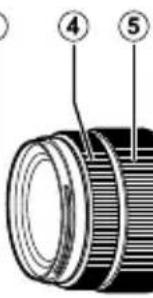
(4) Focus ring
⑤ Zoom ring
⑥ Aperture ring lock release
⑦ Mounting marks (focal length)
⑧ Aperture ring
Lens signal contacts
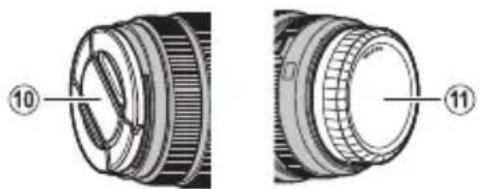
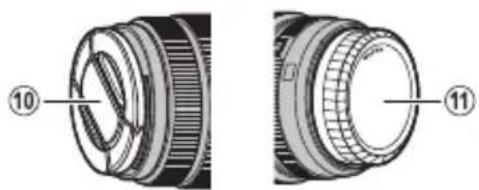
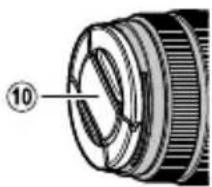
10 Front lens cap
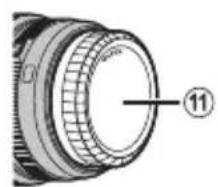
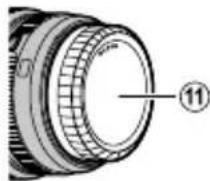
⑪ Rear lens cap
The lens mount includes a rubber ring to ensure that the lens remains dust- and splash-proof. The ring can be replaced for a fee at any FUJIFILM service center.
Supplied Accessories
- Front lens cap
-
Rear lens cap
-
Lens hood
- Lens pouch
EN-5
ENGLISH
Attaching the Lens
See the camera manual for information on attaching and removing lenses.
This lens is for use exclusively with FUJIFILM G mounts and can not be used with X mounts.
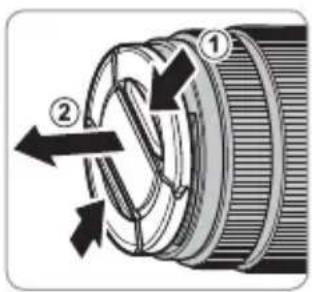
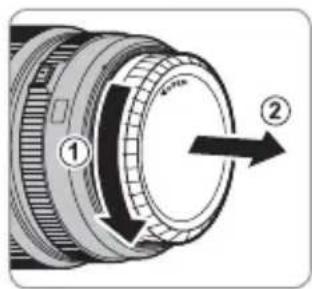
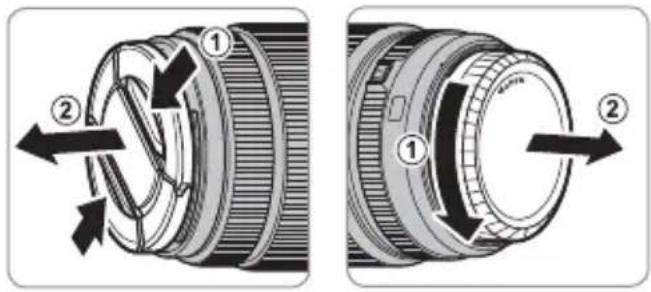
Removing the Caps
Remove the caps as shown.
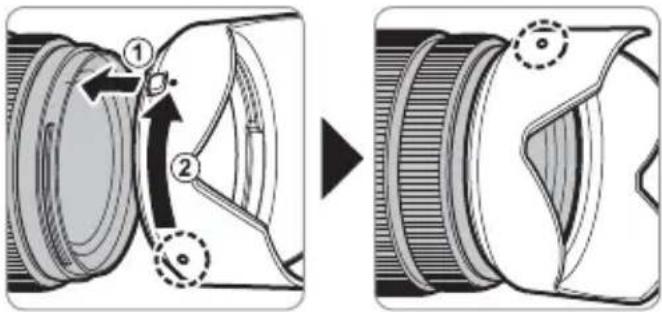
Attaching the Hood
When attached, lens hoods reduce glare and protect the front lens element.
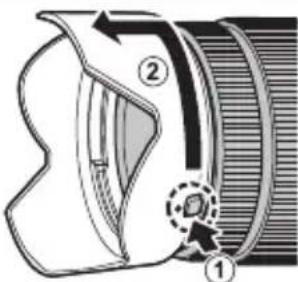
Removing the Hood
To remove the hood, press and hold the hood latch release while rotating the hood counterclockwise.
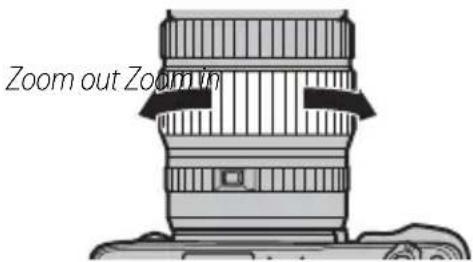
Zoom
Rotate the zoom ring left to zoom out, reducing magnification and increasing the area visible in the frame. Rotate the ring right to zoom in, increasing magnification so that the subject occupies more of the frame.
1 Using the zoom ring while the lens is wet makes it easier for water to find its way inside the lens. Wipe any water from the lens before using the zoom ring.
The Aperture Ring
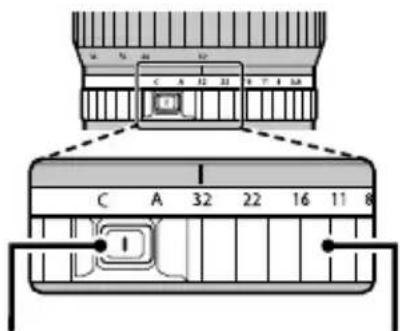
Rotate the lens aperture ring to choose the aperture (f-number).
① C: Set aperture to the value chosen with the camera command dial.
② A: Set aperture to the value chosen automatically by the camera.
③ Other values: Set aperture to the selected value.
To select C or A, or to select another value after selecting C or A, press the aperture ring lock release while rotating the aperture ring.
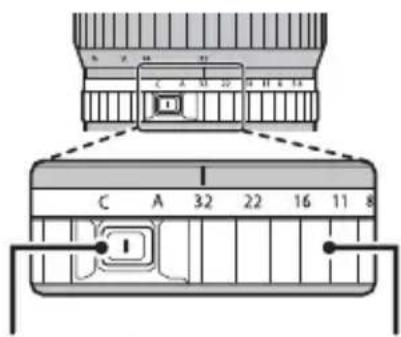
Aperture ring lock release
Aperture ring
Specifications
| Type GF32-64mmF4 R LM WR | |
| Lens construction | 14 elements in 11 groups (including 3 aspherical, 1 extra-low-dispersion, and 1 super extra-low-dispersion element) |
| Focal length (35 mm format equivalent) | f=32-64 mm (25-51 mm) |
| Angle of view 81°-46.3° | |
| Max. aperture f/4 | |
| Min. aperture f/32 | |
| Aperture control | |
| Number of blades | 9 (rounded diaphragm opening) |
| Stop size | \(V_{3} EV\) (19 stops) |
| Focus range (measured from focal plane) | W: 0.5 m-infinity T: 0.6 m-infinity |
| Max. magnification | T: 0.12 × |
| External dimensions: Diameter × Length* (approx.) * distance from camera lens mount flange | W: \(ø92.6 \times 116.0 mm\) T: \(ø92.6 \times 145.5 mm\) |
| Weight* (approx.) * excluding caps and hoods | 875 g |
| Filter size | \(ø77 mm\) |
Improvements may result in unannounced changes to specifications and appearance.
Owing to how this lens is constructed, the "Distance indicator" displayed by the camera may in some cases differ from the actual focus distance. Use the "Distance indicator" as a guide only.
This lens uses linear motors to ensure fast and accurate auto focus while maintaining the highest image quality. When the camera is turned off, the lens is disconnected from the camera body, or the playback feature is turned on, there may be an audible sound and slight physical vibration due to the linear motor's magnets being disengaged. This is perfectly normal and will not negatively affect image quality or lens performance.
Pour vous sécurité

m = 311 ;
http://www.fujifilm.com/support/digital Cameras/software/#firmware
http://www.fujifilm.com/support/digital Cameras/software/#firmware
http://www.fujifilm.com/support/digital Cameras/software/#firmware
http://www.fujifilm.com/support/digital Cameras/software/#firmware
http://www.fujifilm.com/support/digital Cameras/software/#firmware
http://www.fujifilm.com/support/digital Cameras/software/#firmware
He unonb3yime 8
beHHoH uu 8 dyue
He nozpykaumie 6 body u He nooepzaumie 6o3deucmeuio 60dbI. HebblonHne DaHHoro Tpe6oBaHn MoXeT npBBeCTN K Bo3ropaHnIO nIIN NopaKeHnO 3JeKtpn-ueCKM TOKOM.
| ПЕДУПЕЖDEHWE | |
| He pa36upaime | He pa36upaime (He omkpbiaume koprnyc). Hecobniode- нe 3TOI Меры пеюoctopoxhoCTN мозет пивe- СТИ К BOЗТROРАЮ, порожени эл ektpчeCKM TO- КOM ИЛВОВНКHOВЕНИТРаBM N3-3a HeпразвиьноH paobToI N3delenY. |
| He ap026upaime | Eclu kopnyc pa36bunc6 pe3ylnbmate nadehenu unu dpy- ZOZOчрзвчauHNoZ npoucueCmBu. He mpo2aume om- Крыmbte demaru. HecobniodeHne 3TOI Меры пею- STOPOKHOCTN мозет пивebeth K порожени эл ek- ТричeCKM TOKOM ИЛВОВНКHOВЕНИТРаBM, ecnI Вы DOTPOHETeBdo NOВPEJDEHbIX DeTaNen. He- MediNEHBO BvHbTe batapeio FOtOKaMEpBI, co6liODa# OCTOPOXHOCTb, YTObI 36ExKATb ПОЛуEHNЯ TpaBM ИЛN ПОражЕНЯ эл ekTPчeCKM TOKOM, И OTHeCNTe N3delenB M MeTO рпОБpeTeHNA Дя KOHcYNbTaUH. |
| He knadume Na HeycmoUHbBle nobepxHocMu. ИЗделme MOKeT UNaCTb, ВьЗБВТРаBMY. | |
| He smompeme Na conHnce uepe3 obekmu# ckamenu φomokamepbI. HecobniodeHne данно Меры прEOCTOPOKHOCTN мозет пивebeth K Heo6paTmMo- My hapyuHInu 3peHnA. | |
| ПЕДОCTEPEXEHNE | |
| He усаньуке u He xpaHume 6 Meccax, noDBePExHHbIX 603deUcMbUO napa unu dbIMA, a mamke 8 Mecmax, 2de npucymcByem noBbIaHennar bIaxHoCmB unu bObnbUoe KoIueCmB 60 nbIIu. He bblIOJIeHne daHnOrO Tpe6OBA- HЯ может ппвeCTи K Bo3rOpAHIO UNI NOPaJehNIO эЛeКТРИчeCKM TOKOM. | |
| He ocmaIaJIeMHe Na npYamOM coNHeHOM caemy unu B Me- cMax, noDBePexHHbIX 603deUcMbUO bIcOKux Memnepa- myp, makuX KAK 3akpbIbM u ABmObUNB b CoNHeHbI dENb. HecobIIOJIeHne 3TNx MEP ПпeDOCTOPOXHOCTN MOJeT PnIBeCTN K Bo3rOpAHIO. | |
| XpaHume 8 Mecmax, He docmynbIX dRЯ ManelbKux de- mei. B rykax peBeHka LaHnOE iZdJIeNe Mochet cTaTb prunHOB TeLEChbIX NOBpeKJdeHni. | |
| He dompaZuaBaIeMcb MokpbIMu pykAmu. He bblIOJIeHne daHnHO Tpe6OBAHЯ Mochet ппвeCTи K nopaxeHInO эЛeKTPrUcckM TokOM. | |
| Буduu- ! | Во БерЯ CBemku obSeKmoB, OceSeHbIX c3adU, He do- nyckaIe nonadHna coNHa 8 KaDP. CoIHeuHb ICBET, cФokycuropBaHbI B φOTOKaMepy, KOrDa coHnce Ha- XODITCR B KaIpe UNI PRaDM C HIM, MOJeT Bb3BaTb BO3rOpAHne UNI OXOrN. |

IPEDOCTEPEXEHNE

Ko2da u3denue He Ucnonb3yemcr, 3akpoim KpbuWku
06bekmua, u xpaHume u3denue mam, 2de Ha Hezo He na- daem npmaou coNHehbu cem. CoIHehBcET, Coo
KycnPOBaHHbIO6bektNBOM, MOKeT Bbl3BaTb BO3ro- paHne nn OXkOrn.

He nepenocme fomokamepy unu obekmue, kozda onu ymanobnehbl Ha umamuse. H3dene MoKeT ynaCTb nIy dapntbCn O npytne IpeMeTb, BblBab TpaBMy.
Ymuaa 3nekmpueeckozo u 3nekmpoHzo oobopyoabaunB doMaunux ycnobux
B CtpaHax EbponeKoro co03a, HopberHm, NcnaHm n InxTeHwTeHne: DnHHb CMBOH Ha mEHN, B pyKOBOCTBe, H rapaHTHOM TaHOHe N/INHa yNAKOBKe YKa3bMaET Ha To, 4TO DAHHoe mDJIeMe Hb3BaY TINMIOBAtb BMEcTo c 6bTOBIM OTXdAMn. BMcTo 3TOr eTO HyxHO OTHECn B pIeMhB tyHK T O cbOpny, nepepaBoTke IN BTOpHOMN MIOJIbSOBAHNO AIEKTpueeCKOro n AEIEKtonHO OOpyoDBHnA.

PraabnBnHnTnnnnaaonnoomKet npedotbpantntb noteHmuahhe HerattnBhe NoocnctBnIa IOnkpyaoue Cpebln 3doobbaJeNoBeKa, KOtOpbe Moryr BOHNKHTyB pezhytaTe HecooTBeTcByUoeY TynNsau nn daHoro H3dEn.
NoTbOPHOE NcNtB3OBAHKe MaTePnAIOB NmOeKet CoXPaHtB npnpoAHepepcpcb.
Dnno nOnyehnDonOnnHteBhoHn HOpMaun OyTJnnAun DaHHOrO 3denn
OobpaAaTecB MeCTb OePraHb BnActn, B Cny6y No cOby, nepeApotke I
BTOPnHOMy McNOnB3OBAHIn OToXONOB IN M MaarAn, RcBb PnpObpEniMdENIE.
BCTPANAX3a npdenamn Ebponeckoro co03a,Hopbernn,Mcannm n JuxteHutHe:ECnn Hc6xOIMNO yTINMnPbOaTB daHHOC INDNC, BKNIOAB 8aTApEN NNN AKKMyTAOpbl CBKNTecB C MecTHbIMN BnACTAMN yTOCHHTI PPABNlY TINJIAI.
RU-3
PYCCKNI
IpeedncnoB3ObaHnem daHHoro n3dennr
HeKoTOpbIe yHKnN O6BeKTnBa HeNoCTynHbI C 60-nee paHHmB BepCnMn npOuNBKn fOTOKaMepbI. O63aTeNbHO 6OBnTE npOuNBky fOTOKaMepbI Do nocJeHneB BepCnN. IHCTpyKcNn No npocMoTpY BepCnN npOuNBKn fOTOKaMepbI N 6OBnJIeHnIO npOuNBKn fOTOKaMepbI DOCTynHbI Ha cNeJyUoem Be6-caTe: http://www.fujifilm.com/support/digital Cameras/software/#firmware
B cnyuae, ecn y Bac HeT Doctyna K KomnbTopey, 6bpatntecb 3a noDepKko K MeCTHOMy DnCTpn6bToTpO npCncka "FUJIFILM Worldwide Network", nocTabneHHoro c Bawei oToKaMePo.
yXoJ3a n3dennem
-ПиИСПОЛБ3OBAHIN 6JIeHdI OБьЕKTINBa He 6ePHTecb 3a ФOTOKaMepy И HeДeрЖnte ee Tc6JIeHdy.
He onyckaIte 3arpa3HeHnca HHaJIbHbIX KOHTaKTOB o6beKTuBa.
-Поьзупесь рушей дя удалени nbлл и nyxa co CTeКлЯньх NOВерхносте OБъektиBa nln Φиьтра.Дя удалени пгелен И OTпчаTKOB nalb-цев HaheсиTe Heбольшоe KONИЧECTBO JИДКОCTN
ДлгчNTКИОБьЕKTNUOB Ha МягкуIO,ЧИСТУ OЛON-уАTOбУмжHyIO TKAнь ИИN CanФeTKy ДлгчNTKИОБьЕKTNUOB InpOTPnTe OБьЕKTиB OT ueHTpa K КразМ КрУROВыIM N DBИЖeHЯМN, COБПЮДА OCTOPOXHHOCtB, He OCTaBlЯ pa3BOIDOB I He KacayCb CTekla NaIbUcAMN.
- HnKoIa He nCnoJIb3yIte dIy qNCTKn O6beKTnBa opraHnueckne paCTBOpuTeN, TaKne KaK pa36aBnteNb dIg KpaCKn IIN 6eH3nH.
3aKpOHTe KpbIuKy O6beKtNB a KpbIuKy 6aNoHeta o6BeKtNBa, KOrDa o6BeKtNB He NcNoB3yeTc.
XpaHnTe 06bektnb nIbnTpB npoxnaHbIX, cyxnx MeCTax, yTO6bl npedotbpaTntb 6pa3OBaHne pIeCEHN Koppo3nn. He xpaHnTe B MeCTax, rDe Ha Hero nonajaet npraMoN cOnHeHbN CBET, IIN PpIOM C HafTaIIHOBbIMN IIN KaMΦOpHbIMN WaPnKaMn OT MOJI.
Kepertte 6bektnb OT Bnarn. Koppo3n MoKeT HaheCTn HEnonpaBmbl yuep6. Pn nonaHaHn IOxDeBbIX Kaenb Nnn 6pb3r BObl nx CneDyET BbITepeTb.
- Ecnn O6bekTnB OCTaBnTb B MeCTax, NOBepraIOuIUXc BO3DeNCTBnIO BbICOKNX Tempeatyp, To 3TO MoKet NOBpeDnTb INI DeOpMnPoBaTb erO.
Yactu o6bekTnBa
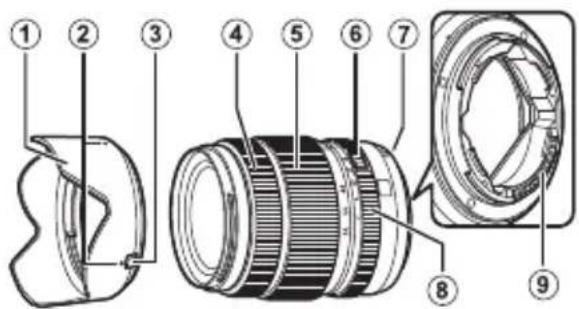
GF32-64mmF4 RLM WR
① bneHda o6bekmuBa
② Memku dnycmaHOeKu
③ 3aueenka bneHdb
④ Φokycupo80yHoe KoiIbO
⑤ Konbuo Macuma6upo8aHua
6 Pa36nokupo8ka konbua daaeppaBmbl
⑦ Memku dnycmaHobku (fokychoe paccmoHue)
⑧ Konbuo duappa2mbl
9 CuZhanhBbIe Kohmakmbiobekmu8a
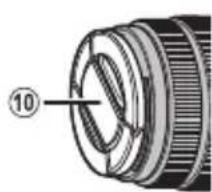
10 Kpbiuka oBekmu8a
11 KpbuKa 6aioHema obekmuBa
Kpenne Hne obbektna nmeet pe3nHOoe KOBIO, KOtOpoe obecneuBaET 3aunTy obbektba OT nbIN N 6pbIr. KOBIO MOKHO 3aMeHb T B IIObOM cepBnCHOM cEHTrpe FUJIFILM 3a OTdJIbHyIO pNAty.
PpnilaraemblepnHaadnexKHOCTN
Kpbiuka o6beKeTnBa
-Kpbiuka 6aioHeTa o6beKtNbA
http://www.fujifilm.com/support/digital Cameras/software/#firmware
http://www.fujifilm.com/support/digital Cameras/software/#firmware
http://www.fujifilm.com/support/digital Cameras/software/#firmware
http://www.fujifilm.com/support/digital Cameras/ software/#firmware
An instant chagoharh
本賊藥用自日海中,。
http://www.fujifilm.com/support/digital Cameras/ software/#firmware
Coupter to sponghh su oohm, kmae rwa hchne Jcgonf“FUJIFLMWorldwide Network” Jtloe eIergeHnHJTzJrJHgEepAoeTJrRtoBnOsiuHsUp
奈吾
·LenzHuaHuaHuaHuaHaHaHaHaHaHaHaHaHaHaHaHaHaHaHaHaHaHaHaHaHaHaHaHaHaHaHaHaHaHaHaHaHaHaHaHaHaHaHaHaHaHaHaHaHaHaHaHaHaHaHaHaHaHaHaHaHaHaHaHaHaHaHaHaHaHaHaHaHaHaHaHaHaHaHaHaHaHaHaHaHaHaHaHaHaHaHaHaHaHaHaHaHaHaHaHaHaHaHaHa Ha
·Lenz sinho jiee ean hao hao hao hao hao hao hao hao hao hao hao hao hao hao hao hao hao hao hao hao hao hao hao hao hao hao hao hao hao hao hao hao hao hao hao hao hao hao hao hao hao hao
· 蒂羅爾等人,「要」的用。
KO-4
志子将自之,贝斯,贝利,贝德,贝德,贝德,贝德,贝德,贝德,贝德,贝德,贝德,贝德,贝德,贝德,贝德,贝德,贝德,贝德,贝德,贝德,贝德,贝德,贝德,贝德,贝德,贝德,贝德,贝德,贝德,贝德,贝德,贝德,贝德,贝德,贝德,贝德
- 裁大塚広連連連連連連連連連連連連連連連連連連連連連連連連連連連連連連連連連連連連連連連連連連連連連連連连
- Rienz to use the same as the same as the same as the same as the same as the same as the same as the same as the same as the same as the same as the same as the same as the same as the same as the same as the same as the same as the same as the same as the same as the same as the same as the same as the same as the same as the same as the same as the same as the same as the same as the same as the same as
·金福园山,国生,日,中,工,,,,,,,,,,,,,,,,,,,,,,,,,,,,,,,,,,,,,,,,,,,,,,,,,,,,,,,,,,,,,,,,,,,,,,,,,,,,,,,,,,,,,,,。 - Rienztoe 1
- Rienzle 1. 勾装的 风味,用头,双面,双面,双面,双面,双面,双面,双面,双面,双面,双面,双面,双面,双面,双面,双面,双面,双面,双面,双面,双面,双面,双面,双面,双面,双面,双面,双面,双面,双面,双面,双面,双面,双面,双面
h
Real 青年
GF32-64mmF4 R LM WR
Lenz StroIe Iang to 1
a a a a a a a a a a a a a a a a a a a a a a a a a a a
Jg 1000000000000000000000000000000000000000000000000
aill 1g jgall oge la l jy jgj y gabla, gbal jggl cllblbla bclj d aab
AR-9

aagaa aalj jlaaabaa aalaua aale J. FUJFILM 2005 50
GF32-64mmF4 R LM WR
a0s y1 1y1gannSyl
= ( x1,y1) , = ( x2,y2)
aewell
- yolny.
AR-5

yIaI I aI yIg JIaI gJIaI gJIaI gJIaI gJIaI gJIaI gJIaI gJIaI gJIaI gJIaI gJIaI gJIaI gJIaI gJIaI gJIaI gJIaI gJIaI gJIaI gJIaI gJIaI gJIaI g
156
J
J
J
J
J
J
J
J
J
J
J
J
J
J
J
J
J
J
J
J
J
J
J
J
J
J
J
J
J
J
J
J
J
J
J
J
J
J
J
J
J
J
J
J
J
J
J
J
J
J
J
J
J
J
J
J
J
J
J
J
J
J
J
J
J
J
J
J
J
J
J
J
J
J
J
J
J
J
J
J
J
J
J
J
J
AR-4
aolll jjldg aaggl gaggul ggal

g jy 11 yj yj yj yj yj yj yj yj yj yj yj yj yj yj yj yj yj yj yj yj yj yj yj yj yj yj yj yj yj yj yj yj yj yj yj yj yj yj yj yj yj yj yj yj yj yj yj yj yj yj y
aagabla aalglal gao de selawgabla lao gauw alalll no sall
yulnue uu yuugabla no gaiabll agaae jgagluyll aagag ayll ylaal
Jog clogabla no yjcbasall gabgblaoaol plalol ggyuus delanu
Cilabla no gabll ao gdyolall glably kdygabll iuy
J 1 J 1


duolw j0j
y
| .(“aole”)clalil lalil lalil lalil jdlalll jgolll jzss | ! |
| Egina aill jall jall jll lall lalil galsy bi yll jgalll jgolll jzss .("egina") | # |
| 4plall bll jall jll lalil galsy bi yll jgalll jzss .("4g1ba") | # |