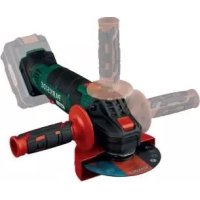
PWSA 20Li B3 - Grinder PARKSIDE - Free user manual and instructions
Find the device manual for free PWSA 20Li B3 PARKSIDE in PDF.



| Product type | Cordless angle grinder |
| Brand | Parkside |
| Model | PWSA 20Li B3 |
| Rated voltage | 20 V (DC) |
| Speed range | 2500 - 10000 min⁻¹ |
| Spindle thread | M14 |
| Max. disc diameter | 125 mm |
| Battery type | Lithium-Ion (PAP 20 A3) |
| Battery capacity | 4 Ah |
| Battery voltage | 20 V |
| Suitable charger | PLG 20 A3 |
| Charger input voltage | 230-240 V~, 50 Hz |
| Charger power consumption | 120 W |
| Charging time (4 Ah battery) | Approx. 60 min |
| Application | Cutting, rough grinding, brushing of metal, concrete, tiles (without water) |
| Safety equipment supplied | Protective guard, auxiliary handle |
| Sound pressure level | 86 dB(A) (K=3 dB) (typical value) |
| Sound power level | 97 dB(A) (K=3 dB) (typical value) |
| Warranty | 3 years |
| Maintenance | Clean with soft cloth, vacuum ventilation slots, no solvents |
| Spare parts | Available via hotline or website |
Frequently Asked Questions - PWSA 20Li B3 PARKSIDE
User questions about PWSA 20Li B3 PARKSIDE
0 question about this device. Answer the ones you know or ask your own.
Ask a new question about this device
Download the instructions for your Grinder in PDF format for free! Find your manual PWSA 20Li B3 - PARKSIDE and take your electronic device back in hand. On this page are published all the documents necessary for the use of your device. PWSA 20Li B3 by PARKSIDE.
USER MANUAL PWSA 20Li B3 PARKSIDE
Translation of the original instructions
NL BE
ACCU-HAAKSE SLIJPER
Before reading, unfold both pages containing illustrations and familiarise yourself with all functions of the device.
FR BE
GB/IE Translation of the original instructions Page 21
All Parkside tools and the chargers PLG 20 A1/PLG 20 A2/PLG 20 A3/PDSLG 20 A1 of the X20V Team series are compatible with the PAP 20 A1/PAP 20 A2 / PAP 20 A3 battery pack.
KOMPERNASS HANDELS GMBH
BURGSTRASSE 21
44867BOCHUM
DEUTSCHLAND
www.kompernass.com
Intended use 22
Features 22
Package contents 23
Technical details 23
General power tool safety warnings 24
1.Work area safety 24
2. Electrical safety 24
3. Personal safety 24
4. Power tool use and care 25
5.Use and handling of the cordless electrical power tool 25
6. Service 26
Safety instructions for all applications 26
Kickback and corresponding safety instructions. 27
Special safety instructions for grinding and abrasive cutting 28
Additional special safety instructions for abrasive cutting 28
Safety guidelines for battery chargers 29
Permissible accessories 30
Storage and handling of the recommended accessory tools 30
Working procedures 31
Before use 32
Charging the battery pack (see fig. A) 32
Attaching/disconnecting the battery pack to/from the appliance 32
Checking the battery charge level 32
Adjusting the blade guard 33
Fitting the additional handle 3 3
Fitting/changing the roughing/cutting disc 33
Operation 34
Switching on and off 34
Adjusting the rotational speed 34
Maintenance and cleaning 35
Disposal 35
Kompernass Handels GmbH warranty 36
Service 37
Importer 37
Translation of the original Conformity Declaration 38
Ordering a replacement battery 39
Order by phone or fax 39
CORDLESS ANGLE GRINDER PWSA 20-Li B3
Introduction
Congratulations on the purchase of your new appliance. You have chosen a high-quality product. The operating instructions are part of this product. They contain important information about safety, usage and disposal. Before using the product, please familiarise yourself with all operating and safety instructions. Use the product only as described and for the range of applications specified. Please also pass these operating instructions on to any future owner.
Intended use
The appliance is intended for cutting, rough cutting and brushing metal, concrete or tiles without the use of water. Any other usage or modification of the appliance is deemed to be improper and carries a significant risk of accidents. The manufacturer accepts no responsibility for damage(s) resulting from improper usage. The appliance is not intended for commercial use.
Explanation of the symbols used:
| Before using the appliance for the first time, read the original operating instructions and safety instructions. | |
| The use of damaged cutting or polishing discs is dangerous and can lead to serious injuries! | |
| 125 mm | Diameter of the disc |
| Cordless angle grinder | |
| Wear protective goggles! | |
| Wear ear muffs! |
| Wear safety shoes! | |
| Wear protective gloves! | |
| Wear a dust mask! | |
| Not approved for wet grinding | |
| Not approved for side grinding | |
| Suitable for grinding metal |
Features
ON/OFF switch
Release button for the battery pack
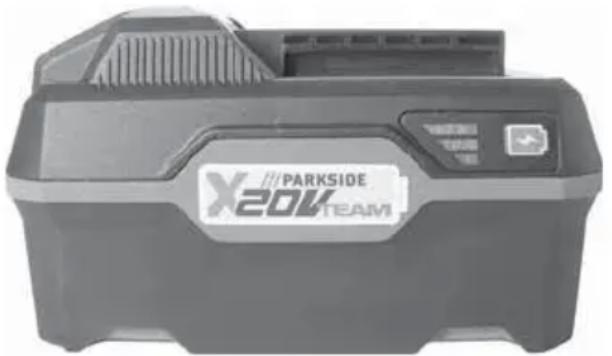
3 Battery pack
4 Battery charge level button
5 Battery display LED
Adjusting wheel for speed pre-selection
Additional handle
8 Blade guard
Spindle locking button
16 Screw thread (3×) for the additional handle
1 Mounting ring
12 Screws
13 Blade guard fixture
16 High-speed charger (see fig. A)
15 Red charge control LED (see fig. A)
16 Green charge control LED (see fig. A)
17 Attachment spindle (see fig. C)
18 Attachment flange (see fig. C)
19 Clamping nut (see fig. C)
20 Two-hole mounting spanner (see fig. D)
Bulges
Package contents
1 cordless angle grinder
1 high-speed battery charger
1 battery pack
1 additional handle
1 blade guard (pre-assembled)
1 two-hole mounting spanner
1 cutting disc (pre-assembled)
1 set of operating instructions
Technical details
Cordless angle grinder: PWSA 20-Li B3
Rated voltage: 20 V = = (DC)
Rated idle speed: n 2500-10000 rpm
Disc width: 125mm
Thread size: M14
Battery: PAP 20 A3
Type: LITHIUM
Rated voltage: 20 V (DC)
Capacity: 4
Cells: 10
High-speed battery charger: PLG 20 A3
INPUT:
Rated voltage: 230-240 V , 50 Hz (AC)
Rated power
consumption: 120 W
Fuse (internal): 3.15 A
OUTPUT:
Rated voltage: 21.5 V (DC)
Rated current: 4.5 A
Charging time: approx. 60 min
Protection class: II (double insulation)
Noise and vibration data:
Noise measurement value determined in accordance with EN 60745. The A-rated noise level of the power tool is typically:
Noise emission value:
Sound pressure level: L_PA = 83 dB(A)
Uncertainty: K = 3 dB
Sound power level: L_WA = 94 dB(A)
Uncertainty: K = 3 ~dB
Wear ear muffs!
Total vibration value:
Surface grinding main handle: A_h,AG = 2.698 m/s^2
Uncertainty: K = 1.5 m/s
Surface grinding
Additional handle: _h,AG = 3.284 m/s^2
Uncertainty: K = 1.5 m/s
ION
NOTE
Ah The vibration level specified in these instructions has been measured in accordance with a standardised measuring procedure and can be used for equipment comparisons. The specified vibration emission value can also be used to make an initial exposure estimate.

WARNING!
The vibration level varies depending on the use of the power tool and may be higher than the value specified in these instructions in some cases. Regular use of the power tool in this way may cause the user to underestimate the vibration. Try to keep the vibration loads as low as possible. Measures to reduce the vibration load are, e.g. wearing gloves and limiting the working time. Wherein all states of operation must be included (e.g. times when the power tool is switched off and times where the power tool is switched on but running without load).

eral power tool safety warnings


WARNING!
Read all safety warnings and all instructions. Failure to follow the warnings and instructions may result in electric shock, fire and/or serious injury.
Save all warnings and instructions for future reference.
The term "power tool" in the warnings refers to your mains-operated (corded) power tool or battery-operated (cordless) power tool.
1. Work area safety
a) Keep work area clean and well lit. Cluttered or dark areas invite accidents.
b) Do not operate power tools in explosive atmospheres, such as in the presence of flammable liquids, gases or dust. Power tools create sparks which may ignite the dust or fumes.
c) Keep children and bystanders away while operating a power tool. Distractions can cause you to lose control.
2. Electrical safety
a) Power tool plugs must match the outlet. Never modify the plug in any way. Do not use any adapter plugs with earthed (grounded) power tools. Unmodified plugs and matching outlets will reduce risk of electric shock.
b) Avoid body contact with earthed or grounded surfaces, such as pipes, radiators, ranges and refrigerators. There is an increased risk of electric shock if your body is earthed or grounded.
c) Do not expose power tools to rain or wet conditions. Water entering a power tool will increase the risk of electric shock.
d) Do not abuse the cord. Never use the cord for carrying, pulling or unplugging the power tool. Keep cord away from heat, oil, sharp edges or moving parts. Damaged or entangled cords increase the risk of electric shock.
e) When operating a power tool outdoors, use an extension cord suitable for outdoor use. Use of a cord suitable for outdoor use reduces the risk of electric shock.
f) If operating a power tool in a damp location is unavoidable, use a residual current device (RCD) protected supply. Use of an RCD reduces the risk of electric shock.
3. Personal safety
a) Stay alert, watch what you are doing and use common sense when operating a power tool. Do not use a power tool while you are tired or under the influence of drugs, alcohol or medication. A moment of inattention while operating power tools may result in serious personal injury.
b) Use personal protective equipment. Always wear eye protection. Protective equipment such as dust mask, non-skid safety shoes, hard hat, or hearing protection used for appropriate conditions will reduce personal injuries.
c) Prevent unintentional starting. Ensure the switch is in the off-position before connecting to power source and/or battery pack, picking up or carrying the tool. Carrying power tools with your finger on the switch or energising power tools that have the switch on invites accidents.
d) Remove any adjusting key or wrench before turning the power tool on. A wrench or a key left attached to a rotating part of the power tool may result in personal injury.
e) Do not overreach. Keep proper footing and balance at all times. This enables better control of the power tool in unexpected situations.
f) Dress properly. Do not wear loose clothing or jewellery. Keep your hair, clothing and gloves away from moving parts. Loose clothes, jewellery or long hair can be caught in moving parts.
g) If devices are provided for the connection of dust extraction and collection facilities, ensure these are connected and properly used. Use of dust collection can reduce dust-related hazards.
4. Power tool use and care
a) Do not force the power tool. Use the correct power tool for your application. The correct power tool will do the job better and safer at the rate for which it was designed.
b) Do not use the power tool if the switch does not turn it on and off. Any power tool that cannot be controlled with the switch is dangerous and must be repaired.
c) Disconnect the plug from the power source and/or the battery pack from the power tool before making any adjustments, changing accessories, or storing power tools. Such preventive safety measures reduce the risk of starting the power tool accidentally.
d) Store idle power tools out of the reach of children and do not allow persons unfamiliar with the power tool or these instructions to operate the power tool. Power tools are dangerous in the hands of untrained users.
e) Maintain power tools. Check for misalignment or binding of moving parts, breakage of parts and any other condition that may affect the power tool's operation. If damaged, have the power tool repaired before use. Many accidents are caused by poorly maintained power tools.
f) Keep cutting tools sharp and clean. Properly maintained cutting tools with sharp cutting edges are less likely to bind and are easier to control.
g) Use the power tool, accessories and tool bits etc. in accordance with these instructions, taking into account the working conditions and the work to be performed.
Use of the power tool for operations different from those intended could result in a hazardous situation.
5. Use and handling of the cordless electrical power tool
a) Charge a rechargeable battery unit using only the charger recommended by the manufacturer. Chargers are often designed for a particular type of rechargeable battery unit. There is the danger of fire if other types of rechargeable battery units are used.
b) Only the rechargeable battery units supplied are to be used with an electrical power tool. The use of other rechargeable batteries may lead to a risk of injury or fire.
c) When they are not being used, store rechargeable battery units away from paper-clips, coins, keys, nails, screws or other small metal objects that could cause the contacts to be bridged. Short-circuiting the contacts of a rechargeable battery unit may result in heat damage or fire.
d) Fluids may leak out of rechargeable battery units if they are misused. If this happens, avoid contact with the fluid. If contact occurs, flush the affected area with water. Seek additional medical help if any of the fluid gets into your eyes. Escaping battery fluid may cause skin irritation or burns.

ON! RISK OF EXPLOSION! Never charge non-rechargeable batteries.

t the rechargeable battery from heat; for example, from continuous exposure to sunlight, fire, water and moisture. There is a risk of explosion.
6. Service
a) Have your power tool serviced by a qualified repair person using only identical replacement parts. This will ensure that the safety of the power tool is maintained.
Safety instructions for all applications
Special safety instructions for grinding and abrasive cutting:
a) This power tool is to be used as a grinder and abrasive cutting appliance. Please follow all safety instructions, instructions, diagrams and data that you receive with the appliance. If you do not observe the following instructions, this can lead to an electrical shock, fire and/or serious injuries.
b) This power tool is not suitable for sandpaper sanding, working with a steel brush or burnishing. Using the power tool for applications for which it is not designed can lead to hazards and injuries.
c) Do not use any accessories that have not been specifically provided or recommended by the manufacturer for this power tool. Just because you can attach the accessories to your power tool does not guarantee they are safe to use.
d) The maximum speed of the accessory tool used must be at least as high as the maximum speed specified for the power tool. Accessories that rotate faster than the permissible rate can break and throw pieces into the air.
e) The external diameter and thickness of the accessory tool used must comply with the dimensions of the power tool. Incorrectly dimensioned accessory tools cannot be sufficiently shielded or controlled.
f) Attachment tools with a thread insert must match the thread of the grinding spindle exactly. For attachment tools that are mounted using a flange, the diameter of the hole on the attachment tool must correspond to the width of the fitment on the flange. Accessory tools that cannot be fitted precisely onto the power tool will rotate unevenly, vibrate severely and can lead to a loss of control.
g) Never use damaged attachment parts. Check accessory tools such as grinding discs before each use for chips or cracks, grinding plates for cracks, wearing or excessive wear and tear and wire brushes for loose or broken wires. If the power tool or the accessory tool in use is dropped, check to see if it is damaged or use an undamaged accessory tool. When you have checked and inserted the accessory tool, ensure that you and any other people in the vicinity remain outside of the level of the rotating accessory tool and allow the tool to rotate at maximum speed for one minute. Damaged accessories usually break during the test period.
h) Wear personal protective equipment. Depending on the application, ensure that you use full face protection, eye protection or goggles. Use a dust mask, hearing protection, protective gloves or special apron to protect yourself from grindings and material particles as required. Protect your eyes from flying debris that may be created during certain applications. Dust or filter masks must be used to filter any dust created by the application. If you are exposed to loud noise for any length of time, you may suffer hearing loss.
i) Ensure that other people remain at a safe distance from your workspace. Anyone who enters the workspace must wear personal protective equipment.
Fragments of the workpiece or broken accessory tools can fly off and cause injury - even outside the immediate working area.
i) Hold the power tool only by the insulated handles when you are carrying out work in which the accessory tool may come into contact with concealed power cables. Contact with a live cable can also make metal parts of the appliance live and could result in an electric shock.
k) Keep the power cord away from any rotating accessories. If you lose control of the appliance, the cord may get caught or cut and your hand or arm could get caught in the rotating accessory tool.
I) Never put the power tool down until the accessory tool being used has come to a complete standstill. The rotating accessory tool can come into contact with the surface and cause you to lose control of the power tool.
m) Do not leave the power tool running whilst carrying it. Accidental contact between your clothing and the rotating accessory tool could lead to physical injury.
n) Clean the ventilation slits of your power tool regularly. The engine fan draws dust into the housing and a strong accumulation of metal dust can cause electrical hazards.
o) Never use the power tool in the vicinity of inflammable materials. Sparks can ignite these materials.
p) Do not use any accessory tools which require liquid coolant. The use of water or other liquid coolants may lead to electric shock.
Kickback and corresponding safety instructions
Kickback is a sudden reaction caused when a rotating accessory tool, e.g. grinding disc, grinding plate, wire brush, etc., catches or jams. Catching or jamming leads to an abrupt stop of the rotating accessory tool. If this happens, an uncontrolled power tool turns rapidly against the direction of rotation of the accessory tool caught in the blockage.
If, for example, a grinding disc catches or jams in a workpiece, the edge of the grinding disc projecting into the workpiece can get caught and break off the grinding disc or cause a kickback. The grinding disc can then fly in the direction of the operator or away from him, depending on the direction of rotation of the disc at the blockage. This can also break grinding discs.
A kickback is caused by improper or incorrect use of the power tool. This can be avoided by taking proper precautions as described below.
a) Hold the power tool firmly in both hands and position your body and arms so they can absorb the force of a kickback. Always use the additional handle, if available, so that you have the maximum possible control over the kickback force or reaction forces at full speed. By taking adequate precautions, the operator can stay in control of the kickback and reaction torques.
b) Never hold your hand close to a rotating accessory tool. The accessory tool could hit your hand in the event of a kickback.
c) Avoid having any part of your body in the region in which the power tool is likely to move in event of a kickback. The kickback will force the power tool in the opposite direction to the direction of rotation of the grinding disc at the blockage.
d) Take special care when working near corners, sharp edges, etc. Avoid allowing the accessory tool to bounce back from the workpiece or jam. The rotating accessory tool is more likely to jam in corners or sharp edges or if it rebounds off them. This can cause a loss of control or kickback.
e) Do not use chains or toothed saw blades. Such accessories often cause a kickback or loss of control over the power tool.
Special safety instructions for grinding and abrasive cutting
a) Use only the grinding accessories approved for your power tool and the appropriate blade guard for these grinding tools. Grinding tools which are not designed for the power tool cannot be sufficiently shielded and are unsafe.
b) Offset grinding discs must be fitted so that the grinding surface does not protrude over the level of the blade guard edge. An improperly fitted grinding disc which protrudes over the level of the blade guard edge cannot be properly guarded.
c) The blade guard must be securely mounted on the power tool and adjusted to ensure maximum safety so that the smallest possible amount of the grinding tool is exposed to the operator. The blade guard is designed to protect the operator from fragments, accidental contact with the grinding tool and sparks that could ignite clothing.
d) Grinding tools should only be used for the recommended applications. For example: Never grind with the side surface of a cutting disc. Cutting discs are designed to remove material with the edge of the disc. Any lateral application of force on these grinding tools can lead to breakage.
e) Always use an undamaged clamping flange of the correct size and shape for the selected grinding disc. Suitable flanges support the grinding disc and reduce the risk of disc breakage. Flanges for cutting discs can be different to flanges for other grinding discs.
f) Do not use worn grinding discs from larger power tools. Grinding discs for larger power tools are not designed for the higher rotational speeds of smaller power tools and can break.
Additional special safety instructions for abrasive cutting
a) Avoid any blockage to the cutting disc or high contact pressure. Do not make any excessively deep cuts. Overloading the cutting disc increases the stress and likelihood of tilting or jamming and thus the possibility of kickback or breakage of the grinding tool.
b) Avoid the area in front of and behind the rotating cutting disc. When you move the cutting disc away from yourself in the workpiece, it is possible, in the event of a kickback, that the power tool along with the rotating disc might be thrown out directly towards you.
b) If the cutting disc jams or you stop working, switch the tool off and hold it steadily in the workpiece until the disc has completely stopped turning. Never attempt to pull a rotating cutting disc out of a cut. This could lead to kickback. Identify and remove the cause of the jam.
d) Do not switch the power tool back on while it is located in the workpiece. Allow the cutting disc to reach its full speed before you carefully continue the cut. Otherwise, the disc can jam, jump out of the workpiece or cause kickback.
e) Support boards or large workpieces to reduce the risk of the cutting disc jamming and causing a kickback. Large workpieces can bend under their own weight. The workpiece must be supported on both sides of the disc: both in the vicinity of the cutting disc and also at the edge.
f) Be particularly careful when making pocket cuts into existing walls or other obscured areas. The inserted cutting disc may cut into gas or water pipes, electrical wiring or other objects that can cause kickback.
Safety guidelines for battery chargers
This appliance may be used by children aged 8 years and above and by persons with limited physical, sensory or mental capabilities or lack of experience and knowledge, provided that they are under supervision or have been told how to use the appliance safely and are aware of the potential risks. Do not allow children to use the appliance as a toy. Cleaning and user maintenance tasks may not be carried out by children unless they are supervised.
To avoid potential risks, damaged mains cables should be replaced by the manufacturer, their customer service department or a similarly qualified person.

only.
The charger is suitable for indoor use
WARNING!
To avoid potential risks, damaged mains cables should be replaced by the manufacturer, their customer service department or a similarly qualified person.
ATTENTION!
This charger can only charge the following batteries: PAP 20 A1 / PAP 20 A2 / PAP 20 A3
A current list of battery compatibility can be found at www.lidl.de/Akku.
Permissible accessories
| Max. diameter∅ (mm) | Max. thickness (mm) | Thread size (mm) | Max speed (rpm) | Max. circumferential speed (m/s) | Tool Blade guard | ||
| Cutting disc | 125 3 M | 14 12 | 250 80 | Two-hole mounting spanner 20 | Yes | ||
| Roughing disc | 125 6 M | 14 12 | 250 80 | Two-hole mounting spanner 20 | Yes | ||
Storage and handling of the recommended accessory tools
Grinding tools are to be treated with care and transported carefully.
Grinding tools should be stored in such a way that they are not exposed to mechanical damage or environmental influences (e.g. moisture).
Working procedures
NOTE
Grinding tools should only be used for the recommended applications. Otherwise, they can break, be damaged or cause injuries.
Rough grinding:
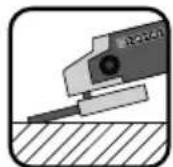
Never use cutting discs for rough grinding!
Move the angle grinder with moderate pressure back and forth over the workpiece.
For soft material, move the rough grinding disc at a shallow angle over the workpiece; for hard material at a slightly steeper angle.
Abrasive cutting:
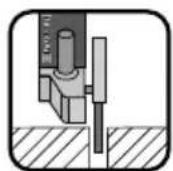
Never use roughing discs for cutting!
Use only tested fibre-reinforced cutting or grinding discs that are approved for a circumferential speed of not less than 80~m / s

CAUTION!
The grinder continues running after being turned off. Do not try to brake it by applying lateral counterpressure.
Secure the workpiece. Use clamps/a vice to hold the workpiece firmly in place. This is much safer than simply holding it in your hand.
Always switch off the appliance before putting it down and wait for the appliance to come to a complete standstill.
Use the appliance only for dry cutting or sanding.
The additional handle must be mounted on the appliance for all work.
Materials containing asbestos may not be processed. Asbestos is a known carcinogen.

Tip! This symbol indicates proper behaviour.

DANGER! ALWAYS GUIDE THE APPLIANCE THROUGH THE WORKPIECE IN REVERSE ROTATION.
In the opposite direction there is a risk of kickback. The appliance can be pushed out of the cut.
Always switch the appliance on before applying it to the workpiece. After completing the task, lift the appliance from the workpiece and then switch it off.
Always hold the appliance firmly with two hands while working. Ensure that your stance is secure and stable.
For an optimum grinding effect, move the appliance evenly at an angle of 15^ to 30^ (between the grinding disc and workpiece) backwards and forwards.
When working on angled surfaces, do not exert great force on the workpiece. If the rotational speed drops significantly, you must reduce the pressure exerted to allow safe and effective working. If the appliance suddenly brakes completely or jams, it must be switched off immediately.
Cutting: Work at a moderate feed rate and do not tilt the cutting disc.
Roughing and cutting discs become very hot - let them cool down completely before touching them.
Never use the appliance for purposes other than the ones for which it was designed.
Always make sure that the appliance is turned off before inserting the battery into it.
In the event of danger, turn off the appliance and remove the battery. Ensure that the appliance is easily and quickly accessible in the event of an emergency.
Always remove the battery during work breaks, when adjusting the appliance and when it is not in use. The appliance must be kept clean, dry and free of oil and grease at all times.
Remain alert at all times! Always pay attention to what you are doing and act with common sense. Do not use the appliance if you are distracted or feeling unwell.

WARNING!
Always wear safety goggles.

WARNING!
Always wear a dust mask!
Before use Charging the battery pack (see fig. A)

CAUTION!
Always unplug the appliance before you remove the battery pack 3 from or connect the battery pack to the charger.
NOTE
Never charge the battery pack if the ambient temperature is below 10^ or above 40^ . If a lithium-ion battery is to be stored for an extended period, the charge level should be checked regularly. The optimum charge level is between 50% and 80% . The storage climate should be cool and dry and the ambient temperature should be between 0^ and 50^ .
Never charge the battery pack 3 when the ambient temperature is below 10^ or above 40^ .
Connect the battery pack to the high-speed charger (see fig. A).
Insert the power plug into the socket. The control LED lights up red.
The green LED indicates that the charging process is complete and the battery pack ready.

ATTENTION!
If the red control LEDs flashes, this means that the battery pack has overheated and cannot be charged.
If the red and green control LEDs 5 both flash, this means that the battery pack 3 is defective.
Switch off the charger for at least 15 minutes between successive charging sessions. Also disconnect the power plug from the mains power socket.
Attaching/disconnecting the battery pack to/from the appliance
Attaching the battery pack:
Allow the battery pack to click into the handle.
Removing the battery pack:
Press the release button and remove the battery pack 3.
Checking the battery charge level
Press the battery charge level butto to check the status of the battery (see also main diagram). The status/remaining charge will be shown on the battery display LED 5 as follows:
RED/ORANGE/GREEN = maximum charge RED/ORANGE = medium charge RED = low charge -charge the battery
Adjusting the blade guard
WARNING! RISK OF INJURY
Always switch the appliance off and remove the battery before carrying out any work on the appliance.
RISK OF INJURY
Always use the angle grinder with the blade guard The blade guard should be installed securely. Set it so that the highest possible degree of safety is achieved, i.e. the smallest possible part of the grinding disc is exposed to the operator. The blade guard is designed to protect the operator from fragments and accidental contact with the grinding tool.
RISK OF INJURY
Make sure that the blade guard is fitted at least the same angle as the additional handle (see fig. B). Otherwise, you could injure yourself on the roughing disc or cutting disc.
Turn the blade guard to the required position (working position). Make sure that the blade guard 8s positioned in such a way that the blade guard fixture 13es over one of the 5 bulges 2n the blade guard 8 (see Fig. E (fold-out page).
Ensure that the blade guard fixture is firmly seated in the respective bulge 21
Fitting the additional handle
CAUTION!
For safety reasons, this appliance may only be used with the additional handle. Failure to do so can lead to serious injury. The additional handle can be screwed onto the left, the right or the top, depending on the job at hand.
Fitting/changing the roughing/ cutting disc
Always wear protective gloves when changing cutting/rough grinding discs.
Pay attention to the dimensions of the roughing/ cutting disc. The diameter of the hole must fit the attachment flange 18 without any play. Do not use a reducer or adapter.
NOTE
Use only discs which are free of dirt.
Use only grinding discs whose permissible speed rating is at least as high as that on the type plate on the power tool.
■ RISK OF INJURY! Press the spindle locking button 9 only when the attachment spindle 17 is at a complete standstill.
Press the spindle locking button to lock the motor.
Undo the clamping nu19 using the two-hole mounting spanner 20 (see fig D).
Place the rough grinding or cutting disc with the label side towards the appliance on the attachment flange 18.
Then replace the clamping nu9 on the attachment spindle 17 with the raised side facing up.
With thin grinding discs (see fig. 1):
The collar of the clamping nut faces upwards so that a thin grinding disc can be fitted safely.
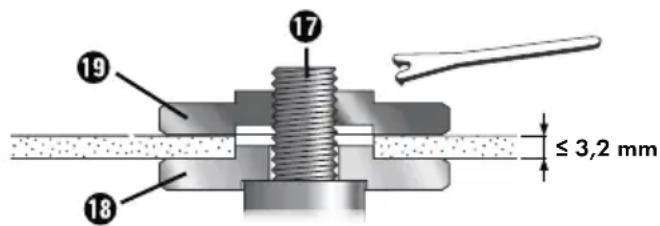
Fig. 1
Press the spindle locking butto to lock the motor.
Tighten the clamping nut using the two-hole mounting spanner 20
With thick grinding discs (see fig. 2):
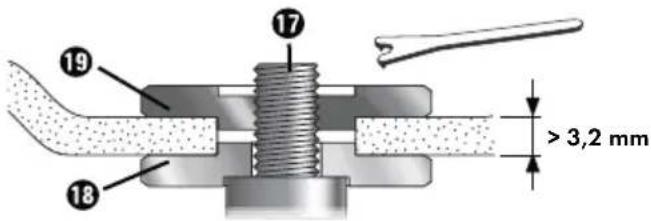
Fig. 2
The collar of the clamping nut faces downwards so that the grinding disk can be fitted securely onto the attachment spindle
Lock the attachment spindle
Tighten the clamping nut in a clockwise direction using the two-hole mounting spanner 20
NOTE
If the disc does not turn smoothly or vibrates after the change, the disc must be replaced immediately.
For safety's sake, run the appliance at maximum speed for 60 seconds after every disc change. Be aware of unusual noises and sparks.
Check whether all the fastening elements are correctly fitted.
Make sure that the arrow showing the direction of rotation (if any) on the cutting or rough grinding discs (including diamond cutting discs) and the direction of rotation of the appliance (arrow showing the direction of rotation on the head) match.
Operation
Switching on and off
Check the attached tool before use to ensure that all fastening elements are correctly fitted.
NOTE
Always switch on the angle grinder before making contact with the material, then apply it to the workpiece.
Switching on:
First, press the ON/OFF switch 1 to the right so that you can then press it forwards.
Switching off:
Let go of the ON/OFF switch.
Switching to continuous operation:
First, press the ON/OFF switch 1b the right so that you can then press it forwards. Then press the ON/OFF switch 1orwards and down until it engages.
Switching off continuous operation:
Press theON/OFF switch 1o the rear and downwards and release it.
Adjusting the rotational speed
You can use the adjusting wheel for speed preselection 6 preselect the rotational speed: (1 = slower speed, 6 = faster speed).
We recommend you carry out practice tests to determine the correct speed.
The speed can also be changed during operation.
Maintenance and cleaning

NING! RISK OF INJURY! Always switch the appliance off and remove the battery before carrying out any work on the appliance.
The battery angle grinder is maintenance-free.
Do not use any sharp objects for cleaning the appliance. Never permit liquids to penetrate inside the appliance. Otherwise the appliance could be damaged.
Clean the appliance regularly, preferably immediately after completion of the work.
Clean the housing with a dry cloth - do not use petrol, solvents or cleaners which can attack the plastic.
A vacuum cleaner is required for thorough cleaning of the appliance.
Ventilation openings must never be obstructed.
Remove any sanding dust stuck to the appliance with a brush.
NOTE
Replacement parts not listed (such as carbon brushes, switch) can be ordered via our service hotline.

WARNING!
Do not use any accessories not recommended by PARKSIDE. This can lead to electric shock and fire.
Disposal

The packaging consists of environmentally friendly material. It can be disposed of in the local recycling containers.
dispose of power tools in your normal domestic waste!
European Directive 2012/19/EU requires that worn-out power tools be collected separately and recycled in an environmentally compatible manner.

dispose of batteries in your normal household waste!
Remove the batteries from the appliance before disposal.
Defective or worn-out rechargeable batteries must be recycled according to Directive 2006/66/EC. Take the battery pack and/or appliance to a nearby collection facility.
Please consult your local authorities regarding suitable disposal of worn out power tools/battery packs.

Dispose of the packaging in an environmentally friendly manner.
Note the labelling on the packaging and separate the packaging material components for disposal if necessary.
The packaging material is labelled with abbreviations (b) and numbers (a) with the following meanings:
1-7:plastics,
20-22: paper and cardboard,
80-98: composites

Your local community or municipal authorities can provide information on how to dispose of the worn-out product.

The product is recyclable, subject to extended producer responsibility and is collected separately.
KompernassHandelsGmbH warranty
Dear Customer,
This appliance has a 3-year warranty valid from the date of purchase. If this product has any faults, you, the buyer, have certain statutory rights. Your statutory rights are not restricted in any way by the warranty described below.
Warranty conditions
The warranty period starts on the date of purchase. Please keep your receipt in a safe place. This will be required as proof of purchase.
If any material or manufacturing fault occurs within three years of the date of purchase of the product, we will either repair or replace the product for you or refund the purchase price (at our discretion).
This warranty service requires that you present the defective appliance and the proof of purchase (receipt) within the three-year warranty period, along with a brief written description of the fault and of when it occurred.
If the defect is covered by the warranty, your product will either be repaired or replaced by us. The repair or replacement of a product does not signify the beginning of a new warranty period.
Warranty period and statutory claims for defects
The warranty period is not prolonged by repairs effected under the warranty. This also applies to replaced and repaired components. Any damage and defects present at the time of purchase must be reported immediately after unpacking. Repairs carried out after expiry of the warranty period shall be subject to a fee.
Scope of the warranty
This appliance has been manufactured in accordance with strict quality guidelines and inspected meticulously prior to delivery.
The warranty covers material faults or production faults. The warranty does not extend to product parts subject to normal wear and tear or to fragile parts which could be considered as consumable parts such as switches or parts made of glass.
The warranty does not apply if the product has been damaged, improperly used or improperly maintained. The directions in the operating instructions for the product regarding proper use of the product are to be strictly followed. Uses and actions that are discouraged in the operating instructions or which are warned against must be avoided.
This product is intended solely for private use and not for commercial purposes. The warranty shall be deemed void in cases of misuse or improper handling, use of force and modifications / repairs which have not been carried out by one of our authorised Service centres.
The warranty period does not apply to
Normal reduction of the battery capacity over time
Commercial use of the product
Damage to or alteration of the product by the customer
Non-compliance with safety and maintenance instructions, operating errors
Damage caused by natural hazards
Warranty claim procedure
To ensure quick processing of your case, please observe the following instructions:
Please have the till receipt and the item number (e.g. IAN 12345) available as proof of purchase.
You will find the item number on the type plate on the product, an engraving on the product, on the front page of the operating instructions (below left) or on the sticker on the rear or bottom of the product.
If functional or other defects occur, please contact the service department listed either by telephone or by e-mail.
You can return a defective product to us free of charge to the service address that will be provided to you. Ensure that you enclose the proof of purchase (till receipt) and information about what the defect is and when it occurred.

You can download these instructions along with many other manuals, product videos and installation software at www.lidl-service.com. This QR code will take you directly
to the Lidl service page (www.lidl-service.com) where you can open your operating instructions by entering the item number (IAN) 123456.
Service

Service Great Britain
Tel.: 0800 404 7657
E-Mail: kompernass@lidl.co.uk

Service Ireland
Tel.: 1890 930 034
(0,08 EUR/Min., (peak))
(0,06 EUR/Min., (off peak))
E-Mail: kompernass@lidl.ie
IAN 338633_1907
Importer
Please note that the following address is not the service address. Please use the service address provided in the operating instructions.
KOMPERNASS HANDELS GMBH
BURGSTRASSE 21
44867 BOCHUM
GERMANY
www.kompernass.com
Translation of the original Conformity Declaration
We, KOMPERNASS HANDELS GMBH, document officer: Mr Semi Uguzlu, BURGSTR. 21, 44867 BOCHUM, GERMANY, hereby declare that this product complies with the following standards, normative documents and EC directives:
Machinery Directive
(2006/42/EC)
EG Low Voltage Directive
(2014/35/EU) (charger only)
Electromagnetic Compatibility
(2014/30/EU)
RoHS Directive
(2011/65/EU)*
- The manufacturer bears the full responsibility for compliance with this conformity declaration. The object of the declaration described above complies with the requirements of the Directive 2011/65/EU of the European Parliament and Council of 8 June 2011 on the limitations of use of certain dangerous substances in electrical and electronic appliances.
Applied harmonised standards:
EN 60745-1:2009/A11:2010
EN 60745-2-3:2011/A13:2015
EN 55014-1:2017
EN 55014-2:2015
EN 55014-1:2006/A2:2011
EN 55014-2:1997/A2:2008
EN 61000-3-2:2014
EN 61000-3-3:2013
EN 60335-2-29:2004/A11:2018
EN 60335-1:2012/A13:2017
EN 62233:2008
EN 50581:2012
Type designation of the machine: Cordless angle grinder PWSA 20-Li B3
Year of manufacture: 11 - 2019
Serial number: IAN 338633_1907
Bochum, 11/11/2019
CE
Semi Uguzlu
- Quality Manager -
We reserve the right to make technical changes in the context of further product development.
Ordering a replacement battery
If you want to order a replacement battery for your appliance, you can do so easily via the Internet on www.kompernass.com or by telephone.
Due to limited stock, this item may sell out in a relatively short time.
NOTE
- Online ordering of replacement parts might not be possible in some countries. If this is the case, please contact the Service hotline.
Order by phone or fax
GB Service Great Britain
Tel.: 0800 404 7657
E-Mail: kompernass@lidl.co.uk
IE Service Ireland
Tel.: 1890 930 034
(0,08 EUR/Min., (peak))
(0,06 EUR/Min., (off peak))
E-Mail: kompernass@lidl.ie
To ensure fast processing of your order, have the article number of your appliance to hand (e.g. IAN 338633) in case of questions. The article number can be found on the type plate or the title page of these instructions.
Table des matieres
Introduction 42
Chere cliente, cher client,
Chere cliente, cher client,
KOMPERNASS HANDELS GMBH
BURGSTRASSE 21
44867 BOCHUM
ALLEMAGNE
www.kompernass.com
Directive relative aux machines
(2006/42/CE)
CE Directive Basse Tension
Nominate spanning: 230 - 240 V ~, 50 Hz (wisselstroom)
Nominal vermogen: 120 W
Zekering (intern): 3,15 A
UITGANG / Output:
Hulphandgreep: a_h,AG = 3,284m / s^2
Onzekerheid: K = 1,5m / s^2
OPMERKING
Tip! Zo handelt u correct.

GEVAARI! BEWEEG HET APPARAAT ALTIJD TEGEN DE DRAAIRICHTING IN DOOR HET WERKSTUK.
WAARSCHUWING! LETSELGEVAAR
KOMPERNASS HANDELS GMBH
BURGSTRASSE 21
44867 BOCHUM
DUITSLAND
www.kompernass.com
Akumulator: PAP 20 A3
Typ:
KOMPERNASS HANDELS GMBH
BURGSTRASSE 21
44867 BOCHUM
NIEMCY
www.kompernass.com
KOMPERNASS HANDELS GMBH
BURGSTRASSE 21
44867 BOCHUM
NEMECKO
www.kompernass.com
Akumulator: PAP 20 A3
Typ:
LITIUM-IOI
Dimenzaçné napätie: 20 V --- (jednosmerny prud)
Kapacita: 4
Clanky: 10
Rychlonabijačka akumulátora: PLG 20 A3
VSTUP/Input:
Dimenzaçné napätie: 230 - 240 V ~, 50 Hz (striedavy
KOMPERNASS HANDELS GMBH
BURGSTRASSE 21
44867 BOCHUM
GERMANY
www.kompernass.com


- FR BE
- General power tool safety warnings 24
- Before use 32
- Operation 34
- Maintenance and cleaning 35
- Disposal 35
- Kompernass Handels GmbH warranty 36
- Service 37
- Importer 37
- Translation of the original Conformity Declaration 38
- Ordering a replacement battery 39
- Order by phone or fax 39
- CORDLESS ANGLE GRINDER PWSA 20-Li B3
- Introduction
- Intended use
- Explanation of the symbols used:
- Features
- Package contents
- Technical details
- Cordless angle grinder: PWSA 20-Li B3
- Battery: PAP 20 A3
- High-speed battery charger: PLG 20 A3
- Noise and vibration data:
- Noise emission value:
- Wear ear muffs!
- Total vibration value:
- NOTE
- WARNING!
- eral power tool safety warnings
- Save all warnings and instructions for future reference.
- Work area safety
- Electrical safety
- Personal safety
- Power tool use and care
- Use and handling of the cordless electrical power tool
- Service
- Safety instructions for all applications
- Kickback and corresponding safety instructions
- Special safety instructions for grinding and abrasive cutting
- Additional special safety instructions for abrasive cutting
- Safety guidelines for battery chargers
- ATTENTION!
- Storage and handling of the recommended accessory tools
- Working procedures
- Rough grinding:
- Abrasive cutting:
- CAUTION!
- DANGER! ALWAYS GUIDE THE APPLIANCE THROUGH THE WORKPIECE IN REVERSE ROTATION.
- Before use Charging the battery pack (see fig. A)
- Attaching/disconnecting the battery pack to/from the appliance
- Checking the battery charge level
- Adjusting the blade guard
- WARNING! RISK OF INJURY
- RISK OF INJURY
- Fitting the additional handle
- Fitting/changing the roughing/ cutting disc
- With thin grinding discs (see fig. 1):
- With thick grinding discs (see fig. 2):
- Operation
- Switching on and off
- Switching on:
- Switching off:
- Switching to continuous operation:
- Switching off continuous operation:
- Adjusting the rotational speed
- Maintenance and cleaning
- Disposal
- KompernassHandelsGmbH warranty
- Warranty conditions
- Warranty period and statutory claims for defects
- Scope of the warranty
- The warranty period does not apply to
- Warranty claim procedure
- Service
- Service Great Britain
- Service Ireland
- Importer
- Translation of the original Conformity Declaration
- Applied harmonised standards:
- Serial number: IAN 338633_1907
- CE
- Ordering a replacement battery
- Order by phone or fax
- Table des matieres
- Introduction 42
- OPMERKING
- GEVAARI! BEWEEG HET APPARAAT ALTIJD TEGEN DE DRAAIRICHTING IN DOOR HET WERKSTUK.
- WAARSCHUWING! LETSELGEVAAR
- Akumulator: PAP 20 A3
- KOMPERNASS HANDELS GMBH
- Rychlonabijačka akumulátora: PLG 20 A3
- VSTUP/Input:
Brand : PARKSIDE
Model : PWSA 20Li B3
Category : Grinder