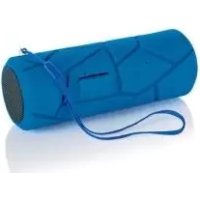
IAN 273510 - Loudspeaker SILVERCREST - Free user manual and instructions
Find the device manual for free IAN 273510 SILVERCREST in PDF.



| Brand | SilverCrest |
| Model | IAN 273510 (SBL 44 A1) |
| Product type | Outdoor Bluetooth speaker |
| Color | Not specified (typical black/gray) |
| Dimensions (L x W x H) | Approx. 138 x 53 x 53 mm |
| Weight | Approx. 0.265 kg |
| Power supply | Lithium polymer battery 3.7 V, 1000 mAh (3.7 Wh) |
| Battery type | Integrated lithium polymer, non-removable |
| Charging time | Approximately 4 hours |
| Battery life | Approximately 5 hours of Bluetooth playback |
| Connectivity | Bluetooth 3.0, 3.5mm AUX port, micro USB port |
| Power output | 2 x 2 W RMS |
| Frequency response | 120 Hz - 18 kHz |
| Protection rating | IP44 (when cover is closed) |
| Main functions | Bluetooth playback, hands-free, cable playback, volume control, track skipping |
| Maintenance and cleaning | Do not use harsh detergents. Clean with a dry cloth. Protect from moisture. |
| Safety | Do not open, do not expose to heat or fire, keep out of reach of children |
| Spare parts and repairability | Contact HOYER after-sales service. Battery not user-replaceable. |
| Warranty | 3 years, subject to the conditions of HOYER Handel GmbH |
| General information | Home use, non-professional. Supplied with USB cable and jack cable. |
Frequently Asked Questions - IAN 273510 SILVERCREST
User questions about IAN 273510 SILVERCREST
0 question about this device. Answer the ones you know or ask your own.
Ask a new question about this device
Download the instructions for your Loudspeaker in PDF format for free! Find your manual IAN 273510 - SILVERCREST and take your electronic device back in hand. On this page are published all the documents necessary for the use of your device. IAN 273510 by SILVERCREST.
USER MANUAL IAN 273510 SILVERCREST
Operating instructions
SE
BLUETOOTH®-OUTDOORHÖGTALARE
Bruksanvisning
FR BE
ENCEINTE D'EXTÉRIEUR BLUETOOTH®
Mode d'emploi
DE AT CH
BLUETOOTH-OUTDOORLAUTSPRECHER
Bedienungsanleitung
IAN 106966
F
BLUETOOTH®-ULKOKAIUTIN
Käytööhje
DK
BLUETOOTHOUTDOORHØJTALER
- Overview 3
- Intended purpose 5
- Safety information 5
- Items supplied 7
5.Before using for the first time 8 - Charging 8
- Operation 9
7.1 Establish a Bluetooth connection.... 9
7.2 Accepting calls 12
7.3 Playing music using the cable..... 13
- Disposal 14
- Troubleshooting 15
- Technical specifications 16
- Warranty of HOYER Handel GmbH .... 17
2 GB
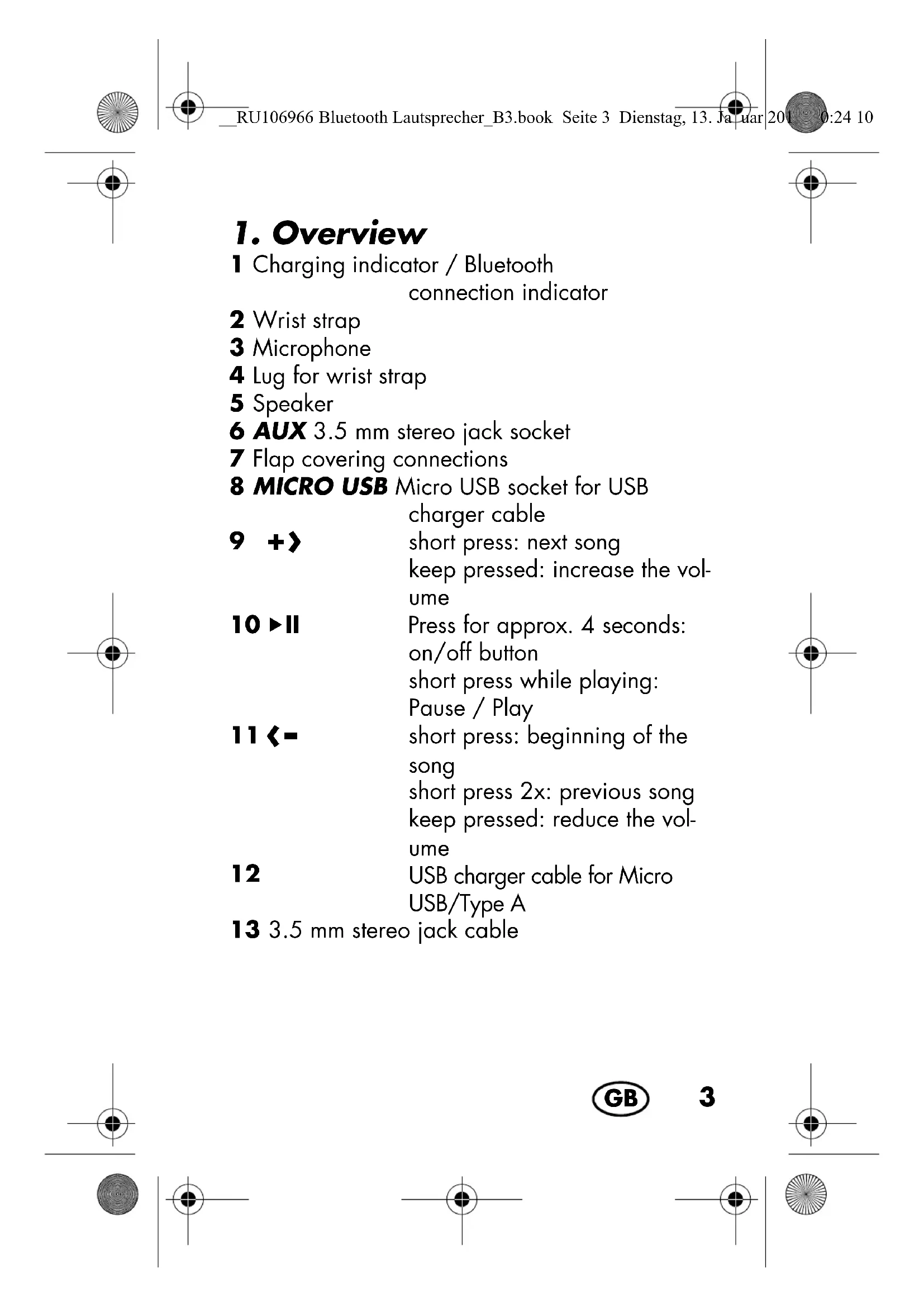
1. Overview
1 Charging indicator / Bluetooth connection indicator
2 Wrist strap
3 Microphone
4 Lug for wrist strap
5 Speaker
6 AUX 3.5 mm stereo jack socket
7 Flap covering connections
8 MICRO USB Micro USB socket for USB charger cable
9 +》 short press: next song keep pressed: increase the vol- ume
10>II Press for approx. 4 seconds: on/off button short press while playing: Pause/Play
11<short press:beginning of the song short press 2x:previous song keep pressed:reduce the volume
12 USB charger cable for Micro USB/Type A
13 3.5 mm stereo jack cable
Thank you for your trust!
Congratulations on your new Bluetooth outdoor speaker.
For a safe handling of the device and in order to get to know the entire scope of features:
- Thoroughly read these operating instructions prior to initial commissioning.
- Above all, observe the safety instructions!
- The device should only be used as described in these operating instructions.
- Keep these operating instructions for reference.
- If you pass the device on to someone else, please include these operating instructions.
We hope you enjoy your new Bluetooth outdoor speaker!
2. Intended purpose
This is a communication technology device. The Bluetooth outdoor speaker is intended for playing sound from audio devices. The device has a hands-free function.
The device is designed for private, domestic use. This device must not be used for commercial purposes.
3. Safety information
Warnings
If necessary, the following warnings will be used in these operating instructions:

DANGER! High risk: failure to observe this warning may result in injury to life and limb.
WARNING! Moderate risk: failure to observe this warning may result in injury or serious material damage.
CAUTION: low risk: failure to observe this warning may result in minor injury or material damage.
NOTE: circumstances and specifics that must be observed when handling the device.

DANGER for children and people with disabilities
- Packing materials are not children's toys. Children should not be allowed to play with the plastic bags: there is a risk of suffocation!
- This device is not designed to be used by people (including children) with limited physical, sensory or mental capabilities or people without adequate experience and/or understanding, unless they are supervised by someone responsible for their safety or are instructed by them on how to use the device.
Children must not play with the device. - Keep the device out of the reach of children.

DANGER from battery
This device must not be thrown into the fire! DANGER OF EXPLOSION!
The device must not be covered whilst charging the battery!
The device must only be charged in a dry environment!
The device is provided with a lithium polymer battery.
- The battery cannot be removed!
- This device must not be opened!
- Completely dispose of the device!
Do not expose the device to direct sunshine or heat. The ambient temperature should not be lower than 10^ or higher than 40^ .
The battery may only be charged with the original accessory (USB charger cable).
6
GB
WARNING! Risk of material damage
-
If you notice any irregularities (e.g. unusual noises, strange smells or smoke developing) turn the device off immediately. Do not use the device any longer.
-
If the device is moved from a cold location to a warm location, condensate may form in the device. Leave the device switched off for a few hours.
-
Protect the device against damage, e.g. from: - drips and splashes of water (if the flap covering the connections is open)
-
Heat, direct sunlight and open flames
- Impacts and similar violent effects
Protect the cable against damage, e.g. from:
Sharp edges
- Hot places
- Clamping or crushing
Do not use any astringent or abrasive cleaning agents.
To avoid any risk, do not make modifications to the device. Repairs must be carried out by a specialist workshop or the Service Centre.
4. Items supplied
1 Bluetooth outdoor speaker
1 USB charger cable (Type A on Micro USB) 12
1 3.5 mm stereo jack cable 13
1 Wrist strap 2
1 Operating instructions
5. Before using for the first time
- Remove all packing material.
- Check that the device is undamaged.
If necessary, attach the wrist strap 2 to the lug 4.
6. Charging

DANGER from battery!
The device must not be covered whilst charging the battery!
The device must only be charged in a dry environment!
NOTES:
- Upon delivery the integrated battery is only half-charged. Charge the battery fully before using the device.
- As soon as the battery capacity drops below about 20% an acoustic signal will sound every 2 minutes and thus reminds the user to recharge the battery. After a while the signal will fall silent.
- The charging time of an empty battery is approx. 4 hours. It is possible to operate the device during the charging process, however, this extends the charging time.
8
GB
- Plug the Micro USB connector of the USB charger cable 12 into the socket MICRO USB8 of the device.
- Connect the USB-A connector of the USB charger cable 12 e.g. to the USB socket of a PC or to a USB power unit (not included in scope of supply). The charging indicator 1 is lit red and goes off when the battery is fully charged.
7. Operation
7.1 Establish a Bluetooth connection
NOTES:
- The identification of the device is "SBL 44 A1".
- After turning it on, the device automatically tries to reconnect to the last paired device or to establish a new connection.
- Please observe that the establishment process of the connection may vary slightly depending on the device and the software used.
-
If no Bluetooth connection can be established within 8 minutes the device switches off.
Depending on e.g. the volume, the device may be used for a period of approx. 5 hours while the Bluetooth connection is established. -
If necessary, remove the plug of the 3.5mm stereo jack cable 13 from the socket AUX6.
- Push and keep the button pressed II 10 until the Bluetooth connection indicator 1 flashes blue. An acoustic signal sounds.
- Switch on the audio device (e.g. smartphone) and start the Bluetooth connection. The audio device will now receive the device identification "SBL 44 A1".
- Establish a connection to the Bluetooth outdoor speaker on the audio device. Both devices are now interconnected. The LED on the device is lit blue and an acoustic signal sounds.
NOTE: it is possible that audio devices remember the identification of the device. Thus it is possible that a new manual connection establishment is not required while the Bluetooth function is active.
- Now play a song on the audio device. The sound is reproduced via the speakers 5.
10
GB
Functions of the buttons
NOTE: it is possible, that not all of the functions will be supported by all mobile phones.
| Button Function | |
| II | press for approx. 4 seconds: switch on / off the device while playing short press: pause / play |
| +〉 | short press: next song keep pressed: increase volume (acoustic signal sounds at maximum volume) |
| ← | short press: beginning of the song short press 2x: previous song keep pressed: decrease volume (acoustic signal sounds at minimum volume) |
7.2 Accepting calls
If the device is connected to a smartphone it is possible for you to accept calls. The ring tone is reproduced via the speakers 5 and the music stops playing.
NOTES:
- For some mobile phones you have to choose Bluetooth as audio source when accepting a call.
-
It is possible, that not all of the functions will be supported by all mobile phones
-
Press the button 10 to accept the call.
- Adjust the volume during the telephone call using the buttons = 11 / + 9.
- Short press the button 10 during the telephone call to end the call. If you have accepted the call while the music was playing, the song will continue to be played after ending the call.
12
GB
7.3 Playing music using the cable
NOTE: if there is a device connected via a cable, this connection has priority over the Bluetooth connection. A possibly existing Bluetooth connection will be interrupted. Phone calls can still be made wireless.
- Plug the TRS connector of the 3.5mm stereo jack cable 13 into the headphone socket of the sound source (e.g. MP3 player, telephone) and the socket AUX 6 on the device.
- Switch on the sound source.
- Press the button 10 for approx. 4 seconds to switch on the device. An acoustic signal sounds.
- Press PLAY on the sound source. The sound is reproduced via the speakers 5.
- Set the volume on the sound source to the maximum level and adjust the volume on the device using the buttons -11 / + 9 The song must be chosen via the sound source.
8. Disposal

DANGER from battery!
The device is provided with a lithium polymer battery.
- The battery cannot be removed!
- This device must not be opened!
- Completely dispose of the device!
This product is subject to the provisions of European Directive 2012/19/EC. The symbol showing a wheelie bin crossed through indicates that the product requires separate refuse collection in the European Union. This applies to the product and all accessories
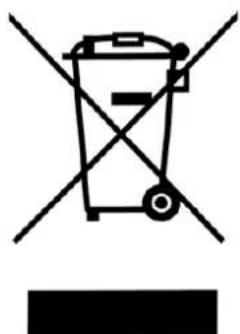
marked with this symbol. Products identified with this symbol may not be discarded with normal household waste, but must be taken to a collection point for recycling electric and electronic appliances. Recycling helps to reduce the consumption of raw materials and protect the environment.
Packaging
The packaging is made from recyclable materials. Dispose of the packaging sorted by materials.
When disposing of the packaging, make sure you comply with the environmental regulations applicable in your country.
14


9. Troubleshooting
If your device fails to function as required, please try this checklist first. Perhaps there is only a minor problem, and you can solve it yourself.
WARNING! Risk of material damage!
Do not attempt to repair the device yourself under any circumstances.
| Fault | Possible causes / Action |
| No function | • Has the device been connected to the power supply? • Is the battery empty? |
| No Blue-tooth con- nection | • Is the Bluetooth function of the au- dio device active? • Did you switch off the device? |
| Music cannot be played via Bluetooth | • Did you press the button ➔II 10? • Is the volume set too low? • Is a TRS connector plugged into the socket AUX 6 on the device? |
10. Technical specifications
| Model: SBL 44 A1 | |
| Power rating: 2x 2 W RMS | |
| Transmission range: 120 Hz - 18 kHz | |
| Bluetooth: Bluetooth | 3.0 |
| Socket: • Micro USB | • 3.5 mm stereo jack |
| Battery: 1x 3.7 V Lithium-Polymer, 1000 mAh (3.7 Wh) | |
| USB socket: 5 V, 500 mA | |
| Type of protection: IP44 (with the flap 7 closed) | |
| Dimensions (WxDxH): | approx. 138 x 53 x 53 mm |
| Weight: approx. 0.265 kg | |
| Ambient condi- tions: | 10 °C to 40 °C Relative humidity 40 to 85% |
CE Subject to technical modification.
Declaration of conformity
A complete declaration of conformity can be requested from HOYER Handel GmbH, see Service Centre.
16


11. Warranty of HOYER Handel GmbH
Dear Customer,
your device is provided with a 3 year warranty starting with the purchase date. In the event of product defects, you are entitled to statutory rights against the vendor. These statutory rights are not restricted by our warranty presented in the following.
Warranty conditions
The warranty period starts with the purchase date. Please keep the original purchase receipt in a safe place. This document is required to verify the purchase.
If within three years from the purchase date of this product a material or factory defect occurs, the product will be repaired or replaced by us - at our discretion - free of charge to you. This warranty implies that within the period of three years the defective device and the purchase receipt are presented, including a brief written description of the defect and the time it occurred.
If the defect is covered by our warranty, the repaired or a new product will be returned to you. No new warranty period starts with a repair or replacement of the product.
Warranty period and statutory claims for defects
The warranty period is not extended when the warranty has been claimed. This also applies to replaced and repaired parts. Any damages and defects already existing at the time of purchase must be reported immediately upon unpacking. Repairs arising after the expiration of the warranty period are subject to a charge.
Warranty coverage
The device was produced carefully according to strict quality guidelines and tested diligently prior to delivery.
The warranty applies to material or factory defects. This warranty does not include product parts that are subject to standard wear and therefore can be considered wear parts; the same applies to damages at fragile parts, e.g. switches, rechargeable batteries or parts made of glass.
This warranty expires if the product is damaged, not used as intended or not serviced. For the proper operation of the product, all instructions listed in the operating instructions must be observed carefully. Any form of use and handling that is advised against in the operating instructions or warned against must always be avoided.
The product is only intended for private and not for commercial use. In the case of incorrect and improper treatment, use of force and interventions
18


not performed by our authorised Service Centre, the warranty shall cease.
Handling in case of a warranty claim
In order to ensure prompt processing of your matter, please observe the following notes:
- Please keep the article number IAN: 106966 and the purchase receipt as a purchase verification for all inquiries.
- If faulty operation or other defects occur, first contact the Service Centre listed in the following by telephone or email.
- Then, you are able to send a product reported as defective free of charge to the service address specified to you, including the purchase receipt and the information on the defect and when it occurred.

Please visit www.lidl-service.com to download this and many other manuals, product videos and software.
Service Centre
GB Service Great Britain
Tel.: 0871 5000 720 (£ 0.10/Min.)
E-Mail: hoyer@lidl.co.uk
IE Service Ireland
Tel.: 1890 930 034
(0,08 EUR/Min., (peak))
(0,06 EUR/Min., (off peak))
E-Mail: hoyer@lidl.ie
IAN: 106966
Supplier
Please note that the following address is no service address. First contact the aforementioned Service Centre.
HOYER Handel GmbH
Kühnhöfe 5
22761 Hamburg
Germany
20

Sisälto

- BLUETOOTH®-OUTDOORHÖGTALARE
- ENCEINTE D'EXTÉRIEUR BLUETOOTH®
- BLUETOOTH-OUTDOORLAUTSPRECHER
- BLUETOOTH®-ULKOKAIUTIN
- BLUETOOTHOUTDOORHØJTALER
- GB
- Overview
- Thank you for your trust!
- Intended purpose
- Safety information
- Warnings
- DANGER for children and people with disabilities
- DANGER from battery
- WARNING! Risk of material damage
- Items supplied
- Before using for the first time
- Charging
- DANGER from battery!
- NOTES:
- Operation
- Establish a Bluetooth connection
- Functions of the buttons
- Accepting calls
- Playing music using the cable
- Disposal
- Packaging
- Troubleshooting
- WARNING! Risk of material damage!
- Technical specifications
- CE Subject to technical modification.
- Declaration of conformity
- Warranty of HOYER Handel GmbH
- Warranty conditions
- Warranty period and statutory claims for defects
- Warranty coverage
- Handling in case of a warranty claim
- Service Centre
- IAN: 106966
- Supplier
- Sisälto
Brand : SILVERCREST
Model : IAN 273510
Category : Loudspeaker