
MIC250IDABBT - Hi-Fi System THOMSON - Free user manual and instructions
Find the device manual for free MIC250IDABBT THOMSON in PDF.



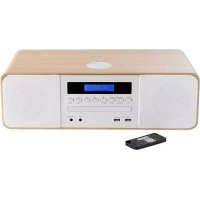
| Product type | Hi-Fi System |
| Brand | Thomson |
| Model | MIC250IDABBT |
| Power supply | AC 230 V ~ 50 Hz, 0.3 A |
| Remote control power | 2 AAA batteries (not included) |
| Audio output power | 15 W × 2 (30 W RMS) |
| Speaker impedance | 8 Ω |
| Radio frequency bands | FM 88.8 – 108 MHz ; DAB/DAB+ 174 – 239 MHz |
| Bluetooth range | Up to 10 m |
| Audio sources | DAB/DAB+, FM, CD, USB, Bluetooth, Line-in, Aux-in, wireless charging |
| CD playback formats | Audio CD, MP3 |
| USB playback | MP3 files |
| Wireless charging | Output 9 V – 1 A |
| USB charging port | Output 5 V – 2.1 A |
| Headphone jack | Yes, 3.5 mm jack |
| Clock functions | Clock, dual alarm, snooze, sleep timer |
| Audio settings | Bass, Treble, Balance, Tone filter |
| Display | LCD screen with adjustable backlight |
| Antenna | Telescopic FM/DAB antenna |
| Package contents | Main unit, remote control, user manual, micro USB cable, line-in cable, AUX cable |
| Care and cleaning | Unplug before cleaning; use a soft, damp, lint-free cloth; do not use harsh products |
| General information | Made in China; designed by Bigben Interactive; France customer service: 09 69 32 59 62 |
Frequently Asked Questions - MIC250IDABBT THOMSON
User questions about MIC250IDABBT THOMSON
0 question about this device. Answer the ones you know or ask your own.
Ask a new question about this device
Download the instructions for your Hi-Fi System in PDF format for free! Find your manual MIC250IDABBT - THOMSON and take your electronic device back in hand. On this page are published all the documents necessary for the use of your device. MIC250IDABBT by THOMSON.
USER MANUAL MIC250IDABBT THOMSON
CLASS 1 LASER PRODUCT
CLASS 1 LASER PRODUCT APPAREL LASER DE CLASSE 1 PRODUCTO LASER DE CLASE 1
CAUTION
INVASIBLE LASER RADIATION WHEN OPEN AND INTERLOCKS DEFATED AVOID EXPOSURE TO BEAM

This product contains a low power laser device.
| PRODUIT DE CLASSE II | |
| COURANT CONTINU | |
| COURANT ALTERNATIF | |
| POUR USAGE INTÉRIEUR UNIQUÉMENT |

Consummation max. : 40 W
Waterloo Office Park/Batiment H
Drive Richelle 161 bte 15 1410 Waterloo, Belgium
Bigben Interactive NEDERLAND b.v.
BELGIQUE, customerservice@bigben-interactive.be
NEDERLAND, customerservice@bigben-interactive.nl
ESPANA, sat@bigbeninteractive.es
ITALIA, support@bigbeninteractive.it
www/bigben.eu
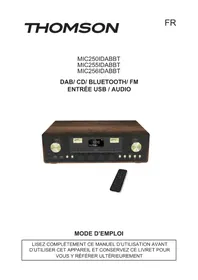
THOMSON
MIC250IDABBT
MIC255IDABBT
MIC256IDABBT
DAB/CD/BLUETOOTH/FM
USB/ AUDIO IN

OPERATING INSTRUCTIONS
PLEASE READ THIS USER MANUAL CAREFULLY BEFORE
OPERATING THIS UNIT AND RETAIN FOR
FUTURE REFERENCE
Contents
Getting Started 1
Safety and Notice 1
Care for your product 2
Care of the environment 3
What's in the box 3
Description of Parts 4
Remote 5
Power 5
Clock and Timers 6
DAB radio mode 7
Playing a compact disc (CD) 11
Remarks 15
Getting Started
- Remove the appliance from the box.
- Remove any packaging from the product.
- Place the packaging inside the box and either dispose of it safely.
Safety and Notice
Read and understand all instructions before you use this product. If damage is caused by failure to follow the instructions, the warranty does not apply.
Safety
Warning
- Never remove the casing of this apparatus.
- Never lubricate any part of this apparatus.
- Never place this apparatus on other electrical equipment.
- Keep this apparatus away from direct sunlight, naked flames or heat.
- Never look into the laser beam inside this apparatus.
- Ensure that you always have easy access to the power cord, plug or adaptor to disconnect this apparatus from the power.

- The apparatus shall not be exposed to dripping or splashing and no liquid-filled objects, such as vases, shall be placed on the apparatus.
- To ensure complete disconnection from the power input, the mains plug of the apparatus shall be disconnected from the mains.
- The mains plug of the apparatus must not be obstructed OR must be easily accessed during its intended use.
- Leave a minimum distance of 10 cm around the apparatus for sufficient ventilation.
- The ventilation should not be impeded by covering the ventilation openings with items, such as newspapers, table-cloths, curtains, etc.
- No naked flame sources such as lighted candles should be placed on the apparatus.
- Attention should be drawn to environmental aspects of battery disposal. The apparatus should be used in moderate climates only.
- Read these instructions.
- Keep these instructions.
- Heed all warnings.
- Follow all instructions.
- Do not use this apparatus near water.
- Clean only with dry cloth.
- Do not block any ventilation openings. Install in accordance with the manufacturer's instructions.
- Do not install near any heat sources such as radiators, heat registers, stoves, or other apparatus (including amplifiers) that produce heat.
- Protect the power cord from being walked on or pinched, particularly at plugs, convenience receptacles, and the point where they exit from the apparatus.
- Only use attachments/accessories specified by the manufacturer.
- Use only with the cart, stand, tripod, bracket, or table specified by the manufacturer or sold with the apparatus. When a cart is used, use caution when moving the cart/apparatus combination to avoid injury from tip-over.
- Unplug this apparatus during lightning storms or when unused for long periods of time.
- Refer all servicing to qualified service personnel. Servicing is required when the apparatus has been damaged in any way, such as power-supply cord or plug is damaged, liquid has been spilled or objects have fallen into the apparatus, apparatus has been exposed to rain or moisture, does not operate normally, or has been dropped.
- Apparatus shall not be exposed to dripping or splashing.
- Do not place any sources of danger on the apparatus (e.g. liquid filled objects, lighted candles).
- Where the MAINS plug (or AC/DC adaptor) or an appliance coupler is used as the disconnect device, the disconnect device shall remain readily operable.
- Make sure there is enough free space around the product for ventilation.
- Batteries (battery pack or batteries installed) shall not be exposed to excessive heat such as sunshine, fire or the like.
- The rating label is placed on the back side of apparatus.
CAUTION
Danger of explosion if the battery is incorrectly replaced.
Replace only with the same or equivalent battery type.

WARNING
Do not ingest the battery (chemical burn hazard)
The remote control supplied with this product contains a coin/button cell battery. If the coin/button cell battery is swallowed, it can cause severe internal burns in just 2 hours and can lead to death.
Keep new and used batteries away from children.
If the battery compartment does not close securely, stop using the product and keep it away from children.
If you think batteries may have been swallowed or placed inside any part of the body, seek immediate medical attention.
Care for your product
- Always unplug the appliance when not in use and before cleaning.
- Do not play music at excessive volume levels as damage to hearing and/or the equipment may occur.
- Do not use this unit in wet or damp conditions.
- Always disconnect the unit from the mains power supply before cleaning. Clean the appliance with a soft, damp, lint-free cloth. Do not use abrasives or harsh cleaners.
Care of the environment


Your product is designed and manufactured with high quality materials and components, which can be recycled and reused.
Your product contains batteries covered by the European Directive 2006/66/EC, which cannot be disposed with normal household waste. Please inform yourself about the local rules on separate collection of batteries because correct disposal helps to prevent negative consequences for the environmental and human health.
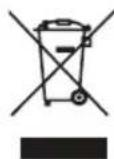
When this crossed-out wheeled bin symbol is attached to a product it means that the product is covered by the European Directive 2002/96/EC. Please inform yourself about the local separate collection system for electrical and electronic products. Please act according to your local rules and do not dispose of your old products with your normal household waste. Correct disposal of your old product helps to prevent potential negative consequences for the environment and human health.
CLASS 1 LASER PRODUCT
CLASS 1 LASER PRODUCT APPAREL LASER DE CLASSE 1 PRODUCTO LASER DE CLASE 1
CAUTION
INVASIBLE LASER RADIATION WHEN OPEN AND INTERLOCKS DEFATED AVOID EXPOSURE TO BEAM
This product contains a low power laser device.


| CLASS II MATERIAL | |
| DIRECT CURRENT | |
| ALTERNATING CURRENT | |
| FOR INDOOR USE ONLY |

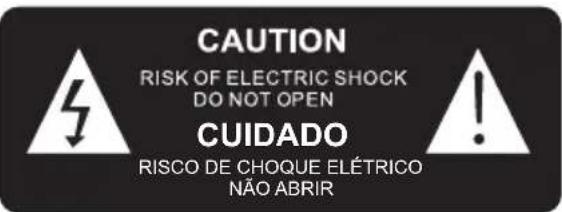
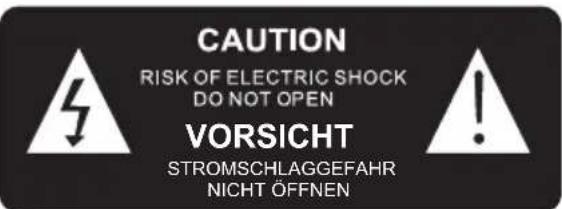
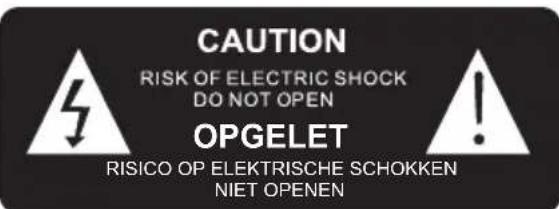
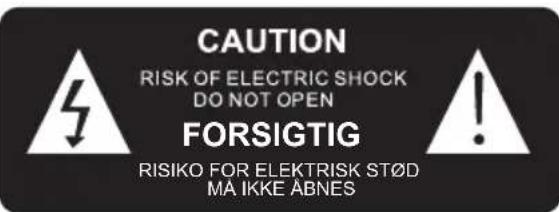
The lightning symbol inside an equilateral triangle warns the user of the presence inside the product of uninsulated hazardous electric voltages powerful enough to represent an electrocution risk.

The exclamation point within a triangle indicates the presence of important operating and maintenance (servicing) instructions in the literature accompanying the unit.
What's in the box
Check and identify the contents of your package:
- Main unit Remote control
- User manual
- Micro USB cable Line in cable AUX in cable
Description of Parts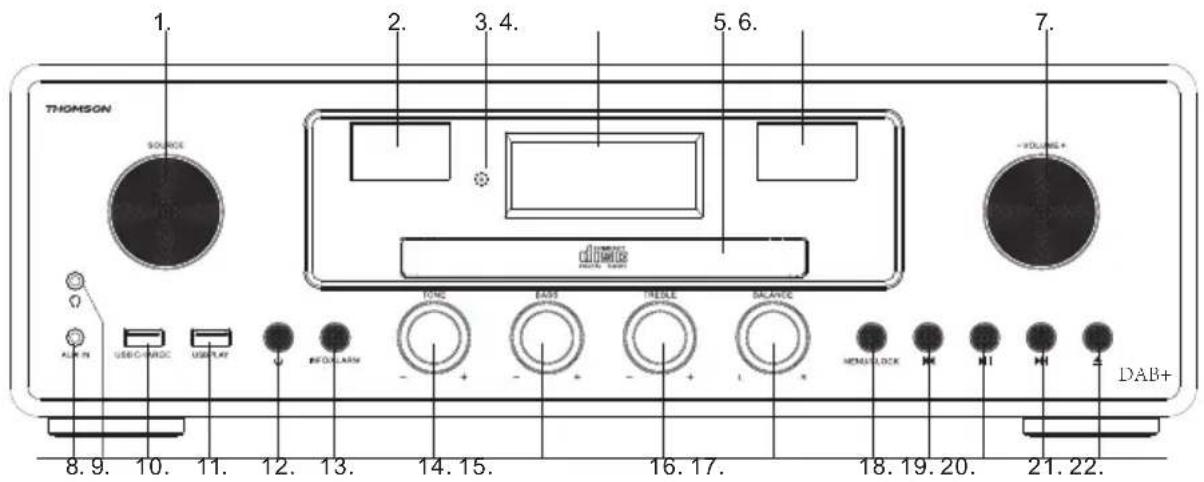
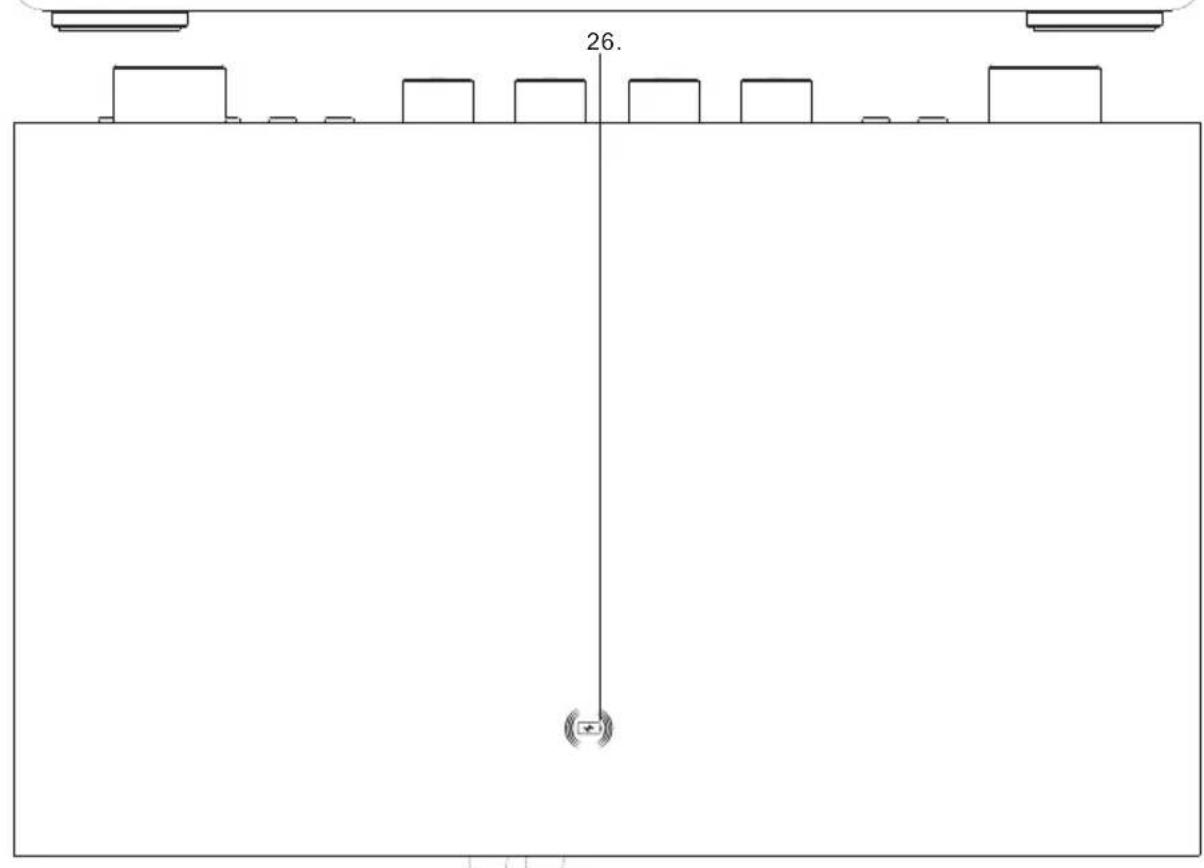
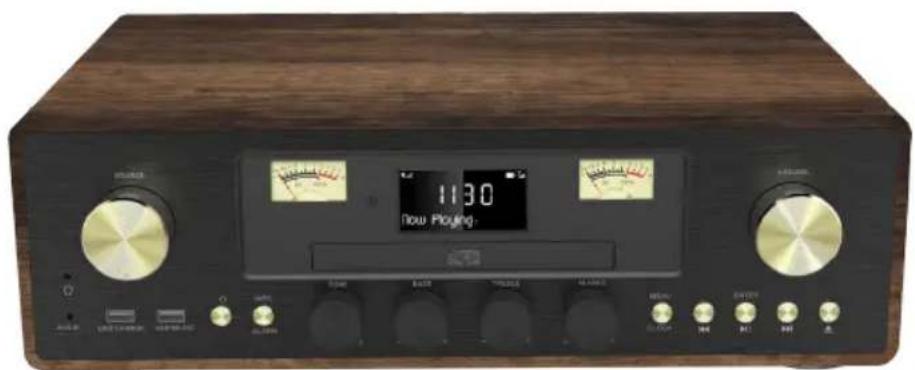
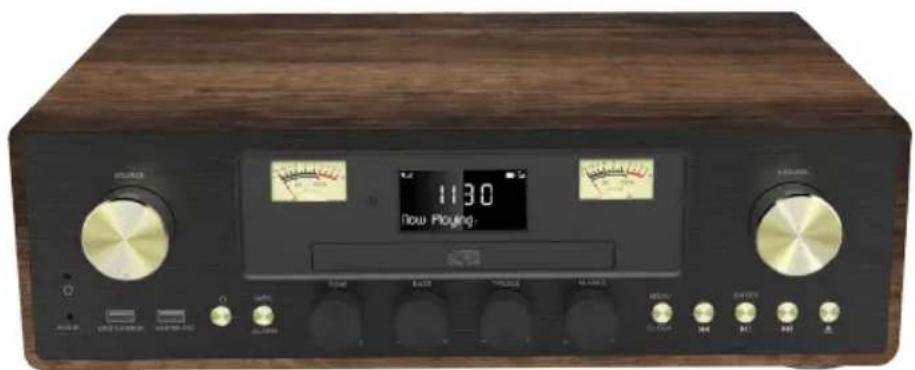
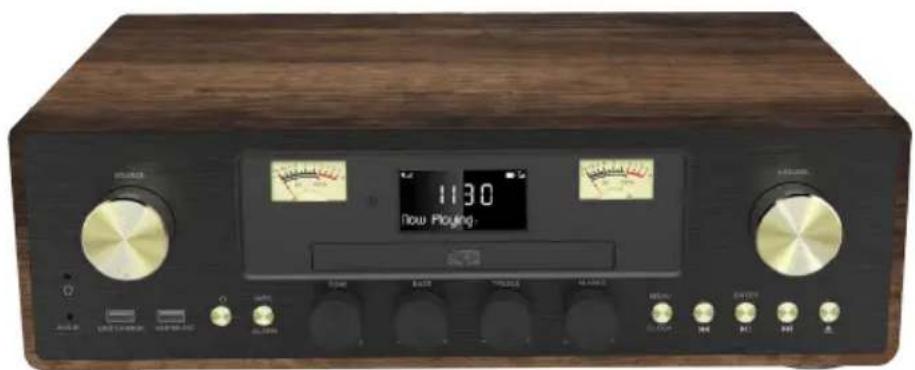
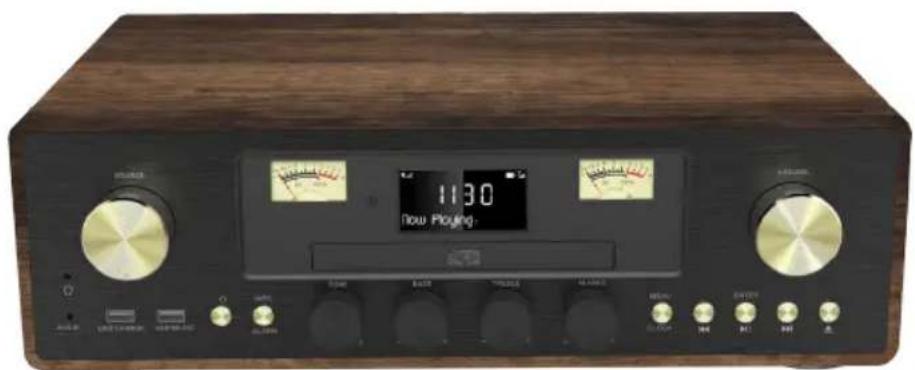
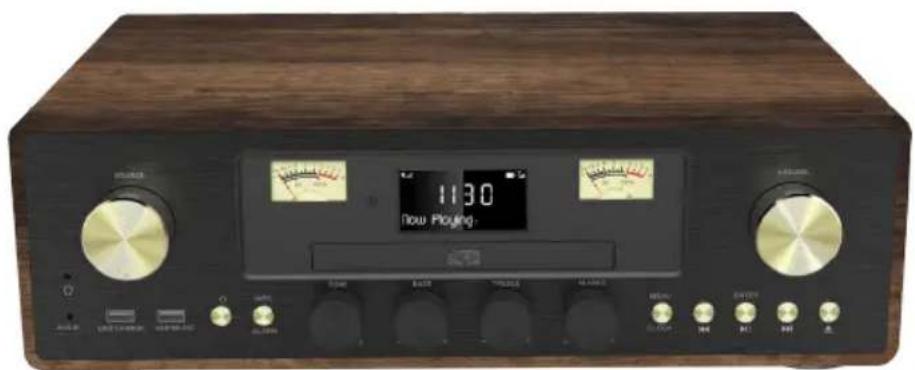
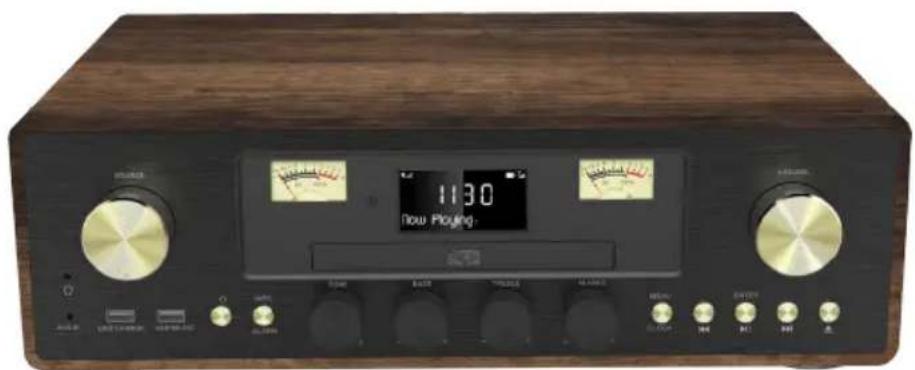
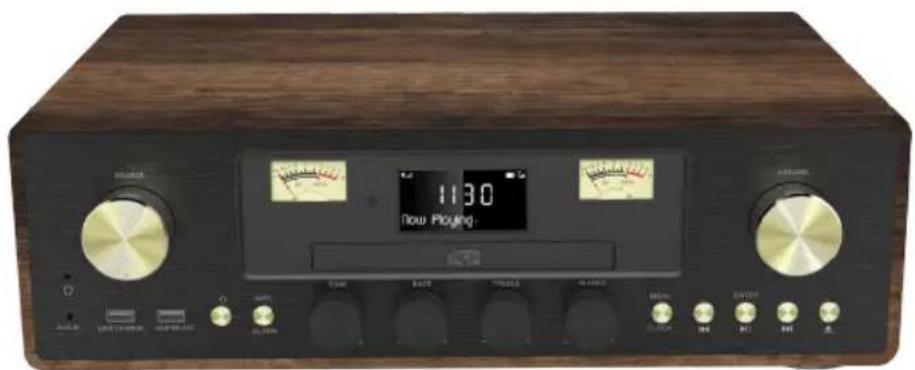
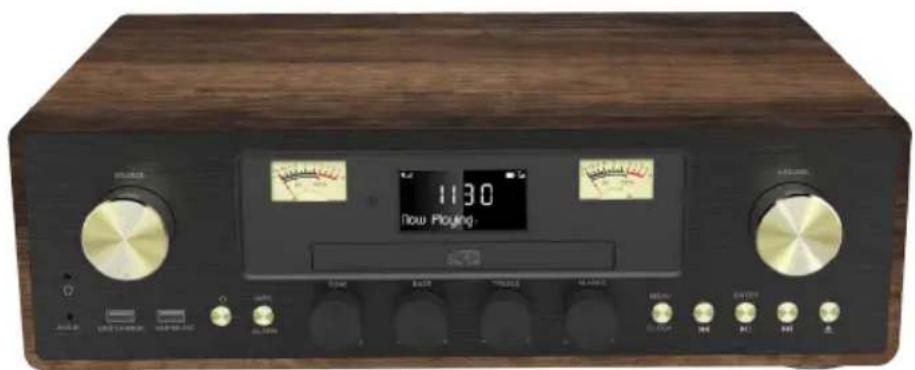
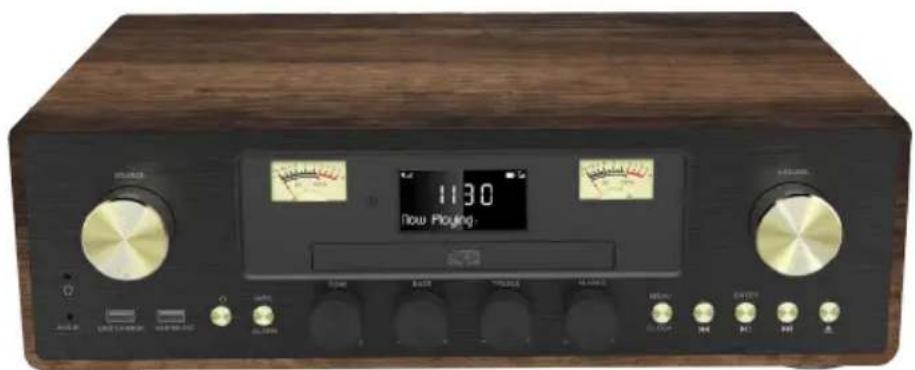
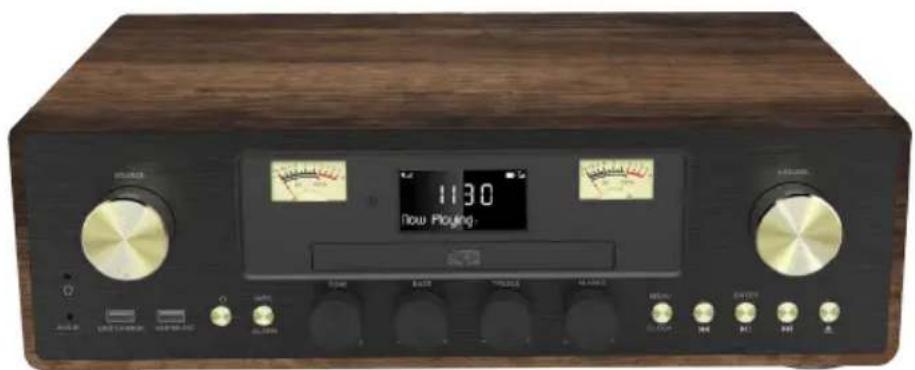
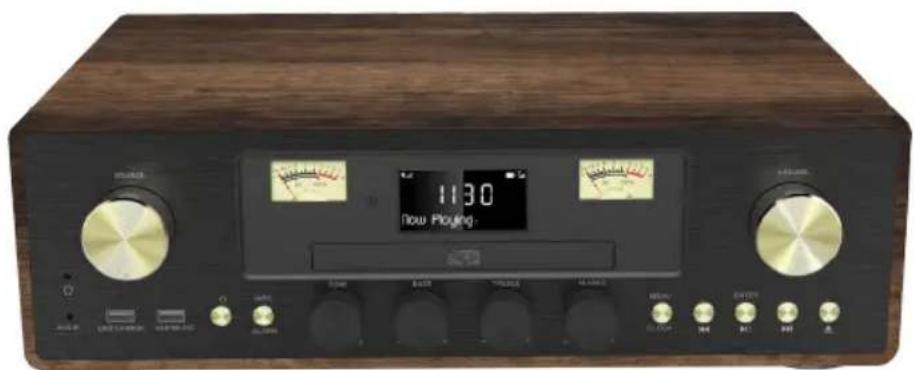
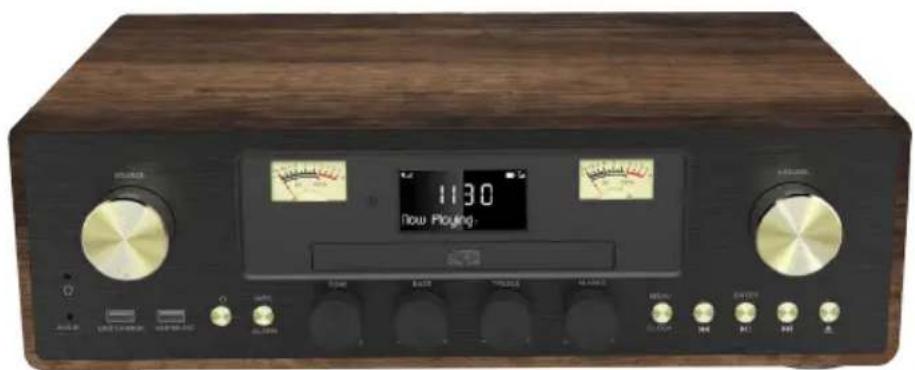
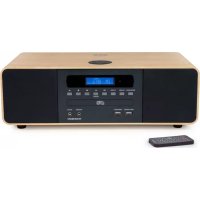
- source knob
- Turn this knob to source: DAB-FM-CD-USB-BT-LINE
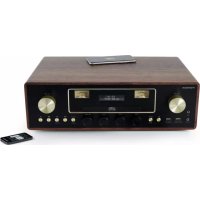
- VU meter
- Remote receiver
- LCD display
- CD door
- VU Meter
- Volume knob
- Line in jack
- Earphone jack
- USB charge port
- USB slot
- Power ON/OFF button
- Info / Alarm
- Tone adjust knob
- Bass adjust knob
- Treble adjust knob
- Balance adjust knob
- Menu / clock
- Prev button
- Play/Pause/Enter
- Next button
- CD Open/close button
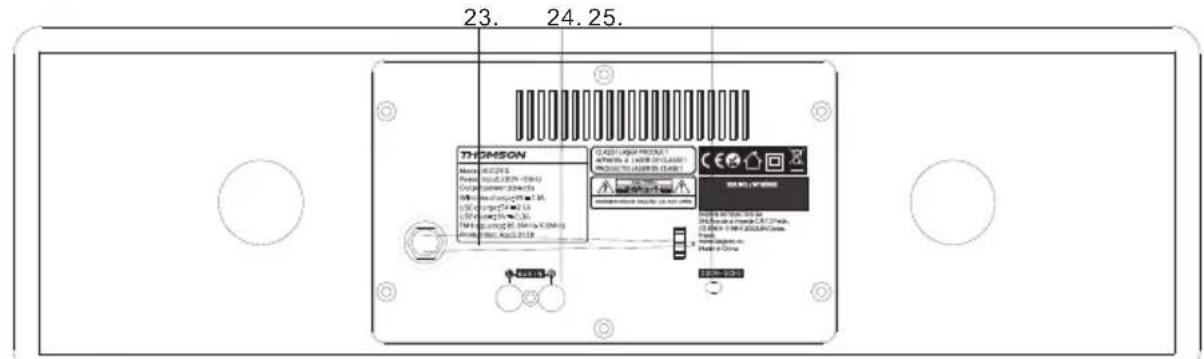
- FM ant
- AUX in
- AC power cable
- Wireless induction
Remote
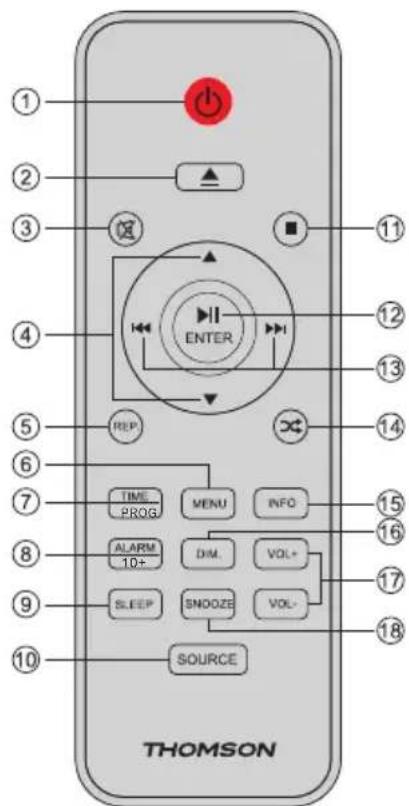
- Power on/off
- Open/Close the CD door
- Mute
- Up/Down
- Repeat
- Menu
- Time/Prog
- Alarm/10+
- Sleep
- Source
- Stop
- Play/Pause/Enter
- Prev/Next
- Random play
- Info
- Dimmer
- VOL +/-
- Snooze
Power
CAUTION
- Risk of product damage! Make sure that the power voltage corresponds to the voltage printed on the back label.
- Risk of electric shock! When you unplug the AC power cord, always pull the plug from the socket. Never pull the cord.
- Before connecting the AC power cord, ensure you have completed all other connections.
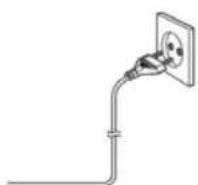
Place the unit in the desired position and unravel the mains cable. Insert the cable into the supply socket and switch on if applicable.
Auto standby
When playing media from a connected device, the Tower automatically switches to standby if:
- No button is pressed for 10 minutes.
- No audio from a connected device for 10 minutes.
Battery power
- Be sure that the batteries are inserted correctly to avoid damage to the appliance. Always remove the batteries when the appliance will not be used for a long period of time, as this will cause leakage to the batteries and subsequently damage to your set.
- Use batteries of the same type. Never use different types of batteries together.
- Do not throw the battery into the fire, or expose it to sunshine or the like.
- If the liquid contained in the batteries comes in contact with eyes or skin, wash the area immediately and carefully with clear water and consult a doctor.
Unit power supply (mains 230V/50Hz)
Connect the power cable plug to the (230V) wall outlet.
Warning:
- Before using the unit, check that the local mains supply is compatible with the unit 230V (50Hz).
- Do not plug or unplug the power cable when your hands are wet.
- When planning not to use this unit for long periods of time (i.e. vacation etc.), disconnect the plug from the wall outlet.
- When disconnecting the power cord from the wall outlet, grasp the plug; do not pull the cord in order to avoid shock risks caused by the damaged cable.
Operation
Press the POWER button to turn the unit ON/OFF.
Adjusting the volume
Rotate the Volume knob clockwise to increase the volume.
Rotate the Volume knob anti-clockwise to decrease the volume.
Check the display, which will confirm the volume setting.
Mute Function
Press the MUTE button on the remote control. The volume is muted and "Volume Muted" will appear on the LCD display. Press this button again to cancel the mute function.
Clock and Timers
Setting the clock and date
After the unit is plugged into a mains supply or following a mains power failure, the display will show the current time and date on the LCD display. The unit should be in standby mode to set the current clock.
- Press the CLOCK button; "Time setup" is displayed. Press ENTER to confirm; "time wizard interval" is displayed.
- Press |<< / >>| to select "24H" or "12H". Press ENTER to confirm. The hour digits on the display will blink.
- Press |<< / >>| to set the hour; press ENTER to confirm. The minutes digits on the display will blink.
- Press |<< / >>| to set the minutes; press ENTER to confirm. The year digits on the display will blink.
- Press |<< / >>| to set the year; press ENTER to confirm. The month digits on the display will blink.
- Press |<< / >>| to set the month; press ENTER to confirm. The day digits on the display will blink.
- Press |<< / >>| to set the day; press ENTER to confirm. Press |<< / >>| to select "YES/NO".
Setting the alarm
Note: Check that the radio has the correct time and date before you set an alarm.
This unit may be used as an alarm clock. The Bluetooth device, CD/USB device or DAB/FM radio is activated to play at a preset time.
- Press the POWER button to switch the unit to standby mode.
- Make sure that you have set the clock correctly.
- Press the ALARM button in shutdown state; press ALARM twice to set Alarm 2.
- "Alarm 1 (or 2) Setup" is displayed. Press the ENTER button to select.
- "Alarm 1 (or 2) Wizard On time" is displayed and the hour digits for the alarm will flash.
- Press I repeatedly to set the hour. Press ENTER to confirm.
- Press I to see the minutes. Press ENTER to confirm.
- Press / to select the Alarm volume from 0 to 30. Press ENTER to confirm.
- Press / to scroll to OFF/CD/DAB/FM/USB/BUZZER status. Press ENTER to confirm.
- Press the / button to scroll to the alarm duration. You can choose from 15, 30, 45 and 60 minutes. Press the ENTER button to select. Press / to select YES and press ENTER to save the alarm.
- The display will show the current time and Alarm 1 (or Alarm 2 or at the same time)
Snooze
- Whenever the alarm (alarm 1, alarm 2) comes on, it can be temporarily suspended for a short period of approximately 9 minutes, by pressing the "SNOOZE" button once.
- The alarm (alarm 1, alarm 2) will then automatically come on again after the 9-minute "snooze" period has ended.
- And the "snooze" symbol will show on the display to remind you that the snooze function is active.
- To deactivate the snooze, press and release the "POWER" key once.
Sleep Timer
- Repeatedly press the SLEEP button; you can set 90/80/70/60/50/40/30/20/10 minutes. This is useful for falling asleep to music at night.
- If you want to cancel the sleep mode, repeatedly press SLEEP to select OFF; the sleep mode will cancel.
Display Backlight
You can press the DIM button to adjust the display backlight brightness. There are 3 options available: High, Medium and Low.
DAB radio mode
Carefully extend the telescopic aerial.
Press the POWER button to turn on the unit, it will automatically go into DAB mode.
Auto Scan
- Rotate the SOURCE knob to select "DAB MODE" (if unit not in DAB mode)
If this is the first time the unit has entered DAB Mode, it will automatically start an 'Auto Scan' to search for available stations. (Once DAB Mode has been used before, the unit will automatically select the previously played station)
- Press the ENTER button to automatically start auto scan to search for available stations.
During the scanning process, the lower line of the display shows a bar graph indicating the progress of the scan.

Manual Scan
- Rotate the SOURCE key on the main unit to select "DAB MODE".
- Press the [I] or [▶] button to select "Manual tune" and press the [ENTER] button to enter the service menu.
- Press [ ] or [ ] to tune in the desired channel. The graph will indicate the signal strength.
- Press MENU or [ ] exit scan.

- If no stations are found, please ensure the aerial is extended and test the reception by doing another auto scan in a different location.
DRC (Dynamic Range Control)
The Dynamic Range Control (also known as DRC) is a technology used to help make quieter sounds that are easier to hear in a noisy environment.
- In DAB mode, press the [14] or [24] button to select "DRC". Press the ENTER button to display "^串" to the top right.
- Press MENU to confirm the setting. The display will return to normal.
DRC OFF - DRC is switched off, broadcast DRC will be ignored.
DRC LOW - DRC level is set to 1/2 that sent by broadcaster.
DRC HIGH - DRC level is used as sent by broadcaster.
Prune (To Remove Stations That are Listed But Unavailable)
In DAB mode, press or to display the "Prune" submenu. Press the ENTER button to select the Prune option.

System (DAB)
In DAB mode, press or to show the "SYSTEM" submenu. Press the ENTER button to go to the system setting submenu.
1. Language
Press ENTER to go to language selection; the default source language is English; the selected language will have "*" displayed at the top right.
Users may choose between "Deutsch", "Italiano" and "Français".

2. Factory Reset
Press ENTER to go to factory reset. If you wish to perform the reset operation, push or until "YES" is highlighted on the display and press. A full reset of your radio will be performed. All resets and station lists will be erased.

3. SW Version
Press ENTER to view the DAB software version. Press Menu or ▶. The display will return to normal.

*If there are no operations after 30 seconds, the display will return to normal.
Preset
1. Preset Recall
In DAB mode, press to select "Preset Recall", then press [ENTER] to tune to the station stored in the preset memory.

Note: If you have not previously stored a preset station and the preset button is pressed, "Empty preset" will be displayed.
2. Preset Store
You may store your preferred DAB stations in the preset station memories. There are 20 memory presets in your radio. Presets are remembered by your radio in the event of a power failure.
The procedure for setting presets and using them to tune into stations is the same for DAB modes:
In DAB mode, select the desired wave band. Press [▲,▼] to view the stored stations, press or to tune to the required station as previously described, and then press ENTER to select the desired preset number under which you will store the station. Press ENTER to confirm.

FM Radio
Carefully extend the telescopic aerial to its full length.
Auto Scan
- Rotate the SOURCE knob to select "FM Mode".
- Long press the button, and your radio will scan and stop automatically when it finds a station of sufficient signal strength.
- After a few seconds, the display will update. The display will show the station frequency. If the signal is strong enough and the station signal contains RDS data, then the radio will display the station name.
- To find other stations, press and hold the button as before.
- To scan the FM band in the opposite direction (high frequencies to low frequencies), press the button and hold for 2 seconds.
- When the waveband end is reached, your radio will recommence tuning from the opposite waveband end.

Manual Scan
- Rotate the SOURCE knob on the main unit to select "FM Mode".
- Select FM mode as previously described, if required.
- Press or to tune to a station. Each press on the tuning button will change the frequency up or down by 100kHz
- When the waveband end is reached, the radio will recommence tuning from the opposite waveband end. If no stations are found, please ensure the aerial is extended and test the reception by doing another auto scan in a different location.
Menu
1. Scan Setting
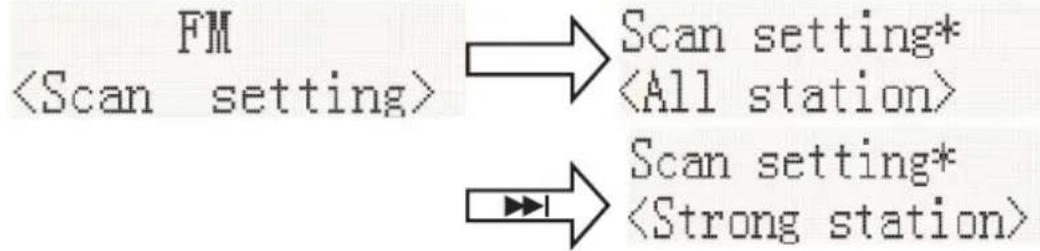
In FM mode, press MENU, enter the FM menu setting, then press or to select [Scan setting], then press ENTER to select the sensitivity setting:
1.1. All stations: 15dB

1.2. Strong stations only: 19dB
2. Audio Setting
2.1. Stereo allowed:

2.2. Forced mono
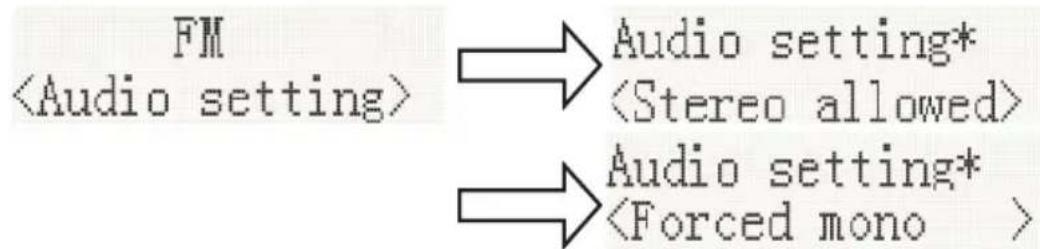
2.3. System (FM system), same DAB system setting.
3. PRESET:
3.1. Preset Recall (Choose the Station):
Press ENTER to tune to the station stored in the preset memory.

3.2. Preset Recall (Choose the Station):
You may store your preferred FM stations to the preset station memories. There are 20 memory presets in your radio. Presets are remembered by your radio in the event of a power failure.
The procedure for setting presets and using them to tune into stations is the same for DAB modes:
In FM mode, select the desired wave band. Press [▲,▼] to view the stored stations, press or to tune to the required station as previously described, and then press ENTER to select the preset number under which you will store the station. Press ENTER to confirm.

Bluetooth Mode
You must follow several steps to connect your mobile phone:
- Activate Bluetooth from your mobile phone (please refer to your phone's user manual)
- Press the POWER button to turn on the unit.
- Rotate the SOURCE knob to select the Bluetooth mode. It will be ready to pair automatically.
- Use your mobile phone to search for the Bluetooth device named "MIC250IDABBT" / "MIC256IDABBT".
- Your mobile phone will find "MIC250IDABBT / MIC256IDABBT" and will present the option to connect or not. Please connect to it using the password "0000" (if any). When you are successfully connected, the Bluetooth indicator "Bluetooth connected" appears on the LCD display.
Automatically Connecting with Your Phone
Pairing is only needed the first time the unit and phone are used together. When the unit and phone have been paired once, they will automatically connect when the unit is on and Bluetooth is activated on the phone. The next time you power on, the unit will automatically connect to the most recently connected mobile phone.
Play from a Bluetooth Device
After successful Bluetooth connection, press the button to play. Press the or button to skip tracks backwards or forwards. To pause or resume play, press the button again. Press and hold the button to disconnect Bluetooth.
Playing a compact disc (CD)
NOTE: Never touch the laser lens inside the CD compartment. Clean the laser lens using a CD cleaner disc if it becomes dirty.
- Press the POWER button to turn on the unit.
- Rotate the SOURCE knob to select the CD function.
- Press the triangle button to open the CD door and insert a CD into the tray (with printed label side facing up).
- Press the triangle button again to close the CD door and the disc will rotate for a few seconds, then play the 1st track automatically.
- To temporarily stop playback, press the button, and to resume playback, press it again.
- Press the button to STOP play.
PREVIOUS/NEXT TRACK
- The right and right buttons are used to jump to a different track number or to scan disc tracks at high speed.
- Press the left button once to hear the beginning of the current track. Press it two or more times to hear previous tracks on the disc.
- Press the button to hear the next track on the disc.
- Press and hold the button. The current track will be scanned and move backwards to the previous track(s); When the desired track section is found, release the button and normal play will resume.
- Press and hold the right button; the current track will be scanned and move forward to the next track(s). When the desired track section is found, release the selected button and normal playback will resume.
REPEAT FUNCTION
The CD REPEAT button may be used to repeat a single track or repeat all tracks on a compact disc.
- Press the REPEAT button once during playback; the "REPEAT ONE" sign will appear on the LCD display for about 2 seconds. The same track will be repeated over and over.
- Press the REPEAT button a second time to repeat all tracks. The "REPEAT ALL" sign will appear on the LCD display for about 2 seconds.
- To cancel REPEAT PLAY, press the REPEAT button repeatedly until "REPEAT OFF" appears on the LCD display for about 2 seconds.
PROGRAM FUNCTION
The Program feature may be used to program up to 20 tracks to play in a selected order.
- While in the stop mode only (CD is not playing), press the PROG button, and the LCD display will show the wording "P 01" and "T 01" starts to flash.
- Press the land butts to allocate the desired track.
- Press the PROG button to select and store the track into the memory.
- Repeat step 2 to 3 to select up to 20 tracks.
- To play the selected tracks (in the program mode), press the ▸ button.
- Press the button to hear the previous programmed track or press the button to hear the next programmed track. Note: After all programmed tracks have been played, the CD player will return to the stop mode.
- Press the button to exit programmed play mode.
MP3 DISC SECTION
- Press the POWER button to turn on the unit.
- Rotate the SOURCE knob to select CD Mode.
- Close the CD Door and the disc will rotate for a few seconds and then play the 1st track automatically.
- Press the button to choose a track.
- To temporarily stop playback, press the button; to resume, press the button again.
- Press the button to stop play.
Note: Because MP3 discs have a large capacity, disc access times are a little longer.
Repeat Playing Function
Single track repeat
Press the REPEAT button once to repeat a single track. The display appears as "Repeat one".
Whole Disc Repeat
In Play mode, press the REPEAT button 2 times to repeatedly play all tracks on the disc. The display will show "Repeat All".
To cancel repeat play, press the REPEAT button repeatedly until the "Repeat off" sign appears.
PROGRAM PLAY
The tracks on the disc can be programmed to play in any order (up to 20 tracks can be programmed). Note: this can only be done while in Stop mode
- Press the PROG button while in Stop mode. "P01" "F01" will appear on the display and "T001" will flash.
- Press either the or button to select the desired tracks in the album, then press the PROG button to store in the memory.
- The first track number is now stored in the memory, and the program number changes to "P02", waiting for your next selection.
- Repeat Steps 1-3 to program additional tracks.
After programming is finished, press the button, and programmed play begins from the first programmed track. The player stops automatically after all programmed tracks have been played.
(Press the button twice to cancel the programmed tracks memory).
Playing Music via USB
This device has been developed using the latest technical advances in the USB field. However, given the wide range of USB storage device types that are currently on the market, we unfortunately cannot guarantee full compatibility with all USB storage devices. For this reason, in rare cases, there may be problems in playing back files from USB storage devices. This is not due to device malfunction.
- Press the POWER button to turn on the unit.
- Rotate the SOURCE knob to select the USB mode. 'USB' appears on the display.
- Connect a USB storage device directly to the USB port. The display briefly shows the number of folders and then the total number of tracks. Playback will automatically start after a few seconds.
- Operation of the control buttons is the same as for MP3 playback. Please refer to MP3 DISC SECTION operations as described previously.
NOTES:
- Always directly connect a USB storage medium to the USB port to prevent any malfunctions.
- The USB port is not designed for charging external devices.
- Important: Switch the device to a different operating mode before you remove the USB storage device.
Wireless Charger Function
Simply place your wireless charging device on the wireless charger area indicated on the top surface and charging will begin on contact.
Output power is 9V-1:1A
USB Charging (5V Out)
The USB port is designed for charging external devices, such as smart phones.
Output power is 5V = 2:1A
AUX INPUT JACK
- Press the POWER button to turn on the unit.
- Rotate the SOURCE knob to select the Aux-In mode. 'Aux-In' will appear on the LCD display.
- Connect the AUX connect wire from the AUX out jack of your personal player (e.g. portable MP3 player) to the AUX input jack.
- Start playback from your personal player.
LINE INPUT JACK
- Press the POWER button to turn on the unit.
- Rotate the SOURCE knob to select the Line-In mode. 'Line-In' will appear on the LCD display.
- Connect the line-in wire from the line out jack of your personal player (e.g. portable MP3 player) to the Line input jack.
- Start playback from your personal player.
PHONE JACK
- Rotate the Volume to set a low volume.
- Insert the headphones into the phone jack.
WARNING! Risk of hearing impairment
- Set a low volume on the playback device before connecting the headphones to the sound source.
- Avoid excessive volume, particularly over extended periods or frequent use. Excessive volume can result in permanent hearing impairment.

Note the following information: Only use the power supplies listed below.
Specification:
Power: AC230V~50Hz 0.3A
Remote control power source: 2 x AAA battery (not included)
Frequency ranges: FM 88.8 - 108MHz
DAB/DAB+174-239MHz
Max.consumption: 40W
Speaker impedance: 8 ohms
Total music output: 15W X 2
Remark: The maximum connection distance is around 10 meters. Please place your Bluetooth speaker as close as possible to this device to avoid the connection being disturbed.
About the disks
| Handling Do not touch the underside of disks. Hold disks by the edges to avoid leaving fingerprints on the surface. Any dust, fingerprints or scratches may cause a malfunction. Never affix a label or sticky tape to the disk. | |
| Storage Put disks back in their case after use. Never expose disks to direct sunlight or heat sources. Never leave disks inside a car parked in full sunlight. | |
| Cleaning Use a clean, soft, lint-free cloth to clean the disk, working from the centre outwards in a straight line. Do not use solvents such as petrol, thinners, commercially available cleaners or antistatic sprays for vinyl disks. |
Remarks:
Don't discard the electrical and electronic appliances in the regular waste disposal.
- Take them to a collection point.
- Some components in these appliances may be hazardous to health and the environment.
- In order to save energy when the unit has no sound output for a while, the unit will be switched to stand-by automatically. It can be switched ON by using the POWER selector again.
- If there is an incoming call while MIC250IDABBT / MIC255IDABBT / MIC256IDABBT is connected to your cell phone for music playback, it will pause at once when you answer the call and resume after the call ended. (Sometimes it will pause after end the call, it depend on your cell phone.)
- The Bluetooth® word, mark and logo are registered trademarks owned by Bluetooth SIG, Inc. and any use of such marks by Bigben Interactive is under license. Other trademarks and trade names are those of their respective owners.
- THOMSON is a trademark of TECHNICOLOR SA or its affiliates used under license to Bigben Interactive.
- You can find the information on the plate located at the back of the unit.
DECLARATION OF CONFORMITY
The undersigned, Bigben Interactive declares that the radio equipment of the MIC250IDABBT / MIC255IDABBT / MIC256IDABBT type complies with the 2014/53/EU directive.
The complete text is available at https://www.bigben-interactive.co.uk/support/
Made in China
Manufactured by BIGBEN INTERACTIVE SA
396, Rue de la Voyette
CRT2-FRETIN
CS 90414
59814 LESQUIN Cedex - France
www.bigben.eu







Manufacturer: Bigben Interactive FRANCE
- Rue de la Voyette, C.R.T. 2, Fretin, CS90414 - 59814 Lesquin Cedex, France
Waterloo Office Park/Building H
Drive Richelle 161 bte 15 1410 Waterloo, Belgium
Bigben Interactive NEDERLAND b.v.
BELGIUM, customerservice@bigben-interactive.be
NETHERLANDS, customerservice@bigben-interactive.nl
SPAIN, sat@bigbeninteractive.es
ITALY, support@bigbeninteractive.it
www/bigben.eu
THOMSON
MIC250IDABBT
MIC255IDABBT
MIC256IDABBT
DAB / CD / BLUETOOTH / FM
USB / AUDIO INPUT

CLASS 1 LASER PRODUCT
CLASS 1 LASER PRODUCT APPAREL LASER DE CLASSE 1 PRODUCTO LASER DE CLASE 1
This product contains a low power laser device.
CAUTION VISIBLE LASER RADIATION WHEN OPEN AND INTERLOCKS DEFEATED AVOID EXPOSURE TO BEAM


CAUTION
RISK OF ELECTRIC SHOCK DO NOT OPEN PRECAUCION

RISK OF ELECTRIC SHOCK DO NOT OPEN
CLASS II EQUIPMENT
DIRECT CURRENT
ALTERNATING CURRENT
INDOOR USE ONLY





Waterloo Office Park / Batiment H
Drève Richelle 161 bte 15 1410 Waterloo, Belgium
Bigben Interactive NEDERLAND b.v.
BELGIUM, customerservice@bigben-interactive.be
NETHERLANDS, customerservice@bigben-interactive.nl
SPAIN, sat@bigbeninteractive.es
ITALY, support@bigbeninteractive.it
www/bigben.eu
THOMSON
MIC250IDABBT
MIC255IDABBT
MIC256IDABBT
DAB / CD / BLUETOOTH / FM RADIO
USB / AUDIO INPUT

INSTRUCTIONS FOR USE
BEFORE USING THE APPLIANCE, READ THIS MANUAL IN FULL AND KEEP IT FOR FUTURE REFERENCE
Index
CLASS 1 LASER PRODUCT
CLASS 1 LASER PRODUCT APPAREL LASER DE CLASSE 1 PRODUCTO LASER DE CLASE 1
CAUTION
INVISIBLE LASER RADIATION WHEN OPEN AND INTERLOCKS DEFEATED. AVOID EXPOSURE TO BEAM
This product contains a low power laser device.


CAUTION
RISK OF ELECTRIC SHOCK DO NOT OPEN

ATTENTION
RISK OF ELECTRIC SHOCK DO NOT OPEN
Waterloo Office Park / Building H
Drève Richelle 161 bte 15 1410 Waterloo, Belgium
Bigben Interactive NEDERLAND b.v.
BELGIUM, customerservice@bigben-interactive.be
NETHERLANDS, customerservice@bigben-interactive.nl
SPAIN, sat@bigbeninteractive.es
ITALY, support@bigbeninteractive.it
www/bigben.eu
THOMSON
MIC250IDABBT
MIC255IDABBT
MIC256IDABBT
DAB / CD / BLUETOOTH / FM
USB / AUDIO INPUT

CLASS 1 LASER PRODUCT
CLASS 1 LASER PRODUCT APPAREL LASER DE CLASSE 1 PRODUCTO LASER DE CLASE 1
This product contains a low power laser device.
CAUTION VISIBLE LASER RADIATION WHEN OPEN AND INTERLOCKS DEFEATED. AVOID EXPOSURE TO BEAM

| MATERIAL DE CLASSE II | |
| CORRENTE CONTÍNUA | |
| CORRENTE ALTERNADA | |
| APENAS PARA USO INTERIOR |

Waterloo Office Park/Batiment H
Drive Richelle 161 bte 15 1410 Waterloo, Belgium
Bigben Interactive NEDERLAND b.v.
BELGIQUE, customerservice@bigben-interactive.be
NEDERLAND, customerservice@bigben-interactive.nl
ESPANA, sat@bigbeninteractive.es
ITALIA, support@bigbeninteractive.it
www/bigben.eu
THOMSON
MIC250IDABBT
MIC255IDABBT
MIC256IDABBT
DAB/CD/BLUETOOTH/UKW
USB/AUDIO INPUT

INSTRUCTION MANUAL
CLASS 1 LASER PRODUCT
CLASS 1 LASER PRODUCT APPAREL LASER DE CLASSE 1 PRODUCTO LASER DE CLASE 1
CAUTION
INVISIBLE LASER RADIATION WHEN OPEN AND INTERLOCKS DEFEATED AVOID EXPOSURE TO BEAM

This product contains a low power laser device.
Waterloo Office Park/Batiment H
Dreme Richelle 161 bte 15 1410 Waterloo, Belgium
Bigben Interactive NEDERLAND b.v.
BELGIUM, customerservice@bigben-interactive.be
NETHERLANDS, customerservice@bigben-interactive.nl
SPAIN, sat@bigbeninteractive.es
ITALIA, support@bigbeninteractive.it
www/bigben.eu
THOMSON
MIC250IDABBT
MIC255IDABBT
MIC256IDABBT
DAB/CD/BLUETOOTH/FM
USB/ AUDIO IN

HANDLEIDING
PLEASE READ THIS MANUAL CAREFULLY BEFORE USING THE DEVICE AND KEEP IT FOR FUTURE REFERENCE
Contents
Getting started
CLASS 1 LASER PRODUCT
CLASS 1 LASER PRODUCT APPAREL LASER DE CLASSE 1 PRODUCTO LASER DE CLASE 1
CAUTION
INVISIBLE LASER RADIATION WHEN OPEN AND INTERLOCKS DEFEATED. AVOID EXPOSURE TO BEAM.

This product contains a low power laser device.
| BESCHERMINGSKLASSE II | |
| GELIJKSTROOM | |
| WISSELSTROOM | |
| UITSLUITEND BESTEMD VOOR GEBRUIK BINNENSHUIS |

Power supply (mains 230V/50Hz)
Waterloo Office Park/Building H
Drive Richelle 161 bte 15 1410 Waterloo, Belgium
Bigben Interactive NEDERLAND B.V.
BELGIUM, customerservice@bigben-interactive.be
NETHERLANDS, customerservice@bigben-interactive.nl
SPAIN, sat@bigbeninteractive.es
ITALY, support@bigbeninteractive.it
www.bigben.eu
THOMSON
MIC250IDABBT
MIC255IDABBT
MIC256IDABBT
DAB/ CD/ BLUETOOTH/ FM
USB/ AUDIO IN

INSTRUKCJA OBSŁUGI
PRZED UZYCIEM URZADZENIA NALEZY UWAZNIE PRZECZYTAÇ NINIEJSZA INSTRUKCJE OBSLUGI. INSTRUKCJE NALEZY ZACHOWAÇ NA PRZYSZŁOSC
Spistresci
Pierwsze kroki 1
CLASS 1 LASER PRODUCT
CLASS 1 LASER PRODUCT APPAREL LASER DE CLASSE 1 PRODUCTO LASER DE CLASE 1
This product contains a low power laser device.
CAUTION ISIBLE LASER RADIATION IN OPEN AND INTERLOCKS DEFEATED OID EXPOSURE TO BEAM

| MATERIAL KLASY II | |
| PRADX TÁŁY | |
| PRADX PRZEMIENNY | |
| TYLKO DO UŽYTKU W POMIESZ-CZENIACH |

Waterloo Office Park / Batiment H
Drève Richelle 161 bte 15 1410 Waterloo, Belgium
Bigben Interactive NEDERLAND b.v.
BELGIQUE, customerservice@bigben-interactive.be
NEDERLAND, customerservice@bigben-interactive.nl
SPAIN, sat@bigbeninteractive.es
ITALY, support@bigbeninteractive.it
www/bigben.eu
THOMSON
MIC250IDABBT
MIC255IDABBT
MIC256IDABBT
DAB/CD/BLUETOOTH/FM
USB/ AUDIO IN

USER MANUAL
PLEASE READ THIS USER MANUAL CAREFULLY BEFORE USE AND KEEP IT FOR
FUTURE REFERENCE.
CONTENTS
Getting Started 1
We start 1
CLASS 1 LASER PRODUCT
CLASS 1 LASER PRODUCT APPAREL LASER DE CLASSE 1 PRODUCTO LASER DE CLASE 1
CAUTION
INVASIBLE LASER RADIATION WHEN OPEN AND INTERLOCKS DEFATED AVOID EXPOSURE TO BEAM

This product contains a low power laser device.
| MATERIALIÁL TRÍDY II | |
| STEJNOSMÉRNÍ PROUD | |
| STRÍDAVÍ PROUD | |
| POUZE PRO VNITRNÍ POUŽITÍ |

Waterloo Office Park/Batiment H
Dreve Richelle 161 bte 15 1410 Waterloo, Belgium
Bigben Interactive NEDERLAND b.v.
BELGIQUE, customerservice@bigben-interactive.be
NEDERLAND, customerservice@bigben-interactive.nl
ESPANA, sat@bigbeninteractive.es
ITALIA, support@bigbeninteractive.it
www/bigben.eu
THOMSON
MIC250IDABBT
MIC255IDABBT
MIC256IDABBT
DAB/CD/BLUETOOTH/FM
USB/ AUDIO IN

USER MANUAL
PLEASE READ THIS USER MANUAL CAREFULLY BEFORE OPERATING THE DEVICE, AND KEEP IT FOR FUTURE REFERENCE.
Table of Contents
Getting Started 1
CLASS 1 LASER PRODUCT
CLASS 1 LASER PRODUCT APPAREL LASER DE CLASSE 1 PRODUCTO LASER DE CLASE 1
This product contains a low power laser device.
CAUTION VISIBLE LASER RADIATION WHEN OPEN AND INTERLOCK DEFEATED AVOID EXPOSURE TO BEAM

| MATERIALALE KLASSE II | |
| JEVNSTRÖM | |
| VEKSELSTRÖM | |
| KUN TIL INDENDÖRS BRUG |

1. Scanning setting:
IFM function: press MENU, enter the FM setting menu, then press I or I to select [Scanning setting], then press ENTER to choose the sensitivity setting:
1.1. All stations: ~15 dB
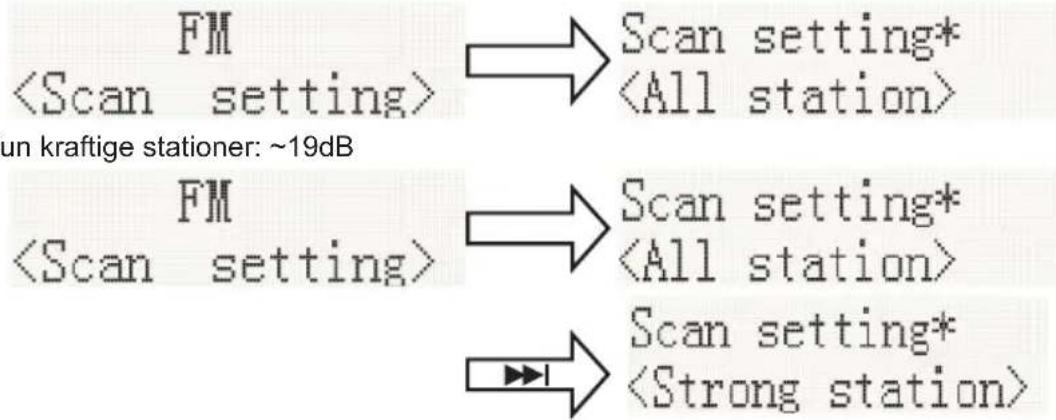
1.2. Only strong stations: ~19 dB
2. Sound settings
2.1. Stereo possible:

2.2. Forced mono
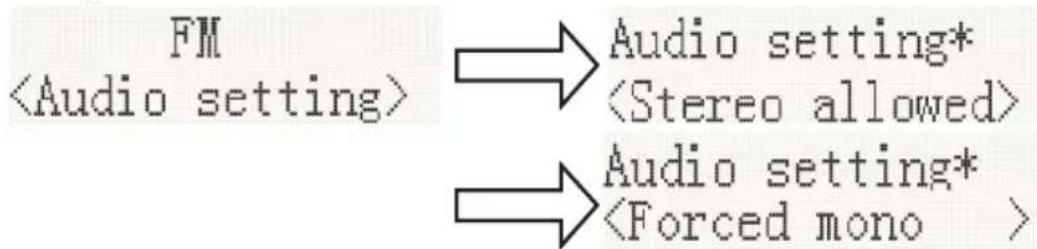
2.3. System (FM system), same setting as for DAB system.
3. PRESET:
3.1. Cancel preset (select the station):
Waterloo Office Park/Batiment H
Drive Richelle 161 bte 15 1410 Waterloo, Belgium
Bigben Interactive NEDERLAND b.v.
BELGIUM, customerservice@bigben-interactive.be
NETHERLANDS, customerservice@bigben-interactive.nl
SPAIN, sat@bigbeninteractive.es
ITALY, support@bigbeninteractive.it
www/bigben.eu
THOMSON
MIC250IDABBT
MIC255IDABBT
MIC256IDABBT
DAB/CD/BLUETOOTH/FM
USB/AUDIO IN

USER MANUAL
PLEASE READ THIS MANUAL CAREFULLY BEFORE OPERATING THE DEVICE, AND KEEP IT FOR FUTURE REFERENCE.
Table of Contents
First steps 1
CLASS 1 LASER PRODUCT
CLASS 1 LASER PRODUCT APPAREL LASER DE CLASSE 1 PRODUCTO LASER DE CLASE 1
CAUTION
INVISIBLE LASER RADIATION WHEN OPEN AND INTERLOCKS DEFEATED. AVOID EXPOSURE TO BEAM.

This product contains a low power laser device.
| II. OSZTÁLYÜ ANYAG | |
| EGYENÁRAM | |
| VÁLTAKOZÓ ÁRAM | |
| CSAK BELTEKI HASZNÁLATRA |

Waterloo Office Park / Building H
Drève Richelle 161 bte 15 1410 Waterloo, Belgium
Bigben Interactive NEDERLAND b.v.
BELGIUM, customerservice@bigben-interactive.be
NETHERLANDS, customerservice@bigben-interactive.nl
SPAIN, sat@bigbeninteractive.es
ITALY, support@bigbeninteractive.it
www/bigben.eu
THOMSON
MIC250IDABBT
MIC255IDABBT
MIC256IDABBT
DAB/CD/BLUETOOTH/FM
USB/ AUDIO IN

USER MANUAL
READ THE USER MANUAL CAREFULLY BEFORE OPERATING THE DEVICE, AND KEEP IT FOR FUTURE REFERENCE
Contents
Getting started 1
CLASS 1 LASER PRODUCT
CLASS 1 LASER PRODUCT APPAREL LASER DE CLASSE 1 PRODUCTO LASER DE CLASE 1
CAUTION
INVISIBLE LASER RADIATION WHEN OPEN AND INTERLOCKS DEFEATED AVOID EXPOSURE TO BEAM
This product contains a low power laser device.


| KLASSE II-MATERIALAIE | |
| LIKESTRØM | |
| VEKSELSTRØM | |
| KUN TIL INNENDØRS BRUK |

The lightning symbol inside the equilateral triangle alerts the user to uninsulated and dangerous electrical voltage, which is strong enough to pose a risk of electric shock.

2.3. System (FM system), same setting for DAB system.
- PRESET:
Waterloo Office Park/Batiment H
Dreme Richelle 161 bte 15 1410 Waterloo, Belgium
Bigben Interactive NEDERLAND b.v.
BELGIQUE, customerservice@bigben-interactive.be
NEDERLAND, customerservice@bigben-interactive.nl
ESPANA, sat@bigbeninteractive.es
ITALIA, support@bigbeninteractive.it
www/bigben.eu
THOMSON
MIC250IDABBT
MIC255IDABBT
MIC256IDABBT
DAB/CD/BLUETOOTH/FM
USB/LJUDINGANG

DRIFTSINSTRUCTIONS
LÄS DENNA ANVÄNDARMANUAL NOGA INNAN PRODUKTEN TAS I BRUK OCH SPARA DEN FÖR FRAMTIDA BRUK
Innehäll
Komma igang 1
CLASS 1 LASER PRODUCT
CLASS 1 LASER PRODUCT APPAREL LASER DE CLASSE 1 PRODUCTO LASER DE CLASE 1
CAUTION
INVASIBLE LASER RADIATION WHEN OPEN AND INTERLOCKS DEFATED AVOID EXPOSURE TO BEAM
This product contains a low power laser device.

| KCLASS 2-MATERIAL | |
| LIKSTRÖM | |
| VÄXELSTRÖM | |
| ENDAST FÜR INOMHUSBRUK |

Waterloo Office Park/Batiment H
Dreve Richelle 161 bte 15 1410 Waterloo, Belgium
Bigben Interactive NEDERLAND b.v.
BELGIQUE, customerservice@bigben-interactive.be
NEDERLAND, customerservice@bigben-interactive.nl
ESPANA, sat@bigbeninteractive.es
ITALIA, support@bigbeninteractive.it
www/bigben.eu
- CLASS 1 LASER PRODUCT
- THOMSON
- OPERATING INSTRUCTIONS
- CONTENTS
- GETTING STARTED
- SAFETY AND NOTICE
- SAFETY
- WARNING
- CAUTION
- CARE FOR YOUR PRODUCT
- CARE OF THE ENVIRONMENT
- WHAT'S IN THE BOX
- REMOTE
- POWER
- AUTO STANDBY
- BATTERY POWER
- UNIT POWER SUPPLY (MAINS 230V/50HZ)
- OPERATION
- ADJUSTING THE VOLUME
- MUTE FUNCTION
- CLOCK AND TIMERS
- SETTING THE CLOCK AND DATE
- SETTING THE ALARM
- SNOOZE
- SLEEP TIMER
- DISPLAY BACKLIGHT
- DAB RADIO MODE
- AUTO SCAN
- MANUAL SCAN
- DRC (DYNAMIC RANGE CONTROL)
- PRUNE (TO REMOVE STATIONS THAT ARE LISTED BUT UNAVAILABLE)
- SYSTEM (DAB)
- LANGUAGE
- FACTORY RESET
- SW VERSION
- PRESET
- PRESET RECALL
- PRESET STORE
- FM RADIO
- MENU
- SCAN SETTING
- AUDIO SETTING
- BLUETOOTH MODE
- AUTOMATICALLY CONNECTING WITH YOUR PHONE
- PLAY FROM A BLUETOOTH DEVICE
- PLAYING A COMPACT DISC (CD)
- PREVIOUS/NEXT TRACK
- REPEAT FUNCTION
- PROGRAM FUNCTION
- MP3 DISC SECTION
- REPEAT PLAYING FUNCTION
- SINGLE TRACK REPEAT
- WHOLE DISC REPEAT
- PROGRAM PLAY
- PLAYING MUSIC VIA USB
- NOTES
- WIRELESS CHARGER FUNCTION
- USB CHARGING (5V OUT)
- AUX INPUT JACK
- LINE INPUT JACK
- PHONE JACK
- WARNING! RISK OF HEARING IMPAIRMENT
- SPECIFICATION
- ABOUT THE DISKS
- REMARKS
- DECLARATION OF CONFORMITY
- INSTRUCTIONS FOR USE
- INDEX
- ATTENTION
- DAB/CD/BLUETOOTH/UKW
- USB/AUDIO INPUT
- INSTRUCTION MANUAL
- HANDLEIDING
- POWER SUPPLY (MAINS 230V/50HZ)
- INSTRUKCJA OBSŁUGI
- SPISTRESCI
- USER MANUAL
- TABLE OF CONTENTS
- SCANNING SETTING
- ONLY STRONG STATIONS: ~19 DB
- SOUND SETTINGS
- STEREO POSSIBLE
- FORCED MONO
- CANCEL PRESET (SELECT THE STATION)
- DRIFTSINSTRUCTIONS
- INNEHÄLL
Brand : THOMSON
Model : MIC250IDABBT
Category : Hi-Fi System