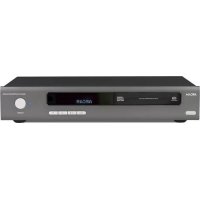
CDS50 - Cd player/recorder ARCAM - Free user manual and instructions
Find the device manual for free CDS50 ARCAM in PDF.

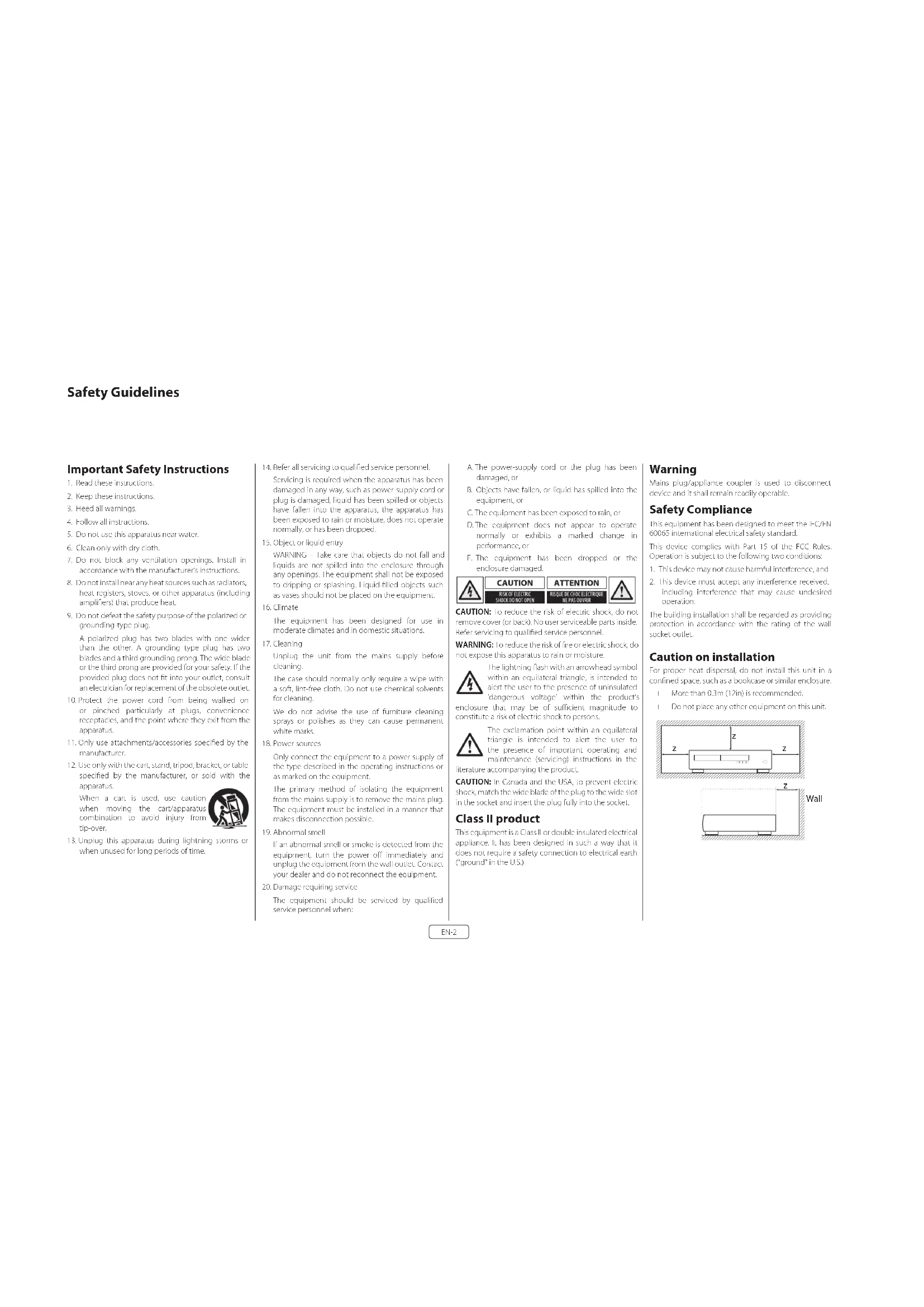


| Product Type | SACD/CD player and network streamer |
| Brand | Arcam |
| Model | CDS50 |
| Power Supply | 110-240 V, 50-60 Hz |
| Power Consumption | 20 W max, standby 0.4 W |
| Dimensions (W x H x D) | 433 x 87 x 283 mm |
| Net Weight | 5.3 kg |
| Gross Weight | 7.3 kg |
| Digital-to-Analog Conversion | DAC ESS9038 Delta-Sigma 32-bit/192 kHz |
| Signal-to-Noise Ratio (A-weighted) | 118 dB unbalanced, 122 dB balanced |
| Harmonic Distortion (1 kHz) | <0.0008% |
| Frequency Response | 10 Hz – 20 kHz ± 0.5 dB |
| Output Level (0 dB) | 2.2 Vrms unbalanced, 4.5 Vrms balanced |
| Output Impedance | 47 Ω unbalanced, 600 Ω balanced |
| Jitter RMS | <20 ps |
| Digital Inputs | 1 optical (up to 96 kHz), 1 coaxial (up to 192 kHz) |
| Digital Outputs | 1 optical, 1 coaxial (stereo PCM) |
| Analog Outputs | 1 RCA unbalanced pair, 1 XLR balanced pair |
| Supported Audio Formats (USB/network/disc) | FLAC, WAV, AAC, AIFF, OGG, MP3, WMA (24-bit/192 kHz max) |
| Network Connectivity | Ethernet 10/100, Wi-Fi 802.11 b/g/n |
| USB Port | Type A (front) for USB key or hard drive, firmware update |
| Control Inputs | RS232, IR In (3.5 mm), Trigger In 12 V |
| Included Accessories | Power cable, remote control, 2 AAA batteries, Wi-Fi antenna |
| Cleaning | Soft dry cloth, unplug before, no chemicals |
| Safety | Class II, double insulation, FCC/CE compliant, Class 1 laser |
| Warranty | 5 years parts and labor (excluding hard drive, battery, transport) |
Frequently Asked Questions - CDS50 ARCAM
User questions about CDS50 ARCAM
0 question about this device. Answer the ones you know or ask your own.
Ask a new question about this device
Download the instructions for your Cd player/recorder in PDF format for free! Find your manual CDS50 - ARCAM and take your electronic device back in hand. On this page are published all the documents necessary for the use of your device. CDS50 by ARCAM.
USER MANUAL CDS50 ARCAM
Important Safety Instructions
- Read these instructions.
- Keep these instructions.
- Heed all warnings.
- Follow all instructions.
- Do not use this apparatus near water.
- Clean only with dry cloth
- Do not block any ventilation openings. Install in accordance with the manufacturer's instructions.
- Do not install near any heat sources such as radiators, heat registers, sloves, or other apparatus (including amplifiers) that produce heat.
- Do not defeat the safety purpose of the polarized or grounding-type plug.
A polarized plug has two blades with one wider than the other. A grounding type plug has two blades and a third grounding prong. The wide blade or the third prong are provided for your safety. If the provided plug does not fit into your outlet, consult an electrician for replacement of the obsolete outlet.
- Protect the power cord from being walked on or pinched particularly at plugs, convenience receptacles, and the point where they exit from the apparatus.
- Only use attachments/accessories specified by the manufacturer.
- Use only with the cart, stand, tripod, bracket, or table specified by the manufacturer, or sold with the apparatus.
When a cart is used, use caution when moving the cart/apparatus combination to avoid injury from tip-over.
- Unplug this apparatus during lightning storms or when unused for long periods of time.

- Refer all servicing to qualified service personnel.
Servicing is required when the apparatus has been damaged in any way, such as power-supply cord or plug is damaged, liquid has been spilled or objects have fallen into the apparatus, the apparatus has been exposed to rain or moisture, does not operate normally, or has been dropped.
- Object or liquid entry
WARNING - Take care that objects do not fall and liquids are not spilled into the enclosure through any openings. The equipment shall not be exposed to dripping or splashing. Liquid filled objects such as vases should not be placed on the equipment.
- Climate
The equipment has been designed for use in moderate climates and in domestic situations.
- Cleaning
Unplug the unit from the mains supply before cleaning.
The case should normally only require a wipe with a soft, lint-free cloth. Do not use chemical solvents for cleaning.
We do not advise the use of furniture cleaning sprays or polishes as they can cause permanent white marks.
- Power sources
Only connect the equipment to a power supply of the type described in the operating instructions or as marked on the equipment.
The primary method of isolating the equipment from the mains supply is to remove the mains plug. The equipment must be installed in a manner that makes disconnection possible.
- Abnormal smell
If an abnormal smell or smoke is detected from the equipment, turn the power off immediately and unplug the equipment from the wall outlet. Contact your dealer and do not reconnect the equipment.
- Damage requiring service
The equipment should be serviced by qualified service personnel when:
A. The power-supply cord or the plug has been damaged, or
B. Objects have fallen, or liquid has spilled into the equipment, or
C. The equipment has been exposed to rain, or
D. The equipment does not appear to operate normally or exhibits a marked change in performance, or
E. The equipment has been dropped or the enclosure damaged.

CAUTION: To reduce the risk of electric shock, do not remove cover (or back). No user serviceable parts inside. Refer servicing to qualified service personnel.
WARNING: To reduce the risk of fire or electric shock, do not expose this apparatus to rain or moisture.
The lightning flash with an arrowhead symbol within an equilateral triangle, is intended to alert the user to the presence of uninsulated 'dangerous voltage' within the product's enclosure that may be of sufficient magnitude to constitute a risk of electric shock to persons.
The exclamation point within an equilateral triangle is intended to alert the user to the presence of important operating and maintenance (servicing) instructions in the literature accompanying the product.
CAUTION: In Canada and the USA, to prevent electric shock, match the wide blade of the plug to the wide slot in the socket and insert the plug fully into the socket.
Class II product
This equipment is a Class II or double insulated electrical appliance. It has been designed in such a way that it does not require a safety connection to electrical earth ("ground" in the U.S.)
Warning
Mains plug/appliance coupler is used to disconnect device and it shall remain readily operable.
Safety Compliance
This equipment has been designed to meet the IEC/EN 60065 international electrical safety standard. This device complies with Part 15 of the FCC Rules. Operation is subject to the following two conditions:
- This device may not cause harmful interference, and
- This device must accept any interference received, including interference that may cause undesire operation.
The building installation shall be regarded as providing protection in accordance with the rating of the wall socket outlet.
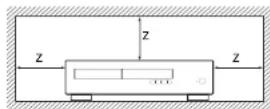
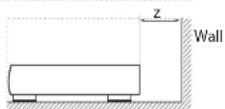
Caution on installation
For proper heat dispersal, do not install this unit in a confined space, such as a bookcase or similar enclosure.
☐ More than 0.3m (12in) is recommended.
☐ Do not place any other equipment on this unit.
Laser Radiation
CLASS 1 LASER PRODUCT
If the CDS50 player is operated whilst the outer casing is removed, invisible laser radiation could cause eye damage.
Radio Interference
The CDS50 player is a digital device which has been designed to very high standards of electromagnetic compatibility.
All CD players generate and can radiate RD (radio frequency) energy. In some case this can cause interference with FM and AM radio reception. If this is the case, keep the player and its connecting cables as far from the tuner and its acerials as possible. Connecting the player and the tuner to different mains sockets can also help reduce interference.
If the problem persists, please contact your Arcam dealer.
EC COUNTRIES - This product has been designed to comply with EMC Directive 2004/108/EC
USA - This products complies with FCC Part 15 Class B.
FCC Information(for US customers)
PRODUCT
This product complies with Part 15 Class B of the FCC Rules. Operation is subject to the following two conditions:
- This device may not cause harmful interference, and
- This device must accept any interference received, including interference that may cause undesired operation.
IMPORTANT NOTICE: DO NOT MODIFY THIS PRODUCT
This product, when installed as indicated in the instructions contained in this manual, meets FCC requirements. Modification not expressly approved by ARCAM may void your authority, granted by the FCC, to use the product.
NOTE: This product has been tested and found to comply with the limits for a Class 8 digital device, pursuant to Part 15 of the FCC Rules. These limits are designed to provide reasonable protection against harmful interference in a residential installation.
This product generates, uses and can radiate radio frequency energy and, if not installed and used in accordance with the Instructions, may cause harmful interference to radio communications. However, there is no guarantee that interference will not occur in a particular installation. If this product does cause harmful interference to radio or television reception, which can be determined by turning the product OFF and ON, the user is encouraged to try to correct the interference by one or more of the following measures:
- Content or relocate the receiving antenna.
☐ Increase the separation between the equipment and receiver.
- Connect the product into an outlet on a circuit, different from that to which the receiver is connected.
□ Consult the local retailer authorized to distribute this type of product or an experienced radio/TV technician for help
Safety Information (for European customers)
- Avoid high temperatures. Allow for sufficient heat dispersion when installed in a rack
- Handle the power cord carefully. Hold the plug when unplugging the cord.
- Keep the unit free from moisture, water, and dust. - Unplug the power cord when not using the unit for long periods of time.
☐ Do not obstruct the ventilation holes.
Do not let foreign objects into the unit
☐ Do not let insecticides, benzene, and thinner come in contact with the unit.
□ Never disassemble or modify the unit in any way.
- Ventilation should not be impeded by covering the ventilation openings with items, such as newspapers, tables, cloths or curtains.
□ Naked flame sources such as lighted candles should not be placed on the unit.
□ Observe and follow local regulations regarding battery disposal.
☐ Do not expose the unit to dripping or splash fluids.
☐ Do not place objects filled with liquids, such as vas on the unit.
- Do not handle the mains cord with wet hands.
1) When the switch is in the O++ position, the equipment is not completely switched off from MAINS.
☐ The equipment shall be installed near the power supply so that the power supply is easily accessible.
^d A note about recycling
This product's packaging materials are recyclable and can be reused. Please dispose of any materials in accordance with the local recycling regulations.
When discarding the unit, comply with local rules or regulations.
Batteries should never be thrown away or incinerated but disposed of in accordance with the local regulations concerning battery disposal.
This product and the supplied accessories, excluding the batteries, constitute the applicable product according to the WHF directive
Correct disposal of this product
These markings indicate that this product should not be disposed with other household waste throughout the EU.


Pb
To prevent possible harm to the environment or human health from uncontrolled waste disposal and to conserve material resources, this product should be recycled responsibly.
To dispose of your product, please use your local return and collection systems or contact the retailer where the product was purchased.
Welcome
Thank you and congratulations...
...for purchasing your Arcam CDS50 player.
The CD550 provides class-leading sound quality from CD, SACD, USB and network based audio. High performance state-of-the-art Delta-Sigma DACs (Digital-to-Analogue Converters) provide audiophile sound quality to truly bring your music to life. The CD550 also accepts inputs from digital sources up to 24-bit/192kHz resolution and decodes them utilizing the high end ISS SABIRI-37 bit DAC with Arcam precision filters.
Arcam has been producing specialist Hi-Fi and home cinema products of remarkable quality for over three decades and the CD550 is the latest in a long line of award-winning equipment. The design of the CD550 draws upon all of Arcam's experience as one of the UK's most respected audio companies and is built to give you years of trouble-free listening enjoyment.
This handbook has been designed to give you all the information you need to install, connect and use your new purchase. The remote control handset supplied with this equipment is also described. Use the contents list shown on the next page to guide you to the section of interest.
We hope that your player will give you years of enjoyment. In the unlikely event of any fault, or if you simply require further information about Arcam products, our network of dealers will be happy to help you. Further information can also be found on the Arcam website at www.arcam.co.uk.
Your CDS50 development team
Contents
Safety Guidelines EN-2
Welcome
Overview
Placing The Unit EN-6
Power EN-6
Interconnect Cables EN-6
Rear Panel Connections EN-7
Front Panel Controls EN-8
Audio Connections EN-9
Introduction EN-9
Digital Audio Inputs EN-9
Digital Audio Outputs EN-9
Analogue Audio Outputs EN-9
Other Connections EN-9
Network EN-9
USB EN-9
RS232
Remote IR Control
EN-4
EN-6
EN-9
EN-9
Trigger In EN-9
Operation EN-10
Before You Begin... EN-10
Switching On EN-10
Playable Discs EN-10
Supported Media EN-10
Playing a Disc EN-10
Playing from the Network EN-10
Playing from USB EN-10
Transport Controls EN-10
Settings Menu EN-12
Specifications EN-13
Worldwide Guarantee EN-14
Overview
Placing The Unit
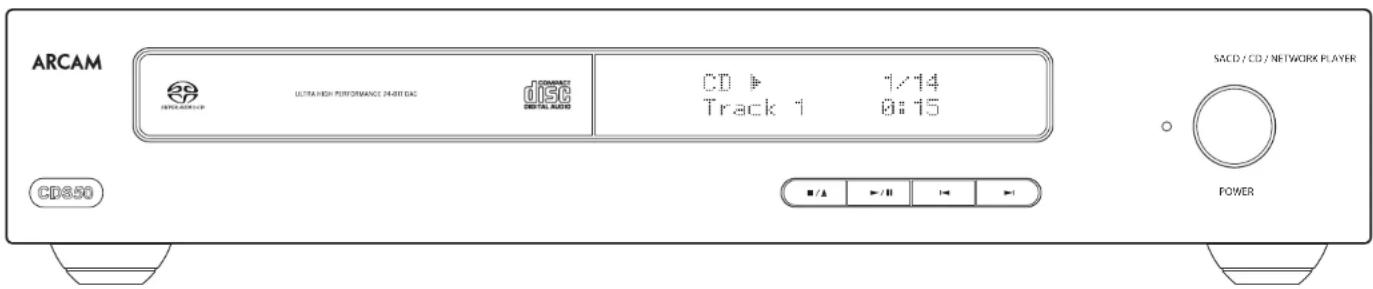
Place the CISS50 on a level, firm surface, avoiding direct sunlight and sources of heat or damp.
☐ Do not place the CDS50 on top of a power amplifier or other source of heat.
☐ Do not place the CDS50 in an enclosed space such as a bookcase or closed cabinet unless there is good provision for ventilation. The CDS50 is designed to run warm during normal operation.
☐ Do not place any other component or item on top of the CDSSO as this may obstruct airflow around the heat-sink, causing the player to run hot. (The unit placed on top of the player would become hot, too.)
☐ Make sure the remote control receiver to the right of the front panel display is unobstructed, otherwise this will impair the use of the remote control.
☐ Do not place your record deck on top of unit. Record decks are very sensitive to the noise generated by mains power supplies which will be heard as a background 'hum' if the record deck is too close.
☐ The normal function of the unit may be disturbed strong electromagnetic interference. If this occurs, simply reset the unit with the power button, or move the unit to another location.
Power
is the CDS50 is supplied with a moulded mains plug already fitted to the lead. Check that the plug supplied fits your supply – should you require a new mains lead, please contact your Arcam dealer.
If your mains supply voltage or mains plug is different, please contact your Arcam dealer immediately. Push the IEC plug end of the power cable into the power socket on the back of the CD550, making sure that it is pushed in firmly. Plug the other end of the cable into your mains socket and switch the socket on.
Interconnect Cables
We recommend the use of high quality screened cables that are designed for the particular application. Other cables will have different impedance characteristics that will degrade the performance of your system (for example, do not use cabling intended for video use to carry audio signals). All cables should be kept as short as is practically possible.
It is good practice when connecting your equipment to make sure that the mains power-supply cabling is kept as far away as possible from your audio cables. Failure to do so may result in unwanted noise in the audio signals.
Rear Panel Connections
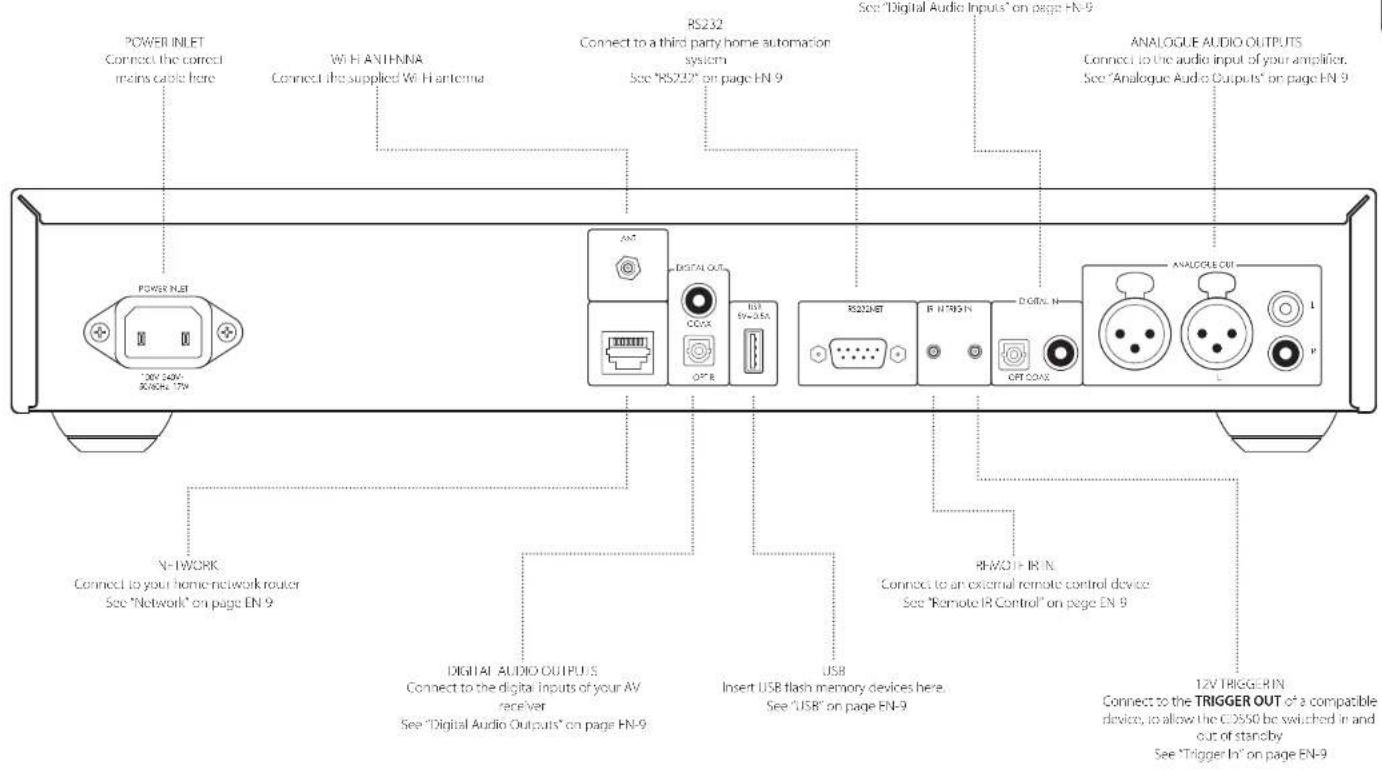

Please read the sections 'Placing The Unit', "Power" and "Interconnected Cables" on page FN-6 before connecting your CD550 player!
Front Panel Controls
FN-8
Audio Connections
Other Connections
EN
Introduction
The CISS50 offers a number of alternatives for connecting audio, the connection type to be used depends on the rest of your system; choose the most appropriate to your amplifier.
For the best stereo sound quality we recommend connecting the stereo analogue audio output to the CD input of your amplifier, a lowing the CDS50's audiophile digital to analogue circuitry to be utilized.
Digital Audio Inputs
The CDSS0 also features an optical and a coaxial digital input, should you require to use the CDSS0 as an audio DAC.
Digital Audio Outputs
Connect one of the digital audio outputs (optical or coaxial) to the "CD/SACD" digital input of your device, such as the Arcam SA10 or SA20 integrated amplifier or an Arcam audio-video receiver.
NOTE: the CDS50 digital outputs provide PCM stereo output only.
Analogue Audio Outputs
The CD550 features both balanced and unbalanced outputs.
Using cables of suitable length, connect the left/right outputs to the left/right inputs on your amplifier, respectively.
Network
An Ethernet cable can be used to connect the CDS50 to a router or switch on your home network, enabling playback of audio stored on your computer or NAS device. Connecting an Ethernet cable will disable the wireless function. Wireless connection is also available, and may be configured through the settings menu.
The CDS50 can also be controlled by a home automation system, using external commands.
Refer to the control document which can be found at www.arcam.co.uk for further information.
USB
A USB type A socket, used to connect your flash drives or external hard drives containing audio. May also be used for software upgrades. For the latest software as well as further information, please visit www.arcam.co.uk.
RS232
The RS232 input is for optional connection to a home automation system or personal computer. Various third-party systems are available providing sophisticated control over all your entertainment devices. Contact your dealer or insta ler for details. The technical details of the remote control protocol are available upon request, by contacting Arcam at support@arcam.co.uk
Remote IR Control
The REMOTE IN input can be used to pass RCS codes to the CDS50 if it is installed in a position or system where infrared can not be used. If this is required, please contact your dealer for more information.
NOTE
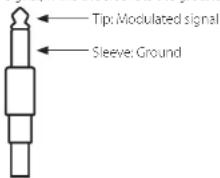
☐ The remote control input requires a mono 3.5mm jack, with the tip active and the sleeve grounded
☐ The remote control signals must be in modulated RCS format (at 36kHz), with a voltage level of between 5V and 12V.
This input allows the connection of external IR receivers, when the CDS50 front panel IR receiver is fully or partially obstructed. The tip is the modulated signal, while the sleeve is the ground.
Trigger In
The 17V TRIGGER IN input can be used to switch the CDS50 into and out of standby. Connecting the trigger output of your Arcam amplifier (or other compatible device), will cause the CDS50 to come out of standby automatically when the amplifier is switched on, returning to standby when the amplifier is switched off. Please see your amplifier handbook for further information.
Operation
Before You Begin...
This section explains how to play audio discs, network content, audio files stored on USB media and audio from external digital sources. Note that it may be necessary to configure your player correctly for your system before optimum - or any - playback can be achieved. Player configuration is described in the "Settings Menu" on page EN-12.
Switching On
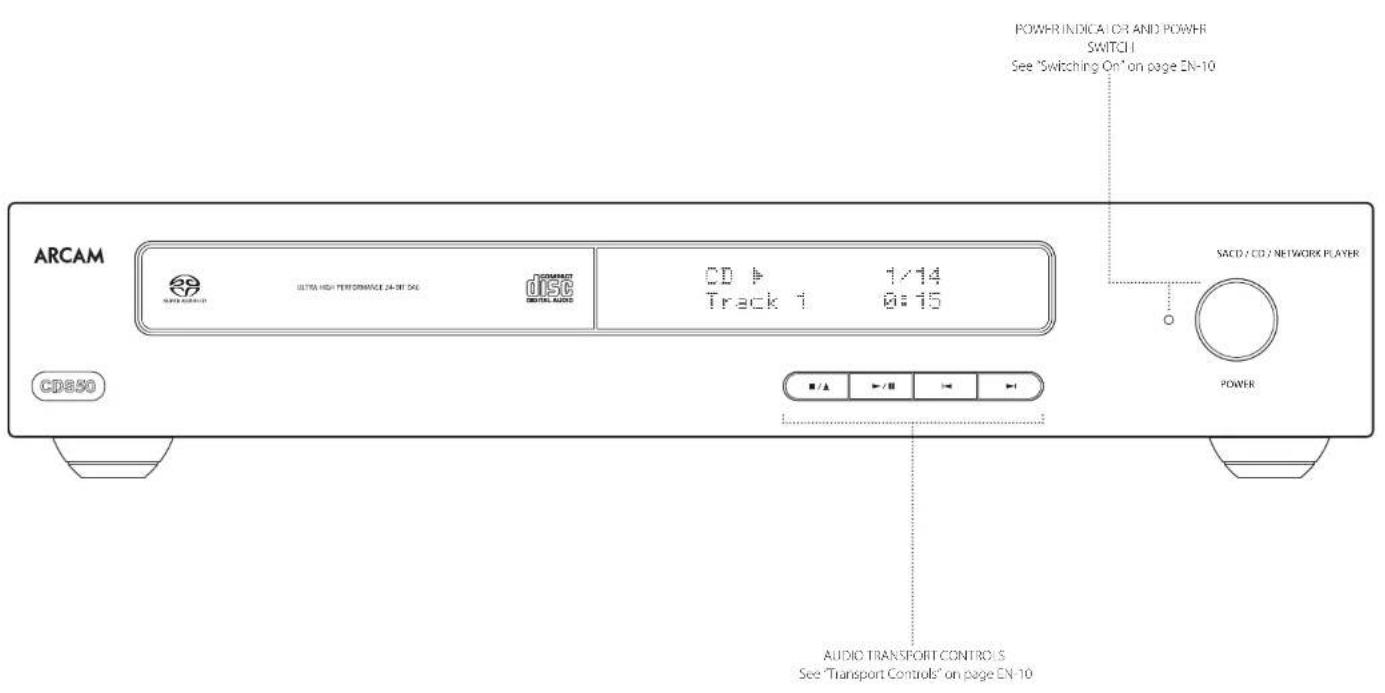
Switch the unit on by pressing the POWER button. The status LED glows white when the unit is powered up and red when in standby mode. Standby mode may be entered using the standby button on the remote control and exited using either the same button, or the ▪/▲ key on the front panel. If the POWER button is pressed for power is removed whilst in standby, the unit will enter standby mode when power is re-applied.
NOTE: The remote control sensor is located to the right-hand side of the display window. Do not obstruct this or the remote control will not work.
playable Discs
The CDS50 supports the following disc types:

CD Audio

CD R

CD-RW

Super Audio CD
Supported Media
Playback of the following file formats are supported, over disc, USB and network:
FLAC up to 24 bit/192kHz
WAV up to 74 bit/192kHz
AAC up to 24 bit/96kHz
AIFF up to 24 c/t/192kHz
OGG up to 24 bit/197kHz
MP3 up to 320kbps/48kHz
WMA up to 192kbps/48kHz
Playing a Disc
Press ■/▲ on the front panel (or ▲ on the remote control) and place the disc on the ray, with the playback side facing down (some discs are double sided, in which case the side labelled 'side A' should face up to play side A).
Press ■/▲ on the front panel to close the tray. The disc loads after a pause of a few seconds. A disc may take some time to load once the tray is closed. When the "Disc Autoplay" setting is set to ON (the default setting), playback starts automatically. If for details, refer to "Disc Auto Playback" section in the "Settings Menu" on page EN 12).
For discs that, do not play automatically, press ▶/II on the front panel or press ▶ on the remote control.
Playing from the Network
Ensure the CDSSO is connected to your local network. Select 'Media Browser' from the home screen, the user will be presented with a list of devices available for browsing. Navigate the available libraries using the keys on the remote.
Network music playback may also be controlled from your computer, phone or mobile device using your favourite UPnP control point application.
Pressing OK or ▶ on a highlighted audio file will access the file for playback. Playback will continue through all subsequent tracks in the playback directory.
Playing from USB
Connect your USB device to the USB socket. In the rear of the CDSSB. After the device has been recognised select 'Media Browser' from the home screen, then choose the 'USB' option from the media list.
Navigate directions using the 🔊 🔒 🔔 keys on the remote and begin playback of a highlighted audio file by pressing OK ▶or 🔒. Playback will continue through all subsequent tracks in the playback directory
Transport Controls
The following front panel controls are available during audio playback:
STOP/EJECT
Press the ■/▲ button to stop playback. Press the ■/▲ button again to eject the disc tray
PLAY/PAUSE
Press the ▶/□ button to pause playback. To resume playback, press the ▶/□ button again
SKIP
To skip tracks, press ▶ or ▶. When skipping back, the first button press takes you to the beginning of the current track. Pressing the button again takes you to the start of the previous track.
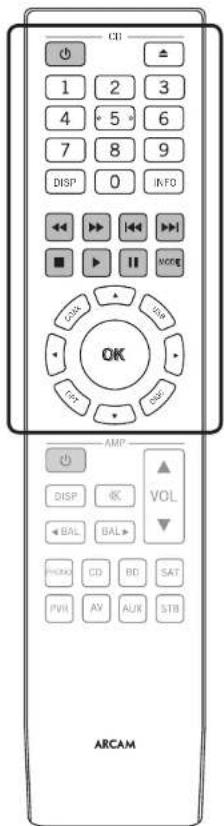
The remote control is pre-programmed for use with the CD550 player and also with an Arcam Integrated amplifier. The information in this section applies to the CD section of the remote control only.
Make sure the two AAA batteries (supplied) are installed before attempting to use the remote control.
-
With the remote face down, press down on the non-slip indentations of the battery compartment cover and slide the cover off
-
Insert the two AAA batteries (supplied). Take care to insert the batteries in the right direction by following the '+' and '-' marks in the battery compartment
-
Slide the battery compartment cover back and lock it in place with a click
The remote control requires a clear line of sight to the front panel of the CDS50 to ensure reliable operation.
NOTE: The supplied remote control is designed to support both the CDSS0 disc player as well as an Arcam integrated amplifier. The section below applies to the CD section of the remote control only. Refer to the amplifier user manual for description on the AMP section of the remote control unit.
| Toggle the CD550 power between standby and powered on | |
| Open/close the disc tray | |
| Search for and play the track corresponding to the key pressed when playing a CD | |
| Cycle through the front panel display brightness notions | |
| Cycle through the information displayed on the lower left portion of the front panel display | |
| Scan backwards (fast rewind) at 4x normal playback speed | |
| Scan forwards (fast forward) at 4x normal playback speed |
| Skip back to the beginning of the current/previous track | |
| Skip forward to the beginning of the next track | |
| Stop playback | |
| Play content | |
| Pause playback | |
| MODE | Cycle through different playback modes (random, repeat one, repeat all) |
| Input select buttons. Select the optical or coaxial digital audio input, USB media input or the internal disc player input. | |
| Navigate the fires and menus on the display. Press OK to select the highlighted fire or enter the highlighted menu option. |
Settings Menu
The Settings menu allows you to configure all aspects of your CDS50. This section will go through the menu items and explain their function.
The only way to view the Settings menu is on the CD550 front panel display.
Entering the settings menu
To access the Settings Menu, press ■ to stop any playback and wait for the CD550 to display the home screen. Press 🔒 to scroll down to the Settings Menu item and press OK to enter.
Navigating the menus
The CDS50 menus can be navigated by using the cursor (arrow) keys on the remote control.
- Use the ' and , keys to navigate up and down the current menu
- With the main section you require displayed, press OK to select it
- Use the 'and, keys to navigate up and down the options
- Pressing > selects a setting: use the ' and , keys to change the setting
- Press OK to confirm the setting. Go back to step 4 to adjust any other settings in the current section
- Press < to return to the previous screen if you want to select another section to adjust
Network Standby
This item determines whether network features are available when the CDS50 is in standby.
Selecting "ACTIVE" will maintain the network connection (required for IP control).
Selecting "STANDBY" will allow the network hardware to be powered down in order to reduce power consumption.
Network Setup
This item allows the user to configure the unit to join an existing network, required for network audio playback and over the internet software updates.
Auto Standby
Allows user to specify the period of inactivity after which the unit will automatically enter standby. The options are: 5, 10, 15, 20 minutes and OFF.
Disc Auto Playback
Controls whether an optical disc (e.g. CD) will play automatically after it is inserted.
☐ On: Optical discs will play automatically
☐ Off: Play must be pressed to play a disc
Firmware Update
You can check for an upgrade to your player's firmware by selecting this menu item and pressing OK to highlight 'Network', then press OK again.
A message appears if no new firmware is available, otherwise follow the instructions shown on the display.
Load Defaults
Press OK with this item highlighted to reset all settings to factory defaults.
You are asked to confirm that you want to load the factory default settings. Select 'cancel' to exit or 'to highlight the 'yes' option and OK to confirm.
System Information
Use the ' and , cursor keys to browse through options.
The System Information panel shows information about your player, such as the IP address and firmware version
Network Audio
Allows the user to enable or disable the UPnP rendering capability of the player. Setting this option to 'off' will disable network audio.
Digital Audio
Allows the user to limit the sample rate of the coas/optical digital output.
Analogue Audio Output
| Digital to Analogue Conversion ESS9038 32-bit 192kHz Delta-Sigma DAC | |
| Signal/Noise Ratio (Awd) 118dB unbalanced, 172Rdb balanced | |
| Harmonic Distortion (1kHz) <0.0008% | |
| Frequency response 10Hz 20kHz ± 0.5dB | |
| Output Level (Cd3) 2.2Vrms unbalanced, 4.5Vrms balanced | |
| Output impedance 47Ω unbalanced, 600Ω balanced | |
| Minimum Recommended Load 5kΩ | |
| RMS Jitter < 20 psec | |
Digital Inputs
| Supported sample rates | Optical 32kHz, 44.1kHz, 48kHz, 88.2kHz, 96kHz |
| Coaxial 37kHz, 44.1kHz, 48kHz, 88.2kHz, 96kHz, 176.4kHz, 197kHz | |
| Bit depth 16-bit - 32-bit | |
Digital Interfaces
| USB USB 2.0 High Speed (480Mbps) | |
| Ethernet 10/100Mbps | |
| Wireless 832.11b/g/n |
General
| Mains voltage 110-240V, 50-60Hz | |
| Maximum power consumption 20W | |
| Standby power consumptionNetwork standby power consumption | 0.4W (auto standby after time set by user - see page HN-12) |
| Dimensions (W x H x D)(including feet and control knob) | 433x87x283mm |
| Weight (net) | 5.3kg |
| Weight (gross) | 7.3kg |
| Supplied accessories | Mains leadsRemote control2 x AAA batteriesWi-Fi Antenna |
All specification values are typical unless otherwise stated. Arcam has a policy of continuous improvement for its products. This means that designs and specifications are subject to change without notice. E&OE.
Worldwide Guarantee
This entitles you to have the unit repaired free of charge, during the first five years after purchase, provided that it was originally purchased from an authorised Arcam dealer. The Arcam dealer is responsible for all after sales service. The manufacture can take no responsibility for defects arising from accident, misuse, abuse, wear and tear, neglect or through unauthorised adjustment and/or repair, neither can they accept responsibility for damage or loss occurring during transit to or from the person claiming under the guarantee.
The warranty covers:
Parts (excluding disc drives) and labour costs for five years from the purchase date (see below for additional terms and conditions). After five years you must pay for both parts and labour costs.
Disc drives (of any type) are covered under this warranty for two years from the purchase date.
The warranty does not cover battery replacement at any time.
The warranty does not cover transportation costs at any time.
Claims under guarantee
This equipment should be packed in the original packing and returned to the dealer from whom it was purchased. It should be sent carriage prepaid by a resuitable carrier – not by post. No responsibility can be accepted for the unit whilst in transit to the dealer or distributor and customers are therefore advised to insure the unit against loss or damage whilst in transit.
For further details contact Arcam at arcam.support@harman.com.
Problems?
I'your Arcam dealer is unable to answer any query regarding this or any other Arcam product please contact Arcam Customer Support at the above address and we will do our best to help you.
On-line registration
You can register your product on-line at www.arcam.co.uk.
Technology Licensing
EN
MPEG Layer-3 audio coding technology licensed from Fraunhofer IIS and Thomson.
This product uses some software programs which are distributed under the GPL license. Accordingly, the following GPL software source codes that have been used in this product can be provided after asking at www.sherwoodusa.com.
GNU GENERAL PUBLIC LICENSE
Version 2, June 1991
Copyright (C) 1989, 1991 Free Software Foundation, Inc. 51 Franklin Street, Fifth Floor, Boston, MA 02110-1301, USA.
TERMS AND CONDITIONS FOR COPYING, DISTRIBUTION AND MODIFICATION
This License applies to any program or other work which contains a notice placed by the copyright holder saying it may be distributed under the terms of this General Public License. The 'Program', below, refers to any such program or work, and a 'work based on the Program' means either the Program or any derivative work under copyright law; that is to say, a work containing the Program or a portion of it, either verbatim or with modifications and/or translated into another language. (Hereinafter, translation is included without limitation in the term 'modification'). Each licensee is addressed as 'yuxt.
Activities other than copying, distribution and modification are not covered by this License; they are outside its scope. The act of running the Program is not restricted, and the output from the Program is covered only if its contents constitute a work based on the Program (independent of having been made by running the Program). Whether that is true depends on what the Program does.
ENGLISH
You may copy and distribute verbatim copies of the Program's source code as you receive it, in any medium, provided that you conspicuously and appropriately publish on each copy an appropriate copyright notice and disclaimer of warranty; keep intact all the notices that refer to this License and to the absence of any warranty; and give any other recipients of the Program a copy of this License
along with the Program.
You may charge a fee for the physical act of transferring a copy, and you may at your option offer warranty protection in exchange for a fee.
- You may modify your copy or copies of the Program or any portion of it, thus forming a work based on the Program, and copy and distribute such modifications or work under the terms of Section 1 above, provided that you also meet all of these conditions:
A. You must cause the modified files to carry prominent notices stating that you changed the files and the date of any change.
B. You must cause any work that you distribute or publish, that in whole or in part contains or is derived from the Program or any part thereof, to be licensed as a whole at no charge to all third parties under the terms of this license.
C. If the modified program normally reads commands interactively when run, you must cause it, when started running for such interactive use in the most ordinary way, to print or display an announcement including an appropriate copyright notice and a notice that there is no warranty (or else, saying that you provide a warranty) and that users may redistribute the program under these conditions, and telling the user how to view a copy of this license. (Exception: if the Program itself is interactive but does not normally print such an announcement, your work based on the Program is not required to print an announcement.)
These requirements apply to the modified work as a whole. If identifiable sections of that work are not derived from the Program, and can be reasonably considered independent and separate works in themselves, then this License, and its terms, do not apply to those sections when you distribute them as separate works. But when you distribute the same sections as part of a whole which is a work based on the Program, the distribution of the whole must be on the terms of this license, whose permissions for other licensees extend to the entire whole, and thus to each and every part regardless of who wrote it.
Thus, it is not the intent of this section to claim rights or contest your rights to work written entirely by you; rather, the intent is to exercise the right to control the distribution of derivative or collective works based on the Program.
In addition, mere aggregation of another work not based on the Program with the Program (or with a work based on the Program) on a volume of a storage or distribution medium does not bring the other work under the scope of this License.
- You may copy and distribute the Program (or a work based on it, under Section 2) in object code or executable form under the terms of Sections 1 and 2 above provided that you also do one of the following:
A. Accompany it with the complete corresponding machine readable source code, which must be distributed under the terms of Sections 1 and 2 above on a medium customarily used for software interchange; or,
B. Accompany it with a written offer, valid for at least three years, to give any third party, for a charge no more than your cost of physically performing source distribution, a complete machine-reachable copy of the corresponding source code, to be distributed under the terms of Sections 1 and 2 above on a medium customarily used for software interchange; or,
C. Accompany it with the information you received as to the offer to distribute corresponding source code. (This alternative is allowed only for non-commercial distribution and only if you received the program in object code or executable form with such an offer, in accord with Subsection b above). The source code for a work means the preferred form of the work for making modifications to it. For an executable work, complete source code means all the source code for all modules it contains, plus any associated interface definition files, plus the scripts used to control compilation and installation of the executable. However, as a special exception, the source code distributed need not include anything that is normally distributed (in either source or binary form) with the major
components (complier, kernel, and so on) of the operating system or which the executable runs, unless that component itself accompanies the executable. If distribution of executable or object code is made by offering access to copy from a designated place, then offering equivalent access to copy the source code from the same place counts as distribution of the source code; even though third parties are not compelled to copy the source along with the object code.
-
You may not copy, modify, sublicense, or distribute the Program except as expressly provided under this License. Any attempt otherwise to copy, modify, sublicense or distribute the Program is void, and will automatically terminate your rights under this License. However, parties who have received copies, or rights, from you under this license will not have their licenses terminated so long as such parties remain in full compliance.
-
You are not required to accept this License, since you have not signed it. However, nothing else grants you permission to modify or distribute the Program or its derivative works. These actions are prohibited by law if you do not accept this License. Therefore, by modifying or distributing the Program (or any work based on the Program), you indicate your acceptance of this License to do so, and all its terms and conditions for copying, distributing or modifying the Program or works based on it.
-
Each time you redistribute the Program (or any work based on the Program), the recipient automatically receives a license from the original licensor to copy, distribute or modify the Program subject to these terms and conditions. You may not impose any further restrictions on the recipients' exercise of the rights granted herein. You are not responsible for enforcing compliance by third parties to this License.
-
If, as a consequence of a court judgment or allegation of patent infringement or for any other reason (not limited to patent issues), conditions are imposed on you (whether by court order, agreement or otherwise) that contradict the conditions of this license, they do not excuse you from the conditions of this License. If you cannot distribute so as to
satisfy simultaneously your obligations under this license and any other pertinent obligations, then as a consequence you may not distribute the Program at all. For example, if a patent license would not permit royalty-free redistribution of the Program by all those who receive copies directly or indirectly through you, then the only way you could satisfy both it and this License would be to refrain entirely from distribution of the Program. If any portion of this section is held invalid or unenforceable under any particular circumstance, the balance of the section is intended to apply and the section as a whole is intended to apply in other circumstances. It is not the purpose of this section to induce you to infringe any patents or other property right claims or to contest validity of any such claims; this section has the sole purpose of protecting the integrity of the free software distribution system, which is implemented by public license practices. Many people have made generous contributions to the wide range of software distributed through that system in reliance on consistent application of that system; it is up to the author/donor to decide if he or she is willing to distribute software through any other system and a licensee cannot impose that choice. This section is intended to make thoroughly clear what is believed to be a consequence of the rest of this License.
-
If the distribution and/or use of the Program is restricted in certain countries either by patents or by copyrighted interfaces, the original copyright holder who places the Program under this License may add an explicit geographical distribution limitation excluding those countries, so that distribution is permitted only in or among countries not thus excluded. In such case, this License incorporates the limitation as if written in the body of this license.
-
The Free Software Foundation may publish revised and/or new versions of the General Public License from time to time. Such new versions will be similar in spirit to the present version, but may differ in detail to address new problems or concerns. Each version is given a distinguishing version number. If the Program specifies a version number of this License which applies to it and 'any later version'.
you have the option of following the terms and conditions either of that version or of any later version published by the Free Software Foundation. If the Program does not specify a version number of this License, you may choose any version ever published by the Free Software Foundation.
- If you wish to incorporate parts of the Program into other free programs whose distribution conditions are different, write to the author to ask for permission. For software which is copyrighted by the Free Software Foundation, write to the Free Software Foundation; we sometimes make exceptions for this. Our decision will be guided by the two goals of preserving the free status of all derivatives of our free software and of promoting the sharing and reuse of software generally
NO WARRANTY
-
BECAUSE THE PROGRAM IS LICENSED FREE OF CHARGE, THERE IS NO WARRANTY FOR THE PROGRAM, TO THE EXTENT PERMITTED BY APPLICABLE LAW EXCEPT WHEN OTHERWISE STATED IN WRITING THE COPYRIGHT HOLDERS AND/OR OTHER PARTIES PROVIDE THE PROGRAM 'AS IS WITHOUT WARRANTY OF ANY KIND, EITHER EXPRESSED OR IMPLIED, INCLUDING, BUT NOT LIMITED TO, THE IMPLIED WARRANTIES OF MERCHANTABILITY AND FITNESS FOR A PARTICULAR PURPOSE. THE ENTIRE RISK AS TO THE QUALITY AND PERFORMANCE OF THE PROGRAM IS WITH YOU SHOULD THE PROGRAM PROVE DEFECTIVE, YOU ASSUME THE COST OF ALL NEEDED SERVICING, REFAR OR CORRECTION.
-
IN NO EVENT UNLESS REQUIRED BY APPLICABLE LAW OR AGREED TO IN WRITING WILL ANY COPYRIGHT HOLDOR, OR ANY OTHER PARTY WHO MAY MODIFY AND/OR REDRIBUTE THE PROGRAM AS PERMITTED ABOVE BELIABLE TO YOU FOR DAMAGES, INCLUDING ANY GENERAL SPECIAL INCENTAL OR CONSEQUENTIAL DAMAGES ARISING OUT OF THE USE OR INABILITY TO USE THE PROGRAM (INCLUDING BUT NOT LIMITED TO LOSS OF DATA OR DATA BEING RENDERED IN ACCURATE OR LOSSES SUSTAINED BY YOU OR THIRD PARTS OR A FAILURE OF THE PROGRAM TO OHPATE WITH ANY OTHER PROGRAMS), EVEN IF SUCH HOLDER OR OTHER
PARTY HAS BEEN ADVISED OF THE POSSIBILITY OF SUCH DAMAGES.
ARCAM | HDA
SACD/CD/LECTEUR DE DIFFUSION EN CONTINU
CDS50
CLASSE 1 PRODUIT LASER
Supports compatibles
Lecture d'un disque
Supports compatibles
OGG tol 74 bit/197 kHz
MP3 tot 320 kbps/48 kHz
WMA tot 192 kbps/48 kHz
Een schijf afspelen
WAV Has 74 bits/197 kHz
AAC Hasta 24 bits/96kHz
AIFF Hasta 24 bits/192 kHz
OGG Hasta 74 bits/197 kHz
MP3 Iasta 320 kops/48 kHz
WMA Hasta 192 kbps/48 kHz
AIFF info a 24-bit/192 kHz
OGG first a 74-bit/192 kHz
MP3 fino a 320kbps/48kHz
WMA fina a 192kops/48kHz
CMIT ID:XXXXXXXXXXXX
CN-11
全球联保
THE WEST WING, STIRLING HOUSE
WATERBEACH, CAMBRIDGESHIRE, CB25 9PB
+44 (0) 1223 203200SH296 ISSUE 5

- Important Safety Instructions
- Class II product
- Warning
- Safety Compliance
- Caution on installation
- Laser Radiation
- Radio Interference
- FCC Information(for US customers)
- PRODUCT
- IMPORTANT NOTICE: DO NOT MODIFY THIS PRODUCT
- Safety Information (for European customers)
- d A note about recycling
- Correct disposal of this product
- Welcome
- Thank you and congratulations...
- Contents
- Overview
- Placing The Unit
- Power
- Interconnect Cables
- Front Panel Controls
- Audio Connections
- Other Connections
- Introduction
- Digital Audio Inputs
- Digital Audio Outputs
- Analogue Audio Outputs
- Network
- USB
- RS232
- Remote IR Control
- NOTE
- Trigger In
- Operation
- Before You Begin...
- Switching On
- playable Discs
- Supported Media
- Playing a Disc
- Playing from the Network
- Playing from USB
- Transport Controls
- STOP/EJECT
- PLAY/PAUSE
- SKIP
- Settings Menu
- Entering the settings menu
- Navigating the menus
- Network Standby
- Network Setup
- Auto Standby
- Disc Auto Playback
- Firmware Update
- Load Defaults
- System Information
- Network Audio
- Digital Audio
- Worldwide Guarantee
- The warranty covers:
- Claims under guarantee
- Problems?
- On-line registration
- Technology Licensing
- ENGLISH
- ARCAM | HDA
- Supports compatibles
- Een schijf afspelen
- 全球联保
Brand : ARCAM
Model : CDS50
Category : Cd player/recorder