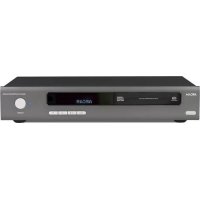
CD192 - Cd player/recorder ARCAM - Free user manual and instructions
Find the device manual for free CD192 ARCAM in PDF.


User questions about CD192 ARCAM
0 question about this device. Answer the ones you know or ask your own.
Ask a new question about this device
Download the instructions for your Cd player/recorder in PDF format for free! Find your manual CD192 - ARCAM and take your electronic device back in hand. On this page are published all the documents necessary for the use of your device. CD192 by ARCAM.
USER MANUAL CD192 ARCAM
Arcam CD192 Compact Disc player
CAUTION: To reduce the risk of electric shock, do not remove cover (or back). No user serviceable parts inside. Refer servicing to qualified service personnel.
WARNING: To reduce the risk of fire or electric shock, do not expose this apparatus to rain or moisture.

The lightning flash with an arrowhead symbol within an equilateral triangle is intended to alert the user to the presence of uninsulated 'dangerous voltage' within the product's enclosure that may be of sufficient magnitude to constitute a risk of electric shock to persons.

The exclamation point within an equilateral triangle is intended to alert the user to the presence of important operating and maintenance (servicing) instructions in the literature accompanying the product.
CAUTION: In Canada and the USA, to prevent electric shock, match the wide blade of the plug to the wide slot in the socket and insert the plug fully into the socket.
Important safety instructions
This product is designed and manufactured to meet strict quality and safety standards. However, you should be aware of the following installation and operation precautions:
1. Take heed of warnings and instructions
You should read all the safety and operating instructions before operating this appliance. Retain this handbook for future reference and adhere to all warnings in the handbook or on the appliance.
2. Water and moisture
The presence of electricity near water can be dangerous. Do not use the appliance near water – for example next to a bathtub, washbowl, kitchen sink, in a wet basement or near a swimming pool, etc.
3. Object or liquid entry
Take care that objects do not fall and liquids are not spilled into the enclosure through any openings. Liquid filled objects such as vases should not be placed on the equipment.
4. Ventilation
Do not place the equipment on a bed, sofa, rug or similar soft surface, or in an enclosed bookcase or cabinet, since ventilation may be impeded. We recommend a minimum distance of 50mm (2 inches) around the sides and top of the appliance to provide adequate ventilation.
5. Heat
Locate the appliance away from naked flames or heat producing equipment such as radiators, stoves or other appliances (including other amplifiers) that produce heat.
6. Climate
The appliance has been designed for use in moderate climates.
7. Racks and stands
Only use a rack or stand that is recommended for use with audio equipment. If the equipment is on a portable rack it should be moved with great care, to avoid overturning the combination.
8. Cleaning
Unplug the unit from the mains supply before cleaning.
The case should normally only require a wipe with a soft, damp, lint-free cloth. Do not use paint thinners or other chemical solvents for cleaning.
We do not advise the use of furniture cleaning sprays or polishes as they can cause indelible white marks if the unit is subsequently wiped with a damp cloth.
9. Power sources
Only connect the appliance to a power supply of the type described in the operating instructions or as marked on the appliance.
10. Power-cord protection
Power supply cords should be routed so that they are not likely to be walked on or pinched by items placed upon or against them, paying particular attention to cords and plugs, and the point where they exit from the appliance.
11. Grounding
Ensure that the grounding means of the appliance is not defeated.
12. Power lines
Locate any outdoor antenna/aerial away from power lines.
13. Non-use periods
If the unit has a standby function, a small amount of current will continue to flow into the equipment in this mode. Unplug the power cord of the appliance from the outlet if left unused for a long period of time.
14. Abnormal smell
If an abnormal smell or smoke is detected from the appliance, turn the power off immediately and unplug the unit from the wall outlet. Contact your dealer immediately.
15. Servicing
You should not attempt to service the appliance beyond that described in this handbook. All other servicing should be referred to qualified service personnel.
16. Damage requiring service
The appliance should be serviced by qualified service personnel when:
A. the power-supply cord or the plug has been damaged, or
B. objects have fallen, or liquid has spilled into the appliance, or
C. the appliance has been exposed to rain, or
D. the appliance does not appear to operate normally or exhibits a marked change in performance, or
E. the appliance has been dropped or the enclosure damaged.
Safety compliance
This product has been designed to meet the IEC 60065 international electrical safety standard.
Using this handbook
This handbook has been designed to give you all the information you need to install, connect, set up and use the Arcam CD192 compact disc player. The CR-314 remote control handset supplied with this equipment is also described.
Safety
Safety guidelines are set out on the inside front cover of this handbook.
Many of these items are common sense precautions, but for your own safety, and to ensure that you do not damage the unit, we strongly recommend that you read them.
Digital to Analogue conversion
The CD192 incorporates the latest audio up-sampling technology to convert the 44.1kHz data from the CD up to 192kHz in 24-bit precision using the Analog Devices AD1896 sample rate converter.
The 192kHz audio data is converted into the analogue domain using four Wolfson Micro WM8740 24-bit stereo DACs. Left and right output channels are made using two stereo DAC chips per channel, both operating in dual mono configuration per channel. The resulting four mono signals (two for each channel) are summed together to help improve dynamic range, linearity and therefore distortion.
Due to the higher sample rates, the digital filters roll off less aggressively than for standard DACs, and the analogue filters have a wider bandwidth resulting in less phase distortion, particularly for the higher frequencies.
Contents
Safety guidelines....E-2
Using this handbook ....E-3
Installation ......E-4
Positioning the unit ......E-4
Connecting to other equipment.....E-4
Connecting to a power supply.....E-4
Using your CD player ....E-5
CDs with text ......E-5
Using the CR-314 remote control.....E-6
Remote-control codes ......E-7
Technical specification.....E-8
Guarantee ......E-9
Worldwide Guarantee ....E-9
On line registration ....E-9
Installation

text_image
POWER INLET VOLTAGE SELECT 120V/230V AUDIO - OUT 1 2 L L R R DIGITAL OUT COAXIAL OPTICAL IR-IN 12V TRIGGER INPositioning the unit
Always place the CD player on a level, fi rm surface. Placing your player on a set of dedicated sorbothane isolation feet will isolate the unit from its surroundings as well as absorbing the vibrations created within the player itself. You will generally hear some sonic improvements, which makes this an extremely cost-effective upgrade.
Connecting to other equipment
Interconnect cables
Interconnecting cables are not supplied with this CD player. We recommend high quality cables as inferior quality cables will degrade the sound quality of your system. Please contact your Arcam dealer for details of suitable cables.
Audio outputs ③
Connect these to your amplifier's CD or any other line-level input using suitable high quality interconnect cables. Ensure that the left and right audio outputs from the CD player are connected to the same left and right inputs on your amplifier.
The second set of sockets can be used to connect to a second amplifier set up for multi-room use.
Coaxial digital output 4
Use this socket if you are using a separate digital to analogue converter (DAC) or digital recorder. Connect to the DAC or recorder's digital input using a suitable 75Ω screened cable.
CAUTION: Never connect the digital output socket to a conventional audio input.
Optical digital output ⑤
Use this socket if you are using a separate DAC or digital recorder with an optical connection. Connect using a suitable optical cable.
Remote IR input ⑥ and 12V Trigger input ⑦
These connections are for use in multi-room installations. In normal use there is no need to make any connections to these sockets.
Connecting to a power supply
Wrong plug?
Check that the plug supplied with the unit fi ts your supply and that your mains supply voltage agrees with the voltage setting (120V/230V) ② indicated on the rear panel of the unit.
If your mains supply voltage or mains plug is different, consult your Arcam dealer.
Mains lead
The appliance is normally supplied with a moulded mains plug already fitted to the lead. If for any reason the plug needs to be removed, it must be disposed of immediately and securely, as it is a potential shock hazard when inserted into the mains socket. Should you require a new mains lead, contact your Arcam dealer.
Plugging in
Push the plug (IEC line socket) of the power cable supplied with the unit into the socket ① (marked POWER INLET) in the back of the unit. Make sure it is pushed in firmly.
Put the plug on the other end of the cable into your power supply socket and switch the socket on.
Using your CD player
text_image
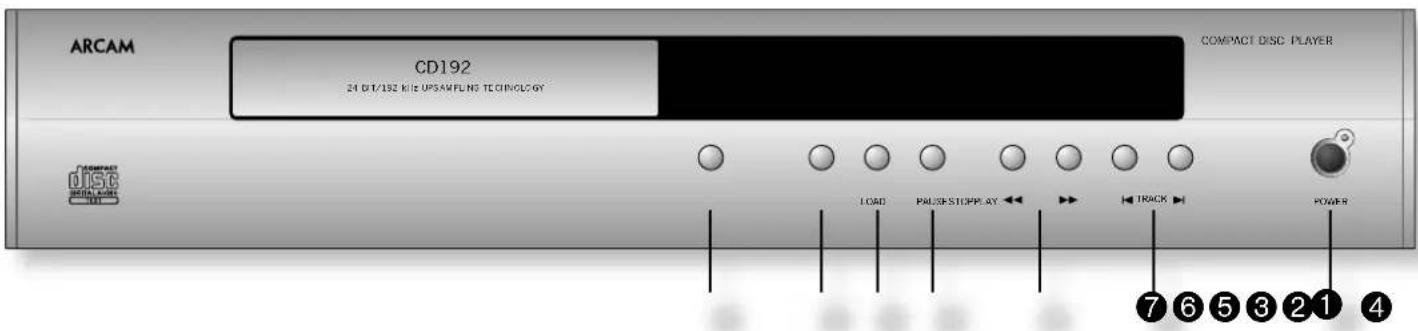
ARCAM CD192 24 DT/192 KIE UPSAMPLING TECHNOLOGY COMPACT DISC PLAYER LOAD PAUSE STOPPLY TRACK POWER 7 6 5 3 2 1 4POWER ①
Press this button to switch the CD player on and off. When first powered up with no CD installed the display shows 'No disc'.

text_image
--NO DISC--LOAD ②
To install a CD, press LOAD (or OPEN on the remote control). The CD tray opens – it accepts 12cm and 8cm discs. Place the CD in the tray with the label facing uppermost. Press LOAD again (or press PLAY, or gently push the tray in 5mm) to close the tray. You will see the total number of tracks and total disc time.

text_image
TRACK INDEX MIN SLC 8 1 52.19 2 3 4 5 5 7 8The display returns to '0' after a few seconds. The disc is now ready to play.
PLAY ③
Press to play the CD. To restart from track 1, press STOP and then PLAY.
Make sure your amplifier's input source selector is set to the correct input.
STOP 4
Press to stop the CD playing. The display shows '0' and the number of tracks.
PAUSE 5
Press to pause the disc (interrupt play). Press PLAY to resume play from the same point.
SEARCH 6
Press to search backwards, or to search forwards for a particular passage within the currently playing track. If the player is in 'PAUSE' mode the search is made at high speed with the sound muted.
Press ◀◀r▶▶Y to stop the search action and resume playing.
SKIP TRACK 7
To start a CD with a track other than the first, press or to locate the desired track.
To select another track during play, press or . The track is played automatically after selection.
CDs with text
Load
You will see the total number of tracks and the total disc time with 'CD TEXT' illuminated in the display. The artist and album title scrolls across the display before returning to show the artist and total number of tracks.

text_image
TRACK INDEX MIN SFC ANASTACIA CD TEXTPlay
The track number is briefly displayed, followed by the track title scrolling across the display. The display returns to showing the track number and time.
Track selection
When a new track is selected, the track number is briefly displayed, followed by the track title scrolling across the display. The display returns to showing the track number and time.
NOTE: The track title is always displayed when a track is selected, either for playing or programming. The artist is always displayed when the disc is stopped.
Using the CR-314 remote control
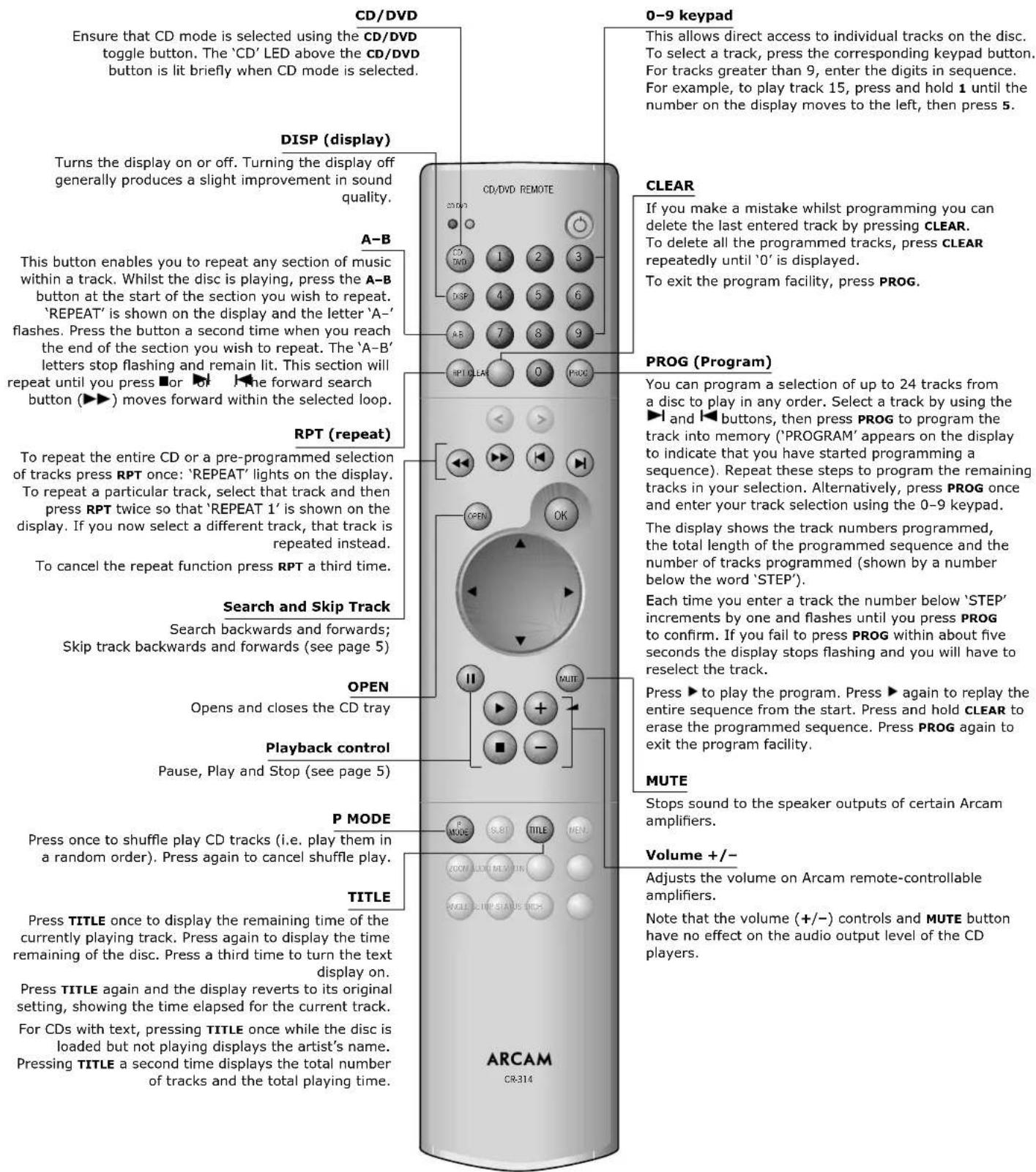
text_image
CD/DVD Ensure that CD mode is selected using the CD/DVD toggle button. The 'CD' LED above the CD/DVD button is lit briefly when CD mode is selected. 0-9 keypad This allows direct access to individual tracks on the disc. To select a track, press the corresponding keypad button. For tracks greater than 9, enter the digits in sequence. For example, to play track 15, press and hold 1 until the number on the display moves to the left, then press 5. DISP (display) Turns the display on or off. Turning the display off generally produces a slight improvement in sound quality. CLEAR If you make a mistake whilst programming you can delete the last entered track by pressing CLEAR. To delete all the programmed tracks, press CLEAR repeatedly until '0' is displayed. To exit the program facility, press PROG. A-B This button enables you to repeat any section of music within a track. Whilst the disc is playing, press the A-B button at the start of the section you wish to repeat. 'REPEAT' is shown on the display and the letter 'A-' flashes. Press the button a second time when you reach the end of the section you wish to repeat. The 'A-B' letters stop flashing and remain lit. This section will repeat until you press ■ or ▶ ▶ ▶ ▶ ▶ forward search button (▶▶) moves forward within the selected loop. PROG (Program) RPT (repeat) To repeat the entire CD or a pre-programmed selection of tracks press RPT once: 'REPEAT' lights on the display. To repeat a particular track, select that track and then press RPT twice so that 'REPEAT 1' is shown on the display. If you now select a different track, that track is repeated instead. To cancel the repeat function press RPT a third time. Search and Skip Track Search backwards and forwards; Skip track backwards and forwards (see page 5) OPEN Opens and closes the CD tray Playback control Pause, Play and Stop (see page 5) P MODE Press once to shuffle play CD tracks (i.e. play them in a random order). Press again to cancel shuffle play. TITLE Press TITLE once to display the remaining time of the currently playing track. Press again to display the time remaining of the disc. Press a third time to turn the text display on. Press TITLE again and the display reverts to its original setting, showing the time elapsed for the current track. For CDs with text, pressing TITLE once while the disc is loaded but not playing displays the artist's name. Pressing TITLE a second time displays the total number of tracks and the total playing time. MUTE Stops sound to the speaker outputs of certain Arcam amplifiers. Volume +/- Adjusts the volume on Arcam remote-controllable amplifiers. Note that the volume (+/-) controls and MUTE button have no effect on the audio output level of the CD players.NOTE: Remember to install the two AAA batteries supplied before trying to use your remote control.
Do not place anything in front of the display area on the CD player (where the IR receiver is located), or the remote control may not work.
Note that greyed-out buttons on the remote control are DVD-specific and are not used with the CD player.
Remote-control codes
The following table gives the IR-commands accepted by the CD192. Items shown in italics reference the buttons on the supplied CR-314 remote control. The items not in italics are additional commands accepted by the CD192.
Power commands
| Command Decimal Code | |
| Power toggle 20-12 | |
| Power-on 20-123 | |
| Power-off 20-124 |
Playback control commands
| Command Decimal Code | |
| Track number 'n', (e.g., 1) 20-n (e.g., 20-1) | |
| Track selection 10+ 20-10 | |
| Time 20-66 | |
| Remain 20-11 | |
| Track forward 20-32 | |
| Track back 20-33 | |
| Fast forward 20-52 | |
| Fast rewind 20-50 | |
| Open | 20-45 |
| Pause | 20-48 |
| Stop | 20-54 |
| Play | 20-53 |
Advanced control commands
| Command Decimal Code | |
| Repeat toggle 20-29 | |
| Repeat off | 20-125 |
| Repeat one | 20-126 |
| Repeat all | 20-127 |
| Repeat A-B | 20-59 |
| Search | 20-76 |
| Scan 20-43 | |
| Scan 10 seconds | 20-79 |
| Scan 20 seconds | 20-88 |
| Scan 30 seconds | 20-90 |
| Scan off | 20-90 |
| Clear | 20-58 |
| Clear all | 20-57 |
| Programme | 20-41 |
| Programme on | 20-99 |
| Programme off | 20-100 |
| PMode (Shuffle) | 20-64 |
| Shuffle | 20-28 |
| Shuffle on 20-114 | |
| Shuffle off | 20-115 |
Display control commands
| Command Decimal Code | |
| Display toggle | 20-18 |
| Display on | 20-14 |
| Display dim | 20-20 |
| Display off 20-21 | |
| Display remaining track time | 20-110 |
| Display elapsed track time | 20-111 |
| Display remaining disk time | 20-112 |
| Display remaining titles | 20-113 |
Technical specifi cation
Digital to Analogue conversion
| High performance 192kHz 24-bit sample rate converter and multiple 24-bit digital to analogue conversion |
Laser pick-up 3 beam
Laser wavelength 780nm
Numerical aperture 0.45
Signal to noise ratio 114dB
Harmonic distortion, 24-bit (1kHz) 0.0008% *
Frequency response (±0.5dB) 0.15Hz–20kHz
Output level (0dB) 2.2Vrms
Output impedance 47Ω
Minimum recommended load 5kΩ
* Using 16-bit, triangular p.d.f. dithered data
Physical
Dimensions W430 x D290 x H85mm
Weight 5.6kg nett/7.5kg packed
| Power consumption | 32VA maximum |
| Digital output connection | 75Ω co-axial optical TOSLINK |
Supplied accessories
| Mains leadCR-314 remote control2 x AAA batteries | |
| E&OE |
NOTE: All specification values are typical unless otherwise stated.
Continual improvement policy
Arcam has a policy of continual improvement for its products. This means that designs and specifications are subject to change without notice.
Radio interference
The CD192 player is a digital audio device which has been designed to very high standards of electromagnetic compatibility.
Both CD players and DACs generate, and can radiate RF (radio frequency) energy. In some cases this can cause interference with FM and AM radio reception. If this is the case, keep the CD player and its connecting cables as far from the tuner and its aerials as possible. Connecting the CD player and the tuner to different mains sockets can also help to reduce interference.
EC COUNTRIES – These products have been designed to comply with directive 89/336/EEC.
USA – These products comply with FCC requirements.
Laser radiation
If an Arcam CD player is operated whilst the outer casing is removed, invisible laser radiation could cause eye damage.

Worldwide Guarantee
This entitles you to have the unit repaired free of charge, during the first two years after purchase, at any authorised Arcam distributor provided that it was originally purchased from an authorised Arcam dealer or distributor. The manufacturer can take no responsibility for defects arising from accident, misuse, abuse, wear and tear, neglect or through unauthorised adjustment and/or repair, neither can they accept responsibility for damage or loss occurring during transit to or from the person claiming under the guarantee.
The warranty covers:
Parts and labour costs for two years from the purchase date. After two years you must pay for both parts and labour costs. The warranty does not cover transportation costs at any time.
Claims under guarantee
This equipment should be packed in the original packing and returned to the dealer from whom it was purchased, or failing this, directly to the Arcam distributor in the country of residence. It should be sent carriage prepaid by a reputable carrier — NOT by post. No responsibility can be accepted for the unit whilst in transit to the dealer or distributor and customers are therefore advised to insure the unit against loss or damage whilst in transit.
For further details contact Arcam at:
Arcam Customer Support Department, Pembroke Avenue, Waterbeach, CAMBRIDGE, CB5 9QR, England
Problems?
If you have a problem, always contact your dealer in the first instance. If your dealer is unable to answer any query regarding this or any other Arcam product please contact Arcam Customer Support and we will do our best to help you.
On line registration
You can register your Arcam product on line at: www.arcam.co.uk