
PGG 15 B1 - Modeling and engraving tools PARKSIDE - Free user manual and instructions
Find the device manual for free PGG 15 B1 PARKSIDE in PDF.



| Product type | Electric engraver |
| Intended use | Engraving on metals, plastics, ceramic, wood, leather, stone |
| Rated voltage | 230 V~, 50 Hz |
| Rated current | 0.15 A |
| Operating mode | Intermittent periodic duty S3 20% |
| Rotation speed | 6000 min⁻¹ |
| Weight | approx. 370 g |
| Sound pressure level | 74.4 dB(A) |
| Sound power level | 85.4 dB(A) |
| Acoustic uncertainty K | 3 dB |
| Total vibration value (forearm) | 1.582 m/s² |
| Vibration uncertainty K | 1.5 m/s² |
| Engraving tip | Tungsten steel |
| Depth adjustment | Yes, by wheel (frequency adjusting knob) |
| Switch | On/Off |
| Included accessories | Engraving templates (letters/numbers) |
| Warranty | 3 years |
| After-sales service France | 0800 919270 |
| After-sales service Belgium | 070 270 171 (0.15 EUR/min) |
| Manufacturer | KOMPERNASS HANDELS GMBH, Burgstrasse 21, 44867 Bochum, Germany |
| Cleaning | Dry cloth |
| Spare parts | Engraving tip (tungsten steel) |
| Recommended hearing protection | Yes, wearing ear muffs |
Frequently Asked Questions - PGG 15 B1 PARKSIDE
User questions about PGG 15 B1 PARKSIDE
0 question about this device. Answer the ones you know or ask your own.
Ask a new question about this device
Download the instructions for your Modeling and engraving tools in PDF format for free! Find your manual PGG 15 B1 - PARKSIDE and take your electronic device back in hand. On this page are published all the documents necessary for the use of your device. PGG 15 B1 by PARKSIDE.
USER MANUAL PGG 15 B1 PARKSIDE
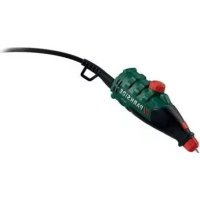
POWER ENGRAVING TOOL PGG 15 B1
GB IE
POWER ENGRAVING TOOL
Operation and Safety Notes
Translation of the original instructions
SE
GRAVYRMASKIN
Before reading, unfold the page containing the illustrations and familiarise yourself with all functions of the device.
FI
GB / IE Operation and Safety Notes Page 5
| FI Käyttö- ja turvaohjeet Sivu 19 | |
| SE Bruksanvisning och säkerhetsanvisningar Sidan 33 | |
| FR / BE Instructions d’utilisation et consignes de sécurité Page 47 | |
| NL/BE Bedienings- en veiligheidsinstructies Pagina 63 | |
| DE/AT/CH Bedienungs- und Sicherheitshinweise | Seite 79 |
natural_image
Close-up of hands adjusting a device with a pen and ruler, no visible text or symbolsIntroduction
Proper use......Page 6
Features and equipment....Page 6
Included items ...... Page 7
Technical details......Page 7
General power tool safety warnings ...... Page 8
- Work area safety...... Page 9
- Electrical safety......Page 9
- Personal safety......Page 10
- Power tool use and care....Page 11
- Service......Page 12
Operation
Switching on/off Page 12
Setting the cutting depth....Page 13
Changing the engraving point ...... Page 13
Advice on use......Page 14
Cleaning Page 14
Service Page 15
Warranty Page 15
Disposal Page 16
Translation of the original declaration of conformity / Manufacturer......Page 17
Power engraving tool PGG 15 B1
- Introduction
We congratulate you on the purchase of your new device. You have chosen a high quality product. The instructions for use are part of the product. They contain important information concerning safety, use and disposal. Before using the product, please familiarise yourself with all of the safety information and instructions for use. Only use the unit as described and for the specified applications. If you pass the product on to anyone else, please ensure that you also pass on all the documentation with it.
Proper use
This product is intended for engraving or decorating materials such as metal, plastic, glass, ceramic, wood, leather and stone. Any other use or modification to the drill / grinder shall be considered as improper use and could give rise to considerable dangers. The manufacturer will not accept liability for loss or damage arising from improper use. Not intended for commercial use.
Features and equipment
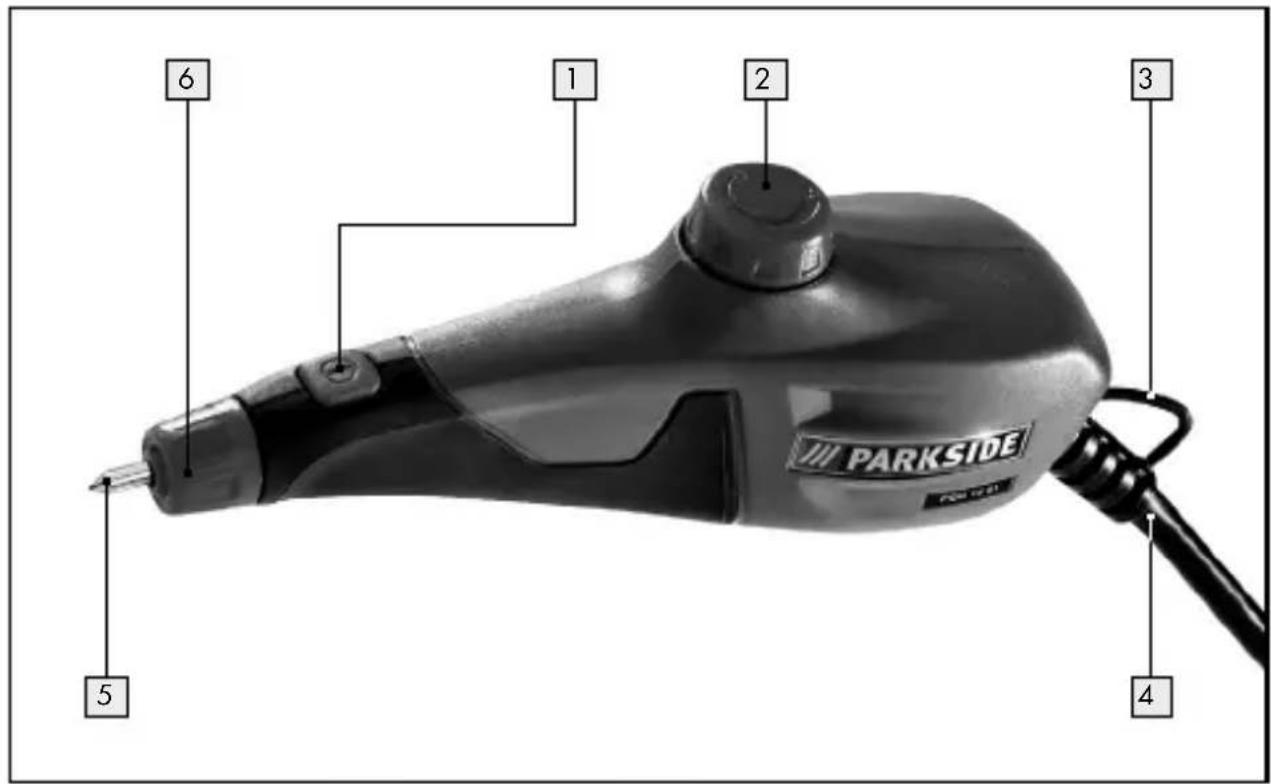
1 ON/OFF switch
2 Stroke rate rotary controller
3 Hanging eye
4 Mains lead
5 Engraving point
6 Engraving point holder
7 Engraving stencils
Included items
1 Power engraving tool PGG 15 B1
2 Engraving stencils
1 Operating instructions
- Technical details
Rated voltage: 230 V\~50 Hz
Mode of operation: intermittent operation: S3 20 %
Note: A duty cycle (in %) defines explicitly the maximum continuous duration of use and the subsequent rest period. In this case the tool requires a cooling phase of eight minutes after an operating period of two minutes, for example.
Rated current: 0.15A
Stroke rate: 6000 min
Weight approx: 370 g
Noise and vibration data:
Measured values for noise are determined in accordance with EN 60745. The A-weighted noise level of the electrical power tool are typically:
Sound pressure level: 74.4 dB(A)
Sound power level: 85.4 dB(A)
Uncertainty K: 3 dB
Wear ear protection!
Evaluated acceleration, typical:
Hand/arm vibration: 1.582 m/s ^4
Uncertainty K = 1.5 m/s ^2
WARNING! The vibration level specified in these instructions was measured in accordance with an EN 60745 standardised measurement process and can be used to compare equipment. The vibration emission value specified can also serve as a preliminary assessment of the exposure.
The vibration level will change according to the application of the electrical tool an in some cases may exceed the value specified in these instructions. Regularly using the electric tool in such a way may make it easy to underestimate the vibration.
Note: If you wish to make an accurate assessment of the vibration loads experienced during a particular period of working, you should also take into account the intervening periods of time when the device is switched off or is running but is not actually in use. This can result in a much lower vibration load over the whole of the period of working.
● General power tool safety warnings

WARNING! Read all safety warnings and all instructions. Failure to follow the warnings and instructions may result in electric shock, fire and / or serious injury.
Save all warnings and instructions for future reference.
The term "power tool" in the warnings refers to your mains-operated (corded) power tool or battery-operated (cordless) power tool.
1. Work area safety
a) Keep work area clean and well lit. Cluttered or dark areas invite accidents.
b) Do not operate power tools in explosive atmospheres, such as in the presence of flammable liquids, gases or dust. Power tools create sparks which may ignite the dust or fumes.
c) Keep children and bystanders away while operating a power tool. Distractions can cause you to lose control.
2. Electrical safety
a) Power tool plugs must match the outlet. Never modify the plug in any way. Do not use any adapter plugs with earthed (grounded) power tools. Unmodified plugs and matching outlets will reduce risk of electric shock.
b) Avoid body contact with earthed or grounded surfaces, such as pipes, radiators, ranges and refrigerators. There is an increased risk of electric shock if your body is earthed or grounded.
c) Do not expose power tools to rain or wet conditions.
Water entering a power tool will increase the risk of electric shock.
d) Do not abuse the cord. Never use the cord for carrying, pulling or unplugging the power tool. Keep cord away from heat, oil, sharp edges or moving parts.
Damaged or entangled cords increase the risk of electric shock.
e) When operating a power tool outdoors, use an extension cord suitable for outdoor use. Use of a cord suitable for outdoor use reduces the risk of electric shock.
f) If operating a power tool in a damp location is unavoidable, use a residual current device (RCD) protected supply. Use of an RCD reduces the risk of electric shock.
3. Personal safety
a) Stay alert, watch what you are doing and use common sense when operating a power tool. Do not use a power tool while you are tired or under the influence of drugs, alcohol or medication. A moment of inattention while operating power tools may result in serious personal injury.
b) Use personal protective equipment. Always wear eye protection. Protective equipment such as dust mask, non-skid safety shoes, hard hat, or hearing protection used for appropriate conditions will reduce personal injuries.
c) Prevent unintentional starting. Ensure the switch is in the off-position before connecting to power source and / or battery pack, picking up or carrying the tool. Carrying power tools with your finger on the switch or energising power tools that have the switch on invites accidents.
d) Remove any adjusting key or wrench before turning the power tool on. A wrench or a key left attached to a rotating part of the power tool may result in personal injury.
e) Do not overreach. Keep proper footing and balance at all times. This enables better control of the power tool in unexpected situations.
f) Dress properly. Do not wear loose clothing or jewellery. Keep your hair, clothing and gloves away from
moving parts. Loose clothes, jewellery or long hair can be caught in moving parts.
g) If devices are provided for the connection of dust extraction and collection facilities, ensure these are connected and properly used. Use of dust collection can reduce dust-related hazards.
4. Power tool use and care
a) Do not force the power tool. Use the correct power tool for your application. The correct power tool will do the job better and safer at the rate for which it was designed.
b) Do not use the power tool if the switch does not turn it on and off. Any power tool that cannot be controlled with the switch is dangerous and must be repaired.
c) Disconnect the plug from the power source and / or the battery pack from the power tool before making any adjustments, changing accessories, or storing power tools. Such preventive safety measures reduce the risk of starting the power tool accidentally.
d) Store idle power tools out of the reach of children and do not allow persons unfamiliar with the power tool or these instructions to operate the power tool. Power tools are dangerous in the hands of untrained users.
e) Maintain power tools. Check for misalignment or binding of moving parts, breakage of parts and any other condition that may affect the power tool's operation. If damaged, have the power tool repaired before use. Many accidents are caused by poorly maintained power tools.
f) Keep cutting tools sharp and clean. Properly maintained cutting tools with sharp cutting edges are less likely to bind and are easier to control.
g) Use the power tool, accessories and tool bits etc. in accordance with these instructions, taking into account the working conditions and the work to be performed.
Use of the power tool for operations different from those intended could result in a hazardous situation.
5. Service
a) Have your power tool serviced by a qualified repair person using only identical replacement parts. This will ensure that the safety of the power tool is maintained.
Operation
Never use the device for a purpose for which it was not intended or with non-original parts / accessories. The use of tools or accessories other than those recommended in the operating instructions could lead to you suffering an injury.
- Switching on/off
☐ Insert the mains plug into a mains socket.
Switching on:
Press the ON / OFF switch.
Switching off:
☐ Release the ON / OFF switch.
Setting the cutting depth
The cutting depth of the engraver is set using the stroke rate rotary controller 2. A low setting is usually sufficient for most common applications.
Turn the stroke rate rotary controller towards the + sign to increase the cutting depth.
Turn the stroke rate rotary controller towards the - sign to decrease the cutting depth.
Note: Take care when increasing the cutting depth not to turn the stroke rate rotary controller 2 too far towards the + sign. Otherwise the switch could screw off the device.
- Changing the engraving point
WARNING! RISK OF INJURY! Switch the device off before performing any tasks on the device and pull the mains plug out of the mains socket.
Replace the engraving point as soon as it becomes too worn and no longer provides the desired engraving performance. Turn the engraving point holder 6 anticlockwise until the engraving point 5 is released.
☐ Remove the spring and the plain washer.
☐ Push the plain washer and spring on to a new engraving point. Then insert this and turn the engraving point holder 6 clockwise to lock the engraving point in position.
☐ Ensure that the engraving point is properly fixed in position.
Advice on use
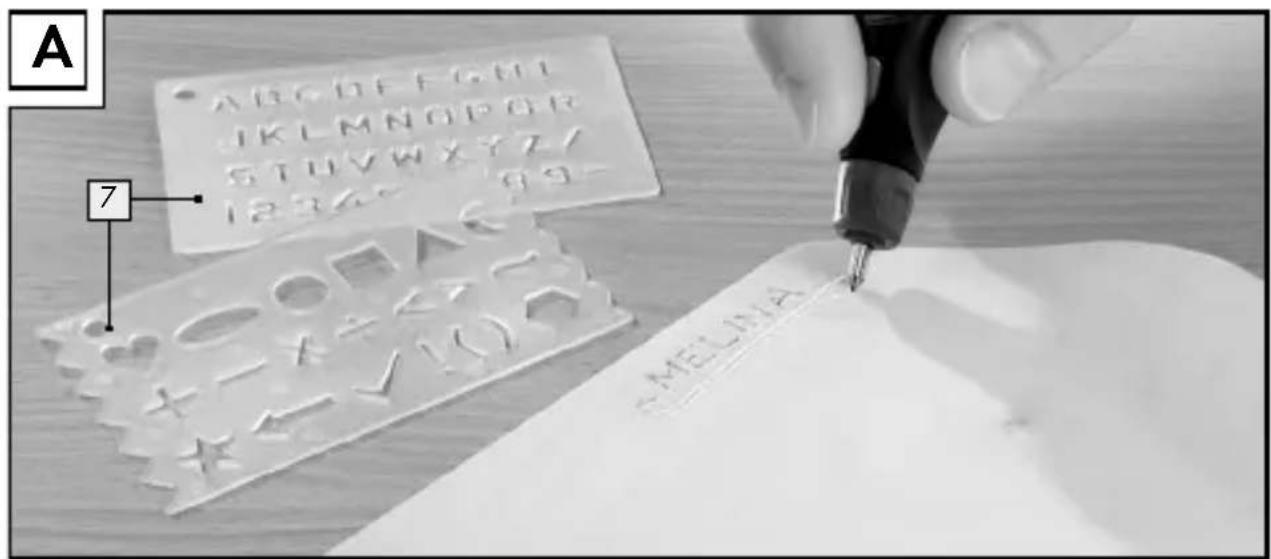
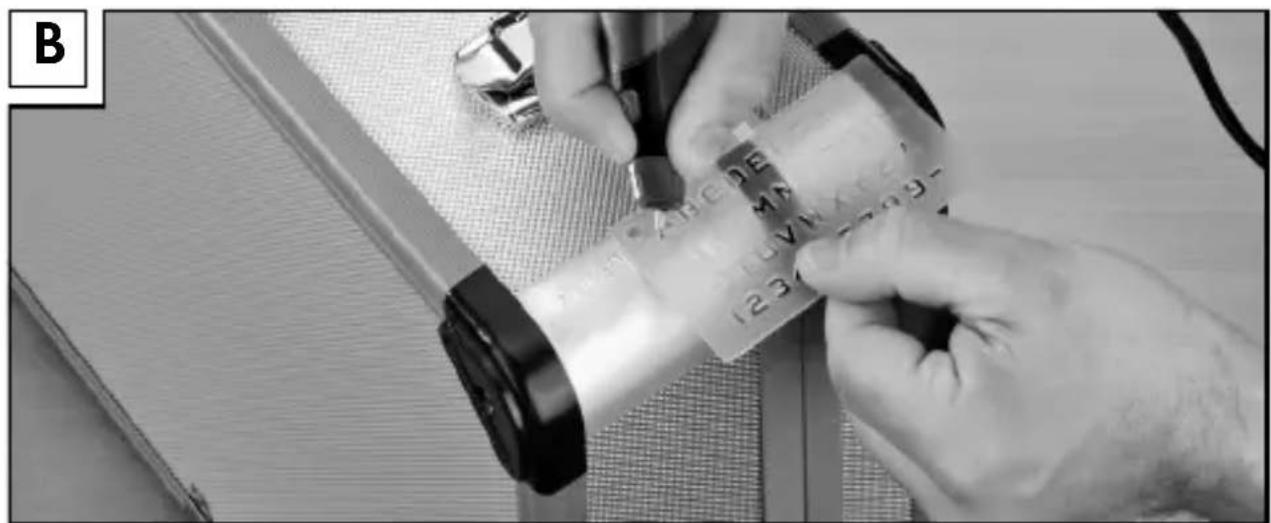
You can use the mini-engraver to produce creative, individual engravings. For example, you can use it to place identifying marks on your valuables. You can engrave numbers and letters into metal, glass, wood, plastic, ceramic, stone and leather. This is done with the help of the supplied engraving stencils 7, see Figs. A and B.
☐ Hold the device at an angle, as you hold a pencil.
☐ Your arm should rest on the table.
Using very light pressure, guide the engraving point over the workpiece. Find the ideal speed of movement by trial and error on a piece of waste material.
Note: The engraving point 5 supplied with the product is made from tungsten steel. Therefore it is not suitable for engraving electronic media such as CDs, DVDs etc. It could damage these materials and render them illegible.
- Cleaning
WARNING! Before performing any cleaning or maintenance work, always remove the mains plug from the socket.
□ Clean all the dirt off the device. Use a dry cloth for cleaning.
Service
WARNING! Have your device repaired at the service centre or by qualified specialist personnel using original manufacturer parts only. This will ensure that your device remains safe to use.
WARNING! If the plug or lead needs to be replaced, always have the replacement carried out by the manufacturer or its service centre. This will ensure that your device remains safe to use.
Note: Spare parts not listed (e.g. carbon brushes, switches) can be ordered through our call centre.
- Warranty
The warranty for this appliance is for 3 years from the date of purchase. The appliance has been manufactured with care and meticulously examined before delivery. Please retain your receipt as proof of purchase. In the event of a warranty claim, please make contact by telephone with our Service Department. Only in this way can a post-free despatch for your goods be assured.
The warranty covers only claims for material and manufacturing defects, but not for transport damage, for wearing parts or for damage to fragile components, e.g. buttons or batteries. This product is for private use only and is not intended for commercial use.
The warranty is void in the case of abusive and improper handling, use of force and internal tampering not carried out by our authorized service
Warranty / Disposal
branch. Your statutory rights are not restricted in any way by this warranty.
The warranty period will not be extended by repairs made unter warranty. This applies also to replaced and repaired parts. Any damage and defects extant on purchase must be reported immediately after unpacking the appliance, at the latest, two days after the purchase date. Repairs made after the expiration of the warranty period are subject to payment.
GB
Service Great Britain
Tel.: 0871 5000 720
(0.10 GBP/Min.)
e-mail: kompernass@lidl.co.uk
IAN 108142
IE
Service Ireland
Tel: 1890 930 034
(0.08 EUR/Min. (peak)
0.06 EUR/Min. (off peak))
e-mail: kompernass@lidl.ie
IAN 108142

Disposal

The packaging is wholly composed of environmentally-friendly materials that can be disposed of at a local recycling centre.
... / Translation of the original declaration of conformity / ...Warr
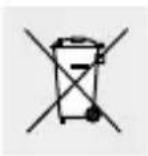
Do not dispose of electric tools in the household waste!
In accordance with European Directive 2012 / 19 / EU about waste electrical and electronic equipment and its transposition into national legislation, worn out electric tools must be collected separately and taken for environmentally compatible recycling.
Contact your local refuse disposal authority for more details of how to dispose of your worn out electrical devices.
● Translation of the original declaration of conformity / Manufacturer C€
We, KOMPERNASS HANDELS GMBH, the person responsible for documents: Mr Semi Uguzlu, BURG STRASSE 21, 44867 BOCHUM, GERMANY, hereby declare that this product complies with the following standards, normative documents and EU directives:
Machinery Directive (2006 / 42 / EC)
EU Low Voltage Directive (2006/95/EC)
Electromagnetic compatibility (2004 / 108 / EC)
RoHS Directive (2011 / 65 / EU)
Translation of the original declaration ... / Manufacturer
Applicable harmonized standards
EN 60745-1/A11:2010
EN ISO 12100:2010
EN 55014-1/A2:2011
EN 55014-2/A2:2008
EN 61000-3-2/A2:2009
EN 61000-3-3:2008
Type / Device description:
Power engraving tool PGG 15 B1
Date of manufacture (DOM): 03-2015 Serial number: IAN 108142
Bochum, 31.03.2015
Semi Uguzlu
- Quality Manager -
We reserve the right to make technical modifications in the course of further development.
Aluksi
Date of manufacture (DOM): 03-2015
Sarjanumero: IAN 108142
Fourniture......Page 49
RoHS Directive (2011 / 65 / EU)
Date of manufacture (DOM): 03-2015
Serienummer: IAN 108142
Bochum, 31.03.2015
Semi Uguzlu
KOMPERNASS HANDELS GMBH
BURGSTRASSE21
44867BOCHUM
GERMANY
Last Information Update · Tietojen tila
Informationsstatus · Version des informations
Stand van de informatie · Stand der Informationen:
03/2015·Ident.-No.: PGG15B1032015-FI/SE/BE/NL
IAN 108142
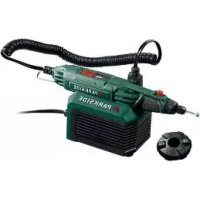



- POWER ENGRAVING TOOL PGG 15 B1
- POWER ENGRAVING TOOL
- GRAVYRMASKIN
- FI
- Introduction
- General power tool safety warnings ...... Page 8
- Operation
- Cleaning Page 14
- Service Page 15
- Warranty Page 15
- Disposal Page 16
- Translation of the original declaration of conformity / Manufacturer......Page 17
- - Introduction
- Proper use
- Features and equipment
- Included items
- - Technical details
- Noise and vibration data:
- Wear ear protection!
- Evaluated acceleration, typical:
- ● General power tool safety warnings
- Work area safety
- Electrical safety
- Personal safety
- Power tool use and care
- Service
- - Switching on/off
- Switching on:
- Switching off:
- Setting the cutting depth
- - Changing the engraving point
- Advice on use
- - Cleaning
- Service
- - Warranty
- Warranty / Disposal
- GB
- IE
- Disposal
- Do not dispose of electric tools in the household waste!
- ● Translation of the original declaration of conformity / Manufacturer C€
- Translation of the original declaration ... / Manufacturer
- Applicable harmonized standards
- Type / Device description:
- Date of manufacture (DOM): 03-2015 Serial number: IAN 108142
- Aluksi
- Date of manufacture (DOM): 03-2015
- Serienummer: IAN 108142
- KOMPERNASS HANDELS GMBH
Brand : PARKSIDE
Model : PGG 15 B1
Category : Modeling and engraving tools