EasyManual
IDK464ONY - Cooker Pelgrim - Free user manual and instructions
Find the device manual for free IDK464ONY Pelgrim in PDF.


User questions about IDK464ONY Pelgrim
0 question about this device. Answer the ones you know or ask your own.
Ask a new question about this device
Download the instructions for your Cooker in PDF format for free! Find your manual IDK464ONY - Pelgrim and take your electronic device back in hand. On this page are published all the documents necessary for the use of your device. IDK464ONY by Pelgrim.
USER MANUAL IDK464ONY Pelgrim
The appliance identificaton card is located on the bottom of the appliance.
Stick the appliance identifi cation card here.
When contacting the service department,
have the complete type number to hand.
You will find the addresses and phone numbers of the service organisation on the guarantee card.
Automatic shut-off 7
Operation
Switching on and power setting 8
Switching off 8
Child lock 9
Residual heat indicator 9
Boost and Power Boost 9
Cooking-timer/alarm 10
Cooking
Cooking settings 12
Maintenance
Clean 13
Errors
General 14
Fault list 14
Installation
What you should be aware of 16
Installation dimensions 17
Ventilation 18
Electrical connection 19
Fitting 21
Technical data 22
Environmental considerations
Disposal of the appliance and packaging 23
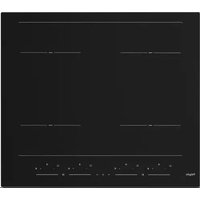
Induction hob
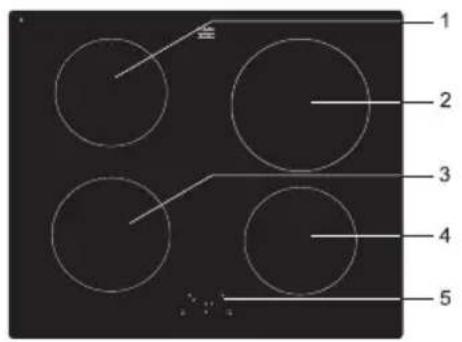
- Cooking zone rearleft (1.4 Kw 0 16 cm)
- Cooking zone rear right (2.3 Kw 200 mm)
- Cooking zone front left (1,4 Kw Nominal, 2 kW BOOST. 160 mm)
- Cooking zone front right (1,4 Kw 0160 mm)
- Controlpanel
Control panel
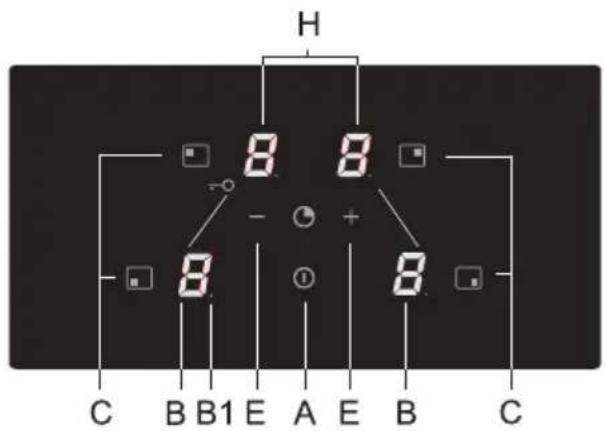
A. On/Off button
B. Power/Residual heat indicator
B1. Decimal point - for activated timer function
C. Selection button cooking zone
E. Power button
H. Timer display
Pans

Pans for induction cooking
Induction cooking requires a particular quality of pan.
Please note
- Pans that have already been used for cooking on a gas hob are no longer suitable for use on an induction hob.
- Only use pans that are suitable for electric and induction cooking with:
a thick base of a minimum 2.25 mm;
a flat base.
- The best pans are those with the 'Class Induction' quality mark.

Tip
You can use a magnet to check whether your pans are suitable. A pan is suitable if the base of the pan is attracted by the magnet.
| Suitable Unsuitable | |
| Special stainless steel pans Earthe | nware |
| Class Induction Stainless steel | |
| Solid enamelled pans Porcelain | |
| Enamelled cast-iron pans Copper | |
| Plastic | |
| Aluminium |

Please note
Be careful with enamelled sheet-steel pans:
the enamel may come loose from the steel at high settings when the pan is too dry;
- high power level settings may cause the base of the pan to warp.
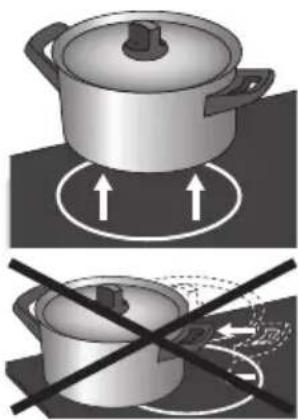

Please note
Grains of grit may cause scratches which cannot be removed. Only put pans with a clean base on the cooking surface and always pick pans up to move them.
- Do not use the hob as a worktop.
To avoid energy loss, always keep the lid on the pan when cooking.
Please note
Never use pans with a misshapen base. A hollow or rounded base can interfere with the operation of the overheating protection, causing the appliance to become too hot. This may lead to the glass top cracking and the pan base melting. Damage caused by using unsuitable pans or boiling dry is excluded from the guarantee.
Minimum pan diameter
- The diameter of a pan must be at least 11 cm (for a cooking zone of Ø 160) and 14.5 cm (for a cooking zone of Ø 200) The best results are achieved by using a pan with the same diameter as the cooking zone. If a pan is too small the zone will not work.
Pressure cookers
- Induction cooking is very suitable for pressure cookers. The fast-reacting cooking zone brings the pressure cooker to pressure quickly. As soon as you switch a cooking zone off, the cooking process stops immediately.
The power level adjusts itself
- In induction cooking, only the zone on which the pan in placed is used. If you use a small pan on a large zone, the power will be adjusted to the diameter of the pan. The power will thus be lower and it will take longer before the food in the pan comes to the boil.
Automatic shut-off

- The cooking-time limiter is a safety function of your hob. If a cooking zone is on for an unusually long time, this will be switched off automatically.
- Depending on the setting you have chosen, the cooking time will be limited as follows:
| Setting The cooking zone switches off automatically after: | |
| 18 hours | |
| 26 hours | |
| 35 hours | |
| 45 hours | |
| 54 hours | |
| 6 1.5 hours | |
| 7 1.5 hours | |
| 8 1.5 hours | |
| 9 1.5 hours | |
| boost (P) 1.5 hours (zones RL, RR and FR) | |
| Super power boost | 5 min. (zone FL) |
Switching on and power setting
The power can be set to 9 different levels. The hob also has a 'boost' setting which is indicated by a 'P' on the display (see 'Boost'). The front left cooking zone has a 'Power Boost' (SP).
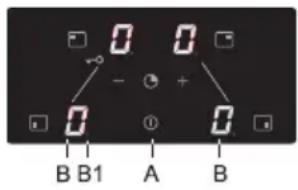
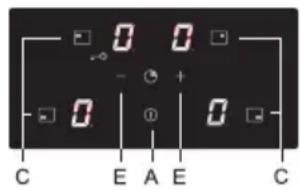
- Place the pan in the middle of a cooking zone.
- Press the On/Off button (A).
You will hear a single beep and a '0' will appear in the display (B) next to each cooking zone. If you don't do anything else, the cooking zone will switch off automatically after 10 seconds.
- Press the on/off button (C) for the cooking zone concerned.
The '0' next to the selected cooking zone will light up clearly.
- Using the - and + buttons (E) select the preferred power level.
When you select the - button directly, the cooking zone will be switched on at power level 9.
The set power is visible in the display (B).

Switching off
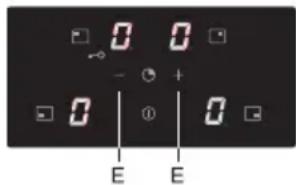
Please note! All 4 zones cannot be set to level 9 (or P) at the same time if the appliance is connected to 1 phase. The 4 zones can be set to a maximum level 7 at the same time. Another zone needs to be reduced or switched off if a higher level is desired. The appliance will beep and the set power level in the display will start to flash. You should then set the zones to a lower level!
Switching off one cooking zone
One cooking zone is switched on. The display shows a power level between 1 and 9, or "P".
- Press the button (C) for the cooking zone to be switched off. Set the cooking zone to '0' with the - button (E).
The cooking zone switches off
The hob switches off after 20 seconds, if all cooking zones are set to '0' and no other process is being used.
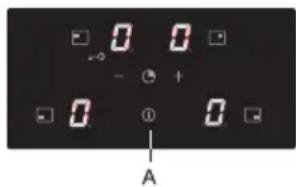
Switching off all cooking zones
Several cooking zones are active.
- Press the On/Off button (A) to switch off all cooking zones. You will hear a beep. All displays are off. The hob is switched off.
Child lock
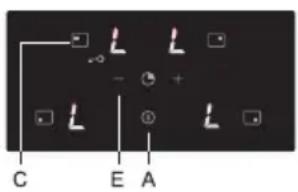
Child lock activated
- Press the On/Off button (A).
The hob is in stand-by mode. The cooking zone displays will display a '0'.
- Press simultaneously for a minimum of three seconds the RL cooking zone button (C) and the - button (E) until you hear a beep.
For a few seconds the cooking zone display will show 'L'. The child lock is activated.
Child lock deactivated
- Press the On/Off button (A).
The cooking zone displays will display 'L' for a few seconds.
- Press simultaneously for a minimum of three seconds the RL cooking zone button (C) and the - button (E).
The cooking zone display will display 'L'. The child lock is de-activated.
Tip
Set the hob to child lock mode before starting to clean the hob. This will prevent you switching on the hob by accident.
Residual heat indicator
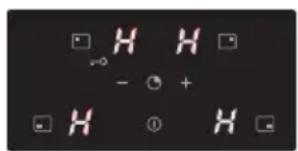
After intensive use, the cooking zone used may stay hot for several minutes. As long as the cooking zone is still hot an "H" will flash in the display.
Boost and Power Boost
The cooking zones rear left and right and front right are equipped with a 'boost' function. With the 'boost' function you can cook at the highest power level for a maximum of 1.5 hours. The cooking zone will switch off automatically once the maximum boost time has passed.
The front left cooking zone, with the 'P' symbol, is equipped with a 'Power Boost' function. With this function you can cook for a short period - maximum 5 minutes - at extra high power level. After this period the cooking zone automatically reduces to level 9.
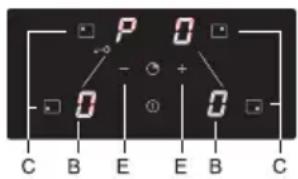
Switch on (Power) Boost
- Place the pan in the middle of a cooking zone.
- Press the on/off button (C) for the cooking zone concerned. The '0' next to the selected cooking zone will light up clearly.
- Select power level with the - and + buttons 9.
- When you select the - button directly, the cooking zone will switch on at power level 9.
- Directly hereafter press the + button.
Level 'P' will appear in the cooking zone display (B).
Switch off (Power) Boost
The boost function has been switched on, the display shows level 'P'.
- Press the button (C) for the activated cooking zone.
- Directly hereafter press the - button (E).
The 'P' will disappear from the display and the cooking zone reduces to power level 9.
Cooking-timer/alarm
A cooking-timer can be set for each cooking zone. The hob also has an alarm. Both the cooking-timer as well as the alarm can be set for a maximum of 99 minutes. The alarm works in the same way as the cooking-timer, but is not linked to a cooking zone. If the alarm has been set, it will continue counting down after the hob has been switched off. The alarm can only be switched off when the hob is switched on.
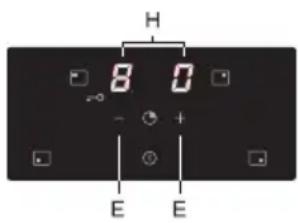
Setting the cooking-timer
- Select desired cooking zone and set the power level.
- At the same time press the - and + button (E).
The timer setting is displayed in the top two displays (H). The bottom two displays have been switched off.
- The timer setting is visible for 10 seconds, after which the power setting is displayed.
Select the desired function:
- Cooking-timer - the timer is linked to a cooking zone. After the set time has elapsed, the cooking zone will switch off automatically.
- Alarm - the alarm only beeps after the set time has elapsed. The alarm works in the same way as the cooking-timer, but is not linked to a cooking zone. If the alarm has been set, it will continue running after the hob has been switched off. The alarm can only be switched off when the hob is switched on.
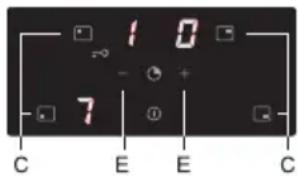
Switching on the cooking-timer, activating and switching off
- Press simultaneously the - and + button (E).
If you have switched on a cooking zone (C) prior to this, the accompanying display will be brighter. The cooking-timer that you have now set applies to this cooking zone. The decimal point next to the power level means that the time has been activated for this zone.
The alarm can also be activated without a cooking zone being selected. Two flashing decimal points indicate that the alarm is counting down.
- Set the cooking time using the - or + button (E). (When you press '-', the time will be set for 30 minutes. If you keep the button pressed the time will run faster).
- The time can be set to a value between 01 and 99 minutes. The cooking-timer can be set for each cooking zone.
- Check the remaining time by selecting the cooking zone concerned (C) while simultaneously pressing the - and + button (E). Adjust the cooking time using the - or + button (E).
- After the set time has ended the '00' will flash in the display, as well as the timer's decimal point. Furthermore you will hear a repeated short beep. Switch off the timer and alarm signal by pressing a random button. If you don't do this, the signal will switch off automatically after three minutes.
Cooking settings
Because the settings depend on the quantity and composition of the contents of the pan, the table below is intended as a guideline only.
Use 'boost' setting and setting 9 to:
- bring food or liquid to the boil quickly;
- 'shrink' greens;
heat oil and fat; - bring a pressure cooker up to pressure.
Use setting 8 to:
sear meats;
- fry flatfish, thin slices or fillet;
- fry omelettes;
- fry boiled potatoes;
- deep frying.
Use setting 7 to:
- fry thick pancakes;
- fry thick slices of breaded meat;
- fry bacon (fat);
- fry raw potatoes;
make French toast; - fry breaded fish.
Use setting 6 and 5 to:
cook food through;
defrost hard vegetables;
- fry thin slices of meat.
Use settings 1-4 to:
simmer bouillon;
- stew meats;
- simmer vegetables;
- melt chocolate;
- melt cheese.
Clean

Tip
Activate the child lock before cleaning the hob.
Daily cleaning
Although food spills cannot burn into the glass, we nevertheless recommend you clean the hob immediately after use.
- For daily cleaning a damp cloth with a mild cleaning agent is best.
- Dry off with kitchen paper or a dry tea towel.
Stubborn stains
- Stubborn stains can also be removed with a mild cleaning agent, washing-up liquid, for example.
- Special products are available for this purpose.
- Traces of metals (caused by sliding pans) can be difficult to remove. Special products are available for this.
- Use a glass scraper to remove food spills. Melted plastic and sugar is also best removed with a glass scraper.

Never use
- Never use abrasives. These leave scratches in which dirt and limescale can accumulate.
- Never use anything sharp such as steel wool or scourers.
General
If you notice a crack in the glass top (however small), switch the hob off immediately, unplug the hob, turn off the (automatic) fuse switch(es) in the meter cupboard or, in the event of a permanent connection, set the switch in the power supply lead to zero. Contact the service department.
Fault list
When in doubt on the proper operation of your appliance, this does not automatically mean there is a defect. Try to address the problem yourself first by checking the points mentioned below or for more information visit the 'www.pelgrimservice.nl' website.
| Symptom Possible cause Solution | ||
| The fan runs on for several minutes after the hob has been switched off. | The hob is cooling down. Normal operation. | |
| A slight smell is noticeable the first few times the hob is used. | The new appliance is heating up. | This is normal and will disappear once it has been used a few times. Ventilate the kitchen. |
| You can hear a ticking sound in your hob. | Ticking can also occur at lower settings. | Normal operation. |
| The pans make a noise while cooking. | This is caused by the energy flowing from the hob to the saucepan. | This is caused by the energy flowing from the hob to the saucepan. This is not harmful for the pans or hob. |
| You have switched a cooking zone on but the display keeps flashing. A pan detection symbol (U) will appear in the display. | The pan you are using is not suitable for induction cooking or has a diameter of less than 12 cm. | Use a good pan. |
| A cooking zone suddenly stops working and you hear a signal. | The preset time has ended. Switch off the signal by pushing a random button. | |
| The hob is not working and nothing appears in the display. | There is no power supply due to a defective cable or a faulty connection. | Check the fuses or the electric switch (if there is no plug). |
| A fuse blows as soon as the hob is switched on. | The appliance is incorrectly connected. | Check the electrical connections. |
| Symptom Possible cause Solution | ||
| Error code ER03. The control panel is dirty or has water on it. | Clean the control panel. | |
| Error code E3. Unsuitable pan used. Use a pan suitable for induction cooking. | induction cooking. | |
| Error code E2. Appliance over heated. The appliance has been switched off because of over heating. | switched off because of over heating. | |
| Fault code E6. The appliance has been connected incorrectly and/or the mains voltage is too high. | Have your connection changed. | |
| The fuse in the appliance will blow if all 4 cooking zones are used on a high power level. | Appliance is connected to a 1 phase/16 Amp and not adjusted to "Lo" by software. | Set the appliance to "Lo" (power limiter). |
| Zone(s) don't work or don't heat up sufficiently. | Appliance is connected to a 1 phase/16 Amp and not adjusted to "Lo". | The appliance's inbuilt power limiter limits the maximum power that can be used simultaneously. |
| Other fault codes. Defective generator. Contact the service | department. | |
What you should be aware of
Safety instructions for installation
- The electrical connection must comply with national and local regulations.
- The appliance must always be earthed.
This appliance should only be connected by a registered electrician. - The hob needs to be set correctly in accordance with the connection. Hi = multi phase connection (2 x 16A); Lo = 1 phase connection (1 x 16A).
- For connecting, use an approved cable (for example type HO7RR) with the correct cable diameters appropriate for the connection. The cable casing should be of rubber.
- The connection cable must hang freely and should not be fed through a drawer.
If you want to make a fixed connection, make sure that a multipolar switch with a contact separation of at least 3mm is fitted in the supply line. - To avoid dangerous situations resulting from any damage to the connecting cable, this should only be replaced by the manufacturer, the manufacturer's service organisation or by qualified persons.
The worktop into which the hob is fitted should be flat. - The walls and the worktop around the appliance must be made of heat-resistant (>85^) material. Even if the appliance itself does not get hot, the heat from a hot pan could cause discolouration or distortion to the wall or worktop.
- Damage caused by incorrect connection, incorrect use or incorrect fitting in is not covered by the guarantee.
- The connection point, the wall socket and/or the plug must always be accessible.
Space around the hob
Sufficient all-round clearance is essential to the safe use of the hob. Check that there is sufficient clearance.
- 600 mm
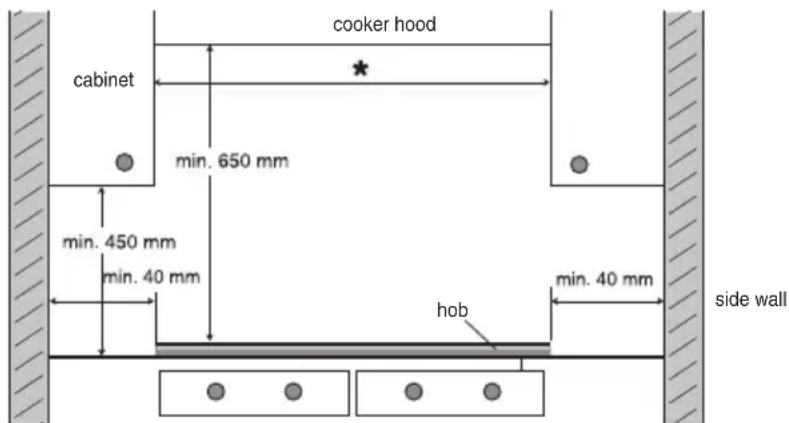
Installation dimensions
The dimensions and recesses are shown in the following illustration.
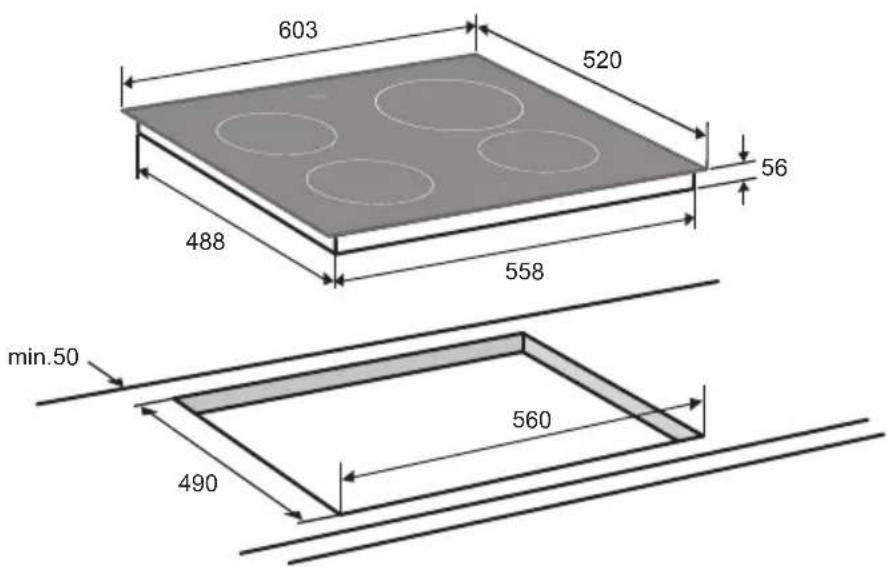
Ventilation
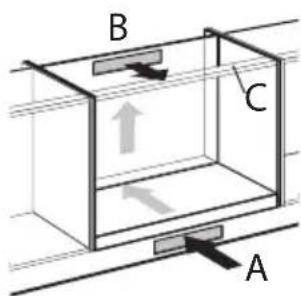
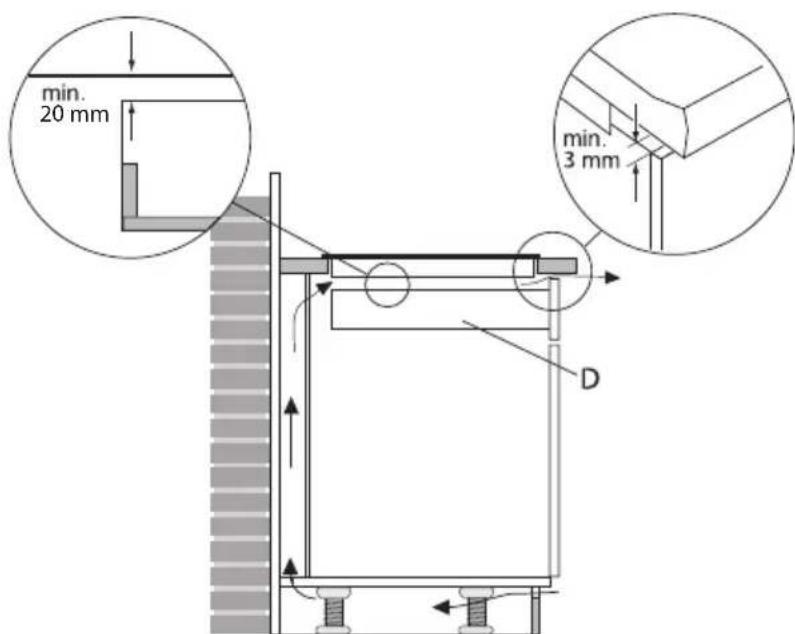
The electronics in the appliance need to cool. The appliance will automatically switch off if there is insufficient air circulation. There are ventilation openings on the underside of the appliance. It must be possible for cool air to be drawn in through these openings. There are outlet openings to the front of the appliance.
Fitting above an oven, drawer or fixed panel
Ventilation occurs through the plinth (A) and the back of the cupboard (B). Saw out the ventilation openings (min. 100cm^2 ) out. Air supply A is superfluous if, together with opening B, there's an opening somewhere else through which air can be drawn in.
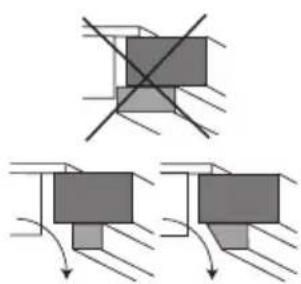
Ensure the crossbar does not impede the airflow.
Plane or saw the crossbar C diagonally if necessary.
Ensure that there is sufficient air circulation.
- Make a ventilation opening to the front of the kitchen unit at least the width of the appliance and to a minimum height of 3mm if the appliance is built-in above a drawer or plank. Ensure that there is a minimum 20mm clearance between drawer or plank 'D' and the hob.
- Ensure that there is a minimum 60~mm clearance between the drawer or plank and the hob if the ventilation opening is not possible.
Electrical connection
This appliance is set as standard for 2 phase with 1 zero connection, but can also be connected to 1 phase.
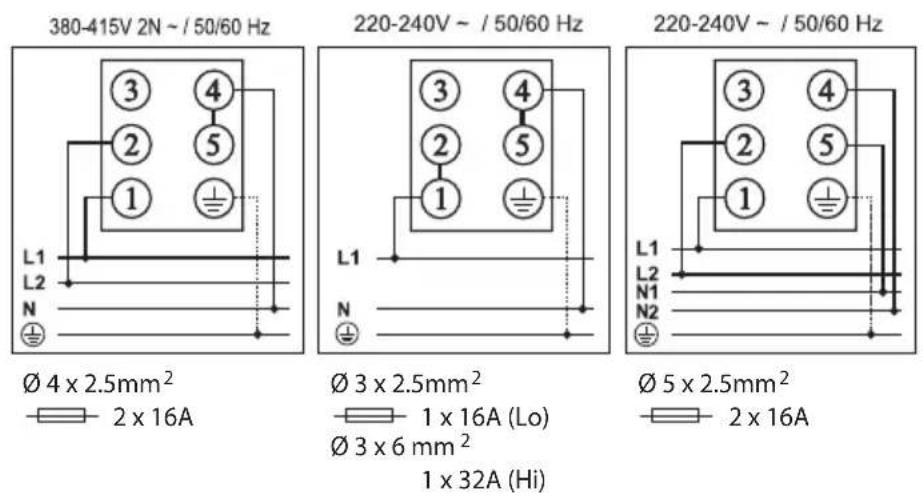
2 phases with 1 zero connection (2 1N, 380 V ~ / 50 Hz):
- Fit connection bridges between the connecting points 4 and 5.
The voltage between the phases and the zero is 230V and the voltage between the phases is 400V . The fuse box in your home must be fitted with a 16 Amp (2x) fuse. The connection cable must be minimally 2.5mm^2 in diameter.
2 phase and 2 zero connection (2 2N, 230V /50Hz )
The voltage between the phases and the zeros is 230V and the voltage between phases is 0 V. The group must have fuses of at least 16 A (2x). The connection cable must be minimally 2.5mm^2 in diameter.
1 phase with 1 zero connection (1 1N, 230V /50Hz
- Fit connection bridges between the connecting points 4 and 5 and 1 and 2. Power limiter needs to be set to "Lo" (for 1x16 Amp connection).
Comment: connection 3 will not be used
Operate appliance on 1 phase
If your home installation is not fitted with 23 Amp fuses, the appliance's total power consumption can be limited (power limiter) so that the power consumption doesn't rise above 16 Amp. Not all zones can be used at full power if the power limiter is activated. The appliance will beep and the display will flash the set power when the maximum power consumption has been reached.
Setting
- Within 2 minutes of connecting the appliance to the electric power press all 4 cooking zone selection buttons simultaneously. Keep these pressed down for at least 3 seconds.
- 'Hi' will appear in the display.
- Push the '-' or '+' button and select 'Lo' in the display.
- Again press all 4 cooking zone selection buttons and keep these pressed for at least 3 seconds.
Fitting
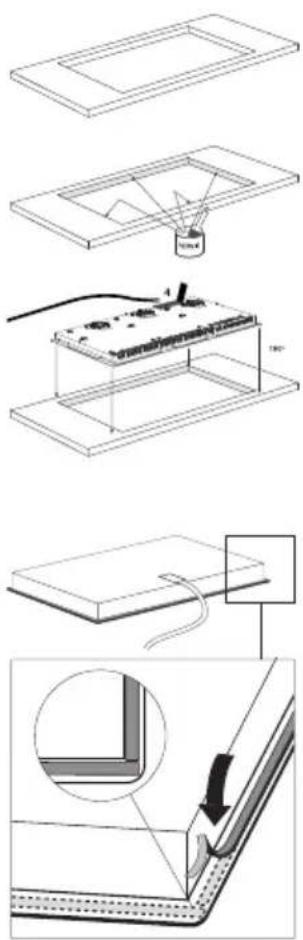
- Check that the cabinet and the cut-out meet dimension and ventilation requirements.
- Treat the sawn ends of wooden or synthetic worktops with sealing varnish if necessary, to prevent moisture causing the worktop to swell.
- Lay the hob upside down on the worktop.
- Fit the connecting cable to the appliance in compliance with requirements.
- Remove the protective layer from the sealing tape and apply the tape in the groove of the aluminium profile or on the edge of the glass plate. Do not stick the tape around the corners, but cut 4 separate pieces to seal the corners well.
- Turn the hob over and lay it in the recess.
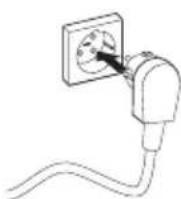
- Connect the appliance to the mains. The appliance is ready for use.
- Check that it works properly. If the appliance has been wrongly connected either a bleep will sound or nothing will appear in the displays, depending on the error.
Technical data
This appliance meets all relevant CE guidelines.
| Hob type IDK464ony | |
| Induction x | |
| Connection 230 V - 50 Hz | |
| Maximum power cooking zones and diameters | |
| Front left 2000 W / Ø 16 cm | |
| Rear left 1400 W / Ø 16 cm | |
| Rear right 2300 W / Ø 20 cm | |
| Front right 1400 W / 16 cm | |
| Load | |
| L1 3400 W | |
| L2 3700 W | |
| Total connected load 7100 W | |
Disposal of the appliance and packaging
Sustainable materials have been used during manufacture of this appliance. This appliance must be disposed of responsibly at the end of its service life. The government can provide you with information about this.
The appliance packaging is recyclable. The following may have been used:
cardboard;
polyethylene film (PE);
CFC-free polystyrene (PS-rigid foam).
You should dispose of these materials responsibly and in accordance with government regulations.
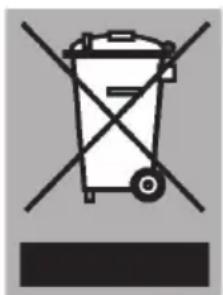
To designate the requirement for separate collection of household electrical appliances, the symbol of a dustbin with a cross through it is applied to the product. This means that the appliance may not be included with normal domestic refuse at the end of its service life. The appliance must be taken to a special municipal centre for separated waste collection or to a dealer providing this service.
Separate collection of household appliances helps to prevent potential negative impact on the environment and on human health caused by improper disposal. It ensures that the materials that make up the unit can be recycled to achieve a significant saving in terms of energy and raw materials.

Please note! Do not throw a broken ceramic glass plate in the glass recycling bin but take this to the Municipality's waste recycling centre.
Declaration of conformity
We hereby declare that our products satisfy the applicable European directives, orders and regulations, as well as the requirements stated in the referenced standards.
Description
Specifications techniques 22