J622 - Watch JAGUAR - Free user manual and instructions
Find the device manual for free J622 JAGUAR in PDF.


User questions about J622 JAGUAR
0 question about this device. Answer the ones you know or ask your own.
Ask a new question about this device
Download the instructions for your Watch in PDF format for free! Find your manual J622 - JAGUAR and take your electronic device back in hand. On this page are published all the documents necessary for the use of your device. J622 by JAGUAR.
USER MANUAL J622 JAGUAR
natural_image
Blank white image with a thin black border (no text, symbols, or markings)
text_image
JAGUAR — SWISS MADE —FESTINA GROUP
Via Layetana 20
08003 BARCELONA
USER GUIDE IJM5040A COMPANY OF TH
INDEX
Español > p.3
English > p.17
Français > p.31
Deutsch > p.45
Italiano >p.59
Manual del usuario
text_image
Analog stopwatch with dual dials showing time, seconds, and elapsed minutestext_image
Diagram showing mechanical or electrical components with labeled arrows A and B, likely illustrating a sequence or motion sequence.-Brief specifications....18
- Description of the display and control buttons ..... 19
- Setting the time / date .....20 - 23
- Operation of the chronograph....24 - 29
By virtue of the regulations pursuant to the handling of waste products deriving from electronic and electrical equipment, end of lifecycle watch making products must be selectively collected for processing. You may therefore dispose of your quartz watch making products at any of our retail outlets or any other authorized collection point. The selective collection, processing, rating and recycling of these products helps contribute to safeguarding the environment and protecting our health.
Brief specifications
Time/Date
- Hour hand
- Minute hand
- Small second hand (position 3h)
• Date (position 12h)
Chronograph
• 1/10 second counter / hour counter after 30 minutes (position 6h)
• Minute counter up to 30 minutes (position 9h)
- Centre stop-second
General
- Battery type: 395 (diameter 9.5mm x 2.6mm / SR 927 SW)
• Accuracy: +20 / -10 seconds per month
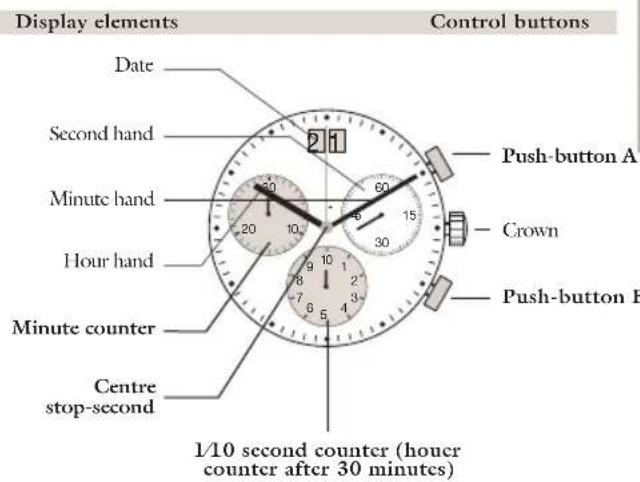
Description of the display and control buttons
text_image
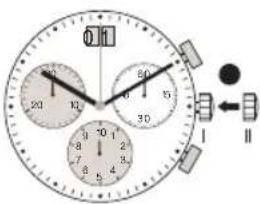
Display elements Control buttons Date Second hand Minute hand Hour hand Minute counter Centre stop-second Push-button A Crown Push-button B 1/10 second counter (hower counter after 30 minutes)Setting the time
text_image
Second hand 1 2 30 60 4 5 30 20 10 8 7 6 5 I II III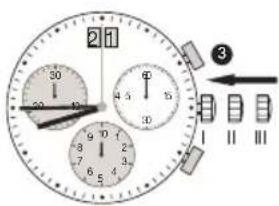
text_image
2 30 40 50 60 70 80 90 100 110 120 130 140 150 160 170 180 190 200 210 220 230 240 250 260 270 280 290 300 310 320 330 340 350 360 370 380 390 400 410 420 430 440 450 460 470 480 490 500 510 520 530 540 550 560 570 580 590 600 610 620 630 640 650 660 670 680 690 700 710 720 730 740 750 760 770 780 790 800 810 820 830 840 850 860 870 880 890 900 910 920 930 940 950 960 970 980 990 1000Setting the date (quick mode)
text_image
3:1 20 30 50 15 30 9 8 7 6 5 4 1 I II 1 U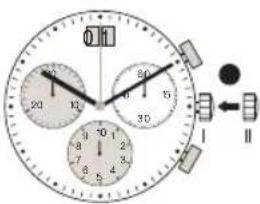
text_image
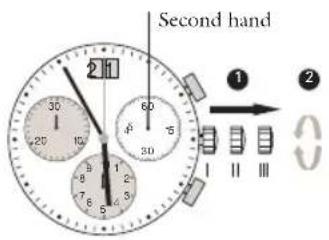
Analog stopwatch with dual dials showing time, seconds, and elapsed minutes1 *Pull out the crown to position III (the watch stops).
② Turn the crown until you reach the correct time 8.45.
3 *Push the crown back into position I.
Please note:
*In order to set the time to the exact second, 1 must be pulled out when the second hand is in position «60» (I).
Once the hour and minute hands have been set, ③ must be pushed back into position I at the exact second.
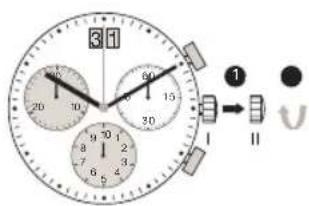
1 Pull out the crown to position II (the watch continues to run).
2 Turn the crown until the correct date 01 appears.
3 Push the crown back into position I.
Please note:
The date can be changed during the date changing phase between 9.00 PM and 12.00 PM; please note that the date must be set to the date of the following day as in this case the automatic date changing does not occur at midnight.
Setting the date/time following a battery change
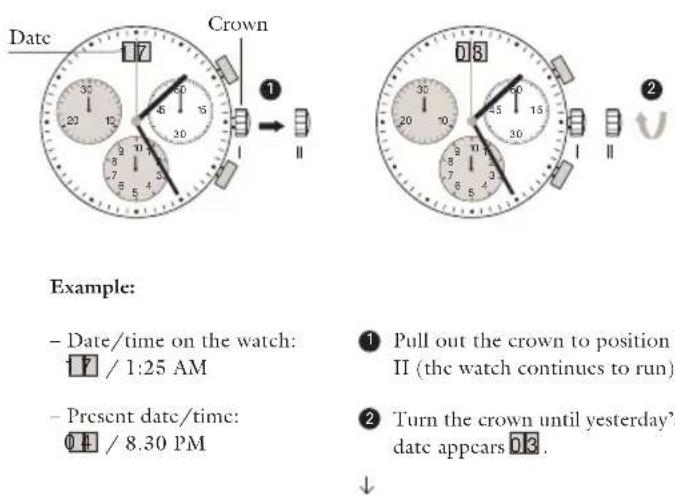
Example:
- Date/time on the watch:
17 / 1:25 AM
- Present date/time:
04 / 8.30 PM
1 Pull out the crown to position II (the watch continues to run).
2 Turn the crown until yesterday's date appears 03.
↓
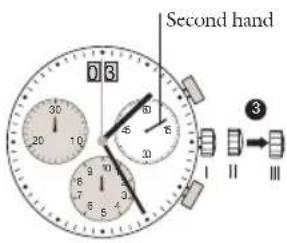
text_image
Second hand 0 3 30 20 10 5 30 6 9 7 8 5 I II III↓
3 *Pull out the crown to position III (the watch stops).
4 Turn the crown until the correct date 0.4 appears.
5 **Continue to turn the crown until the correct time 8.30 PM appears.
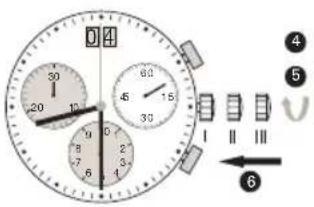
text_image
0 4 1 30 20 15 6 60 15 30 9 8 7 6 1 2 3 4 I II III ④ ⑤ ⑥6 Push the crown back into position I.
Please note:
*To set your watch to the exact second, please refer to the chapter entitled «setting the time».
**Please observe the AM/PM clock rhythm.
Chronograph:
• The minute counter measures 30 minutes per rotation.
• The center stop-second measures 60 seconds per rotation.
- The 1/10 second counter measures 1 second per rotation. After 30 minutes this counter works as hour counter. The how counter measures 10 hours per rotation.
Chronograph: basic function
(start / stop / reset)
Control buttonsDisplay elements
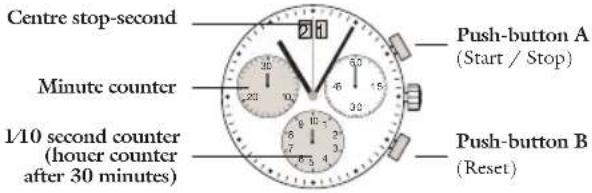
text_image
Centre stop-second Minute counter 1/10 second counter (houer counter after 30 minutes) Push-button A (Start / Stop) Push-button B (Reset)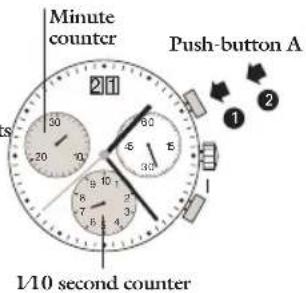
text_image
Minute counter Push-button A 1/10 second counter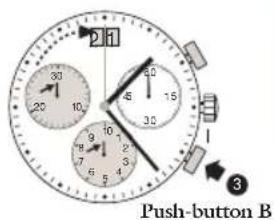
text_image
2 H 30 25 10 6 15 32 9 7 5 4 Push-button BExample:
Please note:
Before using the chronograph functions, please ensure that:
→ the crown is in position I (= normal position).
→ the 3 chronograph hands are precisely at zero position following activation of push
button B. Should this not be the case, the positions of the hands must be adjusted (see the chapter entitled «adjusting the chronograph hands to zero position»).
1 Start: Press push-button A.
2 Stop: to stop the timing, press push-button A.
once more and read the three chronograph hands:
4min/38sec/7/10 sec
3 Zero positioning: Press push-button B. (The three chronograph hands will be reset to their zero positions).
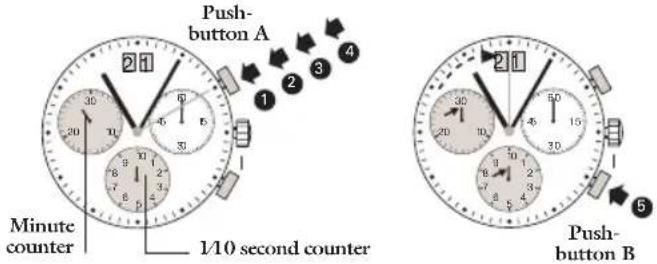
Chronograph: accumulated timing
text_image
Push-button A 21 30 6 20 10 6 30 1 2 3 4 Minute counter 1/10 second counter 21 30 6 20 6 30 10 6 30 5 Push-button BExample:
1 Start: (start timing)
2 Stop: (e.g. 15 min 5 sec following 1)
3 Restart: (timing is resumed)
4 *Stop:
(c.g. 13 min 5 sec following 3)
= 28 min 10 sec
(The accumulated measured time is shown)
5 Reset: The three chronograph hands are returned to their zero positions.
Please note:
* Following 4, the accumulation of the timing can be continued by pressing push button A (Restart / Stop, Restart / Stop, ...)
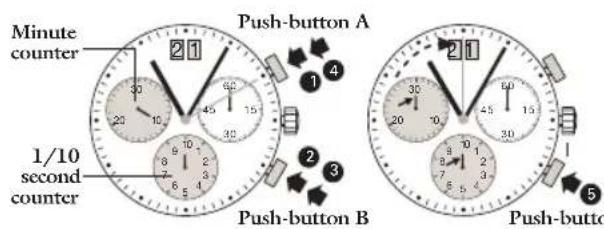
Chronograph: intermediate or interval timing
text_image
Minute counter 1/10 second counter Push-button A Push-button B Push-buttonExample:
1 Start: (start timing)
2 Display interval:
↑ c.g. 10 minutes 10 seconds
(timing continues in the background)
* 3 Making up the measured time: (the 3 chronograph hands are quickly advanced to the ongoing measured time).
4 Stop: (Final time is displayed)
⑤ Reset: The 3 chronograph displays are returned to their zero position
Please note:
* Following 3, further intervals or intermediates can be displayed by pressing push-button B (display interval / make up measured time, ...)
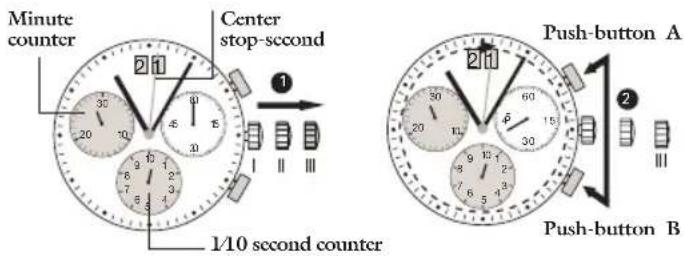
Adjusting the chronograph hands to zero position
text_image
Minute counter Center stop-second 1/10 second counter Push-button A Push-button BExample:
One or several chronograph hands are not in their correct zero positions and have to be adjusted (e.g. following a battery change).
1 Pull out the crown to position III (all 3 chronograph hands are in their correct or incorrect zero position).
2 Keep push-buttons A and B depressed simultaneously for at least 2 seconds (the centre stop-second rotates by 360^ →corrective mode is activated).
↓

text_image
Diagram showing six sequential scenarios of a mechanical or electrical component with labeled components A and B, likely illustrating a process or assembly.↓ Adjusting the centre stop second
Single step • Al x short
Continuous • A long
Adjusting the next hand B
Adjusting the 1/10 second counter hand (position 6h)
Single step • Al x short
Continuous • A long
Adjusting the next hand B
Adjusting the 1/10 minute counter hand (position 9h)
Single step • Al x short
Continuous ♦ A long
3 Returning the crown to position I Termination of the chronograph hands adjustment (can be carried out at any time).


Mode d'emploi
text_image
Analog stopwatch with dual dials and a close-up of the next time showing three labeled buttons (I, II, III) pointing to them.text_image
Diagram showing a mechanical or electrical system with labeled components A and B, likely illustrating a motion or control mechanism.text_image
Digital stopwatch with analog clock face, showing time near 12:00 and 15:00, alongside a close-up of the second analog clock.text_image
Analog stopwatch with dual dials and a close-up of the second dial showing time, seconds, and a U-shaped indicator.